Shakespeare SE700 Ship Station Marine Transceiver User Manual

Shakespeare Company Ship Station Marine Transceiver Users Manual

Users Manual

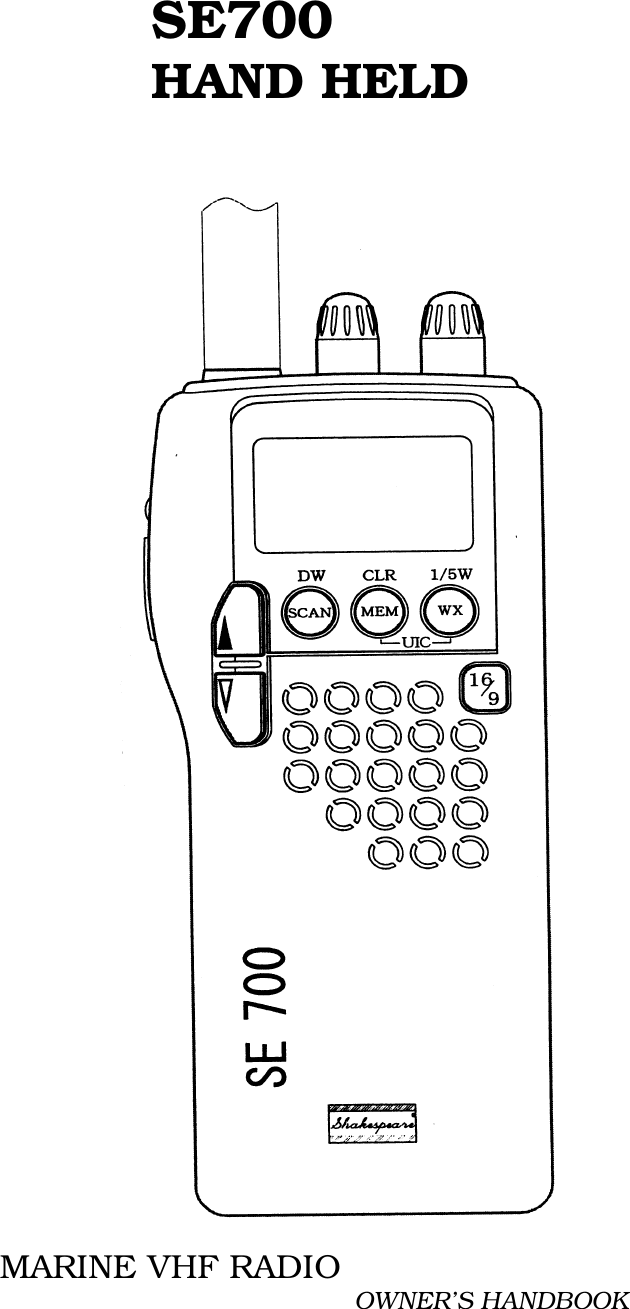
         SE700         HAND HELDMARINE VHF RADIO OWNER’S HANDBOOK
- 1 -  TABLE OF CONTENS1.0 INTRODUCTION2.0 INSTALLATION3.0 OPERATION4.0 APPENDIX
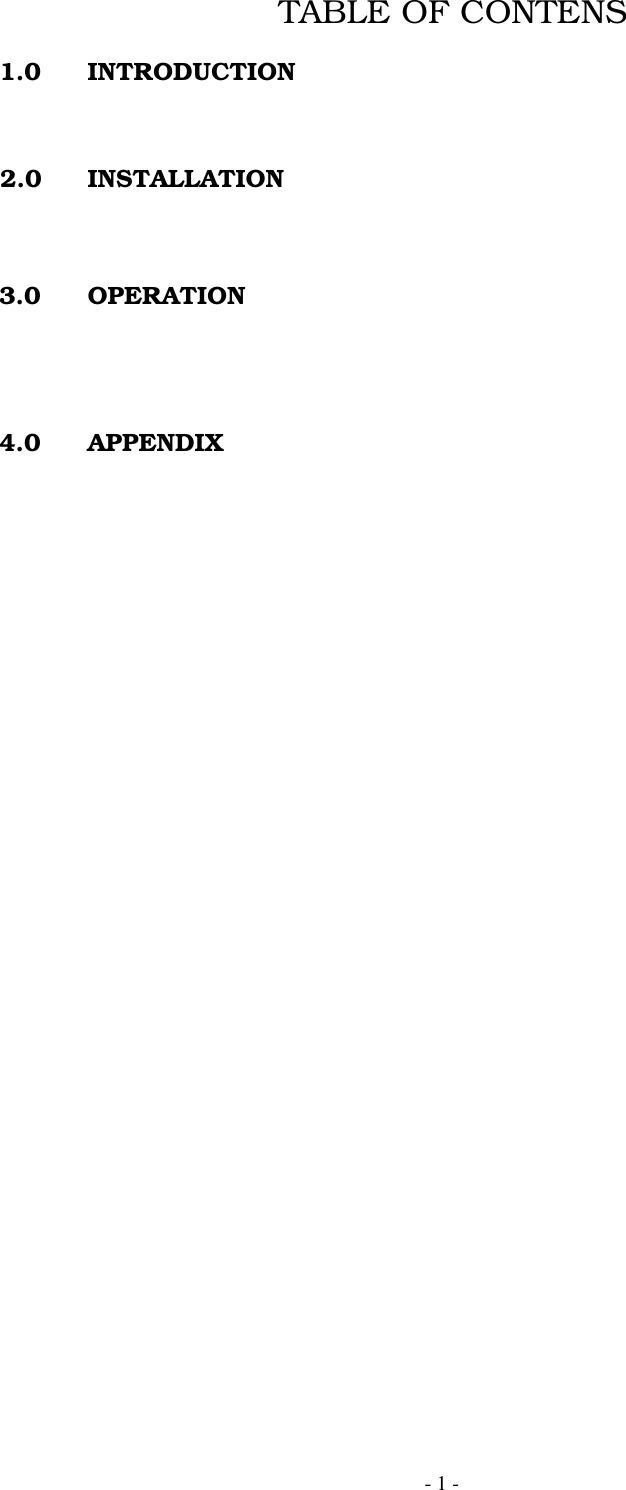
- 2 -Figure1 Shakespeare SE700 Handheld Marine VHF Radio1.0 INTRODUCTION1.1 Purpose1.2 Equipment Description1.3 Supplied Parts1.4 License
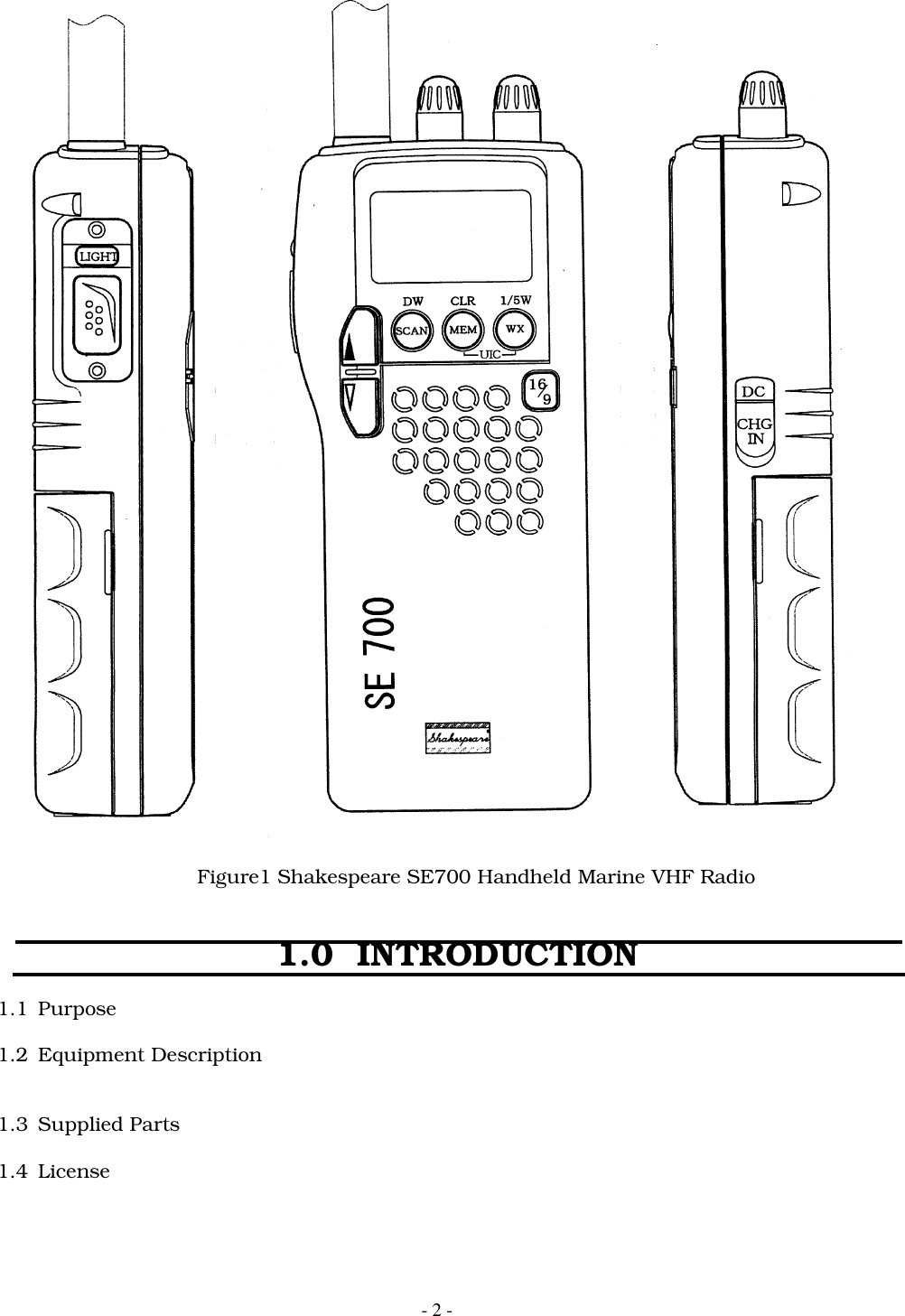
- 3 -2.0  INSTALLATION2.1 Unpacking And Inspection2.2 Preparation for Use2.3 Antenna Installation2.4 Battery Pack Installation2.5 Charging the Battery2.6 Using the Belt Clip3.0  OPERATION3.1 INTRODUCTION51234
- 4 -1, Light key  &  Lock key 2,PTT key3, Squelch Knob 4,Power Switch & Volume Control5, External Charge Jack3.2  Controls And Display3.2.1 Controls(1)ON / OFF Volume SwitchTurns power OFF if turned fully CCW. Max audio output if turned fully CW.All stored memory will be cleared by pressing “MEM” key and turning the power ON.LCD display test mode will be activated by pressing “Light” key and “16/9” key at the sametime and turning the power ON.Display when the power is turned ON.Freq. Mode : Last used CH freq. mode. ( USA, INT, CANADA)Channel   : 16CH, WorkingCHWX Channel :Last used WX CH.Tx Power  :HI 5WLCD      : All characters displayed for 2 sec.(2)Squelch KnobSquelch will get shallow when the knob is turned CCW. Squelch will getdeep when turned CW.(3)Light KeyBy pressing the Light key, Alarm 1 will sound and back light will get ON or OFF.If pressed and held for 1.5 sec., alarm 1 will sound and all key operation will be locked. (Key lock )(4)PTT KeyRadio will Tx when pressed. When it is on either WX CH or Non-Tx CH, Alarm 2 will sound anddoes not Tx.When the radio is transmitting for continuous 5 min., radio will stop Tx and Alarm 2 willsound until the PTT key is released.(5)SCAN KeyIf pressed, alarm 1 will sound and starts or ends ALL SCAN.Except in SCAN MODE, radio will start SCAN if the button is pressed ( short press or longpress. ).Short press during SCAN mode will pause SCAN and cancel SCAN mode. SCAN mode will alsobe canceled if keys other than LIGHT key is pressed. After cancellation of SCAN mode, theradio will operate on the channel that the SCAN mode was cancelled.A long press during the SCAN mode will stop ALL scan and alarm 1 will sound and starts DW.A short press during memory stand-by will start Memory scan.Type of SCAN(a) ALL SCAN : Scans all the channels.(b) MEM-SCAN : Scans memory channels.
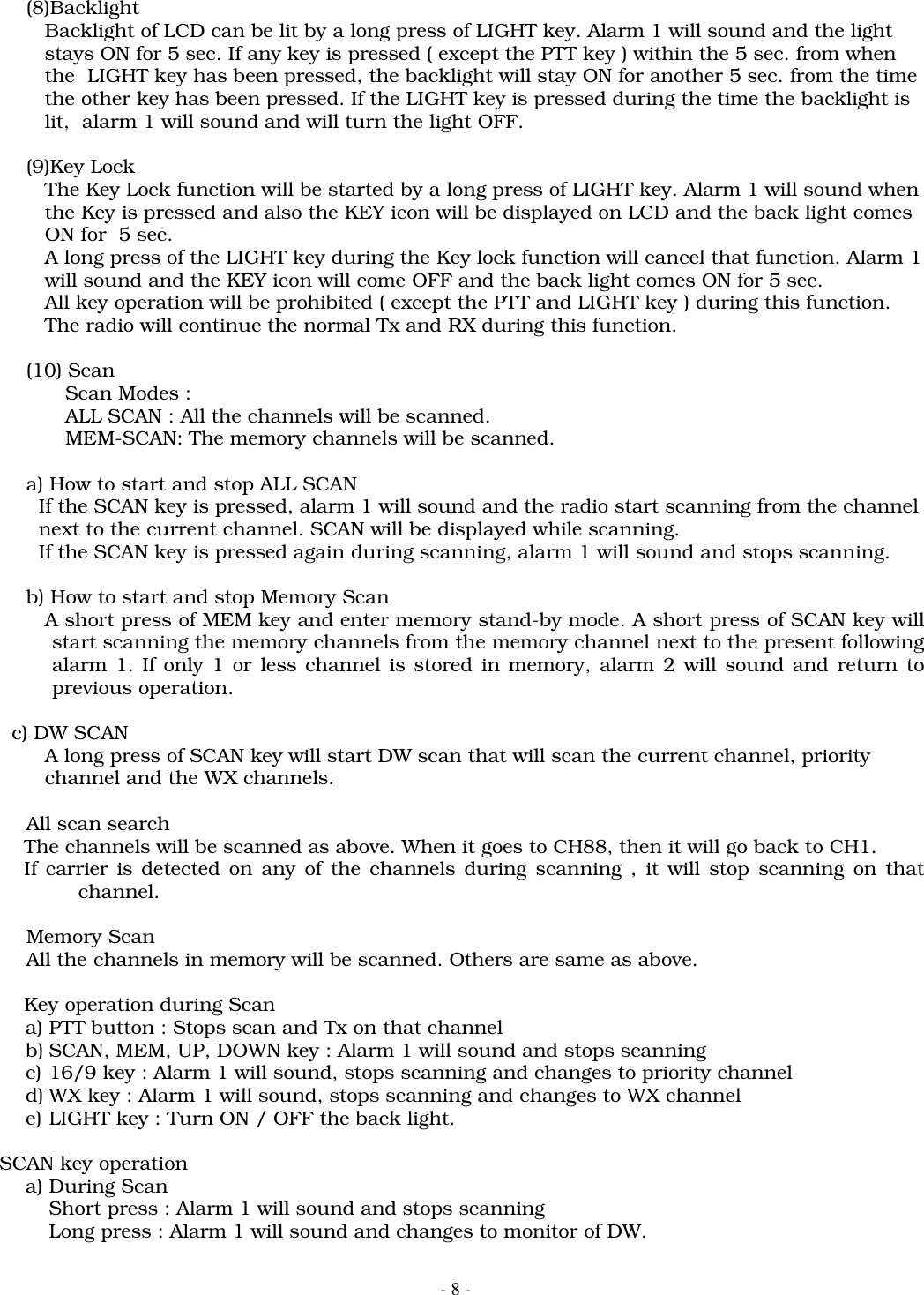
- 5 -       If only 1 or less channel is stored in memory, alarm 2 will sound and return to the       previous operation .(6)MEM KeyAt a short press, alarm 1 will sound and starts memory stand-by. If pressed again, thenit will show the channels stored in memory on the small CH display. It will show from thesmallest number. Other channels stored in memory can be seen by pressing UP/DOWNkey and during the time MEM will blink on the display.At a long press, alarm 1 will sound and will store the current channel into memory. If thecurrent channel is already stored in memory, it will be deleted from memory.MEM will be displayed on LCD if the channel is stored in memory. CLR will be displayed for3 sec. and MEM will come off when channels are deleted from Memory.(7)WX KeyIf pressed, alarm 1 will sound and channel will toggle between working and WX channelLong press will change the Tx power. ( toggle between 1W and 5W )(8)UP KeyIf pressed, alarm 1 will sound and channel will be changed (+1).If pressed and hold for 0.5 sec. or more, the channels will be changed continuously by 100msec. step.(9)DOWN KeyIf pressed, alarm 1 will sound and channel will be changed (-1).If pressed and hold for 0.5 sec. or more, the channels will be changed continuously by 100msec. step.(10)16/9 KeyIf pressed, alarm 1 will sound and the radio switches to priority channel .At a long press, the set priority channel will toggle between CH16 and 9.(11)MEM+WX KeyIf pressed together, the frequency mode will be changed. The frequency mode consist of USA,INT and CAN mode and will change as follows :. The display will show on which mode the radiois :  ( USA-INT, INT- CAN, CAN- USA)
- 6 -3.2.2 DisplayFig. LCD Display1) MEM (Memory):Displayed when the current channel is memory channel,and memory      SCAN mode.2) SCAN (All scan/memory Scan) : displayed when the radio is in the All SCAN or     Memory SCAN mode.3) WX : Will be displayed when Weather channel   4) ALERT : The “ALERT” indicator will blink when a weather alert tone is receive(in SCAN             mode or WX mode)5) PRIORITY : will be displayed when small CH indicate display is priority.6) USA : will be displayed when USA channel mode.7) INT’L : will be displayed when international channel mode.8) CAN : will be displayed when canada channel mode.9) HI : will be displayed when high power output mode(TX)10) LO : will be displayed when low power output mode(TX)11) TX : will be displayed on the LCD when the Push-To-Talk(PTT) switch on the radio is               engaged and the transmitter circuits are providing RF signals to the antenna.12) BAT (Battery) : will be displayed when battery voltage is low.13) KEY : will be displayed when key locked.14) LARGE CHANNEL # : displays the chanel number currently.15) SMALL CHANNEL # : displays the channel number of priority channel or memory               channel.3.3 Operation(1) Operation to change frequency mode Frequency mode is selectable from USA, International and Canada. The present mode will be  shown on LCD by “USA”, “INT” or “CAN”.  Press MEM and WX key at the same time for 1.5sec. or more, alarm 1 will sound and the  frequency mode will be changed. ( USA to INT, INT to CAN, CAN to USA) The changed  frequency mode will be stored in the EEPROM. If the radio if turned ON, it will start from  the last used frequency mode and the set priority channel ( CH 16 or 9 ).  When frequency modes are changed :  It will change to the same channel number of the channel it is changed from. If the  frequency mode does not have that channel number, the channel number next to it will be  used. But when the frequency mode is changed again, it will change back to the original  channel number.
- 7 -   ex. 1:     USA CH15 – INT CH15 – CAN CH15 – USA CH15 -   ex. 2:     CAN CH 2 – USA CH3 – INT CH2 – CAN CH2   ex. 3 :     CAN CH2 – USA CH3 – USA CH5 – CAN CH5         CH and it’s frequencies are attached.    (2) Rx of WX channels        WX channels consist of 10 channels. ( CH0 to CH9 )        Channel mode will toggle between working channel and WX channel(3)Selecting Channels    Channels can be changed by pressing either UP or DOWN key.    ( Alarm 1 will sound )    The channels that is not used in the frequency modes are skipped. The    channels change +1 or –1, but at the smallest number it will change to the biggest    number or at the largest number it will change to the smallest number.(4) Store channel in memoryAll channels can be stored in memory. Stored channels will be scanned during memoryscan. Channels has to be stored separate in every frequency mode.Store or delete channels from memoryIf MEM key is pressed for 1.5 sec. or more, alarm 1 will sound and the currentchannel will be stored into or deleted from memory. If the current channel isalready stored, it will delete after displaying CLR for 3 sec. on LCD. On storedchannels, MEM will be displayed on LCD.(5) Memory stand-byShort press of MEM key will change the radio to memory stand-by mode. This mode willlast for 3 sec. and the MEM display will blink every 0.5sec.If the SCAN key is pressed during the memory stand-by mode, alarm 1 will sound andstarts Memory Scan. If no channels are stored, alarm 2 will sound and revert to theprevious mode.If the MEM key is pressed again during the memory stand-by mode, it will show thechannels stored in memory on the small CH display. Other channels can be seen bypressing the UP or DOWN key. If MEM key is pressed during this mode, it will returnto the current channel.(6) Priority Channel CallThe priority channel have to be set individually on every frequency mode.CH16 is set as default.If the 16/9 key is pressed, alarm 1 will sound and changes to priority channel.The display is : Big CH display : Priority channel Small CH display : OFF “PRIORITY” will be displayed(7)Select Tx Power   Tx output power ( 1W or 5W )can be selected by a long press of WX key.   On WX channels, Tx prohibited channels, Tx power specified channels, key operation will   not   be accepted and alarm 2 will sound.
- 8 -(8)Backlight   Backlight of LCD can be lit by a long press of LIGHT key. Alarm 1 will sound and the light   stays ON for 5 sec. If any key is pressed ( except the PTT key ) within the 5 sec. from when   the  LIGHT key has been pressed, the backlight will stay ON for another 5 sec. from the time   the other key has been pressed. If the LIGHT key is pressed during the time the backlight is      lit,  alarm 1 will sound and will turn the light OFF.(9)Key Lock   The Key Lock function will be started by a long press of LIGHT key. Alarm 1 will sound when   the Key is pressed and also the KEY icon will be displayed on LCD and the back light comes   ON for  5 sec.   A long press of the LIGHT key during the Key lock function will cancel that function. Alarm 1   will sound and the KEY icon will come OFF and the back light comes ON for 5 sec.   All key operation will be prohibited ( except the PTT and LIGHT key ) during this function.   The radio will continue the normal Tx and RX during this function.(10) ScanScan Modes :ALL SCAN : All the channels will be scanned.MEM-SCAN: The memory channels will be scanned.a) How to start and stop ALL SCAN  If the SCAN key is pressed, alarm 1 will sound and the radio start scanning from the channel  next to the current channel. SCAN will be displayed while scanning.  If the SCAN key is pressed again during scanning, alarm 1 will sound and stops scanning.b) How to start and stop Memory Scan   A short press of MEM key and enter memory stand-by mode. A short press of SCAN key willstart scanning the memory channels from the memory channel next to the present followingalarm 1. If only 1 or less channel is stored in memory, alarm 2 will sound and return toprevious operation.    c) DW SCAN   A long press of SCAN key will start DW scan that will scan the current channel, priority   channel and the WX channels.All scan search      The channels will be scanned as above. When it goes to CH88, then it will go back to CH1.      If carrier is detected on any of the channels during scanning , it will stop scanning on thatchannel.Memory ScanAll the channels in memory will be scanned. Others are same as above.      Key operation during Scana) PTT button : Stops scan and Tx on that channelb) SCAN, MEM, UP, DOWN key : Alarm 1 will sound and stops scanningc) 16/9 key : Alarm 1 will sound, stops scanning and changes to priority channeld) WX key : Alarm 1 will sound, stops scanning and changes to WX channele) LIGHT key : Turn ON / OFF the back light.  SCAN key operationa) During ScanShort press : Alarm 1 will sound and stops scanningLong press : Alarm 1 will sound and changes to monitor of DW.
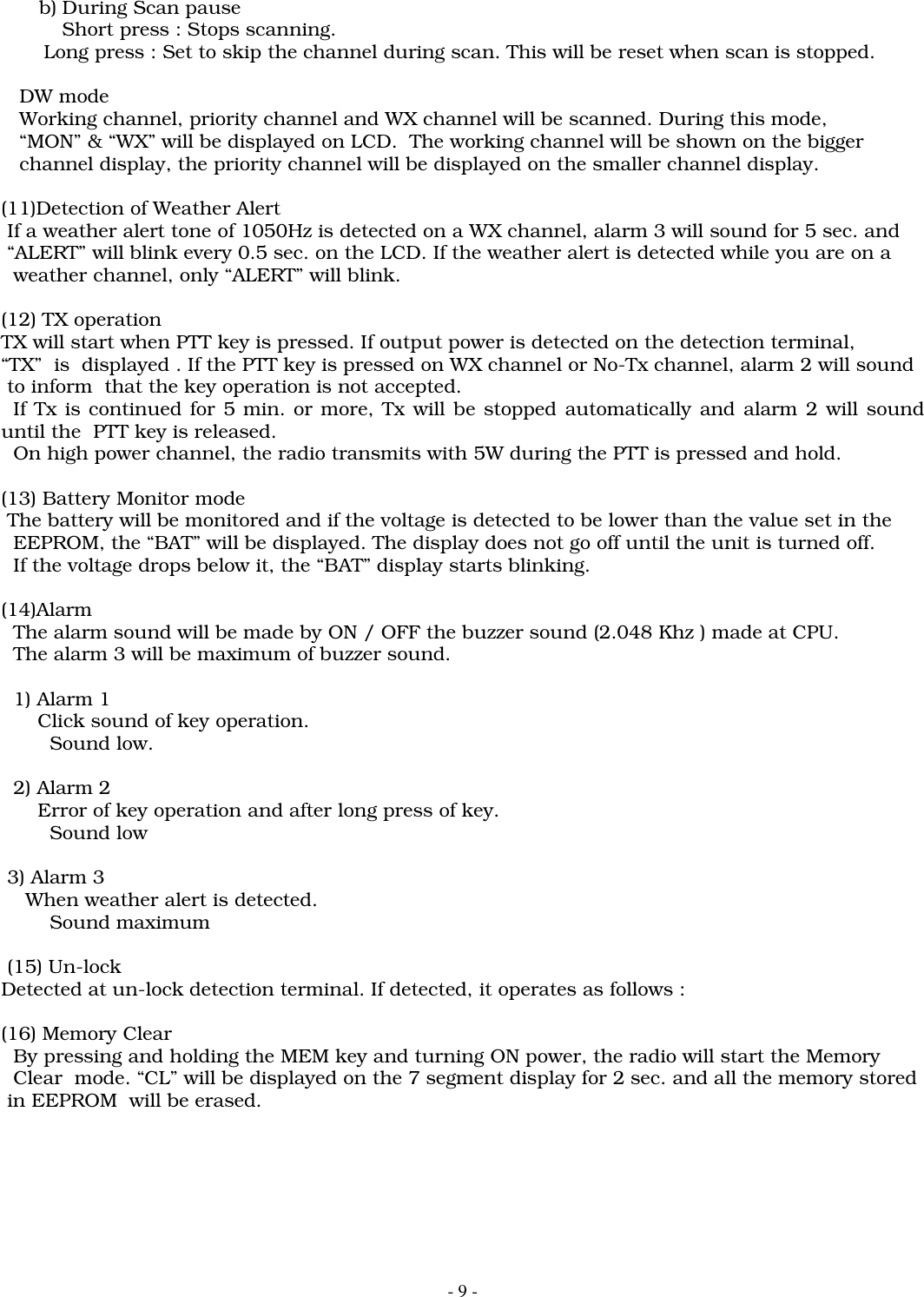
- 9 -b) During Scan pauseShort press : Stops scanning.       Long press : Set to skip the channel during scan. This will be reset when scan is stopped.   DW mode   Working channel, priority channel and WX channel will be scanned. During this mode,   “MON” & “WX” will be displayed on LCD.  The working channel will be shown on the bigger   channel display, the priority channel will be displayed on the smaller channel display.(11)Detection of Weather Alert If a weather alert tone of 1050Hz is detected on a WX channel, alarm 3 will sound for 5 sec. and “ALERT” will blink every 0.5 sec. on the LCD. If the weather alert is detected while you are on a  weather channel, only “ALERT” will blink.(12) TX operationTX will start when PTT key is pressed. If output power is detected on the detection terminal,“TX”  is  displayed . If the PTT key is pressed on WX channel or No-Tx channel, alarm 2 will sound to inform  that the key operation is not accepted.  If Tx is continued for 5 min. or more, Tx will be stopped automatically and alarm 2 will sounduntil the  PTT key is released.  On high power channel, the radio transmits with 5W during the PTT is pressed and hold.(13) Battery Monitor mode The battery will be monitored and if the voltage is detected to be lower than the value set in the  EEPROM, the “BAT” will be displayed. The display does not go off until the unit is turned off.  If the voltage drops below it, the “BAT” display starts blinking.(14)Alarm  The alarm sound will be made by ON / OFF the buzzer sound (2.048 Khz ) made at CPU.  The alarm 3 will be maximum of buzzer sound.  1) Alarm 1      Click sound of key operation.        Sound low.  2) Alarm 2      Error of key operation and after long press of key.        Sound low 3) Alarm 3    When weather alert is detected.        Sound maximum (15) Un-lockDetected at un-lock detection terminal. If detected, it operates as follows :(16) Memory Clear  By pressing and holding the MEM key and turning ON power, the radio will start the Memory  Clear  mode. “CL” will be displayed on the 7 segment display for 2 sec. and all the memory stored in EEPROM  will be erased.
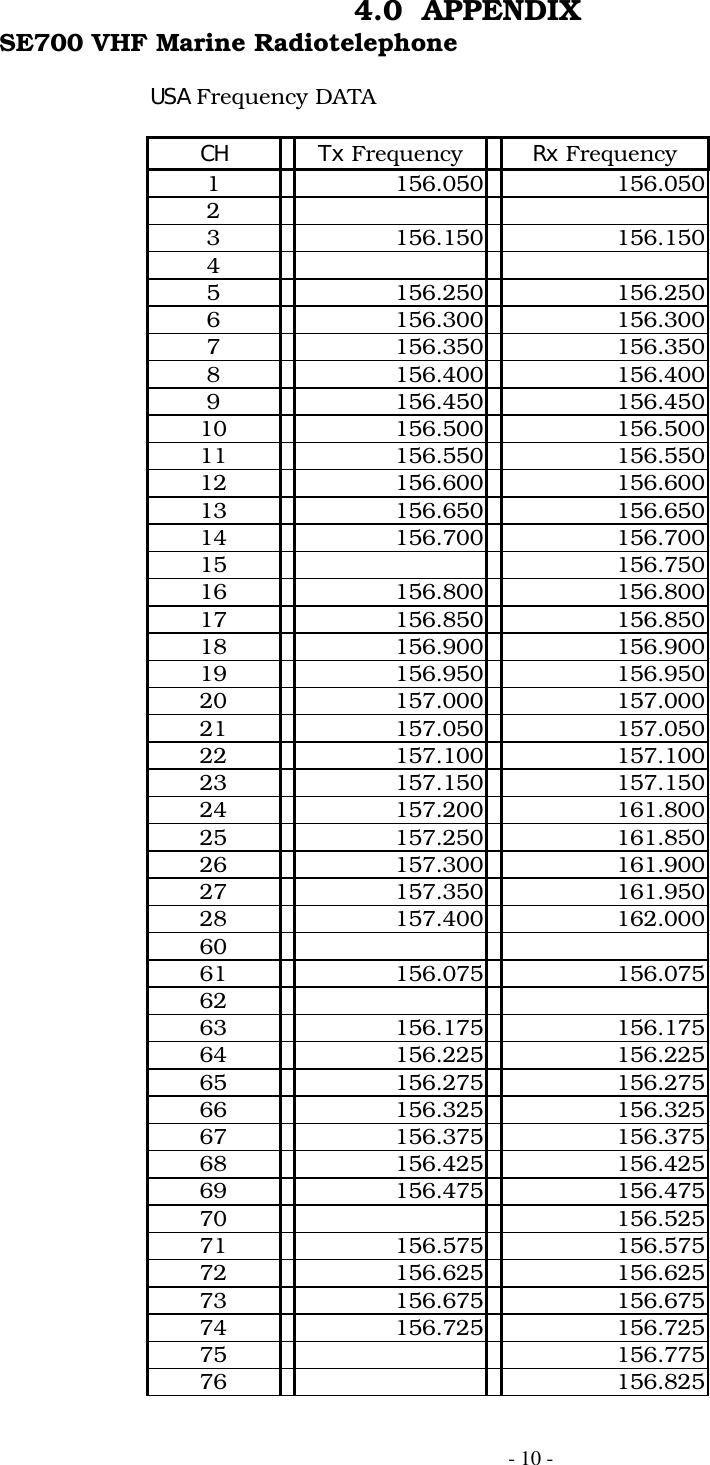
- 10 -4.0  APPENDIXSE700 VHF Marine RadiotelephoneUSA Frequency DATACH Tx Frequency Rx Frequency1 156.050 156.05023 156.150 156.15045 156.250 156.2506 156.300 156.3007 156.350 156.3508 156.400 156.4009 156.450 156.45010 156.500 156.50011 156.550 156.55012 156.600 156.60013 156.650 156.65014 156.700 156.70015 156.75016 156.800 156.80017 156.850 156.85018 156.900 156.90019 156.950 156.95020 157.000 157.00021 157.050 157.05022 157.100 157.10023 157.150 157.15024 157.200 161.80025 157.250 161.85026 157.300 161.90027 157.350 161.95028 157.400 162.0006061 156.075 156.0756263 156.175 156.17564 156.225 156.22565 156.275 156.27566 156.325 156.32567 156.375 156.37568 156.425 156.42569 156.475 156.47570 156.52571 156.575 156.57572 156.625 156.62573 156.675 156.67574 156.725 156.72575 156.77576 156.825
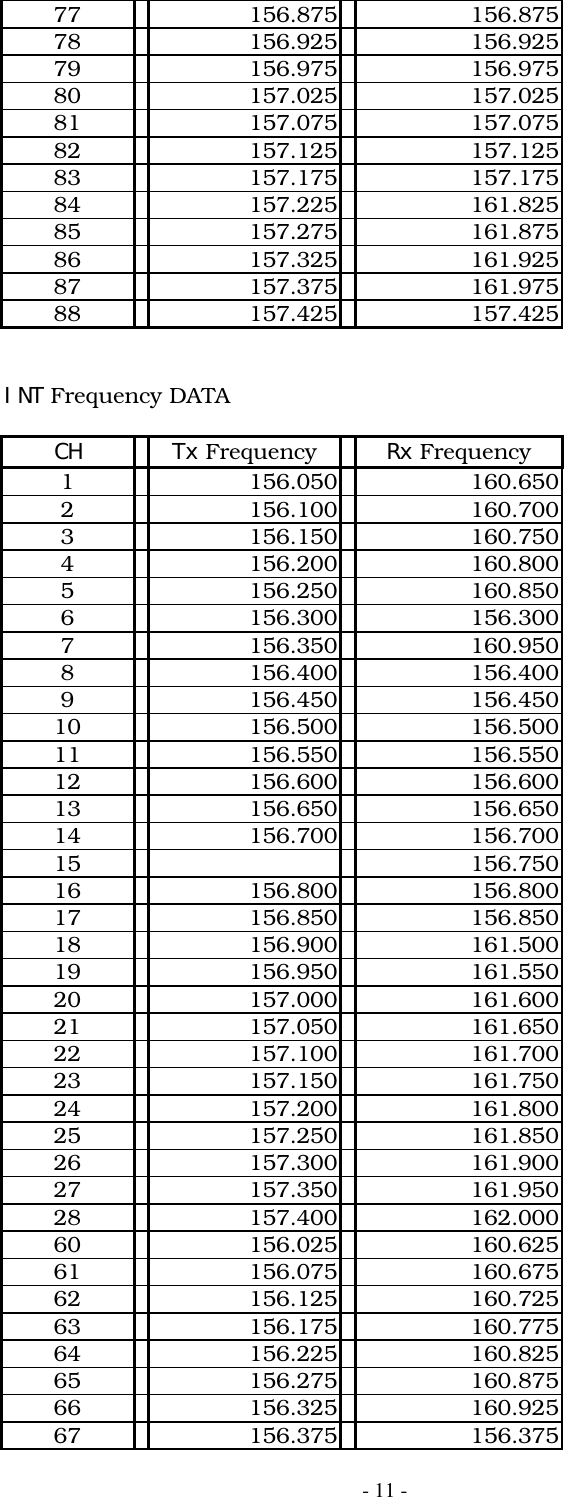
- 11 -77 156.875 156.87578 156.925 156.92579 156.975 156.97580 157.025 157.02581 157.075 157.07582 157.125 157.12583 157.175 157.17584 157.225 161.82585 157.275 161.87586 157.325 161.92587 157.375 161.97588 157.425 157.425INT Frequency DATACH Tx Frequency Rx Frequency1 156.050 160.6502 156.100 160.7003 156.150 160.7504 156.200 160.8005 156.250 160.8506 156.300 156.3007 156.350 160.9508 156.400 156.4009 156.450 156.45010 156.500 156.50011 156.550 156.55012 156.600 156.60013 156.650 156.65014 156.700 156.70015 156.75016 156.800 156.80017 156.850 156.85018 156.900 161.50019 156.950 161.55020 157.000 161.60021 157.050 161.65022 157.100 161.70023 157.150 161.75024 157.200 161.80025 157.250 161.85026 157.300 161.90027 157.350 161.95028 157.400 162.00060 156.025 160.62561 156.075 160.67562 156.125 160.72563 156.175 160.77564 156.225 160.82565 156.275 160.87566 156.325 160.92567 156.375 156.375
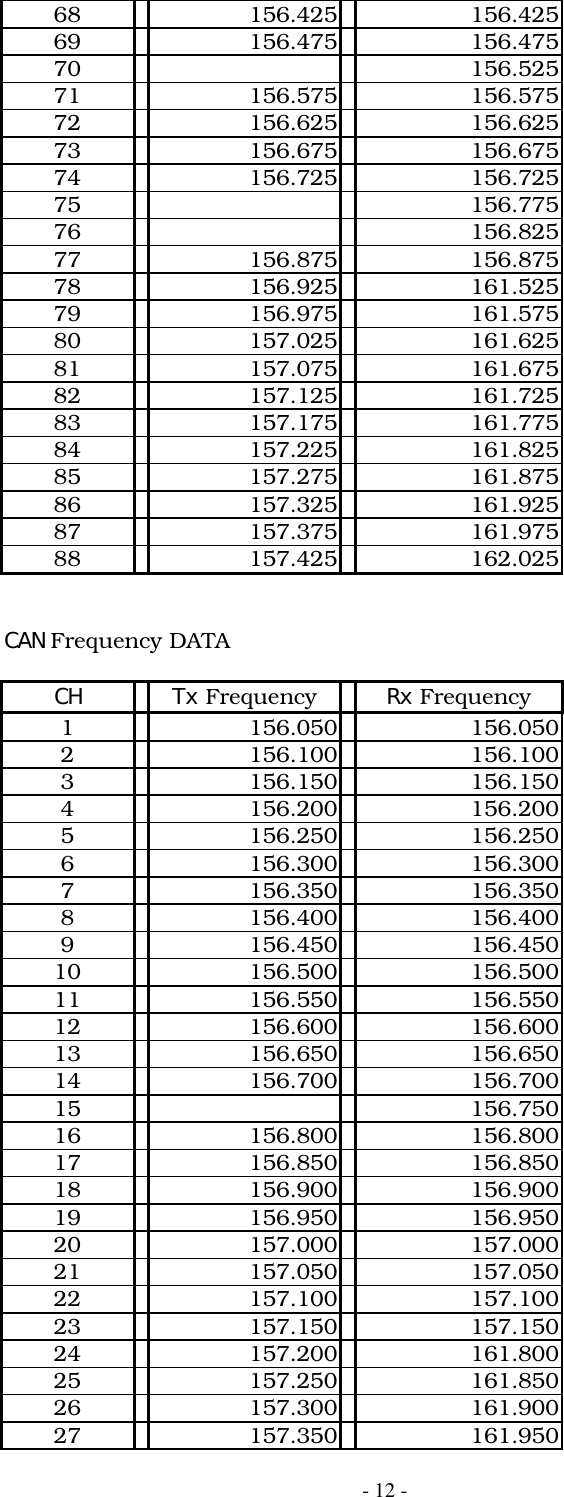
- 12 -68 156.425 156.42569 156.475 156.47570 156.52571 156.575 156.57572 156.625 156.62573 156.675 156.67574 156.725 156.72575 156.77576 156.82577 156.875 156.87578 156.925 161.52579 156.975 161.57580 157.025 161.62581 157.075 161.67582 157.125 161.72583 157.175 161.77584 157.225 161.82585 157.275 161.87586 157.325 161.92587 157.375 161.97588 157.425 162.025CAN Frequency DATACH Tx Frequency Rx Frequency1 156.050 156.0502 156.100 156.1003 156.150 156.1504 156.200 156.2005 156.250 156.2506 156.300 156.3007 156.350 156.3508 156.400 156.4009 156.450 156.45010 156.500 156.50011 156.550 156.55012 156.600 156.60013 156.650 156.65014 156.700 156.70015 156.75016 156.800 156.80017 156.850 156.85018 156.900 156.90019 156.950 156.95020 157.000 157.00021 157.050 157.05022 157.100 157.10023 157.150 157.15024 157.200 161.80025 157.250 161.85026 157.300 161.90027 157.350 161.950
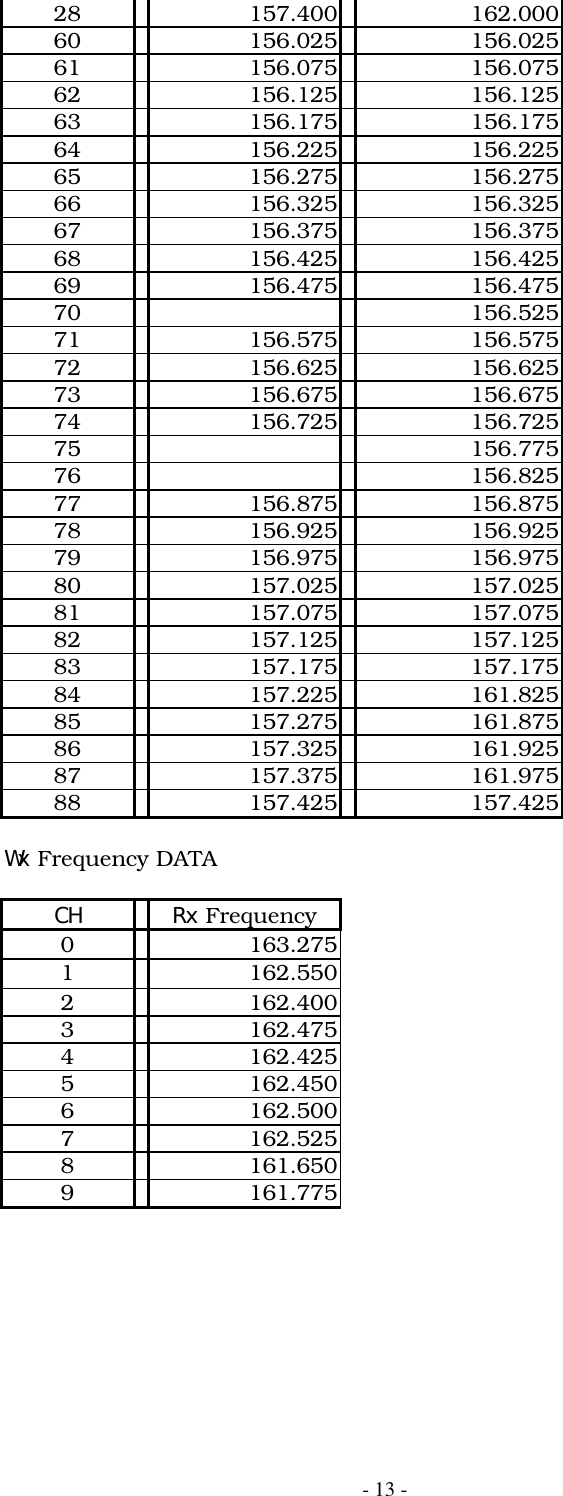
- 13 -28 157.400 162.00060 156.025 156.02561 156.075 156.07562 156.125 156.12563 156.175 156.17564 156.225 156.22565 156.275 156.27566 156.325 156.32567 156.375 156.37568 156.425 156.42569 156.475 156.47570 156.52571 156.575 156.57572 156.625 156.62573 156.675 156.67574 156.725 156.72575 156.77576 156.82577 156.875 156.87578 156.925 156.92579 156.975 156.97580 157.025 157.02581 157.075 157.07582 157.125 157.12583 157.175 157.17584 157.225 161.82585 157.275 161.87586 157.325 161.92587 157.375 161.97588 157.425 157.425Wx Frequency DATACH Rx Frequency0163.2751162.5502162.4003162.4754162.4255162.4506162.5007162.5258161.6509161.775

Navigation menu