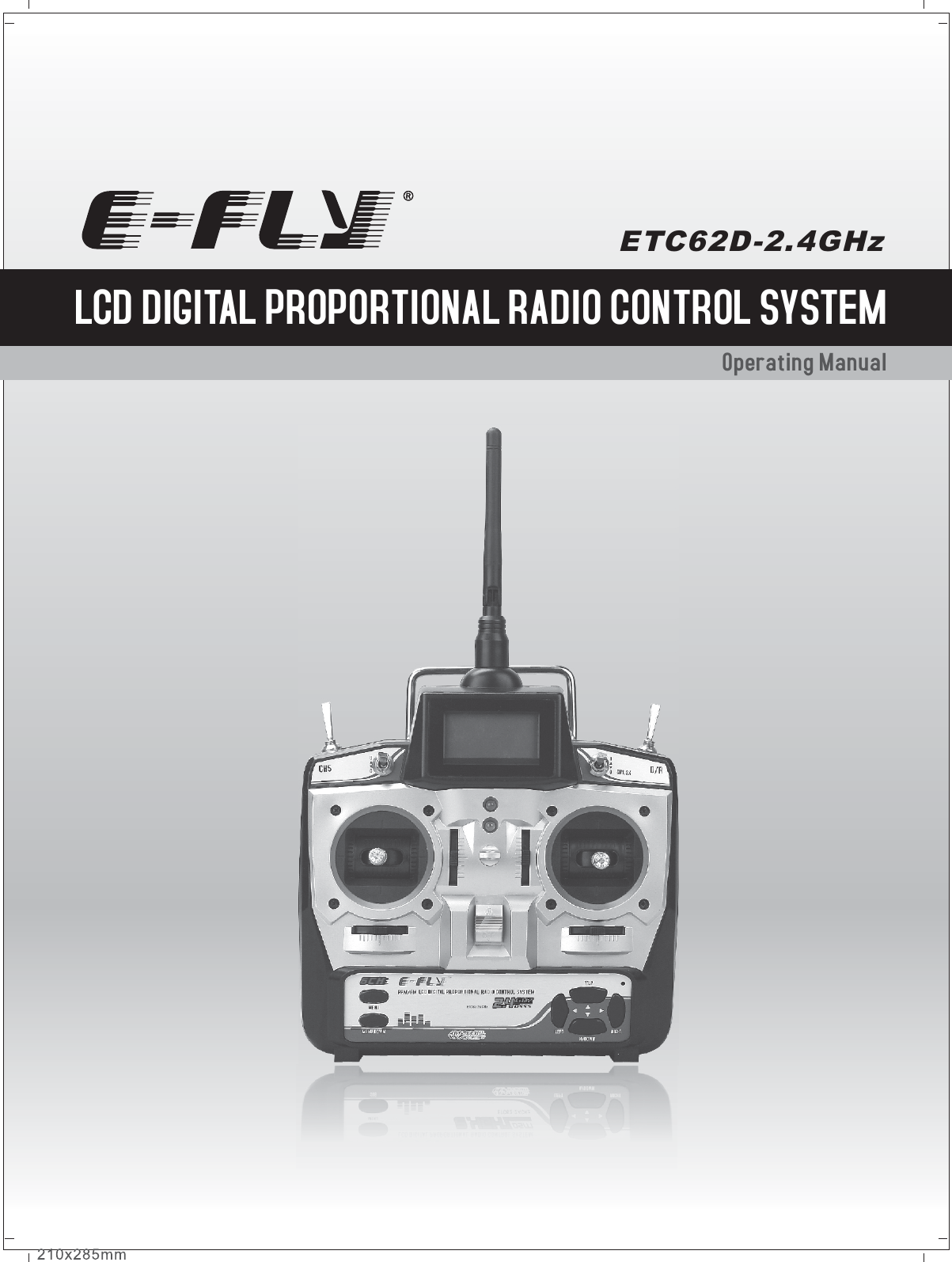
ShenZhen ART TECH R C Hobby ETC62D 2.4GHz Radio Control system User Manual

ShenZhen ART-TECH R/C Hobby Co., Ltd 2.4GHz Radio Control system

User Manual

Operating Manual LCD DIGITAL PROPORTIONAL RADIO CONTROL SYSTEMETC62D-2.4GHz
CatalogNotification before Using                                                                                   05Notice for use                                                                                                       04Contents                                                                                                               04Specifications                                                                                                      04Transmitter particular introductine                                                                06Menu introduction                                                                                             07Other function of the transmitter                                                                    11Receiver                                                                                                                12Electronic speed controler                                                                                10Operation for transmitter and servo                                                                13Flow list                                                                                                                 17Function of Transmitter                                                                                     0 3Charge method of battery                                                                                 16www.art-tech.com02The process of frequency bind for 2.4GHz R/C system                            15Adjust order                                                                                                         14
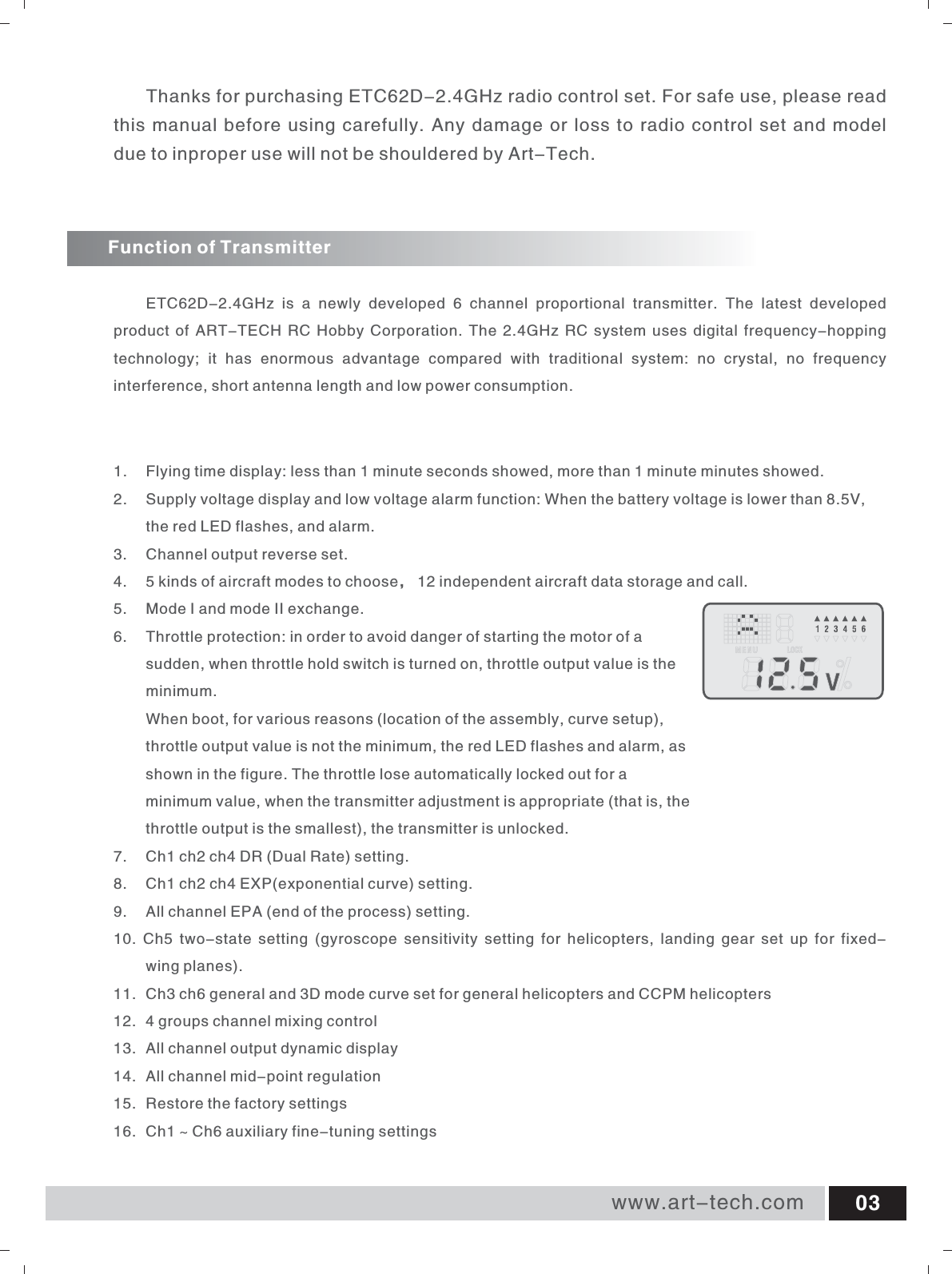
Function of TransmitterETC62D-2.4GHz  is  a  newly  developed  6  channel  proportional  transmitter.  The  latest  developed product of ART-TECH RC Hobby Corporation. The 2.4GHz RC system uses digital frequency-hopping technology;  it  has  enormous  advantage  compared  with  traditional  system:  no  crystal,  no  frequency interference, short antenna length and low power consumption.1.  Flying time display: less than 1 minute seconds showed, more than 1 minute minutes showed. 2.  Supply voltage display and low voltage alarm function: When the battery voltage is lower than 8.5V,              the red LED flashes, and alarm. 3.  Channel output reverse set. 4. 5 kinds of aircraft modes to choose, 12 independent aircraft data storage and call. 5. Mode I and mode II exchange. 6.  Throttle protection: in order to avoid danger of starting the motor of a sudden, when throttle hold switch is turned on, throttle output value is the minimum.  When boot, for various reasons (location of the assembly, curve setup), throttle output value is not the minimum, the red LED flashes and alarm, as shown in the figure. The throttle lose automatically locked out for a minimum value, when the transmitter adjustment is appropriate (that is, the throttle output is the smallest), the transmitter is unlocked. 7. Ch1 ch2 ch4 DR (Dual Rate) setting. 8. Ch1 ch2 ch4 EXP(exponential curve) setting. 9. All channel EPA (end of the process) setting. 10.  Ch5  two-state  setting  (gyroscope  sensitivity  setting  for  helicopters,  landing  gear  set  up  for  fixed-     wing planes). 11.  Ch3 ch6 general and 3D mode curve set for general helicopters and CCPM helicopters 12.  4 groups channel mixing control 13.  All channel output dynamic display 14.  All channel mid-point regulation 15.  Restore the factory settings 16.  Ch1 ~ Ch6 auxiliary fine-tuning settings www.art-tech.com 03Thanks for purchasing ETC62D-2.4GHz radio control set. For safe use, please read this manual before using carefully. Any damage or loss to radio control set and model due to inproper use will not be shouldered by Art-Tech.
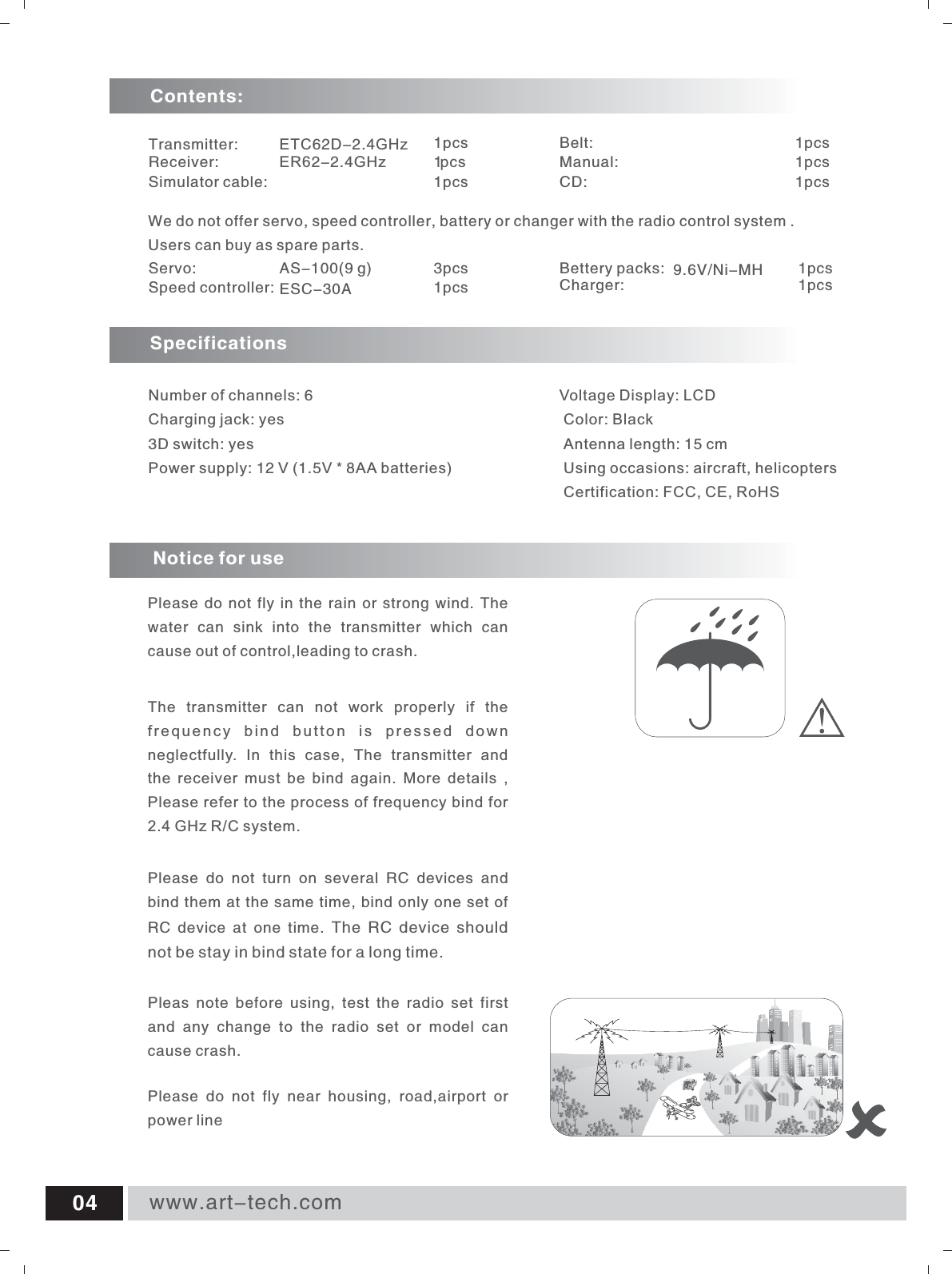
www.art-tech.com04Servo:     AS-100(9 g)                            3pcsSpeed controller: ESC-30A                               1pcsBettery packs: 9.6V/Ni-MH 1pcsCharger:                                                        1pcsSpecifications Number of channels: 6  Charging jack: yes 3D switch: yes Power supply: 12 V (1.5V * 8AA batteries)   We do not offer servo, speed controller, battery or changer with the radio control system .Users can buy as spare parts.Transmitter: ETC62D-2.4GHz                        1pcsReceiver: ER62-2.4GHz                       1p c sSimulator cable: 1pcsBelt: 1pcsManual: 1pcsCD: 1pcsContents:Voltage Display: LCD  Color: Black  Antenna length: 15 cm  Using occasions: aircraft, helicopters  Certification: FCC, CE, RoHS Notice for usePlease do not fly in the rain or strong wind. The water  can  sink  into  the  transmitter  which  can cause out of control,leading to crash.Pleas  note  before  using,  test  the  radio  set  first and  any  change  to  the  radio  set  or  model  can cause crash.Please  do  not  fly  near  housing,  road,airport  or power lineThe  transmitter  can  not  work  properly  if  the frequency  bind  button  is  pressed  down neglectfully.  In  this  case,  The  transmitter  and the  receiver  must  be  bind  again.  More  details  , Please refer to the process of frequency bind for  2.4 GHz R/C system. Please  do  not  turn  on  several  RC  devices  and bind them at the same time, bind only one set of RC  device  at  one  time.  The RC device should not be stay in bind state for a long time.
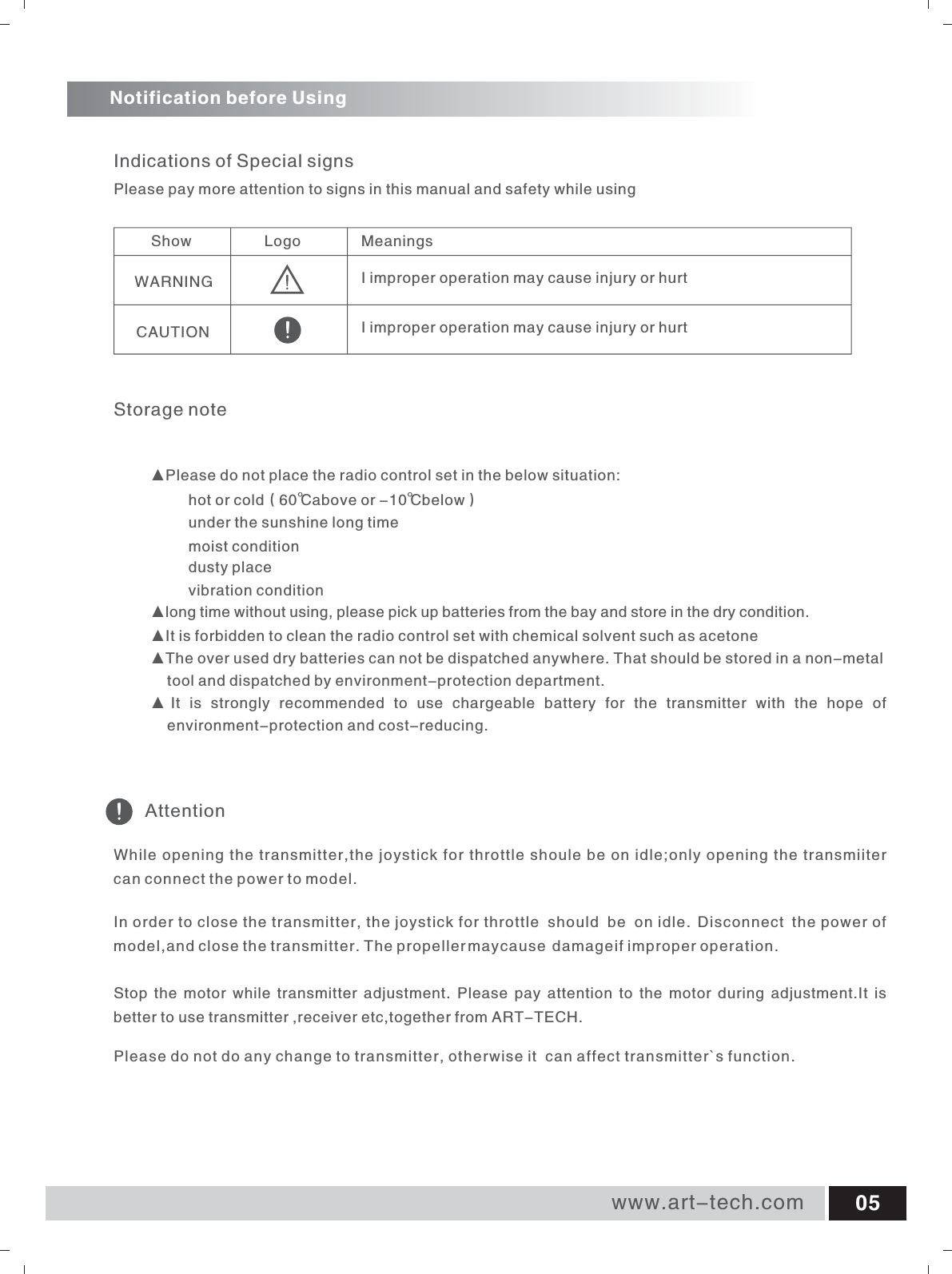
Storage noteShow                 Logo MeaningsWARNING                                 CAUTION                                 Indications of Special signsAttentionNotification before UsingPlease pay more attention to signs in this manual and safety while using▲Please do not place the radio control set in the below situation:hot or cold(60℃above or -10℃below)under the sunshine long timemoist conditiondusty placevibration condition▲long time without using, please pick up batteries from the bay and store in the dry condition.▲It is forbidden to clean the radio control set with chemical solvent such as acetone▲The over used dry batteries can not be dispatched anywhere. That should be stored in a non-metal        tool and dispatched by environment-protection department. ▲ It  is  strongly  recommended  to  use  chargeable  battery  for  the  transmitter  with  the  hope  of     environment-protection and cost-reducing.While opening the transmitter,the joystick for throttle shoule be on idle;only opening the transmiiter can connect the power to model.In order to close the transmitter, the joystick for throttle  should  be o nidle . Disconnect  t h  e power of model,and close the transmitter. The propeller mayc ause d  amageif im  proper operation.Stop  the motor while  transmitter adjustment. Please  pay attention to  the motor during  adjustment.It is better to use transmitter ,receiver etc,together from ART-TECH.Please do not do any change to transmitter, otherwise it  can affect transmitter`s function.I improper operation may cause injury or hurtI improper operation may cause injury or hurtwww.art-tech.com 05
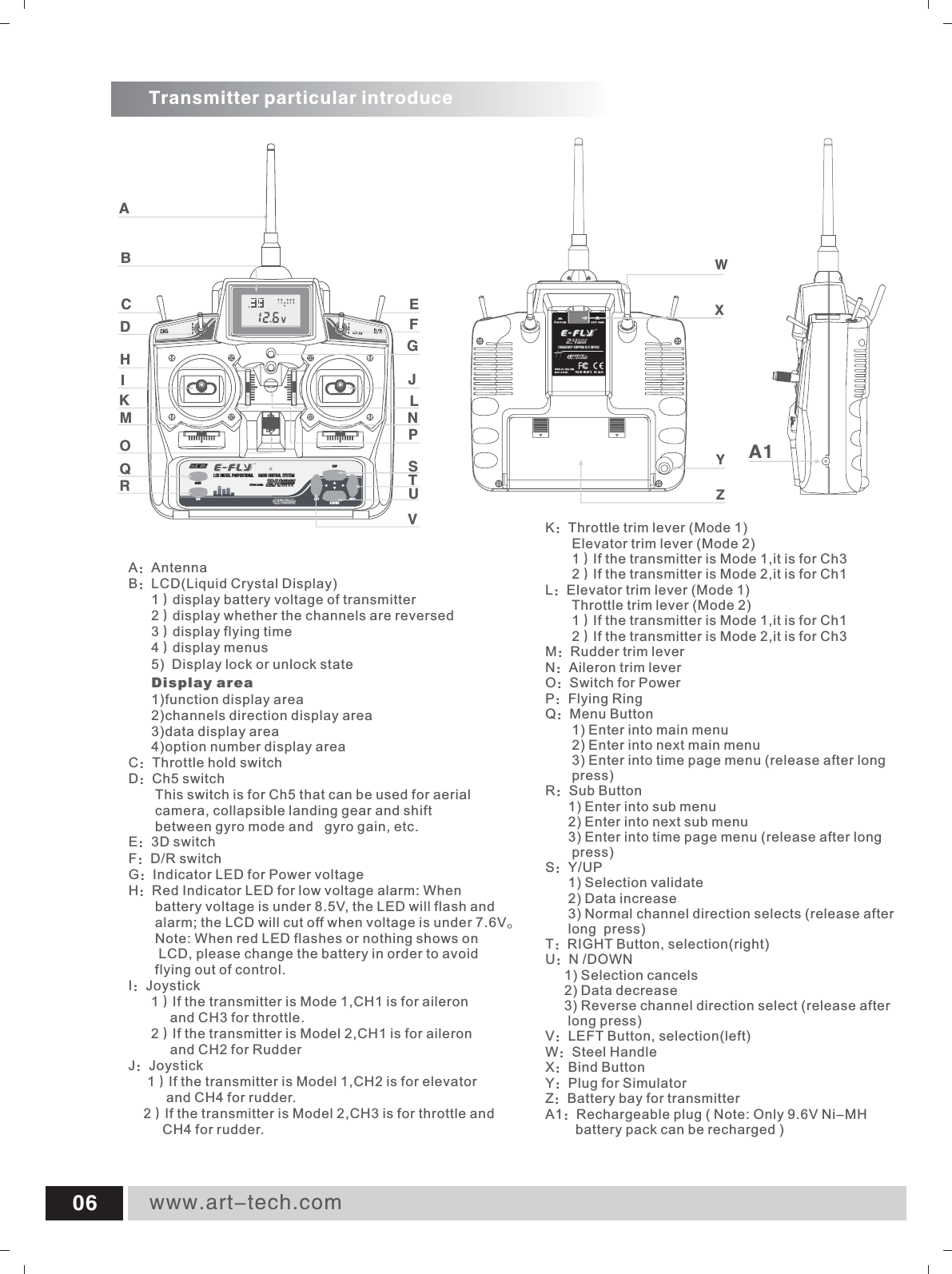
www.art-tech.com06Transmitter particular introduceA:AntennaB:LCD(Liquid Crystal Display)      1)display battery voltage of transmitter      2)display whether the channels are reversed      3)display flying time      4)display menus      5)  Display lock or unlock state      Display area       1)function display area      2)channels direction display area      3)data display area      4)option number display areaC:Throttle hold switchD:Ch5 switch        This switch is for Ch5 that can be used for aerial        camera, collapsible landing gear and shift        between gyro mode and   gyro gain, etc.E:3D switchF:D/R switchG:Indicator LED for Power voltageH:Red Indicator LED for low voltage alarm: When        battery voltage is under 8.5V, the LED will flash and        alarm; the LCD will cut off when voltage is under 7.6V。       Note: When red LED flashes or nothing shows on        LCD, please change the battery in order to avoid        flying out of control.I:Joystick      1)If the transmitter is Mode 1,CH1 is for aileron            and CH3 for throttle.      2)If the transmitter is Model 2,CH1 is for aileron            and CH2 for RudderJ:Joystick     1)If the transmitter is Model 1,CH2 is for elevator           and CH4 for rudder.    2)If the transmitter is Model 2,CH3 is for throttle and          CH4 for rudder.K:Throttle trim lever (Mode 1)       Elevator trim lever (Mode 2)       1)If the transmitter is Mode 1,it is for Ch3       2)If the transmitter is Mode 2,it is for Ch1L:Elevator trim lever (Mode 1)       Throttle trim lever (Mode 2)       1)If the transmitter is Mode 1,it is for Ch1       2)If the transmitter is Mode 2,it is for Ch3M:Rudder trim leverN:Aileron trim leverO:Switch for PowerP:Flying RingQ:Menu Button       1) Enter into main menu       2) Enter into next main menu       3) Enter into time page menu (release after long        press)R:Sub Button      1) Enter into sub menu      2) Enter into next sub menu      3) Enter into time page menu (release after long        press)S:Y/UP      1) Selection validate       2) Data increase      3) Normal channel direction selects (release after         long  press)T:RIGHT Button, selection(right)U:N /DOWN     1) Selection cancels     2) Data decrease     3) Reverse channel direction select (release after       long press)V:LEFT Button, selection(left)W:Steel HandleX:Bind ButtonY:Plug for Simulator Z:Battery bay for transmitterA1:Rechargeable plug ( Note: Only 9.6V Ni-MH         battery pack can be recharged )XWZYA1LCD DIGITAL PROPORTIONAL  RADIO CONTROL SYSTEM MENULEFT RIGHTY/UPN/DOWNSUBEGJLNPVABCDHIKMOFSTUQRETC62-2.4GHz
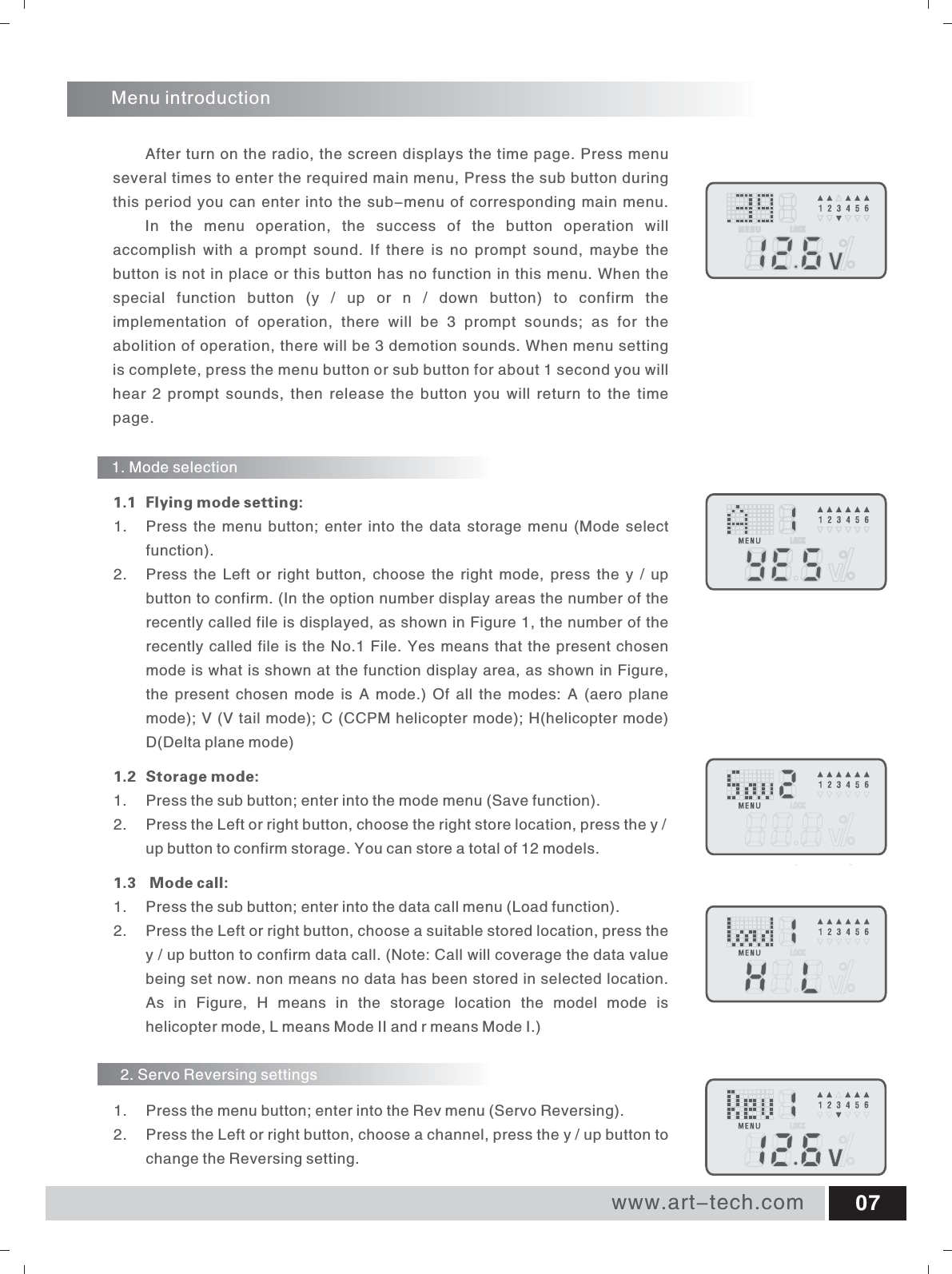
www.art-tech.com 07Menu introductionAfter turn on the radio, the screen displays the time page. Press menu several times to enter the required main menu, Press the sub button during this period you can enter into the sub-menu of corresponding main menu. In  the  menu  operation,  the  success  of  the  button  operation  will accomplish  with  a  prompt  sound.  If  there  is  no  prompt  sound,  maybe  the button is not in place or this button has no function in this menu. When the special  function  button  (y  /  up  or  n  /  down  button)  to  confirm  the implementation  of  operation,  there  will  be  3  prompt  sounds;  as  for  the abolition of operation, there will be 3 demotion sounds. When menu setting is complete, press the menu button or sub button for about 1 second you will hear  2 prompt  sounds, then release  the button  you will return  to  the  time page.1.  Press the menu button; enter into the data storage menu (Mode select function). 2.  Press the Left or  right button,  choose  the  right  mode,  press the y / up button to confirm. (In the option number display areas the number of the recently called file is displayed, as shown in Figure 1, the number of the recently called file is the No.1 File. Yes means that the present chosen mode is what is shown at the function display area, as shown in Figure, the  present  chosen  mode  is  A  mode.)  Of  all the  modes:  A  (aero  plane mode); V (V tail mode); C (CCPM helicopter mode); H(helicopter mode) D(Delta plane mode)1.2 Storage mode: 1.  Press the sub button; enter into the mode menu (Save function). 2.  Press the Left or right button, choose the right store location, press the y / up button to confirm storage. You can store a total of 12 models. 1.3   Mode call:1.  Press the sub button; enter into the data call menu (Load function). 2.  Press the Left or right button, choose a suitable stored location, press the y / up button to confirm data call. (Note: Call will coverage the data value being set now. non means no data has been stored in selected location. As  in  Figure,  H  means  in  the  storage  location  the  model  mode  is helicopter mode, L means Mode II and r means Mode I.) 1.1 Flying mode setting:1. Mode selection2. Servo Reversing settings1.  Press the menu button; enter into the Rev menu (Servo Reversing). 2.  Press the Left or right button, choose a channel, press the y / up button to change the Reversing setting.
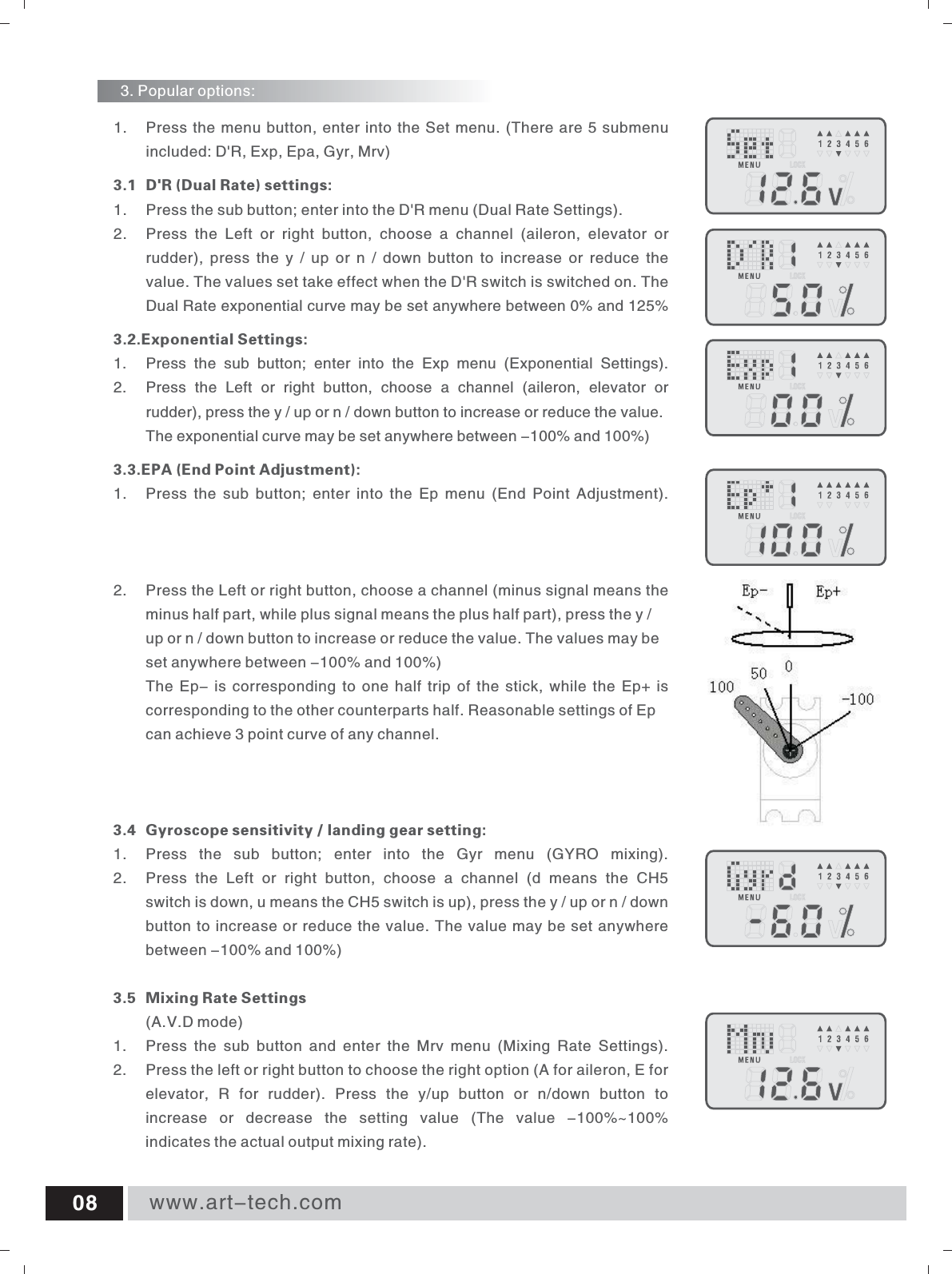
www.art-tech.com081.  Press the menu button, enter into the Set menu. (There are 5 submenu included: D'R, Exp, Epa, Gyr, Mrv) 3.1 D'R (Dual Rate) settings: 1.  Press the sub button; enter into the D'R menu (Dual Rate Settings). 2.  Press  the  Left  or  right  button,  choose  a  channel  (aileron,  elevator  or rudder),  press  the  y  /  up  or n  /  down  button to  increase or  reduce  the value. The values set take effect when the D'R switch is switched on. The Dual Rate exponential curve may be set anywhere between 0% and 125% 3.2.Exponential Settings: 1.  Press  the  sub  button;  enter  into  the  Exp  menu  (Exponential  Settings). 2.  Press  the  Left  or  right  button,  choose  a  channel  (aileron,  elevator  or rudder), press the y / up or n / down button to increase or reduce the value. The exponential curve may be set anywhere between -100% and 100%) 3.3.EPA (End Point Adjustment): 1.  Press  the sub  button; enter  into  the  Ep  menu  (End Point  Adjustment). 2.  Press the Left or right button, choose a channel (minus signal means the minus half part, while plus signal means the plus half part), press the y / up or n / down button to increase or reduce the value. The values may be set anywhere between -100% and 100%)The Ep- is corresponding to one half trip of the stick, while the Ep+ is corresponding to the other counterparts half. Reasonable settings of Ep can achieve 3 point curve of any channel. 3.4 Gyroscope sensitivity / landing gear setting: 1.  Press  the  sub  button;  enter  into  the  Gyr  menu  (GYRO  mixing). 2.  Press  the  Left  or  right  button,  choose  a  channel  (d  means  the  CH5 switch is down, u means the CH5 switch is up), press the y / up or n / down button to increase or reduce the value. The value may be set anywhere between -100% and 100%)3.5  Mixing Rate Settings(A.V.D mode)1.  Press  the  sub  button  and  enter  the  Mrv  menu  (Mixing  Rate  Settings).2.  Press the left or right button to choose the right option (A for aileron, E for elevator,  R  for  rudder).  Press  the  y/up  button  or  n/down  button to increase  or  decrease  the  setting  value  (The  value  -100%~100% indicates the actual output mixing rate).3. Popular options:
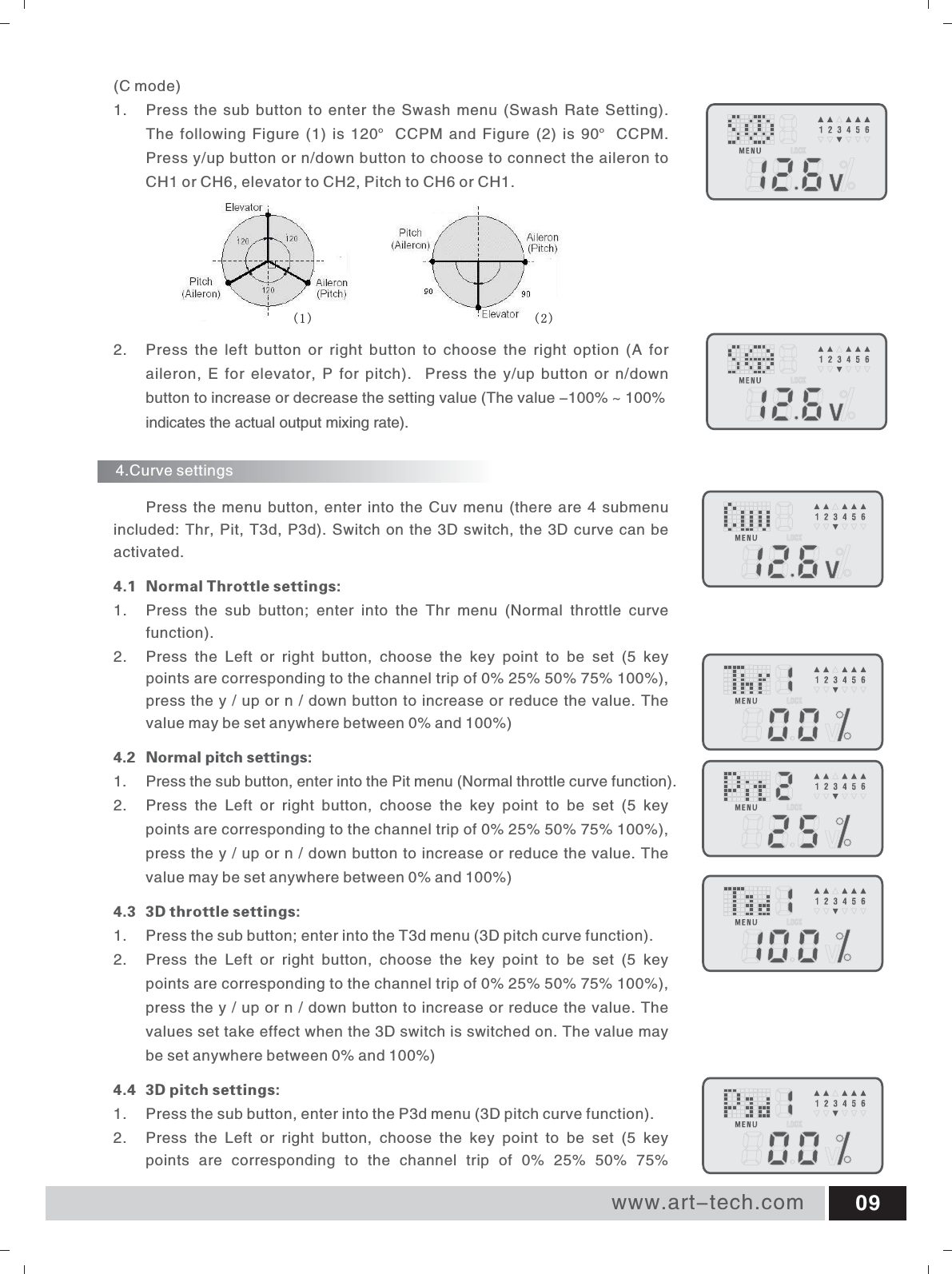
www.art-tech.com 09 Press the menu button, enter into the Cuv menu (there are 4 submenu included: Thr, Pit, T3d, P3d). Switch on the 3D switch, the 3D curve can be activated. 4.1 Normal Throttle settings: 1.  Press  the  sub  button;  enter  into  the  Thr  menu  (Normal  throttle  curve function). 2.  Press  the  Left  or  right  button,  choose  the  key  point  to  be  set  (5  key points are corresponding to the channel trip of 0% 25% 50% 75% 100%), press the y / up or n / down button to increase or reduce the value. The value may be set anywhere between 0% and 100%)4.2 Normal pitch settings: 1.  Press the sub button, enter into the Pit menu (Normal throttle curve function). 2.  Press  the  Left  or  right  button,  choose  the  key  point  to  be  set  (5  key points are corresponding to the channel trip of 0% 25% 50% 75% 100%), press the y / up or n / down button to increase or reduce the value. The value may be set anywhere between 0% and 100%) 4.3 3D throttle settings: 1.  Press the sub button; enter into the T3d menu (3D pitch curve function). 2. Press  the  Left  or  right  button,  choose  the  key  point  to  be  set  (5  key points are corresponding to the channel trip of 0% 25% 50% 75% 100%), press the y / up or n / down button to increase or reduce the value. The values set take effect when the 3D switch is switched on. The value may be set anywhere between 0% and 100%) 4.4 3D pitch settings: 1.  Press the sub button, enter into the P3d menu (3D pitch curve function). 2.  Press  the  Left  or  right  button,  choose  the  key  point  to  be  set  (5  key points  are  corresponding  to  the  channel  trip  of  0%  25%  50%  75% 4.Curve settings(C mode)1.  Press the sub button to enter the Swash menu (Swash Rate Setting). The  following  Figure  (1)  is  120° CCPM  and  Figure  (2)  is  90° CCPM. Press y/up button or n/down button to choose to connect the aileron to CH1 or CH6, elevator to CH2, Pitch to CH6 or CH1.2.  Press  the  left  button  or  right  button  to  choose  the  right  option  (A  for aileron, E for  elevator, P  for pitch).    Press the  y/up button  or  n/down button to increase or decrease the setting value (The value -100% ~ 100%indicates the actual output mixing rate).(1) (2)
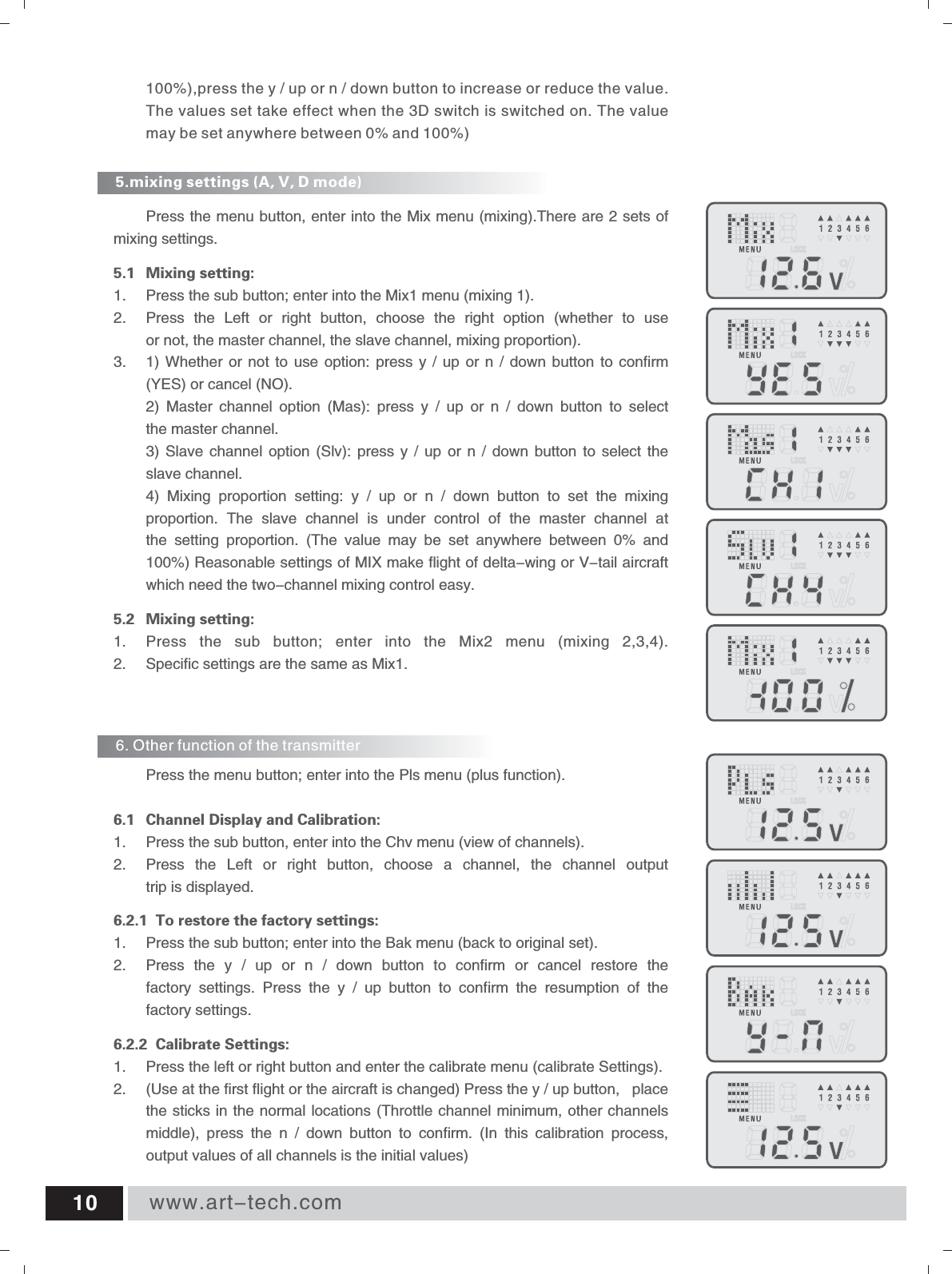
www.art-tech.com105.mixing settings (A, V, D mode) 6. Other function of the transmitter Press the menu button, enter into the Mix menu (mixing).There are 2 sets of mixing settings. 5.1 Mixing setting: 1.  Press the sub button; enter into the Mix1 menu (mixing 1). 2.  Press  the  Left  or  right  button,  choose  the  right  option  (whether  to  use or not, the master channel, the slave channel, mixing proportion). 3. 1) Whether  or  not to use  option: press y  / up or  n  / down  button  to confirm (YES) or cancel (NO). 2)  Master  channel  option  (Mas):  press  y  /  up  or  n  /  down  button  to  select the master channel. 3) Slave  channel option  (Slv): press  y  /  up  or  n  /  down  button to  select the slave channel. 4)  Mixing  proportion  setting:  y  /  up  or  n  /  down  button  to  set  the  mixing proportion.  The  slave  channel  is  under  control  of  the  master  channel  at the  setting  proportion.  (The  value  may  be  set  anywhere  between  0%  and 100%) Reasonable settings of MIX make flight of delta-wing or V-tail aircraft which need the two-channel mixing control easy. 5.2 Mixing setting: 1.  Press  the  sub  button;  enter  into  the  Mix2  menu  (mixing  2,3,4). 2. Specific settings are the same as Mix1. Press the menu button; enter into the Pls menu (plus function).  6.1 Channel Display and Calibration: 1.  Press the sub button, enter into the Chv menu (view of channels). 2.  Press  the  Left  or  right  button,  choose  a  channel,  the  channel  output trip is displayed. 6.2.1  To restore the factory settings: 1.  Press the sub button; enter into the Bak menu (back to original set). 2.  Press  the  y  /  up  or  n  /  down  button  to  confirm  or  cancel  restore  the factory  settings.  Press  the  y  /  up  button  to  confirm  the  resumption  of  the factory settings.6.2.2  Calibrate Settings:Use at the first flight or the aircraft is changed) Press the y / up button,  place the sticks in the normal locations (Throttle channel minimum, other channels middle),  press  the  n  /  down  button  to  confirm.  (In  this  calibration  process, output values of all channels is the initial values) 1.  Press the left or right button and enter the calibrate menu (calibrate Settings).2.  (100%),press the y / up or n / down button to increase or reduce the value. The values set take effect when the 3D switch is switched on. The value may be set anywhere between 0% and 100%)
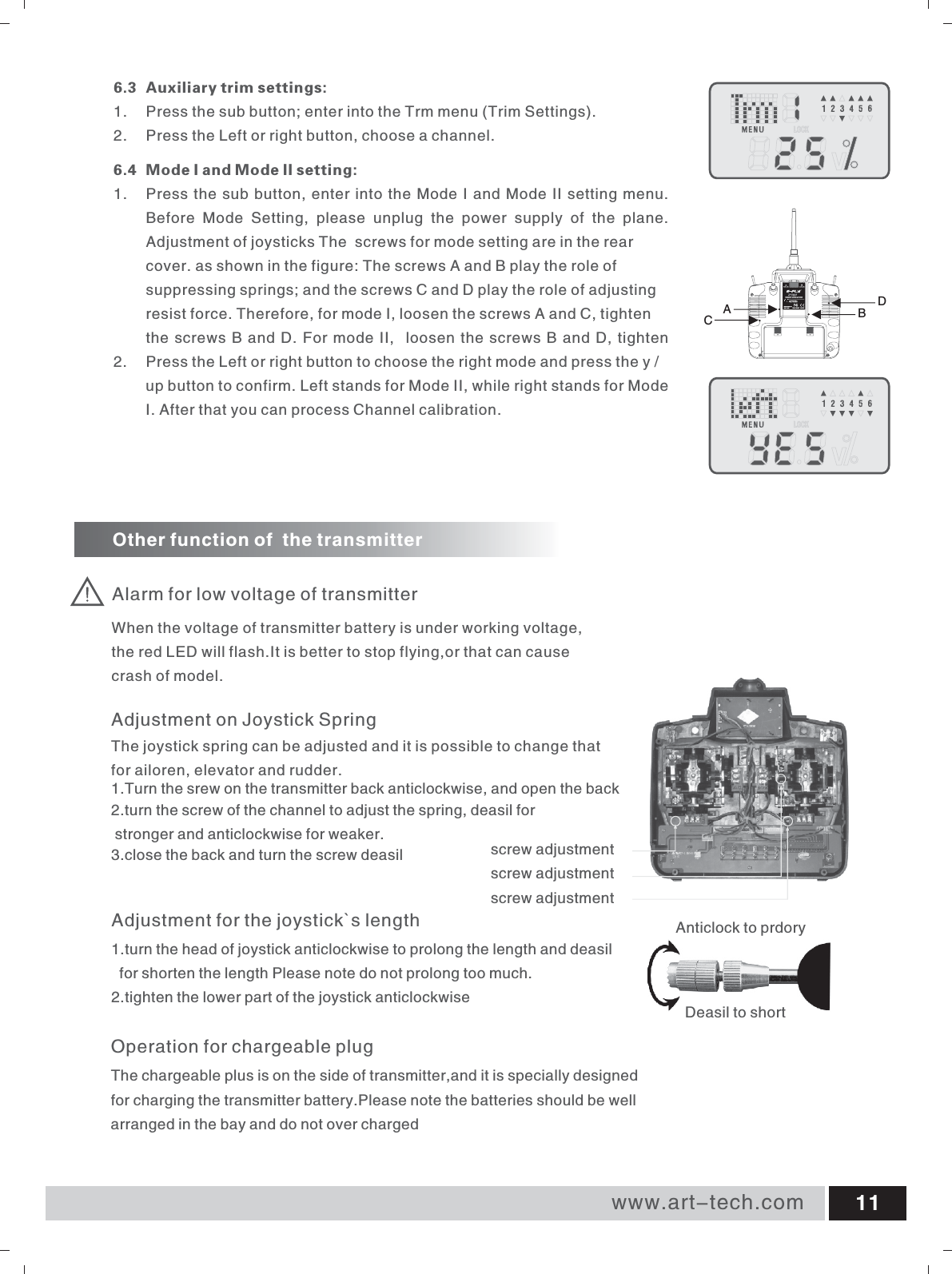
www.art-tech.com 116.3 Auxiliary trim settings: 1.  Press the sub button; enter into the Trm menu (Trim Settings). 2. Press the Left or right button, choose a channel.6.4 Mode I and Mode II setting: 1.  Press the sub button, enter into the Mode I and Mode II setting menu.Before  Mode  Setting,  please  unplug  the  power  supply  of  the  plane. Adjustment of joysticks The  screws for mode setting are in the rear cover. as shown in the figure: The screws A and B play the role of suppressing springs; and the screws C and D play the role of adjusting resist force. Therefore, for mode I, loosen the screws A and C, tighten the screws B and D. For mode II,  loosen the screws B and D, tighten 2.  Press the Left or right button to choose the right mode and press the y / up button to confirm. Left stands for Mode II, while right stands for Mode I. After that you can process Channel calibration.Alarm for low voltage of transmitterOther function of  the transmitterWhen the voltage of transmitter battery is under working voltage, the red LED will flash.It is better to stop flying,or that can cause crash of model.Operation for chargeable plugThe chargeable plus is on the side of transmitter,and it is specially designed for charging the transmitter battery.Please note the batteries should be well arranged in the bay and do not over chargedAdjustment for the joystick`s length1.turn the head of joystick anticlockwise to prolong the length and deasil   for shorten the length Please note do not prolong too much.2.tighten the lower part of the joystick anticlockwise Deasil to shortAnticlock to prdoryAdjustment on Joystick SpringThe joystick spring can be adjusted and it is possible to change that for ailoren, elevator and rudder.1.Turn the srew on the transmitter back anticlockwise, and open the back2.turn the screw of the channel to adjust the spring, deasil for stronger and anticlockwise for weaker.3.close the back and turn the screw deasil screw adjustmentscrew adjustmentscrew adjustmentCABD
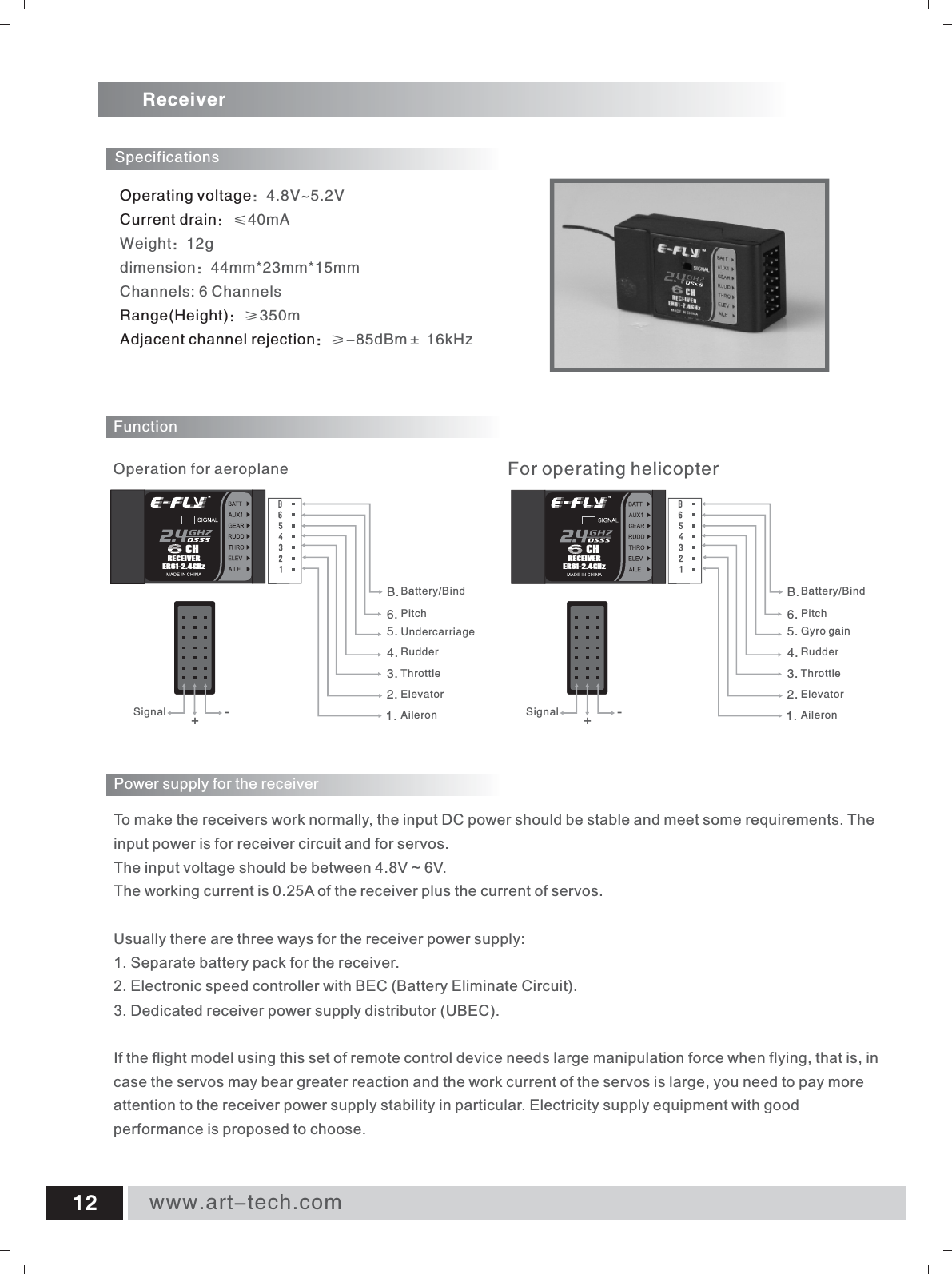
Operating voltageCurrent drain:Range(Height):Adjacent channel rejection::4.8V~5.2V≤40mAWeight:12gdimension:44mm*23mm*15mmChannels: 6 Channels≥350m≥-85dBm± 16kHz ReceiverFunction1.2.3.4.5.6.UndercarriageSpecificationsRudderThrottleElevatorAileron      For operating helicopter      Operation for aeroplanePitchB.Battery/Bind1.2.3.4.5.6.RudderThrottleElevatorAileronPitchB.Battery/BindGyro gainSignal +-Signal +-To make the receivers work normally, the input DC power should be stable and meet some requirements. The input power is for receiver circuit and for servos. The input voltage should be between 4.8V ~ 6V. The working current is 0.25A of the receiver plus the current of servos. Usually there are three ways for the receiver power supply: 1. Separate battery pack for the receiver. 2. Electronic speed controller with BEC (Battery Eliminate Circuit). 3. Dedicated receiver power supply distributor (UBEC). If the flight model using this set of remote control device needs large manipulation force when flying, that is, in case the servos may bear greater reaction and the work current of the servos is large, you need to pay more attention to the receiver power supply stability in particular. Electricity supply equipment with good performance is proposed to choose. Power supply for the receiver www.art-tech.com12RECEIVERER61-2.4GHzCHRECEIVERER61-2.4GHzCH
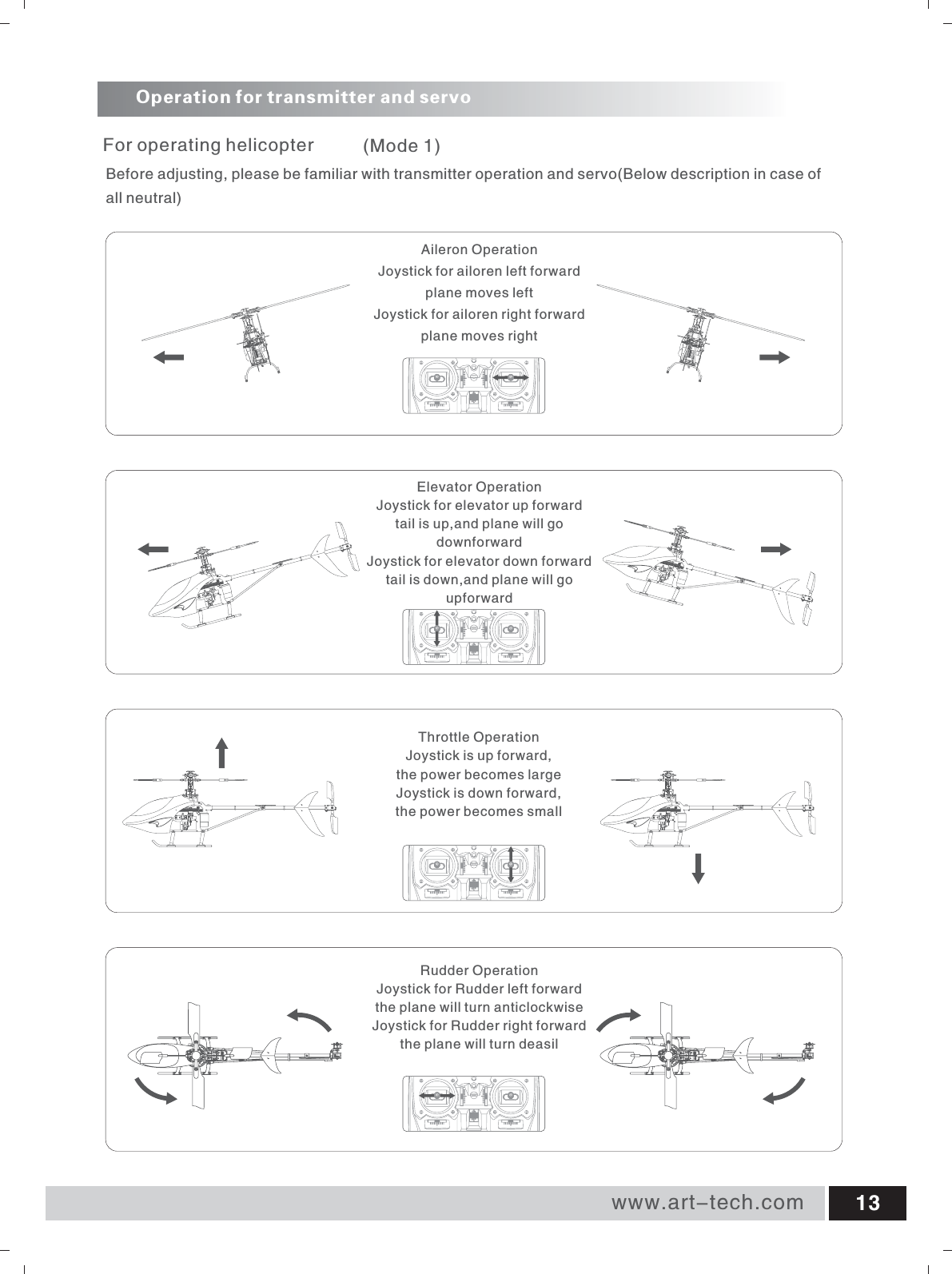
Operation for transmitter and servo      For operating helicopterRudder OperationJoystick for Rudder left forwardthe plane will turn anticlockwiseJoystick for Rudder right forwardthe plane will turn deasilThrottle OperationJoystick is up forward,the power becomes largeJoystick is down forward,the power becomes smallElevator OperationJoystick for elevator up forwardtail is up,and plane will go downforwardJoystick for elevator down forwardtail is down,and plane will go upforwardAileron OperationJoystick for ailoren left forwardplane moves leftJoystick for ailoren right forwardplane moves rightBefore adjusting, please be familiar with transmitter operation and servo(Below description in case of all neutral)(Mode 1)www.art-tech.com 13
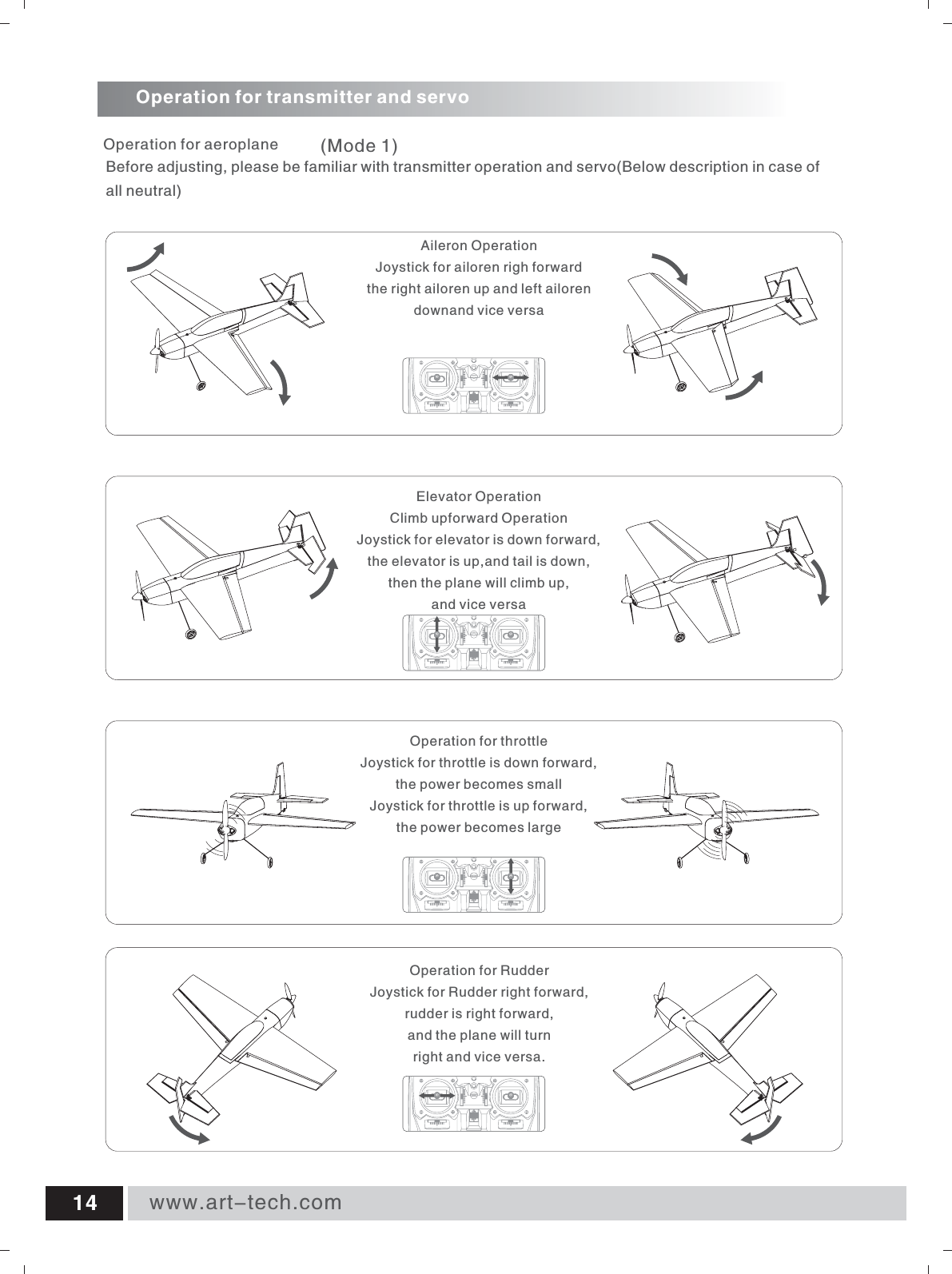
Operation for RudderJoystick for Rudder right forward,rudder is right forward, and the plane will turn right and vice versa.Operation for throttleJoystick for throttle is down forward, the power becomes smallJoystick for throttle is up forward, the power becomes largeElevator OperationClimb upforward OperationJoystick for elevator is down forward, the elevator is up,and tail is down,then the plane will climb up, and vice versaAileron OperationJoystick for ailoren righ forwardthe right ailoren up and left ailoren downand vice versaOperation for transmitter and servo      Operation for aeroplaneBefore adjusting, please be familiar with transmitter operation and servo(Below description in case of all neutral)(Mode 1)www.art-tech.com14
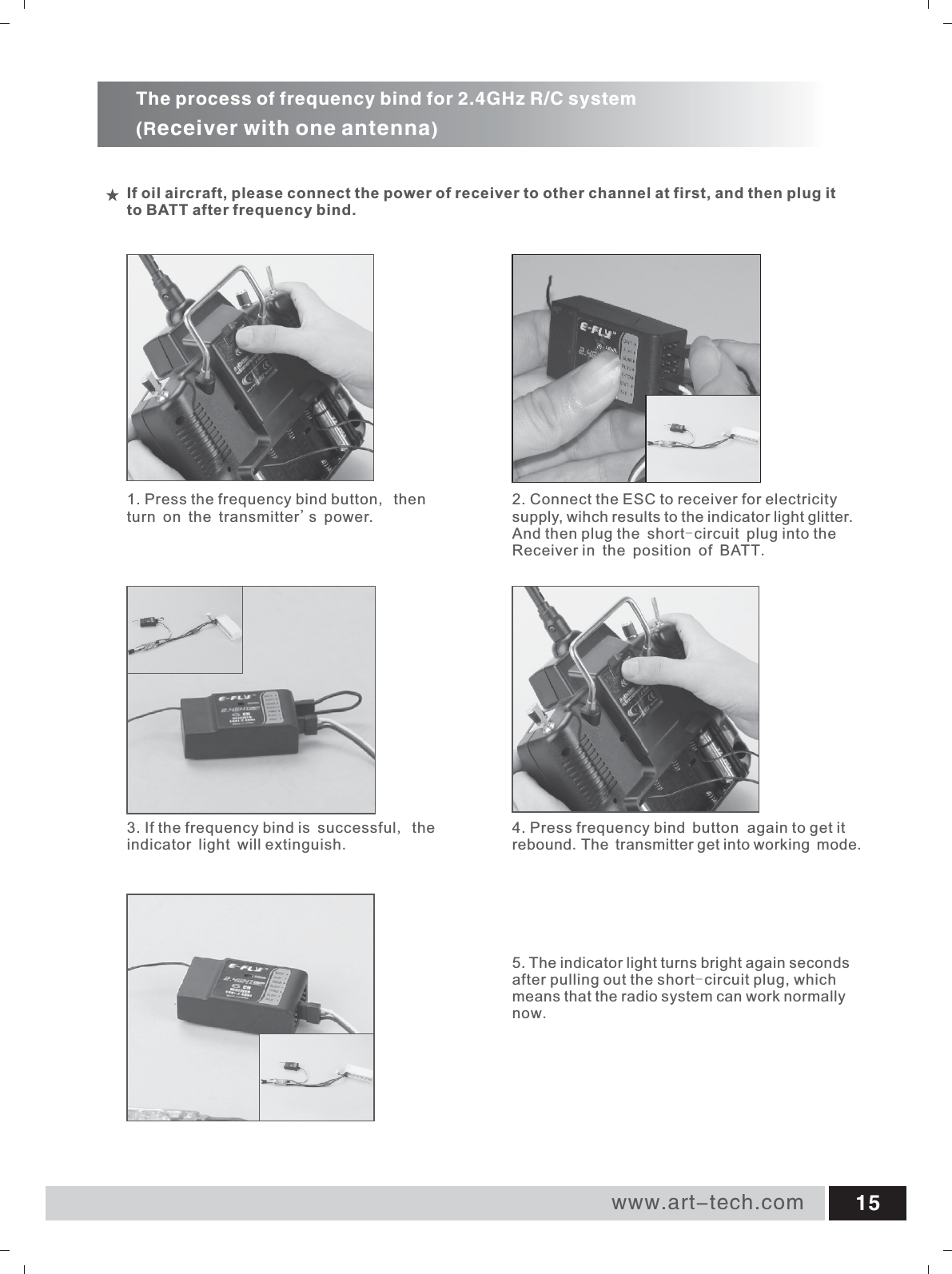
www.art-tech.com 154. Press frequency     again to get it rebound.The transmitter get into working mode.bind button1. Press the frequency bind button, then turn on the transmitter's power.5. The indicator light turns bright again seconds after pulling out the short-circuit plug, which means that the radio system can work normally now.3. If the frequency  is successful, the indicator light will extinguish.bind 2. Connect the ESC to receiver for electricity supply, wihch results to the indicator light glitter.And then plug the short-circuit plug into the Receiver in the position of BATT.If oil aircraft, please connect the power of receiver to other channel at first, and then plug it to BATT after frequency bind.The process of frequency bind for 2.4GHz R/C system(Receiver with one antenna)
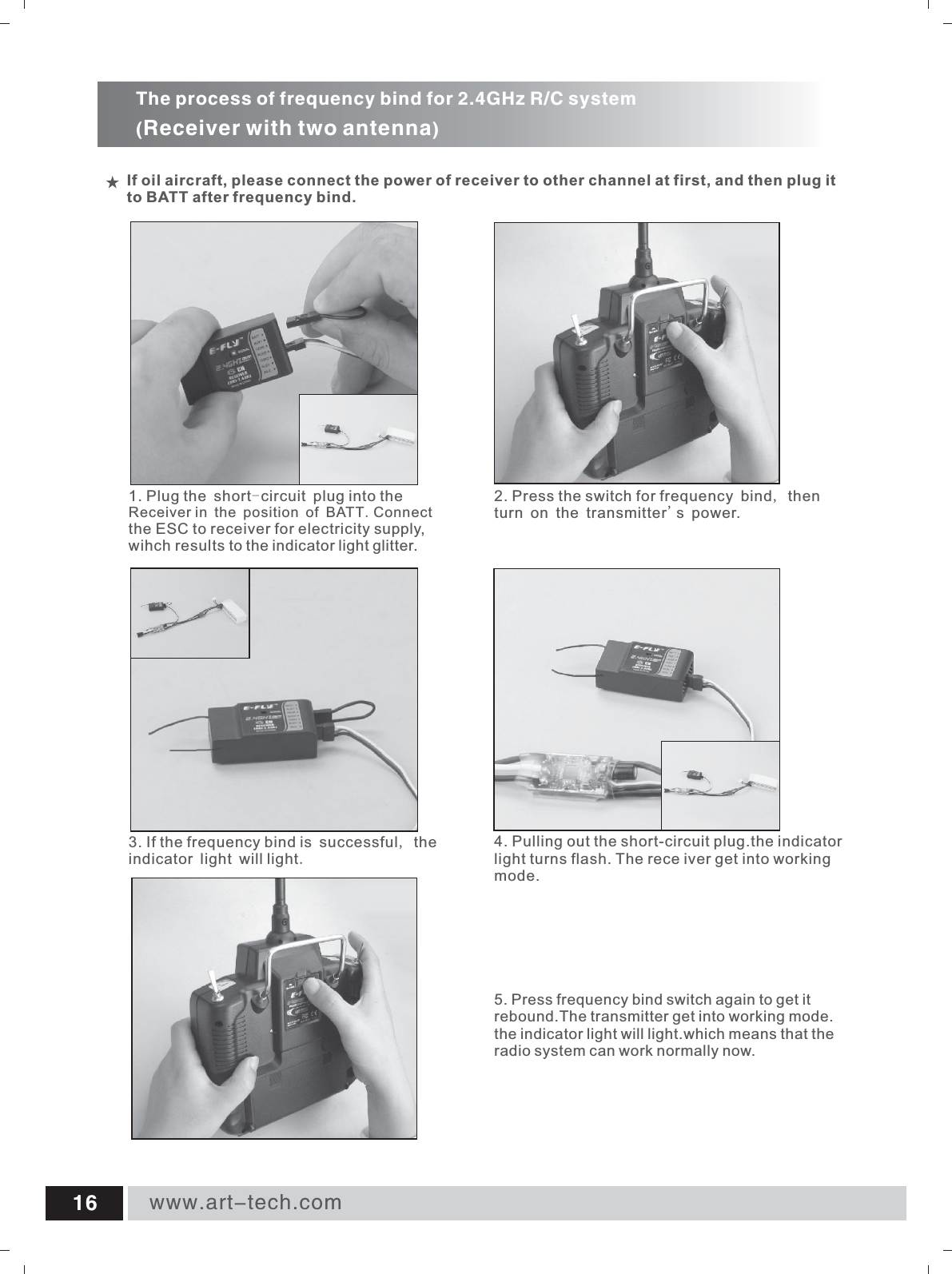
www.art-tech.com16If oil aircraft, please connect the power of receiver to other channel at first, and then plug it to BATT after frequency bind.The process of frequency bind for 2.4GHz R/C system(Receiver with two antenna)4. Pulling out the short-circuit plug.the indicator light turns flash. The rece iver get into working mode.2. Press the switch for frequency bind, then turn on the transmitter's power.5. rebound.The transmitter get into working mode.the indicator light will light.which means that the radio system can work normally now.Press frequency bind switch again to get it 3. If the frequency  is successful, the indicator light will light.bind 1. Receiver in the position of BATT.the ESC to receiver for electricity supply, wihch results to the indicator light glitter.Plug the short-circuit plug into the Connect
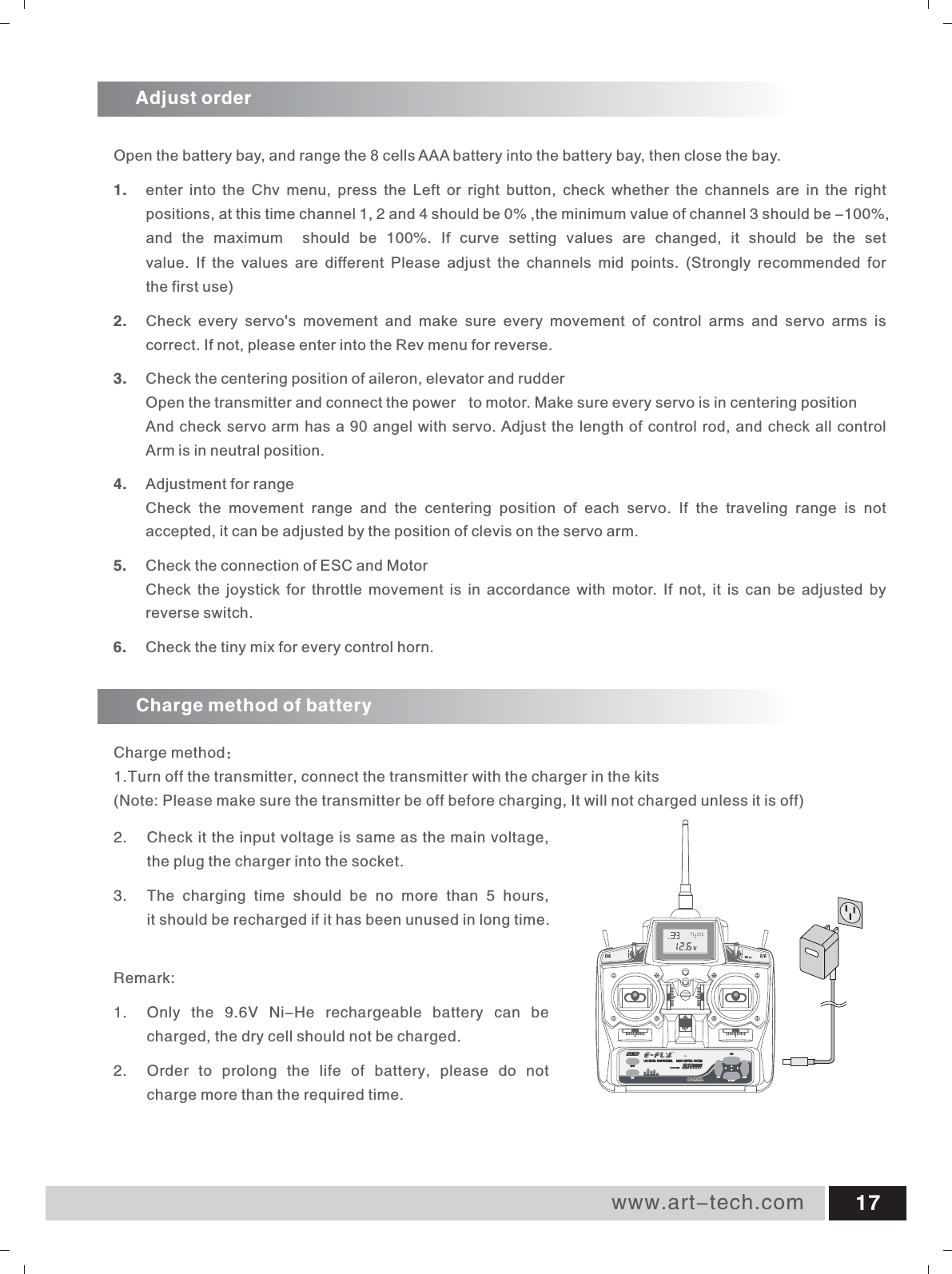
www.art-tech.com 17Adjust orderCharge method of batteryCharge method:1.Turn off the transmitter, connect the transmitter with the charger in the kits(Note: Please make sure the transmitter be off before charging, It will not charged unless it is off) Open the battery bay, and range the 8 cells AAA battery into the battery bay, then close the bay.1.  enter into the Chv menu,  press the Left or right button,  check whether the channels are in the right positions, at this time channel 1, 2 and 4 should be 0% ,the minimum value of channel 3 should be -100%, and the maximum  should be  100%.  If curve setting values are changed,  it should be the set value.  If the values are different Please adjust the channels mid points.  (Strongly recommended for the first use)2.  Check  every  servo's  movement  and  make  sure  every  movement  of  control  arms  and  servo  arms  is correct. If not, please enter into the Rev menu for reverse.3. Check the centering position of aileron, elevator and rudderOpen the transmitter and connect the power  to motor. Make sure every servo is in centering positionAnd check servo arm has a 90 angel with servo. Adjust the length of control rod, and check all controlArm is in neutral position.4.  Adjustment for rangeCheck  the  movement  range  and  the  centering  position  of  each  servo.  If  the  traveling  range  is  not accepted, it can be adjusted by the position of clevis on the servo arm.5. Check the connection of ESC and MotorCheck  the joystick  for  throttle movement  is  in  accordance with  motor.  If not,  it  is can  be  adjusted by reverse switch.6.  Check the tiny mix for every control horn.ETC62-2.4GHzLCD DIGITAL PROPORTIONAL  RADIO CONTROL SYSTEM MENULEFT RIGHTY/UPN/DOWNSUB2. Check it the input voltage is same as the main voltage, the plug the charger into the socket.3. The  charging  time  should  be  no  more  than  5  hours, it should be recharged if it has been unused in long time.Remark:1.  Only  the  9.6V  Ni-He  rechargeable  battery  can  be   charged, the dry cell should not be charged.2. Order  to  prolong  the  life  of  battery,  please  do  not charge more than the required time.
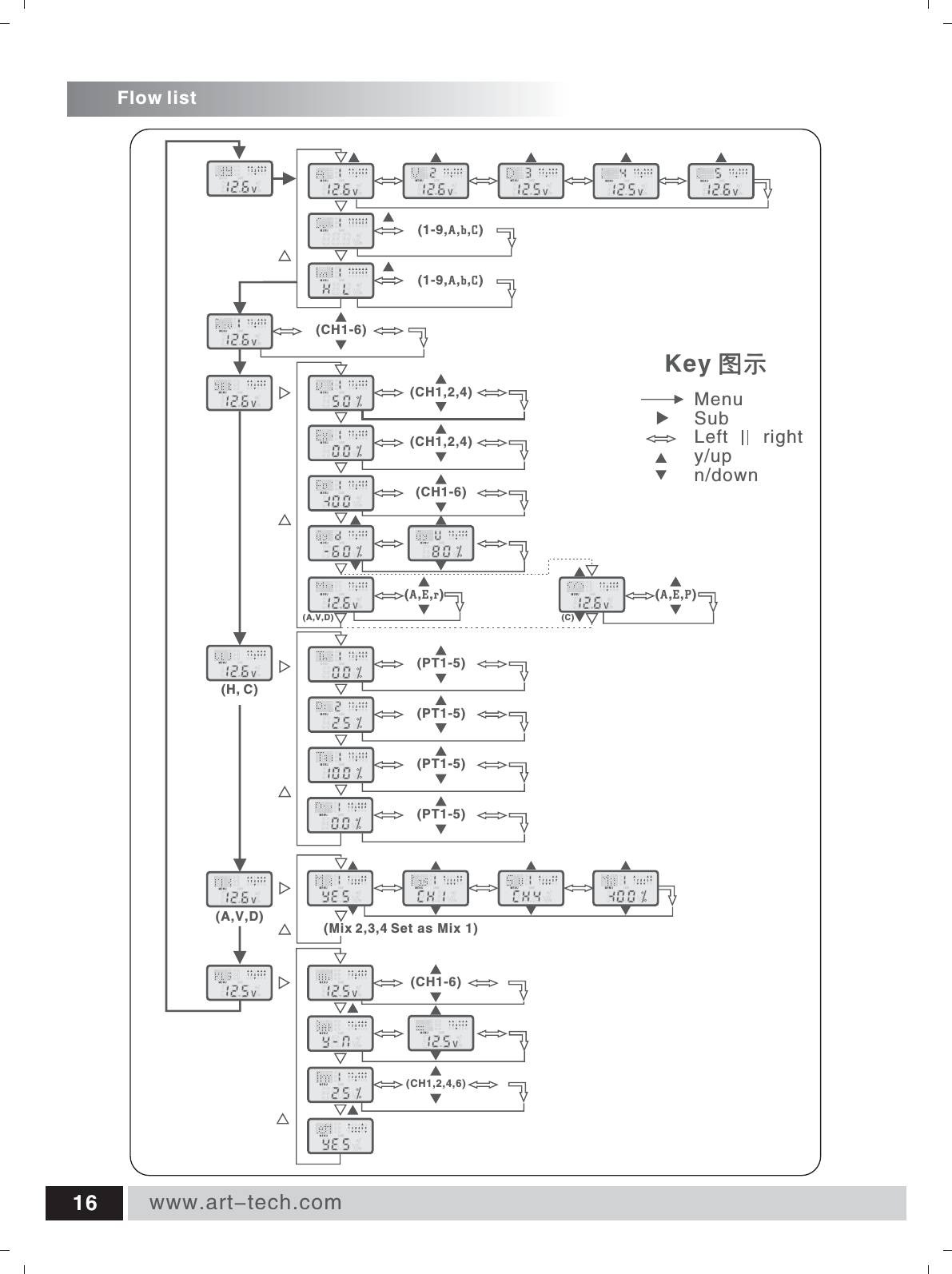
Flow listwww.art-tech.com16  (1-9,A,b,C)(CH1-6)(CH1-6)(CH1,2,4)(CH1,2,4)(PT1-5)(PT1-5)(PT1-5)(PT1-5)(H, C)(A,V,D) (CH1,2,4,6)(CH1-6) Key 图示MenuSubLeft       righty/upn/down(1-9,A,b,C)(Mix 2,3,4 Set as Mix 1)(AEr),, (AEP),,(C)(A,V,D)
FCC Statement This equipment has been tested and found to comply with the limits for a Class B digital device, pursuant to part 15 of the FCC rules. These limits are designed to provide reasonable protection against harmful interference in a residential installation. This equipment generates, uses and can radiate radio frequency energy and, if not installed and used in accordance with the instructions, may cause harmful interference to radio communications. However, there is no guarantee that interference will not occur in a particular installation. If this equipment does cause harmful interferenceto radio or television reception, which can be determined by turning the equipment off and on, the user is encouraged to try to correct the interference by one or more of the following measures: -Reorient or relocate the receiving antenna. -Increase the separation between the equipment and receiver. -Connect the equipment into an outlet on a circuit different from that to which the receiver is connected.-Consult the dealer or an experienced radio/TV technician for help. To assure continued compliance, any changes or modifications not expressly approved by the party responsible for compliance could void the user’s authority to operate this equipment. (Example- use only shielded interface cables when connecting to computer or peripheral devices). FCC Radiation Exposure Statement This equipment complies with FCC radiation exposure limits set forth for an uncontrolled environment and it also complies with Part 15 of FCC RF Rules. Operation is subject to the following two conditions: 1) This device may not cause interference and 2) This device must accept any interference, including interference that may cause undesired operation of the device. Caution!The manufacturer is not responsible for any radio or TV interference caused by unauthorized modifications to this equipment. Such modifications could void the user authority to operate the equipment. Declaration of Conformity Hereby, ShenZhen ART-TECH R/C Hobby Co., Ltd., declares that this device is in compliancewith the essential requirements and other relevant provisions of Directive 1999/5/EC.

Navigation menu