ShenZhen YuYuanXin Electronic Technology TNS1724 PRO WIRELESS CONTROLLER User Manual

ShenZhen YuYuanXin Electronic Technology Co., LTD. PRO WIRELESS CONTROLLER

User Manual

TNS-1724 SWITCH 蓝牙手柄操作说明TNS-1724 SWITCH Bluetooth handle operation manual产品名称:SWITCH蓝牙手柄Product name:SWITCH Bluetooth handle产品编号:TNS-1724Product number:TNS-1724尊敬的用户:Respected users:非常感谢你选用该款Switch/安卓游戏手柄.请在使用前,详细阅读本手册,以便正确操作使用,更好的发挥产品优越性能。本手册中的说明基于设备的默认设置;本手册中的所有图片,陈述及文字信息仅供参考,请以实际产品为准。如有内容更新恕不另行通知。这些更新会重新编入新版手册中,本公司保留最终解释权。可用功能和附加服务可能因设备,软件或服务提供商而异。如果有印刷错误或翻译失误望广大用户谅解。Thank you very much for choosing the switch / Android game handle. Please read this manual carefully before you use itso that you can use it correctly and give full play to the superior performance of the product. The instructions in this manualare based on the device's default settings; All pictures, statements and written information in this manual are for referenceonly. Please refer to the actual product. Content is subject to update without prior notice. These updates will bereprogrammed in the new edition of the manual, the company reserves the right of final interpretation. Available featuresand additional services may vary depending on the device, software, or service provider. If there is a print error or atranslation error, it is expected to be understood by the vast number of users.一、产品概述:I. Overview of products:1.该产品主要用于Switch游戏主机,兼容安卓系统的手机,平板,电视,TV BOX,平板等带蓝牙功能的设备.1.The product is mainly used for Switch game console, compatible Android mobile phone, tablet, TV box, tablet andother devices with Bluetooth capabilities.2.该手柄由15个数字按键(UP,DOWN,LEFT,RIGHT,A,B,X,Y,L1,L2, R1,R2,L3,R3,SELECT,START,HOME和两个模拟 3D 摇杆组成。2. The handle consists of 15 digital buttons, (UP,DOWN,LEFT,RIGHT,A,B,X,Y,L1,L2, R1,R2,L3,R3,SELECT,START,HOME and two simulated 3D rockers.二、操作说明:II. Description of operations:Switch主机设置:Switch host settings:1、把主机的(System Setting ->Ariplane Mode off。1. Make the host system Setting-> Ariplane Mode off.2、在主机主页面选择Controllers ->Change Grip/Order,让主机处于搜索蓝牙设备状态。(回连不需要此操作)2. Select Controllers-> Change grip / order on the host main page to make the host in the state of searching Bluetoothdevice.(The operation does not need this operation)3、注意:若主机很难配对手柄,有可能是主机连接了太多的蓝牙设备,需要手动清除蓝牙信息(SystemSetting->Controllers and Sensors->Disconnect Controllers);3. Note:If the host is difficult to match the handle, it may be that the host is connected to too many Bluetooth devices andneeds to manually clear the Bluetooth information(System Setting->Controllers and Sensors->Disconnect Controllers);4、手柄Switch模式配对Switch主机:4. Handle Switch mode pairing Switch host:
手柄关机状态下,同时按住Y加HOME键开机,4个LED为流水灯状态,连接成功对应的通道指示灯常亮。When the handle is turned off, press and hold Y + HOME key to turn on, 4 LED are flicking constantly, thecorresponding channel indicator lamp is always on.5、Switch手柄Sensor的校准5. Sensor calibration of Switch handle出厂校准:手柄关机状态下:① 按B加减号键+Home开机,4个LED分成2组,交替闪烁; ② 将手柄放置于水平桌面,然后按加号键开始出厂校准,3s内自动完成。Factory calibration: When the handle is off:1.press B plus minus key and Home to turn on, 4 LED are divided into 2groups, alternately flickering;2. Place the handle on the horizontal desktop and press the plus key to start the factorycalibration within 3 s主机对sensors的校准:①手柄连上主机后,放置于水平桌面;②主机进入System Setting->Controllers andSensors->Calibrate Motion Controls,长按手柄的“+”或者“-”号键开始校准。Sensors calibration by host:(1) After the handle is connected to the host computer, it is placed on the horizontal desktop;2Host enters System Setting- > Controllers and Sensor-> Calibrate Motion Controls. Long press the "+" or "-" keys of thehandle to begin calibration.手柄安卓模式配对安卓主机:The handle Android mode matches the Android host:6、同时按住B键加HOME键3S, LED1快闪过入蓝牙配对模式,搜索设备名Gamepad,点击设Gamepad蓝牙设备名连接,蓝牙配对连接上后,LED1指示灯常亮,此时为Gamepad模式。6. press and hold B key and HOME key for 3S, LED1 flashes with Bluetooth pairing mode, search device namedGamepad, click to set the name of Gamepad Bluetooth device to connect. After pairing and connecting Bluetooth, the LED1indicator lights on, and now it’s Gamepad mode.7.自动回连7. Automatic reconnection手柄关机状态下,按下HOME键1秒唤醒手柄,被唤醒后会自动连接与之配对的主机回连,10秒回连不成功则自动休眠;其它按键无唤醒功能。When the handle is turned off, press the HOME button for 1 second to wake up the handle, and automatically connectwith the matching host when awakened, and automatically sleep if backconnect fails for 10 seconds; Other buttons have nowake-up function.8、手柄关机与休眠8. The handle shuts down and sleeps长按Home键5s可以关闭手柄;Long press Home key for 5s can close handle;手柄连接成功后,5min不操作,会自动进入休眠状态;If the handle is not operated for 5 minutes after successful connection, it will automatically enter the dormant state.主机屏幕关闭,手柄自动休眠Host screen shuts down, handle automatically dormant9、低电压报警及充电9. Low voltage alarm and charging如果锂电池电压低于3.55V±0.1V则手柄上的充电指示灯快速闪烁,表示手柄电池低电压报警,灯快闪提示电压低;此时插入USB充电线给手柄充电,充电时,手柄上的红色灯亮,充饱后熄灭。If the voltage of the lithium battery is less than 3.55V + 0.1V, the charging indicator on the handle flashes quickly,
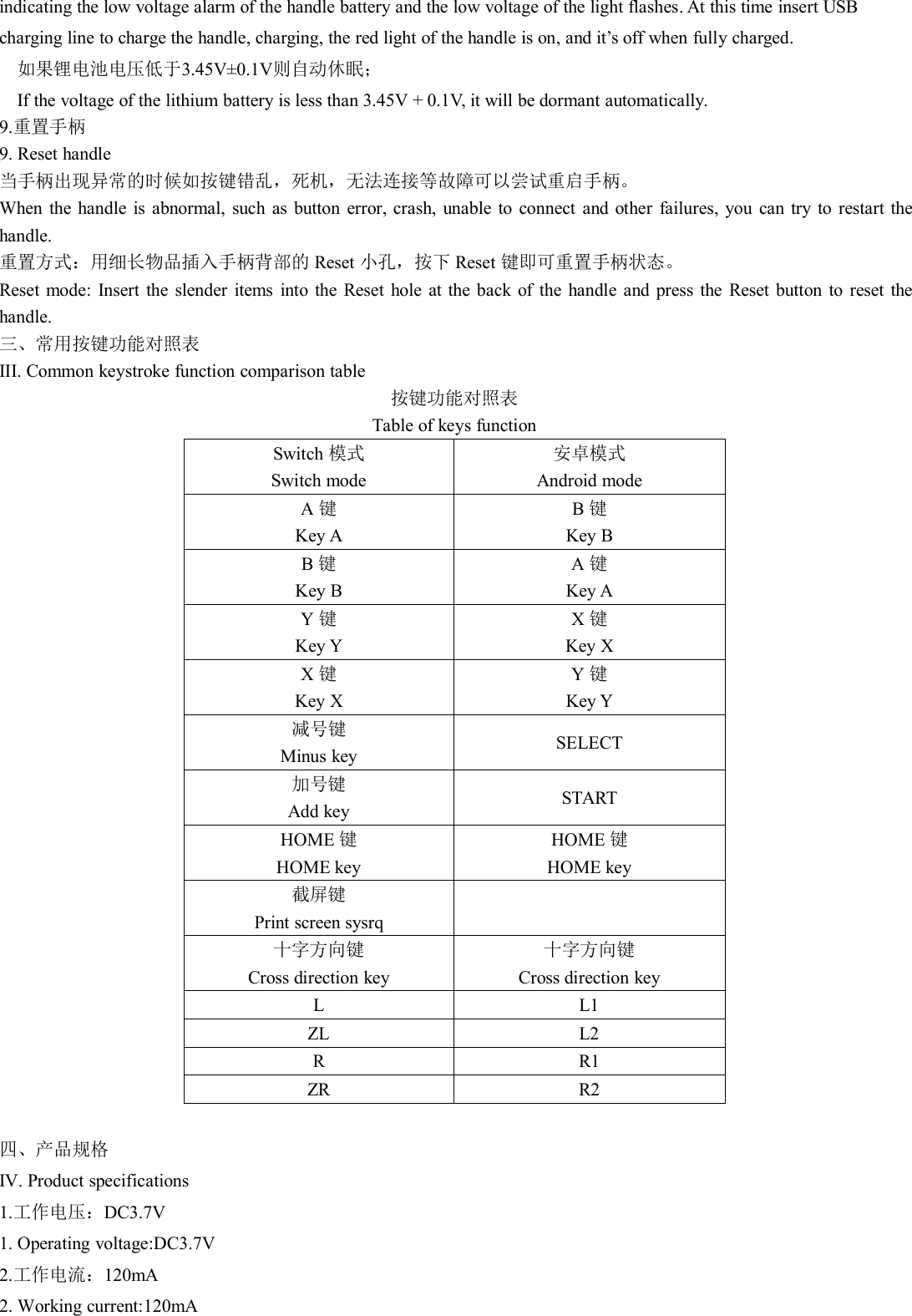
indicating the low voltage alarm of the handle battery and the low voltage of the light flashes. At this time insert USBcharging line to charge the handle, charging, the red light of the handle is on, and it’s off when fully charged.如果锂电池电压低于3.45V±0.1V则自动休眠;If the voltage of the lithium battery is less than 3.45V + 0.1V, it will be dormant automatically.9.重置手柄9. Reset handle当手柄出现异常的时候如按键错乱,死机,无法连接等故障可以尝试重启手柄。When the handle is abnormal, such as button error, crash, unable to connect and other failures, you can try to restart thehandle.重置方式:用细长物品插入手柄背部的 Reset 小孔,按下 Reset 键即可重置手柄状态。Reset mode: Insert the slender items into the Reset hole at the back of the handle and press the Reset button to reset thehandle.三、常用按键功能对照表III. Common keystroke function comparison table按键功能对照表Table of keys functionSwitch 模式Switch mode安卓模式Android modeA键Key AB键Key BB键Key BA键Key AY键Key YX键Key XX键Key XY键Key Y减号键Minus keySELECT加号键Add keySTARTHOME 键HOME keyHOME 键HOME key截屏键Print screen sysrq十字方向键Cross direction key十字方向键Cross direction keyLL1ZLL2RR1ZRR2四、产品规格IV. Product specifications1.工作电压:DC3.7V1. Operating voltage:DC3.7V2.工作电流:120mA2. Working current:120mA
3.静态电流: ≤2UA3. Static current: less than 2UA4.充电输入电压:DC5V4. Charging input voltage:DC5V5.电流:≤500MA5. Current:≤500MA6.蓝牙传输距离:≥8M6. Bluetooth transmission distance:More than 8M7.电池容量:400MA/H7. Battery capacity:400MA/H8.使用时间:4小时8. Duration of use:4 Hours9.充电时间:3小时左右9. Charging time:About 3 hours.五、注意事项V. Notice1.为了正常的使用本产品,请在使用前对产品进行全面充电。1. In order to use this product normally, please charge the product fully before using.2.为了保障蓝牙连接顺利,请在对产品进行连接前,将蓝牙设备中显示的其他设备进行删除。2.In order to ensure a smooth Bluetooth connection, remove other devices displayed in the Bluetooth device beforeconnecting to the product.3.如果产品长时间未进行使用,或其他非法操作引起的工作异常,不能进行正常开关机操作,可以对产品进行复位设置,复位按键在产品背部小圆孔内,可以采用尖锐物体进行操作。3. If the product has not been used for a long time, or other illegal operation caused by abnormal work, you cannot operatethe normal switch machine, and you can reset the product. The reset button is in the back of the product in the small roundhole. You can operate with sharp objects.4.勿让儿童玩弄本产品。4. Do not let children play with this product.5.勿私自拆解本产品,5. Do not unpack this product privately,六.安卓游戏平台推荐VI. Android gaming platform recommendations请下载一个游戏模拟器(如小鸡模拟器http://www.xiaoji001.com或葡萄游戏厅模拟器 http://www. putaoDownload a game simulator (E. g. Chicken Simulator http://www.xiaoji001.com or Grape Game Room Simulator http: / /www. putao)game.com)KO电玩城,棉花糖等安卓模拟器并安装在安卓设备上,打开游戏模拟器并下载安装好里面的游Game.com)KO video game city, cotton candy and other Android simulators and install on Android devices, open the gamesimulator and download the installed game and play it.戏即可体验游戏.因安卓系统为开放性平台,各游戏厂家设计标准不统一,会导致手柄不能能使用全部游戏,敬请见谅!Because Android is an open platform, game manufacturers design standards are not uniform, which will lead to that thehandle may not use all the games.
FCC STATEMENT :This device complies with Part 15 of the FCC Rules. Operation is subjectto the following two conditions:(1) This device may not cause harmful interference, and(2) This device must accept any interference received, includinginterference that may cause undesired operation.Warning: Changes or modifications not expressly approved by the partyresponsible for compliance could void the user's authority to operate theequipment.NOTE: This equipment has been tested and found to comply with thelimits for a Class B digital device, pursuant to Part 15 of the FCC Rules.These limits are designed to provide reasonable protection againstharmful interference in a residential installation. This equipmentgenerates uses and can radiate radio frequency energy and, if notinstalled and used in accordance with the instructions, may cause harmfulinterference to radio communications. However, there is no guaranteethat interference will not occur in a particular installation. If this equipmentdoes cause harmful interference to radio or television reception, whichcan be determined by turning the equipment off and on, the user isencouraged to try to correct the interference by one or more of thefollowing measures:Reorient or relocate the receiving antenna.Increase the separation between the equipment and receiver.Connect the equipment into an outlet on a circuit different from that towhich the receiver is connected.Consult the dealer or an experienced radio/TV technician for help.RF warning statement:The device has been evaluated to meet general RF exposurerequirement. The device can be used in portable exposure conditionwithout restriction.

Navigation menu