ShenZhen YuYuanXin Electronic Technology TP4-022 2.4 G wireless keyboard User Manual SPECIFICATION FOR APPROVAL

ShenZhen YuYuanXin Electronic Technology Co., LTD. 2.4 G wireless keyboard SPECIFICATION FOR APPROVAL

User Manual

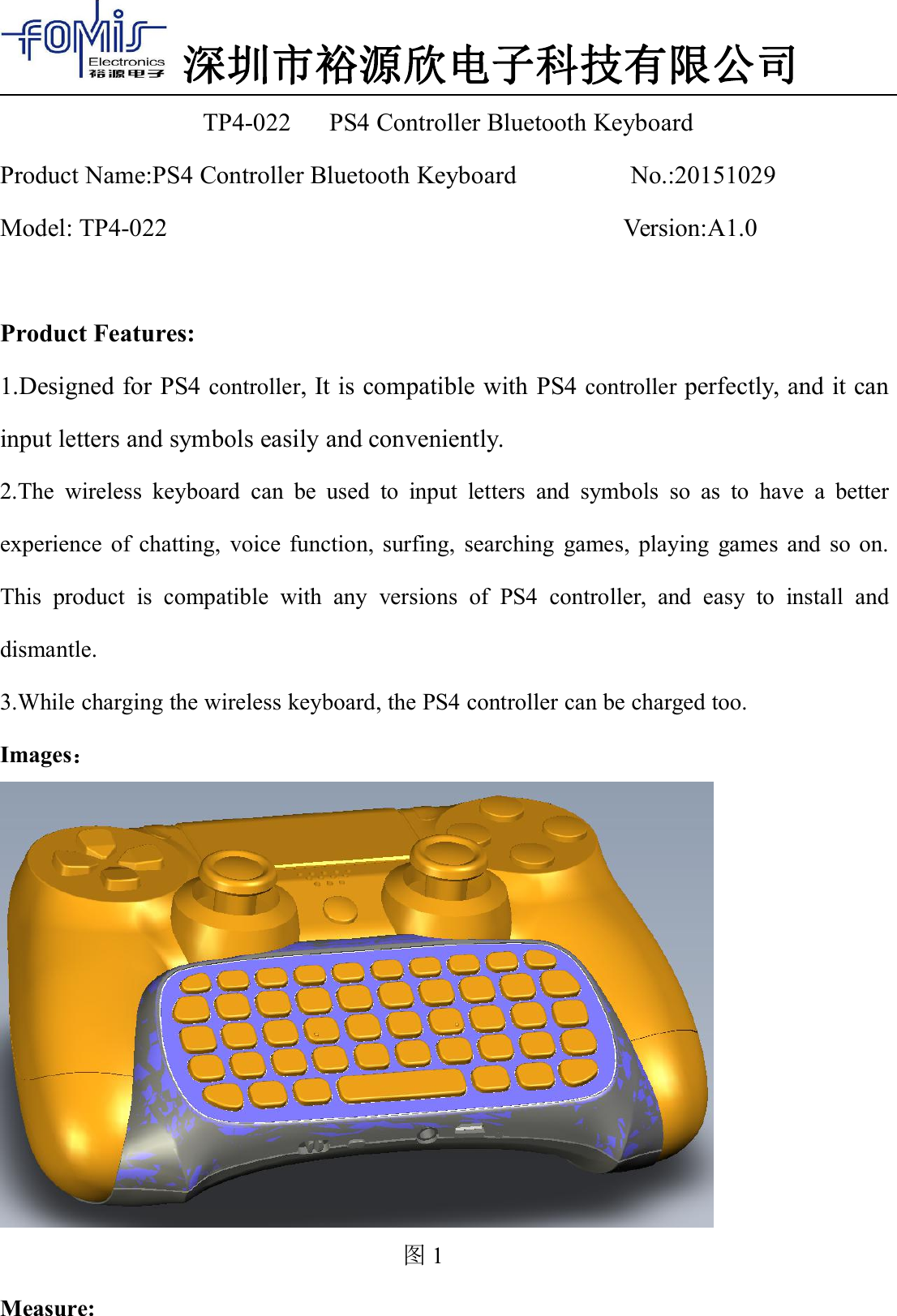
深圳市裕源欣电子科技有限公司TP4-022 PS4 Controller Bluetooth KeyboardProduct Name:PS4 Controller Bluetooth Keyboard No.:20151029Model: TP4-022 Version:A1.0Product Features:1.Designed for PS4 controller, It is compatible with PS4 controller perfectly, and it caninput letters and symbols easily and conveniently.2.The wireless keyboard can be used to input letters and symbols so as to have a betterexperience of chatting, voice function, surfing, searching games, playing games and so on.This product is compatible with any versions of PS4 controller, and easy to install anddismantle.3.While charging the wireless keyboard, the PS4 controller can be charged too.Images:图1Measure:
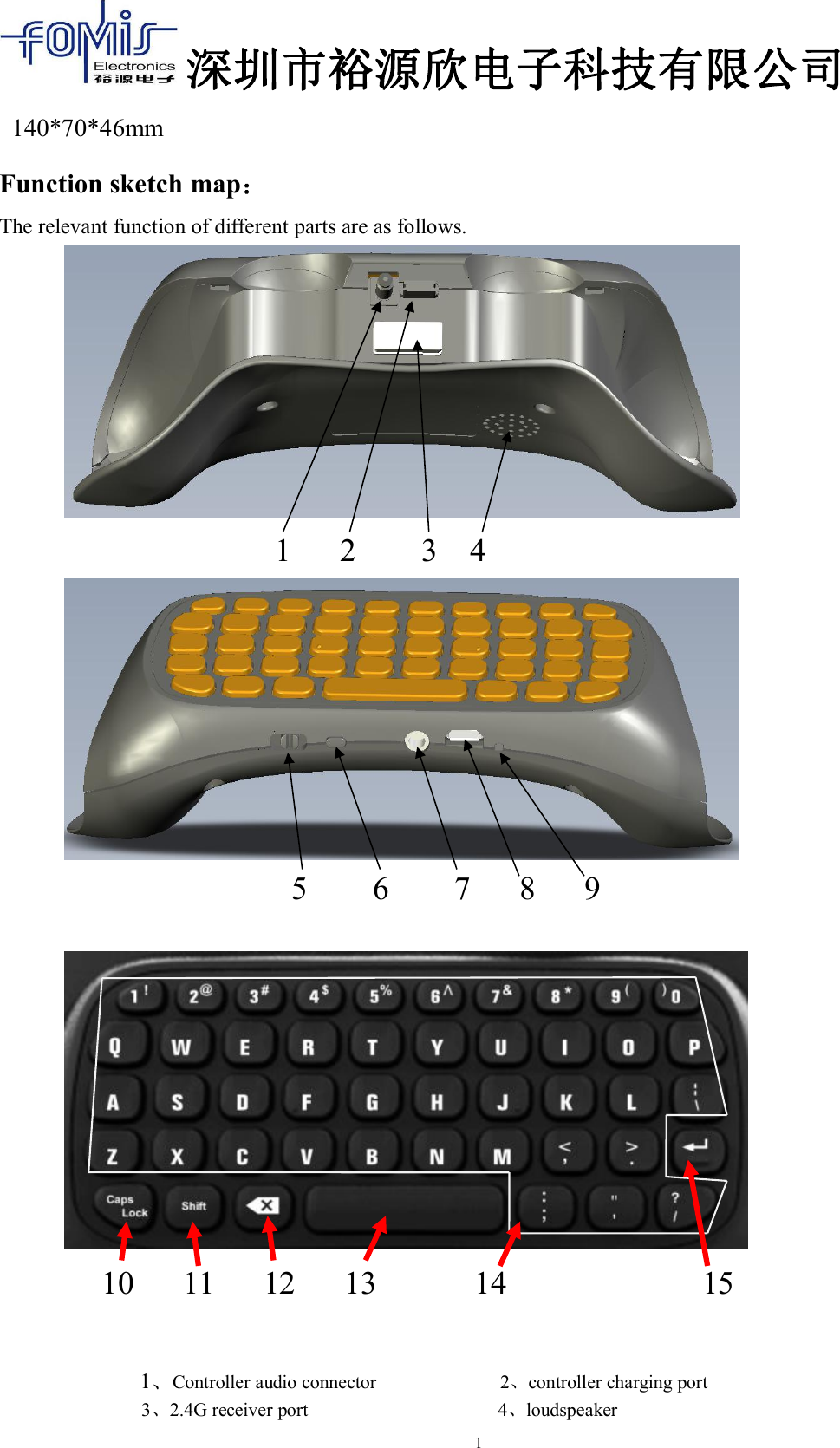
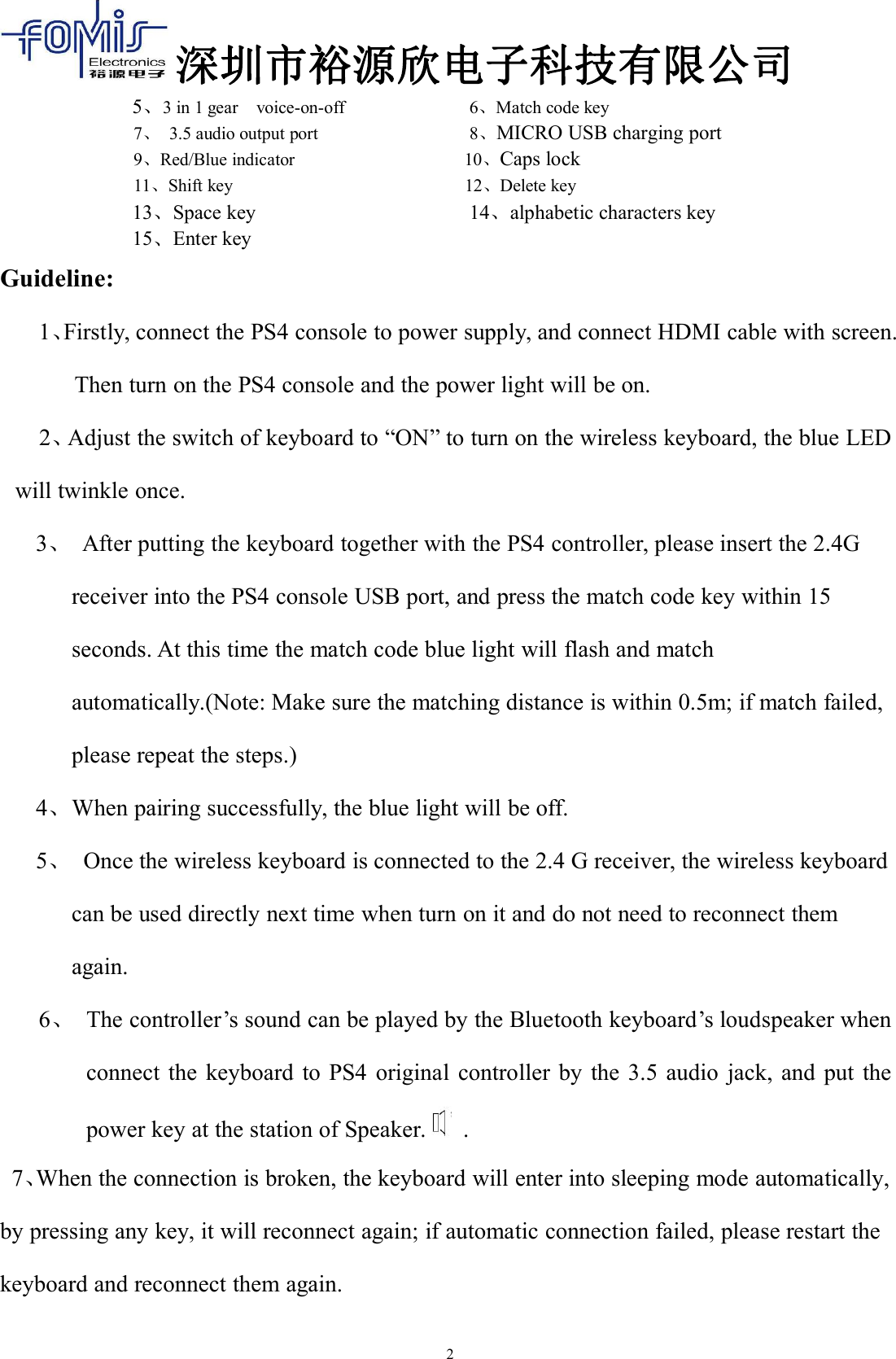
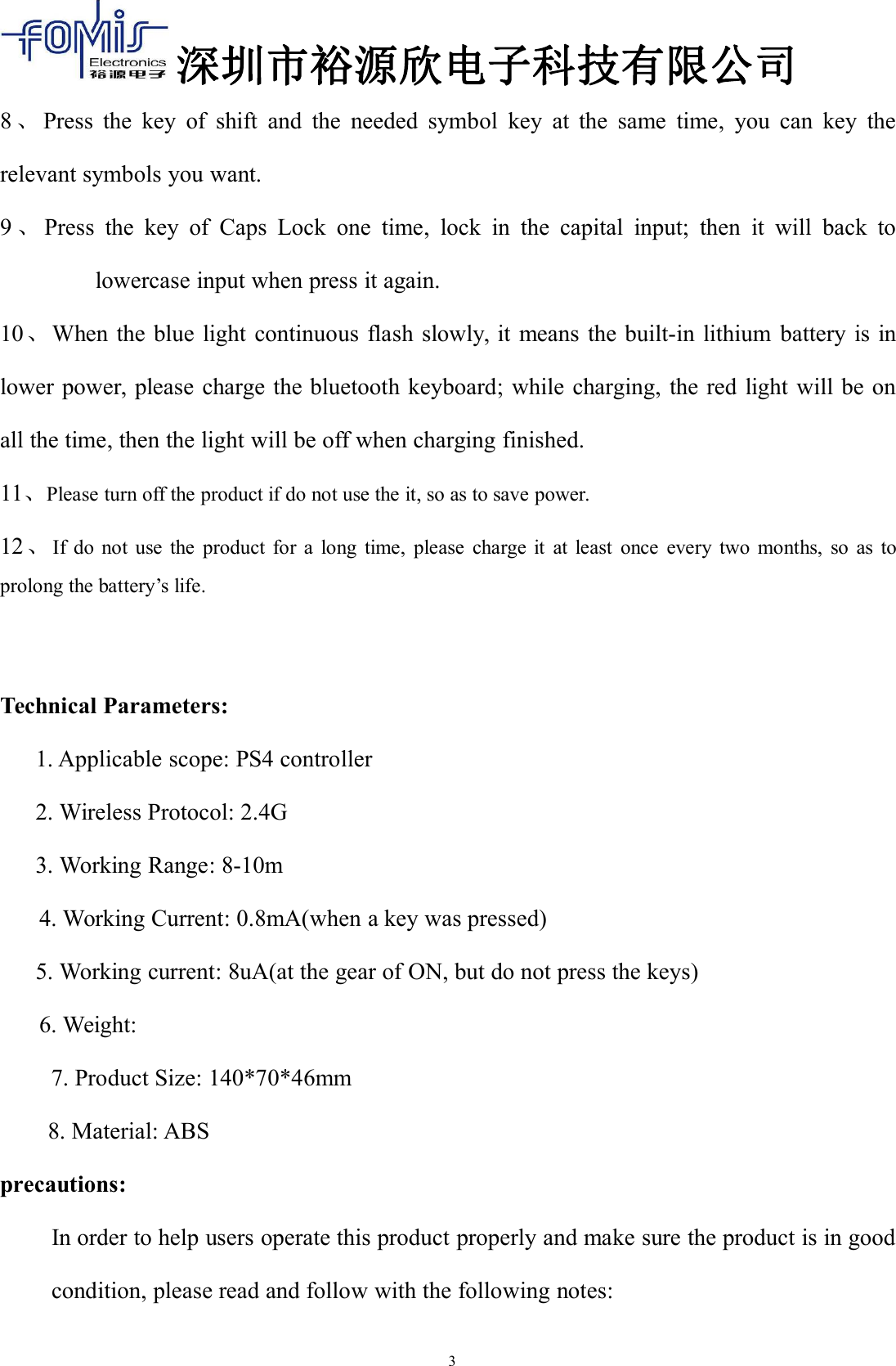
深圳市裕源欣电子科技有限公司1140*70*46mmFunction sketch map:The relevant function of different parts are as follows.1 2 3 45 6 7 8 910 11 12 13 14 151、Controller audio connector 2、controller charging port3、2.4G receiver port 4、loudspeaker
深圳市裕源欣电子科技有限公司25、3 in 1 gear voice-on-off 6、Match code key7、3.5 audio output port 8、MICRO USB charging port9、Red/Blue indicator 10、Caps lock11、Shift key 12、Delete key13、Space key 14、alphabetic characters key15、Enter keyGuideline:1、Firstly, connect the PS4 console to power supply, and connect HDMI cable with screen.Then turn on the PS4 console and the power light will be on.2、Adjust the switch of keyboard to “ON” to turn on the wireless keyboard, the blue LEDwill twinkle once.3、After putting the keyboard together with the PS4 controller, please insert the 2.4Greceiver into the PS4 console USB port, and press the match code key within 15seconds. At this time the match code blue light will flash and matchautomatically.(Note: Make sure the matching distance is within 0.5m; if match failed,please repeat the steps.)4、When pairing successfully, the blue light will be off.5、Once the wireless keyboard is connected to the 2.4 G receiver, the wireless keyboardcan be used directly next time when turn on it and do not need to reconnect themagain.6、The controller’s sound can be played by the Bluetooth keyboard’s loudspeaker whenconnect the keyboard to PS4 original controller by the 3.5 audio jack, and put thepower key at the station of Speaker. .7、When the connection is broken, the keyboard will enter into sleeping mode automatically,by pressing any key, it will reconnect again; if automatic connection failed, please restart thekeyboard and reconnect them again.
深圳市裕源欣电子科技有限公司38、Press the key of shift and the needed symbol key at the same time, you can key therelevant symbols you want.9、Press the key of Caps Lock one time, lock in the capital input; then it will back tolowercase input when press it again.10、When the blue light continuous flash slowly, it means the built-in lithium battery is inlower power, please charge the bluetooth keyboard; while charging, the red light will be onall the time, then the light will be off when charging finished.11、Please turn off the product if do not use the it, so as to save power.12、If do not use the product for a long time, please charge it at least once every two months, so as toprolong the battery’s life.Technical Parameters:1. Applicable scope: PS4 controller2. Wireless Protocol: 2.4G3. Working Range: 8-10m4. Working Current: 0.8mA(when a key was pressed)5. Working current: 8uA(at the gear of ON, but do not press the keys)6. Weight:7. Product Size: 140*70*46mm8. Material: ABSprecautions:In order to help users operate this product properly and make sure the product is in goodcondition, please read and follow with the following notes:
深圳市裕源欣电子科技有限公司4●Do not seriously bump the product.●Keep the product away from benzene, thinner and other chemicals.●Keep away from strong magnetic field, electric field.●Please keep away from the direct ray or heating apparatus.●Do not dismantle, repair or remould it by yourself.●Discarded package, battery, disused electronic products shall be classifiedproperly.
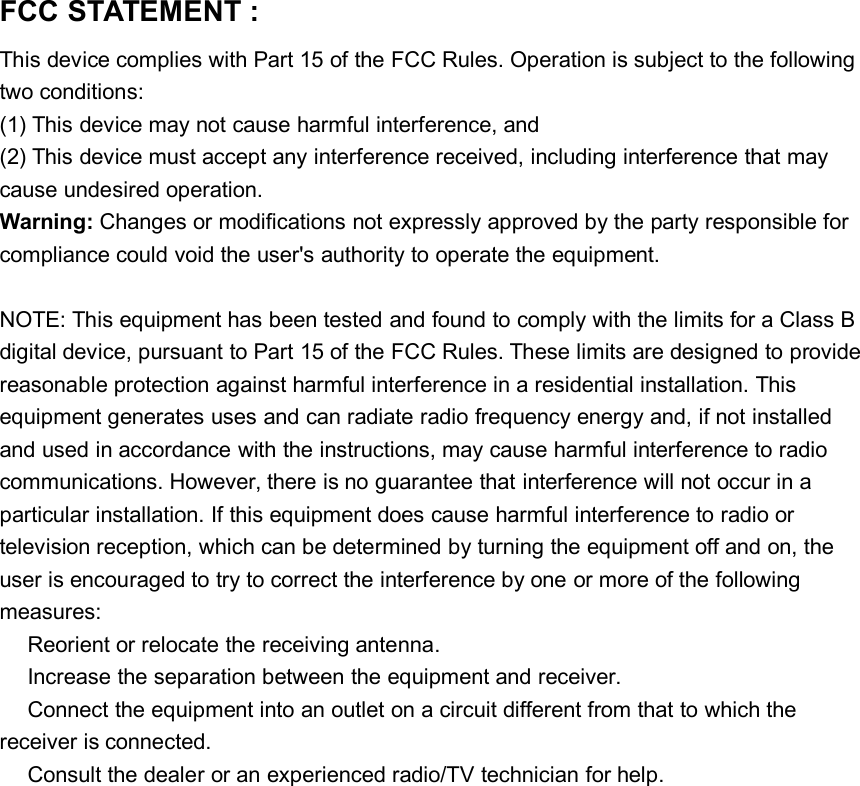
FCC STATEMENT :This device complies with Part 15 of the FCC Rules. Operation is subject to the followingtwo conditions:(1) This device may not cause harmful interference, and(2) This device must accept any interference received, including interference that maycause undesired operation.Warning: Changes or modifications not expressly approved by the party responsible forcompliance could void the user's authority to operate the equipment.NOTE: This equipment has been tested and found to comply with the limits for a Class Bdigital device, pursuant to Part 15 of the FCC Rules. These limits are designed to providereasonable protection against harmful interference in a residential installation. Thisequipment generates uses and can radiate radio frequency energy and, if not installedand used in accordance with the instructions, may cause harmful interference to radiocommunications. However, there is no guarantee that interference will not occur in aparticular installation. If this equipment does cause harmful interference to radio ortelevision reception, which can be determined by turning the equipment off and on, theuser is encouraged to try to correct the interference by one or more of the followingmeasures:Reorient or relocate the receiving antenna.Increase the separation between the equipment and receiver.Connect the equipment into an outlet on a circuit different from that to which thereceiver is connected.Consult the dealer or an experienced radio/TV technician for help.

Navigation menu