ShenZhen YuYuanXin Electronic Technology TYX586 2.4G Wireless Keyboard User Manual Users manual

ShenZhen YuYuanXin Electronic Technology Co., LTD. 2.4G Wireless Keyboard Users manual

Users manual

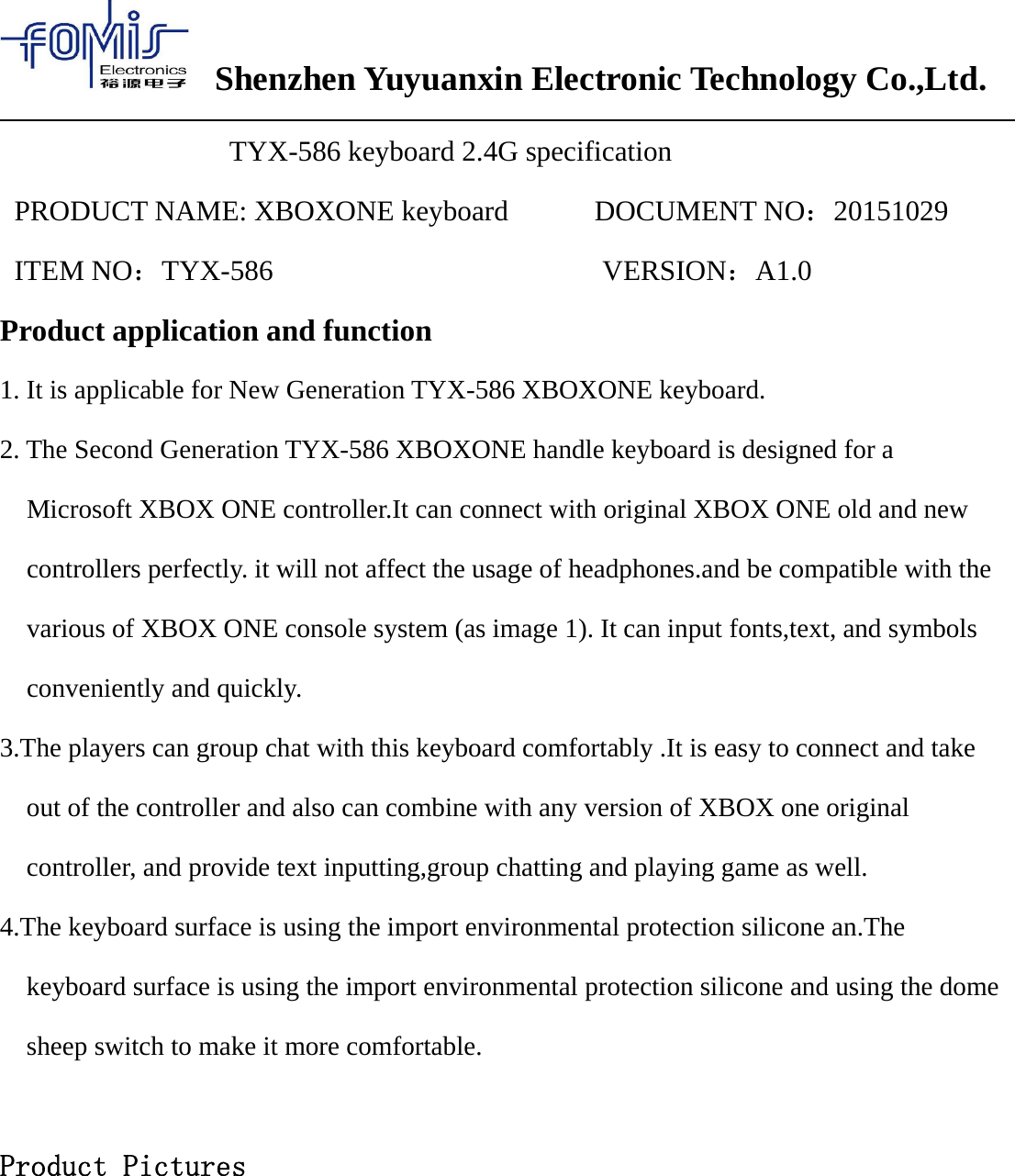
Shenzhen Yuyuanxin Electronic Technology Co.,Ltd.TYX-586 keyboard 2.4G specificationPRODUCT NAME: XBOXONE keyboard DOCUMENT NO:20151029ITEM NO:TYX-586 VERSION:A1.0Product application and function1. It is applicable for New Generation TYX-586 XBOXONE keyboard.2. The Second Generation TYX-586 XBOXONE handle keyboard is designed for aMicrosoft XBOX ONE controller.It can connect with original XBOX ONE old and newcontrollers perfectly. it will not affect the usage of headphones.and be compatible with thevarious of XBOX ONE console system (as image 1). It can input fonts,text, and symbolsconveniently and quickly.3.The players can group chat with this keyboard comfortably .It is easy to connect and takeout of the controller and also can combine with any version of XBOX one originalcontroller, and provide text inputting,group chatting and playing game as well.4.The keyboard surface is using the import environmental protection silicone an.Thekeyboard surface is using the import environmental protection silicone and using the domesheep switch to make it more comfortable.Product Pictures
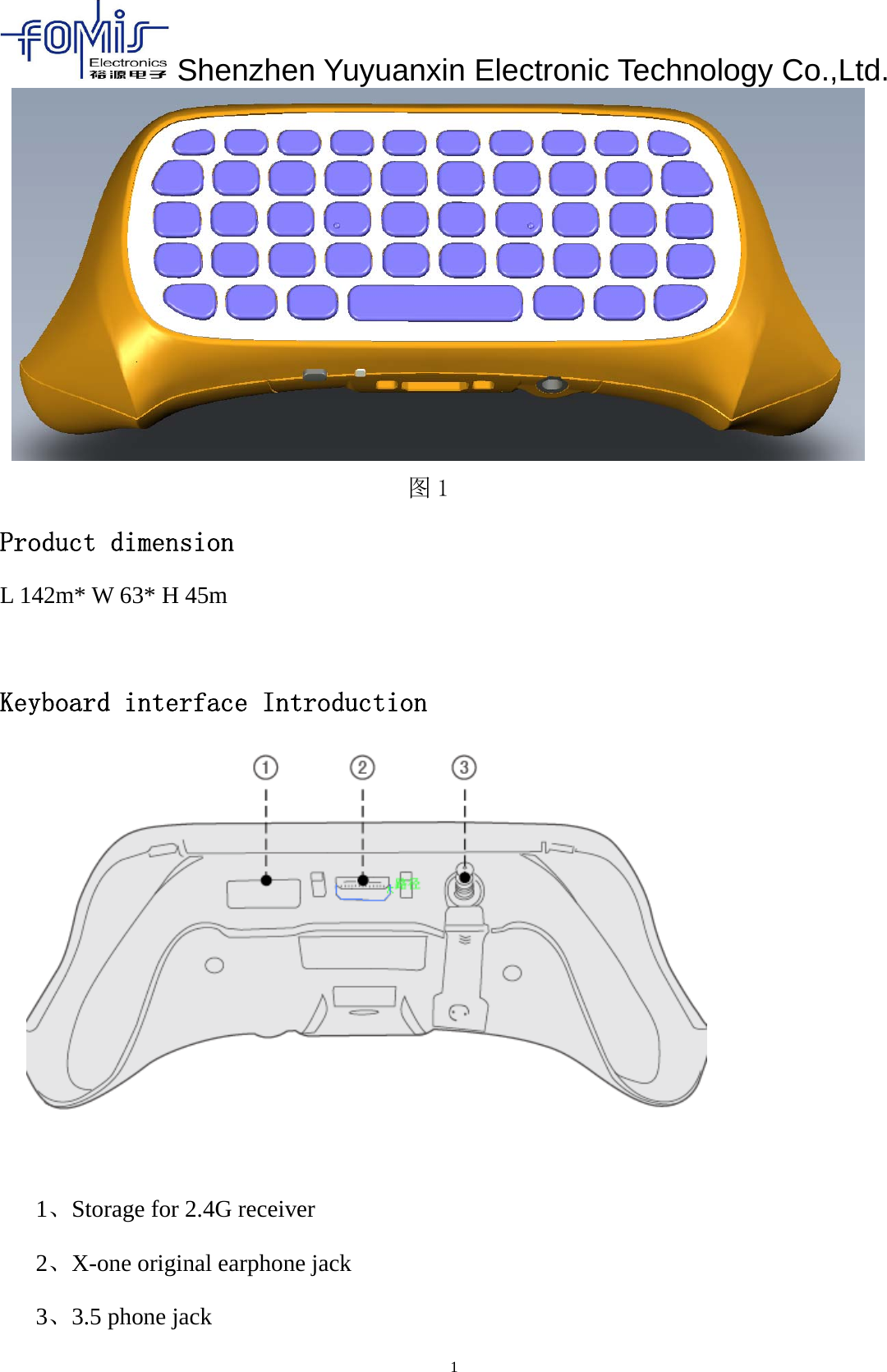
Shenzhen Yuyuanxin Electronic Technology Co.,Ltd.1图1Product dimensionL 142m* W 63* H 45mKeyboard interface Introduction1、Storage for 2.4G receiver2、X-one original earphone jack3、3.5 phone jack
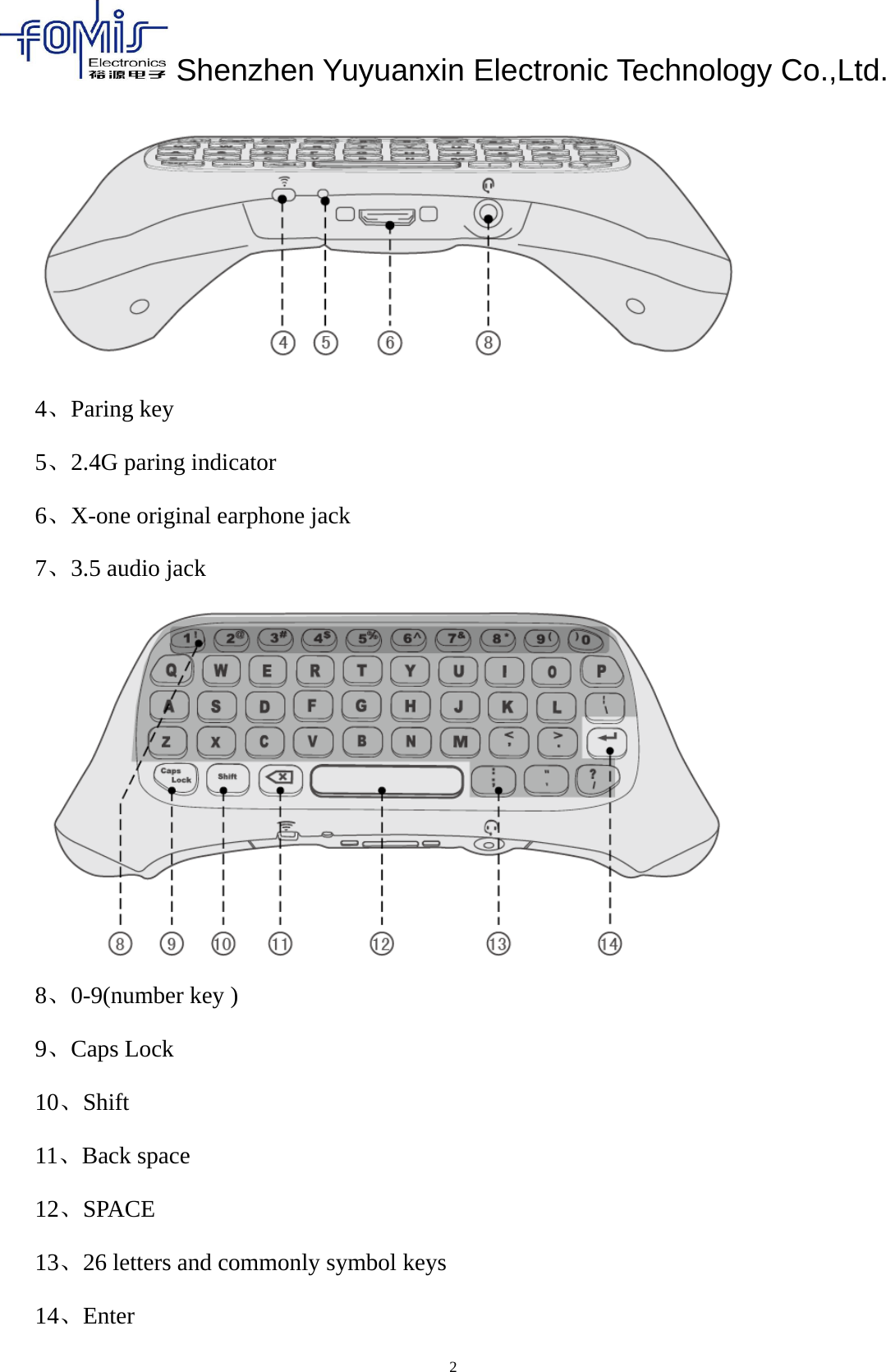
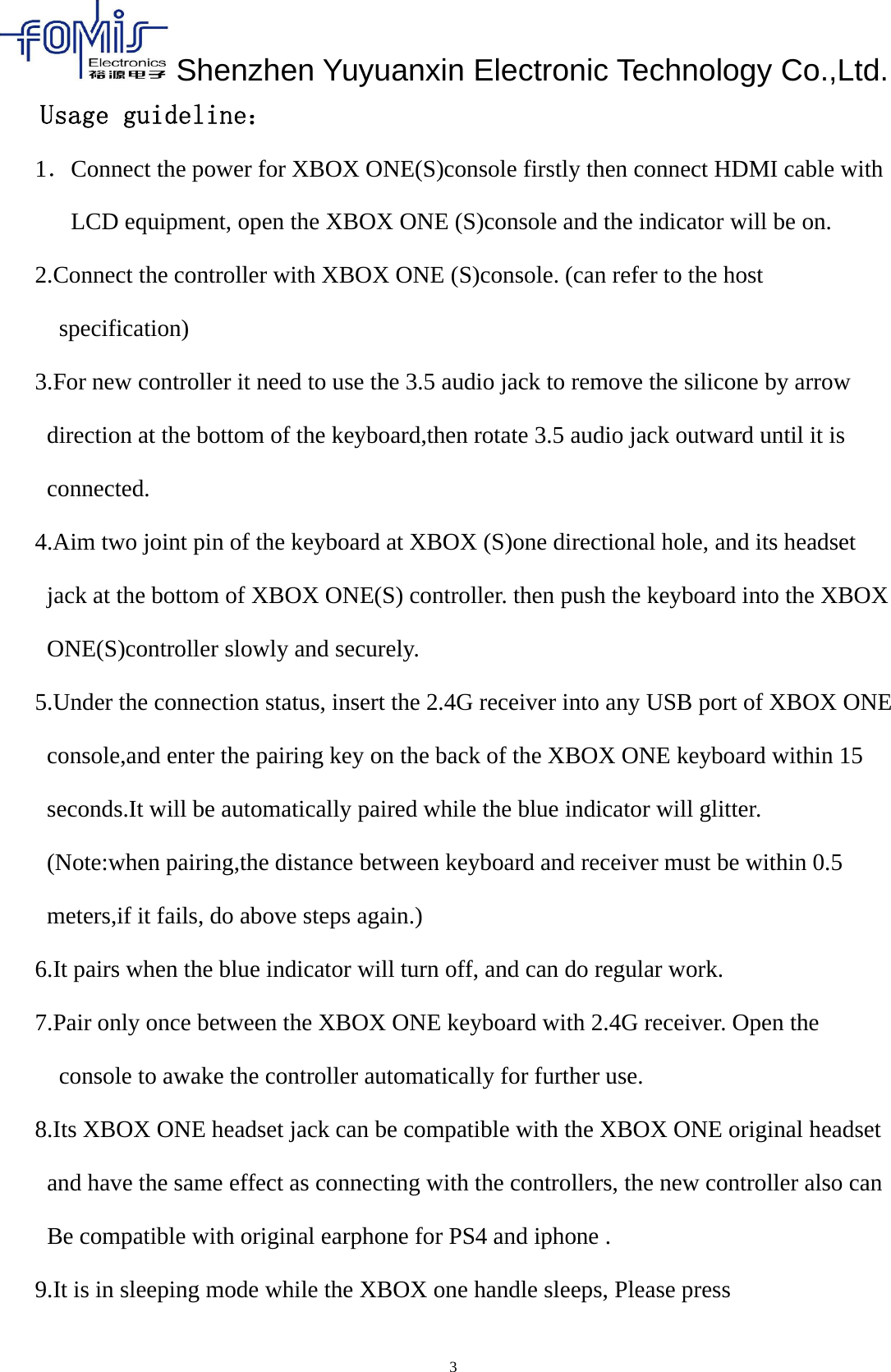
Shenzhen Yuyuanxin Electronic Technology Co.,Ltd.24、Paring key5、2.4G paring indicator6、X-one original earphone jack7、3.5 audio jack8、0-9(number key )9、Caps Lock10、Shift11、Back space12、SPACE13、26 letters and commonly symbol keys14、Enter
Shenzhen Yuyuanxin Electronic Technology Co.,Ltd.3Usage guideline:1.Connect the power for XBOX ONE(S)console firstly then connect HDMI cable withLCD equipment, open the XBOX ONE (S)console and the indicator will be on.2.Connect the controller with XBOX ONE (S)console. (can refer to the hostspecification)3.For new controller it need to use the 3.5 audio jack to remove the silicone by arrowdirection at the bottom of the keyboard,then rotate 3.5 audio jack outward until it isconnected.4.Aim two joint pin of the keyboard at XBOX (S)one directional hole, and its headsetjack at the bottom of XBOX ONE(S) controller. then push the keyboard into the XBOXONE(S)controller slowly and securely.5.Under the connection status, insert the 2.4G receiver into any USB port of XBOX ONEconsole,and enter the pairing key on the back of the XBOX ONE keyboard within 15seconds.It will be automatically paired while the blue indicator will glitter.(Note:when pairing,the distance between keyboard and receiver must be within 0.5meters,if it fails, do above steps again.)6.It pairs when the blue indicator will turn off, and can do regular work.7.Pair only once between the XBOX ONE keyboard with 2.4G receiver. Open theconsole to awake the controller automatically for further use.8.Its XBOX ONE headset jack can be compatible with the XBOX ONE original headsetand have the same effect as connecting with the controllers, the new controller also canBe compatible with original earphone for PS4 and iphone .9.It is in sleeping mode while the XBOX one handle sleeps, Please press
Shenzhen Yuyuanxin Electronic Technology Co.,Ltd.“ ” Button to awake it and controller.Technical parameters:1、Applicable range:XBOX ONE handle2、Wireless Protocol:2.4G3、Wireless distance:effective range:8-10 meter4、Working current(press the buttons ):0.8mA5、Working current(No button pressing):8uA6、Weight:undetermined7、Product dimension:142x63x45MM8、Material:ABSMatters need attention:In order to use this bluetooth product correctly, insure a good performance, please readcarefully and comply with the follows:●Do not hit the keyboard seriously.  ●Do not let this product contact with benzene,thinner,chemical.etc.  ●Do not close to strong magnetic field ,electric field.  ●Please avoid direct lighting or heating apparatus.  ●Do not disassemble , repair or reconstruct by yourself.   ●Please classify and deal with the waste packaging, batteries and old electronicproducts properly.
Warning: Changes or modifications not expressly approved by the party responsible forShenzhen Yuyuanxin Electronic Technology Co.,Ltd.5FCC STATEMENT : This device complies with Part 15 of the FCC Rules. Operation is subject to the following two conditions:(1) This device may not cause harmful interference, and(2) This device must accept any interference received, including interference that may cause undesired operation.compliance could void the user's authority to operate the equipment.NOTE: This equipment has been tested and found to comply with the limits for a Class B digital device, pursuant to Part 15 of the FCC Rules. These limits are designed to provide reasonable protection against harmful interference ina residential installation. This equipment generates uses and can radiate radio frequency energy and, if not installed and used in accordance with the instructions, may cause harmful interference to radio communications. However, there is no guarantee that interference will not occur in a particular installation. If this equipment does cause harmful interference to radio or television reception, which can be determined by turning the equipment off and on, the user is encouraged to try to correct the interference by one or more of the following measures:Reorient or relocate the receiving antenna.Increase the separation between the equipment and receiver.Connect the equipment into an outlet on a circuit different from that to which the receiver is connected.Consult the dealer or an experienced radio/TV technician for help.

Navigation menu