Shuttle BR06 Shuttle FRS User Manual

Shuttle Inc. Shuttle FRS Users Manual

Users Manual

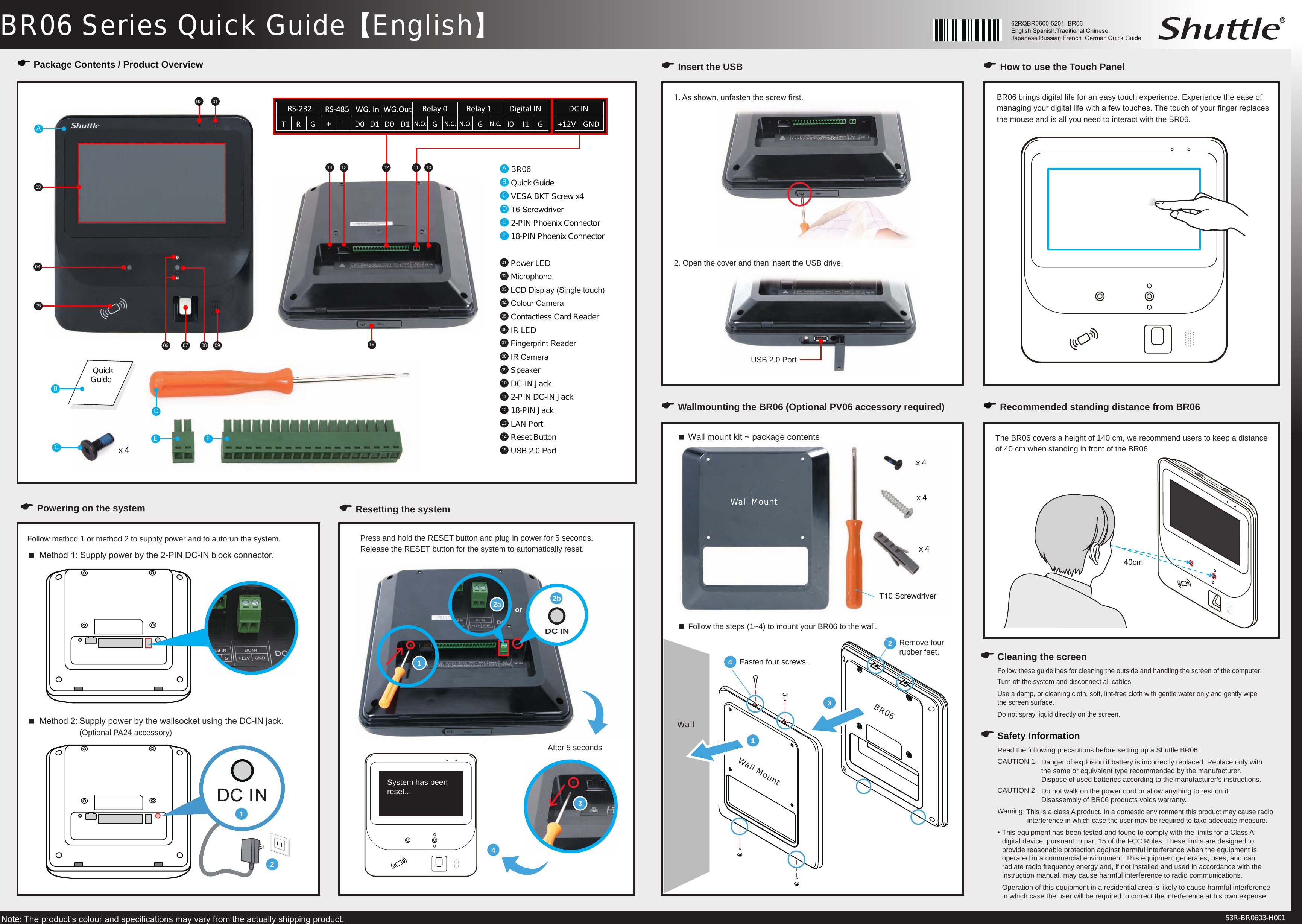
.BR06 Series Quick Guide【English】1or2a 2bDC INNote: The product’s colour and specications may vary from the actually shipping product. 53R-BR0603-H001E Package Contents / Product OverviewA BR06B Quick GuideC VESA BKT Screw x4D T6 ScrewdriverE 2-PIN Phoenix ConnectorF 18-PIN Phoenix Connector01  Power LED02  Microphone03  LCD Display (Single touch)04  Colour Camera05  Contactless Card Reader06  IR LED07  Fingerprint Reader08  IR Camera09  Speaker10  DC-IN Jack11  2-PIN DC-IN Jack12  18-PIN Jack13  LAN Port14  Reset Button 15  USB 2.0 Port010203040506 07 08 09101213141511ABCE Fx 4 Quick GuideE Powering on the system  Method 1: Supply power by the 2-PIN DC-IN block connector.Follow method 1 or method 2 to supply power and to autorun the system.  Method 2: Supply power by the wallsocket using the DC-IN jack.     (Optional PA24 accessory)E Resetting the systemE Insert the USB E How to use the Touch Panel BR06 brings digital life for an easy touch experience. Experience the ease of managing your digital life with a few touches. The touch of your nger replaces the mouse and is all you need to interact with the BR06.E Wallmounting the BR06 (Optional PV06 accessory required) E Recommended standing distance from BR06The BR06 covers a height of 140 cm, we recommend users to keep a distance of 40 cm when standing in front of the BR06. Wall mount kit ~ package contents34Remove four rubber feet.Fasten four screws.2x 4x 4x 4121. As shown, unfasten the screw rst.2. Open the cover and then insert the USB drive. USB 2.0 PortDPress and hold the RESET button and plug in power for 5 seconds. Release the RESET button for the system to automatically reset. After 5 seconds4System has been reset...40cm Follow the steps (1~4) to mount your BR06 to the wall. 3T10 Screwdriver1WallWall MountBR06Wall MountE Safety InformationE Cleaning the screenFollow these guidelines for cleaning the outside and handling the screen of the computer:Turn off the system and disconnect all cables.Use a damp, or cleaning cloth, soft, lint-free cloth with gentle water only and gently wipe  the screen surface.Do not spray liquid directly on the screen.Read the following precautions before setting up a Shuttle BR06.CAUTION 1.  Danger of explosion if battery is incorrectly replaced. Replace only with      the same or equivalent type recommended by the manufacturer.      Dispose of used batteries according to the manufacturer’s instructions.CAUTION 2.  Do not walk on the power cord or allow anything to rest on it.     Disassembly of BR06 products voids warranty.Warning: This is a class A product. In a domestic environment this product may cause radio    interference in which case the user may be required to take adequate measure.• This equipment has been tested and found to comply with the limits for a Class A    digital device, pursuant to part 15 of the FCC Rules. These limits are designed to    provide reasonable protection against harmful interference when the equipment is    operated in a commercial environment. This equipment generates, uses, and can    radiate radio frequency energy and, if not installed and used in accordance with the    instruction manual, may cause harmful interference to radio communications.  Operation of this equipment in a residential area is likely to cause harmful interference    in which case the user will be required to correct the interference at his own expense.

Navigation menu