Smartbow W010 Chirp spread spectrum based transceiver used for wireless localization User Manual 15 W010 UserMan

MKW electronics GmbH Chirp spread spectrum based transceiver used for wireless localization 15 W010 UserMan

15_W010 UserMan
    User Manual  W010 SMARTBOW Wallpoint
      IMPORTANT READ CAREFULLY BEFORE USE! KEEP THE MANUAL FOR FUTURE CONSULTATION!                      © 2015 MKW electronics GmbH. All rights reserved.  MKW electronics GmbH T  +43 (0) 7732 3711-0 Jutogasse 3  F  +43 (0) 7732 3711-35 4675 Weibern, AUSTRIA  office@smartbow.at  www.smartbow.at I www.mkwe.at
 Table of content  1 Introduction  5 1.1 General Information  5 1.2 Trademarks, Copyright and Disclaimer  5 2 Electromagnetic Compatibility (EMC)  8 2.1 Europe  8 2.2 USA  8 2.2.1 User Information acc. to FCC15.21:  8 2.2.2 Statement for Class B digital device acc. to FCC 15.105  8 2.3 Canada  8 2.3.1 Statement acc. RSS Gen Issue 3, Sect. 7.1.3  8 3 Safety  9 3.1 Safety Labels  9 3.2 Signal words and their meaning  10 3.3 Operating states  11 3.4 Electrical safety  11 3.5 Operation  12 3.6 Repair and Service  12 3.7 Transport  13 3.8 Magnetic fields  13 3.9 Waste disposal/Environmental protection  13 4 The SMARTBOW Wallpoint  14 4.1 General product information  14 4.2 Scope of supply  15 4.3 Technical Data  16 4.4 Modification on the SMARTBOW Wallpoint  17 4.5.1 General warranty conditions  18 4.5.2 Warranty coverage  19 4.5.3 Warranty exclusion  19 4.5.4 Support Hotline  19 5 Installation  20 5.2 Mounting the SMARTBOW Wallpoint  20 5.2.1 Installation pipe clamp  24 5.2.2 Installation I-beam clamp  25 6 Equipment  26 6.1 100101 Pipe clamp  26
 6.2 100103 Magnetic holder  26 6.3 100104 I-beam clamp  26 7 Transport and storage  27 7.1 Transport  27 7.2 Storage  27 7.3 Cleaning  27 8 Trouble Shooting  28 9 Waste  29 10 Support  30 11 Lists  32 11.1 List of figures  32 11.2 List of tables  33 12 GLOSSARY  33 13 List of included amendments  34
    Page 5 of 34 1  Introduction 1.1  General Information Welcome to the SMARTBOW manual. We are happy that you have decided to buy our solution.  You will find the  technical information, operating instructions and instructions for maintenance and fault elimination. Read this information carefully before operating the SMARTBOW system and make sure you are familiar with it. Non-observance may result in injury or damage to the system. If there is an unclear point or if you would like to have more information, please contact our support. Please read through the warranty conditions to know your rights and obligations.   Keep the manual within range, to be able to use it immediately.  1.2  Trademarks, Copyright and Disclaimer SMARTBOW is a registered trademark of MKW electronics GmbH.  The exclusive right of use underlies the company MKW electronics GmbH. All rights reserved.  The  statements  contained  in  this  publication  are  only  for  information  and  should  not  be understood as  a sale offer.  Certain products may not  be available in  some countries and  the delivered products may differ from those shown in the pictures. Neither this edition nor parts of it may be copied or published by print or any other means without the written permission of MKW electronics GmbH(in the following MKWE).  The content of this publication has been compiled with the utmost care. Nevertheless MKWE is not liable for any damages that may arise from errors or omissions in this publication.  The germen manual is the original manual. Translations into other languages are based on the German  manual  as  a  source  document.  MKWE  is  not  liable  for  discrepancies  between  the original German manual and versions in other languages. In case of conflicts in the content and accuracy of translated manuals, the German manual is the reference document.  The compliance to this manual as well as the conditions and methods of installation, operation, use  and  maintenance  of  the  system  cannot  be  monitored  by  the  manufacturer.  Improper installation  can  cause  damages  to  material  and  persons.  Therefore,  we  assume  no responsibility  or  liability  for  any  loss,  damage  or  costs  arising  from  incorrect  installation, improper operation or incorrect usage and maintenance which are associated in any way.
    Page 6 of 34 We  also  assume  no  responsibility  for  patent  infringements  or  violations  of  the  rights  of  third parties arising from the use of this system.  For  improvement  in  terms  of  design,  operation,  and/or  reliability  MKWE  reserves  the  right  to modify  the  products  described  in  this  document  without  prior  notice.  MKWE  rejects  from  all liability related with the use or application of the product described here.  All SMARTBOW products have been developed to assist farmers in their daily work with their herd  as  good  as  possible.  Because  of  variations  in  farm  management,  MKWE  cannot  be responsible for the economic results of each individual farm.  As soon as it becomes evident that safe operation is no longer possible (e.g. if there is visible damage), remove the system immediately from power supply.
    Page 7 of 34 1.3  We ask for your feedback All information of this manual has been compiled with the utmost care. The recommendations are intended as guidelines. The instructions, illustrations and specifications in this manual are based on the current information available at the time of publication. Your SMARTBOW system may contain improvements and equipment or options that are not covered in this manual. New information  based  on  the  feedback  from  our  customers,  are  continuously  updated  and expanded.  We hope SMARTBOW fits your expectations and we like to receive your feedback (please send an email to support@smartbow.at or call +43 (0) 7732 3711-175).  The SMARTBOW Team
    Page 8 of 34 2  Electromagnetic Compatibility (EMC) 2.1  Europe For additional regulatory information, see the Regulatory Compliance homepage on www.smartbow.at at the following location http://www.smartbow.at/en/legal.html 2.2  USA 2.2.1 User Information acc. to FCC15.21: Changes or modifications not expressly approved by the party responsible for compliance could void the user’s authority to operate the equipment. 2.2.2 Statement for Class B digital device acc. to FCC 15.105 This equipment has been tested and found to comply with the limits for a Class B digital device, pursuant to part 15 of the FCC Rules. These limits are designed to provide reasonable protection against harmful interference in a residential installation. This equipment generates, uses and can radiate radio frequency energy and, if not installed and used in accordance with the instructions, may cause harmful interference to radio communications. However, there is no guarantee that interference will not occur in a particular installation. If this equipment does cause harmful interference to radio or television reception, which can be determined by turning the equipment off and on, the user is encouraged to try to correct the interference by one or more of the following measures: —  Reorient or relocate the receiving antenna. —  Increase the separation between the equipment and receiver. —  Connect the equipment into an outlet on a circuit different from that to which the receiver is connected. —  Consult the dealer or an experienced radio/ TV technician for help.  2.3  Canada 2.3.1 Statement acc. RSS Gen Issue 3, Sect. 7.1.3 This device complies with Part 15 of the FCC Rules and with Industry Canada license-exempt RSS standard(s). Operation is subject to the following two conditions: (1) this device may not cause harmful interference, and (2) this device must accept any interference received, including interference that may cause undesired operation. Le présent appareil est conforme aux CNR d'Industrie Canada applicables aux appareils radio exempts de licence. L'exploitation est autorisée aux deux conditions suivantes : (1) l'appareil ne doit pas produire de brouillage, et (2) l'utilisateur de l'appareil doit accepter tout brouillage radioélectrique subi, même si le brouillage est susceptible d'en compromettre le fonctionnement.
    Page 9 of 34 3  Safety 3.1  Safety Labels The following safety labels are used on the different SMARTBOW products to warn against risks and dangers.   European-label for the separate collection of electrical and electronic appliances Further information in chapter 9 Disposal   The security labels on your product show important and useful information, which will help you to  use  and  maintain  the  SMARTBOW Wallpoint  safely.  Follow  to  the  instructions  below  to ensure that all labels remain in perfect condition and in the right place.  Make  sure  that  the  safety  labels  are  always  clean  and  legible.  Do  not  use  solvents,  souring agents or other comparable cleaning agents which could damage the sticker.   Replace lost or illegible safety stickers.  Safety labels can be obtained from the MKWE support.
    Page 10 of 34 3.2  Signal words and their meaning The following signal words are used in the manual in order to warn the reader about risks and dangers.  Indicates a hazardous situation which, if not avoided, will result in death or serious injury.  Indicates a hazardous situation which, if not avoided, could result in death or serious injury  Indicates a hazardous situation which, if not avoided, could result in minor, moderate or serious injury.    Indicates  information  considered  important,  but  not  hazard-related, e.g. information relating to possible property damage.  These  signal  words are  in  accordance  with  the standard  definition for  civil  applications  in the European Economic Area. Definitions that deviate from the standard definition may also exist in other  economic  areas  or  military  applications.  It  is  therefore  essential  to  make  sure  that  the signal words described here are always used just with the related product documentation and the  related  product.  The  use  of  signal  words  in  connection  with  unrelated  products  or documentation can result in misinterpretation and in personal injury or material damage.
    Page 11 of 34 3.3  Operating states The SMARTBOW Wallpoint may be operated only under the operating conditions and the positions specified by the manufacturer. Applicable local or national safety regulations and rules for the prevention of accidents must be observed in all work performed.  The SMARTBOW Wallpoint is exclusively produced for use in livestock sheds.. Any other use is only permitted with a written permission of MKW electronics GmbH.  Do not place the SMARTBOW Wallpoint on heat-generating devices such as radiators or fan heaters. The ambient temperature must not exceed the maximum temperature specified in the product documentation or in the data sheet. Product overheating can damage the Wallpoint permanently.  3.4  Electrical safety Unless expressly permitted, never remove the cover or any part of the housing while the SMARTBOW Wallpoint is in operation. Doing so will expose circuits and components and can lead to injuries, or damage to the SMARTBOW Wallpoint.  Any object that is not designed to be placed in the openings of the housing must not be used for this purpose. Doing so can cause damage to the SMARTBOW Wallpoint.   Unless specified otherwise, the SMARTBOW Wallpoint is protected against the ingress of liquids. When the cable entry cover is opened it must be protected against penetration by liquids. If the necessary precautions are not taken the SMARTBOW Wallpoint may be damaged.   Do not use the SMARTBOW Wallpoint under adverse environmental conditions such as  •  inflammable gases, vapours and solvents •  strong vibrations  An operation under the conditions described above may damage the SMARTBOW Wallpoint.  Prior to cleaning the SMARTBOW Wallpoints, disconnect it completely from the power supply (e.g. network cable). Use a soft, non-lining cloth to clean the product. Never use chemical cleaning agents such as alcohol, acetone or diluents for cellulose lacquers.
    Page 12 of 34 3.5  Operation In some countries there are laws about digital positioning and tracking of people, animals and/or objects. Only the user is responsible not to violate such laws or regulations.  Before you start processing the SMARTBOW Wallpoint mechanically and/or thermally or before you disassemble it, be sure to read and pay special attention to the chapter 9 “Waste disposal”.   Depending  on  the  function,  the  SMARTBOW  Wallpoint  can  produce  an  elevated  level  of electromagnetic  radiation,  which  is  within  the  range  of  the  legal  standards.  Considering  that unborn babies require increased protection, pregnant women must be protected by appropriate measures.  Persons  with  pacemakers  may  also  be  exposed  to  risks  from  electromagnetic radiation.  The  employer/operator  must  evaluate  workplaces  where  there  is  a  special  risk  of exposure to radiation and if necessary, take measures to avoid the potential danger.   Should a fire occur, the SMARTBOW Wallpoint may release hazardous substances (gases, fluids, etc.) that can cause health problems. Therefore, suitable measures must be taken, e.g. protective masks and protective clothing must be worn.  3.6  Repair and Service Adjustments, replacement of parts and repair may be performed only by electrical experts authorized by MKWE. Only original parts may be used for replacing parts. A safety test must always be performed after parts have been replaced (visual inspection, functional test). This helps to ensure the continued safety of the SMARTBOW Wallpoint.
    Page 13 of 34 3.7  Transport The packaging of the SMARTBOW Wallpoint protects the housing from damage.   If you have to return a SMARTBOW Wallpoint to MKWE, it should be packed so that external influences cannot cause damage to the product.  3.8  Magnetic fields Please be aware that magnetic fields delete data media (diskettes, hard disks, USB flash drives, digital cameras, check cards, credit cards, audio and video cassettes) and can affect or destroy electronic and mechanical components, e.g. pacemaker monitors, compasses, counters, etc. In any case keep a safety distance of about 1 meter.  Do not use the magnets in locations where they are exposed to high heat (> 80°C).   Magnetic fields of permanent magnets have, according to present knowledge, no measurable positive or negative influence on people. A health risk due to the magnetic field of a permanent magnet is unlikely but cannot be completely excluded.   3.9  Waste disposal/Environmental protection Waste electrical and electronic equipment must not be disposed of with unsorted municipal waste, but must be collected separately.  If products or their components are mechanically and/or thermally processed in a manner that goes  beyond  their  intended  use,  hazardous  substances  (heavy-metal  dust  such  as  lead, beryllium, nickel) may be released. For this reason, the product may only be disassembled by specially  trained  personnel.  Improper  disassembly  may  be  hazardous  to  your  health.  The national waste disposal regulations must be observed.
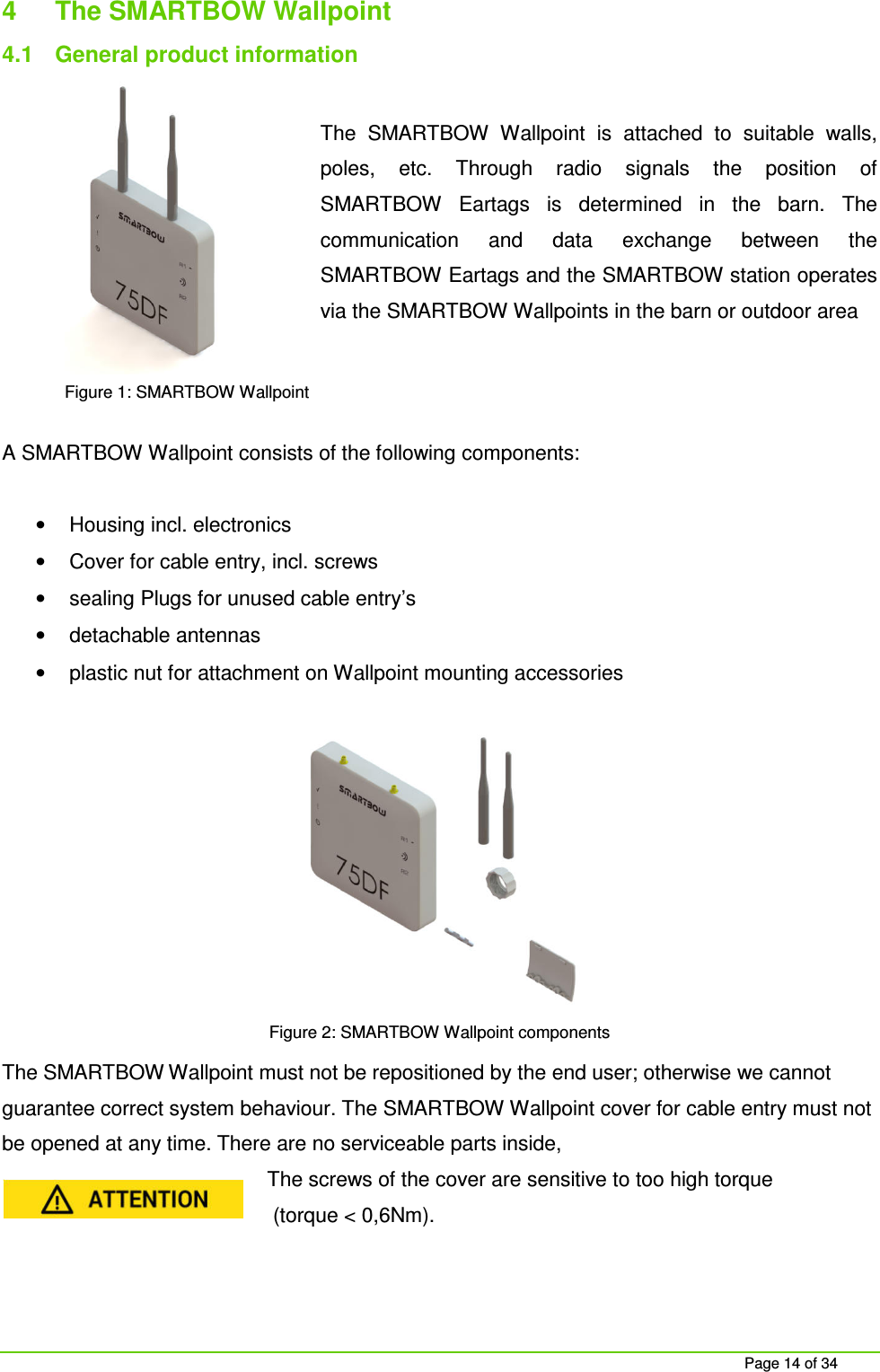
    Page 14 of 34 4  The SMARTBOW Wallpoint  4.1  General product information  The  SMARTBOW  Wallpoint  is  attached  to  suitable  walls, poles,  etc.  Through  radio  signals  the  position  of SMARTBOW  Eartags  is  determined  in  the  barn.  The communication  and  data  exchange  between  the SMARTBOW Eartags and the SMARTBOW station operates via the SMARTBOW Wallpoints in the barn or outdoor area    A SMARTBOW Wallpoint consists of the following components:  •  Housing incl. electronics  •  Cover for cable entry, incl. screws •  sealing Plugs for unused cable entry’s •  detachable antennas •  plastic nut for attachment on Wallpoint mounting accessories  Figure 2: SMARTBOW Wallpoint components The SMARTBOW Wallpoint must not be repositioned by the end user; otherwise we cannot guarantee correct system behaviour. The SMARTBOW Wallpoint cover for cable entry must not be opened at any time. There are no serviceable parts inside,  The screws of the cover are sensitive to too high torque  (torque < 0,6Nm).    Figure 1: SMARTBOW Wallpoint
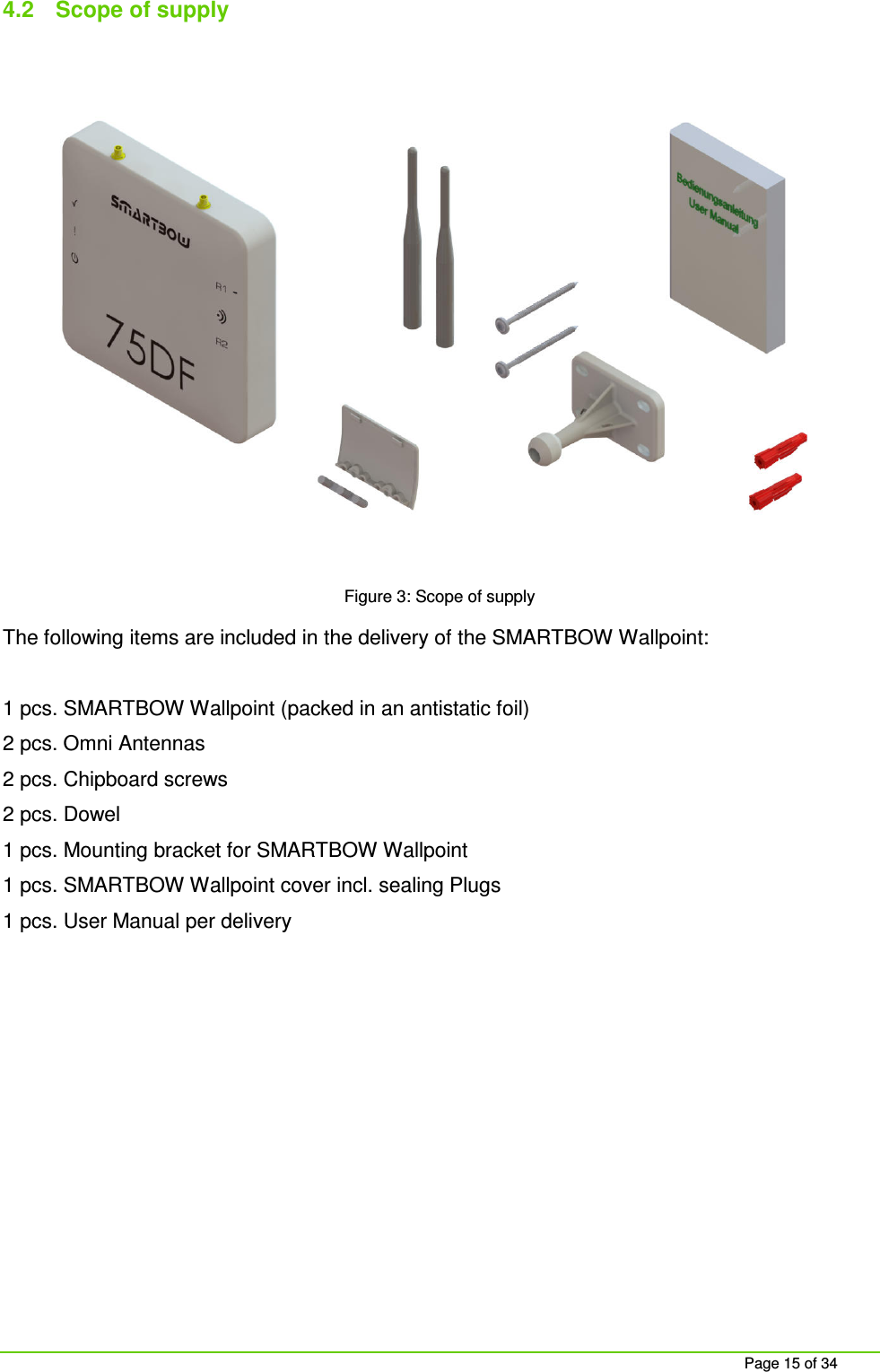
    Page 15 of 34 4.2  Scope of supply   Figure 3: Scope of supply The following items are included in the delivery of the SMARTBOW Wallpoint:  1 pcs. SMARTBOW Wallpoint (packed in an antistatic foil) 2 pcs. Omni Antennas 2 pcs. Chipboard screws 2 pcs. Dowel 1 pcs. Mounting bracket for SMARTBOW Wallpoint 1 pcs. SMARTBOW Wallpoint cover incl. sealing Plugs 1 pcs. User Manual per delivery
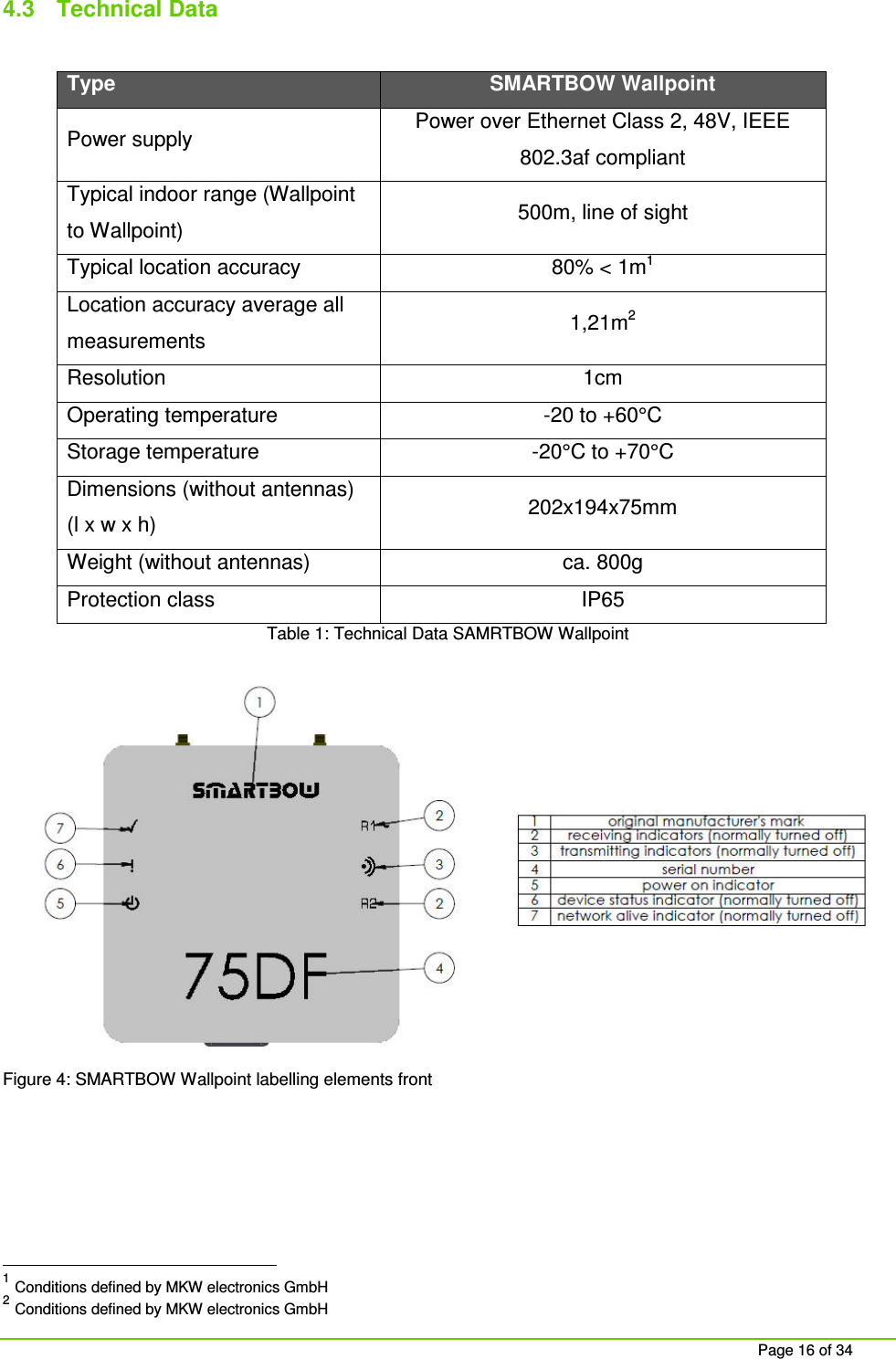
    Page 16 of 34  4.3  Technical Data  Type SMARTBOW Wallpoint Power supply  Power over Ethernet Class 2, 48V, IEEE 802.3af compliant Typical indoor range (Wallpoint to Wallpoint)  500m, line of sight Typical location accuracy  80% < 1m1 Location accuracy average all measurements  1,21m2 Resolution  1cm Operating temperature  -20 to +60°C Storage temperature  -20°C to +70°C Dimensions (without antennas) (l x w x h)  202x194x75mm Weight (without antennas)  ca. 800g Protection class  IP65 Table 1: Technical Data SAMRTBOW Wallpoint  Figure 4: SMARTBOW Wallpoint labelling elements front                                                      1 Conditions defined by MKW electronics GmbH 2 Conditions defined by MKW electronics GmbH
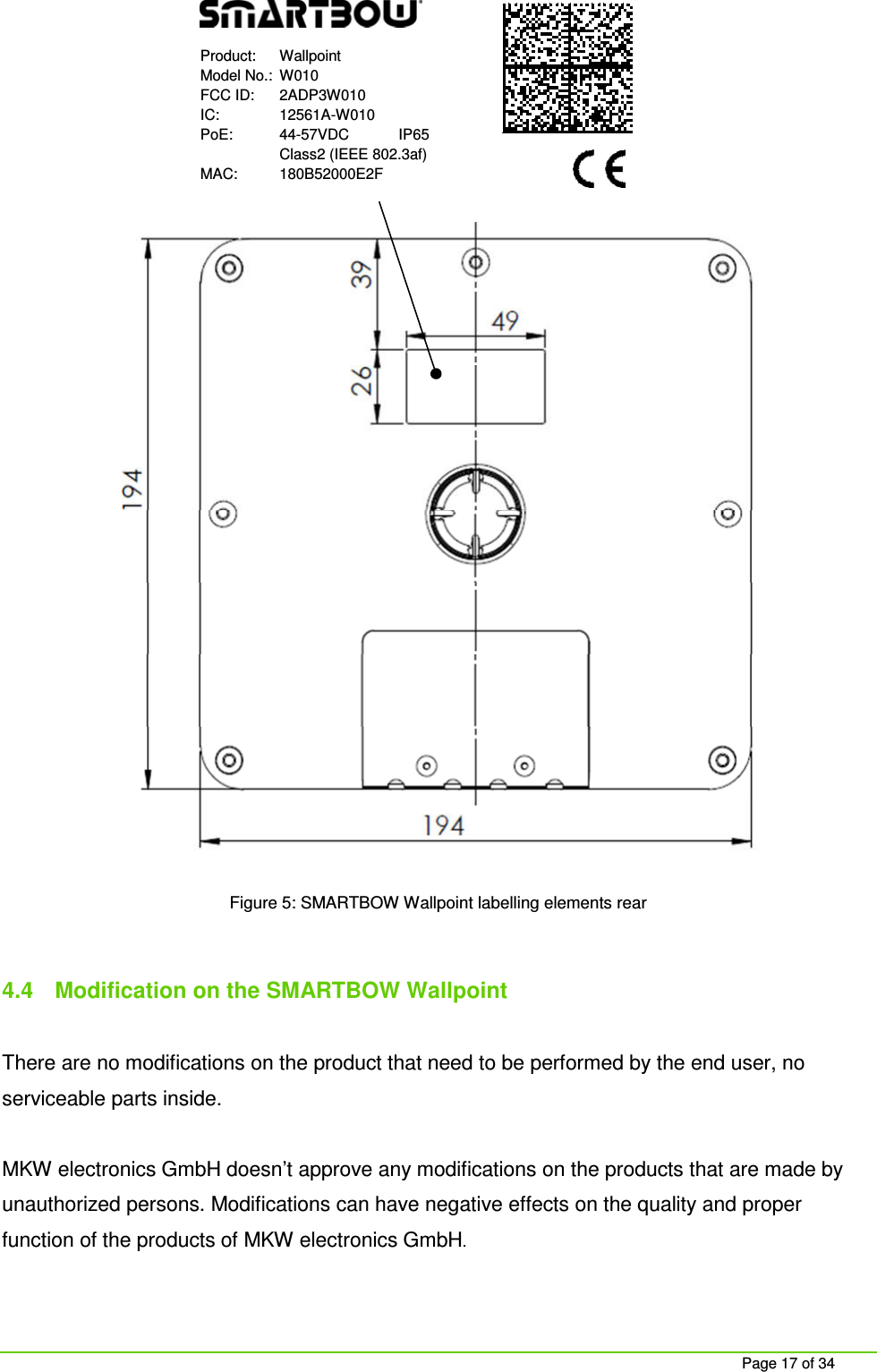
    Page 17 of 34  Product:   Wallpoint Model No.:  W010 FCC ID:   2ADP3W010 IC:  12561A-W010  PoE:   44-57VDC  IP65   Class2 (IEEE 802.3af) MAC:  180B52000E2F   Figure 5: SMARTBOW Wallpoint labelling elements rear  4.4  Modification on the SMARTBOW Wallpoint  There are no modifications on the product that need to be performed by the end user, no serviceable parts inside.  MKW electronics GmbH doesn’t approve any modifications on the products that are made by unauthorized persons. Modifications can have negative effects on the quality and proper function of the products of MKW electronics GmbH.
    Page 18 of 34 4.5  General and special warranty conditions 4.5.1  General warranty conditions These general warranty conditions apply only in connection with the general terms and conditions of sale (GTC) of MKW electronics GmbH at the purchasing moment of the Wallpoint. The current version of the GTC is visible on the homepage of MKWE (http://www.mkwe.at).  The warranty always begins on the date of transfer of the SMARTBOW® Wallpoints  bought from MKWE or an authorized seller of MKWE and refers to any material or production damage, which may occur while normal using. The warranty period is derived from the proof of purchase.  Please keep the original proof of purchase in a safe place. MKWE and its authorized service partners reserve the right to refuse a warranty repair or a warranty confirmation if a proof cannot be provided.   If you have to return a SMARTBOW Wallpoint please make sure that it is packed securely.   Please send us with the SMARTBOW Wallpoint a detailed description of the problem. In order to assert your claims or before sending, please contact the MKWE Support. The SMARTBOW Wallpoint always has to be sent completely, that means with all parts from the scope of supply. An incomplete reception of shipment will delay the repair / exchange. MKWE does not take over any liability for additionally sent materials, which do not belong to the original scope of supply.   This warranty does not have any effect on your existing statutory warranty claims and is subject to the laws of the country, in which the SMARTBOW Wallpoint was bought by the end customer from the authorized distributer and is valid only in this country.
    Page 19 of 34 4.5.2  Warranty coverage In case of a fault in your SMARTBOW Wallpoint covered by this warranty, MKWE ensures the repair or the replacement of the SMARTBOW Wallpoint. The decision whether to repair or replace the SMARTBOW Wallpoint will be made by MKWE. For this reason MKWE will decide if the sent SMARTBOW Wallpoint will be replaced in the same quality and function.  We assume no guarantee for expendable materials, which mean parts which must be replaced at regular intervals.   If it turns out during the repair, that it is an error that is not covered by warranty, MKWE reserves the right to charge a handling fee as well as the costs for the repair (material and labour) which refers to an estimate.  4.5.3  Warranty exclusion MKWE makes no guarantees for failure and damage caused by external influences (heat, water, lightning, etc.), accidental damage, improper use, changes, alterations and extensions made on the SMARTBOW Wallpoint, use of foreign parts, neglect, improper packaging, improper storage or loss in returning the SMARTBOW Wallpoint.  This warranty is void if the defect in the SMARTBOW Wallpoints is caused by maintenance or repair, which was performed by someone else than the MKWE or an authorized service partner. The warranty also void if labels or serial numbers of the SMARTBOW Wallpoints or a component of the SMARTBOW Wallpoints is changed or made illegible.   4.5.4   Support Hotline Before returning the Wallpoint to MKWE we recommend to contact us via the support hotline or by mail. You will receive further information on how you can make your claim under warranty.  The SMARTBOW support is available under support@smartbow.at or +43 (0) 7732 3711-175).
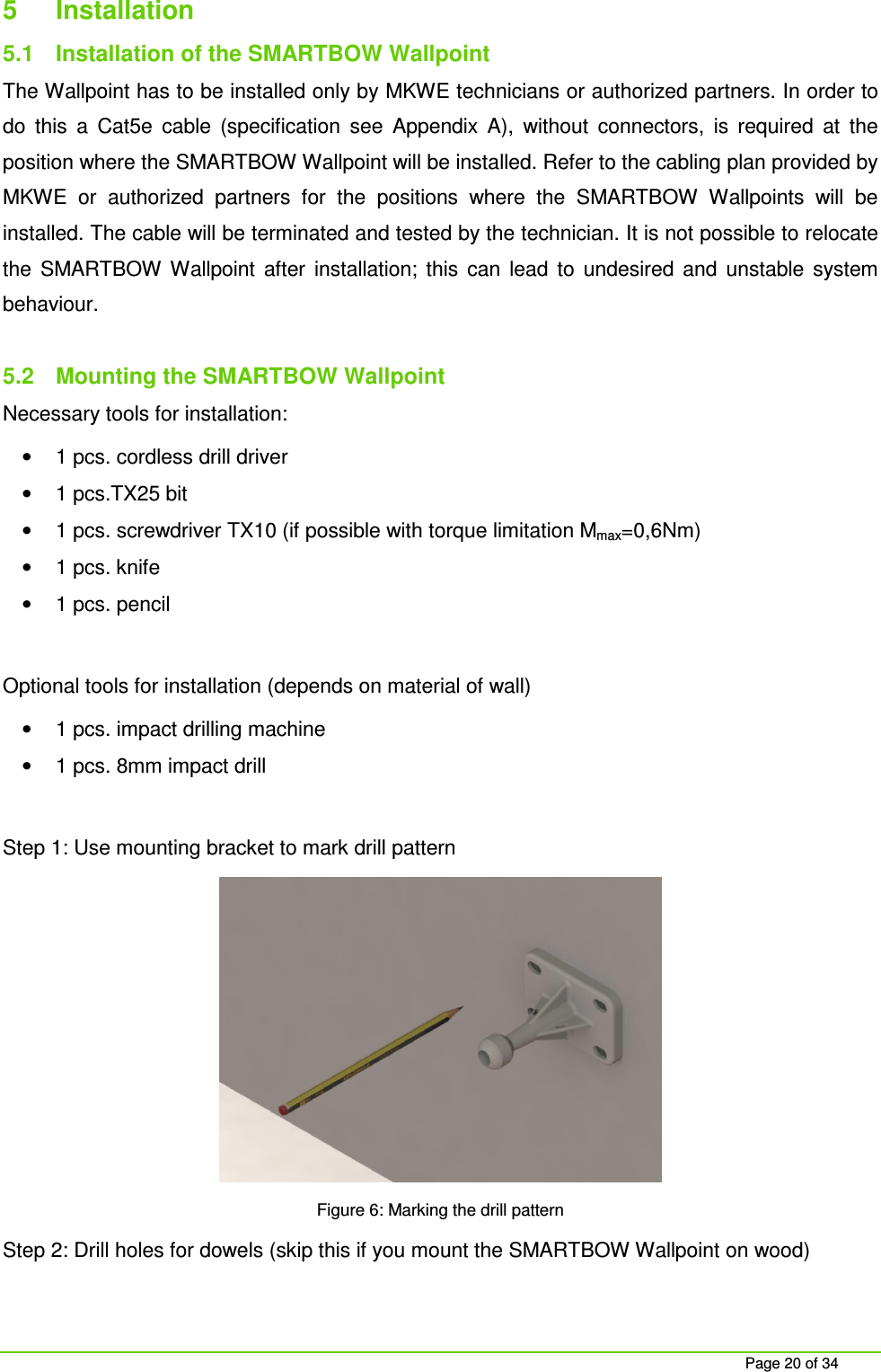
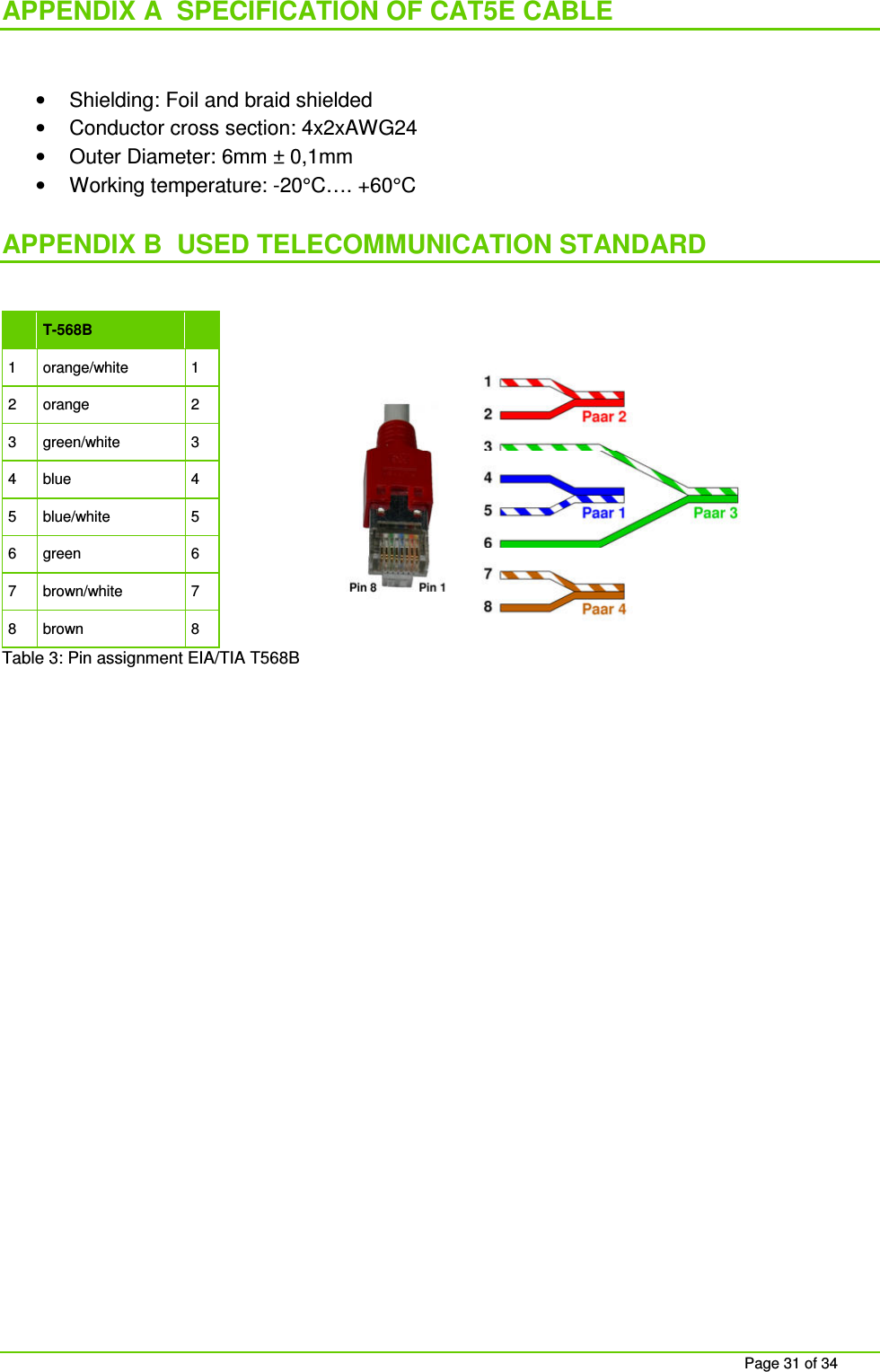
    Page 20 of 34 5  Installation  5.1  Installation of the SMARTBOW Wallpoint The Wallpoint has to be installed only by MKWE technicians or authorized partners. In order to do  this  a  Cat5e  cable  (specification  see  Appendix  A),  without  connectors,  is  required  at  the position where the SMARTBOW Wallpoint will be installed. Refer to the cabling plan provided by MKWE  or  authorized  partners  for  the  positions  where  the  SMARTBOW  Wallpoints  will  be installed. The cable will be terminated and tested by the technician. It is not possible to relocate the  SMARTBOW  Wallpoint  after  installation;  this  can  lead  to  undesired  and  unstable  system behaviour.  5.2  Mounting the SMARTBOW Wallpoint Necessary tools for installation: •  1 pcs. cordless drill driver •  1 pcs.TX25 bit •  1 pcs. screwdriver TX10 (if possible with torque limitation Mmax=0,6Nm) •  1 pcs. knife •  1 pcs. pencil  Optional tools for installation (depends on material of wall) •  1 pcs. impact drilling machine  •  1 pcs. 8mm impact drill  Step 1: Use mounting bracket to mark drill pattern  Figure 6: Marking the drill pattern Step 2: Drill holes for dowels (skip this if you mount the SMARTBOW Wallpoint on wood)
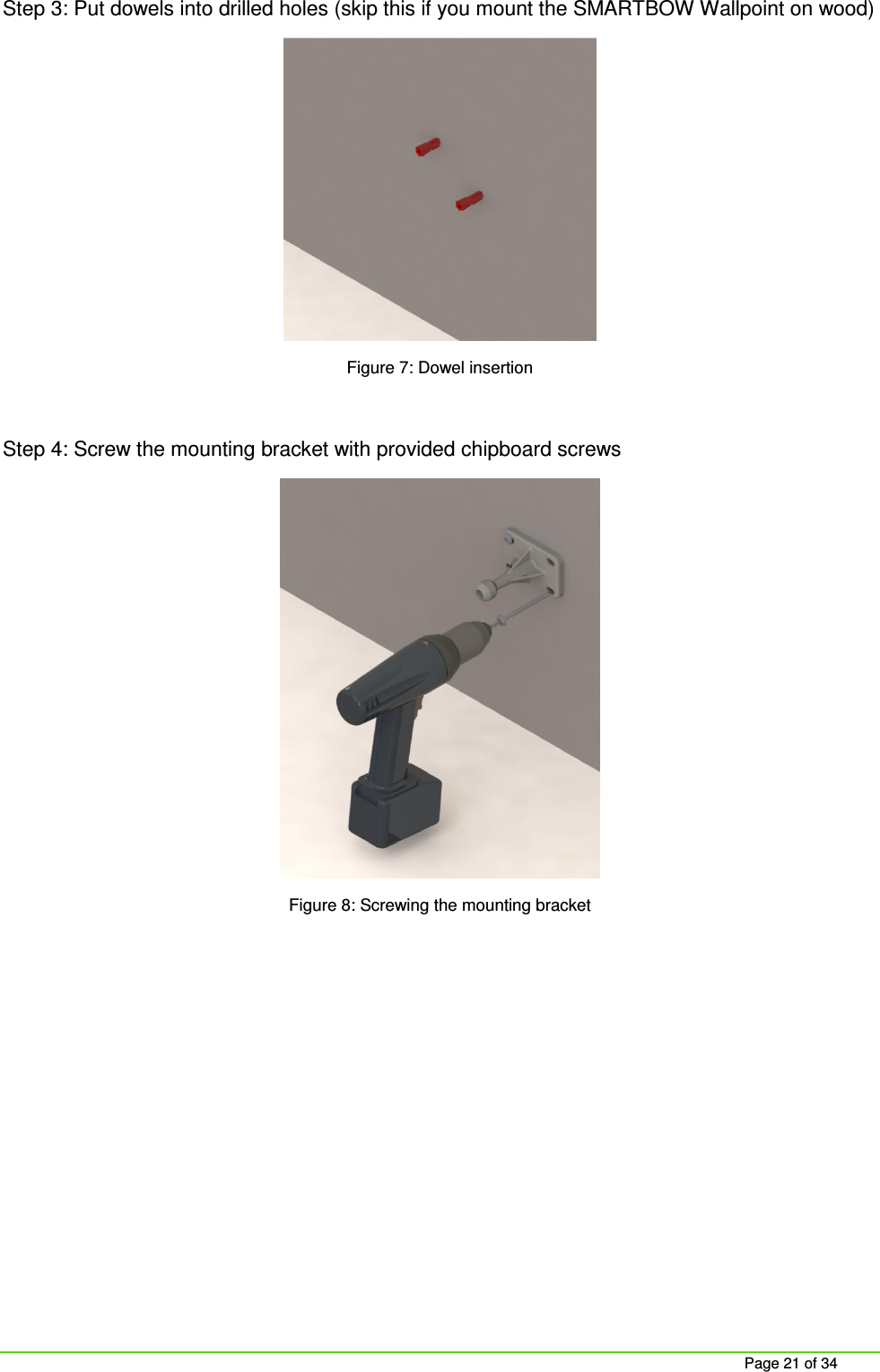
    Page 21 of 34 Step 3: Put dowels into drilled holes (skip this if you mount the SMARTBOW Wallpoint on wood)  Figure 7: Dowel insertion  Step 4: Screw the mounting bracket with provided chipboard screws  Figure 8: Screwing the mounting bracket
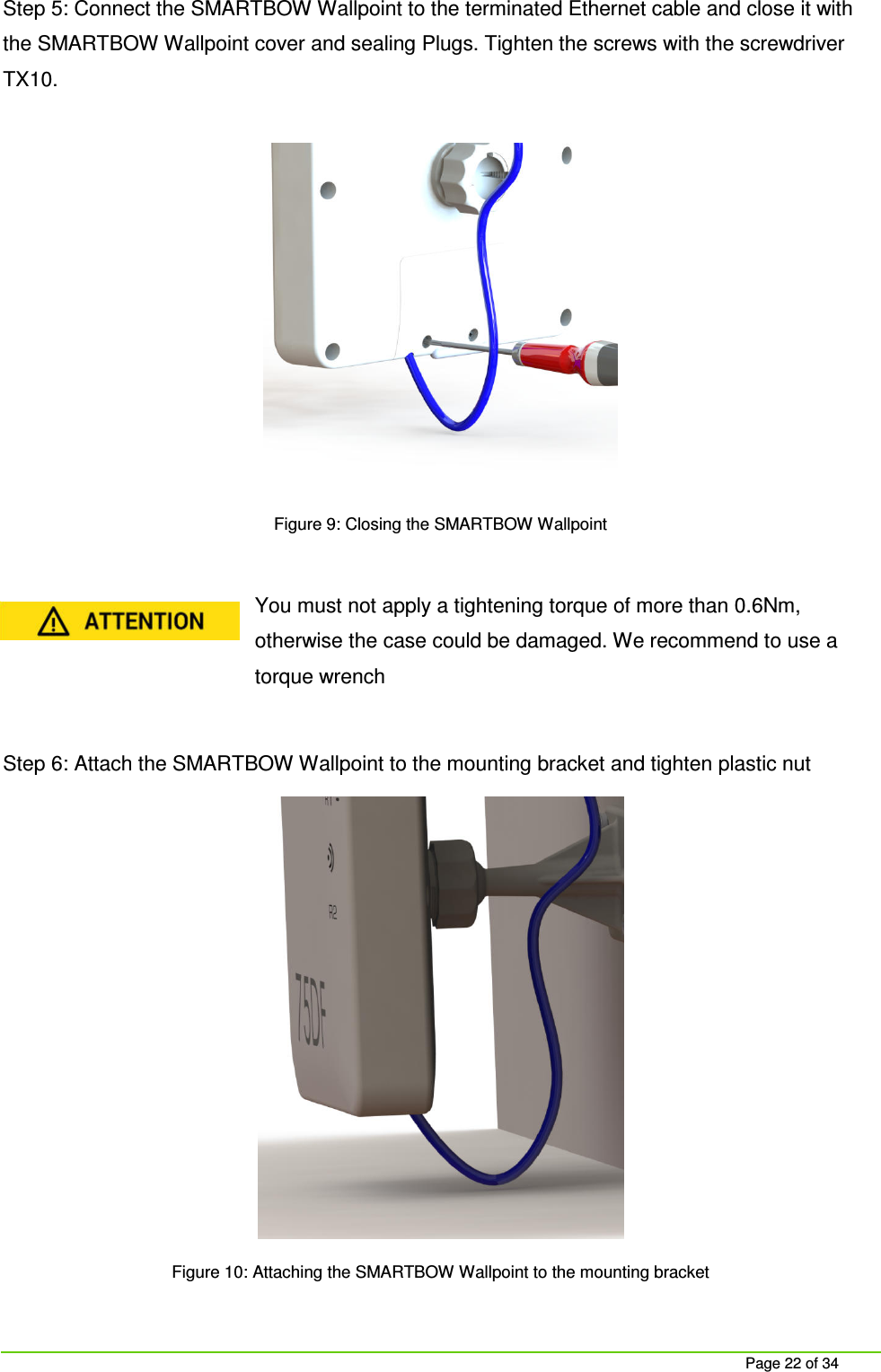
    Page 22 of 34 Step 5: Connect the SMARTBOW Wallpoint to the terminated Ethernet cable and close it with the SMARTBOW Wallpoint cover and sealing Plugs. Tighten the screws with the screwdriver TX10.   Figure 9: Closing the SMARTBOW Wallpoint  You must not apply a tightening torque of more than 0.6Nm, otherwise the case could be damaged. We recommend to use a torque wrench  Step 6: Attach the SMARTBOW Wallpoint to the mounting bracket and tighten plastic nut  Figure 10: Attaching the SMARTBOW Wallpoint to the mounting bracket
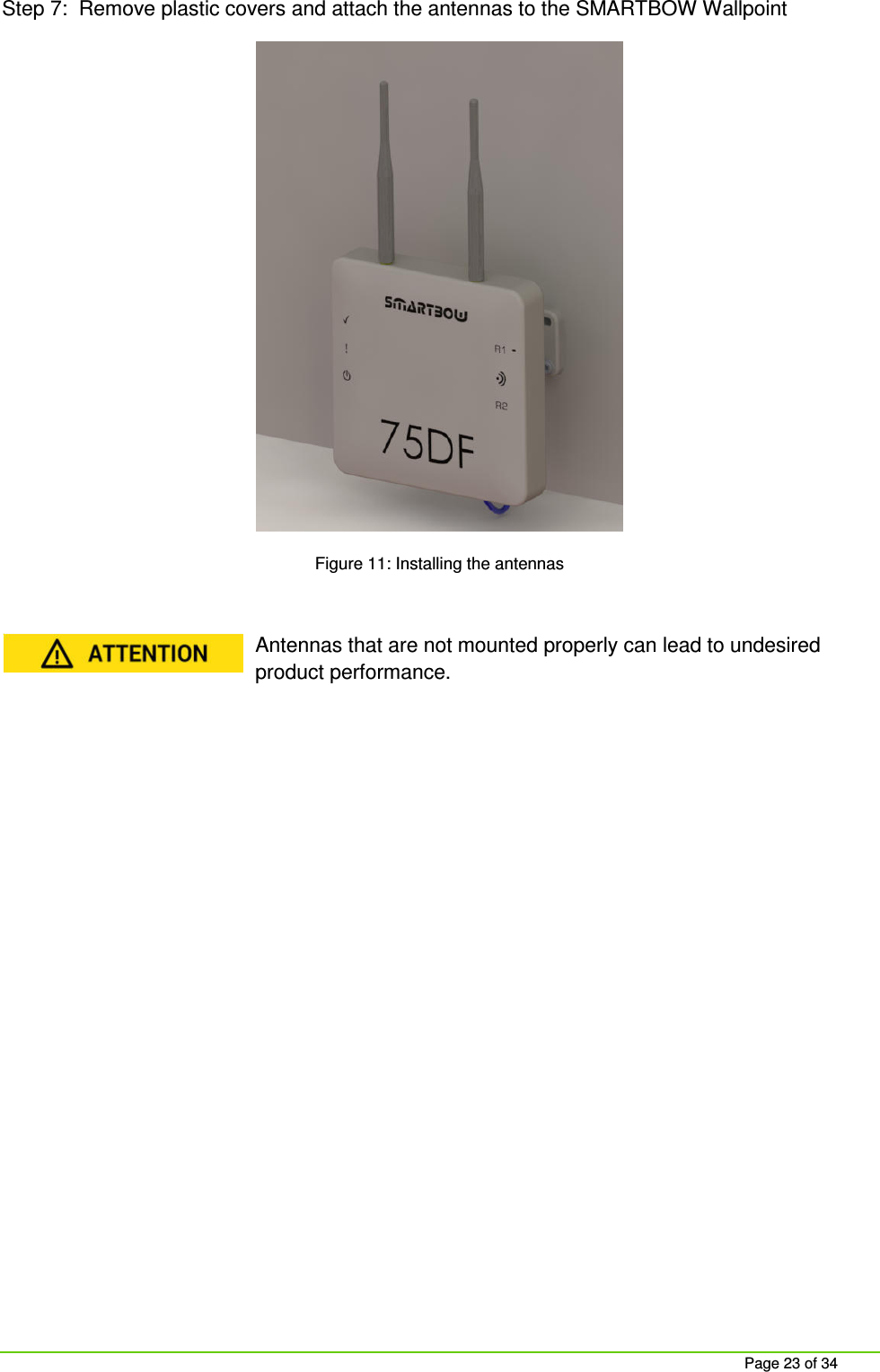
    Page 23 of 34 Step 7:  Remove plastic covers and attach the antennas to the SMARTBOW Wallpoint  Figure 11: Installing the antennas  Antennas that are not mounted properly can lead to undesired product performance.
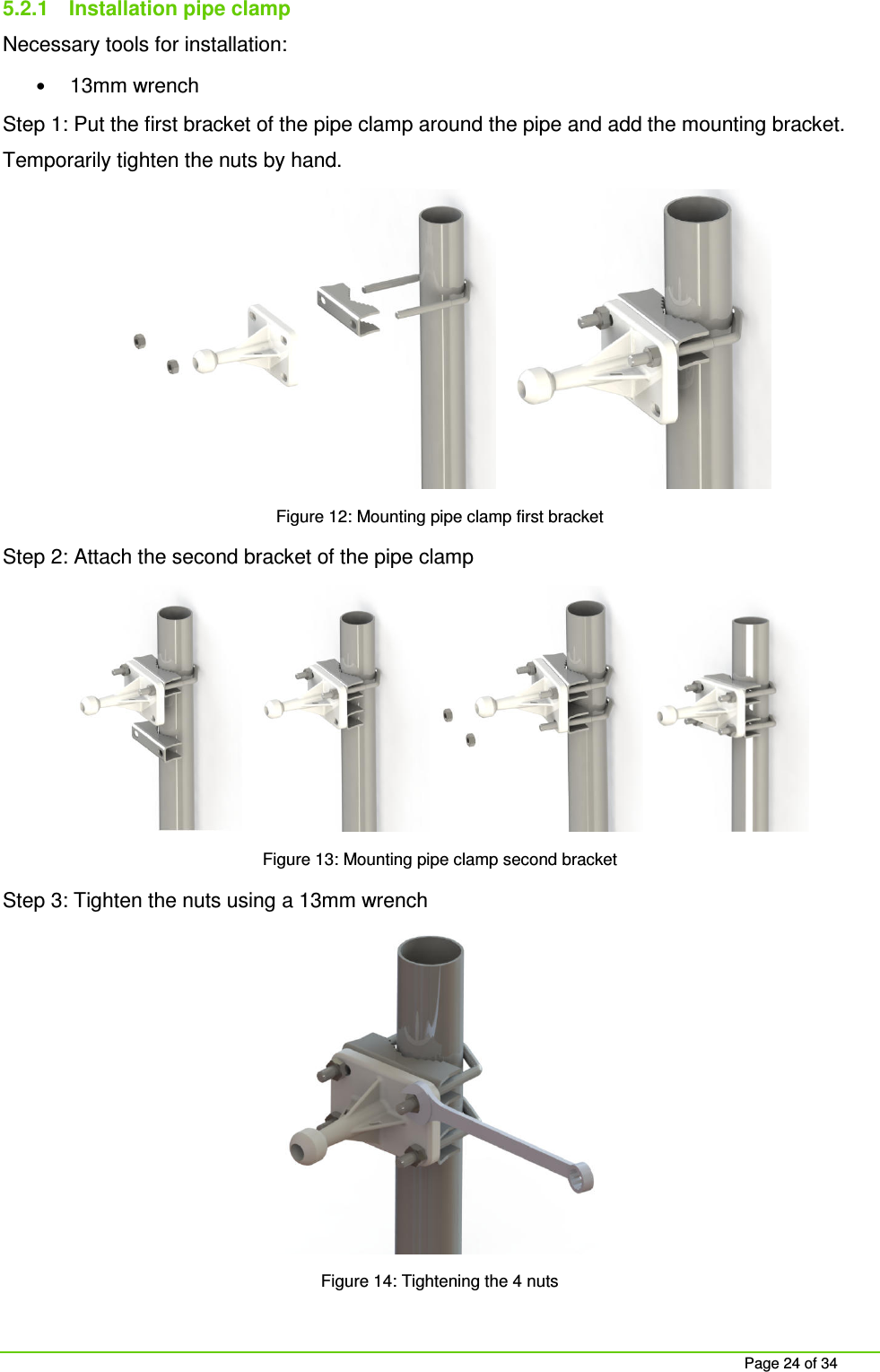
    Page 24 of 34 5.2.1  Installation pipe clamp Necessary tools for installation: • 13mm wrench Step 1: Put the first bracket of the pipe clamp around the pipe and add the mounting bracket. Temporarily tighten the nuts by hand.  Figure 12: Mounting pipe clamp first bracket Step 2: Attach the second bracket of the pipe clamp  Figure 13: Mounting pipe clamp second bracket Step 3: Tighten the nuts using a 13mm wrench  Figure 14: Tightening the 4 nuts
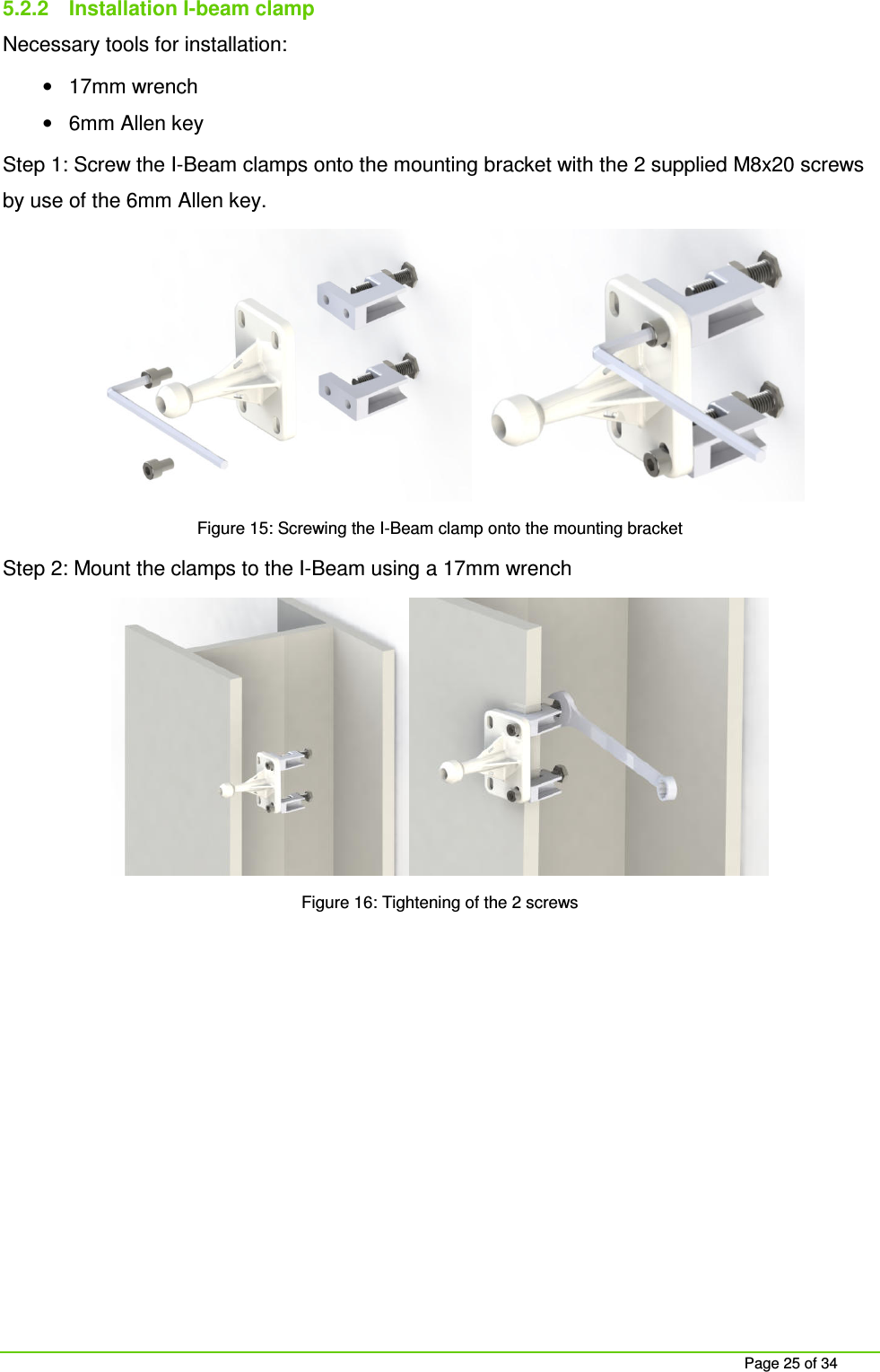
    Page 25 of 34 5.2.2  Installation I-beam clamp Necessary tools for installation: •  17mm wrench •  6mm Allen key Step 1: Screw the I-Beam clamps onto the mounting bracket with the 2 supplied M8x20 screws by use of the 6mm Allen key.  Figure 15: Screwing the I-Beam clamp onto the mounting bracket Step 2: Mount the clamps to the I-Beam using a 17mm wrench  Figure 16: Tightening of the 2 screws
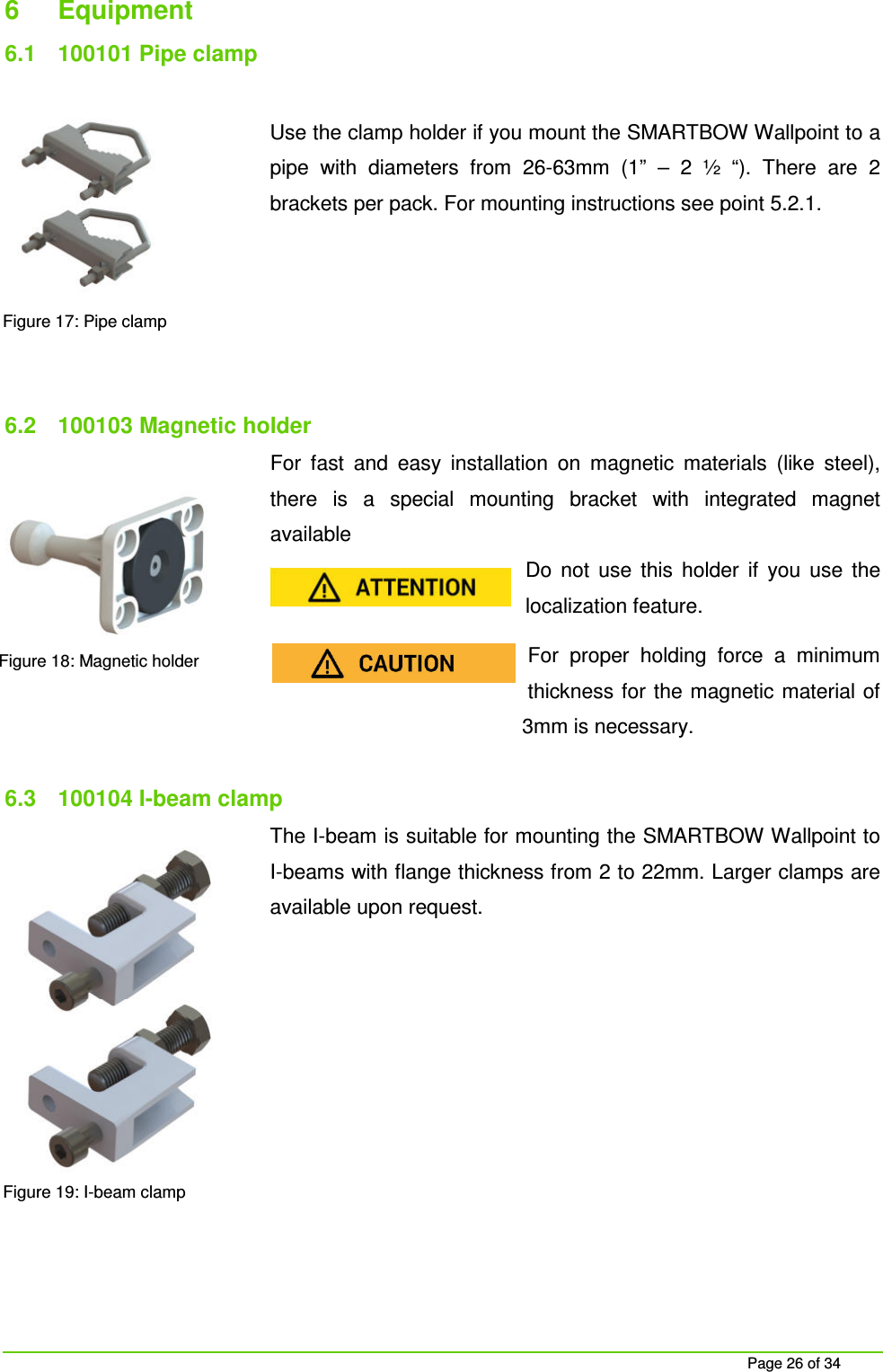
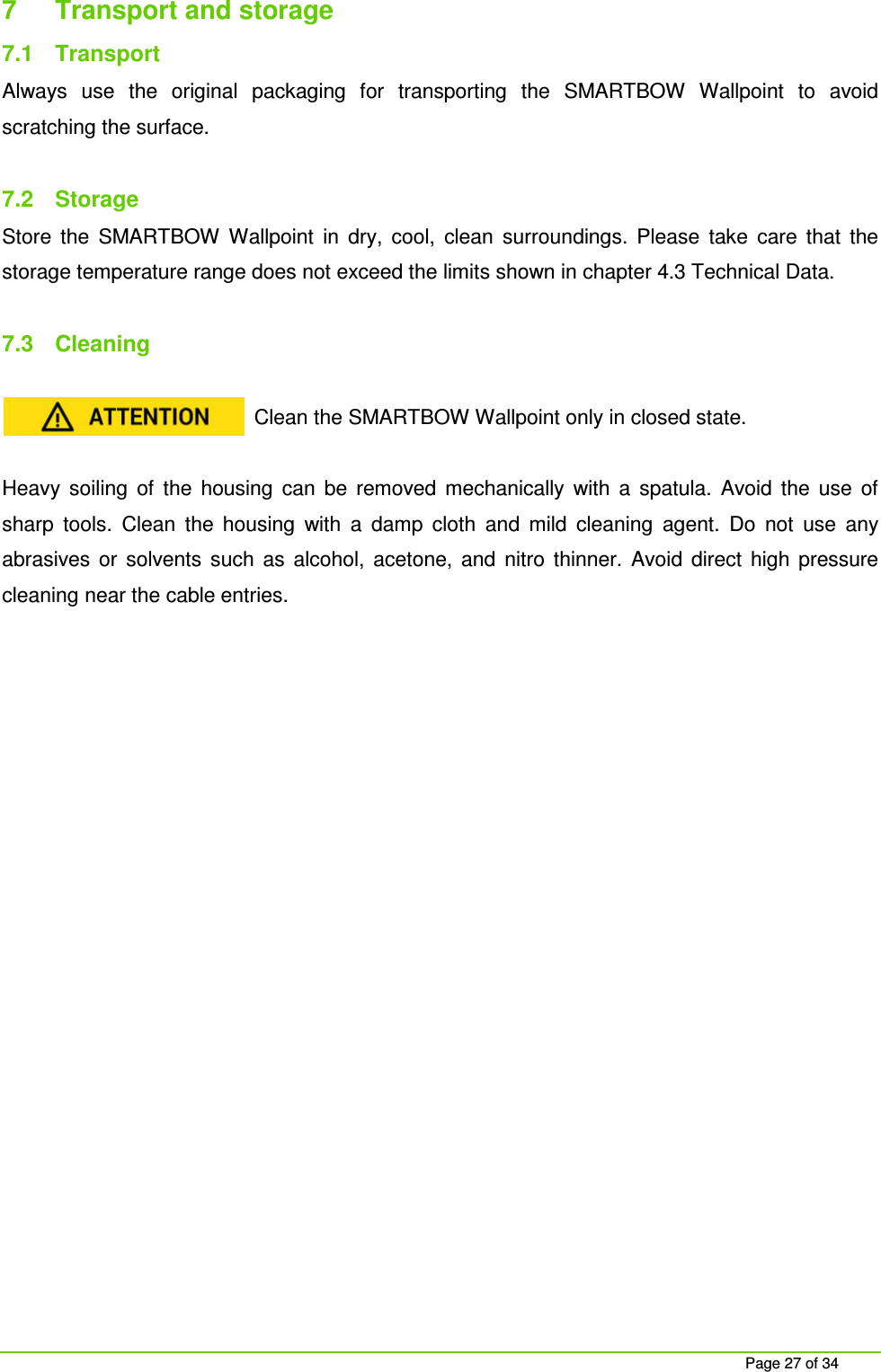
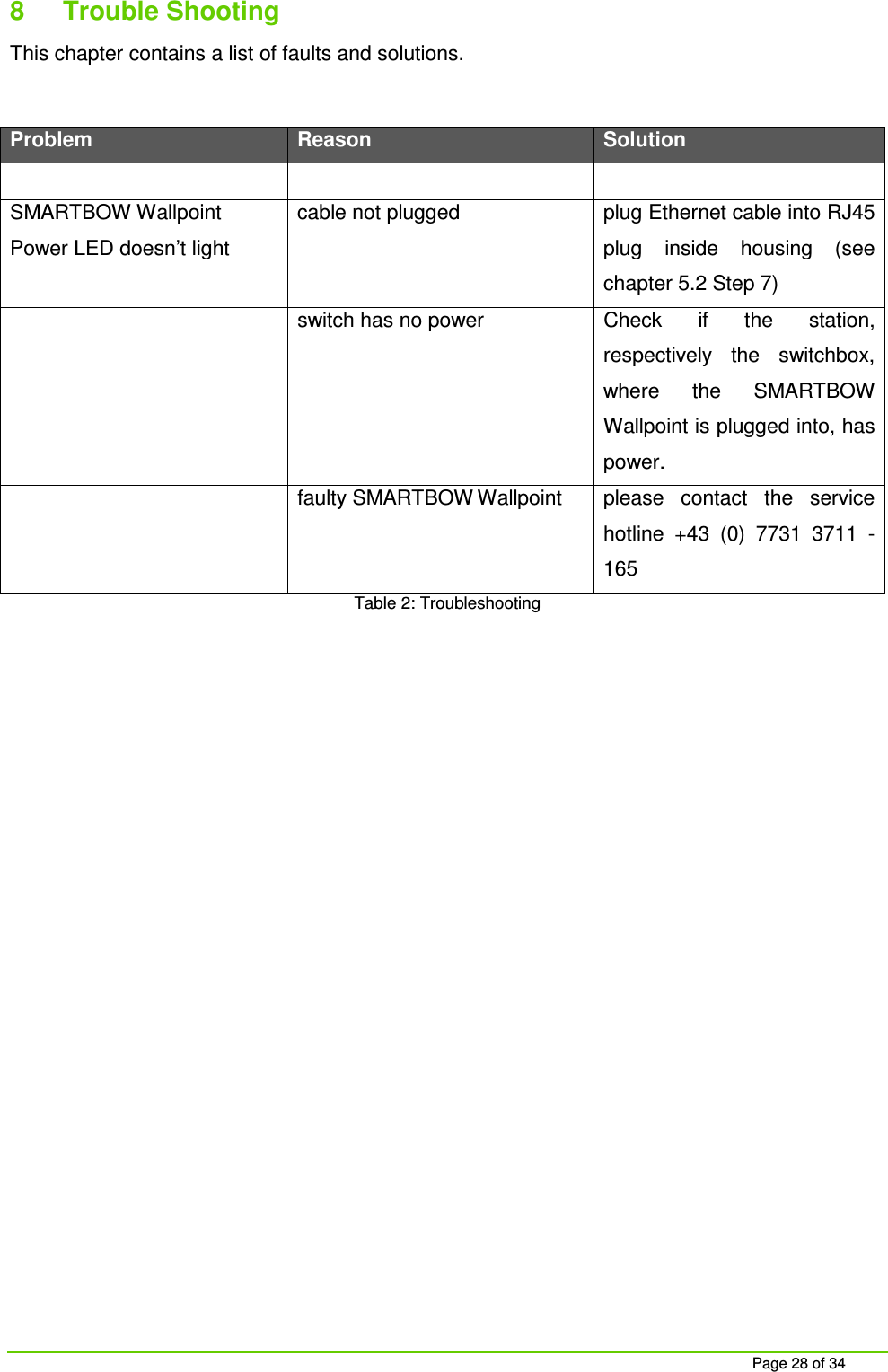
    Page 26 of 34 6  Equipment 6.1  100101 Pipe clamp  Use the clamp holder if you mount the SMARTBOW Wallpoint to a pipe  with  diameters  from  26-63mm  (1”  –  2  ½  “).  There  are  2 brackets per pack. For mounting instructions see point 5.2.1.      6.2  100103 Magnetic holder For  fast  and  easy  installation  on  magnetic  materials  (like  steel), there  is  a  special  mounting  bracket  with  integrated  magnet available  Do  not  use  this  holder  if  you  use  the localization feature. For  proper  holding  force  a  minimum thickness for  the magnetic material of 3mm is necessary.  6.3  100104 I-beam clamp The I-beam is suitable for mounting the SMARTBOW Wallpoint to I-beams with flange thickness from 2 to 22mm. Larger clamps are available upon request.           Figure 17: Pipe clamp Figure 18: Magnetic holder Figure 19: I-beam clamp
    Page 27 of 34 7  Transport and storage 7.1  Transport Always  use  the  original  packaging  for  transporting  the  SMARTBOW  Wallpoint  to  avoid scratching the surface.  7.2  Storage Store  the  SMARTBOW  Wallpoint  in  dry,  cool,  clean  surroundings.  Please  take  care  that  the storage temperature range does not exceed the limits shown in chapter 4.3 Technical Data.  7.3  Cleaning  Clean the SMARTBOW Wallpoint only in closed state.  Heavy  soiling  of  the  housing  can  be  removed  mechanically  with  a  spatula.  Avoid  the  use  of sharp  tools.  Clean  the  housing  with  a  damp  cloth  and  mild  cleaning  agent.  Do  not  use  any abrasives  or  solvents  such  as  alcohol,  acetone,  and  nitro  thinner.  Avoid  direct  high  pressure cleaning near the cable entries.
    Page 28 of 34 8  Trouble Shooting This chapter contains a list of faults and solutions.  Problem Reason Solution      SMARTBOW Wallpoint Power LED doesn’t light  cable not plugged  plug Ethernet cable into RJ45 plug  inside  housing  (see chapter 5.2 Step 7)   switch has no power  Check  if  the  station, respectively  the  switchbox, where  the  SMARTBOW Wallpoint is plugged into, has power.   faulty SMARTBOW Wallpoint  please  contact  the  service hotline  +43  (0)  7731  3711  - 165 Table 2: Troubleshooting
    Page 29 of 34 9  Waste  Please  do  your  part  to  protect  the  environment  by  disposing  used  SMARTBOW  Wallpoints environmentally  friendly  under  European  WEEE  Directive  2002/96/EG  (directive  on  electrical and electronic equipment), and/or national laws. Improper disposal of electronic products could have  a  negative  impact  on  the  environment  and  human  health  due  to  potentially  hazardous substances.  The package contains the following materials: •  corrugated cardboard/cardboard •  films/flat bags of polyethylene •  adhesive tape of PVC   Keep packaging materials away from children - can cause suffocation!  Bring the packaging to an official collection point.  MKW electronics GmbH is focused on sustainability and takes over all duties of the return and disposal for EU manufacturers. Please contact your MKW electronics service center to dispose of  the  product  environmentally  friendly.  A  separate  collection  and  proper  recycling  of  the electronic  waste  helps  to  use  natural  resources  carefully.  Your  cooperation  in  the  correct disposal of this product enables the effective use of natural resources.
    Page 30 of 34 10  Support  For support and customer service please do not hesitate to contact our SMARTBOW team.  MKW electronics GmbH T  +43 (0) 7732 3711-175 Jutogasse 3  F  +43 (0) 7732 3711-35 4675 Weibern, AUSTRIA  support@smartbow.at  www.smartbow.at
    Page 31 of 34 APPENDIX A  SPECIFICATION OF CAT5E CABLE  •  Shielding: Foil and braid shielded •  Conductor cross section: 4x2xAWG24 •  Outer Diameter: 6mm ± 0,1mm •  Working temperature: -20°C…. +60°C APPENDIX B  USED TELECOMMUNICATION STANDARD     T-568B    1  orange/white  1 2  orange  2 3  green/white  3 4  blue  4 5  blue/white  5 6  green  6 7  brown/white  7 8  brown  8 Table 3: Pin assignment EIA/TIA T568B
    Page 32 of 34 11  Lists 11.1  List of figures Figure 1: SMARTBOW Wallpoint ................................................................................................................ 14 Figure 2: SMARTBOW Wallpoint components ........................................................................................... 14 Figure 3: Scope of supply ............................................................................................................................ 15 Figure 4: SMARTBOW Wallpoint labelling elements front .......................................................................... 16 Figure 5: SMARTBOW Wallpoint labelling elements rear ........................................................................... 17 Figure 6: Marking the drill pattern................................................................................................................ 20 Figure 7: Dowel insertion ............................................................................................................................. 21 Figure 8: Screwing the mounting bracket .................................................................................................... 21 Figure 9: Closing the SMARTBOW Wallpoint ............................................................................................. 22 Figure 10: Attaching the SMARTBOW Wallpoint to the mounting bracket ................................................. 22 Figure 11: Installing the antennas ............................................................................................................... 23 Figure 12: Mounting pipe clamp first bracket .............................................................................................. 24 Figure 13: Mounting pipe clamp second bracket ........................................................................................ 24 Figure 14: Tightening the 4 nuts.................................................................................................................. 24 Figure 15: Screwing the I-Beam clamp onto the mounting bracket ............................................................ 25 Figure 16: Tightening of the 2 screws ......................................................................................................... 25 Figure 17: Pipe clamp ................................................................................................................................. 26 Figure 18: Magnetic holder .......................................................................................................................... 26 Figure 19: I-beam clamp ............................................................................................................................. 26
    Page 33 of 34 11.2  List of tables Table 1: Technical Data SAMRTBOW Wallpoint ........................................................................................ 16 Table 2: Troubleshooting ............................................................................................................................. 28 Table 3: Pin assignment EIA/TIA T568B ..................................................................................................... 31  12  GLOSSARY   SMARTBOW Eartag  Low Power 2.4GHz ISM band transceiver sensor module which supports localization, 3-axis accelerometer and ambient temperature   SMARTBOW Station  Local server at the farm for data analysis and localization
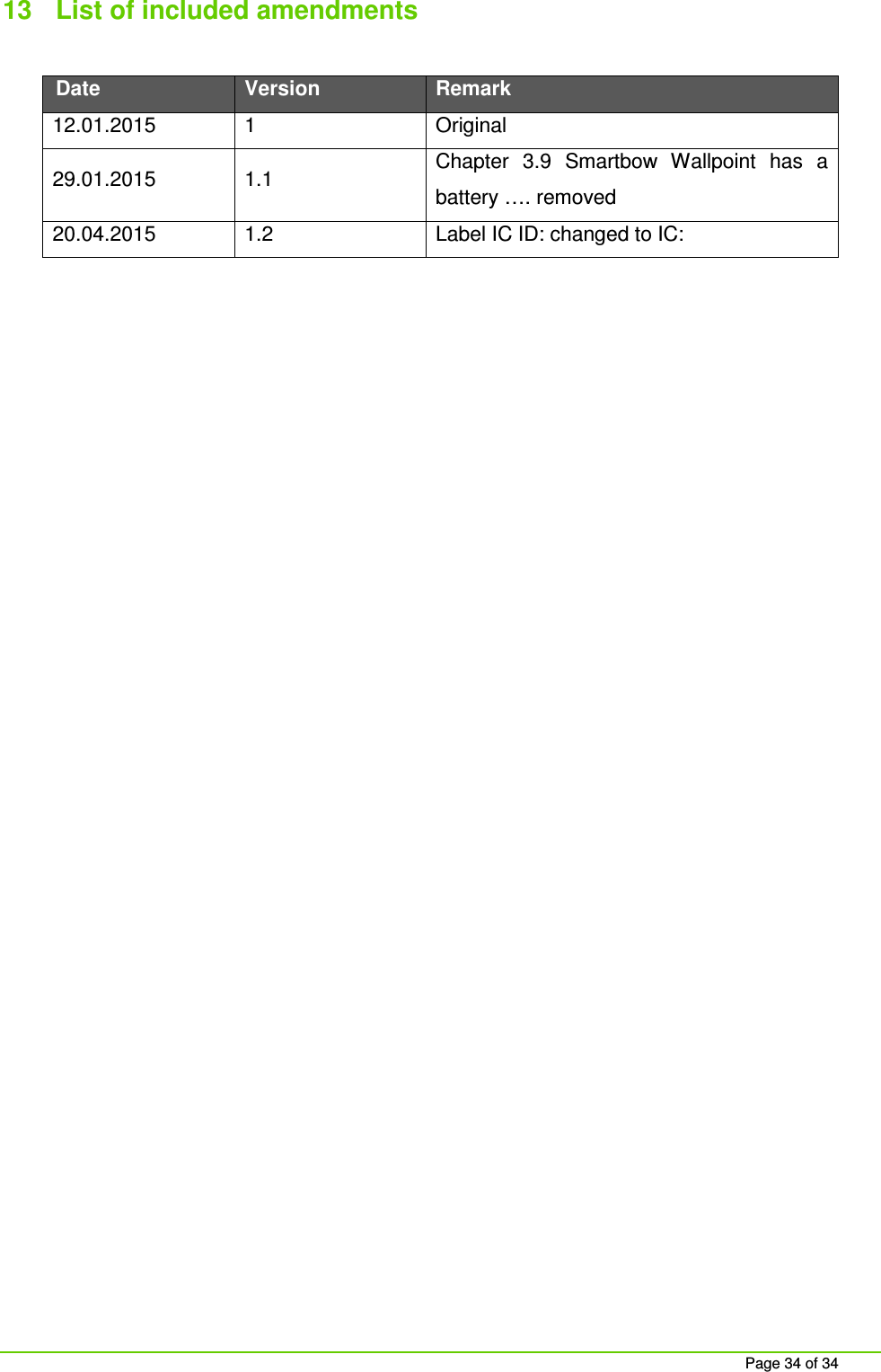
    Page 34 of 34 13  List of included amendments  Date Version Remark 12.01.2015  1  Original 29.01.2015  1.1  Chapter  3.9  Smartbow  Wallpoint  has  a battery …. removed 20.04.2015  1.2  Label IC ID: changed to IC:

Navigation menu