Sondpex of America CA-E065 KoolMAX 40-Quart Wheeled Cooler, Bluetooth PA System and Charging Station User Manual kool max manual 03 26 15

Sondpex Corporation of America KoolMAX 40-Quart Wheeled Cooler, Bluetooth PA System and Charging Station kool max manual 03 26 15

User Manual
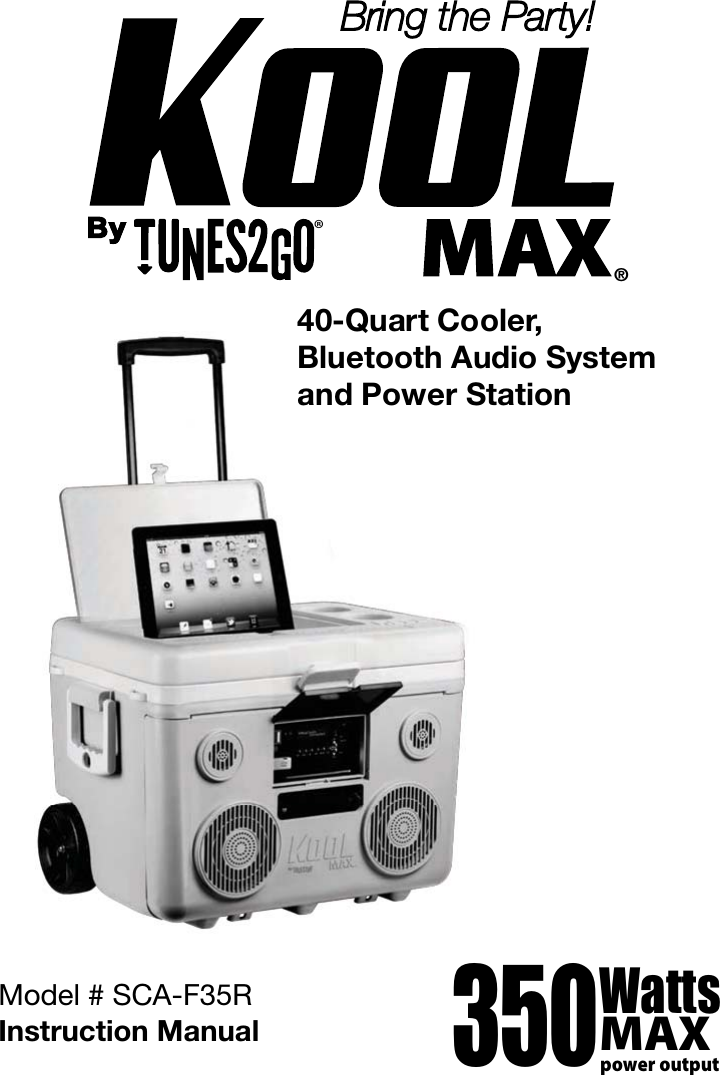
®Bring the Party!40-Quart Cooler,Bluetooth Audio Systemand Power Station350.Watts"9QPXFSPVUQVUModel # :*(-9Instruction Manual
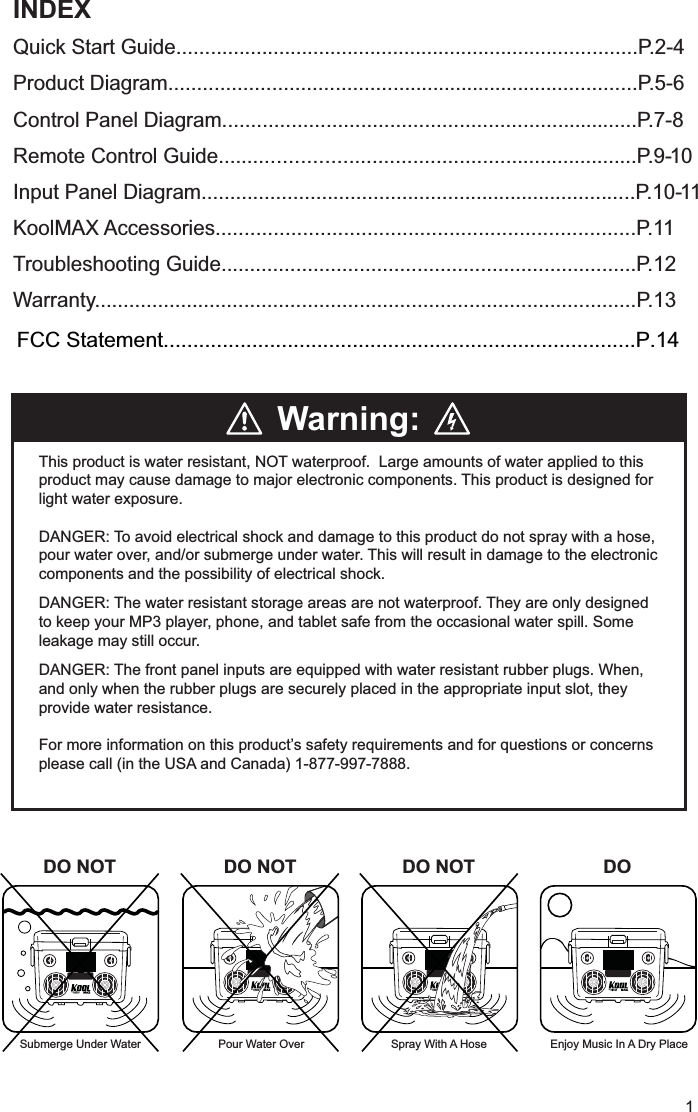
INDEXQuick Start Guide.................................................................................P.2-4Product Diagram..................................................................................P.5-6Control Panel Diagram........................................................................P.7-8Remote Control Guide........................................................................P.9-10Input Panel Diagram............................................................................P.10-11KoolMAX Accessories........................................................................P.11Troubleshooting Guide........................................................................P.12Warranty..............................................................................................P.13Warning: This product is water resistant, NOT waterproof.  Large amounts of water applied to this product may cause damage to major electronic components. This product is designed for light water exposure.  DANGER: To avoid electrical shock and damage to this product do not spray with a hose, pour water over, and/or submerge under water. This will result in damage to the electronic components and the possibility of electrical shock.DANGER: The water resistant storage areas are not waterproof. They are only designed  to keep your MP3 player, phone, and tablet safe from the occasional water spill. Some leakage may still occur.DANGER: The front panel inputs are equipped with water resistant rubber plugs. When, and only when the rubber plugs are securely placed in the appropriate input slot, they provide water resistance.For more information on this product’s safety requirements and for questions or concerns please call (in the USA and Canada) 1-877-997-7888.®™DO NOTDO NOTDO NOT DO®™1®™®™Submerge Under Water Spray With A Hose Enjoy Music In A Dry PlacePour Water Over
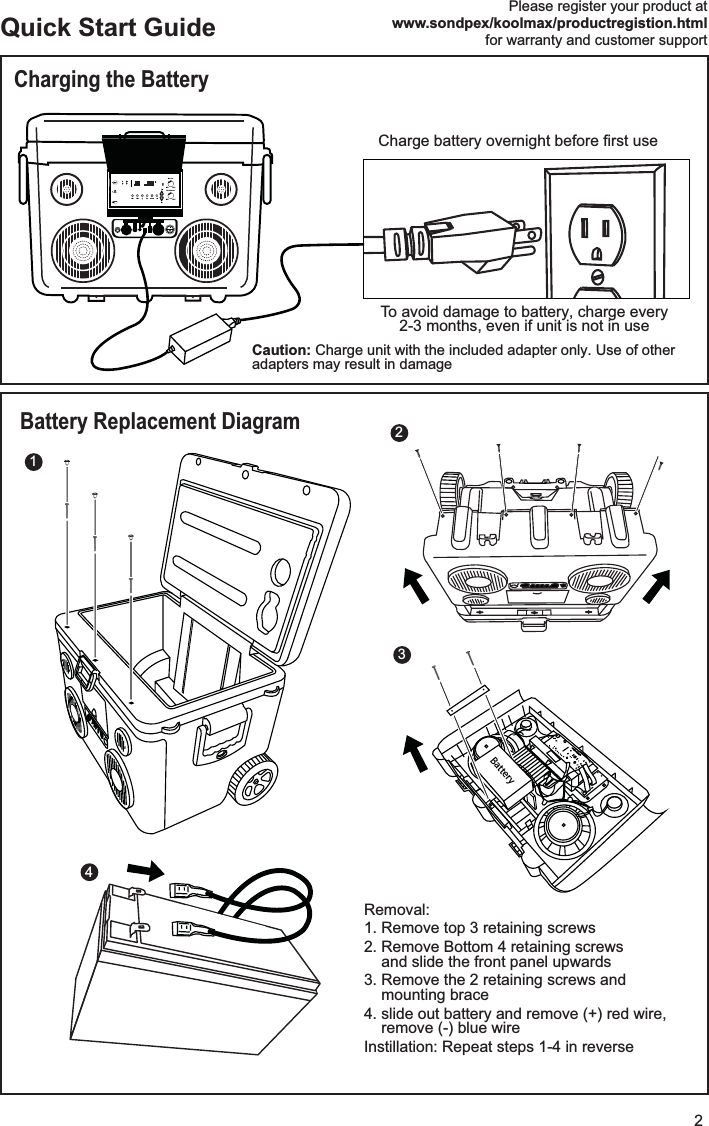
2Quick Start GuideCharging the BatteryBattery Replacement DiagramFM1 FM2 EQ MODEMIN MAXMIN MAXIRMIC VOLMASTER VOLAUX INUSBFUSEBattery4213Please register your product atwww.sondpex/koolmax/productregistion.htmlfor warranty and customer supportRemoval:1. Remove top 3 retaining screws2. Remove Bottom 4 retaining screwsand slide the front panel upwards3. Remove the 2 retaining screws andmounting brace4. slide out battery and remove (+) red wire,remove (-) blue wireInstillation: Repeat steps 1-4 in reverse To avoid damage to battery, charge every 2-3 months, even if unit is not in use 
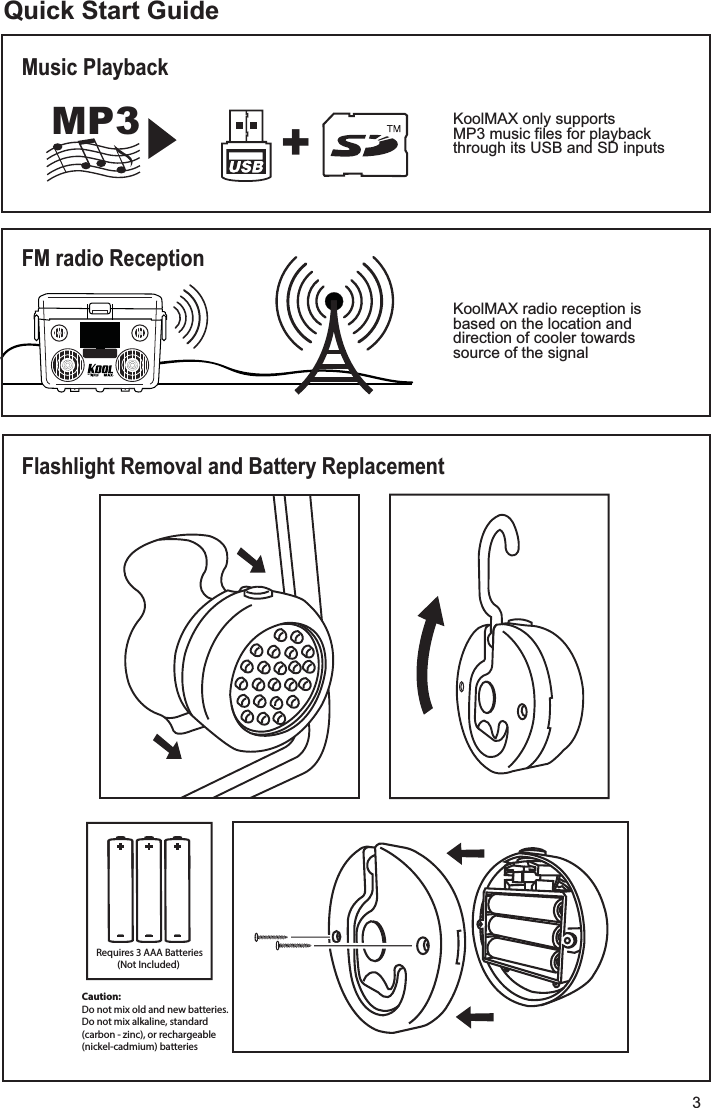
3®™Quick Start GuideFlashlight Removal and Battery ReplacementMusic PlaybackFM radio Reception +_+_+_Requires 3 AAA Batteries(Not Included) KoolMAX only supportsMP3 music files for playbackthrough its USB and SD inputs KoolMAX radio reception is based on the location and direction of cooler towardssource of the signal  MP3 +$BVUJPO%POPUNJYPMEBOEOFXCBUUFSJFT%POPUNJYBMLBMJOFTUBOEBSEDBSCPO[JODPSSFDIBSHFBCMFOJDLFMDBENJVNCBUUFSJFT
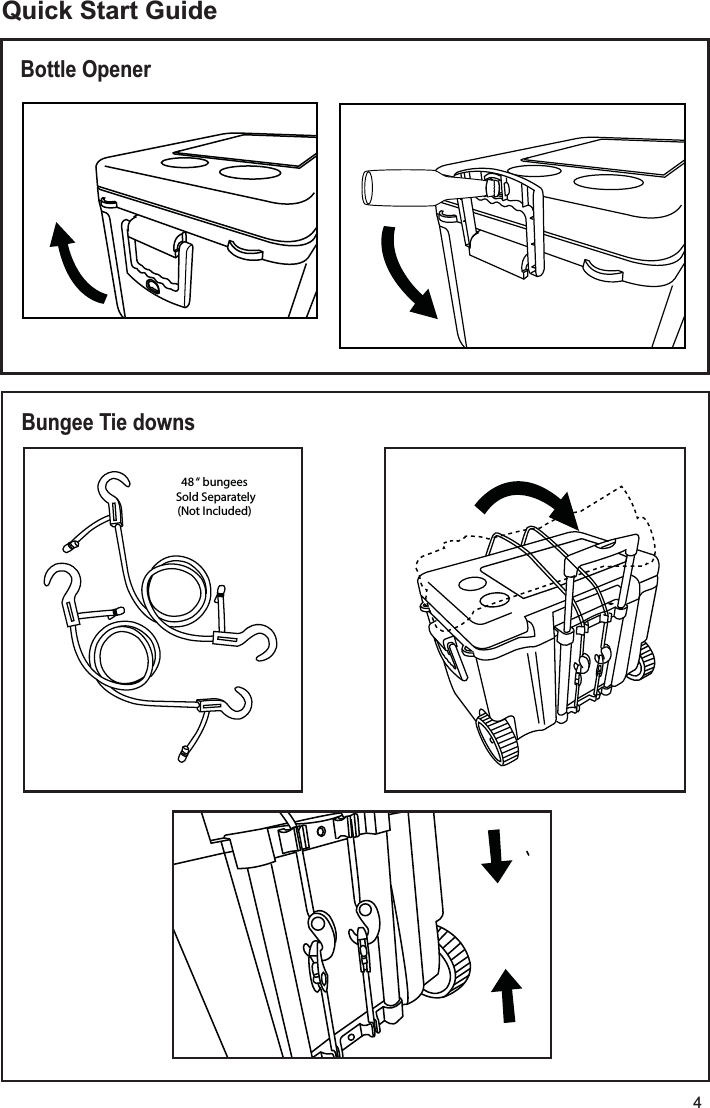
4Quick Start GuideBungee Tie downsBottle Opener 48 “ bungees Sold Separately(Not Included)
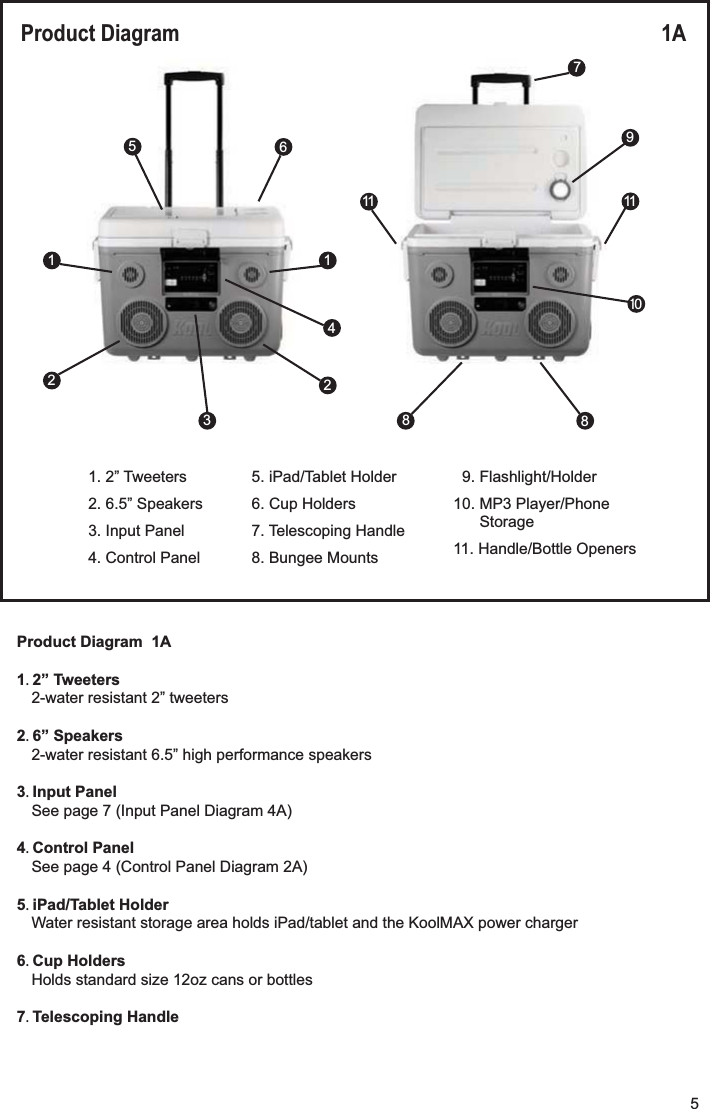
Product Diagram  1A1 2” Tweeters2-water resistant 2” tweeters2 6” Speakers2-water resistant 6.5” high performance speakers3 Input PanelSee page 7 (Input Panel Diagram 4A)4 Control PanelSee page 4 (Control Panel Diagram 2A)5 iPad/Tablet HolderWater resistant storage area holds iPad/tablet and the KoolMAX power charger6 Cup HoldersHolds standard size 12oz cans or bottles7 Telescoping HandleProduct Diagram 1A 5167412111110283891. 2” Tweeters2. 6.5” Speakers3. Input Panel4. Control Panel9. Flashlight/Holder10. MP3 Player/PhoneStorage11. Handle/Bottle Openers5. iPad/Tablet Holder6. Cup Holders7. Telescoping Handle8. Bungee Mounts5
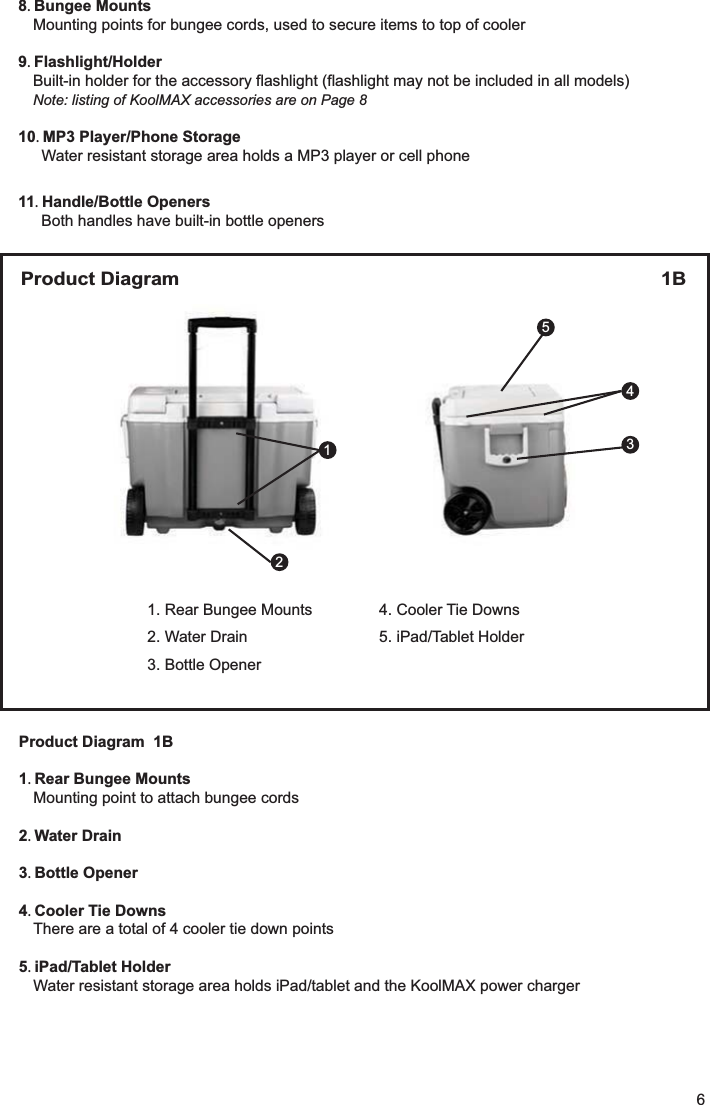
8 Bungee MountsMounting points for bungee cords, used to secure items to top of cooler9 Flashlight/HolderBuilt-in holder for the accessory flashlight (flashlight may not be included in all models)Note: listing of KoolMAX accessories are on Page 810 MP3 Player/Phone StorageWater resistant storage area holds a MP3 player or cell phone11 Handle/Bottle OpenersBoth handles have built-in bottle openersProduct Diagram 1B 3124351. Rear Bungee Mounts2. Water Drain3. Bottle Opener4. Cooler Tie Downs5. iPad/Tablet HolderProduct Diagram  1B1 Rear Bungee MountsMounting point to attach bungee cords2 Water Drain3 Bottle Opener4 Cooler Tie DownsThere are a total of 4 cooler tie down points5 iPad/Tablet HolderWater resistant storage area holds iPad/tablet and the KoolMAX power charger6
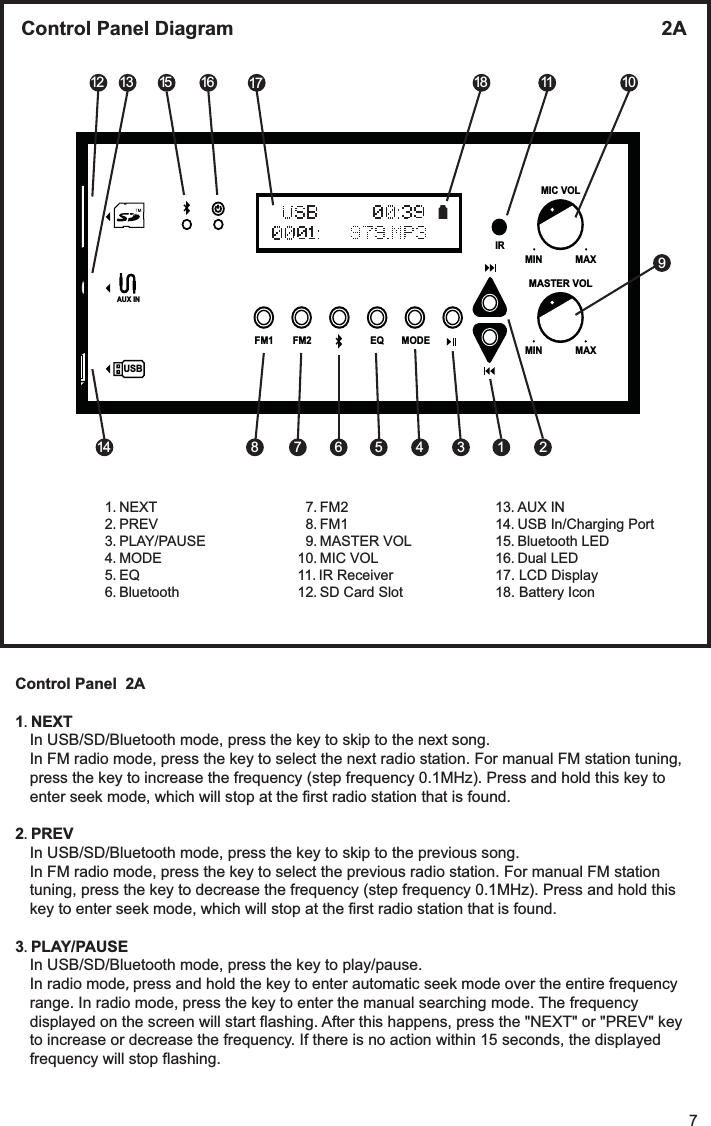
FM1 FM2 EQ MODEMIN MAXMIN MAXIRMIC VOLMASTER VOLAUX INUSBControl Panel Diagram  2A 15 109876 5 2114 341113 16 17 1812Control Panel  2A1 NEXTIn USB/SD/Bluetooth mode, press the key to skip to the next song.In FM radio mode, press the key to select the next radio station. For manual FM station tuning,press the key to increase the frequency (step frequency 0.1MHz). Press and hold this key toenter seek mode, which will stop at the first radio station that is found.2 PREVIn USB/SD/Bluetooth mode, press the key to skip to the previous song.In FM radio mode, press the key to select the previous radio station. For manual FM stationtuning, press the key to decrease the frequency (step frequency 0.1MHz). Press and hold thiskey to enter seek mode, which will stop at the first radio station that is found.3 PLAY/PAUSEIn USB/SD/Bluetooth mode, press the key to play/pause.In radio mode press and hold the key to enter automatic seek mode over the entire frequencyrange. In radio mode, press the key to enter the manual searching mode. The frequencydisplayed on the screen will start flashing. After this happens, press the "NEXT" or "PREV" keyto increase or decrease the frequency. If there is no action within 15 seconds, the displayedfrequency will stop flashing.1 NEXT 2 PREV3 PLAY/PAUSE4 MODE5 EQ6 Bluetooth7 FM28 FM19 MASTER VOL10 MIC VOL11 IR Receiver 12 SD Card Slot13 AUX IN14 USB In/Charging Port15 Bluetooth LED16 Dual LED17. LCD Display18. Battery Icon7
4 MODEToggles audio source. Press this key to toggle the audio source in this order:5 EQToggles EQ mode. Press this key to toggle the EQ mode in this order:NORMAL-BASS-POP-POCK-JAZZ-COUNTRY6 BluetoothShortcut key for Bluetooth mode. Press this at any time to switch to Bluetooth mode.Each time the KoolMAX is powered on, it defaults to Bluetooth mode.7 FM2In FM mode, press this key, then press the "NEXT" or "PREV" key to toggle between the 6 FMstations stored in FM2. In manual tuning and seek modes, press the key to store the currentstation in FM2. FM2 can store 6 stations at one time. If the number of stored stations is morethan 6, the earliest stored station will be overwritten.8 FM1In FM mode, press this key, then press the "NEXT" or "PREV" key to toggle between the 6 FMstations stored in FM1. In manual tuning and seek modes, press the key to store the currentstation in FM1. FM1 can store 6 stations at one time. If the number of stored stations is morethan 6, the earliest stored station will be overwritten.9 MASTER VOLMaster volume control knob. Clockwise rotation increases volume, counter clockwise rotationdecreases volume.10 MIC VOLMicrophone volume control knob. Clockwise rotation increases volume, counter clockwiserotation decreases volume.11 IR Remote Control Receiver12 SD Card Slot13 AUX IN14 USB In/Charging Port15 Bluetooth LEDBlue LED indicator light.  Only turns on when in Bluetooth mode.16 Dual LEDDual LED Indicator SystemGreen LED  Turns on when KoolMAX is powered onRed LED  Turns on when the battery is charging (regardless if KoolMAX is powered onor not). When the battery is fully charged, the red LED will turn off.17 LCD Display18 Battery iconIndication of battery power8
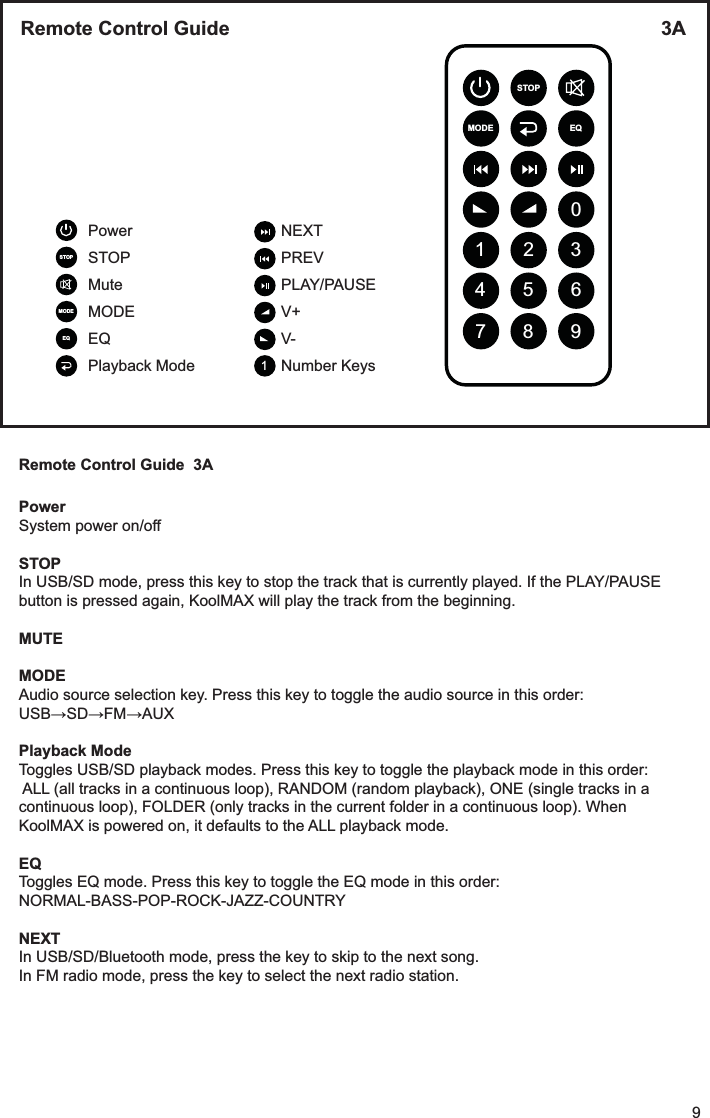
Remote Control Guide  3APowerSystem power on/off STOPIn USB/SD mode, press this key to stop the track that is currently played. If the PLAY/PAUSE button is pressed again, KoolMAX will play the track from the beginning.MUTEMODEAudio source selection key. Press this key to toggle the audio source in this order: Playback ModeToggles USB/SD playback modes. Press this key to toggle the playback mode in this order: ALL (all tracks in a continuous loop), RANDOM (random playback), ONE (single tracks in a continuous loop), FOLDER (only tracks in the current folder in a continuous loop). When KoolMAX is powered on, it defaults to the ALL playback mode.EQToggles EQ mode. Press this key to toggle the EQ mode in this order: NORMAL-BASS-POP-ROCK-JAZZ-COUNTRYNEXTIn USB/SD/Bluetooth mode, press the key to skip to the next song.In FM radio mode, press the key to select the next radio station.9Remote Control Guide  3A MODEEQSTOPMODE EQ0369258147STOPPowerSTOPMuteMODEEQPlayback ModeNEXTPREVPLAY/PAUSEV+V-Number Keys1
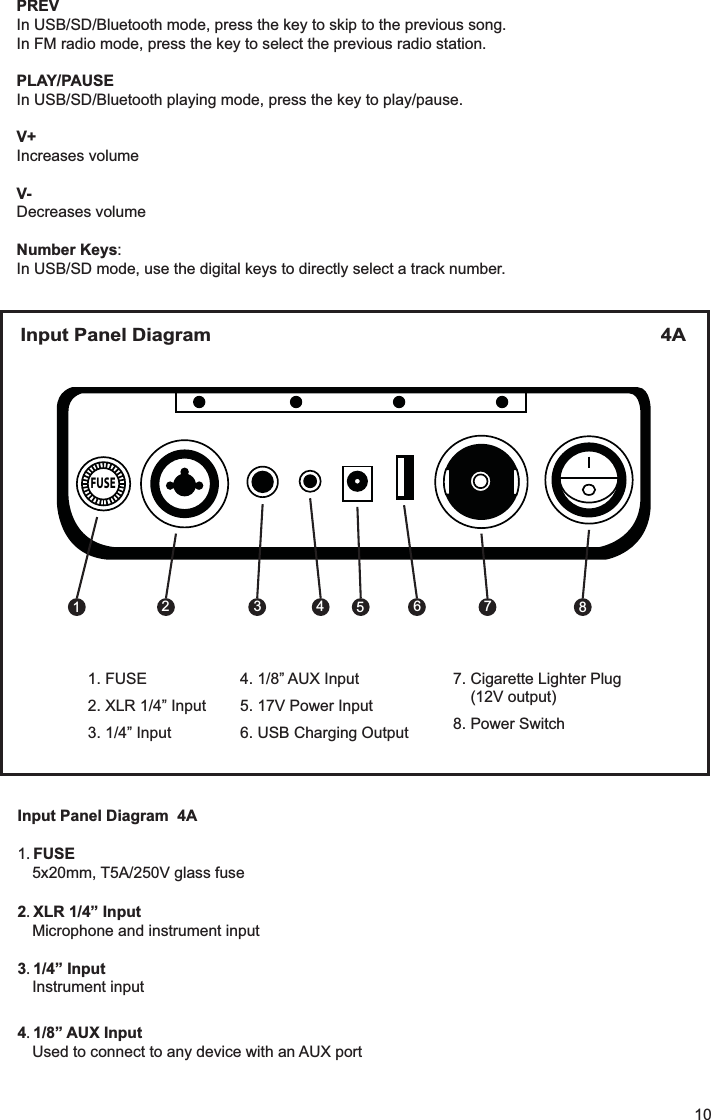
Input Panel Diagram  4A1FUSE5x20mm, T5A/250V glass fuse2 XLR 1/4” InputMicrophone and instrument input3 1/4” InputInstrument input41/8” AUX InputUsed to connect to any device with an AUX portPREVIn USB/SD/Bluetooth mode, press the key to skip to the previous song.In FM radio mode, press the key to select the previous radio station.PLAY/PAUSEIn USB/SD/Bluetooth playing mode, press the key to play/pause.V+Increases volumeV-Decreases volumeNumber Keys:In USB/SD mode, use the digital keys to directly select a track number.FUSEInput Panel Diagram  4A 12 3 4 56 7 81. FUSE2. XLR 1/4” Input3. 1/4” Input7. Cigarette Lighter Plug(12V output)8. Power Switch4. 1/8” AUX Input5. 17V Power Input6. USB Charging Output10
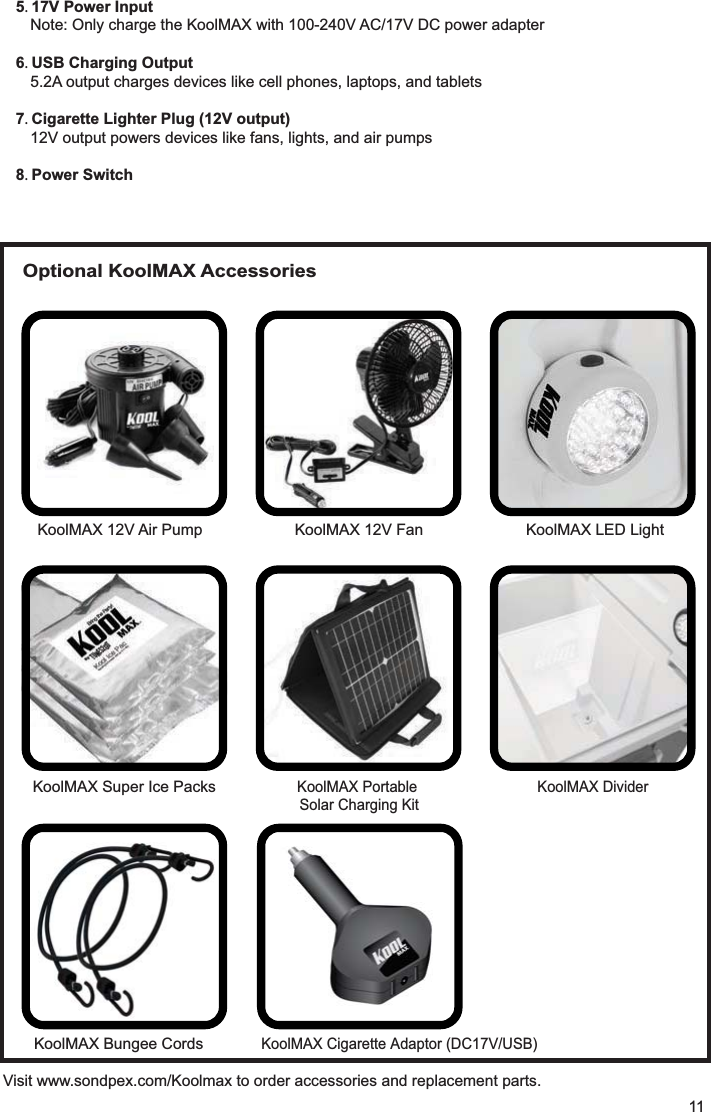
5 17V Power InputNote: Only charge the KoolMAX with 100-240V AC/17V DC power adapter6 USB Charging Output5.2A output charges devices like cell phones, laptops, and tablets7 Cigarette Lighter Plug (12V output)12V output powers devices like fans, lights, and air pumps8 Power SwitchVisit www.sondpex.com/Koolmax to order accessories and replacement parts.11KoolMAX 12V Air Pump KoolMAX 12V Fan KoolMAX LED LightKoolMAX Super Ice PacksKoolMAX Portable Solar Charging KitKoolMAX DividerOptional KoolMAX AccessoriesKoolMAX KoolMAX 
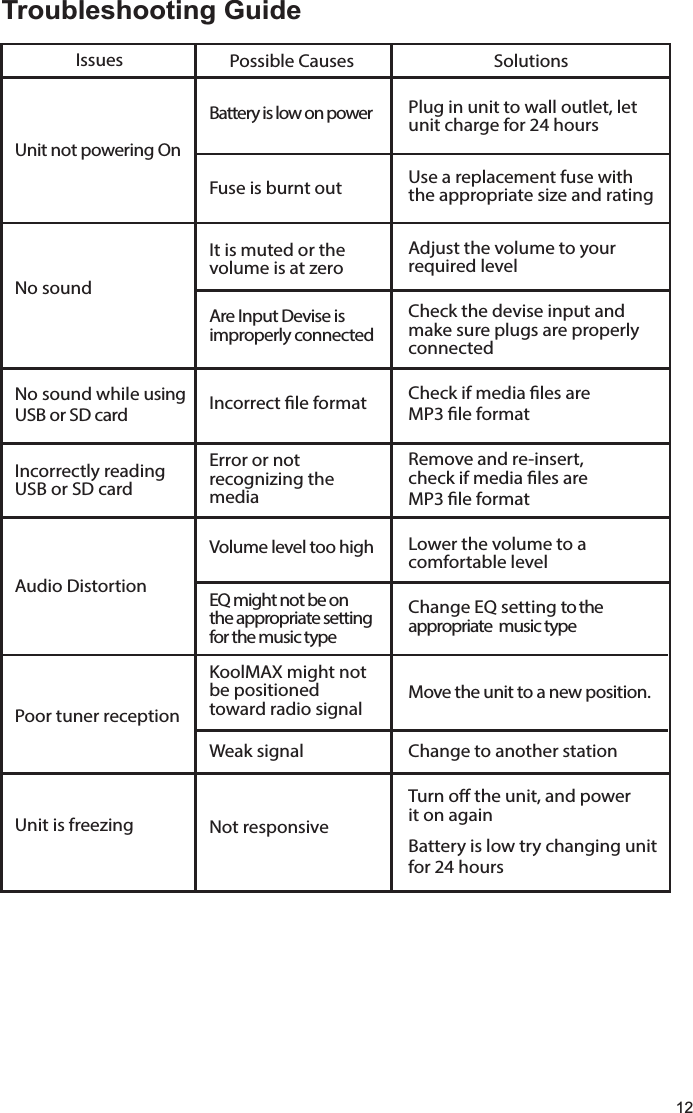
12               IssuesUnit not powering OnNo soundNo sound while using USB or SD cardIncorrectly reading USB or SD cardAudio DistortionPoor tuner reception Unit is freezing     Possible CausesBattery is low on power  Fuse is burnt outIt is muted or the volume is at zeroAre Input Devise is improperly connectedIncorrect le formatError or not recognizing the mediaVolume level too highEQ might not be onthe appropriate setting for the music typeKoolMAX might notbe positioned toward radio signalWeak signalNot responsiveSolutionsPlug in unit to wall outlet, letunit charge for 24 hoursUse a replacement fuse with the appropriate size and ratingAdjust the volume to your required levelCheck the devise input and make sure plugs are properly connectedCheck if media les are MP3 le formatRemove and re-insert, check if media les are MP3 le formatLower the volume to a comfortable levelChange EQ setting to the appropriate  music typeMove the unit to a new position. Change to another stationTurn o the unit, and power it on againBattery is low try changing unitfor 24 hoursTroubleshooting Guide
Please register your product atwww.sondpex/koolmax/productregistion.htmlfor warranty and customer supportOne Year LIMITED WARRANTYKoolMAX Model # This warranty is provided to you by Sondpex Corp. of America, and is applicable to this Sondpex product with the following exceptions:• When the product was used for purposes other than the ones it is intended for• If the product was operated contrary to the instructions provided in this manual• If the product has been altered or repaired by unauthorized partiesWARRANTYSondpex warrants this product against original defects in materialsor workmanship for a period of one year after the original purchase date. Our sole obligations under this warranty are to replace defective products without charge or to provide a refund. Conditions or damages caused by accidents, alterations, misuse, or failure to follow instructions for installation, are excluded from this warranty. Normal wear and tear are not covered by this warranty.Date of purchase: __/__/____SERVICEIf you believe your product is defective, please contact Sondpex at the number listed below. Do not return the product to the place of purchase without first contacting Sondpex. If you need any other assistance, please contact Sondpex at the telephone number provided below.Toll free (USA and Canada): 1-877-997-7888support@sondpex.comwww.sondpex.comSondpex Corp. of AmericaPrinceton, NJ 08540 USA13

®Bring the Party!www.sondpex.comToll Free (USA and Canada) 1-877-997-7888Sondpex Corp. of AmericaPrinceton, NJ 08540 USA

Navigation menu