Soundmatters UP360 Wireless 3-way Speaker User Manual SOMA UPstage360 Quick Guide 20181005

Soundmatters International Inc. Wireless 3-way Speaker SOMA UPstage360 Quick Guide 20181005

Users Manual

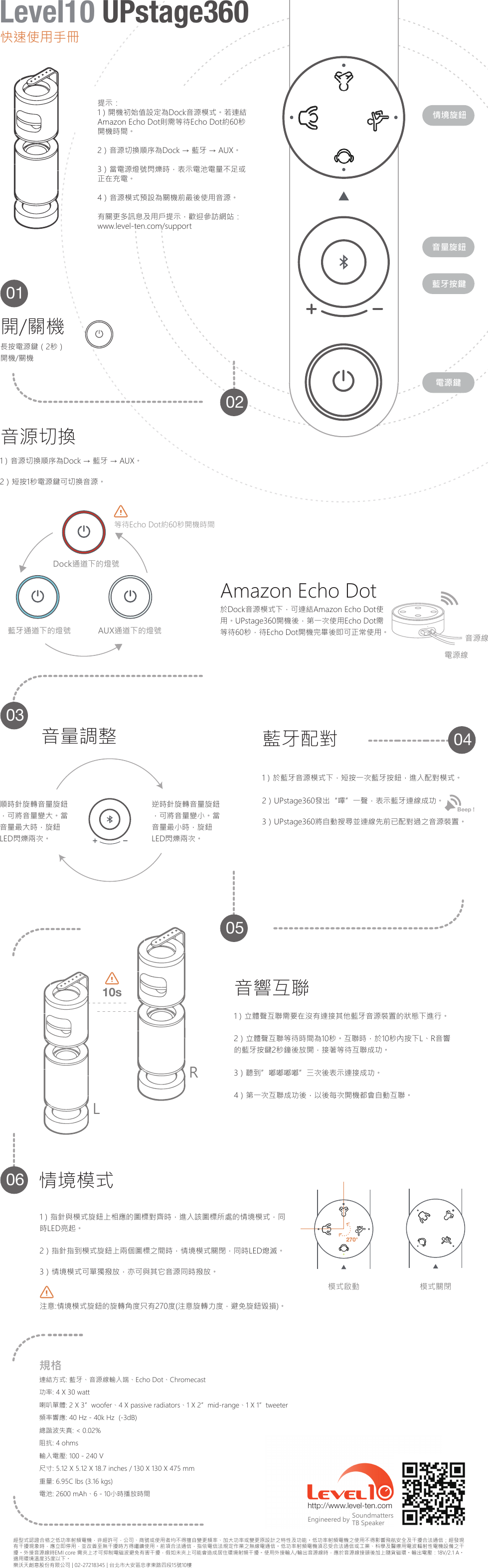
經型式認證合格之低功率射頻電機,非經許可,公司、商號或使用者均不得擅自變更頻率、加大功率或變更原設計之特性及功能。低功率射頻電機之使用不得影響飛航安全及干擾合法通信;經發現有干擾現象時,應立即停用,並改善至無干擾時方得繼續使用。前項合法通信,指依電信法規定作業之無線電通信。低功率射頻電機須忍受合法通信或工業、科學及醫療用電波輻射性電機設備之干擾。外接音源線時EMI core 需夾上才可抑制電磁波避免有害干擾,假如未夾上可能會造成居住環境射頻干擾。使用外接輸入/輸出音源線時,應於音源線接頭後加上隨貨磁環。輸出電壓:18V/2.1 A。適用環境溫度35度以下。樂沃天創意股份有限公司 | 02-27218345 | 台北市大安區忠孝東路四段15號10樓http://www.level-ten.com SoundmattersTB SpeakerEngineered by連結方式: 藍牙、音源線輸入端、Echo Dot、Chromecast功率: 4 X 30 watt喇叭單體: 2 X 3”woofer、4 X passive radiators、1 X 2”mid-range、1 X 1”tweeter頻率響應: 40 Hz - 40k Hz  (-3dB)總諧波失真: < 0.02%阻抗: 4 ohms輸入電壓: 100 - 240 V尺寸: 5.12 X 5.12 X 18.7 inches / 130 X 130 X 475 mm重量: 6.95C lbs (3.16 kgs)電池: 2600 mAh、6 - 10小時播放時間規格270°1)指針與模式旋鈕上相應的圖標對齊時,進入該圖標所處的情境模式,同時LED亮起。2)指針指到模式旋鈕上兩個圖標之間時,情境模式關閉,同時LED熄滅。3)情境模式可單獨撥放,亦可與其它音源同時撥放。注意:情境模式旋鈕的旋轉角度只有270度(注意旋轉力度,避免旋鈕毀損)。情境模式模式啟動 模式關閉1)立體聲互聯需要在沒有連接其他藍牙音源裝置的狀態下進行。2)立體聲互聯等待時間為10秒。互聯時,於10秒內按下L、R音響的藍牙按鍵2秒鐘後放開,接著等待互聯成功。3)聽到”嘟嘟嘟嘟”三次後表示連接成功。4)第一次互聯成功後,以後每次開機都會自動互聯。音響互聯LR10sBeep ! 1)於藍牙音源模式下,短按一次藍牙按鈕,進入配對模式。2)UPstage360發出“嗶”一聲,表示藍牙連線成功。3)UPstage360將自動搜尋並連線先前已配對過之音源裝置。藍牙配對逆時針旋轉音量旋鈕,可將音量變小。當音量最小時,旋鈕LED閃爍兩次。順時針旋轉音量旋鈕,可將音量變大。當音量最大時,旋鈕LED閃爍兩次。音量調整電源鍵藍牙按鍵音量旋鈕情境旋鈕電源線音源線於Dock音源模式下,可連結Amazon Echo Dot使用。UPstage360開機後,第一次使用Echo Dot需等待60秒,待Echo Dot開機完畢後即可正常使用。Amazon Echo Dot等待Echo Dot約60秒開機時間藍牙通道下的燈號 AUX通道下的燈號Dock通道下的燈號1)音源切換順序為Dock → 藍牙 → AUX。2)短按1秒電源鍵可切換音源。音源切換開/關機長按電源鍵(2秒)開機/關機060504030201提示:1)開機初始值設定為Dock音源模式。若連結Amazon Echo Dot則需等待Echo Dot約60秒開機時間。2)音源切換順序為Dock → 藍牙 → AUX。3)當電源燈號閃爍時,表示電池電量不足或正在充電。4)音源模式預設為關機前最後使用音源。有關更多訊息及用戶提示,歡迎參訪網站:www.level-ten.com/support快速使用手冊Level10 UPstage360
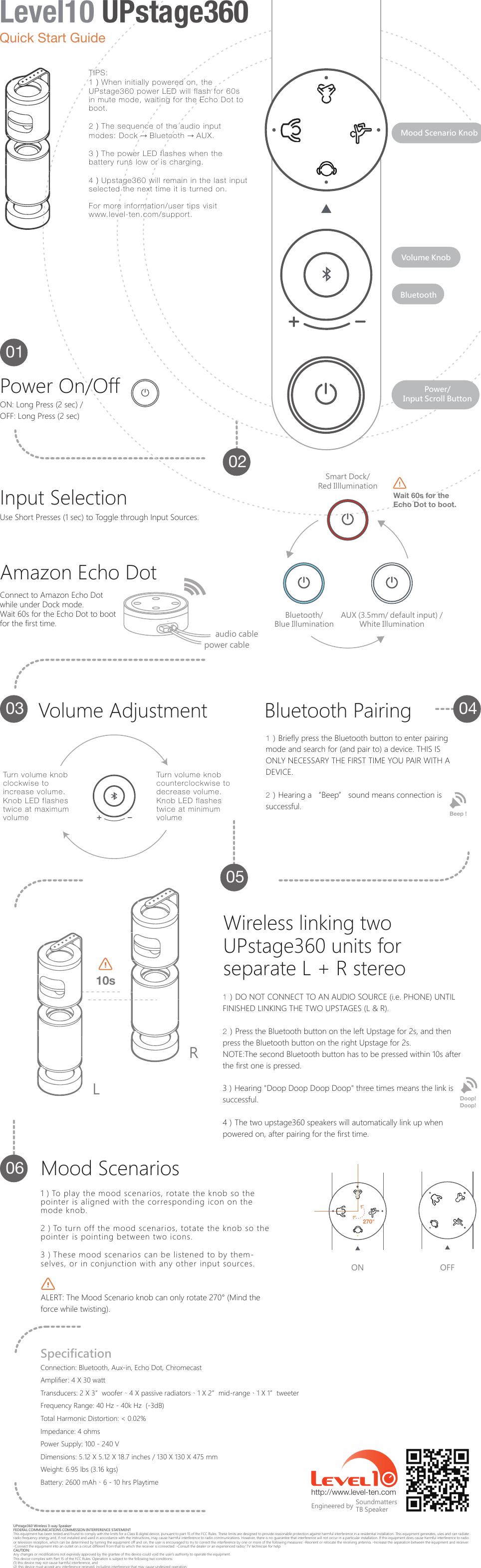
UPstage360 Wireless 3-way SpeakerFEDERAL COMMUNICATIONS COMMISSION INTERFERENCE STATEMENT This equipment has been tested and found to comply with the limits for a Class B digital device, pursuant to part 15 of the FCC Rules. These limits are designed to provide reasonable protection against harmful interference in a residential installation. This equipment generates, uses and can radiate radio frequency energy and, if not installed and used in accordance with the instructions, may cause harmful interference to radio communications. However, there is no guarantee that interference will not occur in a particular installation. If this equipment does cause harmful interference to radio or television reception, which can be determined by turning the equipment off and on, the user is encouraged to try to correct the interference by one or more of the following measures: -Reorient or relocate the receiving antenna. -Increase the separation between the equipment and receiver. -Connect the equipment into an outlet on a circuit different from that to which the receiver is connected. -Consult the dealer or an experienced radio/ TV technician for help.CAUTION: Any changes or modifications not expressly approved by the grantee of this device could void the user's authority to operate the equipment.This device complies with Part 15 of the FCC Rules. Operation is subject to the following two conditions: (1) this device may not cause harmful interference, and (2) this device must accept any interference received, including interference that may cause undesired operation.http://www.level-ten.com SoundmattersTB SpeakerEngineered byConnection: Bluetooth, Aux-in, Echo Dot, ChromecastAmplifier: 4 X 30 wattTransducers: 2 X 3”woofer、4 X passive radiators、1 X 2”mid-range、1 X 1”tweeterFrequency Range: 40 Hz - 40k Hz  (-3dB)Total Harmonic Distortion: < 0.02%Impedance: 4 ohmsPower Supply: 100 - 240 VDimensions: 5.12 X 5.12 X 18.7 inches / 130 X 130 X 475 mmWeight: 6.95 lbs (3.16 kgs)Battery: 2600 mAh、6 - 10 hrs PlaytimeSpecification270°ON OFF1)To play the mood scenarios, rotate the knob so the pointer is aligned with the corresponding icon on the mode knob.2)To turn off the mood scenarios, totate the knob so the pointer is pointing between two icons.3)These mood scenarios can be listened to by them-selves, or in conjunction with any other input sources. ALERT: The Mood Scenario knob can only rotate 270° (Mind the force while twisting).Mood Scenarios1)DO NOT CONNECT TO AN AUDIO SOURCE (i.e. PHONE) UNTIL FINISHED LINKING THE TWO UPSTAGES (L & R).2)Press the Bluetooth button on the left Upstage for 2s, and then press the Bluetooth button on the right Upstage for 2s.NOTE:The second Bluetooth button has to be pressed within 10s after the first one is pressed.3)Hearing "Doop Doop Doop Doop" three times means the link is successful.4)The two upstage360 speakers will automatically link up when powered on, after pairing for the first time.Doop! Doop!Wireless linking two UPstage360 units for separate L + R stereoLR10sBeep ! 1)Briefly press the Bluetooth button to enter pairing mode and search for (and pair to) a device. THIS IS ONLY NECESSARY THE FIRST TIME YOU PAIR WITH A DEVICE.2)Hearing a “Beep” sound means connection is successful.Bluetooth Pairing060504030201Power/Input Scroll ButtonVolume KnobMood Scenario KnobBluetoothVolume AdjustmentTurn volume knob clockwise to increase volume. Knob LED flashes twice at maximum volumeTurn volume knob counterclockwise to decrease volume. Knob LED flashes twice at minimum volumeBluetooth/Blue IlluminationAUX (3.5mm/ default input) /White IlluminationSmart Dock/Red IllluminationWait 60s for theEcho Dot to boot.Connect to Amazon Echo Dot while under Dock mode.Wait 60s for the Echo Dot to boot for the first time.Amazon Echo DotUse Short Presses (1 sec) to Toggle through Input Sources.Input Selectionaudio cablepower cableON: Long Press (2 sec) /OFF: Long Press (2 sec)Power On/OffTIPS:1)When initially powered on, the UPstage360 power LED will flash for 60s in mute mode, waiting for the Echo Dot to boot.2)The sequence of the audio input modes: Dock → Bluetooth → AUX.3)The power LED flashes when the battery runs low or is charging.4)Upstage360 will remain in the last input selected the next time it is turned on.For more information/user tips visit www.level-ten.com/support.Quick Start GuideLevel10 UPstage360

Navigation menu