Spectec Computer MINISDW11BG Mini SDIO Wireless 11b/g User Manual wlan card spectec brand user s manual070503 indd

Spectec Computer Co., Ltd Mini SDIO Wireless 11b/g wlan card spectec brand user s manual070503 indd

Contents

User Manual 1

1bTMWireless/InternetSDIO WLAN cardSDIO WLAN CardUser’s Manualver. 1.401bTMTMWLAN-11b802.11bTMwww.spectec.com.twWireless/InternetSDIO WLAN cardTMWLAN-11b0012E6000506FCC ID:S2YMINIWLAN11BWLAN-11b/gSDIO WLAN Cardwww.spectec.com.tw
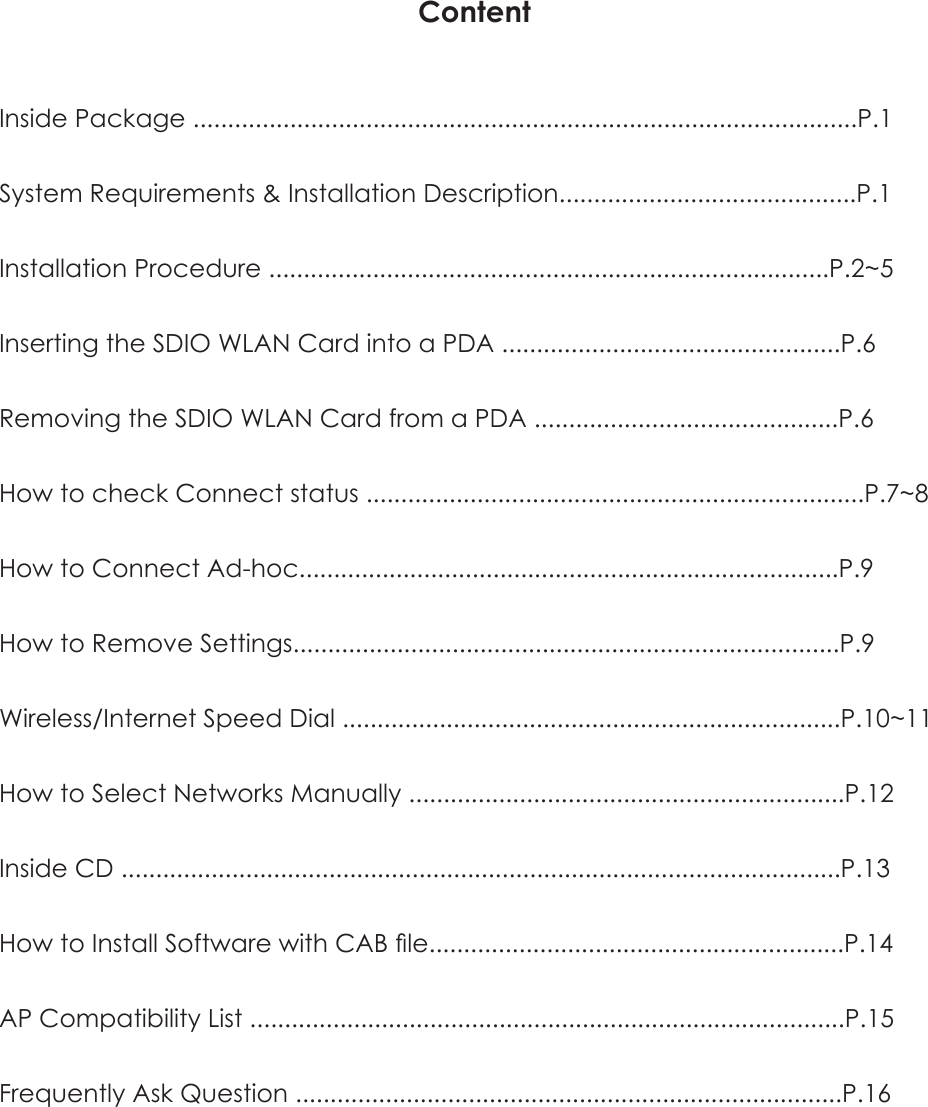
ContentInside Package ................................................................................................P.1System Requirements & Installation Description...........................................P.1Installation Procedure .................................................................................P.2~5Inserting the SDIO WLAN Card into a PDA .................................................P.6Removing the SDIO WLAN Card from a PDA ............................................P.6How to check Connect status ........................................................................P.7~8How to Connect Ad-hoc..............................................................................P.9How to Remove Settings...............................................................................P.9Wireless/Internet Speed Dial ........................................................................P.10~11How to Select Networks Manually ...............................................................P.12Inside CD ........................................................................................................P.13How to Install Software with CAB file............................................................P.14AP Compatibility List ......................................................................................P.15Frequently Ask Question ...............................................................................P.16
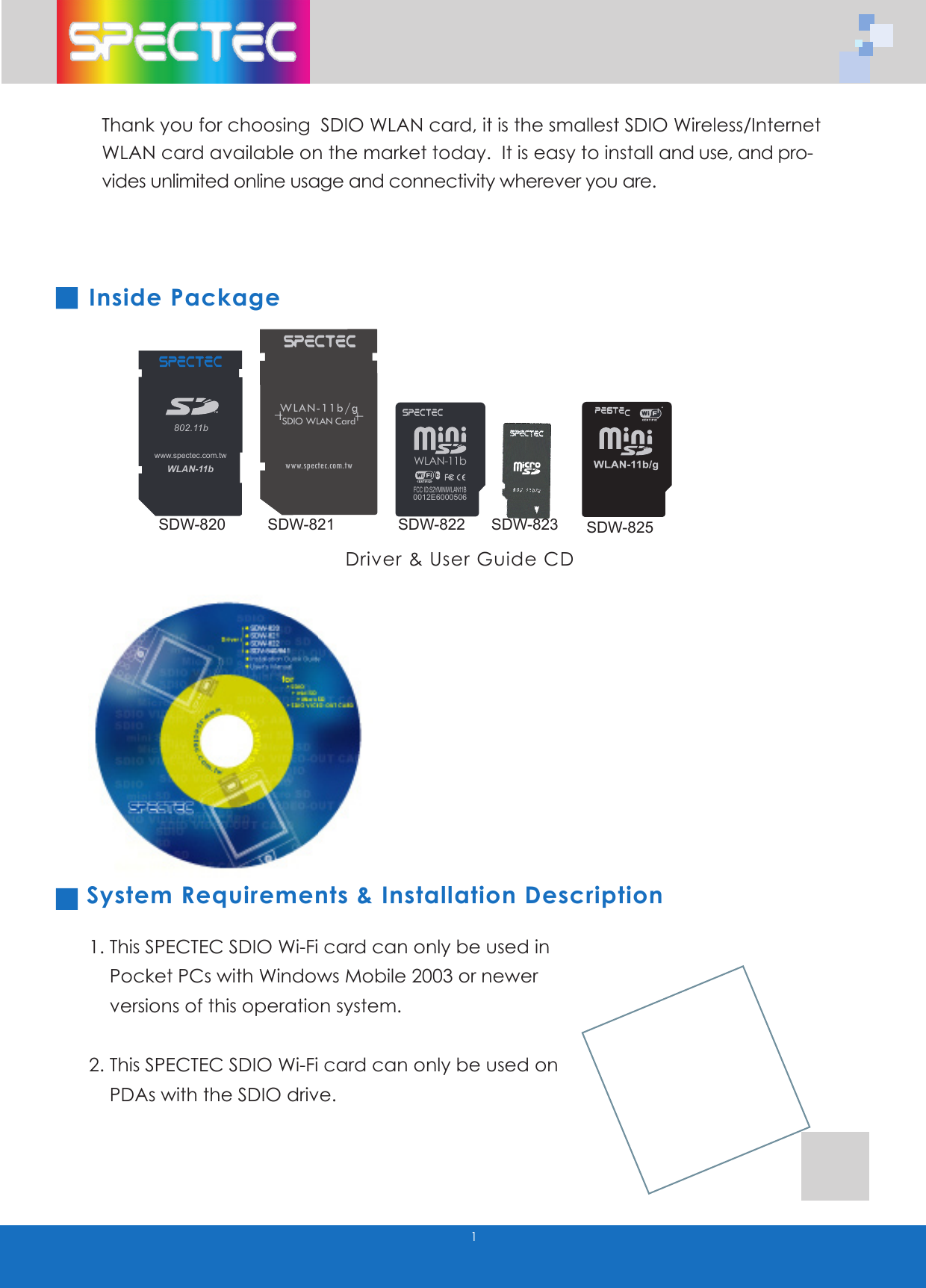
1Thank you for choosing  SDIO WLAN card, it is the smallest SDIO Wireless/Internet WLAN card available on the market today.  It is easy to install and use, and pro-vides unlimited online usage and connectivity wherever you are.Inside Package   System Requirements & Installation Description1. This SPECTEC SDIO Wi-Fi card can only be used in    Pocket PCs with Windows Mobile 2003 or newer      versions of this operation system.  2. This SPECTEC SDIO Wi-Fi card can only be used on     PDAs with the SDIO drive.Driver & User Guide CDWLAN-11b802.11bTMwww.spectec.com.tw WLAN-11b0012E6000506FCC ID:S2YMINIWLAN11BWLAN-11b/gSDIO WLAN Cardwww.spectec.com.twSDW-820 SDW-821SDW-822SDW-823SDW-825
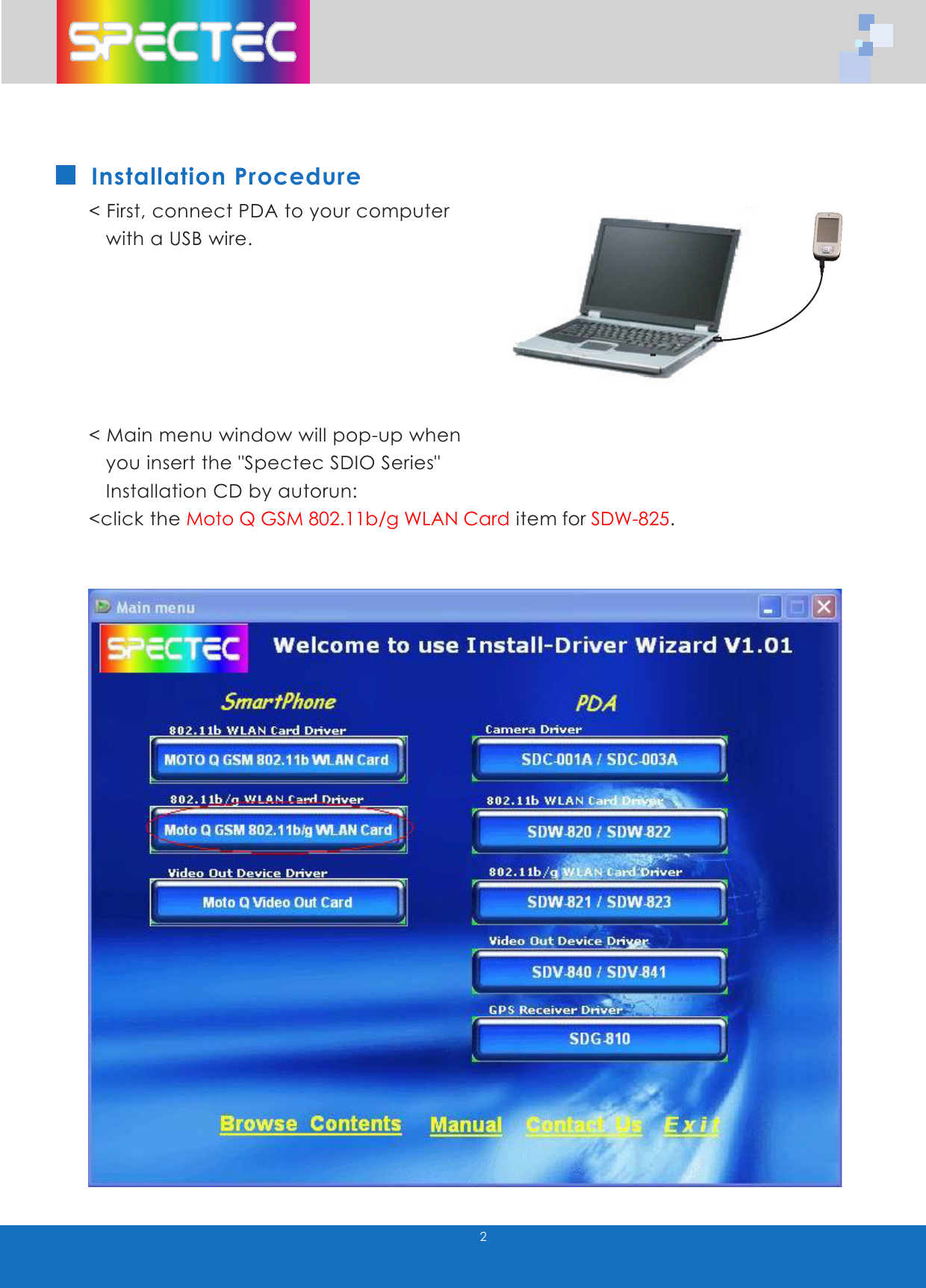
2Installation Procedure< First, connect PDA to your computer     with a USB wire.< Main menu window will pop-up when     you insert the "Spectec SDIO Series"   Installation CD by autorun:<click the Moto Q GSM 802.11b/g WLAN Card item for SDW-825.
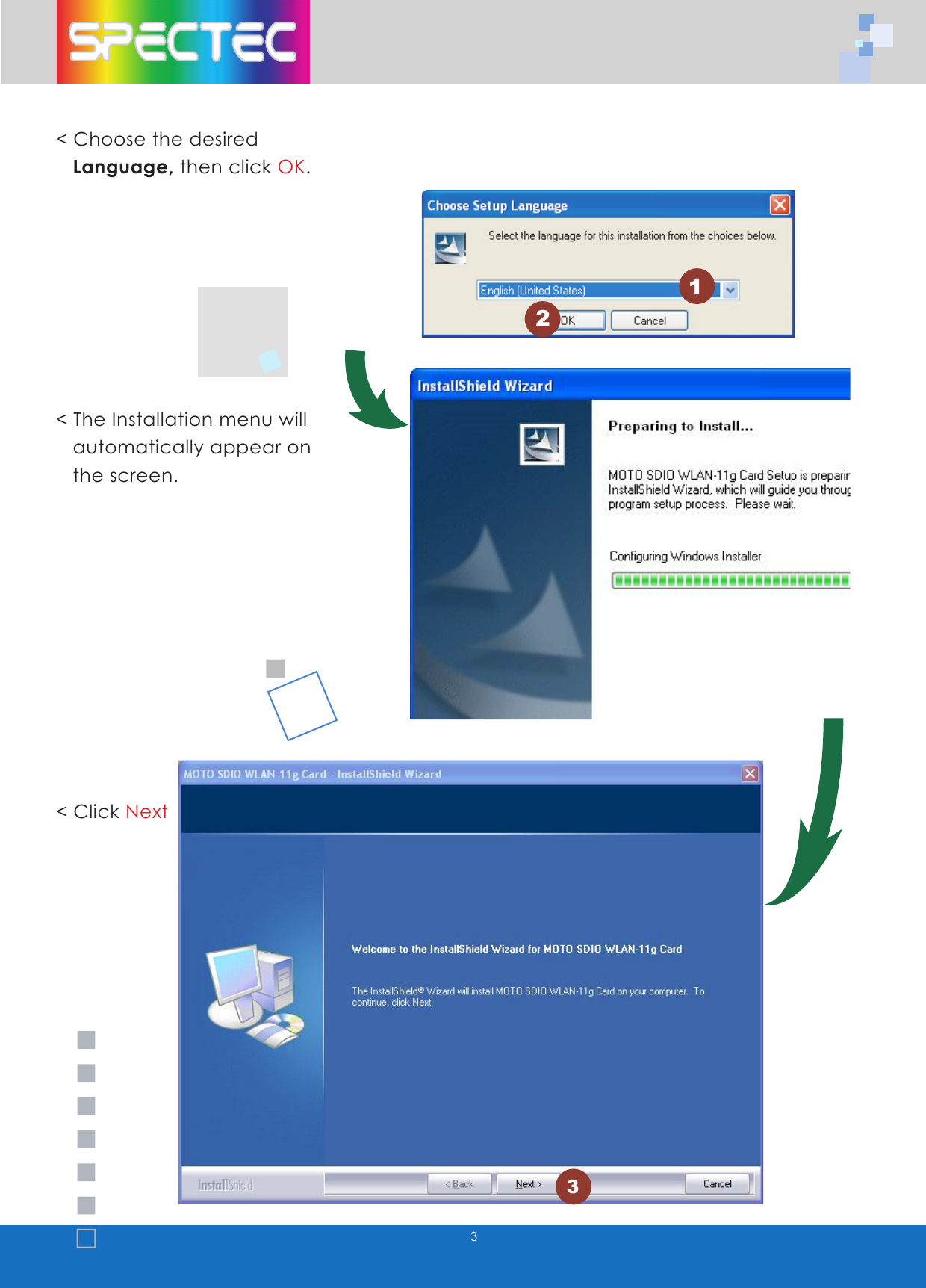
3< Choose the desired    Language, then click OK.< The Installation menu will     automatically appear on     the screen. < Click Next123
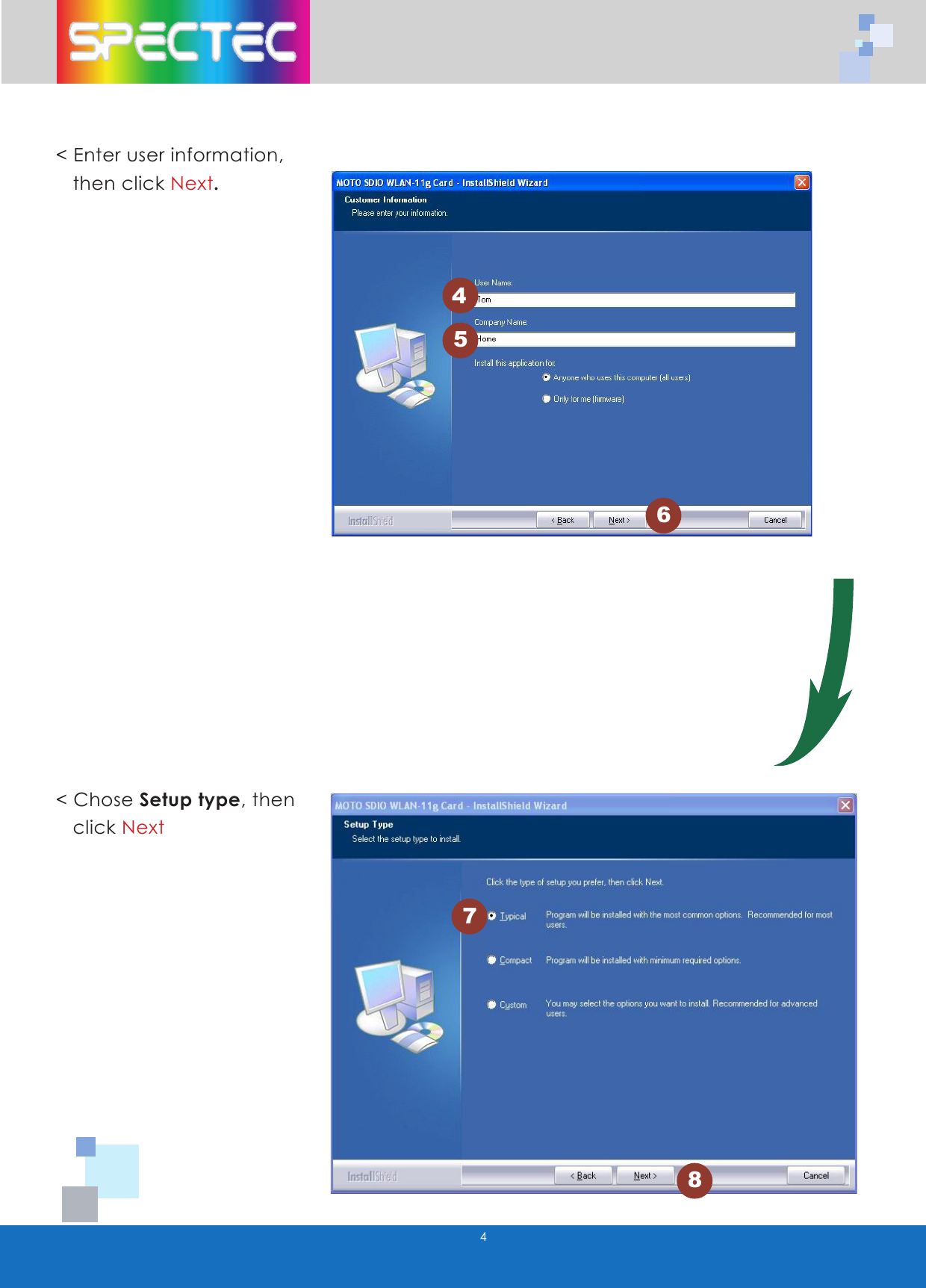
445678< Enter user information,     then click Next.< Chose Setup type, then     click Next
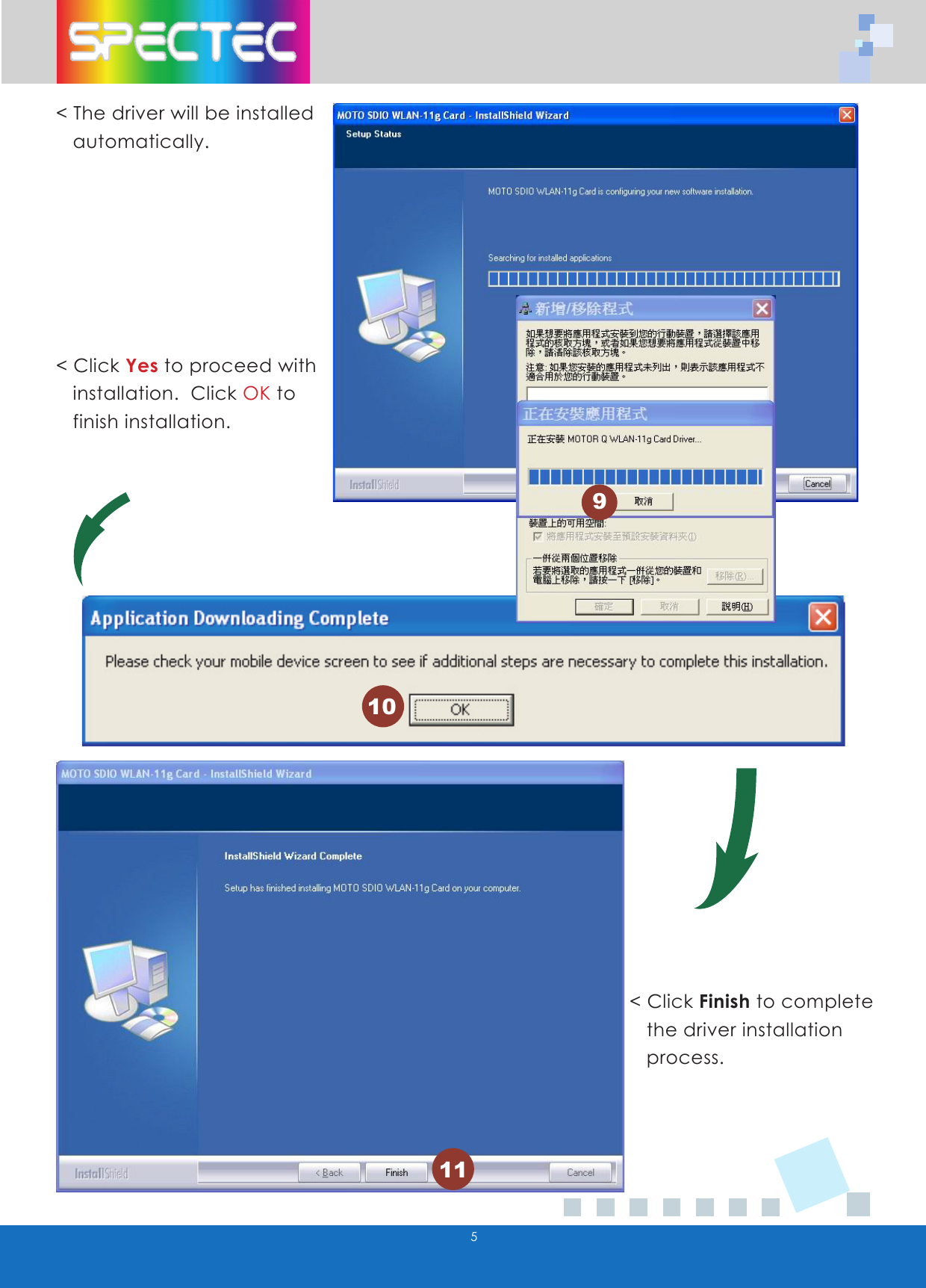
5< The driver will be installed     automatically.< Click Yes to proceed with     installation.  Click OK to     finish installation.< Click Finish to complete     the driver installation    process.10119
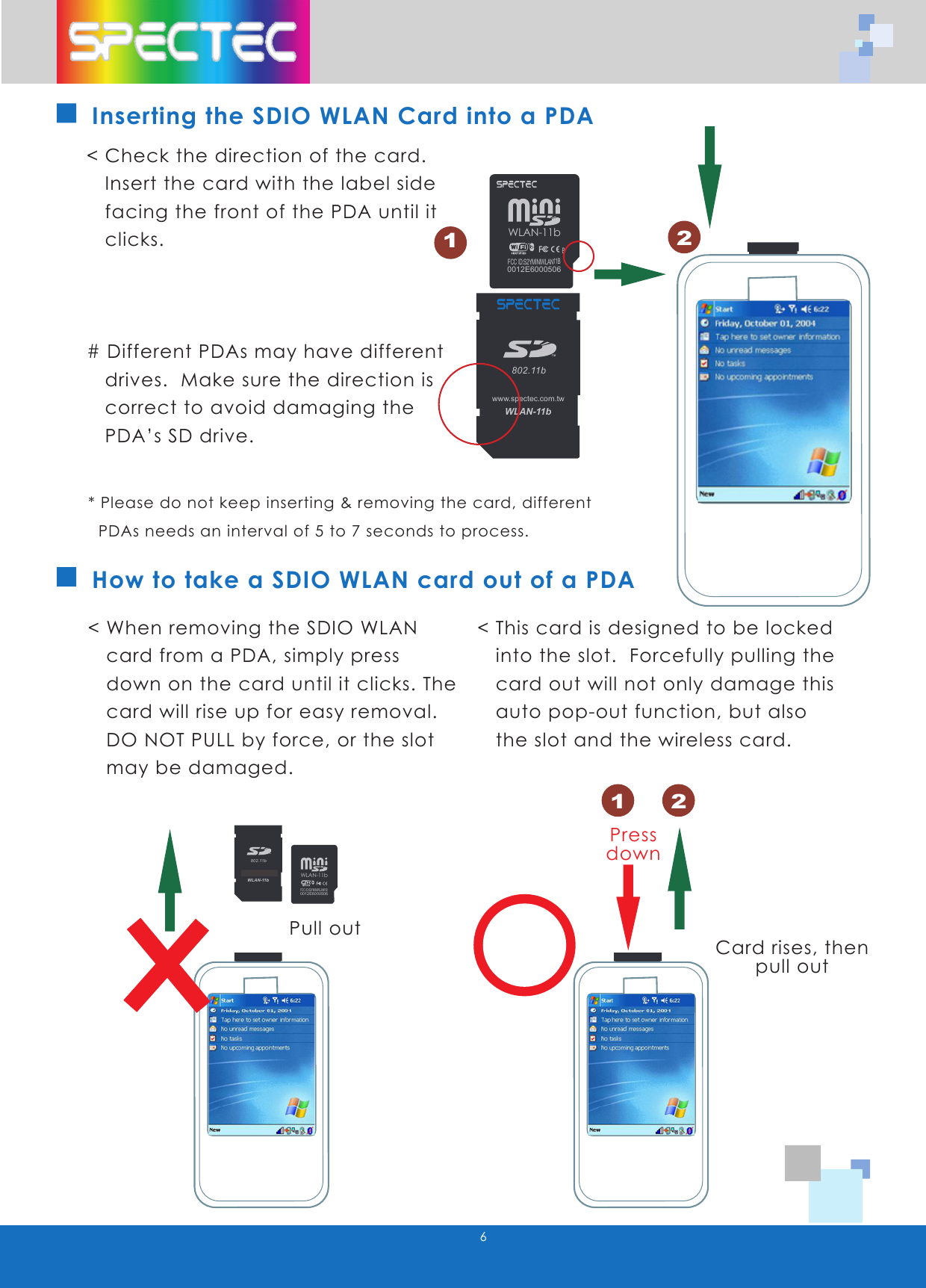
WLAN-11b802.11bTMwww.spectec.com.twWLAN-11b0012E6000506FCC ID:S2YMINIWLAN11B6How to take a SDIO WLAN card out of a PDA< Check the direction of the card.      Insert the card with the label side     facing the front of the PDA until it     clicks.# Different PDAs may have different     drives.  Make sure the direction is     correct to avoid damaging the     PDA’s SD drive.< When removing the SDIO WLAN     card from a PDA, simply press     down on the card until it clicks. The     card will rise up for easy removal.      DO NOT PULL by force, or the slot     may be damaged.< This card is designed to be locked     into the slot.  Forcefully pulling the     card out will not only damage this     auto pop-out function, but also     the slot and the wireless card.Pull outCard rises, thenpull outPressdownInserting the SDIO WLAN Card into a PDA* Please do not keep inserting & removing the card, different    PDAs needs an interval of 5 to 7 seconds to process.121 2BWLAN-11b802.11bTMwww.spectec.com.twWLAN-11b802.11bTMwww.spectec.com.twWLAN-11b0012E6000506FCC ID:S2YMINIWLAN11BWLAN-11b802.11bTMwww.spectec.com.twWLAN-11b802.11bTMwww.spectec.com.tw
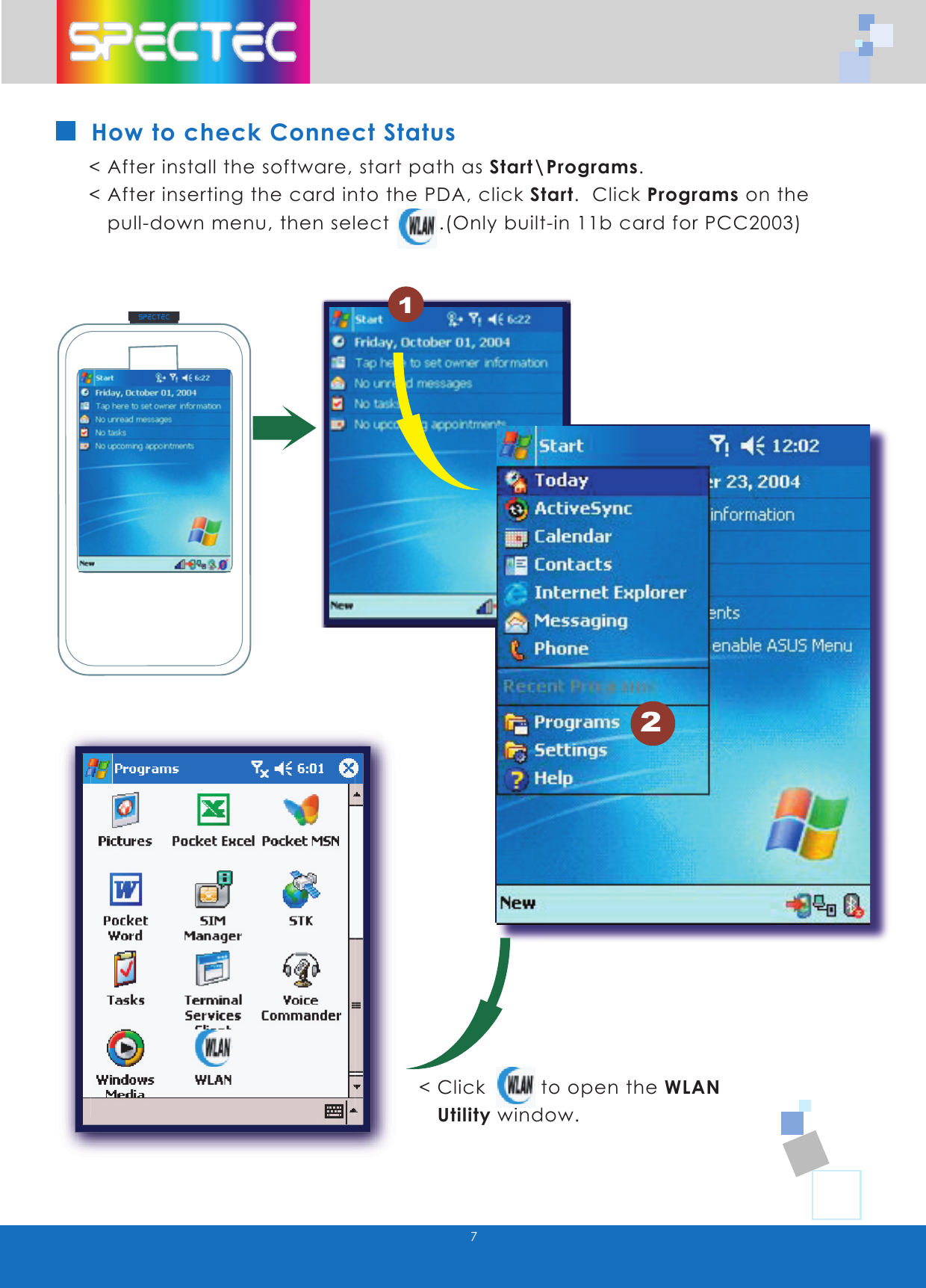
7How to check Connect Status< After install the software, start path as Start\Programs.  < After inserting the card into the PDA, click Start.  Click Programs on the     pull-down menu, then select        .(Only built-in 11b card for PCC2003)< Click         to open the WLAN    Utility window.2WLAN-11b802.11bTMwww.spectec.com.tw
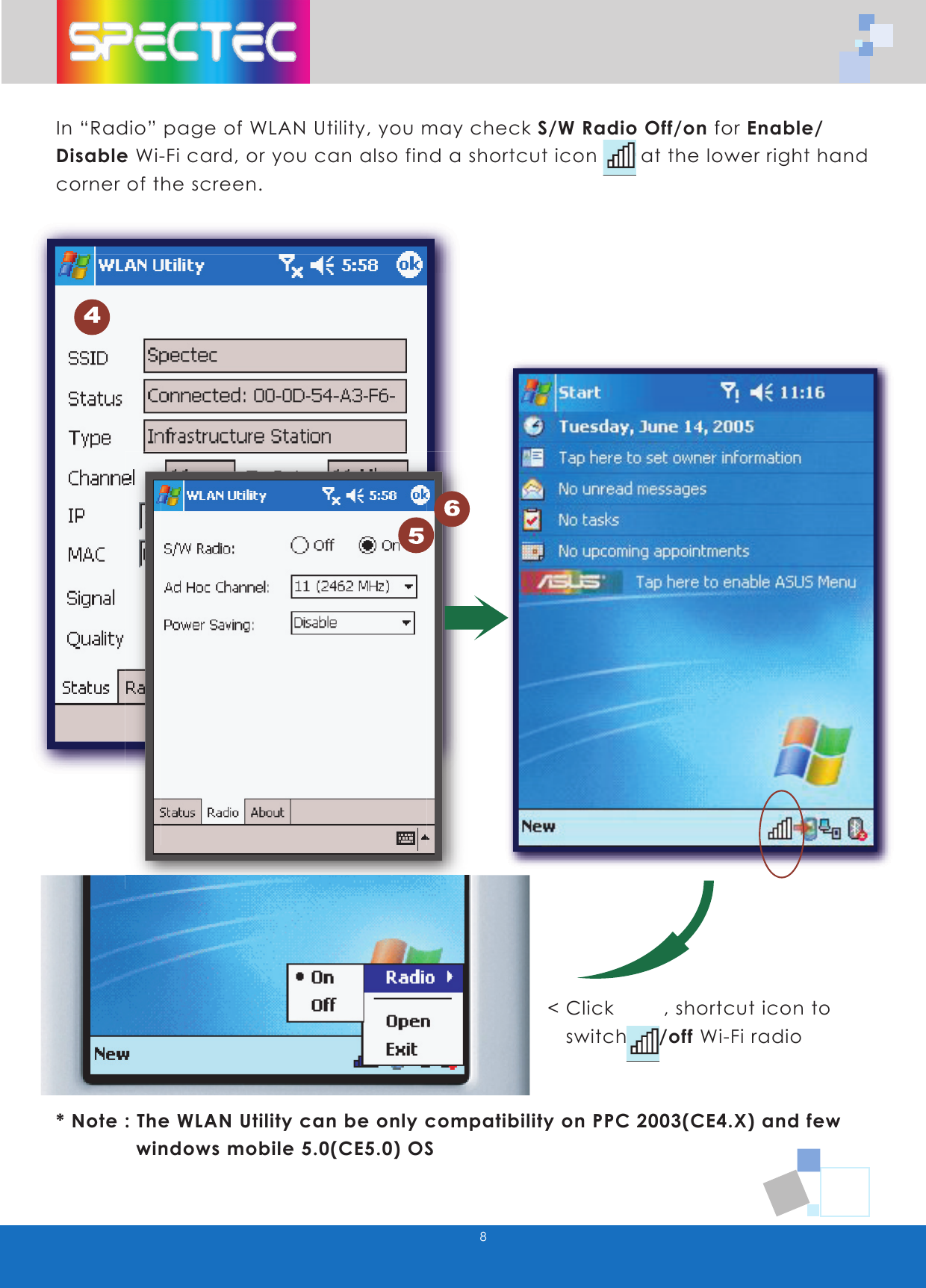
8In “Radio” page of WLAN Utility, you may check S/W Radio Off/on for Enable/ Disable Wi-Fi card, or you can also find a shortcut icon       at the lower right hand corner of the screen.< Click        , shortcut icon to     switch on/off Wi-Fi radio* Note : The WLAN Utility can be only compatibility on PPC 2003(CE4.X) and few             windows mobile 5.0(CE5.0) OS
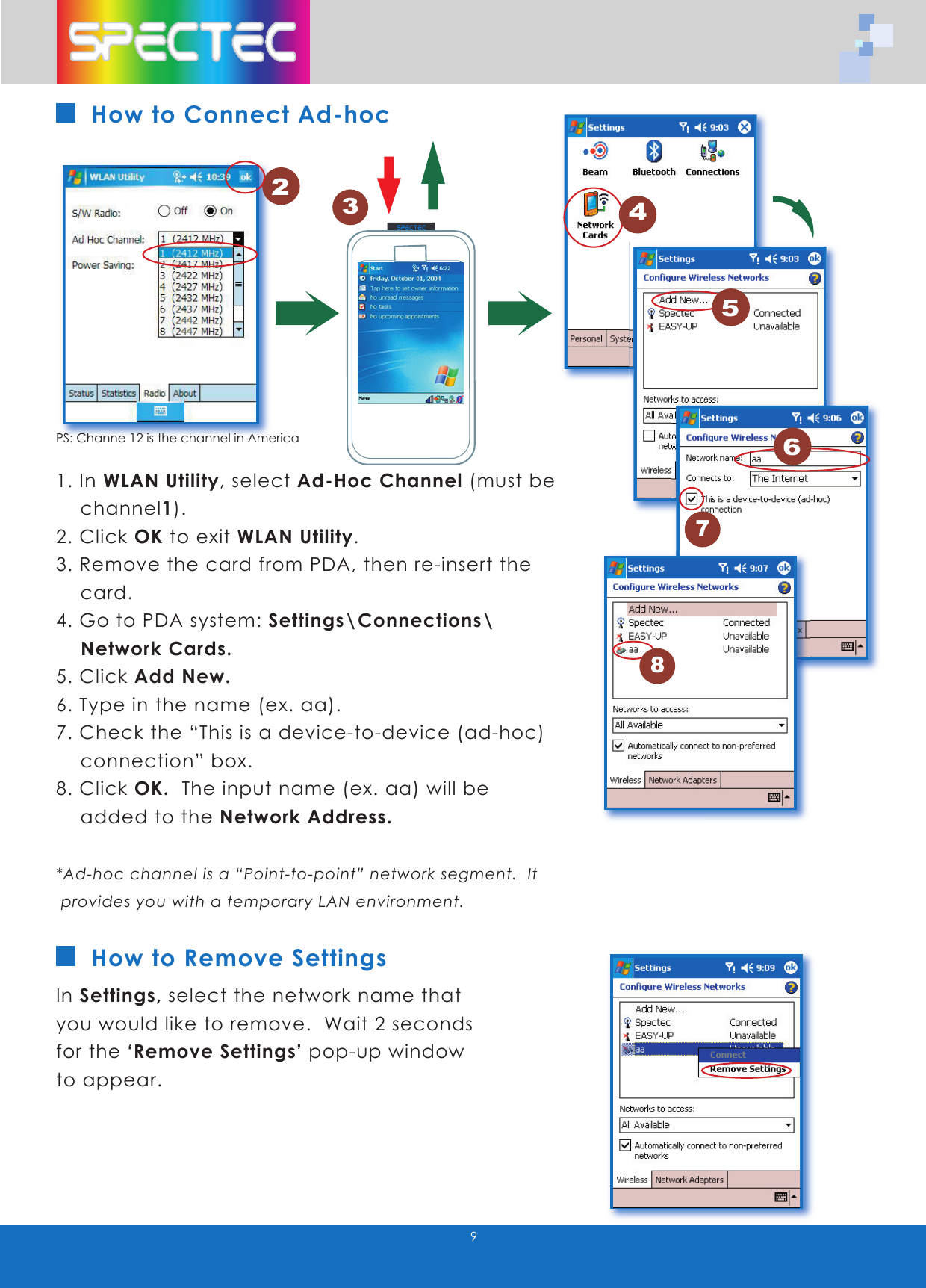
9How to Connect Ad-hoc1. In WLAN Utility, select Ad-Hoc Channel (must be    channel1).   2. Click OK to exit WLAN Utility.3. Remove the card from PDA, then re-insert the      card.4. Go to PDA system: Settings\Connections\     Network Cards.5. Click Add New.6. Type in the name (ex. aa).7. Check the “This is a device-to-device (ad-hoc)      connection” box.8. Click OK.  The input name (ex. aa) will be          added to the Network Address.*Ad-hoc channel is a “Point-to-point” network segment.  It   provides you with a temporary LAN environment.In Settings, select the network name that you would like to remove.  Wait 2 seconds for the ‘Remove Settings’ pop-up window to appear.How to Remove Settings1PS: Channe 12 is the channel in America2456783WLAN-11b802.11bTMwww.spectec.com.tw

Navigation menu