Spire Technology NETIMIZERPM-12 Multi Port Mobile DM Device User Manual Solutions Introduction for NOKIA

SPIRE TECHNOLOGY INC. Multi Port Mobile DM Device Solutions Introduction for NOKIA

User Manual

Applied intelligence. NETIMIZER PM-12 Dec. 2015
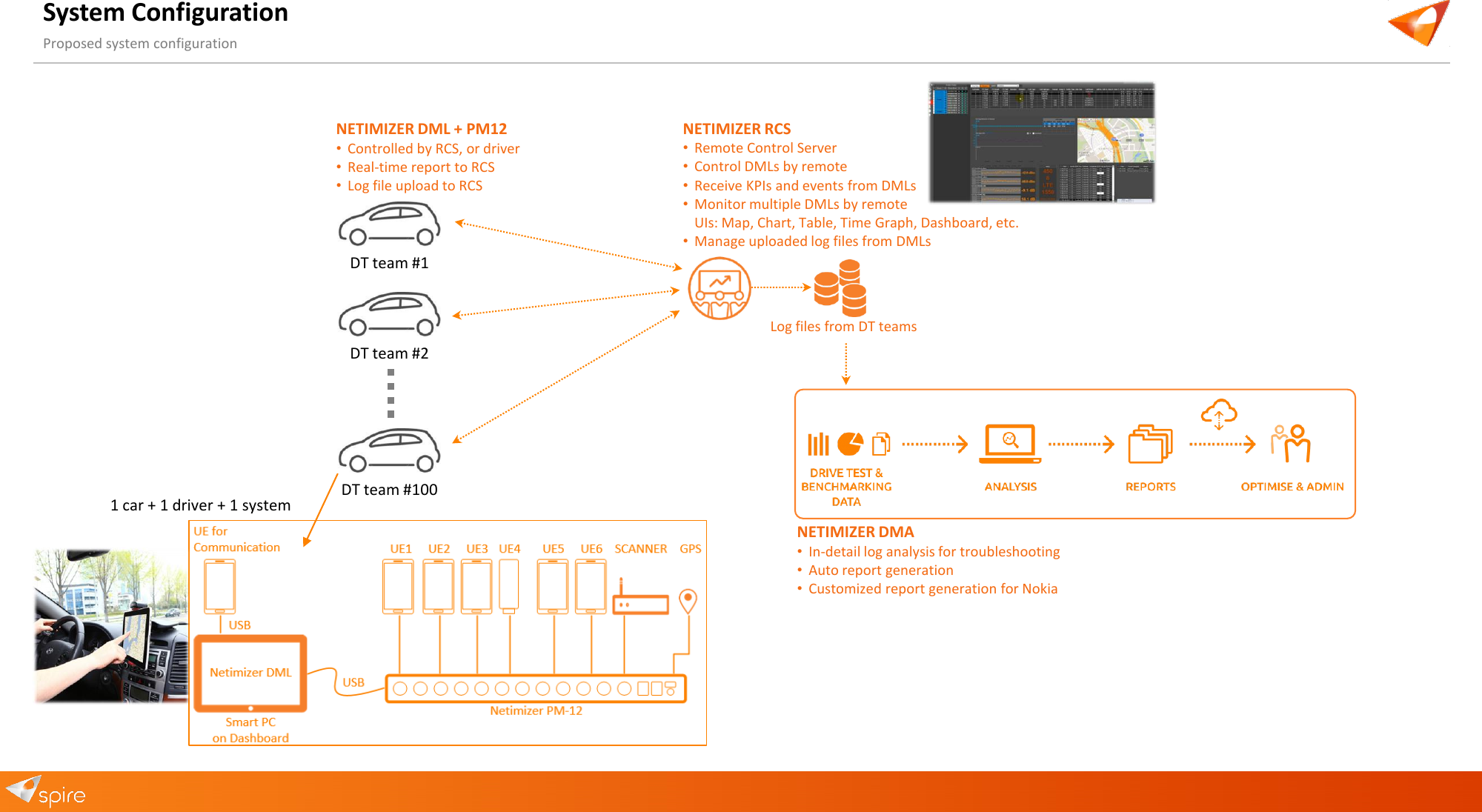
System Configuration Proposed system configuration DT team #1 DT team #2 DT team #100 1 car + 1 driver + 1 system NETIMIZER DML + PM12 •Controlled by RCS, or driver •Real-time report to RCS •Log file upload to RCS NETIMIZER RCS •Remote Control Server •Control DMLs by remote •Receive KPIs and events from DMLs •Monitor multiple DMLs by remote UIs: Map, Chart, Table, Time Graph, Dashboard, etc. •Manage uploaded log files from DMLs Log files from DT teams NETIMIZER DMA •In-detail log analysis for troubleshooting •Auto report generation •Customized report generation for Nokia
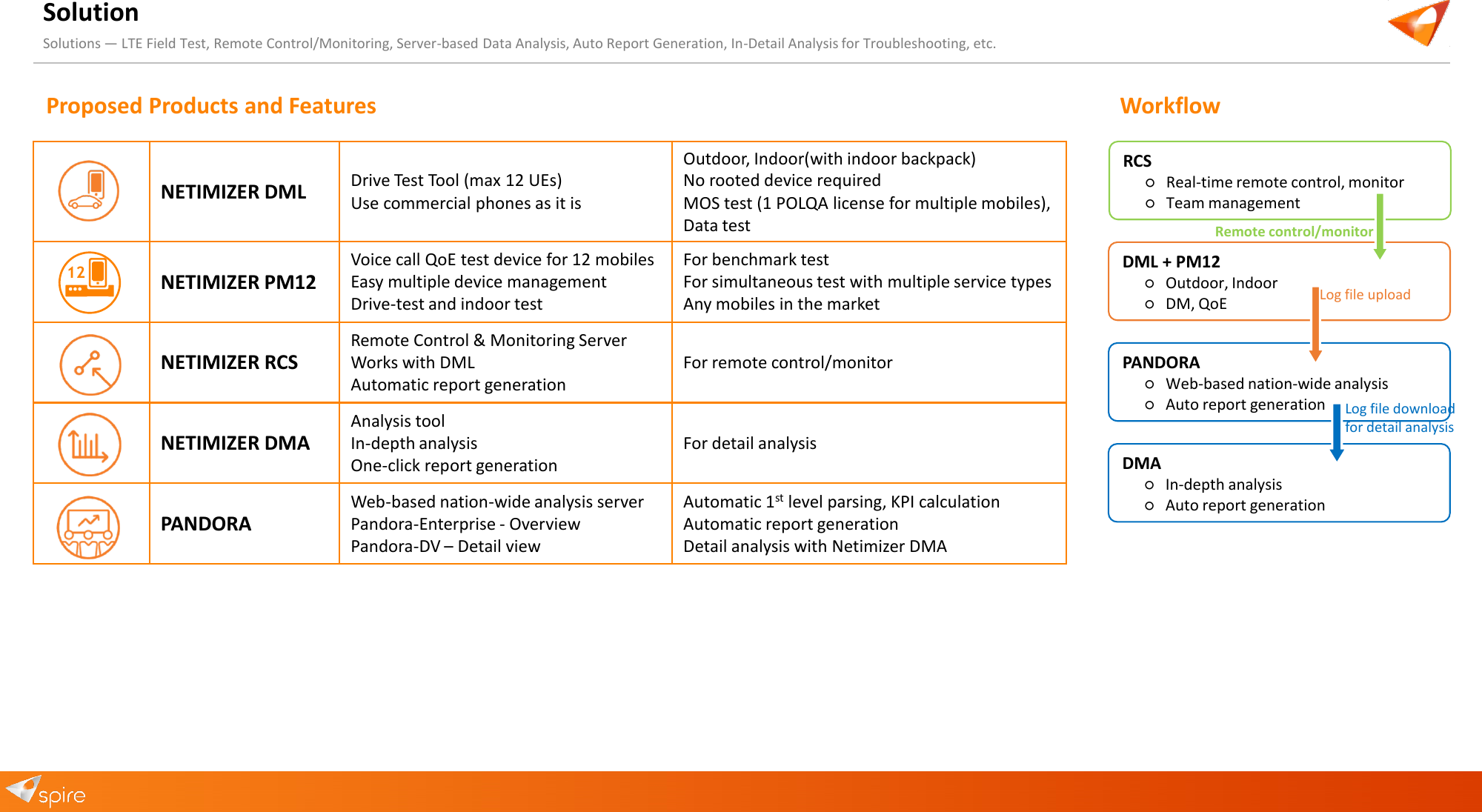
Solution Workflow Solutions — LTE Field Test, Remote Control/Monitoring, Server-based Data Analysis, Auto Report Generation, In-Detail Analysis for Troubleshooting, etc. NETIMIZER DML Drive Test Tool (max 12 UEs) Use commercial phones as it is Outdoor, Indoor(with indoor backpack) No rooted device required MOS test (1 POLQA license for multiple mobiles), Data test NETIMIZER PM12 Voice call QoE test device for 12 mobiles Easy multiple device management Drive-test and indoor test For benchmark test For simultaneous test with multiple service types Any mobiles in the market NETIMIZER RCS Remote Control & Monitoring Server Works with DML Automatic report generation For remote control/monitor NETIMIZER DMA Analysis tool In-depth analysis One-click report generation For detail analysis PANDORA Web-based nation-wide analysis server Pandora-Enterprise - Overview Pandora-DV – Detail view Automatic 1st level parsing, KPI calculation Automatic report generation Detail analysis with Netimizer DMA 12DMA ○In-depth analysis ○Auto report generation PANDORA ○Web-based nation-wide analysis ○Auto report generation DML + PM12 ○Outdoor, Indoor ○DM, QoE RCS ○Real-time remote control, monitor ○Team management Log file download for detail analysis Remote control/monitor Log file upload Proposed Products and Features
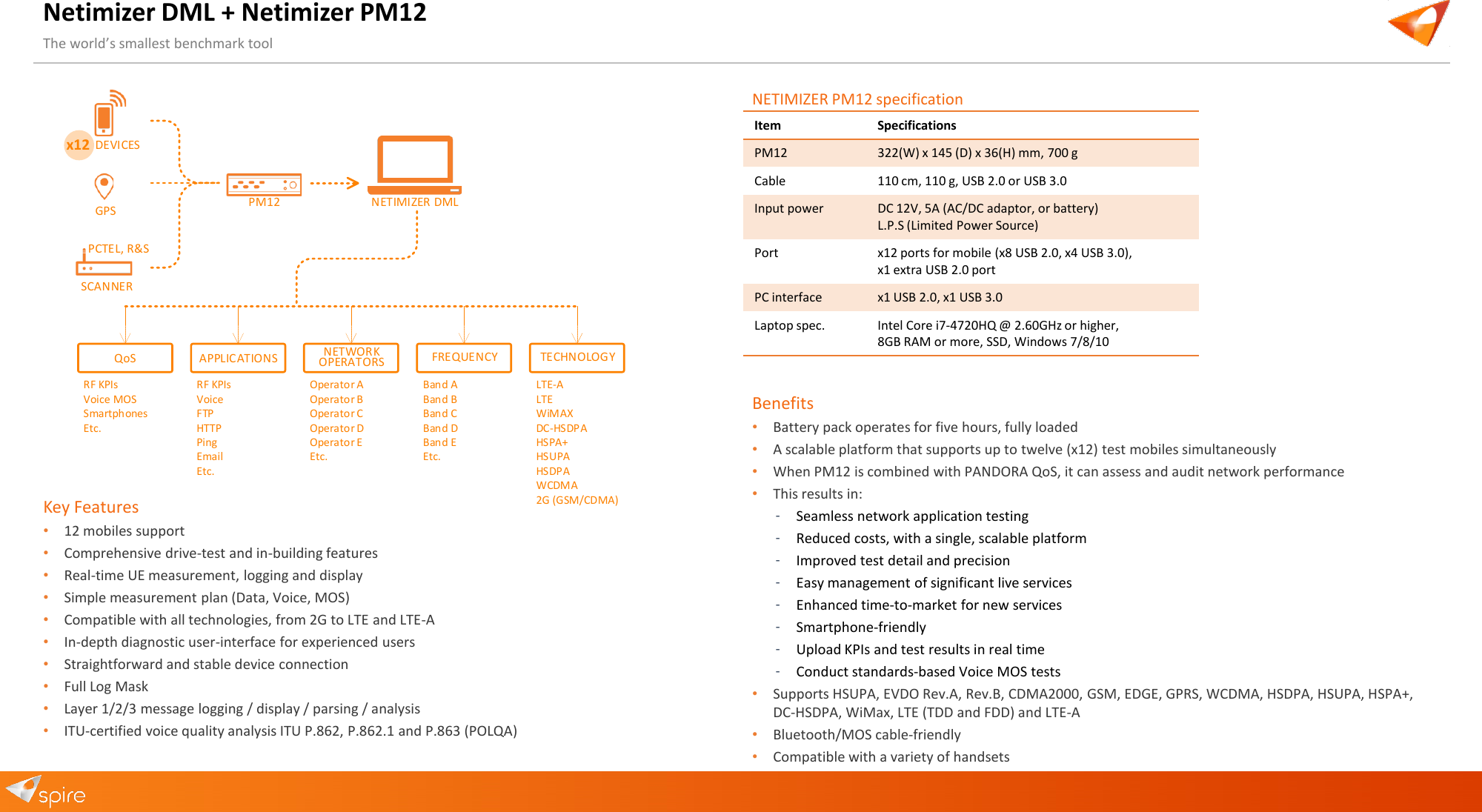
Netimizer DML + Netimizer PM12 The world’s smallest benchmark tool Key Features •12 mobiles support •Comprehensive drive-test and in-building features •Real-time UE measurement, logging and display •Simple measurement plan (Data, Voice, MOS) •Compatible with all technologies, from 2G to LTE and LTE-A •In-depth diagnostic user-interface for experienced users •Straightforward and stable device connection •Full Log Mask •Layer 1/2/3 message logging / display / parsing / analysis •ITU-certified voice quality analysis ITU P.862, P.862.1 and P.863 (POLQA) DEVICESx12GPSSCANNERPCTEL, R&SPM12 NETIMIZER DMLQoS APPLICATIONS NETWORKOPERATORS FREQUENCY TECHNOLOGYRF KPIsVoice MOSSmartphonesEtc.RF KPIsVoiceFTPHTTPPingEmailEtc.Operator AOperator BOperator COperator DOperator EEtc.Band ABand BBand CBand DBand EEtc.LTE-ALTEWiMAXDC-HSDPAHSPA+HSUPAHSDPAWCDMA2G (GSM/CDMA)Item Specifications PM12 322(W) x 145 (D) x 36(H) mm, 700 g Cable 110 cm, 110 g, USB 2.0 or USB 3.0 Input power DC 12V, 5A (AC/DC adaptor, or battery) L.P.S (Limited Power Source) Port x12 ports for mobile (x8 USB 2.0, x4 USB 3.0), x1 extra USB 2.0 port PC interface x1 USB 2.0, x1 USB 3.0 Laptop spec. Intel Core i7-4720HQ @ 2.60GHz or higher, 8GB RAM or more, SSD, Windows 7/8/10 NETIMIZER PM12 specification Benefits •Battery pack operates for five hours, fully loaded •A scalable platform that supports up to twelve (x12) test mobiles simultaneously •When PM12 is combined with PANDORA QoS, it can assess and audit network performance •This results in: ‐Seamless network application testing ‐Reduced costs, with a single, scalable platform ‐Improved test detail and precision ‐Easy management of significant live services ‐Enhanced time-to-market for new services ‐Smartphone-friendly ‐Upload KPIs and test results in real time ‐Conduct standards-based Voice MOS tests •Supports HSUPA, EVDO Rev.A, Rev.B, CDMA2000, GSM, EDGE, GPRS, WCDMA, HSDPA, HSUPA, HSPA+, DC-HSDPA, WiMax, LTE (TDD and FDD) and LTE-A •Bluetooth/MOS cable-friendly •Compatible with a variety of handsets
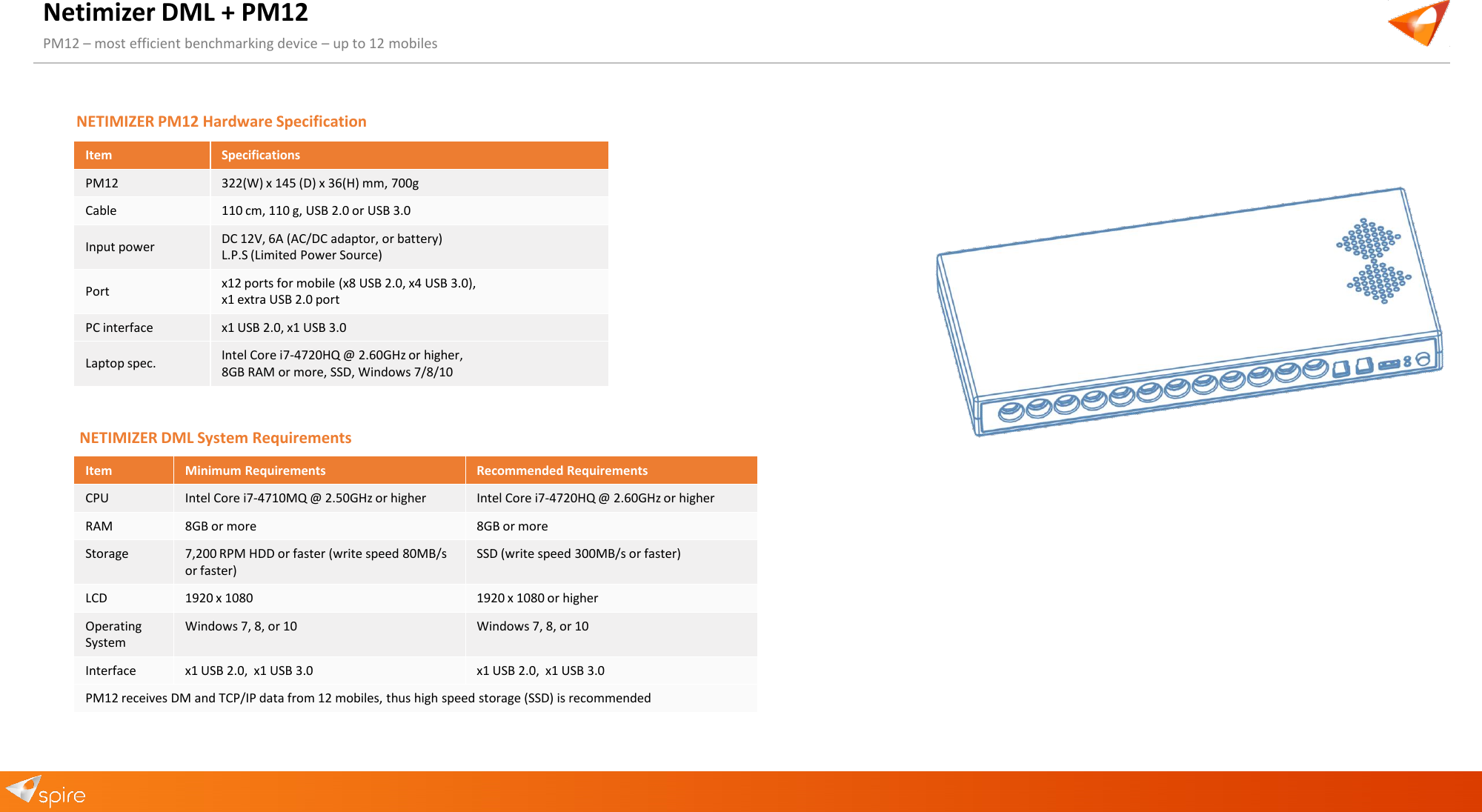
Netimizer DML + PM12 PM12 – most efficient benchmarking device – up to 12 mobiles Item Minimum Requirements Recommended Requirements CPU Intel Core i7-4710MQ @ 2.50GHz or higher Intel Core i7-4720HQ @ 2.60GHz or higher RAM 8GB or more 8GB or more Storage 7,200 RPM HDD or faster (write speed 80MB/s or faster) SSD (write speed 300MB/s or faster) LCD 1920 x 1080 1920 x 1080 or higher Operating System Windows 7, 8, or 10 Windows 7, 8, or 10 Interface x1 USB 2.0,  x1 USB 3.0 x1 USB 2.0,  x1 USB 3.0 PM12 receives DM and TCP/IP data from 12 mobiles, thus high speed storage (SSD) is recommended NETIMIZER DML System Requirements Item Specifications PM12 322(W) x 145 (D) x 36(H) mm, 700g Cable 110 cm, 110 g, USB 2.0 or USB 3.0 Input power DC 12V, 6A (AC/DC adaptor, or battery) L.P.S (Limited Power Source) Port x12 ports for mobile (x8 USB 2.0, x4 USB 3.0), x1 extra USB 2.0 port PC interface x1 USB 2.0, x1 USB 3.0 Laptop spec. Intel Core i7-4720HQ @ 2.60GHz or higher, 8GB RAM or more, SSD, Windows 7/8/10 NETIMIZER PM12 Hardware Specification
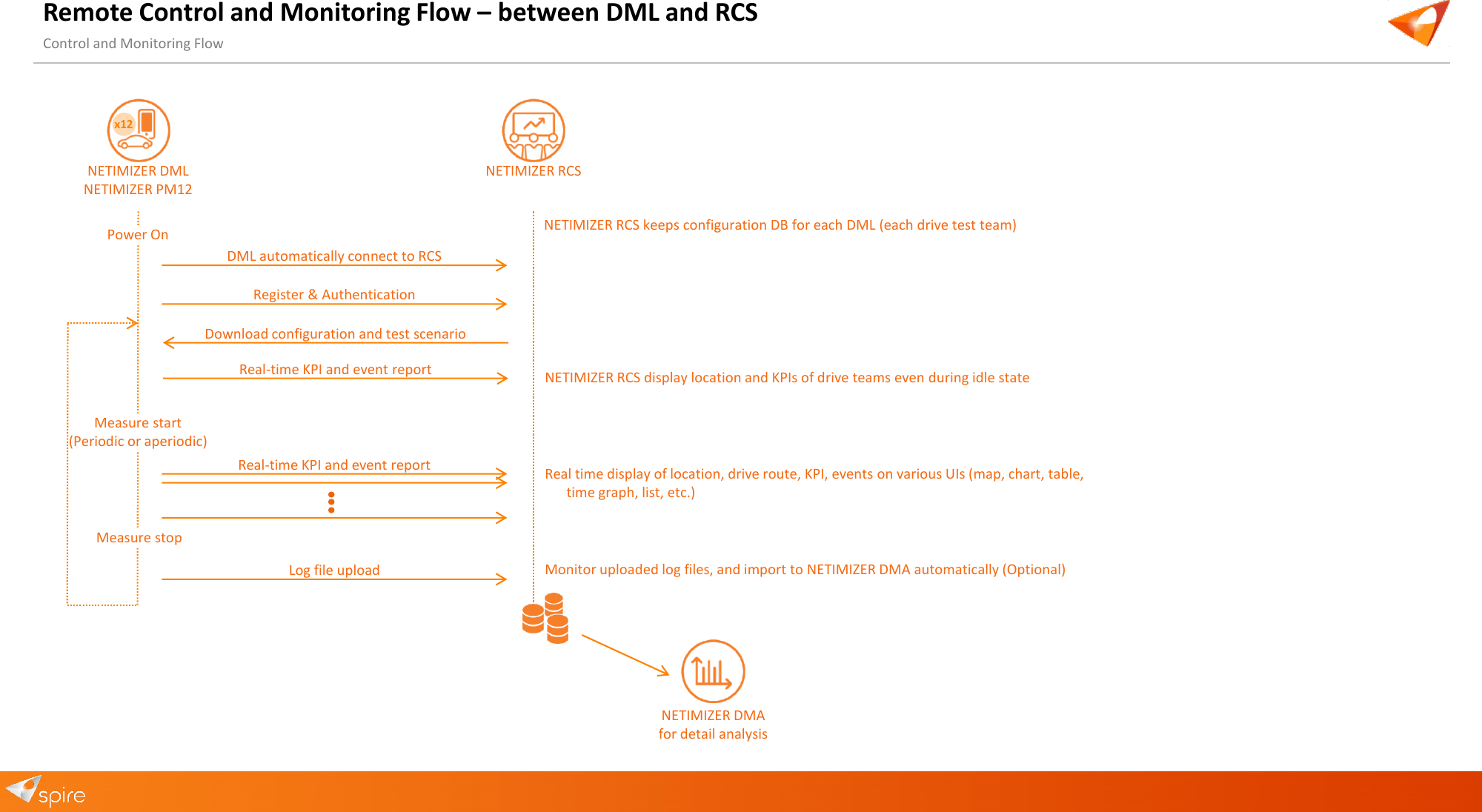
Remote Control and Monitoring Flow – between DML and RCS Control and Monitoring Flow NETIMIZER DML NETIMIZER PM12 NETIMIZER RCS x12DML automatically connect to RCS Register & Authentication Download configuration and test scenario Power On Measure start (Periodic or aperiodic) Real-time KPI and event report Log file upload Measure stop NETIMIZER RCS keeps configuration DB for each DML (each drive test team) NETIMIZER RCS display location and KPIs of drive teams even during idle state Real-time KPI and event report Real time display of location, drive route, KPI, events on various UIs (map, chart, table, time graph, list, etc.) Monitor uploaded log files, and import to NETIMIZER DMA automatically (Optional) NETIMIZER DMA for detail analysis
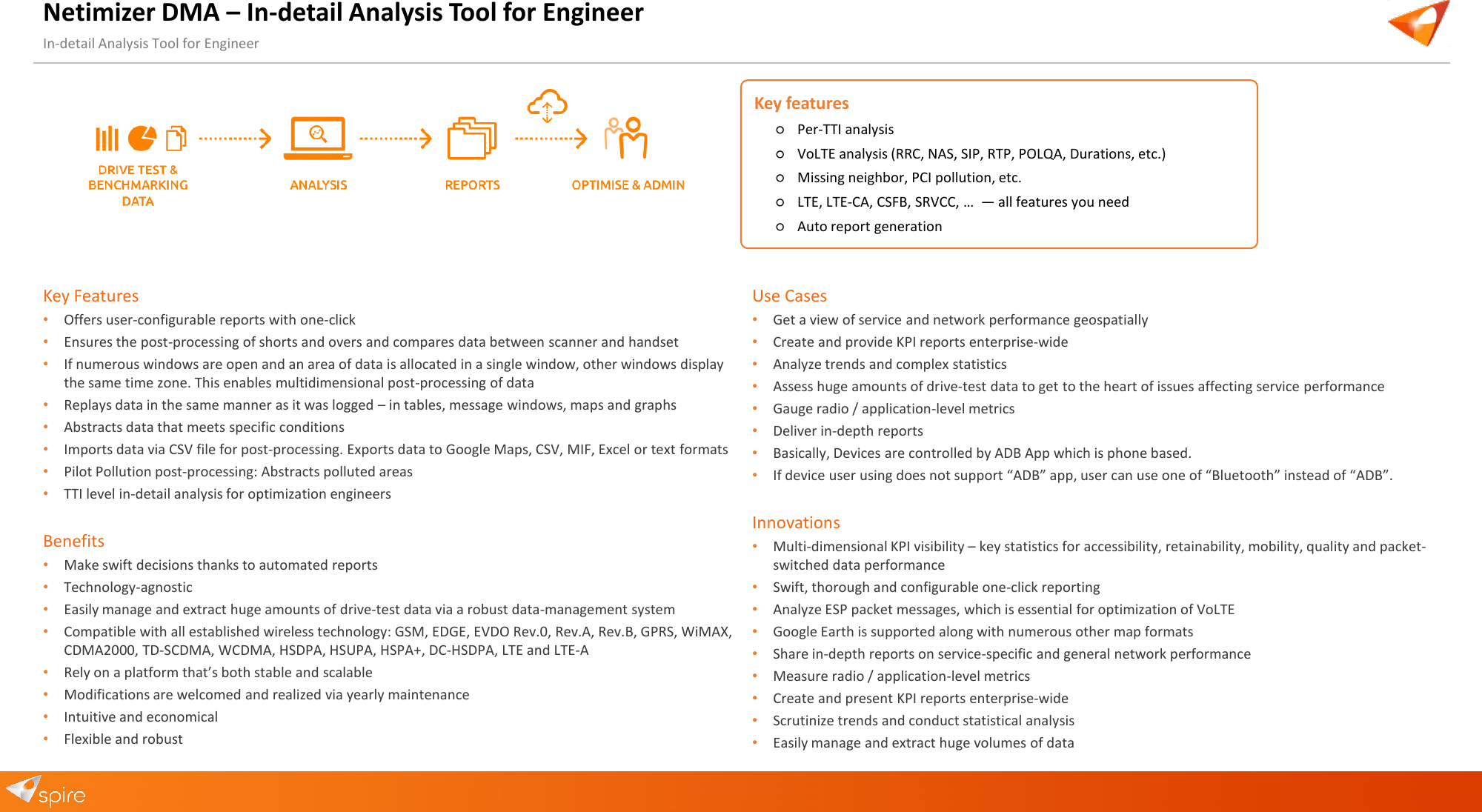
Netimizer DMA – In-detail Analysis Tool for Engineer In-detail Analysis Tool for Engineer Key Features •Offers user-configurable reports with one-click•Ensures the post-processing of shorts and overs and compares data between scanner and handset•If numerous windows are open and an area of data is allocated in a single window, other windows displaythe same time zone. This enables multidimensional post-processing of data•Replays data in the same manner as it was logged – in tables, message windows, maps and graphs•Abstracts data that meets specific conditions•Imports data via CSV file for post-processing. Exports data to Google Maps, CSV, MIF, Excel or text formats•Pilot Pollution post-processing: Abstracts polluted areas•TTI level in-detail analysis for optimization engineersBenefits •Make swift decisions thanks to automated reports•Technology-agnostic•Easily manage and extract huge amounts of drive-test data via a robust data-management system•Compatible with all established wireless technology: GSM, EDGE, EVDO Rev.0, Rev.A, Rev.B, GPRS, WiMAX,CDMA2000, TD-SCDMA, WCDMA, HSDPA, HSUPA, HSPA+, DC-HSDPA, LTE and LTE-A•Rely on a platform that’s both stable and scalable•Modifications are welcomed and realized via yearly maintenance•Intuitive and economical•Flexible and robustUse Cases •Get a view of service and network performance geospatially•Create and provide KPI reports enterprise-wide•Analyze trends and complex statistics•Assess huge amounts of drive-test data to get to the heart of issues affecting service performance•Gauge radio / application-level metrics•Deliver in-depth reports•Basically, Devices are controlled by ADB App which is phone based.•If device user using does not support “ADB” app, user can use one of “Bluetooth” instead of “ADB”.Innovations •Multi-dimensional KPI visibility – key statistics for accessibility, retainability, mobility, quality and packet-switched data performance•Swift, thorough and configurable one-click reporting•Analyze ESP packet messages, which is essential for optimization of VoLTE•Google Earth is supported along with numerous other map formats•Share in-depth reports on service-specific and general network performance•Measure radio / application-level metrics•Create and present KPI reports enterprise-wide•Scrutinize trends and conduct statistical analysis•Easily manage and extract huge volumes of dataKey features ○Per-TTI analysis○VoLTE analysis (RRC, NAS, SIP, RTP, POLQA, Durations, etc.)○Missing neighbor, PCI pollution, etc.○LTE, LTE-CA, CSFB, SRVCC, …  — all features you need○Auto report generation
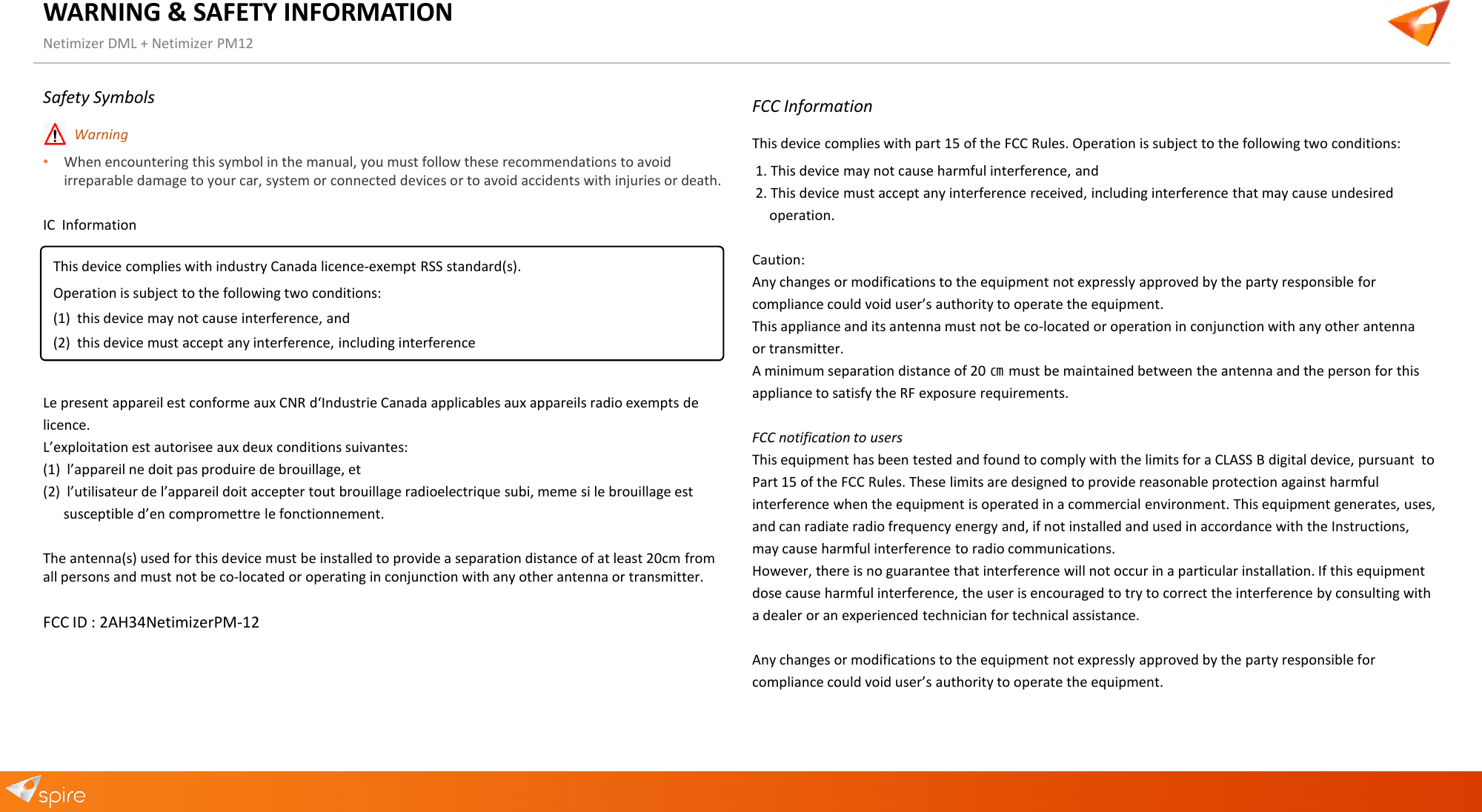
WARNING & SAFETY INFORMATION Netimizer DML + Netimizer PM12 Safety Symbols •Warning•When encountering this symbol in the manual, you must follow these recommendations to avoidirreparable damage to your car, system or connected devices or to avoid accidents with injuries or death.IC  Information Le present appareil est conforme aux CNR d‘Industrie Canada applicables aux appareils radio exempts de licence. L’exploitation est autorisee aux deux conditions suivantes: (1) l’appareil ne doit pas produire de brouillage, et(2) l’utilisateur de l’appareil doit accepter tout brouillage radioelectrique subi, meme si le brouillage estsusceptible d’en compromettre le fonctionnement.The antenna(s) used for this device must be installed to provide a separation distance of at least 20cm from all persons and must not be co-located or operating in conjunction with any other antenna or transmitter. FCC ID : 2AH34NetimizerPM-12 FCC Information This device complies with part 15 of the FCC Rules. Operation is subject to the following two conditions: 1. This device may not cause harmful interference, and2. This device must accept any interference received, including interference that may cause undesiredoperation.Caution:  Any changes or modifications to the equipment not expressly approved by the party responsible for compliance could void user’s authority to operate the equipment.  This appliance and its antenna must not be co-located or operation in conjunction with any other antenna or transmitter.  A minimum separation distance of 20 ㎝ must be maintained between the antenna and the person for this appliance to satisfy the RF exposure requirements. FCC notification to users This equipment has been tested and found to comply with the limits for a CLASS B digital device, pursuant  to Part 15 of the FCC Rules. These limits are designed to provide reasonable protection against harmful interference when the equipment is operated in a commercial environment. This equipment generates, uses, and can radiate radio frequency energy and, if not installed and used in accordance with the Instructions, may cause harmful interference to radio communications. However, there is no guarantee that interference will not occur in a particular installation. If this equipment  dose cause harmful interference, the user is encouraged to try to correct the interference by consulting with a dealer or an experienced technician for technical assistance. Any changes or modifications to the equipment not expressly approved by the party responsible for compliance could void user’s authority to operate the equipment. This device complies with industry Canada licence-exempt RSS standard(s). Operation is subject to the following two conditions: (1) this device may not cause interference, and(2) this device must accept any interference, including interference
Applied intelligence. www.spire-technology.com Head Office  7F, 3Dong,  Pangyo-Seven-Venture-Valley 1  SamPyeong-Dong  625, Bundang-Gu  SeongNam-Si  Gyeonggi-Do   Korea, 463-400   E-mail: sales@spiretech.co.kr Japan Office  4-9 Michinoku Bld.                                                                                                                     2kai  Kandasakumacho Chiyodaku  Tokyo 101-0025  Japan   E-mail: lee@spiretech.co.jp EMEA Office  Stanmore Business & Innovation Centre Stanmore Place  Honeypot Lane London  HA7 1BT  UK   E-mail: spire@spire-technology.com  USA Office  VOIDAS LLC 7928 East Drive  Eloquence Building  Suite 501 North Bay Village  FL 33142  USA    E-mail: mike.ishikawa@voidas.com Thank You

Navigation menu