SupplyNet Communications 1000 TANK MONITOR RF MODULE User Manual USERS MANUAL

SupplyNet Communications L.L.C. TANK MONITOR RF MODULE USERS MANUAL

USERS MANUAL

SU P P L YNE TC O M M U N I C A T I O N S   L . L . C . Product Warranty and Notices – Chapter 9   Sentinel 2300 Series  /  Version 3.0  9/23/2004  Page 26 9-1  Product Warranty and Notices  SupplyNet Communications L.L.C. (“SupplyNet”) warrants that the equipment is and will remain free from defects in workmanship and materials for a period of one (1) year from the date of delivery.  Within the warranty period, SupplyNet shall, without charge for labor or materials, repair or replace any defective components provided that reasonable care has been exercised in protecting the equipment from adverse conditions and rough handling.  This warranty does not cover customer instruction, installation, set up adjustments, or signal reception problems. This warranty does not cover cosmetic damage or damage due to acts of God, accident, misuse, abuse, negligence, or modification of, or to any part of this equipment, including the antenna. This warranty does not cover damage due to improper operation or maintenance, connection to an improper voltage supply, or attempted repair by anyone other than an authorized service facility. This warranty does not cover consumables such as a fuse or battery.  This Limited Warranty is in lieu of all other warranties, express or implied (including implied warranties of merchantability and fitness for a particular purpose), and of all obligations or liabilities of SupplyNet for damages, including but not limited to consequential and incidental damages, arising out of or in connection with the use or performance of the equipment.  SupplyNet shall not be liable for any damages or loss arising from the use of the data from this equipment or the TankLink.com web site.
SU P P L YNE TC O M M U N I C A T I O N S   L . L . C . Terms and Conditions of Service – Chapter 8   Sentinel 2300 Series  /  Version 3.0  9/23/2004  Page 25 8-1  Terms and Conditions of Service This section explains the relationship between the user of this equipment and SupplyNet Communications L.L.C. It explains our respective legal rights concerning all aspects of our relationship, including: •  Billing and extra charges •  Starting and ending service •  Privacy and confidentiality •  Early Termination fees ( if applicable ) •  Limitations of liability and warranty If you use the service or the equipment, or if you pay any amount billed to your account, you consent to the terms and conditions set forth in this agreement. If you do not agree with these terms and conditions, do not use the service and equipment and notify us immediately to cancel service. 1. Service This is an agreement for Remote Data Delivery and associated Services between you and SupplyNet Communications. The term "Unit" is the device which is used to communicate the data to the SupplyNet Communications Data Center. The term of this agreement depends on the rate plan which was defined in a separate document which is also a part of this agreement. The term of this agreement begins on the date that we activate Service for the Unit. There may be an activation fee associated with the rate plan that you select. In addition, if you select a rate plan which requires a  fixed term of more than one month ( such as a one-year plan ), you agree to purchase service for the full term. After the term expires, or if there is not a fixed term associated with the service, then this agreement will continue in force until terminated by either party with a 30-day notice. If you select a rate plan with a fixed term of more than one month, you may terminate service within the first 30 days without a penalty. If you terminate service after the initial 30 days but prior to the end of the term, or we terminate following your default, you will be in material breach of this agreement and agree to pay a cancellation fee as set forth in the rate plan document. 2. Rates Your Service rates are described in your rate plan document. Your service rate may be based on fees for data communication from your Unit and on fees for remote  access to your data via the internet or other electronic means. Additional fees may be added to your monthly fee for services above your base rate. These additional fees and how they are calculated are described in your rate plan document. 3.  Data Availability and Service Interruptions Wireless Data Transmission Service to the TankLink® data center is normally available to your unit when it is within the coverage area of a Cellular Service provider who is under contract to provide Microburst® Data Service. Service is subject to transmission limitation or interruption caused by weather, terrain, obstructions such as trees or buildings, and other conditions. Service may be limited in areas where Microburst® coverage is not available or may be temporarily limited due to system capacity limits ( such as during peak usage periods ), system repairs, or modifications. In addition, access to your information via the internet or other electronic means of transmission may be temporarily limited due to system capacity limitations or maintenance. Service interruption may also result from non-payment by you. 4.  Use of Service/Unit You agree  not to use the unit or service for any unlawful purposes. You may not resell your service without prior written contractual agreements with SupplyNet Communications
SU P P L YNE TC O M M U N I C A T I O N S   L . L . C . Troubleshooting and Technical Support – Chapter 7   Sentinel 2300 Series  /  Version 3.0  9/23/2004  Page 24 7-4 Troubleshooting There are no LEDs lit on the main board ! Check battery power.  Nothing happens when switches pressed. ! Check battery power.  Level reading is correct but volume is off. ! Verify the tank capacity. This should be the volume in the tank at the tank height. If the tank has a slight cone top but a standard vertical strapping chart is used, then the tank height should be only to the shoulder of the tank. ! Verify that the correct strapping chart is used.  Unit cannot transmit to data center. ! Verify the signal strength with a spare radio. ! Check for interfering structures. ! Reposition unit if possible. ! Check that the antenna cable connection to the radio is tight. ! Verify the Network Number of the unit and the setting on the Base Station. 7-5  Obtaining Technical Support If you still are having trouble, contact SupplyNet Communications Technical support hotline at 1-888-TANKLINK.   You will need the following information: • Sentinel Serial Number (label on the circuit board with the numbers 175830xxxx) • Tank location (city/state). • Tank product  remember: For security reasons, no one from SupplyNet Communications will ever ask you for your logon or password.  If it should be necessary to return this unit to SupplyNet Communications for service:  1) You must first obtain a Return Authorization Number from SupplyNet Communications.  2)  This number must be clearly marked on the outside of the shipping container and on the service card which was supplied with the unit. 3)  Place the unit with the service card in the original container and ship it prepaid to the address on the service card.
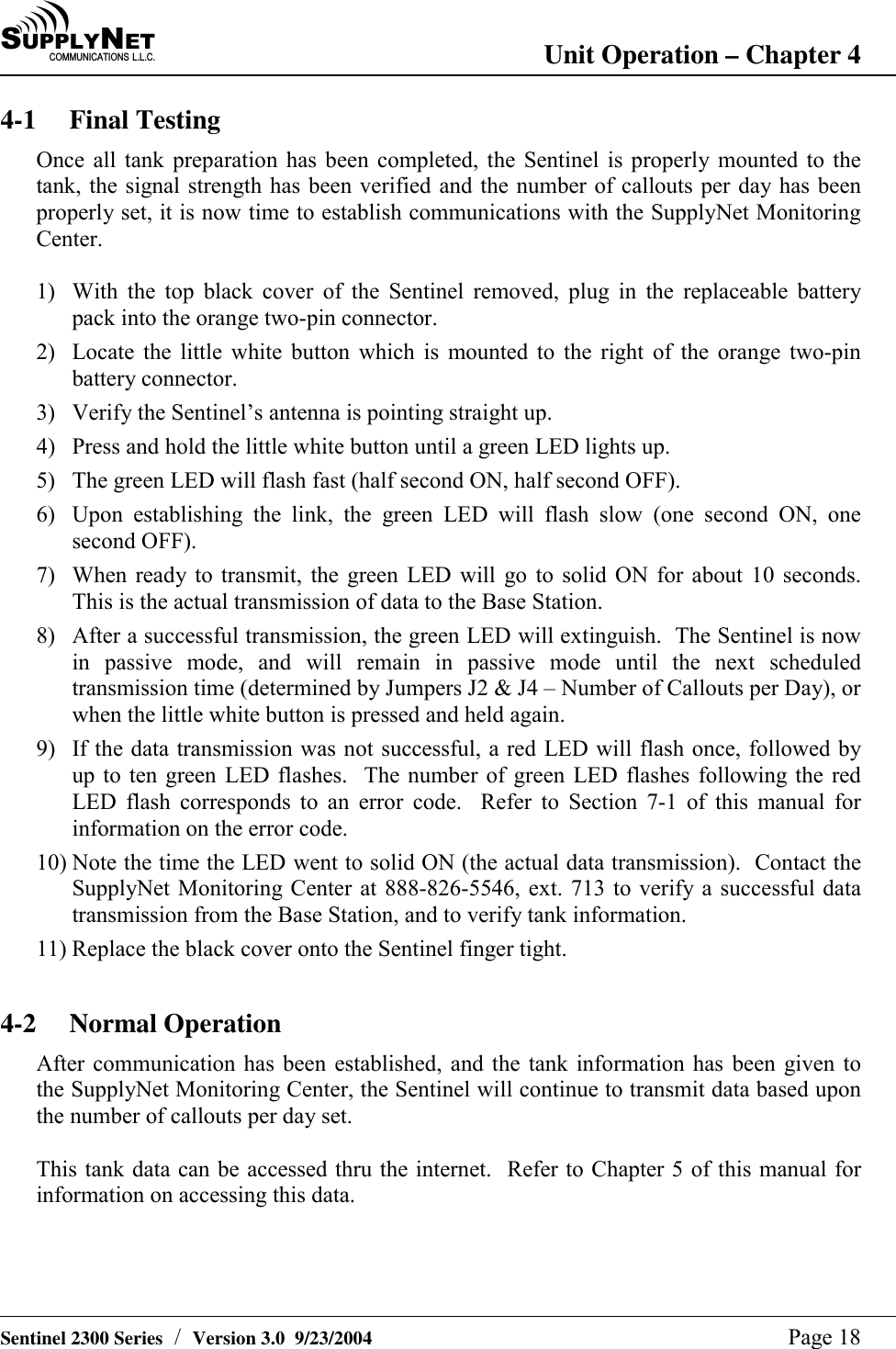
SU P P L YNE TC O M M U N I C A T I O N S   L . L . C . Troubleshooting and Technical Support – Chapter 7   Sentinel 2300 Series  /  Version 3.0  9/23/2004  Page 23 7-3 Battery Pack Replacement The tank monitor that is installed on your bulk storage tank is fitted with an easily replaceable battery pack.  The procedure below outlines the steps necessary to change a dead battery pack. 1.  Secure a ladder to the bulk tank that has the Sentinel tank monitor with the dead battery pack. 2.  With one hand, grab hold of the Sentinel tank monitor.  With your free hand, carefully unscrew the black plastic top. 3.  Locate the battery pack inside the monitor.  Unplug the orange two-pin connector, and remove the battery pack. 4.  Holding the monitor firmly with one hand, insert the new battery pack into the monitor, and connect the new battery pack into the orange two-pin connector. 5.  Locate the Sentinel’s black antenna, and insure that it is tightly connected to the monitor, and is pointing straight up. 6.  With the cover still removed, locate the small white pushbutton located near the top right corner of the monitor’s circuit board  (opposite side of the orange two-pin connector; refer to illustration below). 7.  Press and hold the little white button until a green LED lights up.  The green LED will flash fast (half second ON, half second OFF). 8.  Upon establishing a link with the Base Station, the green LED will flash slow (one second ON, one second OFF). 9.  When a command is received from the Base Station, the green LED will go to solid ON for about 10 seconds.  This is the actual transmission of data to the SupplyNet Base Station. 10. After a successful transmission, the green LED will flash once ON and OFF, then extinguish.  The Sentinel is now in passive mode, and will remain in passive mode until the next scheduled transmission time, or when the little white button is pressed and held again. 11. If the data transmission was not successful, a red LED will flash once, followed by up to ten green LED flashes.  The number of green LED flashes following the red LED flash corresponds to an error code.  Please note the number of green flashes. 12. Note the time the LED went to solid ON (the actual data transmission).  Contact the SupplyNet Monitoring Center at 888-826-5546, ext. 713 to verify a successful data transmission, and to verify the product level, so we can insure the monitor is working properly. 13. Replace the black plastic to onto the Sentinel finger tight. 14. Congratulations!!  You have successfully replaced a dead battery pack.
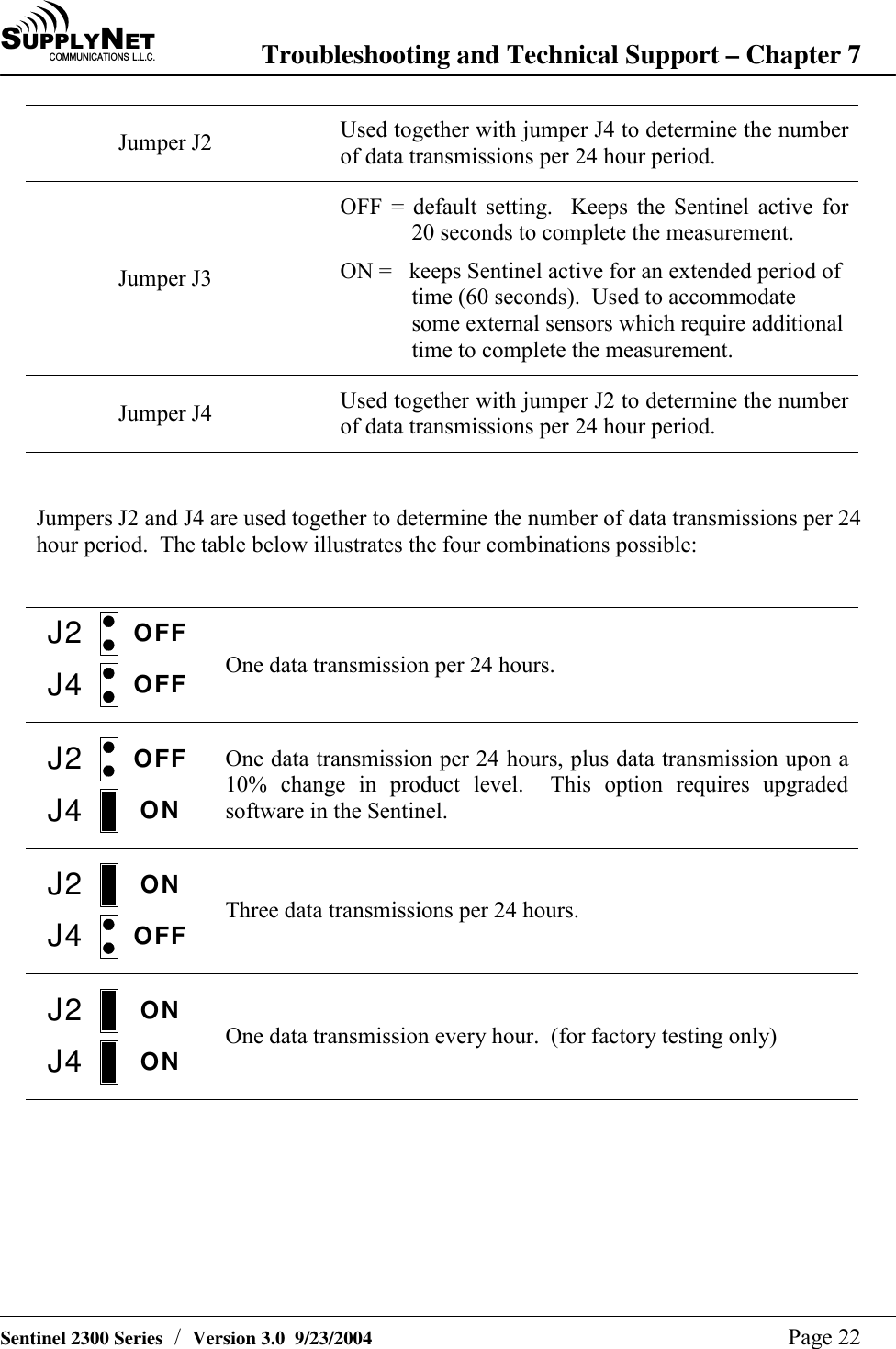
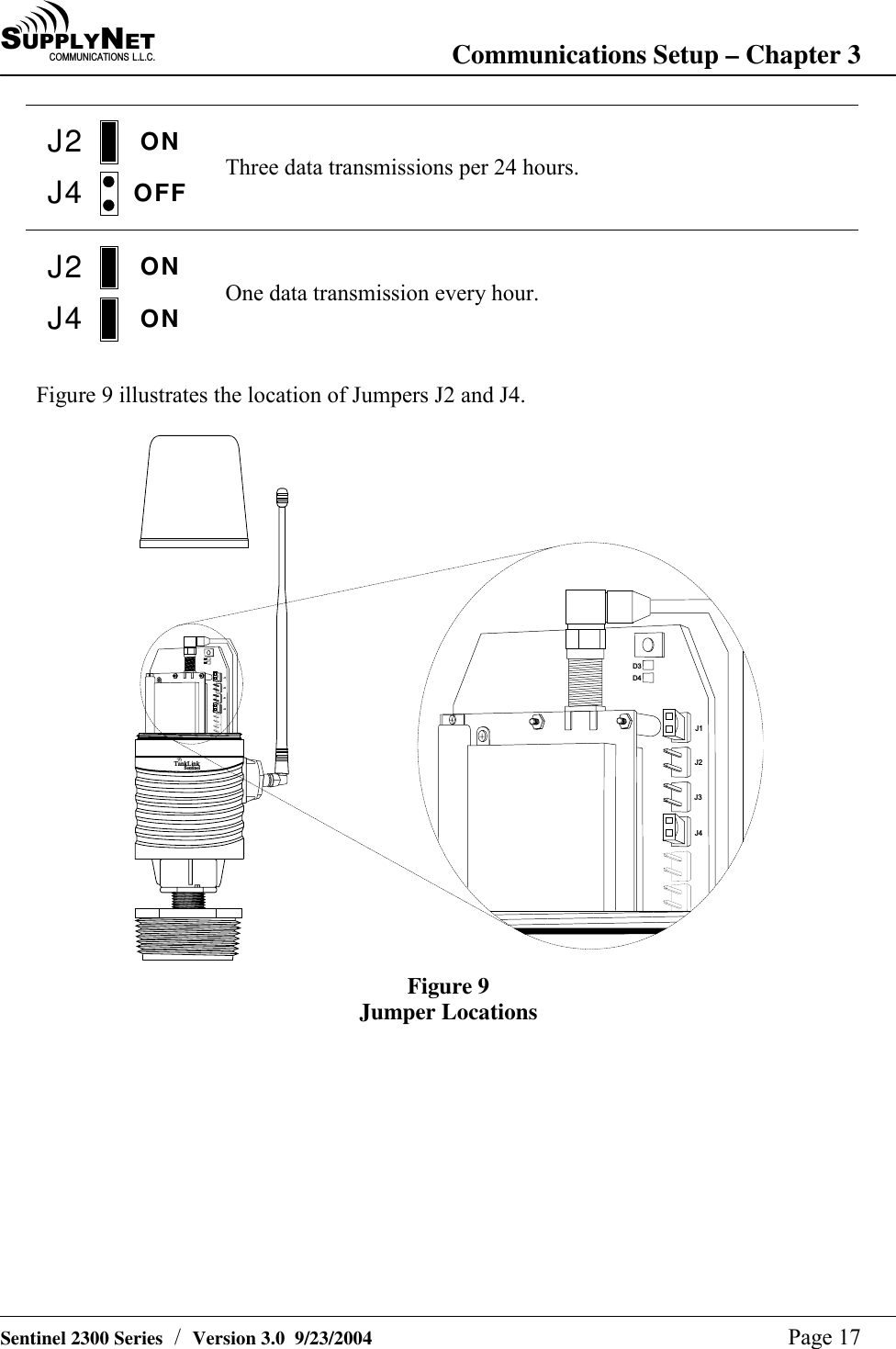
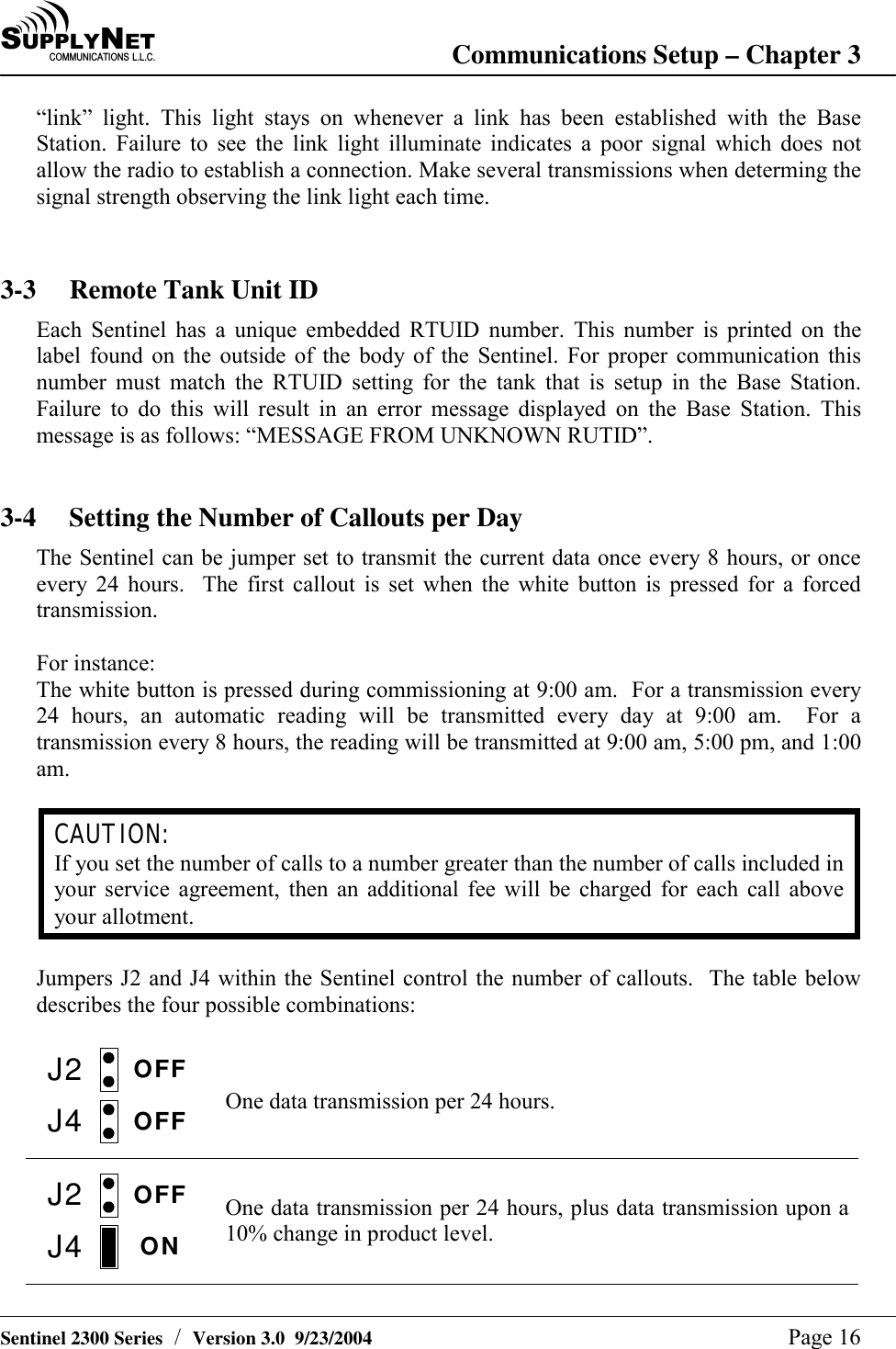
SU P P L YNE TC O M M U N I C A T I O N S   L . L . C . Troubleshooting and Technical Support – Chapter 7   Sentinel 2300 Series  /  Version 3.0  9/23/2004  Page 22 Jumper J2  Used together with jumper J4 to determine the number of data transmissions per 24 hour period. Jumper J3 OFF = default setting.  Keeps the Sentinel active for  20 seconds to complete the measurement. ON =   keeps Sentinel active for an extended period of time (60 seconds).  Used to accommodate some external sensors which require additional time to complete the measurement. Jumper J4  Used together with jumper J2 to determine the number of data transmissions per 24 hour period.   Jumpers J2 and J4 are used together to determine the number of data transmissions per 24 hour period.  The table below illustrates the four combinations possible:  J2J4OFFOFF  One data transmission per 24 hours. J2J4OFFON  One data transmission per 24 hours, plus data transmission upon a 10% change in product level.  This option requires upgraded software in the Sentinel. J2J4ONOFF  Three data transmissions per 24 hours. J2J4ONON  One data transmission every hour.  (for factory testing only)
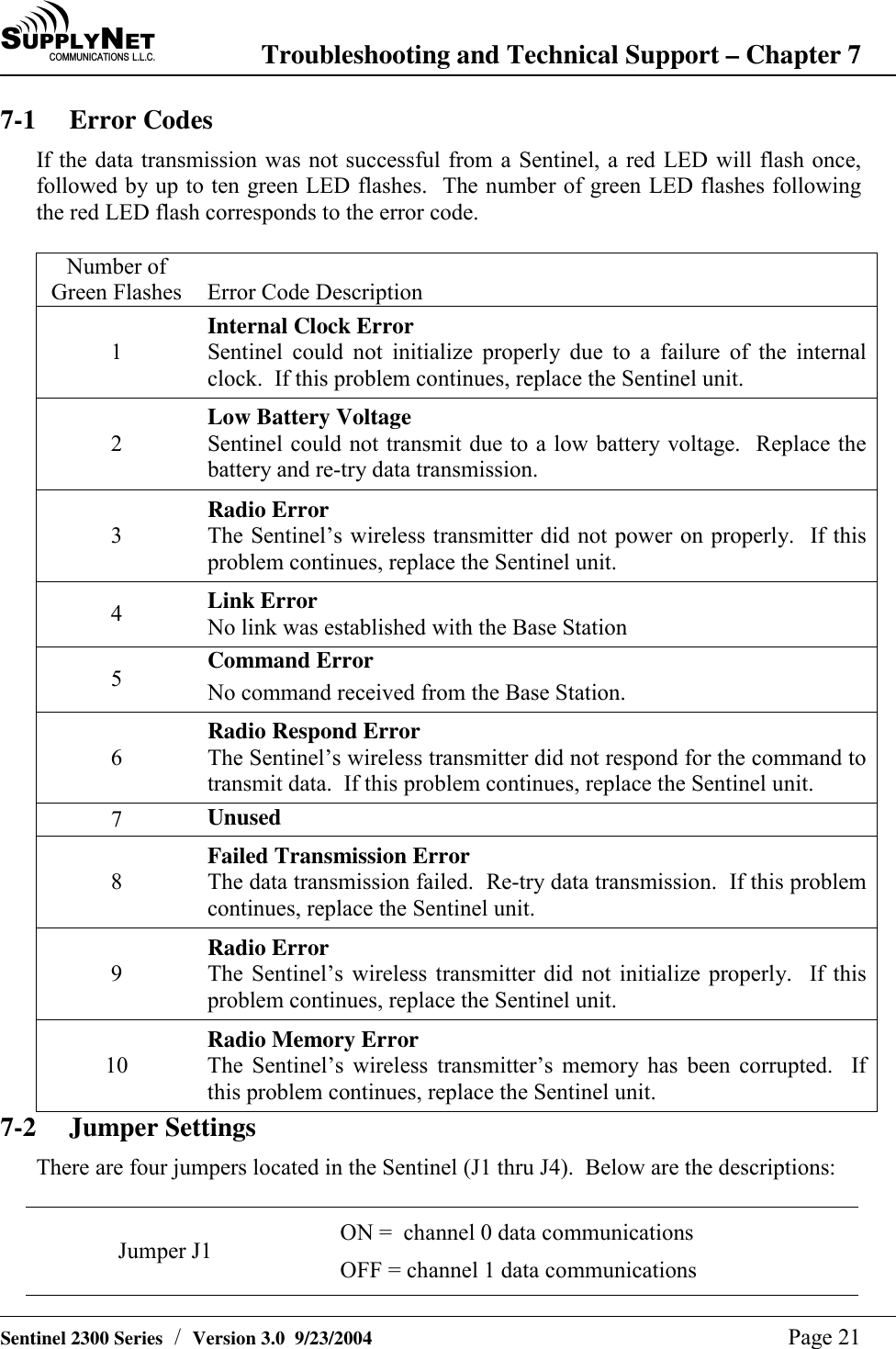
SU P P L YNE TC O M M U N I C A T I O N S   L . L . C . Troubleshooting and Technical Support – Chapter 7   Sentinel 2300 Series  /  Version 3.0  9/23/2004  Page 21 7-1 Error Codes If the data transmission was not successful from a Sentinel, a red LED will flash once, followed by up to ten green LED flashes.  The number of green LED flashes following the red LED flash corresponds to the error code.  Number of Green Flashes  Error Code Description 1 Internal Clock Error Sentinel could not initialize properly due to a failure of the internal clock.  If this problem continues, replace the Sentinel unit. 2 Low Battery Voltage Sentinel could not transmit due to a low battery voltage.  Replace the battery and re-try data transmission. 3 Radio Error The Sentinel’s wireless transmitter did not power on properly.  If this problem continues, replace the Sentinel unit. 4  Link Error No link was established with the Base Station 5  Command Error No command received from the Base Station. 6 Radio Respond Error The Sentinel’s wireless transmitter did not respond for the command to transmit data.  If this problem continues, replace the Sentinel unit. 7  Unused 8 Failed Transmission Error The data transmission failed.  Re-try data transmission.  If this problem continues, replace the Sentinel unit. 9 Radio Error The Sentinel’s wireless transmitter did not initialize properly.  If this problem continues, replace the Sentinel unit. 10 Radio Memory Error The Sentinel’s wireless transmitter’s memory has been corrupted.  If this problem continues, replace the Sentinel unit. 7-2 Jumper Settings There are four jumpers located in the Sentinel (J1 thru J4).  Below are the descriptions:  Jumper J1  ON =  channel 0 data communications OFF = channel 1 data communications
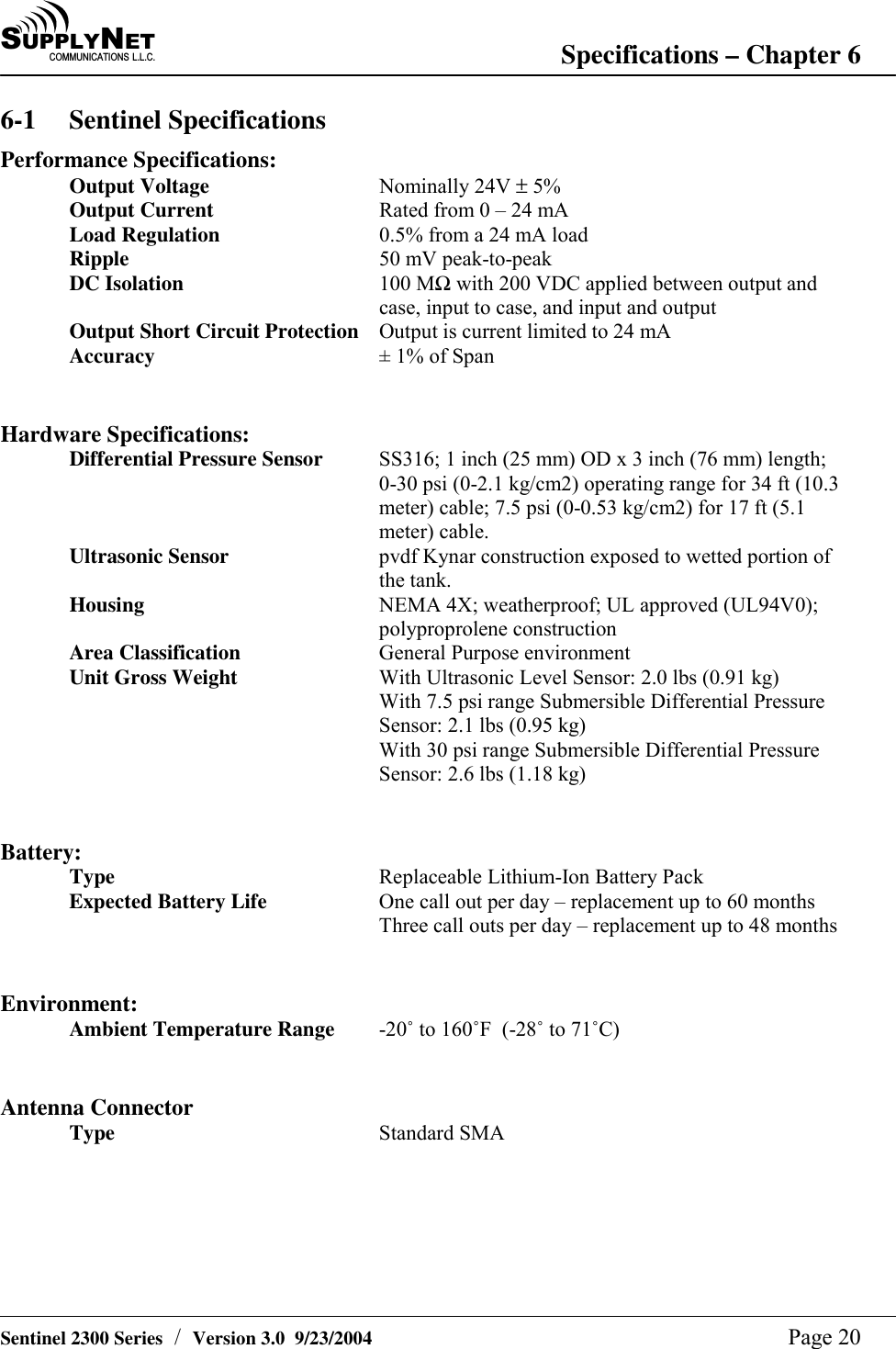
SU P P L YNE TC O M M U N I C A T I O N S   L . L . C . Specifications – Chapter 6   Sentinel 2300 Series  /  Version 3.0  9/23/2004  Page 20 6-1 Sentinel Specifications Performance Specifications: Output Voltage Nominally 24V ± 5% Output Current  Rated from 0 – 24 mA Load Regulation  0.5% from a 24 mA load Ripple  50 mV peak-to-peak DC Isolation  100 MΩ with 200 VDC applied between output and case, input to case, and input and output Output Short Circuit Protection  Output is current limited to 24 mA Accuracy  ± 1% of Span   Hardware Specifications: Differential Pressure Sensor  SS316; 1 inch (25 mm) OD x 3 inch (76 mm) length; 0-30 psi (0-2.1 kg/cm2) operating range for 34 ft (10.3 meter) cable; 7.5 psi (0-0.53 kg/cm2) for 17 ft (5.1 meter) cable. Ultrasonic Sensor  pvdf Kynar construction exposed to wetted portion of the tank. Housing  NEMA 4X; weatherproof; UL approved (UL94V0); polyproprolene construction Area Classification  General Purpose environment Unit Gross Weight  With Ultrasonic Level Sensor: 2.0 lbs (0.91 kg) With 7.5 psi range Submersible Differential Pressure Sensor: 2.1 lbs (0.95 kg) With 30 psi range Submersible Differential Pressure Sensor: 2.6 lbs (1.18 kg)   Battery: Type  Replaceable Lithium-Ion Battery Pack Expected Battery Life  One call out per day – replacement up to 60 months Three call outs per day – replacement up to 48 months   Environment: Ambient Temperature Range  -20û to 160ûF  (-28û to 71ûC)   Antenna Connector Type  Standard SMA
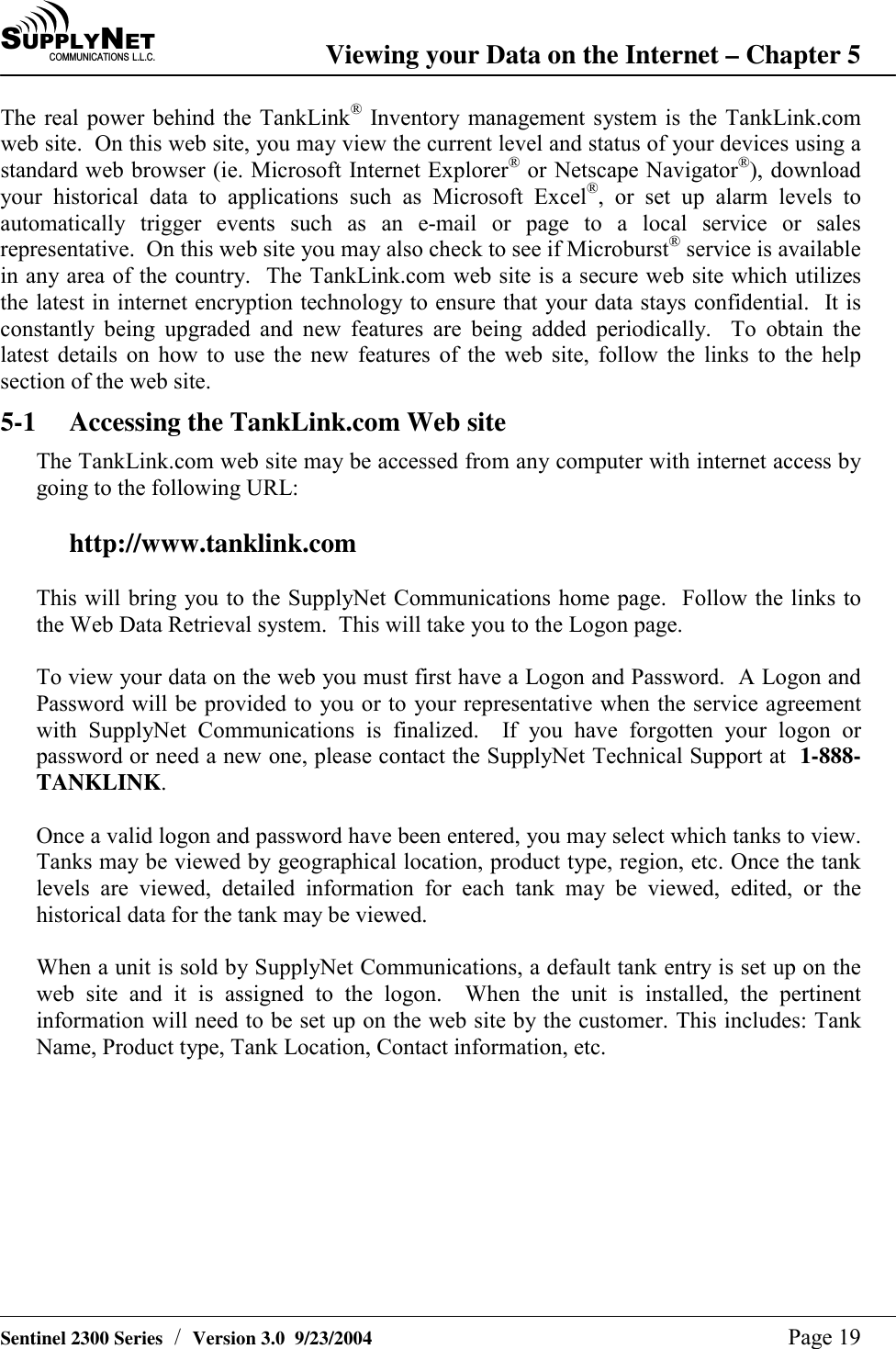
SU P P L YNE TC O M M U N I C A T I O N S   L . L . C . Viewing your Data on the Internet – Chapter 5   Sentinel 2300 Series  /  Version 3.0  9/23/2004  Page 19 The real power behind the TankLink® Inventory management system is the TankLink.com web site.  On this web site, you may view the current level and status of your devices using a standard web browser (ie. Microsoft Internet Explorer® or Netscape Navigator®), download your historical data to applications such as Microsoft Excel®, or set up alarm levels to automatically trigger events such as an e-mail or page to a local service or sales representative.  On this web site you may also check to see if Microburst® service is available in any area of the country.  The TankLink.com web site is a secure web site which utilizes the latest in internet encryption technology to ensure that your data stays confidential.  It is constantly being upgraded and new features are being added periodically.  To obtain the latest details on how to use the new features of the web site, follow the links to the help section of the web site. 5-1  Accessing the TankLink.com Web site The TankLink.com web site may be accessed from any computer with internet access by going to the following URL:  http://www.tanklink.com  This will bring you to the SupplyNet Communications home page.  Follow the links to the Web Data Retrieval system.  This will take you to the Logon page.  To view your data on the web you must first have a Logon and Password.  A Logon and Password will be provided to you or to your representative when the service agreement with SupplyNet Communications is finalized.  If you have forgotten your logon or password or need a new one, please contact the SupplyNet Technical Support at  1-888-TANKLINK.   Once a valid logon and password have been entered, you may select which tanks to view.  Tanks may be viewed by geographical location, product type, region, etc. Once the tank levels are viewed, detailed information for each tank may be viewed, edited, or the historical data for the tank may be viewed.  When a unit is sold by SupplyNet Communications, a default tank entry is set up on the web site and it is assigned to the logon.  When the unit is installed, the pertinent information will need to be set up on the web site by the customer. This includes: Tank Name, Product type, Tank Location, Contact information, etc.
SU P P L YNE TC O M M U N I C A T I O N S   L . L . C . Unit Operation – Chapter 4   Sentinel 2300 Series  /  Version 3.0  9/23/2004  Page 18 4-1 Final Testing Once all tank preparation has been completed, the Sentinel is properly mounted to the tank, the signal strength has been verified and the number of callouts per day has been properly set, it is now time to establish communications with the SupplyNet Monitoring Center.  1)  With the top black cover of the Sentinel removed, plug in the replaceable battery pack into the orange two-pin connector. 2)  Locate the little white button which is mounted to the right of the orange two-pin battery connector. 3)  Verify the Sentinel’s antenna is pointing straight up. 4)  Press and hold the little white button until a green LED lights up. 5)  The green LED will flash fast (half second ON, half second OFF). 6)  Upon establishing the link, the green LED will flash slow (one second ON, one second OFF). 7)  When ready to transmit, the green LED will go to solid ON for about 10 seconds.  This is the actual transmission of data to the Base Station. 8)  After a successful transmission, the green LED will extinguish.  The Sentinel is now in passive mode, and will remain in passive mode until the next scheduled transmission time (determined by Jumpers J2 & J4 – Number of Callouts per Day), or when the little white button is pressed and held again. 9)  If the data transmission was not successful, a red LED will flash once, followed by up to ten green LED flashes.  The number of green LED flashes following the red LED flash corresponds to an error code.  Refer to Section 7-1 of this manual for information on the error code. 10) Note the time the LED went to solid ON (the actual data transmission).  Contact the SupplyNet Monitoring Center at 888-826-5546, ext. 713 to verify a successful data transmission from the Base Station, and to verify tank information. 11) Replace the black cover onto the Sentinel finger tight.  4-2 Normal Operation After communication has been established, and the tank information has been given to the SupplyNet Monitoring Center, the Sentinel will continue to transmit data based upon the number of callouts per day set.  This tank data can be accessed thru the internet.  Refer to Chapter 5 of this manual for information on accessing this data.
SU P P L YNE TC O M M U N I C A T I O N S   L . L . C . Communications Setup – Chapter 3   Sentinel 2300 Series  /  Version 3.0  9/23/2004  Page 17 J2J4ONOFF  Three data transmissions per 24 hours. J2J4ONON  One data transmission every hour.    Figure 9 illustrates the location of Jumpers J2 and J4.  T a n k L i n kS e n t i n e lD 3D 4D 3D 4J 1J 2J 3J 4J 1J 2J 3J 4 Figure 9 Jumper Locations
SU P P L YNE TC O M M U N I C A T I O N S   L . L . C . Communications Setup – Chapter 3   Sentinel 2300 Series  /  Version 3.0  9/23/2004  Page 16 “link” light. This light stays on whenever a link has been established with the Base Station. Failure to see the link light illuminate indicates a poor signal which does not allow the radio to establish a connection. Make several transmissions when determing the signal strength observing the link light each time.    3-3  Remote Tank Unit ID Each Sentinel has a unique embedded RTUID number. This number is printed on the label found on the outside of the body of the Sentinel. For proper communication this number must match the RTUID setting for the tank that is setup in the Base Station. Failure to do this will result in an error message displayed on the Base Station. This message is as follows: “MESSAGE FROM UNKNOWN RUTID”.   3-4  Setting the Number of Callouts per Day The Sentinel can be jumper set to transmit the current data once every 8 hours, or once every 24 hours.  The first callout is set when the white button is pressed for a forced transmission.  For instance: The white button is pressed during commissioning at 9:00 am.  For a transmission every 24 hours, an automatic reading will be transmitted every day at 9:00 am.  For a transmission every 8 hours, the reading will be transmitted at 9:00 am, 5:00 pm, and 1:00 am.  CAUTION: If you set the number of calls to a number greater than the number of calls included in your service agreement, then an additional fee will be charged for each call above your allotment.  Jumpers J2 and J4 within the Sentinel control the number of callouts.  The table below describes the four possible combinations:  J2J4OFFOFF  One data transmission per 24 hours. J2J4OFFON  One data transmission per 24 hours, plus data transmission upon a 10% change in product level.
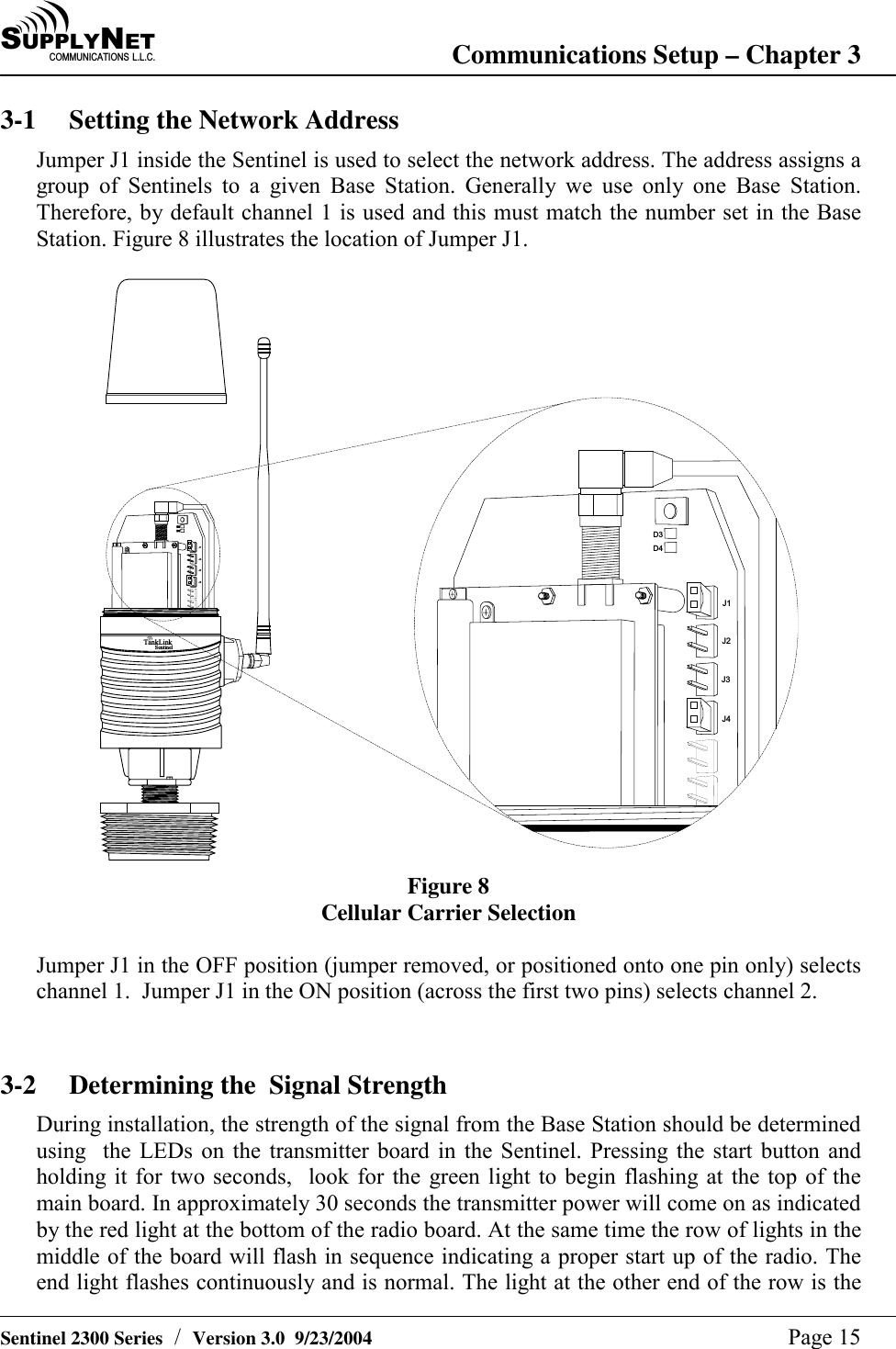
SU P P L YNE TC O M M U N I C A T I O N S   L . L . C . Communications Setup – Chapter 3   Sentinel 2300 Series  /  Version 3.0  9/23/2004  Page 15 3-1  Setting the Network Address Jumper J1 inside the Sentinel is used to select the network address. The address assigns a group of Sentinels to a given Base Station. Generally we use only one Base Station. Therefore, by default channel 1 is used and this must match the number set in the Base Station. Figure 8 illustrates the location of Jumper J1.  T a n k L i n kS e n t i n e lD 3D 4D 3D 4J 1J 2J 3J 4J 1J 2J 3J 4 Figure 8 Cellular Carrier Selection  Jumper J1 in the OFF position (jumper removed, or positioned onto one pin only) selects channel 1.  Jumper J1 in the ON position (across the first two pins) selects channel 2.   3-2  Determining the  Signal Strength During installation, the strength of the signal from the Base Station should be determined using  the LEDs on the transmitter board in the Sentinel. Pressing the start button and holding it for two seconds,  look for the green light to begin flashing at the top of the main board. In approximately 30 seconds the transmitter power will come on as indicated by the red light at the bottom of the radio board. At the same time the row of lights in the middle of the board will flash in sequence indicating a proper start up of the radio. The end light flashes continuously and is normal. The light at the other end of the row is the
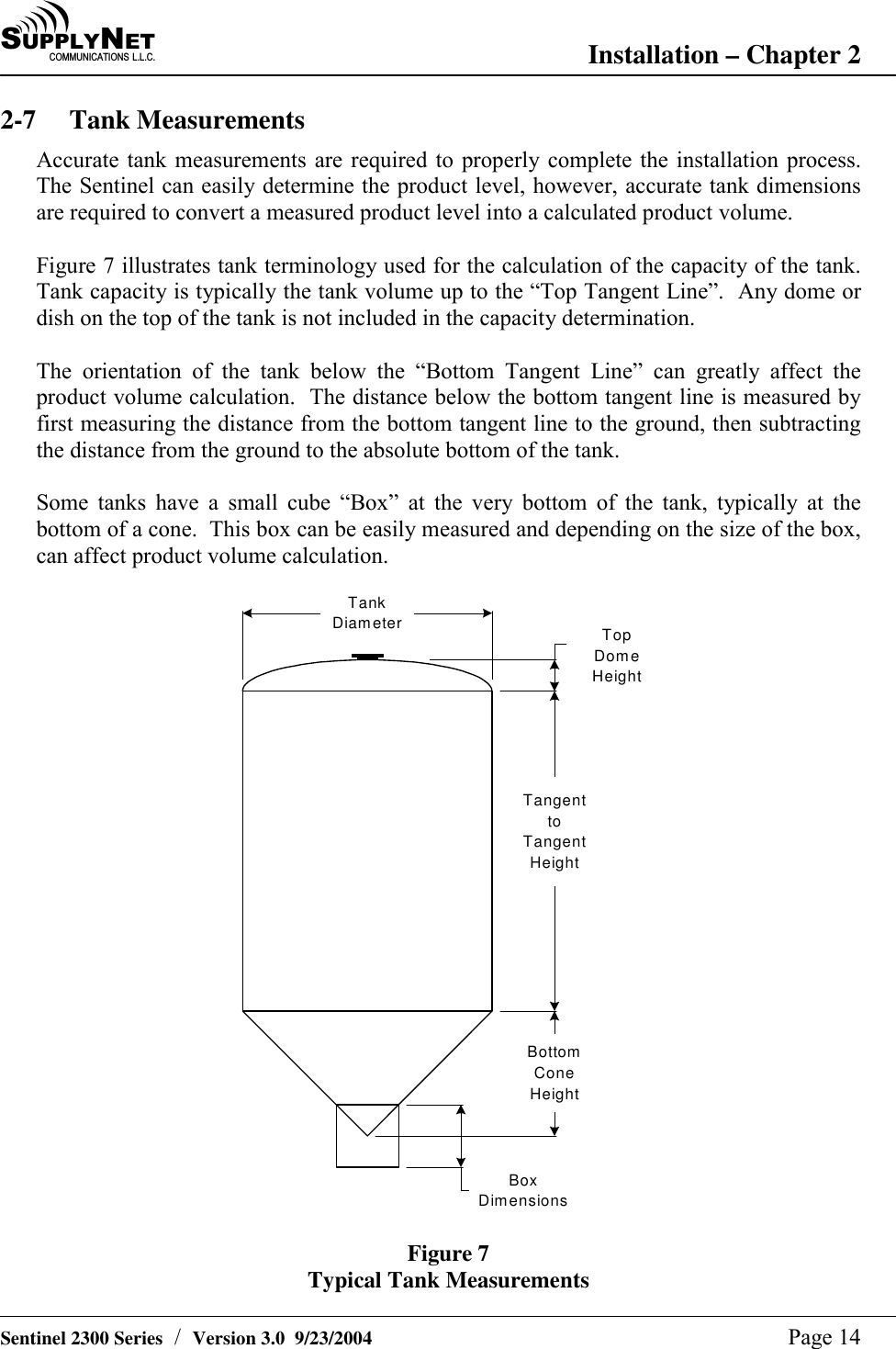
SU P P L YNE TC O M M U N I C A T I O N S   L . L . C . Installation – Chapter 2   Sentinel 2300 Series  /  Version 3.0  9/23/2004  Page 14 2-7 Tank Measurements Accurate tank measurements are required to properly complete the installation process.  The Sentinel can easily determine the product level, however, accurate tank dimensions are required to convert a measured product level into a calculated product volume.  Figure 7 illustrates tank terminology used for the calculation of the capacity of the tank.  Tank capacity is typically the tank volume up to the “Top Tangent Line”.  Any dome or dish on the top of the tank is not included in the capacity determination.  The orientation of the tank below the “Bottom Tangent Line” can greatly affect the product volume calculation.  The distance below the bottom tangent line is measured by first measuring the distance from the bottom tangent line to the ground, then subtracting the distance from the ground to the absolute bottom of the tank.  Some tanks have a small cube “Box” at the very bottom of the tank, typically at the bottom of a cone.  This box can be easily measured and depending on the size of the box, can affect product volume calculation.  TankDiameterTangenttoTangentHeightBottomConeHeightTopDomeHeightBoxDimensions Figure 7 Typical Tank Measurements
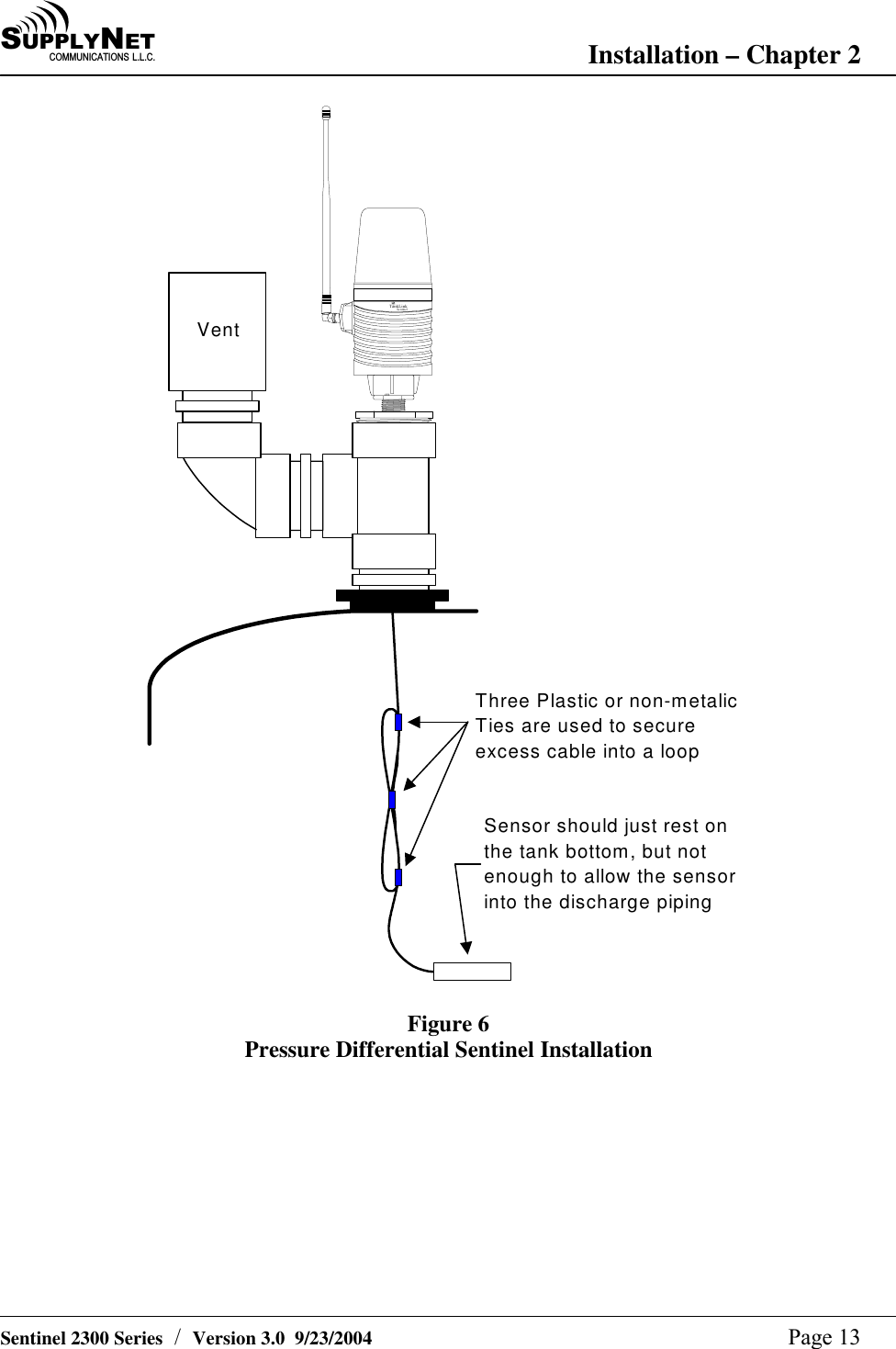
SU P P L YNE TC O M M U N I C A T I O N S   L . L . C . Installation – Chapter 2   Sentinel 2300 Series  /  Version 3.0  9/23/2004  Page 13 TankLinkSentinelVentThree Plastic or non-metalicTies are used to secureexcess cable into a loopSensor should just rest onthe tank bottom, but notenough to allow the sensorinto the discharge piping  Figure 6 Pressure Differential Sentinel Installation
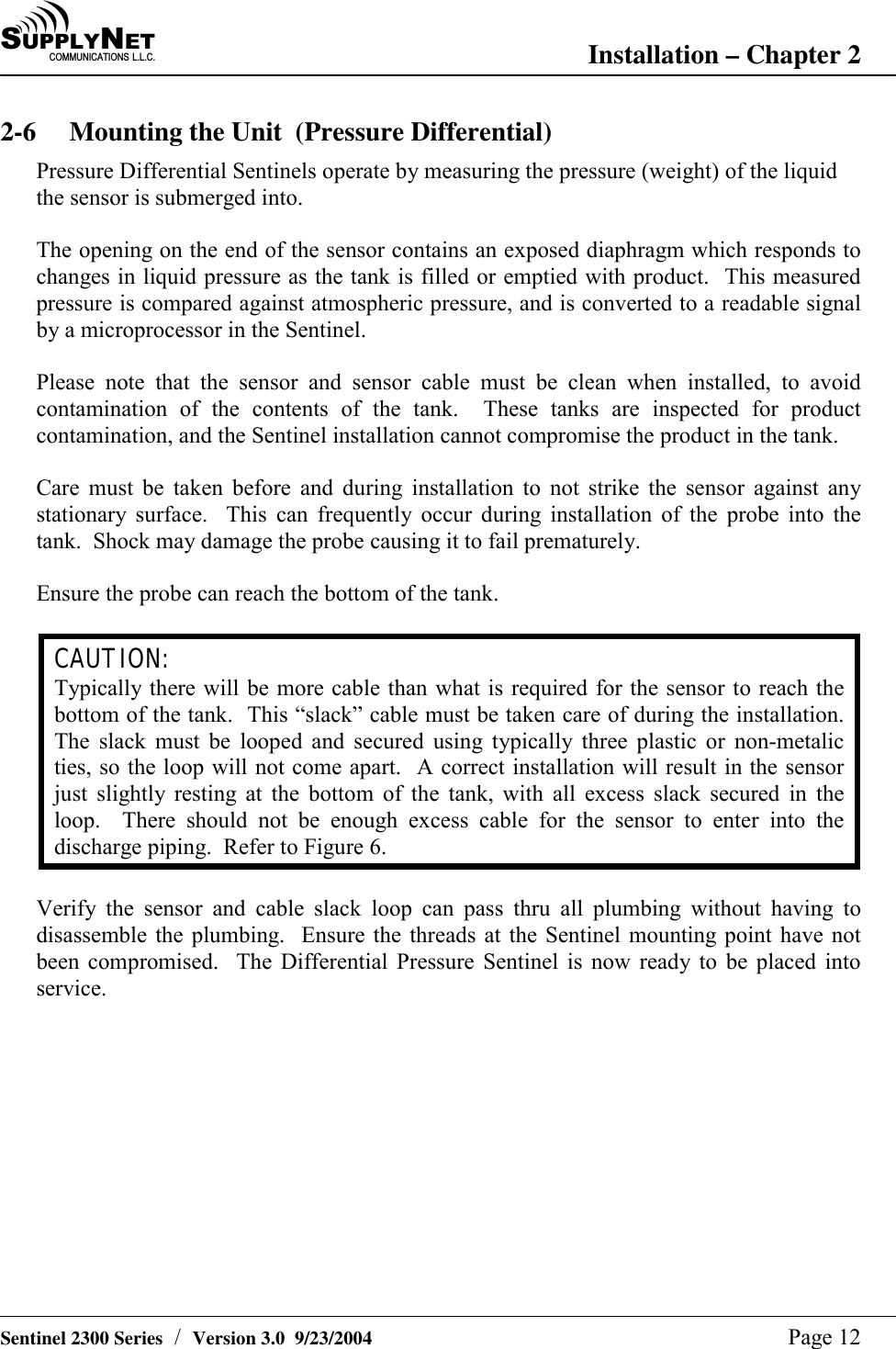
SU P P L YNE TC O M M U N I C A T I O N S   L . L . C . Installation – Chapter 2   Sentinel 2300 Series  /  Version 3.0  9/23/2004  Page 12 2-6  Mounting the Unit  (Pressure Differential)  Pressure Differential Sentinels operate by measuring the pressure (weight) of the liquid the sensor is submerged into.  The opening on the end of the sensor contains an exposed diaphragm which responds to changes in liquid pressure as the tank is filled or emptied with product.  This measured pressure is compared against atmospheric pressure, and is converted to a readable signal by a microprocessor in the Sentinel.  Please note that the sensor and sensor cable must be clean when installed, to avoid contamination of the contents of the tank.  These tanks are inspected for product contamination, and the Sentinel installation cannot compromise the product in the tank.  Care must be taken before and during installation to not strike the sensor against any stationary surface.  This can frequently occur during installation of the probe into the tank.  Shock may damage the probe causing it to fail prematurely.  Ensure the probe can reach the bottom of the tank.  CAUTION: Typically there will be more cable than what is required for the sensor to reach the bottom of the tank.  This “slack” cable must be taken care of during the installation.  The slack must be looped and secured using typically three plastic or non-metalic ties, so the loop will not come apart.  A correct installation will result in the sensor just slightly resting at the bottom of the tank, with all excess slack secured in the loop.  There should not be enough excess cable for the sensor to enter into the discharge piping.  Refer to Figure 6.  Verify the sensor and cable slack loop can pass thru all plumbing without having to disassemble the plumbing.  Ensure the threads at the Sentinel mounting point have not been compromised.  The Differential Pressure Sentinel is now ready to be placed into service.
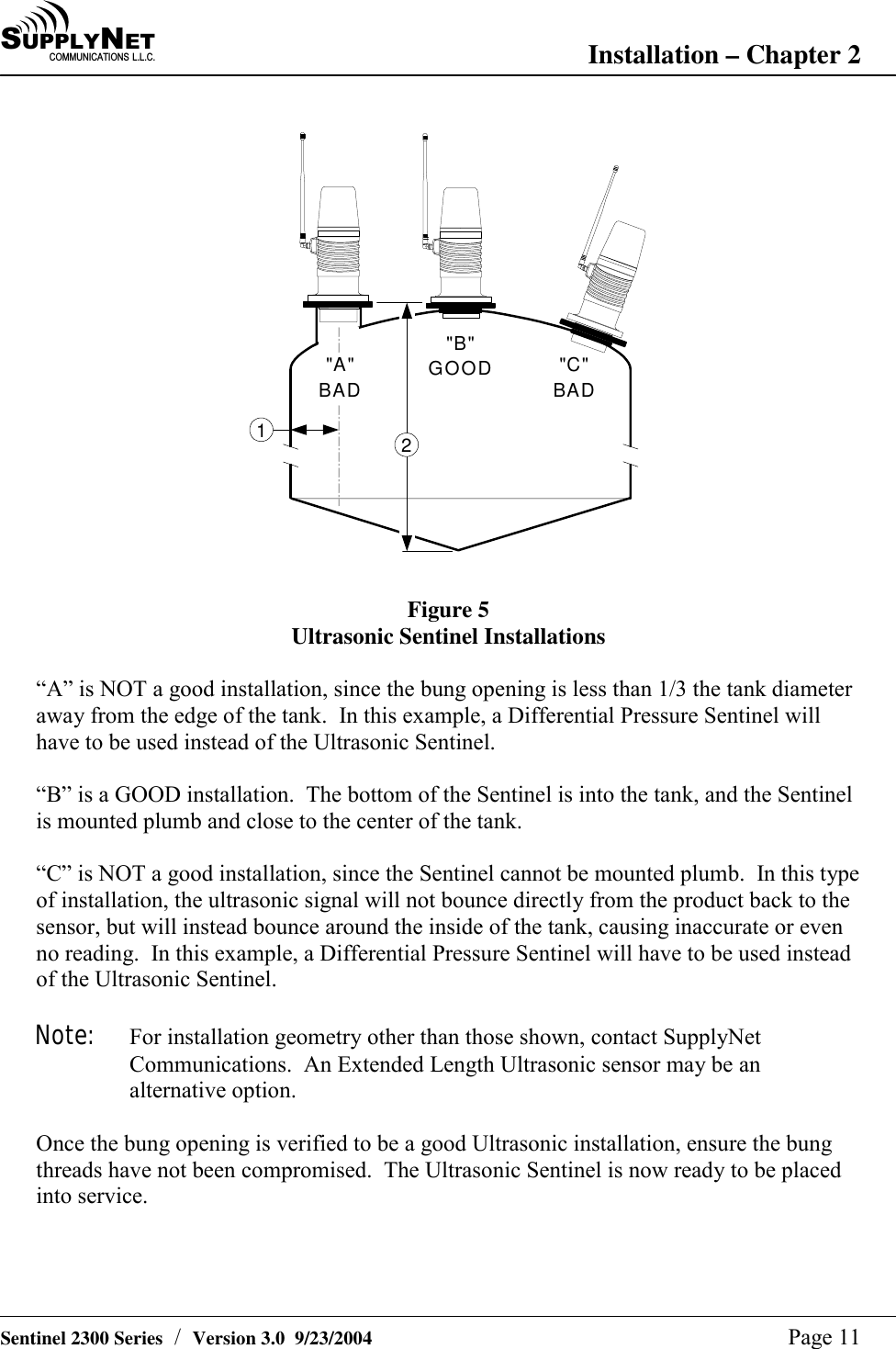
SU P P L YNE TC O M M U N I C A T I O N S   L . L . C . Installation – Chapter 2   Sentinel 2300 Series  /  Version 3.0  9/23/2004  Page 11  "C"BAD"B"GOOD"A"BAD12  Figure 5 Ultrasonic Sentinel Installations  “A” is NOT a good installation, since the bung opening is less than 1/3 the tank diameter away from the edge of the tank.  In this example, a Differential Pressure Sentinel will have to be used instead of the Ultrasonic Sentinel.  “B” is a GOOD installation.  The bottom of the Sentinel is into the tank, and the Sentinel is mounted plumb and close to the center of the tank.  “C” is NOT a good installation, since the Sentinel cannot be mounted plumb.  In this type of installation, the ultrasonic signal will not bounce directly from the product back to the sensor, but will instead bounce around the inside of the tank, causing inaccurate or even no reading.  In this example, a Differential Pressure Sentinel will have to be used instead of the Ultrasonic Sentinel.  Note:  For installation geometry other than those shown, contact SupplyNet Communications.  An Extended Length Ultrasonic sensor may be an alternative option.  Once the bung opening is verified to be a good Ultrasonic installation, ensure the bung threads have not been compromised.  The Ultrasonic Sentinel is now ready to be placed into service.
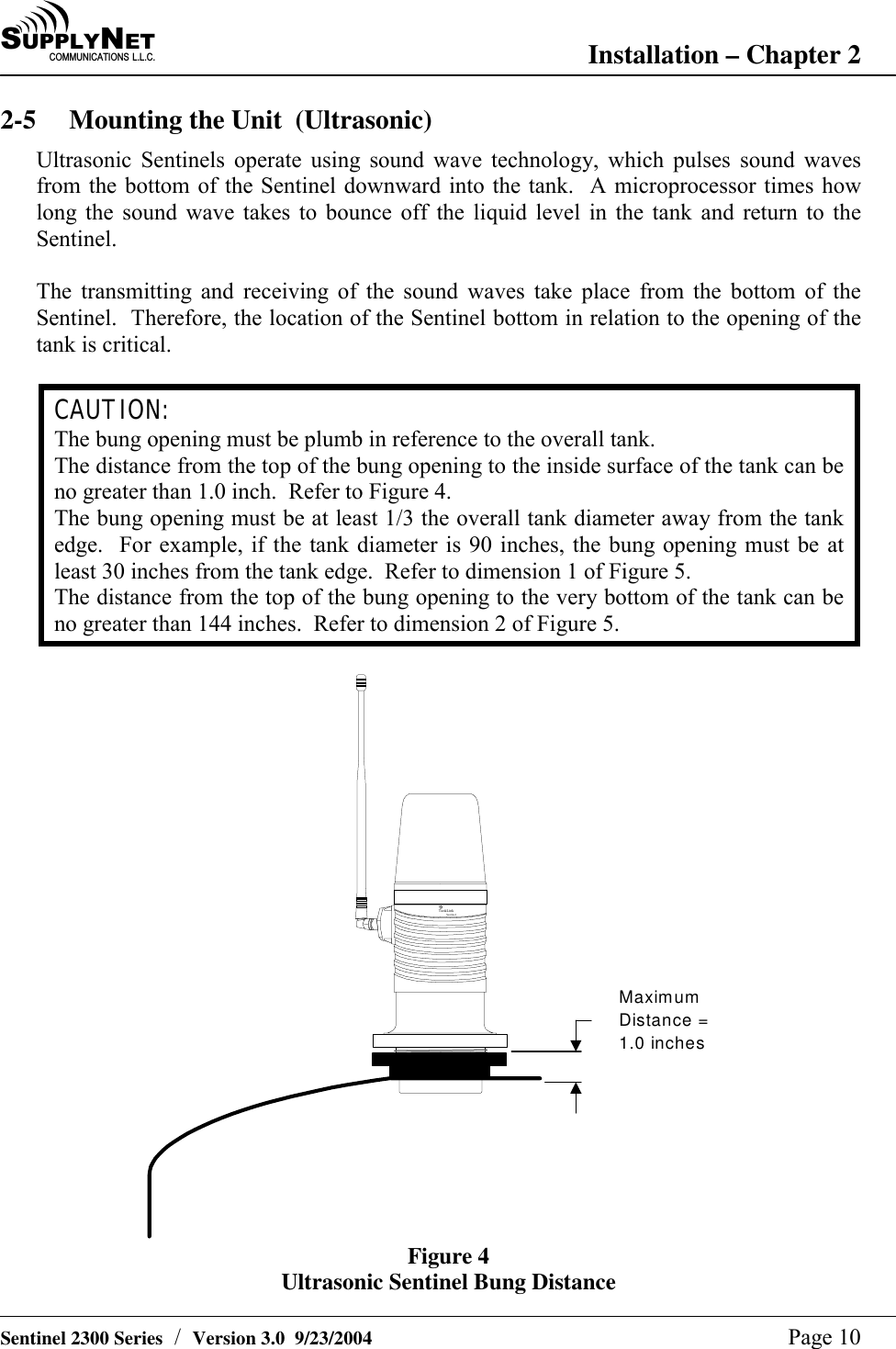
SU P P L YNE TC O M M U N I C A T I O N S   L . L . C . Installation – Chapter 2   Sentinel 2300 Series  /  Version 3.0  9/23/2004  Page 10 2-5  Mounting the Unit  (Ultrasonic) Ultrasonic Sentinels operate using sound wave technology, which pulses sound waves from the bottom of the Sentinel downward into the tank.  A microprocessor times how long the sound wave takes to bounce off the liquid level in the tank and return to the Sentinel.  The transmitting and receiving of the sound waves take place from the bottom of the Sentinel.  Therefore, the location of the Sentinel bottom in relation to the opening of the tank is critical.  CAUTION: The bung opening must be plumb in reference to the overall tank. The distance from the top of the bung opening to the inside surface of the tank can be no greater than 1.0 inch.  Refer to Figure 4. The bung opening must be at least 1/3 the overall tank diameter away from the tank edge.  For example, if the tank diameter is 90 inches, the bung opening must be at least 30 inches from the tank edge.  Refer to dimension 1 of Figure 5. The distance from the top of the bung opening to the very bottom of the tank can be no greater than 144 inches.  Refer to dimension 2 of Figure 5.  Ta nkLinkSentinelMaximumDistance =1.0 inches Figure 4 Ultrasonic Sentinel Bung Distance
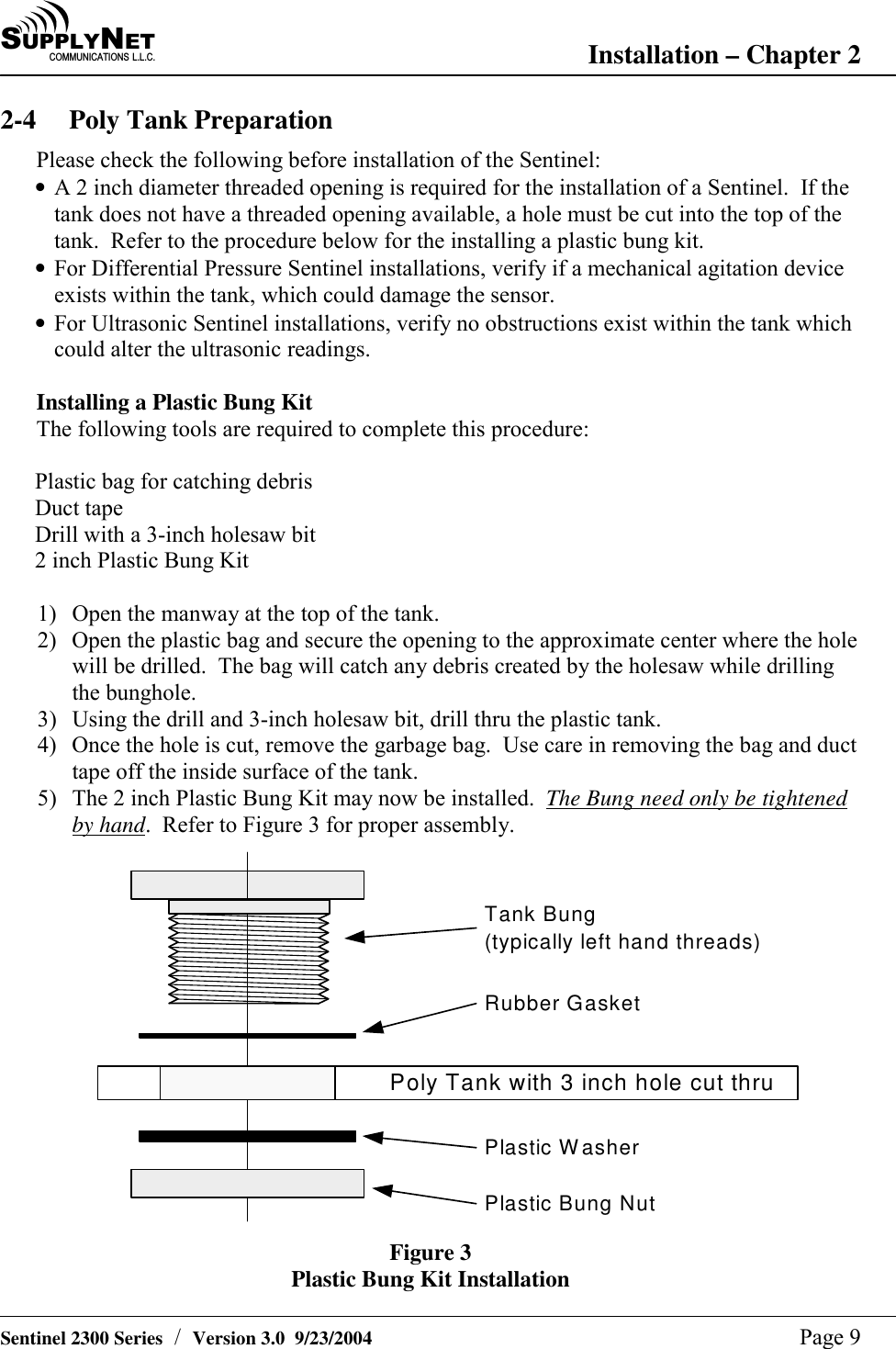
SU P P L YNE TC O M M U N I C A T I O N S   L . L . C . Installation – Chapter 2   Sentinel 2300 Series  /  Version 3.0  9/23/2004  Page 9 2-4  Poly Tank Preparation Please check the following before installation of the Sentinel:  • A 2 inch diameter threaded opening is required for the installation of a Sentinel.  If the tank does not have a threaded opening available, a hole must be cut into the top of the tank.  Refer to the procedure below for the installing a plastic bung kit. • For Differential Pressure Sentinel installations, verify if a mechanical agitation device exists within the tank, which could damage the sensor. • For Ultrasonic Sentinel installations, verify no obstructions exist within the tank which could alter the ultrasonic readings.  Installing a Plastic Bung Kit The following tools are required to complete this procedure:  Plastic bag for catching debris Duct tape Drill with a 3-inch holesaw bit 2 inch Plastic Bung Kit  1)  Open the manway at the top of the tank. 2)  Open the plastic bag and secure the opening to the approximate center where the hole will be drilled.  The bag will catch any debris created by the holesaw while drilling the bunghole. 3)  Using the drill and 3-inch holesaw bit, drill thru the plastic tank. 4)  Once the hole is cut, remove the garbage bag.  Use care in removing the bag and duct tape off the inside surface of the tank. 5)  The 2 inch Plastic Bung Kit may now be installed.  The Bung need only be tightened by hand.  Refer to Figure 3 for proper assembly. Tank Bung(typically left hand threads)Poly Tank with 3 inch hole cut thruRubber GasketPlastic WasherPlastic Bung Nut Figure 3 Plastic Bung Kit Installation
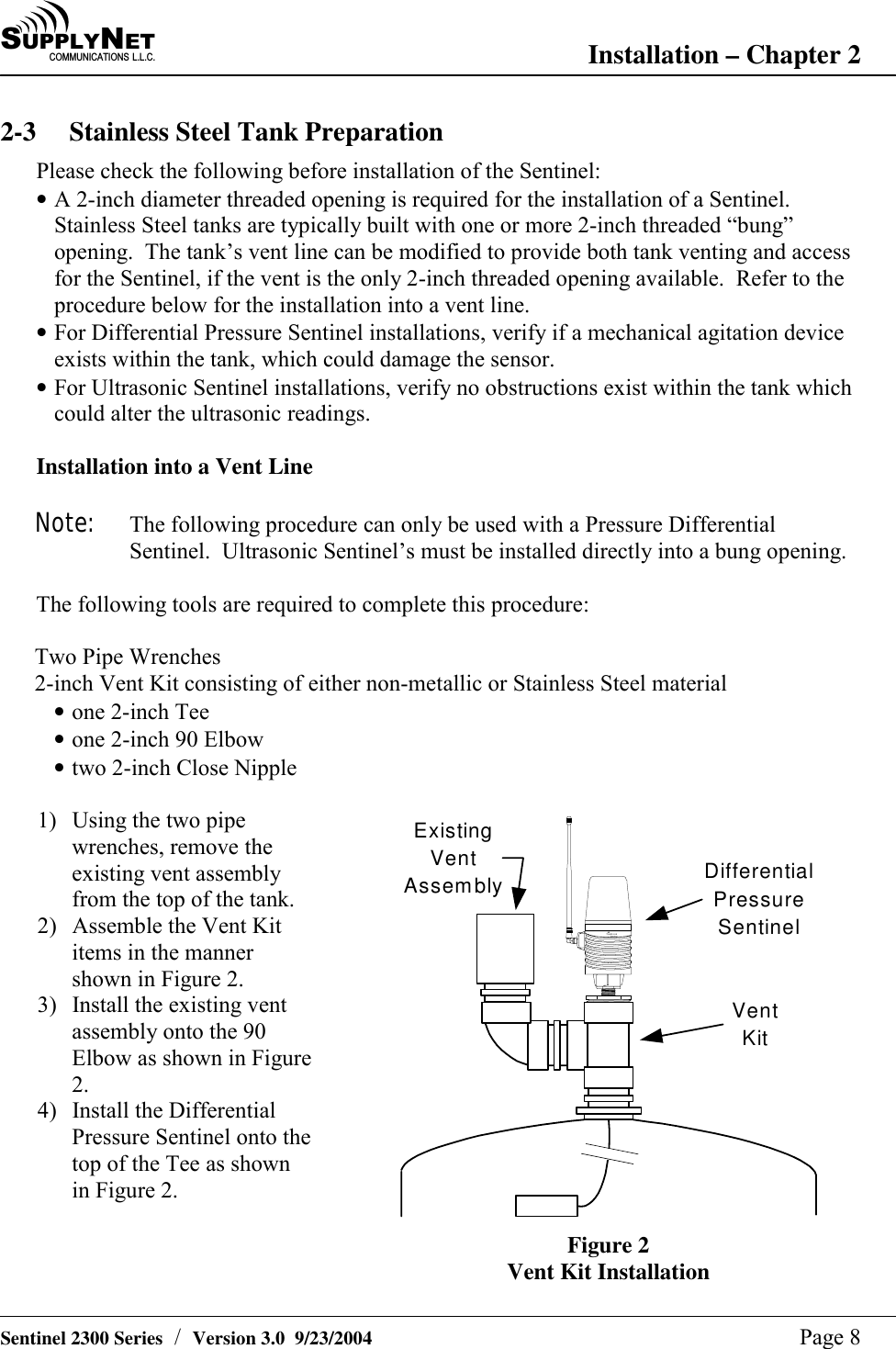
SU P P L YNE TC O M M U N I C A T I O N S   L . L . C . Installation – Chapter 2   Sentinel 2300 Series  /  Version 3.0  9/23/2004  Page 8 2-3  Stainless Steel Tank Preparation Please check the following before installation of the Sentinel: • A 2-inch diameter threaded opening is required for the installation of a Sentinel.  Stainless Steel tanks are typically built with one or more 2-inch threaded “bung” opening.  The tank’s vent line can be modified to provide both tank venting and access for the Sentinel, if the vent is the only 2-inch threaded opening available.  Refer to the procedure below for the installation into a vent line. • For Differential Pressure Sentinel installations, verify if a mechanical agitation device exists within the tank, which could damage the sensor. • For Ultrasonic Sentinel installations, verify no obstructions exist within the tank which could alter the ultrasonic readings.  Installation into a Vent Line  Note:  The following procedure can only be used with a Pressure Differential Sentinel.  Ultrasonic Sentinel’s must be installed directly into a bung opening.  The following tools are required to complete this procedure:  Two Pipe Wrenches 2-inch Vent Kit consisting of either non-metallic or Stainless Steel material • one 2-inch Tee • one 2-inch 90 Elbow • two 2-inch Close Nipple  1)  Using the two pipe wrenches, remove the existing vent assembly from the top of the tank. 2)  Assemble the Vent Kit items in the manner shown in Figure 2. 3)  Install the existing vent assembly onto the 90 Elbow as shown in Figure 2. 4)  Install the Differential Pressure Sentinel onto the top of the Tee as shown in Figure 2. TankLinkSentinelDifferentialPressureSentinelVentKitExistingVentAssembly Figure 2 Vent Kit Installation
SU P P L YNE TC O M M U N I C A T I O N S   L . L . C . Installation – Chapter 2   Sentinel 2300 Series  /  Version 3.0  9/23/2004  Page 7 2-1 Safety Precautions The Sentinel™ uses Radio Frequency (RF) waves for communication to the nearest Base Station. In general, the Sentinel should be able to communicate properly if you are within 1000 feet of the Base Station.  However, because of the inherent characteristics of RF communications, there are certain guidelines that should be followed when positioning the unit.  Warning ! •  Do not use the Sentinel™ in hospitals or near medical equipment. •  Do not install the Sentinel™ where hazardous vapors are present. •  Do not use the Sentinel™ where blasting is in progress. •  Electrostatic discharge can damage sensitive electronic components. Be sure to touch a grounded object before working on the internal circuit board. •  The unit should be located in an area free from overhanging metal structures, large obstructions, or equipment which could generate RF or electrical interference. •   If you have doubt about the suitability of a particular location for the Sentinel™, or are having difficulty transmitting, please see Sections 3-2 and 3-3.  Please contact a SupplyNet Communications specialist to determine your exact needs.  2-2 Initial Inspection When you receive the Sentinel™ unit, thoroughly inspect it for any damage which may have occurred during shipping.  If there is any damage to the Sentinel™, contact the shipping company as soon as possible.  Locate the packing checklist in the shipping container.  Check for any missing items before you begin installation of the Sentinel™.  Note: The Sentinel™ is shipped with the antenna disconnected.  It is located in a separate compartment within the shipping carton.  Verify that the antenna is present before proceeding.
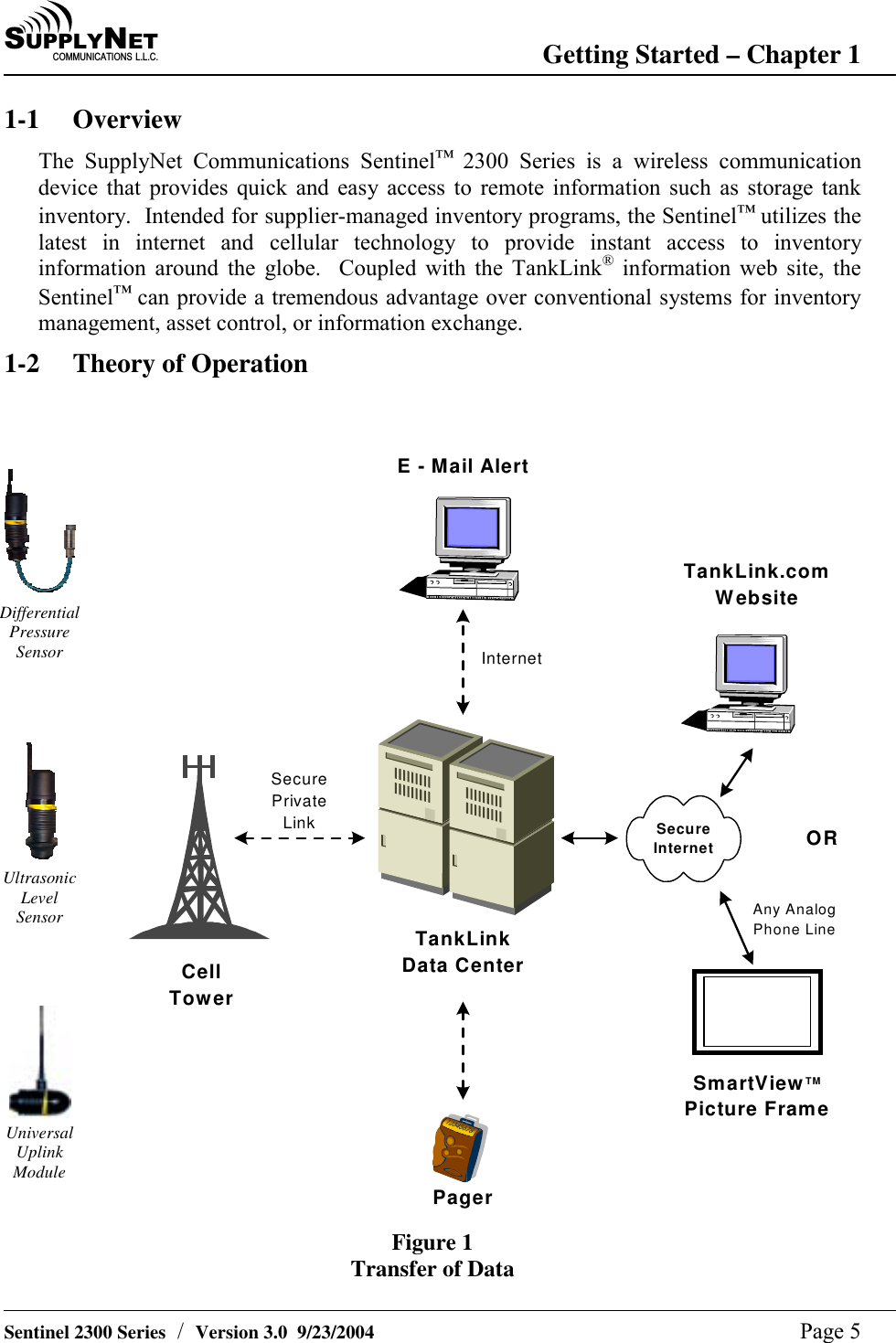
SU P P L YNE TC O M M U N I C A T I O N S   L . L . C . Getting Started – Chapter 1   Sentinel 2300 Series  /  Version 3.0  9/23/2004  Page 6  The Sentinel™ communicates to the Base Station using a short range radio. The distance is limited to 1000 feet. The Base Station is capable of receiving data from multiple Sentinels forming a Local Area Network (LAN) configuration. The maximum number of Sentinels communicating with the Base Station is 24. The Base Station in turn communicates directly with the TankLink® data center using a wireless cellular technology called Microburst®. This patented technology allows the unit to transmit digital data to the TankLink® data center using the existing network of analog cellular towers deployed throughout North America.  Every area with analog cellular service has two carriers, an ‘A’ carrier and a ‘B’ carrier.  In order to transmit a Microburst® data packet, the local cellular carrier must be Microburst® enabled.  Fortunately, nearly all areas in the United States have at least one Microburst® enabled carrier.  Many regions have two Microburst® carriers.  In these areas, the installing technician can choose which carrier to use based on the proximity of the unit to each carrier’s cellular towers.  There is no difference in cost using one carrier over the other, unlike cellular telephone rate plans from competing companies.  Once the data is at the TankLink® data center, it may be viewed over the internet using a standard web browser (ie. Microsoft Internet Explorer or Netscape Navigator), downloaded to applications such as Microsoft Excel, or it may be used to trigger events such as an e-mail or page to a local sales or service representative.  To access the data provided by the Sentinel™ unit, a current monitoring service agreement with SupplyNet Communications is required. For help with accessing the TankLink® web site, see Chapter 5.  Since the Sentinel™ is a wireless device, care must be taken when installing the unit to minimize interference from nearby equipment or structures.  For installation guidelines, please refer to Chapter 2. 1-3 Product Highlights # No telephone line is required for communication. # No external power source is required. # Simple installation. # Sensor flexibility. # Quick commissioning. # Fixed monitoring costs. # Unlimited applications.
SU P P L YNE TC O M M U N I C A T I O N S   L . L . C . Getting Started – Chapter 1   Sentinel 2300 Series  /  Version 3.0  9/23/2004  Page 5 1-1 Overview The SupplyNet Communications Sentinel™ 2300 Series is a wireless communication device that provides quick and easy access to remote information such as storage tank inventory.  Intended for supplier-managed inventory programs, the Sentinel™ utilizes the latest in internet and cellular technology to provide instant access to inventory information around the globe.  Coupled with the TankLink® information web site, the Sentinel™ can provide a tremendous advantage over conventional systems for inventory management, asset control, or information exchange. 1-2 Theory of Operation     Differential Pressure Sensor     Ultrasonic Level Sensor     Universal Uplink Module E - Mail AlertAny AnalogPhone LineTankLinkData CenterTankLink.comWebsiteCellTowerSecurePrivateLinkInternetPagerSecureInternetSmartViewTMPicture FrameORFigure 1 Transfer of Data
SU P P L YNE TC O M M U N I C A T I O N S   L . L . C .    Sentinel 2300 Series  /  Version 3.0  9/23/2004  Page 4 Table of Contents  Chapter 1  Getting Started 1-1 Overview  4 1-2  Theory of Operation  4 1-3 Product Highlights  5  Chapter 2  Installation 2-1 Safety Precautions  6 2-2 Initial Inspection  6 2-3  Stainless Steel Tank Preparation  7 2-4 Poly Tank Preparation  8 2-5  Mounting the Unit  (Ultrasonic)  9 2-6  Mounting the Unit  (Pressure Differential)  11 2-7 Tank Measurements  13  Chapter 3   Communication Setup 3-1  Setting the Network Address  14 3-2  Determining the Signal Strength  15 3-3  Remote Tank Unit ID  15 3-4  Setting the number of callouts per day  16  Chapter 4   Unit Operation 4-1 Final Testing  18 4-2 Normal Operation  18  Chapter 5  Viewing your Data on the Internet  5-1  Accessing the TankLink.com Web site  19  Chapter 6  Specifications 6-1 Sentinel Specifications  20  Chapter 7  Troubleshooting and Technical Support 7-1 Error Codes  21 7-2 Jumper Settings  22 7-3  Battery Pack Replacement  23 7-4 Troubleshooting  24 7-5  Obtaining Technical Support  24  Chapter 8  Terms and Conditions of Service 8-1  Terms and Conditions of Service  25  Chapter 9  Product Warranty and Notices 9-1  Product Warranty and Notices  26
SU P P L YNE TC O M M U N I C A T I O N S   L . L . C .    Sentinel 2300 Series  /  Version 3.0  9/23/2004  Page 3 No part of this document may be copied, reproduced, or translated without the prior written consent of SupplyNet Communications.  No part of this document may be stored or transmitted in any electronic form without the prior written consent of SupplyNet Communications. SupplyNet Communications has made every effort to ensure the accuracy and completeness of this document.  However, as we are continually making improvements to our products, we cannot guarantee the accuracy of this document.  We will not be liable for any inaccuracies, omissions, or future changes. TankLink and the TankLink logo are registered trademarks of SupplyNet Communications L.L.C.  Microburst is a registered trademark of Aeris.Net.  Lexan and Valox are registered trademarks of General Electric Company.  All other trademarks referenced herein are the properties of their respective organizations.
SU P P L YNE TC O M M U N I C A T I O N S   L . L . C .    Sentinel 2300 Series  /  Version 3.0  9/23/2004  Page 2 FCC Statement This device complies with Part 15 of the FCC Rules. Operation is subject to the following two conditions: (1) This device must not be allowed to cause harmful interference, (2) This device must accept any interference that may cause undesired operation.   For Your Safety This equipment contains a short range radio which transmits at very low power.  In non-residential applications, it may still interfere with other electronic equipment.  Therefore its use in certain situations is restricted.   Read these installation and operation instructions carefully. Failure to follow these instructions may be dangerous or illegal and any unauthorized  changes may void the users authority  to operate the equipment.  Only qualified service personnel must install or repair this equipment. This device has been tested with a specific antenna and tampering or replacing it is strictly prohibited.   RF Exposure Warnings for Portable Equipment.  This equipment has been approved for portable applications where the equipment can be used in close proximity to the human body. Excessive RF exposure should be avoided.  This equipment has been approved for portable applications where the equipment should be used at distances greater than 20cm from the human body (with the exception of hands, wrists, feet, ankles). Operation at distances less than 20 cm is strictly prohibited.               Copyright 2001 SupplyNet Communications L.L.C.
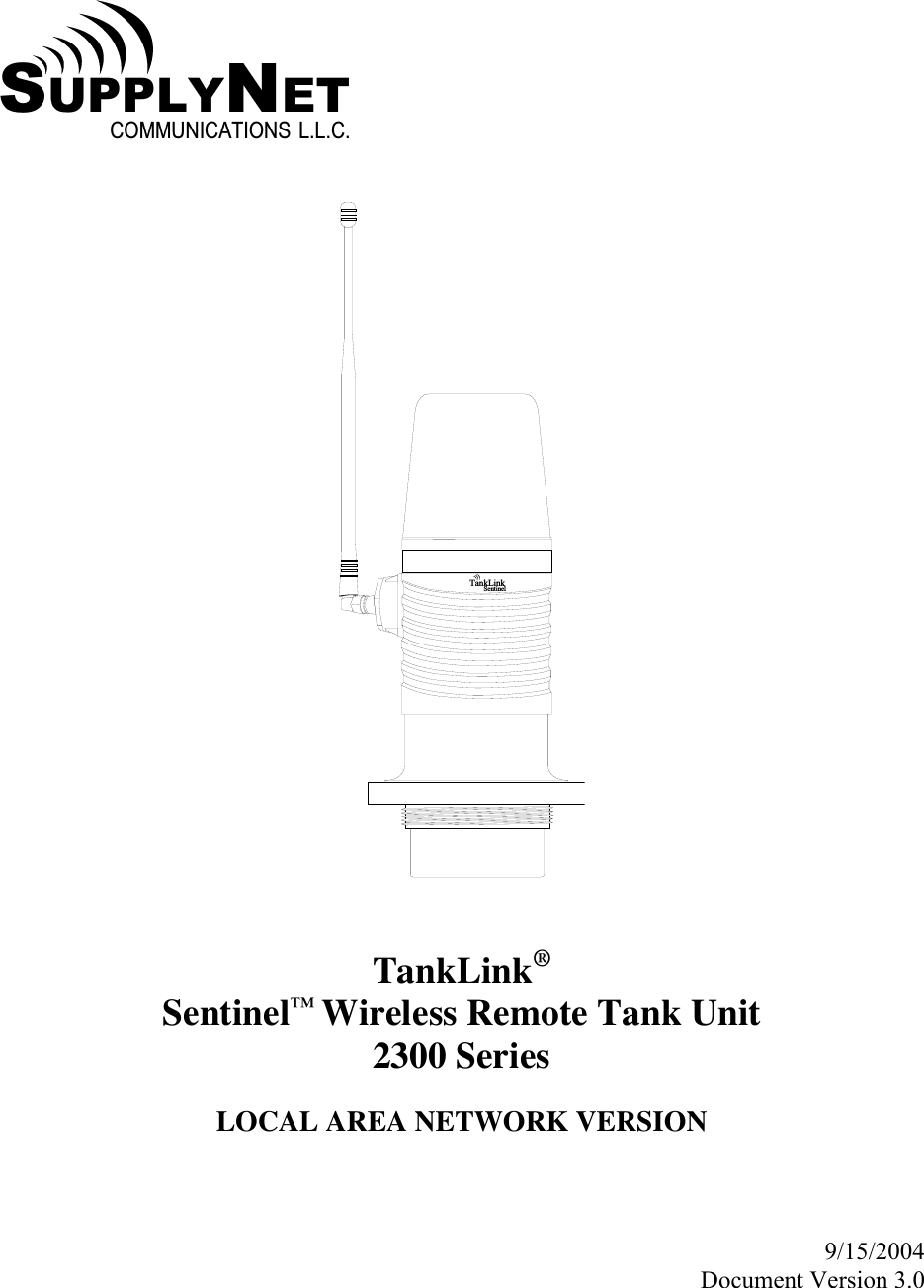
  SU P P L Y NE TC O M M U N I C A T I O N S   L . L . C .   T a n k L i n kS e n t i n e l   TankLink® Sentinel™ Wireless Remote Tank Unit 2300 Series  LOCAL AREA NETWORK VERSION    9/15/2004 Document Version 3.0

Navigation menu