Suzhou Sate Auto Electronic TP036 TIRE PRESSURE MONITORING SYSTEM User Manual USERS MANUAL

Suzhou Sate Auto Electronic Co., Ltd TIRE PRESSURE MONITORING SYSTEM USERS MANUAL

USERS MANUAL

TIRE PRESSURE MONITORING SYSTEMUSER MANUAL1. Please do read this Manual carefully before using the product.2. The system can monitor the tire pressure effectively, but does not warrant       to avoid any sudden accidents. User should utilize the system to ensure the      tire to be used under a standard pressure and avoid using the poor quality     or badly abraded tires.3. Users are not allowed to open, repair and refit the products by themselves,     otherwise the warranty service will be invalid.4. Users must fill the Warranty Card correctly after buying the product for     maintaining their own rights and interests.5. The final right to interpret the product is reserved by Sate Auto Electronic     Co., Ltd.6. Although equipped with S&T TPMS1209W, we still strongly suggest the     User check and adjust the Tire Pressure at least once a month.NOTICEwww.sate.com.cnTPMS1209W03
CATALOGUES&T TPMS1209W03, Full-time Direct TPMS--------------------------------------------------------------1Parts of TPMS1209W03-----------------------------------------------------------------------------------------1Installation-----------------------------------------------------------------------------------------------------------3How to inflate the tire with a locked Transmitter--------------------------------------------------------- 6Monitor Programming--------------------------------------------------------------------------------------------8Function------------------------------------------------------------------------------------------------------------10Specification-------------------------------------------------------------------------------------------------------12Special Annex----------------------------------------------------------------------------------------------------13Frequently Asked Questions--------------------------------------------------------------------------------- 16Warranty Term----------------------------------------------------------------------------------------------------17Installation of the counterweight------------------------------------------------------------------------------ 6
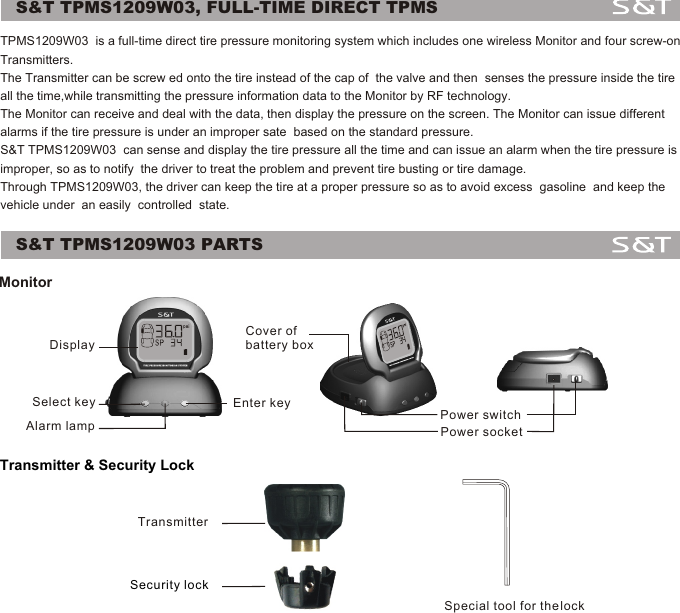
S&T TPMS1209W03, FULL-TIME DIRECT TPMSS&T TPMS1209W03 PARTSMonitorTransmitter & Security Lock1DisplaySelect key Enter keyAlarm lamp Power switchPower socketCover ofbattery boxTransmitterSecurity lockSpecial tool for the lockTPMS1209W03  is a full-time direct tire pressure monitoring system which includes one wireless Monitor and four screw-on Transmitters. The Transmitter can be screw ed onto the tire instead of the cap of  the valve and then  senses the pressure inside the tire all the time,while transmitting the pressure information data to the Monitor by RF technology. The Monitor can receive and deal with the data, then display the pressure on the screen. The Monitor can issue different alarms if the tire pressure is under an improper sate  based on the standard pressure.S&T TPMS1209W03  can sense and display the tire pressure all the time and can issue an alarm when the tire pressure is improper, so as to notify  the driver to treat the problem and prevent tire busting or tire damage. Through TPMS1209W03, the driver can keep the tire at a proper pressure so as to avoid excess  gasoline  and keep the vehicle under  an easily  controlled  state.
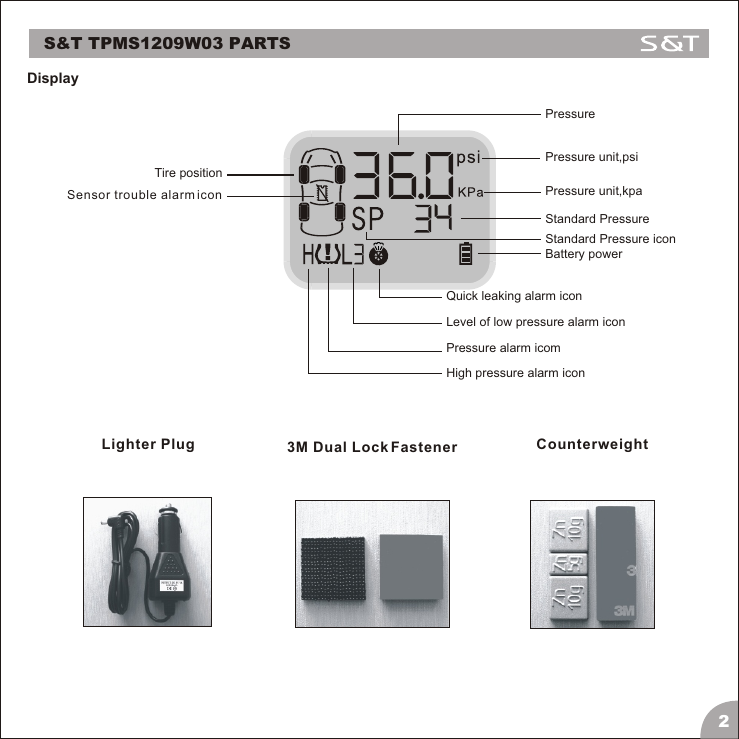
DisplayS&T TPMS1209W03 PARTS23M Dual Lock FastenerLighter Plug Counterweight  PressurePressure unit,psiPressure unit,kpaStandard PressureStandard Pressure iconBattery powerQuick leaking alarm iconLevel of low pressure alarm iconPressure alarm icomHigh pressure alarm iconSensor trouble alarm iconTire position
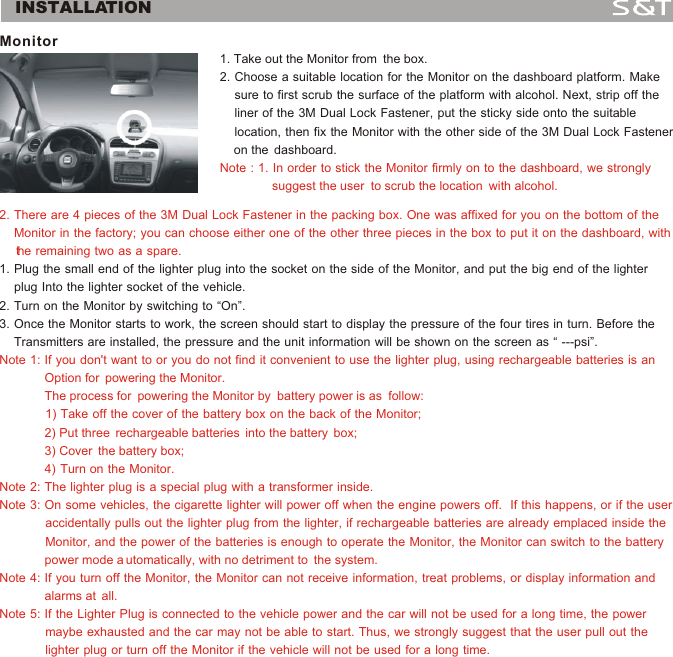
INSTALLATIONMonitor 2. There are 4 pieces of the 3M Dual Lock Fastener in the packing box. One was affixed for you on the bottom of the     Monitor in the factory; you can choose either one of the other three pieces in the box to put it on the dashboard, with     the remaining two as a spare.Note 1: If you don't want to or you do not find it convenient to use the lighter plug, using rechargeable batteries is an              Option for  powering the Monitor.              The process for  powering the Monitor by  battery power is as  follow:             1) Take off the cover of the battery box on the back of the Monitor;             2) Put three  rechargeable batteries  into the battery  box;             3) Cover  the battery box;                                                                 4)  Turn  on  the  Monitor.Note 2: The lighter plug is a special plug with a transformer inside.Note 3: On some vehicles, the cigarette lighter will power off when the engine powers off.  If this happens, or if the user              accidentally pulls out the lighter plug from the lighter, if rechargeable batteries are already emplaced inside the              Monitor, and the power of the batteries is enough to operate the Monitor, the Monitor can switch to the battery              power mode a utomatically, with no detriment to  the system.Note 4: If you turn off the Monitor, the Monitor can not receive information, treat problems, or display information and              alarms at  all. Note 5: If the Lighter Plug is connected to the vehicle power and the car will not be used for a long time, the power              maybe exhausted and the car may not be able to start. Thus, we strongly suggest that the user pull out the              lighter plug or turn off the Monitor if the vehicle will not be used for a long time.1. Plug the small end of the lighter plug into the socket on the side of the Monitor, and put the big end of the lighter     plug Into the lighter socket of the vehicle. 2. Turn on the Monitor by switching to “On”.3. Once the Monitor starts to work, the screen should start to display the pressure of the four tires in turn. Before the     Transmitters are installed, the pressure and the unit information will be shown on the screen as “ ---psi”.1. Take out the Monitor from  the box.                                                            2. Choose a suitable location for the Monitor on the dashboard platform. Make           sure to first scrub the surface of the platform with alcohol. Next, strip off the     liner of the 3M Dual Lock Fastener, put the sticky side onto the suitable     location, then fix the Monitor with the other side of the 3M Dual Lock Fastener     on the  dashboard.                                                                                                            Note : 1. In order to stick the Monitor firmly on to the dashboard, we strongly               suggest the user  to scrub the location  with alcohol.3
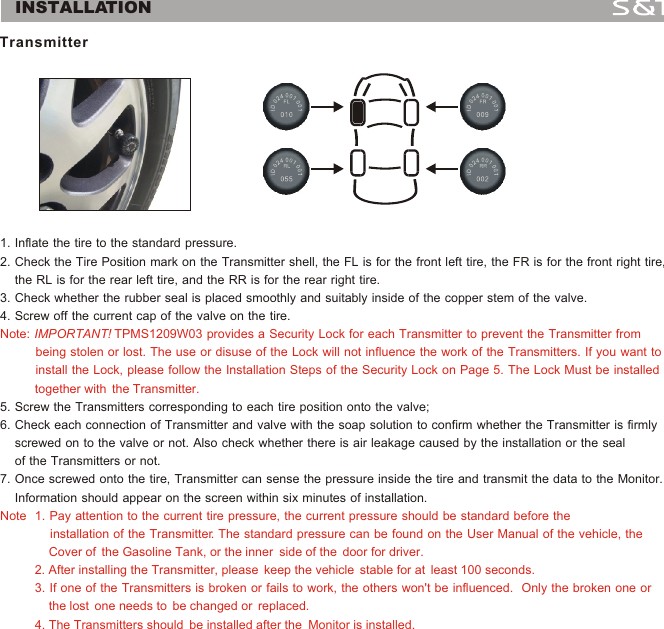
1. Inflate the tire to the standard pressure.2. Check the Tire Position mark on the Transmitter shell, the FL is for the front left tire, the FR is for the front right tire,    the RL is for the rear left tire, and the RR is for the rear right tire.3. Check whether the rubber seal is placed smoothly and suitably inside of the copper stem of the valve.4. Screw off the current cap of the valve on the tire.5. Screw the Transmitters corresponding to each tire position onto the valve;6. Check each connection of Transmitter and valve with the soap solution to confirm whether the Transmitter is firmly     screwed on to the valve or not. Also check whether there is air leakage caused by the installation or the seal     of the Transmitters or not.7. Once screwed onto the tire, Transmitter can sense the pressure inside the tire and transmit the data to the Monitor.     Information should appear on the screen within six minutes of installation. Note: IMPORTANT! TPMS1209W03 provides a Security Lock for each Transmitter to prevent the Transmitter from           being stolen or lost. The use or disuse of the Lock will not influence the work of the Transmitters. If you want to          install the Lock, please follow the Installation Steps of the Security Lock on Page 5. The Lock Must be installed          together with  the Transmitter.                                                             Note  1. Pay attention to the current tire pressure, the current pressure should be standard before the               installation of the Transmitter. The standard pressure can be found on the User Manual of the vehicle, the               Cover of  the Gasoline Tank, or the inner  side of the  door for driver.                                                                                  2. After installing the Transmitter, please  keep the vehicle  stable for at  least 100 seconds.                                                       3. If one of the Transmitters is broken or fails to work, the others won't be influenced.  Only the broken one or               the lost  one needs to  be changed or  replaced.                                                                                                                 4. The Transmitters should  be installed after the  Monitor is installed. Transmitter4INSTALLATION
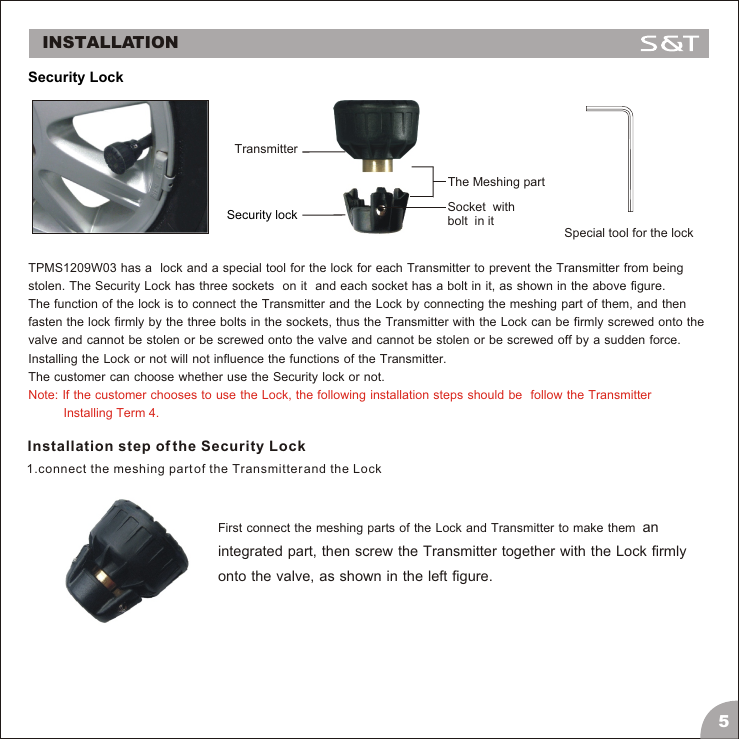
TPMS1209W03 has a  lock and a special tool for the lock for each Transmitter to prevent the Transmitter from being stolen. The Security Lock has three sockets  on it  and each socket has a bolt in it, as shown in the above figure. The function of the lock is to connect the Transmitter and the Lock by connecting the meshing part of them, and then fasten the lock firmly by the three bolts in the sockets, thus the Transmitter with the Lock can be firmly screwed onto the valve and cannot be stolen or be screwed onto the valve and cannot be stolen or be screwed off by a sudden force. Installing the Lock or not will not influence the functions of the Transmitter. The customer can choose whether use the Security lock or not. Note: If the customer chooses to use the Lock, the following installation steps should be  follow the Transmitter           Installing Term 4.Installation step of the Security Lock1.connect the meshing part of the Transmitter and the LockFirst connect the meshing parts of the Lock and Transmitter to make them  an integrated part, then screw the Transmitter together with the Lock firmly onto the valve, as shown in the left figure.INSTALLATION5 Security LockTransmitterSecurity lockSpecial tool for the lockSocket  with bolt  in itThe Meshing part
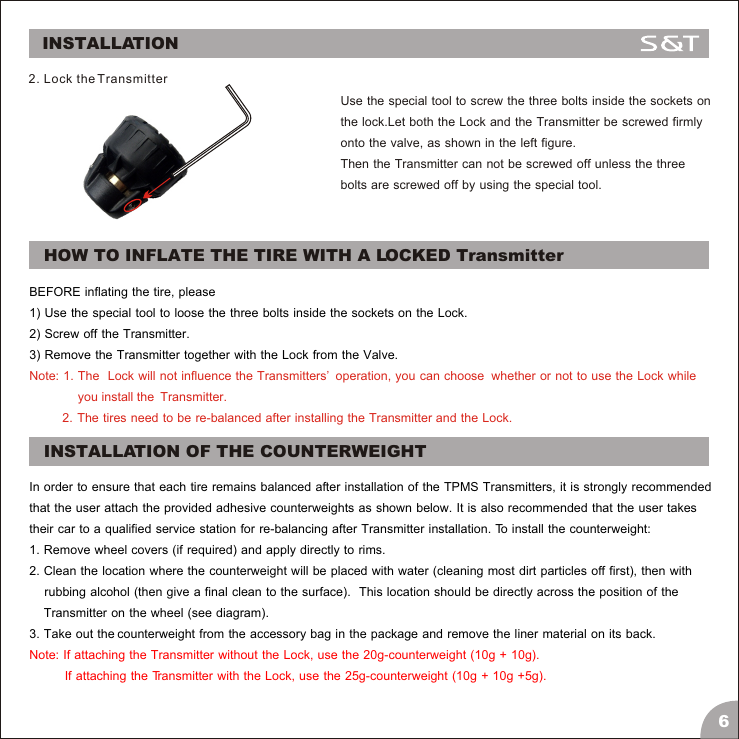
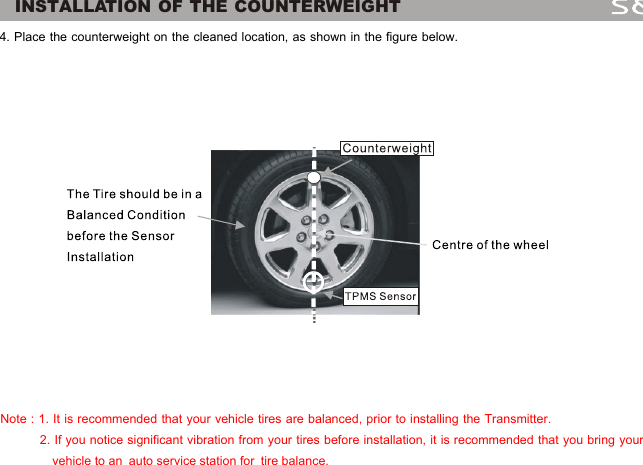
Use the special tool to screw the three bolts inside the sockets on the lock.Let both the Lock and the Transmitter be screwed firmly onto the valve, as shown in the left figure.Then the Transmitter can not be screwed off unless the three bolts are screwed off by using the special tool.BEFORE inflating the tire, please 1) Use the special tool to loose the three bolts inside the sockets on the Lock.2) Screw off the Transmitter.3) Remove the Transmitter together with the Lock from the Valve.Note: 1. The  Lock will not influence the Transmitters’  operation, you can choose  whether or not to use the Lock while                you install the  Transmitter.                                      2.  The  tires  need  to  be  re-balanced  after  installing  the  Transmitter  and  the  Lock. 2. Lock the Transmitter6INSTALLATIONHOW TO INFLATE THE TIRE WITH A LOCKED TransmitterINSTALLATION OF THE COUNTERWEIGHTIn order to ensure that each tire remains balanced after installation of the TPMS Transmitters, it is strongly recommendedthat the user attach the provided adhesive counterweights as shown below. It is also recommended that the user takes their car to a qualified service station for re-balancing after Transmitter installation. To install the counterweight:1. Remove wheel covers (if required) and apply directly to rims.2. Clean the location where the counterweight will be placed with water (cleaning most dirt particles off first), then with    rubbing alcohol (then give a final clean to the surface).  This location should be directly across the position of the     Transmitter on the wheel (see diagram).3. Take out the counterweight from the accessory bag in the package and remove the liner material on its back. Note: If attaching the Transmitter without the Lock, use the 20g-counterweight (10g + 10g).            If attaching the Transmitter with the Lock, use the 25g-counterweight (10g + 10g +5g).
              INSTALLATION OF THE COUNTERWEIGHT4. Place the counterweight on the cleaned location, as shown in the figure below.Note : 1. It is recommended that your vehicle tires are balanced, prior to installing the Transmitter.            2. If you notice significant vibration from your tires before installation, it is recommended that you bring your                vehicle to an  auto service station for  tire balance.7
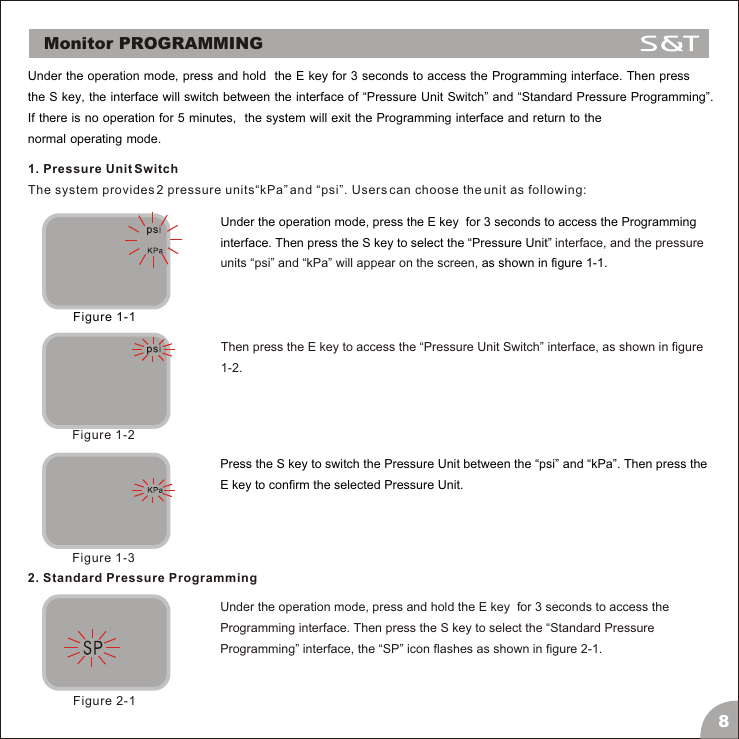
Under the operation mode, press and hold  the E key for 3 seconds to access the Programming interface. Then press the S key, the interface will switch between the interface of “Pressure Unit Switch” and “Standard Pressure Programming”. If there is no operation for 5 minutes,  the system will exit the Programming interface and return to the normal operating mode.1. Pressure Unit SwitchThe system provides 2 pressure units“kPa” and “psi”. Users can choose the unit as following:Under the operation mode, press the E key  for 3 seconds to access the Programming interface. Then press the S key to select the “Pressure Unit”as shown in figure 1-1. interface, and the pressure units “psi” and “kPa” will appear on the screen, Then press the E key to access the “Pressure Unit Switch” interface, as shown in figure 1-2.Press the S key to switch the Pressure Unit between the “psi” and “kPa”. Then press the E key to confirm the selected Pressure Unit.Under the operation mode, press and hold the E key  for 3 seconds to access the Programming interface. Then press the S key to select the “Standard Pressure Programming” interface, the “SP” icon flashes as shown in figure 2-1.Monitor PROGRAMMINGFigure 1-1Figure 1-2Figure 1-32. Standard Pressure ProgrammingFigure 2-18
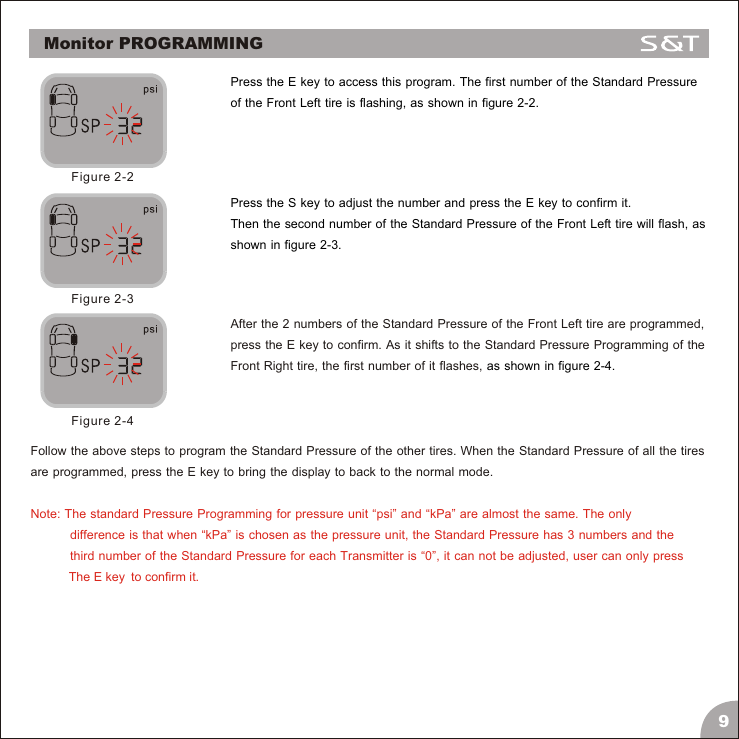
Press the E key to access this program. The first number of the Standard Pressure of the Front Left tire is flashing, as shown in figure 2-2.Figure 2-2Press the S key to adjust the number and press the E key to confirm it. Then the second number of the Standard Pressure of the Front Left tire will flash, as shown in figure 2-3.Figure 2-3After the 2 numbers of the Standard Pressure of the Front Left tire are programmed, press the E key to confirm. As it shifts to the Standard Pressure Programming of the Front Right tire, the first number of it flashes, as shown in figure 2-4.Figure 2-4Follow the above steps to program the Standard Pressure of the other tires. When the Standard Pressure of all the tires are programmed, press the E key to bring the display to back to the normal mode. Note: The standard Pressure Programming for pressure unit “psi” and “kPa” are almost the same. The only            difference is that when “kPa” is chosen as the pressure unit, the Standard Pressure has 3 numbers and the             third number of the Standard Pressure for each Transmitter is “0”, it can not be adjusted, user can only press            The E key  to confirm it.9Monitor PROGRAMMING
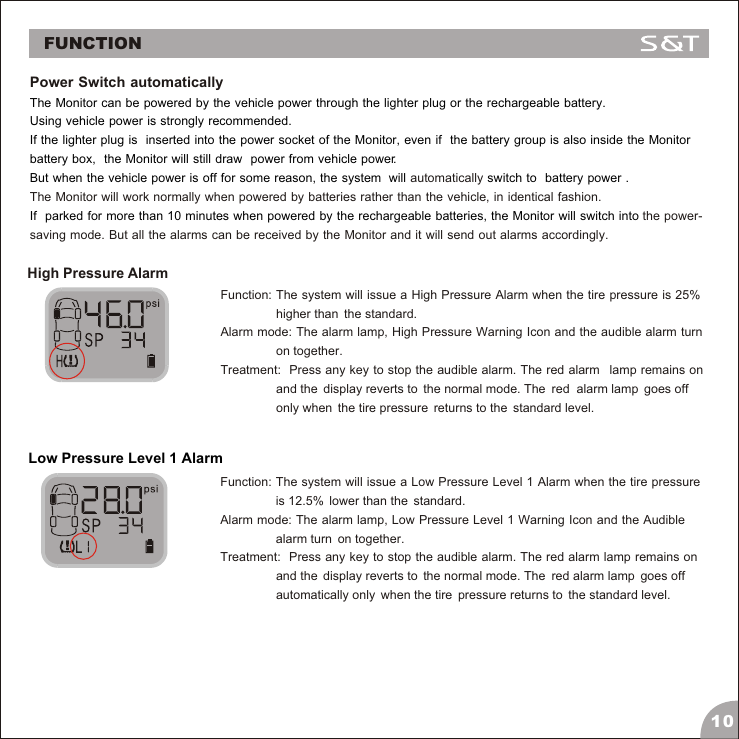
FUNCTIONPower Switch automatically  automaticallyThe Monitor will work normally when powered by batteries rather than the vehicle, in identical fashion.the power-saving mode. But all the alarms can be received by the Monitor and it will send out alarms accordingly.The Monitor can be powered by the vehicle power through the lighter plug or the rechargeable battery. Using vehicle power is strongly recommended. If the lighter plug is  inserted into the power socket of the Monitor, even if  the battery group is also inside the Monitor battery box,  the Monitor will still draw  power from vehicle power.But when the vehicle power is off for some reason, the system  will   switch to  battery power .If  parked for more than 10 minutes when powered by the rechargeable batteries, the Monitor will switch into High Pressure AlarmFunction: The system will issue a High Pressure Alarm when the tire pressure is 25%                 higher than  the standard.Alarm mode: The alarm lamp, High Pressure Warning Icon and the audible alarm turn                 on together.Treatment:  Press any key to stop the audible alarm. The red alarm   lamp remains on                 and the  display reverts to  the normal mode. The  red  alarm lamp  goes off                 only when  the tire pressure  returns to the  standard level.Low Pressure Level 1 AlarmFunction: The system will issue a Low Pressure Level 1 Alarm when the tire pressure                 is 12.5%  lower than the  standard.Alarm mode: The alarm lamp, Low Pressure Level 1 Warning Icon and the Audible                 alarm turn  on together.Treatment:  Press any key to stop the audible alarm. The red alarm lamp remains on                 and the  display reverts to  the normal mode. The  red alarm lamp  goes off                 automatically only  when the tire  pressure returns to  the standard level.10
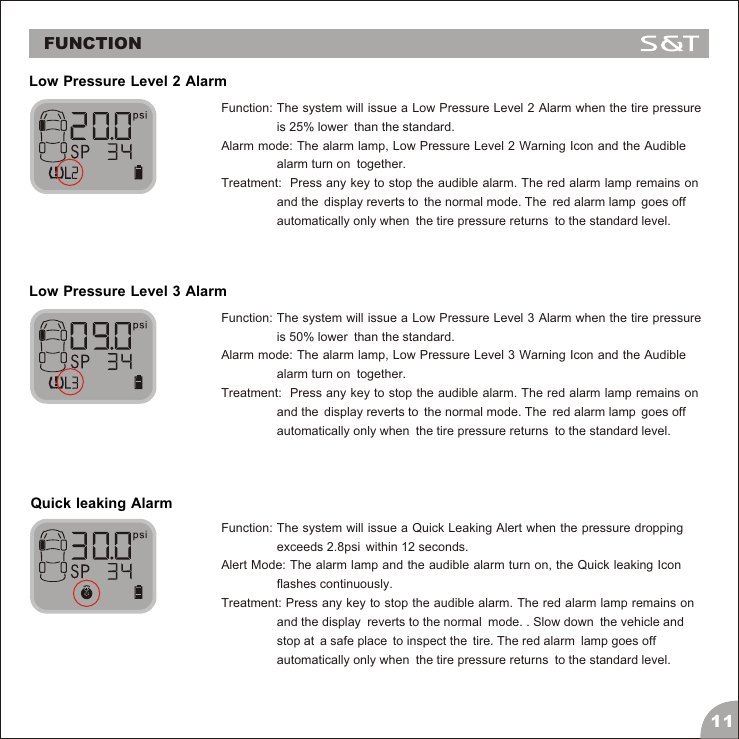
Low Pressure Level 2 AlarmFunction: The system will issue a Low Pressure Level 2 Alarm when the tire pressure                 is 25% lower  than the standard.Alarm mode: The alarm lamp, Low Pressure Level 2 Warning Icon and the Audible                 alarm turn on  together.Treatment:  Press any key to stop the audible alarm. The red alarm lamp remains on                 and the  display reverts to  the normal mode. The  red alarm lamp  goes off                 automatically only when  the tire pressure returns  to the standard level.Low Pressure Level 3 AlarmFunction: The system will issue a Low Pressure Level 3 Alarm when the tire pressure                 is 50% lower  than the standard.Alarm mode: The alarm lamp, Low Pressure Level 3 Warning Icon and the Audible                 alarm turn on  together.Treatment:  Press any key to stop the audible alarm. The red alarm lamp remains on                 and the  display reverts to  the normal mode. The  red alarm lamp  goes off                 automatically only when  the tire pressure returns  to the standard level.Quick leaking AlarmFunction: The system will issue a Quick Leaking Alert when the pressure dropping                 exceeds 2.8psi  within 12 seconds.Alert Mode: The alarm lamp and the audible alarm turn on, the Quick leaking Icon                 flashes continuously.Treatment: Press any key to stop the audible alarm. The red alarm lamp remains on                 and the display  reverts to the normal  mode. . Slow down  the vehicle and                 stop at  a safe place  to inspect the  tire. The red alarm  lamp goes off                 automatically only when  the tire pressure returns  to the standard level.11FUNCTION
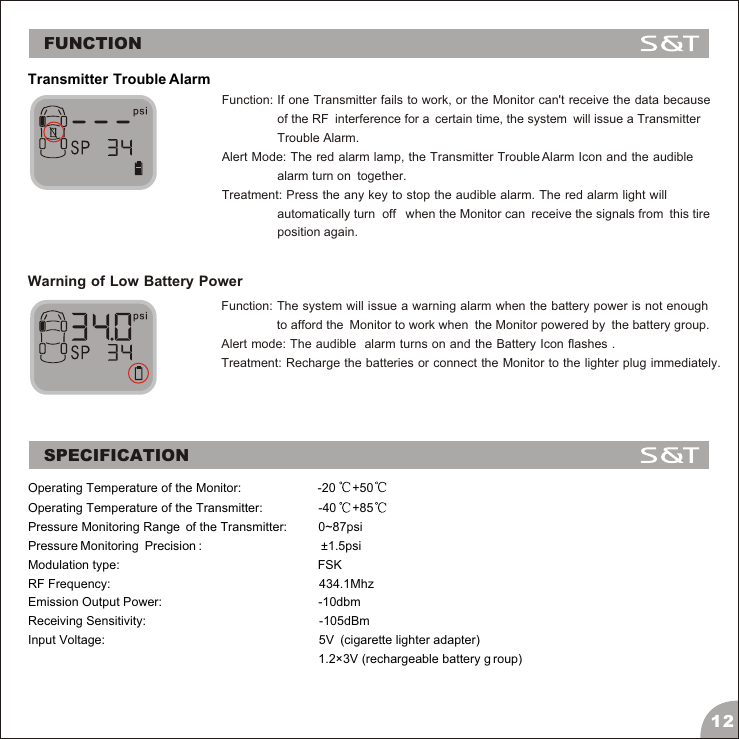
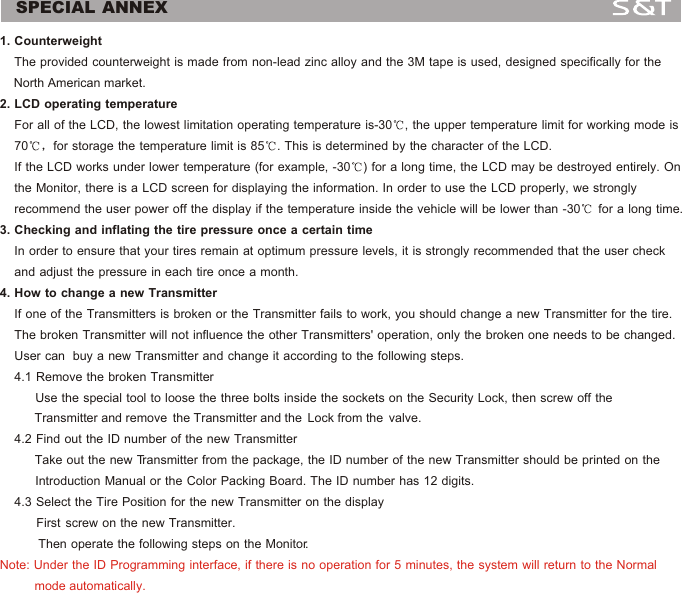
Transmitter Trouble AlarmFunction: If one Transmitter fails to work, or the Monitor can't receive the data because                 of the RF  interference for a  certain time, the system  will issue a Transmitter                 Trouble Alarm.Alert Mode: The red alarm lamp, the Transmitter Trouble Alarm Icon and the audible                 alarm turn on  together.Treatment: Press the any key to stop the audible alarm. The red alarm light will                 automatically turn  off   when the Monitor can  receive the signals from  this tire                 position again.Warning of Low Battery PowerFunction: The system will issue a warning alarm when the battery power is not enough                 to afford the  Monitor to work when  the Monitor powered by  the battery group.Alert mode: The audible  alarm turns on and the Battery Icon flashes .Treatment: Recharge the batteries or connect the Monitor to the lighter plug immediately.SPECIFICATIONOperating Temperature of the Monitor:                      -20 +50Operating Temperature of the Transmitter:                -40 +85Pressure Monitoring Range  of the Transmitter:         0~87psiPressure Monitoring  Precision :                                                  ±1.5psiModulation type:                                                         FSKRF Frequency:                                                            434.1MhzEmission Output Power:                                             -10dbmReceiving Sensitivity:                                                                   -105dBmInput Voltage:                                                             5V  (cigarette lighter adapter)                                                                                      1.2×3V (rechargeable battery g roup)12FUNCTION
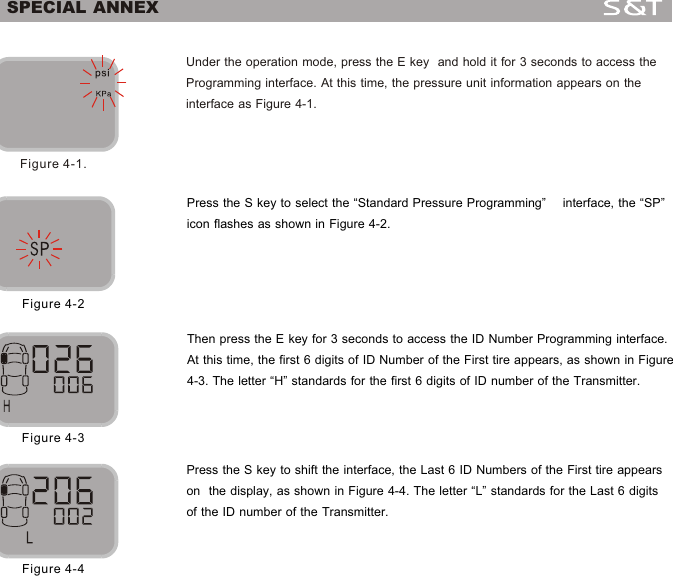
SPECIAL ANNEX1. Counterweight    The provided counterweight is made from non-lead zinc alloy and the 3M tape is used, designed specifically for the     North American market.2. LCD operating temperature     For all of the LCD, the lowest limitation operating temperature is-30 , the upper temperature limit for working mode is     70 for storage the temperature limit is 85 . This is determined by the character of the LCD.     If the LCD works under lower temperature (for example, -30 ) for a long time, the LCD may be destroyed entirely. On     the Monitor, there is a LCD screen for displaying the information. In order to use the LCD properly, we strongly     recommend the user power off the display if the temperature inside the vehicle will be lower than -30  for a long time.3. Checking and inflating the tire pressure once a certain time    In order to ensure that your tires remain at optimum pressure levels, it is strongly recommended that the user check     and adjust the pressure in each tire once a month.4. How to change a new Transmitter    If one of the Transmitters is broken or the Transmitter fails to work, you should change a new Transmitter for the tire.     The broken Transmitter will not influence the other Transmitters' operation, only the broken one needs to be changed.     User can  buy a new Transmitter and change it according to the following steps.     4.1 Remove the broken Transmitter          Use the special tool to loose the three bolts inside the sockets on the Security Lock, then screw off the              Transmitter and remove  the Transmitter and the  Lock from the  valve.         4.2 Find out the ID number of the new Transmitter            Take out the new Transmitter from the package, the ID number of the new Transmitter should be printed on the           Introduction Manual or the Color Packing Board. The ID number has 12 digits.     4.3 Select the Tire Position for the new Transmitter on the display                   First  screw  on  the  new  Transmitter.              Then operate the following steps on the Monitor.  Note: Under the ID Programming interface, if there is no operation for 5 minutes, the system will return to the Normal           mode automatically.13
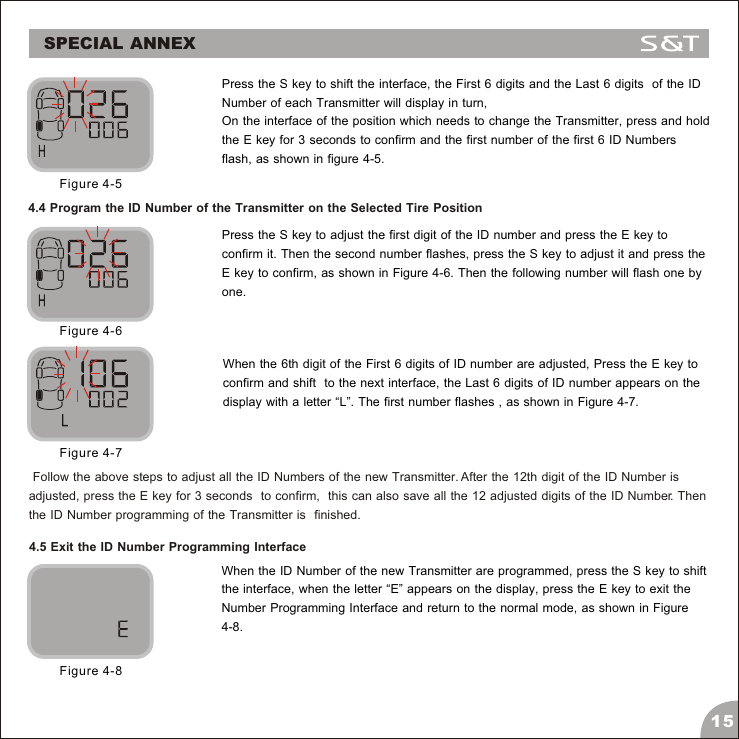
14Under the operation mode, press the E key  and hold it for 3 seconds to access the Programming interface. At this time, the pressure unit information appears on the interface as Figure 4-1.Figure 4-1.Press the S key to select the “Standard Pressure Programming”    interface, the “SP” icon flashes as shown in Figure 4-2.Figure 4-2Then press the E key for 3 seconds to access the ID Number Programming interface. At this time, the first 6 digits of ID Number of the First tire appears, as shown in Figure 4-3. The letter “H” standards for the first 6 digits of ID number of the Transmitter. Figure 4-3Press the S key to shift the interface, the Last 6 ID Numbers of the First tire appears on  the display, as shown in Figure 4-4. The letter “L” standards for the Last 6 digits of the ID number of the Transmitter.Figure 4-4SPECIAL ANNEX
15Press the S key to shift the interface, the First 6 digits and the Last 6 digits  of the ID Number of each Transmitter will display in turn, On the interface of the position which needs to change the Transmitter, press and hold the E key for 3 seconds to confirm and the first number of the first 6 ID Numbers flash, as shown in figure 4-5.Figure 4-54.4 Program the ID Number of the Transmitter on the Selected Tire PositionPress the S key to adjust the first digit of the ID number and press the E key to confirm it. Then the second number flashes, press the S key to adjust it and press the E key to confirm, as shown in Figure 4-6. Then the following number will flash one by one.When the 6th digit of the First 6 digits of ID number are adjusted, Press the E key to confirm and shift  to the next interface, the Last 6 digits of ID number appears on the display with a letter “L”. The first number flashes , as shown in Figure 4-7. Figure 4-6Figure 4-74.5 Exit the ID Number Programming InterfaceWhen the ID Number of the new Transmitter are programmed, press the S key to shift the interface, when the letter “E” appears on the display, press the E key to exit the Number Programming Interface and return to the normal mode, as shown in Figure 4-8.Figure 4-8 Follow the above steps to adjust all the ID Numbers of the new Transmitter. After the 12th digit of the ID Number is  adjusted, press the E key for 3 seconds  to confirm,  this can also save all the 12 adjusted digits of the ID Number. Then the ID Number programming of the Transmitter is  finished.SPECIAL ANNEX
Frequently Asked Questions 1. Q: Why is it necessary to do a periodic check on the pressure of a tire with TPMS?    A: As you drive, tires can be damaged or become unbalanced over time. Checking your tire on a regular basis will          ensure that it  is functioning properly and  safely.2. Q: After installation, when changing the batteries or resetting the Monitor, the pressure information doesn't appear           immediately.     A: Please wait for about 6 minutes. If nothing happens, reset the Monitor Display (turn it off and on) and wait for          another 6 minutes. If the current pressure information still does not appear, please contact our customer service          line at +86-21-50792951.3. Q: Sometimes the LCD screen is not very clear.        A: This usually happens when the temperature inside the car is too low. When the temperature returns to normal, the          display will become clear again. If the LCD screen remains unclear while the temperature has returned to normal          for more than half an hour, the LCD may have been become permanently damaged due to exposure to low         temperatures. In this event, please contact our customer service line at +86-21-50792951.4. Q: Why does the power level of the rechargeable batteries become shorter?      A:  Low temperatures will influence the work time of the recharged batteries. If the temperature is the car is too low          (for example, -30°C) we recommend that you power the Monitor Display Through the 12V Lighter Plug. Once the          temperature returns to a higher level, the batteries should operate as normal.5. Q: Blurriness appears on the LCD screen, or there the LCD screen is blank. Sometimes the audible alarm also can be          heard.    A: This is usually caused by rechargeable batteries of the Monitor Dislpay being low on power. Change the batteries          or connect the Monitor Display to the vehicle power through a 12V Lighter Plug immediately.6. Q: Why does the pressure inside the tire rise after running for some time?    A: This is because of the friction between the tires and the ground. Heat from the friction of a moving tire will cause          pressure inside the tire to rise. The pressure inside a tire can fluctuate up or down approximately 2-4psi depending          on the speed of the vehicle. This is normal for most vehicles.7. Q: Why is the Monitor Display not turning on?    A: If the Monitor Display is being powered by rechargeable batteries, please check whether the batteries are installed          in the correct polarity and if batteries have enough power. If the Monitor is powered by the 12V Lighter Plug, please         check the connection between the Lighter Plug and your TPMS unit.         If this does not solve your problem, please contact our customer service line at +86-21-50792951.         Note: Please do not leave the Monitor Display with the power on in low temperatures (for example, -30°C) for an                    extended period of time. 16
WARRANTY TERMSValid Warranty Card1. The Warranty Card must be filled completely, signed by the user and the authorized distributors of S&T TPMS.2. The Warranty Card is valid in the countries or regions where the purchase occurs.3. The Warranty Service requires user to offer the Warranty Card.Warranty Condition, Responsibility and Limitation1. The product warranty period is one year and is subject to the time marked on the invoice.2. Any damage or faults due to improper use are not involved in the warranty commitment.3. Users are not allowed to open, repair and refit the products by themselves, otherwise the warranty service will be     Invalid.4. The warranty does not include replacement of the enclosure and display panel.5. The warranty does not cover the product damage due to abrasion and corrosion.Important Notes1. The Warranty Card must be filled completely and its number shall be quoted whenever the user requires the service.2. Please inform Sate in case that the telephone number or address on the Warrant Card are changed.3. The warranty responsibility is subject to the conditions and limitations specified in the User Manual.17FCC CautionThis device complies with Part 15 of the FCC Rules. Operation is subject to the following two conditions: (1) this device may not cause harmful interference, and (2) this device must accept any interference received, including interference that may cause undesired operation.
www.sate.com.cnSUZHOU SATE AUTO ELECTRONIC CO.,LTDTIRE PRESSURE MONITORING SYSTEMRev 1.0FCC Notes:The manufacturer is not responsible for and radio or TV interference caused by unauthorized modifications to this equipment. Such modifications could void the user's authority to operate the equipment.

Navigation menu