Suzhou Sate Auto Electronic TP053 Hand Tool User Manual

Suzhou Sate Auto Electronic Co., Ltd Hand Tool Users Manual

Contents

Users Manual

                                                        TPMS1209T03-CS Hand Tool User Manual  1                        S&T TPMS1209T03-CS Hand Tool  User Manual          Suzhou Sate Auto Electronic Co., Ltd                           www.sate.com.cn
                                                        TPMS1209T03-CS Hand Tool User Manual  2Table of Contents S&T TPMS1209T03-CS Hand Tool Components------------------------3 S&T TPMS1209T03-CS Hand Tool Functions----------------------------4 S&T TPMS1209T03-CS Hand Tool Operations---------------------------4      FCC WARNING  This device complies with Part 15 of the FCC Rules. Operation is subject to the following two conditions: (1) this device may not cause harmful interference, and (2) this device must accept any interference received, including interference that may cause undesired operation.  NOTE: The manufacturer is not responsible for and radio or TV interference caused by unauthorized modifications to this equipment. Such modifications could void the user’s authority to operate the equipment.
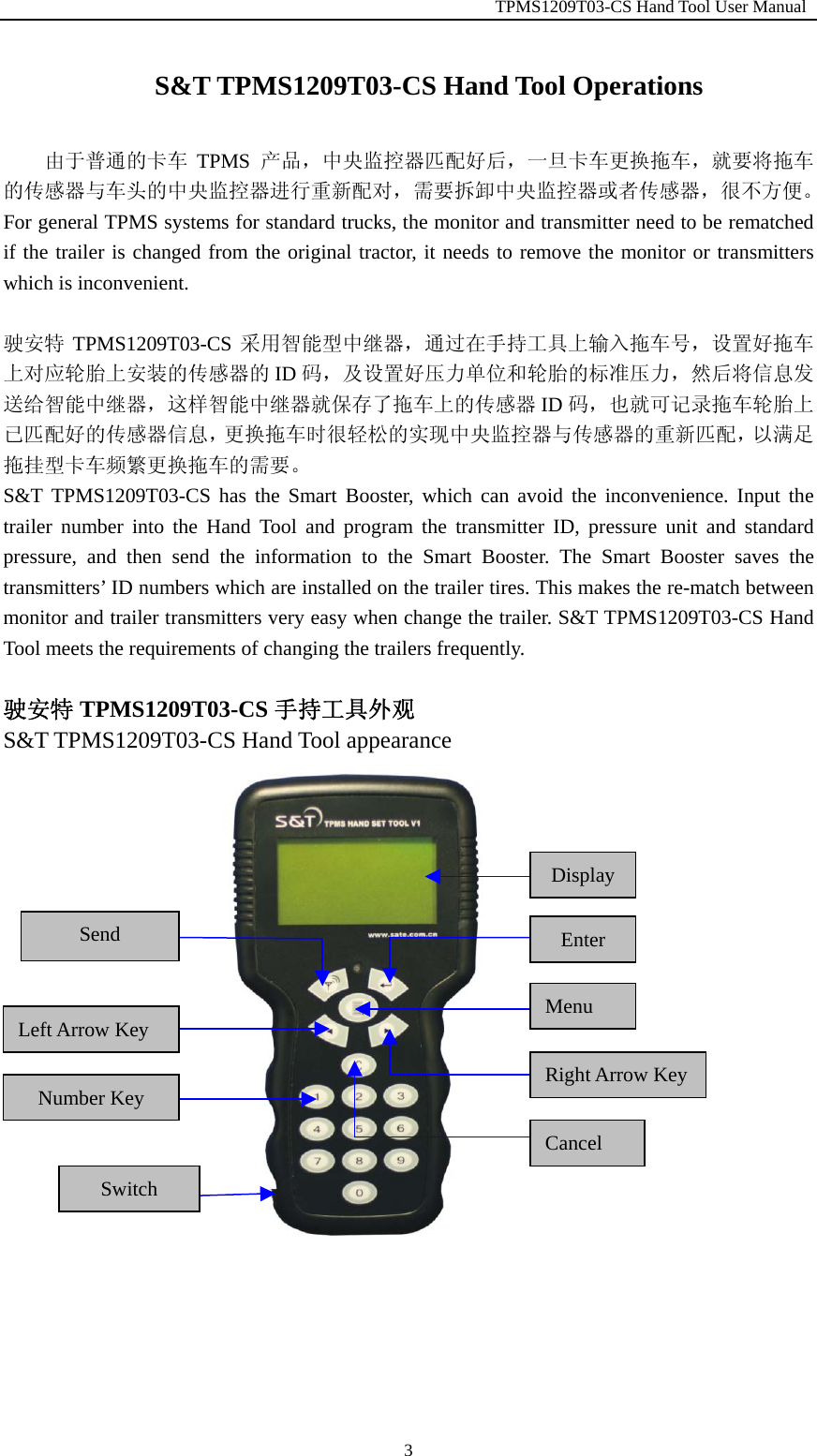
                                                        TPMS1209T03-CS Hand Tool User Manual  3S&T TPMS1209T03-CS Hand Tool Operations  由于普通的卡车 TPMS  产品,中央监控器匹配好后,一旦卡车更换拖车,就要将拖车的传感器与车头的中央监控器进行重新配对,需要拆卸中央监控器或者传感器,很不方便。 For general TPMS systems for standard trucks, the monitor and transmitter need to be rematched if the trailer is changed from the original tractor, it needs to remove the monitor or transmitters which is inconvenient.  驶安特 TPMS1209T03-CS 采用智能型中继器,通过在手持工具上输入拖车号,设置好拖车上对应轮胎上安装的传感器的 ID 码,及设置好压力单位和轮胎的标准压力,然后将信息发送给智能中继器,这样智能中继器就保存了拖车上的传感器 ID 码,也就可记录拖车轮胎上已匹配好的传感器信息,更换拖车时很轻松的实现中央监控器与传感器的重新匹配,以满足拖挂型卡车频繁更换拖车的需要。 S&T TPMS1209T03-CS has the Smart Booster, which can avoid the inconvenience. Input the trailer number into the Hand Tool and program the transmitter ID, pressure unit and standard pressure, and then send the information to the Smart Booster. The Smart Booster saves the transmitters’ ID numbers which are installed on the trailer tires. This makes the re-match between monitor and trailer transmitters very easy when change the trailer. S&T TPMS1209T03-CS Hand Tool meets the requirements of changing the trailers frequently.  驶安特 TPMS1209T03-CS 手持工具外观 S&T TPMS1209T03-CS Hand Tool appearance       DisplayEnterMenu Right Arrow Key Send Left Arrow Key Number Key Switch Cancel
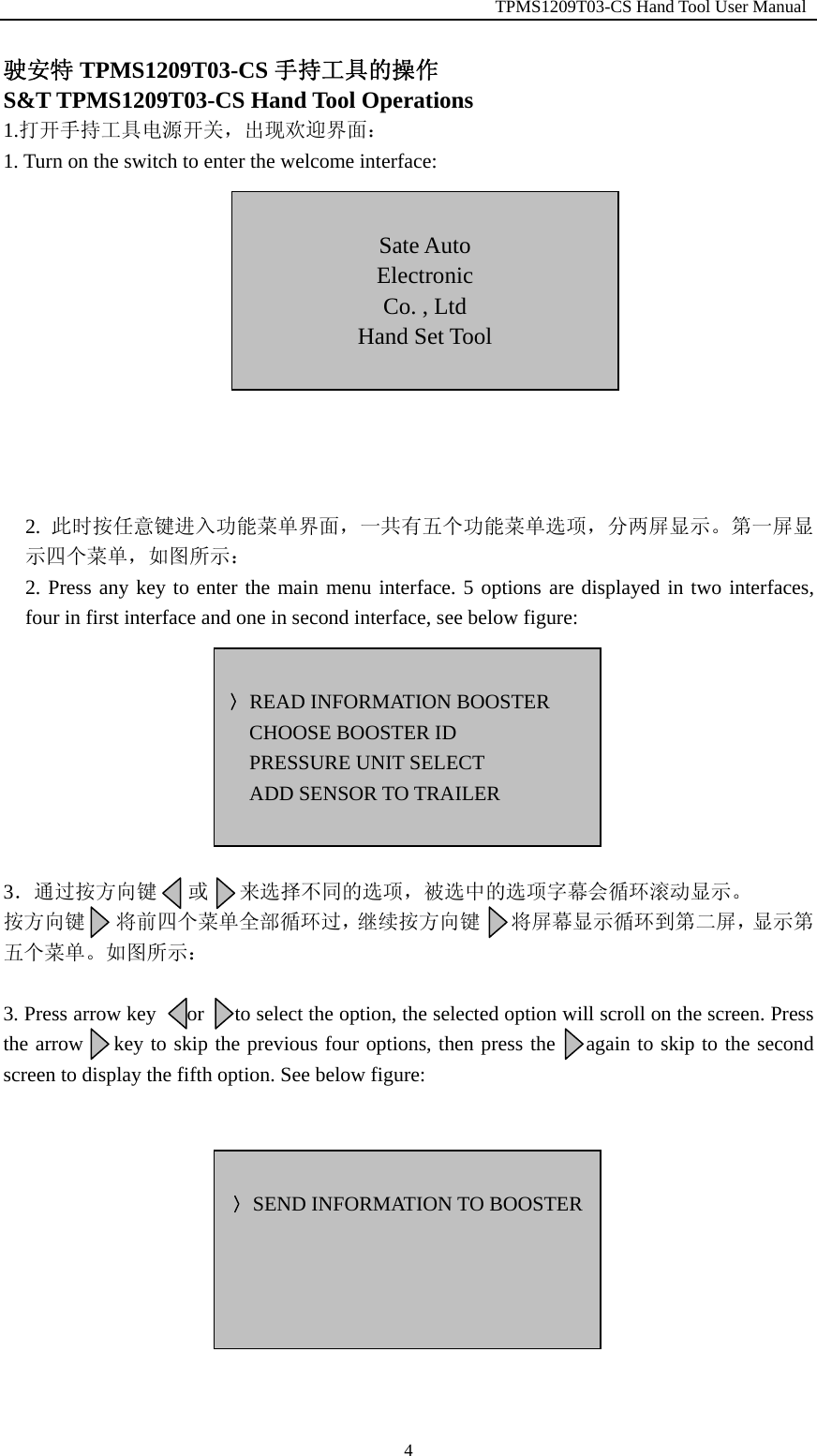
                                                        TPMS1209T03-CS Hand Tool User Manual  4驶安特 TPMS1209T03-CS 手持工具的操作 S&T TPMS1209T03-CS Hand Tool Operations 1.打开手持工具电源开关,出现欢迎界面: 1. Turn on the switch to enter the welcome interface:            2.  此时按任意键进入功能菜单界面,一共有五个功能菜单选项,分两屏显示。第一屏显示四个菜单,如图所示: 2. Press any key to enter the main menu interface. 5 options are displayed in two interfaces, four in first interface and one in second interface, see below figure:         3.通过按方向键   或   来选择不同的选项,被选中的选项字幕会循环滚动显示。 按方向键   将前四个菜单全部循环过,继续按方向键   将屏幕显示循环到第二屏,显示第五个菜单。如图所示:  3. Press arrow key      or      to select the option, the selected option will scroll on the screen. Press the arrow    key to skip the previous four options, then press the     again to skip to the second screen to display the fifth option. See below figure:            〉READ INFORMATION BOOSTER CHOOSE BOOSTER ID PRESSURE UNIT SELECT ADD SENSOR TO TRAILER   Sate Auto Electronic Co. , Ltd Hand Set Tool   〉SEND INFORMATION TO BOOSTER
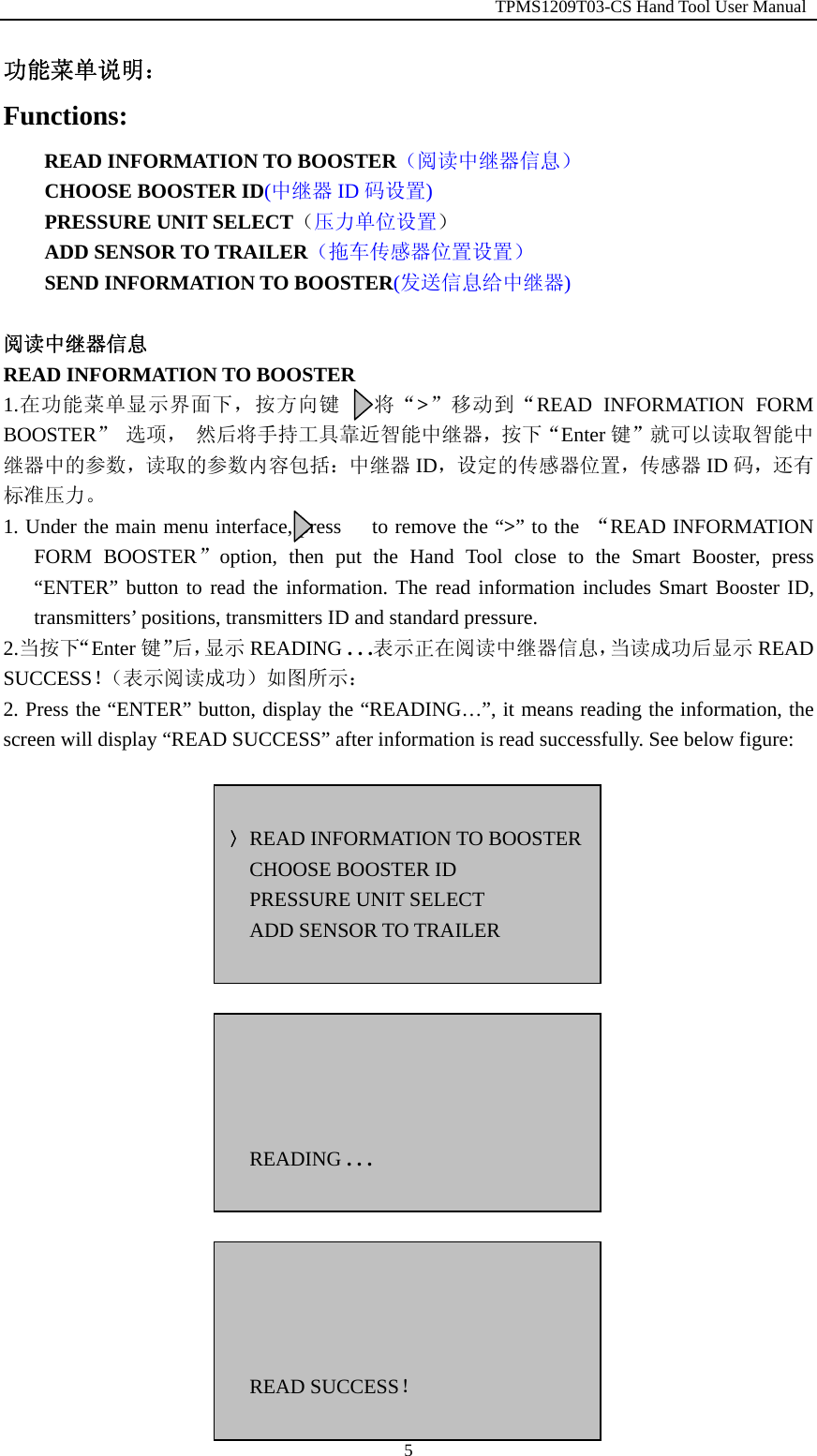
                                                        TPMS1209T03-CS Hand Tool User Manual  5功能菜单说明: Functions: READ INFORMATION TO BOOSTER(阅读中继器信息) CHOOSE BOOSTER ID(中继器 ID 码设置) PRESSURE UNIT SELECT(压力单位设置) ADD SENSOR TO TRAILER(拖车传感器位置设置) SEND INFORMATION TO BOOSTER(发送信息给中继器)  阅读中继器信息 READ INFORMATION TO BOOSTER 1.在功能菜单显示界面下,按方向键   将“>”移动到“READ INFORMATION FORM BOOSTER” 选项, 然后将手持工具靠近智能中继器,按下“Enter 键”就可以读取智能中继器中的参数,读取的参数内容包括:中继器 ID,设定的传感器位置,传感器 ID 码,还有标准压力。 1. Under the main menu interface, press      to remove the “>” to the  “READ INFORMATION FORM BOOSTER”option, then put the Hand Tool close to the Smart Booster, press “ENTER” button to read the information. The read information includes Smart Booster ID, transmitters’ positions, transmitters ID and standard pressure. 2.当按下“Enter 键”后,显示 READING . . .表示正在阅读中继器信息,当读成功后显示 READ SUCCESS!(表示阅读成功)如图所示: 2. Press the “ENTER” button, display the “READING…”, it means reading the information, the screen will display “READ SUCCESS” after information is read successfully. See below figure:                       〉READ INFORMATION TO BOOSTERCHOOSE BOOSTER ID PRESSURE UNIT SELECT ADD SENSOR TO TRAILER      READING . . .     READ SUCCESS!
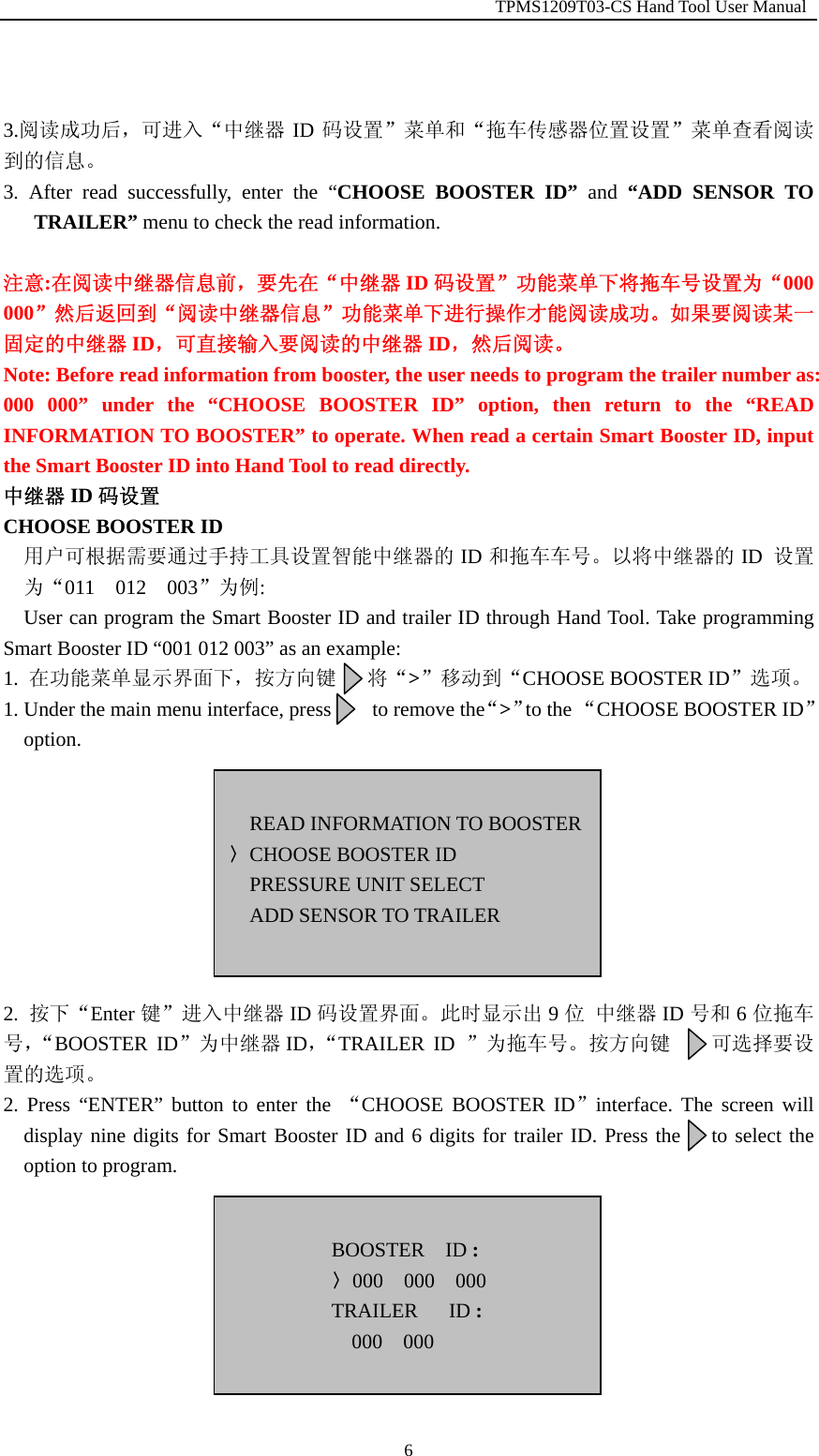
                                                        TPMS1209T03-CS Hand Tool User Manual  6  3.阅读成功后,可进入“中继器 ID 码设置”菜单和“拖车传感器位置设置”菜单查看阅读到的信息。 3. After read successfully, enter the “CHOOSE BOOSTER ID” and “ADD SENSOR TO TRAILER” menu to check the read information.  注意:在阅读中继器信息前,要先在“中继器 ID 码设置”功能菜单下将拖车号设置为“000 000”然后返回到“阅读中继器信息”功能菜单下进行操作才能阅读成功。如果要阅读某一固定的中继器 ID,可直接输入要阅读的中继器 ID,然后阅读。 Note: Before read information from booster, the user needs to program the trailer number as: 000 000” under the “CHOOSE BOOSTER ID” option, then return to the “READ INFORMATION TO BOOSTER” to operate. When read a certain Smart Booster ID, input the Smart Booster ID into Hand Tool to read directly. 中继器 ID 码设置 CHOOSE BOOSTER ID 用户可根据需要通过手持工具设置智能中继器的 ID 和拖车车号。以将中继器的 ID  设置为“011  012  003”为例: User can program the Smart Booster ID and trailer ID through Hand Tool. Take programming Smart Booster ID “001 012 003” as an example: 1.  在功能菜单显示界面下,按方向键   将“>”移动到“CHOOSE BOOSTER ID”选项。 1. Under the main menu interface, press        to remove the“>”to the “CHOOSE BOOSTER ID” option.         2.  按下“Enter 键”进入中继器 ID 码设置界面。此时显示出 9位 中继器 ID 号和 6位拖车号,“BOOSTER ID”为中继器 ID,“TRAILER ID ”为拖车号。按方向键    可选择要设置的选项。 2. Press “ENTER” button to enter the “CHOOSE BOOSTER ID”interface. The screen will display nine digits for Smart Booster ID and 6 digits for trailer ID. Press the   to select the option to program.         READ INFORMATION TO BOOSTER〉CHOOSE BOOSTER ID PRESSURE UNIT SELECT ADD SENSOR TO TRAILER   BOOSTER  ID : 〉000  000  000 TRAILER   ID : 000  000
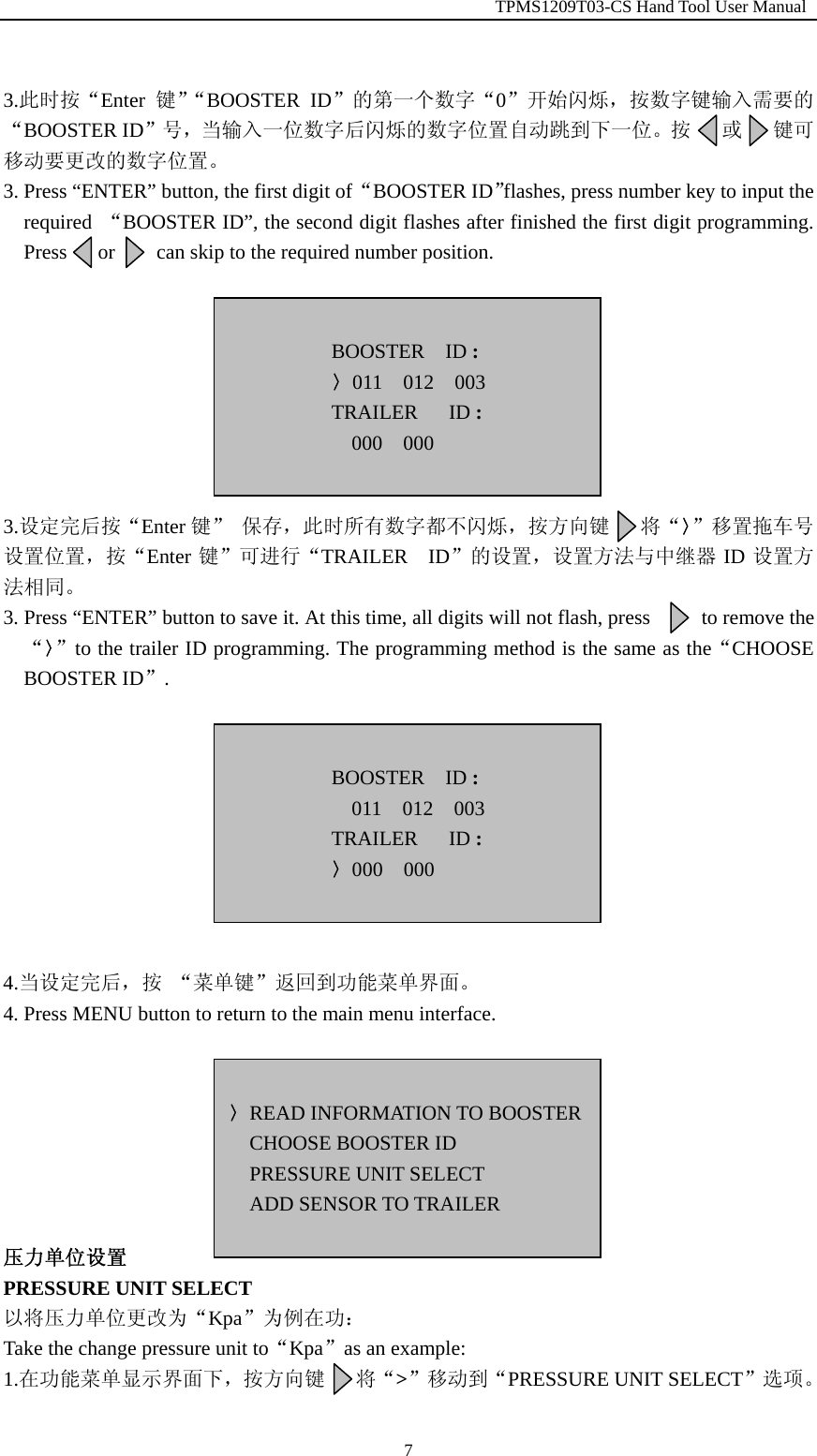
                                                        TPMS1209T03-CS Hand Tool User Manual  7 3.此时按“Enter 键”“BOOSTER ID”的第一个数字“0”开始闪烁,按数字键输入需要的“BOOSTER ID”号,当输入一位数字后闪烁的数字位置自动跳到下一位。按   或   键可移动要更改的数字位置。 3. Press “ENTER” button, the first digit of “BOOSTER ID”flashes, press number key to input the required  “BOOSTER ID”, the second digit flashes after finished the first digit programming. Press   or    can skip to the required number position.         3.设定完后按“Enter 键” 保存,此时所有数字都不闪烁,按方向键   将“〉”移置拖车号设置位置,按“Enter 键”可进行“TRAILER  ID”的设置,设置方法与中继器 ID 设置方法相同。 3. Press “ENTER” button to save it. At this time, all digits will not flash, press          to remove the “〉”to the trailer ID programming. The programming method is the same as the“CHOOSE BOOSTER ID”.           4.当设定完后,按 “菜单键”返回到功能菜单界面。 4. Press MENU button to return to the main menu interface.        压力单位设置 PRESSURE UNIT SELECT 以将压力单位更改为“Kpa”为例在功: Take the change pressure unit to“Kpa”as an example: 1.在功能菜单显示界面下,按方向键   将“>”移动到“PRESSURE UNIT SELECT”选项。  〉READ INFORMATION TO BOOSTERCHOOSE BOOSTER ID PRESSURE UNIT SELECT ADD SENSOR TO TRAILER   BOOSTER  ID : 〉011  012  003 TRAILER   ID : 000  000   BOOSTER  ID : 011  012  003 TRAILER   ID : 〉000  000
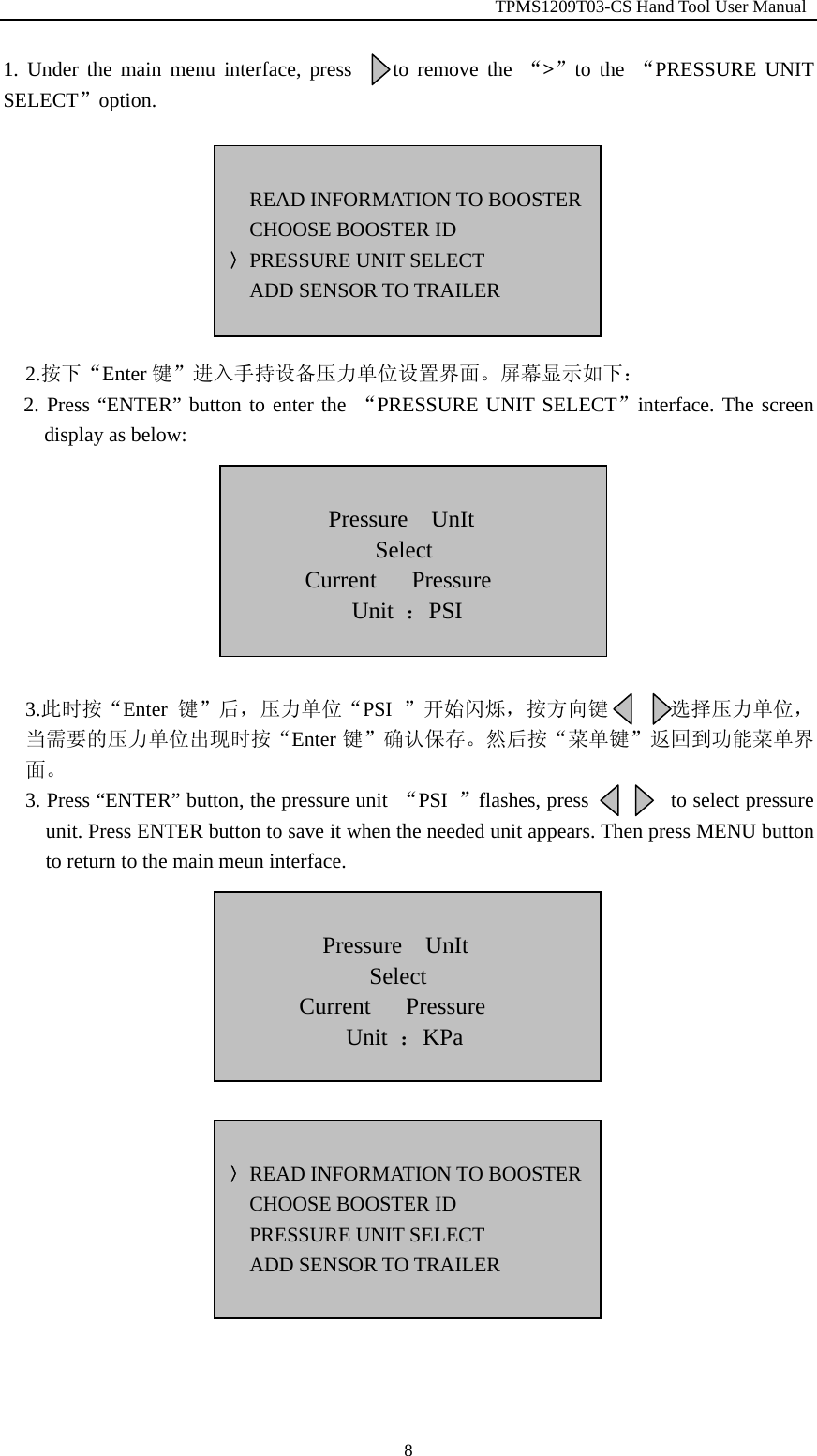
                                                        TPMS1209T03-CS Hand Tool User Manual  81. Under the main menu interface, press    to remove the “>”to the “PRESSURE UNIT SELECT”option.         2.按下“Enter 键”进入手持设备压力单位设置界面。屏幕显示如下:   2. Press “ENTER” button to enter the “PRESSURE UNIT SELECT”interface. The screen display as below:         3.此时按“Enter 键”后,压力单位“PSI  ”开始闪烁,按方向键      选择压力单位,当需要的压力单位出现时按“Enter 键”确认保存。然后按“菜单键”返回到功能菜单界面。 3. Press “ENTER” button, the pressure unit  “PSI  ”flashes, press        to select pressure unit. Press ENTER button to save it when the needed unit appears. Then press MENU button to return to the main meun interface.                   READ INFORMATION TO BOOSTERCHOOSE BOOSTER ID 〉PRESSURE UNIT SELECT ADD SENSOR TO TRAILER   Pressure  UnIt  Select  Current   Pressure  Unit  :PSI  Pressure  UnIt  Select  Current   Pressure  Unit  :KPa  〉READ INFORMATION TO BOOSTERCHOOSE BOOSTER ID PRESSURE UNIT SELECT ADD SENSOR TO TRAILER
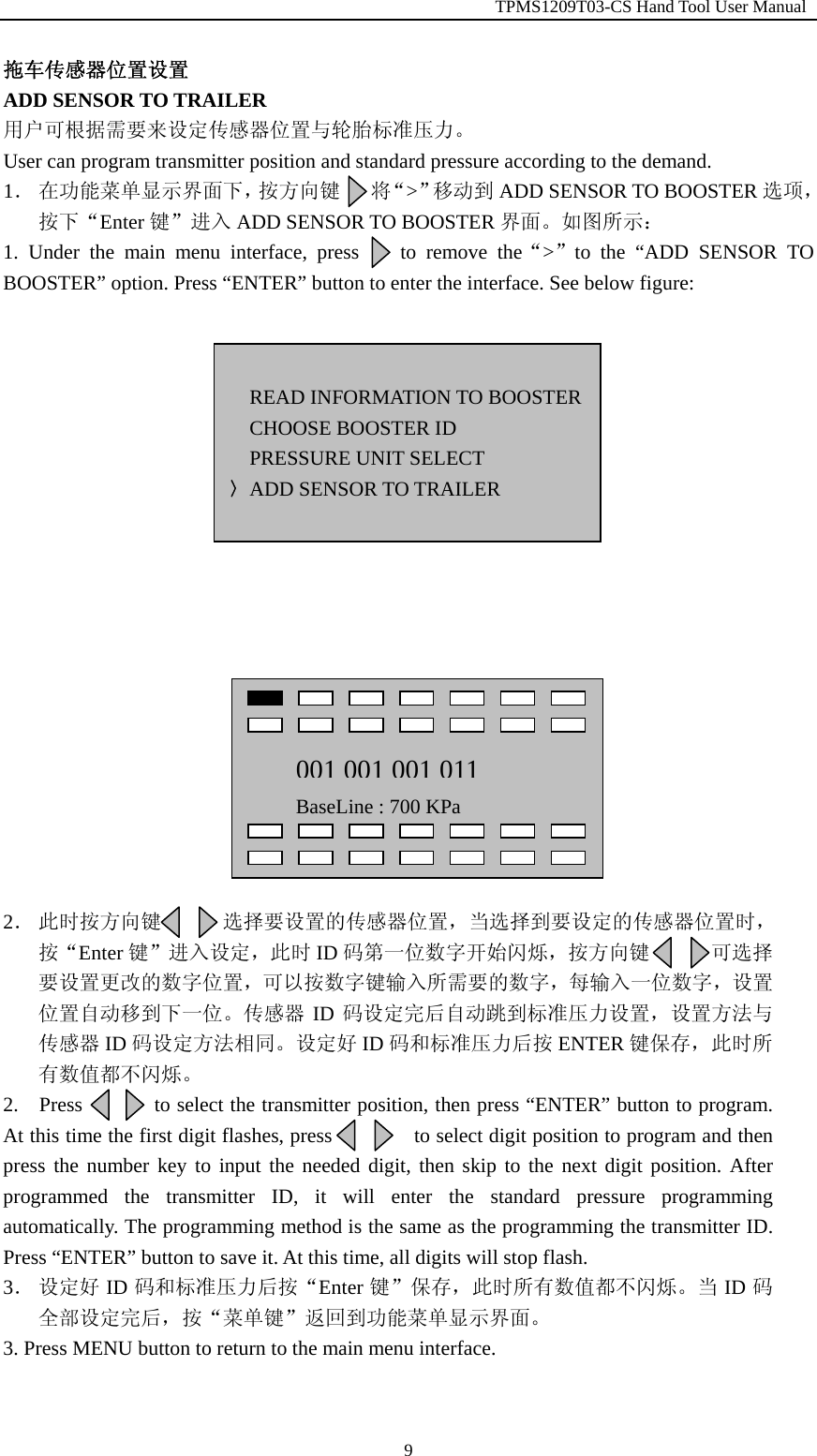
                                                        TPMS1209T03-CS Hand Tool User Manual  9拖车传感器位置设置 ADD SENSOR TO TRAILER 用户可根据需要来设定传感器位置与轮胎标准压力。 User can program transmitter position and standard pressure according to the demand. 1. 在功能菜单显示界面下,按方向键   将“>”移动到 ADD SENSOR TO BOOSTER 选项,按下“Enter 键”进入 ADD SENSOR TO BOOSTER 界面。如图所示: 1. Under the main menu interface, press    to remove the“>”to the “ADD SENSOR TO BOOSTER” option. Press “ENTER” button to enter the interface. See below figure:                     2. 此时按方向键      选择要设置的传感器位置,当选择到要设定的传感器位置时,按“Enter 键”进入设定,此时 ID 码第一位数字开始闪烁,按方向键      可选择要设置更改的数字位置,可以按数字键输入所需要的数字,每输入一位数字,设置位置自动移到下一位。传感器 ID 码设定完后自动跳到标准压力设置,设置方法与传感器 ID 码设定方法相同。设定好 ID 码和标准压力后按 ENTER 键保存,此时所有数值都不闪烁。 2.    Press              to select the transmitter position, then press “ENTER” button to program. At this time the first digit flashes, press                to select digit position to program and then press the number key to input the needed digit, then skip to the next digit position. After programmed the transmitter ID, it will enter the standard pressure programming automatically. The programming method is the same as the programming the transmitter ID. Press “ENTER” button to save it. At this time, all digits will stop flash. 3. 设定好 ID 码和标准压力后按“Enter 键”保存,此时所有数值都不闪烁。当 ID 码全部设定完后,按“菜单键”返回到功能菜单显示界面。 3. Press MENU button to return to the main menu interface.  001001001 011BaseLine : 700 KPa READ INFORMATION TO BOOSTERCHOOSE BOOSTER ID PRESSURE UNIT SELECT 〉ADD SENSOR TO TRAILER
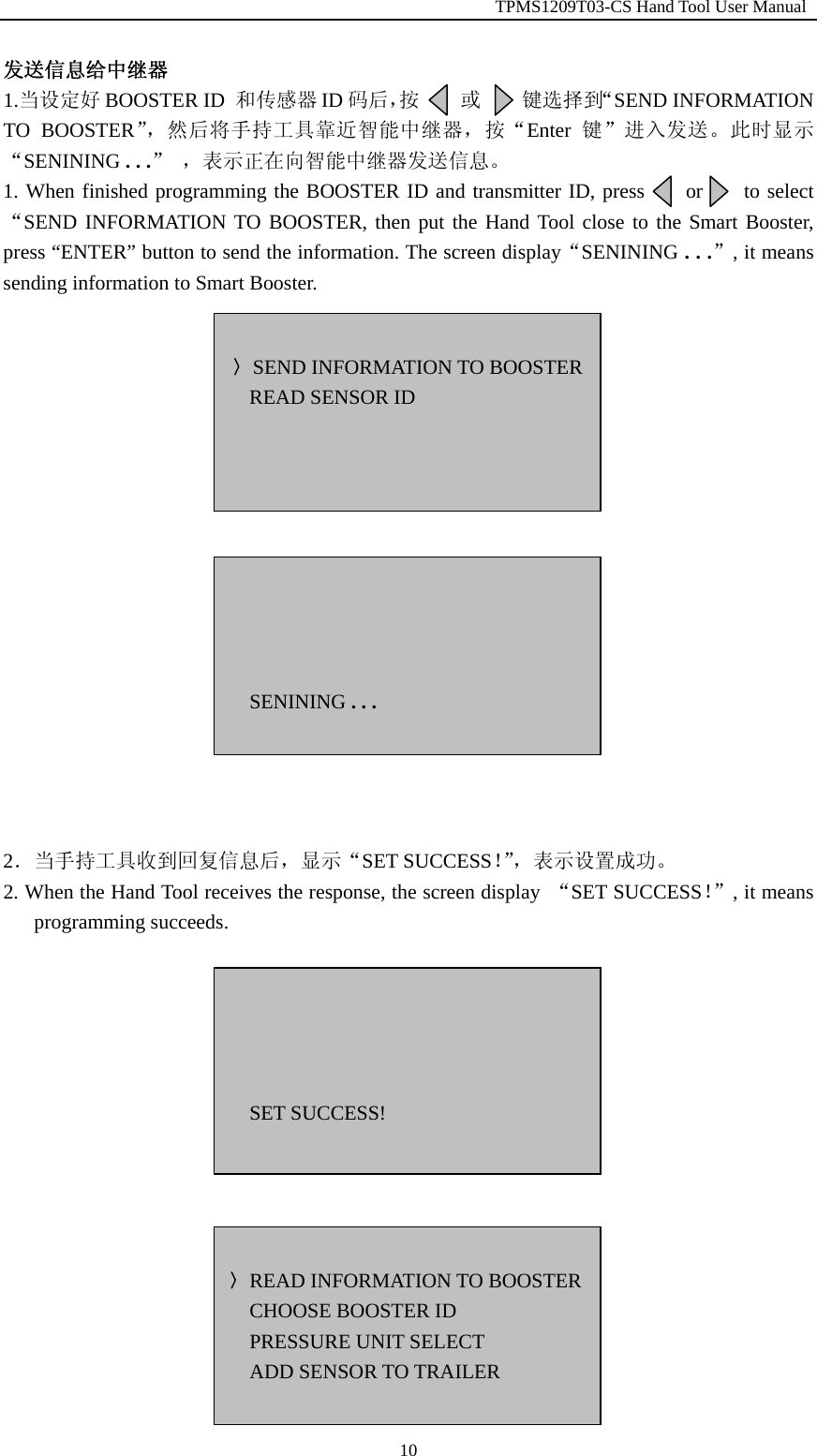
                                                        TPMS1209T03-CS Hand Tool User Manual  10发送信息给中继器 1.当设定好 BOOSTER ID  和传感器 ID 码后,按    或    键选择到“SEND INFORMATION TO BOOSTER”,然后将手持工具靠近智能中继器,按“Enter 键”进入发送。此时显示“SENINING . . .” ,表示正在向智能中继器发送信息。 1. When finished programming the BOOSTER ID and transmitter ID, press        or        to select “SEND INFORMATION TO BOOSTER, then put the Hand Tool close to the Smart Booster, press “ENTER” button to send the information. The screen display“SENINING . . .”, it means sending information to Smart Booster.                   2.当手持工具收到回复信息后,显示“SET SUCCESS!”,表示设置成功。 2. When the Hand Tool receives the response, the screen display  “SET SUCCESS!”, it means programming succeeds.           〉SEND INFORMATION TO BOOSTERREAD SENSOR ID     SENINING . . .     SET SUCCESS!  〉READ INFORMATION TO BOOSTERCHOOSE BOOSTER ID PRESSURE UNIT SELECT ADD SENSOR TO TRAILER

Navigation menu