Swann Communications SWADS-WVDP720 Smart Video doorbell User Manual Smart Video Doorbell QSGWVDP720VER1E 3004

Swann Communications Pty Ltd Smart Video doorbell Smart Video Doorbell QSGWVDP720VER1E 3004

User Manual

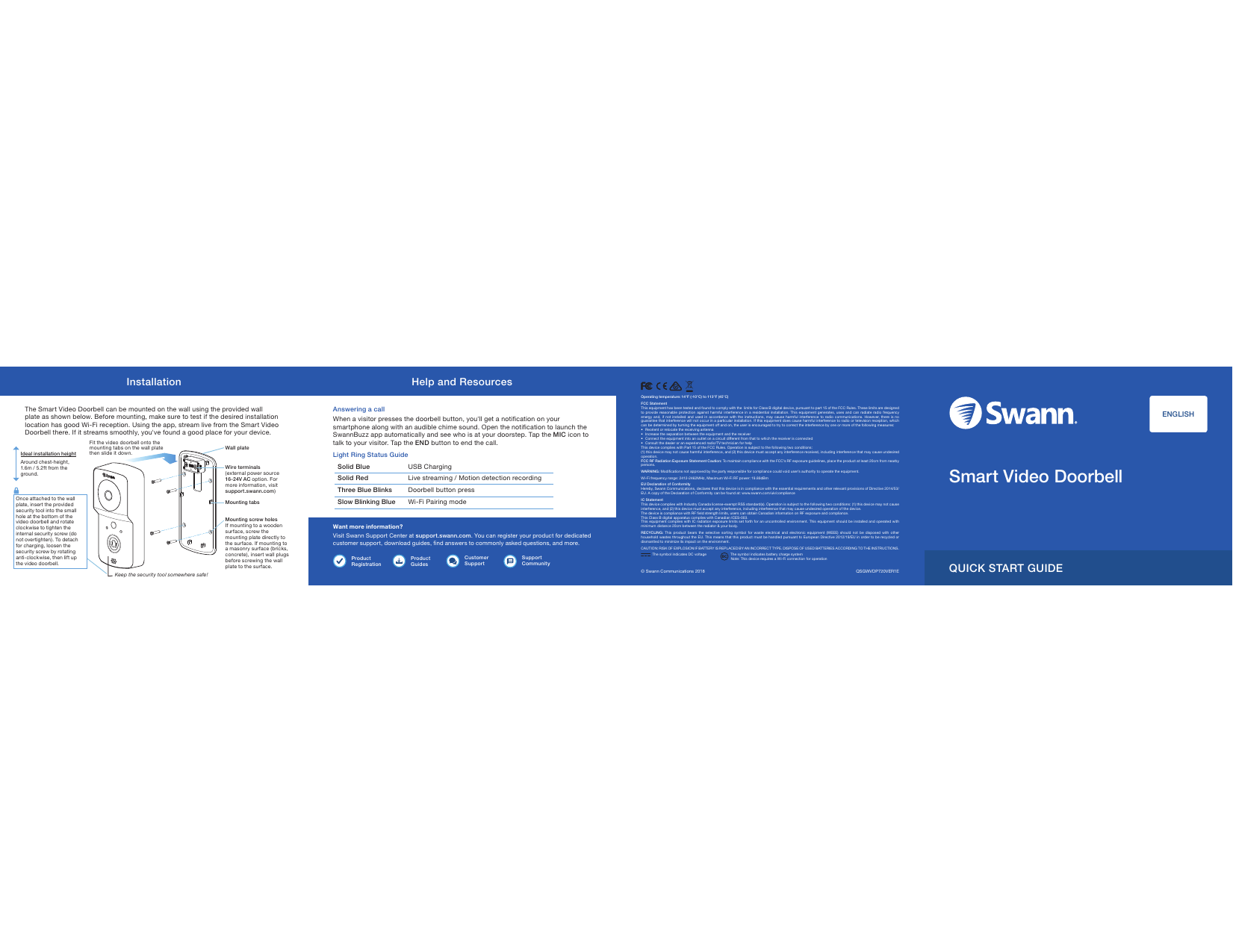
InstallationThe Smart Video Doorbell can be mounted on the wall using the provided wall plate as shown below. Before mounting, make sure to test if the desired installation location has good Wi-Fi reception. Using the app, stream live from the Smart Video Doorbell there. If it streams smoothly, you've found a good place for your device.Help and ResourcesWant more information?Visit Swann Support Center at support.swann.com. You can register your product for dedicated customer support, download guides, find answers to commonly asked questions, and more.Answering a callWhen a visitor presses the doorbell button, you'll get a notification on your smartphone along with an audible chime sound. Open the notification to launch the SwannBuzz app automatically and see who is at your doorstep. Tap the MIC icon to talk to your visitor. Tap the END button to end the call.Light Ring Status Guide© Swann Communications 2018 QSGWVDP720VER1EENGLISHQUICK START GUIDE Wire terminals (external power source 16-24V AC option. For more information, visit support.swann.com) Wall plateMounting tabsMounting screw holesIf mounting to a wooden surface, screw the mounting plate directly to the surface. If mounting to a masonry surface (bricks, concrete), insert wall plugs before screwing the wall plate to the surface.Ideal installation heightAround chest-height, 1.6m / 5.2ft from the ground.Fit the video doorbell onto the mounting tabs on the wall plate then slide it down.Keep the security tool somewhere safe!Once attached to the wall plate, insert the provided security tool into the small hole at the bottom of the video doorbell and rotate clockwise to tighten the internal security screw (do not overtighten). To detach for charging, loosen the security screw by rotating anti-clockwise, then lift up the video doorbell.              Operating temperature: 14°F (-10°C) to 113°F (45°C)FCC StatementThis equipment has been tested and found to comply with the  limits for Class B digital device, pursuant to part 15 of the FCC Rules. These limits are designed to provide reasonable  protection  against harmful interference  in a  residential installation.  This equipment  generates,  uses and can  radiate radio  frequency energy and,  if not  installed and  used  in  accordance with  the instructions,  may cause  harmful  interference  to radio communications. However,  there is no guarantee that interference will not occur  in a particular  installation. If this  equipment does cause harmful interference to  radio or television reception, which can be determined by turning the equipment off and on, the user is encouraged to try to correct the interference by one or more of the following measures: •  Reorient or relocate the receiving antenna•  Increase the separation between the equipment and the receiver•  Connect the equipment into an outlet on a circuit different from that to which the receiver is connected•  Consult the dealer or an experienced radio/TV technician for helpThis device complies with Part 15 of the FCC Rules. Operation is subject to the following two conditions:(1) this device may not cause harmful interference, and (2) this device must accept any interference received, including interference that may cause undesired operation.FCC RF Radiation Exposure Statement Caution: To maintain compliance with the FCC’s RF exposure guidelines, place the product at least 20cm from nearby persons.WARNING: Modifications not approved by the party responsible for compliance could void user’s authority to operate the equipment.Wi-Fi frequency range: 2412-2462MHz, Maximum Wi-Fi RF power: 19.89dBm EU Declaration of Conformity Hereby, Swann Communications, declares that this device is in compliance with the essential requirements and other relevant provisions of Directive 2014/53/EU. A copy of the Declaration of Conformity can be found at: www.swann.com/uk/complianceIC StatementThis device complies with Industry Canada license-exempt RSS standard(s). Operation is subject to the following two conditions: (1) this device may not cause interference, and (2) this device must accept any interference, including interference that may cause undesired operation of the device. The device is compliance with RF field strength limits, users can obtain Canadian information on RF exposure and compliance.This Class B digital apparatus complies with Canadian ICES-003. This equipment  complies with  IC radiation exposure  limits set  forth for  an uncontrolled environment. This  equipment should be  installed and  operated with minimum distance 20cm between the radiator & your body.RECYCLING:  This product  bears  the  selective  sorting symbol  for  waste electrical  and  electronic  equipment (WEEE)  should  not  be disposed  with  other household wastes  throughout the EU.  This means  that this  product must  be handled  pursuant to  European Directive 2012/19/EU in order to be  recycled or dismantled to minimize its impact on the environment.CAUTION: RISK OF EXPLOSION IF BATTERY IS REPLACED BY AN INCORRECT TYPE. DISPOSE OF USED BATTERIES ACCORDING TO THE INSTRUCTIONS.  The symbol indicates DC voltage    The symbol indicates battery charge systemSolid Blue USB ChargingSolid Red Live streaming / Motion detection recordingThree Blue Blinks Doorbell button pressSlow Blinking Blue Wi-Fi Pairing modeSmart Video DoorbellProduct RegistrationProduct GuidesCustomer SupportSupport CommunityNote: This device requires a Wi-Fi connection for operation
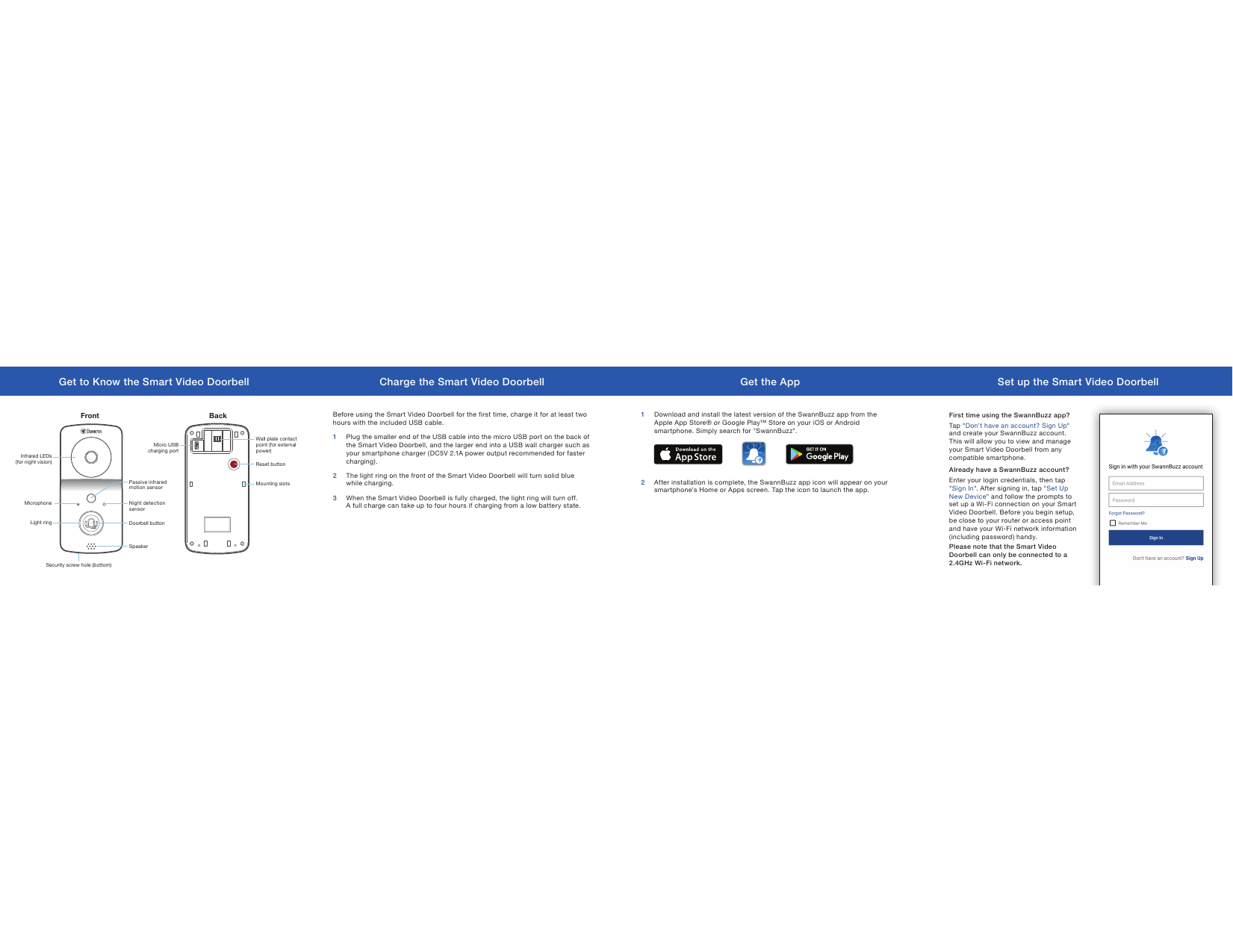
Before using the Smart Video Doorbell for the first time, charge it for at least two hours with the included USB cable.1 Plug the smaller end of the USB cable into the micro USB port on the back of the Smart Video Doorbell, and the larger end into a USB wall charger such as your smartphone charger (DC5V 2.1A power output recommended for faster charging).2 The light ring on the front of the Smart Video Doorbell will turn solid blue while charging.3 When the Smart Video Doorbell is fully charged, the light ring will turn off.  A full charge can take up to four hours if charging from a low battery state. 1  Download and install the latest version of the SwannBuzz app from the Apple App Store® or Google Play™ Store on your iOS or Android smartphone. Simply search for "SwannBuzz".2  After installation is complete, the SwannBuzz app icon will appear on your smartphone's Home or Apps screen. Tap the icon to launch the app.Get to Know the Smart Video Doorbell Charge the Smart Video Doorbell Get the App Set up the Smart Video DoorbellFront BackInfrared LEDs  (for night vision)Micro USB charging portMicrophone Night detection sensorReset buttonMounting slotsWall plate contact point (for external power)Doorbell buttonSpeakerPassive infrared motion sensorLight ringSecurity screw hole (bottom)First time using the SwannBuzz app?Tap "Don’t have an account? Sign Up" and create your SwannBuzz account.  This will allow you to view and manage your Smart Video Doorbell from any compatible smartphone.Already have a SwannBuzz account?Enter your login credentials, then tap "Sign In". After signing in, tap "Set Up New Device" and follow the prompts to set up a Wi-Fi connection on your Smart Video Doorbell. Before you begin setup, be close to your router or access point and have your Wi-Fi network information (including password) handy. Please note that the Smart Video Doorbell can only be connected to a 2.4GHz Wi-Fi network.

Navigation menu