TESA 05030012 Interface box User Manual Manual 1

TESA SA Interface box Manual 1

Contents

Manual 1

Instruction manualBPX and TWIN Station interface boxesEnglish
2
3CONTENTS1 Introduction  42  Safety precautions  43  Overall description  44  Measuring (Examples)  55  Sales programme  66  Data processing system  76.1  TIS software   76.2  User’s interface  76.3  Command library  77  BPX Station  87.1  Technical data  87.2  Elements at the front panel  87.3  Elements at the rear panel  97.4  IN/OUT connector  97.5  Operating mode  107.5.1  Normal mode  107.5.2  Stand-alone mode  118  TWIN Station   138.1  Technical data  138.2  Elements at the front panel  138.3  Elements at the rear panel  149 LEDs  149.1  LED status on both BPX and TWIN Station  149.2  LED status on the BPX in stand-alone mode  159.3  LED status related to an error message  1510  Assembly and connection  1610.1 Assembly  1610.2 Connection  1711 Recycling  1811 Guarantee  1812 Declaration of conformity with confirmation of traceability of all indicated values 18
41  INTRODUCTIONFirst of all, we thank you for the purchase of an interface box intended for use with TESA’s probes. In order to help you obtaining the best from its operational possibilities, we advise to read this manual carefully beforehand.  3  OVERALL DESCRIPTION2  SAFETY PRECAUTIONSBoth BPX box and TWIN Station are key com-ponents of our product line dedicated to multi-gauging measurement. Each unit permits inductive probes made by TESA to be connected to any system featuring a USB interface and used for data processing. Their modern design, which is based on the lat-est technologies, allows for a flexible, fast and independent run of the measuring functions. Their robust construction provides the security as required in the most demanding surround-ings and production areas. The choice of the system for data processing is left to the user. Once connected to a host com-puter fitted with a USB port, each unit will be capable to run the following: – TIS software provided with the BPX box / TWIN Station and used for setting, defining the measurement functions and measuring.–  Restricted interface for all settings and com-mands.– Command library allowing for a direct dia-logue.– Use only the power supply and the charger supplied with the BPX box or TWIN Station.– Do not attempt to dismantle the box, except for those parts listed in this manual. Other-wise you may damage the unit or cause a  failure.–  Do not expose the probes to excessive force or to shocks. These sensitive instruments must be handled with care (refer to the probe’s instruction manual).–  Do not drop or expose your interface box to shocks. Although robust, the built-in measur-ing system may be damaged, thus leading to incorrect measured values. The software is designed to meet the various needs in multigauging measurement, while of-fering optimum flexibility in terms of inspection means. Each measuring function can easily be defined.All trained users will appreciate the possibility to partly merge the TIS software, even to directly communicate with each box running their  own software.These interface boxes of the latest generation stay ahead due to their key features, i.e.: –  Robust – Resistant aluminium housing, also flexible for assembly by means of the conven-ient accessory.–  Reliable – Use of start-of-the-art compo-nents combined with a Swiss manufacturing  for high quality standard.–  Modular – Full compatibility with various technologies, thus offering a solution that meets the user’s needs. –  Universal – Unlimited use of each interface box.Moreover, a strict adherence to the safety  precautions is the guarantee for reliable  measurement results over a long period of use.
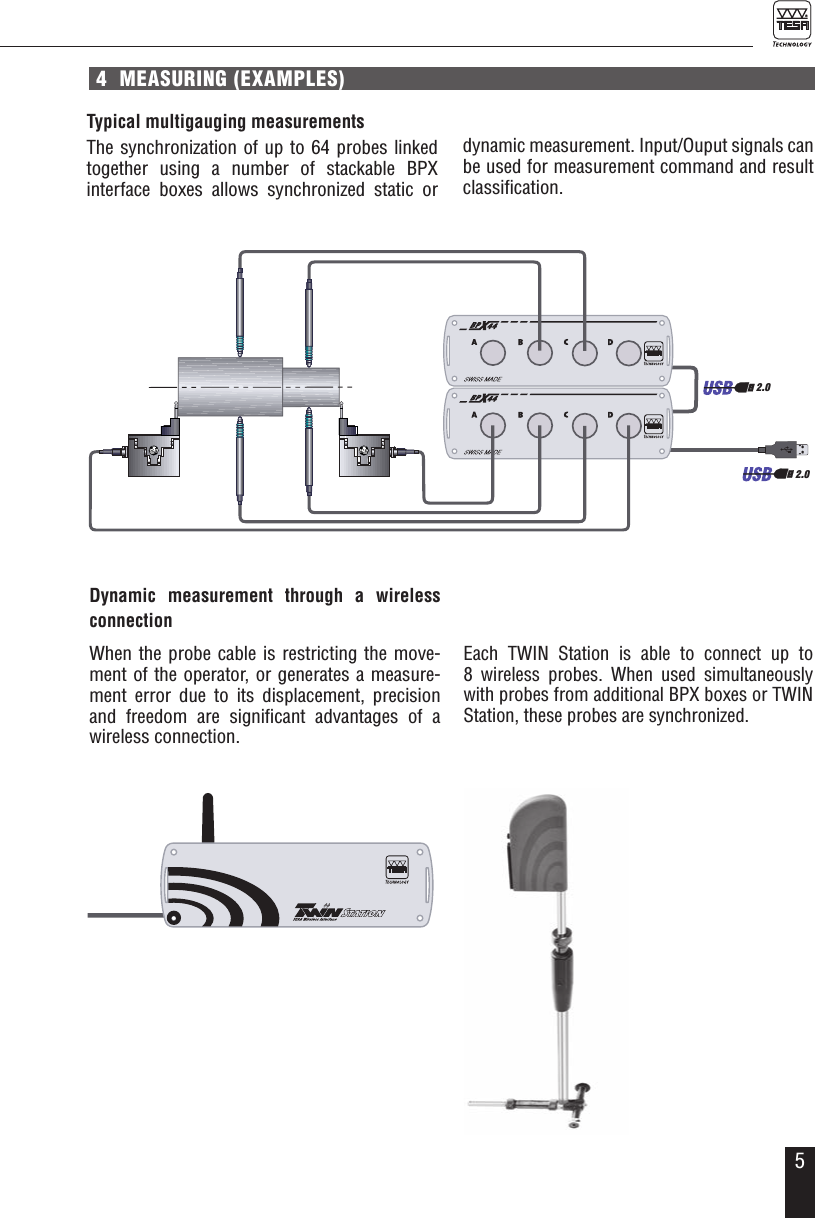
54  MEASURING (EXAMPLES)Typical multigauging measurementsThe synchronization of up to 64 probes linked together using a number of stackable BPX  interface boxes allows synchronized static or  Dynamic measurement through a wireless connectionWhen the probe cable is restricting the move-ment of the operator, or generates a measure-ment error due to its displacement, precision and freedom are significant advantages of a wireless connection.dynamic measurement. Input/Ouput signals can be used for measurement command and result classification.Each TWIN Station is able to connect up to  8 wireless probes. When used simultaneously with probes from additional BPX boxes or TWIN Station, these probes are synchronized.2.02.0SWISSMADE32.30019PAT PENDSWISSMADE32.30019PAT PEND2.0 2.02.0SWISSMADE32.30019SWISSMADE32.30019
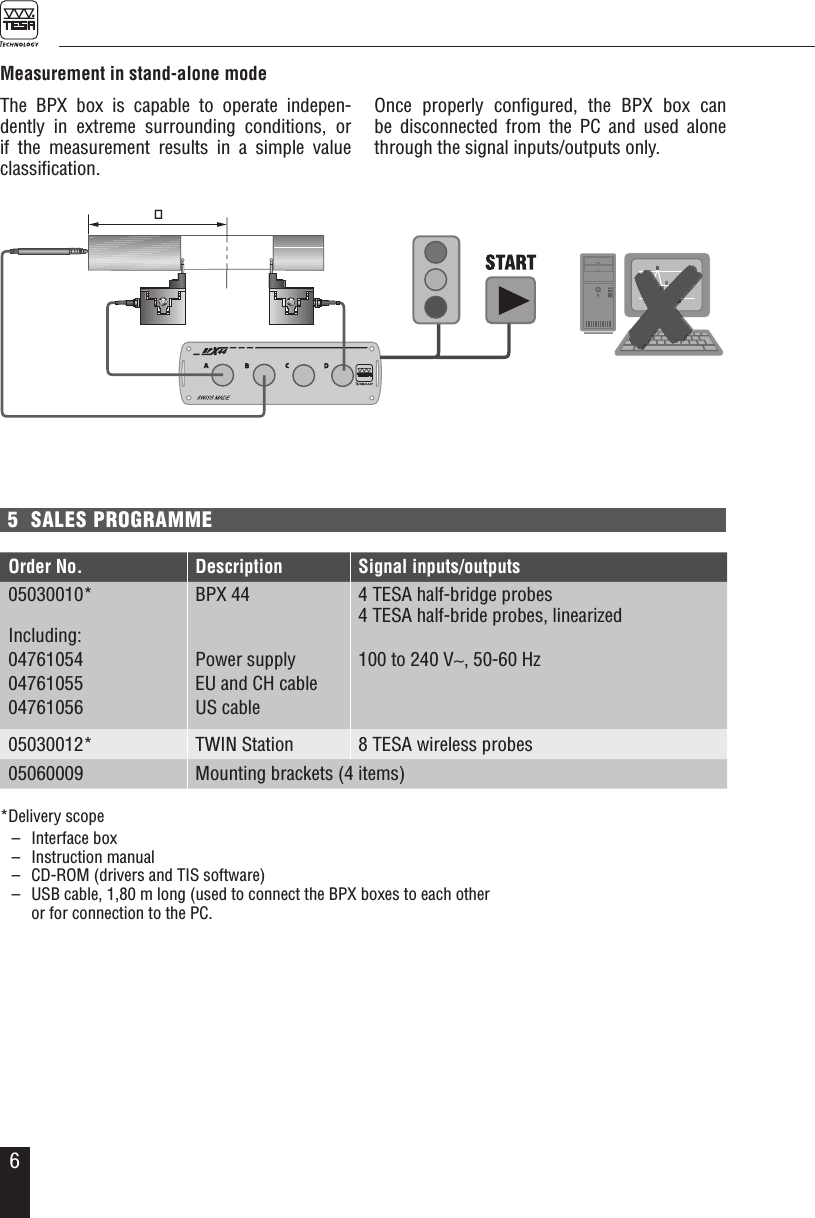
65  SALES PROGRAMMEMeasurement in stand-alone modeThe BPX box is capable to operate indepen-dently in extreme surrounding conditions, or  if the measurement results in a simple value classification. Once properly configured, the BPX box can be disconnected from the PC and used alone through the signal inputs/outputs only.SWISSMADE32.30019PAT PENDSWISSMADE32.30019PAT PEND*Delivery scope  –  Interface box  –  Instruction manual  –  CD-ROM (drivers and TIS software)  –  USB cable, 1,80 m long (used to connect the BPX boxes to each other   or for connection to the PC. Order No. Description Signal inputs/outputs05030010*Including:047610540476105504761056BPX 44Power supplyEU and CH cableUS cable4 TESA half-bridge probes4 TESA half-bride probes, linearized100 to 240 V∼, 50-60 Hz 05030012* TWIN Station 8 TESA wireless probes05060009 Mounting brackets (4 items)
76  DATA PROCESSING SYSTEMA single or several BPX or TWIN Station inter-face boxes can be connected to a host computer fitted with a USB interface.6.1 TIS softwareThis software allows for a correct setting of each peripheral device as well as both interface boxes and probes. Running it will also enable you to conveniently define the measuring func-tions, capture the measured value and export the results. In addition, the BPX box lets the operator con-figure the stand-alone mode (no PC) and moni-tor the signal inputs and outputs.Minimum profile requirements for used PC:  – Windows XP sp3– .NET Framework 3.5– Hard disk, 1GB– Image resolution to 900 x 600 pixelsFor further information about the TIS software, please refer to the instruction manual available on the CD-ROM delivered.The port used for data transmission is a virtual COM port.6.2 User’s interfaceThe User’s interface makes it possible for the main tabs provided with the TIS Software to be downloaded in another programme. Running TIS partly allows for easy control of the settings made for both BPX and TWIN Station, including the assignment of the measuring channels and functions, without the need for the measure-ment to be taken.This software tool is intended for systems used for data processing or data acquisition, which do not provide the core structure needed to han-dle complex measuring functions. Additional information is available upon re-quest.6.3 Command libraryThe command library enables a direct com-munication with the BPX or TWIN Station. This solution is convenient for those programmers/integrators who want to use a proprietary inter-face.Additional information is available upon re-quest.
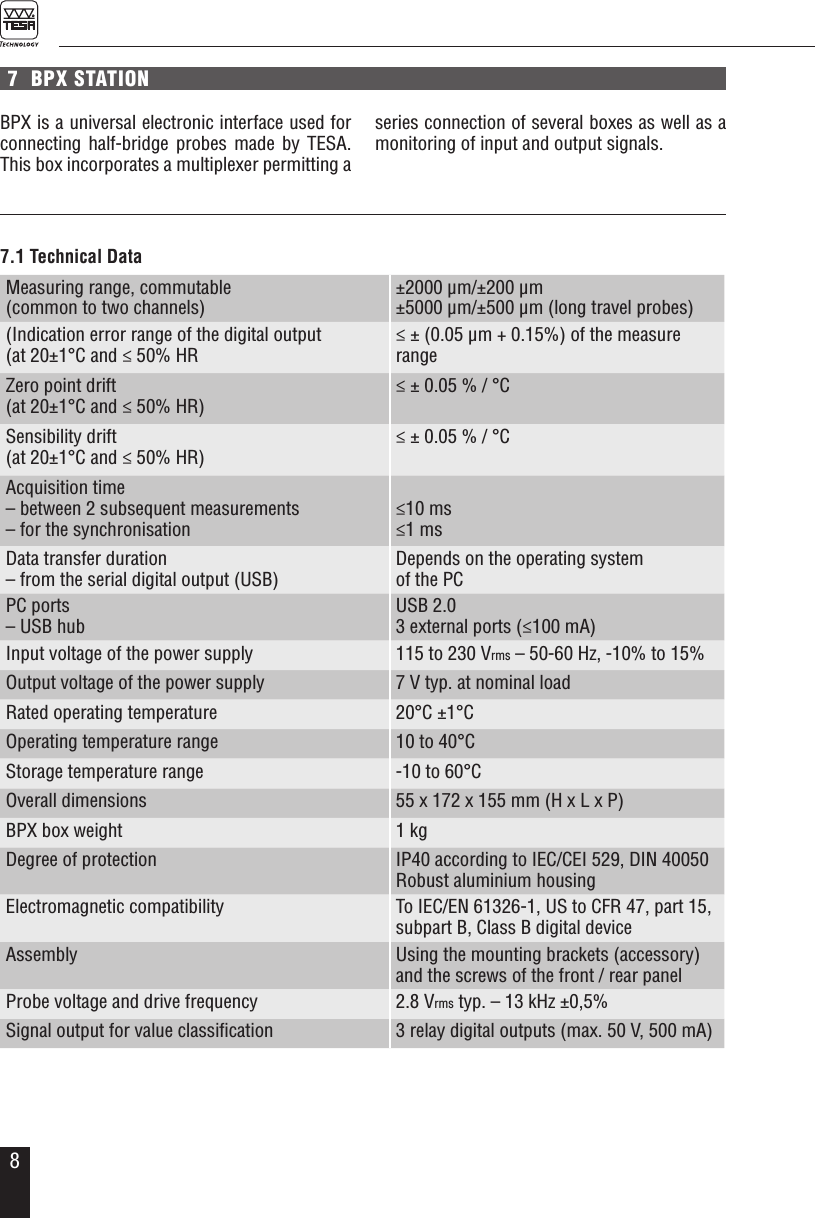
8Measuring range, commutable  (common to two channels)±2000 µm/±200 µm±5000 µm/±500 µm (long travel probes)(Indication error range of the digital output(at 20±1°C and ≤ 50% HR≤ ± (0.05 µm + 0.15%) of the measure rangeZero point drift(at 20±1°C and ≤ 50% HR)≤ ± 0.05 % / °CSensibility drift(at 20±1°C and ≤ 50% HR)≤ ± 0.05 % / °CAcquisition time– between 2 subsequent measurements– for the synchronisation≤10 ms≤1 msData transfer duration – from the serial digital output (USB)Depends on the operating system  of the PCPC ports– USB hubUSB 2.03 external ports (≤100 mA)Input voltage of the power supply 115 to 230 Vrms – 50-60 Hz, -10% to 15%Output voltage of the power supply 7 V typ. at nominal load Rated operating temperature 20°C ±1°COperating temperature range 10 to 40°CStorage temperature range -10 to 60°COverall dimensions 55 x 172 x 155 mm (H x L x P)BPX box weight 1 kgDegree of protection IP40 according to IEC/CEI 529, DIN 40050Robust aluminium housing Electromagnetic compatibility To IEC/EN 61326-1, US to CFR 47, part 15,  subpart B, Class B digital deviceAssembly Using the mounting brackets (accessory)and the screws of the front / rear panelProbe voltage and drive frequency 2.8 Vrms typ. – 13 kHz ±0,5%Signal output for value classification 3 relay digital outputs (max. 50 V, 500 mA)7.1 Technical Data7  BPX STATIONBPX is a universal electronic interface used for connecting half-bridge probes made by TESA. This box incorporates a multiplexer permitting a series connection of several boxes as well as a monitoring of input and output signals.
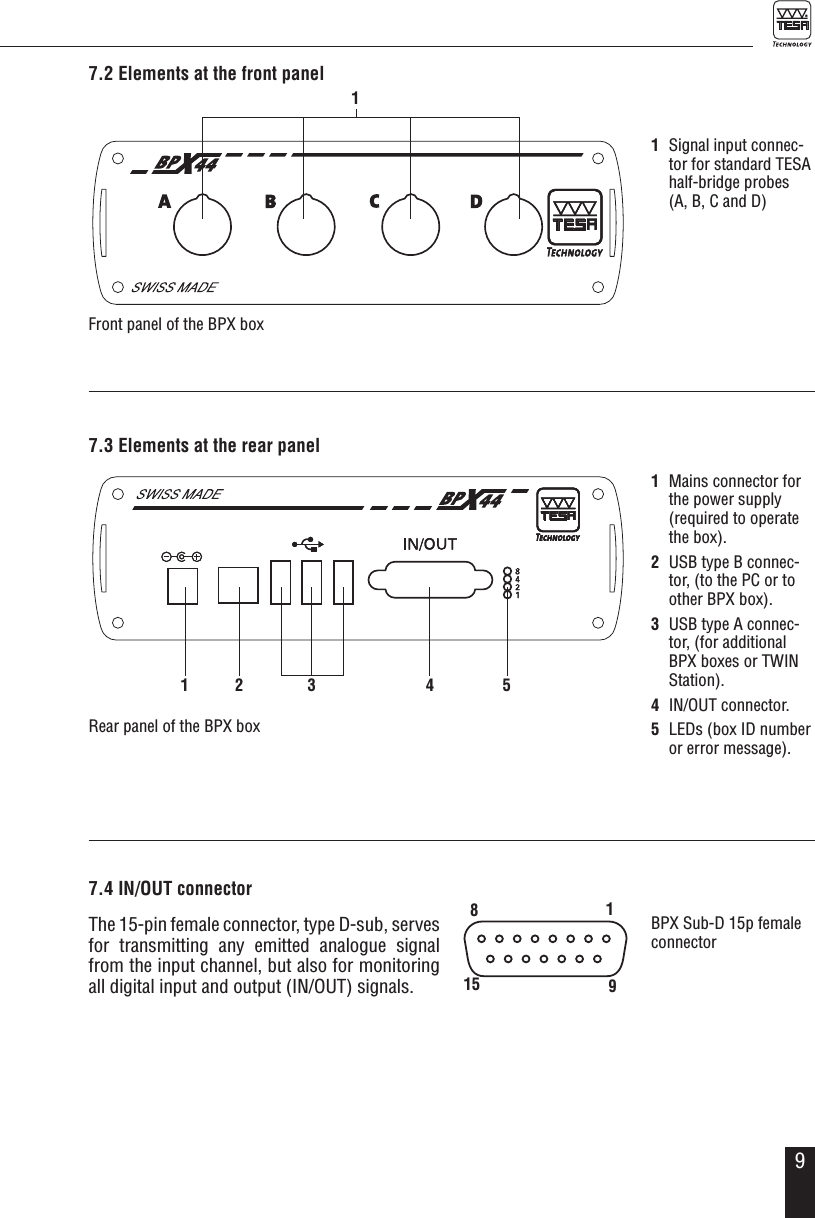
97.2 Elements at the front panel17.3 Elements at the rear panelRear panel of the BPX box1  Mains connector for the power supply (required to operate the box).2  USB type B connec-tor, (to the PC or to other BPX box).3  USB type A connec-tor, (for additional BPX boxes or TWIN Station).4  IN/OUT connector.5  LEDs (box ID number  or error message).1  Signal input connec-tor for standard TESA  half-bridge probes  (A, B, C and D)1 2 3 4 57.4 IN/OUT connectorThe 15-pin female connector, type D-sub, serves for transmitting any emitted analogue signal from the input channel, but also for monitoring all digital input and output (IN/OUT) signals.Front panel of the BPX boxBPX Sub-D 15p female connector89151
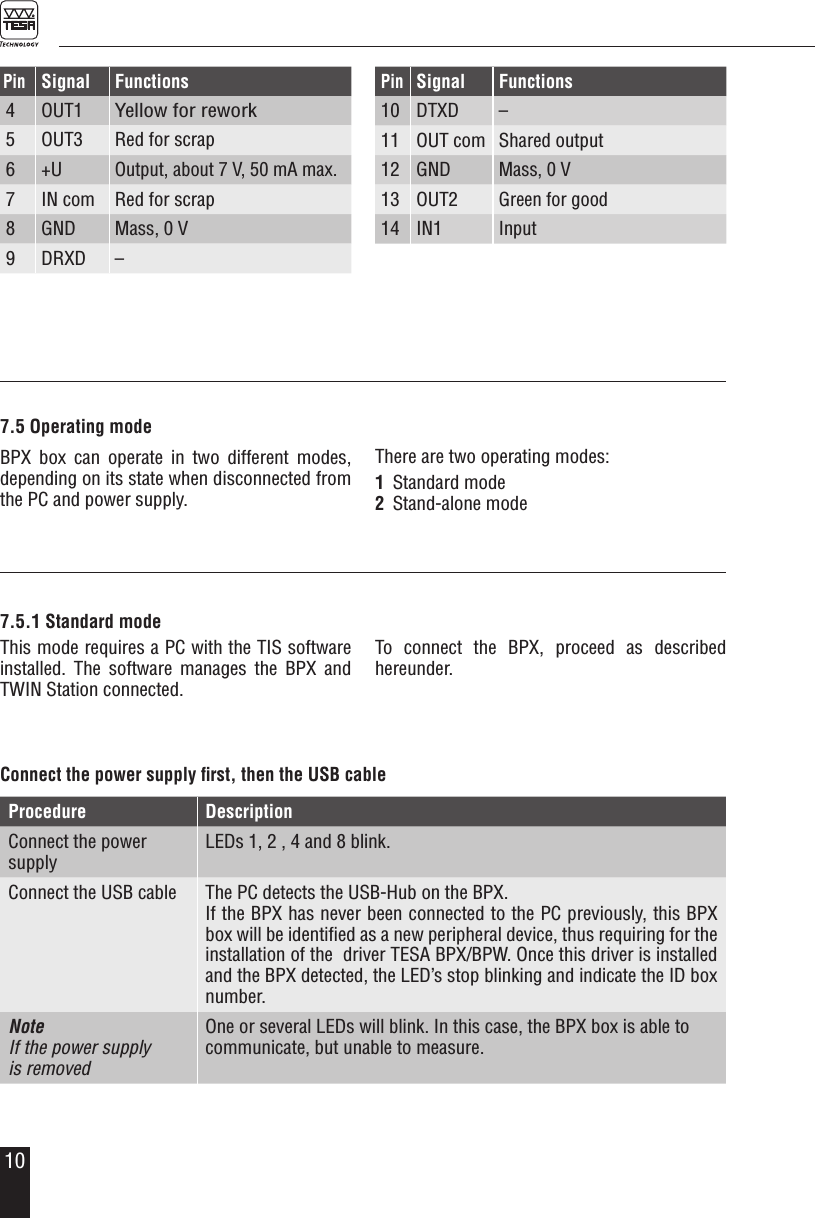
10PinSignal Functions4 OUT1Yellow for rework5 OUT3 Red for scrap6 +UOutput, about 7 V, 50 mA max.7 IN com Red for scrap8 GND Mass, 0 V9 DRXD–PinSignal Functions10 DTXD–11 OUT com Shared output12 GNDMass, 0 V13 OUT2Green for good14 IN1Input7.5.1 Standard modeThis mode requires a PC with the TIS software installed. The software manages the BPX and TWIN Station connected.To connect the BPX, proceed as described  hereunder.Procedure DescriptionConnect the power supply LEDs 1, 2 , 4 and 8 blink.Connect the USB cable The PC detects the USB-Hub on the BPX.If the BPX has never been connected to the PC previously, this BPX box will be identified as a new peripheral device, thus requiring for the installation of the  driver TESA BPX/BPW. Once this driver is installed and the BPX detected, the LED’s stop blinking and indicate the ID box number.Note If the power supply  is removedOne or several LEDs will blink. In this case, the BPX box is able to communicate, but unable to measure.Connect the power supply first, then the USB cable7.5 Operating modeBPX box can operate in two different modes,  depending on its state when disconnected from the PC and power supply.There are two operating modes:1  Standard mode2  Stand-alone mode
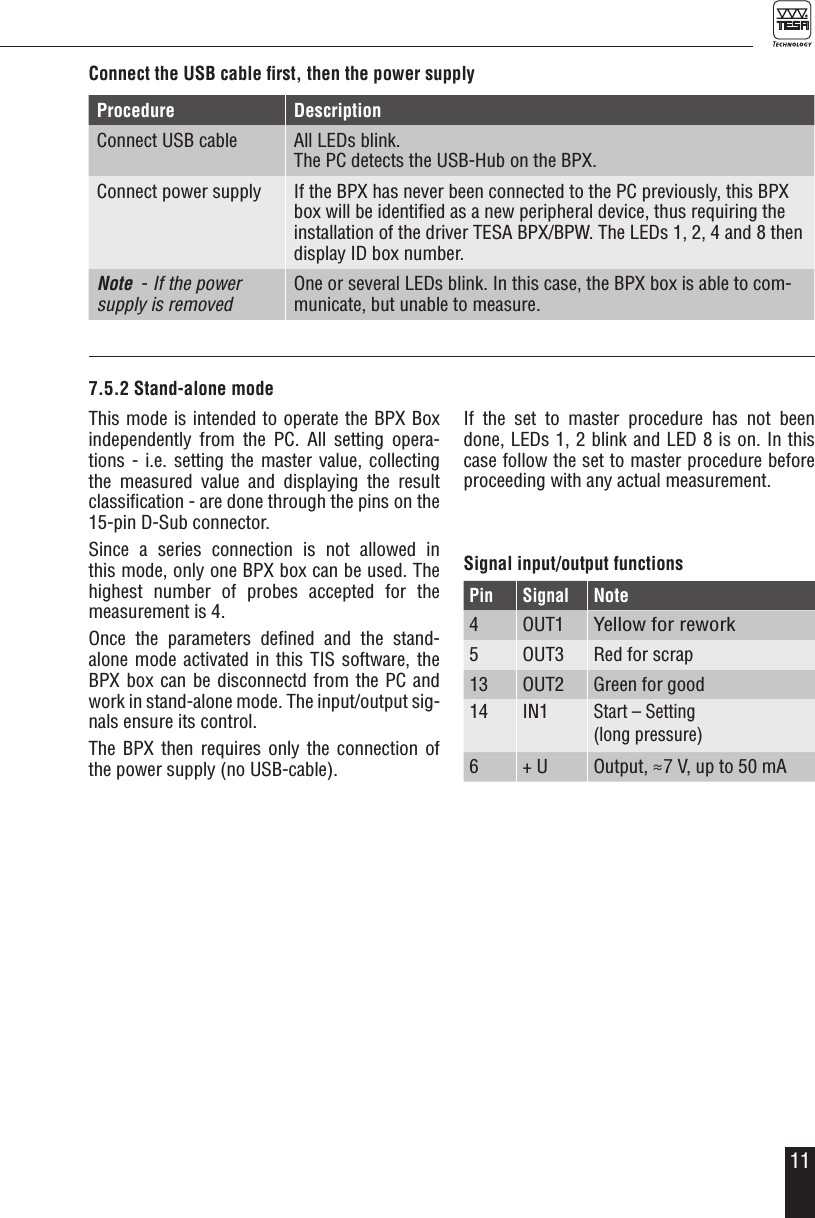
11Procedure DescriptionConnect USB cable All LEDs blink. The PC detects the USB-Hub on the BPX.Connect power supply If the BPX has never been connected to the PC previously, this BPX box will be identified as a new peripheral device, thus requiring the installation of the driver TESA BPX/BPW. The LEDs 1, 2, 4 and 8 then display ID box number.Note  - If the power supply is removedOne or several LEDs blink. In this case, the BPX box is able to com-municate, but unable to measure.Connect the USB cable first, then the power supplyThis mode is intended to operate the BPX Box independently from the PC. All setting opera-tions - i.e. setting the master value, collecting the measured value and displaying the result classification - are done through the pins on the 15-pin D-Sub connector. Since a series connection is not allowed in this mode, only one BPX box can be used. The  highest number of probes accepted for the measurement is 4.Once the parameters defined and the stand-alone mode activated in this TIS software, the BPX box can be disconnectd from the PC and work in stand-alone mode. The input/output sig-nals ensure its control.The BPX then requires only the connection of the power supply (no USB-cable).If the set to master procedure has not been done, LEDs 1, 2 blink and LED 8 is on. In this case follow the set to master procedure before proceeding with any actual measurement. Signal input/output functionsPin SignalNote4 OUT1Yellow for rework5 OUT3 Red for scrap13 OUT2 Green for good14 IN1Start – Setting  (long pressure)6 + U Output, ≈7 V, up to 50 mA7.5.2 Stand-alone mode
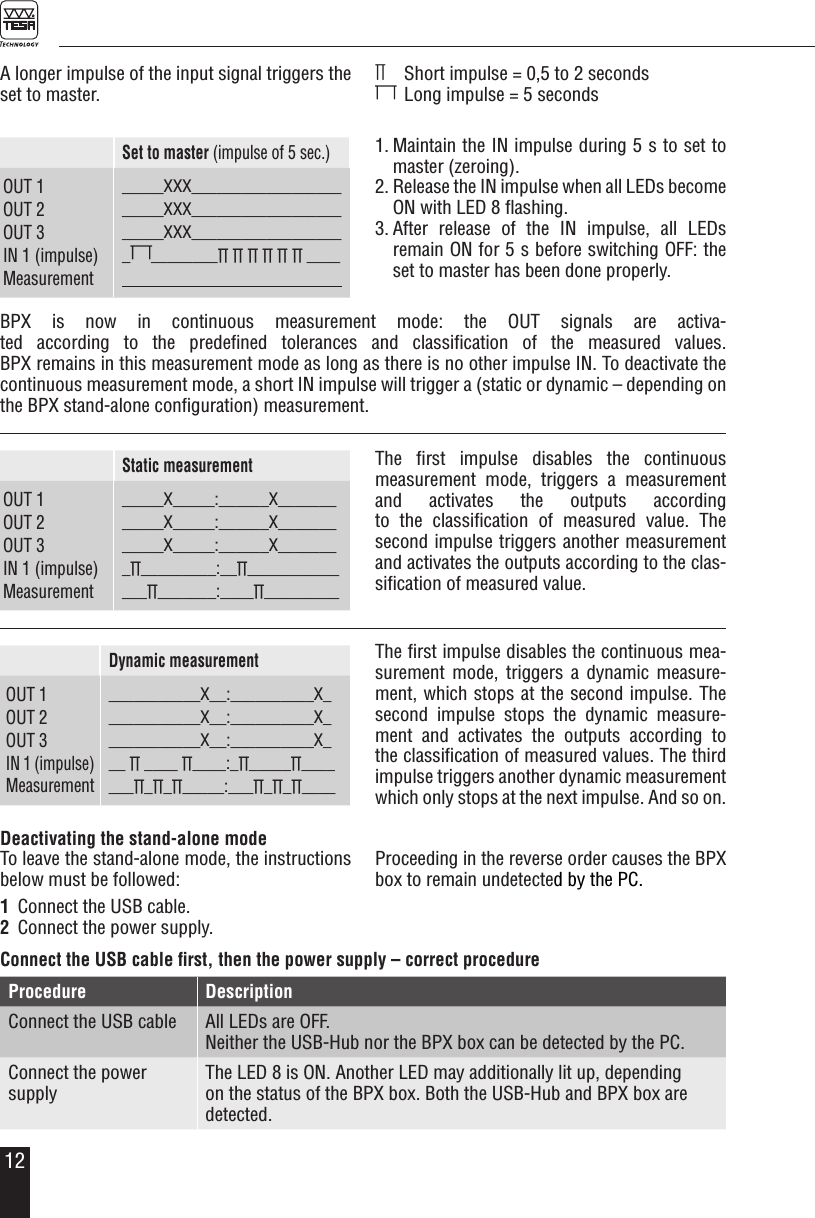
12Deactivating the stand-alone modeTo leave the stand-alone mode, the instructions below must be followed:1  Connect the USB cable.2  Connect the power supply.Proceeding in the reverse order causes the BPX box to remain undetected by the PC.Procedure DescriptionConnect the USB cable All LEDs are OFF.Neither the USB-Hub nor the BPX box can be detected by the PC.Connect the power supplyThe LED 8 is ON. Another LED may additionally lit up, depending on the status of the BPX box. Both the USB-Hub and BPX box are detected.Connect the USB cable first, then the power supply – correct procedureA longer impulse of the input signal triggers the set to master.∏    Short impulse = 0,5 to 2 seconds  Long impulse = 5 secondsSet to master (impulse of 5 sec.)OUT 1OUT 2OUT 3IN 1 (impulse)Measurement_____XXX_______________________XXX_______________________XXX___________________ ________∏ ∏ ∏ ∏ ∏ ∏ ____Dynamic measurementOUT 1OUT 2OUT 3IN 1 (impulse)Measurement___________X__:__________X____________X__:__________X_ ___________X__:__________X___ ∏ ____ ∏____:_∏_____∏_______∏_∏_∏_____:___∏_∏_∏____Static measurementOUT 1OUT 2OUT 3IN 1 (impulse)Measurement_____X_____:______X_______ _____X_____:______X____________X_____:______X________∏_________:__∏______________∏_______:____∏_________BPX is now in continuous measurement mode: the OUT signals are activa-ted according to the predefined tolerances and classification of the measured values.  BPX remains in this measurement mode as long as there is no other impulse IN. To deactivate the continuous measurement mode, a short IN impulse will trigger a (static or dynamic – depending on the BPX stand-alone configuration) measurement.The first impulse disables the continuous mea-surement mode, triggers a dynamic measure-ment, which stops at the second impulse. The second impulse stops the dynamic measure-ment and activates the outputs according to the classification of measured values. The third impulse triggers another dynamic measurement which only stops at the next impulse. And so on.The first impulse disables the continuous measurement mode, triggers a measurement and activates the outputs according  to the classification of measured value. The  second impulse triggers another measurement and activates the outputs according to the clas-sification of measured value.1. Maintain the IN impulse during 5 s to set to  master (zeroing). 2. Release the IN impulse when all LEDs become ON with LED 8 flashing.3. After release of the IN impulse, all LEDs  remain ON for 5 s before switching OFF: the set to master has been done properly.
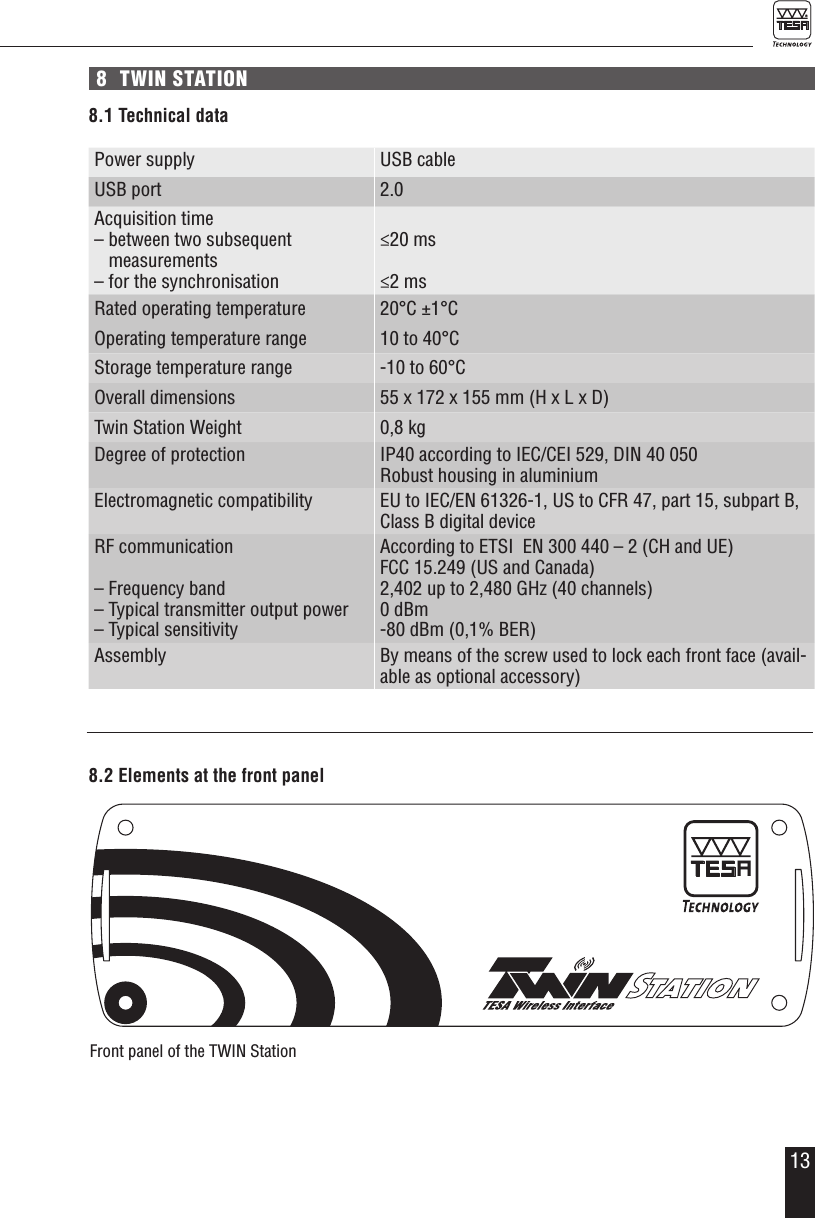
138  TWIN STATION8.1 Technical dataPower supply USB cableUSB port 2.0Acquisition time– between two subsequent   measurements– for the synchronisation≤20 ms≤2 msRated operating temperature 20°C ±1°COperating temperature range 10 to 40°CStorage temperature range -10 to 60°COverall dimensions 55 x 172 x 155 mm (H x L x D)Twin Station Weight 0,8 kgDegree of protection IP40 according to IEC/CEI 529, DIN 40 050Robust housing in aluminiumElectromagnetic compatibility EU to IEC/EN 61326-1, US to CFR 47, part 15, subpart B, Class B digital deviceRF communication– Frequency band– Typical transmitter output power– Typical sensitivityAccording to ETSI  EN 300 440 – 2 (CH and UE)FCC 15.249 (US and Canada)2,402 up to 2,480 GHz (40 channels)0 dBm-80 dBm (0,1% BER)Assembly By means of the screw used to lock each front face (avail-able as optional accessory)8.2 Elements at the front panelFront panel of the TWIN Station
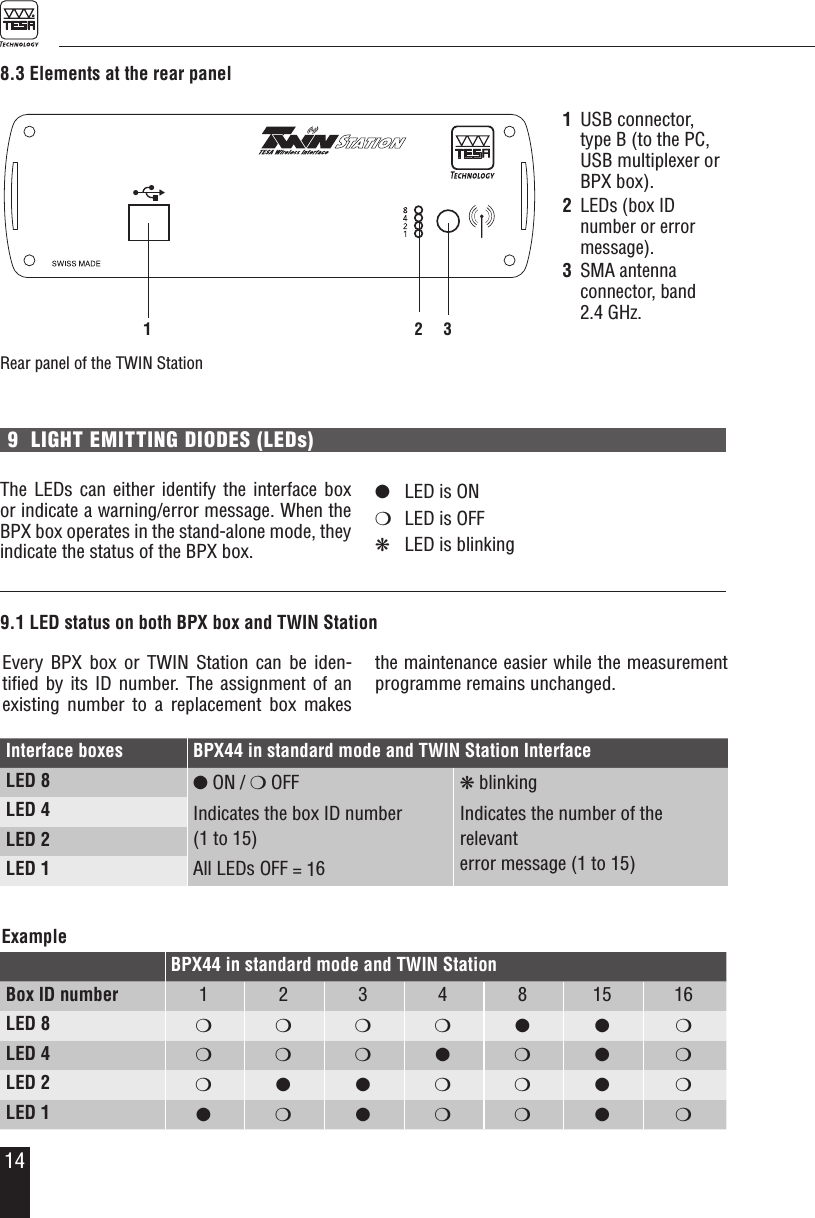
148.3 Elements at the rear panelRear panel of the TWIN Station1  USB connector, type B (to the PC, USB multiplexer or BPX box).2 LEDs (box ID number or error message).3 SMA antenna  connector, band  2.4 GHz.Interface boxes BPX44 in standard mode and TWIN Station InterfaceLED 8 l ON / m OFF Indicates the box ID number  (1 to 15) All LEDs OFF = 16k blinkingIndicates the number of the relevant  error message (1 to 15)LED 4LED 2LED 11 2 39  LIGHT EMITTING DIODES (LEDs)The LEDs can either identify the interface box or indicate a warning/error message. When the BPX box operates in the stand-alone mode, they indicate the status of the BPX box.l  LED is ONm  LED is OFFk  LED is blinking9.1 LED status on both BPX box and TWIN StationEvery BPX box or TWIN Station can be iden-tified by its ID number. The assignment of an existing number to a replacement box makes the maintenance easier while the measurement programme remains unchanged. ExampleBPX44 in standard mode and TWIN StationBox ID number 1 2 3 4 8 15 16LED 8 m m m m l l mLED 4 m m m l m l mLED 2 m l l m m l mLED 1 lmlmml m
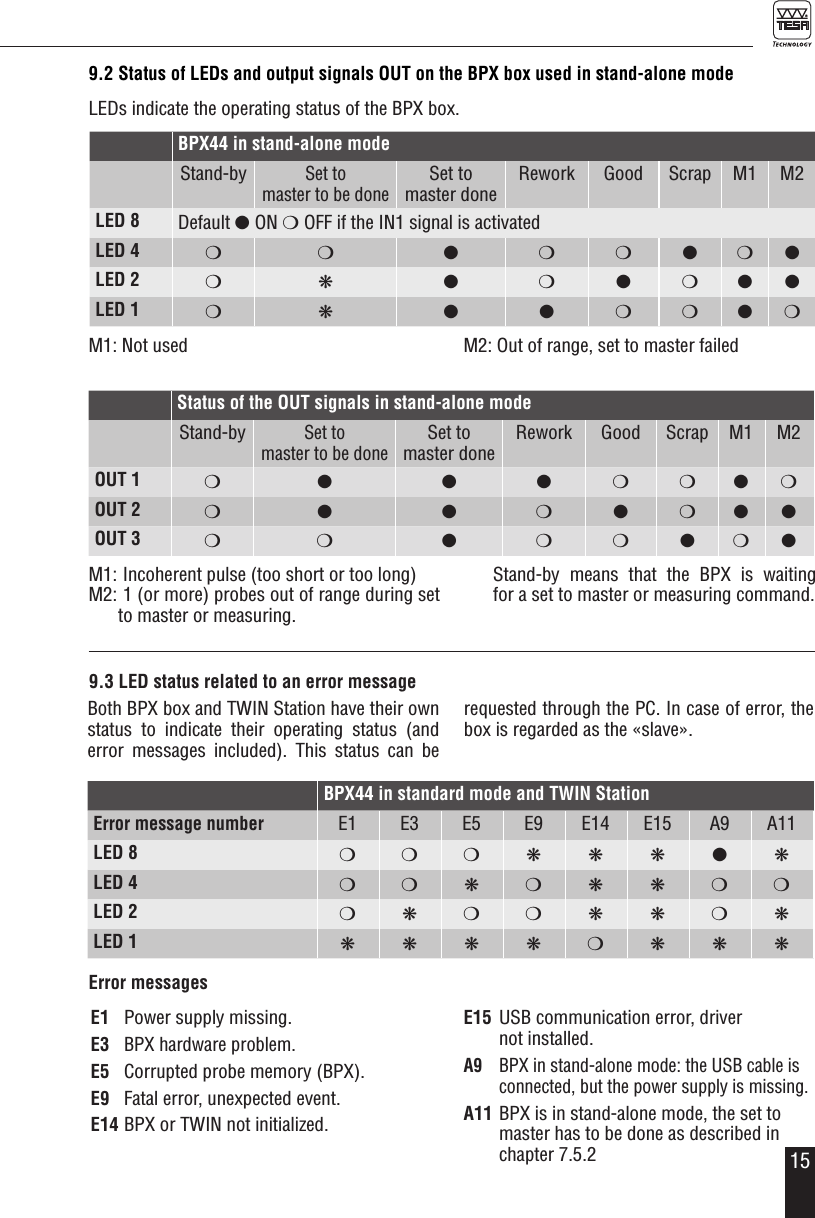
15E1  Power supply missing.E3  BPX hardware problem.E5  Corrupted probe memory (BPX).E9  Fatal error, unexpected event.E14 BPX or TWIN not initialized.E15  USB communication error, driver  not installed.A9  BPX in stand-alone mode: the USB cable is connected, but the power supply is missing.A11 BPX is in stand-alone mode, the set to master has to be done as described in chapter 7.5.29.2 Status of LEDs and output signals OUT on the BPX box used in stand-alone modeLEDs indicate the operating status of the BPX box.BPX44 in standard mode and TWIN StationError message number E1 E3 E5 E9 E14 E15 A9 A11LED 8 m m m k k k l kLED 4 m m k m k k m mLED 2 mkmmkkmkLED 1 kkkkmkkk9.3 LED status related to an error messageBoth BPX box and TWIN Station have their own status to indicate their operating status (and  error messages included). This status can be requested through the PC. In case of error, the box is regarded as the «slave».Error messagesM1: Not used M2: Out of range, set to master failedBPX44 in stand-alone modeStand-bySet to  master to be doneSet to  master doneRework Good Scrap M1 M2LED 8 Default l ON m OFF if the IN1 signal is activatedLED 4 m m l m m l m lLED 2 m k l m l m l lLED 1 m k l l m m l mStatus of the OUT signals in stand-alone modeStand-bySet to  master to be doneSet to  master doneRework Good Scrap M1 M2OUT 1 m l l l m m l mOUT 2 m l l m l m l lOUT 3 m m l m m l m lM1:  Incoherent pulse (too short or too long)M2:  1 (or more) probes out of range during set to master or measuring.   Stand-by means that the BPX is waiting  for a set to master or measuring command.
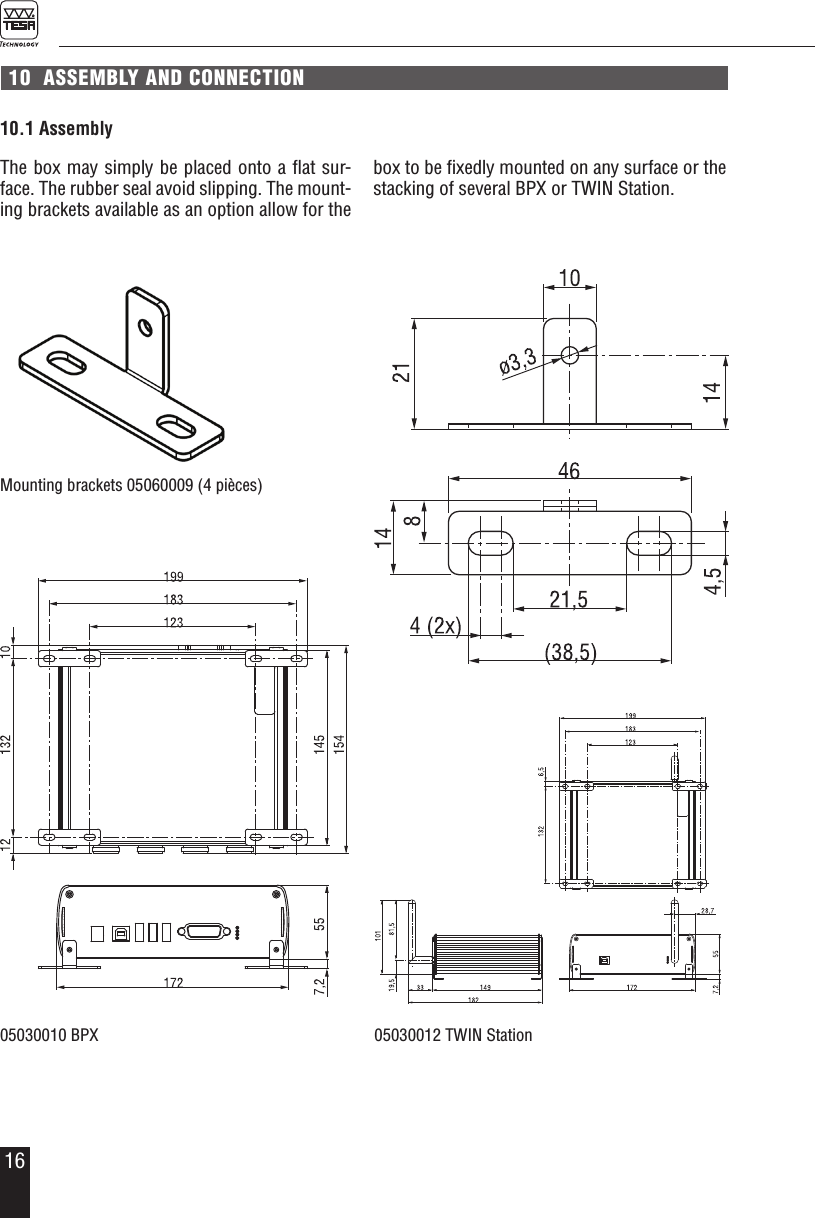
1610  ASSEMBLY AND CONNECTIONThe box may simply be placed onto a flat sur-face. The rubber seal avoid slipping. The mount-ing brackets available as an option allow for the 10.1 Assemblybox to be fixedly mounted on any surface or the stacking of several BPX or TWIN Station.Mounting brackets 05060009 (4 pièces)05030012 TWIN Station05030010 BPX
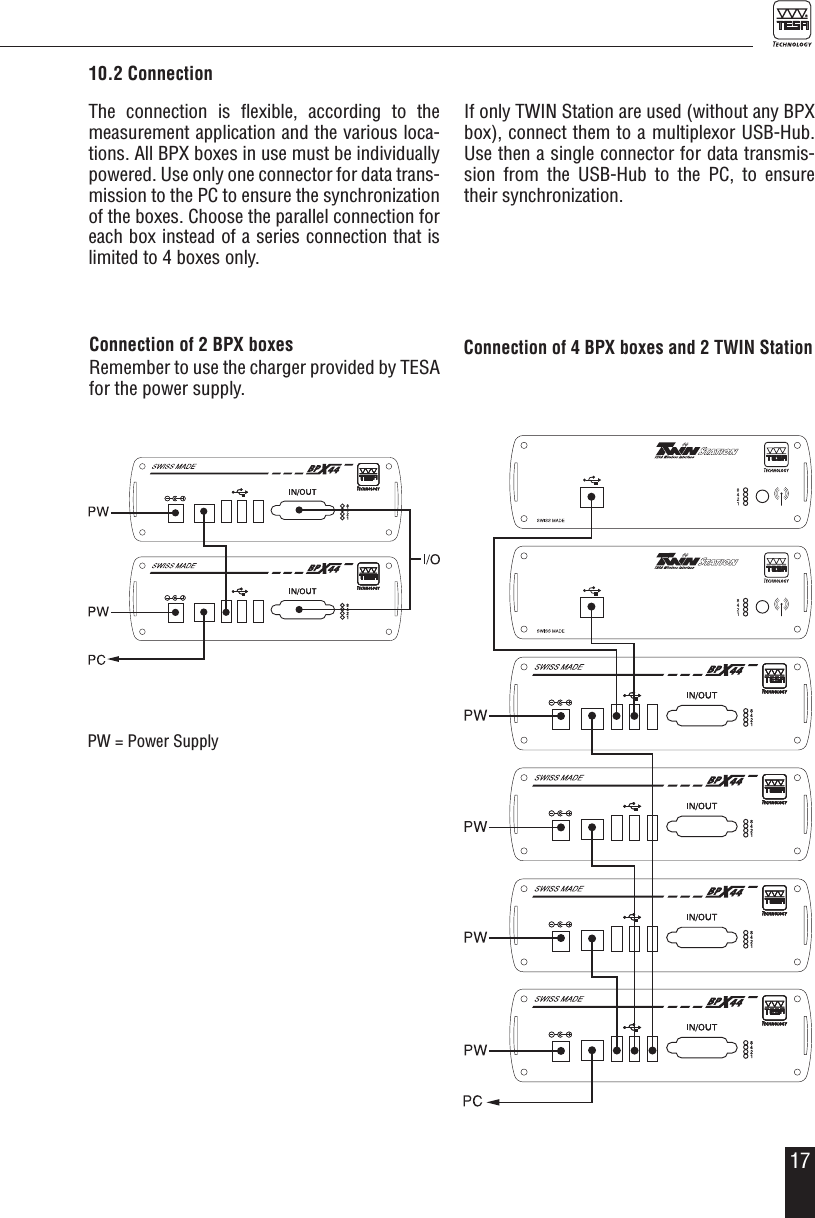
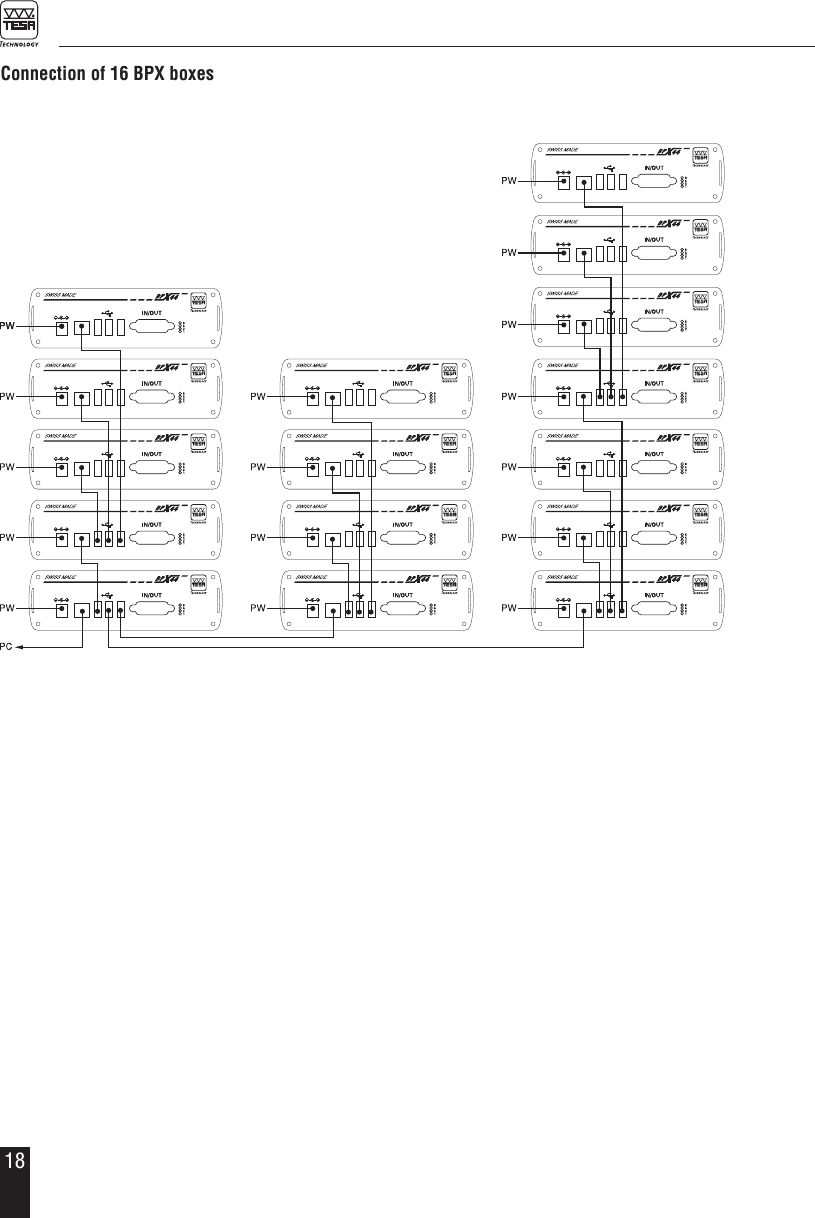
1710.2 ConnectionThe connection is flexible, according to the measurement application and the various loca-tions. All BPX boxes in use must be individually  powered. Use only one connector for data trans-mission to the PC to ensure the synchronization of the boxes. Choose the parallel connection for each box instead of a series connection that is limited to 4 boxes only.If only TWIN Station are used (without any BPX box), connect them to a multiplexor USB-Hub. Use then a single connector for data transmis-sion from the USB-Hub to the PC, to ensure their synchronization.Connection of 2 BPX boxesRemember to use the charger provided by TESA for the power supply.Connection of 4 BPX boxes and 2 TWIN Station PW = Power Supply
18Connection of 16 BPX boxes
1911  RECYCLINGEach product must be treated separately. It is therefore important  to comply with the rules in force in your country as regards recycling. 12  GUARANTEEWe guarantee each product against any fault of design, manufacture or material for a period of 12 months from the date of purchase. Any repair work carried out under the guarantee is free  of charge. Our responsibility is limited to the repair of the relevant product or, if we consider it necessary, to its free replacement.The following are not covered by the guarantee: batteries and damage due to incorrect handling, failure to observe the instruction manual, or attempts by any non-qualified party to repair the  product; any consequences whatever which may be connected either directly or indirectly with the product supplied or its use.(Extract from our General Terms of Delivery, December 1st, 1981)13 DECLARATION OF CONFORMITY AND CONFIRMATION OF TRACEABILITY OF ALL INDICATED VALUESWe thank you for your confidence in purchasing our products, which have been thoroughly checked  in our factory.We declare under our sole responsibility that each product is in conformity with all technical data as specified in our sales literature (instruction manual, leaflet, catalogue). In addition, we certify that the measuring equipment used to check the products refers to national master standards. Traceability of the measured values is guaranteed by our Quality Assurance.NoticeFor the USA and CANADA:This device complies with Part 15 of the FCC Rules and with RSS-210 of Industry Canada.Operation is subject to the following two conditions:1. This device may not cause harmful interference, and 2. This device must accept any interference received, including interference that may cause undesi-red operation.
20Changes or modifications made to this equipment not expressly approved by TESA may void the FCC authorization to operate this equipment. Radiofrequency radiation exposure Information:This equipment complies with FCC radiation exposure limits set forth for an uncontrolled environ-ment. This equipment should be installed and operated with minimum distance of 20 cm between the radiator and your body. This transmitter must not be co-located or operating in conjunction with any other antenna or transmitter. This equipment has been tested and found to comply with the limits for a Class A digital device, pursuant to Part 15 of the FCC Rules. These limits are designed to provide reasonable protection against harmful interference when the equipment is operated in a commercial environment. This equipment generates, uses, and can radiate radio frequency energy and, if not installed and used in accordance with the instruction manual, may cause harmful interference to radio communications. Operation of this equipment in a residential area is likely to cause harmful interference in which case the user will be required to correct the interference at his own expense.Under Industry Canada regulations, this radio transmitter may only operate using the antenna that has been delivered by the manufacturer. Quality Assurance
21NOTES

Navigation menu