Tad Radio of Canada M11A MOBILE VHF RADIO User Manual USERS MANUAL

Tad Radio of Canada Inc MOBILE VHF RADIO USERS MANUAL

USERS MANUAL

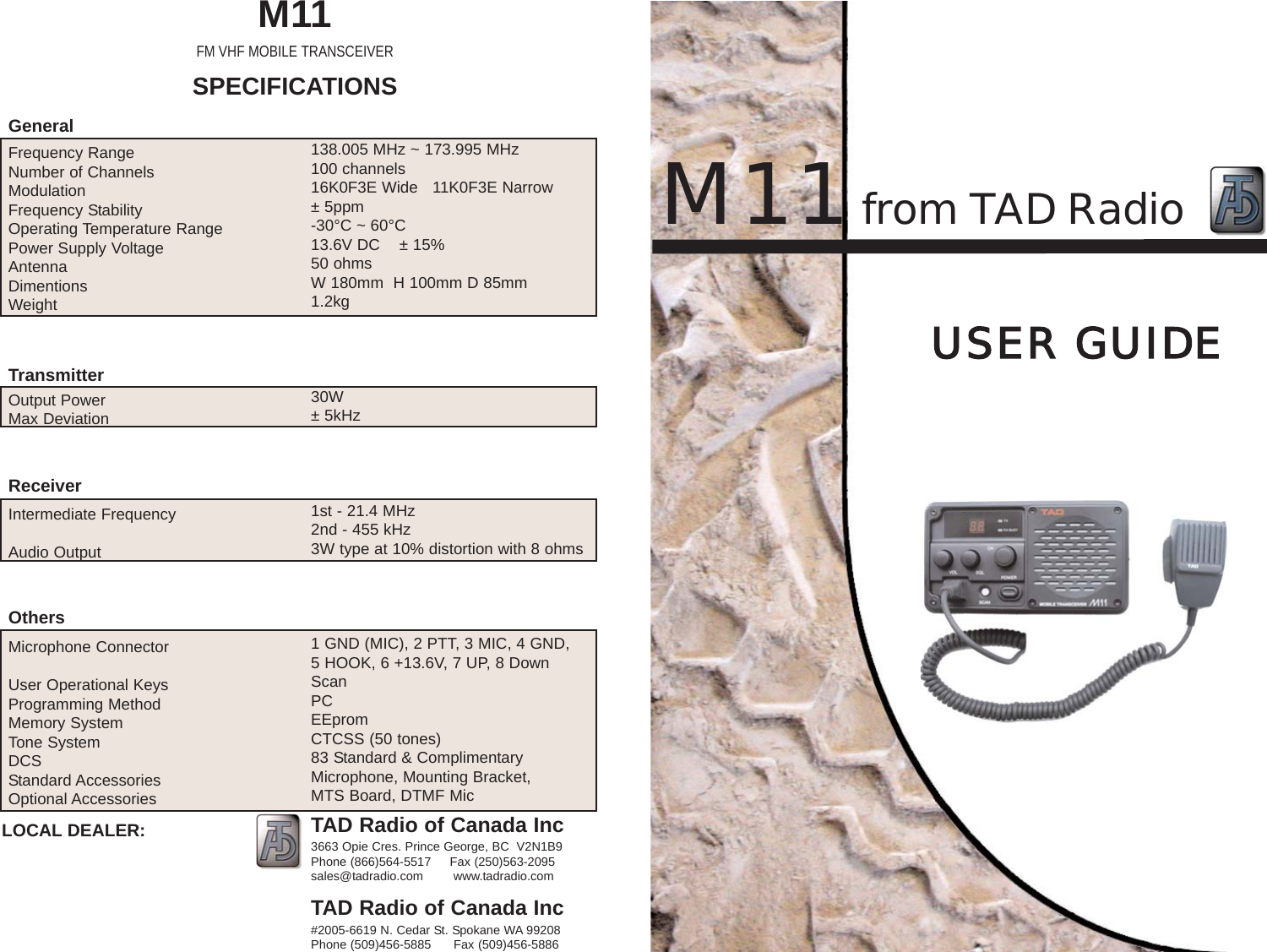
M11from TAD RadioUSER  GUIDEFrequency Range                         Number of Channels ModulationFrequency StabilityOperating Temperature RangePower Supply VoltageAntennaDimentionsWeight Output PowerMax DeviationIntermediate FrequencyAudio OutputMicrophone ConnectorUser Operational KeysProgramming MethodMemory SystemTone SystemDCSStandard AccessoriesOptional Accessories  138.005 MHz ~ 173.995 MHz100 channels16K0F3E Wide   11K0F3E Narrow± 5ppm-30°C ~ 60°C13.6V DC    ± 15%50 ohmsW 180mm  H 100mm D 85mm1.2kg30W± 5kHz1st - 21.4 MHz2nd - 455 kHz3W type at 10% distortion with 8 ohms1 GND (MIC), 2 PTT, 3 MIC, 4 GND, 5 HOOK, 6 +13.6V, 7 UP, 8 DownScanPCEEpromCTCSS (50 tones)83 Standard & ComplimentaryMicrophone, Mounting Bracket, MTS Board, DTMF MicM11FM VHF MOBILE TRANSCEIVERSPECIFICATIONSGeneralOthersReceiverTransmitterTAD Radio of Canada Inc3663 Opie Cres. Prince George, BC  V2N1B9Phone (866)564-5517     Fax (250)563-2095sales@tadradio.com        www.tadradio.comTAD Radio of Canada Inc#2005-6619 N. Cedar St. Spokane WA 99208Phone (509)456-5885      Fax (509)456-5886LOCAL DEALER:
SAFETYCAUTION DO NOT operate the transmitter of anyradio unless al RF connectors are secure and any openconnectors are properly terminated.CAUTION DO NOT operate the radio near electricalblasting caps or in an explosive atmosphere.CAUTION All equipment must be properly groundedfor safe operation.CAUTION DO NOT operate the transceiver of anyradio equipment with the antenna touching or close to,the eyes, faces, or exposed body parts. WARNING DO NOT allow children to operate radioWARNING All equipment should be serviced by a qualifiedtechnician.CAUTION   Some electronic fuel injection, anti-lockbreaking systems, cruise controls, and vehicle alarmsmay be subject to interference from radio frequency (RF)energy or may malfunction due to a lack of protectionfrom RF energy. If the vehicle contains such equipment,consult your communications dealer for assistance oradvice in determining whether the electronic equipmentin the vehicle will operate properly when the radio istransmitting.~5~
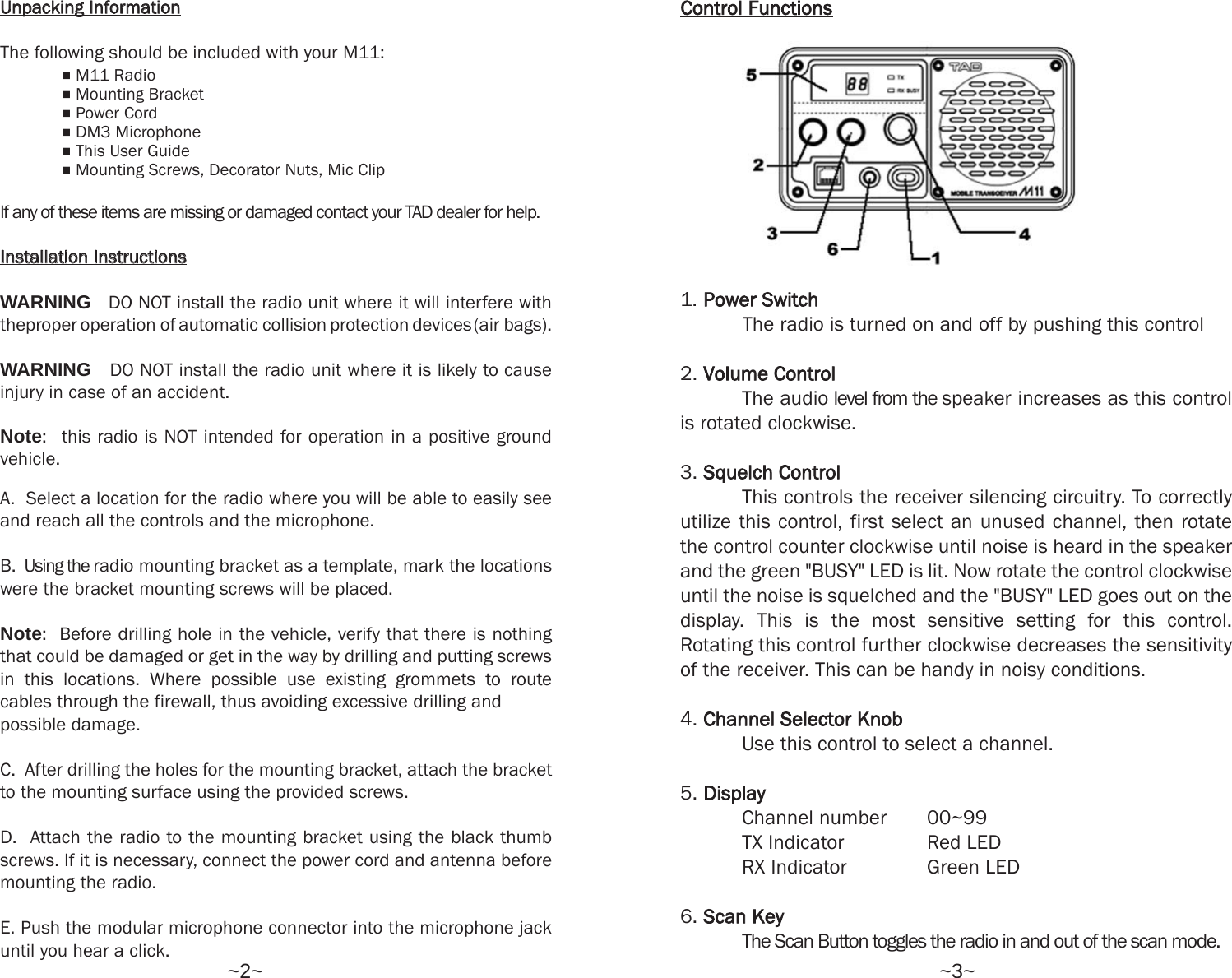
1. Power  SwitchThe radio is turned on and off by pushing this control2. Volume  ControlThe audio level from the speaker increases as this controlis rotated clockwise.3. Squelch  ControlThis controls the receiver silencing circuitry. To correctlyutilize this control, first select an unused channel, then rotatethe control counter clockwise until noise is heard in the speakerand the green "BUSY" LED is lit. Now rotate the control clockwiseuntil the noise is squelched and the "BUSY" LED goes out on thedisplay. This is the most sensitive setting for this control.Rotating this control further clockwise decreases the sensitivityof the receiver. This can be handy in noisy conditions. 4. Channel  Selector  KnobUse this control to select a channel.5. DisplayChannel number  00~99TX Indicator Red LEDRX Indicator Green LED6. Scan  KeyThe Scan Button toggles the radio in and out of the scan mode.Control  Functions~2~ ~3~UUnnppaacckkiinngg  IInnffoorrmmaattiioonnThe following should be included with your M11:eM11 RadioeMounting BracketePower CordeDM3 MicrophoneeThis User GuideeMounting Screws, Decorator Nuts, Mic ClipIf any of these items are missing or damaged contact your TAD dealer for help.IInnssttaallllaattiioonn  IInnssttrruuccttiioonnssWARNING DO NOT install the radio unit where it will interfere withtheproper operation of automatic collision protection devices(air bags).WARNING DO NOT install the radio unit where it is likely to causeinjury in case of an accident.Note: this radio is NOT intended for operation in a positive groundvehicle.A.  Select a location for the radio where you will be able to easily seeand reach all the controls and the microphone.B. Using the radio mounting bracket as a template, mark the locationswere the bracket mounting screws will be placed.Note:  Before drilling hole in the vehicle, verify that there is nothingthat could be damaged or get in the way by drilling and putting screwsin this locations. Where possible use existing grommets to routecables through the firewall, thus avoiding excessive drilling and possible damage.C.  After drilling the holes for the mounting bracket, attach the bracketto the mounting surface using the provided screws.D.  Attach the radio to the mounting bracket using the black thumbscrews. If it is necessary, connect the power cord and antenna beforemounting the radio.E. Push the modular microphone connector into the microphone jackuntil you hear a click.
Thank you for purchasing the M11 mobile radio. We here at TAD  Radio  of  Canada, distributor and designer of professionaltwo-way radios, are confident that you will be pleased with theM11-VHF. It will provide you with dependable, trouble-freecommunications for years to come.IMPORTANTPlease read all instructions thoroughlybefore operating unit.INTRODUCTIONThe M11 is capable of 100 channels. Your dealer has the optionof designating different frequencies in each channel of the radiofor you.  The M11 covers 138-174 MHz without having to beretuned. It has a numeric display for the channel numbers. Thenew configuration makes installing the M11 quicker. For informationon the M11 functions, please read this brochure in full.You must purchase an antenna for proper operation of the radio. Consultyour radio communications dealer to determine which antenna is suitable,and where is the best location for installing the antenna.~1~~4~FFCCCC  EExxppoossuurree  CCoommpplliiaannccee  RReeqquuiirreemmeennttss  ffoorr  OOccccuuppaattiioonnaall  UUssee  OOnnllyyThe Federal Communications Commission (FCC), with its action in generalDocket 9362, November 7, 1997, has adopted a safety standard forhuman exposure to Radio Frequency (RF) electromagnetic e energyemitted by FCC regulated equipment. TAD Radio of Canada subscribesto the same safety standard for the use of its products. Proper operationof this radio will result in user exposure far below the OccupationalSafety and Health Act (OHSA) and Federal CommunicationsCommission limits.Antennas used for this transmitter must not exceed an antenna gainof 3 Bd. The radio must be used in vehicle-mount configurations witha maximum operation duty factor not exceeding 50%, in typical push-to-talkconfigurations. This radio is NOT approved for use by the general populationin an uncontrolled environment. This radio is restricted to occupationaluse, work related operations only where radio operator must have theknowledge to control the exposure conditions of its passengers andbystanders by maintaining the minimum separation distance of 1.37meters (4.5 feet) between any persons on the antenna. Failure toabserve these restrictions will result in exceeding the FCC RF exposurelimits.CAUTION DO NOT transmit for mote than 50% of total radio usetime (50% duty cycle). Transmitting more than 50% of the time cancause FCC RF exposure compliance requirements to be exceeded. Theradio is transmitting when the "red" LED on the front of the radio is illuminated. You can cause the radio to transmit by pressing the P-T-Tbutton on the radio's microphone.CAUTION DO NOT operate the transmitter of the M11 when some-one (bystanders) outside the vehicle is within 1.37 meters (4.5 feet) ofthe antenna.NNOOTTEE: This radio operates in FCC regulated frequency bands. All radiosmust be licensed by the FCC before use. Because this radio containsa transmitter, Federal law prohibits unauthorized use or adjustmentsof this radio.This device complies with Part 15 of the FCC Rules. Operation is subjectto the condition that this device does not cause harmful interference.

Navigation menu