Tekelek Europe 750 Liquid level ultrasonic tank sensor User Manual

Tekelek Europe Ltd Liquid level ultrasonic tank sensor

User manual

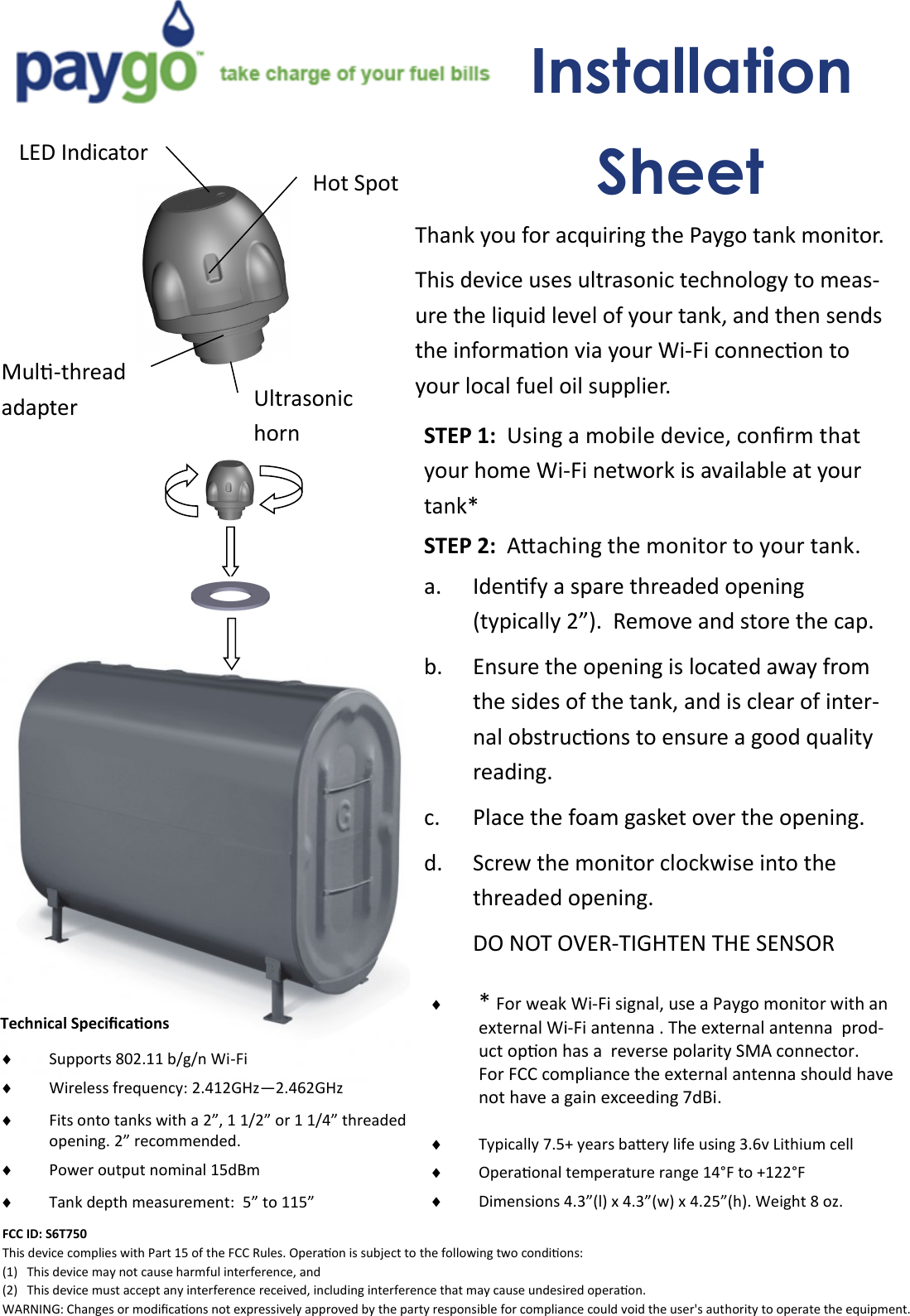
Installation Sheet LED Indicator Hot Spot Mul-thread adapter Ultrasonic horn STEP 1:  Using a mobile device, conrm that your home Wi-Fi network is available at your tank* STEP 2:  Aaching the monitor to your tank. a. Idenfy a spare threaded opening (typically 2”).  Remove and store the cap. b. Ensure the opening is located away from the sides of the tank, and is clear of inter-nal obstrucons to ensure a good quality reading. c. Place the foam gasket over the opening. d. Screw the monitor clockwise into the threaded opening.   DO NOT OVER-TIGHTEN THE SENSOR Thank you for acquiring the Paygo tank monitor. This device uses ultrasonic technology to meas-ure the liquid level of your tank, and then sends the informaon via your Wi-Fi connecon to your local fuel oil supplier. Technical Specicaons   Supports 802.11 b/g/n Wi-Fi   Wireless frequency: 2.412GHz—2.462GHz   Fits onto tanks with a 2”, 1 1/2” or 1 1/4” threaded opening. 2” recommended.   Power output nominal 15dBm   Tank depth measurement:  5” to 115”    Typically 7.5+ years baery life using 3.6v Lithium cell   Operaonal temperature range 14°F to +122°F   Dimensions 4.3”(l) x 4.3”(w) x 4.25”(h). Weight 8 oz.   * For weak Wi-Fi signal, use a Paygo monitor with an external Wi-Fi antenna . The external antenna  prod-uct opon has a  reverse polarity SMA connector.   For FCC compliance the external antenna should have not have a gain exceeding 7dBi. FCC ID: S6T750 This device complies with Part 15 of the FCC Rules. Operaon is subject to the following two condions: (1)   This device may not cause harmful interference, and (2)   This device must accept any interference received, including interference that may cause undesired operaon. WARNING: Changes or modicaons not expressively approved by the party responsible for compliance could void the user's authority to operate the equipment.
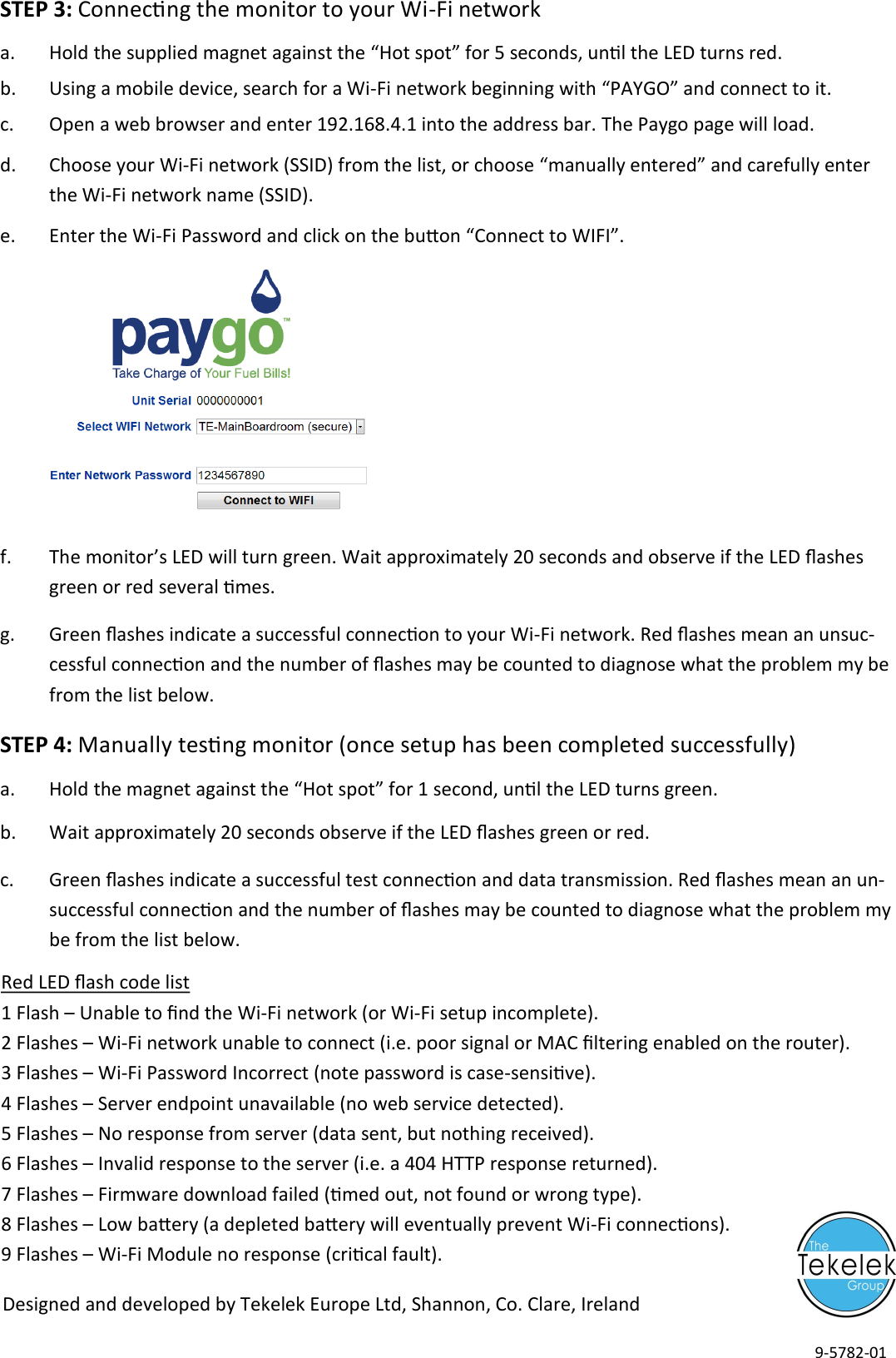
STEP 3: Connecng the monitor to your Wi-Fi network a. Hold the supplied magnet against the “Hot spot” for 5 seconds, unl the LED turns red. b. Using a mobile device, search for a Wi-Fi network beginning with “PAYGO” and connect to it. c. Open a web browser and enter 192.168.4.1 into the address bar. The Paygo page will load.  d. Choose your Wi-Fi network (SSID) from the list, or choose “manually entered” and carefully enter the Wi-Fi network name (SSID). e. Enter the Wi-Fi Password and click on the buon “Connect to WIFI”.       f. The monitor’s LED will turn green. Wait approximately 20 seconds and observe if the LED ashes green or red several mes. g. Green ashes indicate a successful connecon to your Wi-Fi network. Red ashes mean an unsuc-cessful connecon and the number of ashes may be counted to diagnose what the problem my be from the list below. STEP 4: Manually tesng monitor (once setup has been completed successfully) a. Hold the magnet against the “Hot spot” for 1 second, unl the LED turns green. b. Wait approximately 20 seconds observe if the LED ashes green or red. c. Green ashes indicate a successful test connecon and data transmission. Red ashes mean an un-successful connecon and the number of ashes may be counted to diagnose what the problem my be from the list below. Red LED ash code list 1 Flash – Unable to nd the Wi-Fi network (or Wi-Fi setup incomplete). 2 Flashes – Wi-Fi network unable to connect (i.e. poor signal or MAC ltering enabled on the router). 3 Flashes – Wi-Fi Password Incorrect (note password is case-sensive). 4 Flashes – Server endpoint unavailable (no web service detected). 5 Flashes – No response from server (data sent, but nothing received). 6 Flashes – Invalid response to the server (i.e. a 404 HTTP response returned). 7 Flashes – Firmware download failed (med out, not found or wrong type). 8 Flashes – Low baery (a depleted baery will eventually prevent Wi-Fi connecons). 9 Flashes – Wi-Fi Module no response (crical fault). Designed and developed by Tekelek Europe Ltd, Shannon, Co. Clare, Ireland 9-5782-01

Navigation menu