Telcare TELCBGM02 CDMA 2000 1X BLOOD GLUCOSE METER User Manual

Telcare, Inc. CDMA 2000 1X BLOOD GLUCOSE METER

User Manual

TELCARE™ Blood Glucose Monitoring SystemTELCARE™ Blood Glucose  Monitoring SystemUser Manual
TELCARE™ Blood Glucose Monitoring Systeme TELCARE™ Blood Glucose Monitoring system is intended for the quantitative measurement of glucose in fresh capillary whole blood samples drawn from the ngertips, forearm, or palm. It is intended for lay use by persons with diabetes to aid in diabetes management. It is indicated for use at home (over the counter [OTC]) and should be used only by a single patient and should not be shared. Test results are plasma-calibrated for easy comparison to clinical laboratory methods. Testing is done outside the body (in vitro diagnostic use). e TELCARE™ Blood Glucose Monitoring System consists of the Telcare BGM™ Blood Glucose Meter, TELCARE™ Blood Glucose Test Strips, and TELCARE™ Glucose Control Solutions. e TELCARE™ Blood Glucose Monitoring system is not indicated for the diagnosis or screening of diabetes or for neonatal use. Palm and forearm testing should be done only during steady-state times when glucose is not changing rapidly. e Telcare BGM™ Blood Glucose Meter uses cellular data transmission to send test results to TELCARE™’s remote database, Telserve, and to receive messages from Telserve. e TELCARE™ Blood Glucose Monitoring System is not intended to provide automated treatment guidance or decisions, nor is it to be used as a substitute for professional healthcare judgment. Intended Use(i)
TELCARE™ Blood Glucose Monitoring Systeme TELCARE™ Blood Glucose Monitoring System and lancing device is for single patient use. Do not share it with anyone, including family members! Do not use on multiple patients!Because all parts of the kit may come in contact with your blood, all parts are considered biohazardous. Kit parts can potentially transmit infectious diseases, even aer cleaning and disinfection.Users should wash hands thoroughly with soap and water and dry thoroughly aer handling the meter, test strips, and any lancing device.For Cleaning and Disinfecting procedures to prevent the spread of diseases such as Hepatitis B, see Cleaning and Disinfecting Your Meter (pg. 31).For Technical Support contact TELCARE™ at (888) 666-4530. Hours of Operation: Monday - Friday, 9AM - 5PM ESTReferences“FDA Public Health Notication: Use of Fingerstick Devices on More than One Person Poses Risk for Transmitting Blood-borne Pathogens: Initial Communication” (2010) http://www.fda.gov/MedicalDevices/Safety/AlertsandNotices/ucm224025.htm“CDC Clinical Reminder: Use of Fingerstick Devices on More than One Person Poses Risk for Transmitting Bloodborne Pathogens” (2010) http://www.cdc.gov/injectionsafety/Fingerstick-DevicesBGM.html“Protection of Laboratory Workers from Occupationally Acquired Infections; Approved Guideline–ird Edition. Clinical and Laboratory Standards Institute (CLSI), document M29-A3, (ISBN 1-56238-567-4).  Important Safety Instructions(ii)
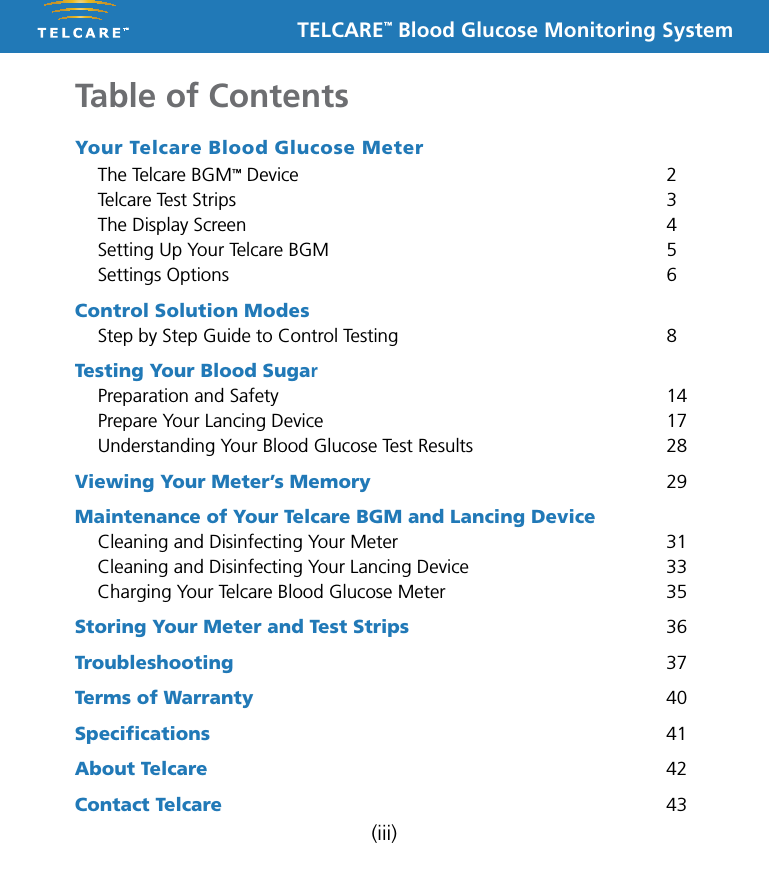
TELCARE™ Blood Glucose Monitoring System(iii)Your Telcare Blood Glucose Meter  The Telcare BGM™ Device  2  Telcare Test Strips  3  The Display Screen  4  Setting Up Your Telcare BGM  5  Settings Options  6Control Solution Modes Step by Step Guide to Control Testing  8Testing Your Blood Sugar  Preparation and Safety  14  Prepare Your Lancing Device  17  Understanding Your Blood Glucose Test Results  28Viewing Your Meter’s Memory 29Maintenance of Your Telcare BGM and Lancing Device  Cleaning and Disinfecting Your Meter  31  Cleaning and Disinfecting Your Lancing Device  33  Charging Your Telcare Blood Glucose Meter  35Storing Your Meter and Test Strips 36Troubleshooting 37Terms of Warranty 40Specifications 41About Telcare 42Contact Telcare 43Table of Contents
TELCARE™ Blood Glucose Monitoring System1Unboxing the Telcare BGM™ for the first timeBefore we begin, take a moment to go over the contents of your Telcare BGM kit. Your kit should include:n Telcare BGM™ Blood Glucose Meter (battery included)n AC Chargern Instruction Manualn Telcare Test Strips (10)n Telcare Glucose Control Solutionn Lancing Devicen LancetsMake sure you charge your glucose meter for at least 12 hours before first use. To charge your glucose meter, use the AC Charger included in your kit.You should use the Telcare BGM for:n Testing blood glucose.n Testing only with fresh capillary whole blood samples.You should NOT use the Telcare BGM for:n The diagnosis of diabetes.n Testing blood glucose on newborns.n Testing of arterial blood.n Testing of venous blood.Your Telcare Blood Glucose Meter
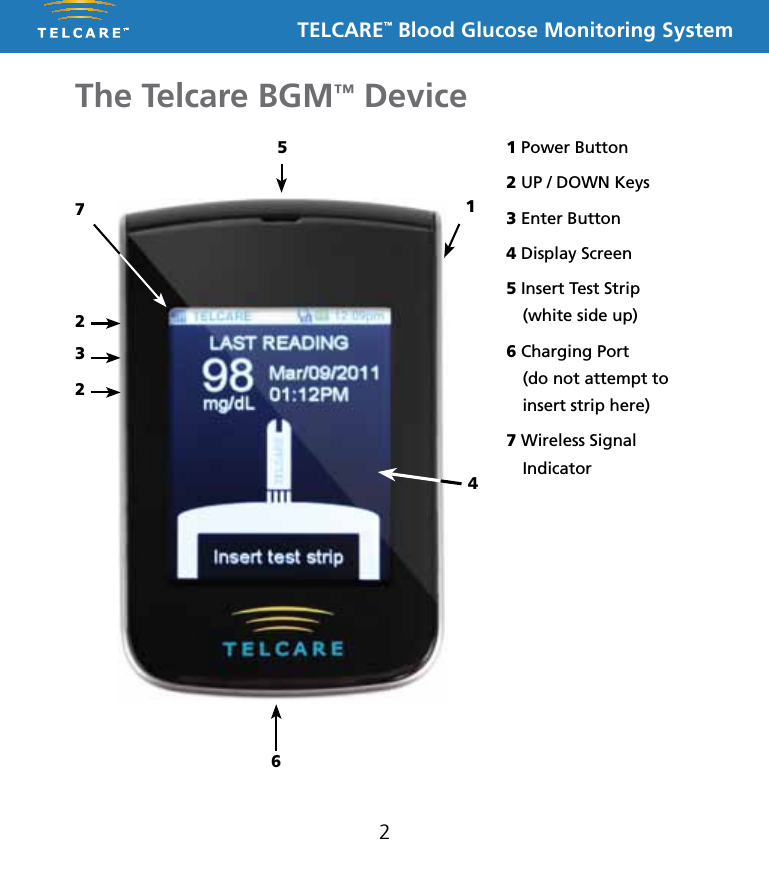
TELCARE™ Blood Glucose Monitoring System2The Telcare BGM™ Device265711 Power Button2 UP / DOWN Keys3 Enter Button4 Display Screen5 Insert Test Strip  (white side up)6 Charging Port  (do not attempt to insert strip here)7 Wireless Signal Indicator234
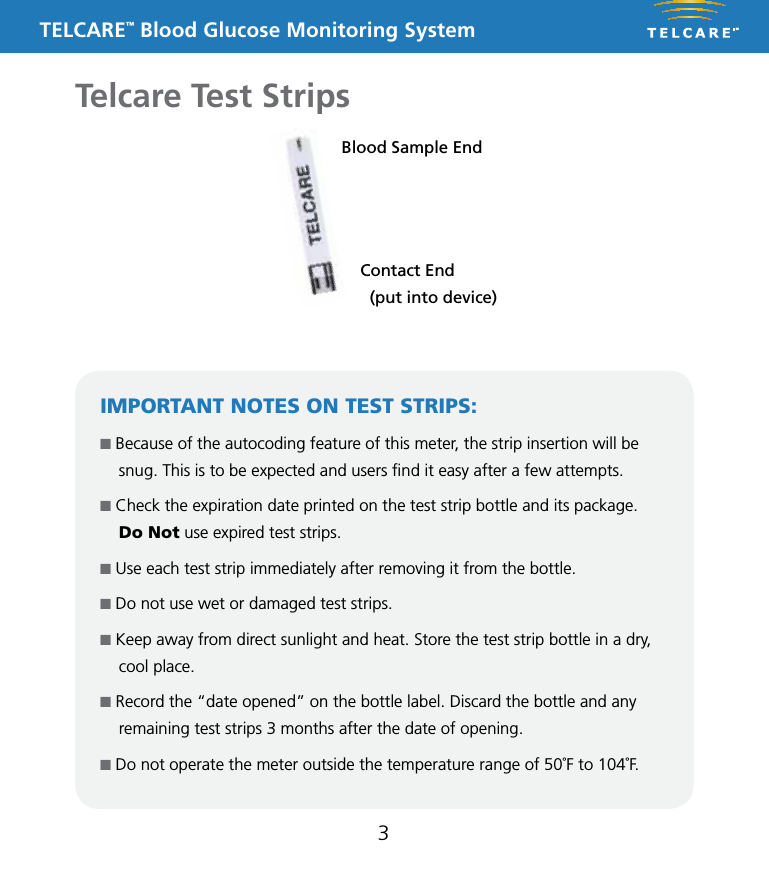
TELCARE™ Blood Glucose Monitoring System3Telcare Test StripsBlood Sample EndContact End   (put into device)IMPORTANT NOTES ON TEST STRIPS:n Because of the autocoding feature of this meter, the strip insertion will be snug. This is to be expected and users find it easy after a few attempts.  n Check the expiration date printed on the test strip bottle and its package.  Do Not use expired test strips.n Use each test strip immediately after removing it from the bottle.n Do not use wet or damaged test strips.n Keep away from direct sunlight and heat. Store the test strip bottle in a dry, cool place.n Record the “date opened” on the bottle label. Discard the bottle and any remaining test strips 3 months after the date of opening.n Do not operate the meter outside the temperature range of 50˚F to 104˚F.
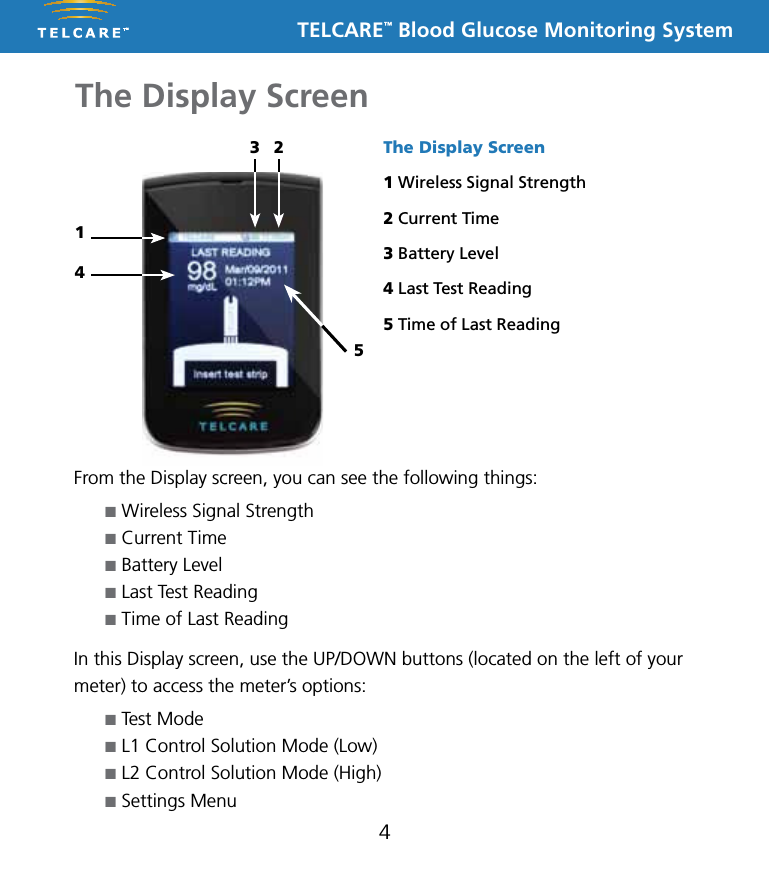
TELCARE™ Blood Glucose Monitoring SystemThe Display Screen4From the Display screen, you can see the following things:n Wireless Signal Strengthn Current Timen Battery Leveln Last Test Readingn Time of Last ReadingIn this Display screen, use the UP/DOWN buttons (located on the left of your meter) to access the meter’s options:n Test Moden L1 Control Solution Mode (Low)n L2 Control Solution Mode (High)n Settings MenuThe Display Screen1 Wireless Signal Strength2 Current Time3 Battery Level4 Last Test Reading5 Time of Last Reading3 2145
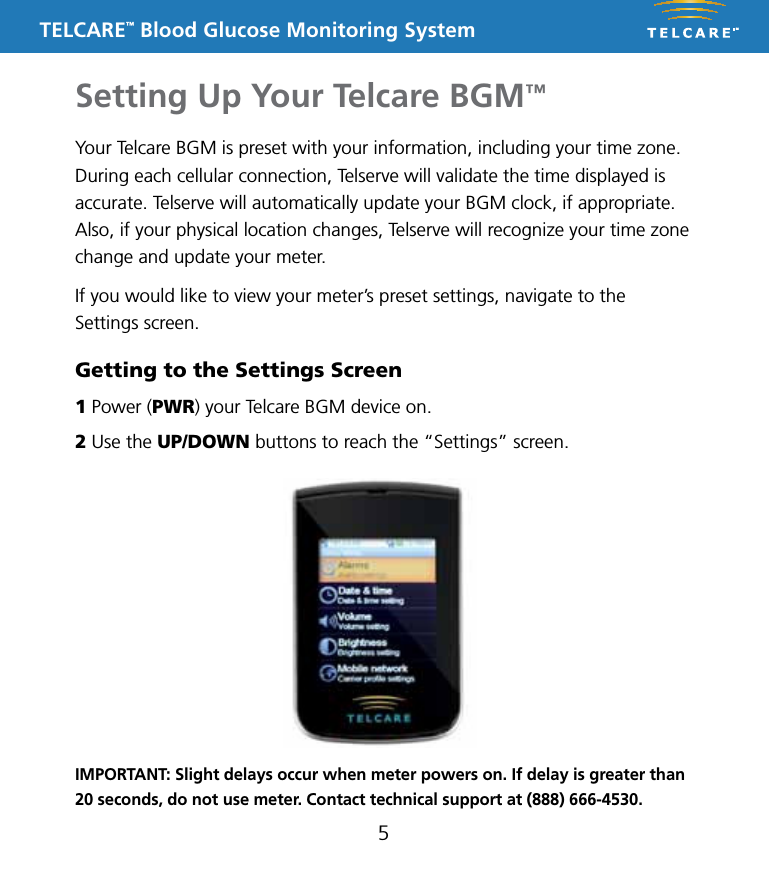
TELCARE™ Blood Glucose Monitoring SystemSetting Up Your Telcare BGM™5Your Telcare BGM is preset with your information, including your time zone. During each cellular connection, Telserve will validate the time displayed is accurate. Telserve will automatically update your BGM clock, if appropriate. Also, if your physical location changes, Telserve will recognize your time zone change and update your meter.If you would like to view your meter’s preset settings, navigate to the Settings screen.Getting to the Settings Screen1 Power (PWR) your Telcare BGM device on.2 Use the UP/DOWN buttons to reach the “Settings” screen.IMPORTANT: Slight delays occur when meter powers on. If delay is greater than 20 seconds, do not use meter. Contact technical support at (888) 666-4530.
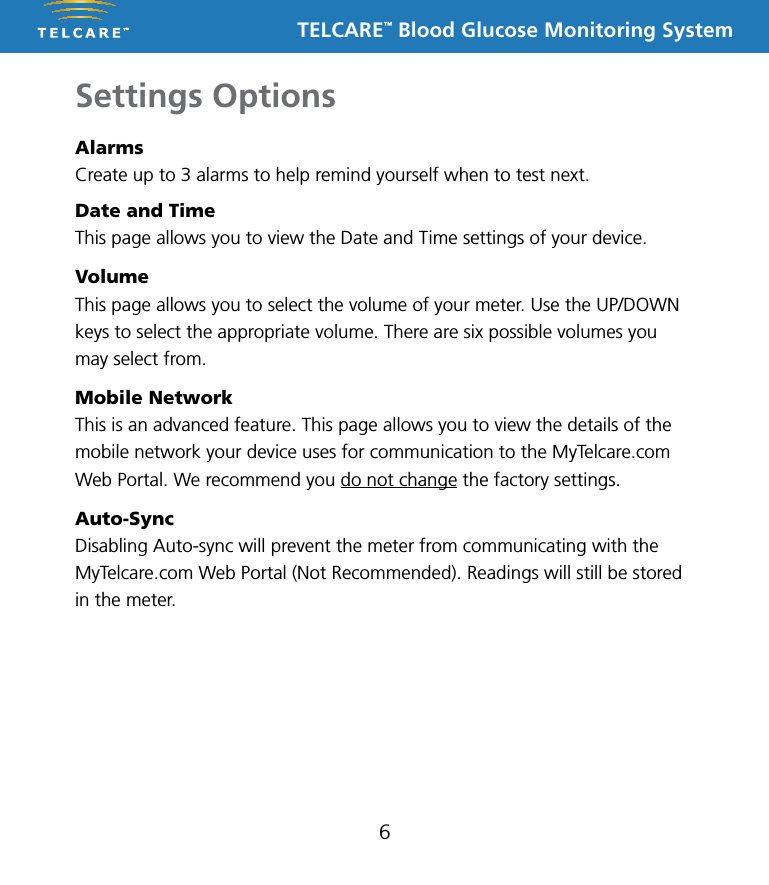
TELCARE™ Blood Glucose Monitoring System6Settings OptionsAlarmsCreate up to 3 alarms to help remind yourself when to test next.Date and TimeThis page allows you to view the Date and Time settings of your device.VolumeThis page allows you to select the volume of your meter. Use the UP/DOWN keys to select the appropriate volume. There are six possible volumes you may select from. Mobile NetworkThis is an advanced feature. This page allows you to view the details of the mobile network your device uses for communication to the MyTelcare.com Web Portal. We recommend you do not change the factory settings.Auto-SyncDisabling Auto-sync will prevent the meter from communicating with the MyTelcare.com Web Portal (Not Recommended). Readings will still be stored in the meter.
TELCARE™ Blood Glucose Monitoring System7Memory RecallYour last 300 glucose and control test readings are stored within the meter. Please see “Viewing Your Meter’s Memory” (page 29) for further details. To send a reading to MyTelcare.com, highlight it and push the Enter button. If a reading has already been stored on MyTelcare.com and you attempt to send it, an error will appear on screen.Airplane ModeTurning on Airplane Mode disables cellular network access. You will not be able to transmit your readings while Airplane Mode is turned on. Your meter’s clock will continue to work properly while in this mode. If a time zone change occurs, your meter will not automatically update to the new time until Airplane Mode has been disabled. The meter will reset the time from the new network.AboutThis screen provides a listing of current software and related information  about your meter. This is helpful if you need technical support.
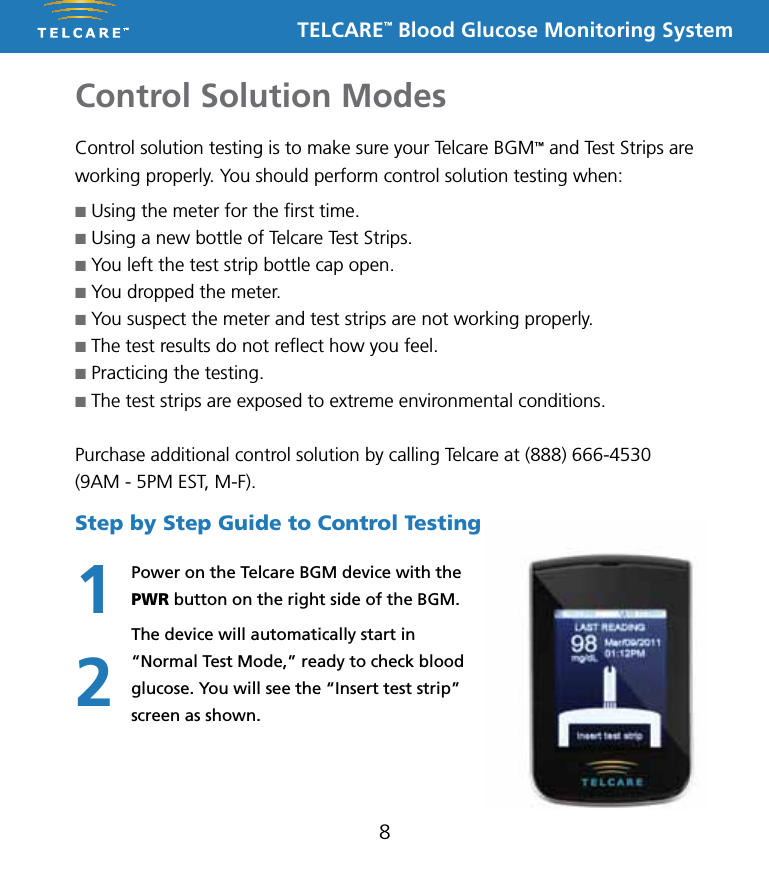
TELCARE™ Blood Glucose Monitoring SystemControl Solution Modes8Control solution testing is to make sure your Telcare BGM™ and Test Strips are working properly. You should perform control solution testing when:n Using the meter for the first time.n Using a new bottle of Telcare Test Strips.n You left the test strip bottle cap open.n You dropped the meter.n You suspect the meter and test strips are not working properly.n The test results do not reflect how you feel.n Practicing the testing.n The test strips are exposed to extreme environmental conditions.Purchase additional control solution by calling Telcare at (888) 666-4530 (9AM - 5PM EST, M-F).Step by Step Guide to Control TestingPower on the Telcare BGM device with the PWR button on the right side of the BGM.The device will automatically start in “Normal Test Mode,” ready to check blood glucose. You will see the “Insert test strip” screen as shown.12
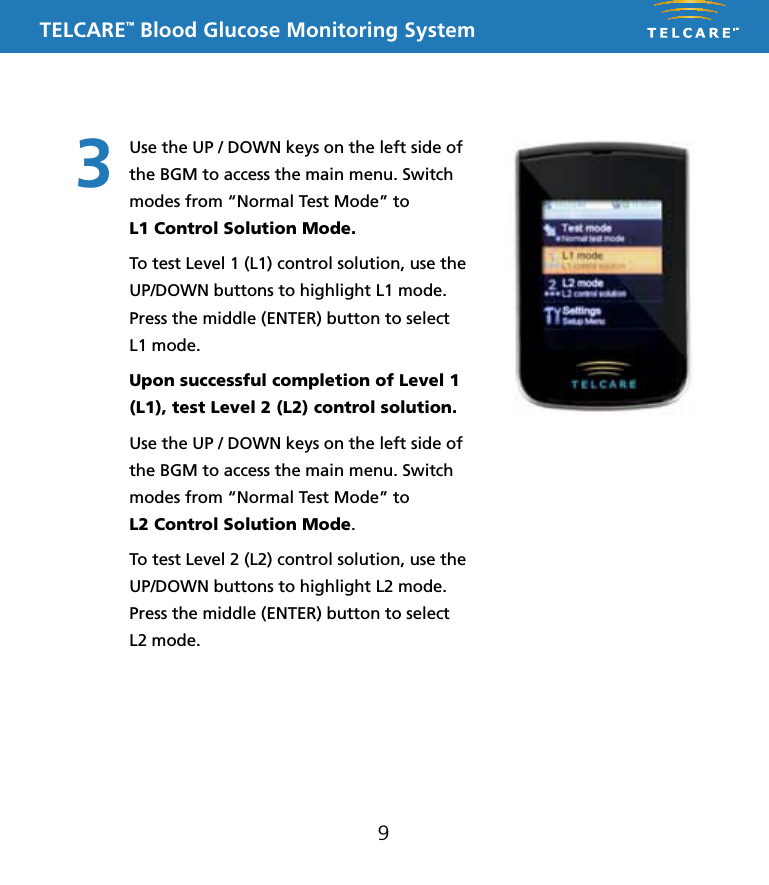
TELCARE™ Blood Glucose Monitoring System93Use the UP / DOWN keys on the left side of the BGM to access the main menu. Switch modes from “Normal Test Mode” to  L1 Control Solution Mode.To test Level 1 (L1) control solution, use the UP/DOWN buttons to highlight L1 mode. Press the middle (ENTER) button to select  L1 mode. Upon successful completion of Level 1 (L1), test Level 2 (L2) control solution.Use the UP / DOWN keys on the left side of the BGM to access the main menu. Switch modes from “Normal Test Mode” to  L2 Control Solution Mode.To test Level 2 (L2) control solution, use the UP/DOWN buttons to highlight L2 mode. Press the middle (ENTER) button to select L2 mode.
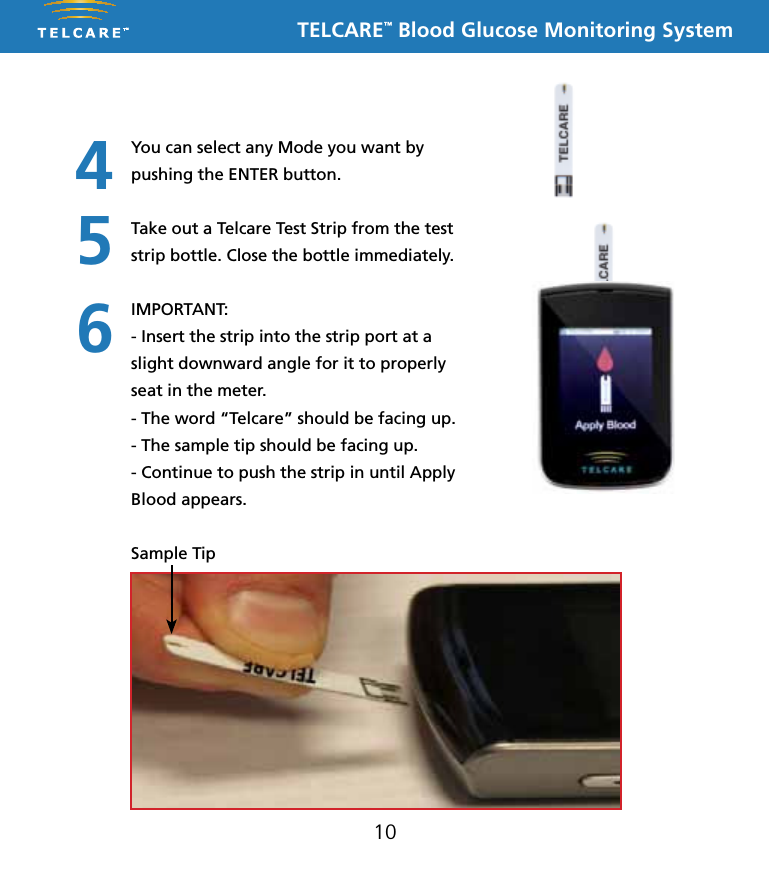
TELCARE™ Blood Glucose Monitoring System10You can select any Mode you want by pushing the ENTER button. Take out a Telcare Test Strip from the test strip bottle. Close the bottle immediately.IMPORTANT:- Insert the strip into the strip port at a slight downward angle for it to properly seat in the meter. - The word “Telcare” should be facing up.- The sample tip should be facing up.- Continue to push the strip in until Apply Blood appears. Sample Tip456
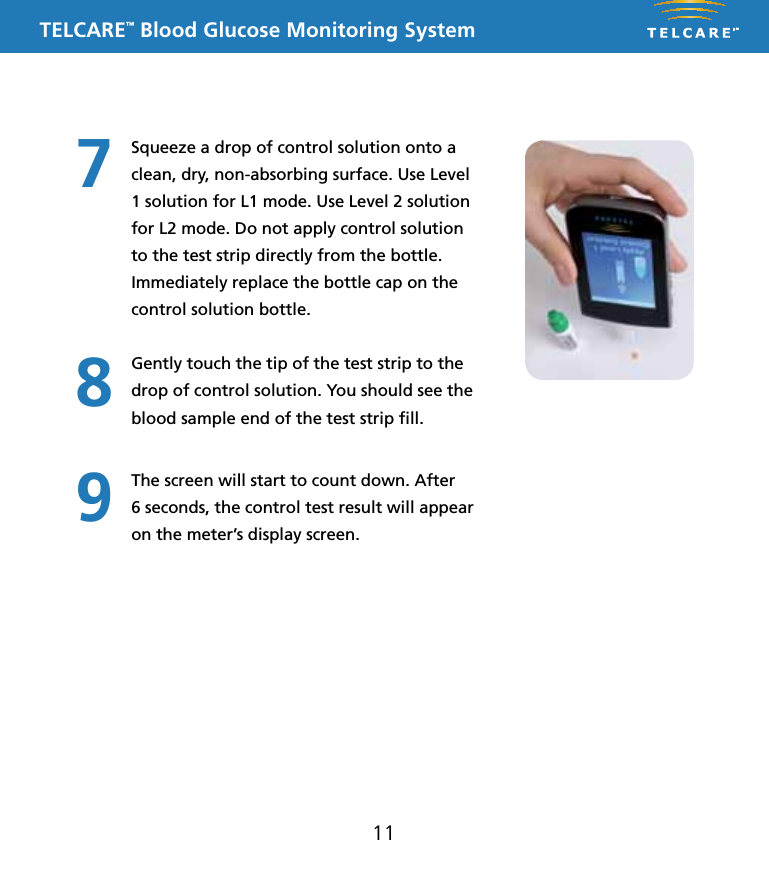
TELCARE™ Blood Glucose Monitoring System11Squeeze a drop of control solution onto a clean, dry, non-absorbing surface. Use Level 1 solution for L1 mode. Use Level 2 solution for L2 mode. Do not apply control solution to the test strip directly from the bottle. Immediately replace the bottle cap on the control solution bottle.Gently touch the tip of the test strip to the drop of control solution. You should see the blood sample end of the test strip fill.The screen will start to count down. After  6 seconds, the control test result will appear on the meter’s display screen.789
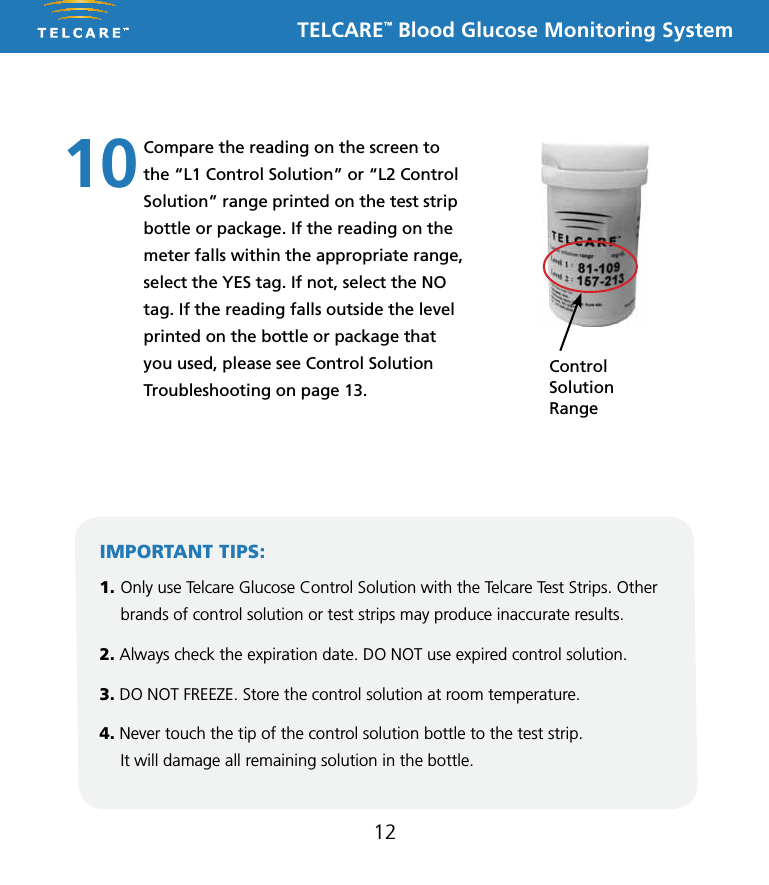
TELCARE™ Blood Glucose Monitoring System12Compare the reading on the screen to the “L1 Control Solution” or “L2 Control Solution” range printed on the test strip bottle or package. If the reading on the meter falls within the appropriate range, select the YES tag. If not, select the NO tag. If the reading falls outside the level printed on the bottle or package that you used, please see Control Solution Troubleshooting on page 13.10IMPORTANT TIPS:1. Only use Telcare Glucose Control Solution with the Telcare Test Strips. Other brands of control solution or test strips may produce inaccurate results.2. Always check the expiration date. DO NOT use expired control solution.3. DO NOT FREEZE. Store the control solution at room temperature.4. Never touch the tip of the control solution bottle to the test strip.  It will damage all remaining solution in the bottle.Control  Solution  Range
TELCARE™ Blood Glucose Monitoring System13Control Solution TroubleshootingIf your control solution testing is out of range (too high or too low),  it may be caused by the following:n Wrong brand of control solution.n Control solution not at room temperature.n Expired or contaminated control solution.n Damaged test strip.n Touched the tip of solution bottle to test strip.n Meter malfunction.n Wrong ambient temperature (should be between 50˚F and 104˚F).n Check the expiration date and open bottle date on the control solution and on the test strips. Repeat testing using a new test strip. If the result is still out of range, use a new bottle of control solution and retest.If the problem persists, turn your meter off and then call TELCARE™ at (888) 666-4530. Do not perform any blood glucose tests until you resolve this issue.
TELCARE™ Blood Glucose Monitoring SystemTesting Your Blood Sugar14n Set up your Telcare BGM™ Blood Glucose Meter properly. Run a control test before first use. (See Step by Step Guide to Control Testing on page 8.) n Wash your hands and testing site thoroughly with warm  water and soap. Dry your hands well.n Test in a place where the temperature range is between 50˚F and 104˚F. (See Troubleshooting on page 37 for more information.)You will need:n  Your Telcare BGM™ Blood Glucose Metern  A new Telcare Test Stripn A lancing device with a clean, unused lancet (or safety lancets)IMPORTANT:Inaccurate results may occur in severely hypotensive individuals or patients in shock. Inaccurate low results may occur for individuals experiencing a hyperglycemic hyperosmolar state, with or without ketosis. Critically ill patients should not be tested with blood glucose meters.Before you begin, make sure to:
TELCARE™ Blood Glucose Monitoring SystemImportant Safety Information Before Testing15n Please follow cleaning and disinfecting instructions for the meter (page 31) and lancing device (page 33) to prevent the risk of blood-borne pathogen transmission!n Follow any cleaning/disinfection instructions that may come with the lancing device you use.n The meter and lancing device are intended for a single user and should not be shared. n Make sure you wash and dry hands thoroughly with soap and water before and after handling the meter, lancing device, or test strips.
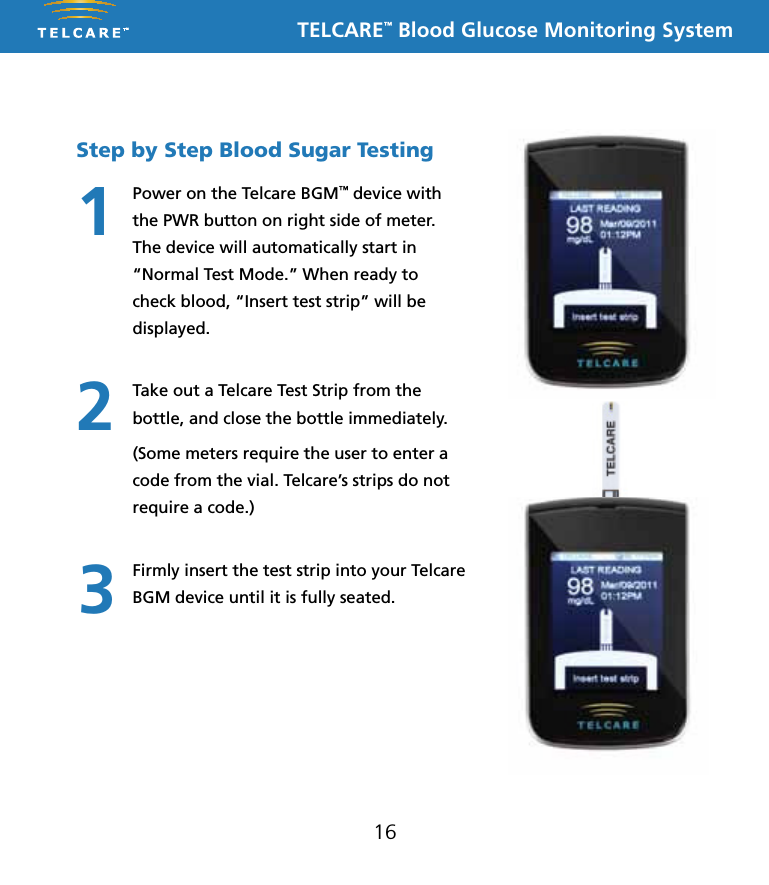
TELCARE™ Blood Glucose Monitoring System16Step by Step Blood Sugar TestingPower on the Telcare BGM™ device with the PWR button on right side of meter. The device will automatically start in “Normal Test Mode.” When ready to check blood, “Insert test strip” will be displayed.Take out a Telcare Test Strip from the bottle, and close the bottle immediately. (Some meters require the user to enter a code from the vial. Telcare’s strips do not require a code.)Firmly insert the test strip into your Telcare BGM device until it is fully seated.123
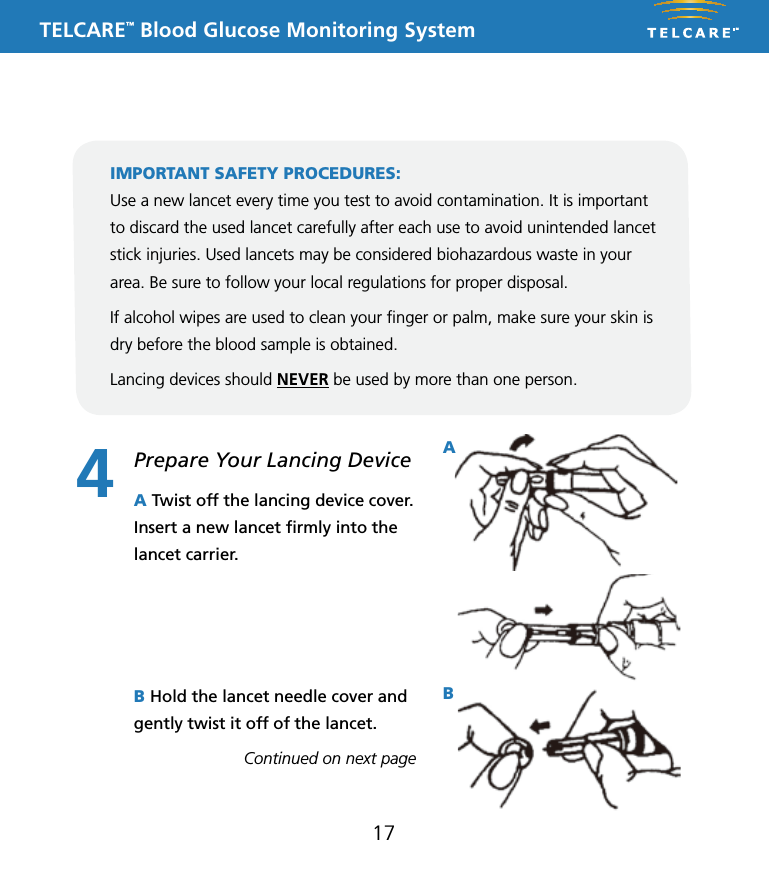
TELCARE™ Blood Glucose Monitoring SystemThis Lancing Device is used to obtain capillary whole blood samples needed for blood glucose monitoring or for other tests requiring one or two drops of blood. The Adjustable Tip on the Lancing Device allows you to choose the best depth of skin penetration. Use the CLEAR endcap for alternative site testing (AST) on the palm or forearm. Please see the blood glucose user guide before performing alternative site testing as it provides important information about the best testing site for your system. 5 Depth AdjustableLancing DeviceNote: The lancing device is intended for patient self-monitoring by a single person only. It must not be used to collect blood from more than one person as this poses an infection risk.Note: •  Keep Dispatch out of reach of children.•  User should wash hands thoroughly with soap and water after handling the lancing device.•  Only DISPATCH Hospital Cleaner Disinfectant Towel should be used to do cleaning and disinfection with the lancing device.Note:• Should not be used for assisted blood draws by healthcare providers or at healthcare provision sites*, and should never be shared with anyone else, even a family member..• Always use a new lancet with each test.• Keep your lancing device clean.Note:   DO NOT re-use the LancetInserting a LancetRemoving and disposing of the used lancetTo clean the Lancing Device:Wash your hands and puncture site with soap and warm water. Rinse and dry thoroughly.Twist off the Lancing Device CoverInsert a new Lance firmly into the Lancet CarrierHold the Lancet Needle Cover and gently twist off of the LancetThe Adjustable Tip offers 5 levels of skin penetration. To select the desired depth, twist the Adjustable Tip in either direction until the number line up with the Arrow.Replace the Lancing Device CoverTo select the best depth:1-2 for soft or think skin3 for average skin4-5 for thick or calloused skin1 2 34 5 6Place the Lancing Device aside and wait a few seconds for a blood drop to form. To help form a blood drop, lower the hand to waist level and gently massage the finger from palm to fingertip.Position the end of the Adjust-able Comfort Tip against the side-tip of the finger. Press the Trigger Button, and then lift the Lancing Device away from the finger after the puncture is complete.7 8 9Hold the Lancing Device Cover in one hand. Using the other hand, slowly pull the Sliding Barrel away from the Lancing Device Cover. You will hear a click, indicating that the Lancet Carrier is locked into position. Release the Sliding Barrel to return it to its original position.To dispose the used Lancet safety, discard it into the appropriate sharps or biohazard container. 1011To remove the used Lancet from the Lancing Device, first twist off the Lancing Device Cover. While holding the Sliding Barrel., leave the Lancet in the Lancet Carrier and firmly stick the Lancet Needle into the Lancet Needle Cover (this will push down the Lancet Carrier). Gently remove the Lancet from the Lancet Carrier. Press the Trigger Button to release the Lancet Carrier. Replace the Lancing Device Cover.Cleaning and disinfection frequency: The lancing device should be clean and disinfected after every use by the individual patient. * Any setting where fingerstick procedures are performed, including assisted living or residential care facilities, skilled nursing facilities, clinics, health fairs, shelters, detention facilities, senior centers, schools, and camps.Equipment Needed: • Damp cloth or paper towel • DISPATCH: DISPATCH Hospital Cleaner Disinfectant Towels With Bleach are pre-moistened disposable towels for use in healthcare and other areas where control of cross contamination is required. 1. Inspect for blood, debris, dust, or lint anywhere on the lancing device.2. Clean or disinfect lancing device.3. To clean the lancing device and endcap, blood/body fluids must be thoroughly cleaned from surface and objects before disinfecting. Wipe surface with towel (DISPATCH) until completely wet. Allow to remain wet for one minute at room temperature (68-77˚F).4. To disinfect the lancing device allow 2 minutes contact at room temperature. Wipe dry or allow to air dry. Gross soil must be removed prior to disinfection.5. Wash hands with soap and water.P/N 65070000002    Rev.11/10AST Endcap (for palm or forearm)Manufactured for:Apex Biotechnology Corporation#7, Li Hsin V Rd., Hsinchu Science Park, Hsinchu, Taiwan, R.O.C.TEL: 1-877-979-5454        Website: www.apexbio.com17Prepare Your Lancing Device4This Lancing Device is used to obtain capillary whole blood samples needed for blood glucose monitoring or for other tests requiring one or two drops of blood. The Adjustable Tip on the Lancing Device allows you to choose the best depth of skin penetration. Use the CLEAR endcap for alternative site testing (AST) on the palm or forearm. Please see the blood glucose user guide before performing alternative site testing as it provides important information about the best testing site for your system. 5 Depth AdjustableLancing DeviceNote: The lancing device is intended for patient self-monitoring by a single person only. It must not be used to collect blood from more than one person as this poses an infection risk.Note: •  Keep Dispatch out of reach of children.•  User should wash hands thoroughly with soap and water after handling the lancing device.•  Only DISPATCH Hospital Cleaner Disinfectant Towel should be used to do cleaning and disinfection with the lancing device.Note:• Should not be used for assisted blood draws by healthcare providers or at healthcare provision sites*, and should never be shared with anyone else, even a family member..• Always use a new lancet with each test.• Keep your lancing device clean.Note:   DO NOT re-use the LancetInserting a LancetRemoving and disposing of the used lancetTo clean the Lancing Device:Wash your hands and puncture site with soap and warm water. Rinse and dry thoroughly.Twist off the Lancing Device CoverInsert a new Lance firmly into the Lancet CarrierHold the Lancet Needle Cover and gently twist off of the LancetThe Adjustable Tip offers 5 levels of skin penetration. To select the desired depth, twist the Adjustable Tip in either direction until the number line up with the Arrow.Replace the Lancing Device CoverTo select the best depth:1-2 for soft or think skin3 for average skin4-5 for thick or calloused skin1 2 34 5 6Place the Lancing Device aside and wait a few seconds for a blood drop to form. To help form a blood drop, lower the hand to waist level and gently massage the finger from palm to fingertip.Position the end of the Adjust-able Comfort Tip against the side-tip of the finger. Press the Trigger Button, and then lift the Lancing Device away from the finger after the puncture is complete.7 8 9Hold the Lancing Device Cover in one hand. Using the other hand, slowly pull the Sliding Barrel away from the Lancing Device Cover. You will hear a click, indicating that the Lancet Carrier is locked into position. Release the Sliding Barrel to return it to its original position.To dispose the used Lancet safety, discard it into the appropriate sharps or biohazard container. 1011To remove the used Lancet from the Lancing Device, first twist off the Lancing Device Cover. While holding the Sliding Barrel., leave the Lancet in the Lancet Carrier and firmly stick the Lancet Needle into the Lancet Needle Cover (this will push down the Lancet Carrier). Gently remove the Lancet from the Lancet Carrier. Press the Trigger Button to release the Lancet Carrier. Replace the Lancing Device Cover.Cleaning and disinfection frequency: The lancing device should be clean and disinfected after every use by the individual patient. * Any setting where fingerstick procedures are performed, including assisted living or residential care facilities, skilled nursing facilities, clinics, health fairs, shelters, detention facilities, senior centers, schools, and camps.Equipment Needed: • Damp cloth or paper towel • DISPATCH: DISPATCH Hospital Cleaner Disinfectant Towels With Bleach are pre-moistened disposable towels for use in healthcare and other areas where control of cross contamination is required. 1. Inspect for blood, debris, dust, or lint anywhere on the lancing device.2. Clean or disinfect lancing device.3. To clean the lancing device and endcap, blood/body fluids must be thoroughly cleaned from surface and objects before disinfecting. Wipe surface with towel (DISPATCH) until completely wet. Allow to remain wet for one minute at room temperature (68-77˚F).4. To disinfect the lancing device allow 2 minutes contact at room temperature. Wipe dry or allow to air dry. Gross soil must be removed prior to disinfection.5. Wash hands with soap and water.P/N 65070000002    Rev.11/10AST Endcap (for palm or forearm)Manufactured for:Apex Biotechnology Corporation#7, Li Hsin V Rd., Hsinchu Science Park, Hsinchu, Taiwan, R.O.C.TEL: 1-877-979-5454        Website: www.apexbio.comThis Lancing Device is used to obtain capillary whole blood samples needed for blood glucose monitoring or for other tests requiring one or two drops of blood. The Adjustable Tip on the Lancing Device allows you to choose the best depth of skin penetration. Use the CLEAR endcap for alternative site testing (AST) on the palm or forearm. Please see the blood glucose user guide before performing alternative site testing as it provides important information about the best testing site for your system. 5 Depth AdjustableLancing DeviceNote: The lancing device is intended for patient self-monitoring by a single person only. It must not be used to collect blood from more than one person as this poses an infection risk.Note: •  Keep Dispatch out of reach of children.•  User should wash hands thoroughly with soap and water after handling the lancing device.•  Only DISPATCH Hospital Cleaner Disinfectant Towel should be used to do cleaning and disinfection with the lancing device.Note:• Should not be used for assisted blood draws by healthcare providers or at healthcare provision sites*, and should never be shared with anyone else, even a family member..• Always use a new lancet with each test.• Keep your lancing device clean.Note:   DO NOT re-use the LancetInserting a LancetRemoving and disposing of the used lancetTo clean the Lancing Device:Wash your hands and puncture site with soap and warm water. Rinse and dry thoroughly.Twist off the Lancing Device CoverInsert a new Lance firmly into the Lancet CarrierHold the Lancet Needle Cover and gently twist off of the LancetThe Adjustable Tip offers 5 levels of skin penetration. To select the desired depth, twist the Adjustable Tip in either direction until the number line up with the Arrow.Replace the Lancing Device CoverTo select the best depth:1-2 for soft or think skin3 for average skin4-5 for thick or calloused skin1 2 34 5 6Place the Lancing Device aside and wait a few seconds for a blood drop to form. To help form a blood drop, lower the hand to waist level and gently massage the finger from palm to fingertip.Position the end of the Adjust-able Comfort Tip against the side-tip of the finger. Press the Trigger Button, and then lift the Lancing Device away from the finger after the puncture is complete.7 8 9Hold the Lancing Device Cover in one hand. Using the other hand, slowly pull the Sliding Barrel away from the Lancing Device Cover. You will hear a click, indicating that the Lancet Carrier is locked into position. Release the Sliding Barrel to return it to its original position.To dispose the used Lancet safety, discard it into the appropriate sharps or biohazard container. 1011To remove the used Lancet from the Lancing Device, first twist off the Lancing Device Cover. While holding the Sliding Barrel., leave the Lancet in the Lancet Carrier and firmly stick the Lancet Needle into the Lancet Needle Cover (this will push down the Lancet Carrier). Gently remove the Lancet from the Lancet Carrier. Press the Trigger Button to release the Lancet Carrier. Replace the Lancing Device Cover.Cleaning and disinfection frequency: The lancing device should be clean and disinfected after every use by the individual patient. * Any setting where fingerstick procedures are performed, including assisted living or residential care facilities, skilled nursing facilities, clinics, health fairs, shelters, detention facilities, senior centers, schools, and camps.Equipment Needed: • Damp cloth or paper towel • DISPATCH: DISPATCH Hospital Cleaner Disinfectant Towels With Bleach are pre-moistened disposable towels for use in healthcare and other areas where control of cross contamination is required. 1. Inspect for blood, debris, dust, or lint anywhere on the lancing device.2. Clean or disinfect lancing device.3. To clean the lancing device and endcap, blood/body fluids must be thoroughly cleaned from surface and objects before disinfecting. Wipe surface with towel (DISPATCH) until completely wet. Allow to remain wet for one minute at room temperature (68-77˚F).4. To disinfect the lancing device allow 2 minutes contact at room temperature. Wipe dry or allow to air dry. Gross soil must be removed prior to disinfection.5. Wash hands with soap and water.P/N 65070000002    Rev.11/10AST Endcap (for palm or forearm)Manufactured for:Apex Biotechnology Corporation#7, Li Hsin V Rd., Hsinchu Science Park, Hsinchu, Taiwan, R.O.C.TEL: 1-877-979-5454        Website: www.apexbio.comA Twist off the lancing device cover. Insert a new lancet firmly into the lancet carrier.B Hold the lancet needle cover and gently twist it off of the lancet.Continued on next pageIMPORTANT SAFETY PROCEDURES:Use a new lancet every time you test to avoid contamination. It is important to discard the used lancet carefully after each use to avoid unintended lancet stick injuries. Used lancets may be considered biohazardous waste in your area. Be sure to follow your local regulations for proper disposal. If alcohol wipes are used to clean your finger or palm, make sure your skin is dry before the blood sample is obtained. Lancing devices should NEVER be used by more than one person. AB
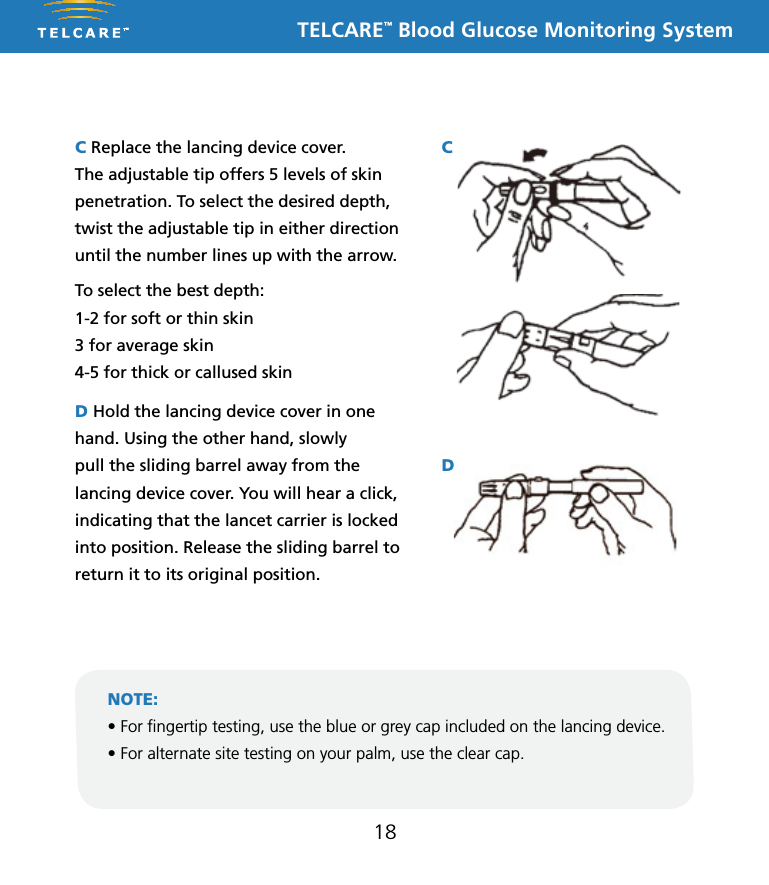
TELCARE™ Blood Glucose Monitoring System18C Replace the lancing device cover.  The adjustable tip offers 5 levels of skin penetration. To select the desired depth, twist the adjustable tip in either direction until the number lines up with the arrow.To select the best depth:1-2 for soft or thin skin3 for average skin4-5 for thick or callused skinD Hold the lancing device cover in one hand. Using the other hand, slowly pull the sliding barrel away from the lancing device cover. You will hear a click, indicating that the lancet carrier is locked into position. Release the sliding barrel to return it to its original position.NOTE:• For ngertip testing, use the blue or grey cap included on the lancing device.• For alternate site testing on your palm, use the clear cap.This Lancing Device is used to obtain capillary whole blood samples needed for blood glucose monitoring or for other tests requiring one or two drops of blood. The Adjustable Tip on the Lancing Device allows you to choose the best depth of skin penetration. Use the CLEAR endcap for alternative site testing (AST) on the palm or forearm. Please see the blood glucose user guide before performing alternative site testing as it provides important information about the best testing site for your system. 5 Depth AdjustableLancing DeviceNote: The lancing device is intended for patient self-monitoring by a single person only. It must not be used to collect blood from more than one person as this poses an infection risk.Note: •  Keep Dispatch out of reach of children.•  User should wash hands thoroughly with soap and water after handling the lancing device.•  Only DISPATCH Hospital Cleaner Disinfectant Towel should be used to do cleaning and disinfection with the lancing device.Note:• Should not be used for assisted blood draws by healthcare providers or at healthcare provision sites*, and should never be shared with anyone else, even a family member..• Always use a new lancet with each test.• Keep your lancing device clean.Note:   DO NOT re-use the LancetInserting a LancetRemoving and disposing of the used lancetTo clean the Lancing Device:Wash your hands and puncture site with soap and warm water. Rinse and dry thoroughly.Twist off the Lancing Device CoverInsert a new Lance firmly into the Lancet CarrierHold the Lancet Needle Cover and gently twist off of the LancetThe Adjustable Tip offers 5 levels of skin penetration. To select the desired depth, twist the Adjustable Tip in either direction until the number line up with the Arrow.Replace the Lancing Device CoverTo select the best depth:1-2 for soft or think skin3 for average skin4-5 for thick or calloused skin1 2 34 5 6Place the Lancing Device aside and wait a few seconds for a blood drop to form. To help form a blood drop, lower the hand to waist level and gently massage the finger from palm to fingertip.Position the end of the Adjust-able Comfort Tip against the side-tip of the finger. Press the Trigger Button, and then lift the Lancing Device away from the finger after the puncture is complete.7 8 9Hold the Lancing Device Cover in one hand. Using the other hand, slowly pull the Sliding Barrel away from the Lancing Device Cover. You will hear a click, indicating that the Lancet Carrier is locked into position. Release the Sliding Barrel to return it to its original position.To dispose the used Lancet safety, discard it into the appropriate sharps or biohazard container. 1011To remove the used Lancet from the Lancing Device, first twist off the Lancing Device Cover. While holding the Sliding Barrel., leave the Lancet in the Lancet Carrier and firmly stick the Lancet Needle into the Lancet Needle Cover (this will push down the Lancet Carrier). Gently remove the Lancet from the Lancet Carrier. Press the Trigger Button to release the Lancet Carrier. Replace the Lancing Device Cover.Cleaning and disinfection frequency: The lancing device should be clean and disinfected after every use by the individual patient. * Any setting where fingerstick procedures are performed, including assisted living or residential care facilities, skilled nursing facilities, clinics, health fairs, shelters, detention facilities, senior centers, schools, and camps.Equipment Needed: • Damp cloth or paper towel • DISPATCH: DISPATCH Hospital Cleaner Disinfectant Towels With Bleach are pre-moistened disposable towels for use in healthcare and other areas where control of cross contamination is required. 1. Inspect for blood, debris, dust, or lint anywhere on the lancing device.2. Clean or disinfect lancing device.3. To clean the lancing device and endcap, blood/body fluids must be thoroughly cleaned from surface and objects before disinfecting. Wipe surface with towel (DISPATCH) until completely wet. Allow to remain wet for one minute at room temperature (68-77˚F).4. To disinfect the lancing device allow 2 minutes contact at room temperature. Wipe dry or allow to air dry. Gross soil must be removed prior to disinfection.5. Wash hands with soap and water.P/N 65070000002    Rev.11/10AST Endcap (for palm or forearm)Manufactured for:Apex Biotechnology Corporation#7, Li Hsin V Rd., Hsinchu Science Park, Hsinchu, Taiwan, R.O.C.TEL: 1-877-979-5454        Website: www.apexbio.comThis Lancing Device is used to obtain capillary whole blood samples needed for blood glucose monitoring or for other tests requiring one or two drops of blood. The Adjustable Tip on the Lancing Device allows you to choose the best depth of skin penetration. Use the CLEAR endcap for alternative site testing (AST) on the palm or forearm. Please see the blood glucose user guide before performing alternative site testing as it provides important information about the best testing site for your system. 5 Depth AdjustableLancing DeviceNote: The lancing device is intended for patient self-monitoring by a single person only. It must not be used to collect blood from more than one person as this poses an infection risk.Note: •  Keep Dispatch out of reach of children.•  User should wash hands thoroughly with soap and water after handling the lancing device.•  Only DISPATCH Hospital Cleaner Disinfectant Towel should be used to do cleaning and disinfection with the lancing device.Note:• Should not be used for assisted blood draws by healthcare providers or at healthcare provision sites*, and should never be shared with anyone else, even a family member..• Always use a new lancet with each test.• Keep your lancing device clean.Note:   DO NOT re-use the LancetInserting a LancetRemoving and disposing of the used lancetTo clean the Lancing Device:Wash your hands and puncture site with soap and warm water. Rinse and dry thoroughly.Twist off the Lancing Device CoverInsert a new Lance firmly into the Lancet CarrierHold the Lancet Needle Cover and gently twist off of the LancetThe Adjustable Tip offers 5 levels of skin penetration. To select the desired depth, twist the Adjustable Tip in either direction until the number line up with the Arrow.Replace the Lancing Device CoverTo select the best depth:1-2 for soft or think skin3 for average skin4-5 for thick or calloused skin1 2 34 5 6Place the Lancing Device aside and wait a few seconds for a blood drop to form. To help form a blood drop, lower the hand to waist level and gently massage the finger from palm to fingertip.Position the end of the Adjust-able Comfort Tip against the side-tip of the finger. Press the Trigger Button, and then lift the Lancing Device away from the finger after the puncture is complete.7 8 9Hold the Lancing Device Cover in one hand. Using the other hand, slowly pull the Sliding Barrel away from the Lancing Device Cover. You will hear a click, indicating that the Lancet Carrier is locked into position. Release the Sliding Barrel to return it to its original position.To dispose the used Lancet safety, discard it into the appropriate sharps or biohazard container. 1011To remove the used Lancet from the Lancing Device, first twist off the Lancing Device Cover. While holding the Sliding Barrel., leave the Lancet in the Lancet Carrier and firmly stick the Lancet Needle into the Lancet Needle Cover (this will push down the Lancet Carrier). Gently remove the Lancet from the Lancet Carrier. Press the Trigger Button to release the Lancet Carrier. Replace the Lancing Device Cover.Cleaning and disinfection frequency: The lancing device should be clean and disinfected after every use by the individual patient. * Any setting where fingerstick procedures are performed, including assisted living or residential care facilities, skilled nursing facilities, clinics, health fairs, shelters, detention facilities, senior centers, schools, and camps.Equipment Needed: • Damp cloth or paper towel • DISPATCH: DISPATCH Hospital Cleaner Disinfectant Towels With Bleach are pre-moistened disposable towels for use in healthcare and other areas where control of cross contamination is required. 1. Inspect for blood, debris, dust, or lint anywhere on the lancing device.2. Clean or disinfect lancing device.3. To clean the lancing device and endcap, blood/body fluids must be thoroughly cleaned from surface and objects before disinfecting. Wipe surface with towel (DISPATCH) until completely wet. Allow to remain wet for one minute at room temperature (68-77˚F).4. To disinfect the lancing device allow 2 minutes contact at room temperature. Wipe dry or allow to air dry. Gross soil must be removed prior to disinfection.5. Wash hands with soap and water.P/N 65070000002    Rev.11/10AST Endcap (for palm or forearm)Manufactured for:Apex Biotechnology Corporation#7, Li Hsin V Rd., Hsinchu Science Park, Hsinchu, Taiwan, R.O.C.TEL: 1-877-979-5454        Website: www.apexbio.comThis Lancing Device is used to obtain capillary whole blood samples needed for blood glucose monitoring or for other tests requiring one or two drops of blood. The Adjustable Tip on the Lancing Device allows you to choose the best depth of skin penetration. Use the CLEAR endcap for alternative site testing (AST) on the palm or forearm. Please see the blood glucose user guide before performing alternative site testing as it provides important information about the best testing site for your system. 5 Depth AdjustableLancing DeviceNote: The lancing device is intended for patient self-monitoring by a single person only. It must not be used to collect blood from more than one person as this poses an infection risk.Note: •  Keep Dispatch out of reach of children.•  User should wash hands thoroughly with soap and water after handling the lancing device.•  Only DISPATCH Hospital Cleaner Disinfectant Towel should be used to do cleaning and disinfection with the lancing device.Note:• Should not be used for assisted blood draws by healthcare providers or at healthcare provision sites*, and should never be shared with anyone else, even a family member..• Always use a new lancet with each test.• Keep your lancing device clean.Note:   DO NOT re-use the LancetInserting a LancetRemoving and disposing of the used lancetTo clean the Lancing Device:Wash your hands and puncture site with soap and warm water. Rinse and dry thoroughly.Twist off the Lancing Device CoverInsert a new Lance firmly into the Lancet CarrierHold the Lancet Needle Cover and gently twist off of the LancetThe Adjustable Tip offers 5 levels of skin penetration. To select the desired depth, twist the Adjustable Tip in either direction until the number line up with the Arrow.Replace the Lancing Device CoverTo select the best depth:1-2 for soft or think skin3 for average skin4-5 for thick or calloused skin1 2 34 5 6Place the Lancing Device aside and wait a few seconds for a blood drop to form. To help form a blood drop, lower the hand to waist level and gently massage the finger from palm to fingertip.Position the end of the Adjust-able Comfort Tip against the side-tip of the finger. Press the Trigger Button, and then lift the Lancing Device away from the finger after the puncture is complete.7 8 9Hold the Lancing Device Cover in one hand. Using the other hand, slowly pull the Sliding Barrel away from the Lancing Device Cover. You will hear a click, indicating that the Lancet Carrier is locked into position. Release the Sliding Barrel to return it to its original position.To dispose the used Lancet safety, discard it into the appropriate sharps or biohazard container. 1011To remove the used Lancet from the Lancing Device, first twist off the Lancing Device Cover. While holding the Sliding Barrel., leave the Lancet in the Lancet Carrier and firmly stick the Lancet Needle into the Lancet Needle Cover (this will push down the Lancet Carrier). Gently remove the Lancet from the Lancet Carrier. Press the Trigger Button to release the Lancet Carrier. Replace the Lancing Device Cover.Cleaning and disinfection frequency: The lancing device should be clean and disinfected after every use by the individual patient. * Any setting where fingerstick procedures are performed, including assisted living or residential care facilities, skilled nursing facilities, clinics, health fairs, shelters, detention facilities, senior centers, schools, and camps.Equipment Needed: • Damp cloth or paper towel • DISPATCH: DISPATCH Hospital Cleaner Disinfectant Towels With Bleach are pre-moistened disposable towels for use in healthcare and other areas where control of cross contamination is required. 1. Inspect for blood, debris, dust, or lint anywhere on the lancing device.2. Clean or disinfect lancing device.3. To clean the lancing device and endcap, blood/body fluids must be thoroughly cleaned from surface and objects before disinfecting. Wipe surface with towel (DISPATCH) until completely wet. Allow to remain wet for one minute at room temperature (68-77˚F).4. To disinfect the lancing device allow 2 minutes contact at room temperature. Wipe dry or allow to air dry. Gross soil must be removed prior to disinfection.5. Wash hands with soap and water.P/N 65070000002    Rev.11/10AST Endcap (for palm or forearm)Manufactured for:Apex Biotechnology Corporation#7, Li Hsin V Rd., Hsinchu Science Park, Hsinchu, Taiwan, R.O.C.TEL: 1-877-979-5454        Website: www.apexbio.comCD
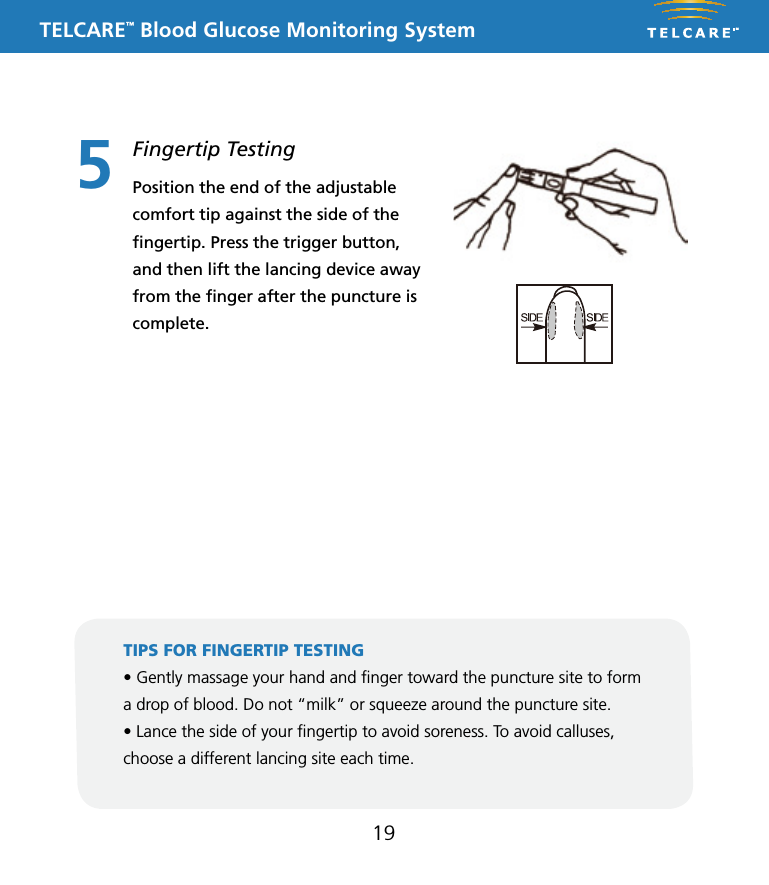
TELCARE™ Blood Glucose Monitoring System195Fingertip TestingPosition the end of the adjustable comfort tip against the side of the fingertip. Press the trigger button, and then lift the lancing device away from the finger after the puncture is complete.TIPS FOR FINGERTIP TESTING • Gently massage your hand and nger toward the puncture site to form a drop of blood. Do not “milk” or squeeze around the puncture site.• Lance the side of your ngertip to avoid soreness. To avoid calluses, choose a different lancing site each time.This Lancing Device is used to obtain capillary whole blood samples needed for blood glucose monitoring or for other tests requiring one or two drops of blood. The Adjustable Tip on the Lancing Device allows you to choose the best depth of skin penetration. Use the CLEAR endcap for alternative site testing (AST) on the palm or forearm. Please see the blood glucose user guide before performing alternative site testing as it provides important information about the best testing site for your system. 5 Depth AdjustableLancing DeviceNote: The lancing device is intended for patient self-monitoring by a single person only. It must not be used to collect blood from more than one person as this poses an infection risk.Note: •  Keep Dispatch out of reach of children.•  User should wash hands thoroughly with soap and water after handling the lancing device.•  Only DISPATCH Hospital Cleaner Disinfectant Towel should be used to do cleaning and disinfection with the lancing device.Note:• Should not be used for assisted blood draws by healthcare providers or at healthcare provision sites*, and should never be shared with anyone else, even a family member..• Always use a new lancet with each test.• Keep your lancing device clean.Note:   DO NOT re-use the LancetInserting a LancetRemoving and disposing of the used lancetTo clean the Lancing Device:Wash your hands and puncture site with soap and warm water. Rinse and dry thoroughly.Twist off the Lancing Device CoverInsert a new Lance firmly into the Lancet CarrierHold the Lancet Needle Cover and gently twist off of the LancetThe Adjustable Tip offers 5 levels of skin penetration. To select the desired depth, twist the Adjustable Tip in either direction until the number line up with the Arrow.Replace the Lancing Device CoverTo select the best depth:1-2 for soft or think skin3 for average skin4-5 for thick or calloused skin1 2 34 5 6Place the Lancing Device aside and wait a few seconds for a blood drop to form. To help form a blood drop, lower the hand to waist level and gently massage the finger from palm to fingertip.Position the end of the Adjust-able Comfort Tip against the side-tip of the finger. Press the Trigger Button, and then lift the Lancing Device away from the finger after the puncture is complete.7 8 9Hold the Lancing Device Cover in one hand. Using the other hand, slowly pull the Sliding Barrel away from the Lancing Device Cover. You will hear a click, indicating that the Lancet Carrier is locked into position. Release the Sliding Barrel to return it to its original position.To dispose the used Lancet safety, discard it into the appropriate sharps or biohazard container. 1011To remove the used Lancet from the Lancing Device, first twist off the Lancing Device Cover. While holding the Sliding Barrel., leave the Lancet in the Lancet Carrier and firmly stick the Lancet Needle into the Lancet Needle Cover (this will push down the Lancet Carrier). Gently remove the Lancet from the Lancet Carrier. Press the Trigger Button to release the Lancet Carrier. Replace the Lancing Device Cover.Cleaning and disinfection frequency: The lancing device should be clean and disinfected after every use by the individual patient. * Any setting where fingerstick procedures are performed, including assisted living or residential care facilities, skilled nursing facilities, clinics, health fairs, shelters, detention facilities, senior centers, schools, and camps.Equipment Needed: • Damp cloth or paper towel • DISPATCH: DISPATCH Hospital Cleaner Disinfectant Towels With Bleach are pre-moistened disposable towels for use in healthcare and other areas where control of cross contamination is required. 1. Inspect for blood, debris, dust, or lint anywhere on the lancing device.2. Clean or disinfect lancing device.3. To clean the lancing device and endcap, blood/body fluids must be thoroughly cleaned from surface and objects before disinfecting. Wipe surface with towel (DISPATCH) until completely wet. Allow to remain wet for one minute at room temperature (68-77˚F).4. To disinfect the lancing device allow 2 minutes contact at room temperature. Wipe dry or allow to air dry. Gross soil must be removed prior to disinfection.5. Wash hands with soap and water.P/N 65070000002    Rev.11/10AST Endcap (for palm or forearm)Manufactured for:Apex Biotechnology Corporation#7, Li Hsin V Rd., Hsinchu Science Park, Hsinchu, Taiwan, R.O.C.TEL: 1-877-979-5454        Website: www.apexbio.comThis Lancing Device is used to obtain capillary whole blood samples needed for blood glucose monitoring or for other tests requiring one or two drops of blood. The Adjustable Tip on the Lancing Device allows you to choose the best depth of skin penetration. Use the CLEAR endcap for alternative site testing (AST) on the palm or forearm. Please see the blood glucose user guide before performing alternative site testing as it provides important information about the best testing site for your system. 5 Depth AdjustableLancing DeviceNote: The lancing device is intended for patient self-monitoring by a single person only. It must not be used to collect blood from more than one person as this poses an infection risk.Note: •  Keep Dispatch out of reach of children.•  User should wash hands thoroughly with soap and water after handling the lancing device.•  Only DISPATCH Hospital Cleaner Disinfectant Towel should be used to do cleaning and disinfection with the lancing device.Note:• Should not be used for assisted blood draws by healthcare providers or at healthcare provision sites*, and should never be shared with anyone else, even a family member..• Always use a new lancet with each test.• Keep your lancing device clean.Note:   DO NOT re-use the LancetInserting a LancetRemoving and disposing of the used lancetTo clean the Lancing Device:Wash your hands and puncture site with soap and warm water. Rinse and dry thoroughly.Twist off the Lancing Device CoverInsert a new Lance firmly into the Lancet CarrierHold the Lancet Needle Cover and gently twist off of the LancetThe Adjustable Tip offers 5 levels of skin penetration. To select the desired depth, twist the Adjustable Tip in either direction until the number line up with the Arrow.Replace the Lancing Device CoverTo select the best depth:1-2 for soft or think skin3 for average skin4-5 for thick or calloused skin1 2 34 5 6Place the Lancing Device aside and wait a few seconds for a blood drop to form. To help form a blood drop, lower the hand to waist level and gently massage the finger from palm to fingertip.Position the end of the Adjust-able Comfort Tip against the side-tip of the finger. Press the Trigger Button, and then lift the Lancing Device away from the finger after the puncture is complete.7 8 9Hold the Lancing Device Cover in one hand. Using the other hand, slowly pull the Sliding Barrel away from the Lancing Device Cover. You will hear a click, indicating that the Lancet Carrier is locked into position. Release the Sliding Barrel to return it to its original position.To dispose the used Lancet safety, discard it into the appropriate sharps or biohazard container. 1011To remove the used Lancet from the Lancing Device, first twist off the Lancing Device Cover. While holding the Sliding Barrel., leave the Lancet in the Lancet Carrier and firmly stick the Lancet Needle into the Lancet Needle Cover (this will push down the Lancet Carrier). Gently remove the Lancet from the Lancet Carrier. Press the Trigger Button to release the Lancet Carrier. Replace the Lancing Device Cover.Cleaning and disinfection frequency: The lancing device should be clean and disinfected after every use by the individual patient. * Any setting where fingerstick procedures are performed, including assisted living or residential care facilities, skilled nursing facilities, clinics, health fairs, shelters, detention facilities, senior centers, schools, and camps.Equipment Needed: • Damp cloth or paper towel • DISPATCH: DISPATCH Hospital Cleaner Disinfectant Towels With Bleach are pre-moistened disposable towels for use in healthcare and other areas where control of cross contamination is required. 1. Inspect for blood, debris, dust, or lint anywhere on the lancing device.2. Clean or disinfect lancing device.3. To clean the lancing device and endcap, blood/body fluids must be thoroughly cleaned from surface and objects before disinfecting. Wipe surface with towel (DISPATCH) until completely wet. Allow to remain wet for one minute at room temperature (68-77˚F).4. To disinfect the lancing device allow 2 minutes contact at room temperature. Wipe dry or allow to air dry. Gross soil must be removed prior to disinfection.5. Wash hands with soap and water.P/N 65070000002    Rev.11/10AST Endcap (for palm or forearm)Manufactured for:Apex Biotechnology Corporation#7, Li Hsin V Rd., Hsinchu Science Park, Hsinchu, Taiwan, R.O.C.TEL: 1-877-979-5454        Website: www.apexbio.com
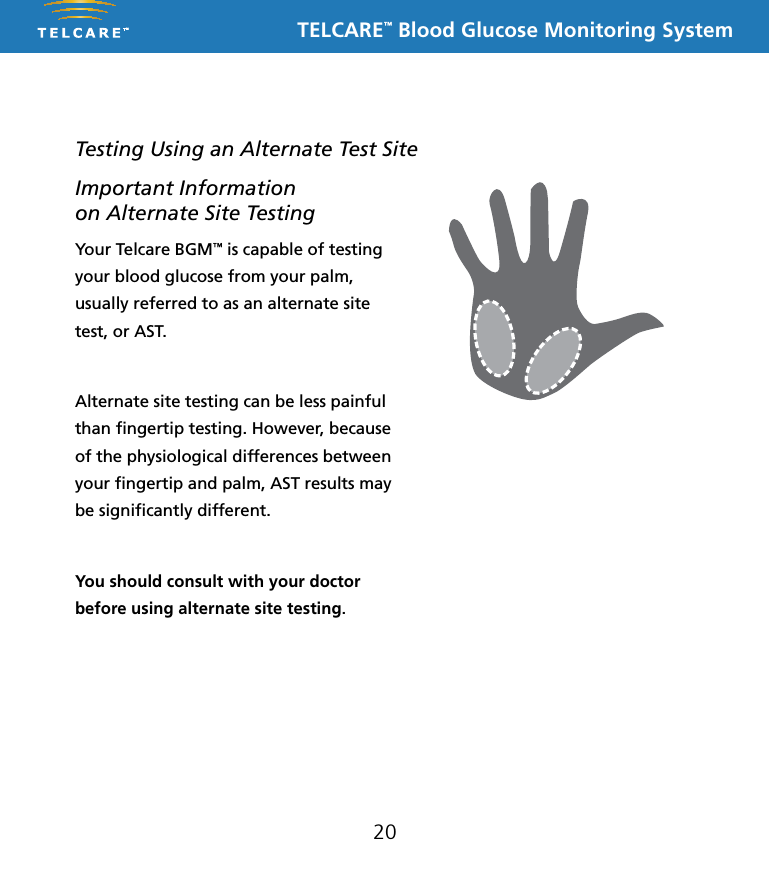
TELCARE™ Blood Glucose Monitoring System20Testing Using an Alternate Test SiteYour Telcare BGM™ is capable of testing your blood glucose from your palm, usually referred to as an alternate site test, or AST. Alternate site testing can be less painful than fingertip testing. However, because of the physiological differences between your fingertip and palm, AST results may be significantly different. You should consult with your doctor before using alternate site testing.Important Information  on Alternate Site Testing
TELCARE™ Blood Glucose Monitoring System21Testing on Your PalmPrepare the lancing device with a new lancet and clear cap. Cock the lancing device so that it is ready to use. Select a site on your palm that does not have veins, moles, excessive hair, or bone. Vigorously rub the side of your palm with your other hand for at least 10 seconds. You should feel it get quite warm.Press the opening of the clear cap against a fleshy area of the palm. Press the lancing device up and down in a slow pumping motion for several seconds to help the flow of blood.Keep steady pressure on the area and press the release button. Do not be afraid to apply pressure to the area with the lancing device to assist the flow of blood. Continue to press the cap against the area for a few seconds to allow blood to come to the surface. You can see the blood drop through the clear cap. Do not smear the blood when removing the lancing device. If the blood drop is too small, the meter will show “Error: Not Enough Blood.” Insert a new strip and obtain a new blood drop.If the results from alternate site testing differ from how you feel, use fingertip testing instead.user tipTelcare users have found that a 26 gauge lancet or thicker (a number lower than 26) is needed in order to obtain an adequate blood drop for palm testing.  Ultra-fine lancets that are adequate for finger testing will often fail to yield enough blood for palm testing.
TELCARE™ Blood Glucose Monitoring System22IMPORTANT INFORMATION FOR LANCING DEVICEA Use the TELCARE™ Lancing Device included in your TELCARE™ Blood Glucose Monitoring System to obtain a blood sample. The minimum blood sample volume is 0.8 microliters.B  Purchase an additional TELCARE™ Lancing Device by calling TELCARE™ at (888) 666-4530 (9AM - 5PM EST, M-F).C If using another type of lancing device, please refer to its user manual.IMPORTANT SAFETY PROCEDURES:Use a new lancet every time you test to avoid contamination. It is important to discard the used lancet carefully after each use to avoid unintended lancet stick injuries. Used lancets may be considered biohazardous waste in your area. Be sure to follow your local regulations for proper disposal. Lancing devices should NEVER be used by more than one person. Please see your lancing device’s user manual for further instructions.
TELCARE™ Blood Glucose Monitoring System23Important Information on Alternate Site Testing We recommend that Alternate Site Testing SHOULD NOT BE USED WHEN:n You have hypoglycemic unawareness (not able to tell if you have low  blood sugar).n You are within 2 hours of eating a meal, exercising, or taking medication.n You will be operating machinery or driving a car.n You are sick.n You think your blood glucose is low.n Your Alternate Site Testing results do not match the way you feel.n You are testing for hyperglycemia.n Your routine blood glucose results are fluctuating often.n Alternate Site Testing should not be used for patients who are dehydrated, hypotensive, in shock, critically ill, or in a hyperosmolar state.n Alternate Site Testing measurements should never be used to calibrate a continuous glucose monitor (CGM).n Alternate Site Testing measurements should never be used for insulin dose calculations.Please see your lancing device’s user manual for further instructions.
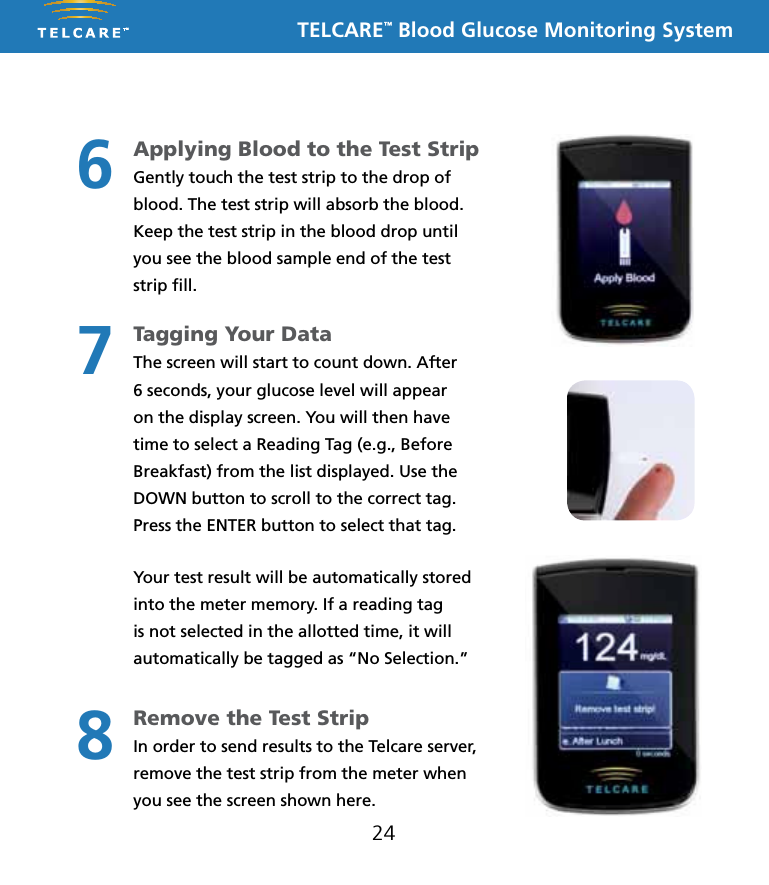
TELCARE™ Blood Glucose Monitoring System24Applying Blood to the Test Strip Gently touch the test strip to the drop of blood. The test strip will absorb the blood.Keep the test strip in the blood drop until you see the blood sample end of the test strip fill.Tagging Your Data The screen will start to count down. After 6 seconds, your glucose level will appear on the display screen. You will then have time to select a Reading Tag (e.g., Before Breakfast) from the list displayed. Use the DOWN button to scroll to the correct tag. Press the ENTER button to select that tag.Your test result will be automatically stored into the meter memory. If a reading tag is not selected in the allotted time, it will automatically be tagged as “No Selection.”Remove the Test Strip In order to send results to the Telcare server, remove the test strip from the meter when you see the screen shown here.678
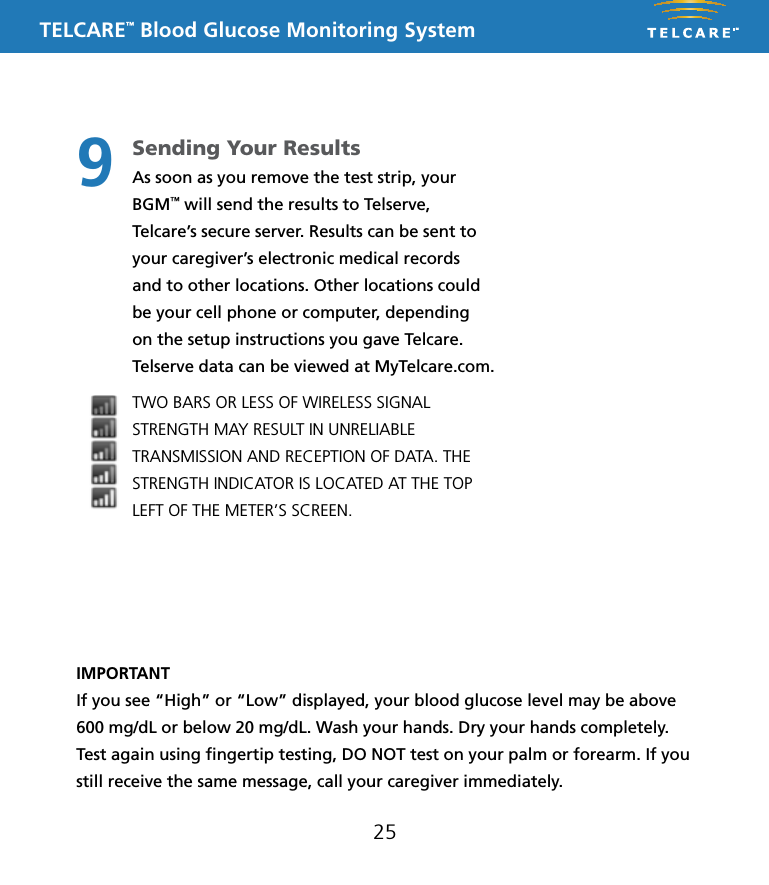
TELCARE™ Blood Glucose Monitoring System25IMPORTANTIf you see “High” or “Low” displayed, your blood glucose level may be above 600 mg/dL or below 20 mg/dL. Wash your hands. Dry your hands completely. Test again using fingertip testing, DO NOT test on your palm or forearm. If you still receive the same message, call your caregiver immediately.Sending Your ResultsAs soon as you remove the test strip, your BGM™ will send the results to Telserve, Telcare’s secure server. Results can be sent to your caregiver’s electronic medical records and to other locations. Other locations could be your cell phone or computer, depending on the setup instructions you gave Telcare. Telserve data can be viewed at MyTelcare.com. TWO BARS OR LESS OF WIRELESS SIGNAL STRENGTH MAY RESULT IN UNRELIABLE TRANSMISSION AND RECEPTION OF DATA. THE STRENGTH INDICATOR IS LOCATED AT THE TOP LEFT OF THE METER’S SCREEN.9
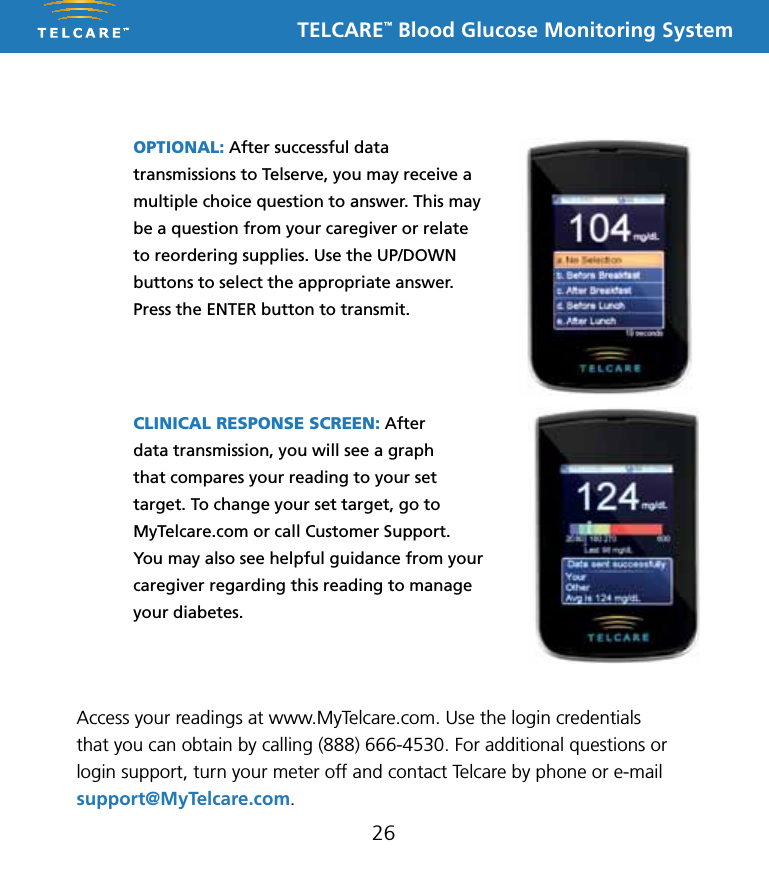
TELCARE™ Blood Glucose Monitoring System26OPTIONAL: After successful data transmissions to Telserve, you may receive a multiple choice question to answer. This may be a question from your caregiver or relate to reordering supplies. Use the UP/DOWN buttons to select the appropriate answer. Press the ENTER button to transmit.CLINICAL RESPONSE SCREEN: After  data transmission, you will see a graph  that compares your reading to your set target. To change your set target, go to MyTelcare.com or call Customer Support. You may also see helpful guidance from your caregiver regarding this reading to manage your diabetes.Access your readings at www.MyTelcare.com. Use the login credentials that you can obtain by calling (888) 666-4530. For additional questions or login support, turn your meter off and contact Telcare by phone or e-mail support@MyTelcare.com.
TELCARE™ Blood Glucose Monitoring System27If Your Data Transmission Is Not SuccessfulIf the device cannot communicate with Telserve, the following message will appear:“No data connection, Data will be stored” Your test results will be stored in your device. You can send the reading on your own by going into Memory Recall within Settings. See page 7.IF DATA TRANSFER FAILS, YOU MAY USE THIS PRODUCT LIKE ANY OTHER GLUCOSE METER. FOLLOW YOUR HEALTHCARE PROFESSIONAL’S INSTRUCTIONS ON TREATMENT.
TELCARE™ Blood Glucose Monitoring SystemReferences1. American Diabetes Association. Standards of Medical Care in Diabetes—2008. Diabetes Care. 2008;31:S12–S54.28Understanding Your Blood Glucose Test ResultsBlood glucose value will vary depending on food intake, medication, health, stress, and exercise. The ideal ranges for people without diabetes are as follows1:n 70 to 100 mg/dL before meals, andn 70 to 140 mg/dL after mealsWhat to do if you get a high or low reading AND you feel ill.If the Telcare BGM™ displays results that are “High” or “Low,” or you get a result that is more than 250 mg/dL or below 50 mg/dL AND you feel ill:n Treat your diabetes according to the instructions from your doctor.If the Telcare BGM displays results that are “High” or “Low,” or you get a result that is more than 250 mg/dL or below 50 mg/dL AND you DO NOT  feel ill:n Test your Telcare BGM with a control solution, refer to page 8, ”Step by Step Guide to Control Testing.”n Wash your hands, dry thoroughly and test again using your fingertip. If you still get a high or low reading, contact your doctor.
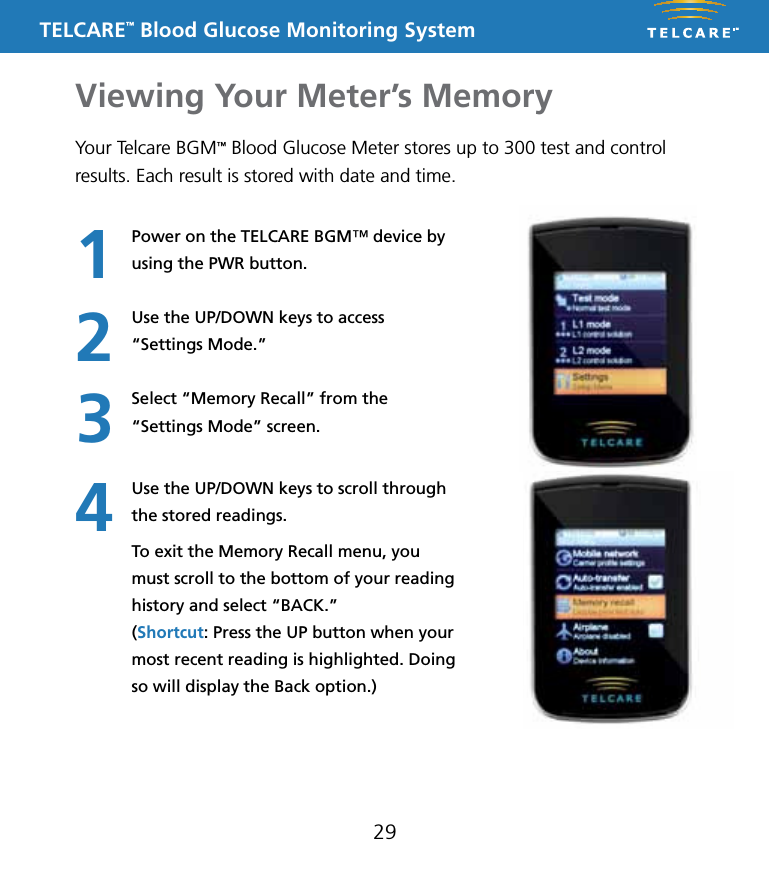
TELCARE™ Blood Glucose Monitoring SystemViewing Your Meter’s Memory29Your Telcare BGM™ Blood Glucose Meter stores up to 300 test and control results. Each result is stored with date and time.Power on the TELCARE BGM™ device by using the PWR button.Use the UP/DOWN keys to access  “Settings Mode.”Select “Memory Recall” from the  “Settings Mode” screen.Use the UP/DOWN keys to scroll through the stored readings.To exit the Memory Recall menu, you must scroll to the bottom of your reading history and select “BACK.”  (Shortcut: Press the UP button when your most recent reading is highlighted. Doing so will display the Back option.)1234
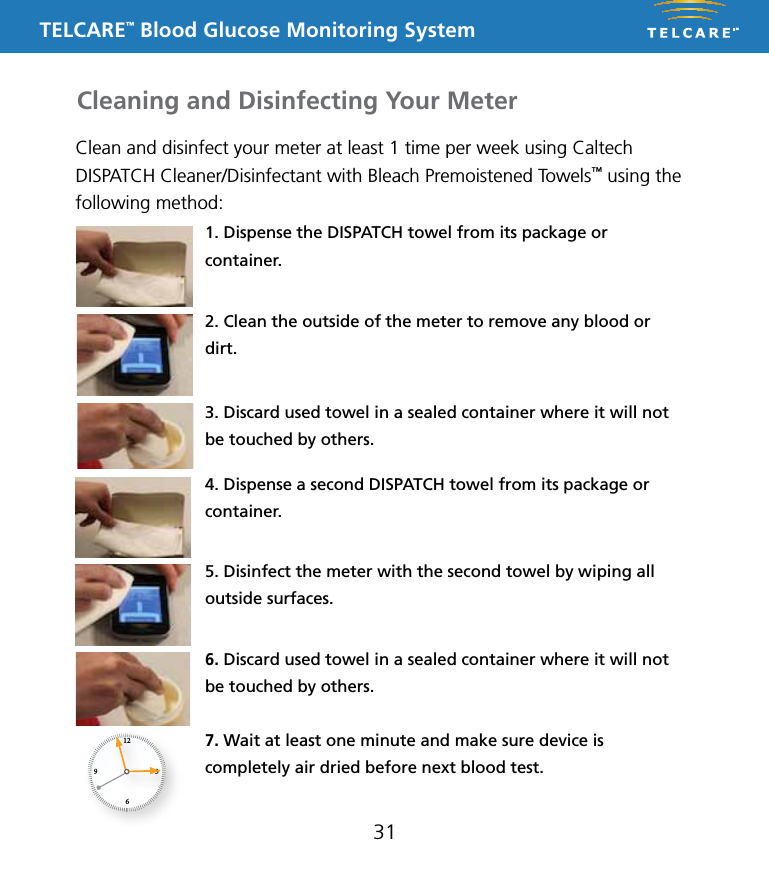
TELCARE™ Blood Glucose Monitoring SystemCleaning & Disinfecting30What is the difference between cleaning and disinfecting?Cleaning and disinfecting are not the same thing. Cleaning simply removes blood and dirt. Disinfecting kills germs and provides an extra level of safety. In the following procedure, the first disinfectant towel is used for cleaning, and the second towel provides for disinfection.  You should disinfect areas where there are both high concentrations of germs and a possibility that they will be spread to others. The Caltech DISPATCH Cleaner/Disinfectant with Bleach Premoistened Towels™ have ingredients that clean and disinfect your meter, lancing device, and endcaps. While surfaces may look clean, many infectious germs may be lurking around. Some germs can live on surfaces for hours and even for days! The disinfection process shown in the pages that follow is effective in destroying dangerous Hepatitis B viruses.  If the meter or lancing device is being operated by a second person who is providing testing assistance to the user, the meter should be decontaminated prior to use by the second person. See your lancing device’s user manual for instructions on decontaminating your lancing device.To acquire canisters of Caltech DISPATCH towels, please contact: Medex Supply - www.medexsupply.com - (888) 433-2300 Sears - www.sears.com - (800) 349-4358 Berktree - www.berktree.com - (866) 505-5333 Optics Planet - www.opticsplanet.com - (800) 504-5897 Amazon.com - www.amazon.comA full list of authorized dealers of Caltech DISPATCH towels is at www.MyTelcare.com.
TELCARE™ Blood Glucose Monitoring System31Clean and disinfect your meter at least 1 time per week using Caltech DISPATCH Cleaner/Disinfectant with Bleach Premoistened Towels™ using the following method:1. Dispense the DISPATCH towel from its package or container.2. Clean the outside of the meter to remove any blood or dirt. 3. Discard used towel in a sealed container where it will not be touched by others.4. Dispense a second DISPATCH towel from its package or container.6. Discard used towel in a sealed container where it will not be touched by others.7. Wait at least one minute and make sure device is completely air dried before next blood test.5. Disinfect the meter with the second towel by wiping all outside surfaces.Cleaning and Disinfecting Your Meter1269 3
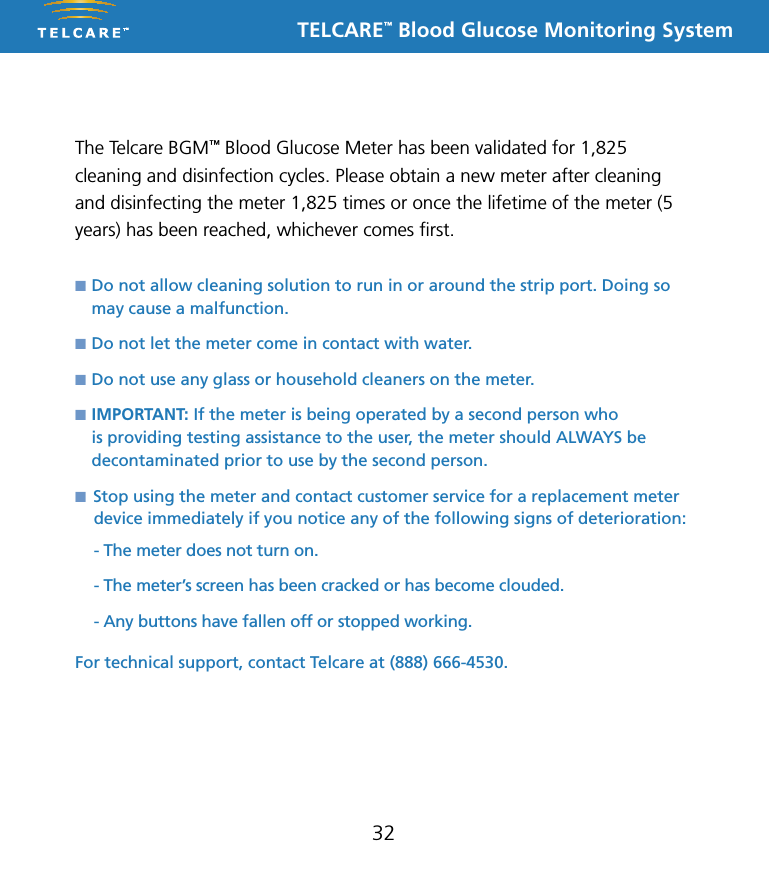
TELCARE™ Blood Glucose Monitoring System32n  Do not allow cleaning solution to run in or around the strip port. Doing so    may cause a malfunction.n  Do not let the meter come in contact with water.n  Do not use any glass or household cleaners on the meter.n  IMPORTANT: If the meter is being operated by a second person who    is providing testing assistance to the user, the meter should ALWAYS be    decontaminated prior to use by the second person.n Stop using the meter and contact customer service for a replacement meter device immediately if you notice any of the following signs of deterioration: - The meter does not turn on.- The meter’s screen has been cracked or has become clouded. - Any buttons have fallen off or stopped working.For technical support, contact Telcare at (888) 666-4530.The Telcare BGM™ Blood Glucose Meter has been validated for 1,825 cleaning and disinfection cycles. Please obtain a new meter after cleaning and disinfecting the meter 1,825 times or once the lifetime of the meter (5 years) has been reached, whichever comes first.
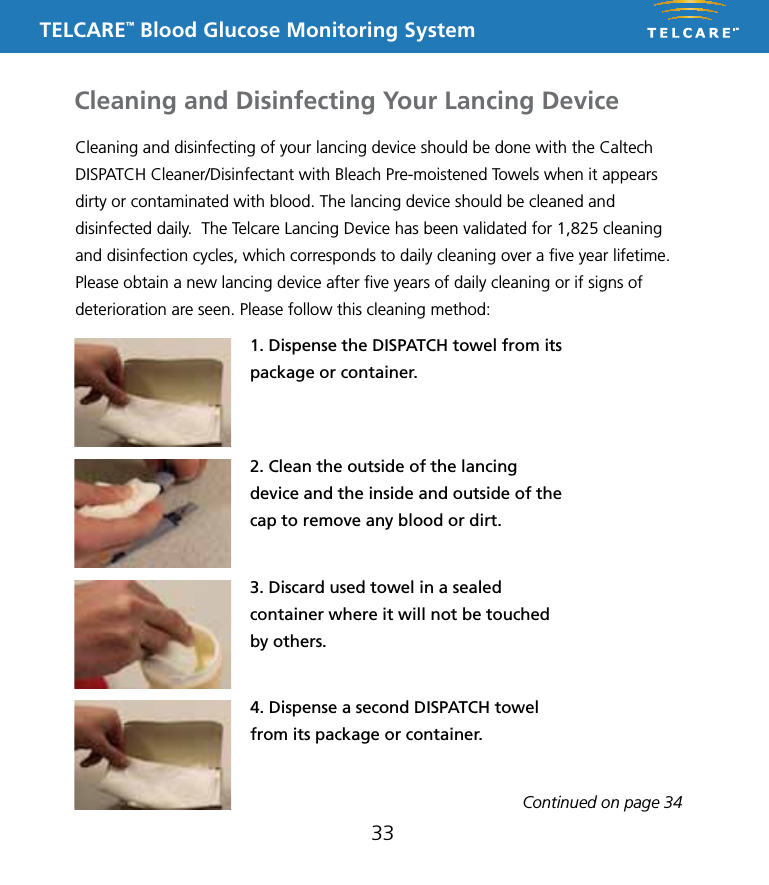
TELCARE™ Blood Glucose Monitoring SystemCleaning and disinfecting of your lancing device should be done with the Caltech DISPATCH Cleaner/Disinfectant with Bleach Pre-moistened Towels when it appears dirty or contaminated with blood. The lancing device should be cleaned and disinfected daily.  The Telcare Lancing Device has been validated for 1,825 cleaning and disinfection cycles, which corresponds to daily cleaning over a five year lifetime. Please obtain a new lancing device after five years of daily cleaning or if signs of deterioration are seen. Please follow this cleaning method:1. Dispense the DISPATCH towel from its package or container.2. Clean the outside of the lancing device and the inside and outside of the cap to remove any blood or dirt.3. Discard used towel in a sealed container where it will not be touched by others.33Cleaning and Disinfecting Your Lancing DeviceContinued on page 344. Dispense a second DISPATCH towel from its package or container.
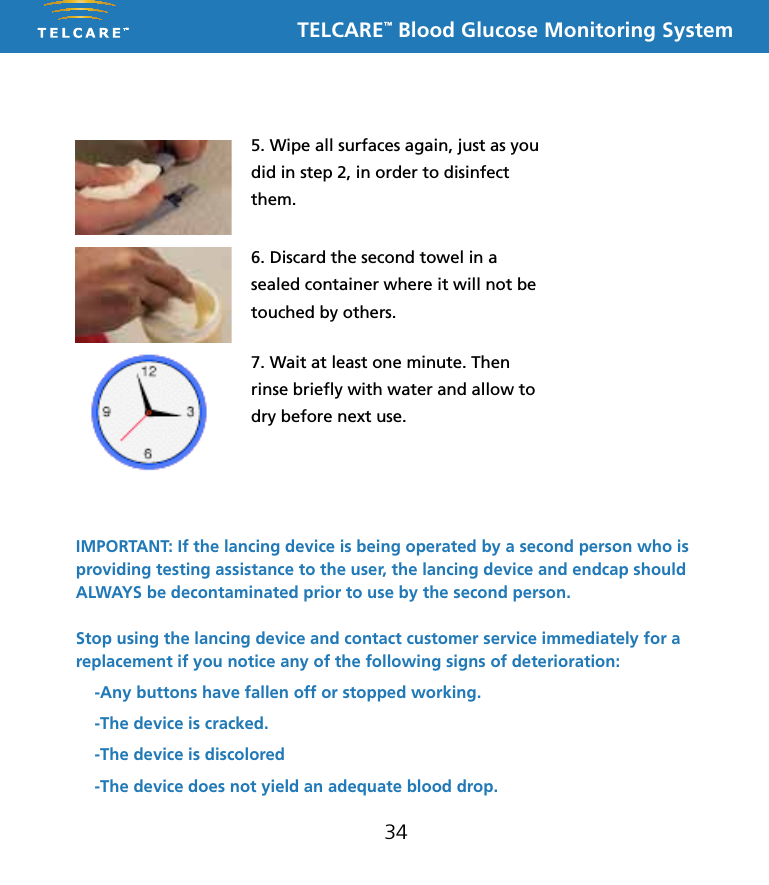
TELCARE™ Blood Glucose Monitoring System345. Wipe all surfaces again, just as you did in step 2, in order to disinfect them. 6. Discard the second towel in a sealed container where it will not be touched by others.7. Wait at least one minute. Then rinse briefly with water and allow to dry before next use.IMPORTANT: If the lancing device is being operated by a second person who is providing testing assistance to the user, the lancing device and endcap should ALWAYS be decontaminated prior to use by the second person.Stop using the lancing device and contact customer service immediately for a replacement if you notice any of the following signs of deterioration:-Any buttons have fallen off or stopped working.-The device is cracked.-The device is discolored-The device does not yield an adequate blood drop.
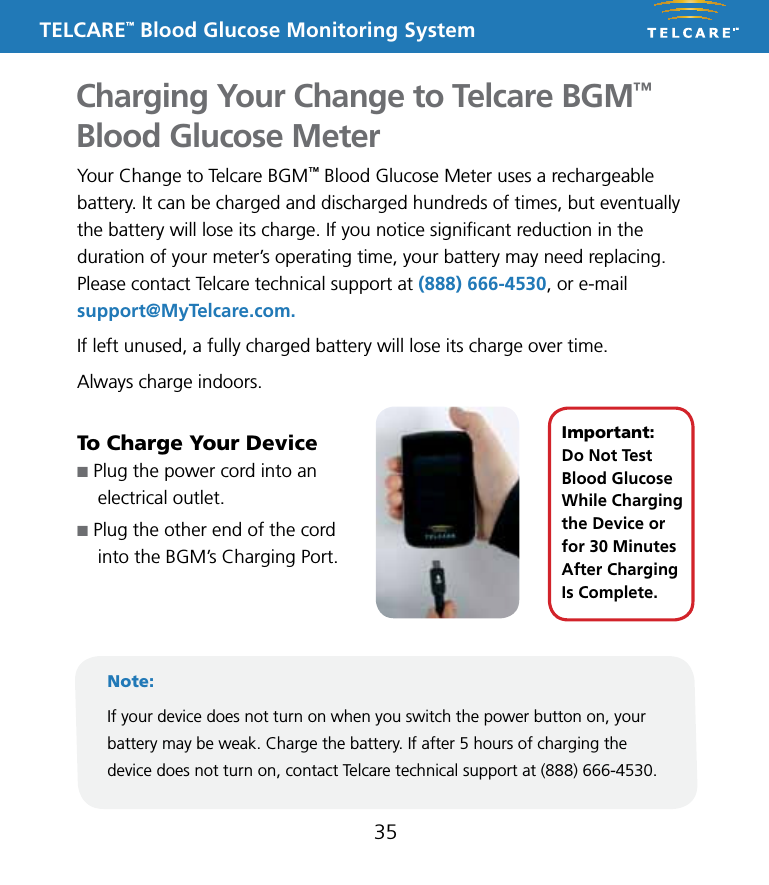
TELCARE™ Blood Glucose Monitoring SystemCharging Your Change to Telcare BGM™ Blood Glucose Meter35Your Change to Telcare BGM™ Blood Glucose Meter uses a rechargeable battery. It can be charged and discharged hundreds of times, but eventually the battery will lose its charge. If you notice significant reduction in the duration of your meter’s operating time, your battery may need replacing. Please contact Telcare technical support at (888) 666-4530, or e-mail support@MyTelcare.com. If left unused, a fully charged battery will lose its charge over time.Always charge indoors.To Charge Your Devicen Plug the power cord into an  electrical outlet. n Plug the other end of the cord  into the BGM’s Charging Port.Note:If your device does not turn on when you switch the power button on, your battery may be weak. Charge the battery. If after 5 hours of charging the device does not turn on, contact Telcare technical support at (888) 666-4530.Important:  Do Not Test Blood Glucose While Charging the Device or for 30 Minutes After Charging Is Complete.
TELCARE™ Blood Glucose Monitoring SystemStoring Your Telcare BGM™ and Test Strips36n Your meter is a delicate electronic device that should be handled with care.  Severe shock, such as dropping the meter, could damage it.n The meter and test strips only work in the temperature range of 50˚F to 104˚F.n Store the test strips between 39°F and 86°F. Do not freeze. See the test strip instructions for more details.n Don’t leave the meter in a place that is extremely hot or extremely cold  (e.g., anywhere near a heat source or in an extremely hot or cold car).n Do not expose the meter or test strips to high levels of humidity, such as in the bathroom or kitchen.n Immediately close the bottle cap tightly after removing a test strip.n Do not attempt to open the meter. Opening the meter will void the warranty and may cause it to operate improperly. If you have technical problems or questions, turn your meter off and contact Telcare at (888) 666-4530. Support is available Monday through Friday, 9AM - 5PM EST.
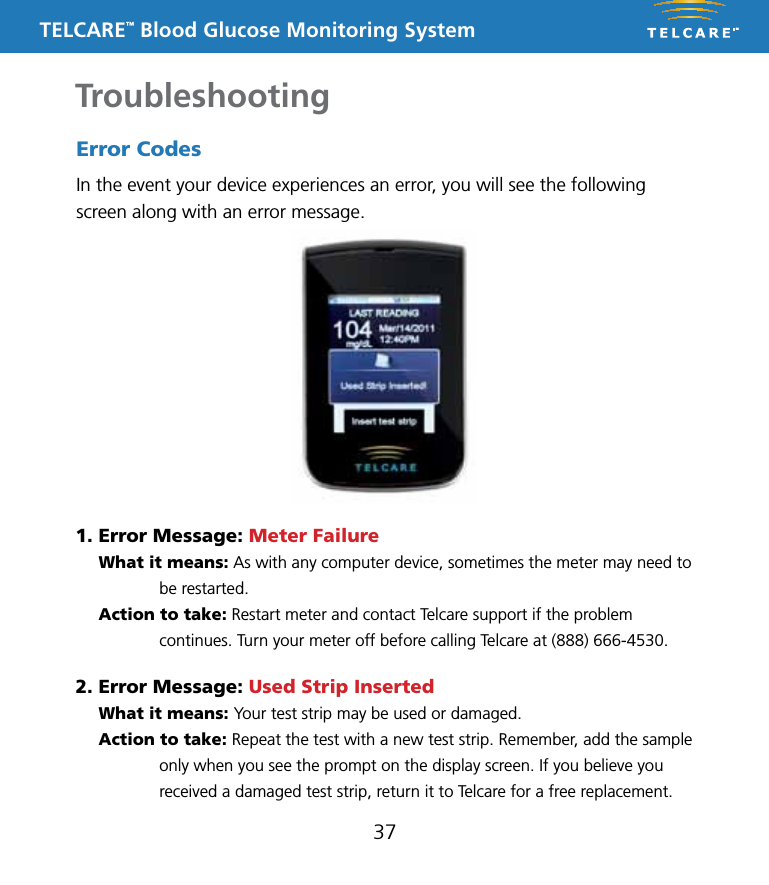
TELCARE™ Blood Glucose Monitoring SystemTroubleshooting37Error CodesIn the event your device experiences an error, you will see the following screen along with an error message.1. Error Message: Meter Failure What it means: As with any computer device, sometimes the meter may need to be restarted.  Action to take: Restart meter and contact Telcare support if the problem continues. Turn your meter off before calling Telcare at (888) 666-4530.2. Error Message: Used Strip Inserted  What it means: Your test strip may be used or damaged.  Action to take: Repeat the test with a new test strip. Remember, add the sample only when you see the prompt on the display screen. If you believe you received a damaged test strip, return it to Telcare for a free replacement.
TELCARE™ Blood Glucose Monitoring System3. Error Message: Not Enough Blood   What it means: There is not enough blood or too much blood or control solution on the test strip to give a reliable reading.  Action to take: Remove the test strip and repeat the test with a new test strip.4. Error Message: Temp. Too Low / Temp. Too High  What it means: The meter is too hot or too cold.  Action to take: Move the meter into an area that is between 50˚F and 104˚F. IMPORTANT: After receiving this error, allow the meter to be at room temperature for at least 30 minutes before testing blood or control solution.38If your meter displays a “Low Battery” icon, charge the battery. Other MessagesHigh / Low DisplayedIf you see either High or Low displayed on your device, your blood sugar level may be out of range (either in excess of 600 mg/dL [High] or lower than 20 mg/dL [Low]).
TELCARE™ Blood Glucose Monitoring System39Communication Errors If you are having trouble uploading your results to Telserve, you may want to try the following:n If testing indoors, move closer to a window for better cellular reception.n Test outdoors.n Check to see if there is cellular coverage in your area. Two bars or less of wireless signal strength may result in unreliable transmission and reception of data.n Restart meter and send reading within Memory Recall (see page 7).If the above actions do not resolve your problem, turn your meter off and then contact Telcare technical support at (888) 666-4530, or e-mail support@MyTelcare.com.5. Error Message: No data connection, Data will be stored  What it means: The meter cannot find a cellular connection.  Action to take: See “Communication Errors” below.
TELCARE™ Blood Glucose Monitoring SystemTerms of Warranty40Telcare warrants the Telcare BGM™ Blood Glucose Meter to be free of defects in workmanship and materials under normal use for a period of one (1) year from the date of purchase.The liability of Telcare is limited to repair or replacement. In no event shall Telcare be liable for any collateral or consequential damages or loss.Instruments subjected to misuse, abuse, neglect, exposure to water, unauthorized repair, or modification are excluded from this warranty.This guarantee specifically excludes expendables and consumables.Please direct any questions or claims to the authorized dealer from whom you purchased your system, or to:  Telcare, Inc.  Bethesda, MD 20814 USA  Phone: (888) 666-4530This warranty applies only to the original purchaser of the system.
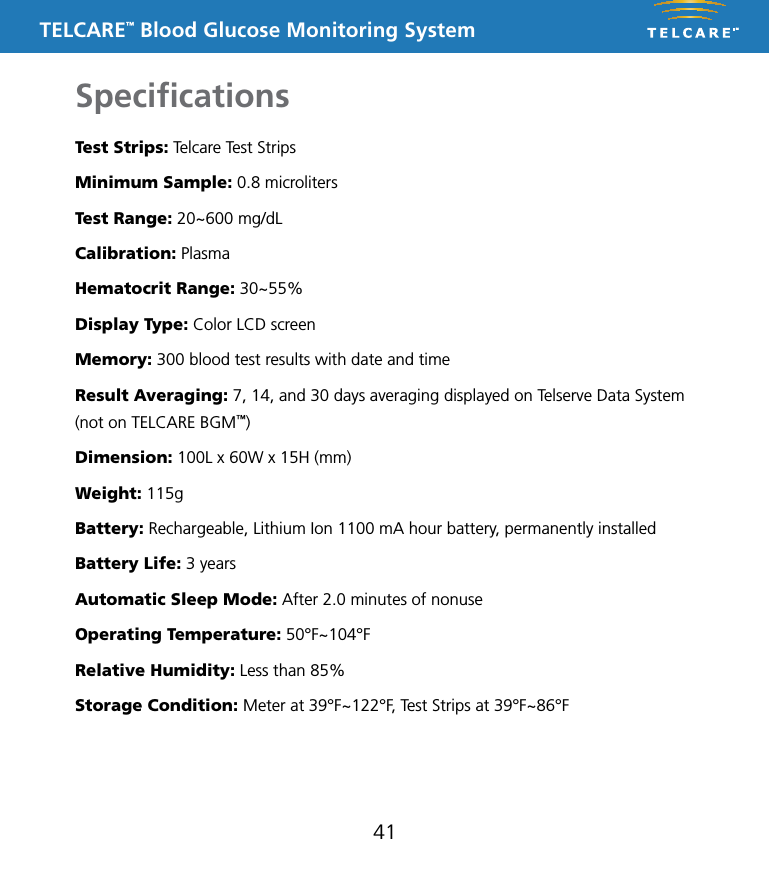
TELCARE™ Blood Glucose Monitoring SystemSpecifications41Test Strips: Telcare Test StripsMinimum Sample: 0.8 microlitersTest Range: 20~600 mg/dLCalibration: PlasmaHematocrit Range: 30~55%Display Type: Color LCD screenMemory: 300 blood test results with date and timeResult Averaging: 7, 14, and 30 days averaging displayed on Telserve Data System (not on TELCARE BGM™)Dimension: 100L x 60W x 15H (mm)Weight: 115gBattery: Rechargeable, Lithium Ion 1100 mA hour battery, permanently installedBattery Life: 3 yearsAutomatic Sleep Mode: After 2.0 minutes of nonuseOperating Temperature: 50°F~104°FRelative Humidity: Less than 85%Storage Condition: Meter at 39°F~122°F, Test Strips at 39°F~86°F
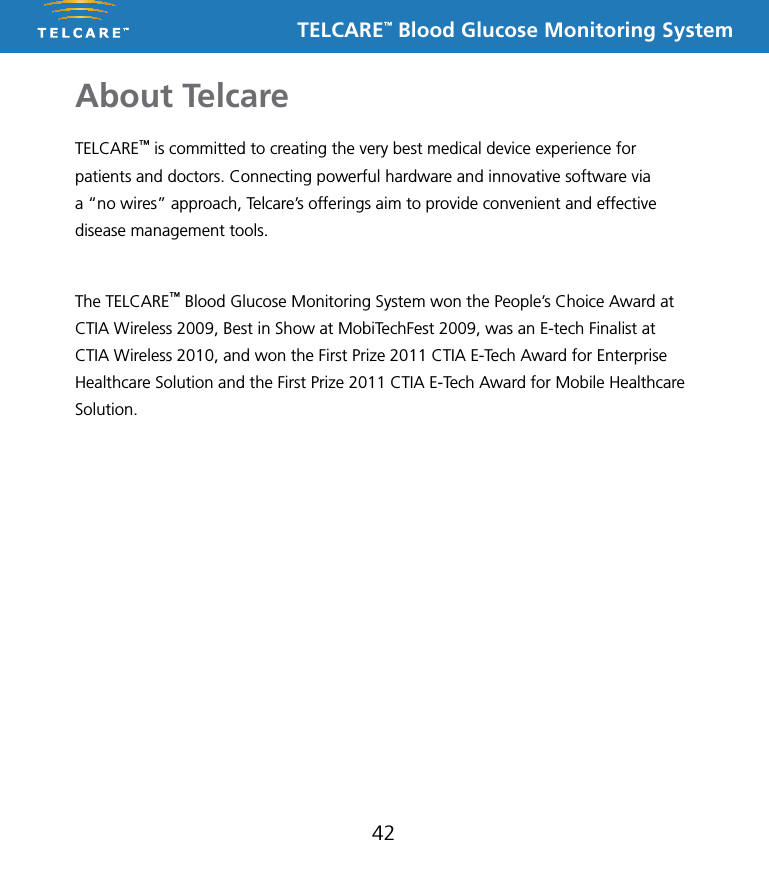
TELCARE™ Blood Glucose Monitoring SystemAbout Telcare42TELCARE™ is committed to creating the very best medical device experience for patients and doctors. Connecting powerful hardware and innovative software via a “no wires” approach, Telcare’s offerings aim to provide convenient and effective disease management tools. The TELCARE™ Blood Glucose Monitoring System won the People’s Choice Award at CTIA Wireless 2009, Best in Show at MobiTechFest 2009, was an E-tech Finalist at CTIA Wireless 2010, and won the First Prize 2011 CTIA E-Tech Award for Enterprise Healthcare Solution and the First Prize 2011 CTIA E-Tech Award for Mobile Healthcare Solution.
TELCARE™ Blood Glucose Monitoring System43Contact TelcareTelcare, Inc.Bethesda, MD 20814 USAPhone: (888) 666-4530Hours: M - F, 9AM - 5PM ESTE-mail: support@MyTelcare.comWebsite: www.MyTelcare.comFederal Communication Commission Interference StatementThis equipment has been tested and found to comply with the limits for a Class B digital device, pursuant to Part 18 of the FCC Rules. These limits are designed to provide reasonable protection against harmful interference in a residential installation. This equipment generates, uses and can radiate radio frequency energy and, if not installed and used in accordance with the instructions, may cause harmful interference to radio communications. However, there is no guarantee that interference will not occur in a particular installation. If this equipment does cause harmful interference to radio or television reception, which can be determined by turning the equipment off and on, the user is encouraged to try to correct the interference by one of the following measures:• Reorient or relocate the receiving antenna.• Increase the separation between the equipment and receiver.• Connect the equipment into an outlet on a circuit different from that to which the    receiver is connected.• Consult the dealer or an experienced radio/TV technician for help.n This device complies with Part 18 of the FCC Rules. Operation is subject to the following two conditions: (1) This device may not cause harmful interference, and (2) this device must accept any interference received, including interference that may cause undesired operation.n FCC Caution: Any changes or modifications not expressly approved by the party responsible for compliance could void the user’s authority to operate this equipment.FCC Radiation Exposure StatementThis equipment complies with FCC radiation exposure limits set forth for an uncontrolled environment. This equipment should be installed and operated with minimum distance 20cm between the radiator & your body. This transmitter must not be co-located or operating in conjunction with any other antenna or transmitter.Please contact your healthcare professional at all other times.
TELCARE™ Blood Glucose Monitoring System

Navigation menu