Telemedic MUMS-002 Multi-users, multi-sensors User Manual sstBB4

Telemedic Inc. Multi-users, multi-sensors sstBB4

User Manual

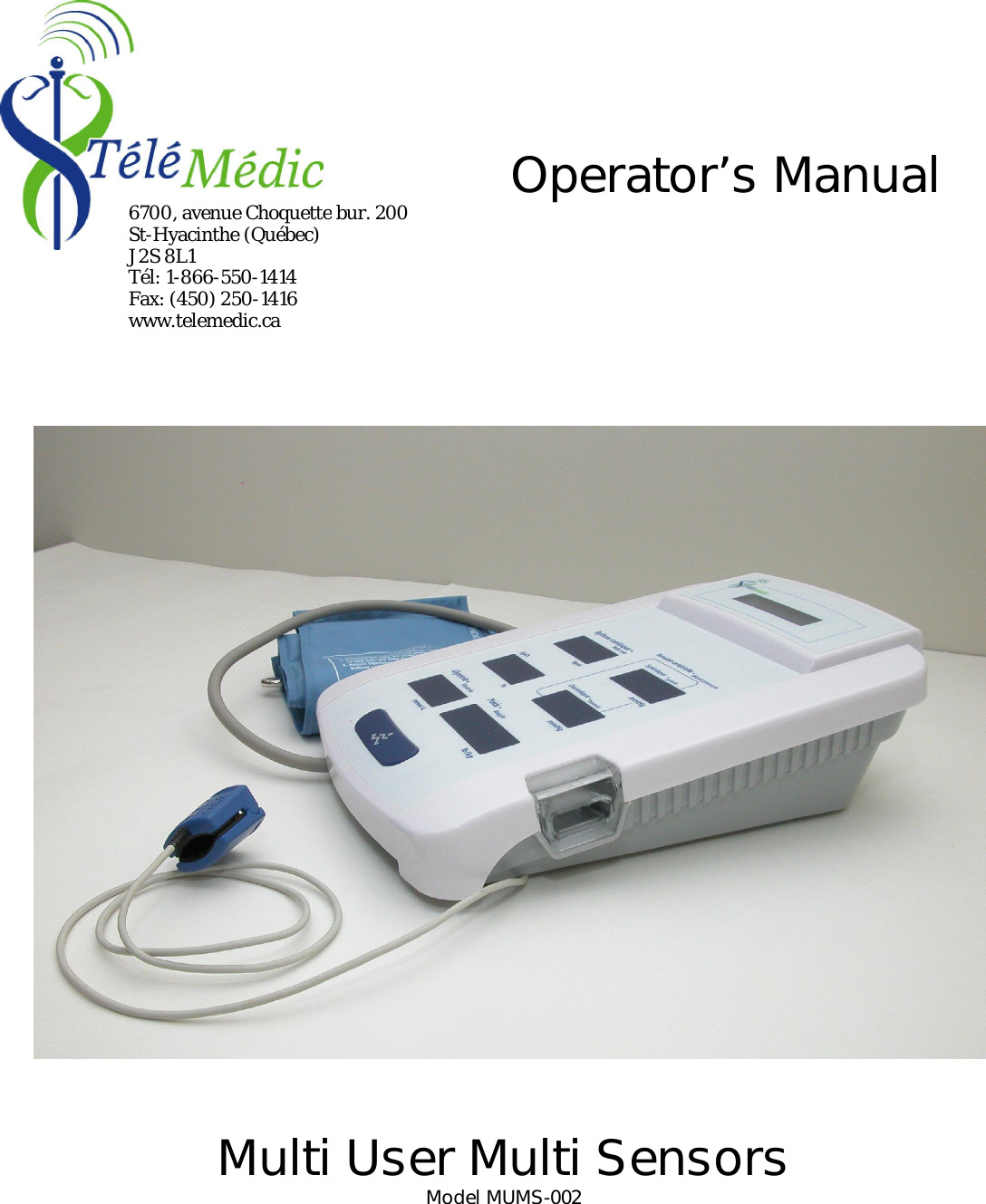
                          Multi User Multi Sensors Model MUMS-002 Operator’s Manual 6700, avenue Choquette bur. 200 St-Hyacinthe (Québec) J2S 8L1 Tél: 1-866-550-1414 Fax: (450) 250-1416 www.telemedic.ca
Copyright © 2010 TéléMédic Inc. All rights reserved.  This equipment is protected by the Canadian copyright  laws. It cannot be reproduced,  distributed or modified in any ways by other entities  than TéléMédic, except under written consent by TéléMédic.  All the requisite efforts have been done to ensure that the information contained in this document was complete and precise at the moment of printing. However, the information can be modified without notice.  Declaration of conformity This device is registered as CSA International certified. To see the certificates of official declaration, consult the online documentation on TéléMédic’s website: http : //www.telemedic.ca This device complies with Industry Canada’s low power radio devices norms RSS-210. Certification number: 6418A-MUMS002 This device complies with the FCC (Federal Communications Commission) intentional radio frequencies transmission. Identification number: FCC ID : T3W-MUMS-002  Trademark Vie-Gie Med is registered trademarks. Other brands and products names mentioned in this document are properties of the respective holders.  Ordering information You can order updates of this document directly on TéléMédic's website: http://www.telemedic.ca .  Comments TéléMédic appreciates your comments relating to this manual. Please send your comments directly to info@telemedic.ca.  Support For all technical questions or defectiveness, please contact TéléMédic’s user support service at 1-866-550-1414 or at info@telemedic.ca    Meaning of symbols used in this manual:     Warning:  Failure  to  these  instructions  may  lead  to  unexpected  operation  or defects of the system.     Important: Important element to consider in the use of this device.    Meaning of device symbols:     Warning:  Consult  accompanying  documents.  This  manual  and  the  associated sections on TéléMédic’s website (see manual for references) should be consulted before using this device.    This equipment complies with general requirements for safety of medical electrical equipment  CAN/CSA  C22.2  No.601.1  and  CAN/CSA  C22.2  No.60601-1-1,  UL 2601-1.  This  equipment  also  complies  with  electromagnetic  compatibility requirements for medical electrical equipment CAN/CSA C22.2 No 60601-1-2    This device complies with FCC (Federal Communications Commission) rules part 15 (Radio frequency devices) for the United States.      This equipment includes radio frequency transmitter which generate non-ionizing radiation.
Table of contain The Multi User Multi Sensors, MUMS.............................................................................................................4 Indications for use............................................................................................................................................ 4 Main components ............................................................................................................................................ 4 Installation....................................................................................................................................................... 6 Turning on the unit....................................................................................................................................... 6 MUMS indicators ............................................................................................................................................ 6 Language selection .......................................................................................................................................... 7 Acquiring vital signs session............................................................................................................................ 8 Emergency stop ............................................................................................................................................... 8 Server data transmission .................................................................................................................................. 8 Battery recharge (available only on model MUMS-002)................................................................................... 8 Precautionary measures.................................................................................................................................... 8 Functional preventive check-ups ...................................................................................................................... 9 Maintenance .................................................................................................................................................... 9 Optimal operating performance........................................................................................................................ 9 Warranty ...........................................................................................................................................................9 Technical support............................................................................................................................................ 10 Conformity....................................................................................................................................................... 10 Technical specifications...................................................................................................................................11  Pictures list  Picture 1: Components of MUMS ........................................................................................................................ 4 Picture 2: Accessories port of MUMS.................................................................................................................. 5  Table list  Table 1 List of supported optional medical equipment.......................................................................................... 6 Table 2 List of accessories on the MUMS ............................................................................................................ 6
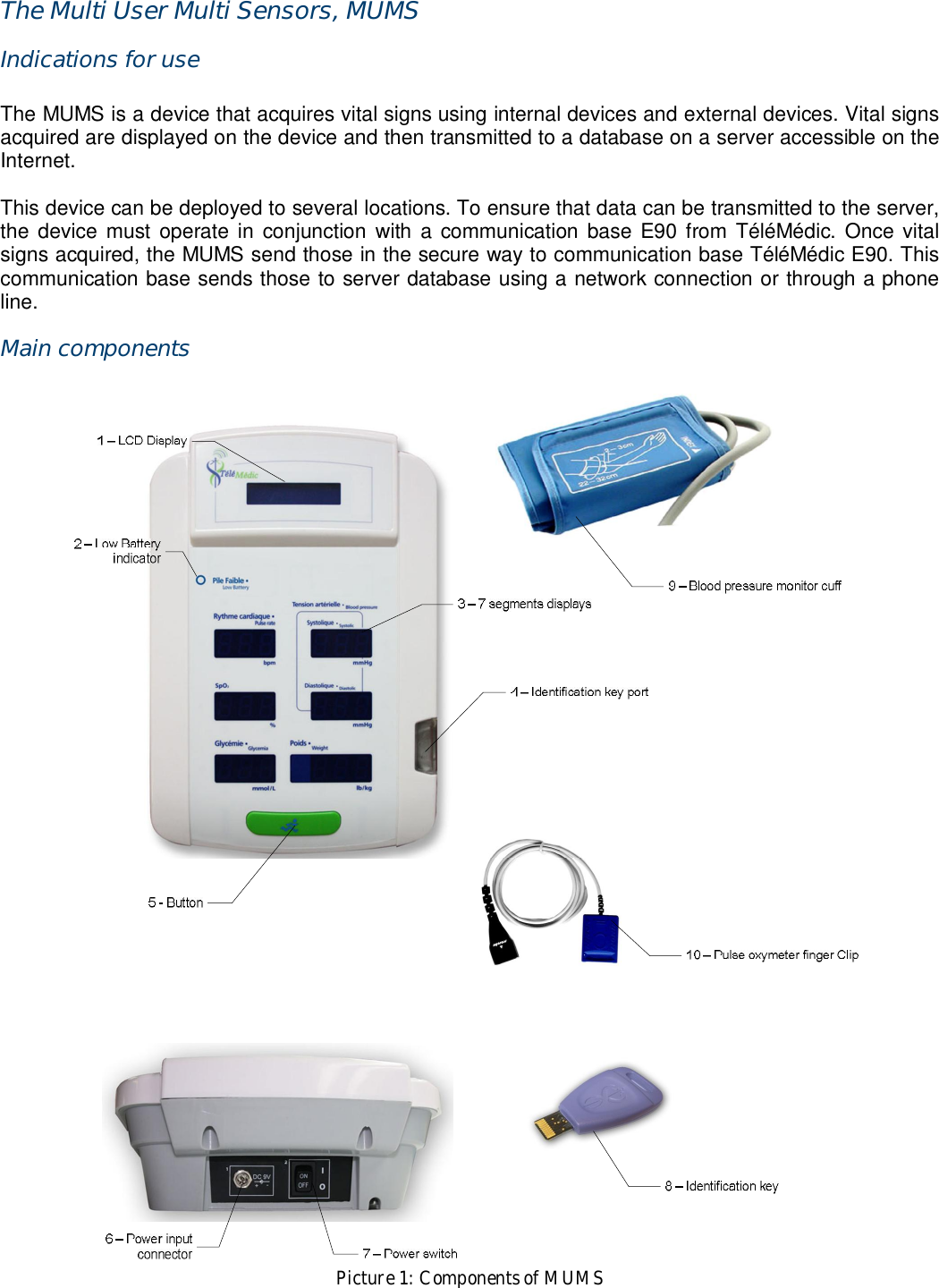
The Multi User Multi Sensors, MUMS Indications for use  The MUMS is a device that acquires vital signs using internal devices and external devices. Vital signs acquired are displayed on the device and then transmitted to a database on a server accessible on the Internet.  This device can be deployed to several locations. To ensure that data can be transmitted to the server, the  device  must  operate  in  conjunction  with  a  communication base E90 from  TéléMédic.  Once vital signs acquired, the MUMS send those in the secure way to communication base TéléMédic E90. This communication base sends those to server database using a network connection or through a phone line. Main components   Picture 1: Components of MUMS
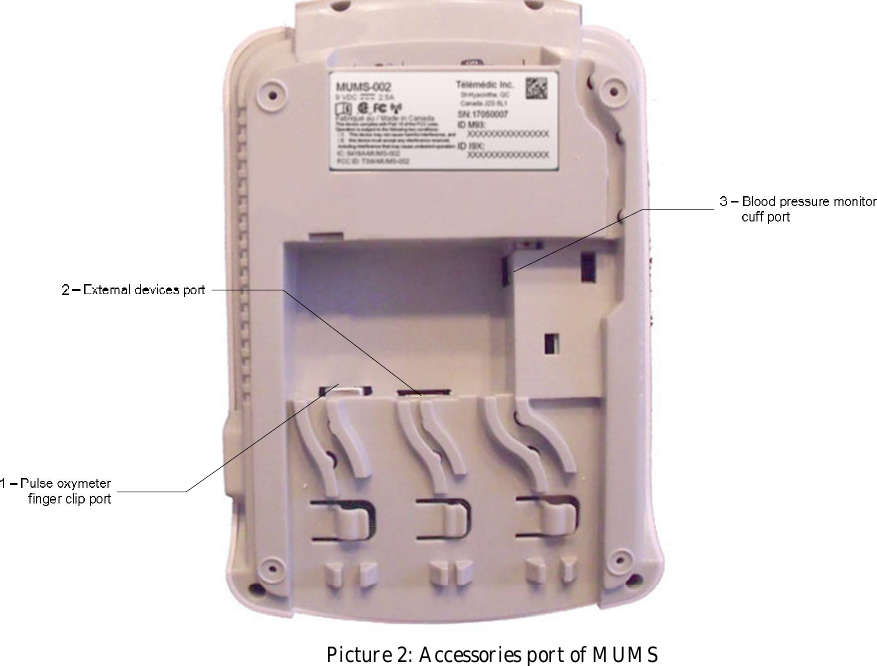
  Picture 2: Accessories port of MUMS
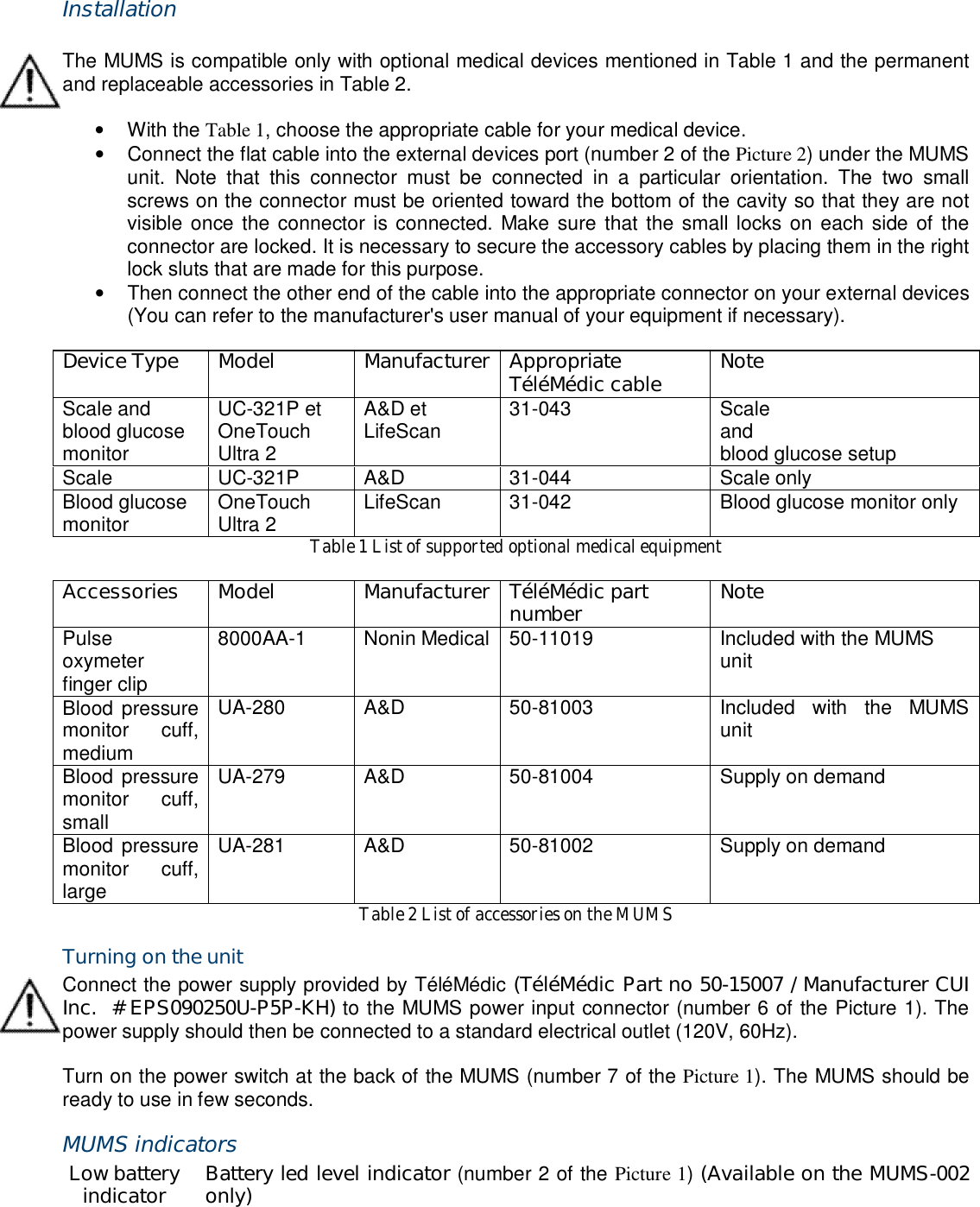
 Installation  The MUMS is compatible only with optional medical devices mentioned in Table 1 and the permanent and replaceable accessories in Table 2.  •  With the Table 1, choose the appropriate cable for your medical device. •  Connect the flat cable into the external devices port (number 2 of the Picture 2) under the MUMS unit.  Note  that  this  connector  must  be  connected  in  a  particular  orientation.  The  two  small screws on the connector must be oriented toward the bottom of the cavity so that they are not visible once the  connector is connected. Make sure that the small locks on  each side of the connector are locked. It is necessary to secure the accessory cables by placing them in the right lock sluts that are made for this purpose. •  Then connect the other end of the cable into the appropriate connector on your external devices (You can refer to the manufacturer's user manual of your equipment if necessary).  Device Type  Model  Manufacturer Appropriate TéléMédic cable  Note Scale and blood glucose monitor UC-321P et OneTouch Ultra 2 A&D et LifeScan  31-043  Scale and blood glucose setup Scale  UC-321P  A&D  31-044  Scale only Blood glucose monitor  OneTouch Ultra 2  LifeScan  31-042  Blood glucose monitor only Table 1 List of supported optional medical equipment  Accessories  Model  Manufacturer TéléMédic part number  Note Pulse oxymeter finger clip 8000AA-1  Nonin Medical 50-11019  Included with the MUMS unit Blood pressure monitor  cuff, medium UA-280  A&D  50-81003  Included  with  the  MUMS unit Blood pressure monitor  cuff, small UA-279  A&D  50-81004  Supply on demand Blood pressure monitor  cuff, large UA-281  A&D  50-81002  Supply on demand Table 2 List of accessories on the MUMS Turning on the unit Connect the power supply provided by TéléMédic (TéléMédic Part no 50-15007 / Manufacturer CUI Inc.  # EPS090250U-P5P-KH) to the MUMS power input connector (number 6 of the Picture 1). The power supply should then be connected to a standard electrical outlet (120V, 60Hz).  Turn on the power switch at the back of the MUMS (number 7 of the Picture 1). The MUMS should be ready to use in few seconds. MUMS indicators Low battery indicator  Battery led level indicator (number 2 of the Picture 1) (Available on the MUMS-002 only)
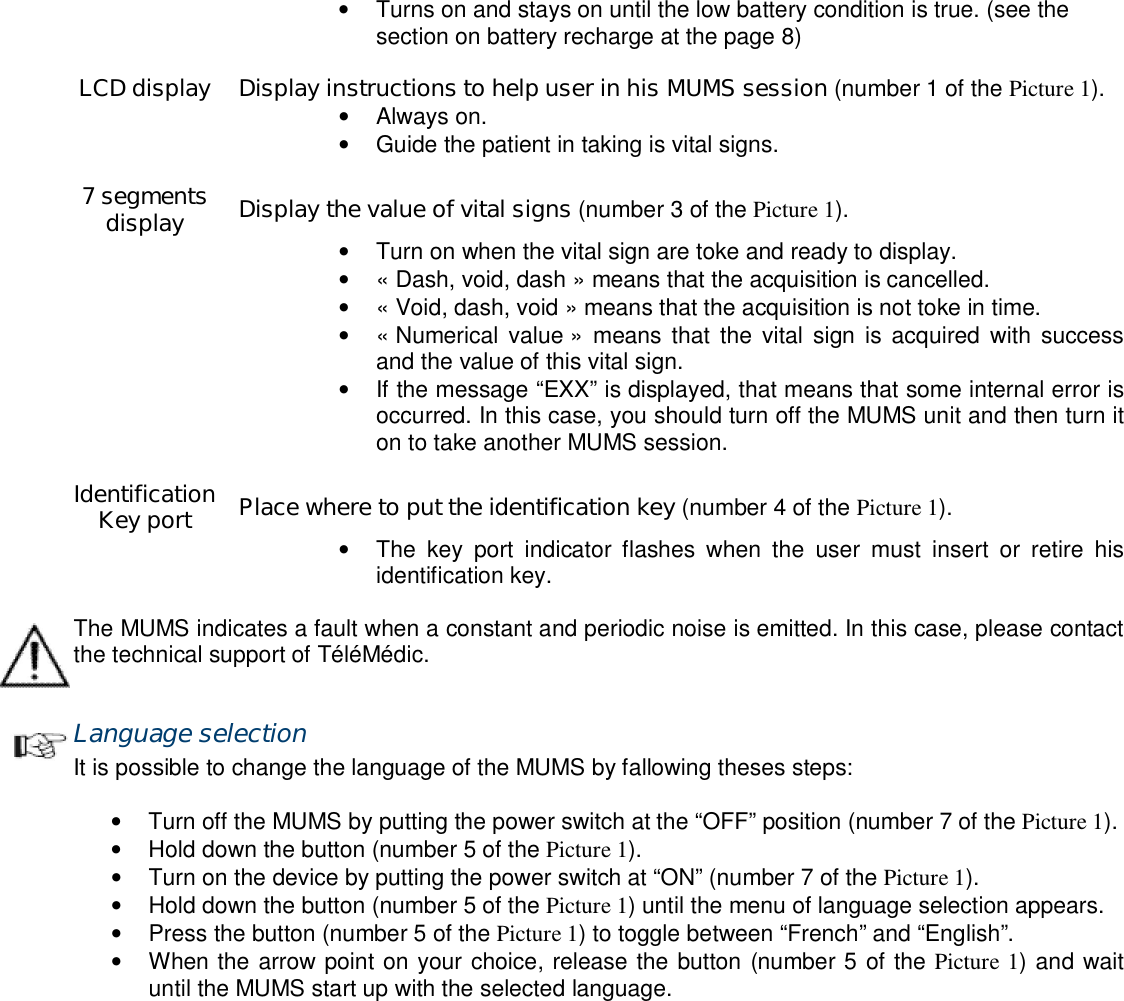
 •  Turns on and stays on until the low battery condition is true. (see the section on battery recharge at the page 8)    LCD display  Display instructions to help user in his MUMS session (number 1 of the Picture 1).  •  Always on. •  Guide the patient in taking is vital signs.    7 segments display  Display the value of vital signs (number 3 of the Picture 1).  •  Turn on when the vital sign are toke and ready to display.  •  « Dash, void, dash » means that the acquisition is cancelled.  •  « Void, dash, void » means that the acquisition is not toke in time.  •  « Numerical value »  means that  the  vital sign  is  acquired with  success and the value of this vital sign.  •  If the message “EXX” is displayed, that means that some internal error is occurred. In this case, you should turn off the MUMS unit and then turn it on to take another MUMS session.    Identification Key port  Place where to put the identification key (number 4 of the Picture 1).  •  The  key  port  indicator  flashes  when  the  user  must  insert  or  retire  his identification key.  The MUMS indicates a fault when a constant and periodic noise is emitted. In this case, please contact the technical support of TéléMédic.  Language selection It is possible to change the language of the MUMS by fallowing theses steps:  •  Turn off the MUMS by putting the power switch at the “OFF” position (number 7 of the Picture 1). •  Hold down the button (number 5 of the Picture 1). •  Turn on the device by putting the power switch at “ON” (number 7 of the Picture 1). •  Hold down the button (number 5 of the Picture 1) until the menu of language selection appears. •  Press the button (number 5 of the Picture 1) to toggle between “French” and “English”. •  When the arrow point on your choice, release the button (number 5 of the Picture 1) and wait until the MUMS start up with the selected language.
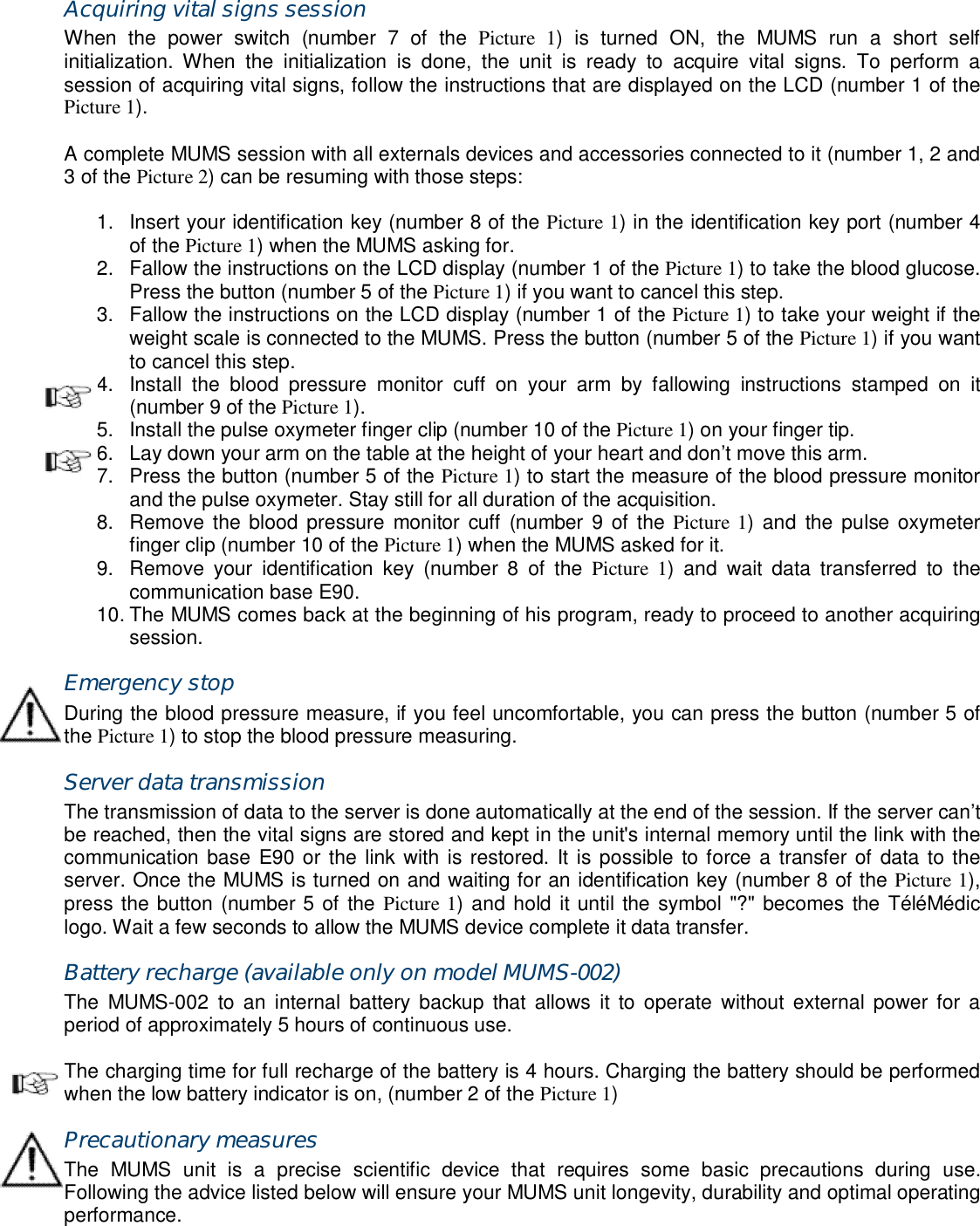
Acquiring vital signs session When  the  power  switch  (number  7  of  the  Picture  1)  is  turned  ON,  the  MUMS  run  a  short  self initialization.  When  the  initialization  is  done,  the  unit  is  ready  to  acquire  vital  signs.  To  perform  a session of acquiring vital signs, follow the instructions that are displayed on the LCD (number 1 of the Picture 1).  A complete MUMS session with all externals devices and accessories connected to it (number 1, 2 and 3 of the Picture 2) can be resuming with those steps:  1.  Insert your identification key (number 8 of the Picture 1) in the identification key port (number 4 of the Picture 1) when the MUMS asking for. 2.  Fallow the instructions on the LCD display (number 1 of the Picture 1) to take the blood glucose. Press the button (number 5 of the Picture 1) if you want to cancel this step. 3.  Fallow the instructions on the LCD display (number 1 of the Picture 1) to take your weight if the weight scale is connected to the MUMS. Press the button (number 5 of the Picture 1) if you want to cancel this step. 4.  Install  the  blood  pressure  monitor  cuff  on  your  arm  by  fallowing  instructions  stamped  on  it (number 9 of the Picture 1). 5.  Install the pulse oxymeter finger clip (number 10 of the Picture 1) on your finger tip. 6.  Lay down your arm on the table at the height of your heart and don’t move this arm. 7.  Press the button (number 5 of the Picture 1) to start the measure of the blood pressure monitor and the pulse oxymeter. Stay still for all duration of the acquisition. 8.  Remove the blood pressure  monitor cuff  (number  9  of the Picture 1) and  the pulse oxymeter finger clip (number 10 of the Picture 1) when the MUMS asked for it. 9.  Remove  your  identification  key  (number  8  of  the  Picture  1)  and  wait  data  transferred  to  the communication base E90. 10. The MUMS comes back at the beginning of his program, ready to proceed to another acquiring session. Emergency stop During the blood pressure measure, if you feel uncomfortable, you can press the button (number 5 of the Picture 1) to stop the blood pressure measuring. Server data transmission The transmission of data to the server is done automatically at the end of the session. If the server can’t be reached, then the vital signs are stored and kept in the unit's internal memory until the link with the communication base E90 or the link with is restored. It is possible  to force a transfer of data to the server. Once the MUMS is turned on and waiting for an identification key (number 8 of the Picture 1), press the button (number 5 of the Picture 1) and hold it until the symbol "?" becomes the TéléMédic logo. Wait a few seconds to allow the MUMS device complete it data transfer. Battery recharge (available only on model MUMS-002) The  MUMS-002  to  an  internal  battery backup  that  allows  it  to operate  without  external  power  for  a period of approximately 5 hours of continuous use.  The charging time for full recharge of the battery is 4 hours. Charging the battery should be performed when the low battery indicator is on, (number 2 of the Picture 1) Precautionary measures The  MUMS  unit  is  a  precise  scientific  device  that  requires  some  basic  precautions  during  use. Following the advice listed below will ensure your MUMS unit longevity, durability and optimal operating performance.
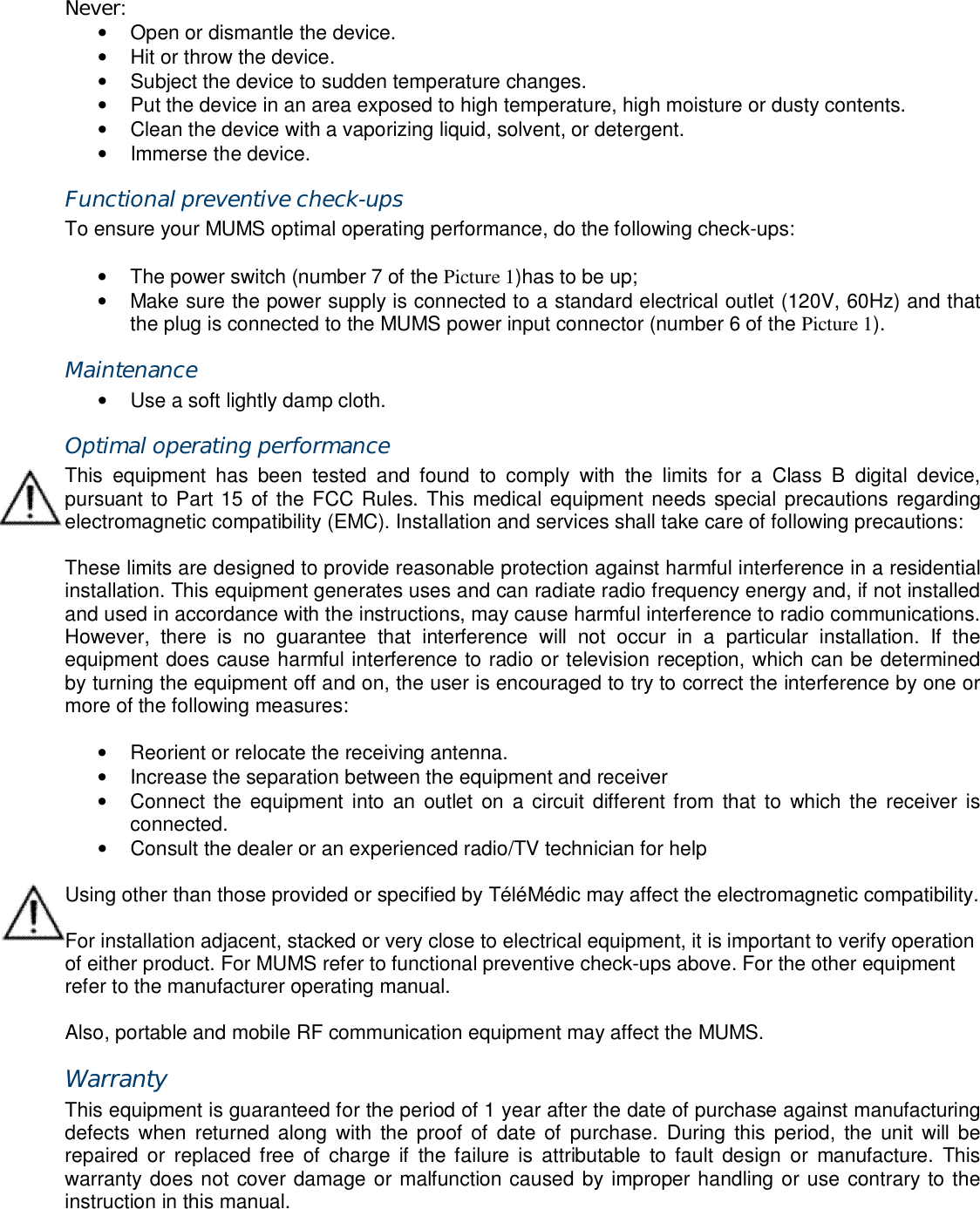
Never: •  Open or dismantle the device. •  Hit or throw the device. •  Subject the device to sudden temperature changes. •  Put the device in an area exposed to high temperature, high moisture or dusty contents. •  Clean the device with a vaporizing liquid, solvent, or detergent. •  Immerse the device. Functional preventive check-ups To ensure your MUMS optimal operating performance, do the following check-ups:  •  The power switch (number 7 of the Picture 1)has to be up; •  Make sure the power supply is connected to a standard electrical outlet (120V, 60Hz) and that the plug is connected to the MUMS power input connector (number 6 of the Picture 1). Maintenance •  Use a soft lightly damp cloth. Optimal operating performance This  equipment  has  been  tested  and  found  to  comply  with  the  limits  for  a  Class  B  digital  device, pursuant to Part 15 of the FCC Rules. This medical equipment needs special precautions regarding electromagnetic compatibility (EMC). Installation and services shall take care of following precautions:  These limits are designed to provide reasonable protection against harmful interference in a residential installation. This equipment generates uses and can radiate radio frequency energy and, if not installed and used in accordance with the instructions, may cause harmful interference to radio communications. However,  there  is  no  guarantee  that  interference  will  not  occur  in  a  particular  installation.  If  the equipment does cause harmful interference to radio or television reception, which can be determined by turning the equipment off and on, the user is encouraged to try to correct the interference by one or more of the following measures:  •  Reorient or relocate the receiving antenna. •  Increase the separation between the equipment and receiver •  Connect the  equipment  into  an  outlet  on  a circuit different from that to  which the  receiver  is connected. •  Consult the dealer or an experienced radio/TV technician for help  Using other than those provided or specified by TéléMédic may affect the electromagnetic compatibility.  For installation adjacent, stacked or very close to electrical equipment, it is important to verify operation of either product. For MUMS refer to functional preventive check-ups above. For the other equipment refer to the manufacturer operating manual.  Also, portable and mobile RF communication equipment may affect the MUMS. Warranty This equipment is guaranteed for the period of 1 year after the date of purchase against manufacturing defects  when  returned along  with  the proof of date of  purchase.  During this period,  the unit  will be repaired  or  replaced  free  of charge  if  the failure  is attributable  to  fault  design  or  manufacture.  This warranty does not cover damage or malfunction caused by improper handling or use contrary to the instruction in this manual.
Technical support If  you detect  or  suspect  any  malfunction  or failure  of  the  MUMS, or  if  you have questions about  its installation or use, please contact TéléMédic's technical support at 1-866-550-1414 or visit our website at www.telemedic.ca. Conformity This device complies with Part 15 of the FCC rules (US) and RSS-210 (Canada). Operation is subject to the following two conditions: (1) this device may not cause harmful interference, and (2) this device must accept any interference received, including interference that may cause undesired operation.  Any changes or modifications not expressly approved by TéléMédic could void the user’s authority to operate the equipment.
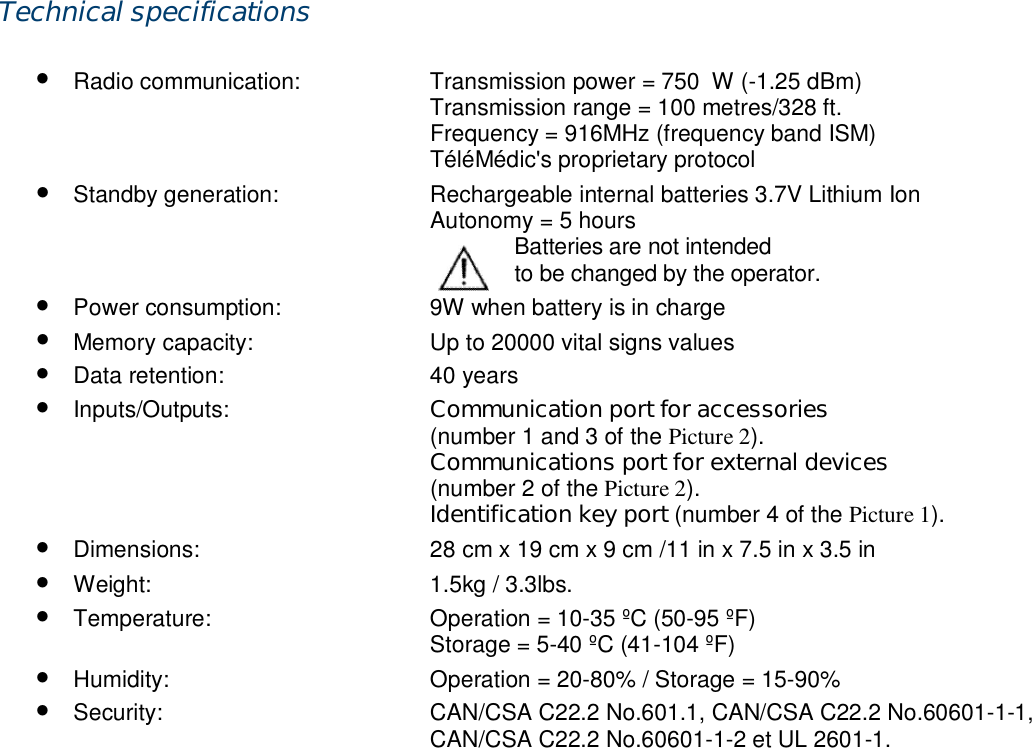
Technical specifications  • Radio communication:  Transmission power = 750μW (-1.25 dBm)  Transmission range = 100 metres/328 ft.   Frequency = 916MHz (frequency band ISM)   TéléMédic's proprietary protocol • Standby generation:  Rechargeable internal batteries 3.7V Lithium Ion   Autonomy = 5 hours               Batteries are not intended                      to be changed by the operator. • Power consumption:  9W when battery is in charge • Memory capacity:  Up to 20000 vital signs values • Data retention:  40 years • Inputs/Outputs:  Communication port for accessories  (number 1 and 3 of the Picture 2).  Communications port for external devices   (number 2 of the Picture 2).  Identification key port (number 4 of the Picture 1). • Dimensions:  28 cm x 19 cm x 9 cm /11 in x 7.5 in x 3.5 in • Weight:  1.5kg / 3.3lbs. • Temperature:  Operation = 10-35 ºC (50-95 ºF)   Storage = 5-40 ºC (41-104 ºF) • Humidity:  Operation = 20-80% / Storage = 15-90% • Security:  CAN/CSA C22.2 No.601.1, CAN/CSA C22.2 No.60601-1-1,   CAN/CSA C22.2 No.60601-1-2 et UL 2601-1.
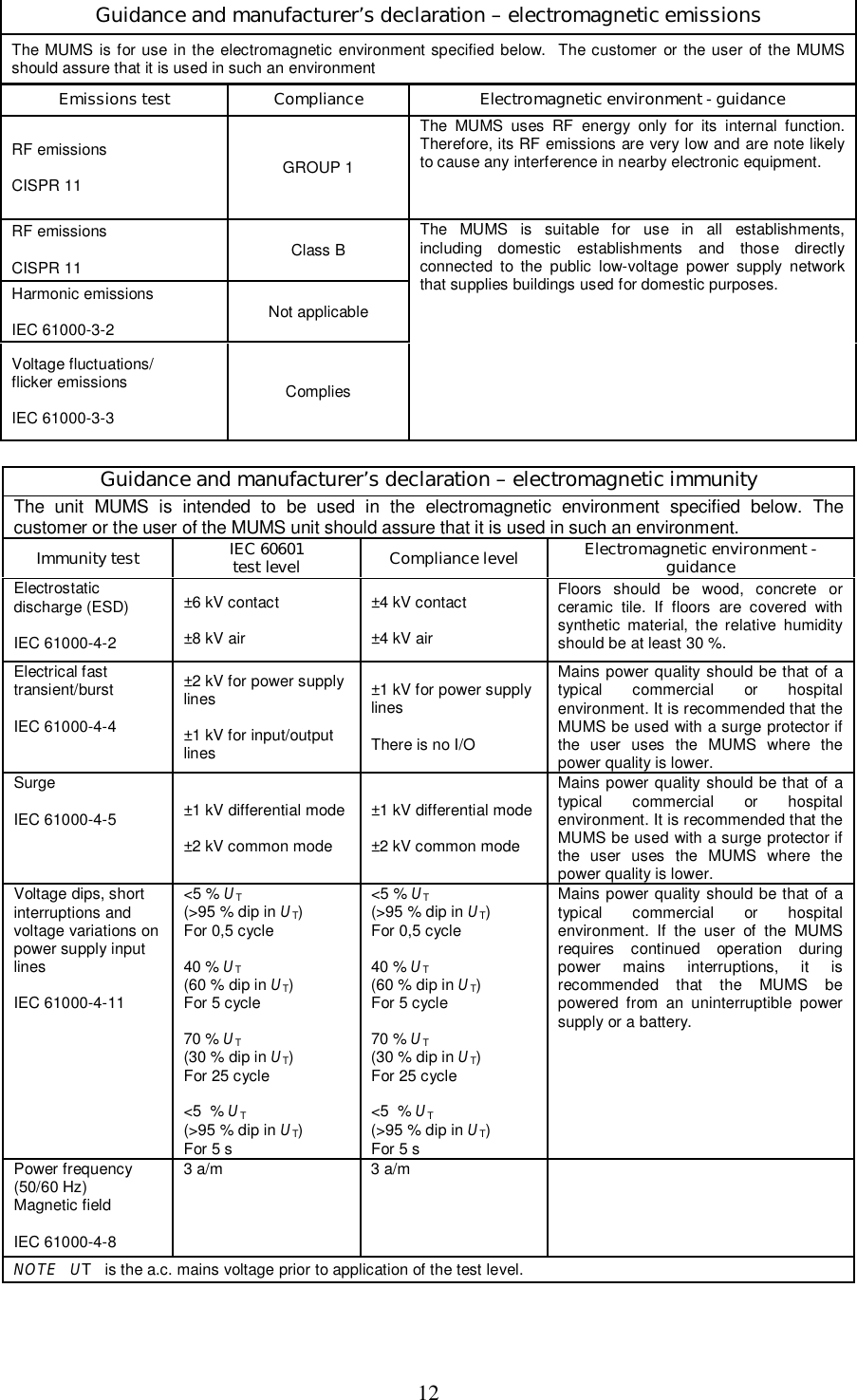
12  Guidance and manufacturer’s declaration – electromagnetic emissions The MUMS is for use in the  electromagnetic  environment specified below.  The customer  or the user  of the MUMS should assure that it is used in such an environment  Emissions test  Compliance Electromagnetic environment - guidance RF emissions  CISPR 11  GROUP 1 The  MUMS  uses  RF  energy  only  for  its  internal  function. Therefore, its RF emissions are very low and are note likely to cause any interference in nearby electronic equipment. RF emissions  CISPR 11  Class B Harmonic emissions  IEC 61000-3-2  Not applicable Voltage fluctuations/  flicker emissions  IEC 61000-3-3  Complies The  MUMS  is  suitable  for  use  in  all  establishments, including  domestic  establishments  and  those  directly connected  to  the  public  low-voltage  power  supply  network that supplies buildings used for domestic purposes.  Guidance and manufacturer’s declaration – electromagnetic immunity The  unit  MUMS  is  intended  to  be  used  in  the  electromagnetic  environment  specified  below.  The customer or the user of the MUMS unit should assure that it is used in such an environment. Immunity test IEC 60601 test level Compliance level Electromagnetic environment - guidance Electrostatic discharge (ESD)  IEC 61000-4-2 ±6 kV contact  ±8 kV air ±4 kV contact  ±4 kV air Floors  should  be  wood,  concrete  or ceramic  tile.  If  floors  are  covered  with synthetic  material,  the  relative  humidity should be at least 30 %. Electrical fast transient/burst  IEC 61000-4-4 ±2 kV for power supply lines  ±1 kV for input/output lines ±1 kV for power supply lines  There is no I/O Mains power quality should be that  of  a typical  commercial  or  hospital environment. It is recommended that the MUMS be used with a surge protector if the  user  uses  the  MUMS  where  the power quality is lower. Surge  IEC 61000-4-5  ±1 kV differential mode  ±2 kV common mode ±1 kV differential mode  ±2 kV common mode Mains power quality should be that  of  a typical  commercial  or  hospital environment. It is recommended that the MUMS be used with a surge protector if the  user  uses  the  MUMS  where  the power quality is lower. Voltage dips, short interruptions and voltage variations on power supply input lines  IEC 61000-4-11 <5 % UT  (>95 % dip in UT) For 0,5 cycle  40 % UT  (60 % dip in UT) For 5 cycle  70 % UT  (30 % dip in UT) For 25 cycle  <5  % UT  (>95 % dip in UT) For 5 s <5 % UT  (>95 % dip in UT) For 0,5 cycle  40 % UT  (60 % dip in UT) For 5 cycle  70 % UT  (30 % dip in UT) For 25 cycle  <5  % UT  (>95 % dip in UT) For 5 s Mains power quality should be that  of  a typical  commercial  or  hospital environment.  If  the  user  of  the  MUMS requires  continued  operation  during power  mains  interruptions,  it  is recommended  that  the  MUMS  be powered  from  an  uninterruptible  power supply or a battery. Power frequency (50/60 Hz) Magnetic field  IEC 61000-4-8 3 a/m  3 a/m   NOTE   UT   is the a.c. mains voltage prior to application of the test level.
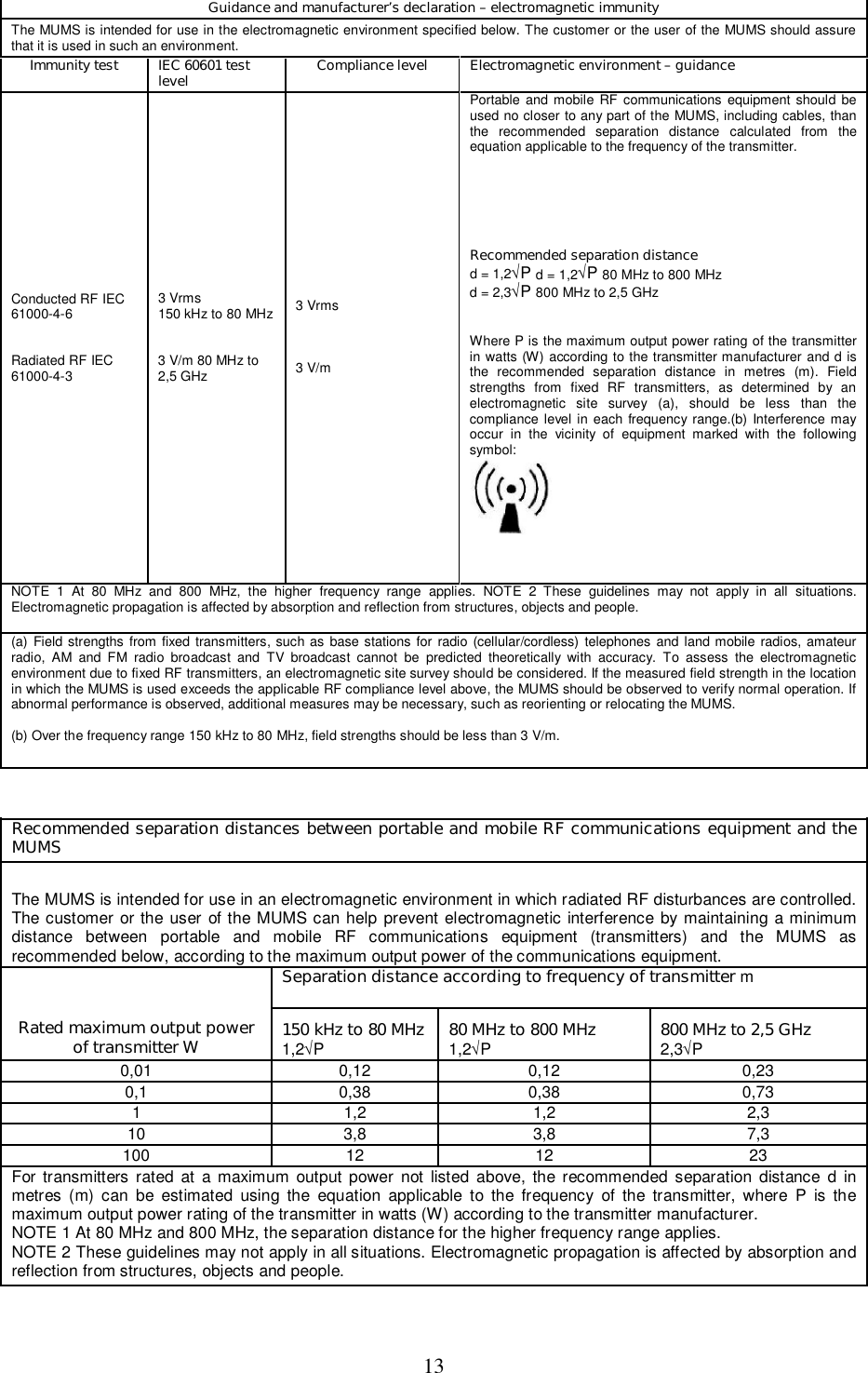
13  Guidance and manufacturer’s declaration – electromagnetic immunity  The MUMS is intended for use in the electromagnetic environment specified below. The customer or the user of the MUMS should assure that it is used in such an environment.  Immunity test  IEC 60601 test level  Compliance level  Electromagnetic environment – guidance  Conducted RF IEC 61000-4-6    Radiated RF IEC 61000-4-3  3 Vrms  150 kHz to 80 MHz    3 V/m 80 MHz to 2,5 GHz  3 Vrms     3 V/m  Portable and mobile RF communications  equipment should be used no closer to any part of the MUMS, including cables, than the  recommended  separation  distance  calculated  from  the equation applicable to the frequency of the transmitter.       Recommended separation distance  d = 1,2√P d = 1,2√P 80 MHz to 800 MHz  d = 2,3√P 800 MHz to 2,5 GHz    Where P is the maximum output power rating of the transmitter in watts (W) according to the transmitter manufacturer and d is the  recommended  separation  distance  in  metres  (m).  Field strengths  from  fixed  RF  transmitters,  as  determined  by  an electromagnetic  site  survey  (a),  should  be  less  than  the compliance  level  in each frequency  range.(b)  Interference may occur  in  the  vicinity  of  equipment  marked  with  the  following symbol:     NOTE  1  At  80  MHz  and  800  MHz,  the  higher  frequency  range  applies.  NOTE  2  These  guidelines  may  not  apply  in  all  situations. Electromagnetic propagation is affected by absorption and reflection from structures, objects and people.  (a)  Field strengths  from  fixed transmitters, such as base stations for radio (cellular/cordless) telephones and land mobile  radios, amateur radio,  AM  and  FM  radio  broadcast  and  TV  broadcast  cannot  be  predicted  theoretically  with  accuracy.  To  assess  the  electromagnetic environment due to fixed RF transmitters, an electromagnetic site survey should be considered. If the measured field strength in the location in which the MUMS is used exceeds the applicable RF compliance level above, the MUMS should be observed to verify normal operation. If abnormal performance is observed, additional measures may be necessary, such as reorienting or relocating the MUMS.   (b) Over the frequency range 150 kHz to 80 MHz, field strengths should be less than 3 V/m.    Recommended separation distances between portable and mobile RF communications equipment and the MUMS  The MUMS is intended for use in an electromagnetic environment in which radiated RF disturbances are controlled. The customer or the user of the MUMS can help prevent electromagnetic interference by maintaining a minimum distance  between  portable  and  mobile  RF  communications  equipment  (transmitters)  and  the  MUMS  as recommended below, according to the maximum output power of the communications equipment.  Separation distance according to frequency of transmitter m  Rated maximum output power of transmitter W   150 kHz to 80 MHz 1,2√P   80 MHz to 800 MHz 1,2√P   800 MHz to 2,5 GHz 2,3√P  0,01   0,12   0,12   0,23  0,1   0,38   0,38   0,73  1   1,2   1,2   2,3  10   3,8   3,8   7,3  100   12   12   23  For transmitters rated  at  a  maximum  output  power  not  listed above, the recommended  separation  distance  d  in metres  (m)  can  be  estimated  using  the  equation  applicable  to  the frequency  of  the transmitter,  where  P  is  the maximum output power rating of the transmitter in watts (W) according to the transmitter manufacturer.  NOTE 1 At 80 MHz and 800 MHz, the separation distance for the higher frequency range applies.  NOTE 2 These guidelines may not apply in all situations. Electromagnetic propagation is affected by absorption and reflection from structures, objects and people.

Navigation menu