Telian MP-2000 MP3 PLAYER User Manual

Telian Corporation MP3 PLAYER

USER MANUAL

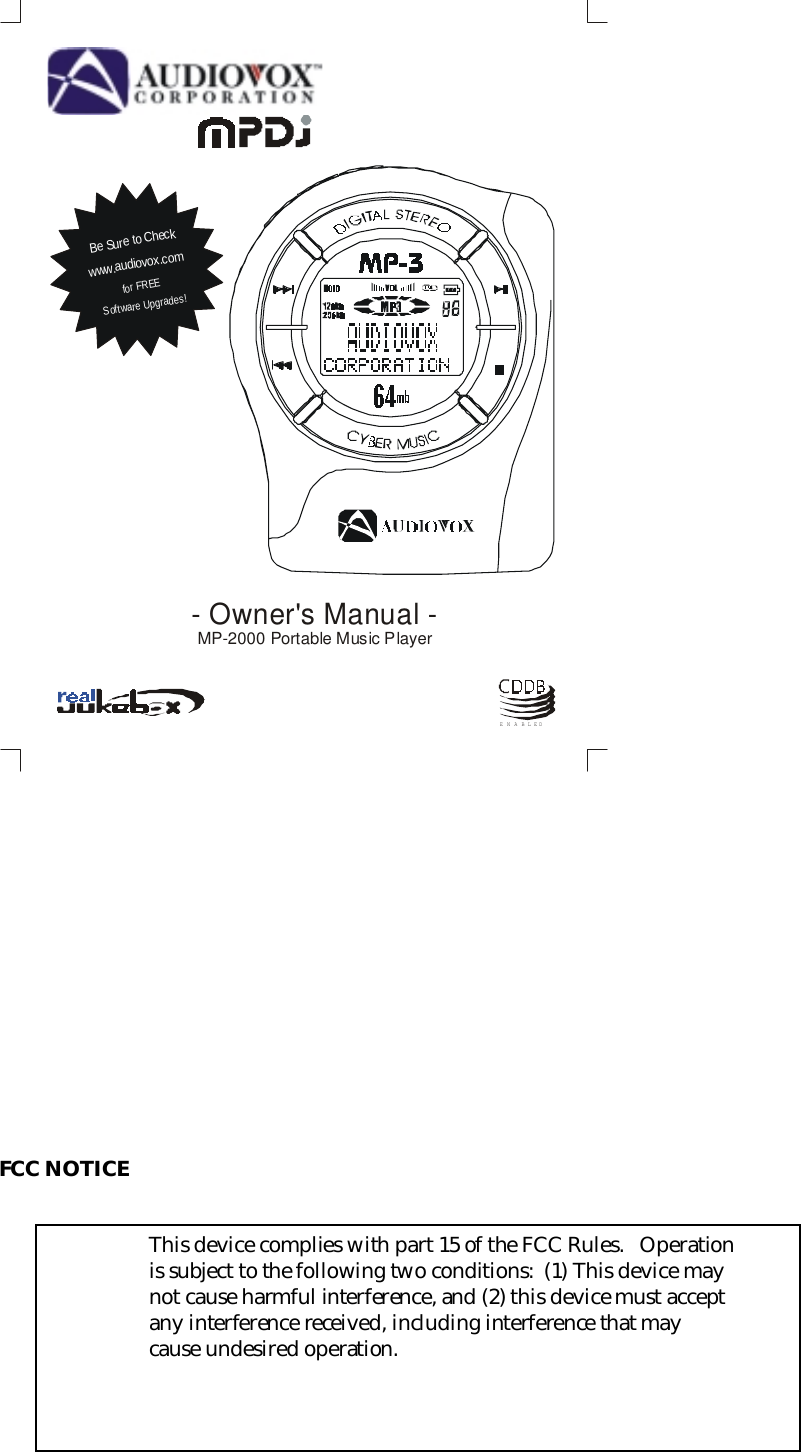
FCC NOTICEThis device complies with part 15 of the FCC Rules.   Operationis subject to the following two conditions:  (1) This device maynot cause harmful interference, and (2) this device must acceptany interference received, including interference that maycause undesired operation.- Owner's Manual -MP-2000 Portable Music PlayerBe Sure to Checkwww.audiovox.comfor FREESoftware Upgrades!ENABLED
WarningNote: This equipment has been tested and found to comply with the limits for a Class Bdigital device, pursuant to part 15 of the FCC Rules.   These limits are designed to providereasonable protection against harmful interference in a residential installation.   Thisequipment generates, uses and can radiate radio frequency energy and, if not installed andused in accordance with the instructions, may cause harmful interference to radiocommunications.   However, there is no guarantee that interference will not occur in aparticular installation.   If this equipment does cause harmful interference to radio ortelevision reception, which can be determined by turning the equipment off and on, theuser is encouraged to try to correct the interference by one or more of the followingmeasures:-  Reorient or relocate the receiving antenna.-  Increase the separation between the equipment and receiver.-  Connect the equipment into an outlet on a circuit different from that to which thereceiver is connected.-  Consult the dealer or an experienced radio/TV technician for help.! NOTE: You are cautioned that any change or modifications to the equipment notexpressly approved by the party responsible for compliance could void your authorityto operate such equipment.! NOTE: This unit was tested with shielded cables on the peripheral devices.   Shieldedcables must be used with the unit to insure compliance.
TAB LE O F C O N TEN TSINTRODUCTION TO MP3 AND THE MP-2000MPDJ KIT CONTENTSBEFORE USING THE MP-2000MP-2000 CONTROL BUTTONSMP-2000 LCD DISPLAYOPTIONAL MULTIMEDIA CARD (MMC)CONNECTING THE MP-2000 TO YOUR PCSOFTWARE  INS TALLATIONOBTAININ G AND MA NAG ING M P3 FILE SREAL JUKEBOX SOFTWARETHE DOWNLOADER PROGRAMHOW TO USE THE MP-2000TROUBLESHOOTINGCAUTION IN USING AND STORING THE MP-2000MP-2000 TECHNICAL SPECIFICATIONS123456789101719363738
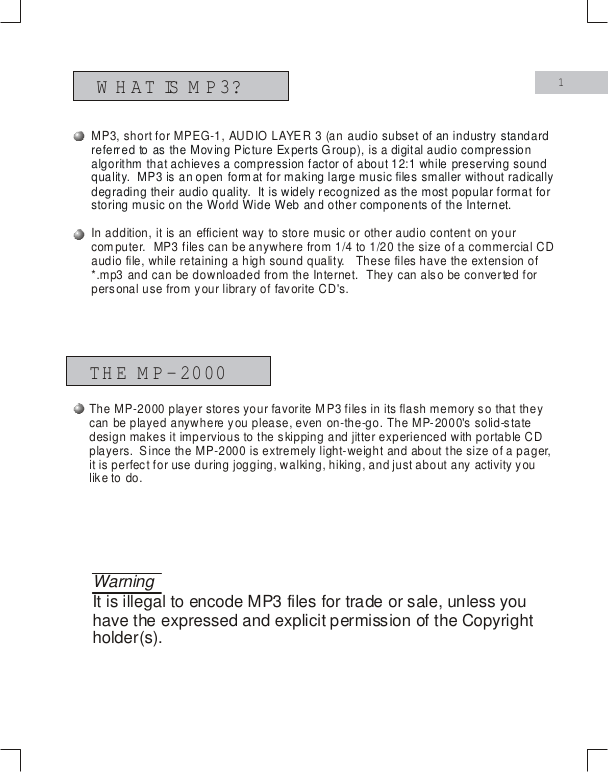
WHAT IS M P3?THE MP-20001WarningIt is illegal to encode MP3 files for trade or sale, unless you have the expressed and explicit permission of the Copyright holder(s).MP3, short for MPEG-1, AUDIO LAYER 3 (an t is an efficient way to store music or other audio content on your compuaudio subset of an industry standard referred to as the Moving Picture Experts Group),  digital audio compression algorithm that achieves a compression factor of about 12:1 while preserving sound quality.  MP3 is an open format for making large music files smaller without radically degrading their audio quality.  It is widely recognized as the most popular format for storing music on the World Wide Web and other components of the Internet.  is a In addition, iter.  MP3 files can be anywhere from 1/4 to 1/20 the size of a commercial CD audio file, while retaining a high sound quality.   These files have the extension of *.mp3 and can be downloaded from the Internet.  They can also be converted for personal use from your library of favorite CD's.The MP-2000 player stores your favorite MP3 files in its flash memory so that they can be played anywhere you please, even on-the-go. The MP-2000's solid-state design makes it impervious to the skipping and jitter experienced with portable CD players.  Since the MP-2000 is extremely light-weight and about the size of a pager, it is perfect for use during jogging, walking, hiking, and just about any activity you like to do.
MPDJ KIT CONTENTSMANUALMP-2000 PLAYER    OWNER'S  MANUAL PARALLEL PORT PC CONNECTING CABLEEARPHONES BATT ERIE S (2  x AAA ) LEATHER CASEINSTALLATION CD HAND STRAP2DIGITAL STEREOCYBER MUSICTake a moment to examine the components provided with your MP DJ  kit.
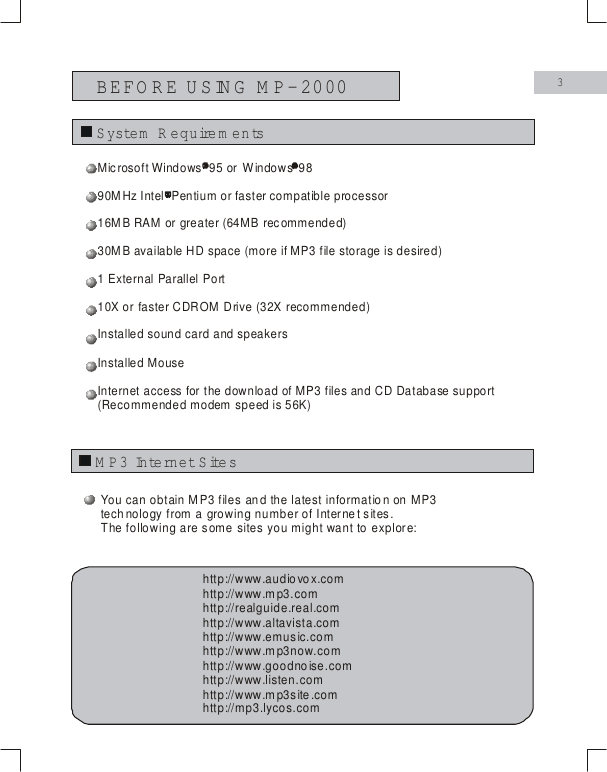
BEFORE USING M P-20003System  R equire m e n tsM P3 Internet Site sYou can obtain MP3 files and the latest information on MP3technology from a growing number of Internet sites.The following are some sites you might want to explore:http://www.audiovox.comhttp://realguide.real.comhttp://www.altavista.comhttp://www.emusic.comhttp://www.mp3now.comhttp://www.goodnoise.comhttp://www.listen.comhttp://www.mp3site.comhttp://mp3.lycos.comhttp://www.mp3.comMicrosoft Windows  95 or  9816MB RAM or greater (64MB recommended)30MB available HD space (more if MP3 file storage is desired)1 External Parallel Port10X or faster CDROM Drive (32X recommended)Installed sound card and speakersInstalled MouseInternet access for the download of MP3 files and CD Database support(Recommended modem speed is 56K)      Windows 90MHz Intel  Pentium or faster compatible processor
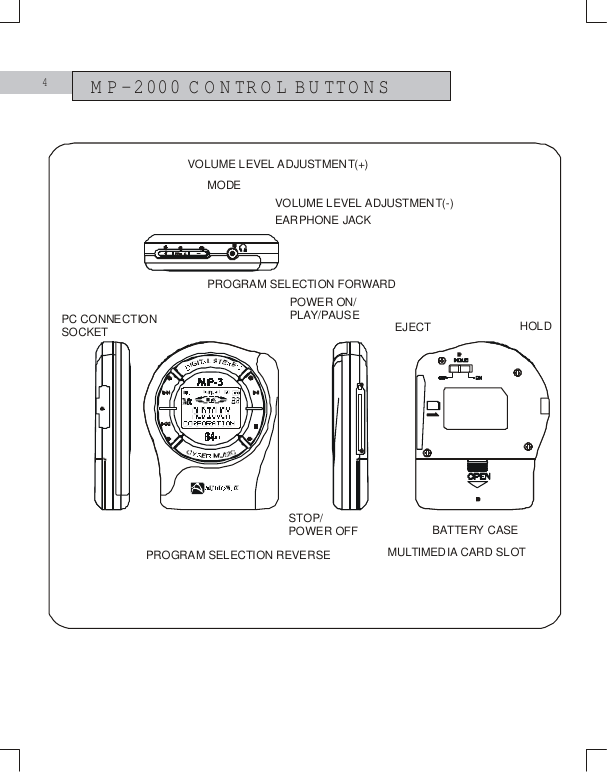
4MP-2000 CONTROL BUTTONSMODEVOLUME LEVEL ADJUSTMENT(+)EARPHONE JACKVOLUME LEVEL ADJUSTMENT(-)HOLDPC CONNECTION SOCKETPROGRAM SELECTION FORWARDPROGRAM SELECTION REVERSEPOWER ON/PLAY/PAUSESTOP/POWER OFF BATTERY CASEEJECTMULTIMEDIA CARD SLOT
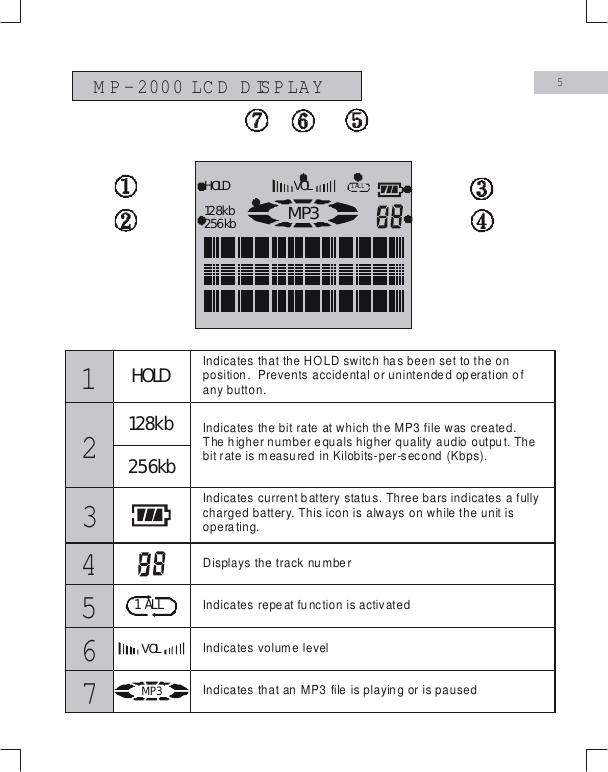
M P-2000 LC D  D ISPLAY5HOLD128kb256kbVOL1  ALLM P3HOLD128kb256kbVOL1  AL LM P3Displays the track numberIndicates repe at fu nction is activatedIndicates volume levelIndicates that an MP3 file is playing or is paused123456Indicates that the HOLD switch has been set to the on position.  Prevents accidental or unintended operation of any button.  Indicates the bit rate at which the MP3 file was created. The higher number equals higher quality audio output. The bit rate is measured in Kilobits-per-second (Kbps).Indicates current battery status. Three bars indicates a fully charged battery. This icon is always on while the unit is operating. 7
6OPTIONAL FLASH M EM ORY MULTIMEDIA CARD [M M C] 123Inserting The Flash Memory CardEjecting The Flash M em ory CardTurn off the power by pressing and holding the Stop Button   for 2 seconds.  Insert the MultiMedia card into the MMC slot  .(figure 1)()â– STEREOEject buttonThe MP-2000 player can store and play additional MP3 files by inserting an optional flash memory card into the MMC slot.If you have a MultiMedia Card inserted into the MP-2000 player, remove it by pressing the Eject Button .(figures 2 & 3)Caution:  Do not remove the MultiMedia Cardwhile unit is on, or damage to the unit and/or MMC could result.
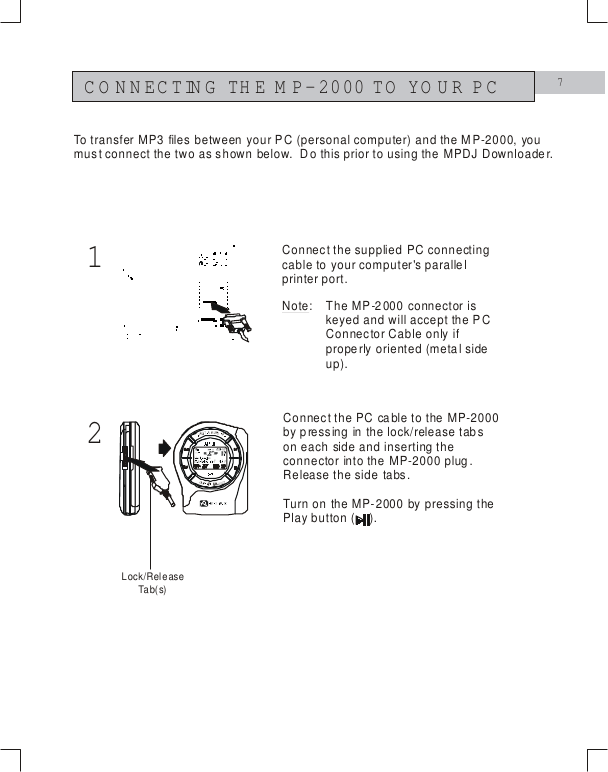
712CONNECTING THE M P-2000 TO YOUR PCConnect the supplied PC connecting cable to your computer's parallel printer port.Connect the PC cable to the MP-2000 by pressing in the lock/release tabs on each side and inserting the connector into the MP-2000 plug.  Release the side tabs.Turn on the MP-2000 by pressing the Play button (    ).To transfer MP3 files between your PC (personal computer) and the MP-2000, you must connect the two as shown below.  Do this prior to using the MPDJ Downloader.Note: The MP-2000 connector is keyed and will accept the PC Connector Cable only if properly oriented (metal side up).Lock/ReleaseTa b( s)
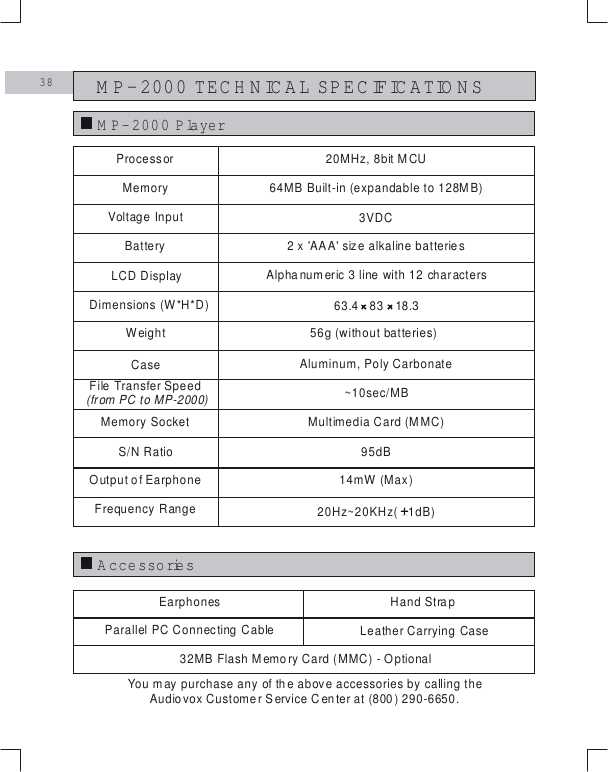
M P-2000 TECHNICAL SPECIFICATIO NS38M P-2000 PlayerA ccessoriesProcessorMemoryVoltage InputBatteryLCD DisplayDimensions (W*H*D)WeightCase File  Transfer (from PC to MP-2000)SpeedMemory SocketS/N RatioOutput of EarphoneFrequency Range20MHz, 8bit MCU64MB Built-in (expandable to 128MB)3VDC95dB20Hz~20KHz(   1dB)2 x 'AAA' size alkaline batteriesAlphanumeric 3 line with 12 characters63.4   83   18.3Aluminum, Poly CarbonateMultimedia Card (MMC)EarphonesParallel PC Connecting Cable32MB Flash Memory Card (MMC) - OptionalLeather Carrying Case56g (without batteries)~10sec/MBHand Strap14mW (Max)You may purchase any of the above accessories by calling theAudiovox Customer Service Center at (800) 290-6650.
150 Marcus BoulevardHauppauge, NY 11788USAhttp://www.audiovox.com(800) 290-6650                                         Printed in KoreaFORM No. 128-5827RealJukebox   is either a registered trademark or trademark of RealNetworks, Inc. in the United States and/or other countries.Music CD-related data is provided through the Internet from the CDDB   Music CD Database.  Copyright   1998 CDDB Inc. All rights reserved.CDDB   and the CDDB Logo are trademarks of CDDB, Inc.RealPlayer    is either a registered trademark or trademark of RealNetworks, Inc. in the United States and/or other countries.TMTMTM

Navigation menu