Tensator RFIOBRD00 Transceiver and Remote Control unit for Tensator E-queuing system User Manual

Tensator Limited Transceiver and Remote Control unit for Tensator E-queuing system

User manual

[Type text]      RF board 1.00
  RF board 1.00 – RF Board 2015-02-01  2     Copyright © 2013 Tensator, S.A. All rights reserved.  No part of this publication may be reproduced, copied by any means or translated without written authorisation by Tensator.  Software Licence The software described in this document is provided under a licence agreement. This software may only be used or copied according to licence conditions.  Warning Tensator follows a continuous development policy and consequent product updating. Accordingly, the information included in this manual is subject to alteration without previous warning.  Registered Trademarks Trademarks and products mentioned in this manual are the property of the corresponding companies.  Tensator Limited Danbury Court Inline Business Analyzer Manager’s Manual  R2 2011 Inline Business Analyzer Manager’s Manual  R2 2011 Inline Business Analyzer Manager’s Manual  R2 2011
  RF board 1.00 – RF Board 2015-02-01  3 Linford Wood Milton Keynes MK14 6TS United Kingdom  Tel.: +351 211 991 510 E-mail: helpdesk-techcentre@tensator.com  Manual created in: 2015 – June - 02
  RF board 1.00 – RF Board 2015-02-01  4  Tensator is the global leader in the management of the customer journey. Its products are proven to generate revenues, improve efficiencies and increase profitability. The company’s core value proposition is to ‘make and save money’ for its clients.  Tensator enjoys a strong global reputation for product quality, customer service, and as the inventor of the world-famous Tensabarrier® - the most respected queue barrier in the world – and industry-wide recognition as a true pioneer its field.  Tensator’s advanced queue management technology includes: electronic call forward systems; virtual queuing technology; digital media platforms including the Tensator Virtual Assistant; in-queue merchandising; self-service systems, crowd and access control solutions; display and signage devices. As well as its dedication to innovative product development, Tensator also prides itself on adopting a customer centric approach that ensures tailored solutions are developed to meet a client’s exacting needs.  By managing the customer journey more efficiently, Tensator’s clients enjoy operational savings, increases in profitable sales and rapid ROI. Its clients’ customers benefit from reduced waiting times and a more informed, entertaining and equitable queuing experience. As a result, Tensator’s clients regularly report improved customer satisfaction levels and high retention rates.   Tensator empowers organisations in over 170 countries to improve their customers’ journey and boasts a broad range of clients including: blue chip retailers; international airport terminals; transport providers; financial institutions; major exhibition centres; leisure and entertainment venues; government administration offices; restaurants and hotels.  Headquartered in Milton Keynes, UK, Tensator has offices in the USA, UAE, Germany, France, and Poland. It has affiliate offices in Portugal, Spain and Colombia, as well as a worldwide network of distribution partners.  Visit www.tensator.com and follow us on Twitter, LinkedIn, and YouTube.
  RF board 1.00 – RF Board 2015-02-01  5 TABLE OF CONTENTS  1 DESCRIPTION ................................................................................................ 6 1.1 RF interface ............................................................................................ 6 1.2 RS485 Interface ...................................................................................... 6 1.3 USB Interface ......................................................................................... 6 2 CONFIGURATION ........................................................................................... 7 2.1 Reset ..................................................................................................... 8 2.2 Current config ......................................................................................... 8 2.3 Set zone ................................................................................................. 9 2.4 Set Address ............................................................................................ 9 2.5 Get firmware version ............................................................................... 9 3 SETUP ............................................................................................................. 9 4 CHARACTERISTICS ....................................................................................... 11 5 INFORMATION TO USER .............................................................................. 11
  RF board 1.00 – RF Board 2015-02-01  6 1 Description  The RF IO Board is  a remote control and communication transceiver. It uses a  radio interface for remote communication. Through a rs485 interface collects information and transmits  commands  to  external  modules.  A  USB  serial  port  allows  a  computer  with compatible software to update firmware, configure and get log information.  1.1 RF interface  The RF Interface is a single chip. Low power, multi-channel FSK transceiver configured to  operate  on  the  433MHz  band.  The  chip  is  a  complete  analog  RF  and  baseband transceiver  including  a  PLL  synthesizer  with  PA,  LNA,  I/Q  down  converter  mixers, baseband filters and amplifiers. The transmitter block is equipped with an 8bit TX data register. The receiver has a 16bit FIFO  1.2 RS485 Interface  The RF Board uses the RS485 interface to communicate to external modules. It can poll and  collect  information,  send  commands  originated  locally  or  relayed  from  the  RF interface. Communication rate used can 9600 or 115200 baud. Power may be supplied via this connector (5V)  1.3 USB Interface  The miniUSB type B port is connected to a FTDI232 chip. This implements a serial port  and allows for firmware update, configuration e collection of log information.
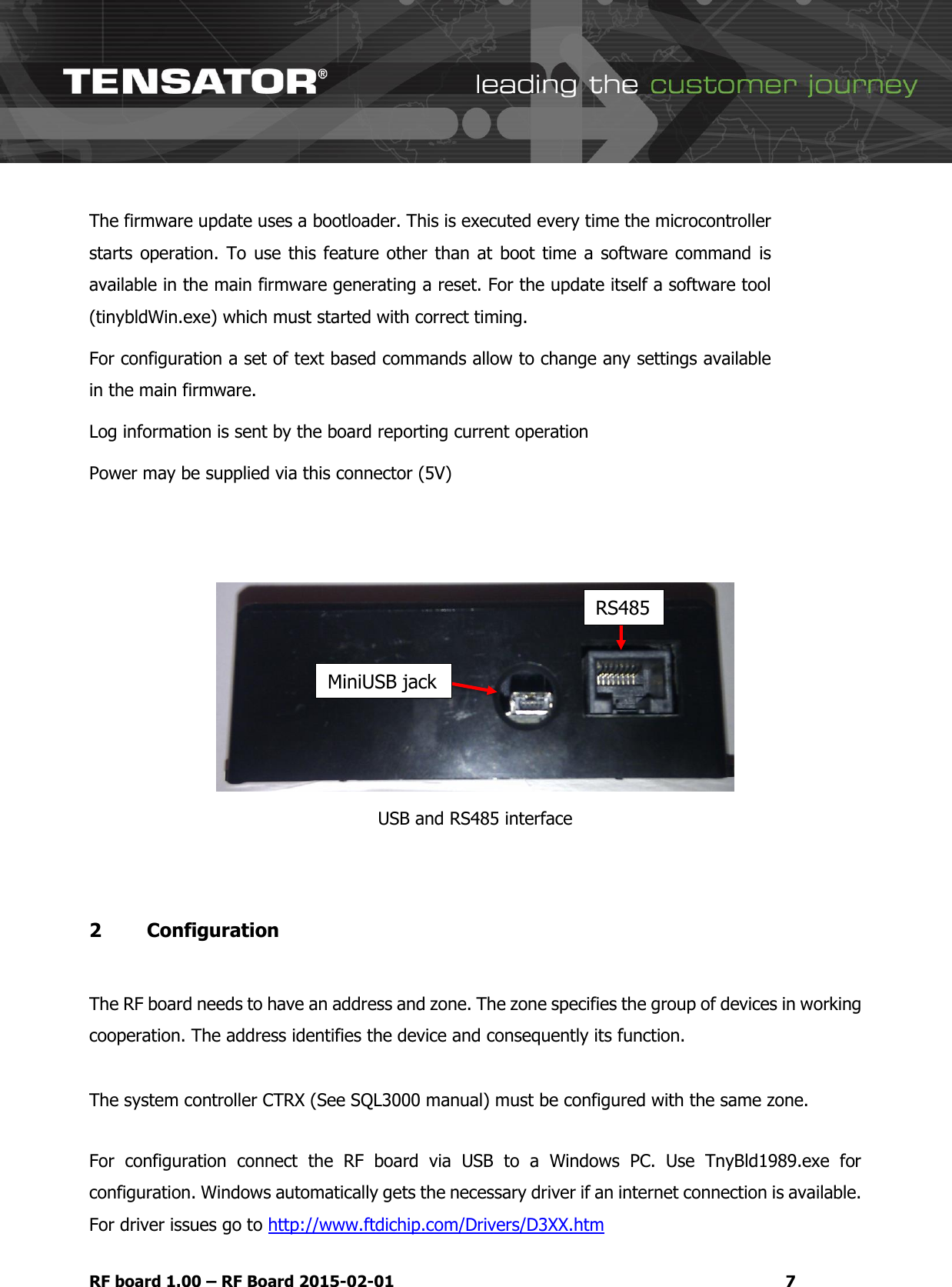
  RF board 1.00 – RF Board 2015-02-01  7 The firmware update uses a bootloader. This is executed every time the microcontroller starts operation. To  use this  feature other than at  boot time  a software  command  is available in the main firmware generating a reset. For the update itself a software tool (tinybldWin.exe) which must started with correct timing. For configuration a set of text based commands allow to change any settings available in the main firmware. Log information is sent by the board reporting current operation  Power may be supplied via this connector (5V)    USB and RS485 interface  2   Configuration   The RF board needs to have an address and zone. The zone specifies the group of devices in working cooperation. The address identifies the device and consequently its function.  The system controller CTRX (See SQL3000 manual) must be configured with the same zone.   For  configuration  connect  the  RF  board  via  USB  to  a  Windows  PC.  Use  TnyBld1989.exe  for configuration. Windows automatically gets the necessary driver if an internet connection is available. For driver issues go to http://www.ftdichip.com/Drivers/D3XX.htm MiniUSB jack RS485
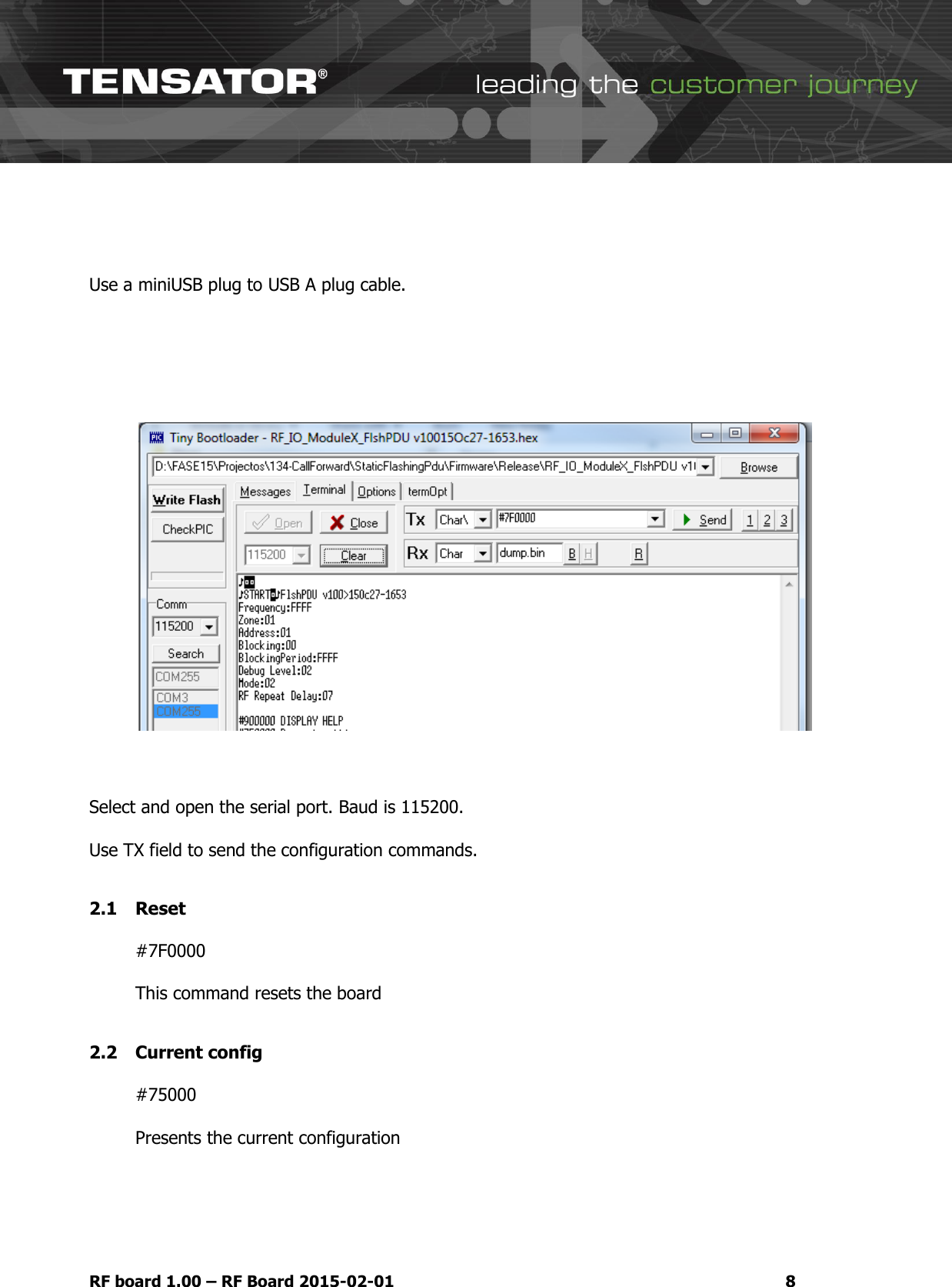
  RF board 1.00 – RF Board 2015-02-01  8   Use a miniUSB plug to USB A plug cable.         Select and open the serial port. Baud is 115200.  Use TX field to send the configuration commands.  2.1 Reset  #7F0000  This command resets the board  2.2 Current config  #75000  Presents the current configuration
  RF board 1.00 – RF Board 2015-02-01  9 2.3 Set zone   #760001XX  Set zone command. Replace XX by 01 to 09 for zone    2.4 Set Address  #770001XX  Set address command. Replace XX by 01 to 18 for zone. This is coded in hexadecimal. 24 positions can be defined   2.5 Get firmware version  #7A0000  Requests firmware version    3 Setup  Configure the board according to the system requirements (Configuration chapter of this manual).  Once  configuration  is  complete  remove  configuration  cable  and  prepare  location  for install. Verify if power is being received via RS485 cable or if an external power supply is necessary. Connect the RS485 with RJ11 in the RS485 jack.  If necessary connect a 5V , 2A, power supply with a mini USB plug  in the miniUSB jack of the RF board.
  RF board 1.00 – RF Board 2015-02-01 10 The connecting cables should have enough slack in order not to stress the connection points. Once the RF board is powered is starts updating the system controller via CTRX with its status. Verify operation in the main controller console. (See Tensator SLQ manual).  Make the sensor bar status (see Sensor Bar manual) change to verify status update in the main system controller (see SLQ3000 manual). Optionally to verify operation a Windows PC may remain connected via USB instead of the external power supply. Using the software described in the Configuration chapter of this manual, is possible to verify operation of the connected sensor bars. Please note that the PC USB port may not be able feed enough current to all the connected sensor bars if these are not self-powered.
  RF board 1.00 – RF Board 2015-02-01 11  4 Characteristics  Dimensions Standard: 90 mm (L) x 66 mm (D) x 32 mm (H) Power 5V DC, 2A   Environment Temperature range: 0ºC ~ 40ºC humidity: 10% ~ 80% (Class 3K2 – EN60721)  5 Information to user  1. Changes or modifications not expressly approved by the party responsible for compliance could void the user's authority to operate the equipment. 2.  This equipment has been tested and found to comply with the limits for a Class A digital device, pursuant to part 15 of the FCC Rules. These limits are designed to provide reasonable protection against harmful interference when the equipment is operated in a commercial environment. This equipment generates, uses, and can radiate radio frequency energy and, if not installed and used in  accordance  with  the  instruction  manual,  may  cause  harmful  interference  to  radio communications.  Operation  of  this  equipment  in  a  residential  area  is  likely  to  cause  harmful interference in which case the user will be required to correct the interference at his own expense. 3. This  device  complies  with  part  15  of  the  FCC  Rules.  Operation  is  subject  to  the  following  two conditions: (1) This device may not cause harmful interference, and (2) this device must accept any interference received, including interference that may cause undesired operation.
  RF board 1.00 – RF Board 2015-02-01 12    Whenever you wish, do not hesitate to contact your Supplier or Tensator – helpdesk-techcentre@tensator.com

Navigation menu