Testo SE and KGaA 2016T330I testo 330i - flue gas analyzer User Manual

Testo AG testo 330i - flue gas analyzer Users Manual

Users Manual

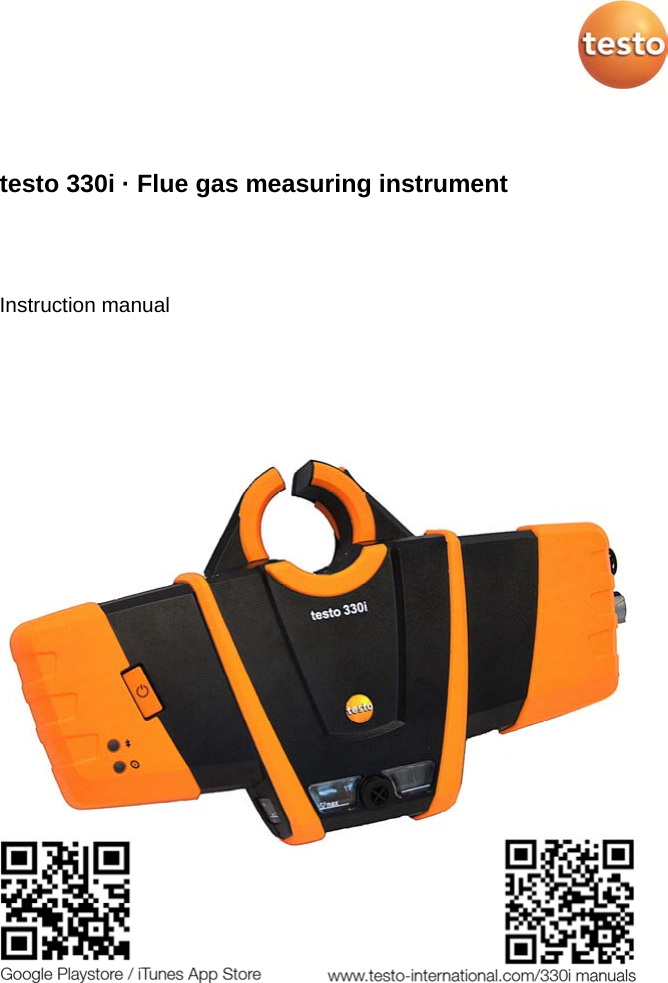
  testo 330i · Flue gas measuring instrument   Instruction manual
 2
1 Contents   3 Pos: 1 /TD/Überschr iften/1. Inhalt @ 0\mod_1 177587817070_79.doc x @ 1243 @ 1 @ 1  1 Contents 1 Contents ................................................................................................... 3 2 Safety and the environment .................................................................... 6 3 Use ............................................................................................................ 6 4 Product description ................................................................................. 7 4.1. Measuring instrument ...................................................................... 7 4.1.1. Overview ..........................................................................................................  7 4.1.2. Terminal panel left/right ................................................................................... 9 4.2. Modular flue gas probe .................................................................... 9 5 First steps .............................................................................................. 10 5.1. Commissioning .............................................................................. 10 5.2. Getting to know the product ........................................................... 10 5.2.1. Connecting probes ......................................................................................... 10 5.2.2. Mains unit/rechargeable battery ..................................................................... 10 5.2.2.1. Charging the rechargeable battery .................................................. 10 5.2.2.2. Mains operation ............................................................................... 11 5.2.3. Switching on and connecting with a mobile terminal device ........................... 11 5.2.4. Switching off .................................................................................................. 12 5.2.5. Using the App ................................................................................................ 12 6 Using the product .................................................................................. 13 6.1. Performing settings ........................................................................ 13 6.1.1.  Configuring measurements..................................................................... 13 6.1.2. Graphics ........................................................................................................ 14 6.1.3.  | Instrument settings | Language ............................................................ 14 6.1.4.  | Instrument settings | Country version ................................................... 14 6.1.5.  (Fuels) .................................................................................................... 15 6.1.6.  | Instrument settings | Sensor protection ................................................ 15 6.1.7.  | Instrument settings | Sensor protection ................................................ 15 6.1.8.  | Instrument settings | O2 reference ........................................................  15 6.1.9.  | Instrument settings | O2 addition .......................................................... 15 6.1.10.  | Instrument settings | Height compensation .......................................... 15 6.1.11.  | Instrument settings | Sensor protection ................................................ 16 6.1.12.  | Instrument settings | Sensor protection ................................................ 16 6.2. Measuring ...................................................................................... 16 6.2.1. Preparing for measurement ........................................................................... 16 6.2.1.1. Checking the condensate container fill level .................................... 16 6.2.1.2. Checking the particle filter ............................................................... 16 6.2.1.3. Zeroing phases ................................................................................ 16
1 Contents 4 6.2.1.4. Performing a gas path check ........................................................... 17 6.2.1.5. Installing the probe mount testofix® ................................................ 17 6.2.1.6. Using the modular flue gas probe .................................................... 19 6.2.2.  | Flue gas ................................................................................................ 20 6.2.3.  | Draught ................................................................................................. 21 6.2.4.  | BImSchV ............................................................................................... 21 6.2.5.  | COundiluted .......................................................................................... 21 6.2.6.  | Smoke number ...................................................................................... 22 6.2.7.  | Differential pressure .............................................................................. 22 6.2.8.  | Differential temp. ................................................................................... 22 6.2.9.  | O2 supply air .......................................................................................... 23 6.2.10.  | Differential temp. ................................................................................... 23 6.2.11.  | Differential temp. ................................................................................... 23 6.3. Printing readings ........................................................................... 23 6.4. Report ........................................................................................... 24 6.4.1. Add to protocol (save measurement) ............................................................. 24 6.4.2. Finish protocol ............................................................................................... 24 7 Maintaining the product ....................................................................... 26 7.1. Checking instrument status ........................................................... 26 7.1.1.  | Instrument settings | Sensor diagnosis ................................................ 26 7.1.2.  | Error list ............................................................................................... 26 7.2. Cleaning the measuring instrument .............................................. 26 7.3. Draining the condensate container ............................................... 26 7.4. Opening the measuring instrument ............................................... 27 7.5. Replacing the rechargeable battery .............................................. 30 7.6. Replacing sensors ........................................................................ 31 7.7. Cleaning the modular flue gas probe ............................................ 32 7.8. Replacing the probe module ......................................................... 32 7.9. Checking/replacing the particle filter ............................................. 33 7.10. Changing the thermocouple .......................................................... 34 7.11. Updating the instrument software ................................................. 34 8 Technical data ....................................................................................... 35 8.1.1. Examinations and licenses ............................................................................ 35 8.1.2. Bluetooth® module ......................................................................................... 35 8.1.3. Measuring ranges and resolution ................................................................... 38 8.1.4. Accuracy and response time .......................................................................... 38 8.1.5. Other instrument data .................................................................................... 40 8.1.6. Declaration of conformity ............................................................................... 42 9 Tips and assistance .............................................................................. 43
1 Contents   5 9.1. Questions and answers ................................................................. 43 9.2. Accessories and spare parts ......................................................... 44  Pos: 2 /TD/--- Seitenwechsel --- @ 0\mod_1173774430601_0. docx @ 283 @  @ 1
3 Use 6 Pos: 3 /TD/Überschr iften/2. Sicher heit und Umwelt @ 0\mod_117377471935 1_79.docx @ 292 @ 1 @ 1  2 Safety and the environment Pos: 4 /TD/Sicherhei t und Umwelt/Verweis auf " Inbetriebnahme und Si cherheit" - Kap. Sic herheit @ 18\mod_143799616456 3_79.docx @ 216177 @  @ 1  Please note the information in the document Commissioning and Safety (printed version supplied with the product). Make sure that all product users read and observe the safety information! Pos: 5 /TD/Überschr iften/3. Verwendung @ 18\m od_1437996869580_7 9.docx @ 216211 @ 1 @ 1  3 Use Pos: 6 /TD/Leistungsbe schreibung/Verwendu ng/testo 3xx/tes to 330i_Verwendung @ 17\m od_1432802471780_79.d ocx @ 213305 @  @ 1  The testo 330i is a flue gas measuring instrument which in combination with a separate Android or iOS mobile device and the testo 330i App enables professional flue gas analysis of combustion systems: •  Small combustion systems (oil, gas, wood, coal) •  Low-temperature and condensing boilers •  Gas water heaters These systems can be adjusted using the instrument and checked for compliance with the applicable limit values.  The instrument has been verified as a short-term measuring instrument and should not be used as a safety (alarm) instrument. The following tasks can also be carried out using the instrument: •  Regulating the O2, CO and CO2, NO, NOx values in furnaces for the purpose of ensuring optimal operation. •  Draught measurement. •  Measuring and regulating the gas flow pressure in gas water heaters. •  Measuring and optimising the flow and return temperatures of heating systems. •  Ambient measurement - CO and CO2. •  Detection of CH4 (methane) and C3H8 (propane). •  The instrument can be used for measurements on combined heat and power stations (CHP) in accordance with the first German Federal Immission Control Ordinance (BImSchV). •  In principal, the CO sensor can also be used for measurements on CHP stations. If you should carry out more than 50 measurements on CHP stations per year, please contact your nearest Testo service centre or send the testo 330i to testo Service for inspection.   A worn NOx filter of the CO sensor can be ordered as a spare part (item no. 0554 4150) and replaced.
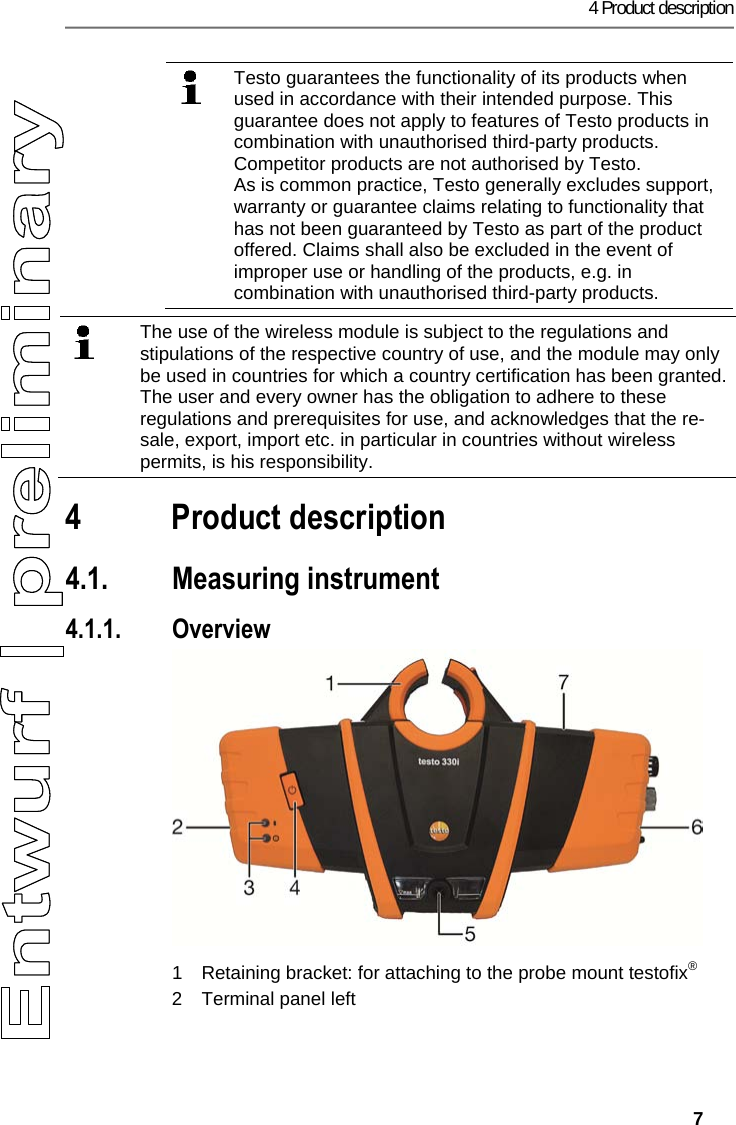
4 Product description   7  Testo guarantees the functionality of its products when used in accordance with their intended purpose. This guarantee does not apply to features of Testo products in combination with unauthorised third-party products. Competitor products are not authorised by Testo. As is common practice, Testo generally excludes support, warranty or guarantee claims relating to functionality that has not been guaranteed by Testo as part of the product offered. Claims shall also be excluded in the event of improper use or handling of the products, e.g. in combination with unauthorised third-party products.   Pos: 7 /TD/00-WI CHTIG, prüfen, ggf. einf ügenFunk-Modul Verwendung ( BT) @ 17\mod_143504385431 4_79.docx @ 214068 @  @ 1    The use of the wireless module is subject to the regulations and stipulations of the respective country of use, and the module may only be used in countries for which a country certification has been granted. The user and every owner has the obligation to adhere to these regulations and prerequisites for use, and acknowledges that the re-sale, export, import etc. in particular in countries without wireless permits, is his responsibility.   Pos: 8 /TD/Überschr iften/4. Produktbesc hreibung @ 0\mod_11737 74846679_79.docx @ 310 @ 1 @ 1  4 Product description Pos: 9 /TD/Produktbe schreibung/Übersic ht/testo 3xx/tes to 330/testo 330i Übersi cht @ 17\mod_14328878520 94_79.docx @ 213517 @ 2333 @ 1  4.1. Measuring instrument 4.1.1. Overview   1  Retaining bracket: for attaching to the probe mount testofix® 2  Terminal panel left
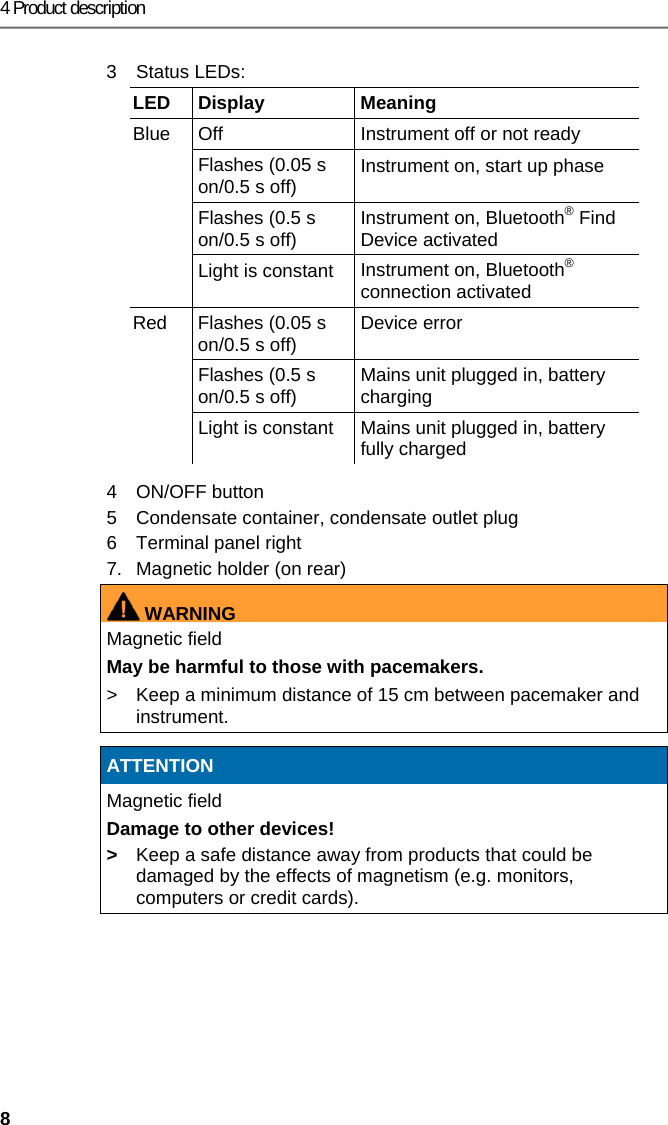
4 Product description 8 3  Status LEDs: LED Display  Meaning Blue  Off  Instrument off or not ready Flashes (0.05 s on/0.5 s off)  Instrument on, start up phase Flashes (0.5 s on/0.5 s off)  Instrument on, Bluetooth® Find Device activated Light is constant  Instrument on, Bluetooth® connection activated Red  Flashes (0.05 s on/0.5 s off)  Device error  Flashes (0.5 s on/0.5 s off)  Mains unit plugged in, battery charging Light is constant  Mains unit plugged in, battery fully charged 4 ON/OFF button 5  Condensate container, condensate outlet plug 6  Terminal panel right 7.  Magnetic holder (on rear) WARNINGMagnetic field May be harmful to those with pacemakers. >  Keep a minimum distance of 15 cm between pacemaker and instrument.   ATTENTION Magnetic field Damage to other devices! >  Keep a safe distance away from products that could be damaged by the effects of magnetism (e.g. monitors, computers or credit cards).
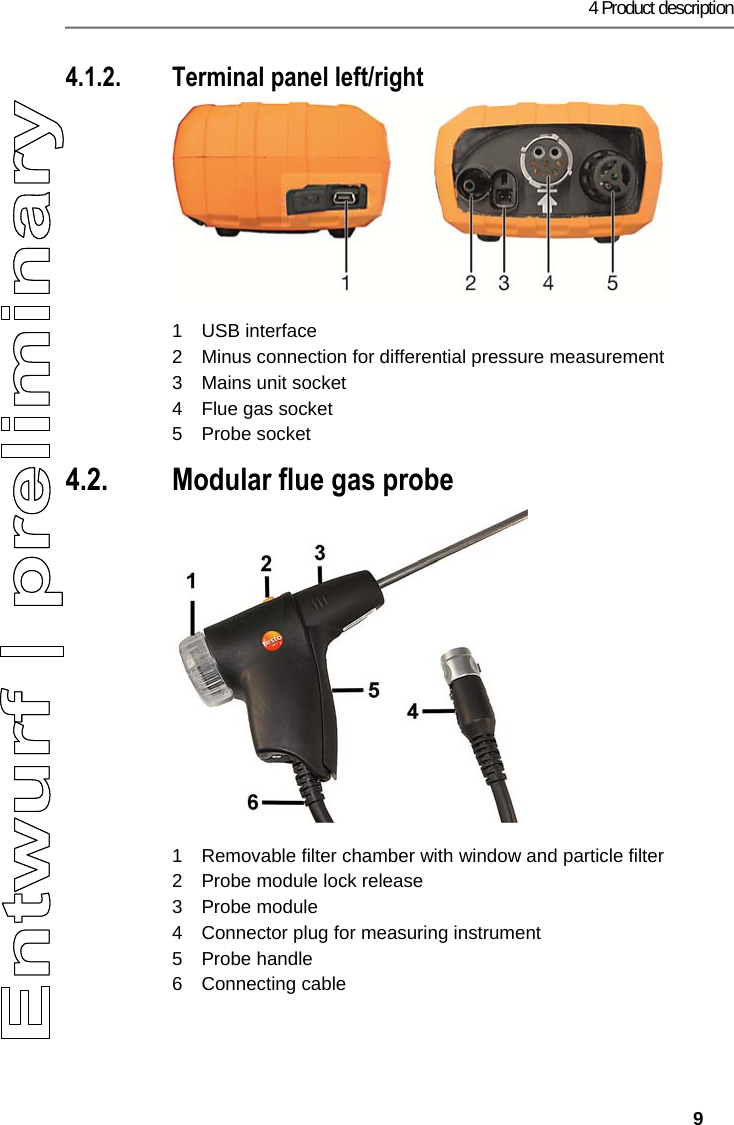
4 Product description   9 4.1.2. Terminal panel left/right   1 USB interface 2  Minus connection for differential pressure measurement  3  Mains unit socket  4  Flue gas socket 5 Probe socket 4.2. Modular flue gas probe   1  Removable filter chamber with window and particle filter 2  Probe module lock release 3 Probe module 4  Connector plug for measuring instrument 5 Probe handle 6 Connecting cable
5 First steps 10 Pos: 10 /TD/Überschr iften/5. Erste Schr itte @ 0\mod_1173774895039_ 79.docx @ 319 @ 2 @ 1  5 First steps Pos: 11 /TD/Überschr iften/5.1 Inbetriebn ahme @ 0\mod_1185342823 812_79.docx @ 1885 @ 2 @ 1  5.1. Commissioning Pos: 12 /TD/Erste Sc hritte/Verweis auf "I nbetriebnahme und Sicher heit" - Kap. Inbetriebnah me @ 18\mod_14379975672 95_79.docx @ 216281 @  @ 1  Please note the information in the document Commissioning and Safety (printed version supplied with the product). Pos: 13 /TD/Überschr iften/5.3 Produkt kenn enlernen @ 0\mod_11853 42901015_79.docx @ 1894 @ 2 @ 1  5.2. Getting to know the product Pos: 14 /TD/Erste Sc hritte/testo 330/test o 330i Produkt kennenler nen Sonden/Fühler ansc hließen @ 18\mod_14374 01463337_79.docx @  215912 @ 355 @ 1  5.2.1. Connecting probes    Always connect the probes to the flue gas socket or probe socket before switching on the measuring instrument; switch the measuring instrument off and restart after replacing a probe.    Connecting flue gas probes/gas pressure adapters/temperature adapters >  Insert the connector plug into the flue gas socket and lock by slightly turning it clockwise (bayonet lock).   There must be no more than one extension lead (0554 1201) between measuring instrument and flue gas probe.  Connecting other probes >  Insert the connector plug of the probe into the probe socket. Pos: 15 /TD/Erste Sc hritte/testo 330/test o 330i Produkt kennenler nen Netzteil_Akkus _Batt @ 18\mod_143740096725 3_79.docx @ 21587 7 @ 3445 @ 1   5.2.2. Mains unit/rechargeable battery If the mains unit is connected, the measuring instrument is automatically powered from the unit.    5.2.2.1. Charging the rechargeable battery The rechargeable battery can only be charged at an ambient temperature of 0 to 35 °C. If the rechargeable battery pack has discharged completely, the charging time at room temperature is approx. 5-6 hrs.  1.  Connect the instrument plug of the mains unit to the mains unit socket on the measuring instrument. 2.  Plug the mains plug of the mains unit into a mains socket. -  The charging process starts (red LED flashes: 0.5 s on/0.5 s off).
5 First steps   11 -  The charging process stops automatically when the battery is charged (red LED is constant). Rechargeable battery care •  Do not fully exhaust rechargeable batteries.  •  Store rechargeable batteries only if charged and at low temperatures, but not below 0 °C. The best storage conditions are with a charge level of 30-70% and an ambient temperature of 0-15 °C. Fully charge before using again. •  Optimal charging temperature at 20 °C ambient temperature. •  Trickle charging should not exceed 2 days. 5.2.2.2. Mains operation 1.  Connect the instrument plug of the mains unit to the mains unit socket on the measuring instrument.  2.  Plug the mains plug of the mains unit into a mains socket. -  The measuring instrument is powered via the mains unit. -  If the measuring instrument is switched off and a rechargeable battery is inserted, the charging process will start automatically. Switching the measuring instrument on has the effect of stopping the battery charging and the measuring instrument is then powered via the mains unit. Pos: 16 /TD/Erste Sc hritte/testo 330/test o 330i Produkt kennenler nen Ein/Aus, Verbi nden @ 17\mod_1435045795085 _79.docx @ 214062 @ 33 @ 1  5.2.3. Switching on and connecting with a mobile terminal device ✓ The testo 330i App must be installed on your mobile terminal device. Please note the information in the document Commissioning and Safety (printed version supplied with the product). 1.  Switch on the measuring instrument: Press the   key. -  Measuring instrument starts up: The blue LED flashes (0.05 s on/0.5 s off). -  Connecting mode is activated: The blue LED flashes (0.5 s on/0.5 s off). 2.  Switch on the mobile terminal device. 3.  Start up the testo 330i App on your mobile terminal device.  - The Find Device function is activated: Compatible devices within wireless range are displayed (product designation + serial number). >  Tap instrument designation to select an instrument. - A Bluetooth® connection is established: The blue LED is constant.
5 First steps 12 - Measurement type Flue Gas screen is displayed.   5.2.4. Switching off   Measuring values that have not been saved are lost when the measuring instrument is switched off.  >  Switch off the measuring instrument: Press the   key. -  This may happen: the pump starts and the sensors are rinsed until the switch-off thresholds (O2 > 20%, other measurement parameters < 50 ppm) are reached. The maximum rinsing period is 3 minutes. -  The measuring instrument switches off.  Pos: 17 /TD/Erste Sc hritte/testo 330/330i Pr odukt kennenlernen App- Bedienung @ 18\mod_1438 342301782_79.doc x @ 216656 @ 33 @ 1  5.2.5. Using the App Make sure you are familiar with how your mobile terminal device works before using the App; observe the documentation for your mobile terminal device. Actions are mainly carried out by touching an icon, a symbol, or a name.  Some actions require a different gesture. This is pointed out in each case in this documentation.  User interface FEHLER - Variable ohne Inhalt    1  : Open the Measurement Types selection list 2  : Open/close the Menu selection list 3  : Open the Fuels selection list 4  Select reading display type 5  : Open the Options selection list 6 Start/stop measurement 7  : Open the Protocols selection list Please also take note of the tutorial in the App under   | Help | Tutorial.
6 Using the product   13 Pos: 18 /TD/Überschr iften/6. Produkt ver wenden @ 0\mod_117377492855 4_79.docx @ 328 @ 2 @ 1  6 Using the product Pos: 19 /TD/Überschr iften/6.1 Einstellun gen vornehmen @ 0\mod_11845 84321421_79.doc x @ 1863 @ 3 @ 1  6.1. Performing settings Pos: 20 /TD/Produkt ver wenden/testo 330ites to 330i Messwertanzeig e @ 18\mod_1438350052777 _79.docx @ 216910 @ 45 @ 1  6.1.1.  Configuring measurements The measurement parameters/units and the number and order of displayed measurement parameters in the reading display type can be set in the List. Only those parameters and units that are enabled in the reading display appear in the measured value display, in the saved measurement records and on the record printouts. The settings only apply to the measurement type currently activated.  Overview of measurement parameters (available selection depends on the chosen measurement type, set fuel, and the sensors available in the measuring instrument):  Display Measurement parameter FT  Flue gas temperature AT  Combustion air temperature Itemp  Instrument temperature Pump  Pumping capacity O2 Oxygen CO2 Carbon dioxide qAnet  Flue gas loss without due consideration of the calorific value range Effn  Efficiency without consideration of the heat value range qAgr.  Flue gas loss with due consideration of the calorific value range Effg  Efficiency with due consideration of the calorific value range Draught  Flue draught ∆P  Differential pressure CO  Carbon monoxide uCO  Carbon monoxide undiluted NO  Nitrogen monoxide
6 Using the product 14 Display Measurement parameter NOx Nitrogen oxide λ Fuel-air ratio AmbCO  Ambient carbon monoxide O2ref  Oxygen reference Dew Pt  Flue gas dewpoint temperature Performing actions >  To add a measurement parameter to the display list: Touch Add to open the selection list of measurement parameters.  >  To delete a measurement parameter from the display list: Touch . >  Change the unit of a measurement parameter: Touch the measurement parameter name to open the selection list of measurement units. >  To change the position of a measurement parameter in the display list:   press down and drag. >  To accept changes: Touch Confirm. Pos: 21 /TD/Produkt  verwenden/testo 330i/t esto 330i Messwert-Dar stellungsart Grafi k @ 18\mod_1438355555554_ 79.docx @ 217018 @ 3 @ 1  6.1.2. Graphics In the graphics reading display type, the reading progress can be displayed as a line diagram. A maximum of 4 measurement parameters can be set at any one time. Only those measurement parameters/units can be displayed that are available in the reading display type List. >  Touch   to open the selection list of measurement parameters/units. Pos: 22 /TD/Produkt ver wenden/testo 330i/t esto 330i Sprache @ 17\mod_14 35060640365_79.doc x @ 214172 @ 3 @ 1  6.1.3.  | Instrument settings | Language  The user interface language can be set.  The number of available languages depends on the activated country version. Pos: 23 /TD/Produkt ver wenden/testo 330ites to 330i Landesversion @ 17\ mod_1435061137749_7 9.docx @ 214242 @ 3 @ 1  6.1.4.  | Instrument settings | Country version The Country version configuration affects the measurement parameters, fuels, fuel parameters, and the basis of and formulas for calculations activated in the measurement box. The country version setting affects the user screen languages that can be enabled.
6 Using the product   15 Pos: 24 /TD/Produkt ver wenden/testo 330ites to 330i Brennstoffe @  17\mod_1434440641647_7 9.docx @ 213817 @ 3 @ 1  6.1.5.  (Fuels) In order to obtain the correct readings the used fuel is to be set before taking the readings. Pos: 25 /TD/Produkt ver wenden/testo 330i/t esto 330i Sensordiagn ose @ 19\mod_145378948565 6_79.docx @ 226797 @ 3 @ 4  6.1.6.  | Instrument settings | Sensor protection Threshold values can be set to protect the CO/NO sensors against overload. The sensor protection is activated if the threshold is exceeded:  •  Fresh air dilution if exceeded •  Shutdown if exceeded again To disable sensor protection the threshold values must be set to 0 ppm. Pos: 26 /TD/Produkt ver wenden/testo 330i/t esto 330i Sensorschut z @ 18\mod_1439470077571_ 79.docx @ 218787 @ 3 @ 1  6.1.7.  | Instrument settings | Sensor protection Threshold values can be set to protect the CO/NO sensors against overload. The sensor protection is activated if the threshold is exceeded:  •  Fresh air dilution if exceeded •  Shutdown if exceeded again To disable sensor protection the threshold values must be set to 0 ppm. Pos: 27 /TD/Produkt ver wenden/testo 330i/t esto 330i O2-Referenz @ 18\ mod_1439470144870_79. docx @ 218857 @ 3 @ 1  6.1.8.  | Instrument settings | O2 reference The O2 reference value of the current fuel can be set.  Pos: 28 /TD/Produkt ver wenden/testo 330i/t esto 330i NO2-Zuschlag @ 18\ mod_1439470169269_79. docx @ 218892 @ 3 @ 1  6.1.9.  | Instrument settings | O2 addition The NO2 addition value can be set.  Pos: 29 /TD/Produkt ver wenden/testo 330i/t esto 330i Höhenkompens ation @ 18\mod_1439470121 376_79.docx @ 218822 @ 3 @ 1  6.1.10.  | Instrument settings | Height compensation Extremely low absolute pressure causes wrong calculation of the O2 sensor service life. Therefore, when the measuring instrument is used at great heights, the factory set value should be adjusted so that an O2 sensor is not displayed prematurely as “expended”. If using the measuring instrument at heights up to approx. 1800 m above mean sea level (MSL), the factory setting (922 hPa, equals approx. 800 m above MSL) can be retained. The value can be input directly (Abs. pressure), or is automatically calculated when entering the barometric pressure (Barom. pressure) and Altitude.
6 Using the product 16 Pos: 30 /TD/Produkt ver wenden/testo 330i/t esto 330i Schalten sie das  Gerät aus @ 19\mod_1453791009 889_79.docx @ 226832 @ 3 @  4  6.1.11.  | Instrument settings | Sensor protection Threshold values can be set to protect the CO/NO sensors against overload. The sensor protection is activated if the threshold is exceeded:  •  Fresh air dilution if exceeded •  Shutdown if exceeded again To disable sensor protection the threshold values must be set to 0 ppm. Pos: 31 /TD/Produkt ver wenden/testo 330i/t esto 330i Firmware Update @ 19\ mod_1453791089278_ 79.docx @ 226867 @ 3 @ 4  6.1.12.  | Instrument settings | Sensor protection Threshold values can be set to protect the CO/NO sensors against overload. The sensor protection is activated if the threshold is exceeded:  •  Fresh air dilution if exceeded •  Shutdown if exceeded again To disable sensor protection the threshold values must be set to 0 ppm. Pos: 32 /TD/Überschr iften/6.3 Messungen durc hführen @ 0\mod_118458 4650078_79.doc x @ 1872 @ 3 @ 1  6.2. Measuring Pos: 33 /TD/Produkt ver wenden/testo 330ites to 330i Messung vorberei ten @ 17\mod_1434441345 106_79.docx @ 213852 @ 345554 5544454 @ 1  6.2.1. Preparing for measurement 6.2.1.1. Checking the condensate container fill level Regularly check the fill level of the condensate container and empty it in good time; see Draining the condensate container, page 26. 6.2.1.2. Checking the particle filter Regularly check the particle filter of the flue gas probe for contamination and replace in good time; see Checking/replacing the particle filter, page 33. 6.2.1.3. Zeroing phases Measuring the combustion air temperature (AT) If no combustion air temperature probe is connected, the temperature measured by the thermocouple of the flue gas probe during the zeroing phase is used as the combustion air temperature. All dependent parameters are calculated using this value. This method of measuring combustion air temperature is sufficient for systems dependent on ambient air. However, ensure
6 Using the product   17 that the flue gas probe is near the intake duct of the burner during the zeroing phase! If a combustion air temperature probe is connected, the combustion air temperature is measured continuously via this probe. Gas zeroing The gas sensors are automatically zeroed when the instrument is switched on. >  To manually start zeroing of the gas sensors:   | Zeroing Gas Sensors. Draught/pressure zeroing The pressure sensors are continuously zeroed. The flue gas probe can be in the flue gas duct during the zeroing phase, if there is no overpressure in the duct and a separate AT probe is plugged in. The minus connection for differential pressure measurements must be clear (ambient pressure, not closed). 6.2.1.4. Performing a gas path check Regularly check the measurement system (measuring instrument + flue gas probe) for leaks.  A high O2 value, in particular, may be an indicator of a leaking measurement system. >  | Gas path check. 6.2.1.5. Installing the probe mount testofix® 1.  Insert the probe mount in the measurement aperture of the flue gas duct, making sure the attachment pin is pointing downwards.
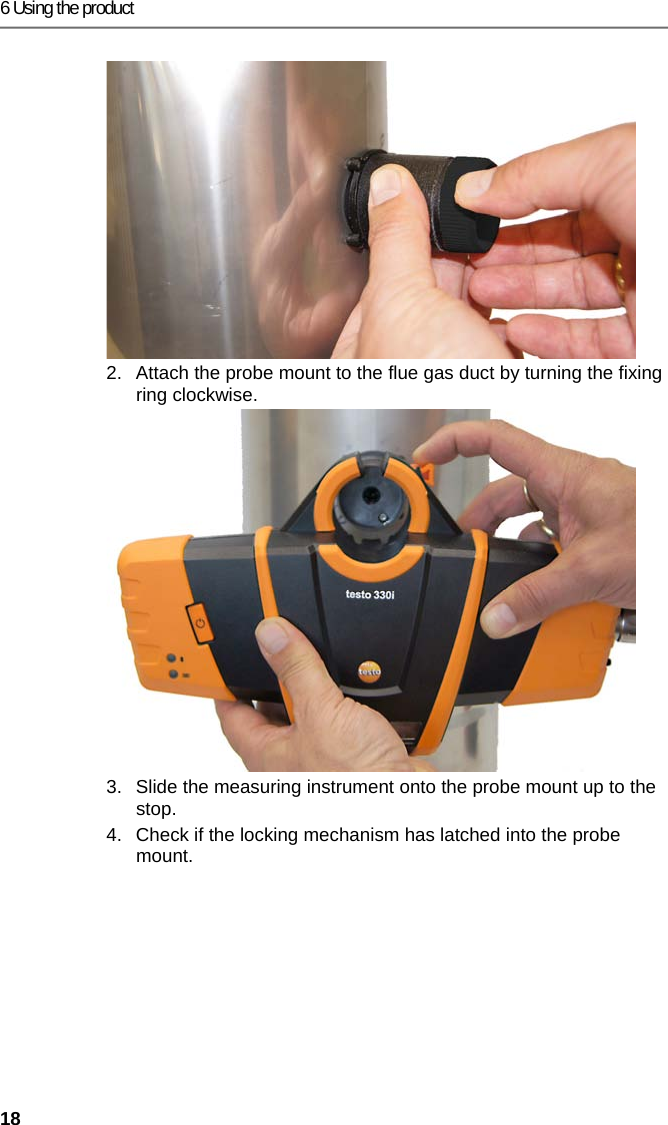
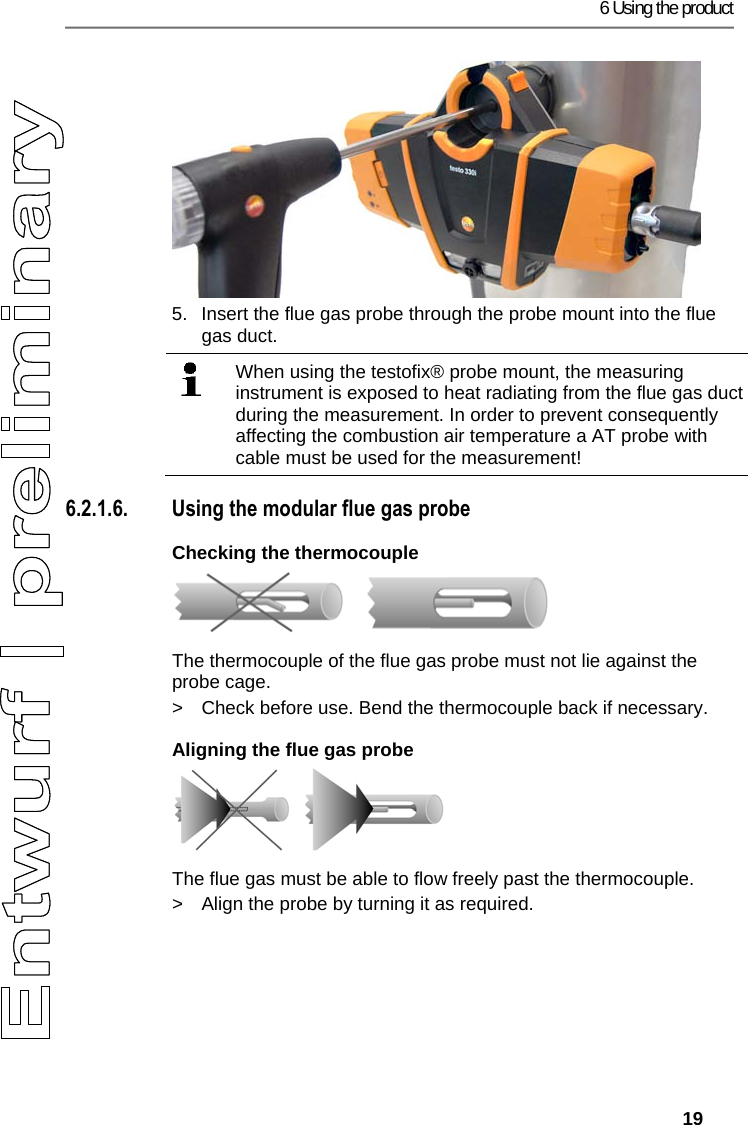
6 Using the product 18 2.  Attach the probe mount to the flue gas duct by turning the fixing ring clockwise. 3.  Slide the measuring instrument onto the probe mount up to the stop.  4.  Check if the locking mechanism has latched into the probe mount.
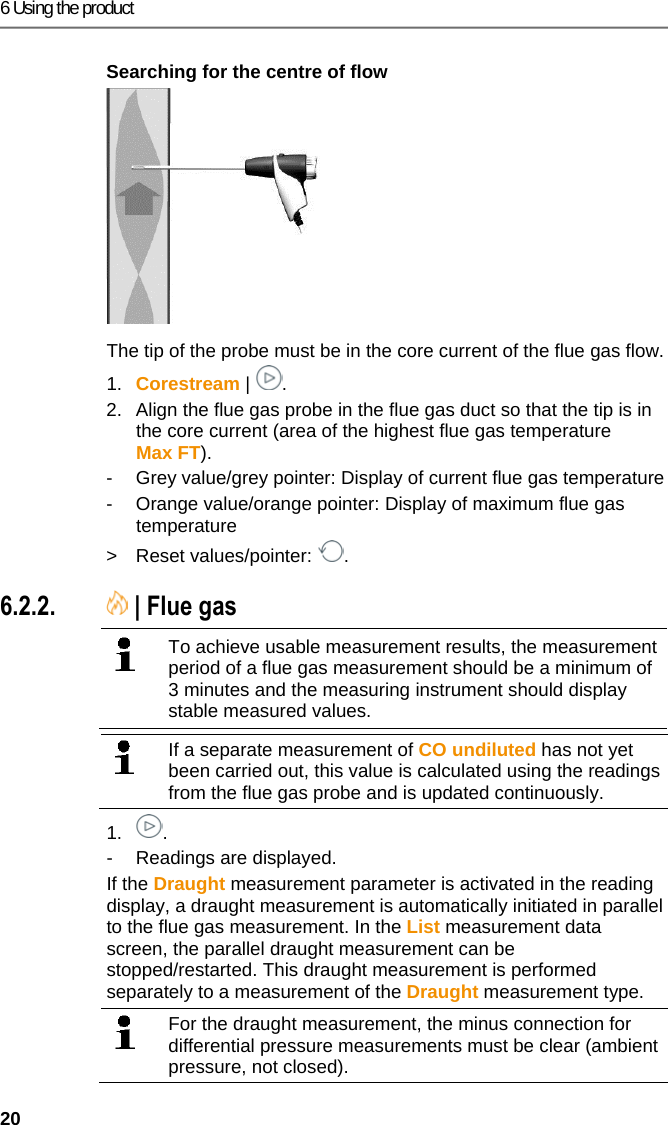
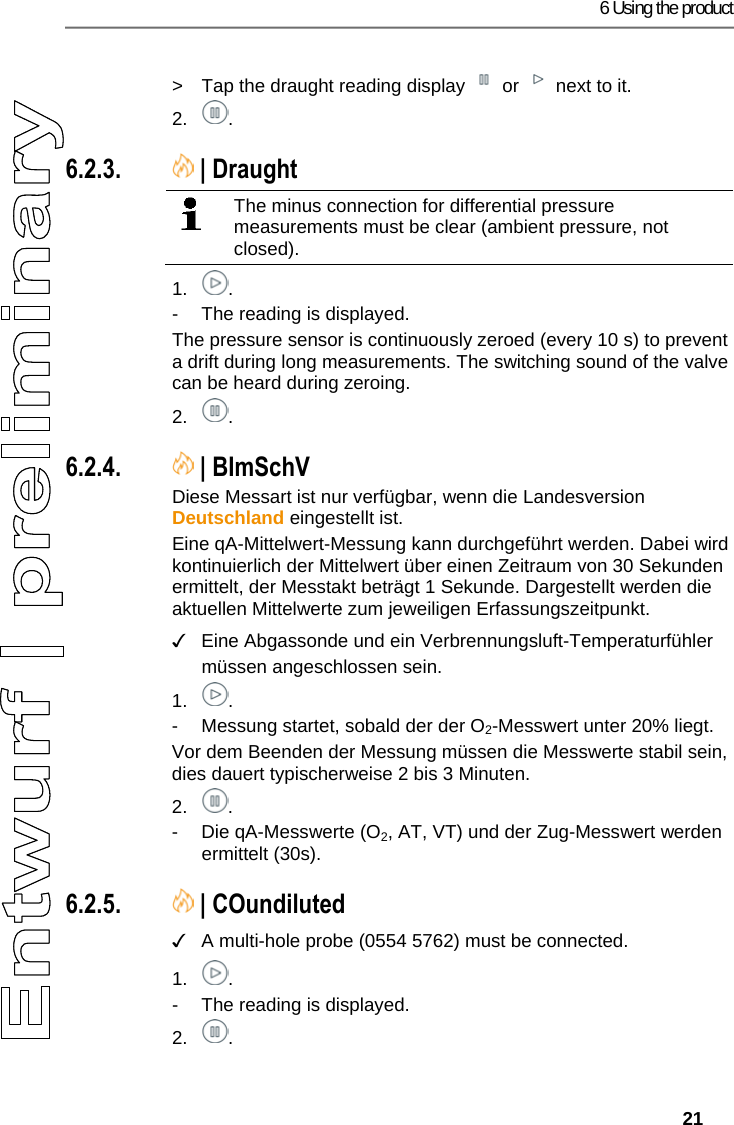
6 Using the product   19 5.  Insert the flue gas probe through the probe mount into the flue gas duct.    When using the testofix® probe mount, the measuring instrument is exposed to heat radiating from the flue gas duct during the measurement. In order to prevent consequently affecting the combustion air temperature a AT probe with cable must be used for the measurement!   6.2.1.6. Using the modular flue gas probe Checking the thermocouple      The thermocouple of the flue gas probe must not lie against the probe cage. >  Check before use. Bend the thermocouple back if necessary. Aligning the flue gas probe    The flue gas must be able to flow freely past the thermocouple. >  Align the probe by turning it as required.
6 Using the product 20 Searching for the centre of flow   The tip of the probe must be in the core current of the flue gas flow. 1.  Corestream |  . 2.  Align the flue gas probe in the flue gas duct so that the tip is in the core current (area of the highest flue gas temperature Max FT).  -  Grey value/grey pointer: Display of current flue gas temperature -  Orange value/orange pointer: Display of maximum flue gas temperature > Reset values/pointer:  . Pos: 34 /TD/Produkt ver wenden/testo 330ites to 330i Abgasmessung @ 17\ mod_1435137697977_79. docx @ 214452 @ 355 @ 1  6.2.2.  | Flue gas     To achieve usable measurement results, the measurement period of a flue gas measurement should be a minimum of 3 minutes and the measuring instrument should display stable measured values.     If a separate measurement of CO undiluted has not yet been carried out, this value is calculated using the readings from the flue gas probe and is updated continuously.  1. . -  Readings are displayed. If the Draught measurement parameter is activated in the reading display, a draught measurement is automatically initiated in parallel to the flue gas measurement. In the List measurement data screen, the parallel draught measurement can be stopped/restarted. This draught measurement is performed separately to a measurement of the Draught measurement type.   For the draught measurement, the minus connection for differential pressure measurements must be clear (ambient pressure, not closed).
6 Using the product   21  >  Tap the draught reading display   or   next to it. 2. . Pos: 35 /TD/Produkt ver wenden/testo 330ites to 330i_Zugmessung @ 17\ mod_1435137966035_79. docx @ 214487 @ 355 @ 1 3.  6.2.3.  | Draught   The minus connection for differential pressure measurements must be clear (ambient pressure, not closed).   1. . -  The reading is displayed. The pressure sensor is continuously zeroed (every 10 s) to prevent a drift during long measurements. The switching sound of the valve can be heard during zeroing. 2. . Pos: 36 /TD/Produkt ver wenden/testo 330ites to 330i BIMSCHV (LV DE) @ 17\ mod_1435144026625_79.doc x @ 214522 @ 3 @ 1  6.2.4.  | BImSchV  Diese Messart ist nur verfügbar, wenn die Landesversion Deutschland eingestellt ist. Eine qA-Mittelwert-Messung kann durchgeführt werden. Dabei wird kontinuierlich der Mittelwert über einen Zeitraum von 30 Sekunden ermittelt, der Messtakt beträgt 1 Sekunde. Dargestellt werden die aktuellen Mittelwerte zum jeweiligen Erfassungszeitpunkt. ✓  Eine Abgassonde und ein Verbrennungsluft-Temperaturfühler müssen angeschlossen sein. 1. . -  Messung startet, sobald der der O2-Messwert unter 20% liegt. Vor dem Beenden der Messung müssen die Messwerte stabil sein, dies dauert typischerweise 2 bis 3 Minuten. 2. . -  Die qA-Messwerte (O2, AT, VT) und der Zug-Messwert werden ermittelt (30s). Pos: 39 /TD/Produkt ver wenden/testo 330ites to 330i CO unverdünnt @ 17\m od_1435144575689_79.d ocx @ 214557 @ 355 @ 1  6.2.5.  | COundiluted ✓  A multi-hole probe (0554 5762) must be connected. 1. . -  The reading is displayed. 2. .
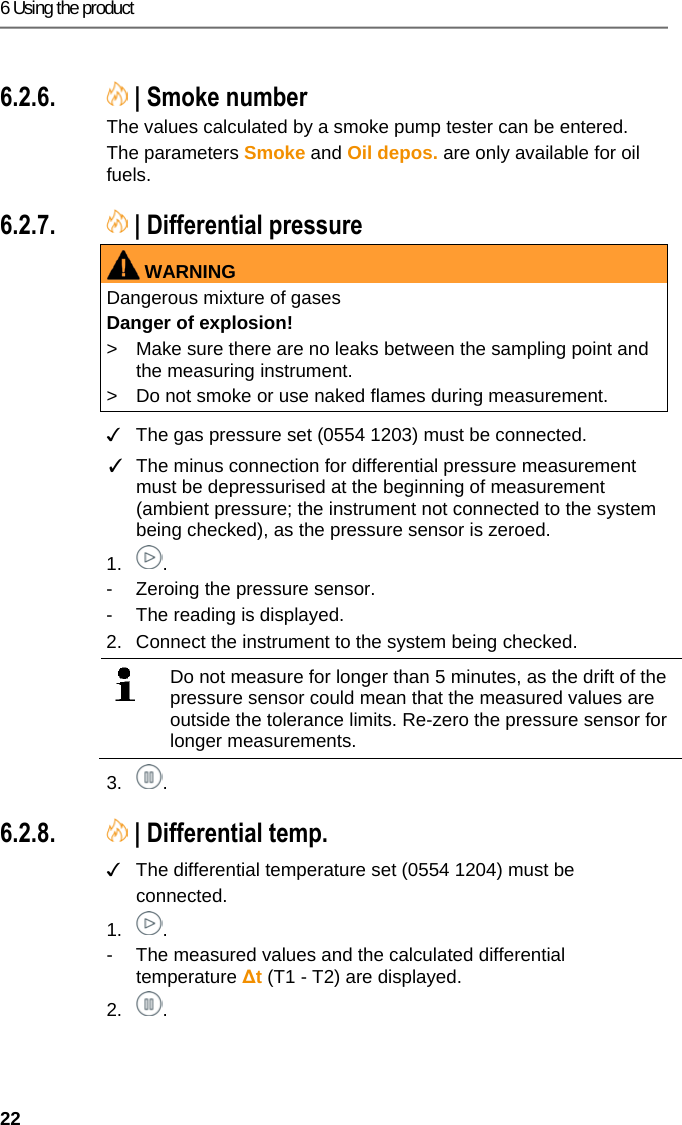
6 Using the product 22 Pos: 40 /TD/Produkt ver wenden/testo 330ites to 330i Rußzahl/WTT @ 17\mo d_1434442164943_79.doc x @ 213887 @ 3555 @ 1  6.2.6.  | Smoke number The values calculated by a smoke pump tester can be entered. The parameters Smoke and Oil depos. are only available for oil fuels. Pos: 41 /TD/Produkt  verwenden/testo 330i/t esto 330i Differenzdr uckmessung @ 18\mod_14 38358780132_79.doc x @ 217124 @ 355 @ 1  6.2.7.  | Differential pressure WARNINGDangerous mixture of gases Danger of explosion! >  Make sure there are no leaks between the sampling point and the measuring instrument.  >  Do not smoke or use naked flames during measurement.   ✓  The gas pressure set (0554 1203) must be connected. ✓  The minus connection for differential pressure measurement must be depressurised at the beginning of measurement (ambient pressure; the instrument not connected to the system being checked), as the pressure sensor is zeroed. 1. . -  Zeroing the pressure sensor. -  The reading is displayed. 2.  Connect the instrument to the system being checked.    Do not measure for longer than 5 minutes, as the drift of the pressure sensor could mean that the measured values are outside the tolerance limits. Re-zero the pressure sensor for longer measurements.  3. . Pos: 42 /TD/Produkt ver wenden/testo 330i/t esto 330i Diff_Temper aturmessung @ 18\mod_14 38358778900_79.doc x @ 217089 @ 355 @ 1  6.2.8.  | Differential temp. ✓  The differential temperature set (0554 1204) must be connected. 1. . -  The measured values and the calculated differential temperature ∆t (T1 - T2) are displayed. 2. .
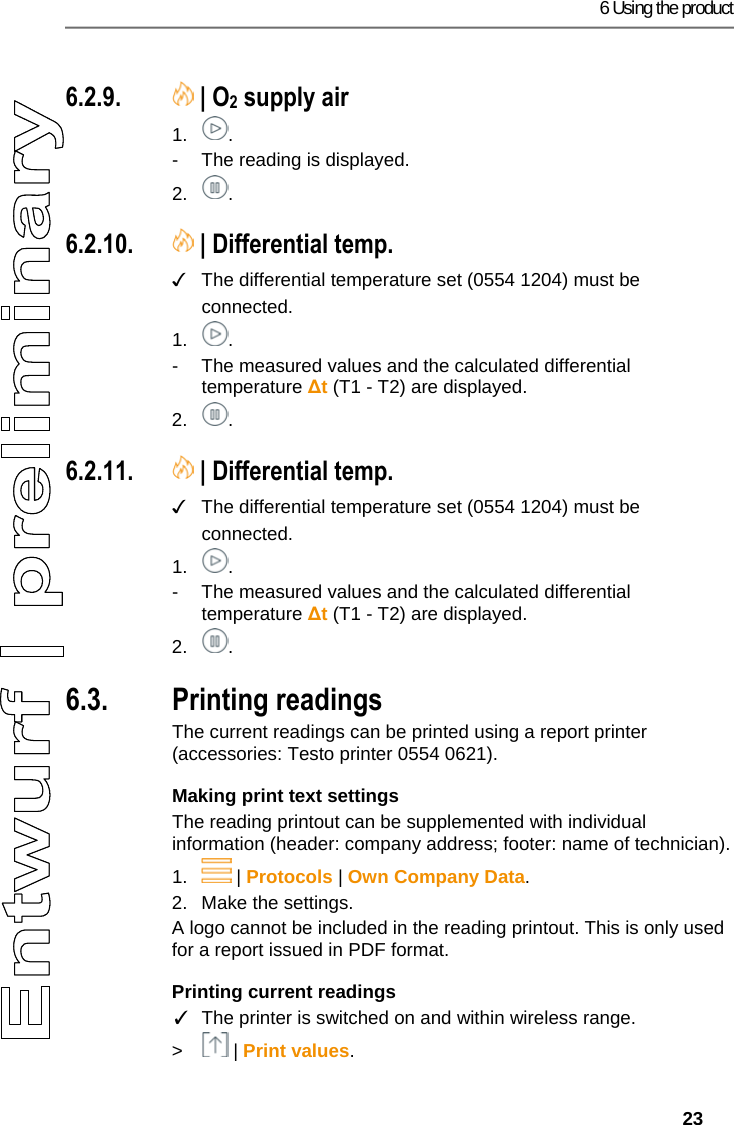
6 Using the product   23 Pos: 43 /TD/Produkt ver wenden/testo 330i/t esto 330i O2 Zuluft @ 18\mod_ 1438358781318_79.doc x @ 217159 @ 3 @ 1  6.2.9.  | O2 supply air 1. . -  The reading is displayed. 2. . Pos: 44 /TD/Produkt ver wenden/testo 330i/t esto 330i Gasdurchsatz @ 19\ mod_1448542207252_ 79.docx @ 225997 @ 3 @ 4  6.2.10.  | Differential temp. ✓  The differential temperature set (0554 1204) must be connected. 1. . -  The measured values and the calculated differential temperature ∆t (T1 - T2) are displayed. 2. . Pos: 45 /TD/Produkt ver wenden/testo 330i/t esto 330i Öldurchsatz @  19\mod_1448542436455_ 79.docx @ 226032 @ 3 @ 4  6.2.11.  | Differential temp. ✓  The differential temperature set (0554 1204) must be connected. 1. . -  The measured values and the calculated differential temperature ∆t (T1 - T2) are displayed. 2. . Pos: 46 /TD/Produkt ver wenden/testo 330i330i  6.x Messdaten drucken @  17\mod_1435060959550_ 79.docx @ 214207 @ 355 @ 1  6.3. Printing readings The current readings can be printed using a report printer (accessories: Testo printer 0554 0621). Making print text settings The reading printout can be supplemented with individual information (header: company address; footer: name of technician). 1.  | Protocols | Own Company Data. 2.  Make the settings. A logo cannot be included in the reading printout. This is only used for a report issued in PDF format. Printing current readings ✓  The printer is switched on and within wireless range. >  | Print values.
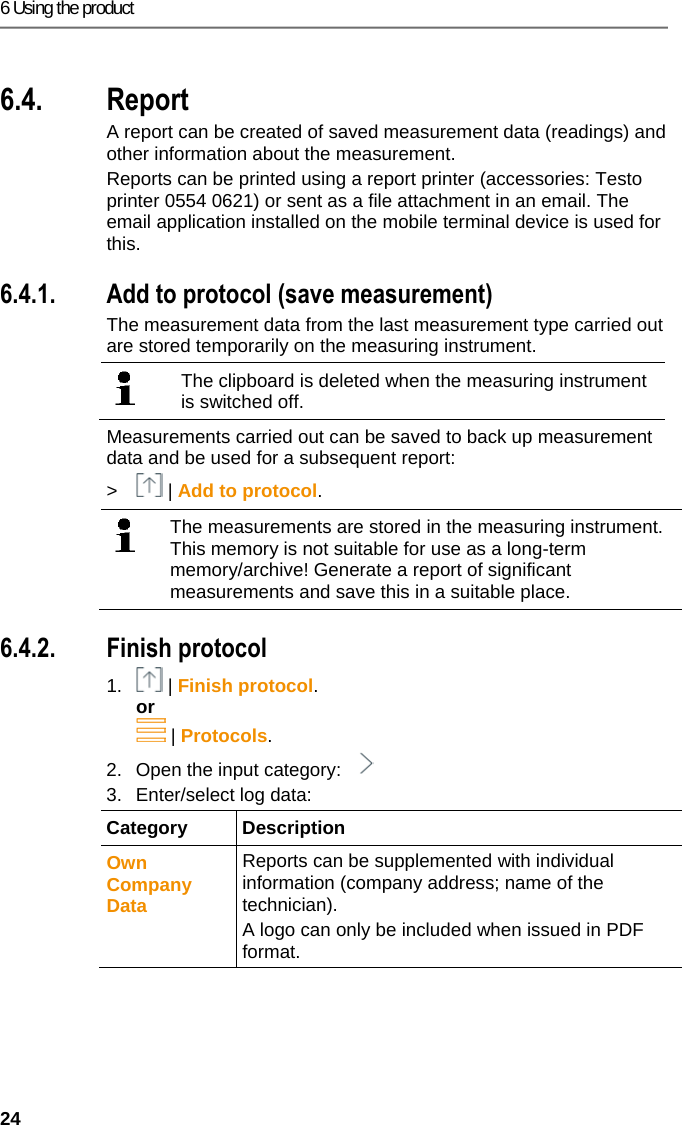
6 Using the product 24 Pos: 47 /TD/Produkt ver wenden/testo 330i330i  6.x Protokoll @ 17\mod_1 435063502616_79.doc x @ 214382 @ 3 @ 1  6.4. Report A report can be created of saved measurement data (readings) and other information about the measurement.  Reports can be printed using a report printer (accessories: Testo printer 0554 0621) or sent as a file attachment in an email. The email application installed on the mobile terminal device is used for this. Pos: 48 /TD/Produkt ver wenden/testo 330i/33 0i 6.x.1 Zu Protokoll hi nzufügen @ 18\mod_143946 8867019_79.docx @ 21864 7 @ 3 @ 1  6.4.1. Add to protocol (save measurement) The measurement data from the last measurement type carried out are stored temporarily on the measuring instrument.    The clipboard is deleted when the measuring instrument is switched off.  Measurements carried out can be saved to back up measurement data and be used for a subsequent report:  >  | Add to protocol.    The measurements are stored in the measuring instrument. This memory is not suitable for use as a long-term memory/archive! Generate a report of significant measurements and save this in a suitable place.   Pos: 49 /TD/Produkt ver wenden/testo 330i/33 0i 6.x.2 Protokoll fer tigstellen @ 18\mod_1439 468920481_79.doc x @ 218717 @ 3 @ 1  6.4.2. Finish protocol 1.  | Finish protocol. or  | Protocols. 2.  Open the input category:   3.  Enter/select log data: Category Description Own Company Data  Reports can be supplemented with individual information (company address; name of the technician). A logo can only be included when issued in PDF format.
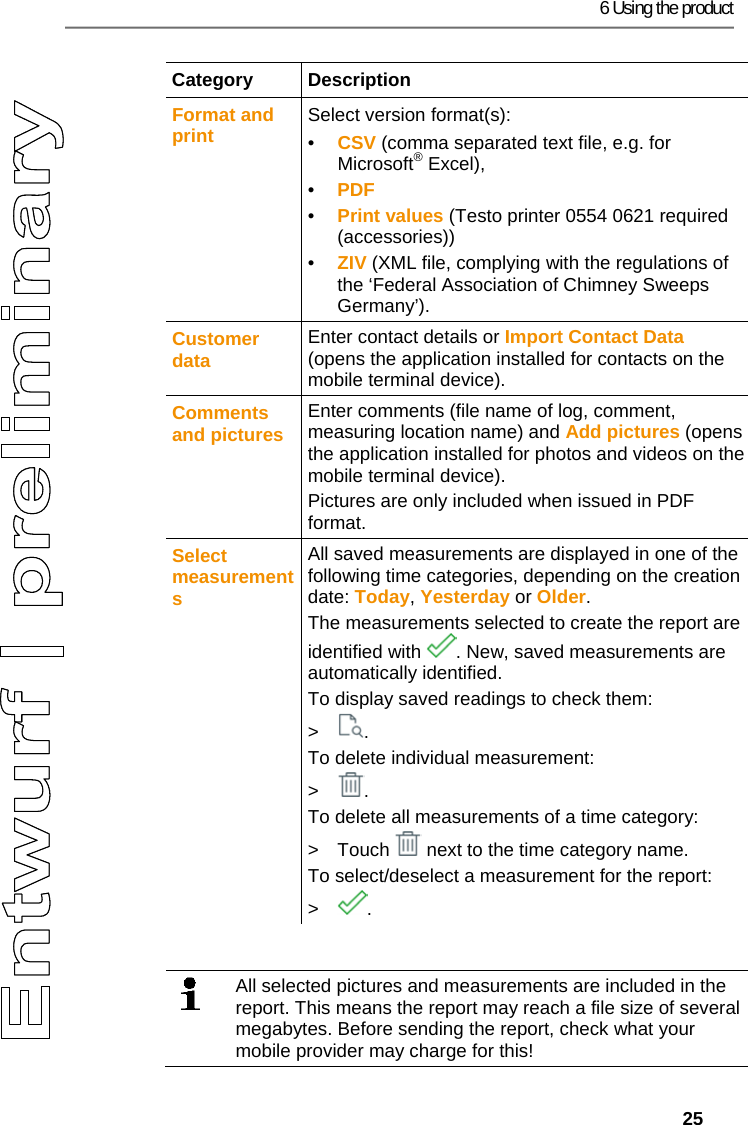
6 Using the product   25 Category Description Format and print  Select version format(s): •  CSV (comma separated text file, e.g. for Microsoft® Excel),  •  PDF •  Print values (Testo printer 0554 0621 required (accessories))  •  ZIV (XML file, complying with the regulations of the ‘Federal Association of Chimney Sweeps Germany’). Customer data  Enter contact details or Import Contact Data (opens the application installed for contacts on the mobile terminal device). Comments and pictures  Enter comments (file name of log, comment, measuring location name) and Add pictures (opens the application installed for photos and videos on the mobile terminal device). Pictures are only included when issued in PDF format. Select measurements All saved measurements are displayed in one of the following time categories, depending on the creation date: Today, Yesterday or Older. The measurements selected to create the report are identified with  . New, saved measurements are automatically identified. To display saved readings to check them: > . To delete individual measurement: > . To delete all measurements of a time category: >  Touch   next to the time category name. To select/deselect a measurement for the report: > .   All selected pictures and measurements are included in the report. This means the report may reach a file size of several megabytes. Before sending the report, check what your mobile provider may charge for this!
7 Maintaining the product 26  4.  Send. Pos: 50 /TD/Überschr iften/7. Produkt ins tand halten @ 0\mod_1173789 831362_79.doc x @ 397 @ 2 @ 1  7 Maintaining the product Pos: 51 /TD/Produkt ins tand halten/testo 330/ testo 330i Gerätezus tand prüfen @ 18\mod_1439538 650018_79.doc x @ 218941 @ 255 @ 1  7.1. Checking instrument status 7.1.1.  | Instrument settings | Sensor diagnosis The current status of the sensors can be displayed. To change expended sensors, see Replacing sensors , page 31. 7.1.2.  | Error list  Instrument errors that have not yet been rectified can be displayed. Pos: 52 /TD/Produkt ins tand halten/testo 330/ testo 330i Instandha ltung_Messbox reinigen @  18\mod_14376324980 59_79.docx @ 216102 @ 2 @ 1  7.2. Cleaning the measuring instrument >  If the housing of the measuring instrument is dirty, clean it with a damp cloth. Do not use any aggressive cleaning agents or solvents! Mild household cleaning agents and soap suds may be used. Pos: 53 /TD/Produkt ins tand halten/testo 330/ testo 330i_Instan dhaltung Kondensatbeh älter @ 18\mod_1437642496 381_79.docx @ 216137 @  25 @ 1  7.3. Draining the condensate container The fill level of the condensate container can be read from the markings. Hold the instrument horizontally or vertically to check the fill level.   The condensate consists of a weak mix of acids. Avoid skin contact. Make sure that the condensate does not run over the housing.    CAUTIONCondensate entering the gas path. Damage to sensors and flue gas pump! >  Do not empty the condensate container while the flue gas pump is in operation.
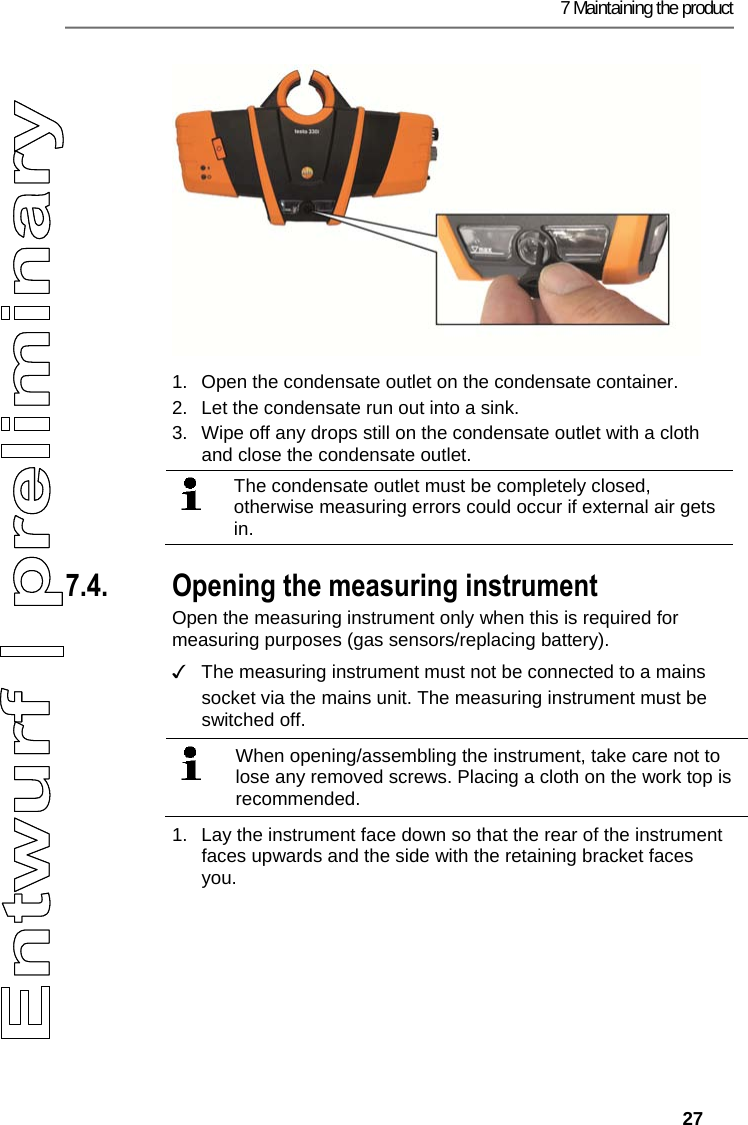
7 Maintaining the product   27    1.  Open the condensate outlet on the condensate container. 2.  Let the condensate run out into a sink. 3.  Wipe off any drops still on the condensate outlet with a cloth and close the condensate outlet.  The condensate outlet must be completely closed, otherwise measuring errors could occur if external air gets in.  Pos: 54 /TD/Produkt ins tand halten/testo 330/ testo 330i Gerät_oef fnen @ 18\mod_1437632106 827_79.docx @ 216067 @ 35 @ 1   7.4. Opening the measuring instrument Open the measuring instrument only when this is required for measuring purposes (gas sensors/replacing battery). ✓  The measuring instrument must not be connected to a mains socket via the mains unit. The measuring instrument must be switched off.     When opening/assembling the instrument, take care not to lose any removed screws. Placing a cloth on the work top is recommended.   1.  Lay the instrument face down so that the rear of the instrument faces upwards and the side with the retaining bracket faces you.
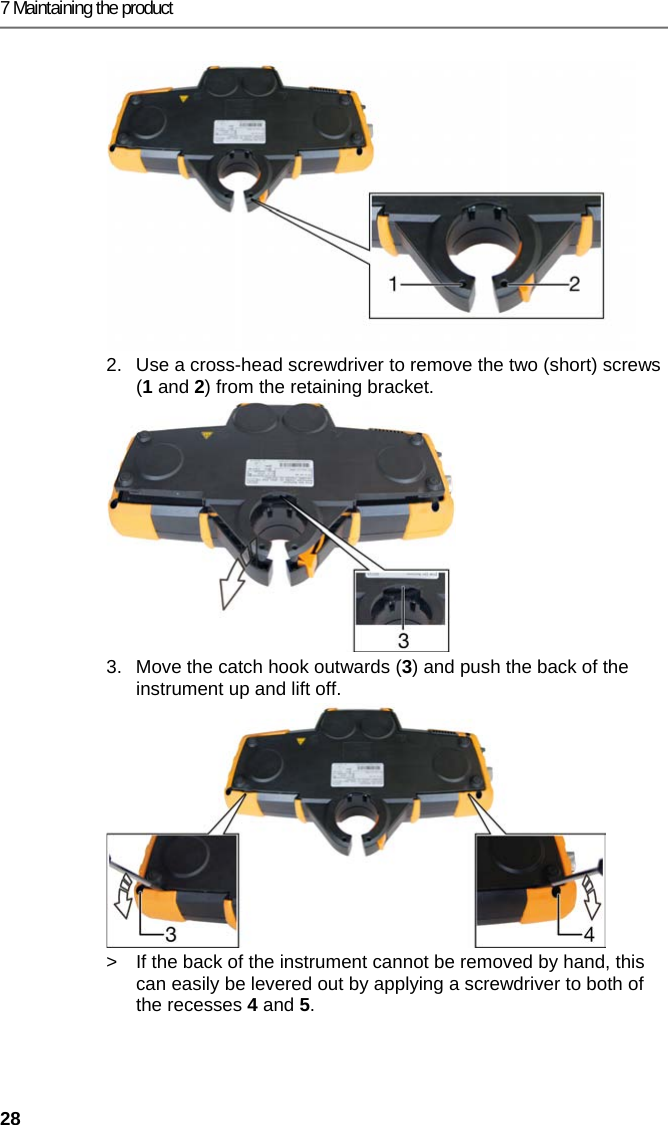
7 Maintaining the product 28 2.  Use a cross-head screwdriver to remove the two (short) screws (1 and 2) from the retaining bracket. 3.  Move the catch hook outwards (3) and push the back of the instrument up and lift off.  >  If the back of the instrument cannot be removed by hand, this can easily be levered out by applying a screwdriver to both of the recesses 4 and 5.
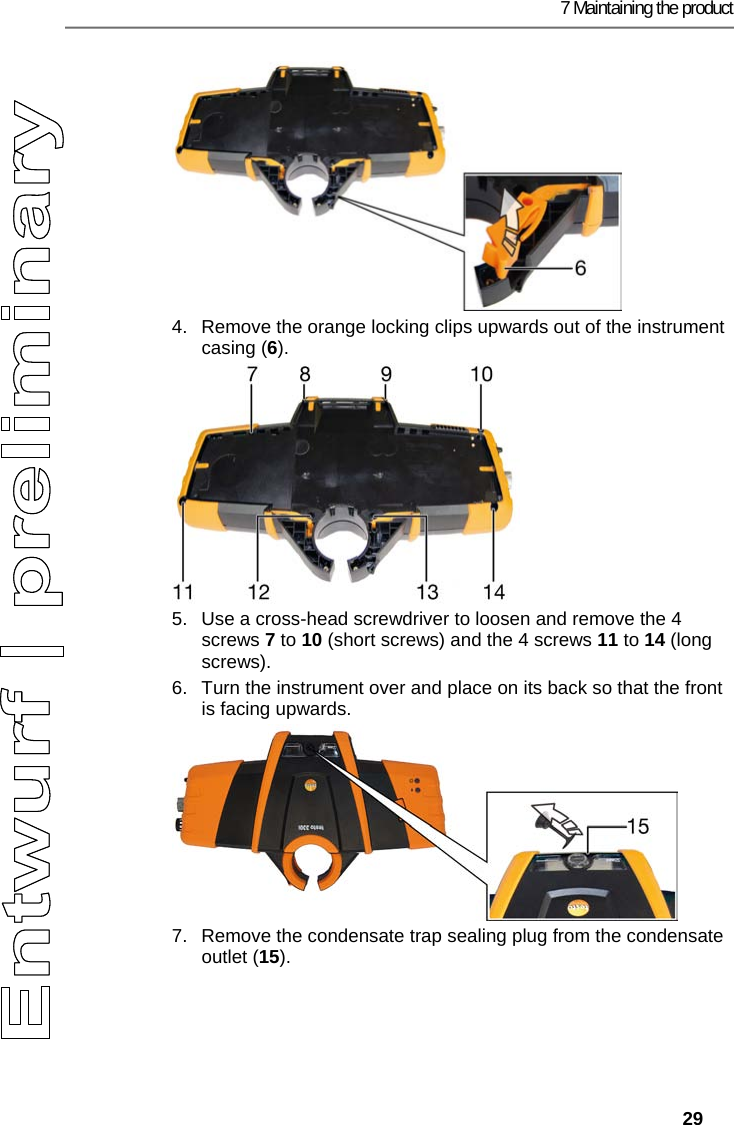
7 Maintaining the product   29 4.  Remove the orange locking clips upwards out of the instrument casing (6). 5.  Use a cross-head screwdriver to loosen and remove the 4 screws 7 to 10 (short screws) and the 4 screws 11 to 14 (long screws). 6.  Turn the instrument over and place on its back so that the front is facing upwards. 7.  Remove the condensate trap sealing plug from the condensate outlet (15).
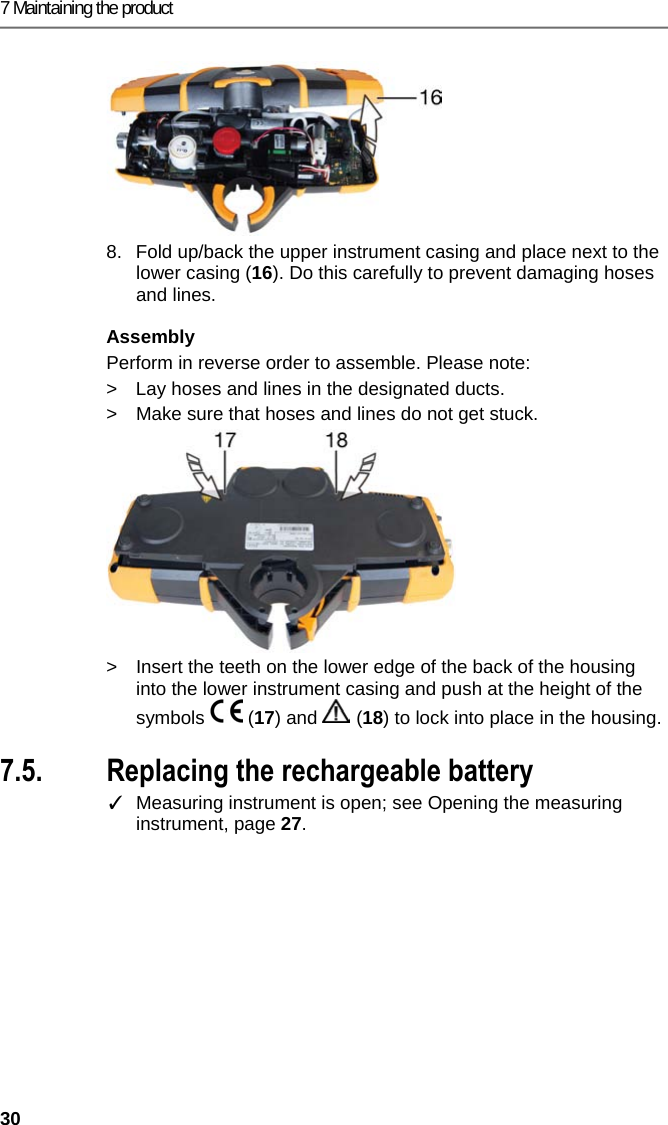
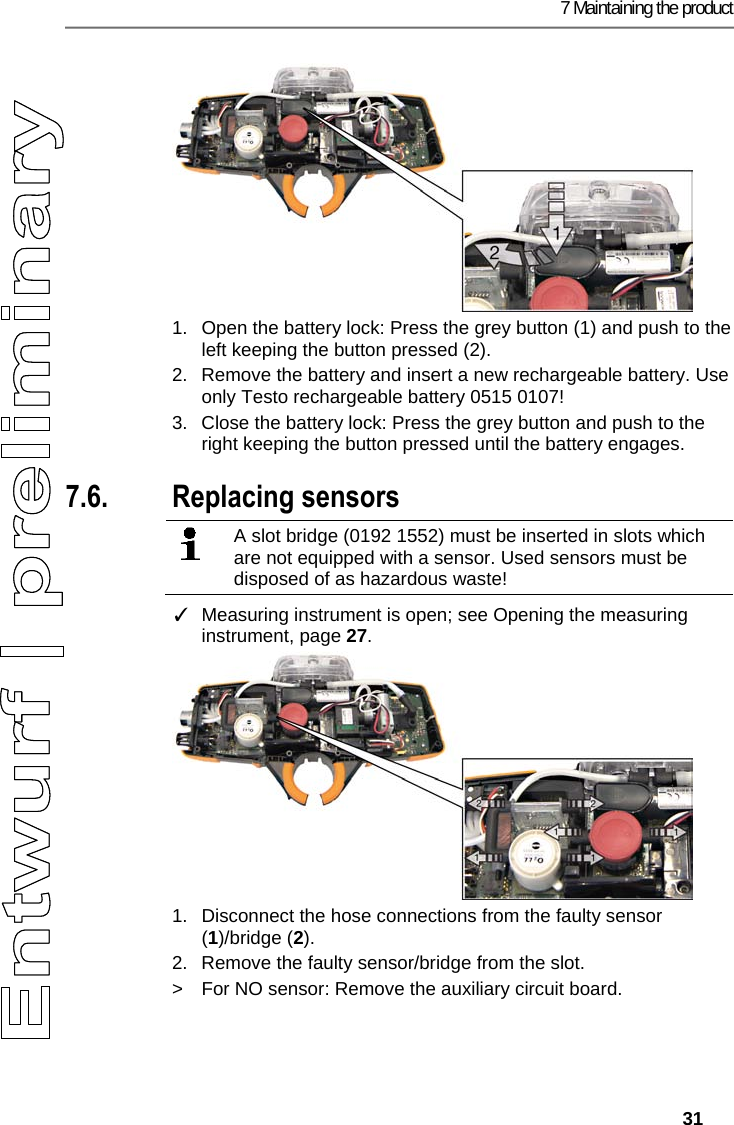
7 Maintaining the product 30 8.  Fold up/back the upper instrument casing and place next to the lower casing (16). Do this carefully to prevent damaging hoses and lines. Assembly Perform in reverse order to assemble. Please note: >  Lay hoses and lines in the designated ducts.  >  Make sure that hoses and lines do not get stuck.  >  Insert the teeth on the lower edge of the back of the housing into the lower instrument casing and push at the height of the symbols  (17) and   (18) to lock into place in the housing. Pos: 55 /TD/Produkt ins tand halten/testo 330/ testo 330i Akku wechse ln @ 18\mod_1437631105427_7 9.docx @ 216032 @ 3 @ 1  7.5. Replacing the rechargeable battery ✓  Measuring instrument is open; see Opening the measuring instrument, page 27.
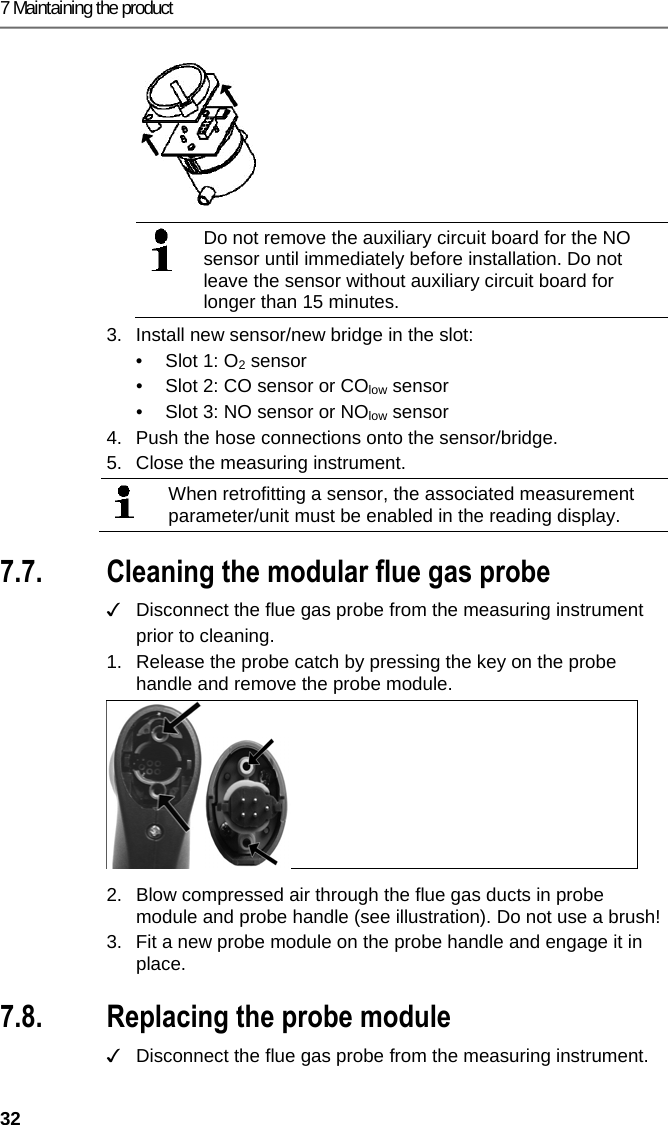
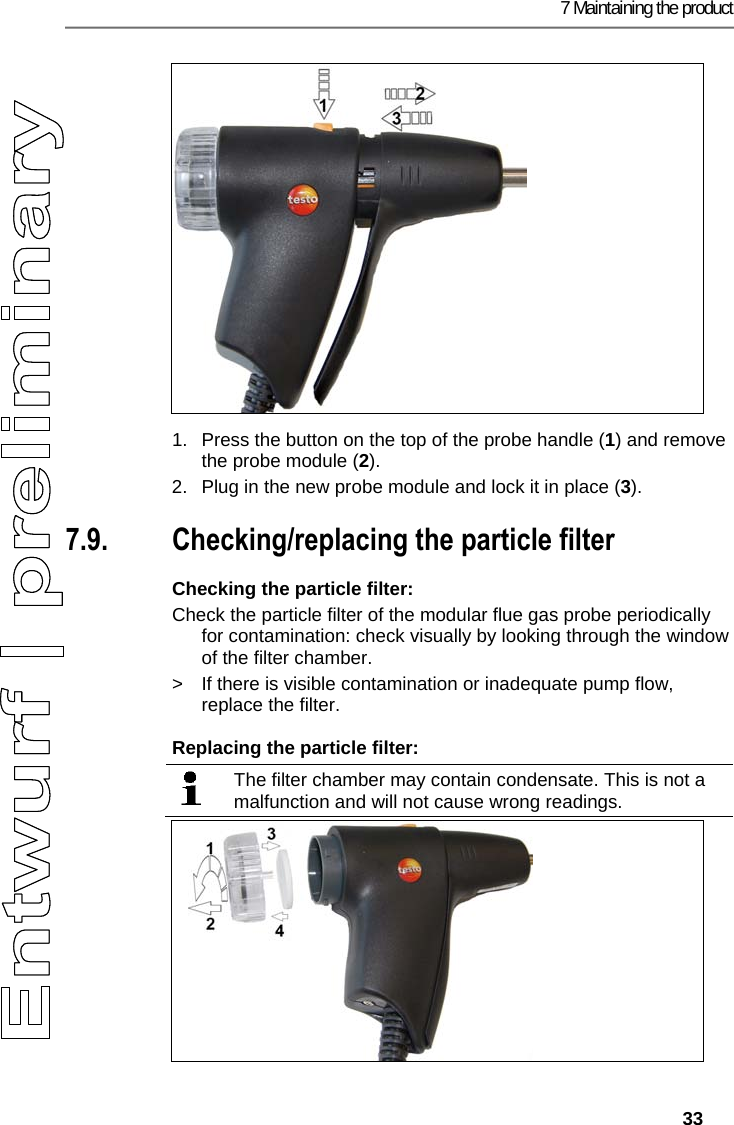
7 Maintaining the product   31  1.  Open the battery lock: Press the grey button (1) and push to the left keeping the button pressed (2). 2.  Remove the battery and insert a new rechargeable battery. Use only Testo rechargeable battery 0515 0107! 3.  Close the battery lock: Press the grey button and push to the right keeping the button pressed until the battery engages. Pos: 56 /TD/Produkt ins tand halten/testo 330/ testo 330i Sensoren wechs eln @ 17\mod_1434444564 831_79.docx @ 213957 @ 2 @ 1  7.6. Replacing sensors    A slot bridge (0192 1552) must be inserted in slots which are not equipped with a sensor. Used sensors must be disposed of as hazardous waste!    ✓  Measuring instrument is open; see Opening the measuring instrument, page 27. 1.  Disconnect the hose connections from the faulty sensor (1)/bridge (2). 2.  Remove the faulty sensor/bridge from the slot.  >  For NO sensor: Remove the auxiliary circuit board.
7 Maintaining the product 32    Do not remove the auxiliary circuit board for the NO sensor until immediately before installation. Do not leave the sensor without auxiliary circuit board for longer than 15 minutes.  3.  Install new sensor/new bridge in the slot: •  Slot 1: O2 sensor •  Slot 2: CO sensor or COlow sensor •  Slot 3: NO sensor or NOlow sensor 4.  Push the hose connections onto the sensor/bridge. 5.  Close the measuring instrument.  When retrofitting a sensor, the associated measurement parameter/unit must be enabled in the reading display.  Pos: 57 /TD/Produkt ins tand halten/testo 330 und t esto 350 neu/testo 330/ 350 Instandhaltung Ab gassonde reinigen @ 6\ mod_1270039302035_79. docx @ 60667 @ 2 @ 1  7.7. Cleaning the modular flue gas probe ✓   Disconnect the flue gas probe from the measuring instrument prior to cleaning.  1.  Release the probe catch by pressing the key on the probe handle and remove the probe module.   2.  Blow compressed air through the flue gas ducts in probe module and probe handle (see illustration). Do not use a brush! 3. Fit a new probe module on the probe handle and engage it in place. Pos: 58 /TD/Produkt ins tand halten/testo 330/ testo 330 Sondenmodul  wechseln @ 6\mod_12792631 31873_79.docx @ 66807 @ 2 @ 1  7.8. Replacing the probe module ✓  Disconnect the flue gas probe from the measuring instrument.
7 Maintaining the product   33   1.  Press the button on the top of the probe handle (1) and remove the probe module (2). 2.  Plug in the new probe module and lock it in place (3). Pos: 59 /TD/Produkt ins tand halten/testo 330/ testo 330 Instandhal tung Partikelfil ter prüfen @ 6\mod_12792655 18333_79.docx @ 66943 @ 255 @ 1  7.9. Checking/replacing the particle filter Checking the particle filter: Check the particle filter of the modular flue gas probe periodically for contamination: check visually by looking through the window of the filter chamber. >  If there is visible contamination or inadequate pump flow, replace the filter. Replacing the particle filter:   The filter chamber may contain condensate. This is not a malfunction and will not cause wrong readings.
7 Maintaining the product 34  1.  Open the filter chamber: turn slightly anti-clockwise (1). Remove the filter chamber (2). 2.  Remove the filter plate (3) and replace it with a new one (4 [0554 3385]). 3.  Attach the filter chamber and lock it: turn slightly clockwise. Pos: 60 /TD/Produkt ins tand halten/testo 330 und t esto 350 neu/testo 330/ 350 Instandhaltung   Thermoelement wechseln @ 6\mod_1 270039469873_ 79.docx @ 60729 @ 2 @ 1  7.10. Changing the thermocouple 1.  Release the probe catch by pressing the key on the probe handle and remove the probe module.   2.  Remove the thermocouple plug-in head from the socket using a screwdriver and pull the thermocouple out of the probe shaft. 3.  Keep inserting the new thermocouple into the probe shaft until the connection head clicks into place. 4.  Fit a new probe module on the handle and engage in place. Pos: 61 /TD/Tipps und Hilf e/testo 330i Firm ware-Update @ 18\mod_14383592 71696_79.docx @ 217194 @  2 @ 1  7.11. Updating the instrument software At www.testo.com/download-center you can download the current instrument software (firmware) for the testo 330i.  ✓  The measuring instrument must be switched off.  1.  Plug the measuring instrument mains unit into a mains socket. 2.   Press and hold down for 10 s. -  Both status LEDs (blue/red) slowly flash alternately. 3.  Insert the connecting cable (0449 0047) into the USB port on the measuring instrument, then connect it to the PC. -  Your PC identifies the measuring instrument as a removable medium. 4.  Copy the new instrument software file (ap330ir.bin) to the identified removable medium. -  Both status LEDs (blue/red) quickly flash alternately. This process may take a few minutes. 5.  Disconnect the connecting cable from the measuring instrument. -  Once the instrument software has been updated, the measuring instrument will automatically reboot and is ready for use again.
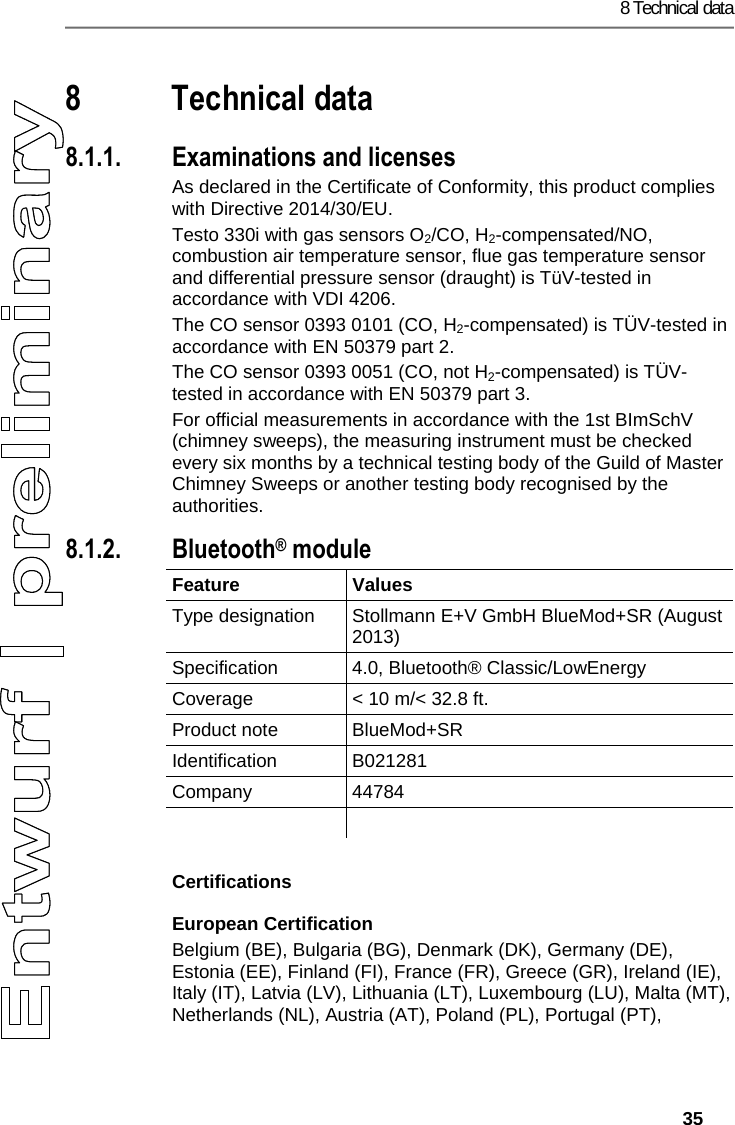
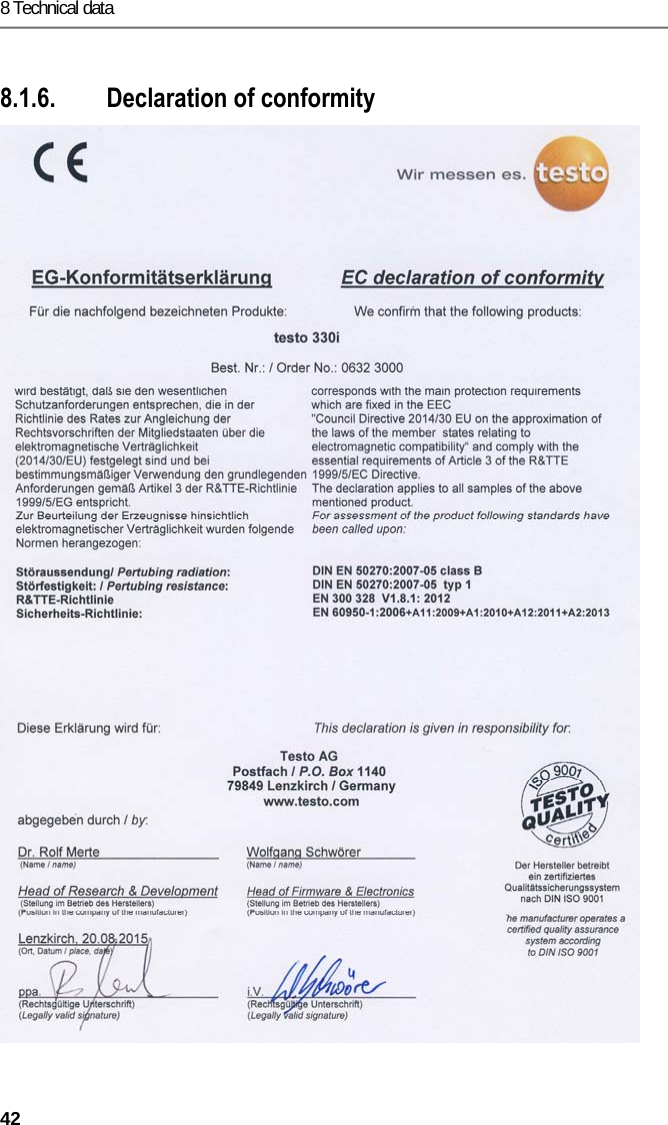
8 Technical data   35 Pos: 62 /TD/Überschr iften/9. Technische Da ten @ 18\mod_143799698380 4_79.docx @ 216246 @ 1 @ 1  8 Technical data Pos: 63 /TD/Leistungsb eschreibung/Tec hnische Daten/testo 330  Technische Daten/ Zulassungen testo 330i (LV- spezifisch?) @ 17\ mod_1432805433483_ 79.docx @ 213340 @ 335555555 @ 4   8.1.1. Examinations and licenses As declared in the Certificate of Conformity, this product complies with Directive 2014/30/EU. Testo 330i with gas sensors O2/CO, H2-compensated/NO, combustion air temperature sensor, flue gas temperature sensor and differential pressure sensor (draught) is TüV-tested in accordance with VDI 4206.  The CO sensor 0393 0101 (CO, H2-compensated) is TÜV-tested in accordance with EN 50379 part 2. The CO sensor 0393 0051 (CO, not H2-compensated) is TÜV-tested in accordance with EN 50379 part 3. For official measurements in accordance with the 1st BImSchV (chimney sweeps), the measuring instrument must be checked every six months by a technical testing body of the Guild of Master Chimney Sweeps or another testing body recognised by the authorities. 8.1.2. Bluetooth® module Feature   Values  Type designation  Stollmann E+V GmbH BlueMod+SR (August 2013) Specification 4.0, Bluetooth® Classic/LowEnergy Coverage  < 10 m/< 32.8 ft. Product note  BlueMod+SR Identification B021281 Company 44784   Certifications European Certification Belgium (BE), Bulgaria (BG), Denmark (DK), Germany (DE), Estonia (EE), Finland (FI), France (FR), Greece (GR), Ireland (IE), Italy (IT), Latvia (LV), Lithuania (LT), Luxembourg (LU), Malta (MT), Netherlands (NL), Austria (AT), Poland (PL), Portugal (PT),
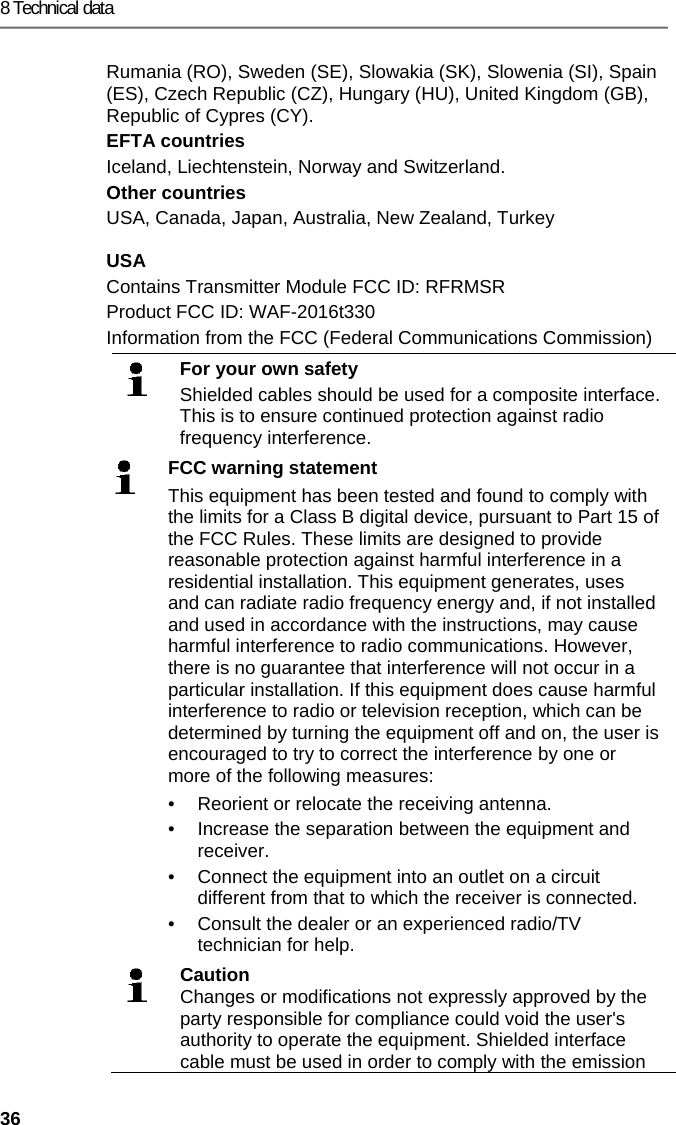
8 Technical data 36 Rumania (RO), Sweden (SE), Slowakia (SK), Slowenia (SI), Spain (ES), Czech Republic (CZ), Hungary (HU), United Kingdom (GB), Republic of Cypres (CY). EFTA countries Iceland, Liechtenstein, Norway and Switzerland. Other countries USA, Canada, Japan, Australia, New Zealand, Turkey USA Contains Transmitter Module FCC ID: RFRMSR Product FCC ID: WAF-2016t330 Information from the FCC (Federal Communications Commission)  For your own safety Shielded cables should be used for a composite interface. This is to ensure continued protection against radio frequency interference.  FCC warning statement This equipment has been tested and found to comply with the limits for a Class B digital device, pursuant to Part 15 of the FCC Rules. These limits are designed to provide reasonable protection against harmful interference in a residential installation. This equipment generates, uses and can radiate radio frequency energy and, if not installed and used in accordance with the instructions, may cause harmful interference to radio communications. However, there is no guarantee that interference will not occur in a particular installation. If this equipment does cause harmful interference to radio or television reception, which can be determined by turning the equipment off and on, the user is encouraged to try to correct the interference by one or more of the following measures: •  Reorient or relocate the receiving antenna. •  Increase the separation between the equipment and  receiver.  •  Connect the equipment into an outlet on a circuit different from that to which the receiver is connected.  •  Consult the dealer or an experienced radio/TV technician for help.  Caution Changes or modifications not expressly approved by the party responsible for compliance could void the user's authority to operate the equipment. Shielded interface cable must be used in order to comply with the emission
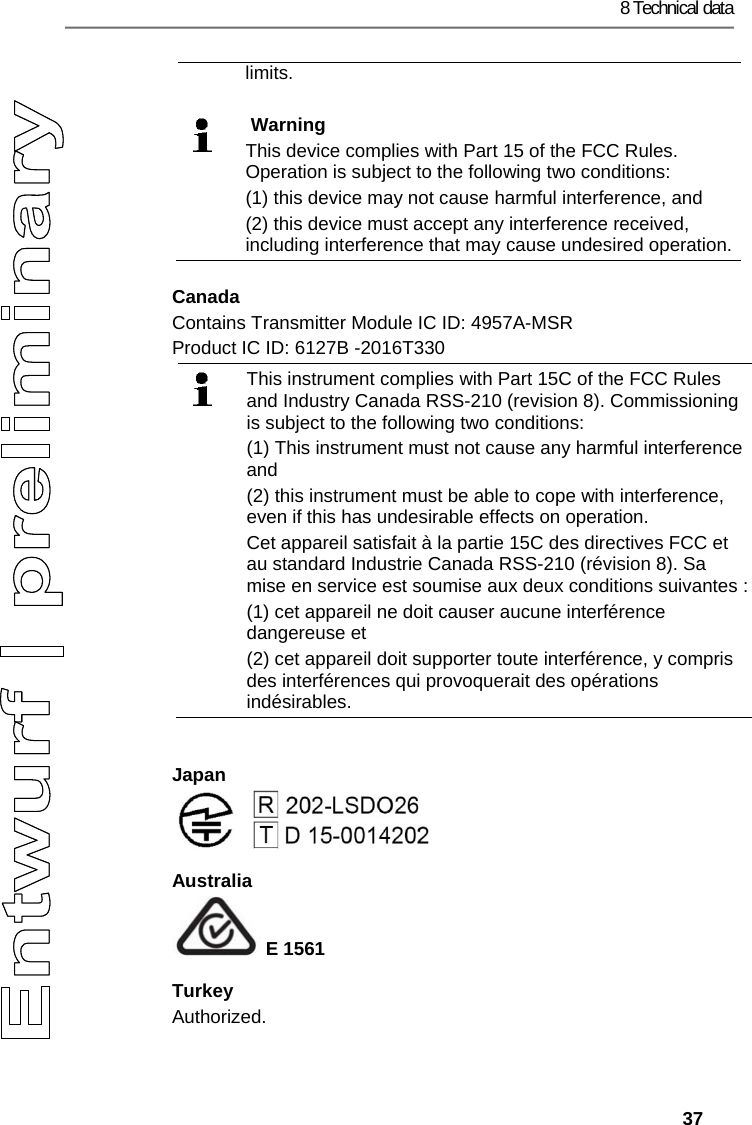
8 Technical data   37 limits.    Warning This device complies with Part 15 of the FCC Rules. Operation is subject to the following two conditions: (1) this device may not cause harmful interference, and  (2) this device must accept any interference received, including interference that may cause undesired operation.Canada Contains Transmitter Module IC ID: 4957A-MSR Product IC ID: 6127B -2016T330  This instrument complies with Part 15C of the FCC Rules and Industry Canada RSS-210 (revision 8). Commissioning is subject to the following two conditions:  (1) This instrument must not cause any harmful interference and  (2) this instrument must be able to cope with interference, even if this has undesirable effects on operation. Cet appareil satisfait à la partie 15C des directives FCC et au standard Industrie Canada RSS-210 (révision 8). Sa mise en service est soumise aux deux conditions suivantes : (1) cet appareil ne doit causer aucune interférence dangereuse et  (2) cet appareil doit supporter toute interférence, y compris des interférences qui provoquerait des opérations indésirables.  Japan  Australia  E 1561 Turkey Authorized.
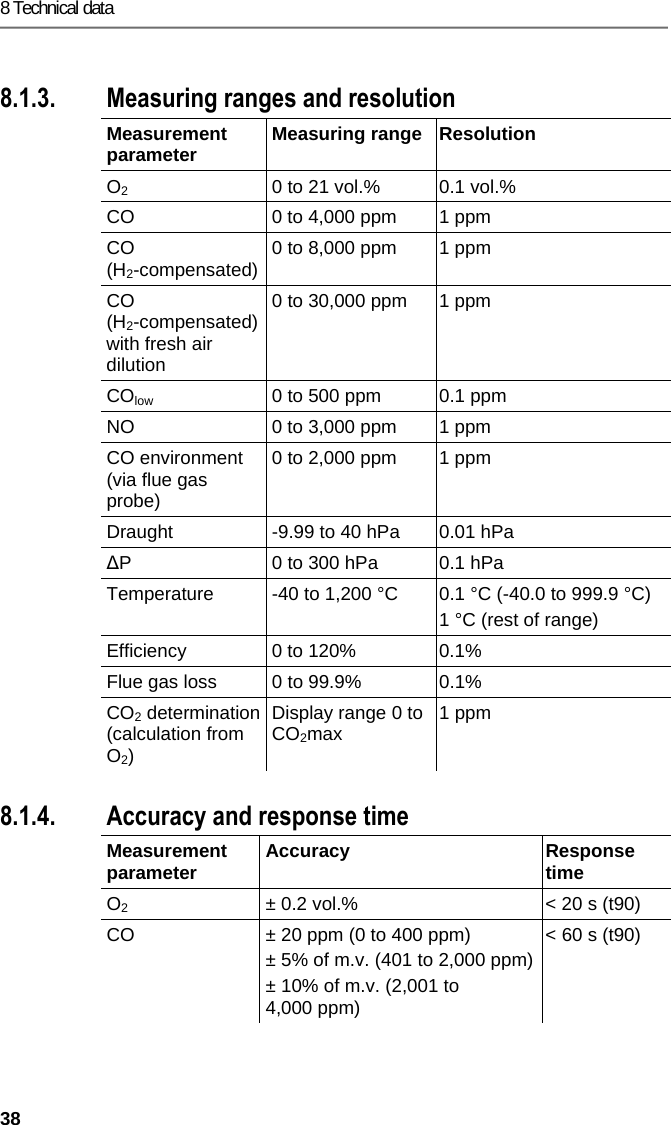
8 Technical data 38  Pos: 64 /TD/Leistungsb eschreibung/Techni sche Daten/testo 330  Technische Daten/ Messbereiche_Genauigkei ten testo330i @ 17\ mod_1434361470830_79. docx @ 213677 @ 33 @ 1  8.1.3. Measuring ranges and resolution Measurement parameter  Measuring range  Resolution O2  0 to 21 vol.%  0.1 vol.% CO  0 to 4,000 ppm  1 ppm CO (H2-compensated) 0 to 8,000 ppm  1 ppm CO  (H2-compensated) with fresh air dilution 0 to 30,000 ppm  1 ppm COlow  0 to 500 ppm  0.1 ppm NO  0 to 3,000 ppm  1 ppm CO environment (via flue gas probe) 0 to 2,000 ppm  1 ppm Draught  -9.99 to 40 hPa  0.01 hPa ∆P  0 to 300 hPa  0.1 hPa Temperature  -40 to 1,200 °C  0.1 °C (-40.0 to 999.9 °C) 1 °C (rest of range) Efficiency  0 to 120%  0.1% Flue gas loss  0 to 99.9%  0.1% CO2 determination (calculation from O2) Display range 0 to CO2max  1 ppm 8.1.4. Accuracy and response time Measurement parameter  Accuracy  Response time O2  ± 0.2 vol.%  < 20 s (t90) CO  ± 20 ppm (0 to 400 ppm) ± 5% of m.v. (401 to 2,000 ppm)± 10% of m.v. (2,001 to 4,000 ppm) < 60 s (t90)
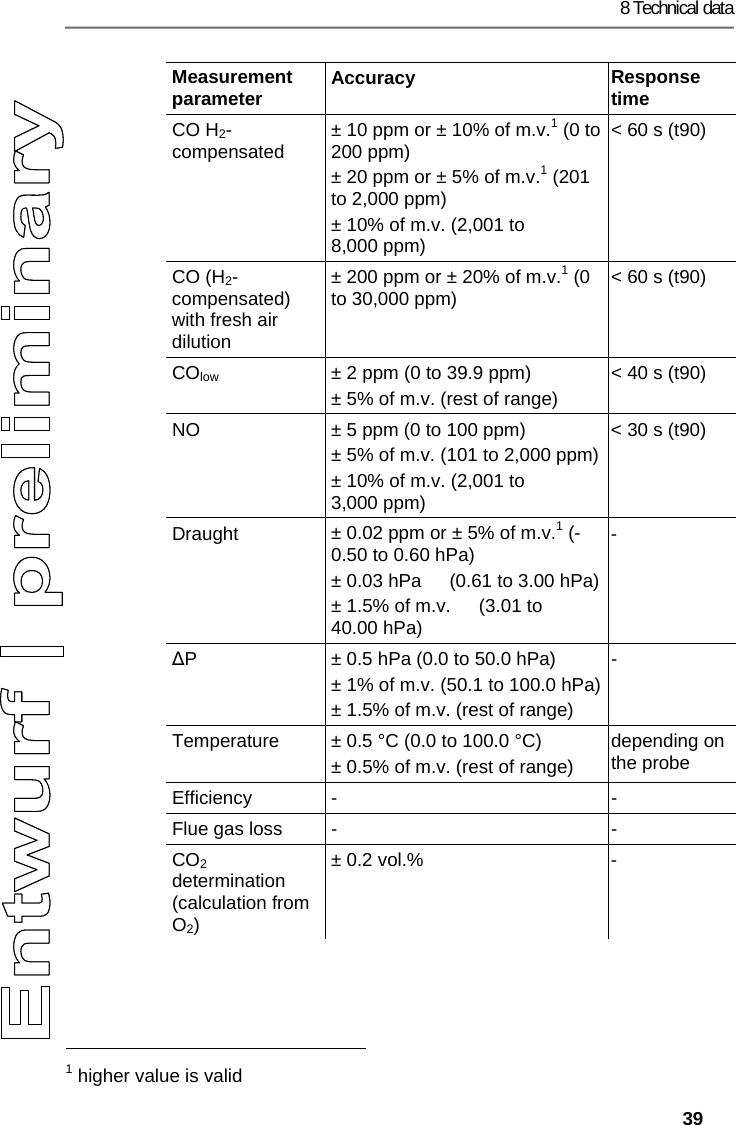
8 Technical data   39 Measurement parameter  Accuracy  Response time CO H2-compensated  ± 10 ppm or ± 10% of m.v.1 (0 to 200 ppm)  ± 20 ppm or ± 5% of m.v.1 (201 to 2,000 ppm) ± 10% of m.v. (2,001 to 8,000 ppm) < 60 s (t90) CO (H2-compensated) with fresh air dilution ± 200 ppm or ± 20% of m.v.1 (0 to 30,000 ppm)  < 60 s (t90) COlow  ± 2 ppm (0 to 39.9 ppm) ± 5% of m.v. (rest of range) < 40 s (t90) NO  ± 5 ppm (0 to 100 ppm) ± 5% of m.v. (101 to 2,000 ppm)± 10% of m.v. (2,001 to 3,000 ppm) < 30 s (t90) Draught  ± 0.02 ppm or ± 5% of m.v.1 (-0.50 to 0.60 hPa) ± 0.03 hPa  (0.61 to 3.00 hPa)± 1.5% of m.v.  (3.01 to 40.00 hPa) - ∆P  ± 0.5 hPa (0.0 to 50.0 hPa) ± 1% of m.v. (50.1 to 100.0 hPa)± 1.5% of m.v. (rest of range) - Temperature  ± 0.5 °C (0.0 to 100.0 °C) ± 0.5% of m.v. (rest of range) depending on the probe Efficiency -  - Flue gas loss  -  - CO2 determination (calculation from O2) ± 0.2 vol.%  -                                                            1 higher value is valid
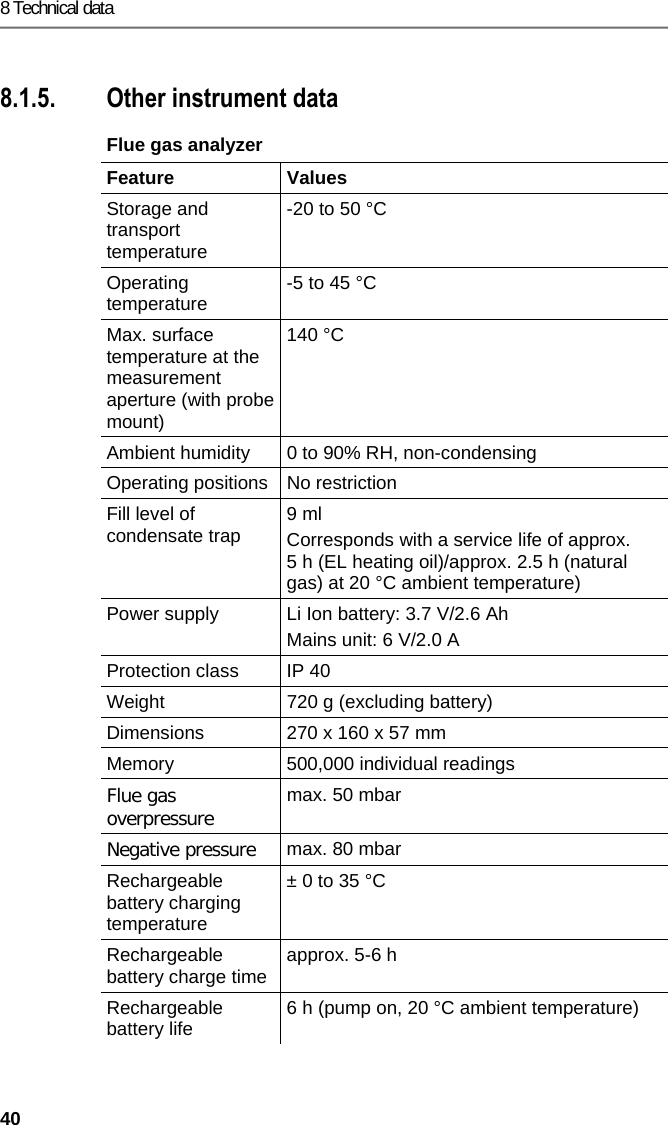
8 Technical data 40  Pos: 65 /TD/Leistungsb eschreibung/Techni sche Daten/testo 330  Technische Daten/ weitere Gerätedaten test o 330i @ 17\mod_143280582 6557_79.docx @ 213410 @ 35 @ 1  8.1.5. Other instrument data Flue gas analyzer  Feature   Values  Storage and transport temperature -20 to 50 °C Operating temperature  -5 to 45 °C Max. surface temperature at the measurement aperture (with probe mount) 140 °C Ambient humidity  0 to 90% RH, non-condensing Operating positions  No restriction Fill level of condensate trap  9 ml Corresponds with a service life of approx. 5 h (EL heating oil)/approx. 2.5 h (natural gas) at 20 °C ambient temperature) Power supply  Li Ion battery: 3.7 V/2.6 Ah Mains unit: 6 V/2.0 A Protection class  IP 40 Weight  720 g (excluding battery) Dimensions   270 x 160 x 57 mm Memory  500,000 individual readings Flue gas overpressure max. 50 mbar Negative pressure  max. 80 mbar Rechargeable battery charging temperature ± 0 to 35 °C Rechargeable battery charge time  approx. 5-6 h Rechargeable battery life  6 h (pump on, 20 °C ambient temperature)
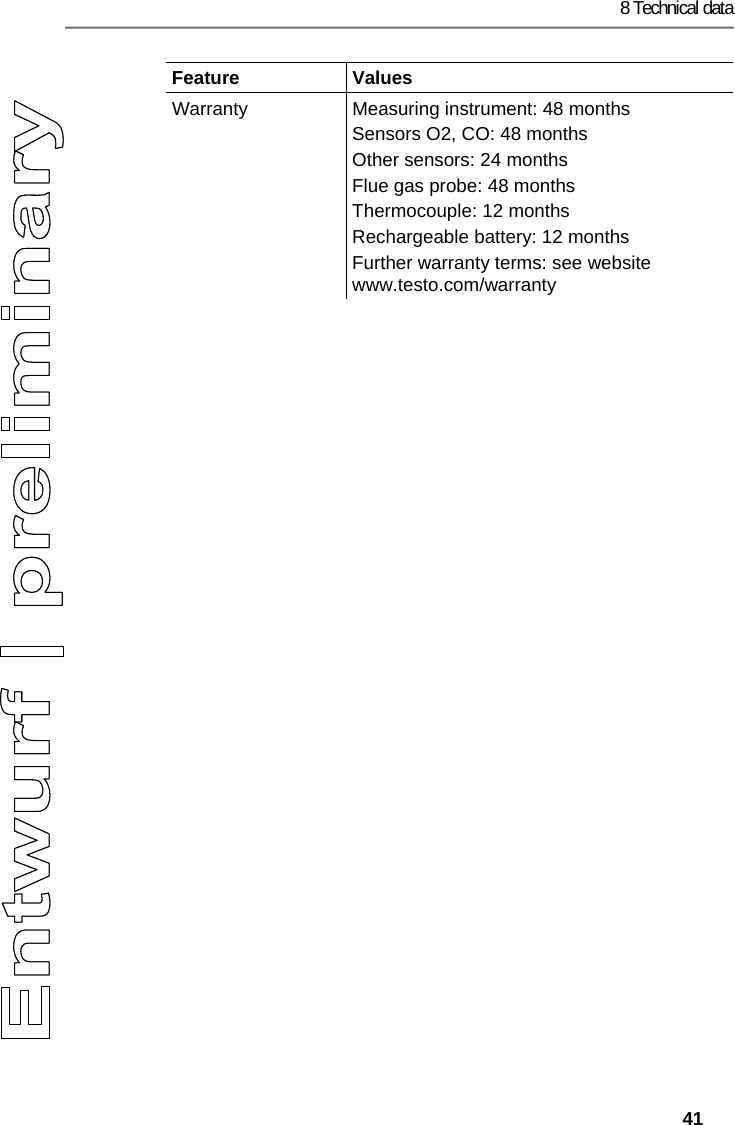
8 Technical data   41 Feature   Values  Warranty  Measuring instrument: 48 months Sensors O2, CO: 48 months  Other sensors: 24 months Flue gas probe: 48 months Thermocouple: 12 months Rechargeable battery: 12 months Further warranty terms: see website www.testo.com/warranty
8 Technical data 42  Pos: 66 /TD/Leistungsb eschreibung/Tec hnische Daten/testo 330  Technische Daten/Konf ormitätserkläru ng testo 330i @ 17\mod_143280 5698761_79.d ocx @ 213375 @ 3 @ 1  8.1.6. Declaration of conformity
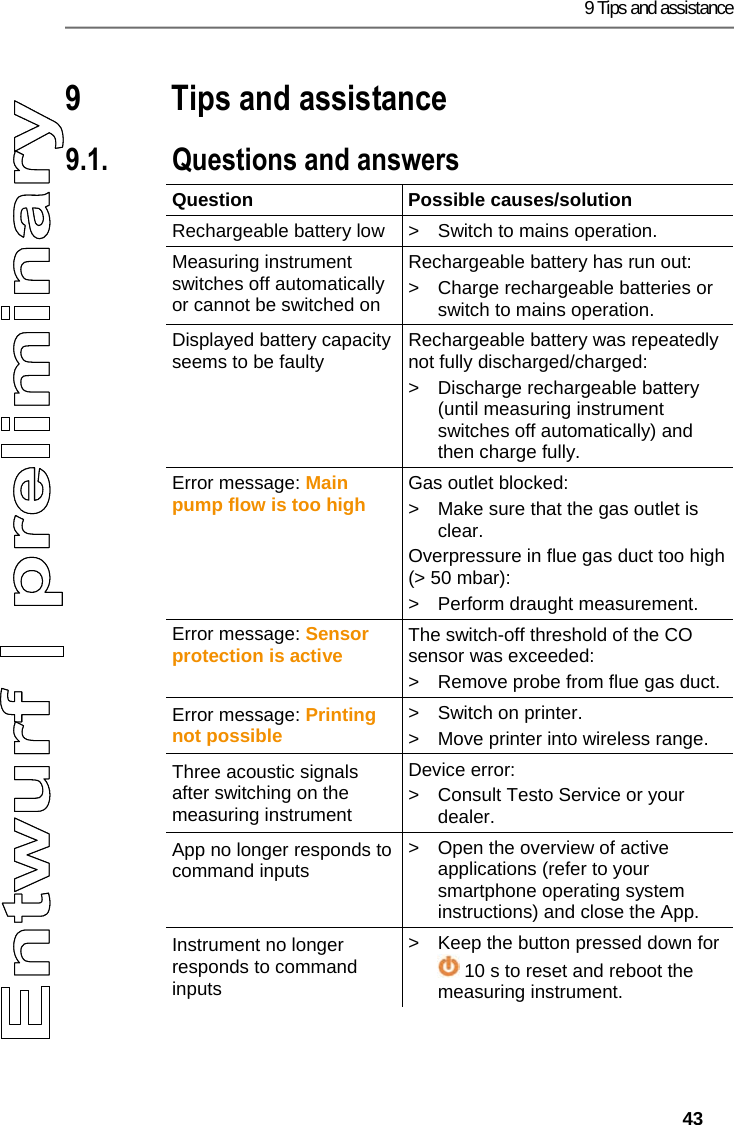
9 Tips and assistance   43 Pos: 67 /TD/Überschr iften/8. Tipps und Hilfe @ 0\ mod_1173789887985 _79.docx @ 406 @ 2 @ 1  9 Tips and assistance Pos: 68 /TD/Überschr iften/8.1 Fragen und Ant worten @ 0\mod_117740201 7078_79.docx @ 1093 @ 2 @ 1  9.1. Questions and answers Pos: 69 /TD/Tipps und Hilf e/Fragen und Antworten/ testo 330i Fragen und An worten @ 18\mod_14383594 16497_79.docx @ 217229 @ 2 @ 1  Question Possible causes/solution Rechargeable battery low  >  Switch to mains operation. Measuring instrument switches off automatically or cannot be switched on Rechargeable battery has run out: >  Charge rechargeable batteries or switch to mains operation. Displayed battery capacity seems to be faulty  Rechargeable battery was repeatedly not fully discharged/charged: >  Discharge rechargeable battery (until measuring instrument switches off automatically) and then charge fully. Error message: Main pump flow is too high Gas outlet blocked: >  Make sure that the gas outlet is clear. Overpressure in flue gas duct too high (> 50 mbar): >  Perform draught measurement. Error message: Sensor protection is active The switch-off threshold of the CO sensor was exceeded: >  Remove probe from flue gas duct. Error message: Printing not possible >  Switch on printer. >  Move printer into wireless range. Three acoustic signals after switching on the measuring instrument Device error: >  Consult Testo Service or your dealer. App no longer responds to command inputs >  Open the overview of active applications (refer to your smartphone operating system instructions) and close the App. Instrument no longer responds to command inputs >  Keep the button pressed down for  10 s to reset and reboot the measuring instrument.
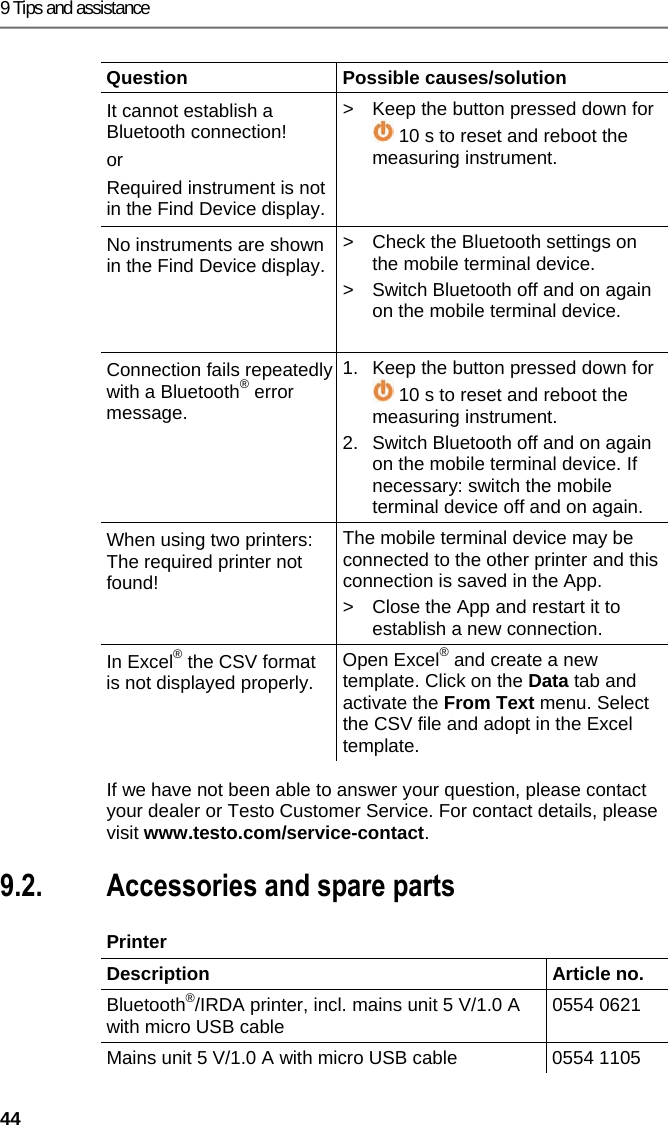
9 Tips and assistance 44 Question Possible causes/solution It cannot establish a Bluetooth connection! or Required instrument is not in the Find Device display. >  Keep the button pressed down for  10 s to reset and reboot the measuring instrument. No instruments are shown in the Find Device display. >  Check the Bluetooth settings on the mobile terminal device. >  Switch Bluetooth off and on again on the mobile terminal device.  Connection fails repeatedly with a Bluetooth® error message. 1.  Keep the button pressed down for  10 s to reset and reboot the measuring instrument. 2.  Switch Bluetooth off and on again on the mobile terminal device. If necessary: switch the mobile terminal device off and on again. When using two printers: The required printer not found! The mobile terminal device may be connected to the other printer and this connection is saved in the App. >  Close the App and restart it to establish a new connection. In Excel® the CSV format is not displayed properly.  Open Excel® and create a new template. Click on the Data tab and activate the From Text menu. Select the CSV file and adopt in the Excel template.  If we have not been able to answer your question, please contact your dealer or Testo Customer Service. For contact details, please visit www.testo.com/service-contact. Pos: 70 /TD/Überschr iften/8.3 Zubehör und Er satzteile @ 0\mod_117740 2058734_79.doc x @ 1102 @ 2 @ 1  9.2. Accessories and spare parts Pos: 71 /TD/Tipps und Hilf e/Zubehör und Ersatzt eile/testo 330i Zubehör _Ersatzteile @ 17\m od_1434444889185_79.d ocx @ 213992 @ 55555555 @ 1  Printer  Description   Article no. Bluetooth®/IRDA printer, incl. mains unit 5 V/1.0 A with micro USB cable  0554 0621 Mains unit 5 V/1.0 A with micro USB cable  0554 1105
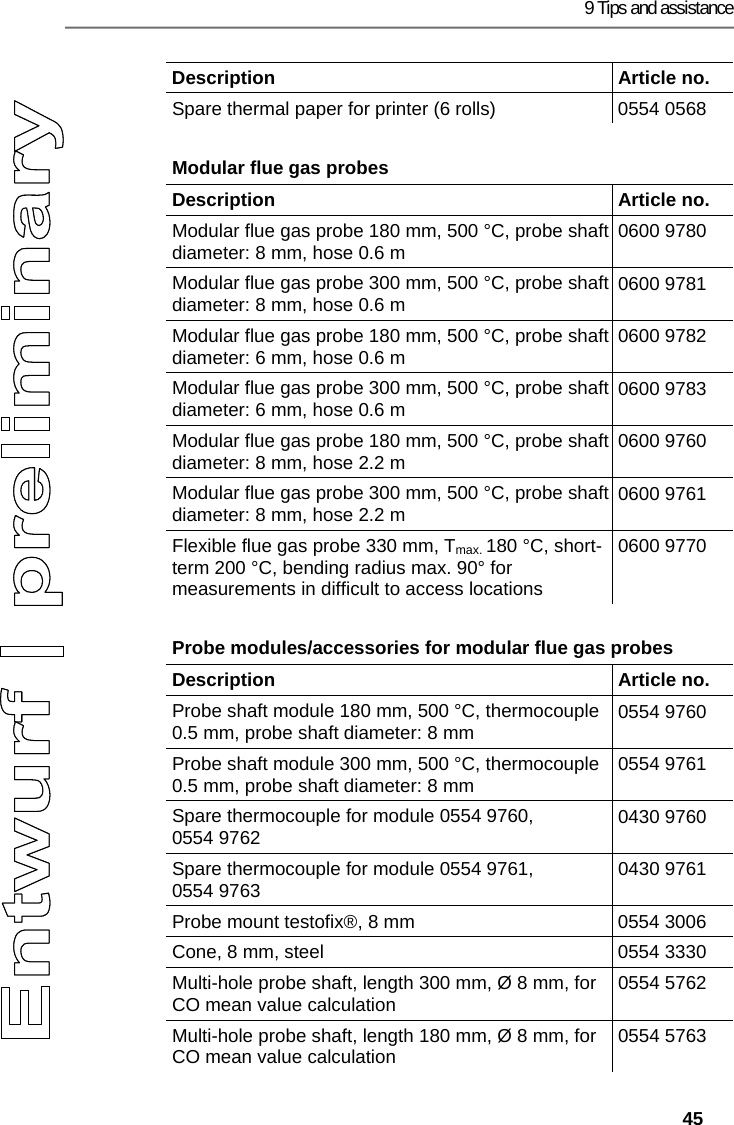
9 Tips and assistance   45 Description   Article no. Spare thermal paper for printer (6 rolls)  0554 0568 Modular flue gas probes  Description   Article no. Modular flue gas probe 180 mm, 500 °C, probe shaft diameter: 8 mm, hose 0.6 m  0600 9780 Modular flue gas probe 300 mm, 500 °C, probe shaft diameter: 8 mm, hose 0.6 m  0600 9781 Modular flue gas probe 180 mm, 500 °C, probe shaft diameter: 6 mm, hose 0.6 m  0600 9782 Modular flue gas probe 300 mm, 500 °C, probe shaft diameter: 6 mm, hose 0.6 m  0600 9783 Modular flue gas probe 180 mm, 500 °C, probe shaft diameter: 8 mm, hose 2.2 m  0600 9760 Modular flue gas probe 300 mm, 500 °C, probe shaft diameter: 8 mm, hose 2.2 m  0600 9761 Flexible flue gas probe 330 mm, Tmax. 180 °C, short-term 200 °C, bending radius max. 90° for measurements in difficult to access locations 0600 9770 Probe modules/accessories for modular flue gas probes  Description   Article no. Probe shaft module 180 mm, 500 °C, thermocouple 0.5 mm, probe shaft diameter: 8 mm  0554 9760 Probe shaft module 300 mm, 500 °C, thermocouple 0.5 mm, probe shaft diameter: 8 mm  0554 9761 Spare thermocouple for module 0554 9760, 0554 9762  0430 9760 Spare thermocouple for module 0554 9761, 0554 9763  0430 9761 Probe mount testofix®, 8 mm  0554 3006 Cone, 8 mm, steel  0554 3330 Multi-hole probe shaft, length 300 mm, Ø 8 mm, for CO mean value calculation  0554 5762 Multi-hole probe shaft, length 180 mm, Ø 8 mm, for CO mean value calculation  0554 5763
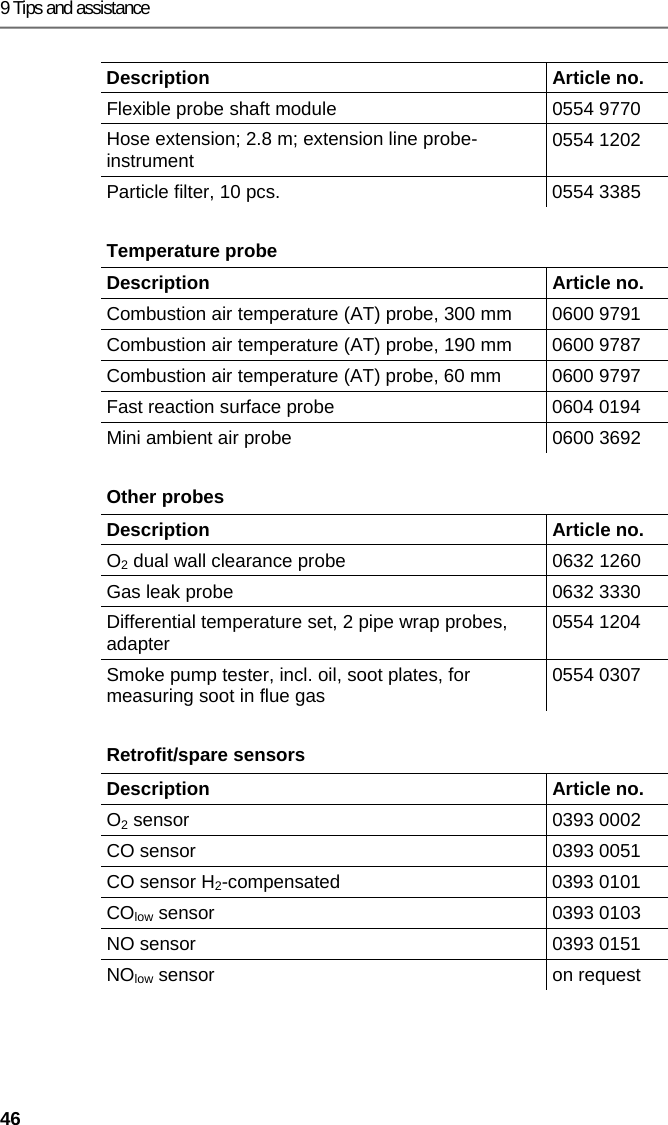
9 Tips and assistance 46 Description   Article no. Flexible probe shaft module  0554 9770 Hose extension; 2.8 m; extension line probe-instrument  0554 1202 Particle filter, 10 pcs.  0554 3385 Temperature probe  Description   Article no. Combustion air temperature (AT) probe, 300 mm  0600 9791 Combustion air temperature (AT) probe, 190 mm  0600 9787 Combustion air temperature (AT) probe, 60 mm  0600 9797 Fast reaction surface probe  0604 0194 Mini ambient air probe  0600 3692 Other probes  Description   Article no. O2 dual wall clearance probe  0632 1260 Gas leak probe  0632 3330 Differential temperature set, 2 pipe wrap probes, adapter  0554 1204 Smoke pump tester, incl. oil, soot plates, for measuring soot in flue gas  0554 0307 Retrofit/spare sensors   Description   Article no. O2 sensor  0393 0002 CO sensor   0393 0051 CO sensor H2-compensated 0393 0101 COlow sensor   0393 0103 NO sensor  0393 0151 NOlow sensor  on request
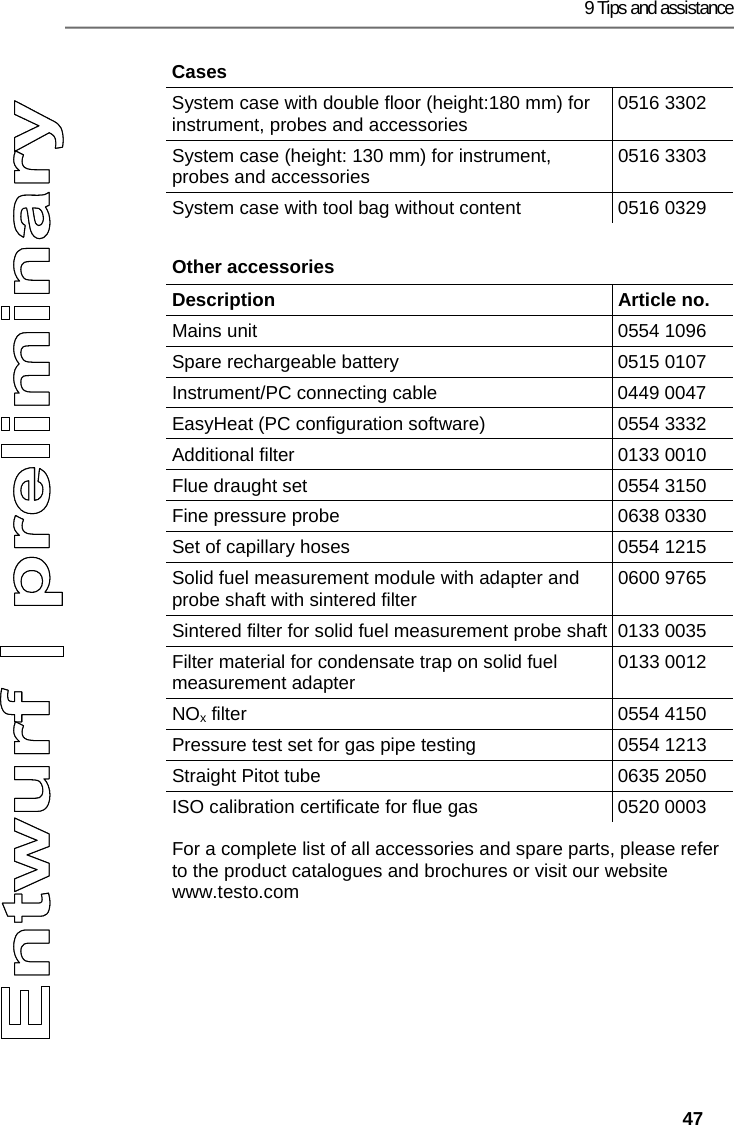
9 Tips and assistance   47 Cases System case with double floor (height:180 mm) for instrument, probes and accessories  0516 3302 System case (height: 130 mm) for instrument, probes and accessories  0516 3303 System case with tool bag without content  0516 0329 Other accessories  Description   Article no. Mains unit  0554 1096 Spare rechargeable battery  0515 0107 Instrument/PC connecting cable  0449 0047 EasyHeat (PC configuration software)  0554 3332 Additional filter  0133 0010 Flue draught set  0554 3150 Fine pressure probe  0638 0330 Set of capillary hoses  0554 1215 Solid fuel measurement module with adapter and probe shaft with sintered filter  0600 9765 Sintered filter for solid fuel measurement probe shaft 0133 0035 Filter material for condensate trap on solid fuel measurement adapter  0133 0012 NOx filter  0554 4150 Pressure test set for gas pipe testing  0554 1213 Straight Pitot tube  0635 2050 ISO calibration certificate for flue gas  0520 0003 For a complete list of all accessories and spare parts, please refer to the product catalogues and brochures or visit our website www.testo.com === Ende der Liste für  Textmarke Inhalt ===
 0971 3340 en 02a en-GB

Navigation menu