Testo SE and KGaA AMB2520T 2.4 GHz Transceiver module User Manual manual 1

Testo AG 2.4 GHz Transceiver module manual 1

Contents

manual 1

Annex No.4a Page 1 of 41                    Functional description / User’s manual  Radio Transceiver Module AMB2520-T1
               Manual for AMB8420 and AMB2520 Version 3.6 SW-V3.0, 3.1, 3.2                           AMBER wireless GmbH Albin-Köbis-Strasse 18 D-51147 Cologne Phone: +49 2203 6991950 Fax: +49 2203 459883 E-mail: info@amber-wireless.de Internet: http://www.amber-wireless.de
     AMB8420/2520 Manual V3.6  Page 2 of 40  Last update: 25/3/2008  Table of Contents 1 Summary.............................................................................................................................................. 4 2 Operating Modes ................................................................................................................................. 4 2.1 Transparent, Buffered Data Transfer ................................................................................................. 5 2.2 Command Mode................................................................................................................................. 5 2.2.1 Switching to the Command Mode............................................................................................... 5 2.2.2 Exiting the Command Mode ....................................................................................................... 6 2.2.3 Communication in the Command Mode ..................................................................................... 6 3 Addressing Modes ............................................................................................................................... 7 3.1 Monitoring Wireless Communication ................................................................................................. 7 4 Electrical Parameters........................................................................................................................... 7 4.1 Input Voltage ...................................................................................................................................... 7 4.2 Power Consumption........................................................................................................................... 8 4.2.1 AMB8420 .................................................................................................................................... 8 4.2.2 AMB2520 .................................................................................................................................... 8 5 Dimensions and Weight....................................................................................................................... 8 6 Pinout................................................................................................................................................... 9 7 Serial Interface................................................................................................................................... 11 7.1 UART................................................................................................................................................ 11 7.1.1 Supported Data Rates .............................................................................................................. 11 7.1.2 Supported Data Formats .......................................................................................................... 11 7.2 SPI Interface .................................................................................................................................... 11 8 Setting the HF Parameters ................................................................................................................ 12 8.1 AMB8420.......................................................................................................................................... 12 8.1.1 "g1" Band .................................................................................................................................. 12 8.1.2 "g3" Band .................................................................................................................................. 12 8.1.3 "g4" Band .................................................................................................................................. 12 8.1.4 "g" Band .................................................................................................................................... 12 8.2 AMB2520.......................................................................................................................................... 13 9 Timing Parameters............................................................................................................................. 14 9.1 Reset Behaviour............................................................................................................................... 14 9.1.1 Power-On Reset ....................................................................................................................... 14 9.1.2 Reset via /RESET Pin............................................................................................................... 14 9.2 Wake-up from the Sleep Mode ........................................................................................................ 15 9.3 Latencies During Data Transfer / Packet Generation ...................................................................... 15 9.3.1 Transparent Operating Mode.................................................................................................... 15 9.3.2 Command Mode ....................................................................................................................... 16 10 Battery Operation............................................................................................................................... 16 10.1 Active Mode ................................................................................................................................... 16 10.2 Stand-By......................................................................................................................................... 16 10.3 WOR Mode .................................................................................................................................... 16 10.4 Sleep Mode .................................................................................................................................... 16 11 The Command Interface .................................................................................................................... 17 11.1 Data Transfer in the Command Mode............................................................................................ 17 11.1.1 CMD_DATA_REQ .................................................................................................................. 17 11.1.2 CMD_DATAEX_REQ ............................................................................................................. 17 11.1.3 CMD_DATAEX_IND ............................................................................................................... 18 11.1.4 CMD_DATARETRY_REQ ...................................................................................................... 18 11.2 CMD_SET_MODE_REQ ............................................................................................................... 19 11.3 CMD_RESET_REQ ....................................................................................................................... 19 11.4 CMD_SET_CHANNEL_REQ ......................................................................................................... 20 11.5 CMD_SET_DESTNETID_REQ...................................................................................................... 20 11.6 CMD_SET_DESTADDR_REQ ...................................................................................................... 20 11.7 CMD_SET_REQ ............................................................................................................................ 21
     AMB8420/2520 Manual V3.6  Page 3 of 40  Last update: 25/3/2008 11.8 CMD_GET_REQ............................................................................................................................ 22 11.9 CMD_SERIALNO_REQ ................................................................................................................. 22 11.10 CMD_RSSI_REQ......................................................................................................................... 23 11.11 CMD_ERRORFLAGS_REQ ........................................................................................................ 25 12 Configuration Parameters.................................................................................................................. 25 12.1 Non-Volatile Configuration Parameters ......................................................................................... 25 12.1.1 UART_CTL ............................................................................................................................. 28 12.1.2 UART_TCTL ........................................................................................................................... 28 12.1.3 UART_MCTL .......................................................................................................................... 28 12.1.4 UART_BR0 ............................................................................................................................. 28 12.1.5 UART_BR1 ............................................................................................................................. 29 12.1.6 UART_PktMode...................................................................................................................... 29 12.1.7 UART_PktSize........................................................................................................................ 29 12.1.8 UART_RTSLimit ..................................................................................................................... 29 12.1.9 UART_ETXChar ..................................................................................................................... 29 12.1.10 UART_Timeout ..................................................................................................................... 29 12.1.11 UART_DIDelay ..................................................................................................................... 30 12.1.12 MAC_NumRetrys .................................................................................................................. 30 12.1.13 MAC_AddrMode ................................................................................................................... 30 12.1.14 MAC_DestNetID ................................................................................................................... 30 12.1.15 MAC_DestAddrLSB .............................................................................................................. 30 12.1.16 MAC_SourceNetID ............................................................................................................... 30 12.1.17 MAC_SourceAddrLSB .......................................................................................................... 30 12.1.18 MAC_ACKTimeout ............................................................................................................... 31 12.1.19 PHY_FIFOPrecharge............................................................................................................ 31 12.1.20 PHY_PAPower ..................................................................................................................... 31 12.1.21 PHY_DefaultChannel............................................................................................................ 31 12.1.22 PHY_CCARSSILevel............................................................................................................ 31 12.1.23 OpMode ................................................................................................................................ 31 12.1.24 MSP_RSELx......................................................................................................................... 31 12.1.25 MSP_DCOCTL ..................................................................................................................... 32 12.1.26 WOR_Prescaler.................................................................................................................... 32 12.1.27 WOR_Countdown................................................................................................................. 32 12.1.28 WOR_RXOnTime ................................................................................................................. 32 12.1.29 CfgFlags................................................................................................................................ 33 13 Start-up .............................................................................................................................................. 34 13.1 Minimal Configuration .................................................................................................................... 34 13.2 Transfer of Large Amounts of Data................................................................................................ 34 13.3 Deployment of Several Modules, Use of Addresses, Channel Switching ..................................... 34 13.4 Use of the Low-Power Functionality .............................................................................................. 34 13.5 Minimising Latencies...................................................................................................................... 34 14 Firmware Update ............................................................................................................................... 34 14.1 Update of Earlier FW Versions (< 3.0.0)........................................................................................ 35 15 Manufacturing Information ................................................................................................................. 36 15.1 Footprint Dimensioning Proposal................................................................................................... 36 15.2 Soldering ........................................................................................................................................ 37 16 Version History................................................................................................................................... 38 16.1 Software ......................................................................................................................................... 38 16.2 Manual............................................................................................................................................ 38 17 References......................................................................................................................................... 38 18 Declaration of Conformity .................................................................................................................. 39 19 Important Information......................................................................................................................... 40 19.1 Exclusion of Liability....................................................................................................................... 40 19.2 Trademarks .................................................................................................................................... 40 19.3 Usage Restriction........................................................................................................................... 40
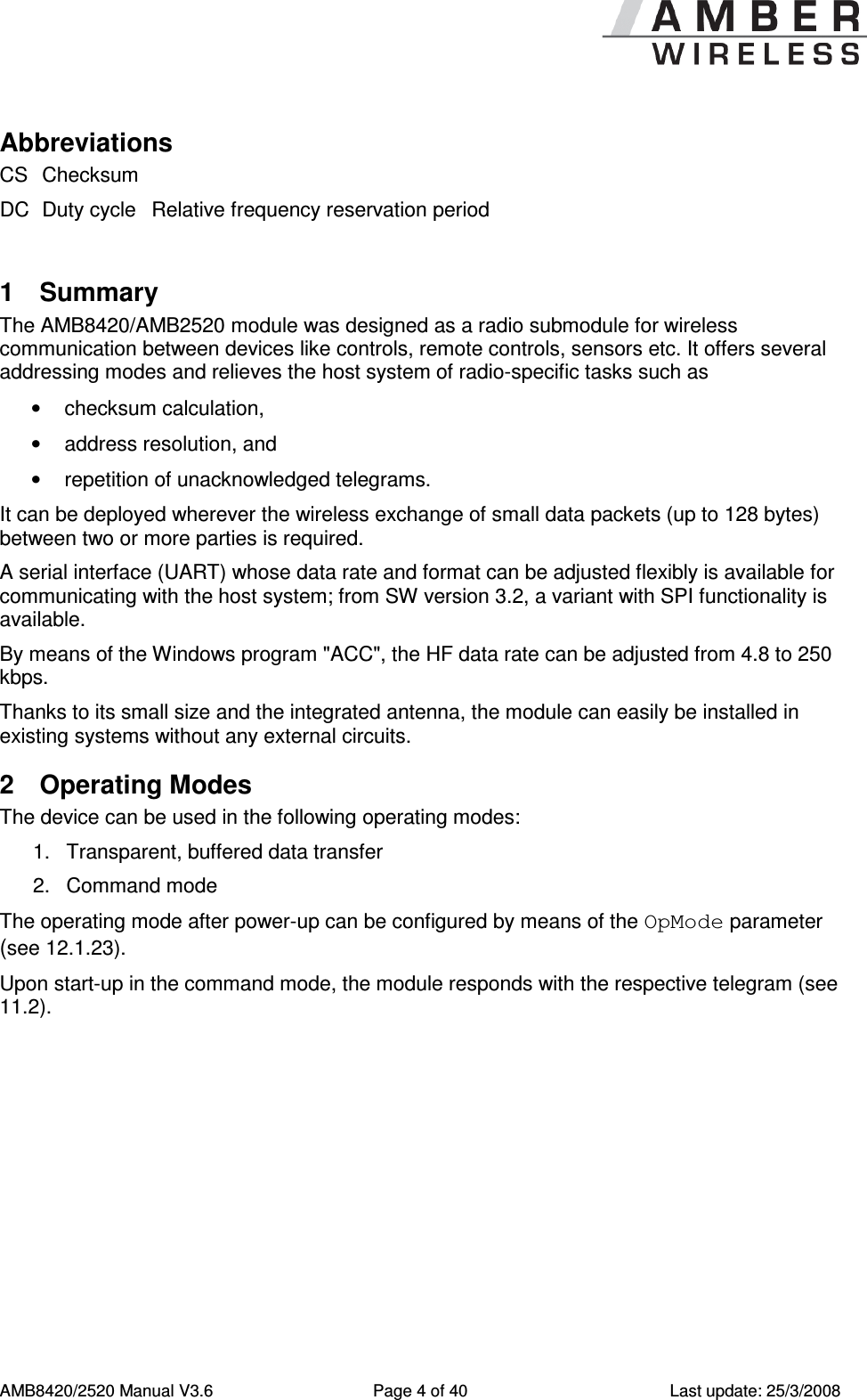
     AMB8420/2520 Manual V3.6  Page 4 of 40  Last update: 25/3/2008 Abbreviations CS Checksum  DC Duty cycle Relative frequency reservation period  1  Summary The AMB8420/AMB2520 module was designed as a radio submodule for wireless communication between devices like controls, remote controls, sensors etc. It offers several addressing modes and relieves the host system of radio-specific tasks such as  •  checksum calculation, •  address resolution, and •  repetition of unacknowledged telegrams. It can be deployed wherever the wireless exchange of small data packets (up to 128 bytes) between two or more parties is required.  A serial interface (UART) whose data rate and format can be adjusted flexibly is available for communicating with the host system; from SW version 3.2, a variant with SPI functionality is available. By means of the Windows program "ACC", the HF data rate can be adjusted from 4.8 to 250 kbps. Thanks to its small size and the integrated antenna, the module can easily be installed in existing systems without any external circuits. 2  Operating Modes The device can be used in the following operating modes: 1.  Transparent, buffered data transfer 2.  Command mode The operating mode after power-up can be configured by means of the OpMode parameter (see 12.1.23).  Upon start-up in the command mode, the module responds with the respective telegram (see 11.2).
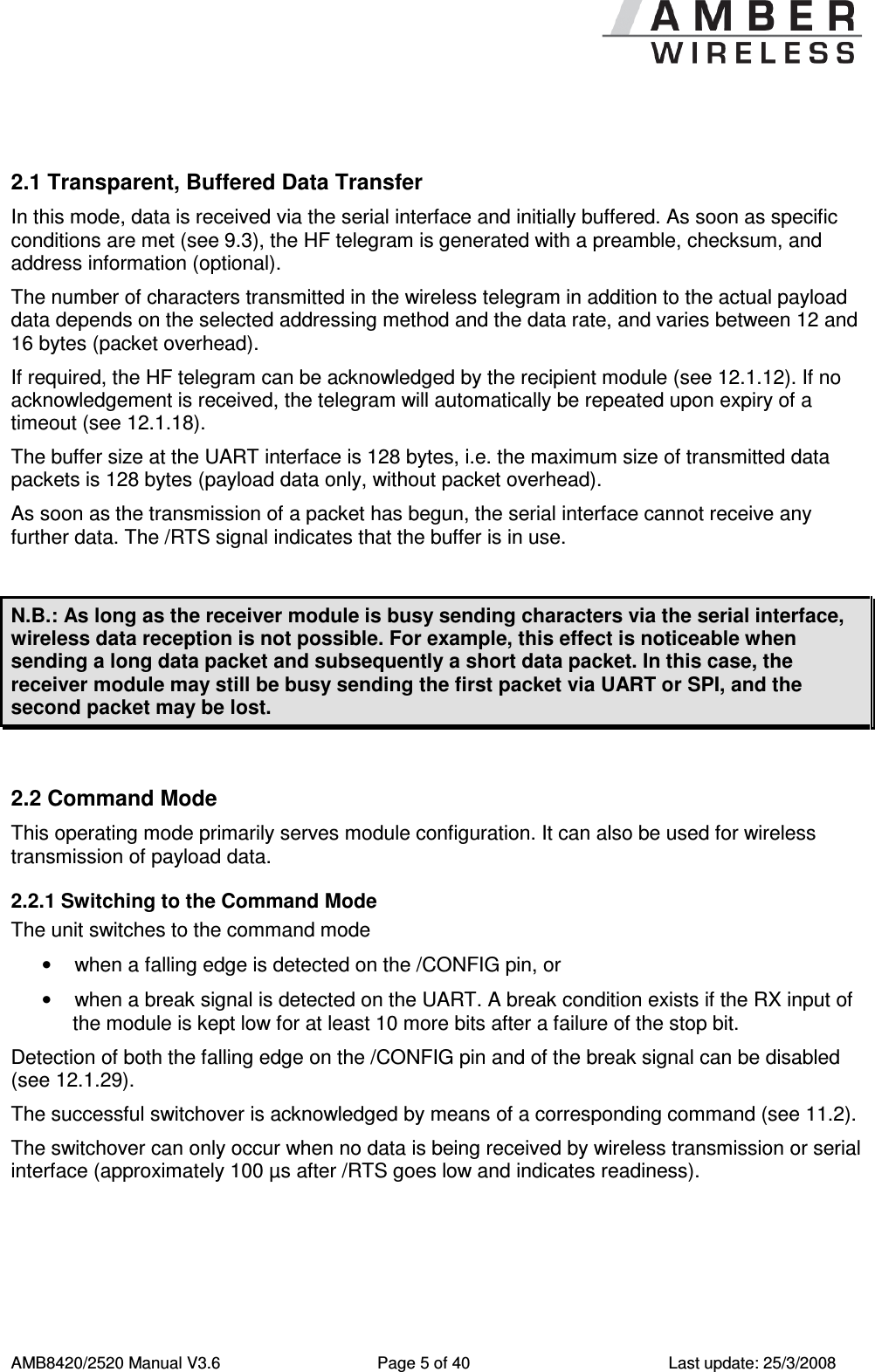
     AMB8420/2520 Manual V3.6  Page 5 of 40  Last update: 25/3/2008  2.1 Transparent, Buffered Data Transfer In this mode, data is received via the serial interface and initially buffered. As soon as specific conditions are met (see 9.3), the HF telegram is generated with a preamble, checksum, and address information (optional). The number of characters transmitted in the wireless telegram in addition to the actual payload data depends on the selected addressing method and the data rate, and varies between 12 and 16 bytes (packet overhead). If required, the HF telegram can be acknowledged by the recipient module (see 12.1.12). If no acknowledgement is received, the telegram will automatically be repeated upon expiry of a timeout (see 12.1.18).  The buffer size at the UART interface is 128 bytes, i.e. the maximum size of transmitted data packets is 128 bytes (payload data only, without packet overhead).  As soon as the transmission of a packet has begun, the serial interface cannot receive any further data. The /RTS signal indicates that the buffer is in use.  N.B.: As long as the receiver module is busy sending characters via the serial interface, wireless data reception is not possible. For example, this effect is noticeable when sending a long data packet and subsequently a short data packet. In this case, the receiver module may still be busy sending the first packet via UART or SPI, and the second packet may be lost.  2.2 Command Mode This operating mode primarily serves module configuration. It can also be used for wireless transmission of payload data. 2.2.1 Switching to the Command Mode The unit switches to the command mode •  when a falling edge is detected on the /CONFIG pin, or •  when a break signal is detected on the UART. A break condition exists if the RX input of the module is kept low for at least 10 more bits after a failure of the stop bit. Detection of both the falling edge on the /CONFIG pin and of the break signal can be disabled (see 12.1.29). The successful switchover is acknowledged by means of a corresponding command (see 11.2).  The switchover can only occur when no data is being received by wireless transmission or serial interface (approximately 100 µs after /RTS goes low and indicates readiness).
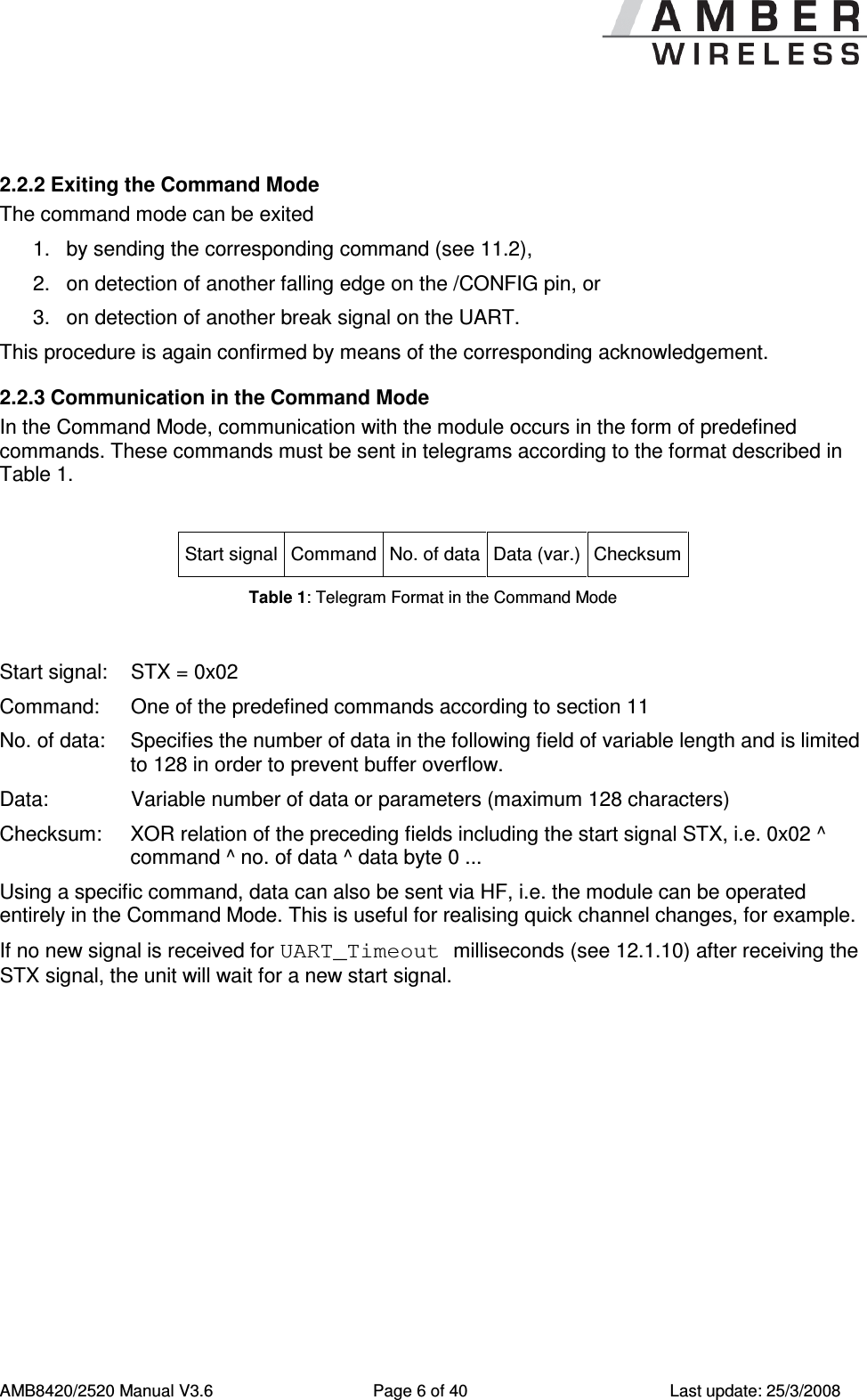
     AMB8420/2520 Manual V3.6  Page 6 of 40  Last update: 25/3/2008  2.2.2 Exiting the Command Mode The command mode can be exited 1.  by sending the corresponding command (see 11.2), 2.  on detection of another falling edge on the /CONFIG pin, or 3.  on detection of another break signal on the UART. This procedure is again confirmed by means of the corresponding acknowledgement. 2.2.3 Communication in the Command Mode In the Command Mode, communication with the module occurs in the form of predefined commands. These commands must be sent in telegrams according to the format described in Table 1.  Start signal Command No. of data Data (var.) Checksum Table 1: Telegram Format in the Command Mode  Start signal:  STX = 0x02 Command:   One of the predefined commands according to section 11 No. of data:  Specifies the number of data in the following field of variable length and is limited to 128 in order to prevent buffer overflow. Data:    Variable number of data or parameters (maximum 128 characters) Checksum:  XOR relation of the preceding fields including the start signal STX, i.e. 0x02 ^ command ^ no. of data ^ data byte 0 ... Using a specific command, data can also be sent via HF, i.e. the module can be operated entirely in the Command Mode. This is useful for realising quick channel changes, for example. If no new signal is received for UART_Timeout milliseconds (see 12.1.10) after receiving the STX signal, the unit will wait for a new start signal.
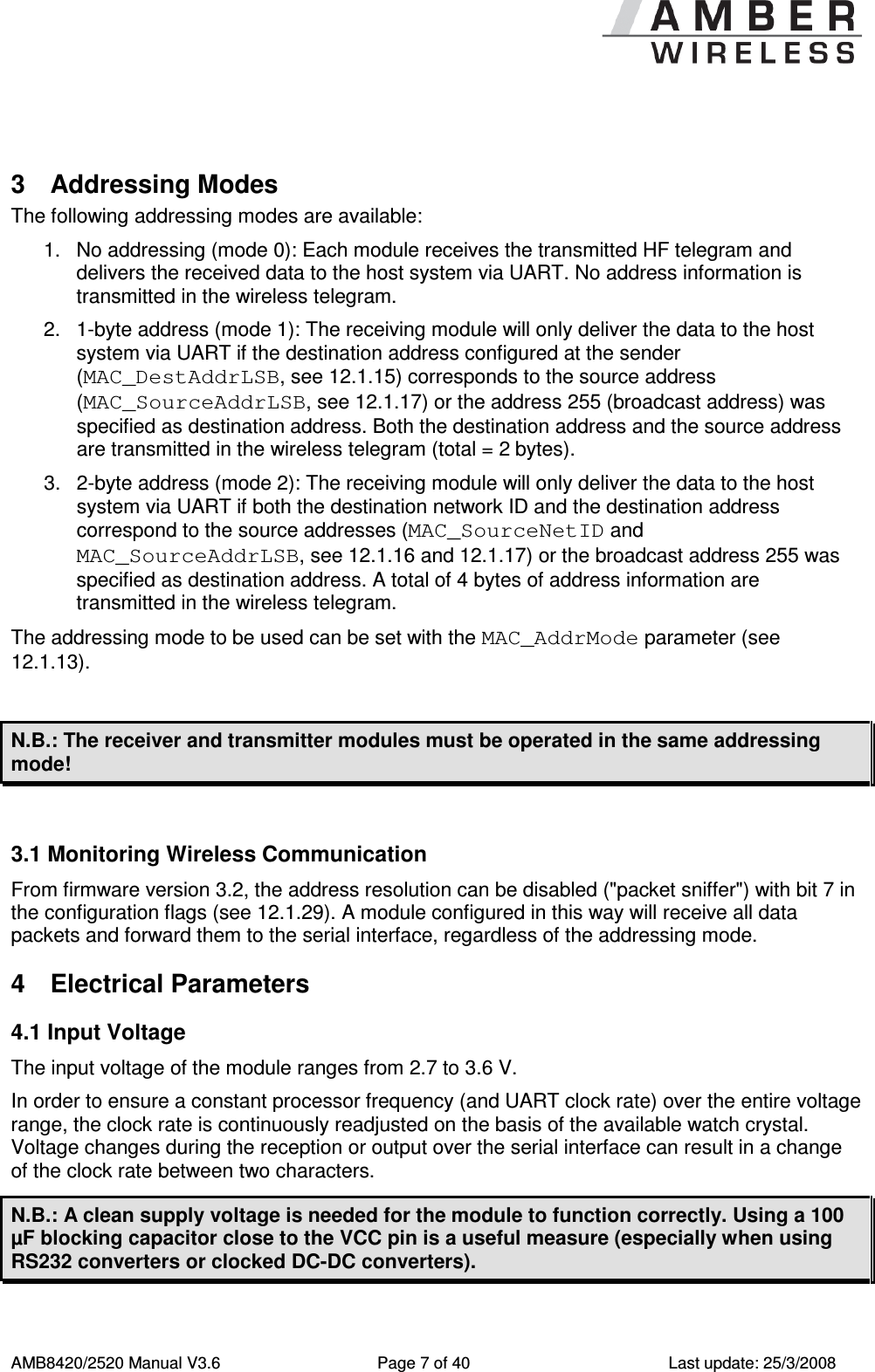
     AMB8420/2520 Manual V3.6  Page 7 of 40  Last update: 25/3/2008  3  Addressing Modes The following addressing modes are available: 1.  No addressing (mode 0): Each module receives the transmitted HF telegram and delivers the received data to the host system via UART. No address information is transmitted in the wireless telegram. 2.  1-byte address (mode 1): The receiving module will only deliver the data to the host system via UART if the destination address configured at the sender (MAC_DestAddrLSB, see 12.1.15) corresponds to the source address (MAC_SourceAddrLSB, see 12.1.17) or the address 255 (broadcast address) was specified as destination address. Both the destination address and the source address are transmitted in the wireless telegram (total = 2 bytes). 3.  2-byte address (mode 2): The receiving module will only deliver the data to the host system via UART if both the destination network ID and the destination address correspond to the source addresses (MAC_SourceNetID and MAC_SourceAddrLSB, see 12.1.16 and 12.1.17) or the broadcast address 255 was specified as destination address. A total of 4 bytes of address information are transmitted in the wireless telegram. The addressing mode to be used can be set with the MAC_AddrMode parameter (see 12.1.13).  N.B.: The receiver and transmitter modules must be operated in the same addressing mode!  3.1 Monitoring Wireless Communication From firmware version 3.2, the address resolution can be disabled ("packet sniffer") with bit 7 in the configuration flags (see 12.1.29). A module configured in this way will receive all data packets and forward them to the serial interface, regardless of the addressing mode. 4  Electrical Parameters 4.1 Input Voltage The input voltage of the module ranges from 2.7 to 3.6 V. In order to ensure a constant processor frequency (and UART clock rate) over the entire voltage range, the clock rate is continuously readjusted on the basis of the available watch crystal. Voltage changes during the reception or output over the serial interface can result in a change of the clock rate between two characters. N.B.: A clean supply voltage is needed for the module to function correctly. Using a 100 µF blocking capacitor close to the VCC pin is a useful measure (especially when using RS232 converters or clocked DC-DC converters).
     AMB8420/2520 Manual V3.6  Page 8 of 40  Last update: 25/3/2008 4.2 Power Consumption 4.2.1 AMB8420 See data sheet [4]. 4.2.2 AMB2520 See data sheet [5].  N.B.: To minimise power consumption in Sleep Mode, the input signals of the module (/CONFIG, SLEEP, TRX_DISABLE und /DATA_REQUEST) must be set to the levels defined in Table 2. Open (floating) pins result in increased power consumption.  5  Dimensions and Weight See data sheets [4] and [5].
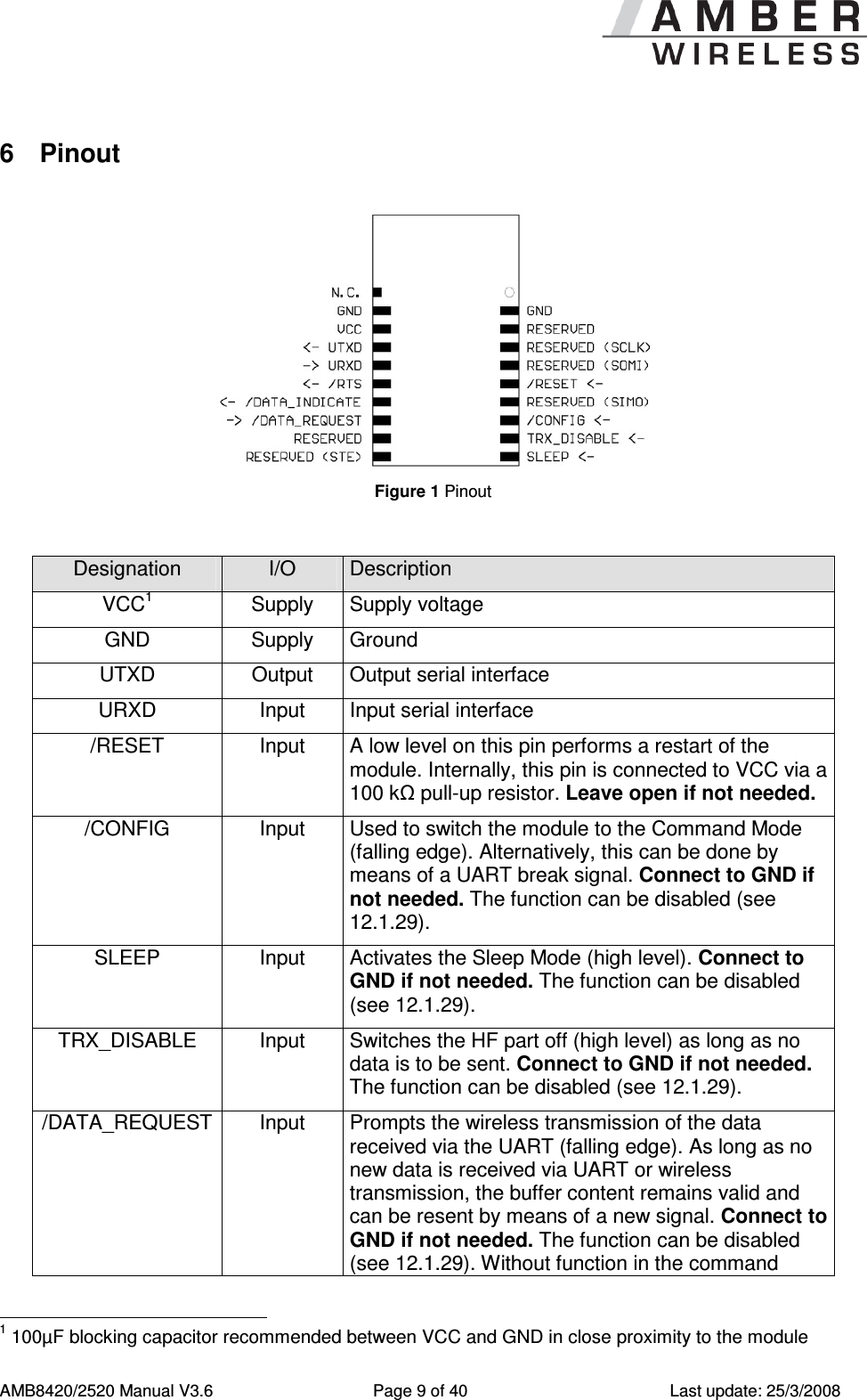
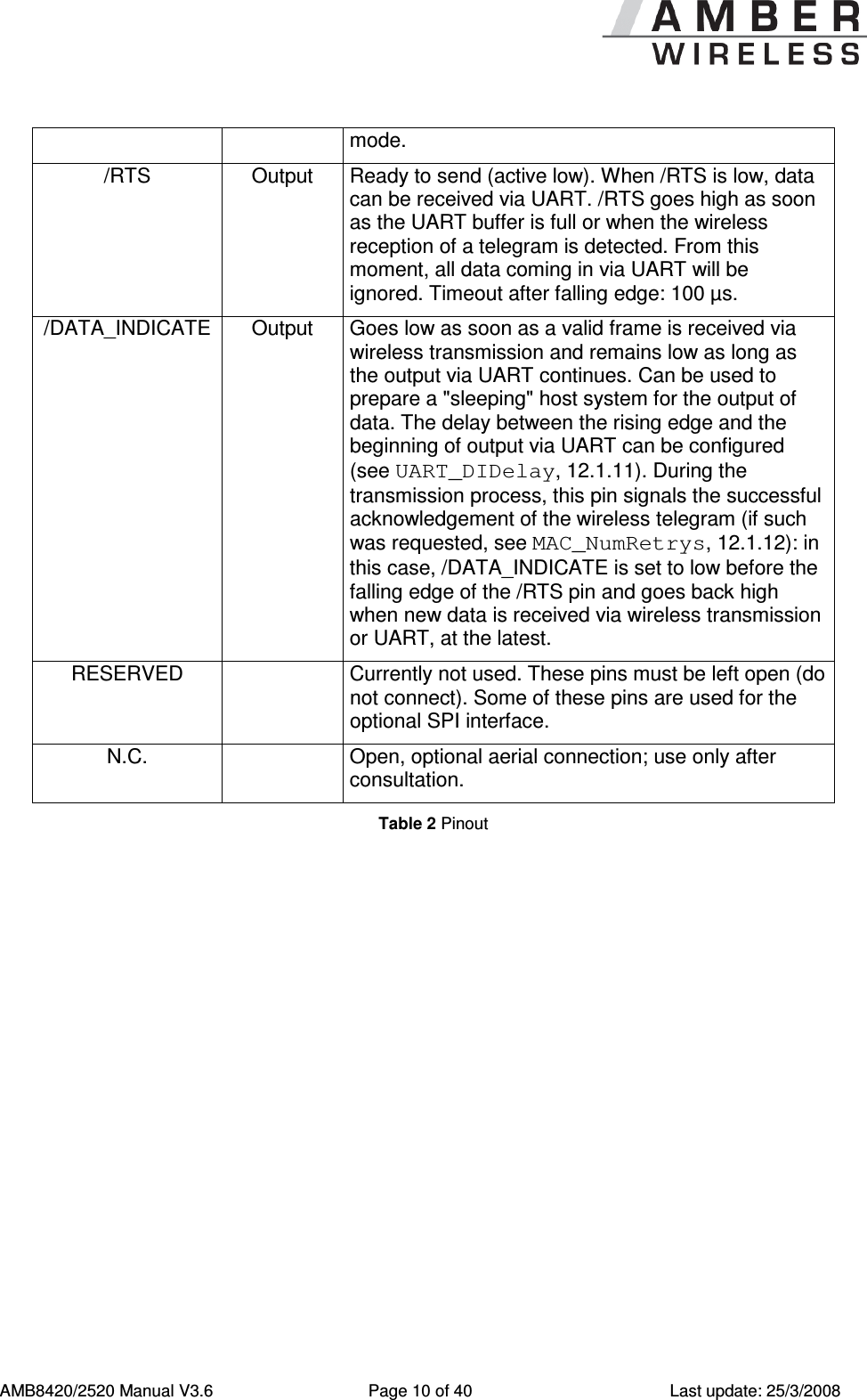
     AMB8420/2520 Manual V3.6  Page 9 of 40  Last update: 25/3/2008 6  Pinout   Figure 1 Pinout   Designation  I/O  Description VCC1  Supply  Supply voltage GND  Supply  Ground UTXD  Output  Output serial interface URXD  Input  Input serial interface /RESET  Input  A low level on this pin performs a restart of the module. Internally, this pin is connected to VCC via a 100 kΩ pull-up resistor. Leave open if not needed. /CONFIG  Input  Used to switch the module to the Command Mode (falling edge). Alternatively, this can be done by means of a UART break signal. Connect to GND if not needed. The function can be disabled (see 12.1.29). SLEEP  Input  Activates the Sleep Mode (high level). Connect to GND if not needed. The function can be disabled (see 12.1.29). TRX_DISABLE  Input  Switches the HF part off (high level) as long as no data is to be sent. Connect to GND if not needed. The function can be disabled (see 12.1.29). /DATA_REQUEST Input  Prompts the wireless transmission of the data received via the UART (falling edge). As long as no new data is received via UART or wireless transmission, the buffer content remains valid and can be resent by means of a new signal. Connect to GND if not needed. The function can be disabled (see 12.1.29). Without function in the command                                                       1 100µF blocking capacitor recommended between VCC and GND in close proximity to the module
     AMB8420/2520 Manual V3.6  Page 10 of 40  Last update: 25/3/2008 mode. /RTS  Output  Ready to send (active low). When /RTS is low, data can be received via UART. /RTS goes high as soon as the UART buffer is full or when the wireless reception of a telegram is detected. From this moment, all data coming in via UART will be ignored. Timeout after falling edge: 100 µs. /DATA_INDICATE Output  Goes low as soon as a valid frame is received via wireless transmission and remains low as long as the output via UART continues. Can be used to prepare a "sleeping" host system for the output of data. The delay between the rising edge and the beginning of output via UART can be configured (see UART_DIDelay, 12.1.11). During the transmission process, this pin signals the successful acknowledgement of the wireless telegram (if such was requested, see MAC_NumRetrys, 12.1.12): in this case, /DATA_INDICATE is set to low before the falling edge of the /RTS pin and goes back high when new data is received via wireless transmission or UART, at the latest. RESERVED    Currently not used. These pins must be left open (do not connect). Some of these pins are used for the optional SPI interface. N.C.    Open, optional aerial connection; use only after consultation. Table 2 Pinout
     AMB8420/2520 Manual V3.6  Page 11 of 40  Last update: 25/3/2008  7  Serial Interface 7.1 UART 7.1.1 Supported Data Rates The data rate is adjusted by directly configuring the respective registers of the utilised microprocessor (see UART_TCTL, UART_MCTL, UART_BR0, and UART_BR1; from 12.1.1). In this way, the data rate can be adjusted freely from 0.5 to 115200 baud. As the UART speed is derived from the speed of the utilised clock quartz, there may be variations of up to 0.5%. When using the PC program "ACC", the following data rates can be selected directly via drop-down menu: 110, 300, 600, 1200, 2400, 4800, 9600, 14400, 19200, 28800, 38400, 56000, 57600, and 115200 baud. With this selection, the three registers above are automatically set to the optimum value. Moreover, the "ACC" program also provides a dialogue for calculating any baud rates. The default baud rate of the module is 9600 (AMB8420)/38400 (AMB2520). The output of characters on the serial interface takes place with secondary priority. For this reason, short interruptions may occur between the output of individual characters (e.g. in the event of an interrupt). 7.1.2 Supported Data Formats All data formats offered by the processor are supported: •  7 or 8 bits •  No, even, or odd parity •  1 or 2 stop bits In ACC, the following data formats can be selected directly via the drop-down menu: 8n1, 8o1, 8e1, 8n2, 8o2, 8e2, 7n1, 7o1, 7e1, 7n2, 7o2, 7e2. The data format, too, can be set by directly configuring the respective microprocessor registers (see UART_CTL, 12.1.1). The default data format is 8 data bits, no parity, 1 stop bit ("8n1"). 7.2 SPI Interface Instead of the UART interface, the module also has an SPI interface. This interface is supported from software version 3.2 (separate firmware, can be installed with the Windows program "ACC"). See [6].
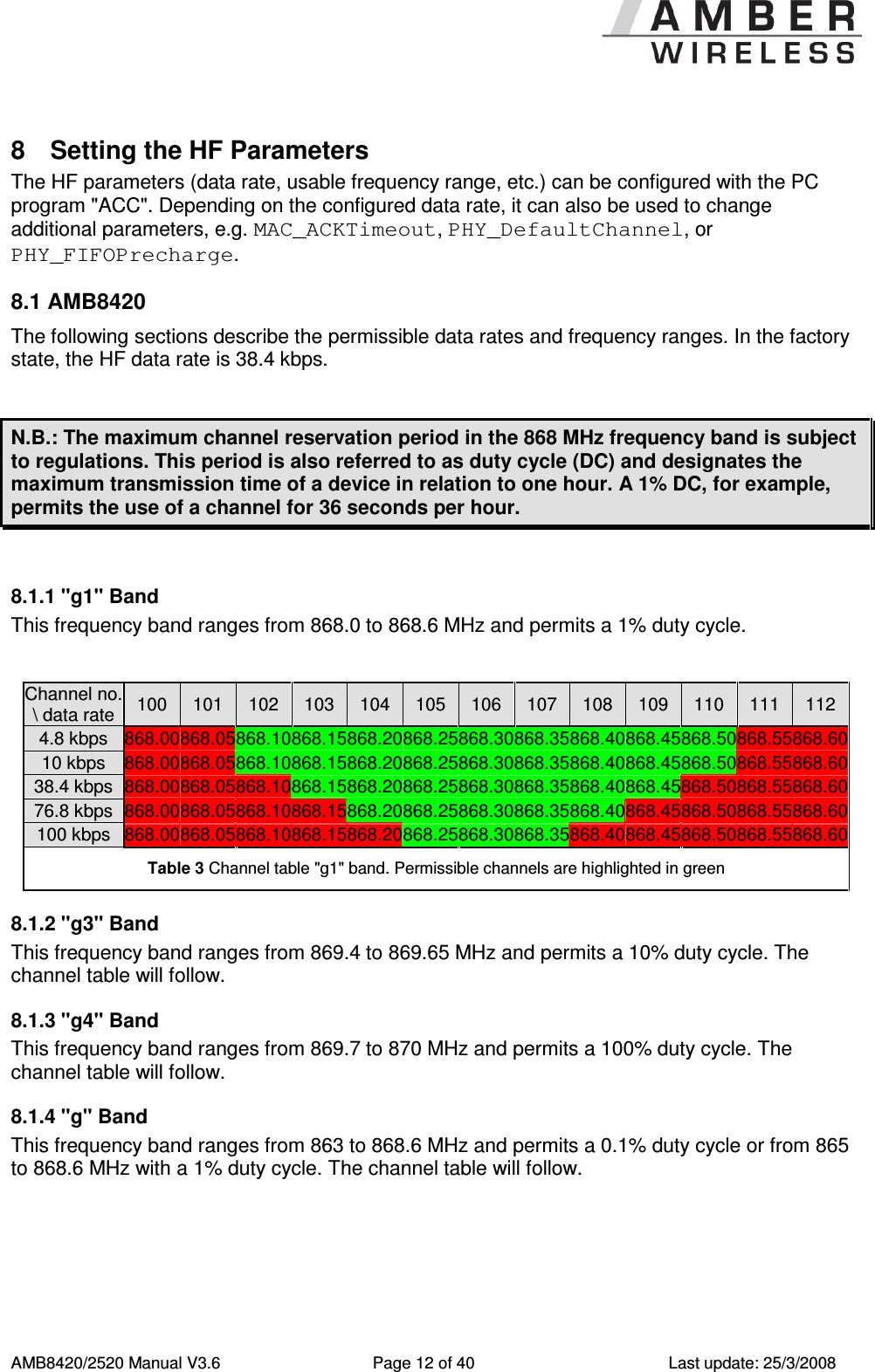
     AMB8420/2520 Manual V3.6  Page 12 of 40  Last update: 25/3/2008 8  Setting the HF Parameters The HF parameters (data rate, usable frequency range, etc.) can be configured with the PC program "ACC". Depending on the configured data rate, it can also be used to change additional parameters, e.g. MAC_ACKTimeout, PHY_DefaultChannel, or PHY_FIFOPrecharge. 8.1 AMB8420 The following sections describe the permissible data rates and frequency ranges. In the factory state, the HF data rate is 38.4 kbps.  N.B.: The maximum channel reservation period in the 868 MHz frequency band is subject to regulations. This period is also referred to as duty cycle (DC) and designates the maximum transmission time of a device in relation to one hour. A 1% DC, for example, permits the use of a channel for 36 seconds per hour.  8.1.1 "g1" Band This frequency band ranges from 868.0 to 868.6 MHz and permits a 1% duty cycle.  Channel no. \ data rate 100  101  102  103  104  105  106  107  108  109  110  111  112 4.8 kbps  868.00 868.05 868.10 868.15 868.20 868.25 868.30 868.35 868.40 868.45 868.50 868.55 868.60 10 kbps  868.00 868.05 868.10 868.15 868.20 868.25 868.30 868.35 868.40 868.45 868.50 868.55 868.60 38.4 kbps 868.00 868.05 868.10 868.15 868.20 868.25 868.30 868.35 868.40 868.45 868.50 868.55 868.60 76.8 kbps 868.00 868.05 868.10 868.15 868.20 868.25 868.30 868.35 868.40 868.45 868.50 868.55 868.60 100 kbps  868.00 868.05 868.10 868.15 868.20 868.25 868.30 868.35 868.40 868.45 868.50 868.55 868.60 Table 3 Channel table "g1" band. Permissible channels are highlighted in green 8.1.2 "g3" Band This frequency band ranges from 869.4 to 869.65 MHz and permits a 10% duty cycle. The channel table will follow. 8.1.3 "g4" Band This frequency band ranges from 869.7 to 870 MHz and permits a 100% duty cycle. The channel table will follow. 8.1.4 "g" Band This frequency band ranges from 863 to 868.6 MHz and permits a 0.1% duty cycle or from 865 to 868.6 MHz with a 1% duty cycle. The channel table will follow.
     AMB8420/2520 Manual V3.6  Page 13 of 40  Last update: 25/3/2008  8.2 AMB2520 In the factory state, the HF data rate is 250 kbps. The module AMB2520 uses a channel spacing of approximately 500 kHz; the carrier frequency can be determined with the following formula: )500.0(5.2400][ ⋅+=ChannelCNMHzF Here, the channels 0 to 165 are permissible. See Table 4 for an overview of usable frequencies.  N.B.: Avoid the channels/frequencies (2405 MHz + n x 13MHz) marked in red, which merely provide a reduced range due to a property of the wireless IC.    Channel no. Freq. [MHz] Channel no. Freq. [MHz] Channel no. Freq. [MHz] Channel no. Freq. [MHz] 0  2400.5  41  2421.0  82  2441.5  123  2462.0 1  2401.0  42  2421.5  83  2442.0  124  2462.5 2  2401.5  43  2422.0  84  2442.5  125  2463.0 3  2402.0  44  2422.5  85  2443.0  126  2463.5 4  2402.5  45  2423.0  86  2443.5  127  2464.0 5  2403.0  46  2423.5  87  2444.0  128  2464.5 6  2403.5  47  2424.0  88  2444.5  129  2465.0 7  2404.0  48  2424.5  89  2445.0  130  2465.5 8  2404.5  49  2425.0  90  2445.5  131  2466.0 9  2405.0  50  2425.5  91  2446.0  132  2466.5 10  2405.5  51  2426.0  92  2446.5  133  2467.0 11  2406.0  52  2426.5  93  2447.0  134  2467.5 12  2406.5  53  2427.0  94  2447.5  135  2468.0 13  2407.0  54  2427.5  95  2448.0  136  2468.5 14  2407.5  55  2428.0  96  2448.5  137  2469.0 15  2408.0  56  2428.5  97  2449.0  138  2469.5 16  2408.5  57  2429.0  98  2449.5  139  2470.0 17  2409.0  58  2429.5  99  2450.0  140  2470.5 18  2409.5  59  2430.0  100  2450.5  141  2471.0 19  2410.0  60  2430.5  101  2451.0  142  2471.5 20  2410.5  61  2431.0  102  2451.5  143  2472.0 21  2411.0  62  2431.5  103  2452.0  144  2472.5 22  2411.5  63  2432.0  104  2452.5  145  2473.0 23  2412.0  64  2432.5  105  2453.0  146  2473.5 24  2412.5  65  2433.0  106  2453.5  147  2474.0 25  2413.0  66  2433.5  107  2454.0  148  2474.5 26  2413.5  67  2434.0  108  2454.5  149  2475.0 27  2414.0  68  2434.5  109  2455.0  150  2475.5 28  2414.5  69  2435.0  110  2455.5  151  2476.0
     AMB8420/2520 Manual V3.6  Page 14 of 40  Last update: 25/3/2008 Channel no. Freq. [MHz] Channel no. Freq. [MHz] Channel no. Freq. [MHz] Channel no. Freq. [MHz] 29  2415.0  70  2435.5  111  2456.0  152  2476.5 30  2415.5  71  2436.0  112  2456.5  153  2477.0 31  2416.0  72  2436.5  113  2457.0  154  2477.5 32  2416.5  73  2437.0  114  2457.5  155  2478.0 33  2417.0  74  2437.5  115  2458.0  156  2478.5 34  2417.5  75  2438.0  116  2458.5  157  2479.0 35  2418.0  76  2438.5  117  2459.0  158  2479.5 36  2418.5  77  2439.0  118  2459.5  159  2480.0 37  2419.0  78  2439.5  119  2460.0  160  2480.5 38  2419.5  79  2440.0  120  2460.5  161  2481.0 39  2420.0  80  2440.5  121  2461.0  162  2481.5 40  2420.5  81  2441.0  122  2461.5  163  2482.0             164  2482.5       165  2483.0 Table 4 Frequency assignment AMB2520  9  Timing Parameters 9.1 Reset Behaviour Following a reset, a low level on the /RTS pin signals that the module is ready for operation. However, the level is only valid after the time required for the internal initialisation of the processor (a couple of µs).  After this initialisation, /RTS is first set to high. Then the processor rate is calibrated on the basis of the watch crystal. Only after this procedure is the module ready for operation. 9.1.1 Power-On Reset After setting the supply voltage and releasing the /RESET pin (if wired), the period until the module is ready for operation greatly depends on the build time of the clock quartz. This procedure may take up to 1 second; typical values range from 200 to 400 ms. Recommended procedure: Check for low level on /RTS pin 2 ms after setting the prescribed supply voltage. Subsequently, an additional 100 µs is required until readiness. 9.1.2 Reset via /RESET Pin To force a module restart by means of the /RESET pin, it must first be set to low for at least 10 ms. After the pin is released, /RTS will switch to high after 100 µs at the latest. As the build-up time for the clock quartz does not apply in this case, the time until the module is ready for operation is reduced to a couple of ms. During this time, the processor rate will be calibrated, which takes anywhere between 2 and 20 ms depending on the supply voltage and temperature. Recommended procedure: After the /RESET pin is released, wait for 2 ms for low level on the /RTS pin. Subsequently, an additional 100 µs are required until readiness.
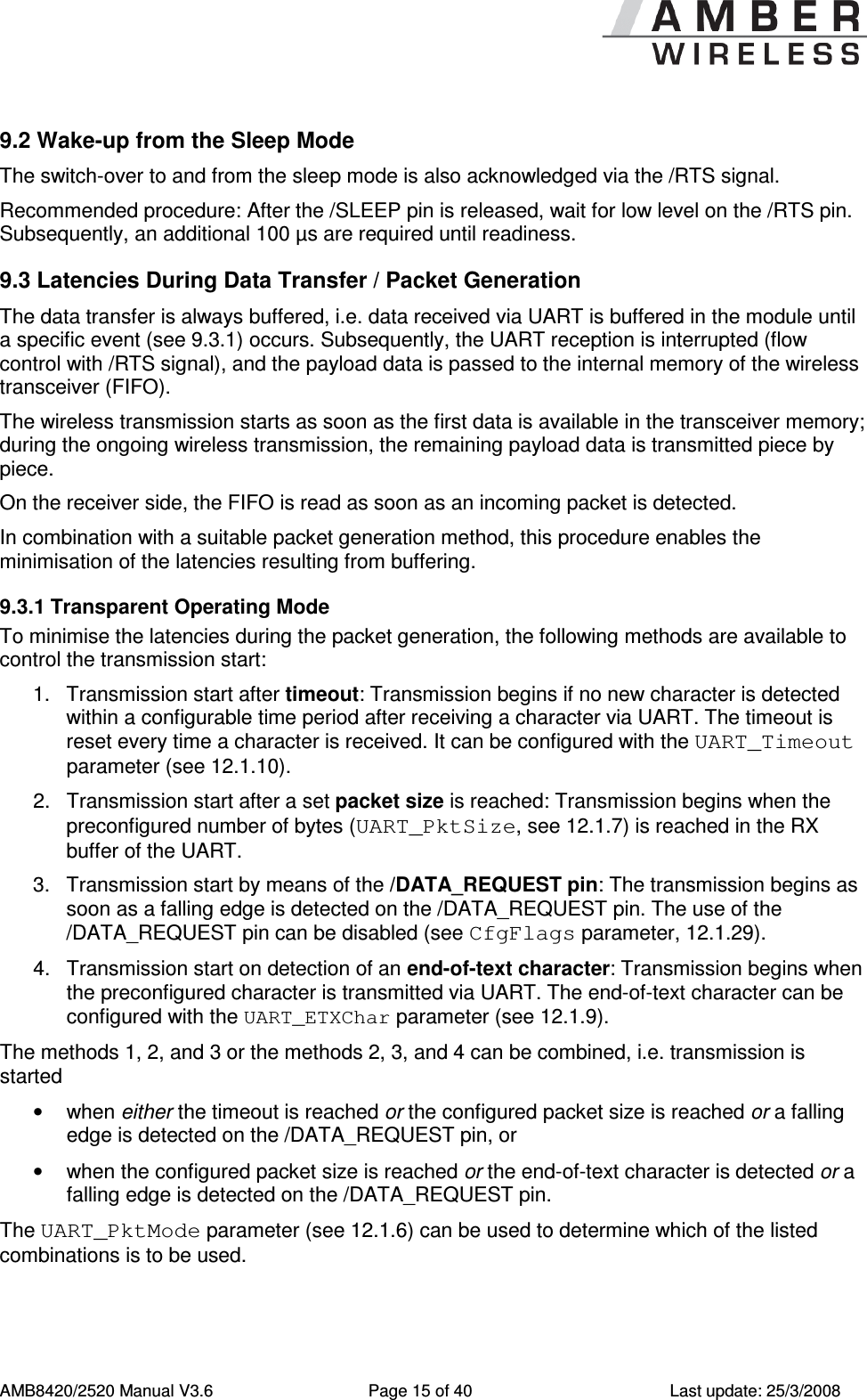
     AMB8420/2520 Manual V3.6  Page 15 of 40  Last update: 25/3/2008 9.2 Wake-up from the Sleep Mode The switch-over to and from the sleep mode is also acknowledged via the /RTS signal.  Recommended procedure: After the /SLEEP pin is released, wait for low level on the /RTS pin. Subsequently, an additional 100 µs are required until readiness. 9.3 Latencies During Data Transfer / Packet Generation The data transfer is always buffered, i.e. data received via UART is buffered in the module until a specific event (see 9.3.1) occurs. Subsequently, the UART reception is interrupted (flow control with /RTS signal), and the payload data is passed to the internal memory of the wireless transceiver (FIFO). The wireless transmission starts as soon as the first data is available in the transceiver memory; during the ongoing wireless transmission, the remaining payload data is transmitted piece by piece.   On the receiver side, the FIFO is read as soon as an incoming packet is detected. In combination with a suitable packet generation method, this procedure enables the minimisation of the latencies resulting from buffering. 9.3.1 Transparent Operating Mode To minimise the latencies during the packet generation, the following methods are available to control the transmission start: 1.  Transmission start after timeout: Transmission begins if no new character is detected within a configurable time period after receiving a character via UART. The timeout is reset every time a character is received. It can be configured with the UART_Timeout parameter (see 12.1.10). 2.  Transmission start after a set packet size is reached: Transmission begins when the preconfigured number of bytes (UART_PktSize, see 12.1.7) is reached in the RX buffer of the UART. 3.  Transmission start by means of the /DATA_REQUEST pin: The transmission begins as soon as a falling edge is detected on the /DATA_REQUEST pin. The use of the /DATA_REQUEST pin can be disabled (see CfgFlags parameter, 12.1.29). 4.  Transmission start on detection of an end-of-text character: Transmission begins when the preconfigured character is transmitted via UART. The end-of-text character can be configured with the UART_ETXChar parameter (see 12.1.9). The methods 1, 2, and 3 or the methods 2, 3, and 4 can be combined, i.e. transmission is started •  when either the timeout is reached or the configured packet size is reached or a falling edge is detected on the /DATA_REQUEST pin, or •  when the configured packet size is reached or the end-of-text character is detected or a falling edge is detected on the /DATA_REQUEST pin. The UART_PktMode parameter (see 12.1.6) can be used to determine which of the listed combinations is to be used.
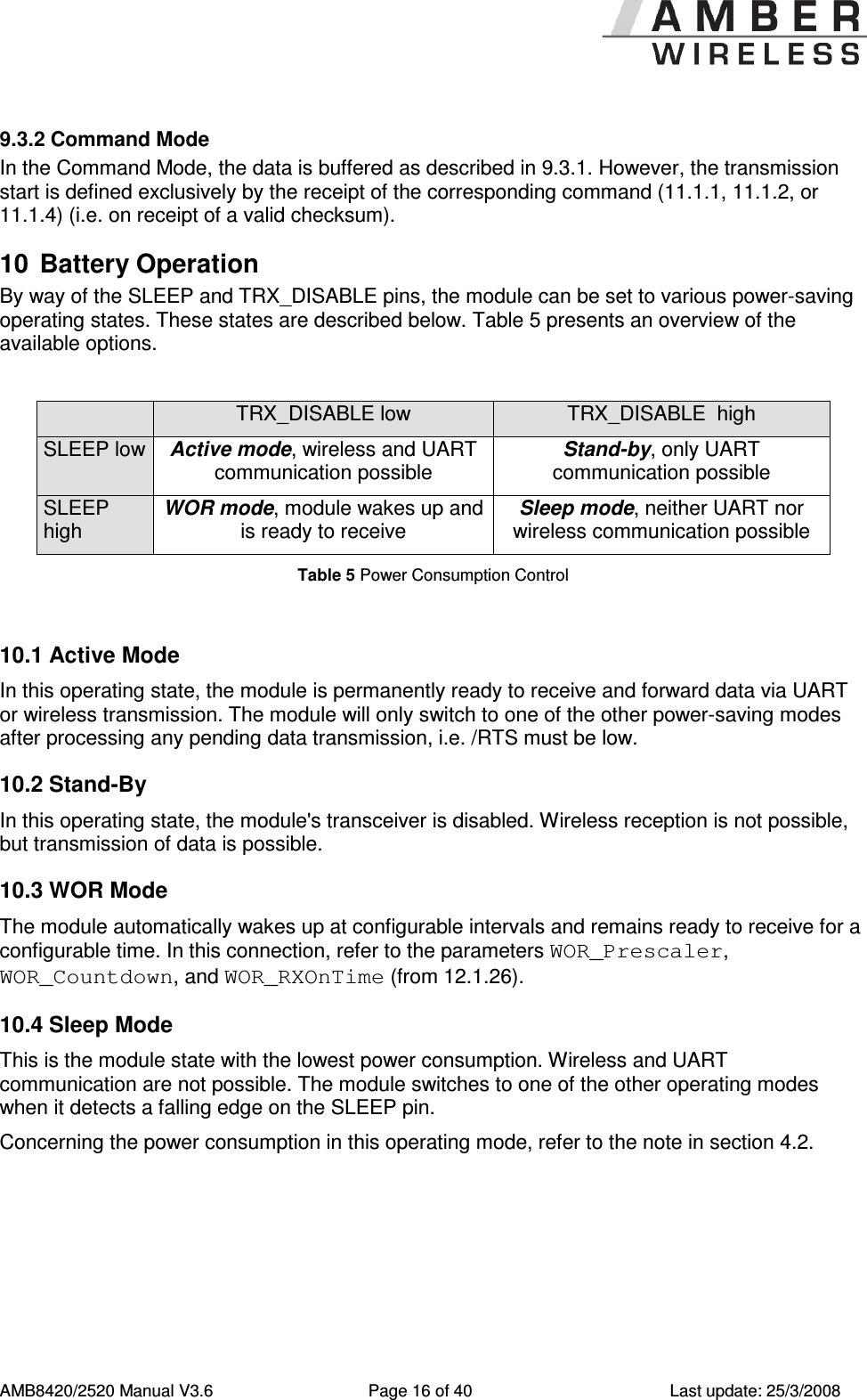
     AMB8420/2520 Manual V3.6  Page 16 of 40  Last update: 25/3/2008 9.3.2 Command Mode In the Command Mode, the data is buffered as described in 9.3.1. However, the transmission start is defined exclusively by the receipt of the corresponding command (11.1.1, 11.1.2, or 11.1.4) (i.e. on receipt of a valid checksum).  10  Battery Operation By way of the SLEEP and TRX_DISABLE pins, the module can be set to various power-saving operating states. These states are described below. Table 5 presents an overview of the available options.    TRX_DISABLE low  TRX_DISABLE  high SLEEP low Active mode, wireless and UART communication possible Stand-by, only UART communication possible SLEEP high WOR mode, module wakes up and is ready to receive Sleep mode, neither UART nor wireless communication possible Table 5 Power Consumption Control  10.1 Active Mode In this operating state, the module is permanently ready to receive and forward data via UART or wireless transmission. The module will only switch to one of the other power-saving modes after processing any pending data transmission, i.e. /RTS must be low. 10.2 Stand-By In this operating state, the module's transceiver is disabled. Wireless reception is not possible, but transmission of data is possible. 10.3 WOR Mode The module automatically wakes up at configurable intervals and remains ready to receive for a configurable time. In this connection, refer to the parameters WOR_Prescaler, WOR_Countdown, and WOR_RXOnTime (from 12.1.26). 10.4 Sleep Mode This is the module state with the lowest power consumption. Wireless and UART communication are not possible. The module switches to one of the other operating modes when it detects a falling edge on the SLEEP pin. Concerning the power consumption in this operating mode, refer to the note in section 4.2.
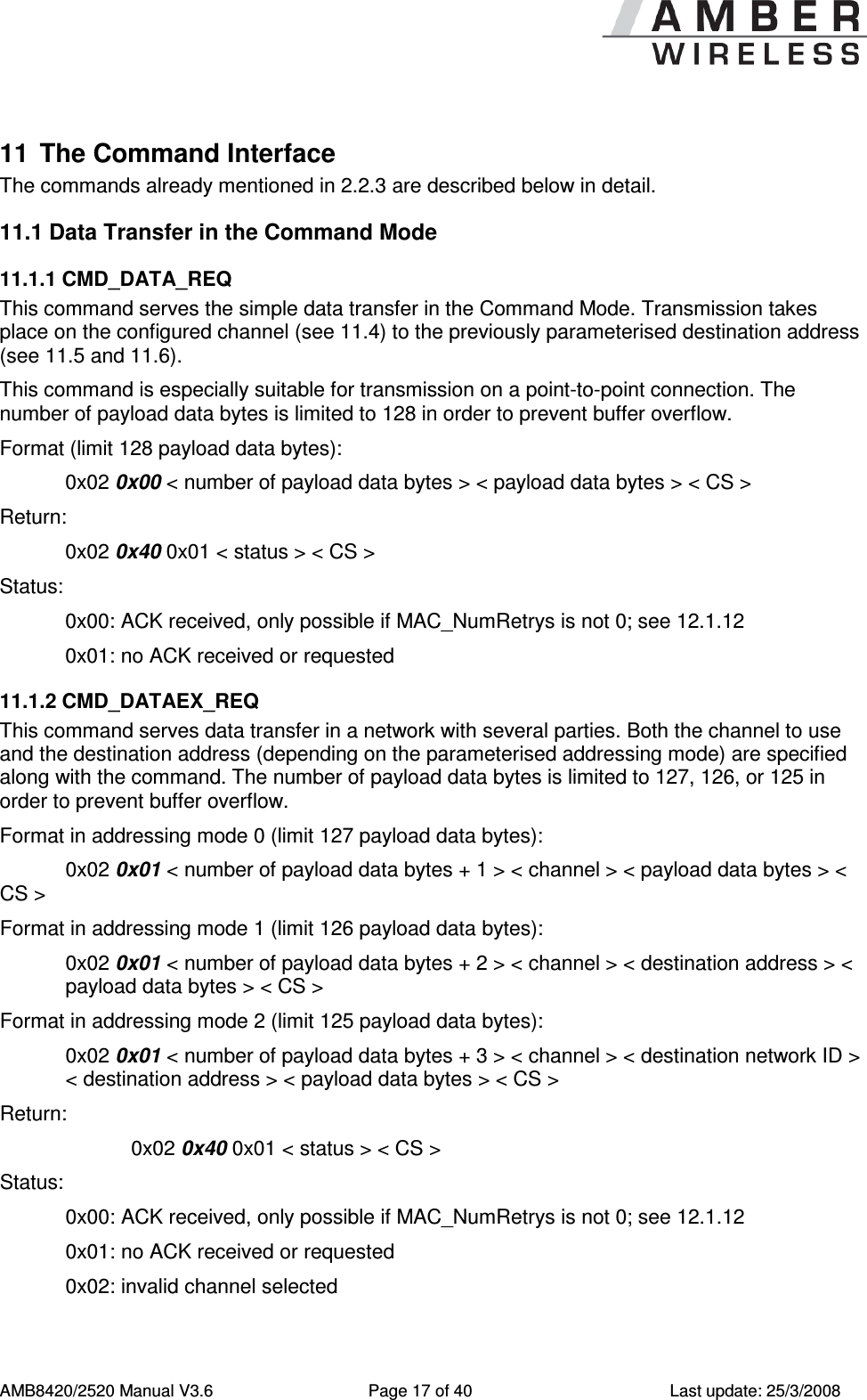
     AMB8420/2520 Manual V3.6  Page 17 of 40  Last update: 25/3/2008 11  The Command Interface The commands already mentioned in 2.2.3 are described below in detail.  11.1 Data Transfer in the Command Mode 11.1.1 CMD_DATA_REQ This command serves the simple data transfer in the Command Mode. Transmission takes place on the configured channel (see 11.4) to the previously parameterised destination address (see 11.5 and 11.6). This command is especially suitable for transmission on a point-to-point connection. The number of payload data bytes is limited to 128 in order to prevent buffer overflow. Format (limit 128 payload data bytes): 0x02 0x00 < number of payload data bytes > < payload data bytes > < CS > Return:   0x02 0x40 0x01 < status > < CS > Status:   0x00: ACK received, only possible if MAC_NumRetrys is not 0; see 12.1.12   0x01: no ACK received or requested 11.1.2 CMD_DATAEX_REQ This command serves data transfer in a network with several parties. Both the channel to use and the destination address (depending on the parameterised addressing mode) are specified along with the command. The number of payload data bytes is limited to 127, 126, or 125 in order to prevent buffer overflow. Format in addressing mode 0 (limit 127 payload data bytes):   0x02 0x01 < number of payload data bytes + 1 > < channel > < payload data bytes > < CS >  Format in addressing mode 1 (limit 126 payload data bytes):   0x02 0x01 < number of payload data bytes + 2 > < channel > < destination address > < payload data bytes > < CS >  Format in addressing mode 2 (limit 125 payload data bytes):   0x02 0x01 < number of payload data bytes + 3 > < channel > < destination network ID > < destination address > < payload data bytes > < CS >  Return:     0x02 0x40 0x01 < status > < CS > Status:   0x00: ACK received, only possible if MAC_NumRetrys is not 0; see 12.1.12   0x01: no ACK received or requested   0x02: invalid channel selected
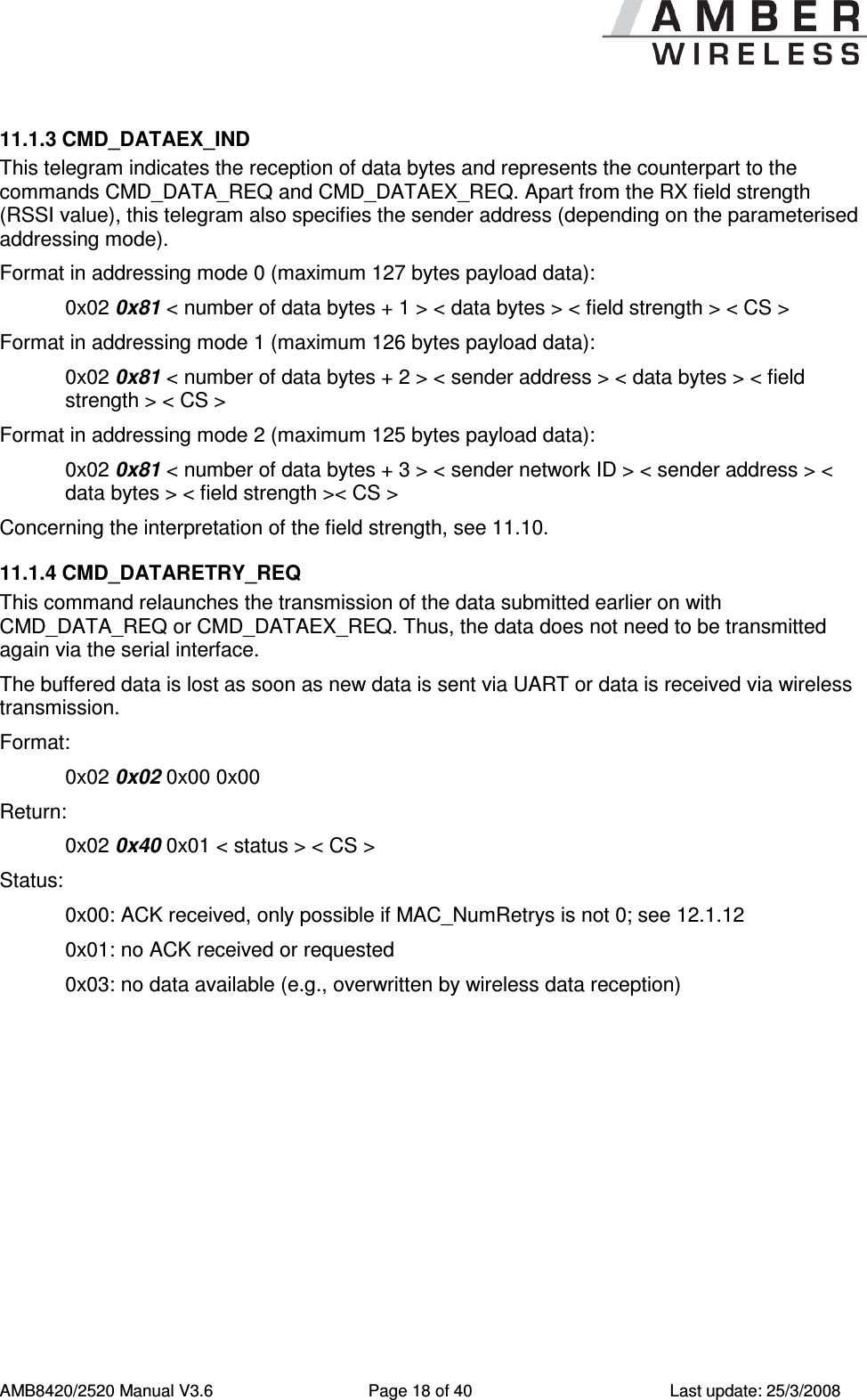
     AMB8420/2520 Manual V3.6  Page 18 of 40  Last update: 25/3/2008 11.1.3 CMD_DATAEX_IND This telegram indicates the reception of data bytes and represents the counterpart to the commands CMD_DATA_REQ and CMD_DATAEX_REQ. Apart from the RX field strength (RSSI value), this telegram also specifies the sender address (depending on the parameterised addressing mode). Format in addressing mode 0 (maximum 127 bytes payload data): 0x02 0x81 < number of data bytes + 1 > < data bytes > < field strength > < CS >  Format in addressing mode 1 (maximum 126 bytes payload data): 0x02 0x81 < number of data bytes + 2 > < sender address > < data bytes > < field strength > < CS >  Format in addressing mode 2 (maximum 125 bytes payload data): 0x02 0x81 < number of data bytes + 3 > < sender network ID > < sender address > < data bytes > < field strength >< CS >  Concerning the interpretation of the field strength, see 11.10. 11.1.4 CMD_DATARETRY_REQ This command relaunches the transmission of the data submitted earlier on with CMD_DATA_REQ or CMD_DATAEX_REQ. Thus, the data does not need to be transmitted again via the serial interface. The buffered data is lost as soon as new data is sent via UART or data is received via wireless transmission. Format:     0x02 0x02 0x00 0x00 Return:     0x02 0x40 0x01 < status > < CS > Status:   0x00: ACK received, only possible if MAC_NumRetrys is not 0; see 12.1.12   0x01: no ACK received or requested   0x03: no data available (e.g., overwritten by wireless data reception)
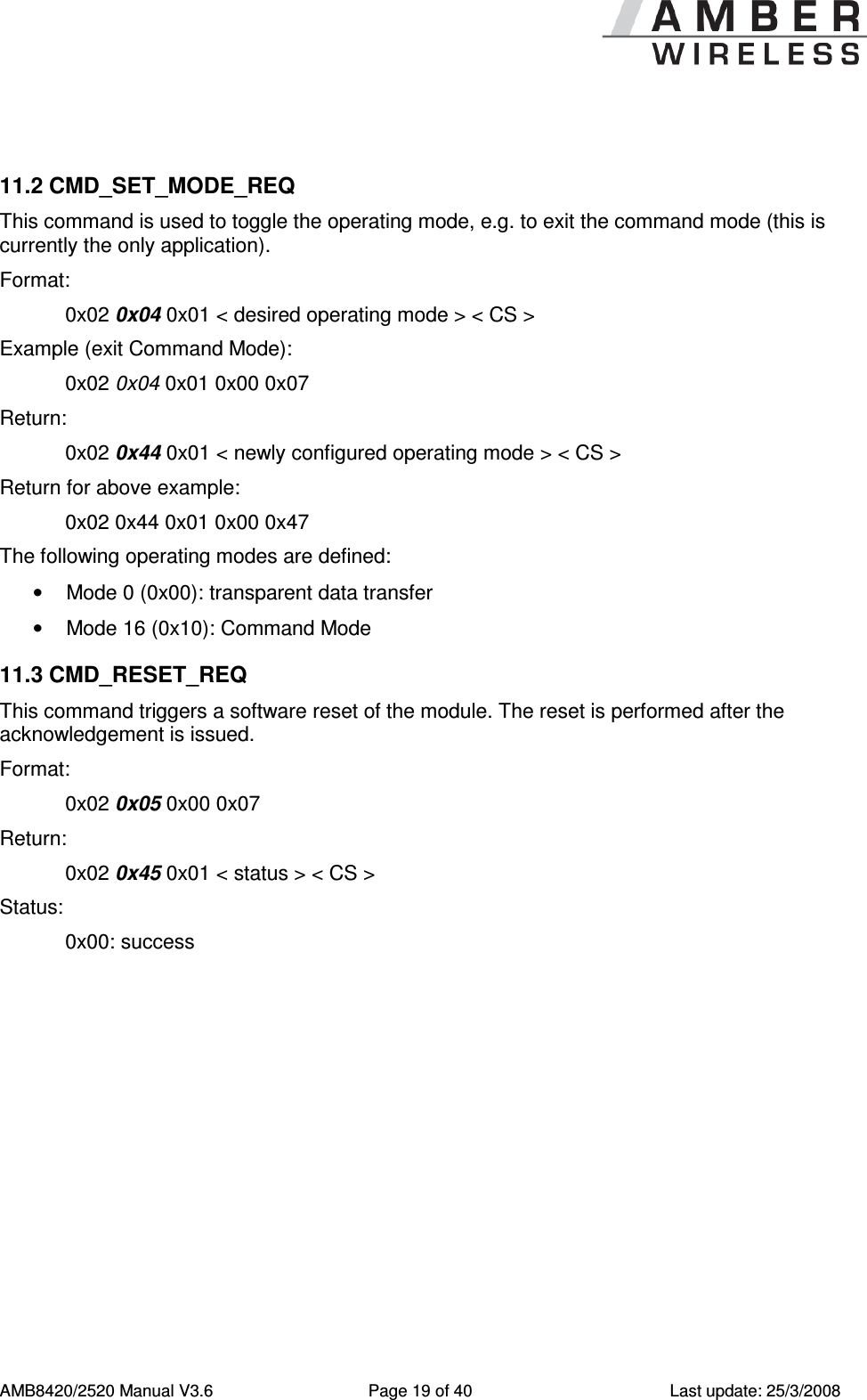
     AMB8420/2520 Manual V3.6  Page 19 of 40  Last update: 25/3/2008  11.2 CMD_SET_MODE_REQ This command is used to toggle the operating mode, e.g. to exit the command mode (this is currently the only application). Format:     0x02 0x04 0x01 < desired operating mode > < CS > Example (exit Command Mode):     0x02 0x04 0x01 0x00 0x07 Return:   0x02 0x44 0x01 < newly configured operating mode > < CS > Return for above example:   0x02 0x44 0x01 0x00 0x47 The following operating modes are defined: •  Mode 0 (0x00): transparent data transfer •  Mode 16 (0x10): Command Mode 11.3 CMD_RESET_REQ This command triggers a software reset of the module. The reset is performed after the acknowledgement is issued. Format:     0x02 0x05 0x00 0x07 Return:   0x02 0x45 0x01 < status > < CS > Status:    0x00: success
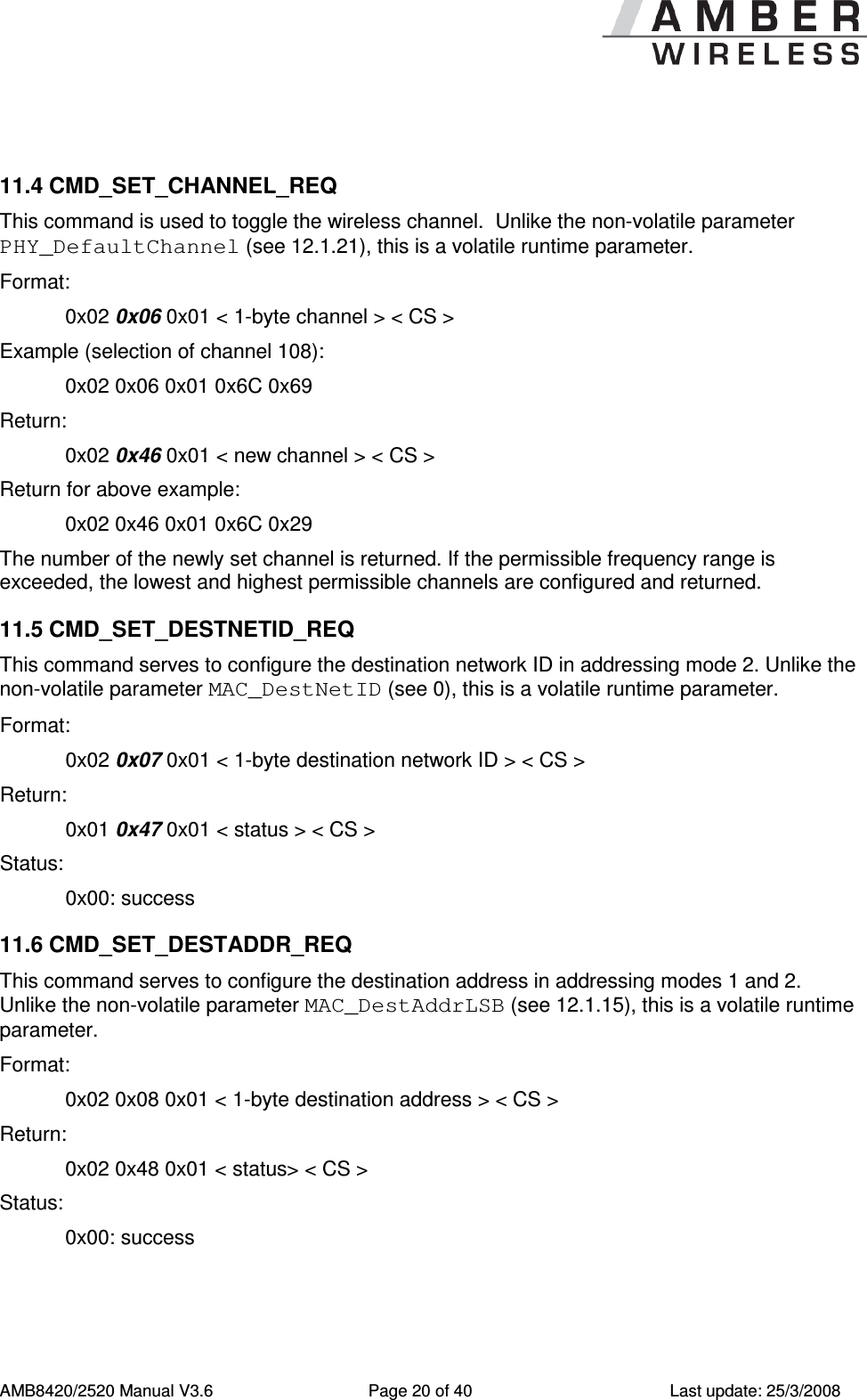
     AMB8420/2520 Manual V3.6  Page 20 of 40  Last update: 25/3/2008  11.4 CMD_SET_CHANNEL_REQ This command is used to toggle the wireless channel.  Unlike the non-volatile parameter PHY_DefaultChannel (see 12.1.21), this is a volatile runtime parameter. Format:     0x02 0x06 0x01 < 1-byte channel > < CS > Example (selection of channel 108):   0x02 0x06 0x01 0x6C 0x69 Return:   0x02 0x46 0x01 < new channel > < CS > Return for above example:   0x02 0x46 0x01 0x6C 0x29 The number of the newly set channel is returned. If the permissible frequency range is exceeded, the lowest and highest permissible channels are configured and returned. 11.5 CMD_SET_DESTNETID_REQ This command serves to configure the destination network ID in addressing mode 2. Unlike the non-volatile parameter MAC_DestNetID (see 0), this is a volatile runtime parameter. Format:     0x02 0x07 0x01 < 1-byte destination network ID > < CS > Return:   0x01 0x47 0x01 < status > < CS > Status:    0x00: success 11.6 CMD_SET_DESTADDR_REQ This command serves to configure the destination address in addressing modes 1 and 2.  Unlike the non-volatile parameter MAC_DestAddrLSB (see 12.1.15), this is a volatile runtime parameter. Format:     0x02 0x08 0x01 < 1-byte destination address > < CS > Return:   0x02 0x48 0x01 < status> < CS > Status:  0x00: success
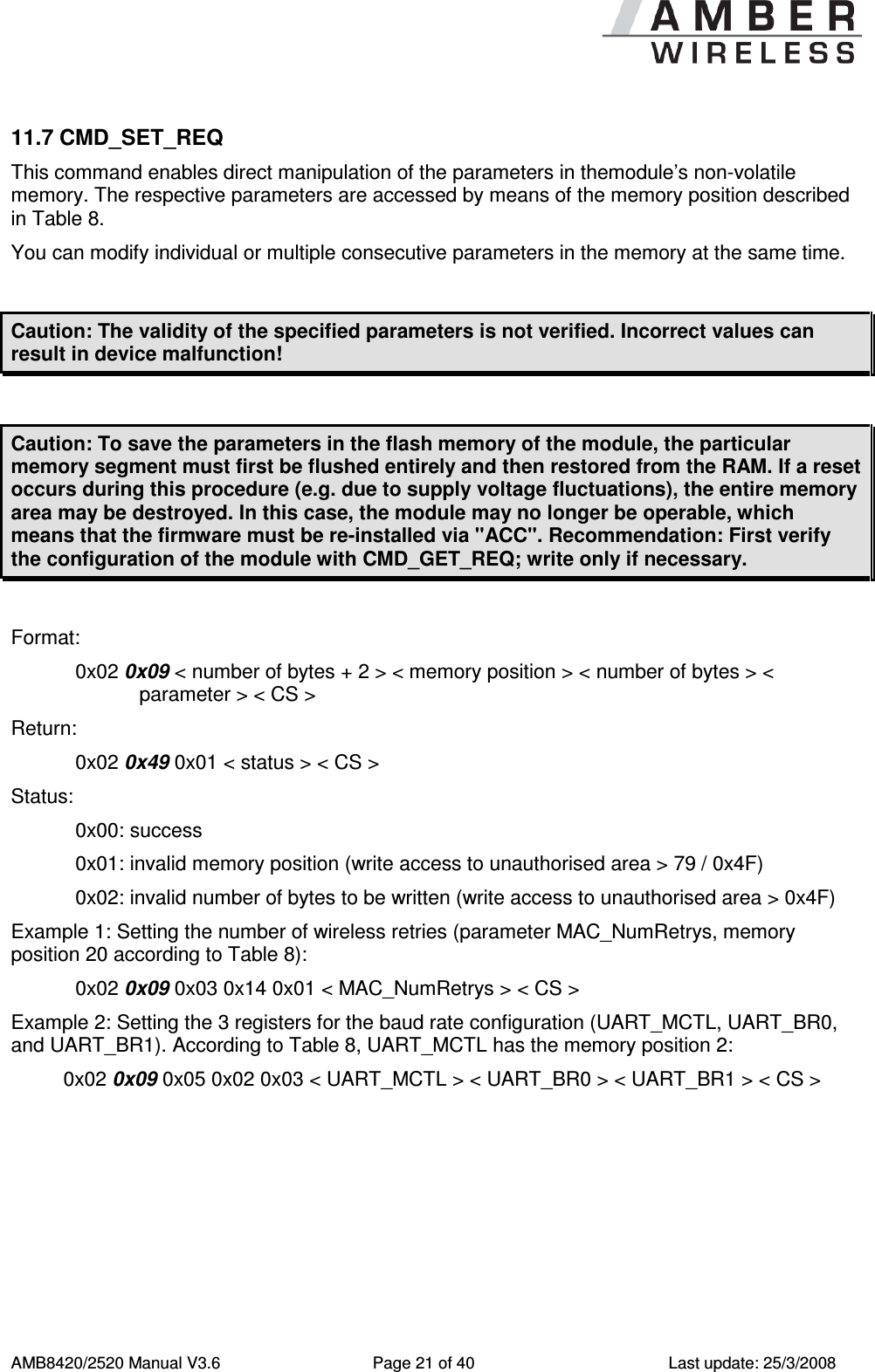
     AMB8420/2520 Manual V3.6  Page 21 of 40  Last update: 25/3/2008 11.7 CMD_SET_REQ This command enables direct manipulation of the parameters in themodule’s non-volatile memory. The respective parameters are accessed by means of the memory position described in Table 8. You can modify individual or multiple consecutive parameters in the memory at the same time.  Caution: The validity of the specified parameters is not verified. Incorrect values can result in device malfunction!  Caution: To save the parameters in the flash memory of the module, the particular memory segment must first be flushed entirely and then restored from the RAM. If a reset occurs during this procedure (e.g. due to supply voltage fluctuations), the entire memory area may be destroyed. In this case, the module may no longer be operable, which means that the firmware must be re-installed via "ACC". Recommendation: First verify the configuration of the module with CMD_GET_REQ; write only if necessary.  Format:    0x02 0x09 < number of bytes + 2 > < memory position > < number of bytes > < parameter > < CS > Return:   0x02 0x49 0x01 < status > < CS > Status:    0x00: success 0x01: invalid memory position (write access to unauthorised area > 79 / 0x4F) 0x02: invalid number of bytes to be written (write access to unauthorised area > 0x4F) Example 1: Setting the number of wireless retries (parameter MAC_NumRetrys, memory position 20 according to Table 8): 0x02 0x09 0x03 0x14 0x01 < MAC_NumRetrys > < CS > Example 2: Setting the 3 registers for the baud rate configuration (UART_MCTL, UART_BR0, and UART_BR1). According to Table 8, UART_MCTL has the memory position 2: 0x02 0x09 0x05 0x02 0x03 < UART_MCTL > < UART_BR0 > < UART_BR1 > < CS >
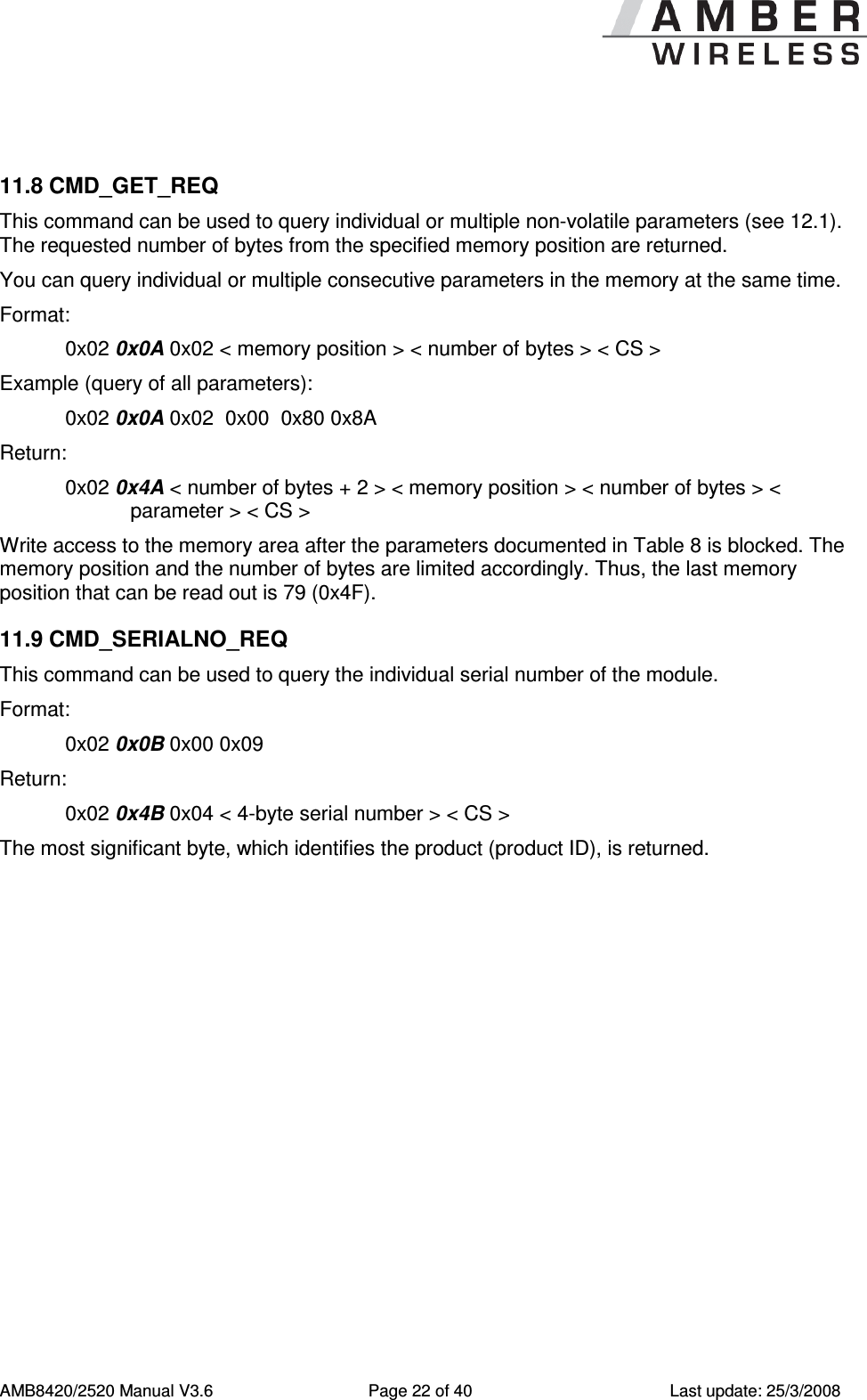
     AMB8420/2520 Manual V3.6  Page 22 of 40  Last update: 25/3/2008  11.8 CMD_GET_REQ This command can be used to query individual or multiple non-volatile parameters (see 12.1). The requested number of bytes from the specified memory position are returned. You can query individual or multiple consecutive parameters in the memory at the same time. Format:     0x02 0x0A 0x02 < memory position > < number of bytes > < CS > Example (query of all parameters): 0x02 0x0A 0x02  0x00  0x80 0x8A Return:   0x02 0x4A < number of bytes + 2 > < memory position > < number of bytes > < parameter > < CS > Write access to the memory area after the parameters documented in Table 8 is blocked. The memory position and the number of bytes are limited accordingly. Thus, the last memory position that can be read out is 79 (0x4F). 11.9 CMD_SERIALNO_REQ This command can be used to query the individual serial number of the module.  Format:     0x02 0x0B 0x00 0x09 Return:   0x02 0x4B 0x04 < 4-byte serial number > < CS >  The most significant byte, which identifies the product (product ID), is returned.
     AMB8420/2520 Manual V3.6  Page 23 of 40  Last update: 25/3/2008  11.10 CMD_RSSI_REQ This command delivers the current RX level determined by the transceiver IC in the form of a two's complement.  Format:     0x02 0x0D 0x00 0x0F  Return:   0x02 0x4D 0x01 < RX level > < CS >  The value obtained in this way delivers the RX level RSSIdBm in dBm as follows: 1.  Conversion of the hexadecimal value to a decimal RSSIdec 2.  If RSSIdec ≥ 128: RSSIdBm = (RSSIdec –256) / 2 - RSSIOffset 3.  Otherwise (RSSIdec < 128): RSSIdBm = RSSIdec / 2 - RSSIOffset RSSIOffset is a data-rate-dependent correction factor according to Table 6 (AMB8420) and Table 7 (AMB2520). The relation between the calculated value and the physical RX level in dBm is not linear across the entire operating range and is displayed in Figure 2  and Figure 3 .  Data rate  RSSI offset 1.2 kbps  74 38.4 kbps  74 250 kbps  78 Table 6 Data rate-dependent RSSI offset for AMB8420 (from [2])  Data rate  RSSI offset 2.4 kbps  71 10 kbps  69 250 kbps  72 500 kbps  72 Table 7 Data rate-dependent RSSI offset for AMB2520 (from [3])
     AMB8420/2520 Manual V3.6  Page 24 of 40  Last update: 25/3/2008  Figure 2  Relation between the RX level and the RSSI value read out for AMB8420 (from [2])   Figure 3  Relation between the RX level and the RSSI value read out for AMB2520 (from [3])
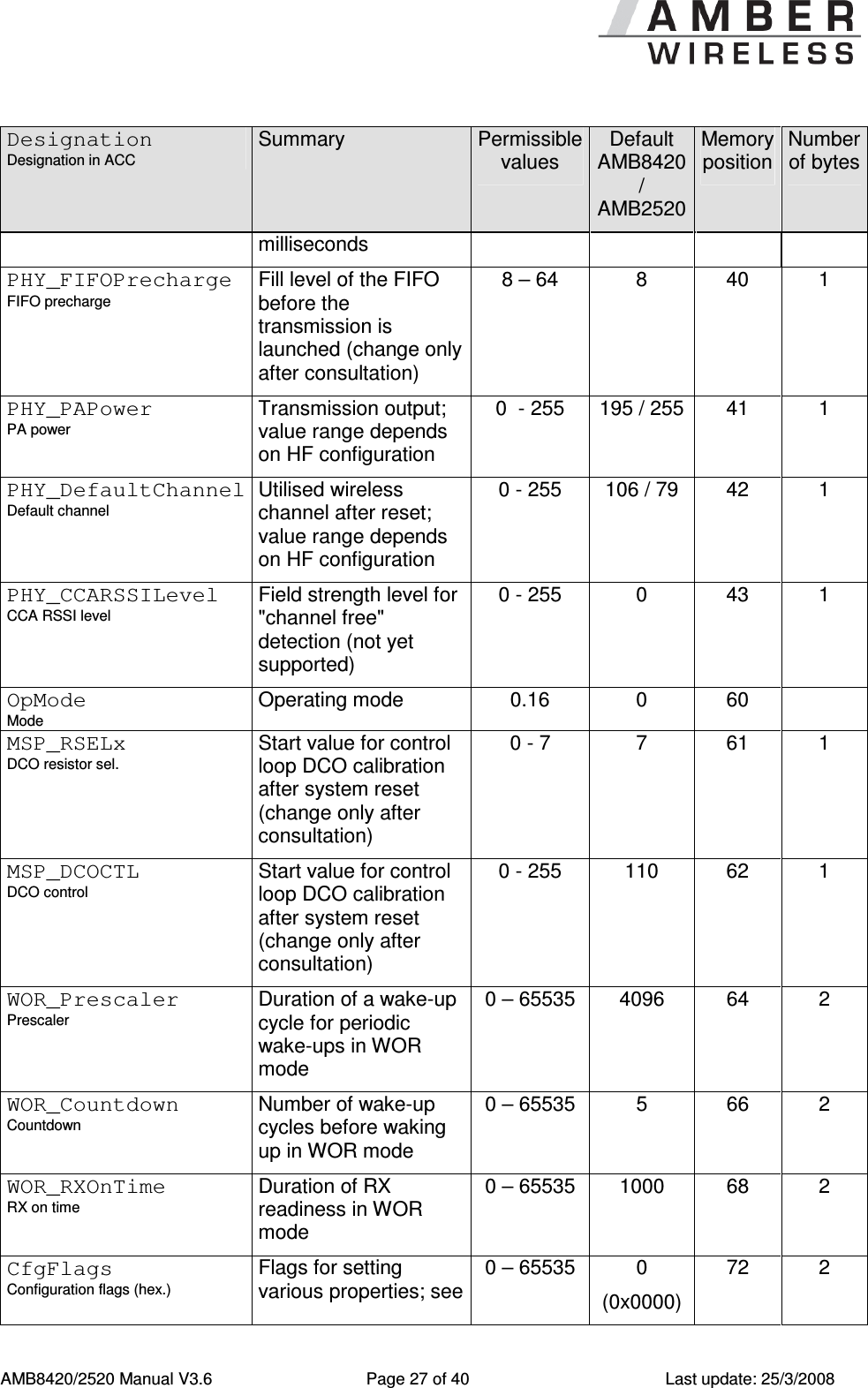
     AMB8420/2520 Manual V3.6  Page 25 of 40  Last update: 25/3/2008 11.11 CMD_ERRORFLAGS_REQ This command returns internal error states.   Format:     0x02 0x0E 0x00 0x0C  Return:   0x02 0x4E 0x02 < error flags MSB > < error flags LSB >< CS >  An error flag return value of "0" indicates that no error has occurred. The value is set back after the query and in the event of a reset. The meaning of the error flags is not described in detail in this context. 12  Configuration Parameters 12.1 Non-Volatile Configuration Parameters The non-volatile parameters listed in the following table can be modified by means of specific commands in the configuration mode (CMD_SET_REQUEST, see 11.7) of the module or by using the Windows software "ACC". These parameters are stored permanently in the module's flash memory.  Caution: The validity of the specified parameters is not verified. Incorrect values can result in device malfunction!  Designation Designation in ACC Summary  Permissible values Default AMB8420 / AMB2520 Memory position Number of bytes UART_CTL Data format Control register for UART data format See Table 9 16  0  1  UART_TCTL Control register for the baud rate (change only after consultation) 32  32  1  1 UART_MCTL MCTL Control register for fine-adjusting the UART baud rate; concerning the calculation, see [1] 0 - 255  0 / 68  2  1 UART_BR0 BR0 Prescaler for setting the baud rate (LSB); concerning the calculation, see [1] 0 - 255  113 / 156 3  1 UART_BR1 BR1 Prescaler for setting the baud rate (MSB); concerning the 0 - 255  2 / 0  4  1
     AMB8420/2520 Manual V3.6  Page 26 of 40  Last update: 25/3/2008 Designation Designation in ACC Summary  Permissible values Default AMB8420 / AMB2520 Memory position Number of bytes calculation, see [1] UART_PktMode Packetizing mode Selects the packet generation method 0 or 1  0  5  1 UART_PktSize Packet size  Number of characters for transmission start with set packet size 1 - 128  128  7  1 UART_RTSLimit /RTS limit Number of received characters after which /RTS responds 1 - 128  112  8  1 UART_ETXChar ETX character End-of-text character used to mark data packets; reception of this character triggers wireless transmission  0 - 255  10  9  1 UART_Timeout Timeout Timeout after the last character before the data received via UART are transmitted via wireless transmission (in milliseconds) 0 – 65535  5  12  2 UART_DIDelay Data indication delay Delay between the signalling by the /DATA_INDICATION pin and the start of the output via UART  0 – 65535  0  14  2 MAC_NumRetrys Retrys Number of wireless retries 0 – 255  0  20  1 MAC_AddrMode Addressing mode Addressing mode to use 0/1/2  0  21  1 MAC_DestNetID Dest. net ID Default destination network ID 0 – 255  0  24  1 MAC_DestAddrLSB Dest. device address Default destination address (LSB) 0 – 255  0  25  1 MAC_SourceNetID Local net ID Own network ID  0 – 254  0  28  1 MAC_SourceAddrLSB Local device address  Own address (LSB)  0 – 254  0  29  1 MAC_ACKTimeout ACK timeout Waiting time for wireless acknowledgement in 0 – 65535  10  32  2
     AMB8420/2520 Manual V3.6  Page 27 of 40  Last update: 25/3/2008 Designation Designation in ACC Summary  Permissible values Default AMB8420 / AMB2520 Memory position Number of bytes milliseconds PHY_FIFOPrecharge FIFO precharge Fill level of the FIFO before the transmission is launched (change only after consultation) 8 – 64  8  40  1 PHY_PAPower PA power Transmission output; value range depends on HF configuration 0  - 255  195 / 255 41  1 PHY_DefaultChannel Default channel Utilised wireless channel after reset; value range depends on HF configuration 0 - 255  106 / 79  42  1 PHY_CCARSSILevel CCA RSSI level Field strength level for "channel free" detection (not yet supported) 0 - 255  0  43  1 OpMode Mode Operating mode  0.16  0  60   MSP_RSELx DCO resistor sel. Start value for control loop DCO calibration after system reset (change only after consultation) 0 - 7  7  61  1 MSP_DCOCTL DCO control Start value for control loop DCO calibration after system reset (change only after consultation)  0 - 255  110  62  1 WOR_Prescaler Prescaler Duration of a wake-up cycle for periodic wake-ups in WOR mode 0 – 65535  4096  64  2 WOR_Countdown Countdown Number of wake-up cycles before waking up in WOR mode 0 – 65535  5  66  2 WOR_RXOnTime RX on time Duration of RX readiness in WOR mode 0 – 65535  1000  68  2 CfgFlags Configuration flags (hex.) Flags for setting various properties; see 0 – 65535  0 (0x0000) 72  2
     AMB8420/2520 Manual V3.6  Page 28 of 40  Last update: 25/3/2008 Designation Designation in ACC Summary  Permissible values Default AMB8420 / AMB2520 Memory position Number of bytes 12.1.29 Synch1 Synch1 Synch word MSB for transceiver (change only after consultation!) 0 - 255  211  76  1 Synch0 Synch0 Synch word LSB for transceiver (change only after consultation) 0 - 255  145  77  1 Table 8 Overview of Non-Volatile Configuration Parameters  12.1.1 UART_CTL The UART data format can be configured with the help of the upper 4 bits in this register. The meaning of these bits is described in Table 9.  Bit no.  Description 0 to 3 (0x0F)  Reserved, must always be set to 0. 4 (0x10)  If this bit is set, the character length will be 8 bits, if not, it will be 7 bits. 5 (0x20)  This bit selects the number of stop bits. If this bit is set, 2 stop bits will be used, if not, 1 will be used. 6 (0x40)  If this bit is set, even parity will be used, if not, odd parity will be used. 7 (0x80)  This bit enables the use of parity (if set). Table 9 Setting the Data Format   12.1.2 UART_TCTL This register selects the source for generating the UART clock speed. Currently, the only permissible value is 32. 12.1.3 UART_MCTL The registers UART_MCTL, UART_BR0, and UART_BR1 can be used to set the UART baud rate. Concerning the calculation of the corresponding settings, see [1]. 12.1.4 UART_BR0 The registers UART_MCTL, UART_BR0, and UART_BR1 can be used to set the UART baud rate. Concerning the calculation of the corresponding settings, see [1].
     AMB8420/2520 Manual V3.6  Page 29 of 40  Last update: 25/3/2008 12.1.5 UART_BR1 The registers UART_MCTL, UART_BR0, and UART_BR1 can be used to set the UART baud rate. Concerning the calculation of the corresponding settings, see [1] 12.1.6 UART_PktMode Selects the method used for generating packets for the transparent operating mode. Two methods have been implemented:  0.  Mode 0: Sends when a.  the timeout defined with UART_Timeout is reached, or b.  the number of bytes defined with UART_PktSize is reached, or c.  the transmission of the data is requested by means of the /DATA_REQUEST pin. 1.  Mode 1: Sends when a.  the character defined with UART_ETXChar is detected, or b.  the number of bytes defined with UART_PktSize has been received, or c.  the transmission of the data is requested by means of the /DATA_REQUEST pin. 12.1.7 UART_PktSize Maximum number of bytes after which the wireless transmission of the data received via UART starts. Used in packet mode 0 as well as in packet mode 1. Not used in the command mode. 12.1.8 UART_RTSLimit Number of bytes after which the host system is prompted to interrupt the data transfer over /RTS. Necessary, because an immediate response to the /RTS signal may not take place (UART FIFO), depending on the host system.  12.1.9 UART_ETXChar End-of-text character that triggers the transmission of the data received via UART. Only used in packet mode 1. During the wireless transmission, the ETX character is treated like a normal character.  Not used in the Command Mode. 12.1.10 UART_Timeout Timeout in milliseconds after the last character has been received on UART before the wireless transmission of the data received via UART starts. Only used in packet mode 0. If no new character is detected for this period after the STX character has been received in the command mode, the characters received until then will be dropped, and the unit will wait for a new start character. Not used in the Command Mode.
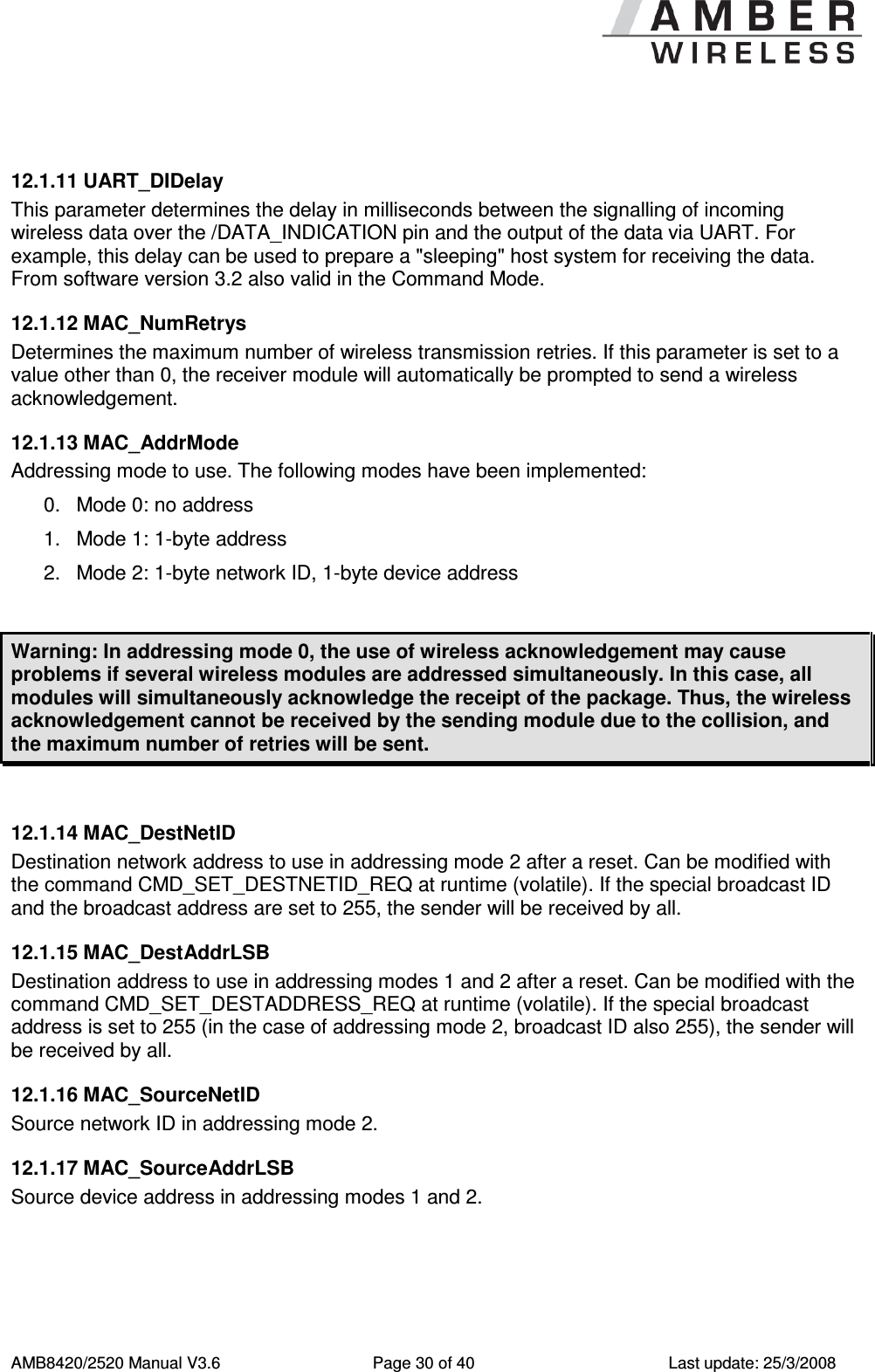
     AMB8420/2520 Manual V3.6  Page 30 of 40  Last update: 25/3/2008  12.1.11 UART_DIDelay This parameter determines the delay in milliseconds between the signalling of incoming wireless data over the /DATA_INDICATION pin and the output of the data via UART. For example, this delay can be used to prepare a "sleeping" host system for receiving the data. From software version 3.2 also valid in the Command Mode. 12.1.12 MAC_NumRetrys Determines the maximum number of wireless transmission retries. If this parameter is set to a value other than 0, the receiver module will automatically be prompted to send a wireless acknowledgement.  12.1.13 MAC_AddrMode Addressing mode to use. The following modes have been implemented: 0.  Mode 0: no address 1.  Mode 1: 1-byte address 2.  Mode 2: 1-byte network ID, 1-byte device address  Warning: In addressing mode 0, the use of wireless acknowledgement may cause problems if several wireless modules are addressed simultaneously. In this case, all modules will simultaneously acknowledge the receipt of the package. Thus, the wireless acknowledgement cannot be received by the sending module due to the collision, and the maximum number of retries will be sent.  12.1.14 MAC_DestNetID Destination network address to use in addressing mode 2 after a reset. Can be modified with the command CMD_SET_DESTNETID_REQ at runtime (volatile). If the special broadcast ID and the broadcast address are set to 255, the sender will be received by all. 12.1.15 MAC_DestAddrLSB Destination address to use in addressing modes 1 and 2 after a reset. Can be modified with the command CMD_SET_DESTADDRESS_REQ at runtime (volatile). If the special broadcast address is set to 255 (in the case of addressing mode 2, broadcast ID also 255), the sender will be received by all. 12.1.16 MAC_SourceNetID Source network ID in addressing mode 2. 12.1.17 MAC_SourceAddrLSB Source device address in addressing modes 1 and 2.
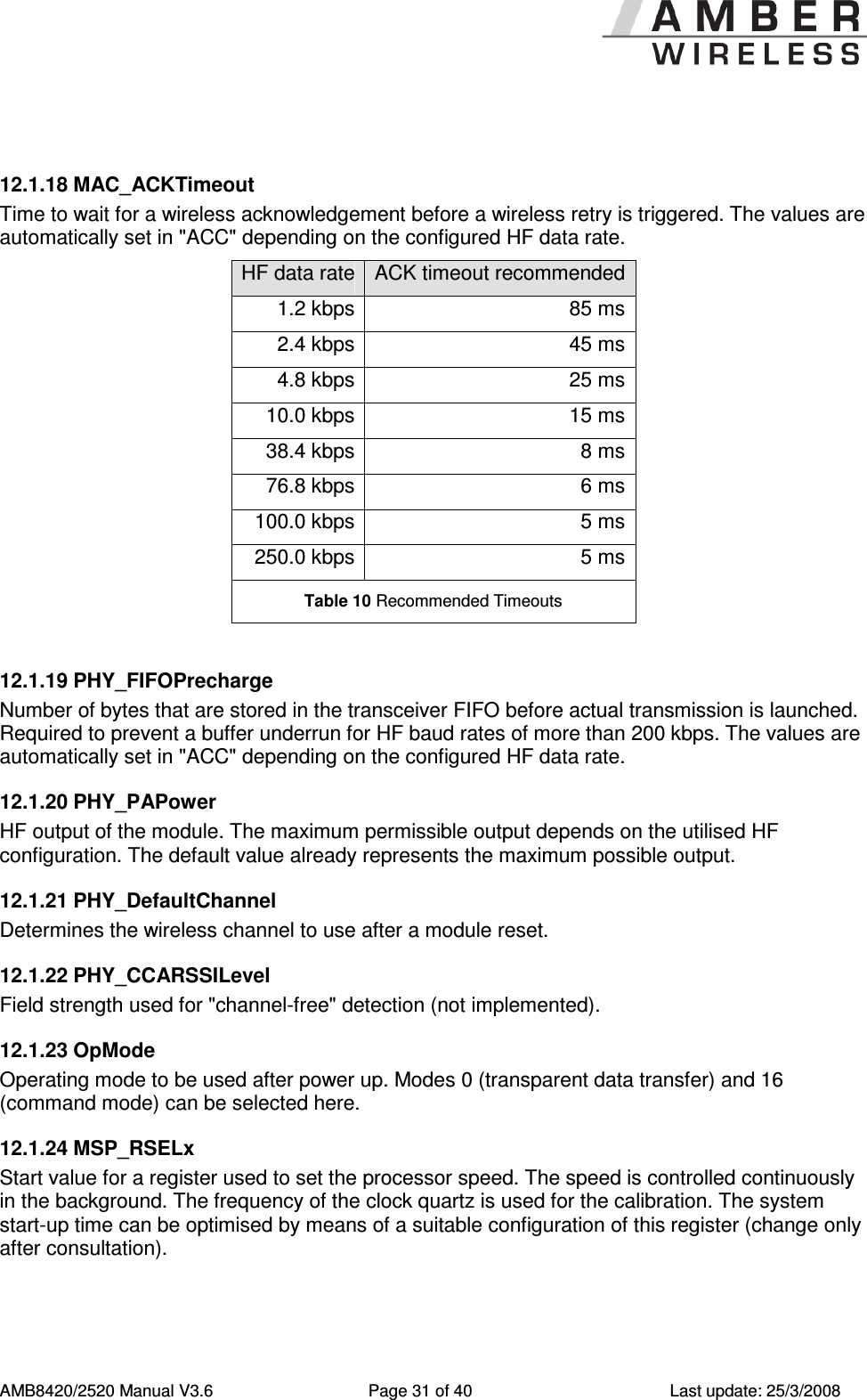
     AMB8420/2520 Manual V3.6  Page 31 of 40  Last update: 25/3/2008  12.1.18 MAC_ACKTimeout Time to wait for a wireless acknowledgement before a wireless retry is triggered. The values are automatically set in "ACC" depending on the configured HF data rate. HF data rate ACK timeout recommended 1.2 kbps 85 ms 2.4 kbps 45 ms 4.8 kbps 25 ms 10.0 kbps 15 ms 38.4 kbps 8 ms 76.8 kbps 6 ms 100.0 kbps 5 ms 250.0 kbps 5 ms Table 10 Recommended Timeouts  12.1.19 PHY_FIFOPrecharge Number of bytes that are stored in the transceiver FIFO before actual transmission is launched. Required to prevent a buffer underrun for HF baud rates of more than 200 kbps. The values are automatically set in "ACC" depending on the configured HF data rate. 12.1.20 PHY_PAPower HF output of the module. The maximum permissible output depends on the utilised HF configuration. The default value already represents the maximum possible output. 12.1.21 PHY_DefaultChannel Determines the wireless channel to use after a module reset. 12.1.22 PHY_CCARSSILevel Field strength used for "channel-free" detection (not implemented). 12.1.23 OpMode Operating mode to be used after power up. Modes 0 (transparent data transfer) and 16 (command mode) can be selected here. 12.1.24 MSP_RSELx Start value for a register used to set the processor speed. The speed is controlled continuously in the background. The frequency of the clock quartz is used for the calibration. The system start-up time can be optimised by means of a suitable configuration of this register (change only after consultation).
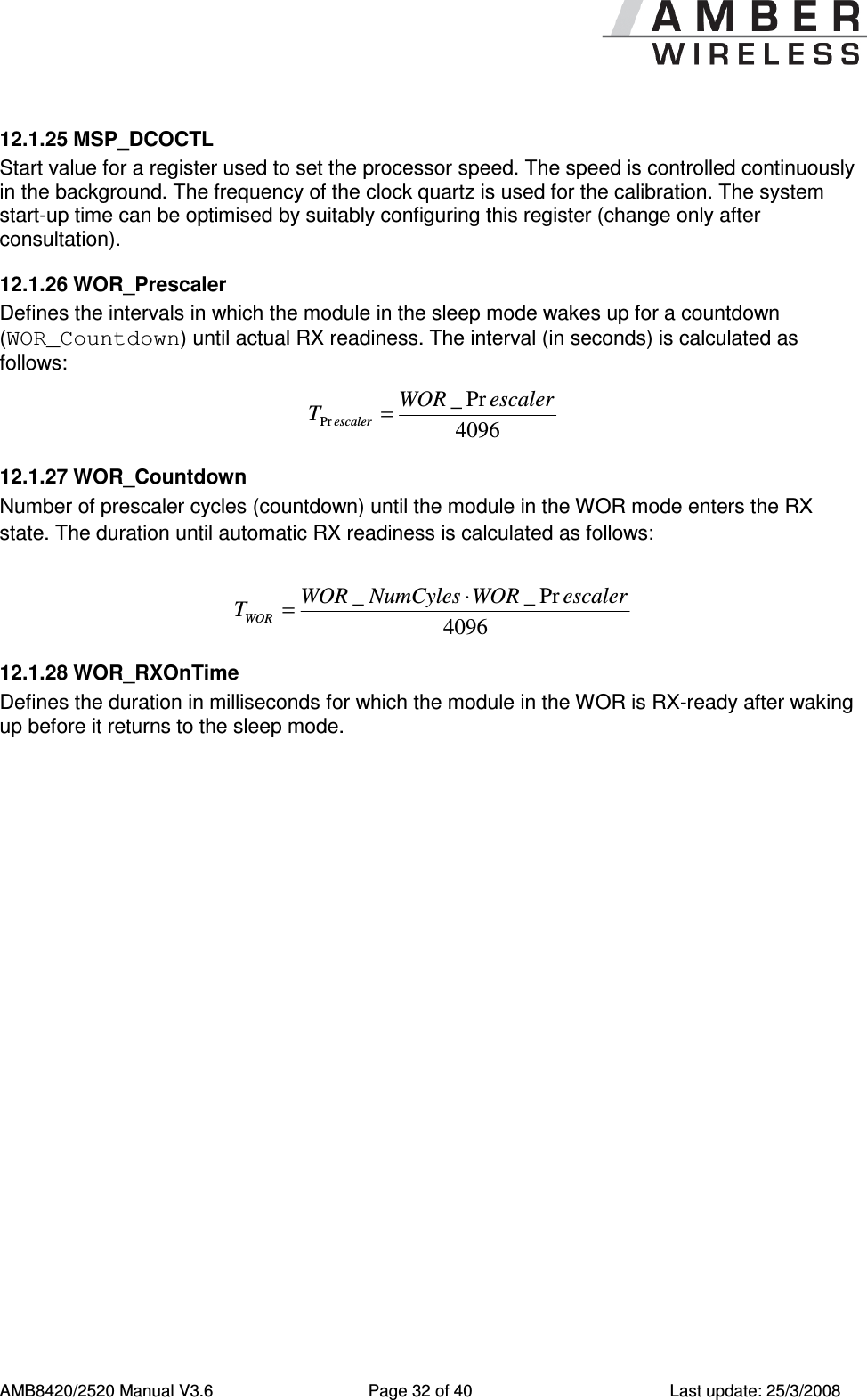
     AMB8420/2520 Manual V3.6  Page 32 of 40  Last update: 25/3/2008 12.1.25 MSP_DCOCTL Start value for a register used to set the processor speed. The speed is controlled continuously in the background. The frequency of the clock quartz is used for the calibration. The system start-up time can be optimised by suitably configuring this register (change only after consultation). 12.1.26 WOR_Prescaler Defines the intervals in which the module in the sleep mode wakes up for a countdown (WOR_Countdown) until actual RX readiness. The interval (in seconds) is calculated as follows: 4096Pr_PrescalerWORTescaler= 12.1.27 WOR_Countdown Number of prescaler cycles (countdown) until the module in the WOR mode enters the RX state. The duration until automatic RX readiness is calculated as follows:   4096Pr__ escalerWORNumCylesWORTWOR⋅= 12.1.28 WOR_RXOnTime Defines the duration in milliseconds for which the module in the WOR is RX-ready after waking up before it returns to the sleep mode.
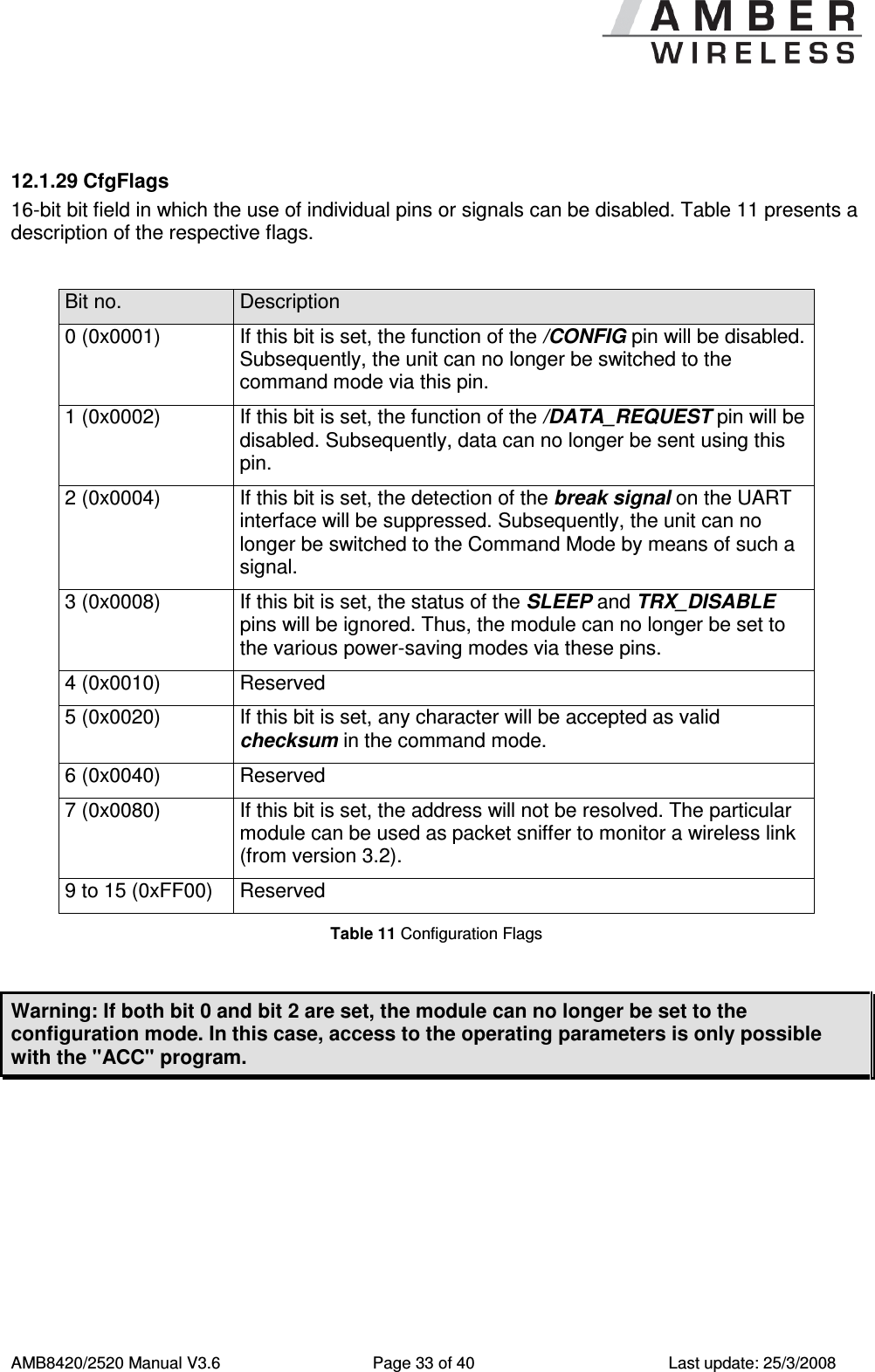
     AMB8420/2520 Manual V3.6  Page 33 of 40  Last update: 25/3/2008  12.1.29 CfgFlags 16-bit bit field in which the use of individual pins or signals can be disabled. Table 11 presents a description of the respective flags.  Bit no.  Description 0 (0x0001)  If this bit is set, the function of the /CONFIG pin will be disabled. Subsequently, the unit can no longer be switched to the command mode via this pin. 1 (0x0002)  If this bit is set, the function of the /DATA_REQUEST pin will be disabled. Subsequently, data can no longer be sent using this pin. 2 (0x0004)  If this bit is set, the detection of the break signal on the UART interface will be suppressed. Subsequently, the unit can no longer be switched to the Command Mode by means of such a signal. 3 (0x0008)  If this bit is set, the status of the SLEEP and TRX_DISABLE pins will be ignored. Thus, the module can no longer be set to the various power-saving modes via these pins. 4 (0x0010)  Reserved 5 (0x0020)  If this bit is set, any character will be accepted as valid checksum in the command mode. 6 (0x0040)  Reserved 7 (0x0080)  If this bit is set, the address will not be resolved. The particular module can be used as packet sniffer to monitor a wireless link (from version 3.2). 9 to 15 (0xFF00)  Reserved Table 11 Configuration Flags  Warning: If both bit 0 and bit 2 are set, the module can no longer be set to the configuration mode. In this case, access to the operating parameters is only possible with the "ACC" program.
     AMB8420/2520 Manual V3.6  Page 34 of 40  Last update: 25/3/2008  13  Start-up 13.1 Minimal Configuration In the factory state, the modules are immediately ready for operation; the following pins are required in the minimal configuration: VCC, GND, UTXD, and URXD. If the module is to be connected to a PC, a level converter (TTL to RS232) must be used. In the default configuration, all module inputs (SLEEP, TRX_DISABLE, /CONFIG, and /DATA_REQUEST) are activated and must be switched to GND if they are not to be used (see Table 2). 13.2 Transfer of Large Amounts of Data When transmitting larger amounts of data, the limited buffer size in the module must be taken into consideration. The data can only be transmitted packet by packet. In this case, the /RTS pin should be used (flow control). 13.3 Deployment of Several Modules, Use of Addresses, Channel Switching In this case, we recommend connecting the /CONFIG pin in order to facilitate the required settings in the command mode.  13.4 Use of the Low-Power Functionality In this case, we recommend connecting the SLEEP, TRX_DISABLE, and /DATA_INDICATE pins. The /CONFIG pin, too, should be set to a defined level (see section 0). 13.5 Minimising Latencies The latencies that occur during the formation of packets (see section 9) can be minimised by using the /DATA_REQUEST pin, if neither fixed packet sizes nor a fixed packet termination character are used.  14  Firmware Update The firmware of the module can be updated with the PC utility "ACC" via the serial interface. If the module is not connected to a PC, the UART of the module should be made accessible, e.g. by means of suitable connectors. Only the UTDX and URXD signals are needed for this procedure. A level converter (TTL to RS232) is required for PC connection.
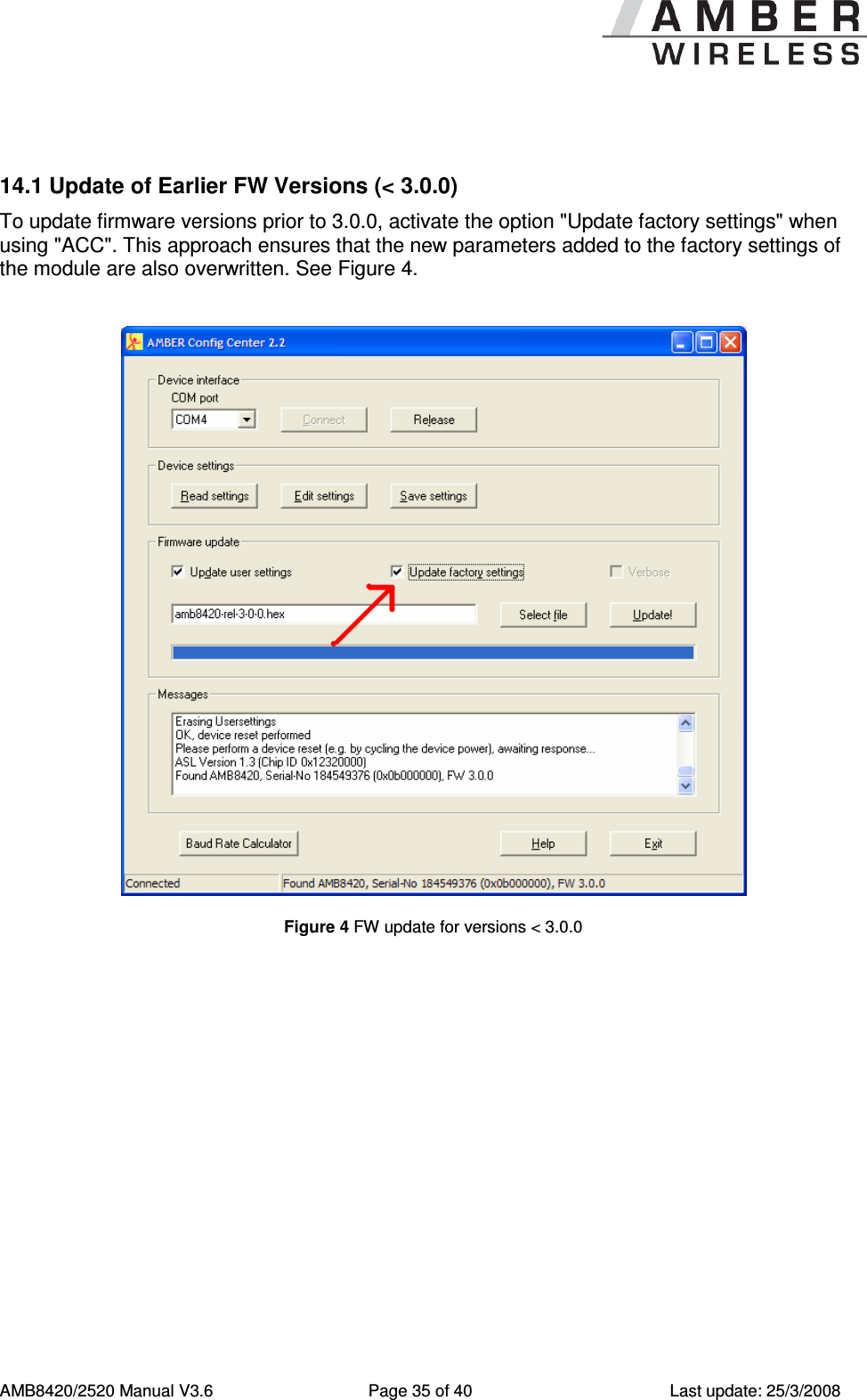
     AMB8420/2520 Manual V3.6  Page 35 of 40  Last update: 25/3/2008  14.1 Update of Earlier FW Versions (< 3.0.0) To update firmware versions prior to 3.0.0, activate the option "Update factory settings" when using "ACC". This approach ensures that the new parameters added to the factory settings of the module are also overwritten. See Figure 4.   Figure 4 FW update for versions < 3.0.0
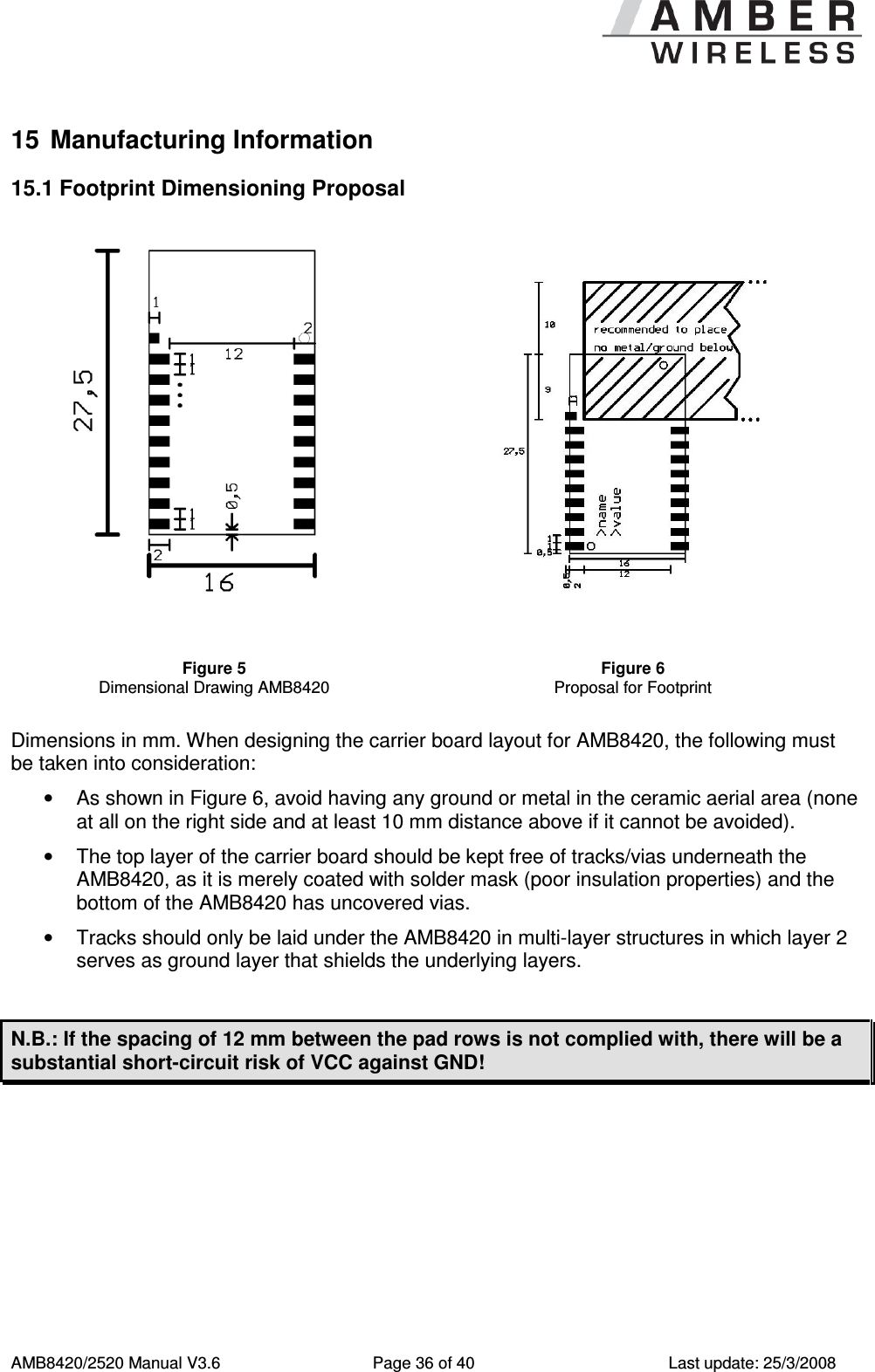
     AMB8420/2520 Manual V3.6  Page 36 of 40  Last update: 25/3/2008 15  Manufacturing Information 15.1 Footprint Dimensioning Proposal    Figure 5 Dimensional Drawing AMB8420 Figure 6 Proposal for Footprint  Dimensions in mm. When designing the carrier board layout for AMB8420, the following must be taken into consideration: •  As shown in Figure 6, avoid having any ground or metal in the ceramic aerial area (none at all on the right side and at least 10 mm distance above if it cannot be avoided). •  The top layer of the carrier board should be kept free of tracks/vias underneath the AMB8420, as it is merely coated with solder mask (poor insulation properties) and the bottom of the AMB8420 has uncovered vias. •  Tracks should only be laid under the AMB8420 in multi-layer structures in which layer 2 serves as ground layer that shields the underlying layers.  N.B.: If the spacing of 12 mm between the pad rows is not complied with, there will be a substantial short-circuit risk of VCC against GND!
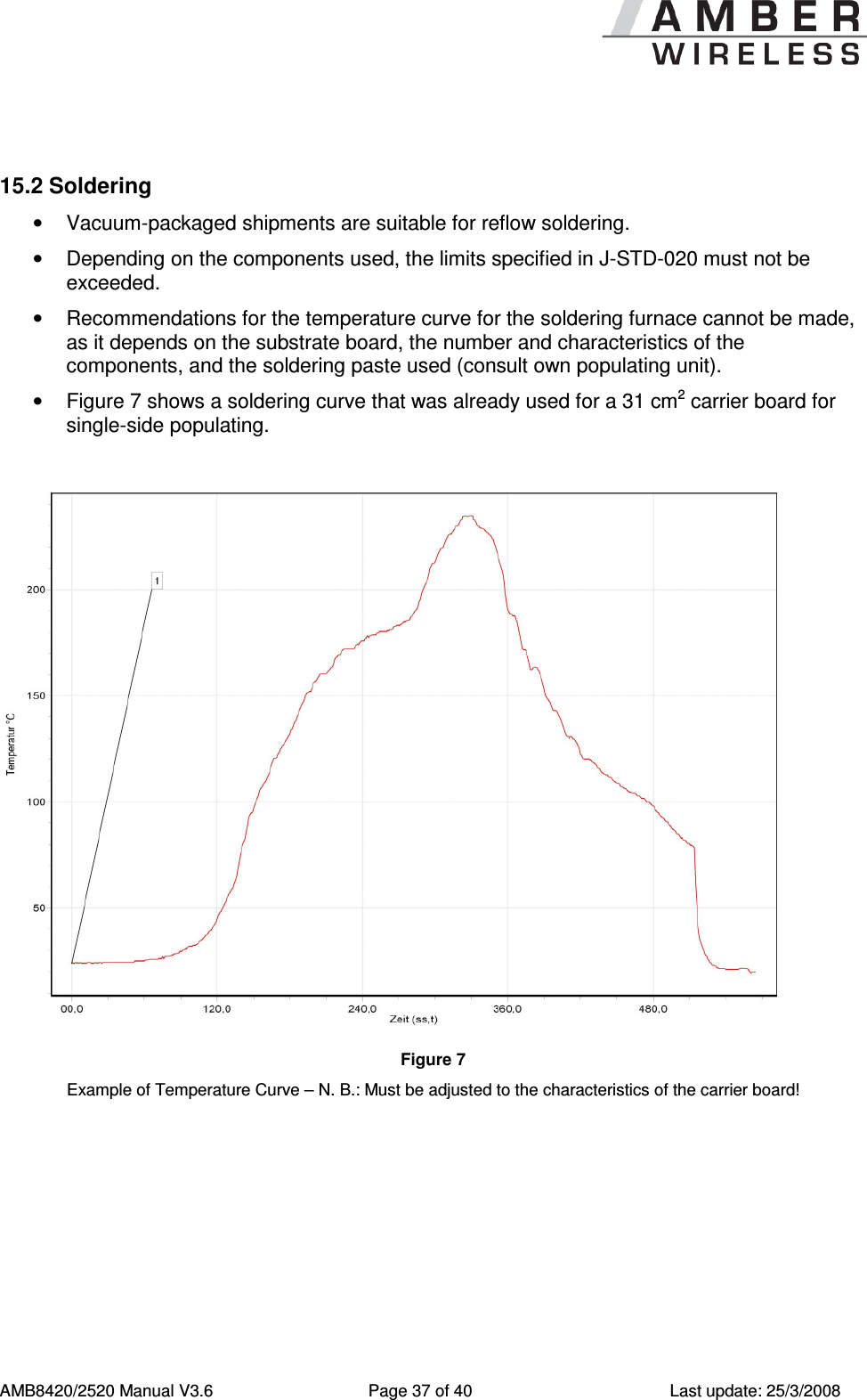
     AMB8420/2520 Manual V3.6  Page 37 of 40  Last update: 25/3/2008  15.2 Soldering •  Vacuum-packaged shipments are suitable for reflow soldering. •  Depending on the components used, the limits specified in J-STD-020 must not be exceeded. •  Recommendations for the temperature curve for the soldering furnace cannot be made, as it depends on the substrate board, the number and characteristics of the components, and the soldering paste used (consult own populating unit).  •  Figure 7 shows a soldering curve that was already used for a 31 cm2 carrier board for single-side populating.   Figure 7 Example of Temperature Curve – N. B.: Must be adjusted to the characteristics of the carrier board!
     AMB8420/2520 Manual V3.6  Page 38 of 40  Last update: 25/3/2008 16  Version History 16.1 Software Version 3.0 •  Product release Version 3.1 •  Bug fix "break detection" Version 3.2 •  Bug fix UART_DIDelay in Command Mode •  Sniffer mode via CfgFlags •  SPI variant available 16.2 Manual  Version 3.6 (valid for software versions 3.0, 3.1, and 3.2) •  Clarification of packet formation in Command Mode (also concerns /DATA_REQUEST) •  Readout of the RSSI value: added specification for AMB2520 •  Added electrical parameters AMB2520 •  Switching to the Command Mode only with delay after /RTS low (2.2.1) •  Added timing parameters •  Added restrictions for channel table AMB2520 17  References [1]  To calculate the baud rate registers UART_MCTL, UART_BR0, and UART_BR1, the "Baud Rate Calculator" tool is integrated in ACC. To configure a standard baud rate, ACC provides a drop-down field with automatic calculation and parameterisation of the baud rate registers. [2]  "CC1100 Single-Chip Low-Cost Low-Power RF Transceiver (Rev. B)", Texas Instruments [3]  "CC2500 Single-Chip Low-Cost Low-Power RF Transceiver (Rev. B)", Texas Instruments [4]  "AMB8420 Data Sheet", AMBER wireless GmbH [5]  "AMB2520 Data Sheet", AMBER wireless GmbH [6]  "AMB8420 / AMB2520 SPI Operation" AMBER wireless GmbH
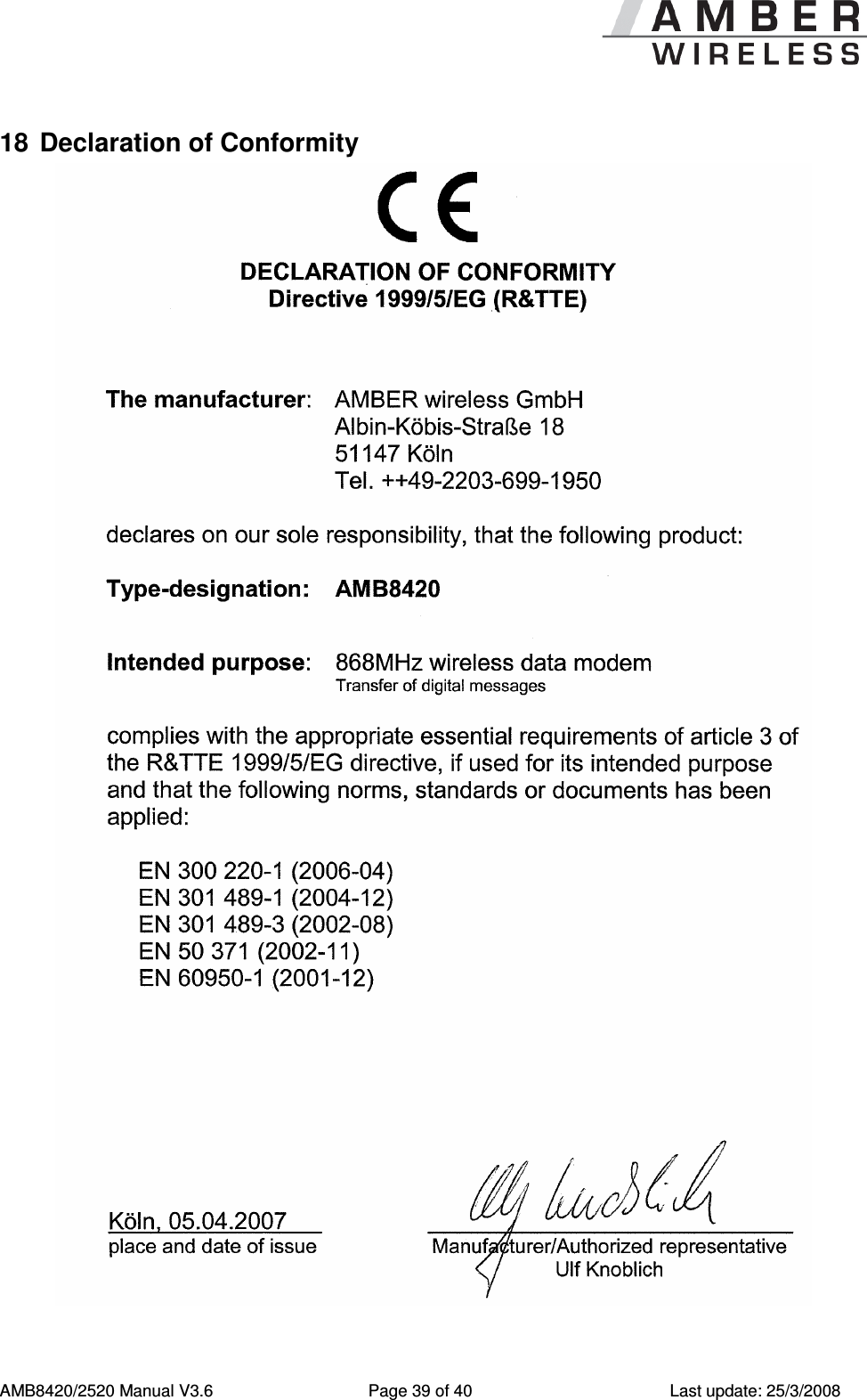
     AMB8420/2520 Manual V3.6  Page 39 of 40  Last update: 25/3/2008 18  Declaration of Conformity
     AMB8420/2520 Manual V3.6  Page 40 of 40  Last update: 25/3/2008  19  Important Information 19.1 Exclusion of Liability AMBER wireless GmbH presumes that the information in this document is correct at the time of publication. However, AMBER wireless GmbH reserves the right to modify technical specifications or functions of its products or discontinue the production of these products or the support of one of these products without any written announcement or notification to customers. The customer must make sure that the information used is valid. AMBER wireless GmbH does not assume any liability for the use of its products. Amber wireless GmbH does not grant licenses for its patent rights or for any other of its intellectual property rights or third-party rights. Customers bear responsibility for compliance of systems or units in which AMBER wireless products are integrated with applicable legal regulations. 19.2 Trademarks •  AMBER wireless® is a registered trademark of AMBER wireless GmbH. All other trademarks, registered trademarks, and product names are the exclusive property of the respective owners. 19.3 Usage Restriction AMBER wireless products are not approved for use in life-supporting or life-sustaining systems or units or other systems whose malfunction could result in serious bodily injury to the user. Moreover, AMBER wireless products are not approved for use as key components of any life-supporting or life-sustaining system or unit whose malfunction could result in the failure of the life-supporting system or unit or could affect its safety or effectiveness. AMBER wireless customers who use these products in such applications or sell them for such usage act at their own risk and must relieve AMBER wireless GmbH from all damages that may result from the sale for unsuitable purposes or unsuitable usage. By using AMBER wireless products, the user agrees to these terms and conditions. © 2008, AMBER wireless GmbH. All rights reserved.  AMBER wireless GmbH Albin-Köbis-Strasse 18 D-51147 Cologne Phone: +49 2203 6991950 Fax: +49 2203 459883 E-mail: Internet:  Internet http://www.amber-wireless.de

Navigation menu