Texa S p A ET17 VEHICLE DIAGNOSTIC SYSTEM User Manual

Texa S.p.A. VEHICLE DIAGNOSTIC SYSTEM

User Manual

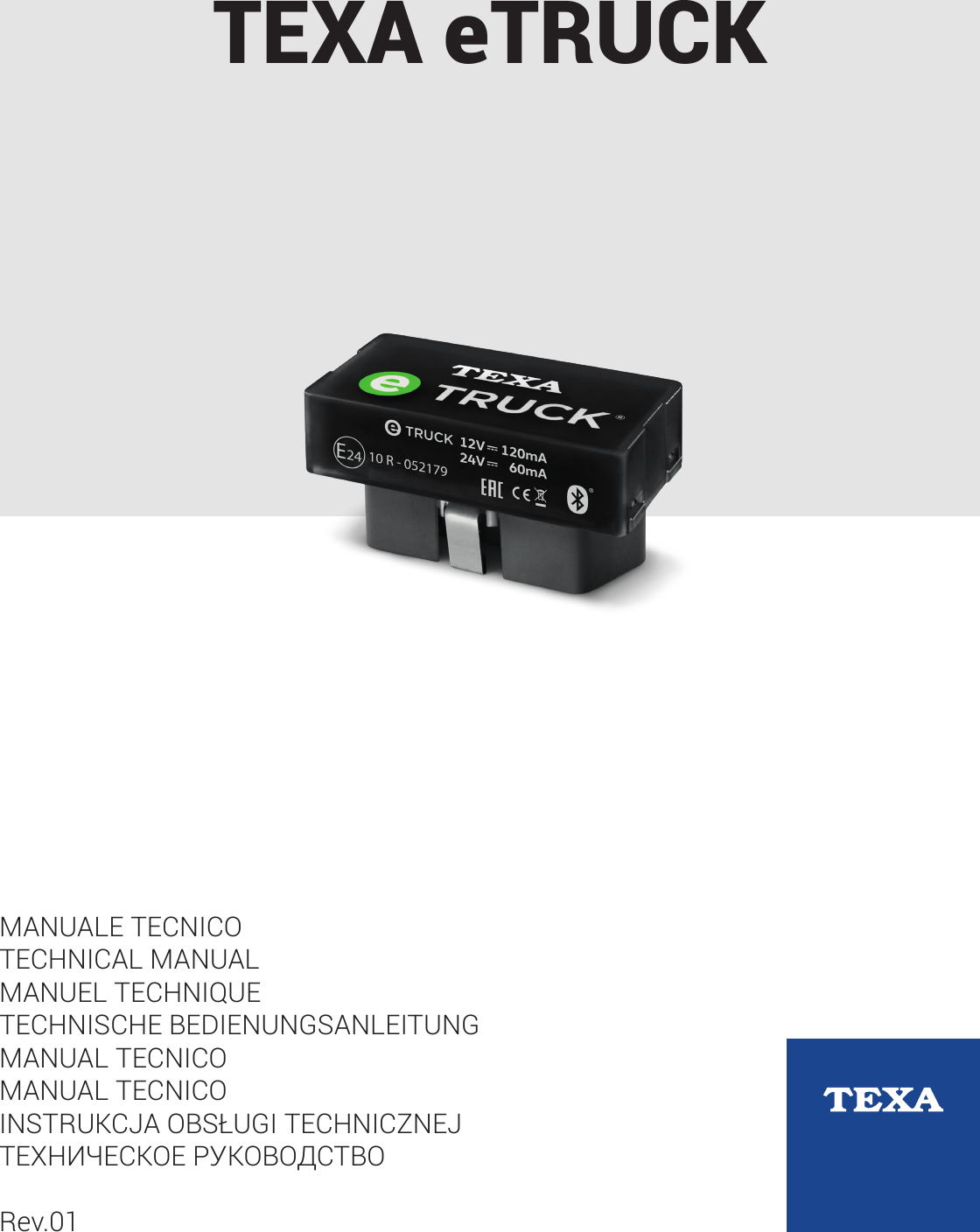
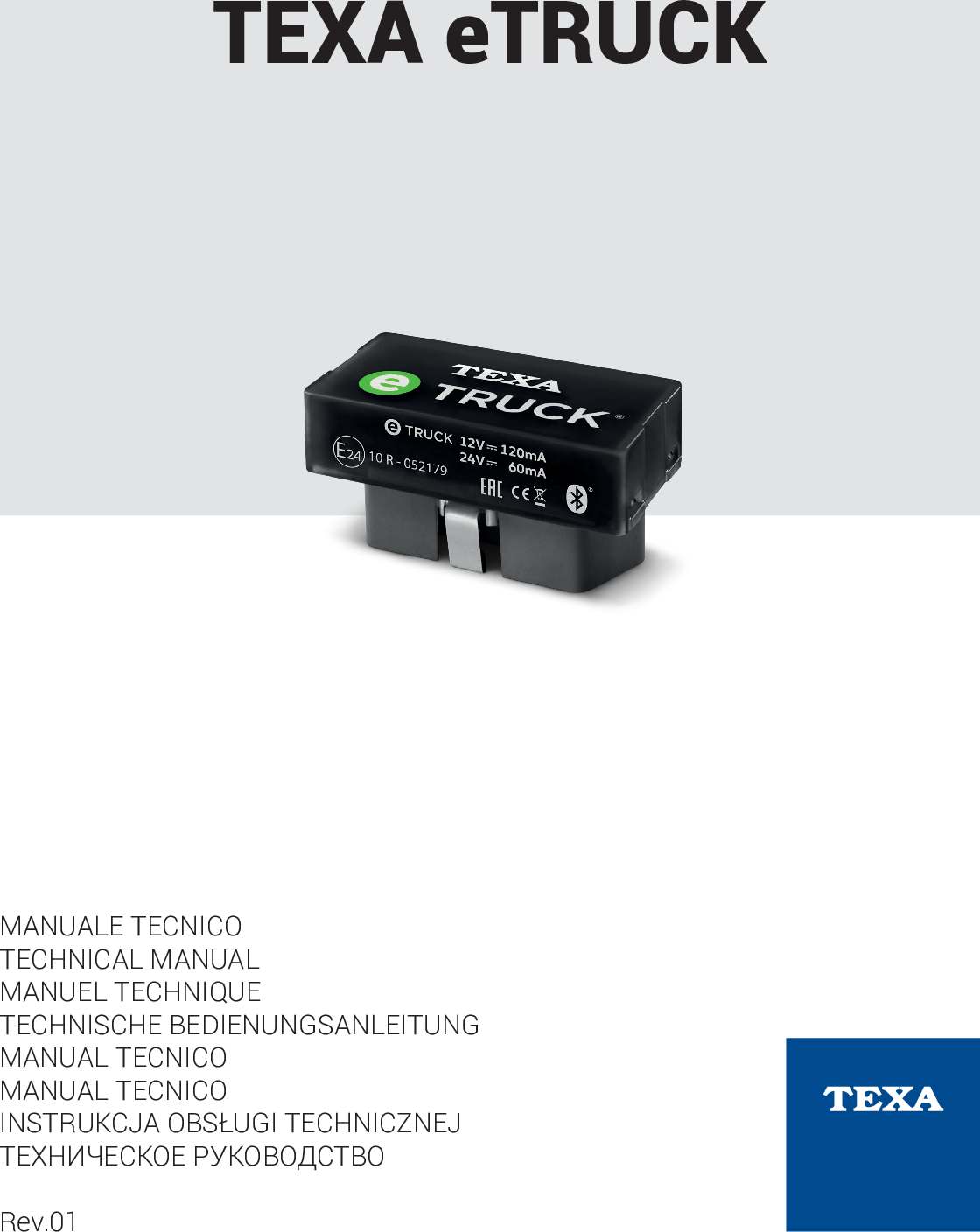
TEXA eTRUCKMANUALE TECNICOTECHNICAL MANUALMANUEL TECHNIQUETECHNISCHE BEDIENUNGSANLEITUNGMANUAL TECNICOMANUAL TECNICOINSTRUKCJA OBSŁUGI TECHNICZNEJТЕХНИЧЕСКОЕ РУКОВОДСТВОRev.01
2
SUMMARYREVISION OF THE MANUAL..................................................................5INTRODUCTION......................................................................................61   LEGEND OF THE SYMBOLS USED..................................................72   GLOSSARY........................................................................................83   GENERAL SAFETY REGULATIONS.................................................93.1   Glossary.................................................................................................93.2   Operator Safety Regulations..................................................................93.2.1   General Safety Regulations........................................................................93.2.2   Risk of Asphyxiation...................................................................................93.2.3   Risk of Impact and Crushing.......................................................................93.2.4   Hazards Caused by Moving Parts............................................................103.2.5   Risk of Burning or Scalding......................................................................103.2.6   Fire and Explosion Hazard.......................................................................113.2.7   Noise Hazard............................................................................................113.2.8   High Voltage Hazard.................................................................................113.2.9   Poisoning Hazard.....................................................................................123.3   General User and Maintenance Warnings...........................................124   SPECIFIC USER SAFETY RULES FOR TEXA eTRUCK................134.1   General Rules......................................................................................134.2   User Safety...........................................................................................134.3   Vehicle Safety......................................................................................134.4   Device Safety.......................................................................................145   ENVIRONMENTAL INFORMATION.................................................166   OPERATION OF THE RADIO DEVICES..........................................177   REGULATORY INFORMATION.......................................................188   TEXA eTRUCK.................................................................................199   DESCRIPTION..................................................................................2010   TECHNICAL FEATURES ...............................................................2111   INSTALLATION AND CONFIGURATION.......................................2311.1   Preliminary operations........................................................................233en
11.2   Configuration through the App...........................................................2311.3   Installation in the Vehicle....................................................................2411.3.1   Installation through 9-pin Deutsch Adapter.............................................2412   eTRUCK INSTALLATION KIT FOR VOLVO EURO IV-V(ACCESSORY)......................................................................................2613   USE.................................................................................................3214   POWER SUPPLY ..........................................................................3215   BLINK CODES................................................................................3316   MAINTENANCE..............................................................................3417   TROUBLESHOOTING....................................................................3518   LEGAL NOTICES............................................................................364
TEXA ETRUCK TECHNICAL MANUALREVISION OF THE MANUALThis document is revision 01 of the TEXA eTRUCK technical manual.Issue date: 11/10/20175en
INTRODUCTIONDear Customer,We would like to thank you for choosing a TEXA product for your workshop.We are certain that you will get the greatest satisfaction from it and receive agreat deal of help in your work.Please read through the instructions in this manual carefully and keep it forfuture reference.Reading and understanding the following manual will help you to avoid damageor personal injury caused by improper use of the product to which it refers.TEXA S.p.A reserves the right to make any changes deemed necessary toimprove the manual for any technical or marketing requirement; the companymay do so at any time without prior notice.This product is intended for use by technicians specialised in the automotivefield only. Reading and understanding the information in this manual cannotreplace adequate specialised training in this field.The sole purpose of the manual is to illustrate the operation of the product sold.It is not intended to offer technical training of any kind and technicians willtherefore carry out any interventions under their own responsibility and will beaccountable for any damage or personal injury caused by negligence,carelessness, or inexperience, regardless of the fact that a TEXA S.p.A. toolhas been used based on the information within this manual.Any additions to this manual, useful in describing the new versions of theprogram and the new functions associated to it, may be sent to you through ourTEXA technical bulletin service.This manual is to be considered an essential part of the product it refers to. If itis resold, the original buyer is therefore required to forward the manual to thenew owner.Reproduction, whole or in part, of this manual in any form without writtenauthorisation by the manufacturer is strictly forbidden.The original manual was written in Italian, every other language is a translationof the original manual.© copyright and database rights 2018. The material contained in thisdocument is protected by copyright and database rights. All rights reserved byLaw and under International Conventions.6
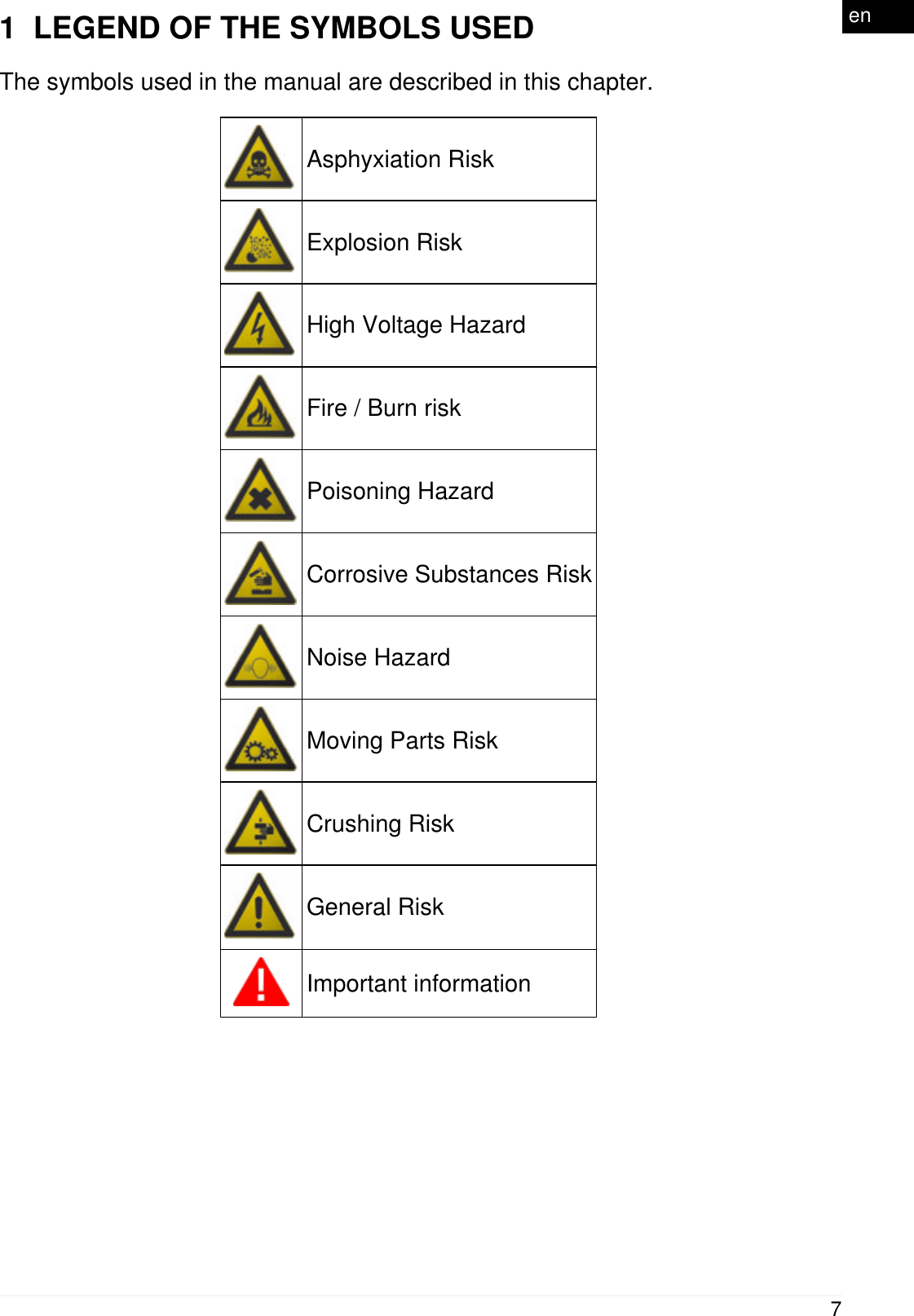
1  LEGEND OF THE SYMBOLS USEDThe symbols used in the manual are described in this chapter.Asphyxiation RiskExplosion RiskHigh Voltage HazardFire / Burn riskPoisoning HazardCorrosive Substances RiskNoise HazardMoving Parts RiskCrushing RiskGeneral RiskImportant information7en
2  GLOSSARYThis chapter provides the meaning of the technical terms used in the manual:•Device: any TEXA eTRUCK device.•WORKSHOP: the workshop that sells and installs TEXA eTRUCK devices.•FLEET MANAGER: the manager of the vehicle fleet who subscribed the FleetContract in order to use the services associated with TEXA eTRUCK.•DRIVER: the driver of a vehicle of the fleet.•Fleet: the group of vehicles managed by the FLEET MANAGER, where TEXAeTRUCK is installed.•TEXA eTRUCK FLEET MANAGER WEB Portal: the WEB portal owned byTEXA through which the FLEET MANAGER can view the data related to thevehicles of her/his fleet.•TEXA eTRUCK WORKSHOP WEB Portal: the WEB portal owned by TEXAthrough which the WORKSHOP can view the data related to the vehicles of itscustomers.•Coverage list: the official document that indicates only the vehicles on which youcan safely install the device.•16-pin OBD socket: the diagnostic socket specific for European EURO 4, EURO5, EURO 6 vehicles, some American heavy duty vehicles and for light commercialvehicles.•9-pin Deutsch OBD socket: the diagnostic socket specific for American heavyduty vehicles.•Pairing: the mutual recognition process that takes place when two Bluetoothdevices must establish communication for the first time. It could require you toenter an identification code (PIN).8
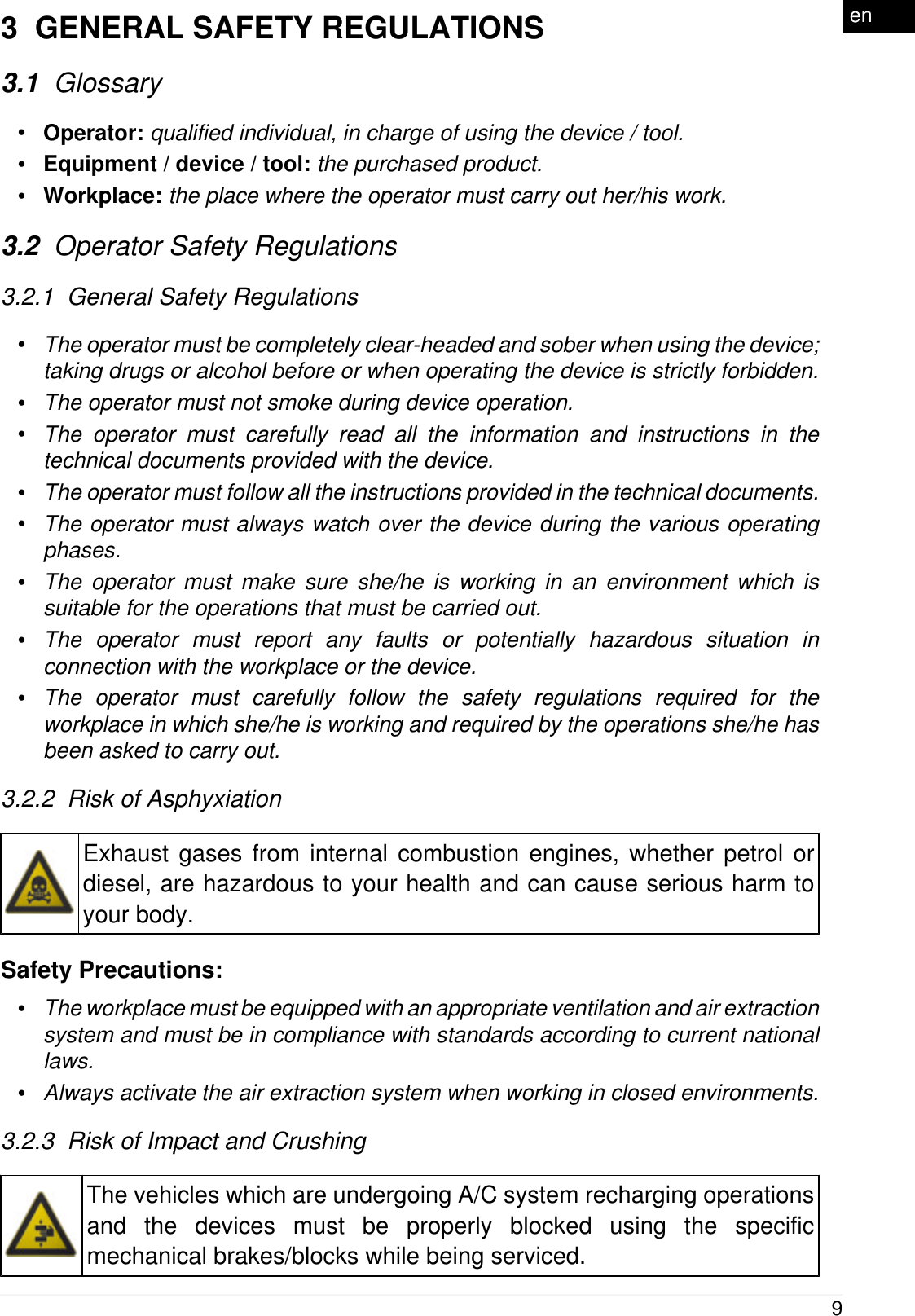
3  GENERAL SAFETY REGULATIONS3.1  Glossary•Operator: qualified individual, in charge of using the device / tool.•Equipment / device / tool: the purchased product.•Workplace: the place where the operator must carry out her/his work.3.2  Operator Safety Regulations3.2.1  General Safety Regulations•The operator must be completely clear-headed and sober when using the device;taking drugs or alcohol before or when operating the device is strictly forbidden.•The operator must not smoke during device operation.•The operator must carefully read all the information and instructions in thetechnical documents provided with the device.•The operator must follow all the instructions provided in the technical documents.•The operator must always watch over the device during the various operatingphases.•The operator must make sure she/he is working in an environment which issuitable for the operations that must be carried out.•The operator must report any faults or potentially hazardous situation inconnection with the workplace or the device.•The operator must carefully follow the safety regulations required for theworkplace in which she/he is working and required by the operations she/he hasbeen asked to carry out.3.2.2  Risk of AsphyxiationExhaust gases from internal combustion engines, whether petrol ordiesel, are hazardous to your health and can cause serious harm toyour body.Safety Precautions:•The workplace must be equipped with an appropriate ventilation and air extractionsystem and must be in compliance with standards according to current nationallaws.•Always activate the air extraction system when working in closed environments.3.2.3  Risk of Impact and CrushingThe vehicles which are undergoing A/C system recharging operationsand the devices must be properly blocked using the specificmechanical brakes/blocks while being serviced.9en
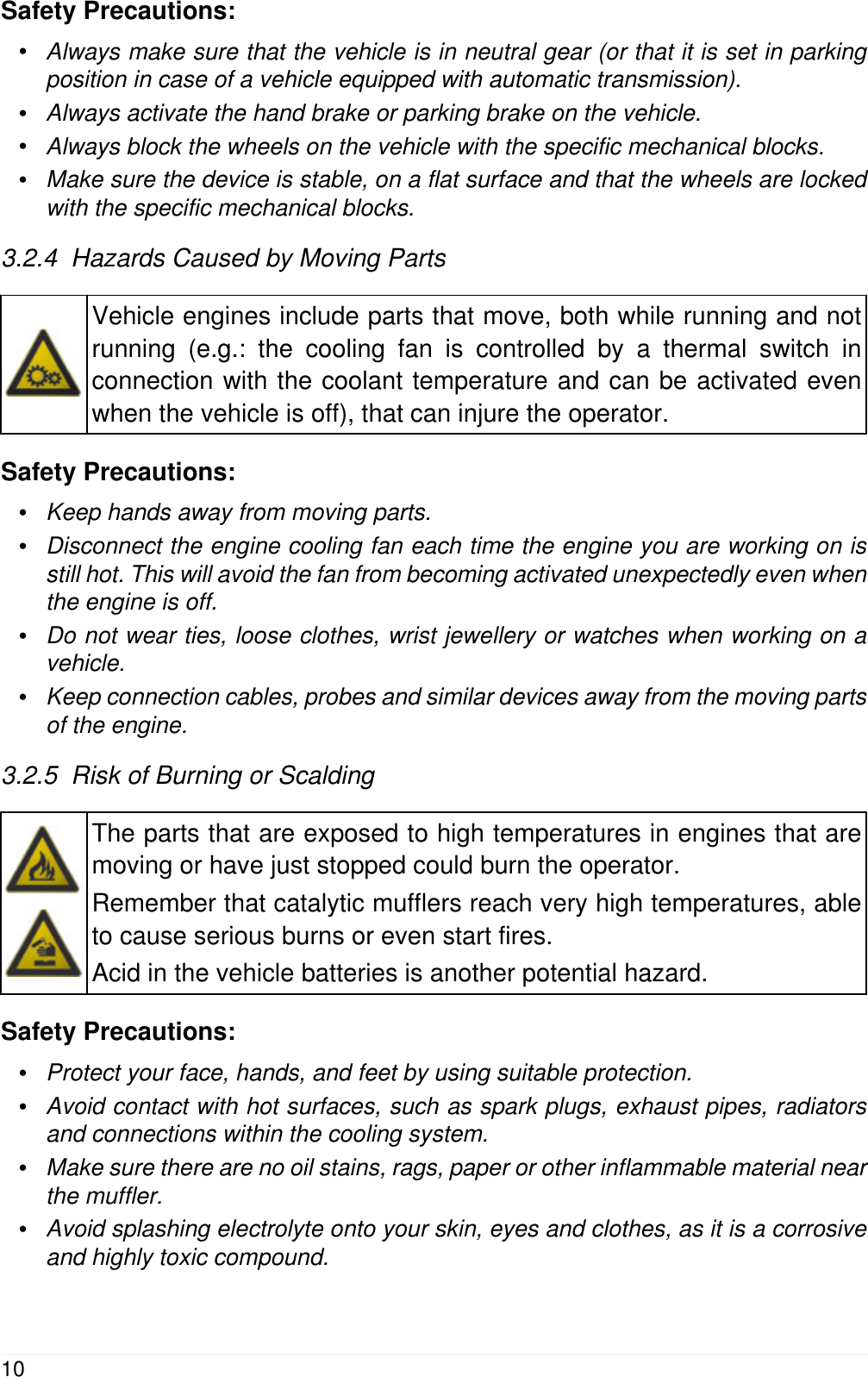
Safety Precautions:•Always make sure that the vehicle is in neutral gear (or that it is set in parkingposition in case of a vehicle equipped with automatic transmission).•Always activate the hand brake or parking brake on the vehicle.•Always block the wheels on the vehicle with the specific mechanical blocks.•Make sure the device is stable, on a flat surface and that the wheels are lockedwith the specific mechanical blocks.3.2.4  Hazards Caused by Moving PartsVehicle engines include parts that move, both while running and notrunning (e.g.: the cooling fan is controlled by a thermal switch inconnection with the coolant temperature and can be activated evenwhen the vehicle is off), that can injure the operator.Safety Precautions:•Keep hands away from moving parts.•Disconnect the engine cooling fan each time the engine you are working on isstill hot. This will avoid the fan from becoming activated unexpectedly even whenthe engine is off.•Do not wear ties, loose clothes, wrist jewellery or watches when working on avehicle.•Keep connection cables, probes and similar devices away from the moving partsof the engine.3.2.5  Risk of Burning or ScaldingThe parts that are exposed to high temperatures in engines that aremoving or have just stopped could burn the operator.Remember that catalytic mufflers reach very high temperatures, ableto cause serious burns or even start fires.Acid in the vehicle batteries is another potential hazard.Safety Precautions:•Protect your face, hands, and feet by using suitable protection.•Avoid contact with hot surfaces, such as spark plugs, exhaust pipes, radiatorsand connections within the cooling system.•Make sure there are no oil stains, rags, paper or other inflammable material nearthe muffler.•Avoid splashing electrolyte onto your skin, eyes and clothes, as it is a corrosiveand highly toxic compound.10
3.2.6  Fire and Explosion HazardThe following are potential fires and / or explosion hazards:•The types of fuel used by the vehicle and the vapours released by thesefuels.•The refrigerants used by the A/C system.•The acid in the vehicle batteries.Safety Precautions:•Let the engine cool down.•Do NOT smoke near the vehicle.•Do NOT expose the vehicle to open flames.•Make sure that the electrical connections are all well insulated.•Collect any fuel that might have spilled.•Collect any refrigerant that might have spilled.•Make sure you are always working in an environment equipped with a goodventilation and air extraction system.•Always activate the air extraction system when working in closed environments.•Cover the openings of the batteries with a wet cloth in order to stifle the explosivegases before proceeding in testing or recharging.•Avoid causing sparks when connecting cables to the battery.3.2.7  Noise HazardLoud noises that may occur within the workplace, especially duringservice operations, may damage the operator's hearing.Safety Precautions:•Protect your ears with suitable protective ear wear.3.2.8  High Voltage HazardThe voltage supply from the mains that powers the devices in theworkplace and the voltage within the vehicle starter system is apotential shock hazard to the operator.Safety Precautions:•Make sure the electrical system in the workplace is compliant to current nationalstandards.•Make sure the device being used is connected to ground.•Cut off the power supply voltage before connecting or disconnecting cables.•Do NOT touch the high voltage cables when the engine is on.11en
•Operate in conditions of insulation from ground.•Work with dry hands only.•Keep conductive liquids away from the engine while working.•Never leave tools on the battery in order to avoid accidental contacts.3.2.9  Poisoning HazardThe hoses used to extract the gases can release toxic gases,dangerous to the operator if exposed to temperatures higher than 250°C or in case of a fire.Safety Precautions:•Should you inhale these gases, seek medical advice immediately.•Use neoprene or PVC gloves when eliminating combustion deposits.3.3  General User and Maintenance WarningsWhen using the device or carrying out ordinary maintenance (e.g. fusereplacement) on the device, carefully follow the information provided below.•Do not remove or damage the labels/tags and the warnings on the device; doNOT in any case make them illegible.•Do not remove, or block, any safety devices the device is equipped with.•Only use original spare parts or spare parts approved by the manufacturer.•Contact your retailer for any extraordinary maintenance.•Periodically check the electrical connections of the device, making sure they arein good condition and replacing any damaged cables.•Periodically check parts that are subject to wear and replace them if necessary.•Do not open or disassemble the device.12
4  SPECIFIC USER SAFETY RULES FOR TEXA eTRUCKThe technology used for the design and manufacturing control of TEXAeTRUCK makes it a reliable, simple and safe device to use.Users of TEXA eTRUCK are required to follow the general safety rules, to usethe device for its intended use only and to take care of it as indicated in thismanual.4.1  General Rules•The user must have carefully read all the information and instructions indicatedin the technical documents provided with the device.4.2  User SafetyThe device was designed and created in order to allow an easy, fastand safe installation; nevertheless, it is impossible to completelyeliminate some of the risks connected to this operation.Safety Measures:•Make sure the vehicle's instrument panel is off before starting the installation.•Make sure the vehicle on which you wish to install the device is on a flat surfaceand with the parking brake engaged.•Make sure there are not any damaged cables around the diagnostic socket.•Be careful not to injure yourself on sharp plastic edges or metal plates around thediagnostic socket.The position in which the device is placed and the behaviour of its LEDswere designed to avoid any possible obstacle or interference for thedriver.Lack of concentration while driving puts both the driver and the vehiclein danger.Safety Measures:•Do not drive the vehicle before reassembling the plastic parts and panelspreviously removed.•Do not get distracted by checking the status of the device or interacting with itneither directly or through the display unit.4.3  Vehicle SafetyThe device was designed and created in order to allow an easy, fastand safe installation; nevertheless, it is best to be sure not tocompromise any vehicle function during this operation.13en
Safety Measures:•Delicately remove any plastic part, cover or bulkhead that might cover thediagnostic socket, being careful not to loose any screw or fastening hook.•Be careful not to damage or disconnect any plastic part or cable near thediagnostic cable.•Carefully reposition and close any plastic part, cover or bulkhead once thedevice's installation and configuration phase is completed.•Do not install the device on vehicles that are not supported.4.4  Device SafetyThe device was designed to be used in specific environmentalconditions.Using the device in environments with temperatures and humidity thatdiffer from those specified may impair its efficiency.Safety measures:•Always place the device in a dry area.•Do not expose or use the device close to heat sources.•Position the device in order to guarantee its proper ventilation.•Do not use corrosive chemicals, solvents or harsh detergents to clean the device.The device was created to be mechanically resistant and suitable forthe use it was designed for.Careless use and excessive mechanical strain may impair itsefficiency.Safety measures:•Do not drop, shake or knock the device.•Do not carry out any type of intervention that may damage the device.•Do not open or disassemble the device.•Do not force the device or the connectors and take the utmost care during allconnecting and disconnecting operations.•Connect the device properly and securely in order to avoid it from accidentallydisconnecting during use.•Do not use screwdrivers or other tools to lever and disconnect the device.The device was manufactured to be electrically safe and to work withspecific supply voltage levels.Failure to comply with the specifications related to the power supplymay impair the device's efficiency.14
Safety measures:•Do not wet the device with water or other liquids.•Use the device on vehicles with a 12-24 V DC power supply, chassis connectedto the negative pole, and in any case only on supported vehicles.•The connection for the device's power supply must always be with the battery-operated system of the vehicle being tested.The electromagnetic compatibility tests carried out on the deviceguarantee that it can be adapted to the technologies normally used onvehicles (ex.: engine control, ABS, airbag, etc.). Nevertheless, ifmalfunctions occur, contact the vehicle's dealer.15en
5  ENVIRONMENTAL INFORMATION For information regarding the disposal of this product please seethe pamphlet supplied.16
6  OPERATION OF THE RADIO DEVICESWireless connection with Bluetooth® technologyThe wireless connection with Bluetooth technology is a technology that suppliesa standard and reliable method to exchange information between differentdevices, using radio waves. Products such as cellular phones, portable devices,computers, printers, cameras, pocket PCs etc. use this type of technology.The Bluetooth interface searches for compatible electronic devices accordingto the radio signal they generate and establishes a connection between them.The tools operate a selection suggesting only compatible / enabled devices.This does not exclude the presence of other sources of communication orinterference.THE EFFICIENCY AND THE QUALITY OF THE BLUETOOTHCOMMUNICATION MAY BE INFLUENCED BY THE PRESENCE OF RADIODISTURBANCE SOURCES. THE COMMUNICATION PROTOCOL HASBEEN DEVELOPED TO MANAGE THESE TYPES OF ERRORS; HOWEVER,IN THESE CASES COMMUNICATION MAY BECOME DIFFICULT ANDCONNECTION MAY REQUIRE SEVERAL ATTEMPTS.SHOULD THE WIRELESS CONNECTION ENCOUNTER SERIOUSPROBLEMS THAT MAY COMPROMISE A REGULAR COMMUNICATION,THE SOURCE OF THE ENVIRONMENTAL ELECTROMAGNETICINTERFERENCE MUST BE IDENTIFIED AND ITS INTENSITY REDUCED.Position the product in order to guarantee the correct operation of its radiodevices. In particular, do not cover it with any shielding or metal materials ingeneral.17en
7  REGULATORY INFORMATIONSimplified EU Declaration of ConformityThe manufacturer, TEXA S.p.A, declares that the type of radioequipment TEXA eTRUCK is compliant with the RED 2014/53/EUdirective.The complete text of the EU declaration of conformity is available atthe following Internet address http://www.texa.it/download.18
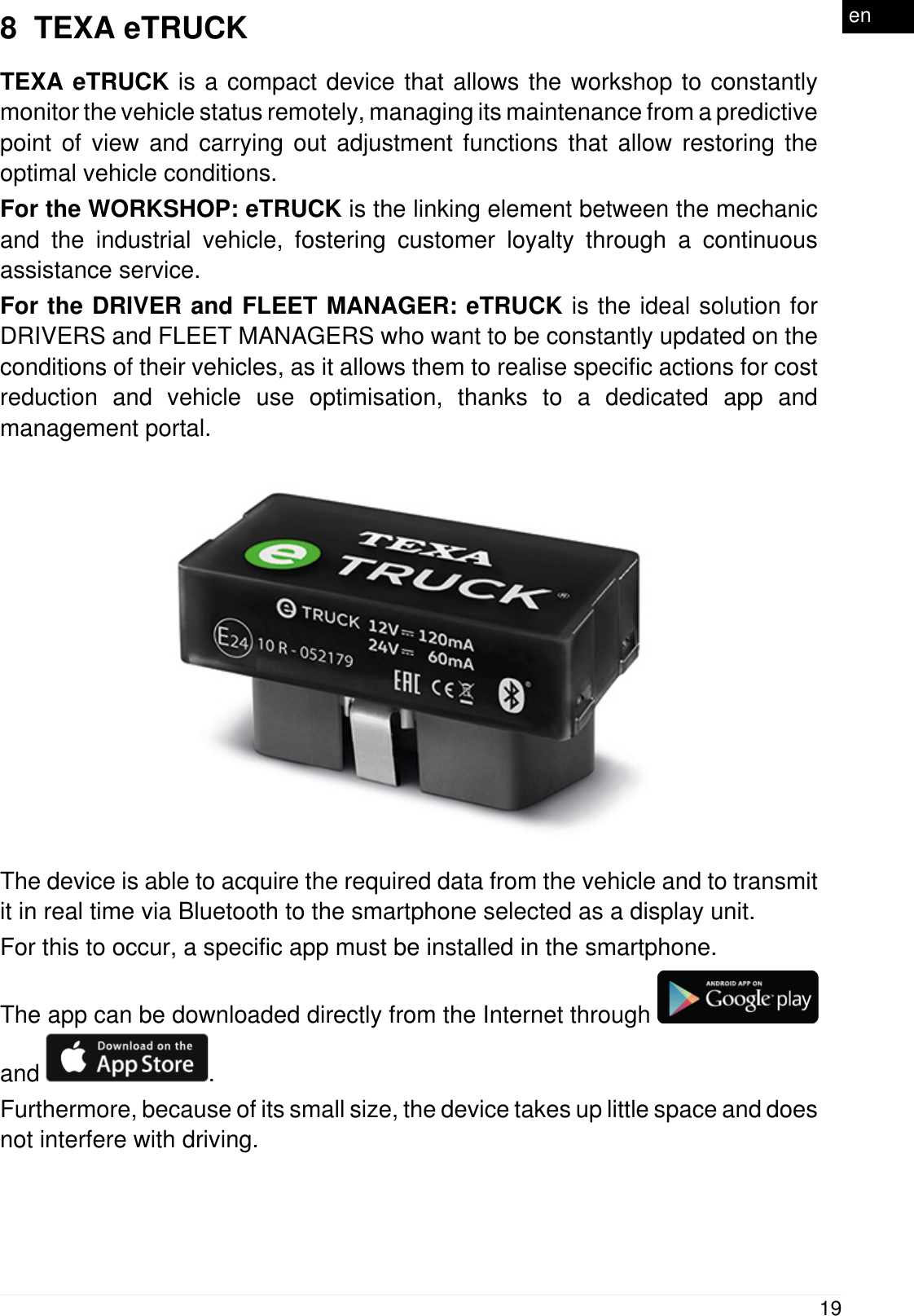
8  TEXA eTRUCKTEXA eTRUCK is a compact device that allows the workshop to constantlymonitor the vehicle status remotely, managing its maintenance from a predictivepoint of view and carrying out adjustment functions that allow restoring theoptimal vehicle conditions.For the WORKSHOP: eTRUCK is the linking element between the mechanicand the industrial vehicle, fostering customer loyalty through a continuousassistance service.For the DRIVER and FLEET MANAGER: eTRUCK is the ideal solution forDRIVERS and FLEET MANAGERS who want to be constantly updated on theconditions of their vehicles, as it allows them to realise specific actions for costreduction and vehicle use optimisation, thanks to a dedicated app andmanagement portal.The device is able to acquire the required data from the vehicle and to transmitit in real time via Bluetooth to the smartphone selected as a display unit.For this to occur, a specific app must be installed in the smartphone.The app can be downloaded directly from the Internet through and  .Furthermore, because of its small size, the device takes up little space and doesnot interfere with driving.19en
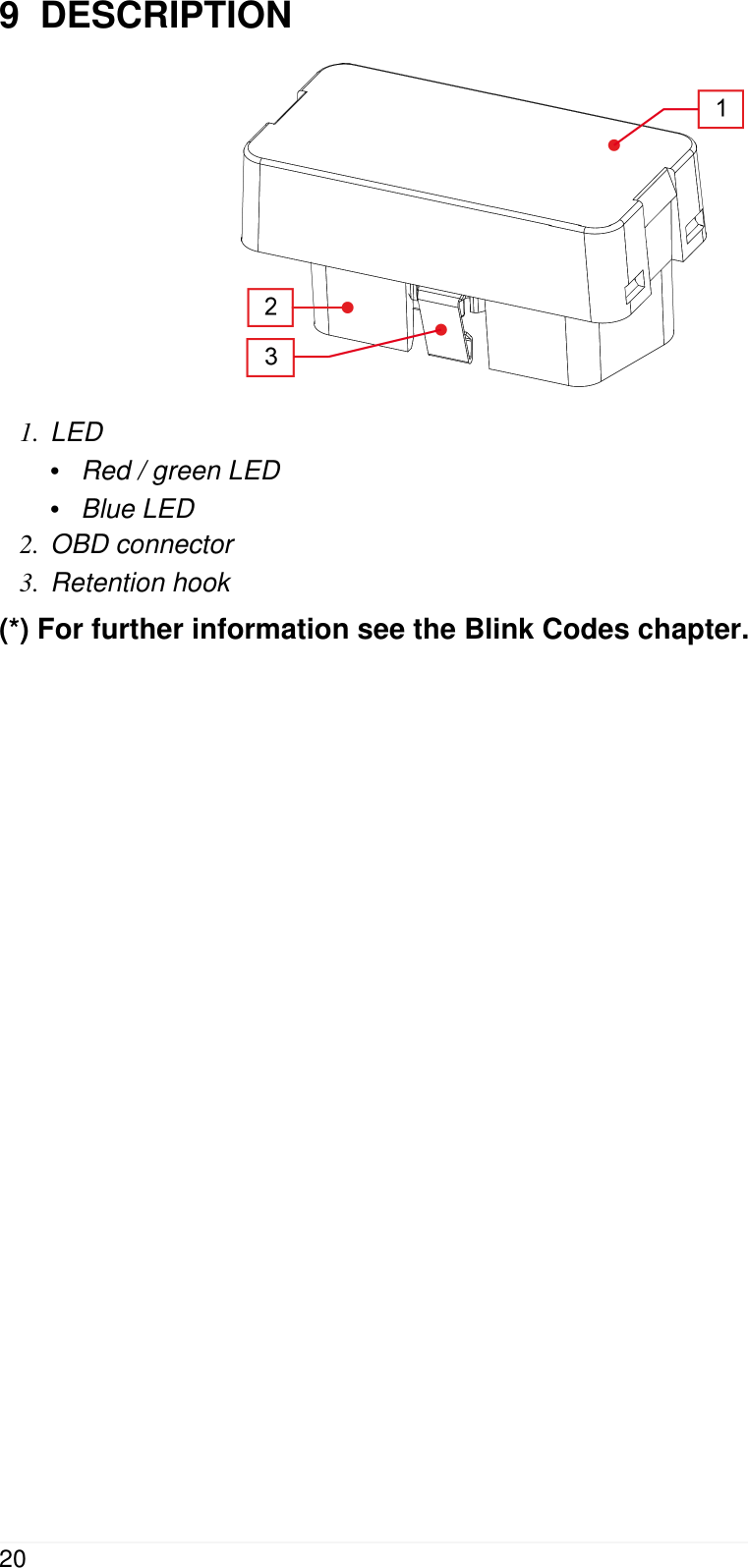
9  DESCRIPTION1. LED•Red / green LED•Blue LED2. OBD connector3. Retention hook(*) For further information see the Blink Codes chapter.20
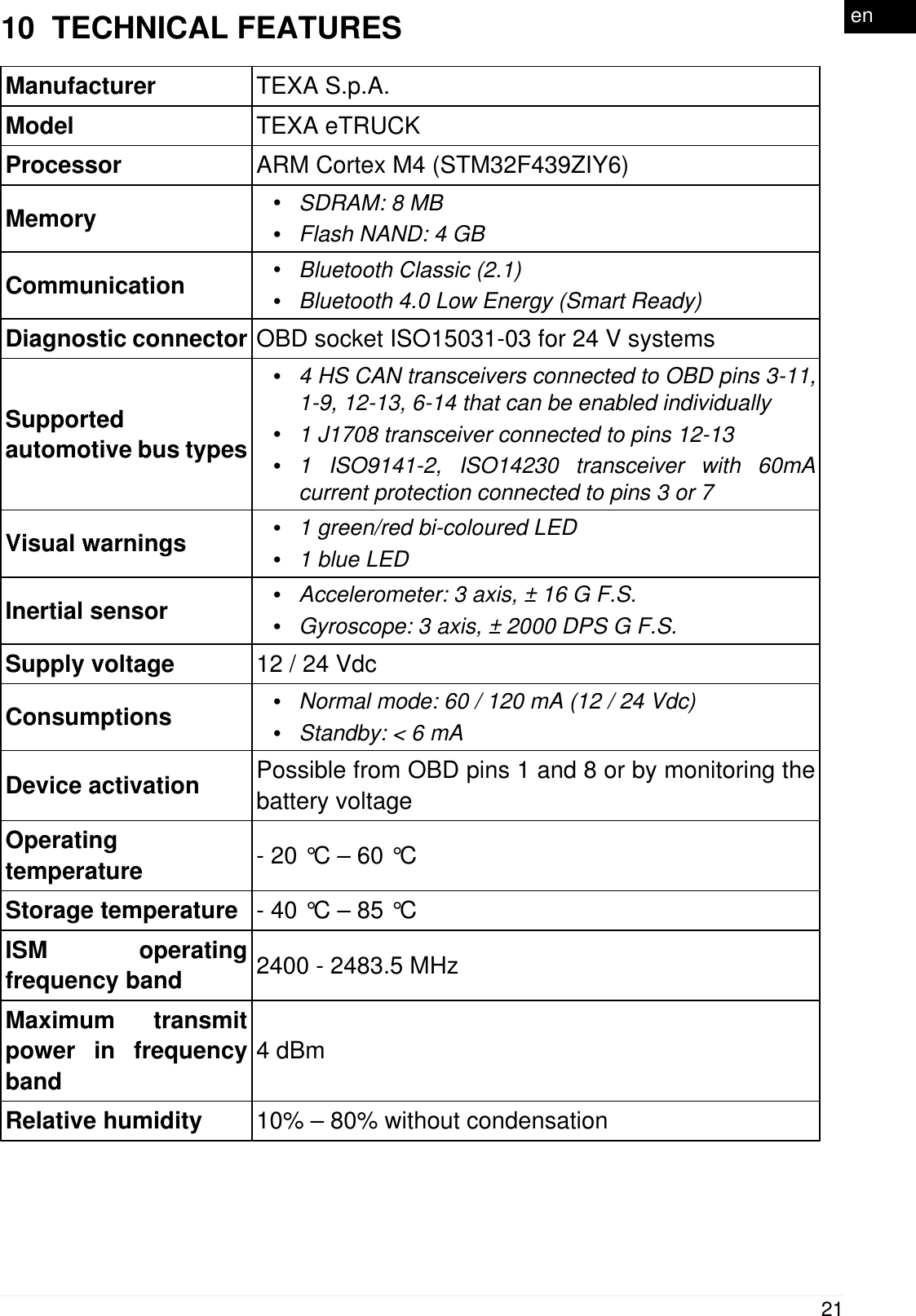
10  TECHNICAL FEATURESManufacturer TEXA S.p.A.Model TEXA eTRUCKProcessor ARM Cortex M4 (STM32F439ZIY6)Memory •SDRAM: 8 MB•Flash NAND: 4 GBCommunication •Bluetooth Classic (2.1)•Bluetooth 4.0 Low Energy (Smart Ready)Diagnostic connector OBD socket ISO15031-03 for 24 V systemsSupportedautomotive bus types•4 HS CAN transceivers connected to OBD pins 3-11,1-9, 12-13, 6-14 that can be enabled individually•1 J1708 transceiver connected to pins 12-13•1 ISO9141-2, ISO14230 transceiver with 60mAcurrent protection connected to pins 3 or 7Visual warnings •1 green/red bi-coloured LED•1 blue LEDInertial sensor •Accelerometer: 3 axis, ± 16 G F.S.•Gyroscope: 3 axis, ± 2000 DPS G F.S.Supply voltage 12 / 24 VdcConsumptions •Normal mode: 60 / 120 mA (12 / 24 Vdc)•Standby: < 6 mADevice activation Possible from OBD pins 1 and 8 or by monitoring thebattery voltageOperatingtemperature - 20 °C – 60 °CStorage temperature - 40 °C – 85 °CISM operatingfrequency band 2400 - 2483.5 MHzMaximum transmitpower in frequencyband4 dBmRelative humidity 10% – 80% without condensation21en
Dimensions in [mm]Weight 15 gDirectives RED 2014 / 53 / EUROHS 2011 / 65 / EUProduct standardsEN 301 489-1 V2.1.1EN 301 489-17 3.1.1EN 300 328 V2.1.1EN 62311:2008EN 60950-1:2006 / A11+A1+A12+AC:2001+A2:2013ISO 7637-1:2002ISO 7637-2:2011Regulations UN / ECE R1022
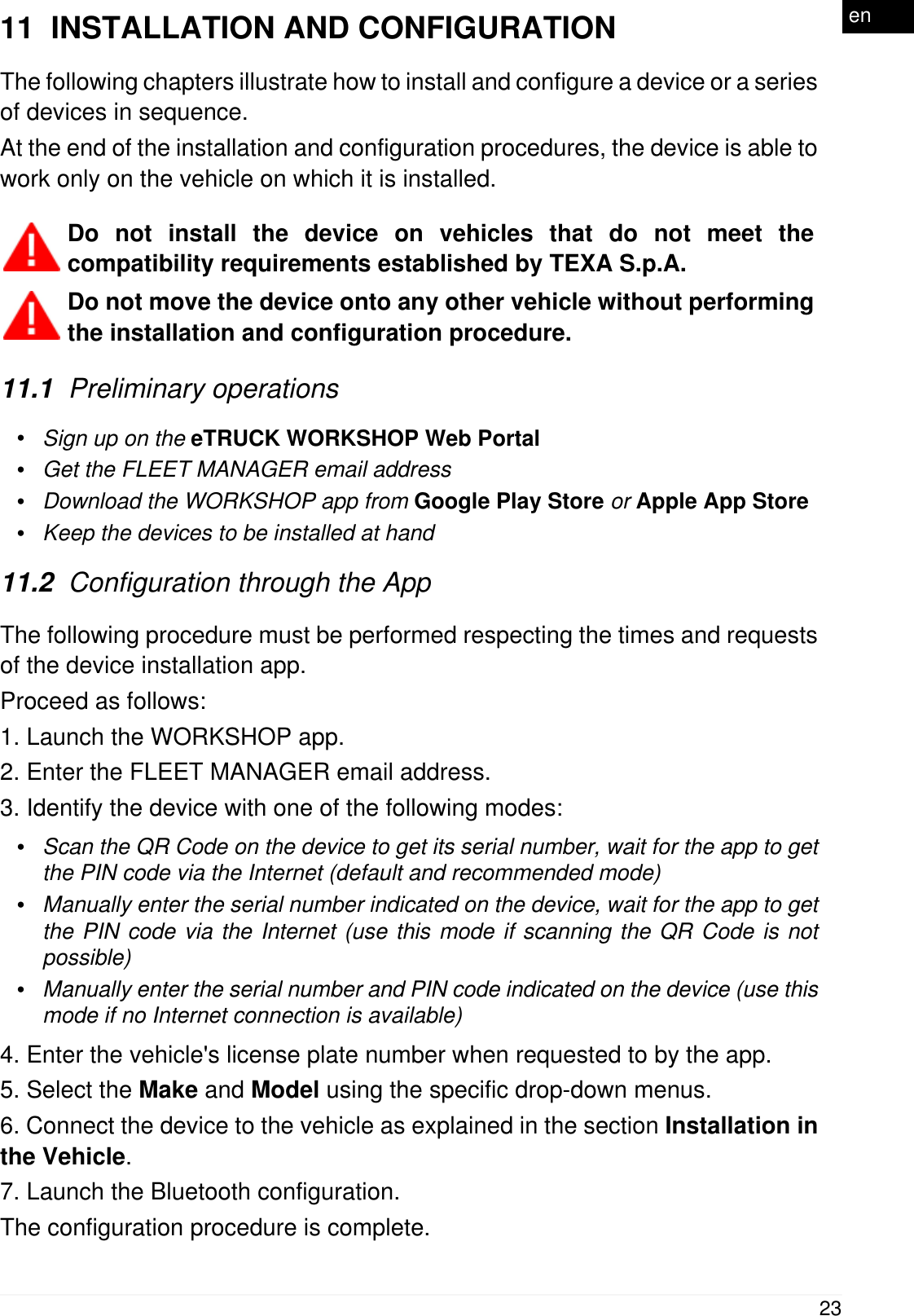
11  INSTALLATION AND CONFIGURATIONThe following chapters illustrate how to install and configure a device or a seriesof devices in sequence.At the end of the installation and configuration procedures, the device is able towork only on the vehicle on which it is installed. Do not install the device on vehicles that do not meet thecompatibility requirements established by TEXA S.p.A.Do not move the device onto any other vehicle without performingthe installation and configuration procedure.11.1  Preliminary operations•Sign up on the eTRUCK WORKSHOP Web Portal•Get the FLEET MANAGER email address•Download the WORKSHOP app from Google Play Store or Apple App Store•Keep the devices to be installed at hand11.2  Configuration through the AppThe following procedure must be performed respecting the times and requestsof the device installation app.Proceed as follows:1. Launch the WORKSHOP app.2. Enter the FLEET MANAGER email address.3. Identify the device with one of the following modes:•Scan the QR Code on the device to get its serial number, wait for the app to getthe PIN code via the Internet (default and recommended mode)•Manually enter the serial number indicated on the device, wait for the app to getthe PIN code via the Internet (use this mode if scanning the QR Code is notpossible)•Manually enter the serial number and PIN code indicated on the device (use thismode if no Internet connection is available)4. Enter the vehicle's license plate number when requested to by the app.5. Select the Make and Model using the specific drop-down menus.6. Connect the device to the vehicle as explained in the section Installation inthe Vehicle.7. Launch the Bluetooth configuration.The configuration procedure is complete.23en
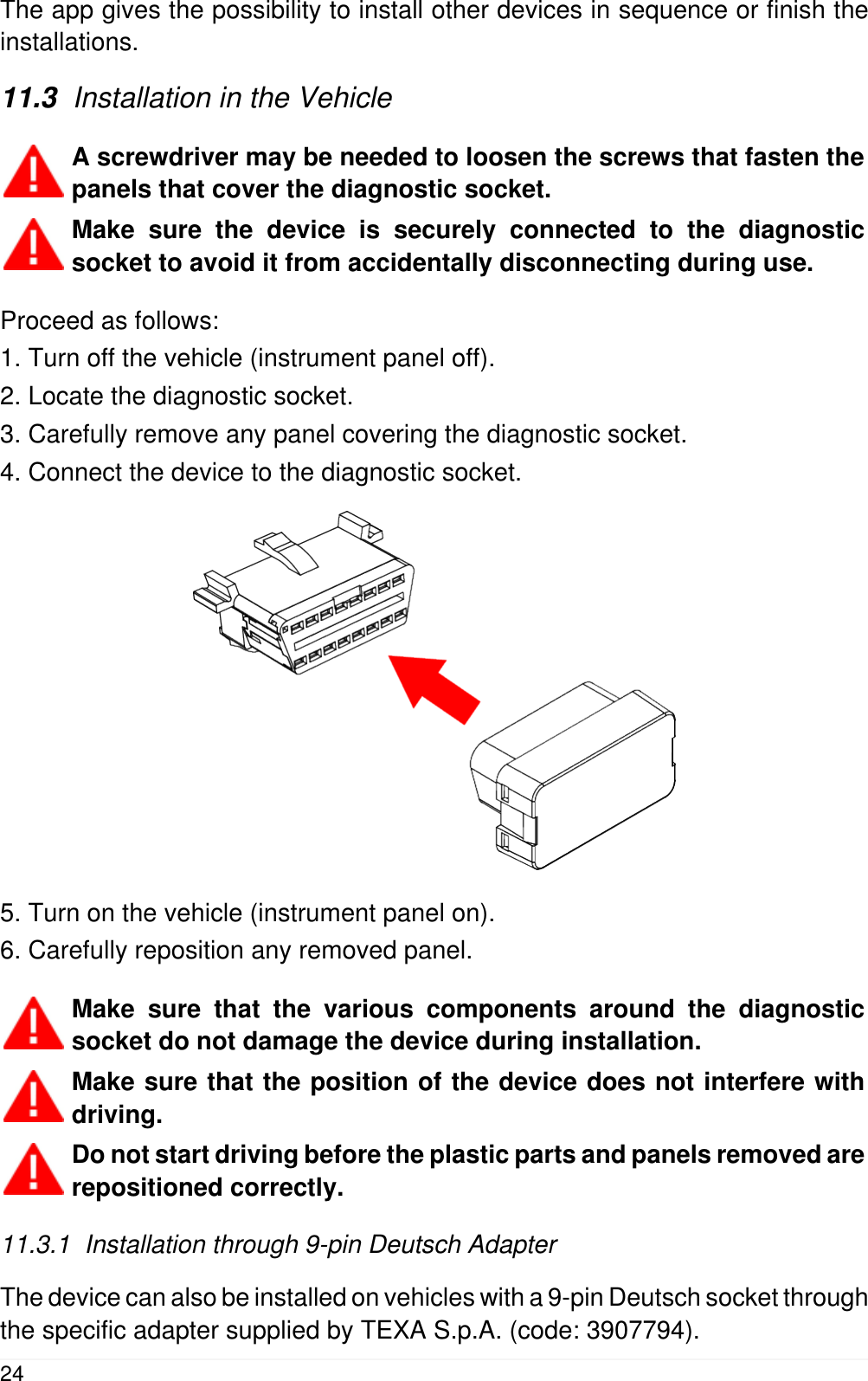
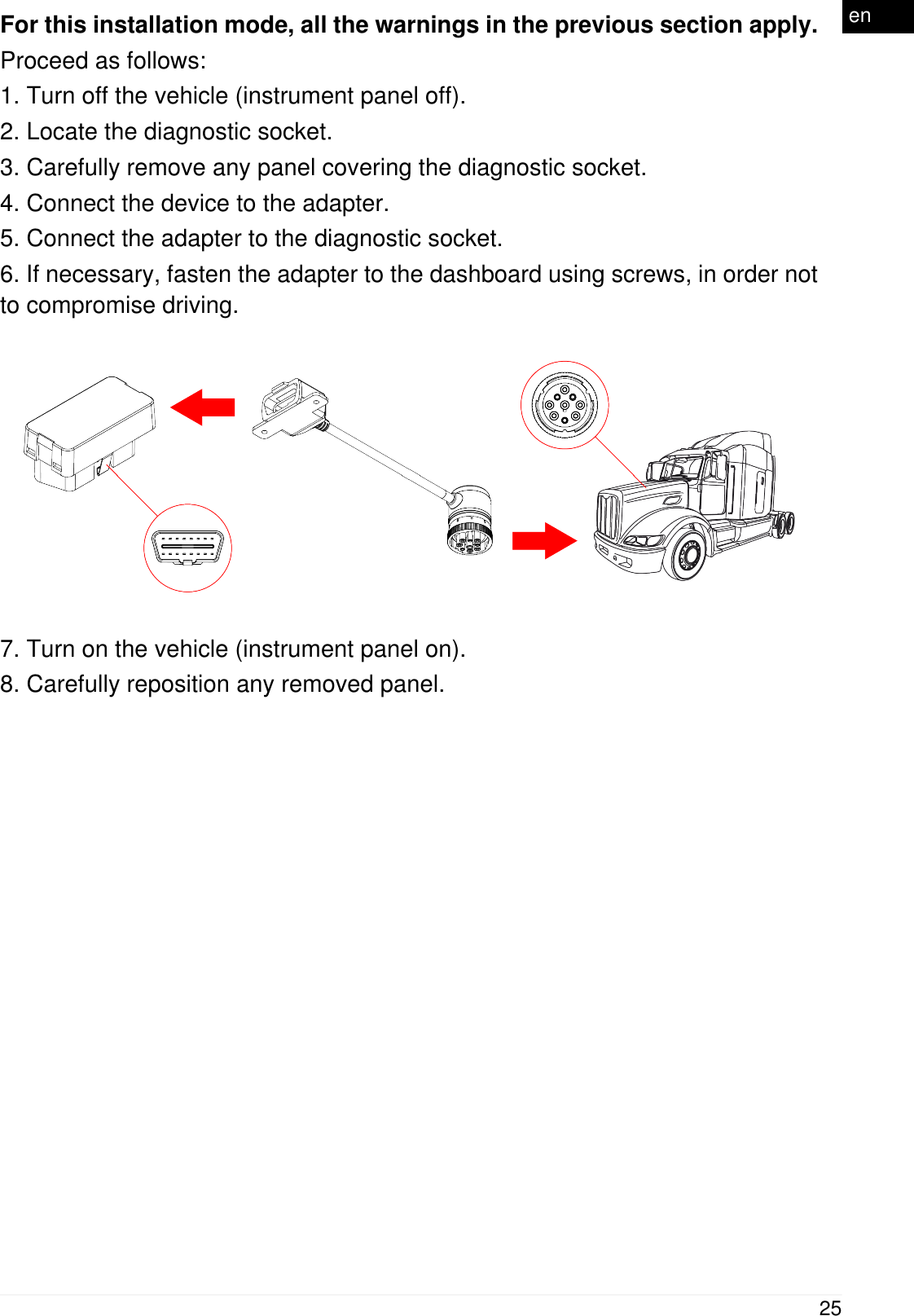
The app gives the possibility to install other devices in sequence or finish theinstallations.11.3  Installation in the VehicleA screwdriver may be needed to loosen the screws that fasten thepanels that cover the diagnostic socket.Make sure the device is securely connected to the diagnosticsocket to avoid it from accidentally disconnecting during use.Proceed as follows:1. Turn off the vehicle (instrument panel off).2. Locate the diagnostic socket.3. Carefully remove any panel covering the diagnostic socket.4. Connect the device to the diagnostic socket.5. Turn on the vehicle (instrument panel on).6. Carefully reposition any removed panel.Make sure that the various components around the diagnosticsocket do not damage the device during installation.Make sure that the position of the device does not interfere withdriving.Do not start driving before the plastic parts and panels removed arerepositioned correctly.11.3.1  Installation through 9-pin Deutsch AdapterThe device can also be installed on vehicles with a 9-pin Deutsch socket throughthe specific adapter supplied by TEXA S.p.A. (code: 3907794).24
For this installation mode, all the warnings in the previous section apply.Proceed as follows:1. Turn off the vehicle (instrument panel off).2. Locate the diagnostic socket.3. Carefully remove any panel covering the diagnostic socket.4. Connect the device to the adapter.5. Connect the adapter to the diagnostic socket.6. If necessary, fasten the adapter to the dashboard using screws, in order notto compromise driving.7. Turn on the vehicle (instrument panel on).8. Carefully reposition any removed panel.25en
12  eTRUCK INSTALLATION KIT FOR VOLVO EURO IV-V(ACCESSORY)The industrial vehicles of the Swedish manufacturer Volvo Truck, with approvalclass Euro IV and Euro V, were created in different configurations, many ofwhich have two diagnostic sockets.One is the EOBD connection, the other is the Volvo Truck proprietary diagnosticsocket (Texa ref.: connection cable 3151 / T11B).In order to use the eTRUCK device to its fullest potential, the electrical wiringneeds to be modified in this series of vehicles.This is because the installed EOBD diagnostic socket does not allow analysingall the values, but only the parameters of the EOBD standard protocol.The modification does not require special technical skills, and the installationkit contains the material and information that are needed to carry out themodification.However, the work should be performed by technical personnel with all thenecessary knowledge to perform it properly.Following is a step-by-step description of the procedure operations,accompanied by explanatory images.NOTES:This technical information sheet is ONLY for the vehicles with the two diagnosticsockets.The vehicles with only the EOBD socket are already 100% compatible with theeTRUCK device.26
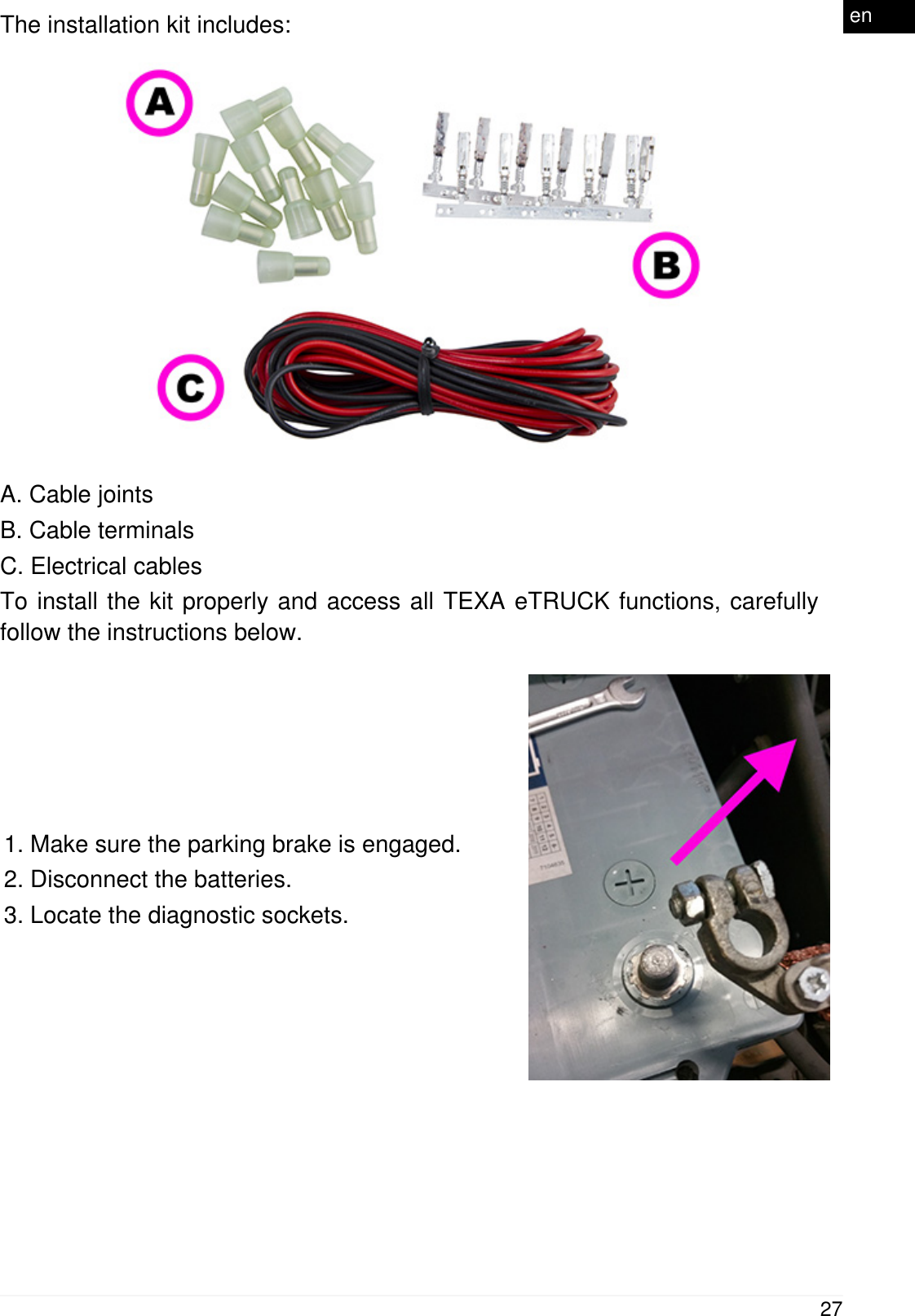
The installation kit includes:A. Cable jointsB. Cable terminalsC. Electrical cablesTo install the kit properly and access all TEXA eTRUCK functions, carefullyfollow the instructions below.1. Make sure the parking brake is engaged.2. Disconnect the batteries.3. Locate the diagnostic sockets.27en
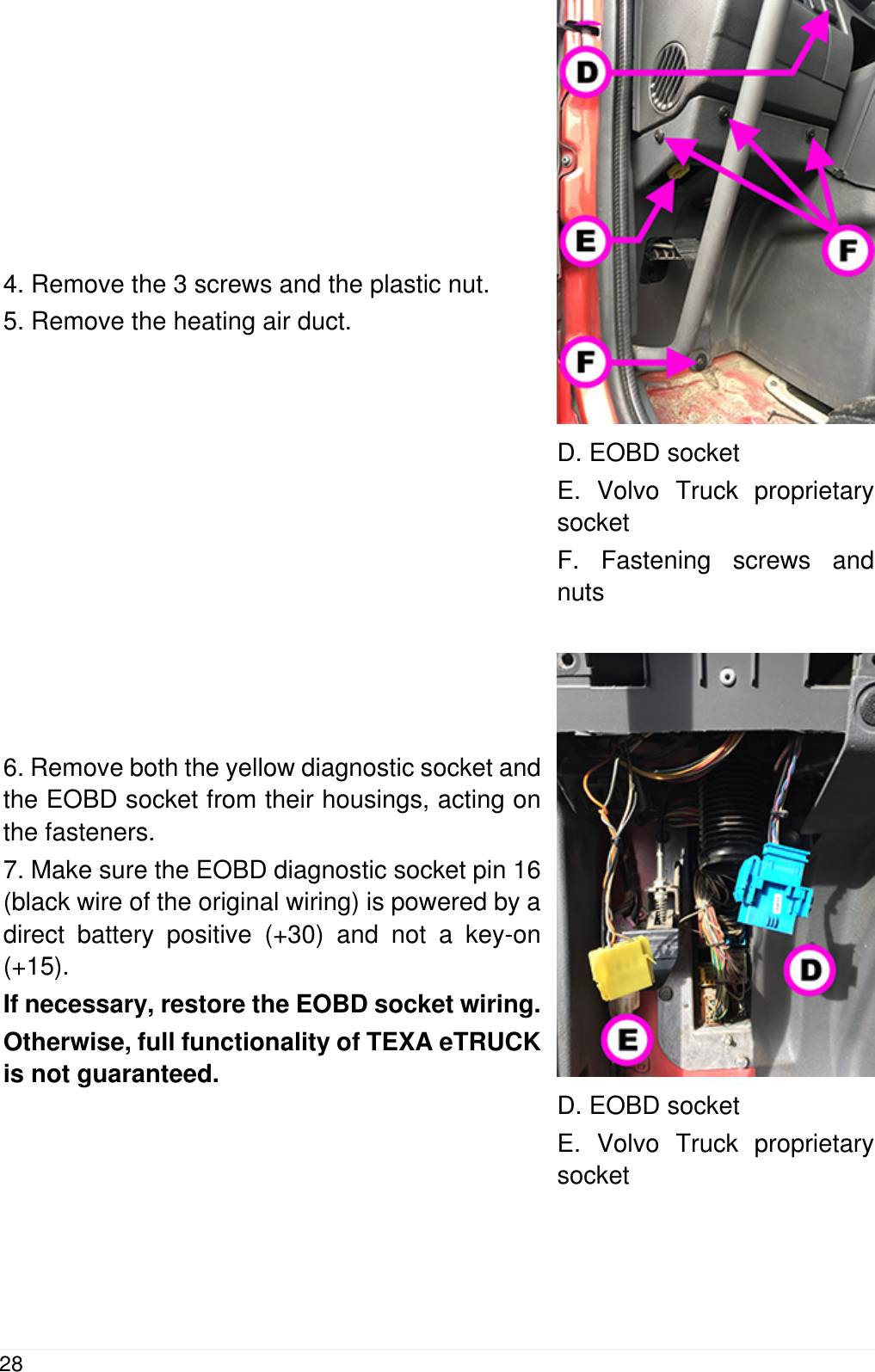
4. Remove the 3 screws and the plastic nut.5. Remove the heating air duct.D. EOBD socketE. Volvo Truck proprietarysocketF. Fastening screws andnuts6. Remove both the yellow diagnostic socket andthe EOBD socket from their housings, acting onthe fasteners.7. Make sure the EOBD diagnostic socket pin 16(black wire of the original wiring) is powered by adirect battery positive (+30) and not a key-on(+15).If necessary, restore the EOBD socket wiring.Otherwise, full functionality of TEXA eTRUCKis not guaranteed.D. EOBD socketE. Volvo Truck proprietarysocket28
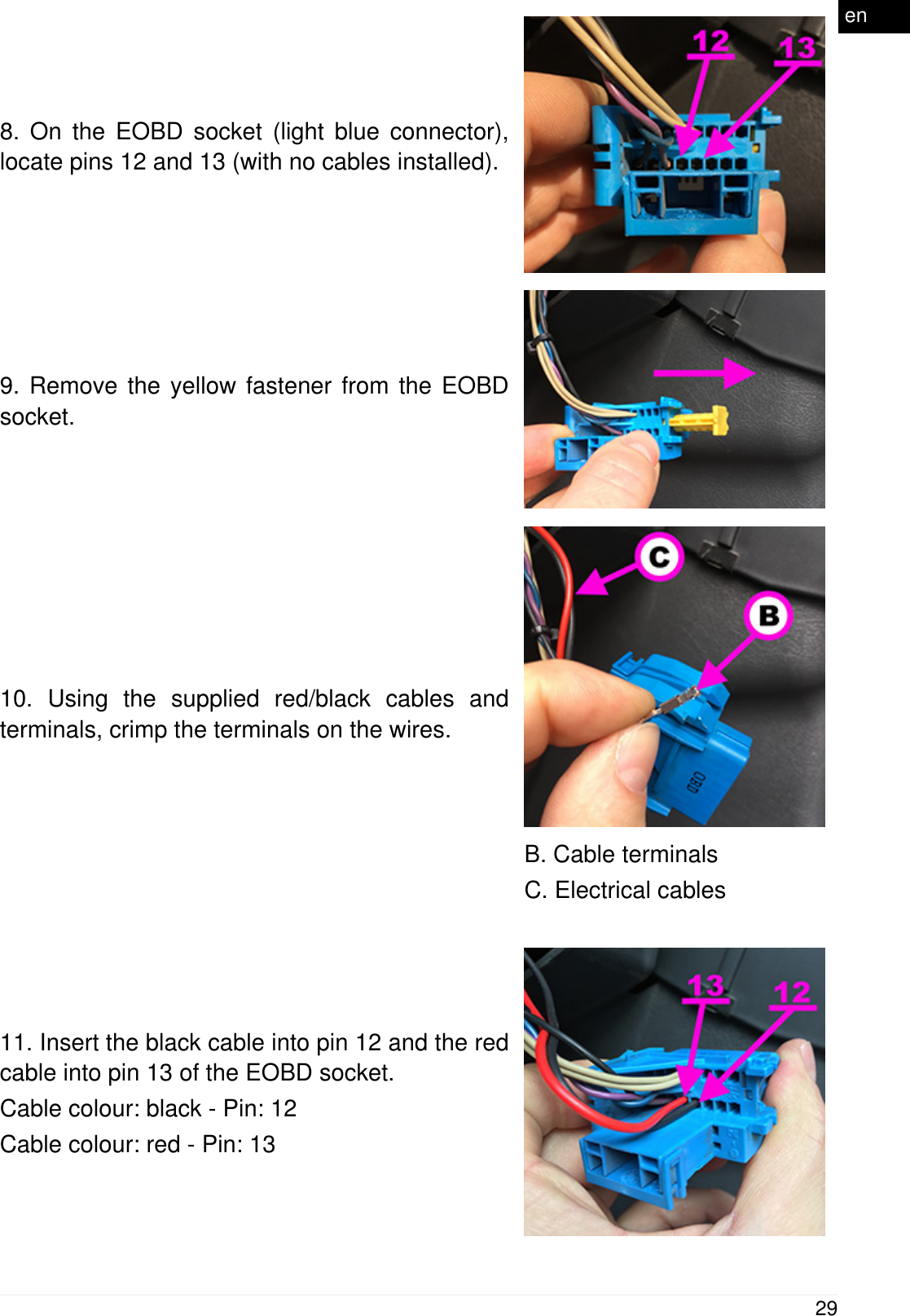
8. On the EOBD socket (light blue connector),locate pins 12 and 13 (with no cables installed).9. Remove the yellow fastener from the EOBDsocket.10. Using the supplied red/black cables andterminals, crimp the terminals on the wires.B. Cable terminalsC. Electrical cables11. Insert the black cable into pin 12 and the redcable into pin 13 of the EOBD socket.Cable colour: black - Pin: 12Cable colour: red - Pin: 1329en
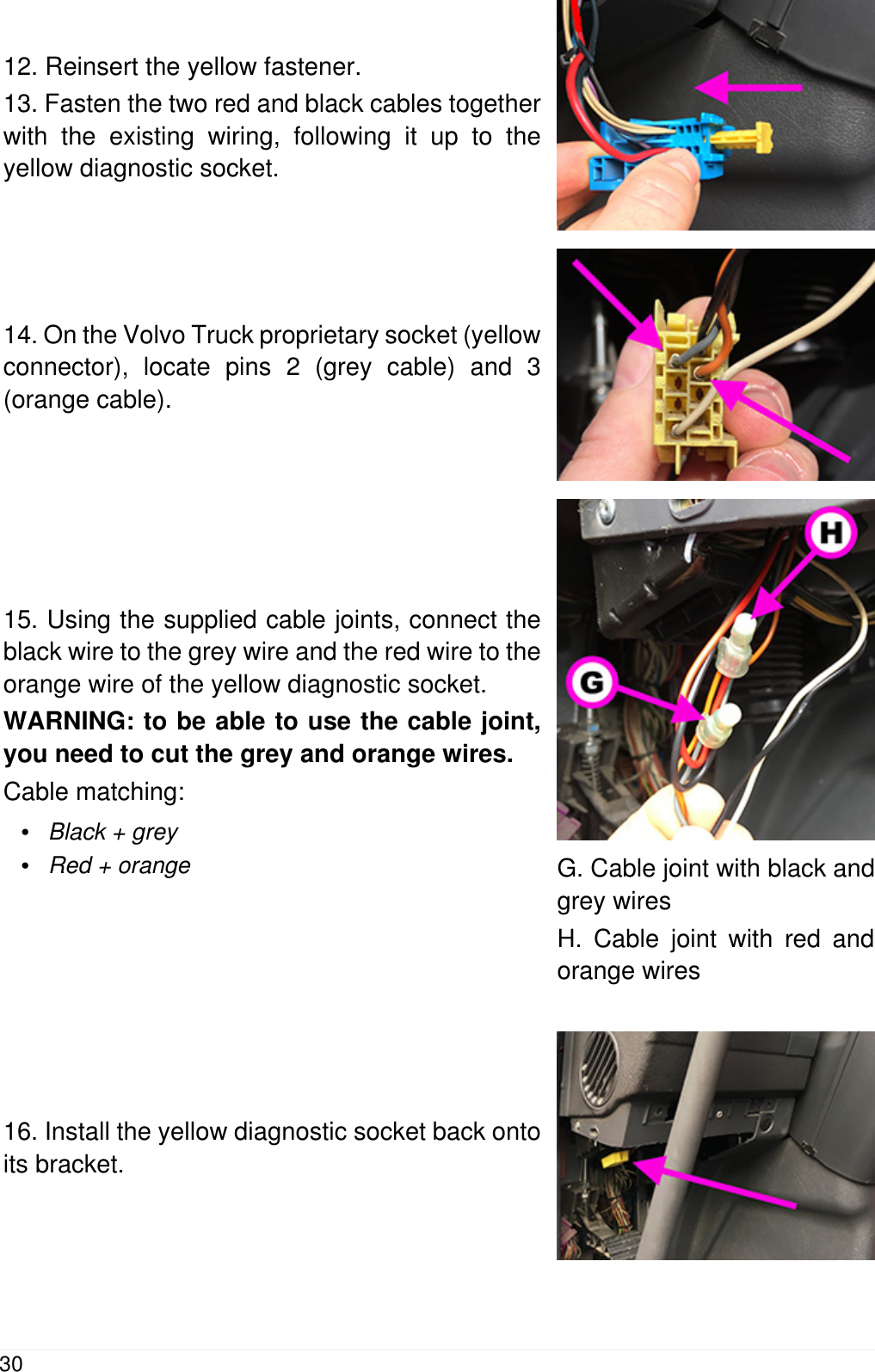
12. Reinsert the yellow fastener.13. Fasten the two red and black cables togetherwith the existing wiring, following it up to theyellow diagnostic socket.14. On the Volvo Truck proprietary socket (yellowconnector), locate pins 2 (grey cable) and 3(orange cable).15. Using the supplied cable joints, connect theblack wire to the grey wire and the red wire to theorange wire of the yellow diagnostic socket.WARNING: to be able to use the cable joint,you need to cut the grey and orange wires.Cable matching:•Black + grey•Red + orange G. Cable joint with black andgrey wiresH. Cable joint with red andorange wires16. Install the yellow diagnostic socket back ontoits bracket.30
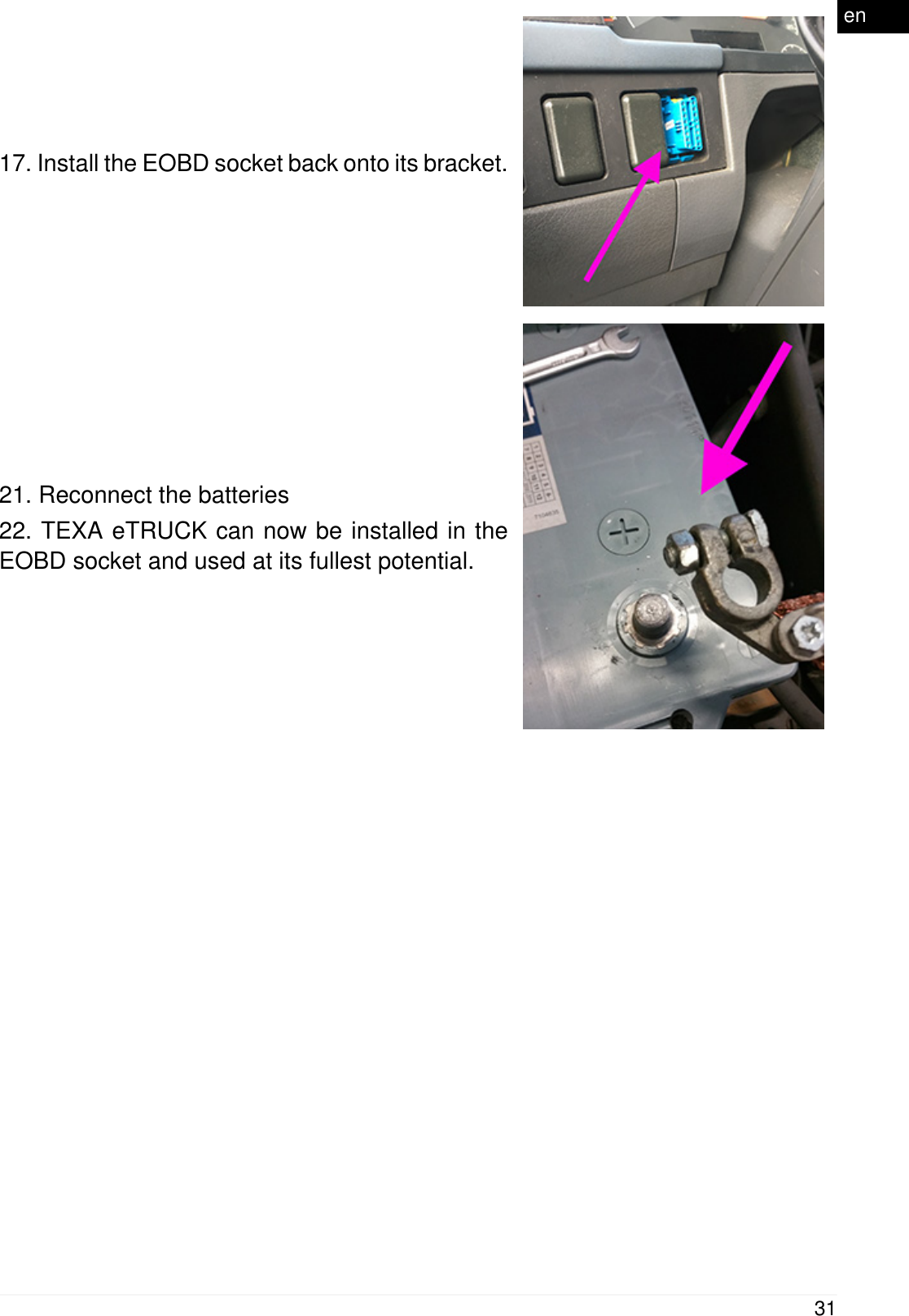
17. Install the EOBD socket back onto its bracket.21. Reconnect the batteries22. TEXA eTRUCK can now be installed in theEOBD socket and used at its fullest potential.31en
13  USENo further action must be carried out after installing and configuring the device.Any interaction occurs through the smartphone.The device activates as soon as the vehicle's instrument panel is turned on andit connects automatically to the smartphone if it is within the operating range ofthe device's Bluetooth antenna.  While driving, do not get distracted to check the status of the deviceor to interact with it either directly or through the smartphone.For further help, contact your Retailer or send a request for assistancethrough the function TEXA iSupport - eTRUCK.14  POWER SUPPLYThe device draws its power supply directly from the battery of the vehicle it isconnected to through the diagnostic socket.The vehicle's diagnostic socket is always powered, even when the engine andinstrument panel are off.The absorption never affects the battery's charge, however you shoulddisconnect the device from the vehicle's diagnostic socket if the vehicleis not used for a long period of time.32
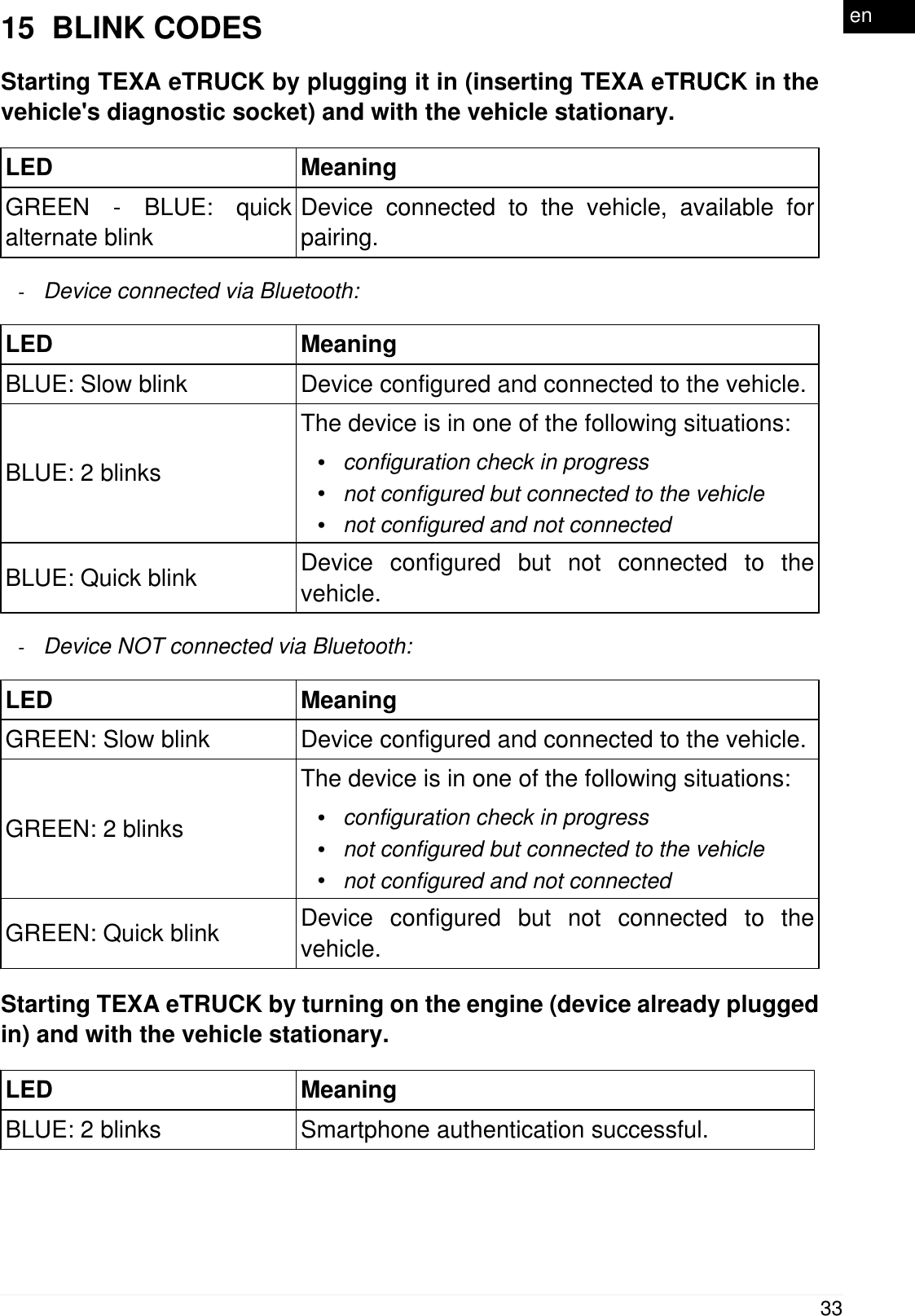
15  BLINK CODESStarting TEXA eTRUCK by plugging it in (inserting TEXA eTRUCK in thevehicle's diagnostic socket) and with the vehicle stationary.LED MeaningGREEN - BLUE: quickalternate blinkDevice connected to the vehicle, available forpairing.-Device connected via Bluetooth:LED MeaningBLUE: Slow blink Device configured and connected to the vehicle.BLUE: 2 blinksThe device is in one of the following situations:•configuration check in progress•not configured but connected to the vehicle•not configured and not connectedBLUE: Quick blink Device configured but not connected to thevehicle.-Device NOT connected via Bluetooth:LED MeaningGREEN: Slow blink Device configured and connected to the vehicle.GREEN: 2 blinksThe device is in one of the following situations:•configuration check in progress•not configured but connected to the vehicle•not configured and not connectedGREEN: Quick blink Device configured but not connected to thevehicle.Starting TEXA eTRUCK by turning on the engine (device already pluggedin) and with the vehicle stationary.LED MeaningBLUE: 2 blinks Smartphone authentication successful.33en
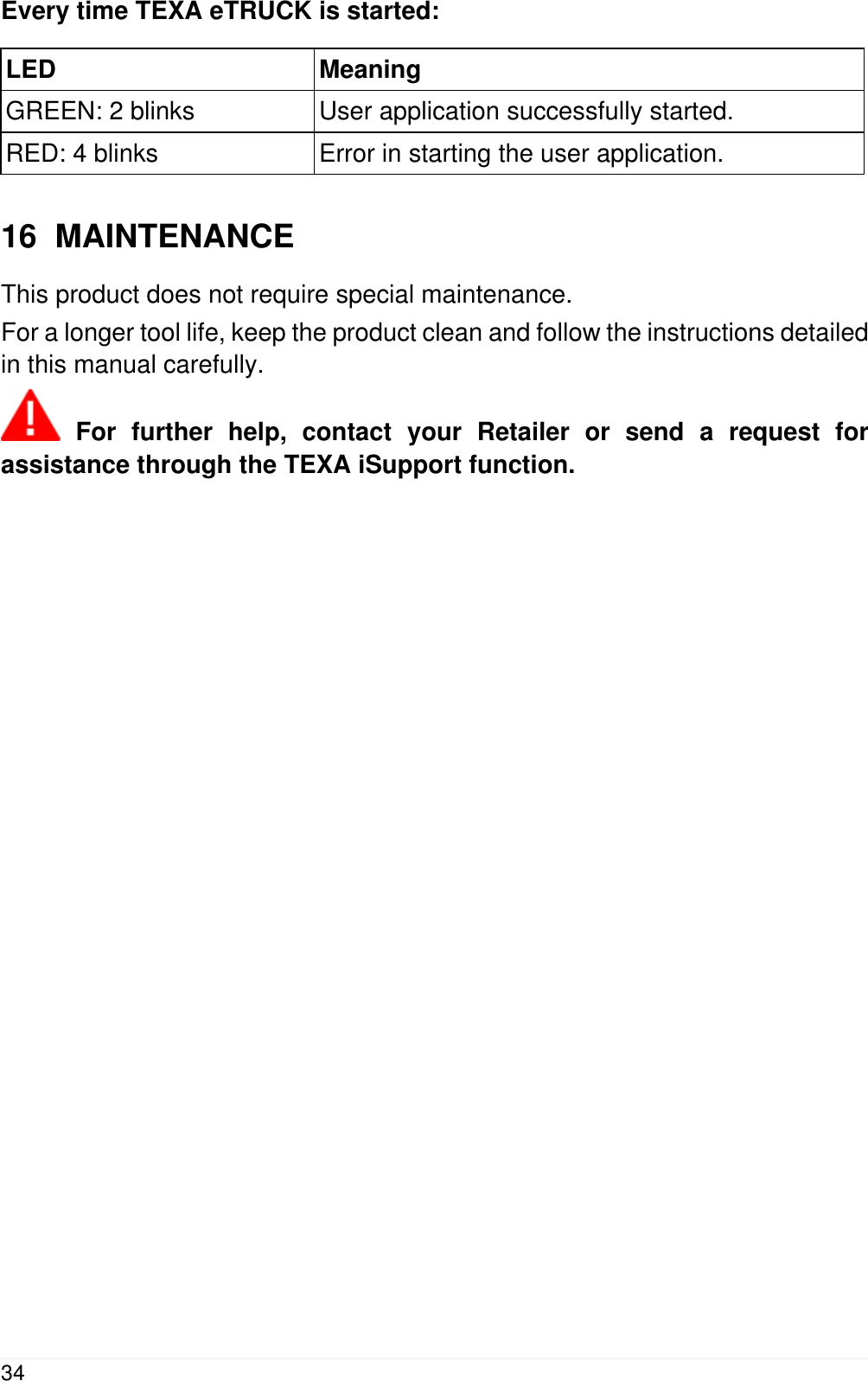
Every time TEXA eTRUCK is started:LED MeaningGREEN: 2 blinks User application successfully started.RED: 4 blinks Error in starting the user application.16  MAINTENANCEThis product does not require special maintenance.For a longer tool life, keep the product clean and follow the instructions detailedin this manual carefully. For further help, contact your Retailer or send a request forassistance through the TEXA iSupport function.34
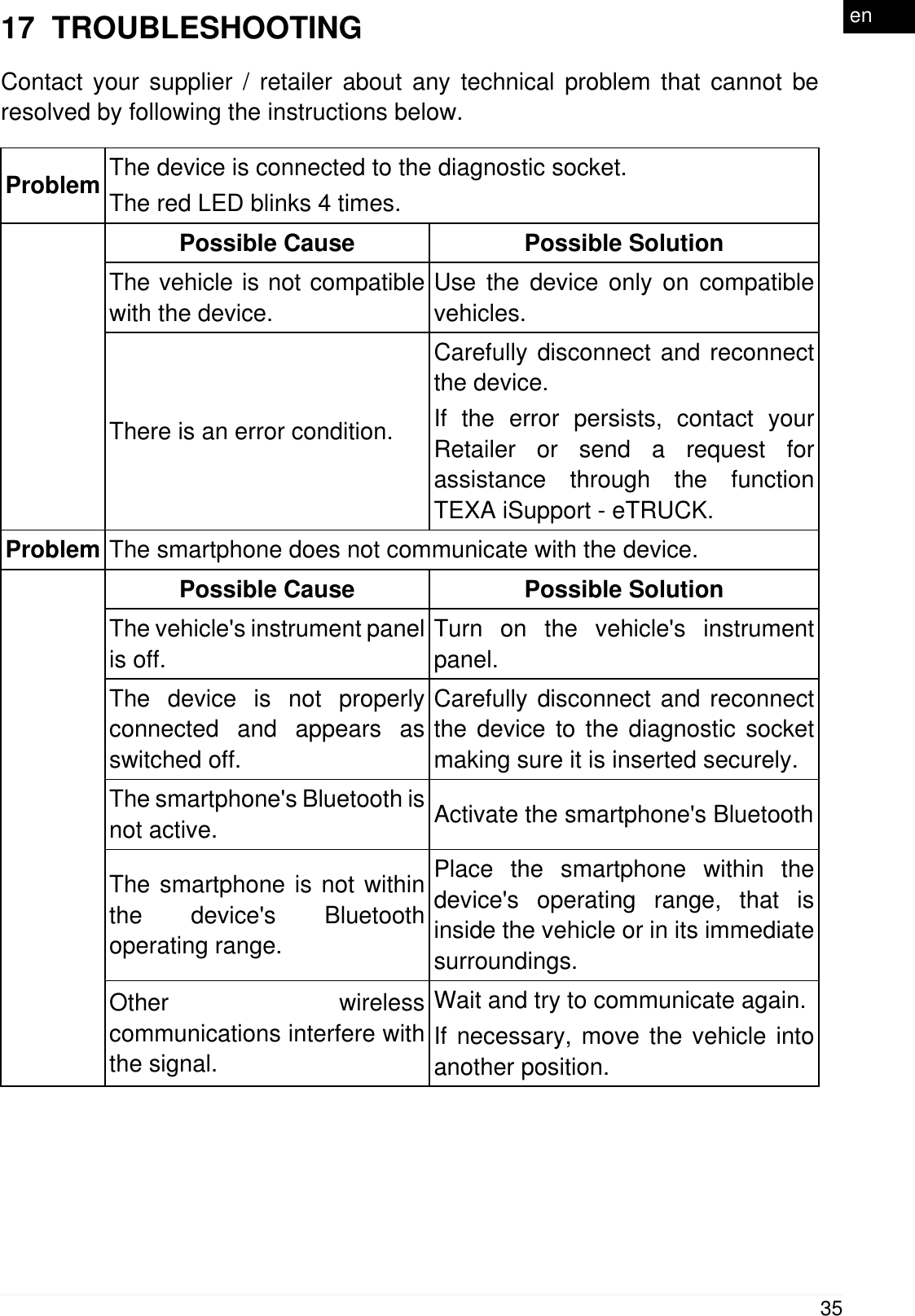
17  TROUBLESHOOTINGContact your supplier / retailer about any technical problem that cannot beresolved by following the instructions below.Problem The device is connected to the diagnostic socket.The red LED blinks 4 times.Possible Cause Possible SolutionThe vehicle is not compatiblewith the device.Use the device only on compatiblevehicles.There is an error condition.Carefully disconnect and reconnectthe device.If the error persists, contact yourRetailer or send a request forassistance through the functionTEXA iSupport - eTRUCK.Problem The smartphone does not communicate with the device.Possible Cause Possible SolutionThe vehicle's instrument panelis off.Turn on the vehicle's instrumentpanel.The device is not properlyconnected and appears asswitched off.Carefully disconnect and reconnectthe device to the diagnostic socketmaking sure it is inserted securely.The smartphone's Bluetooth isnot active. Activate the smartphone's BluetoothThe smartphone is not withinthe device's Bluetoothoperating range.Place the smartphone within thedevice's operating range, that isinside the vehicle or in its immediatesurroundings.Other wirelesscommunications interfere withthe signal.Wait and try to communicate again.If necessary, move the vehicle intoanother position.35en
18  LEGAL NOTICESTEXA S.p.A.Via 1 Maggio, 9 - 31050 Monastier di Treviso - ITALYTax Code - Company Register of Treviso ID No. - VAT No.: 02413550266Single-shareholder company subject to the direction and coordination activitiesof Opera Holding S.r.l.Paid-up share capital 1,000,000 € - R.E.A. (Economic Administrative Index) No.208102Legal Representative Bruno VianelloPhone +39 0422.791.311Fax +39 0422.791.300www.texa.comFor information regarding the legal notices, please refer to the InternationalWarranty Booklet provided with the product.36

Navigation menu