Texa S p A NWTX VEHICLE DIAGNOSTIC SYSTEM User Manual 3900698 MT NAVIGATOR TXT USA 00

Texa S.p.A. VEHICLE DIAGNOSTIC SYSTEM 3900698 MT NAVIGATOR TXT USA 00

Contents

User Manual I

MT_NAVIGATOR_TXT_EN_00  Texa S.p.a.    1/ 22 Introduction.................................................................................................. 2 General Rules for the Operator's Safety.................................................... 5 Functioning of the Equipment Radio Devices........................................... 9 Warning...................................................................................................... 10 Information about Regulations................................................................. 13 Environmental Information (European Union)......................................... 14 For a Correct Use of NAVIGATOR TXT .................................................... 15 1 DESCRIPTION OF NAVIGATOR TXT ................................................. 16 1.1 Tool Overview ................................................................................. 17 2 HOW TO SUPPLY NAVIGATOR TXT.................................................. 18 2.1 Supply Through the Diagnostic Port ................................................ 18 2.2 Supply Through Battery Auxiliary Cable .......................................... 18 2.2.1 Battery Cable............................................................................. 18 2.2.2 Cigar Lighter Cable.................................................................... 19 3 HOW TO CONNECT TO THE VEHICLE.............................................. 20 4 CONNECTION TO THE DISPLAY UNIT (Communication Type)....... 21 4.1 Bluetooth Communication................................................................ 21 4.2 USB Communication ....................................................................... 21 5 TECHNICAL FEATURES OF TXT....................................................... 22 5.1 Supported Communication Protocols............................................... 22
MT_NAVIGATOR_TXT_EN_00  Texa S.p.a.    2/ 22  Introduction  Dear Mechanic,  We would like to thank you for choosing our tool for your garage. We are sure that you will obtain the greatest satisfaction and a significant help from it in your work. Please read carefully the instructions included in this operation manual, and keep it in a safe, handy place for future reference.  The data, features and descriptions included in this manual are provided for indication  only  with  reference  to  a  certain  software  version;  they  do  not commit  the  manufacturer  who  reserves  the  right  to  make,  at  any  time  and without notice, all the changes considered useful to improve the product or to meet any technical or commercial need. Supplements to this manual, useful to describe new versions of the program and related new  functions, may be also provided through TEXA S.p.A. technical newsletters.   No  parts  of  this  manual  may  be  reproduced  in  any  form  or  by  any means without the prior permission in writing of the manufacturer.                         © Copyright and Database Rights 2007. The material included in  this manual is protected by copyright and database rights. All rights reserved under national and international law.
MT_NAVIGATOR_TXT_EN_00  Texa S.p.a.    3/ 22 This  manual  illustrates  and  describes  both  standard  and  optional  features. Therefore, the tool you purchase might not feature some of the functions or components described herein.  This  manual  should  be  considered  as  part  of  the  tool  it  refers  to.  If  you transfer the tool to a third party, please include the manual as well.  Reading  and  understanding  this  manual  may  help  to  prevent  damage  to things and injuries to people deriving from the incorrect operation of the tool it refers to,  but cannot replace the competence  and  skills of the professional profile this tool was designed for.    The content of this manual may undergo changes without notice and should be  considered  guide  lines.  Therefore,  the  information  provided  could  be incomplete.   Texa S.p.A. is not liable of any damage or injuries deriving  from operations carried  out  on  the  basis  of  possibly  incorrect  or  inaccurate  information included in this manual.    No  parts  of  this  manual  may  be  reproduced  in  any  form  or  by  any means without the prior permission in writing by the manufacturer.
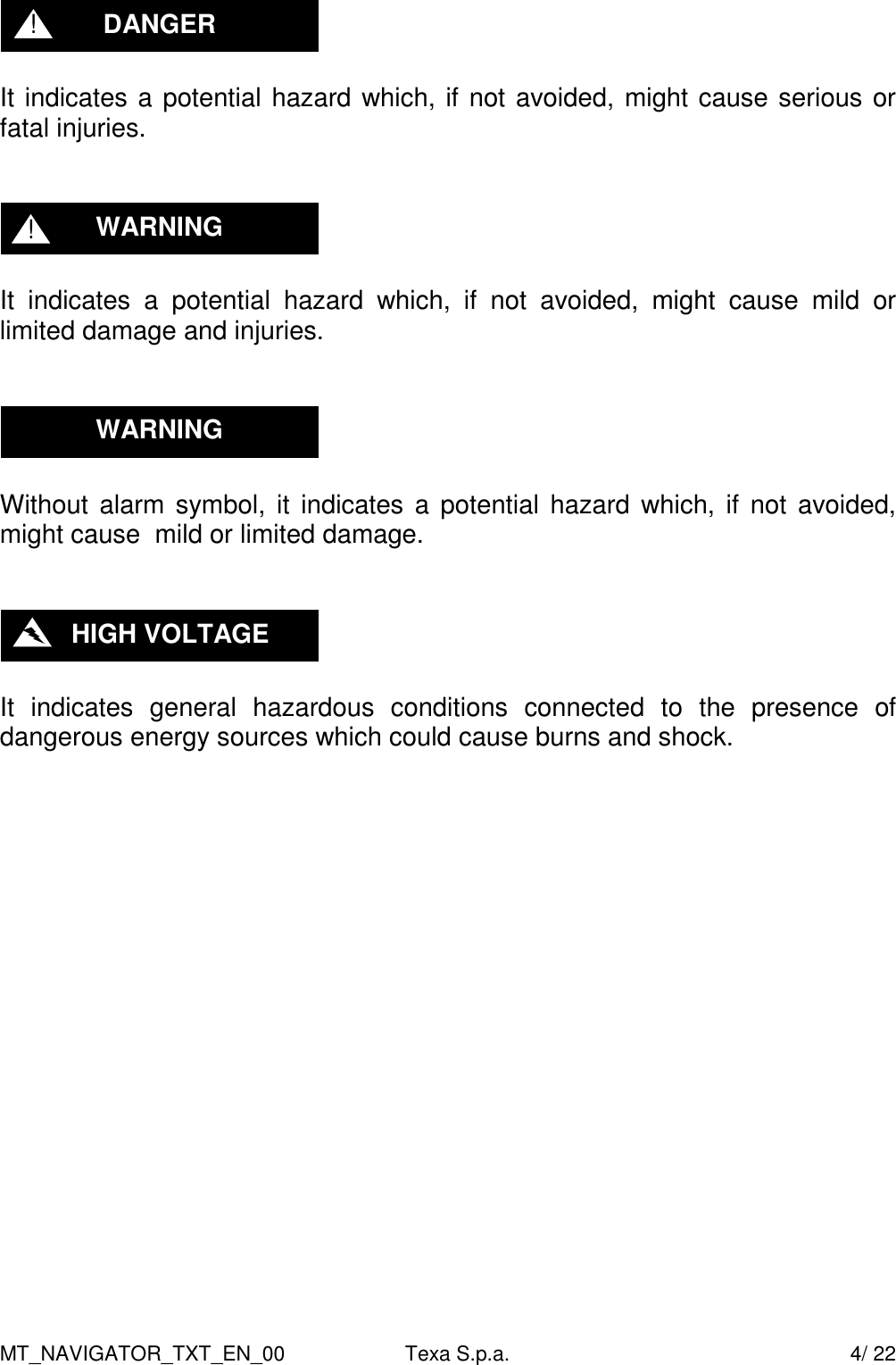
MT_NAVIGATOR_TXT_EN_00  Texa S.p.a.    4/ 22   It indicates a potential hazard which, if not avoided, might cause serious or fatal injuries.     It  indicates  a  potential  hazard  which,  if  not  avoided,  might  cause  mild  or limited damage and injuries.      Without  alarm symbol,  it  indicates a  potential  hazard which, if  not  avoided, might cause  mild or limited damage.     It  indicates  general  hazardous  conditions  connected  to  the  presence  of dangerous energy sources which could cause burns and shock.                       HIGH VOLTAGE WARNING WARNING ! DANGER !
MT_NAVIGATOR_TXT_EN_00  Texa S.p.a.    5/ 22 General Rules for the Operator's Safety  This  product  was  designed  and  developed  to  be  used  by  specializing technical  personnel  in  the  field  of  automotive,  such  as  electricians, mechanics, technicians and engineers specializing in automotive. Never allow this  equipment  to  be  used  by  unqualified  personnel  in  order  to  prevent personal injuries and damage to  the tool or to the  electronic system of the vehicle the tool is connected to. The workplace shall be dry, with sufficient light and proper air circulation. In particular, the diagnostic operations requiring to start the engine shall be carried out in facilities equipped with exhaust gas system. We  remind  you  that  inhaling  carbon  monoxide  (which  is  odourless)  may cause serious body injuries.   1.  Unless otherwise specified in the technical characteristics of the devices which can be used, the solution may only be used on vehicles featuring 12 / 24 Volt DC supply and frame connected to the negative pole.   2.  Do not place the interfaces possibly used to connect NAVIGATOR TXT to the vehicle over the airbag or next to an airbag in its expansion area. Airbags  tend  to  deploy  with  great  force.  If  placed  within  the  airbag deployment area and the airbag deploys, the unit might be thrown away violently causing serious injuries to the people in the vehicle.   3.  Place the unit so to guarantee proper ventilation. Do not place the unit close to heat sources or high temperature surfaces and/or components.   4.  The  electromagnetic  compatibility  tests  performed  on  the  product guarantee that it  is compatible with the technologies normally  used on the  vehicles  (e.g.,  engine  control,  ABS,  airbags,  air  conditioner, navigator, radio,  Hi-Fi system) however, should any failure occur, it will be necessary to contact the vehicle's dealer.   5.  Do  not  wet  NAVIGATOR  TXT,  as  rain,  moisture,  and  any  liquids  or condensation might damage its electronic circuits. WARNING WARNING WARNING DANGER ! DANGER !
MT_NAVIGATOR_TXT_EN_00  Texa S.p.a.    6/ 22  6.  Do not open the NAVIGATOR TXT device. Any operations carried out by unqualified personnel might damage the device itself.   7.  Do not drop, hit or shake the unit, as this might damage irreparably its internal circuits. Do not use corrosive chemicals, solvents or aggressive detergents to use NAVIGATOR TXT.  WARNING WARNING
MT_NAVIGATOR_TXT_EN_00  Texa S.p.a.    7/ 22 Work Environment   The workplace shall be dry, with sufficient light and proper air circulation. In particular, the diagnostic operations required to start the engine shall be carried out in facilities equipped with exhaust gas system. We  remind  you  that  inhaling  carbon  monoxide  (which  is  odourless)  may cause serious body injuries.   When  operating  on  engines  or  other  parts  of  vehicles  remember  the following:   -  Wear suitable clothing and keep a behaviour fit to prevent accidents. -  Before starting, make sure that the vehicle's gearbox is placed in neutral (or  parking,  in  case  of  automatic  transmission);  engage  the  safety  or parking  brake  of  the  vehicle  to  be  examined,  and  make  sure  that  the vehicle's wheels are blocked. -  Protect your face, hands and feet, and avoid contact with hot surfaces, such  as  spark  plugs,  exhaust  pipes,  radiators,  cooling  system  pipe fittings. -  Do not smoke and do not light flames when working on the vehicle. -  Make sure that all electrical connections are insulated and tight. -  Do not stare into the intake pipe of the carburettor from a close distance when the engine is running. -  Keep hands and hair away from parts in motion.  -  Never wear ties, loose clothing, bracelets and watches when working on a vehicle, especially when the engine is running. -  Keep  away  from  the  fan.  The  cooling  fan  is  controlled  by  a  thermal circuit-breaker  depending  on  the  coolant  temperature:  therefore,please disconnect the fan cable every time you work on a still hot engine , in order to avoid that the fan starts suddenly even if the engine is stopped. -  Do not pour fuel directly into the carburettor to facilitate the engine start-up. -  Do not unscrew the radiator's cap before the   engine temperature has decreased together with the cooling system pressure. -  Do not touch high voltage wiring when the engine is running. -  Handle  with  care  portable  lamps  and  use  only  those  with  metal protection. -  Wear safety goggles to protect your eyes from gasoline, dust and metals. DANGER ! DANGER !
MT_NAVIGATOR_TXT_EN_00  Texa S.p.a.    8/ 22 -  It  is  necessary  to  remember  that  the  catalytic  converter  reaches  an extremely high temperature, able to cause serious burns and start a fire.  Therefore,  pay  attention  that  no  oil  drippings,  rags,  paper  or  other inflammable materials are close to the catalytic converter.  When you work on the batteries, it is necessary to remember that:   Car batteries contain sulphuric acid, and produce explosive gas. Therefore, it is necessary to heed the following instructions:  -  Always wear protective goggles. -  Never  place  tools  on  the  battery  as  they  might  create  accidental contacts. -  Before testing or recharging the battery, cover its openings  with  a wet cloth, so as to prevent explosive gas from leaking. -  Avoid sparkling when connecting the cables to the battery. -  Avoid the electrolythe to get in contact with your skin, eyes and clothing, as it is a corrosive, very toxic compound.  When operating with equipment supplied from line voltage     -  Make sure the unit is earthed. -  Cut off the supply voltage before connecting and disconnecting cables. -  Avoid contact with wet hands. -  Work in a condition of insulation from the earth.  Functioning of the Equipment Radio Devices    Place  the  unit  so  as  to  ensure  the  correct  operation  of  the  radio  devices contained in it. In particular, do not cover it with shielding materials or metal in general,  and  do  not  place  it  inside  the  trunk,  engine  bay  or  glove compartment; if you place it inside the passenger compartment, make sure that the vehicle's windows are not shielded.       WARNING    HIGH VOLTAGE DANGER ! DANGER !
MT_NAVIGATOR_TXT_EN_00  Texa S.p.a.    9/ 22 Functioning of the Equipment Radio Devices                 Wireless connection with Bluetooth technology, Wi-Fi and GPRS  The  Wireless  connection  with  Bluetooth  technology,  Wi-Fi  and  GPRS,  is  a technology providing a standard and safe method to exchange data between different devices using radio wave. Besides Texa's tools, other products use this  technology,  such  as:  mobile  phones,  portable  phones,  computers, printers, cameras, pocket PC's, etc.  The Bluetooth, Wi-Fi and GPRS interfaces search for compatible electronic devices  on  the  basis  of  the  radio  signal  they  generate    establishing  a connection between them. Texa's tools make a selection only proposing the Texa  compatible  devices.  This  does  not  exclude  the  possibility  of  other communication or interference sources.   THE EFFECTIVENESS AND QUALITY OF BLUETOOTH, WIFI AND GPRS COMMUNICATION  CAN  BE  EFFECTED  BY  SOURCES  OF  RADIO INTERFERENCE. THE COMMUNICATION PROTOCOL INCLUDES ERROR MANAGEMENT,  BUT  MIGHT  ENCOUNTER  COMMUNICATION PROBLEMS  SOMETIMES  MAKING  IT  NECESSARY  TO  ATTEMPT  NEW CONNECTIONS.  IF  WIRELESS COMMUNICATION PROVES DIFFICULT  TO THE EXTENT THAT REGULAR OPERATION IS COMPROMISED, IT IS NECESSARY TO IDENTIFY  THE  SOURCE  OF  THE  ENVIRONMENTAL ELECTROMAGNETIC INTERFERENCE AND REDUCE ITS INTENSITY.   Place  the  unit so  as  to  ensure  the  correct  functioning of  the  radio  devices contained in it. In particular, do not cover it with shielding materials or metal in general.      WARNING
MT_NAVIGATOR_TXT_EN_00  Texa S.p.a.    10/ 22 Warning  Use  of  Texa  Software  for  Pocket  PC  is  subject  to  the  acceptance  of  the following conditions:          1. Liability  The customer is responsible of the use of any tool and software application provided by TEXA S.p.A. and sold by the dealer. The  customer  accepts  to  idemnify  and  hold  harmless TEXA  S.p.A.  and  its  dealer,  against any liability and damage deriving from the improper use of products, software and information contained in them, and TEXA's services and products sold by the dealer  and purchased by the customer, and from their use not complying with all the instructions, sequences and operational steps indicated in the programs and user's manual.  The customer shall use all the data and information however obtained from TEXA  S.p.A.  or  from  the  dealer,  directly  or  through  programs  and  user's manuals, being aware that these might be incomplete and that they need to be always used to integrate one's own professional knowledge. The customer is also aware of the necessity to update the product to guarantee its constant adjustment to the ever-developing market needs.    2. Software License  TEXA  S.p.A.  grants  the  customer  the  use  of  the  software  included  in  the purchased products on the basis of a non-exclusive license agreement and for the sole purposes described in this user's manual. For the purpose of the license agreement, "Software" indicates the program included  in  the  product  and  "License"  the  right  to  use  or  access  to  a determined copy of the specific software. The licensee shall keep the license agreement as  proof of the right  of use granted by the licensor, Texa S.p.A. If the licensee does not intend to accept the terms of the license agreement, he shall immediately return to the dealer the product including the software covered by the license, together with all the material and documents sent to him.  The software included in the products is intellectual property of TEXA S.p.A. and  its  suppliers.  The  software  architecture,  arrangement  and  code  are important trade secrets and confidential information owned by TEXA S.p.A. and its suppliers. The software is protected by national and international laws and regulations on copyright, as well as other laws and international treatises on intellectual property. For each purchased license, the customer may only use one copy of the software or of a previous version for the same operating system.  The customer may not:
MT_NAVIGATOR_TXT_EN_00  Texa S.p.a.    11/ 22 A)  Lease,  sub-license,  lend,  copy,  modify,  reproduce,  translate,  redesign, decompile, disassemble the licensed software and the information contained in it. B) Transmit by wire or over the air, or by any other means the software, in whole or part. C) Create works or derive other works, partly or entirely on the basis of the software or of the information contained in it, or on information associated to it. D) Use, reproduce, print or market the software and the information contained in it, in any forms, even not explicitly provided for by this agreement. The  Licence    Agreement  is  valid  for  the  entire  period  during  which  the software  is  used.  It  ends  upon  destroying  the  software  and  related documents. Furthermore, if the customer does not respect the terms of the agreement,  the  license  is  no  longer  deemed  valid.  At  the  end  of  use,  the customer accepts to destroy all the copies of the software - stored in memory cards,  CD-ROM/DVD,  HARD  DISK  or  any  other  storage  device  -  and  the related  documents.  The  rights  and  obbligation  included  in  the    Licence Agreement may not be transferred or delegated to third parties without prior permission in writing of TEXA S.p.A.  The customer installs and uses the software at one's own risk and in no event may TEXA S.p.A. be deemed liable for any loss or damage, including profit loss or other losses deriving from the use or inability to use the software, or from errors or defects in the software itself, even if caused by negligence, or from  using  the  software  in  association  with  any  other  program.  It  is  the customer's responsibility to  check  whether computer viruses  are  present  in the products in which the software is to be installed. TEXA S.p.A. does not accept  any  liability  for  any  losses,  damage  or  costs,  caused  by  computer viruses.  3. Warranty  SOFTWARE: Even though TEXA S.p.A. took all possible measures to ensure the accuracy of the information included or displayed by the software, it does not  guarantee that the software, nor any information contained therein and displayed,  meet  the  customer's  needs,  be  error-free,  feature  unlimited operation  or  that  the  defects,  possibly  existing  in  the  software,  can  be corrected. The data and material (in any forms) contained in the programs or in  the  files  the  programs  access  to,  come  from  different  sources,  among which we mention as an example: original material distributed by the different suppliers, and material supplied to Texa S.p.A. by companies specializing in the development of this type of information. In general, the  original material has anyhow been compiled for the purpose of publication in Europe and of use  on  vehicles  manufactured  according  to  European  specifications.  User should  always  be  aware  of  the  fact  that  in  non-European  countries  model
MT_NAVIGATOR_TXT_EN_00  Texa S.p.a.    12/ 22 names and descriptions as well are the relating specifications may differ from the ones listed and proposed in the programs and tools this manual refers to. The warranty does not cover problems possibly arising from software conflicts if  the  software  is  installed  on  hardware  platforms  other  than  those manufactured by Texa S.p.A.  (e.g., commercial personal computers, pocket PCs,  tablet  PCs).  As  instances  of  problems  which  are  not  covered  by  the warranty,  we mention the ones generated by: incompatibility between Texa programs and software environment whose requirements are not suitable or protected  by  anti-virus  systems  preventing  the  installation  and  regular operation of the programs; environments damaged by viruses, environments supported by inadequate hardware resources. PLACE  WHERE  THE  ASSISTANCE  COVERED  BY  THE  WARRANTY  IS PERFORMED: All repairs referring to the warranty, unless otherwise agreed in  writing,  shall  be  carried  out  at  TEXA  S.p.A.  or  at  the  assistance  center authorized by TEXA S.p.A. All expenses relating to shipping the product to be repair from the customer's premises to the assistence center and/or travelling costs  of  assistance  personnel  from  TEXA  S.p.A.  or  from  the  assistance center are payable by the customer. TRASPORT: The warranty does not cover damage deriving from transport or inadequate packaging carried out by the customers when returning products for repair. MAINTENANCE:  Prior  to    delivery  to  the  client,  the  product  was  carefully tested  by  TEXA  S.p.A.  and  by  the  dealer  (if  provided  for).  The  manual  supplied  with  the  product  includes  minimum maintenance  to  be performed, failing which entitlement to right to warranty services might lapse.
MT_NAVIGATOR_TXT_EN_00  Texa S.p.a.    13/ 22 Information about Regulations  Declaration of compliance   Texa S.p.A. hereby declares that this unit complies with the basic requirements  and  other  relevant  provisions  set  out  by  Directive 1999/5/EC.      A copy of the full-length Declaration of Conformity is available at  Texa S.p.A., Via 1 Maggio 9, 31050 Monastier di Treviso (TV), Italy   Antenna  This product was designed and tested for use with the antenna provided. In order to guarantee compliance with the aforementioned regulations, please only use the unit with the antenna provided or another antenna approved by Texa S.p.A.   FCC  Changes  or  modifications  not  expressly  approved  by  the  party  responsible  for compliance could void the user's authority to operate the equipment.
MT_NAVIGATOR_TXT_EN_00  Texa S.p.a.    14/ 22 Environmental Information (European Union)  This  product  contains  substances  which  could  be  hazardous  for  the environment and human health if not properly disposed of. We are therefore providing you with the following information to prevent such substances from being released and to improve the use of natural resources.  Electric  and  electronic  equipment  shall  not  be  disposed  of together  with  ordinary  urban  waste,  but  shall  be  taken  to separate collection facilities for correct treatment. The crossed out bin symbol displayed on the product and in this page reminds the user of the need to properly dispose of the product  at the end of its life-time. In  this  way,  it  will  be  possible  to  avoid  that  non  specific treatment of the substances contained in these products, or the  improper  use  of  their  parts,  lead  to  hazardous consequences for the environment and human health. Moreover, it is a way to  contribute  to  retrieve,  recycle  and  reuse  several  materials  contained  in these products.  To this aim, producers and distributors of electric and  electronic equipment arrange suitable collection and disposal systems. At  the  end  of  the  product's  life-time,  please  contact  your  distributor  for information on the collection system.  When you purchase this product, your distributor will also inform you of the possibility to return, free of charge, another unit at the end of its life time, as long as it is of an equivalent type, and has performed the same functions as the purchased product.  Disposing  of  the  product  in  ways  other  than  how  described  above  will  be subject  to  the  fines  provided  for  by  the  national  regulations  in  force  in  the country where the product is disposed of.  Furthermore,  we  recommend  the  adoption  of  other  environment-friendly measures: recycle the internal and external package in which the product is delivered, and properly dispose of old batteries (only if they are included in the product). Your  help  will  make  it  possible  to  reduce  the  quantity of  natural  resources used  to  produce  electric  and  electronic  equipment,  minimize  the  use  of wastelands  for  product  disposal,  and  improve  quality  of  life,  preventing potentially hazardous substances from being released in the environment.
MT_NAVIGATOR_TXT_EN_00  Texa S.p.a.    15/ 22 For a Correct Use of NAVIGATOR TXT  In order to use your NAVIGATOR TXT correctly, it is necessary to heed the following rules:  -  The unit shall be placed in a dry environment, avoiding its exposure or use near heat sources. -  Do not hit the NAVIGATOR TXT Central Unit. -  Do not wet the NAVIGATOR TXT Central Unit with water or other liquids. -  Do not place any objects on the cables, and do not bend the cables. -  The  connection  to  supply  NAVIGATOR  TXT  shall  always  be  done through  the  battery  system  of  the  vehicle  under  examination.  External batteries shall not be used. -  When using the terminals and cables for the connection to the vehicle, please pay the greatest attention to the quality of the connection itself, in order to prevent bad contacts and/or accidental connections between the cables and any metallic component of the vehicle itself. Use the provided rubber  caps  to  protect  the  terminals  not  in  use.  Strictly  follow  all  the indications supplied by the program.
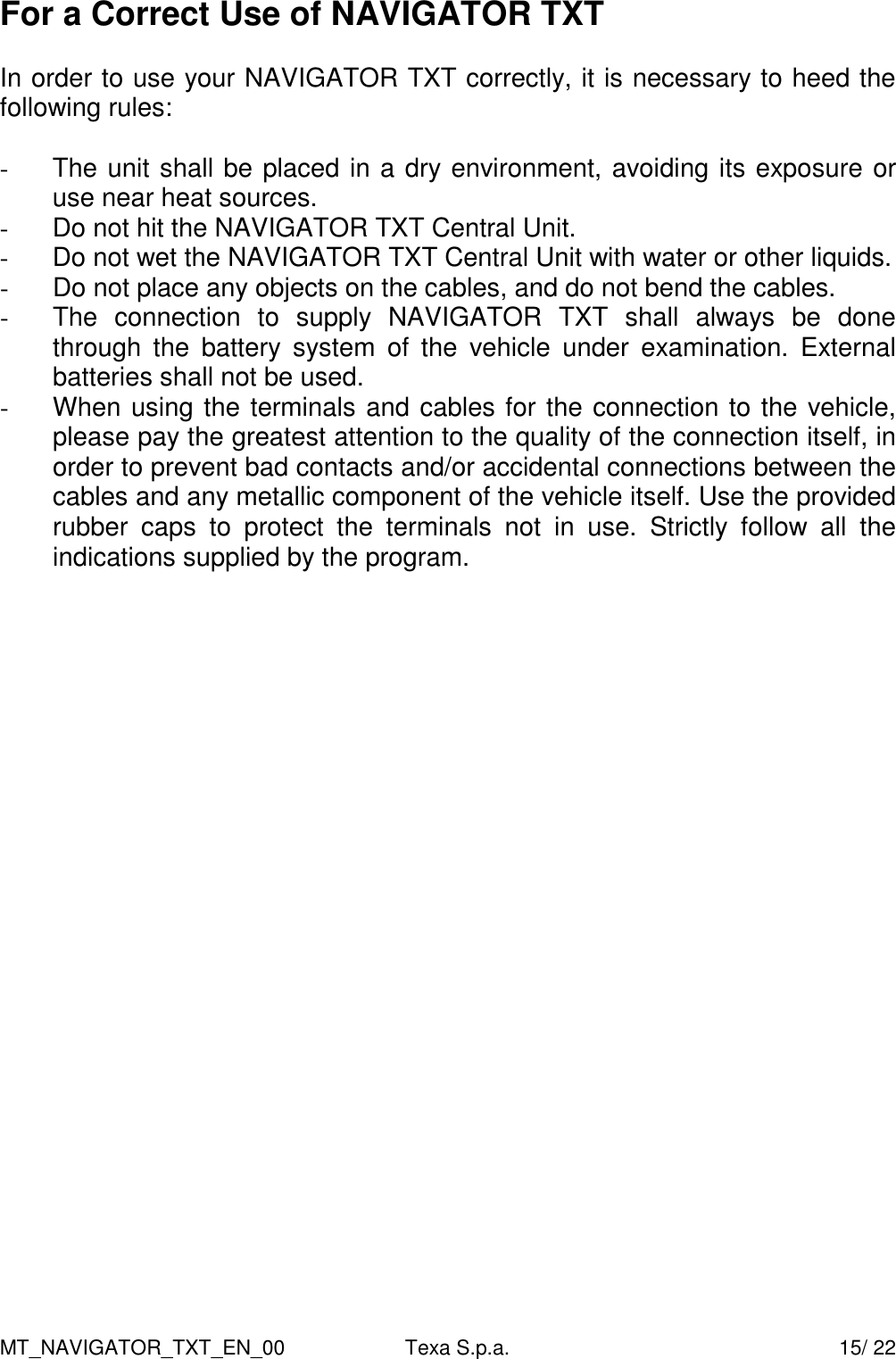
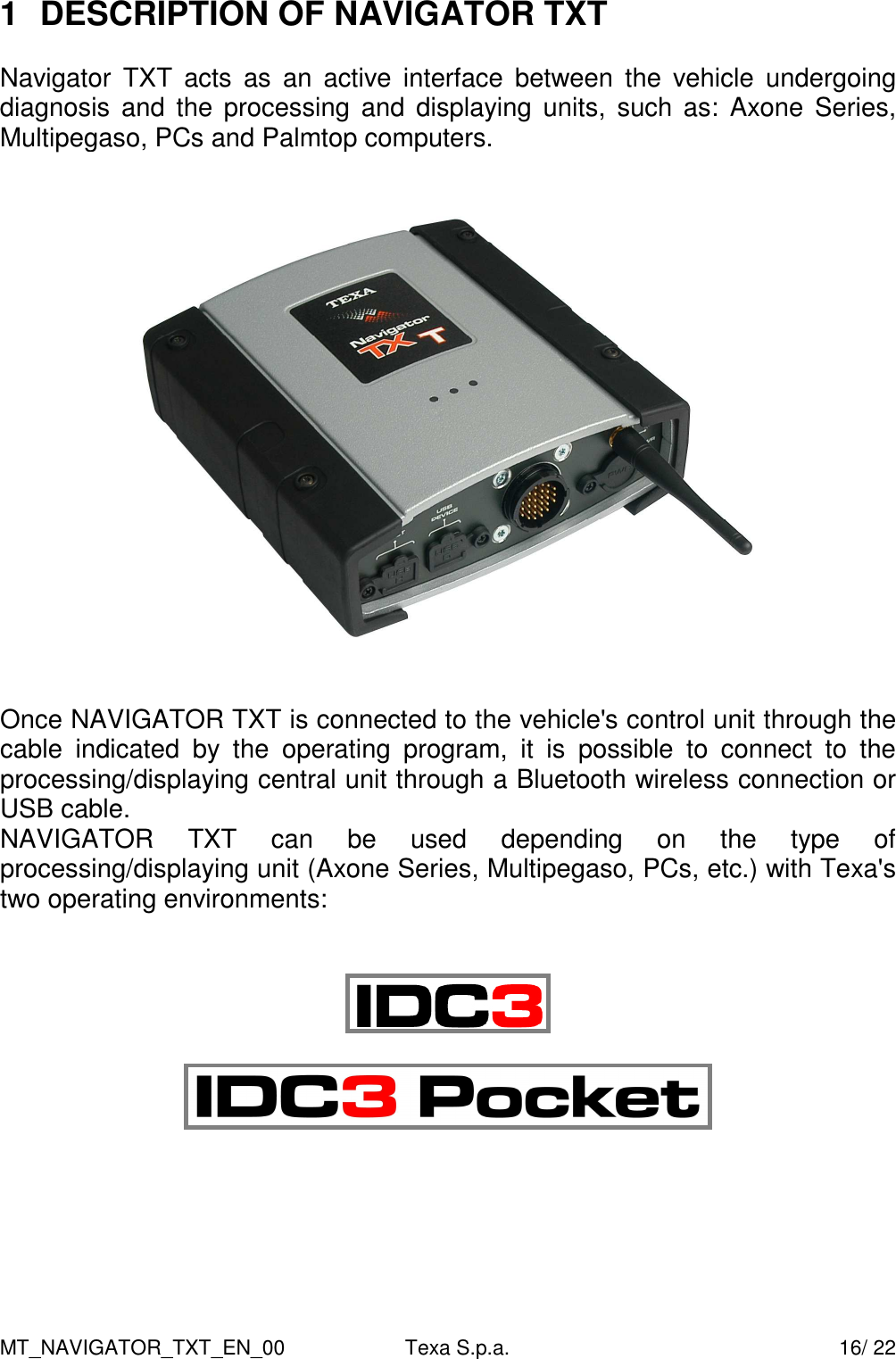
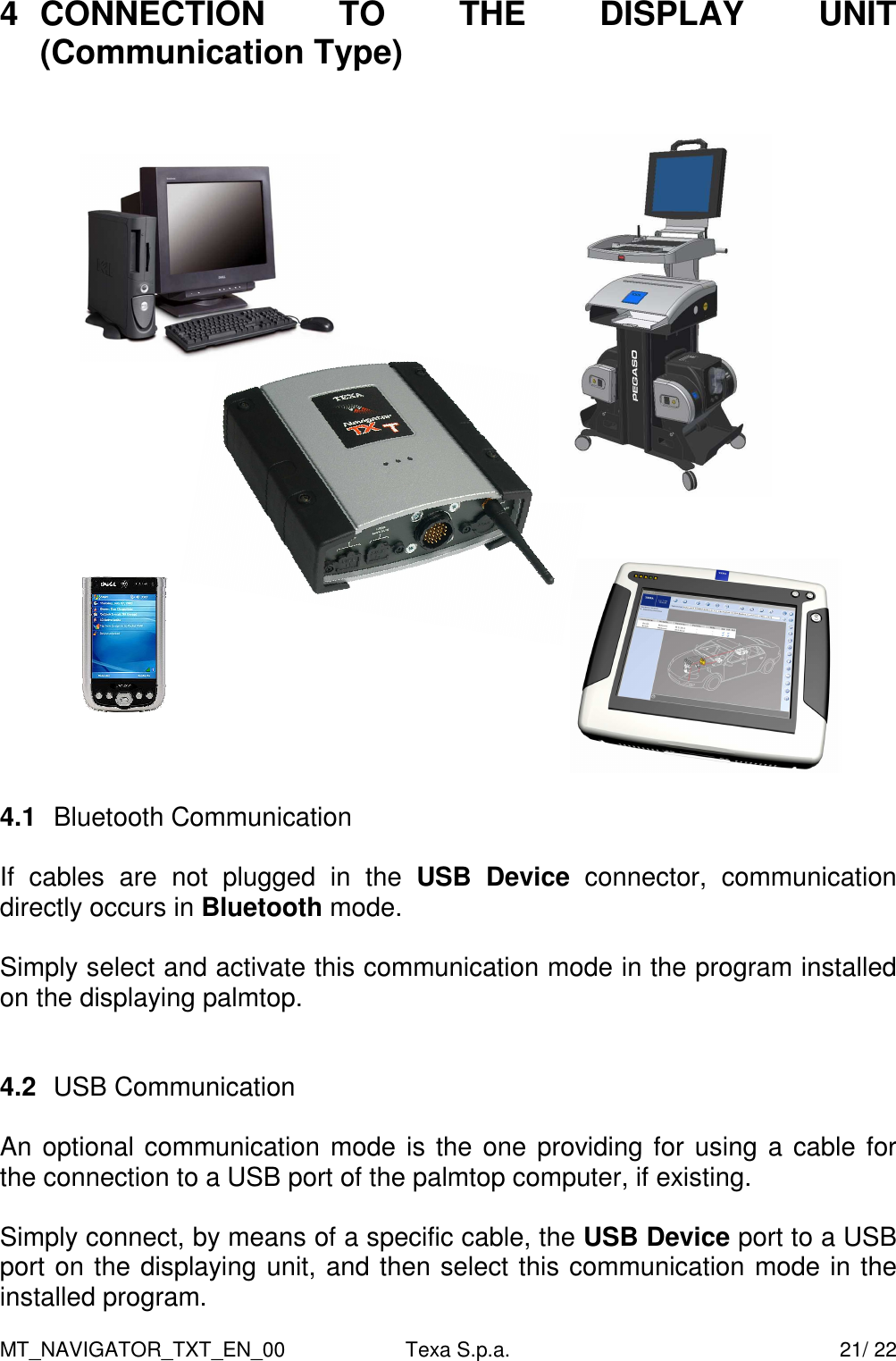
MT_NAVIGATOR_TXT_EN_00  Texa S.p.a.    16/ 22 1  DESCRIPTION OF NAVIGATOR TXT  Navigator  TXT  acts  as  an  active  interface  between  the  vehicle  undergoing diagnosis  and  the  processing  and  displaying units,  such  as:  Axone  Series, Multipegaso, PCs and Palmtop computers.  Once NAVIGATOR TXT is connected to the vehicle's control unit through the cable  indicated  by  the  operating  program,  it  is  possible  to  connect  to  the processing/displaying central unit through a Bluetooth wireless connection or USB cable.  NAVIGATOR  TXT  can  be  used  depending  on  the  type  of processing/displaying unit (Axone Series, Multipegaso, PCs, etc.) with Texa's two operating environments:
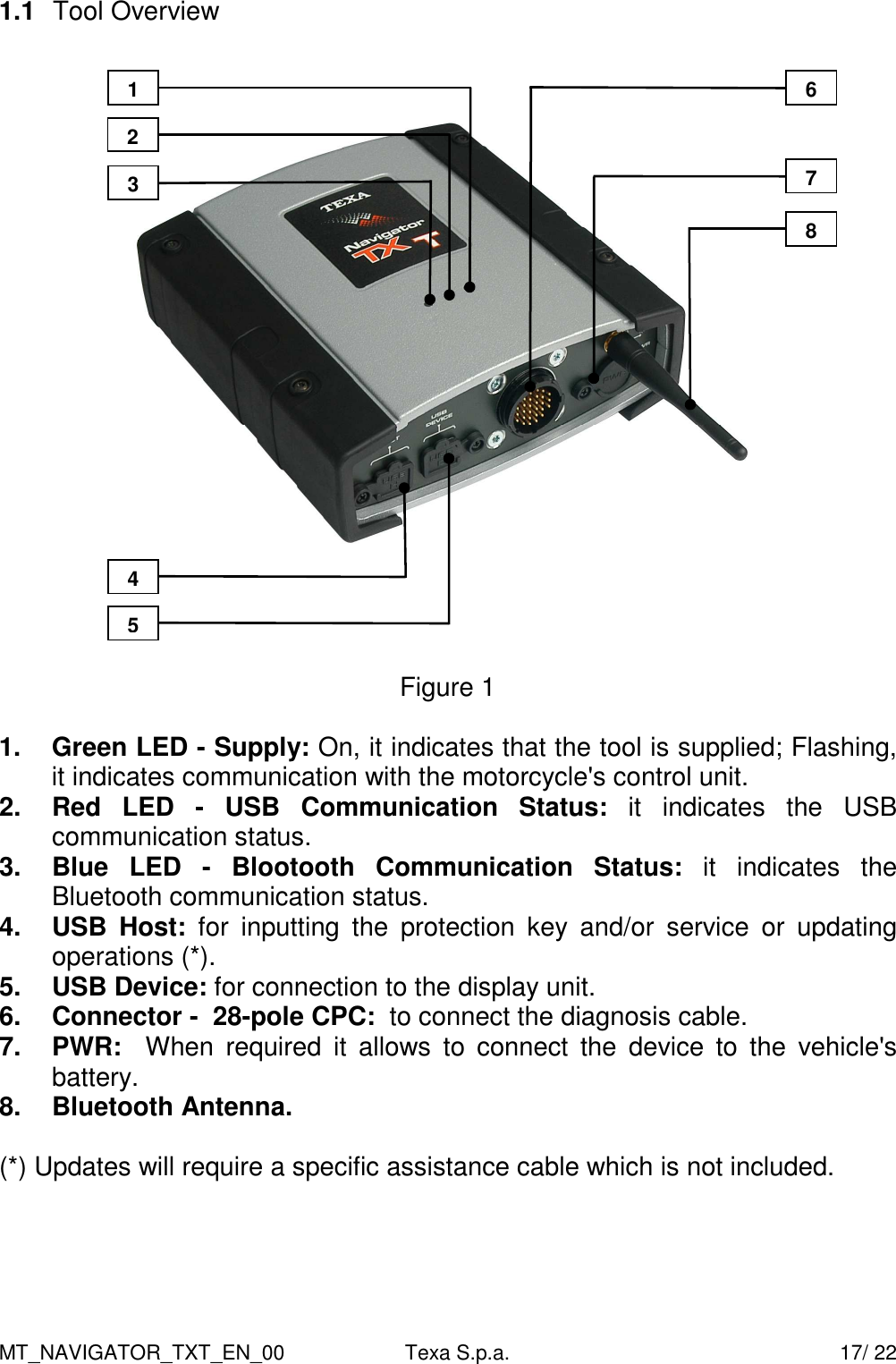
MT_NAVIGATOR_TXT_EN_00  Texa S.p.a.    17/ 22 1.1  Tool Overview    Figure 1  1.  Green LED - Supply: On, it indicates that the tool is supplied; Flashing, it indicates communication with the motorcycle's control unit.  2.  Red  LED  -  USB  Communication  Status:  it  indicates  the  USB communication status. 3.  Blue  LED  -  Blootooth  Communication  Status:  it  indicates  the Bluetooth communication status.  4.  USB  Host:  for  inputting  the  protection  key  and/or  service  or  updating operations (*). 5.  USB Device: for connection to the display unit. 6.  Connector -  28-pole CPC:  to connect the diagnosis cable. 7.  PWR:    When  required  it  allows  to  connect  the  device  to  the  vehicle's battery. 8.  Bluetooth Antenna.  (*) Updates will require a specific assistance cable which is not included.  3 2 1 4 5 7 8 6
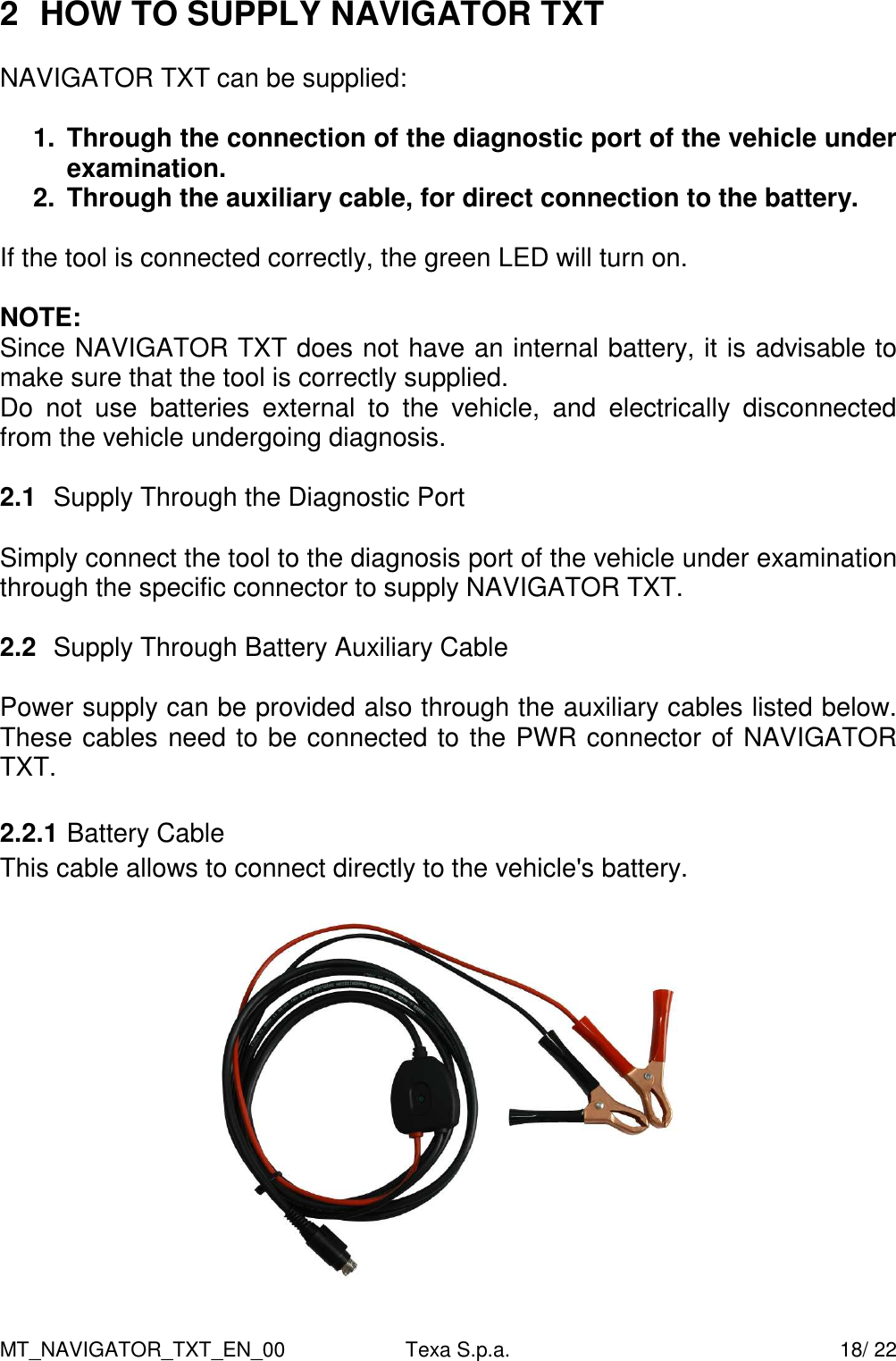
MT_NAVIGATOR_TXT_EN_00  Texa S.p.a.    18/ 22 2  HOW TO SUPPLY NAVIGATOR TXT   NAVIGATOR TXT can be supplied:  1.  Through the connection of the diagnostic port of the vehicle under examination.  2.  Through the auxiliary cable, for direct connection to the battery.  If the tool is connected correctly, the green LED will turn on.  NOTE: Since NAVIGATOR TXT does not have an internal battery, it is advisable to make sure that the tool is correctly supplied. Do  not  use  batteries  external  to  the  vehicle,  and  electrically  disconnected from the vehicle undergoing diagnosis.  2.1  Supply Through the Diagnostic Port  Simply connect the tool to the diagnosis port of the vehicle under examination through the specific connector to supply NAVIGATOR TXT.  2.2  Supply Through Battery Auxiliary Cable  Power supply can be provided also through the auxiliary cables listed below. These cables need to be connected to the PWR connector of NAVIGATOR TXT.  2.2.1 Battery Cable This cable allows to connect directly to the vehicle's battery.
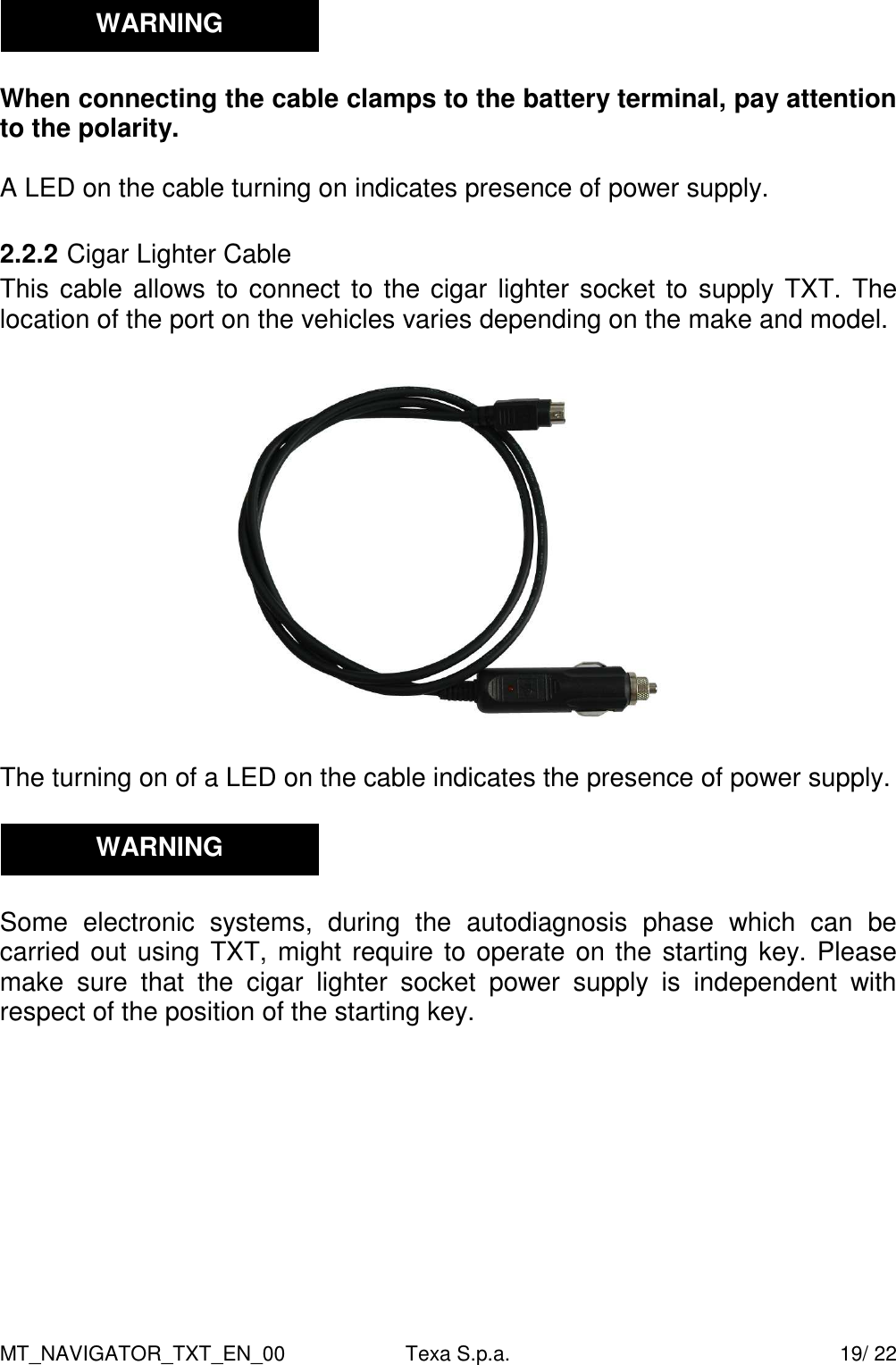
MT_NAVIGATOR_TXT_EN_00  Texa S.p.a.    19/ 22   When connecting the cable clamps to the battery terminal, pay attention to the polarity.  A LED on the cable turning on indicates presence of power supply.  2.2.2 Cigar Lighter Cable This cable allows to connect to the cigar lighter socket to supply TXT. The location of the port on the vehicles varies depending on the make and model.    The turning on of a LED on the cable indicates the presence of power supply.     Some  electronic  systems,  during  the  autodiagnosis  phase  which  can  be carried out using TXT, might require to operate on the starting key. Please make  sure  that  the  cigar  lighter  socket  power  supply  is  independent  with respect of the position of the starting key.   WARNING WARNING
MT_NAVIGATOR_TXT_EN_00  Texa S.p.a.    20/ 22 3  HOW TO CONNECT TO THE VEHICLE   To connect to the vehicle, first of all it is necessary to locate the control unit's connector on the basis of the information (pictures or movie) provided by the operating program in use.  The location and type of connector on the vehicles vary depending on make and  model.  For  this  reason,  the  program  provides  all  the  necessary information.      Strictly heed the instructions provided by the program.   Connect  the  cable  indicated  by  the  program,  one  end  to  the  28-pole  AMP connector of NAVIGATOR TXT (detail 6 - figure 1) and the other end to the vehicle's diagnostic port.   If not specified otherwise, NAVIGATOR TXT will be supplied directly by the connection to the diagnostic port of the vehicle; the green LED will light up indicating correct supply.  At  this  point,  it  is  possible  to  continue  with  the  analysis  of  the  electronic system  under  examination,  by  using  the  functions  and  procedures  made available by the autodiagnosis program in use.       WARNING
MT_NAVIGATOR_TXT_EN_00  Texa S.p.a.    21/ 22 4  CONNECTION  TO  THE  DISPLAY  UNIT (Communication Type)     4.1  Bluetooth Communication  If  cables  are  not  plugged  in  the  USB  Device  connector,  communication directly occurs in Bluetooth mode.   Simply select and activate this communication mode in the program installed on the displaying palmtop.      4.2  USB Communication   An optional communication mode is the one providing for using a cable for the connection to a USB port of the palmtop computer, if existing.   Simply connect, by means of a specific cable, the USB Device port to a USB port on the displaying unit, and then select this communication mode in the installed program.
MT_NAVIGATOR_TXT_EN_00  Texa S.p.a.    22/ 22 5  TECHNICAL FEATURES OF TXT  • Main Processor: INTEL PXA255 400MHz,   • Internal memory: 64 Mb SDRAM, 64 Mb FLASH  • External power supply: 8 ÷ 32 Volt • 12V Consumption: 0.25 A typical • 24V Consumption: 0.18 A typical • Power supply connector: 4-pole power mini-din  • USB  Connections:  1  USB  2.0  Device  connection,  1  USB  2.0  Host connection,  with  possibility  of  SW  update  by  means  of  USB  storage pen. • Wireless connection to PC:  Bluetooth 2.0    • Electronic changeover switch:  13  K  lines,  L  lines  with  100  mA current protection controlled by FPGA. • Diagnostic connector:  AMP CPC2 series, 28 poles male contacts.  • Operating temperature: + 0 °C / + 45 °C. • Storage temperature: - 20 °C / + 60 °C. • Operating and service humidity: 10% ÷ 80% with no condensation. • Size: 155x165x55 mm • Weight: 1.0 Kg   5.1  Supported Communication Protocols  • Blink codes; • K, L, (with current protection) ISO9141-2, ISO14230; • CAN, ISO11898, ISO11519-2; • SAE J1850 PWM; • SAE J1850 VPW.

Navigation menu