The Art of Utility D105 ANC Bluetooth Headphone User Manual

The Art of Utility AB ANC Bluetooth Headphone

User Manual

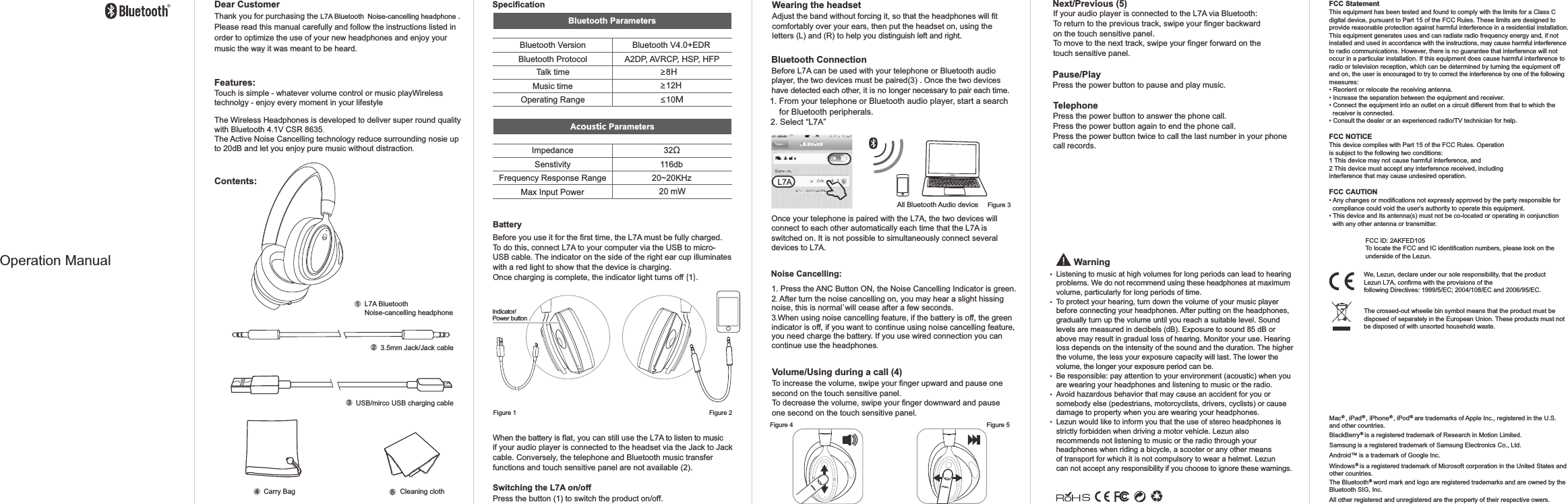
We, Lezun, declare under our sole responsibility, that the product Lezun L7A, confirms with the provisions of the following Directives: 1999/5/EC; 2004/108/EC and 2006/95/EC.The crossed-out wheelie bin symbol means that the product must be disposed of separately in the European Union. These products must not be disposed of with unsorted household waste.FCC ID: 2AKFED105To locate the FCC and IC identification numbers, please look on the underside of the Lezun. BatteryBefore you use it for the first time, the L7A must be fully charged. To do this, connect L7A to your computer via the USB to micro-USB cable. The indicator on the side of the right ear cup illuminates with a red light to show that the device is charging. Once charging is complete, the indicator light turns off (1).When the battery is flat, you can still use the L7A to listen to music if your audio player is connected to the headset via the Jack to Jack cable. Conversely, the telephone and Bluetooth music transfer functions and touch sensitive panel are not available (2).Switching the L7A on/offPress the button (1) to switch the product on/off.Wearing the headsetAdjust the band without forcing it, so that the headphones will fit comfortably over your ears, then put the headset on, using the letters (L) and (R) to help you distinguish left and right. Bluetooth ConnectionBefore L7A can be used with your telephone or Bluetooth audio player, the two devices must be paired(3) . Once the two devices have detected each other, it is no longer necessary to pair each time.1. From your telephone or Bluetooth audio player, start a search     for Bluetooth peripherals.2. Select “L7A”Once your telephone is paired with the L7A, the two devices will connect to each other automatically each time that the L7A is switched on. It is not possible to simultaneously connect several devices to L7A.All Bluetooth Audio deviceListening to music at high volumes for long periods can lead to hearing problems. We do not recommend using these headphones at maximum volume, particularly for long periods of time.To protect your hearing, turn down the volume of your music player before connecting your headphones. After putting on the headphones, gradually turn up the volume until you reach a suitable level. Sound levels are measured in decibels (dB). Exposure to sound 85 dB or above may result in gradual loss of hearing. Monitor your use. Hearing loss depends on the intensity of the sound and the duration. The higher the volume, the less your exposure capacity will last. The lower the volume, the longer your exposure period can be.Be responsible: pay attention to your environment (acoustic) when you are wearing your headphones and listening to music or the radio.Avoid hazardous behavior that may cause an accident for you or somebody else (pedestrians, motorcyclists, drivers, cyclists) or cause damage to property when you are wearing your headphones.Lezun would like to inform you that the use of stereo headphones is strictly forbidden when driving a motor vehicle. Lezun also recommends not listening to music or the radio through your headphones when riding a bicycle, a scooter or any other means of transport for which it is not compulsory to wear a helmet. Lezun can not accept any responsibility if you choose to ignore these warnings.WarningVolume/Using during a call (4)To increase the volume, swipe your finger upward and pause one second on the touch sensitive panel. To decrease the volume, swipe your finger downward and pause one second on the touch sensitive panel.Next/Previous (5)If your audio player is connected to the L7A via Bluetooth:To return to the previous track, swipe your finger backward on the touch sensitive panel.To move to the next track, swipe your finger forward on the touch sensitive panel.Pause/PlayPress the power button to pause and play music.TelephonePress the power button to answer the phone call.Press the power button again to end the phone call.Press the power button twice to call the last number in your phone call records.®  ®  ®  ®Mac , iPad , iPhone , iPod  are trademarks of Apple Inc., registered in the U.S. and other countries.®BlackBerry  is a registered trademark of Research in Motion Limited. Samsung is a registered trademark of Samsung Electronics Co., Ltd.TMAndroid   is a trademark of Google Inc.®Windows  is a registered trademark of Microsoft corporation in the United States and other countries.®The Bluetooth  word mark and logo are registered trademarks and are owned by theBluetooth SIG, Inc.  All other registered and unregistered are the property of their respective owers. FCC StatementThis equipment has been tested and found to comply with the limits for a Class C digital device, pursuant to Part 15 of the FCC Rules. These limits are designed to provide reasonable protection against harmful interference in a residential installation. This equipment generates uses and can radiate radio frequency energy and, if not installed and used in accordance with the instructions, may cause harmful interference to radio communications. However, there is no guarantee that interference will not occur in a particular installation. If this equipment does cause harmful interference to radio or television reception, which can be determined by turning the equipment off and on, the user is encouraged to try to correct the interference by one of the following measures:• Reorient or relocate the receiving antenna.• Increase the separation between the equipment and receiver.• Connect the equipment into an outlet on a circuit different from that to which the   receiver is connected.• Consult the dealer or an experienced radio/TV technician for help.FCC NOTICEThis device complies with Part 15 of the FCC Rules. Operationis subject to the following two conditions:1 This device may not cause harmful interference, and2 This device must accept any interference received, includinginterference that may cause undesired operation.FCC CAUTION• Any changes or modifications not expressly approved by the party responsible for   compliance could void the user‘s authority to operate this equipment.• This device and its antenna(s) must not be co-located or operating in conjunction   with any other antenna or transmitter.Contents:L7A Bluetooth Noise-cancelling headphone Features:Touch is simple - whatever volume control or music playWireless technolgy - enjoy every moment in your lifestyleThe Wireless Headphones is developed to deliver super roundqualitywith Bluetooth 4.1V CSR 8635.The Active Noise Cancelling technology reduce surroundingnosie up to 20dB and let you enjoy pure music without distraction.Dear CustomerThank you for purchasing the L7A Bluetooth Noise-cancelling headphone .Please read this manual carefully and follow the instructions listed in order to optimize the use of your new headphones and enjoy your music the way it was meant to be heard.3.5mm Jack/Jack cable2USB/mirco USB charging cable3Carry Bag Cleaning cloth45Figure 1 Figure 2Figure 3Figure 4 Figure 5Operation ManualL7ASpecificationBluetooth VersionBluetooth ProtocolTalk timeMusic timeOperating RangeBluetooth V4.0+EDRA2DP, AVRCP, HSP, HFP ≥8H ≥12H≤10MImpedance 32ΩSenstivity 116dbFrequency Response RangeMax Input Power20~20KHz20 mWBluetooth ParametersAcoustic ParametersIndicator/Power button11. Press the ANC Button ON, the Noise Cancelling Indicator is green.2. After turn the noise cancelling on, you may hear a slight hissing noise, this is normal`will ceaseafter a few seconds.3.When using noise cancelling feature, if the battery is off, the greenindicator is off, if you want tocontinueusing noise cancelling feature, you need charge the battery. If you use wired connection you can continue use theheadphones.Noise Cancelling:

Navigation menu