The Loln Electric LEWB0000111 Power Wave Communication Kit User Manual IM10421 Power Wave R450

The Lincoln Electric Company Power Wave Communication Kit IM10421 Power Wave R450

User Manual

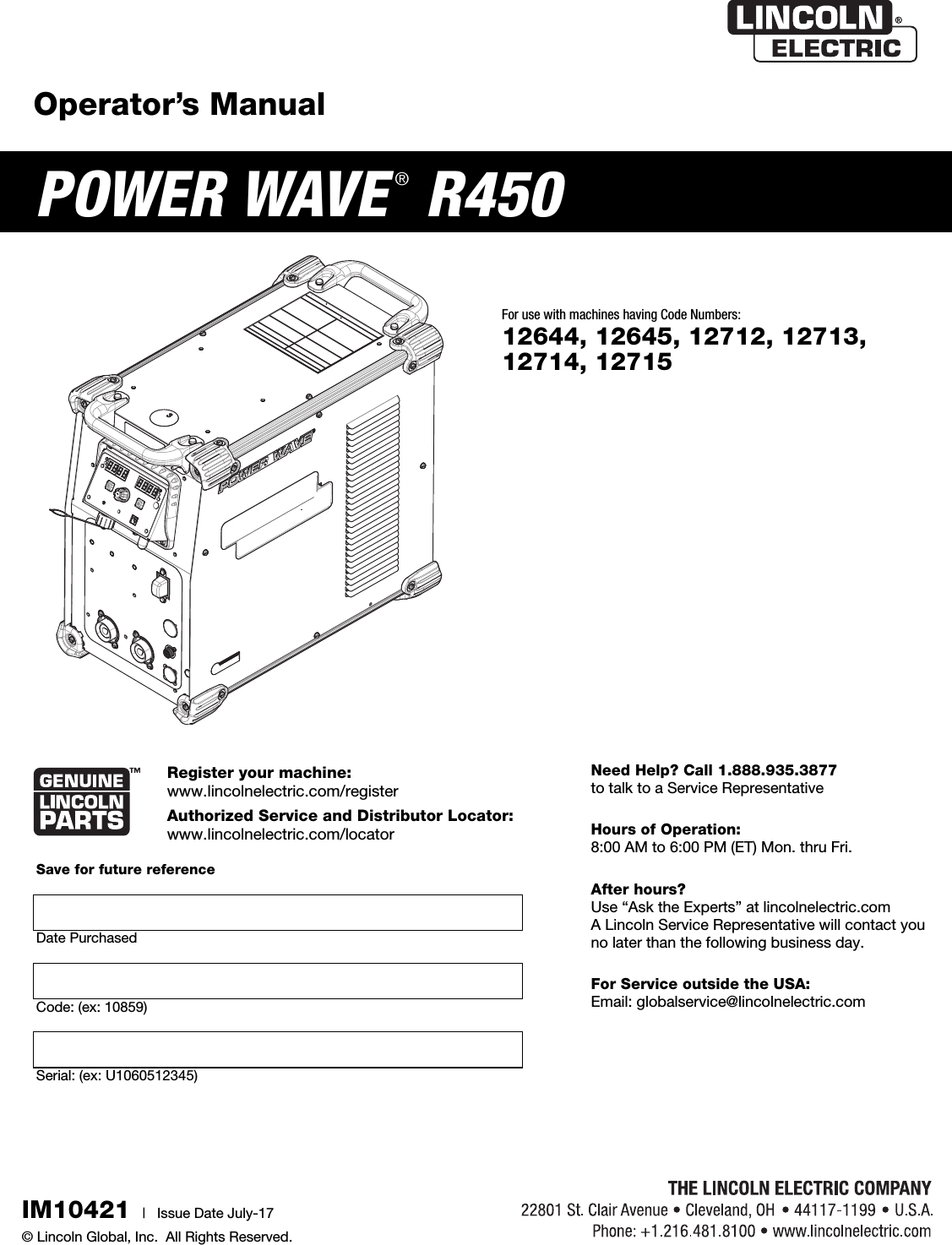
Operator’s ManualPOWER WAVE ®R450Register your machine:  www.lincolnelectric.com/registerAuthorized Service and Distributor Locator:  www.lincolnelectric.com/locatorIM10421 |   Issue D ate July-17© Lincoln Global, Inc.  All Rights Reserved.For use with machines having Code Numbers:12644, 12645, 12712, 12713,12714, 12715Need Help? Call 1.888.935.3877 to talk to a Service RepresentativeHours of Operation: 8:00 AM to 6:00 PM (ET) Mon. thru Fri.After hours? Use “Ask the Experts” at lincolnelectric.comA Lincoln Service Representative will contact you no later than the following business day.For Service outside the USA: Email: globalservice@lincolnelectric.comSave for future reference  Date PurchasedCode: (ex: 10859)Serial: (ex: U1060512345)
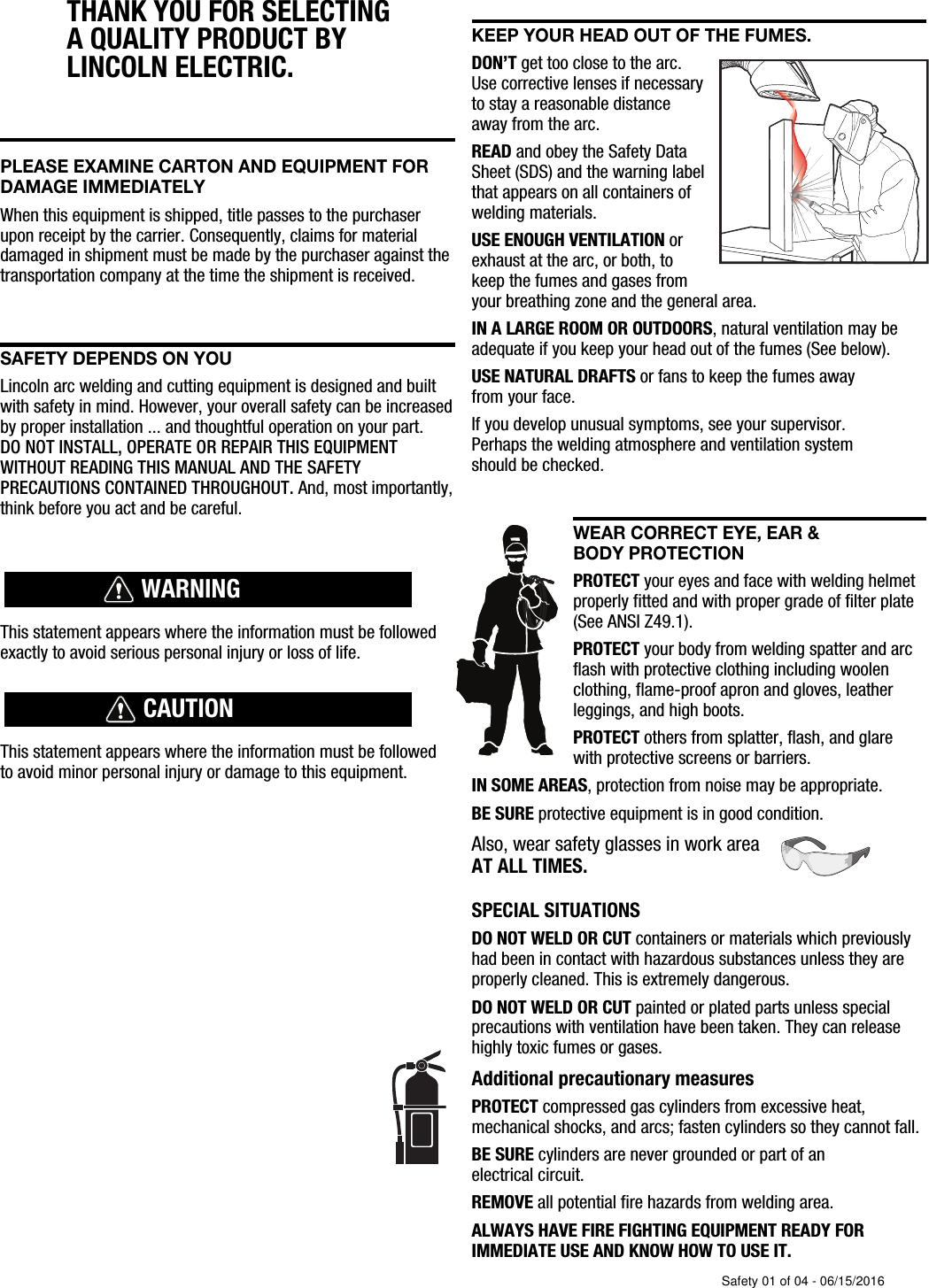
THANK YOU FOR SELECTING A QUALITY PRODUCT BY LINCOLN ELEC  TRIC. PLEASE EXAMINE CARTON AND EQUIPMENT FORDAMAGE IMMEDIATELYWhen this equipment is shipped, title passes to the purchaserupon receipt by the carrier. Consequently, claims for materialdamaged in shipment must be made by the purchaser against thetransportation company at the time the shipment is received.SAFETY DEPENDS ON YOULincoln arc welding and cutting equipment is designed and builtwith safety in mind. However, your overall safety can be increasedby proper installation ... and thoughtful operation on your part. DO NOT INSTALL, OPERATE OR REPAIR THIS EQUIPMENT WITHOUT READING THIS MANUAL AND THE SAFETYPRECAUTIONS CONTAINED THROUGHOUT. And, most importantly,think before you act and be careful.This statement appears where the information must be followedexactly to avoid serious personal injury or loss of life.This statement appears where the information must be followedto avoid minor personal injury or damage to this equipment.KEEP YOUR HEAD OUT OF THE FUMES.DON’T get too close to the arc.Use corrective lenses if necessaryto stay a reasonable distanceaway from the arc.READ and obey the Safety DataSheet (SDS) and the warning labelthat appears on all containers ofwelding materials.USE ENOUGH VENTILATION orexhaust at the arc, or both, tokeep the fumes and gases from your breathing zone and the general area.IN A LARGE ROOM OR OUTDOORS, natural ventilation may beadequate if you keep your head out of the fumes (See below).USE NATURAL DRAFTS or fans to keep the fumes away from your face.If you de velop unusual symptoms, see your supervisor. Perhaps the welding atmosphere and ventilation system should be checked.WEAR CORRECT EYE, EAR & BODY PROTECTIONPROTECT your eyes and face with welding helmetproperly fitted and with proper grade of filter plate(See ANSI Z49.1).PROTECT your body from welding spatter and arcflash with protective clothing including woolenclothing, flame-proof apron and gloves, leatherleggings, and high boots.PROTECT others from splatter, flash, and glarewith protective screens or barriers.IN SOME AREAS, protection from noise may be appropriate.BE SURE protective equipment is in good condition.Also, wear safety glasses in work areaAT ALL TIMES.SPECIAL SITUATIONSDO NOT WELD OR CUT containers or materials which previouslyhad been in contact with hazardous substances unless they areproperly cleaned. This is extremely dangerous.DO NOT WELD OR CUT painted or plated parts unless specialprecautions with ventilation have been taken. They can releasehighly toxic fumes or gases.Additional precautionary measuresPROTECT compressed gas cylinders from excessive heat,mechanical shocks, and arcs; fasten cylinders so they cannot fall.BE SURE cylinders are never grounded or part of an electrical circuit.REMOVE all potential fire hazards from welding area.ALWAYS HAVE FIRE FIGHTING EQUIPMENT READY FORIMMEDIATE USE AND KNOW HOW TO USE IT.WARNINGCAUTIONSafety 01 of 04 - 06/15/2016
SECTION A:WARNINGS  CALIFORNIA PROPOSITION 65 WARNINGSDiesel EnginesDiesel engine exhaust and some of its constituents are known to the State of California to cause cancer, birth defects, and otherreproductive harm.Gasoline EnginesThe engine exhaust from this product contains chemicals known to the State of California to cause cancer, birth defects, or otherreproductive harm.ARC WELDING CAN BE HAZARDOUS. PROTECTYOURSELF AND OTHERS FROM POSSIBLE SERIOUSINJURY OR DEATH. KEEP CHILDREN AWAY. PACEMAKER WEARERS SHOULD CONSULT WITHTHEIR DOCTOR BEFORE OPERATING.Read and understand the following safety highlights. Foradditional safety information, it is strongly recommended that you purchase a copy of “Safety in Welding & Cutting - ANSI Standard Z49.1” from the American Welding Society, P.O. Box 351040, Miami, Florida 33135 or CSA Standard W117.2-1974. A Free copy of “Arc Welding Safety” booklet E205 is available from the Lincoln Electric Company, 22801 St. Clair Avenue, Cleveland, Ohio 44117-1199.BE SURE THAT ALL INSTALLATION, OPERATION,MAINTENANCE AND REPAIR PROCEDURES AREPERFORMED ONLY BY QUALIFIED INDIVIDUALS.FOR ENGINE POWEREDEQUIPMENT.   1.a. Turn the engine off before troubleshootingand maintenance work unless themaintenance work requires it to be running.   1.b. Operate engines in open, well-ventilatedareas or vent the engine exhaust fumes outdoors.   1.c. Do not add the fuel near an open flamewelding arc or when the engine is running.Stop the engine and allow it to cool beforerefueling to prevent spilled fuel fromvaporizing on contact with hot engine partsand igniting. Do not spill fuel when fillingtank. If fuel is spilled, wipe it up and do not start engine untilfumes have been eliminated.   1.d.  Keep all equipment safety guards, covers and devices in position and in good repair.Keep hands, hair, clothing and tools away from V-belts, gears, fans and all other moving parts when starting, operating orrepairing equipment.   1.e. In some cases it may be necessary to remove safety guards toperform required maintenance. Remove guards only whennecessary and replace them when the maintenance requiringtheir removal is complete. Always use the greatest care whenworking near moving parts.   1.f.  Do not put your hands near the engine fan. Do not attempt tooverride the governor or idler by pushing on the throttle controlrods while the engine is running.   1.g. To prevent accidentally starting gasoline engines while turningthe engine or welding generator during maintenance work,disconnect the spark plug wires, distributor cap or  magneto wireas appropriate.   1.h. To avoid scalding, do not remove the radiatorpressure cap when the engine is hot.ELECTRIC ANDMAGNETIC FIELDS MAYBE DANGEROUS   2.a. Electric current flowing through any conductorcauses localized Electric and Magnetic Fields (EMF). Welding current creates EMF fields around welding cables and welding machines   2.b. EMF fields may interfere with some pacemakers, and welders having a pacemaker should consult their physicianbefore welding.   2.c. Exposure to EMF fields in welding may have other health effectswhich are now not known.   2.d. All welders should use the following procedures in order tominimize exposure to EMF fields from the welding circuit:2.d.1. Route the electrode and work cables together - Securethem with tape when possible.2.d.2. Never coil the electrode lead around your body.2.d.3. Do not place your body between the electrode and workcables. If the electrode cable is on your right side, thework cable should also be on your right side.2.d.4. Connect the work cable to the workpiece as close as pos-sible to the area being welded.2.d.5. Do not work next to welding power source.SAFETYSafety 02 of 04 - 06/15/2016
ELECTRIC SHOCK CAN KILL.   3.a. The electrode and work (or ground) circuits areelectrically “hot” when the welder is on. Donot touch these “hot” parts with your bare skin or wet clothing.Wear dry, hole-free gloves to insulate hands.   3.b. Insulate yourself from work and ground using dry insulation.Make certain the insulation is large enough to cover your full areaof physical contact with work and ground.      In addition to the normal safety precautions, ifwelding must be performed under electricallyhazardous conditions (in damp locations or whilewearing wet clothing; on metal structures such asfloors, gratings or scaffolds; when in crampedpositions such as sitting, kneeling or lying, if thereis a high risk of unavoidable or accidental contactwith the workpiece or ground) use the followingequipment:• Semiautomatic DC Constant Voltage (Wire) Welder.• DC Manual (Stick) Welder.• AC Welder with Reduced Voltage Control.   3.c. In semiautomatic or automatic wire welding, the electrode,electrode reel, welding head, nozzle or semiautomatic weldinggun are also electrically “hot”.   3.d. Always be sure the work cable makes a good electricalconnection with the metal being welded. The connection shouldbe as close as possible to the area being welded.   3.e. Ground the work or metal to be welded to a good electrical (earth)ground.   3.f. Maintain the electrode holder, work clamp, welding cable andwelding machine in good, safe operating condition. Replacedamaged insulation.   3.g. Never dip the electrode in water for cooling.   3.h. Never simultaneously touch electrically “hot” parts of electrodeholders connected to two welders because voltage between thetwo can be the total of the open circuit voltage of bothwelders.   3.i. When working above floor level, use a safety belt to protectyourself from a fall should you get a shock.   3.j. Also see It   ems 6.c. and 8.ARC RAYS CAN BURN.4.a. Use a shield with the proper filter and cover plates to protect youreyes from sparks and the rays of the arc when welding orobserving open arc welding. Headshield and filter lens shouldconform to ANSI Z87. I standards. 4.b. Use suitable clothing made from durable flame-resistant materialto protect your skin and that of your helpers from the arc rays.4.c. Protect other nearby personnel with suitable, non-flammablescreening and/or warn them not to watch the arc nor exposethemselves to the arc rays or to hot spatter or metal.FUMES AND GASESCAN BE DANGEROUS.   5.a. Welding may produce fumes and gaseshazardous to health. Avoid breathing these fumes and gases.When welding, keep your head out of the fume. Use enoughventilation and/or exhaust at the arc to keep fumes and gasesaway from the breathing zone.  When welding hardfacing(see instructions on container or SDS) or on leador cadmium plated steel and other metals orcoatings which produce highly toxic fumes, keepexposure as low as possible and within applicableOSHA PEL and ACGIH TLV limits using localexhaust or mechanical ventilation unless exposureassessments indicate otherwise. In confinedspaces or in some circumstances, outdoors, arespirator may also be required. Additionalprecautions are also required when welding on galvanized steel.   5. b. The operation of welding fume control equipment is affected byvarious factors including proper use and positioning of theequipment, maintenance of the equipment and the specificwelding procedure and application involved.  Worker exposurelevel should be checked upon installation and periodicallythereafter to be certain it is within applicable OSHA PEL andACGIH TLV limits.   5.c. Do not weld in locations near chlorinated hydrocarbon vaporscoming from degreasing, cleaning or spraying operations. Theheat and rays of the arc can react with solvent vapors to formphosgene, a highly toxic gas, and other irritating products.    5.d. Shielding gases used for arc welding can displace air and causeinjury or death. Always use enough ventilation, especially inconfined areas, to insure breathing air is safe.   5.e. Read and understand the manufacturer’s instructions for thisequipment and the consumables to be used, including theSafety Data Sheet (SDS) and follow your employer’s safetypractices. SDS forms are available from your weldingdistributor or from the manufacturer.   5.f. Also see item 1.b.SAFETYSafety 03 of 04 - 06/15/2016
WELDING AND CUTTINGSPARKS CAN CAUSEFIRE OR EXPLOSION.   6.a. Remove fire hazards from the welding area. Ifthis is not possible, cover them to prevent the welding sparksfrom starting a fire. Remember that welding sparks and hotmaterials from welding can easily go through small cracks andopenings to adjacent areas. Avoid welding near hydraulic lines.Have a fire extinguisher readily available.   6.b. Where compressed gases are to be used at the job site, specialprecautions should be used to prevent hazardous situations.Refer to “Safety in Welding and Cutting” (ANSI Standard Z49.1)and the operating information for the equipment being used.       6.c. When not welding, make certain no part of the electrode circuit istouching the work or ground. Accidental contact can causeoverheating and create a fire hazard.   6.d. Do not heat, cut or weld tanks, drums or containers until theproper steps have been taken to insure that such procedures will not cause flammable or toxic vapors from substances inside.They can cause an explosion even though they have been“cleaned”. For information, purchase “Recommended SafePractices for the Preparation for Welding and Cutting ofContainers and Piping That Have Held Hazardous Substances”,AWS F4.1 from the American Welding Society (see address above).   6.e. Vent hollow castings or containers before heating, cutting orwelding. They may explode.   6.f. Sparks and spatter are thrown from the welding arc. Wear oil freeprotective garments such as leather gloves, heavy shirt, cufflesstrousers, high shoes and a cap over your hair. Wear ear plugswhen welding out of position or in confined places. Always wearsafety glasses with side shields when in a welding area.   6.g. Connect the work cable to the work as close to the welding areaas practical. Work cables connected to the building framework orother locations away from the welding area increase thepossibility of the welding current passing through lifting chains,crane cables or other alternate circuits. This can create firehazards or overheat lifting chains or cables until they fail.   6.h. Also see item 1.c.   6.I. Read and follow NFPA 51B “Standard for Fire Prevention DuringWelding, Cutting and Other Hot Work”, available from NFPA, 1Batterymarch Park, PO box 9101, Quincy, MA 022690-9101.   6.j. Do not use a welding power source for pipe thawing.CYLINDER MAY EXPLODE IFDAMAGED.   7.a. Use only compressed gas cylinders containingthe correct shielding gas for the process usedand properly operating regulators designed forthe gas and pressure used. All hoses, fittings,etc. should be suitable for the application andmaintained in good condition.   7.b. Always keep cylinders in an upright position securely chained toan undercarriage or fixed support.   7.c. Cylinders should be located:• Away from areas where they may be struck or subjectedto physical damage.• A safe distance from arc welding or cutting operationsand any other source of heat, sparks, or flame.   7.d. Never allow the electrode, electrode holder or any otherelectrically “hot” parts to touch a cylinder.   7.e. Keep your head and face away from the cylinder valve outletwhen opening the cylinder valve.   7.f. Valve protection caps should always be in place and hand tightexcept when the cylinder is in use or connected for use.   7.g. Read and follow the instructions on compressed gas cylinders,associated equipment, and CGA publication P-l, “Precautions forSafe Handling of Compressed Gases in Cylinders,” available fromthe Compressed Gas Association,  14501 George Carter WayChantilly, VA 20151.FOR ELECTRICALLYPOWERED EQUIPMENT.   8.a. Turn off input power using the disconnectswitch at the fuse box before working on the equipment.   8.b. Install equipment in accordance with the U.S. National ElectricalCode, all local codes and the manufacturer’s recommendations.   8.c. Ground the equipment in accordance with the U.S. NationalElectrical Code and the manufacturer’s recommendations.Refer tohttp://www.lincolnelectric.com/safetyfor additional safety information.SAFETYSafety 04 of 04 - 06/15/2016
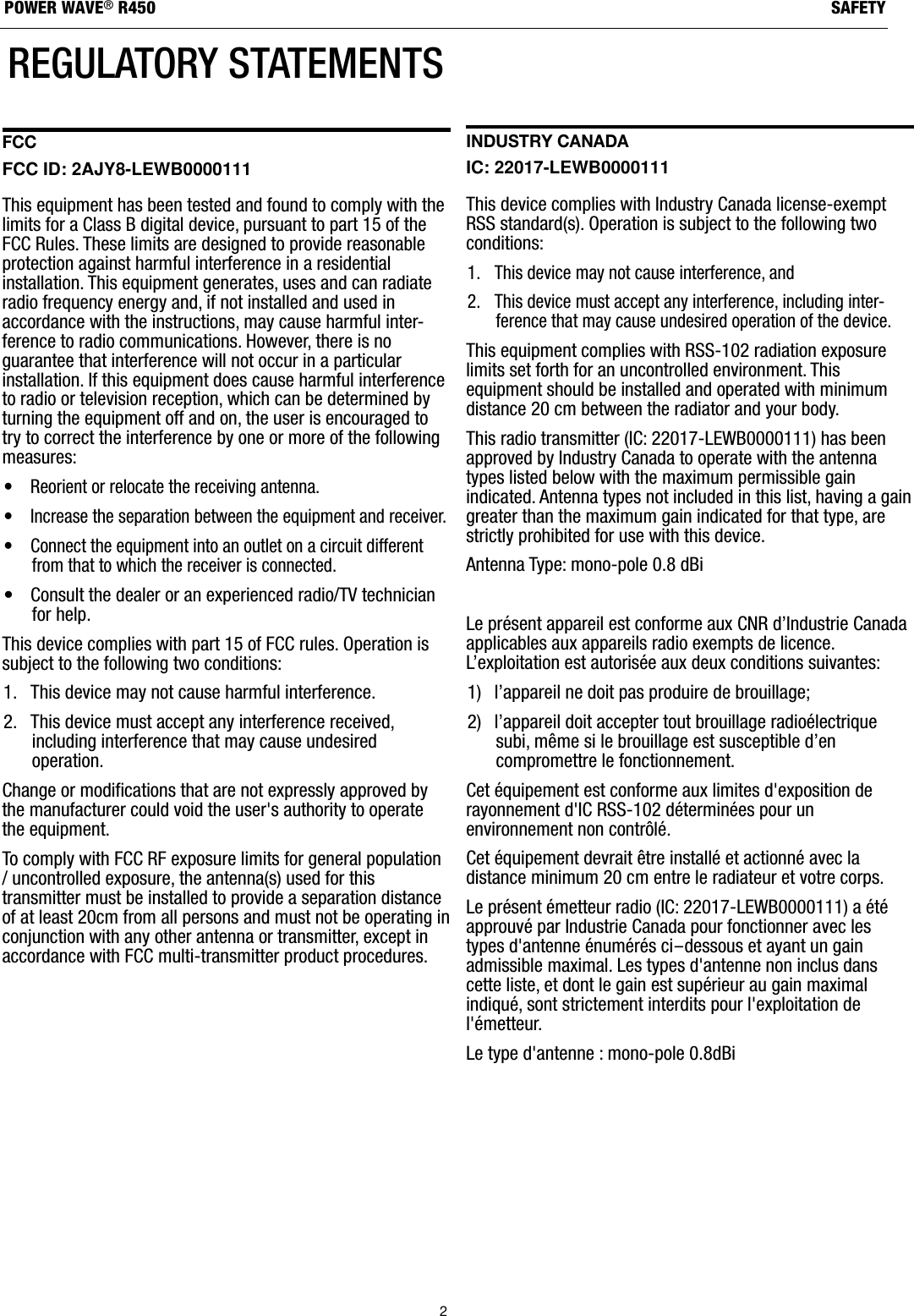
2SAFETYPOWER WAVE®R450REGULATORY STATEMENTSFCC FCC ID: 2AJY8-LEWB0000111 This equipment has been tested and found to comply with thelimits for a Class B digital device, pursuant to part 15 of theFCC Rules. These limits are designed to provide reasonableprotection against harmful interference in a residentialinstallation. This equipment generates, uses and can radiateradio frequency energy and, if not installed and used inaccordance with the instructions, may cause harmful inter-ference to radio communications. However, there is noguarantee that interference will not occur in a particularinstallation. If this equipment does cause harmful interferenceto radio or television reception, which can be determined byturning the equipment off and on, the user is encouraged totry to correct the interference by one or more of the followingmeasures: • Reorient or relocate the receiving antenna.• Increase the separation between the equipment and receiver.• Connect the equipment into an outlet on a circuit differentfrom that to which the receiver is connected.• Consult the dealer or an experienced radio/TV technicianfor help.This device complies with part 15 of FCC rules. Operation issubject to the following two conditions: 1. This device may not cause harmful interference.2. This device must accept any interference received,including interference that may cause undesiredoperation.Change or modifications that are not expressly approved bythe manufacturer could void the user's authority to operatethe equipment. To comply with FCC RF exposure limits for general population/ uncontrolled exposure, the antenna(s) used for thistransmitter must be installed to provide a separation distanceof at least 20cm from all persons and must not be operating inconjunction with any other antenna or transmitter, except inaccordance with FCC multi-transmitter product procedures.Industry Canada IC: 22017-LEWB0000111 This device complies with Industry Canada license-exemptRSS standard(s). Operation is subject to the following twoconditions: 1. This device may not cause interference, and2. This device must accept any interference, including inter-ference that may cause undesired operation of the device.This equipment complies with RSS-102 radiation exposurelimits set forth for an uncontrolled environment. Thisequipment should be installed and operated with minimumdistance 20 cm between the radiator and your body. This radio transmitter (IC: 22017-LEWB0000111) has beenapproved by Industry Canada to operate with the antennatypes listed below with the maximum permissible gainindicated. Antenna types not included in this list, having a gaingreater than the maximum gain indicated for that type, arestrictly prohibited for use with this device.Antenna Type: mono-pole 0.8 dBi Le présent appareil est conforme aux CNR d’Industrie Canadaapplicables aux appareils radio exempts de licence.L’exploitation est autorisée aux deux conditions suivantes:1)  l’appareil ne doit pas produire de brouillage;2)  l’appareil doit accepter tout brouillage radioélectriquesubi, même si le brouillage est susceptible d’encompromettre le fonctionnement.Cet équipement est conforme aux limites d'exposition derayonnement d'IC RSS-102 déterminées pour unenvironnement non contrôlé.Cet équipement devrait être installé et actionné avec ladistance minimum 20 cm entre le radiateur et votre corps.Le présent émetteur radio (IC: 22017-LEWB0000111) a étéapprouvé par Industrie Canada pour fonctionner avec lestypes d'antenne énumérés ci-dessous et ayant un gainadmissible maximal. Les types d'antenne non inclus danscette liste, et dont le gain est supérieur au gain maximalindiqué, sont strictement interdits pour l'exploitation del'émetteur.Le type d'antenne : mono-pole 0.8dBi
ELECTROMAGNETICCOMPATIBILITY (EMC)Products displaying the CE mark are in conformity with EuropeanCommunity Council Directive of 15 Dec 2004 on the approximationof the laws of the Member States relating to electromagneticcompatibility, 2004/108/EC. It was manufactured in conformity witha national standard that implements a harmonized standard: EN60974-10 Electromagnetic Compatibility (EMC) Product Standard forArc Welding Equipment. It is for use with other Lincoln Electricequipment. It is designed for industrial and professional use. All electrical equipment generates small amounts of electromagneticemission. Electrical emission may be transmitted through powerlines or radiated through space, similar to a radio transmitter. Whenemissions are received by other equipment, electrical interferencemay result. Electrical emissions may affect many kinds of electricalequipment; other nearby welding equipment, radio and TV reception,numerical controlled machines, telephone systems, computers, etc. Warning: This Class A equipment is not intended for use inresidential locations where the electrical power is provided by thepublic low-voltage supply system. There may be potential difficultiesin ensuring electro-magnetic compatibility in those locations, due toconducted as well as radiated disturbances.The user is responsible for installing and using the weldingequipment according to the manufacturer’s instructions. If electromagnetic disturbances are detected then it shall be theresponsibility of the user of the welding equipment to resolve thesituation with the technical assistance of the manufacturer. In somecases this remedial action may be as simple as earthing (grounding)the welding circuit, see Note. In other cases it could involveconstructing an electromagnetic screen enclosing the power sourceand the work complete with associated input filters. In all caseselectromagnetic disturbances must be reduced to the point wherethey are no longer troublesome.Note: The welding circuit may or may not be earthed for safetyreasons. Follow your local and national standards for installation anduse. Changing the earthing arrangements should only be authorizedby a person who is competent to assess whether the changes willincrease the risk of injury, e.g., by allowing parallel welding currentreturn paths which may damage the earth circuits of otherequipment.Before installing welding equipment the user shall make anassessment of potential electromagnetic problems in thesurrounding area. The following shall be taken into account:a) other supply cables, control cables, signaling and telephonecables; above, below and adjacent to the welding equipment;b) radio and television transmitters and receivers;c) computer and other control equipment;d) safety critical equipment, e.g., guarding of industrial equipment;e) the health of the people around, e.g., the use of pacemakersand hearing aids;f) equipment used for calibration or measurement;g) the immunity of other equipment in the environment. The usershall ensure that other equipment being used in theenvironment is compatible. This may require additionalprotection measures;h) the time of day that welding or other activities are to be carriedout.The size of the surrounding area to be considered will depend on thestructure of the building and other activities that are taking place.The surrounding area may extend beyond the boundaries of thepremises.Welding equipment should be connected to the public supply systemaccording to the manufacturer’s recommendations. If interferenceoccurs, it may be necessary to take additional precautions such asfiltering of the system. Consideration should be given to shieldingthe supply cable of permanently installed welding equipment, inmetallic conduit or equivalent. Shielding should be electricallycontinuous throughout its length. The shielding should be connectedto the welding power source so that good electrical contact ismaintained between the conduit and the welding power sourceenclosure.The welding equipment should be routinely maintained according tothe manufacturer’s recommendations. All access and service doorsand covers should be closed and properly fastened when thewelding equipment is in operation. The welding equipment shouldnot be modified in any way except for those changes andadjustments covered in the manufacturer’s instructions. Inparticular, the spark gaps of arc striking and stabilizing devicesshould be adjusted and maintained according to the manufacturer’srecommendations.The welding cables should be kept as short as possible and shouldbe positioned close together, running at or close to the floor level.Bonding of all metallic components in the welding installation andadjacent to it should be considered. However, metallic componentsbonded to the work piece will increase the risk that the operatorcould receive a shock by touching these metallic components andthe electrode at the same time. The operator should be insulatedfrom all such bonded metallic components.Where the workpiece is not bonded to earth for electrical safety, norconnected to earth because of its size and position, e.g., ship’s hullor building steelwork, a connection bonding the workpiece to earthmay reduce emissions in some, but not all instances. Care should betaken to prevent the earthing of the workpiece increasing the risk ofinjury to users, or damage to other electrical equipment. Wherenecessary, the connection of the workpiece to earth should be madeby a direct connection to the workpiece, but in some countrieswhere direct connection is not permitted, the bonding should beachieved by suitable capacitance, selected according to nationalregulations.Selective screening and shielding of other cables and equipment inthe surrounding area may alleviate problems of interference.Screening of the entire welding installation may be considered forspecial applications.
INSTALLATION............................................................................................................................................. SECTION ATECHNICAL SPECIFICATIONS..................................................................................................................................... A-1LIFTING         ............................................................................................................................................................ A-5STACKING     ............................................................................................................................................................ A-5TILTING         ............................................................................................................................................................ A-5INPUT AND GROUND CONNECTIONS.......................................................................................................................... A-5MACHINE GROUNDING...............................................................................................................................................A-5HIGH FREQUENCY PROTECTION................................................................................................................................. A-5FCC REGULATORY STATEMENT................................................................................................................................. A-5INPUT CONNECTION.................................................................................................................................................. A-6INPUT FUSE AND SUPPLY WIRE CONSIDERATIONS.....................................................................................................A-6INPUT VOLTAGE SELECTION...................................................................................................................................... A-6RECOMMENDED WORK CABLE SIZES FOR ARC WELDING.......................................................................................... A-9GENERAL GUIDELINES  ............................................................................................................................................. A-9CABLE INDUCTANCE AND ITS EFFECTS ON WELDING.............................................................................................. A-10REMOTE SENSE LEAD SPECIFICATIONS................................................................................................................... A-10VOLTAGE SENSING CONSIDERATIONS FOR MULTIPLE ARC SYSTEMS...................................................................... A-12CONTROL CABLE CONNECTIONS............................................................................................................................. A-14OPERATION ................................................................................................................................................SECTION BPOWER-UP SEQUENCE.............................................................................................................................................. B-1DUTY CYCLE ............................................................................................................................................................ B-1GRAPHIC SYMBOLS THAT APPEAR ON THIS MACHINE OR IN THIS MANUAL............................................................... B-1PRODUCT DESCRIPTION............................................................................................................................................ B-2RECOMMENDED PROCESSES AND EQUIPMENT......................................................................................................... B-2PROCESS LIMITATIONS............................................................................................................................................. B-2EQUIPMENT LIMITATIONS..........................................................................................................................................B-2CASE FRONT CONTROLS  ......................................................................................................................................... B-3CASE BACK CONTROLS ............................................................................................................................................ B-4COMMON WELDING PROCEDURES............................................................................................................................ B-5DEFINITION OF WELDING MODES.............................................................................................................................. B-5BASIC WELDING CONTROLS...................................................................................................................................... B-5SMAW (STICK) WELDING........................................................................................................................................... B-6GTAW  (TIG) WELDING............................................................................................................................................... B-6CONSTANT VOLTAGE WELDING................................................................................................................................. B-6PULSE WELDING........................................................................................................................................................B-6DIGITAL DISPLAY....................................................................................................................................................... B-8NAVIGATING THE USER CONFIGURATION MENU......................................................................................................... B-8CONFIGURING AN ADDITIONAL DISPLAY.................................................................................................................... B-9FRONT ETHERNET PORT SETTINGS......................................................................................................................... B-10REAR ETHERNET PORT SETTINGS............................................................................................................................B-10WI-FI SETTINGS.......................................................................................................................................................B-10BLUETOOTH SETTINGS............................................................................................................................................ B-10WI-FI STATUS INDICATOR LIGHT..............................................................................................................................B-11BLUETOOTH STATUS INDICATOR LIGHT................................................................................................................... B-11OPTIONS / ACCESSORIES.............................................................................................................................SECTION CMAINTENANCE............................................................................................................................................. SECTION DROUTINE MAINTENANCE............................................................................................................................................D-1PERIODIC MAINTENANCE...........................................................................................................................................D-1CALIBRATION SPECIFICATION....................................................................................................................................D-1TROUBLESHOOTING......................................................................................................................................SECTION EDIAGRAMS   .................................................................................................................................................SECTION F Parts List     ......................................................................................................................... parts.lincolnelectric.comContent/details may be changed or updated without notice.For most current Instruction Manuals, go to parts.lincolnelectric.com.4TABLE OF CONTENTS
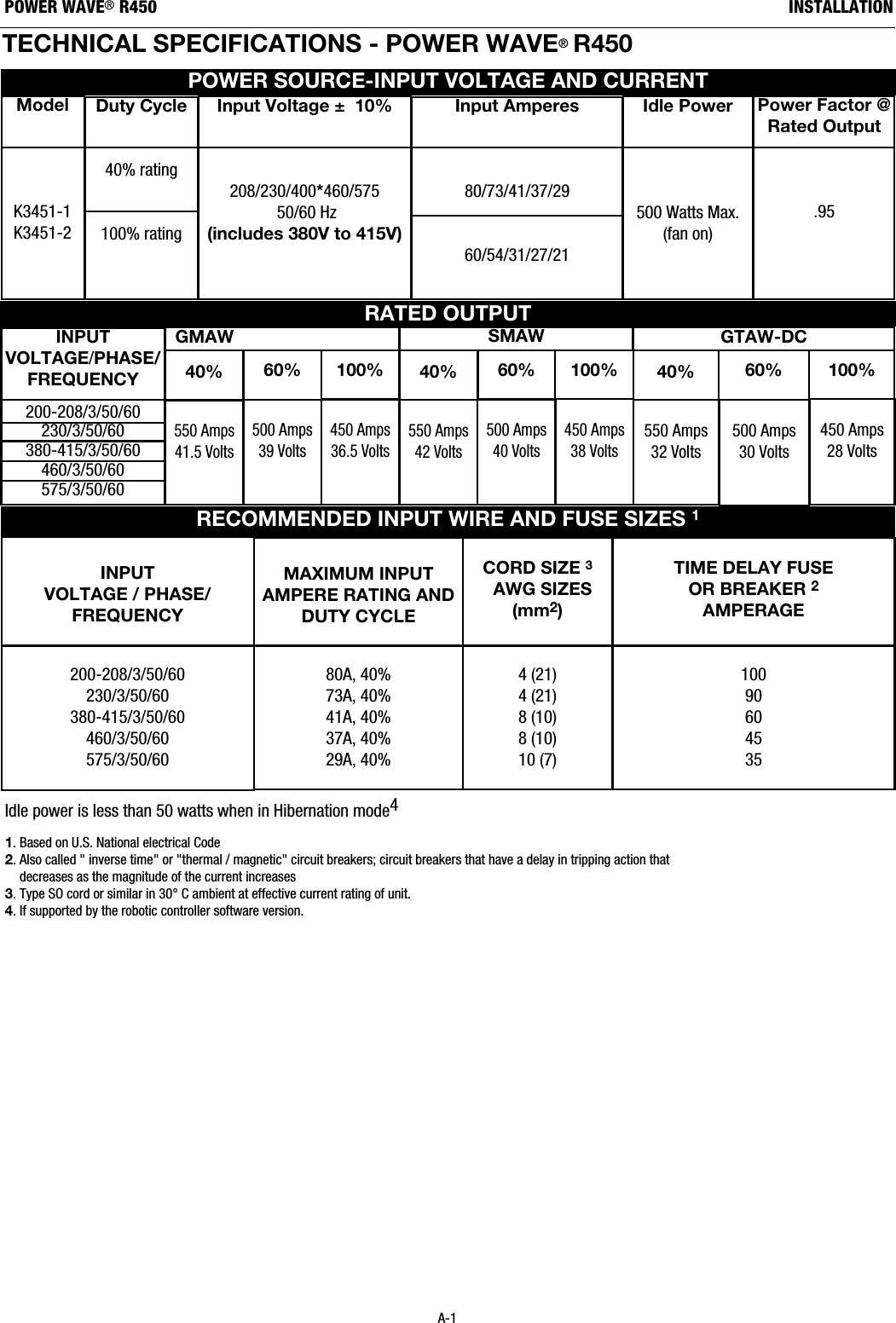
TECHNICAL SPECIFICATIONS - POWER WAVE®R450 RECOMMENDED INPUT WIRE AND FUSE SIZES 1INPUTVOLTAGE / PHASE/FREQUENCY200-208/3/50/60230/3/50/60380-415/3/50/60460/3/50/60575/3/50/60TIME DELAY FUSE OR BREAKER 2AMPERAGE10090604535CORD SIZE 3AWG SIZES(mm2)4 (21)4 (21)8 (10)8 (10)10 (7)MAXIMUM INPUTAMPERE RATING ANDDUTY CYCLE 80A, 40%73A, 40%41A, 40%37A, 40%29A, 40%RATED OUTPUTPOWER SOURCE-INPUT VOLTAGE AND CURRENTModelK3451-1K3451-2Duty Cycle40% rating100% rating450 Amps36.5 Volts550 Amps41.5 Volts500 Amps39 VoltsINPUTVOLTAGE/PHASE/ FREQUENCY  200-208/3/50/60230/3/50/60380-415/3/50/60460/3/50/60575/3/50/60Input Amperes80/73/41/37/29 60/54/31/27/21 Idle Power500 Watts Max.(fan on)Power Factor @Rated Output.95Input Voltage ±  10%208/230/400*460/57550/60 Hz(includes 380V to 415V)Idle power is less than 50 watts when in Hibernation mode41. Based on U.S. National electrical Code2. Also called " inverse time" or "thermal / magnetic" circuit breakers; circuit breakers that have a delay in tripping action thatdecreases as the magnitude of the current increases3. Type SO cord or similar in 30°C ambient at effective current rating of unit.4. If supported by the robotic controller software version.A-1INSTALLATIONPOWER WAVE®R450GMAW40% 60% 100%GTAW-DC450 Amps38 Volts550 Amps42 Volts500 Amps40 Volts40% 60% 100%450 Amps28 Volts550 Amps32 Volts500 Amps30 Volts40% 60% 100%SMAW
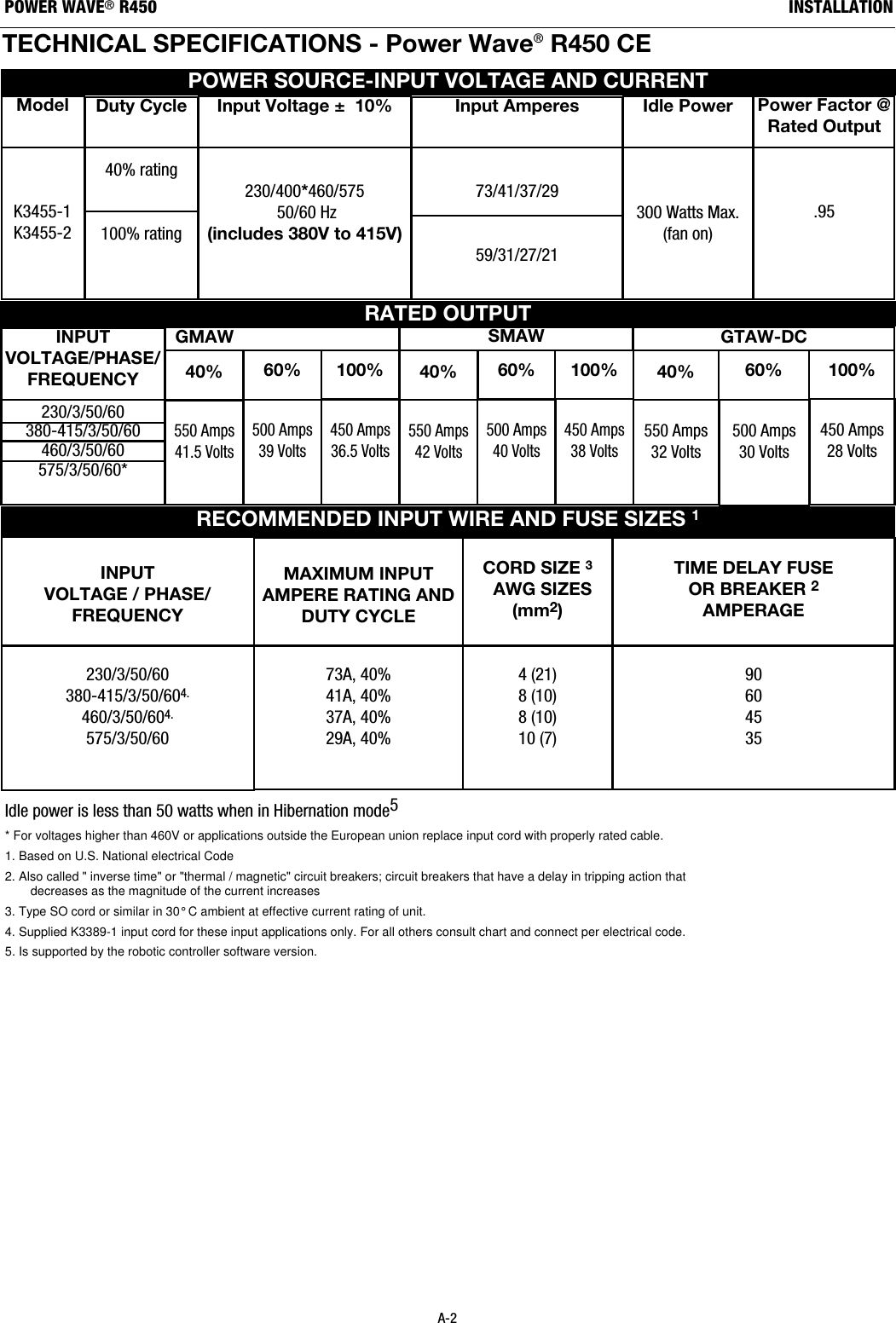
POWER WAVE®R450TECHNICAL SPECIFICATIONS - Power Wave®R450 CE RECOMMENDED INPUT WIRE AND FUSE SIZES 1INPUTVOLTAGE / PHASE/FREQUENCY230/3/50/60380-415/3/50/604.460/3/50/604.575/3/50/60TIME DELAY FUSE OR BREAKER 2AMPERAGE90604535CORD SIZE 3AWG SIZES(mm2)4 (21)8 (10)8 (10)10 (7)MAXIMUM INPUTAMPERE RATING ANDDUTY CYCLE 73A, 40%41A, 40%37A, 40%29A, 40%RATED OUTPUTPOWER SOURCE-INPUT VOLTAGE AND CURRENTModelK3455-1K3455-2Duty Cycle40% rating100% rating450 Amps36.5 Volts550 Amps41.5 Volts500 Amps39 VoltsINPUTVOLTAGE/PHASE/ FREQUENCY  230/3/50/60380-415/3/50/60460/3/50/60575/3/50/60*Input Amperes73/41/37/2959/31/27/21Idle Power300 Watts Max.(fan on)Power Factor @Rated Output.95Input Voltage ±  10%230/400*460/57550/60 Hz(includes 380V to 415V)Idle power is less than 50 watts when in Hibernation mode5* For voltages higher than 460V or applications outside the European union replace input cord with properly rated cable.1. Based on U.S. National electrical Code2. Also called " inverse time" or "thermal / magnetic" circuit breakers; circuit breakers that have a delay in tripping action thatdecreases as the magnitude of the current increases3. Type SO cord or similar in 30° C ambient at effective current rating of unit.4. Supplied K3389-1 input cord for these input applications only. For all others consult chart and connect per electrical code.5. Is supported by the robotic controller software version.A-2INSTALLATIONGMAW40% 60% 100%GTAW-DC450 Amps38 Volts550 Amps42 Volts500 Amps40 Volts40% 60% 100%450 Amps28 Volts550 Amps32 Volts500 Amps30 Volts40% 60% 100%SMAW
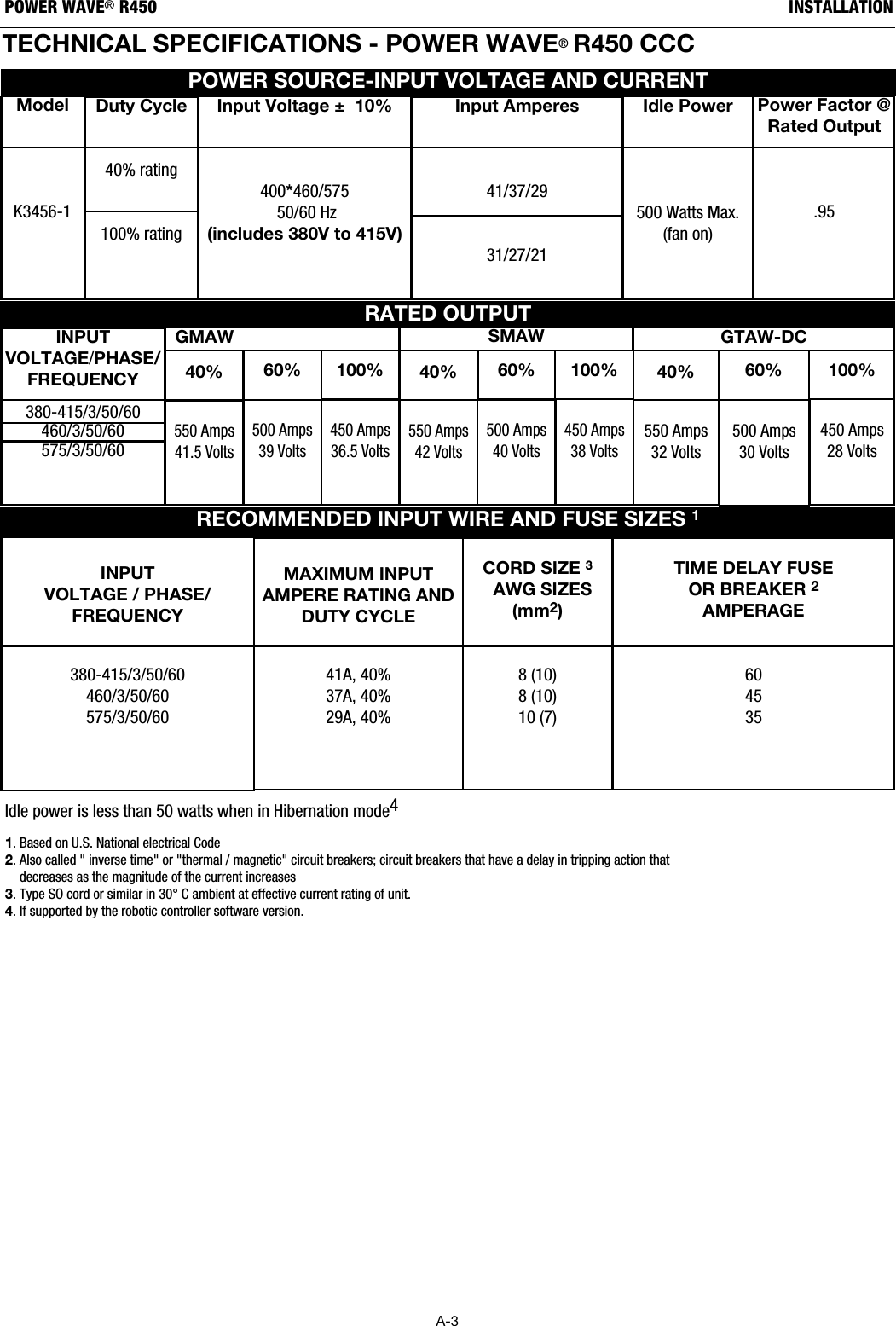
A-3INSTALLATIONPOWER WAVE®R450TECHNICAL SPECIFICATIONS - POWER WAVE®R450 CCC RECOMMENDED INPUT WIRE AND FUSE SIZES 1INPUTVOLTAGE / PHASE/FREQUENCY380-415/3/50/60460/3/50/60575/3/50/60TIME DELAY FUSE OR BREAKER 2AMPERAGE604535CORD SIZE 3AWG SIZES(mm2)8 (10)8 (10)10 (7)MAXIMUM INPUTAMPERE RATING ANDDUTY CYCLE 41A, 40%37A, 40%29A, 40%RATED OUTPUTPOWER SOURCE-INPUT VOLTAGE AND CURRENTModelK3456-1Duty Cycle40% rating100% rating450 Amps36.5 Volts550 Amps41.5 Volts500 Amps39 VoltsINPUTVOLTAGE/PHASE/ FREQUENCY  380-415/3/50/60460/3/50/60575/3/50/60Input Amperes41/37/29 31/27/21 Idle Power500 Watts Max.(fan on)Power Factor @Rated Output.95Input Voltage ±  10%400*460/57550/60 Hz(includes 380V to 415V)Idle power is less than 50 watts when in Hibernation mode41. Based on U.S. National electrical Code2. Also called " inverse time" or "thermal / magnetic" circuit breakers; circuit breakers that have a delay in tripping action thatdecreases as the magnitude of the current increases3. Type SO cord or similar in 30°C ambient at effective current rating of unit.4. If supported by the robotic controller software version.GMAW40% 60% 100%GTAW-DC450 Amps38 Volts550 Amps42 Volts500 Amps40 Volts40% 60% 100%450 Amps28 Volts550 Amps32 Volts500 Amps30 Volts40% 60% 100%SMAW
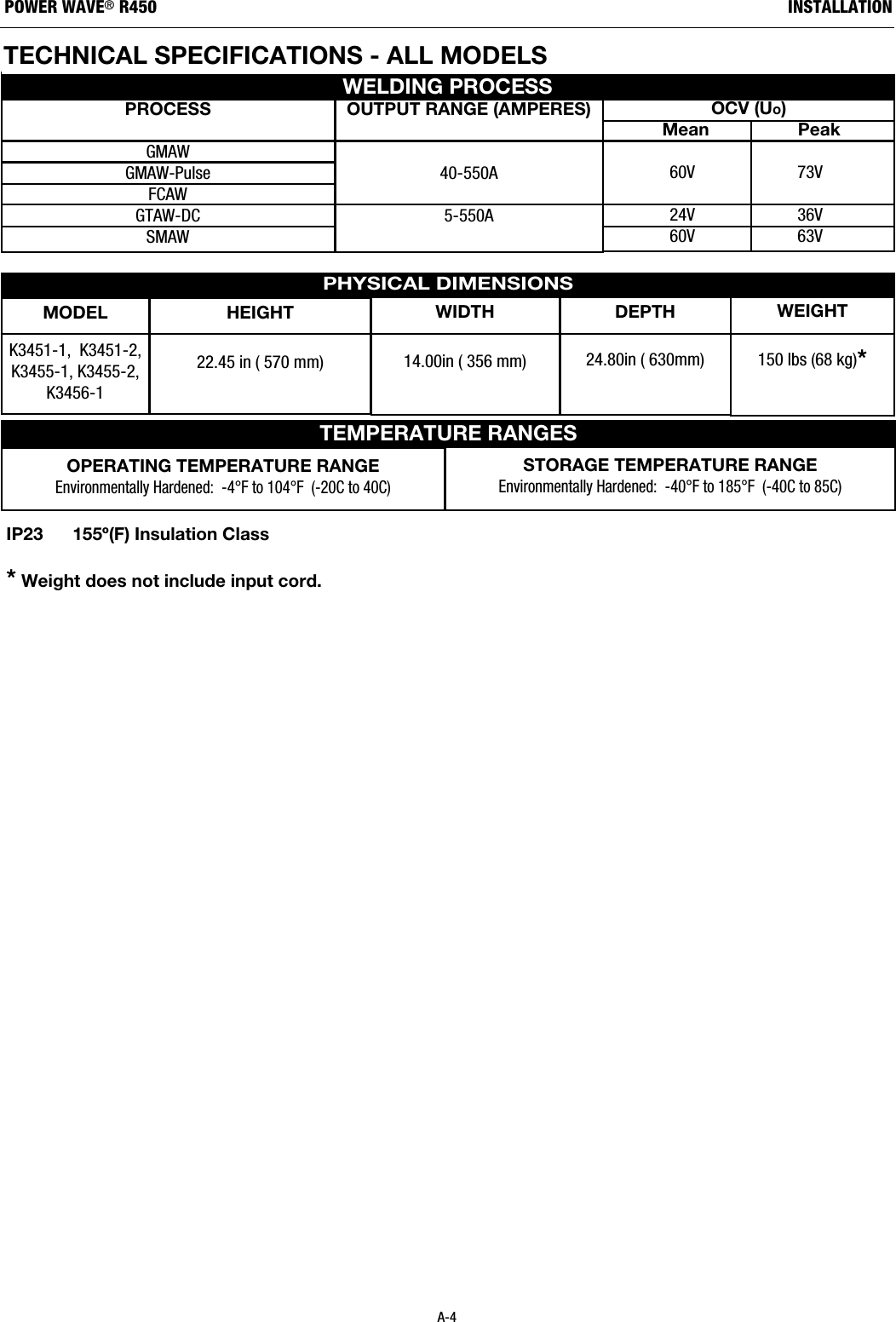
TEMPERATURE RANGESHEIGHT22.45 in ( 570 mm)MODELK3451-1,  K3451-2,K3455-1, K3455-2, K3456-1WIDTH14.00in ( 356 mm)DEPTH24.80in ( 630mm)WEIGHT150 lbs (68 kg)*OPERATING TEMPERATURE RANGEEnvironmentally Hardened:  -4°F to 104°F  (-20C to 40C)STORAGE TEMPERATURE RANGEEnvironmentally Hardened:  -40°F to 185°F  (-40C to 85C)PROCESSGMAWGMAW-PulseFCAWGTAW-DCSMAWOUTPUT RANGE (AMPERES)40-550A5-550AOCV (Uo)Mean                  Peak60V 73V24V 36V60V 63VWELDING PROCESSA-4INSTALLATIONPOWER WAVE®R450IP23      155º(F) Insulation Class*Weight does not include input cord.PHYSICAL DIMENSIONSTECHNICAL SPECIFICATIONS - ALL MODELS
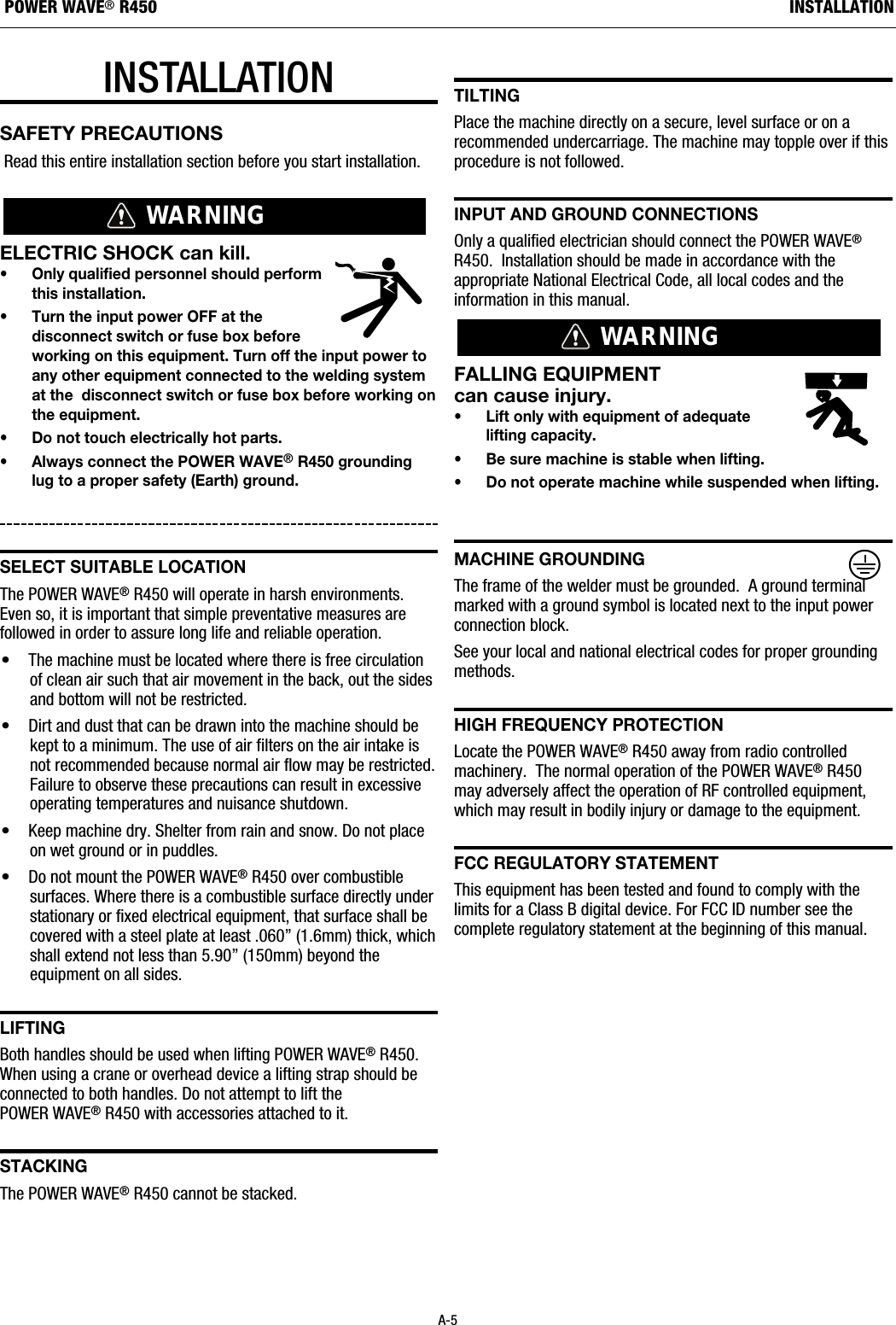
INSTALLATIONSAFETY PRECAUTIONSRead this entire installation section before you start installation.ELECTRIC SHOCK can kill.• Only qualified personnel should performthis installation.• Turn the input power OFF at thedisconnect switch or fuse box beforeworking on this equipment. Turn off the input power toany other equipment connected to the welding systemat the  disconnect switch or fuse box before working onthe equipment.• Do not touch electrically hot parts.• Always connect the POWER WAVE®R450 groundinglug to a proper safety (Earth) ground.sELECt suItaBLE LOCatIOnThe POWER WAVE®R450 will operate in harsh environments.Even so, it is important that simple preventative measures arefollowed in order to assure long life and reliable operation.• The machine must be located where there is free circulationof clean air such that air movement in the back, out the sidesand bottom will not be restricted. • Dirt and dust that can be drawn into the machine should bekept to a minimum. The use of air filters on the air intake isnot recommended because normal air flow may be restricted.Failure to observe these precautions can result in excessiveoperating temperatures and nuisance shutdown.• Keep machine dry. Shelter from rain and snow. Do not placeon wet ground or in puddles.• Do not mount the POWER WAVE®R450 over combustiblesurfaces. Where there is a combustible surface directly understationary or fixed electrical equipment, that surface shall becovered with a steel plate at least .060” (1.6mm) thick, whichshall extend not less than 5.90” (150mm) beyond theequipment on all sides.LIFtIngBoth handles should be used when lifting POWER WAVE®R450.When using a crane or overhead device a lifting strap should beconnected to both handles. Do not attempt to lift thePOWER WAVE®R450 with accessories attached to it.staCkIngThe POWER WAVE®R450 cannot be stacked.tILtIngPlace the machine directly on a secure, level surface or on arecommended undercarriage. The machine may topple over if thisprocedure is not followed. InPut and grOund COnnECtIOnsOnly a qualified electrician should connect the POWER WAVE®R450.  Installation should be made in accordance with theappropriate National Electrical Code, all local codes and theinformation in this manual.FALLING EQUIPMENT can cause injury.• Lift only with equipment of adequate lifting capacity.• Be sure machine is stable when lifting.• Do not operate machine while suspended when lifting.MaChInE grOundIngThe frame of the welder must be grounded.  A ground terminalmarked with a ground symbol is located next to the input powerconnection block.See your local and national electrical codes for proper groundingmethods.hIgh FrEQuEnCy PrOtECtIOnLocate the POWER WAVE®R450 away from radio controlledmachinery.  The normal operation of the POWER WAVE®R450may adversely affect the operation of RF controlled equipment,which may result in bodily injury or damage to the equipment.FCC rEguLatOry statEMEntThis equipment has been tested and found to comply with thelimits for a Class B digital device. For FCC ID number see thecomplete regulatory statement at the beginning of this manual.WARNINGWARNINGA-5INSTALLATIONPOWER WAVE®R450
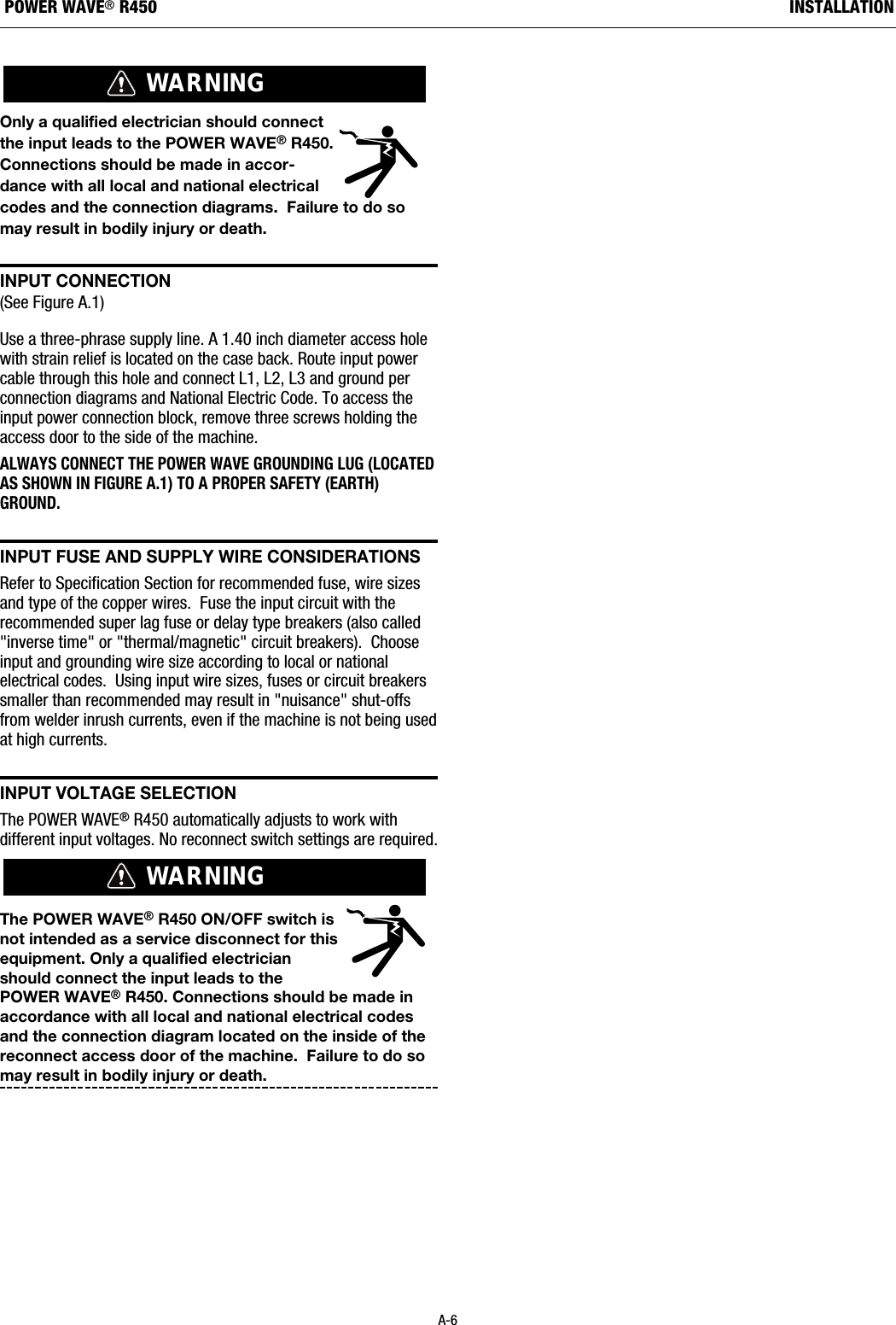
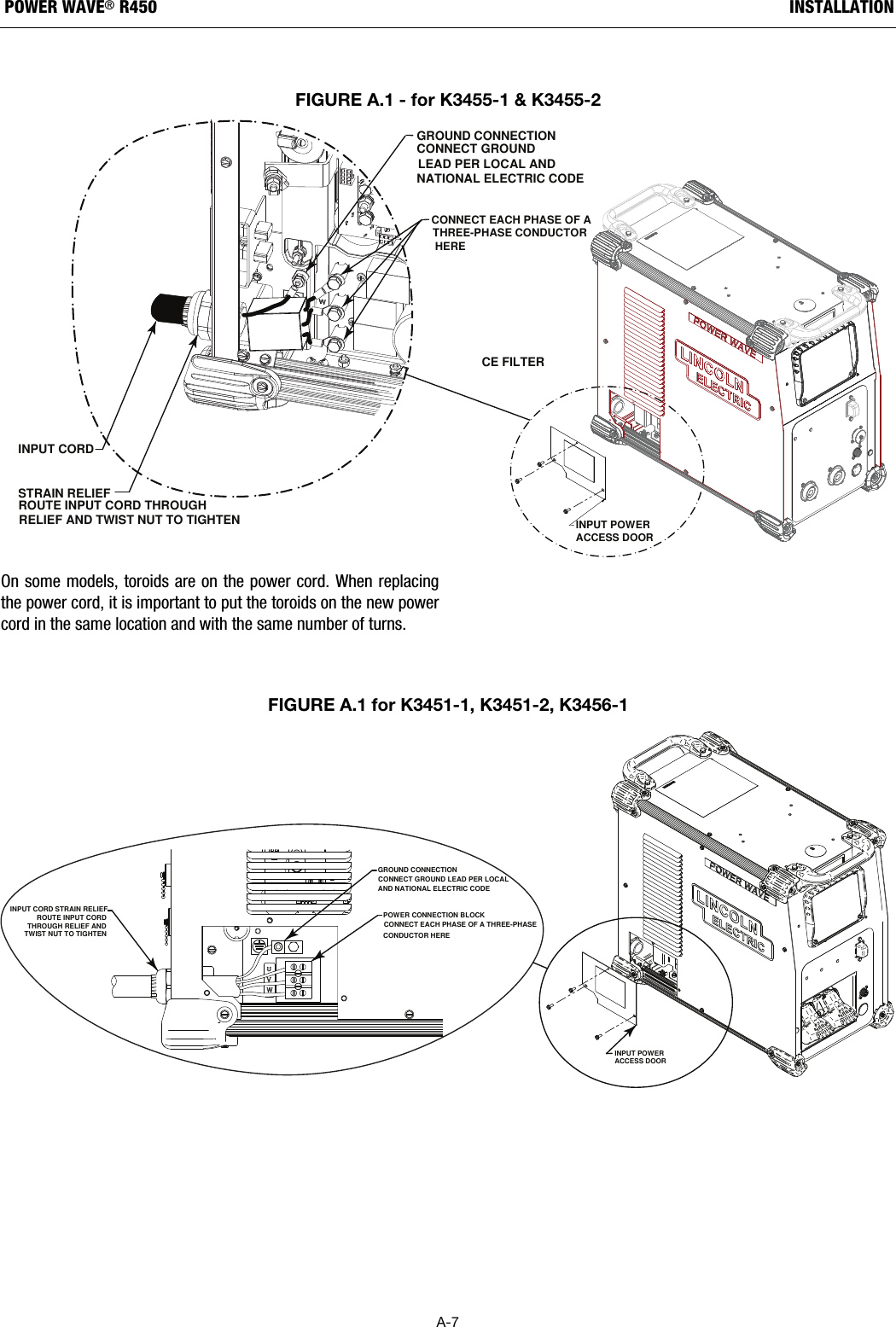
Only a qualified electrician should connectthe input leads to the POWER WAVE®R450.Connections should be made in accor-dance with all local and national electricalcodes and the connection diagrams.  Failure to do somay result in bodily injury or death.  InPut COnnECtIOn(See Figure A.1) Use a three-phrase supply line. A 1.40 inch diameter access holewith strain relief is located on the case back. Route input powercable through this hole and connect L1, L2, L3 and ground perconnection diagrams and National Electric Code. To access theinput power connection block, remove three screws holding theaccess door to the side of the machine.ALWAYS CONNECT THE POWER WAVE GROUNDING LUG (LOCATEDAS SHOWN IN FIGURE A.1) TO A PROPER SAFETY (EARTH)GROUND.InPut FusE and suPPLy WIrE COnsIdEratIOnsRefer to Specification Section for recommended fuse, wire sizesand type of the copper wires.  Fuse the input circuit with therecommended super lag fuse or delay type breakers (also called"inverse time" or "thermal/magnetic" circuit breakers).  Chooseinput and grounding wire size according to local or nationalelectrical codes.  Using input wire sizes, fuses or circuit breakerssmaller than recommended may result in "nuisance" shut-offsfrom welder inrush currents, even if the machine is not being usedat high currents.InPut VOLtagE sELECtIOnThe POWER WAVE®R450 automatically adjusts to work withdifferent input voltages. No reconnect switch settings are required.The POWER WAVE®R450 ON/OFF switch isnot intended as a service disconnect for thisequipment. Only a qualified electricianshould connect the input leads to thePOWER WAVE®R450. Connections should be made inaccordance with all local and national electrical codesand the connection diagram located on the inside of thereconnect access door of the machine.  Failure to do somay result in bodily injury or death.  WARNINGWARNINGA-6INSTALLATIONPOWER WAVE®R450
On some models, toroids are on the power cord. When replacingthe power cord, it is important to put the toroids on the new powercord in the same location and with the same number of turns.A-7INSTALLATIONPOWER WAVE®R450POWER CONNECTION BLOCKINPUT CORD STRAIN RELIEF CONNECT EACH PHASE OF A THREE-PHASE CONDUCTOR HERE GROUND CONNECTION  CONNECT GROUND LEAD PER LOCAL  AND NATIONAL ELECTRIC CODE  ROUTE INPUT CORD  THROUGH RELIEF AND  TWIST NUT TO TIGHTEN INPUT POWER ACCESS DOORFIGURE A.1 for K3451-1, K3451-2, K3456-1  CONNECT EACH PHASE OF A      THREE-PHASE CONDUCTOR      HERE INPUT POWER ACCESS DOORINPUT CORD STRAIN RELIEFCE FILTERGROUND CONNECTION CONNECT GROUND      LEAD PER LOCAL AND NATIONAL ELECTRIC CODE  ROUTE INPUT CORD THROUGH     RELIEF AND TWIST NUT TO TIGHTEN  FIGURE A.1 - for K3455-1 & K3455-2
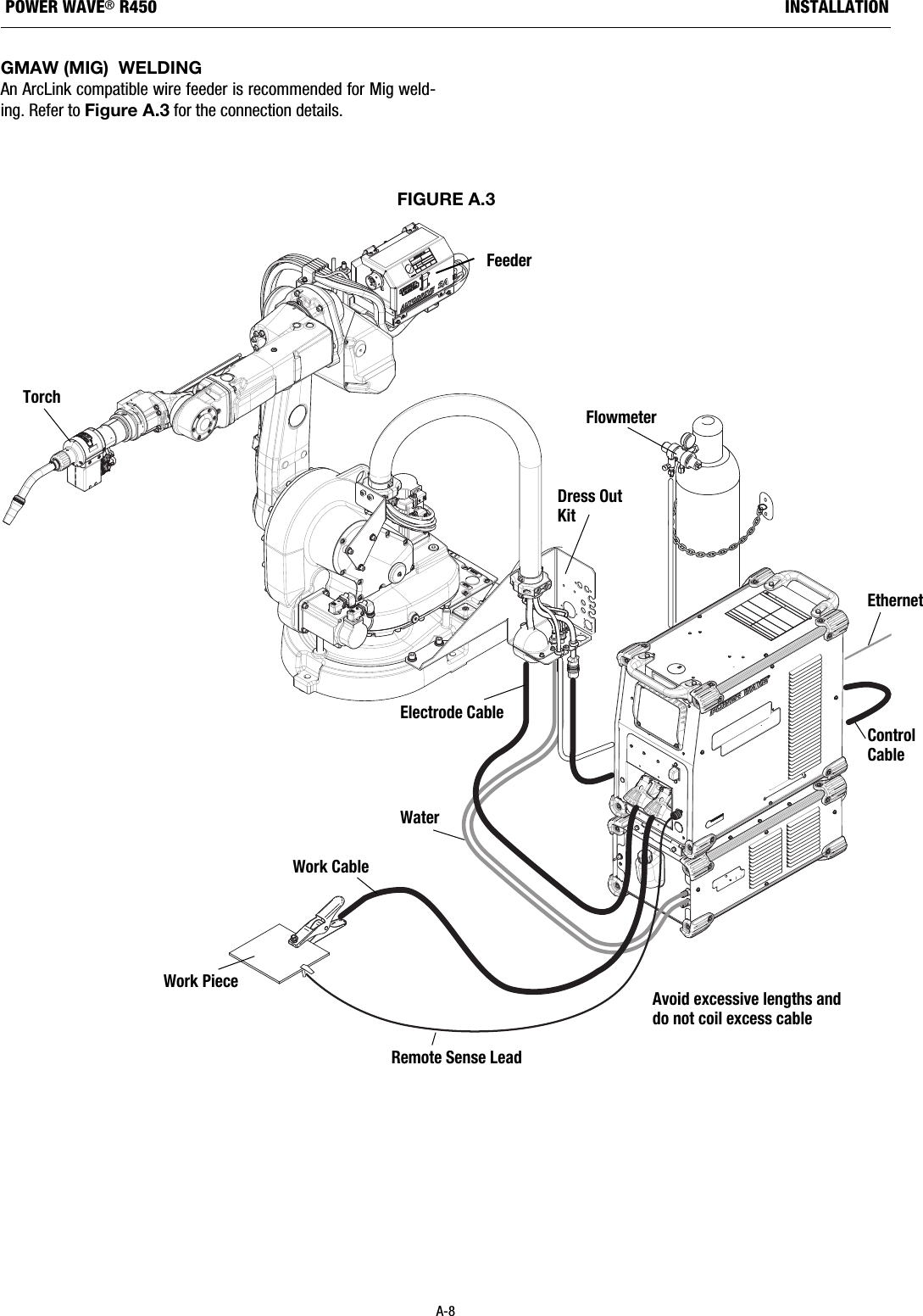
A-8INSTALLATIONPOWER WAVE®R450GMAW (MIG)  WELDINGAn ArcLink compatible wire feeder is recommended for Mig weld-ing. Refer to Figure A.3 for the connection details.FIGURE A.3Avoid excessive lengths anddo not coil excess cableEthernetControlCableRemote Sense LeadWork CableWork PieceElectrode CableWaterFeederDress OutKitFlowmeterTorch
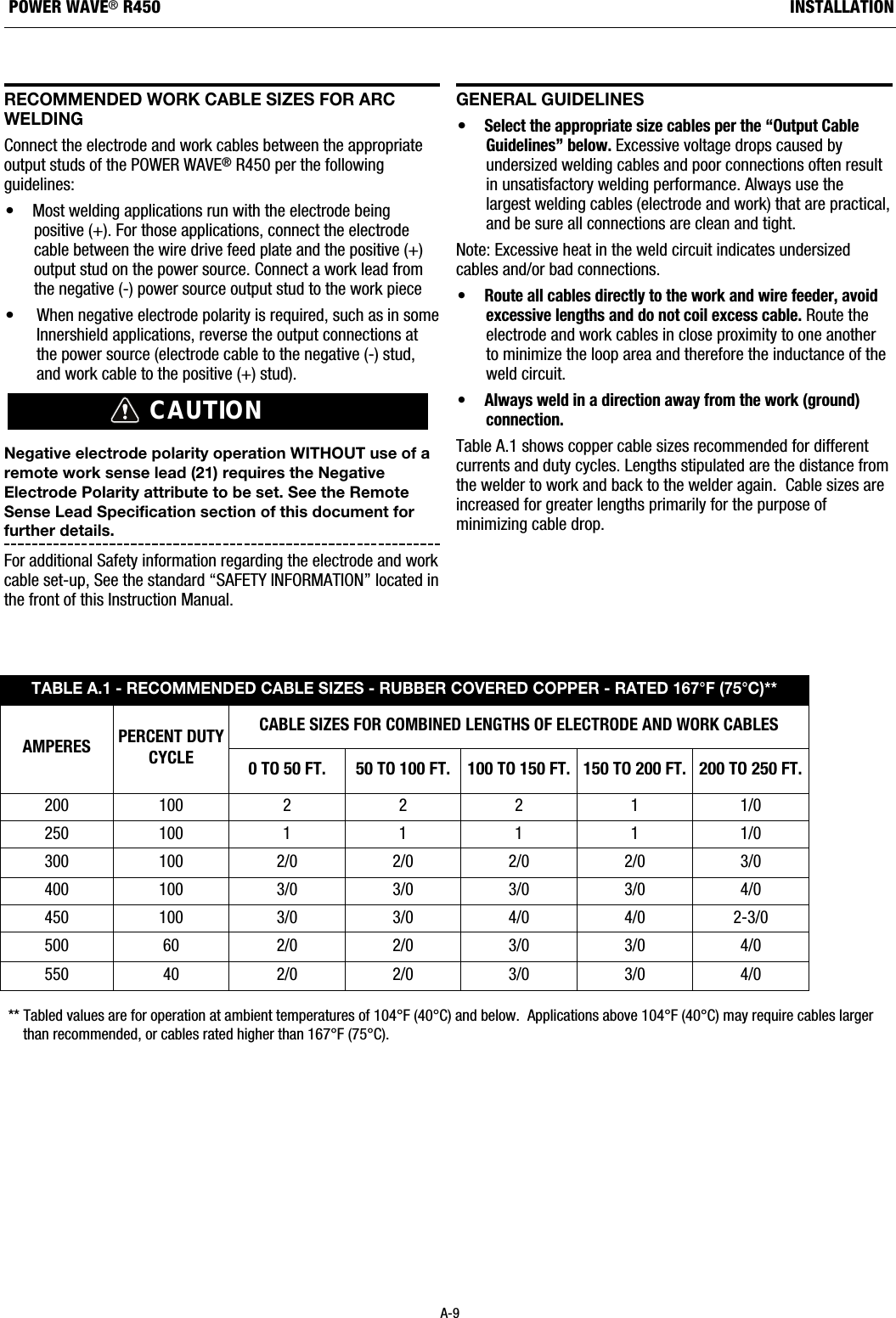
rECOMMEndEd WOrk CaBLE sIZEs FOr arCWELdIngConnect the electrode and work cables between the appropriateoutput studs of the POWER WAVE®R450 per the followingguidelines:•  Most welding applications run with the electrode beingpositive (+). For those applications, connect the electrodecable between the wire drive feed plate and the positive (+)output stud on the power source. Connect a work lead fromthe negative (-) power source output stud to the work piece • When negative electrode polarity is required, such as in someInnershield applications, reverse the output connections atthe power source (electrode cable to the negative (-) stud,and work cable to the positive (+) stud).Negative electrode polarity operation WITHOUT use of aremote work sense lead (21) requires the NegativeElectrode Polarity attribute to be set. See the RemoteSense Lead Specification section of this document forfurther details. For additional Safety information regarding the electrode and workcable set-up, See the standard “SAFETY INFORMATION” located inthe front of this Instruction Manual.gEnEraL guIdELInEs  •Select the appropriate size cables per the “Output CableGuidelines” below. Excessive voltage drops caused byundersized welding cables and poor connections often resultin unsatisfactory welding performance. Always use thelargest welding cables (electrode and work) that are practical,and be sure all connections are clean and tight. Note: Excessive heat in the weld circuit indicates undersizedcables and/or bad connections.• Route all cables directly to the work and wire feeder, avoidexcessive lengths and do not coil excess cable.Route theelectrode and work cables in close proximity to one anotherto minimize the loop area and therefore the inductance of theweld circuit.• Always weld in a direction away from the work (ground)connection.Table A.1 shows copper cable sizes recommended for differentcurrents and duty cycles. Lengths stipulated are the distance fromthe welder to work and back to the welder again.  Cable sizes areincreased for greater lengths primarily for the purpose ofminimizing cable drop. CAUTIONA-9INSTALLATIONPOWER WAVE®R450** Tabled values are for operation at ambient temperatures of 104°F (40°C) and below.  Applications above 104°F (40°C) may require cables largerthan recommended, or cables rated higher than 167°F (75°C).TABLE A.1 - RECOMMENDED CABLE SIZES - RUBBER COVERED COPPER - RATED 167°F (75°C)**AMPERES PERCENT DUTYCYCLECABLE SIZES FOR COMBINED LENGTHS OF ELECTRODE AND WORK CABLES0 TO 50 FT. 50 TO 100 FT. 100 TO 150 FT. 150 TO 200 FT. 200 TO 250 FT.200 100 2 2 2 1 1/0250 100 1 1 1 1 1/0300 100 2/0 2/0 2/0 2/0 3/0400 100 3/0 3/0 3/0 3/0 4/0450 100 3/0 3/0 4/0 4/0 2-3/0500 60 2/0 2/0 3/0 3/0 4/0550 40 2/0 2/0 3/0 3/0 4/0
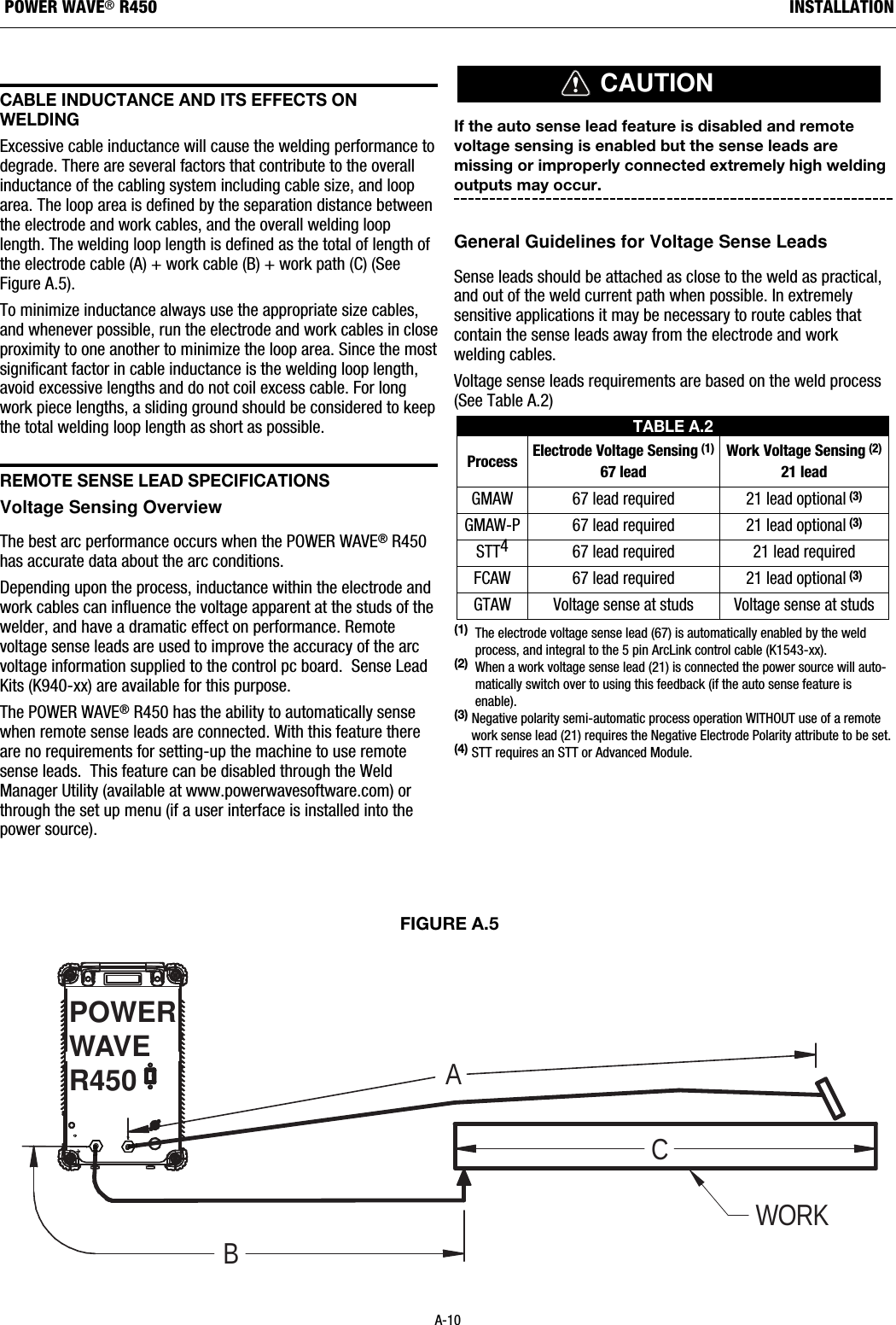
CaBLE InduCtanCE and Its EFFECts OnWELdIngExcessive cable inductance will cause the welding performance todegrade. There are several factors that contribute to the overallinductance of the cabling system including cable size, and looparea. The loop area is defined by the separation distance betweenthe electrode and work cables, and the overall welding looplength. The welding loop length is defined as the total of length ofthe electrode cable (A) + work cable (B) + work path (C) (SeeFigure A.5). To minimize inductance always use the appropriate size cables,and whenever possible, run the electrode and work cables in closeproximity to one another to minimize the loop area. Since the mostsignificant factor in cable inductance is the welding loop length,avoid excessive lengths and do not coil excess cable. For longwork piece lengths, a sliding ground should be considered to keepthe total welding loop length as short as possible.rEMOtE sEnsE LEad sPECIFICatIOnsVoltage Sensing Overview The best arc performance occurs when the POWER WAVE®R450has accurate data about the arc conditions. Depending upon the process, inductance within the electrode andwork cables can influence the voltage apparent at the studs of thewelder, and have a dramatic effect on performance. Remotevoltage sense leads are used to improve the accuracy of the arcvoltage information supplied to the control pc board.  Sense LeadKits (K940-xx) are available for this purpose.The POWER WAVE®R450 has the ability to automatically sensewhen remote sense leads are connected. With this feature thereare no requirements for setting-up the machine to use remotesense leads.  This feature can be disabled through the WeldManager Utility (available at www.powerwavesoftware.com) orthrough the set up menu (if a user interface is installed into thepower source). If the auto sense lead feature is disabled and remotevoltage sensing is enabled but the sense leads aremissing or improperly connected extremely high weldingoutputs may occur. General Guidelines for Voltage Sense LeadsSense leads should be attached as close to the weld as practical,and out of the weld current path when possible. In extremelysensitive applications it may be necessary to route cables thatcontain the sense leads away from the electrode and workwelding cables. Voltage sense leads requirements are based on the weld process(See Table A.2)(1) The electrode voltage sense lead (67) is automatically enabled by the weldprocess, and integral to the 5 pin ArcLink control cable (K1543-xx).(2)  When a work voltage sense lead (21) is connected the power source will auto-matically switch over to using this feedback (if the auto sense feature isenable).(3) Negative polarity semi-automatic process operation WITHOUT use of a remotework sense lead (21) requires the Negative Electrode Polarity attribute to be set.(4) STT requires an STT or Advanced Module.CAUTIONTABLE A.2Process Electrode Voltage Sensing (1)67 leadWork Voltage Sensing (2)21 leadGMAW 67 lead required 21 lead optional(3)GMAW-P 67 lead required 21 lead optional(3)STT467 lead required 21 lead requiredFCAW 67 lead required 21 lead optional(3)GTAW Voltage sense at studs Voltage sense at studsFIGURE A.5BACWORKPOWERWAVER450A-10INSTALLATIONPOWER WAVE®R450
Electrode Voltage SensingThe remote ELECTRODE sense lead (67) is built into the ArcLinkcontrol cable and is always connected to the wire drive feed platewhen a wire feeder is present. Enabling or disabling electrodevoltage sensing is application specific, and automaticallyconfigured by the active weld mode.If the auto sense lead feature is disabled and the weldpolarity attribute is improperly configured extremely highwelding outputs may occur. Work Voltage SensingWhile most applications perform adequately by sensing the workvoltage directly at the output stud, the use of a remote workvoltage sense lead is recommended for optimal performance. Theremote WORK sense lead (21) can be accessed through the four-pin voltage sense connector located on the control panel by usingthe K940 Sense Lead Kit. It must be attached to the work as closeto the weld as practical, but out of the weld current path. For moreinformation regarding the placement of remote work voltagesense leads, see in this section entitled "Voltage SensingConsiderations for Multiple Arc Systems."   Negative Electrode PolarityThe POWER WAVE®R450 has the ability to automatically sensethe polarity of the sense leads.  With this feature there are no set-up requirements for welding with negative electrode polarity.  Thisfeature can be disabled through the Weld Manager Utility(available at www.powerwavesoftware.com) or through the set upmenu (if a user interface is installed into the power source).CAUTIONA-11INSTALLATIONPOWER WAVE®R450
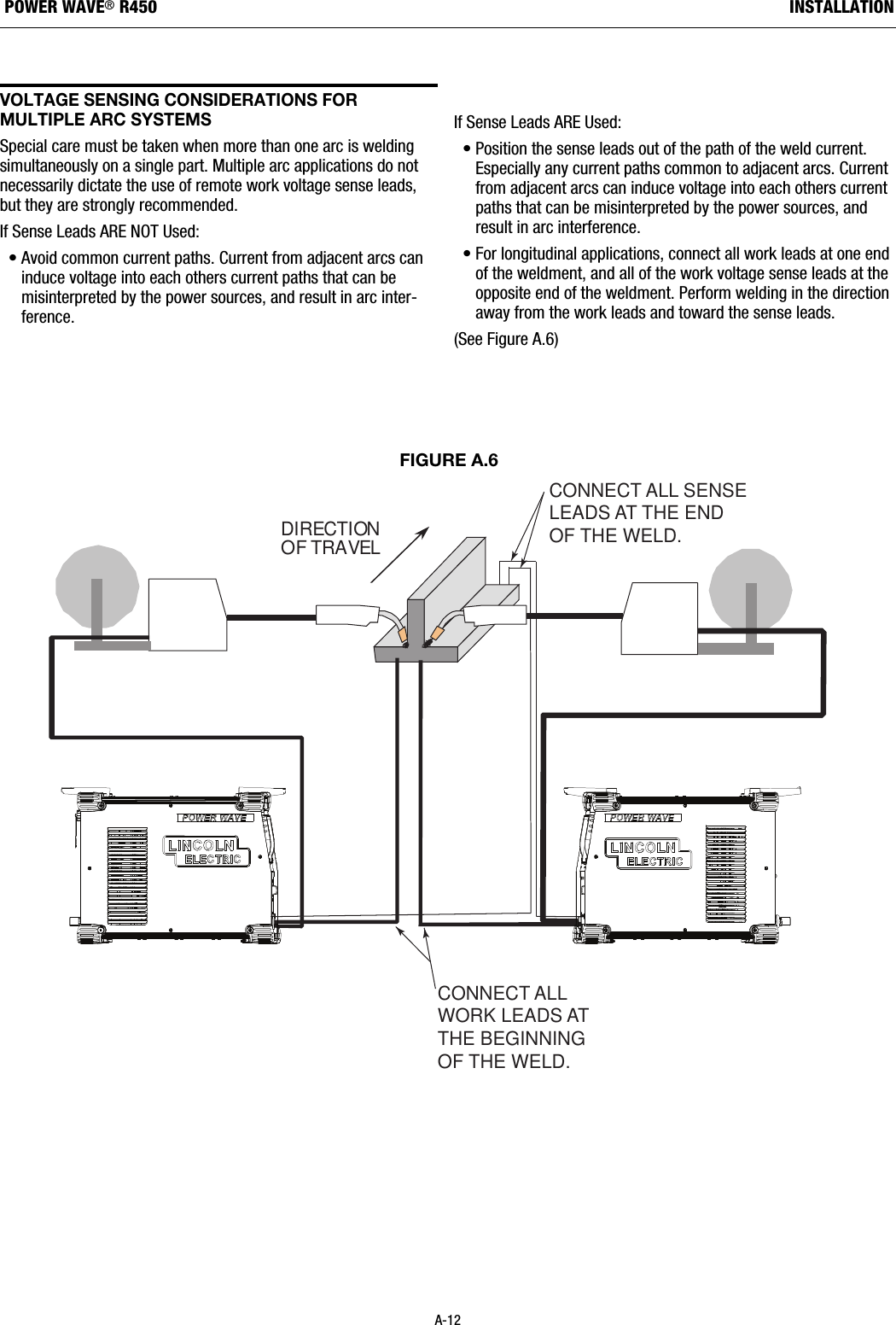
VOLtagE sEnsIng COnsIdEratIOns FOrMuLtIPLE arC systEMsSpecial care must be taken when more than one arc is weldingsimultaneously on a single part. Multiple arc applications do notnecessarily dictate the use of remote work voltage sense leads,but they are strongly recommended.If Sense Leads ARE NOT Used:• Avoid common current paths. Current from adjacent arcs caninduce voltage into each others current paths that can bemisinterpreted by the power sources, and result in arc inter-ference.If Sense Leads ARE Used:• Position the sense leads out of the path of the weld current.Especially any current paths common to adjacent arcs. Currentfrom adjacent arcs can induce voltage into each others currentpaths that can be misinterpreted by the power sources, andresult in arc interference.• For longitudinal applications, connect all work leads at one endof the weldment, and all of the work voltage sense leads at theopposite end of the weldment. Perform welding in the directionaway from the work leads and toward the sense leads.(See Figure A.6)DIRECTIONOF TRAVELCONNECT ALLWORK LEADS AT THE BEGINNINGOF THE WELD.CONNECT ALL SENSELEADS AT THE ENDOF THE WELD.FIGURE A.6A-12INSTALLATIONPOWER WAVE®R450

Navigation menu