Thomson Broadcast and Multimedia ULT-1K10K2 UHF Digital transmitter, for use with MediaFlo User Manual PREIMPAP

Thomson Broadcast & Multimedia, Inc. UHF Digital transmitter, for use with MediaFlo PREIMPAP

User Manual part 2

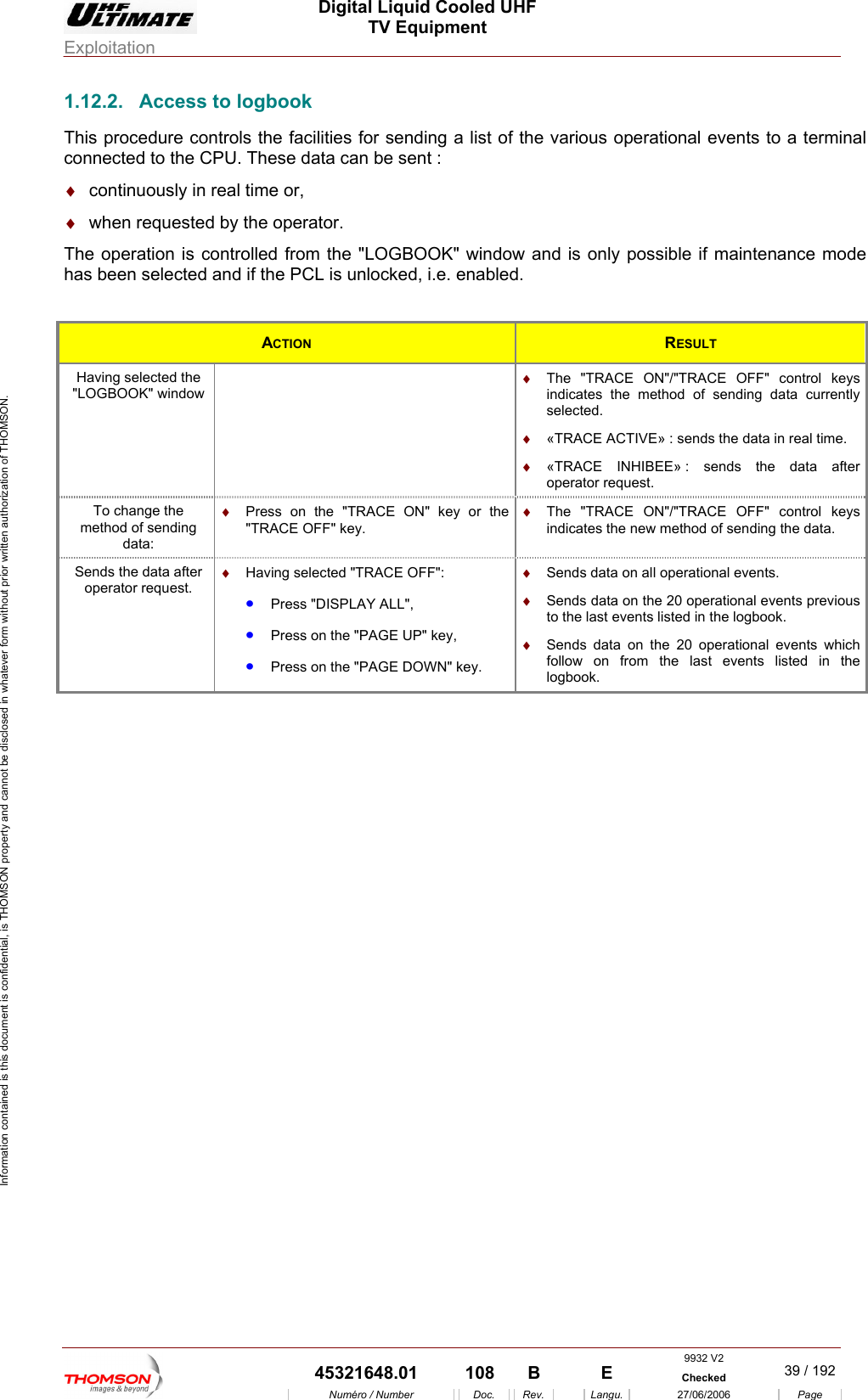
 Digital Liquid Cooled UHF TV Equipment Exploitation  Information contained is this document is confidential, is THOMSON property and cannot be disclosed in whatever form without prior written authorization of THOMSON. 1.12.2.  Access to logbook  to a terminal ♦  continuously in real time or, The operation is controlled from the "LOGBOOK" window and is only possible if maintenance mode  if the PCL is unlocked, i.e. enabled. This procedure controls the facilities for sending a list of the various operational eventsconnected to the CPU. These data can be sent : ♦  when requested by the operator. has been selected and ACTION  RESULT Having selected the   "LOGBOOK" window  indicates the method of sending data currently selected. ♦  The "TRACE ON"/"TRACE OFF" control keys ♦  «TRACE ACTIVE» : sends the data in real time. : sends the data after operator request. ♦  «TRACE INHIBEE» To changmethod of sdata:  ON" key or the  ♦  The "TRACE ON"/"TRACE OFF" control keys indicates the new method of sending the data. e the ending ♦  Press on the "TRACE"TRACE OFF" key. Sends the data aoperator reing selected "TRACE OFF":  ALL", •  Press on the "PAGE DOWN" key. ♦  Sends data on all operational events. ♦  Sends data on the 20 operational events previous to the last events listed in the logbook. ♦  Sends data on the 20 operational events which follow on from the last events listed in the logbook. fter quest. ♦  Hav•  Press "DISPLAY•  Press on the "PAGE UP" key, 9932 V2  45321648.01  108  B    E  Checked  39 / 192Numéro / Number Doc. Rev. Langu. 27/06/2006 Page
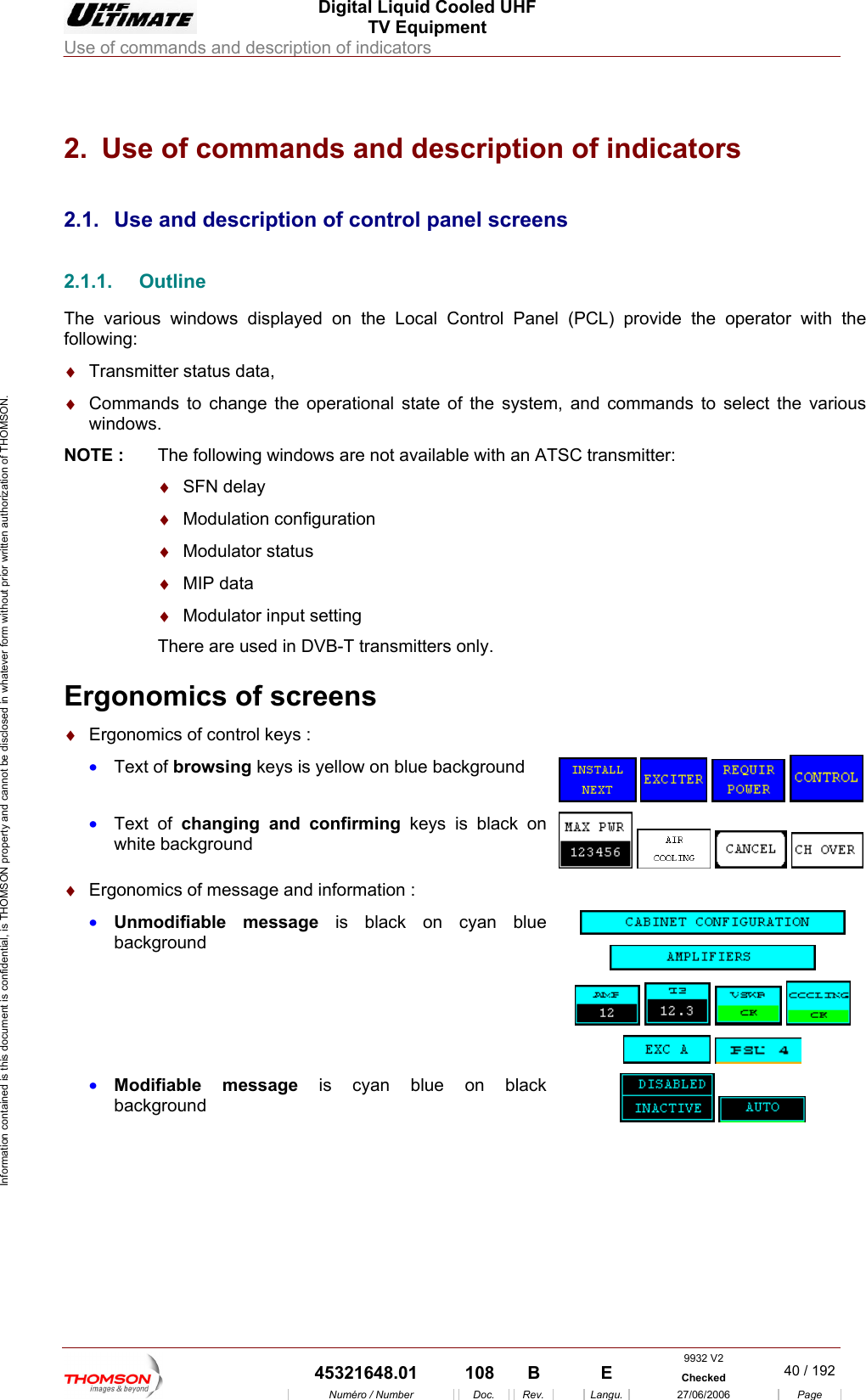
 Digital Liquid Cooled UHF TV Equipment Use of commands and description of indicators  Information contained is this document is confidential, is THOMSON property and cannot be disclosed in whatever form without prior written authorization of THOMSON. 2.  Use of commands and description of indicators 2.1.   2.1.1.The vario e Local Control Panel (PCL) provide the operator with the follow :♦  Trans♦  Comm l state of the system, and commands to select the various NOTE :  The following windows are not available with an ATSC transmitter: ♦  SFN delay  ♦  Modulation configuration   ♦  Modulator status  ♦  MIP data  ♦  Modulator input setting There are used in DVB-T transmitters only.  Ergonomics of screens ♦  Ergonomics of control keys : •  Text of browsing keys is yellow on blue background Use and description of control panel screens Outline us windows displayed on thing  mitter status data, ands to change the operationawindows.      •  Text of changing and confirming keys is black on white background      ♦  Ergonomics of message and information : •  Unmodifiable message is black on cyan blue background              •  Modifiable message is cyan blue on black background     9932 V2  45321648.01  108  B    E  Checked  40 / 192Numéro / Number Doc. Rev. Langu. 27/06/2006 Page
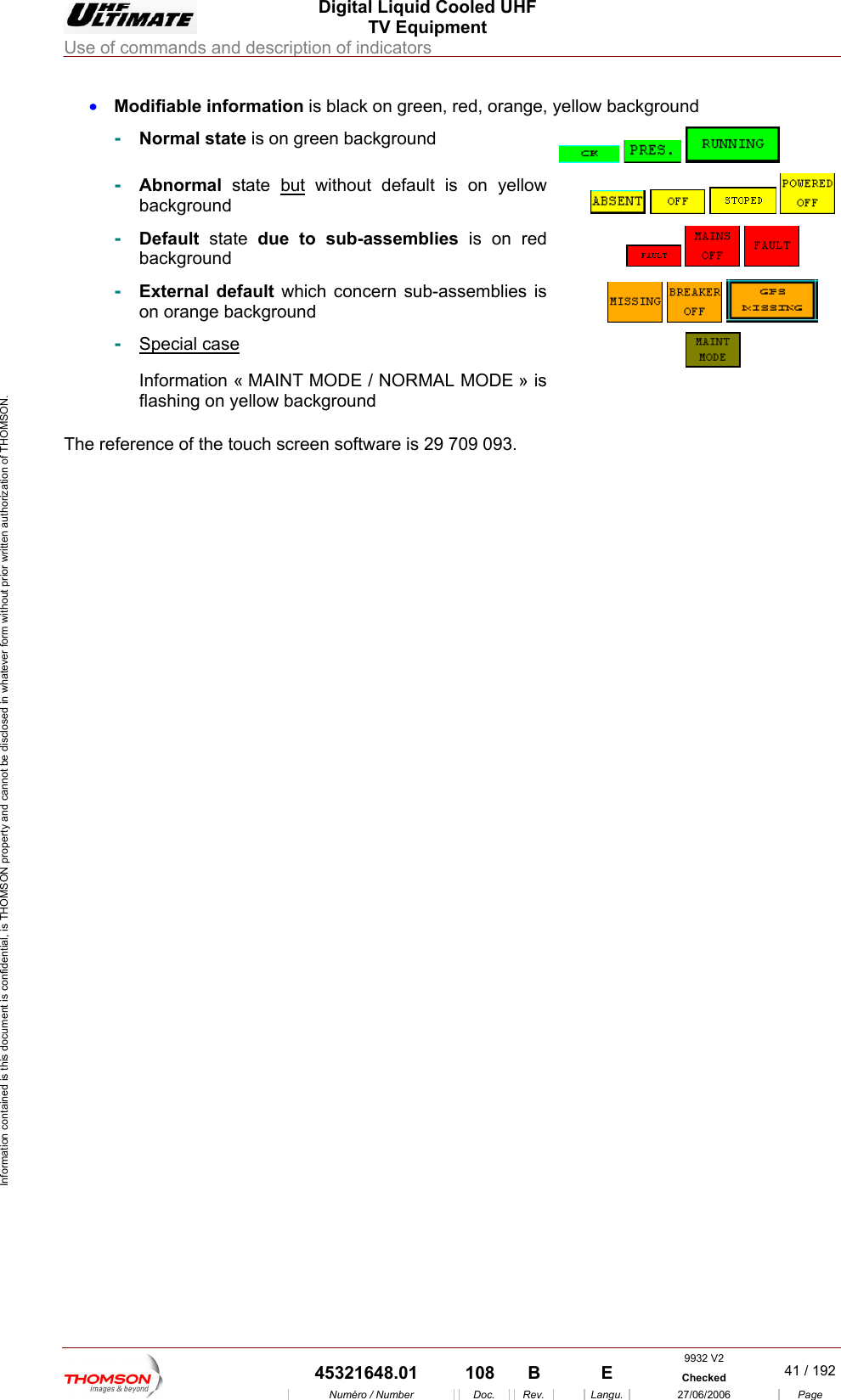
 Digital Liquid Cooled UHF TV Equipment Use of commands and description of indicators  Information contained is this document is confidential, is THOMSON property and cannot be disclosed in whatever form without prior written authorization of THOMSON. •  Modifiable information is black on green, red, orange, yellow background ckground -  Normal state is on green ba     -  bnormal state Abut without default is on yellow ackground        b-  Default state due to sub-assemblies is on red background      -  External default which concern sub-assemblies is on orange background       -  Special case « MAINT MODE / NORMAL MODE » is ellow backgroun Information flashing on y d   The reference of the touch    screen software is 29 709 093. 9932 V2  45321648.01  108  B    E  Checked  41 / 192Numéro / Number Doc. Rev. Langu. 27/06/2006 Page
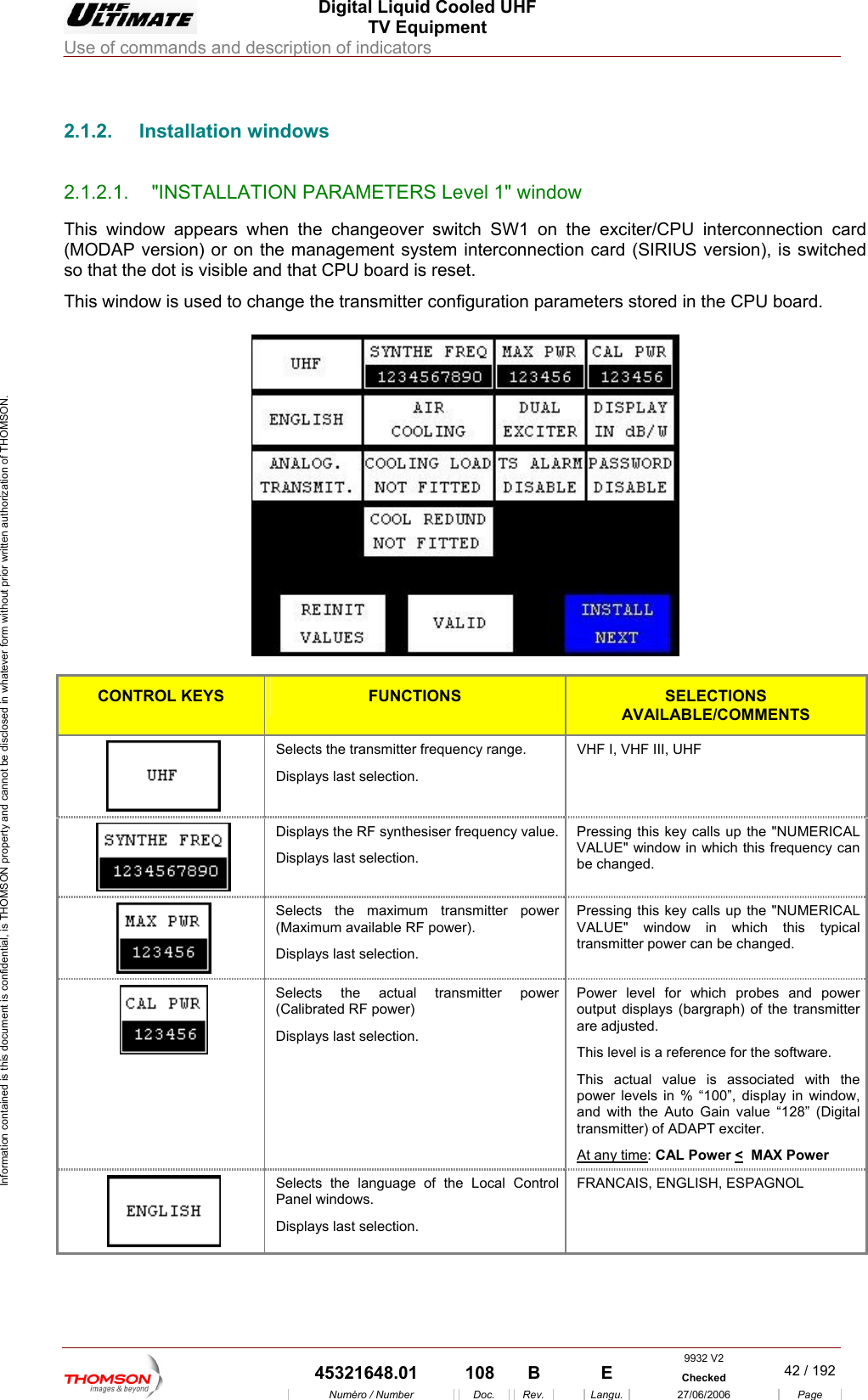
 Digital Liquid Cooled UHF TV Equipment Use of commands and description of indicators  Information contained is this document is confidential, is THOMSON property and cannot be disclosed in whatever form without prior written authorization of THOMSON.                        2.1.2. Installation windows 2.1.2.1.  "INSTALLATION PARAMETERS Level 1" window This window appears when the changeover switch SW1 on t(MODAP version) or on the management system interconnectio witched so that the dot is visible anThis window is used to change the transmitter configuration param he exciter/CPU interconnection card n card (SIRIUS version), is sd that CPU board is reset. eters stored in the CPU board.   CONTROL KEYS FUNCTIONS SELECTIONS AVAILABLE/COMMENTS  Selects the transmitter frequency range. Displays last selection. VHF I, VHF III, UHF  Displays the RF synthesiser frequency value.Displays last selection. Pressing this key calls up the "NUMERICAL VALUE" window in which this frequency can be changed.  Selects the maximum transmitter power (Maximum available RF power). Displays last selection. Pressing this key calls up the "NUMERICAL VALUE" window in which this typical transmitter power can be changed.  Selects the actual transmitter power (Calibrated RF power)  Displays last selection. Power level for which probes and power output displays (bargraph) of the transmitter are adjusted. This level is a reference for the software.  This actual value is associated with the power levels in % “100”, display in window, and with the Auto Gain value “128” (Digital transmitter) of ADAPT exciter. At any time: CAL Power <  MAX Power   Selects the language of the Local Control Panel windows. Displays last selection. FRANCAIS, ENGLISH, ESPAGNOL 9932 V2  45321648.01  108  B    E  Checked  42 / 192Numéro / Number Doc. Rev. Langu. 27/06/2006 Page
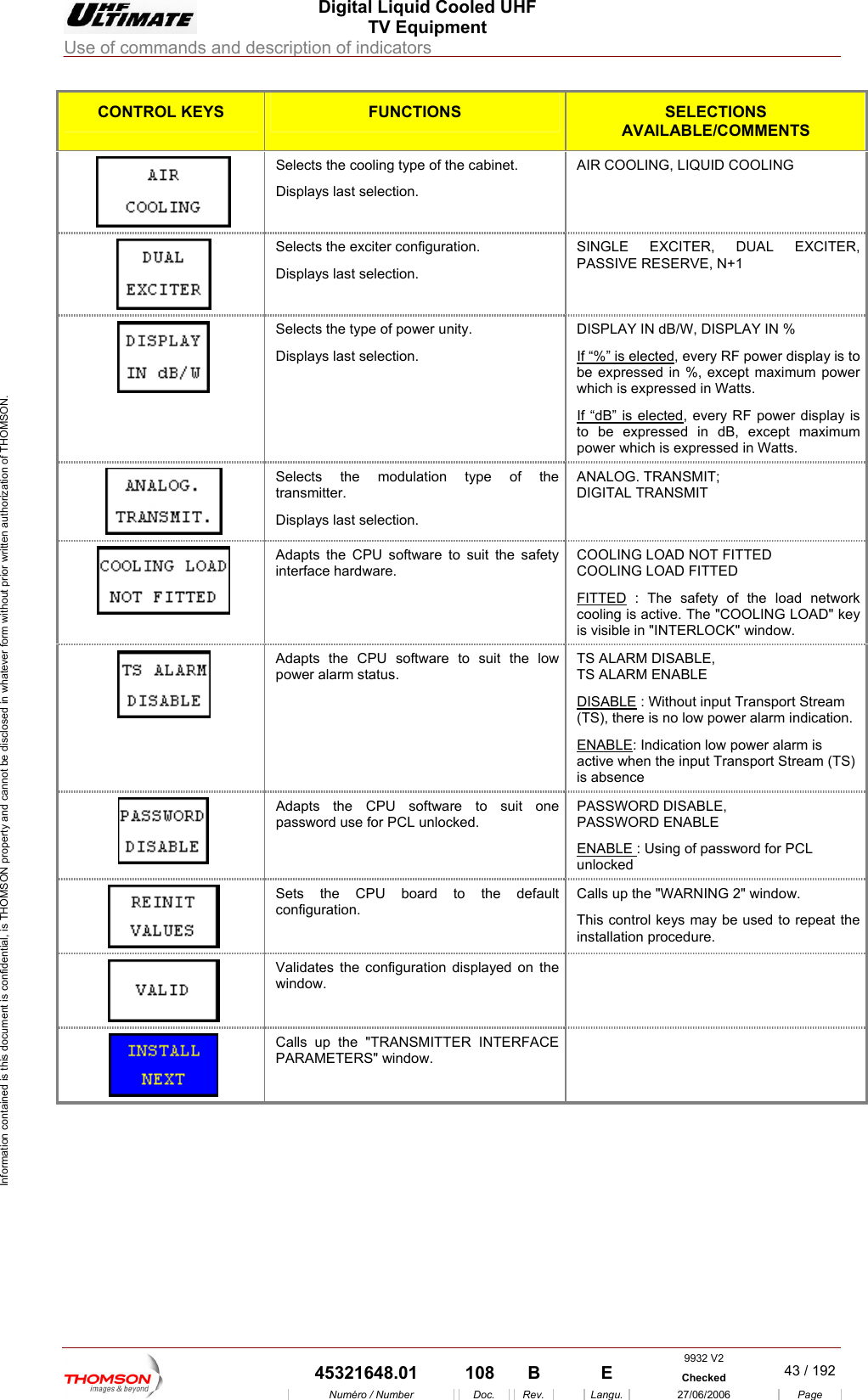
 Digital Liquid Cooled UHF TV Equipment Use of commands and description of indicators  Information contained is this document is confidential, is THOMSON property and cannot be disclosed in whatever form without prior written authorization of THOMSON. CONTROL KEYS FUNCTIONS SELECTIONS AVAILABLE/COMMENTS Selects the cooling type of the cabinet. Displays last selection. AIR COOLING, LIQUID COOLING  Selects the exciter configuration.  SINGLE EXCITER, DUAL EXCITER,  Displays last selection.  PASSIVE RESERVE, N+1 Selects the type of power unityDisplays last selection. DISPLAY IN dB/W, DISPLAY IN % If “%” is elected. , every RF power display is to be expressed in %, excep mum power which is exprIf “dB”t maxiessed in Watts.  is elected, every RF power display is to be expressed in dB, except maximum power which is expressed in Watts.  Selects the modulattransmitter. ion type of the Displays last selection. ANALOG. TRANSMIT;  DIGITAL TRANSMIT  Adapts the CPU software to suit the safety interface hardware. COOLING LOCOOLING LAD NOT FITTED OAD FITTED FITTED : The safety of the load network " key indow.  cooling is active. The "COOLING LOADis visible in "INTERLOCK" wAdapts the CPU software to suit the low power alarm status. TS ALARM DISABLE,  TS ALARM ENABLE ISABLE D : Without input Transport Stream (TS), there is no low power alarm indication. ENABLE: Indication low power alarm is active when the input Transport Stream (TS) is absence  Adapts the CPU software to suit one password use for PCL unlocked. PASSWORD DISABLE,  PASSWORD ENABLE ENABLE : Using of password for PCL unlocked   Sets the CPU board to the default configuration. Calls up the "WARNING 2" window. This control keys may be used to repeat the installation procedure.  Validates the configuration displayed on the window.   Calls up the "TRANSMITTER INTERFACE PARAMETERS" window.      9932 V2  45321648.01  108  B    E  Checked  43 / 192Numéro / Number Doc. Rev. Langu. 27/06/2006 Page
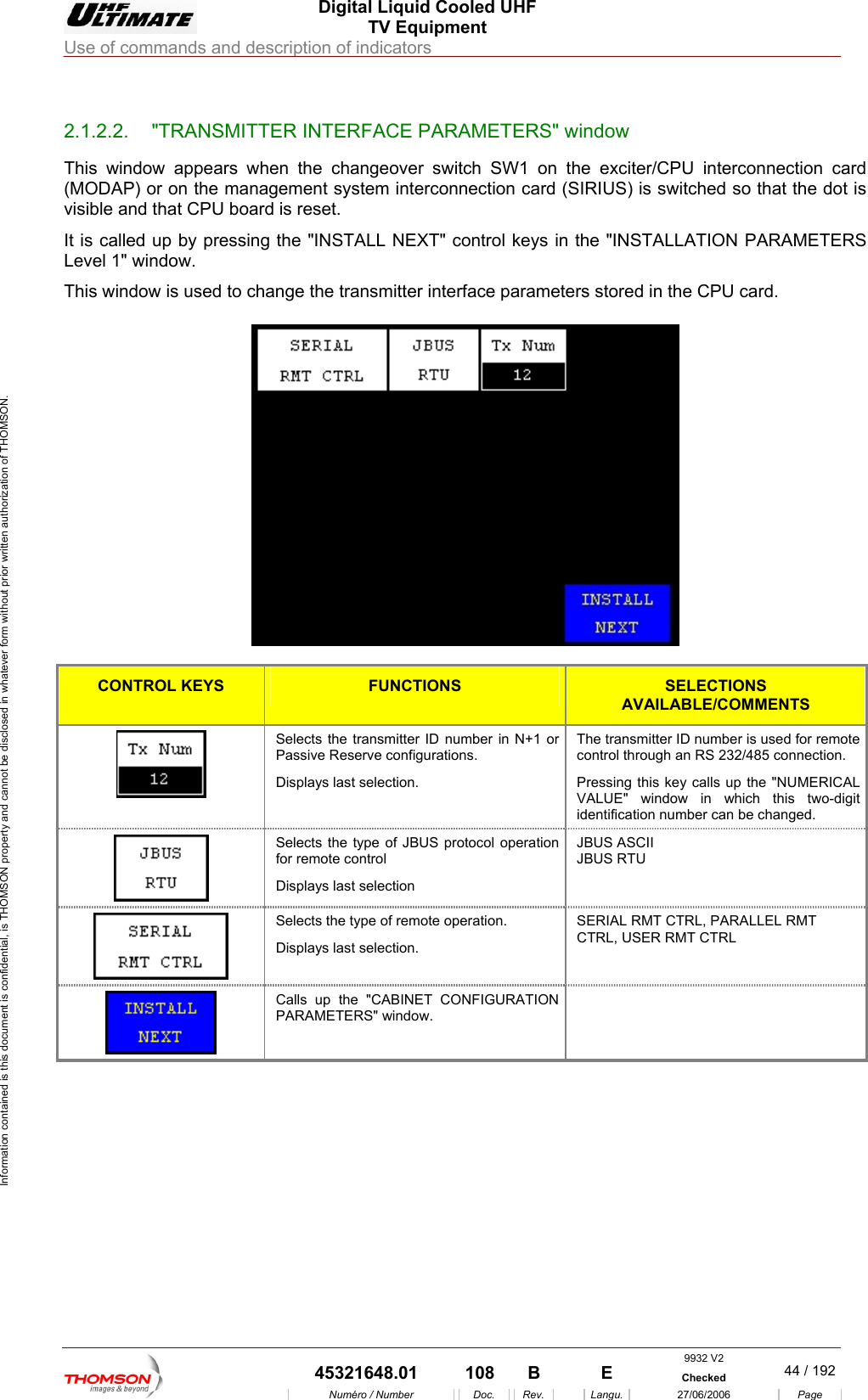
 Digital Liquid Cooled UHF TV Equipment Use of commands and description of indicators  Information contained is this document is confidential, is THOMSON property and cannot be disclosed in whatever form without prior written authorization of THOMSON.                        2.1.2.2.  "TRANSMITTER INTERFACE PARAMETERS" window This window appears when the changeover switch SW1 on the exciter/CPU interconnection card (MODAP) or on the management system interconnection card (SIRIUS) is switched so that the dot is visible and that CPU board is reset. It is called up by pressing the "INSTALL NEXT" control keys in the "INSTALLATION PARAMETERS Level 1" window. This window is used to change the transmitter interface parameters stored in the CPU card.    CONTROL KEYS FUNCTIONS SELECTIONS AVAILABLE/COMMENTS Selects the transmitter ID number in N+1 or Passive Reserve configurations. Displays last selection. he transmitter ID number is used for remote control through an RS 232/485 connection. Pressing this key calls up the "NUMERICAL ALUE" window in which this two-digit identification number can be changed. TV Selects the type of JBUS protocol operation for remote control Displays last selection JBUS ASCII JBUS RTU   Selects the type of remote operation. Displays last selection. SERIAL RMT CTRL, PARALLEL RMT CTRL, USER RMT CTRL   Calls up the "CABINET CONFIGURATION PARAMETERS" window.      9932 V2  45321648.01  108  B    E  Checked  44 / 192Numéro / Number Doc. Rev. Langu. 27/06/2006 Page
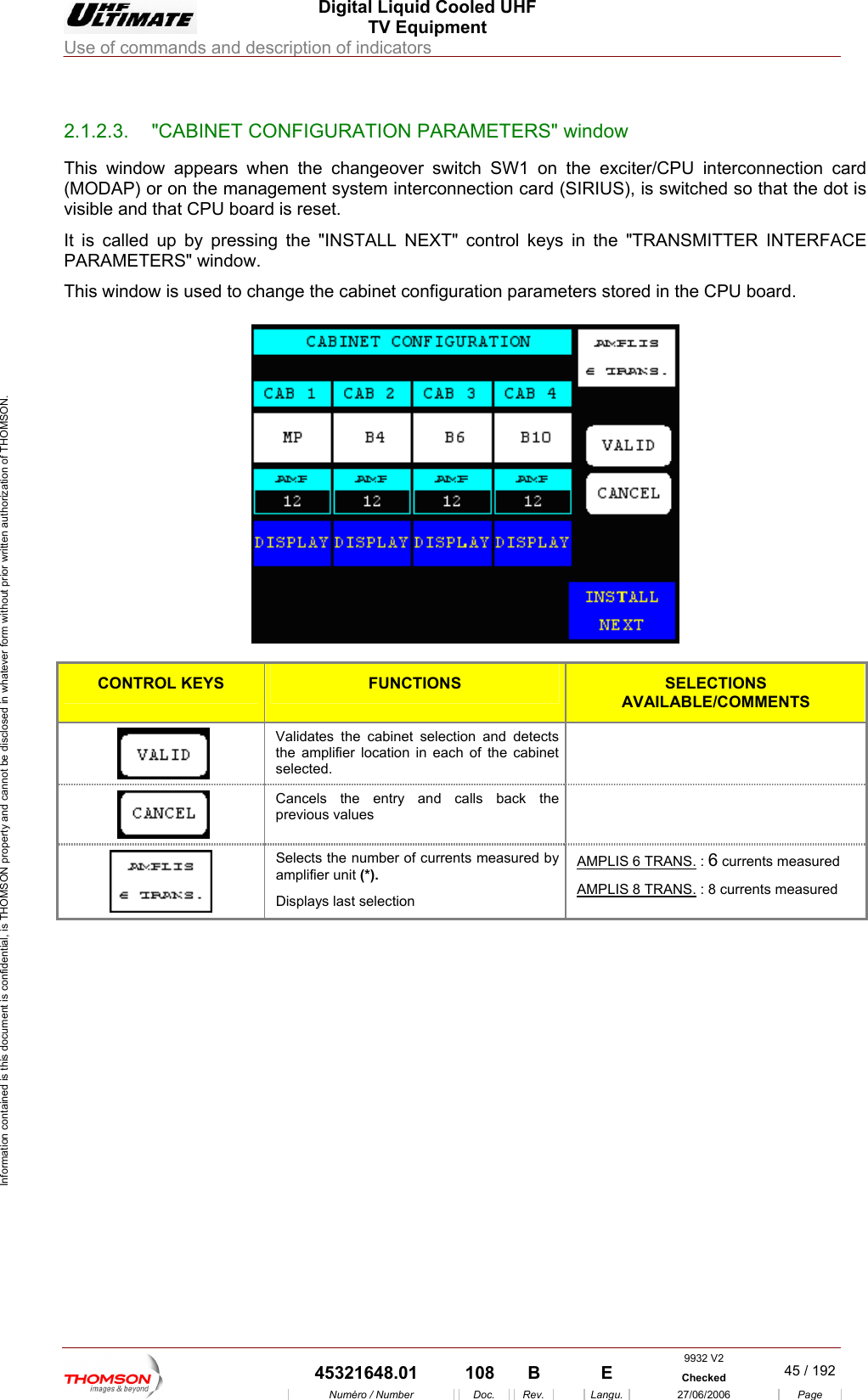
 Digital Liquid Cooled UHF TV Equipment Use of commands and description of indicators  Information contained is this document is confidential, is THOMSON property and cannot be disclosed in whatever form without prior written authorization of THOMSON.                        2.1.2.3.  "CABINET CONFIGURATION PARAMETERS" window This window appears wh  SW1 on th(MODAP) or on the manag rconnection card (S hed so that the dot is visible and that CPU boar set. It is called up by pressing the "INSTALL NEXT" control keys in the "TRANSMITTER INTERFACE PARAMETERS" window. This window is used to change the cabinet configuration paramete s sto en the changeover switch e exciter/CPU interconnection card IRIUS), is switcement system inted is rer red in the CPU board.   CONTROL KEYS FUNCTIONS SELECTIONS AVAILABLE/COMMENTS  the amplifier location in each of the cabinet selected. Validates the cabinet selection and detects    previous values Cancels the entry and calls back the   Selects the number of currents measured by amplifier unit (*). Displays last selection AMPLIS 6 TRANS. : 6 currents measured  AMPLIS 8 TRANS. : 8 currents measured 9932 V2  45321648.01  108  B    E  Checked  45 / 192Numéro / Number Doc. Rev. Langu. 27/06/2006 Page
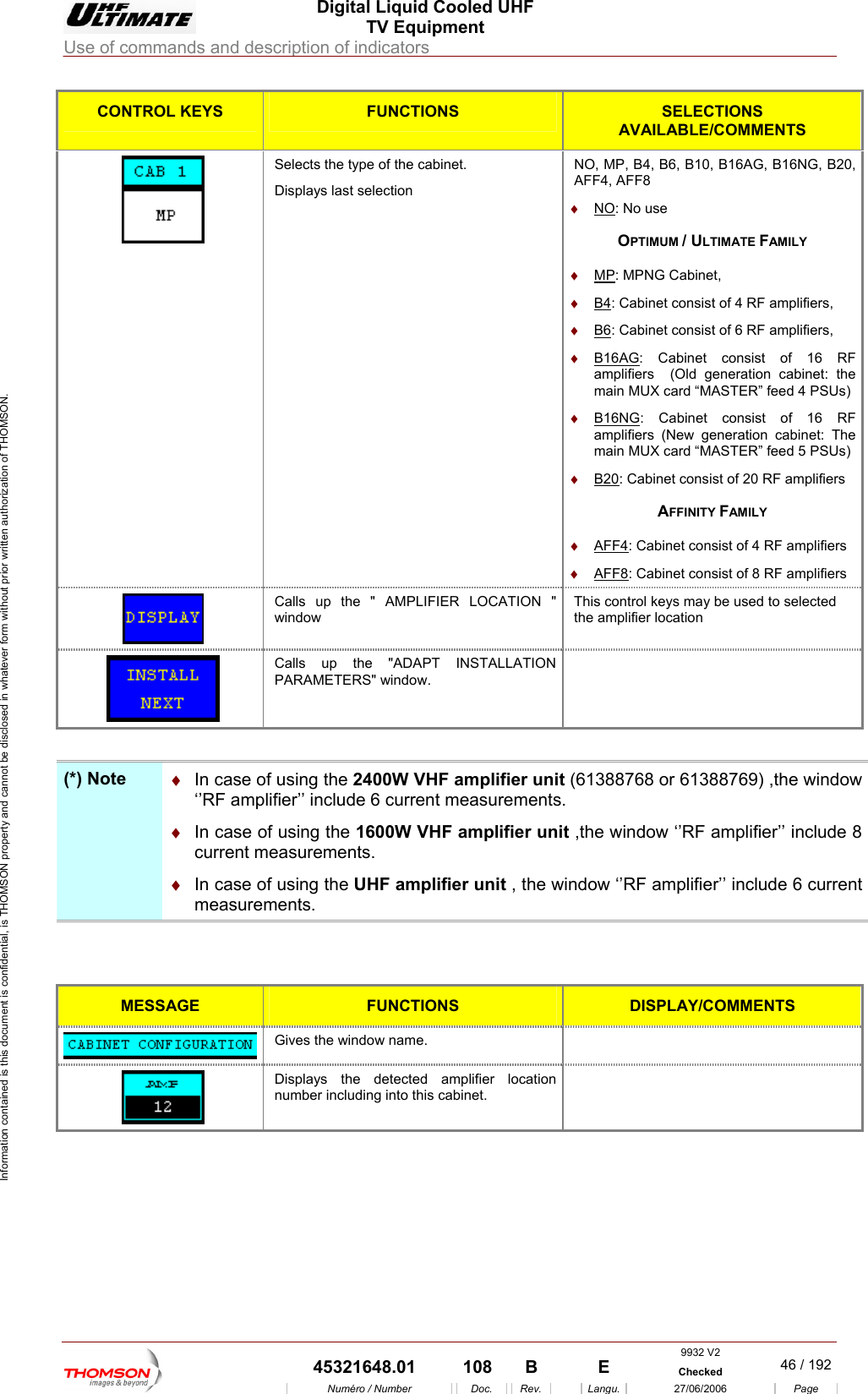
 Digital Liquid Cooled UHF TV Equipment Use of commands and description of indicators  Information contained is this document is confidential, is THOMSON property and cannot be disclosed in whatever form without prior written authorization of THOMSON. CONTROL KEYS FUNCTIONS SELECTIONS AVAILABLE/COMMENTS Selects the type of the cabinet.  NO, MP, B4, B6, B10, B16AG, B16NG, B20, AFF4, AFF8   ♦ Displays last selection NO: No use OPTIMUM / ULTIMATE FAMILY ♦  MP: MPNG Cabinet, ♦  B4: Cabinet consist of 4 RF amplifiers, ♦  B6: Cabinet consist of 6 RF amplifiers, ♦  B16AG: Cabinet consist of 16 RF amplifiers  (Old generation cabinet: the mai SUs) ♦  B16NGn MUX card “MASTER” feed 4 P: Cabinet consist of 16 RF amplifiers (New generation cabinet: The main MUX card “MASTER” feed 5 PSUs) ♦  B20: Cabinet consist of 20 RF amplifiers AFFINITY FAMILY ♦  AFF4: Cabinet consist of 4 RF amplifiers ♦  AFF8: Cabinet consist of 8 RF amplifiers Calls up the " AMPLIFIER LOCATION " window  ys may be used to selected This control kethe amplifier location  Calls up the "ADAPT INSTALLATION PARAMETERS" window.    (*) Note  ♦  In case of  unit (61388768 or 61388769) ,the window ‘’RF amplifier’’ include 6 current measurements. In case of he window ‘’RF amplifier’’ include 8 current measuremwindow ‘’RF amplifier’’ include 6 current measurements.  using the 2400W VHF amplifier♦   using the 1600W VHF amplifier unitents.  ,t♦  In case of using the UHF amplifier unit , the   MESS GE AFUNCTIONS DISPLAY/COMMENTS  Gives the window name.    Displays the detectenumber including into this cabinet. d amplifier location       9932 V2  45321648.01  108  B    E  Checked  46 / 192Numéro / Number Doc. Rev. Langu. 27/06/2006 Page
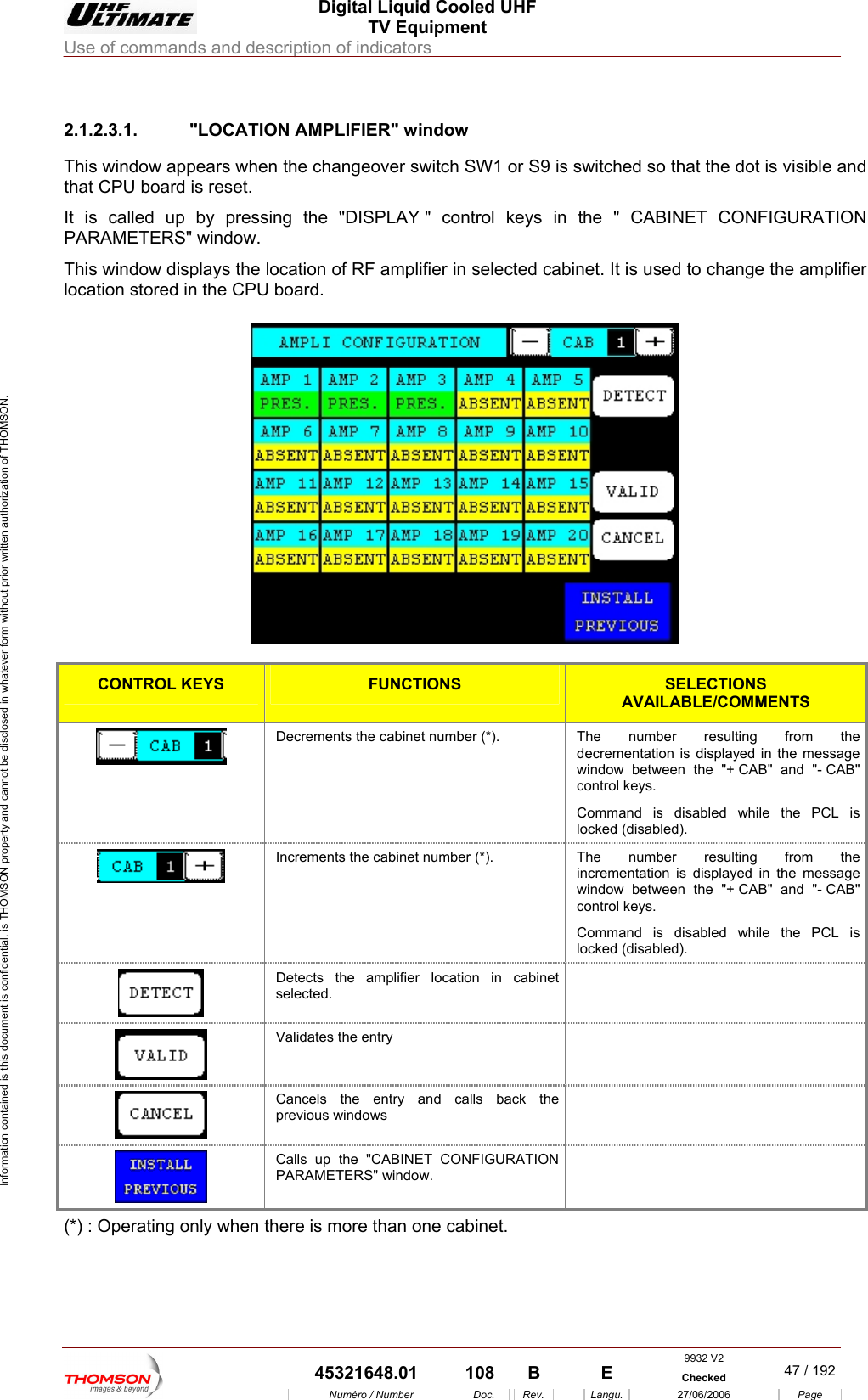
 Digital Liquid Cooled UHF TV Equipment Use of commands and description of indicators  Information contained is this document is confidential, is THOMSON property and cannot be disclosed in whatever form without prior written authorization of THOMSON.                        2.1.2.3.1. "LOCATION AMPLIFIER" window and U is called PARAMETERThis window  e amplifier cation store This window appears when the changeover switch SW1 or S9 is switched so that the dot is visible that CP board is reset. It  up by pressing the "DISPLAY " control keys in the " CABINET CONFIGURATION S" window. displays the location of RF amplifier in selected cabinet. It is used to change thlo d in the CPU board.    CONTROL KEYS FUNCTIONS SELECTIONS AVAILABLE/COMMENTS Decrements the cabinet number (*).  The ng from the decrementation is displayed in the message is  number resulti window between the "+ CAB" and "- CAB" control keys. Command is disabled while the PCL locked (disabled). Increments the cabinet number (*). ed in the message window between the "+ CAB" and "- CAB" control keys. Command is disabled while the PCL is locked (disabled). The number resulting from the incrementation is display Detects the amplifier location in cabinet    selected. Validates the entry    Cancels the entry and calls back the previous windows   Calls up the "CABINET CONFIGURATION PARAMETERS" window.   (*) : Operating only when there is more than one cabinet.  9932 V2  45321648.01  108  B    E  Checked  47 / 192Numéro / Number Doc. Rev. Langu. 27/06/2006 Page
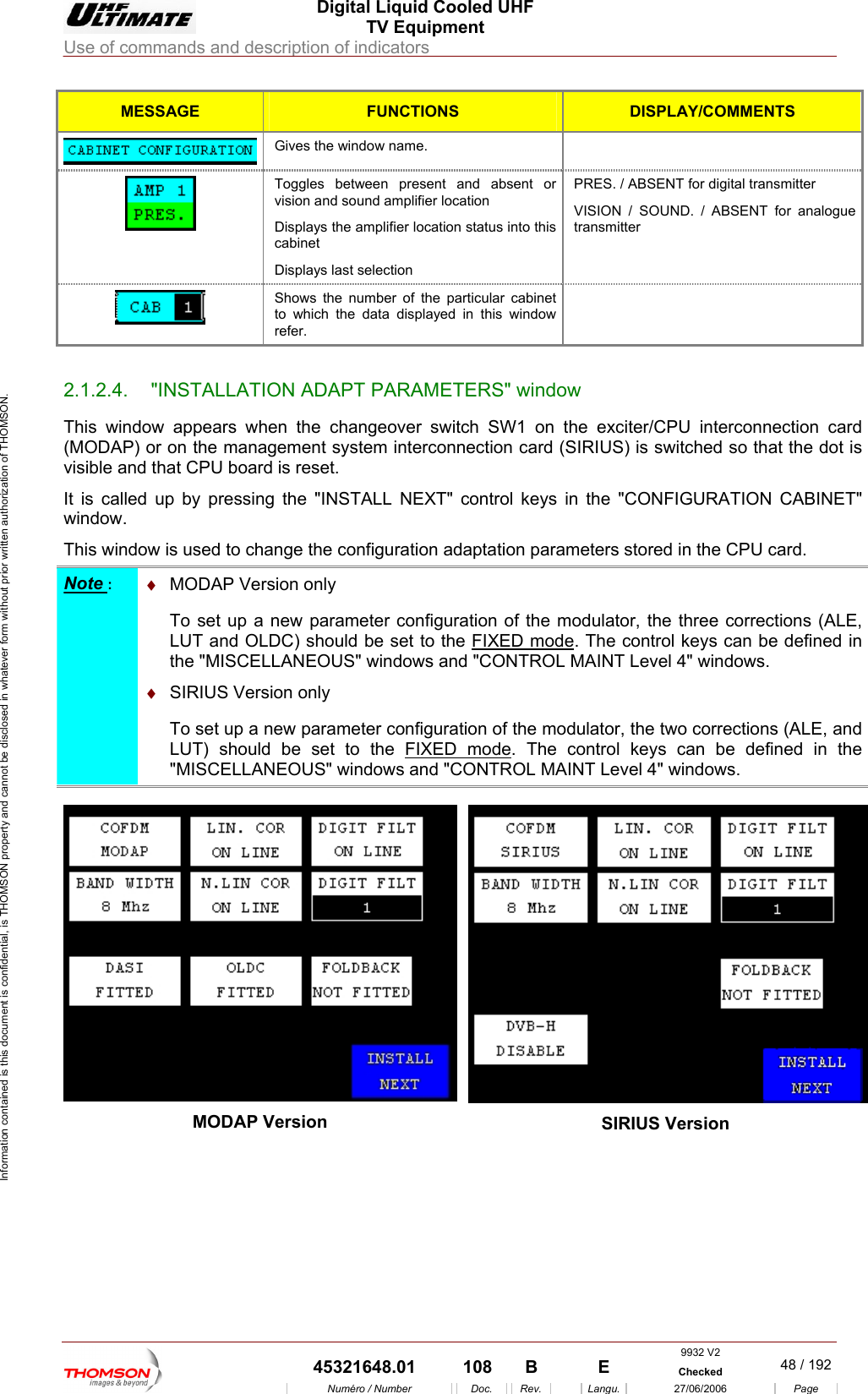
 Digital Liquid Cooled UHF TV Equipment Use of commands and description of indicators  Information contained is this document is confidential, is THOMSON property and cannot be disclosed in whatever form without prior written authorization of THOMSON. MESSAGE FUNCTIONS DISPLAY/COMMENTS  Gives the window name.   Toggles between presvision and sound amplifier locatioent and absent or n  Displays the amplifier location status into this cabinet Displays last selection  transmitter ENT for analogue PRES. / ABSENT for digitalVISION / SOUND. / ABStransmitter  Shows the number of the particularto which the data displayed in this  cabinet window refer.                       2.1.2.4.  "INSTALLATION ADAPT PARAMETERS" window This window appears when the changeover switch SW1 on the  PU interconnection card (MODAP) or on the management system interconnection card (Svisible and that CPU board is reset. It is called up by pressing iBINET" window. This window is used to cha n adaptation parameters stored in the CPU card.      exciter/CIRIUS) is switched so that the dot is  the "INSTALL NEXT" control keys  n the "CONFIGURATION CAnge the configuratioNote :  ♦DAP VersTo set up a  figuration of the modulator, the three corrections (ALE, LUT and OLDC) shoul MO ion only  new parameter cond be set to the FIXED mode. The control keys can AINT Level 4" windows. be defined in the "MISCELLANEOUS" windows and "CONTROL M ♦  SIRIUS VersiTo set up a new parameter configuration of the mod  LUT) should be set to the FIXED modeon only  ulator, the two corrections (ALE, and. The "MISCELLANEOUS" windows and "CONTROL MAcontrol keys can be defined in the INT Level 4" windows.  MODAP Version  SIRIUS Version  9932 V2  45321648.01  108  B    E  Checked  48 / 192Numéro / Number Doc. Rev. Langu. 27/06/2006 Page
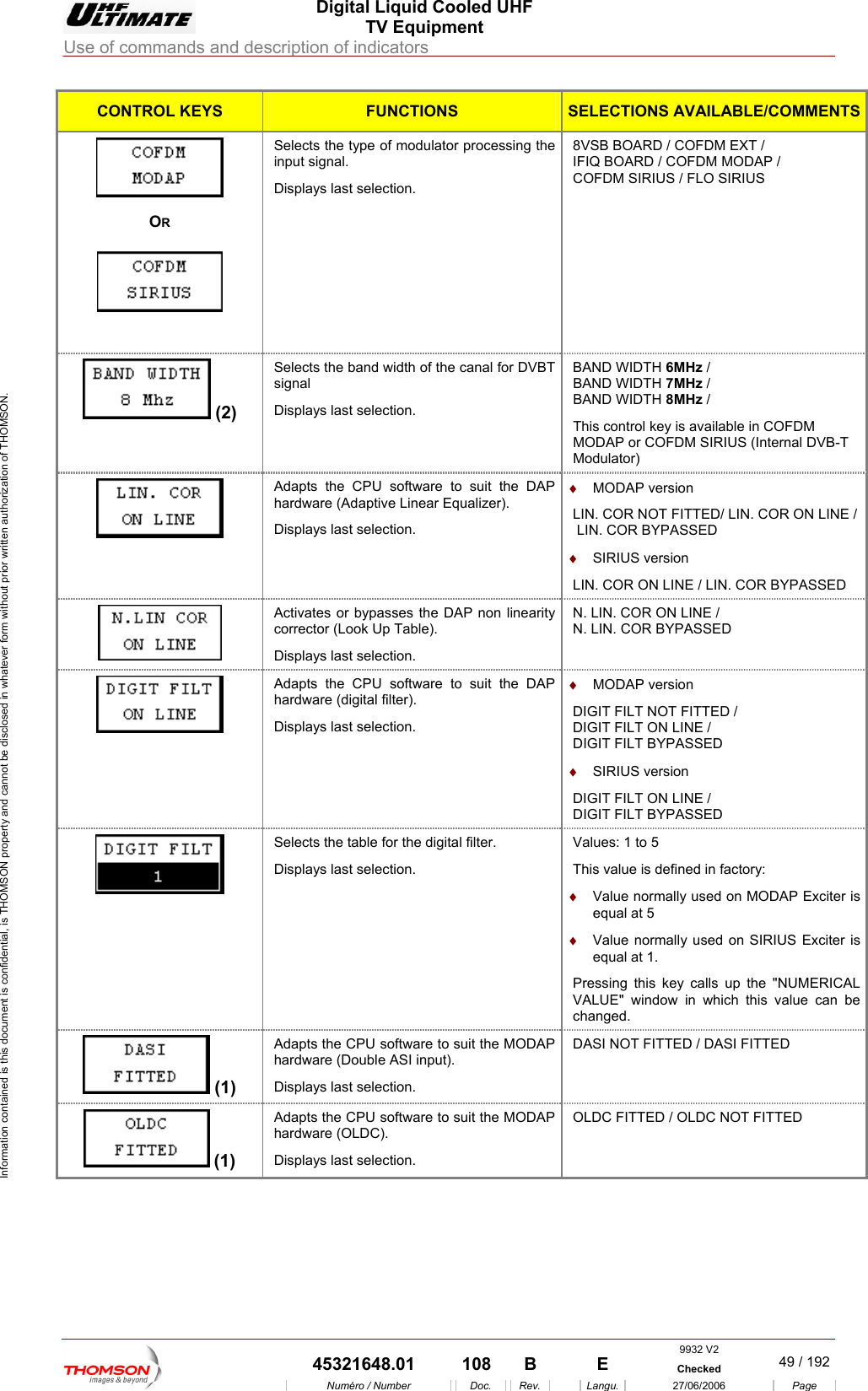
 Digital Liquid Cooled UHF TV Equipment Use of commands and description of indicators  Information contained is this document is confidential, is THOMSON property and cannot be disclosed in whatever form without prior written authorization of THOMSON. CONTROL KEYS FUNCTIONS SELECTIONS AVAILABLE/COMMENTS OR    Displays last selection. ARD / COFDM EXT /                   Selects the type of modulator processing the  8VSB BOinput signal.  IFIQ BOARD / COFDM MODAP /        COFDM SIRIUS / FLO SIRIUS  (2) signal Displays last selection. BAND WIDTH 7MHz / BAND WIDTH 8MHz / Selects the band width of the canal for DVBT  BAND WIDTH 6MHz /  This control key is available in COFDM MODAP or COFDM SIRIUS (Internal DVB-T Modulator) Adaphardts the CPU it the DAPware (Adaptive Linear Equalizer). DisplaLIN. COR NOT FITTED/ LIN. COR ON LINE /LIN. COR ON LINE / LIN. COR BYPASSED  software to su   ♦  MODAP version ys last selection.   LIN. COR BYPASSED ♦  SIRIUS version  Activacorre ok Up Table). Displays last selection. tes or bypasses the DAP non linearityctor (Lo N. LIN. COR ON LINE /  N. LIN. COR BYPASSED  AdaphardwDisplays last selection.   ON LINE /   ON LINE /  ts the CPU software to suit the DAP are (digital filter). ♦  MODAP version DIGIT FILT NOT FITTED / DIGIT FILTDIGIT FILT BYPASSED ♦  SIRIUS version DIGIT FILTDIGIT FILT BYPASSED  Selects the table for the digital filter. Displa normally used on MODAP Exciter is normally used on SIRIUS Exciter is Pressing this key calls up the "NUMERICAL ys last selection. Values: 1 to 5 This value is defined in factory: ♦  Valueequal at 5 ♦  Value equal at 1. VALUE" window in which this value can be changed.   (1) dapardwDisplaAhts the CPU software to suit the MODAPare (Double ASI input).   DASI NOT FITTED / DASI FITTED ys last selection.  (1) AdaphardwDisplays last selection.  NOT FITTED  ts the CPU software to suit the MODAP are (OLDC). OLDC FITTED / OLDC9932 V2  45321648.01  108  B    E  Checked  49 / 192Numéro / Number Doc. Rev. Langu. 27/06/2006 Page
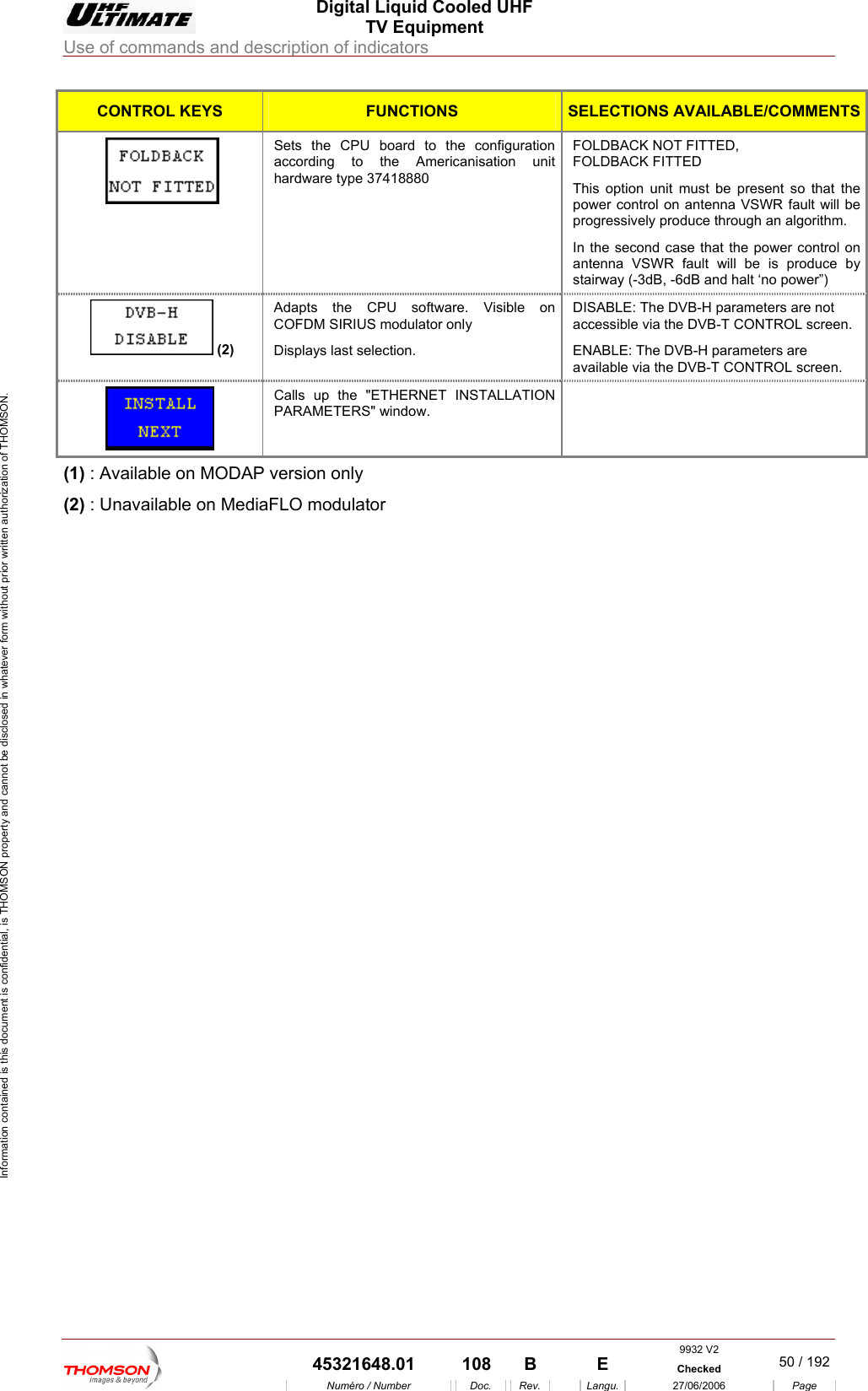
 Digital Liquid Cooled UHF TV Equipment Use of commands and description of indicators  Information contained is this document is confidential, is THOMSON property and cannot be disclosed in whatever form without prior written authorization of THOMSON. CONTROL KEYS FUNCTIONS SELECTIONS AVAILABLE/COMMENTSSets accor the Americanisation unithardwK FITTED l on antenna VSWR fault will be In the second case that the power control on antenna VSWR fault will be is produce by the CPU board to the configuration ding to   FOLDBACK NOT FITTED, FOLDBACare type 37418880  This option unit must be present so that the power controprogressively produce through an algorithm. stairway (-3dB, -6dB and halt ‘no power”)   (2) Adap nCOFDsplameters are not arameters are ts the CPU software. Visible o   DISABLE: The DVB-H paraM SIRIUS modulator only Di ys last selection. accessible via the DVB-T CONTROL screen. ENABLE: The DVB-H pavailable via the DVB-T CONTROL screen.  Calls  ET INSTALLATION PARAMETERS" w up the "ETHERNindow.  (1) : Available on MODAP version only (2) : Unavailable on MediaFLO modulator    9932 V2  45321648.01  108  B    E  Checked  50 / 192Numéro / Number Doc. Rev. Langu. 27/06/2006 Page
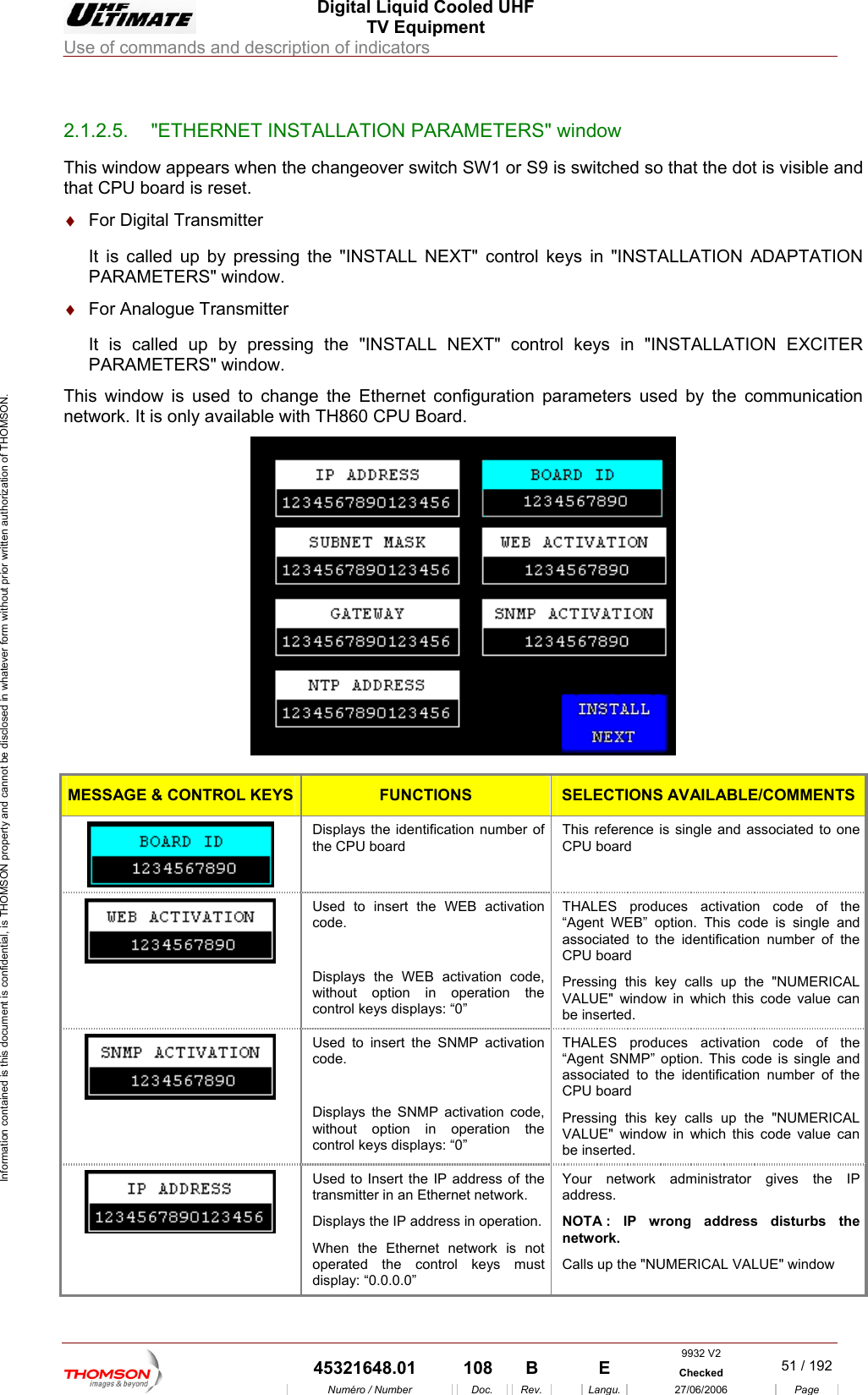
 Digital Liquid Cooled UHF TV Equipment Use of commands and description of indicators  Information contained is this document is confidential, is THOMSON property and cannot be disclosed in whatever form without prior written authorization of THOMSON.                        2.1.2.5.  "ETHERNET INSTALLATION PARAMETERS" window This window appears when the changeover switch SW1 or S9 is switched so that the dot is visible and It is called up by pressing the "INSTALL NEXT" control keys in "INSTALLATION EXCITER PARAMETERS" window. This window is used to change the Ethernet configuration parameters used by the communication network. It is only available with TH860 CPU Board. that CPU board is reset. ♦  For Digital Transmitter It is called up by pressing the "INSTALL NEXT" control keys in "INSTALLATION ADAPTATION PARAMETERS" window. ♦  For Analogue Transmitter   MESSAGE & CONTROL KEYS FUNCTIONS SELECTIONS AVAILABLE/COMMENTS Displays the identification number of the CPU board  This reference is single and associated to one CPU board  Used to insert the WEB activation code.  Displays the WEB activation code, without option in operation the control keys displays: “0” THALES produces activation code of the “Agent WEB” option. This code is single and associated to the identification number of the CPU board Pressing this key calls up the "NUMERICAL VALUE" window in which this code value can be inserted.  Used to insert the SNMP activation code.  Displays the SNMP activation code, without option in operation the control keys displays: “0” THALES produces activation code of the “Agent SNMP” option. This code is single and associated to the identification number of the CPU board  Pressing this key calls up the "NUMERICAL VALUE" window in which this code value can be inserted.  Used to Insert the IP address of the transmitter in an Ethernet network. Displays the IP address in operation. When the Ethernet network is not operated the control keys must display: “0.0.0.0” Your network administrator gives the IP address.  NOTA : IP wrong address disturbs the network.  Calls up the "NUMERICAL VALUE" window  9932 V2  45321648.01  108  B    E  Checked  51 / 192Numéro / Number Doc. Rev. Langu. 27/06/2006 Page
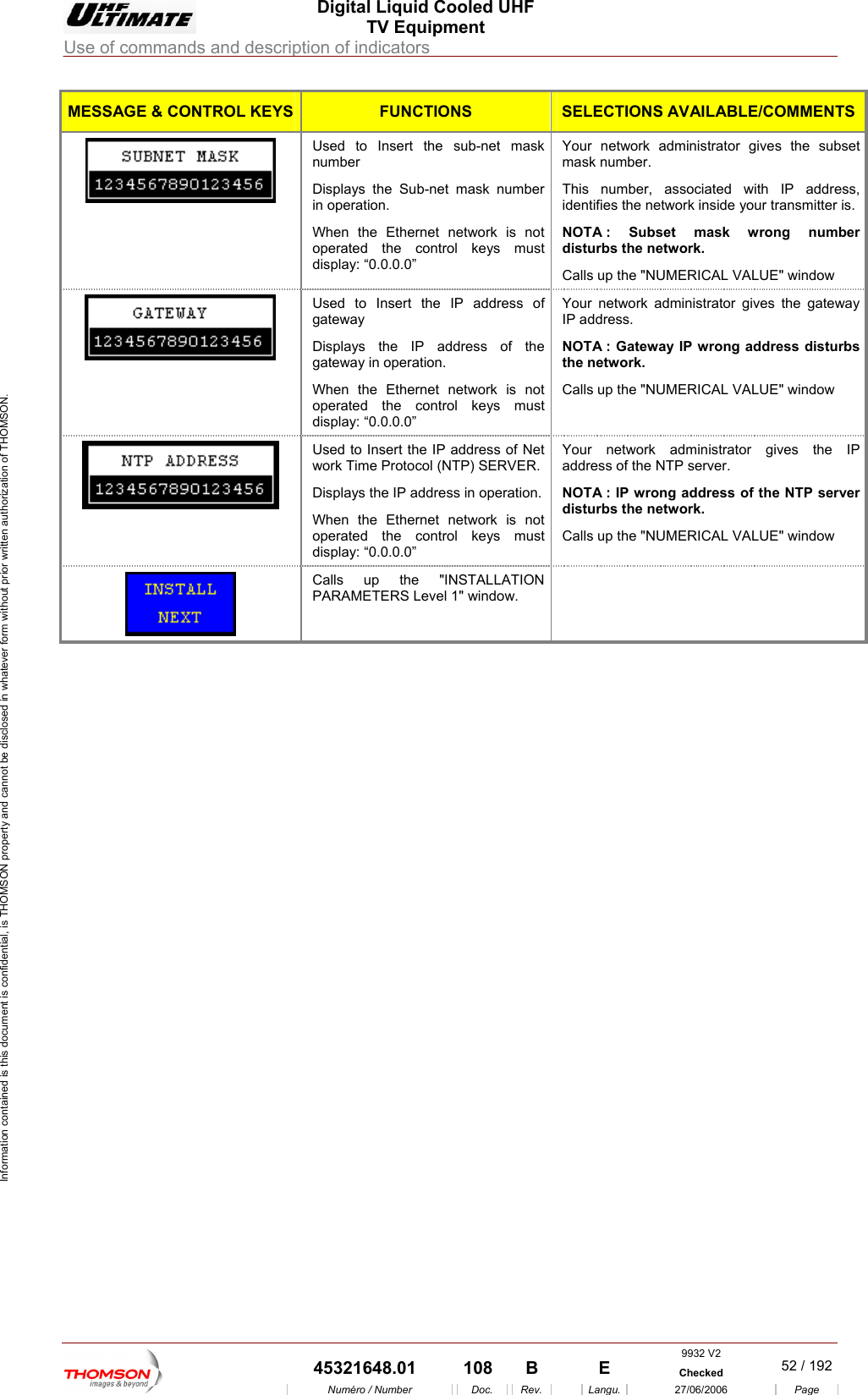
 Digital Liquid Cooled UHF TV Equipment Use of commands and description of indicators  Information contained is this document is confidential, is THOMSON property and cannot be disclosed in whatever form without prior written authorization of THOMSON. MESSAGE & CONTROL KEYS FUNCTIONS SELECTIONS AVAILABLE/COMMENTSUsed to Insert the sub-net mask Displays the Sub-net mask number operated the control keys must display: “0.0.0.0” Your network administrator gives the subset This number, associated with IP address, disturbs the network. Calls up the "NUMERICAL VALUE" window   number  mask number. in operation. When the Ethernet network is not identifies the network inside your transmitter is. NOTA : Subset mask wrong number Used to Insert the IP address of gateway  Displays  the tion. When the Ethernet network is not operated the control keys must display: “0.0.0.0” Your network administrator gives the gateway IP address. NOTthC    the IP address ofgateway in operaA : Gateway IP wrong address disturbs e network. alls up the "NUMERICAL VALUE" windowUsed to Insert twork Time Protohe IP address of Net col (NTP) SERVER. Displays the IP address in operation. When the Ethernet network is not operated the control keys must display: “0.0.0.0” Y r network administrator gives the IP address of the NTP server.  NOTA : IP wrong address of the NTP server disturbs the network.  Calls up the "NUMERICAL VALUE" window ou  Calls up the "INSTALLATION PARAMETERS Level 1" window.      9932 V2  45321648.01  108  B    E  Checked  52 / 192Numéro / Number Doc. Rev. Langu. 27/06/2006 Page
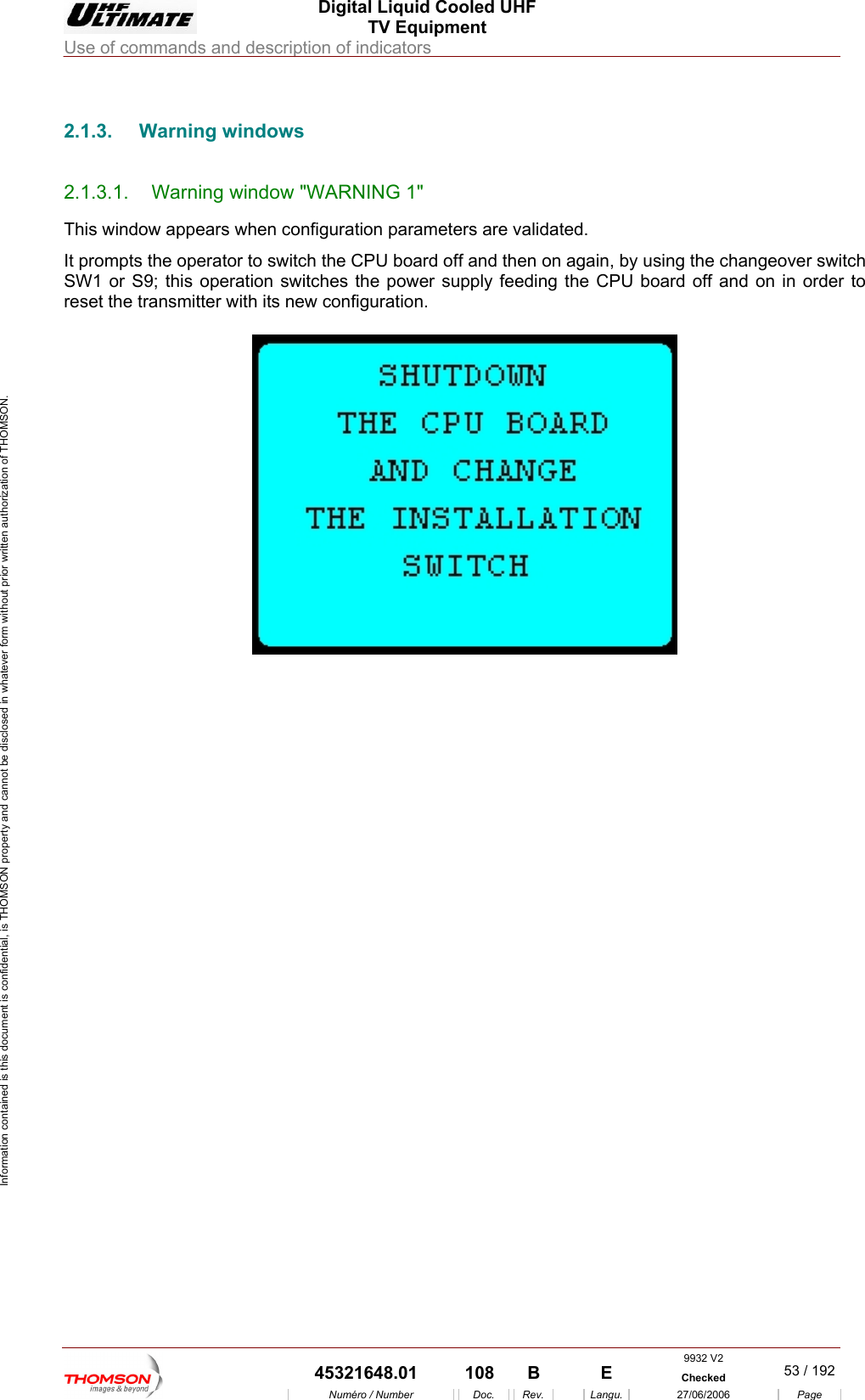
 Digital Liquid Cooled UHF TV Equipment Use of commands and description of indicators  Information contained is this document is confidential, is THOMSON property and cannot be disclosed in whatever form without prior written authorization of THOMSON.                        2.1.3. Warning windows 2.1.3.1.  Warning window "WARNING 1" This window appears when configuration parameters are validated.  It prompts the operator to switch the CPU board off and then on again, by using the changeover switch SW1 or S9; this operation switches the power supply feeding the CPU board off and on in order to reset the transmitter with its new configuration.       9932 V2  45321648.01  108  B    E  Checked  53 / 192Numéro / Number Doc. Rev. Langu. 27/06/2006 Page
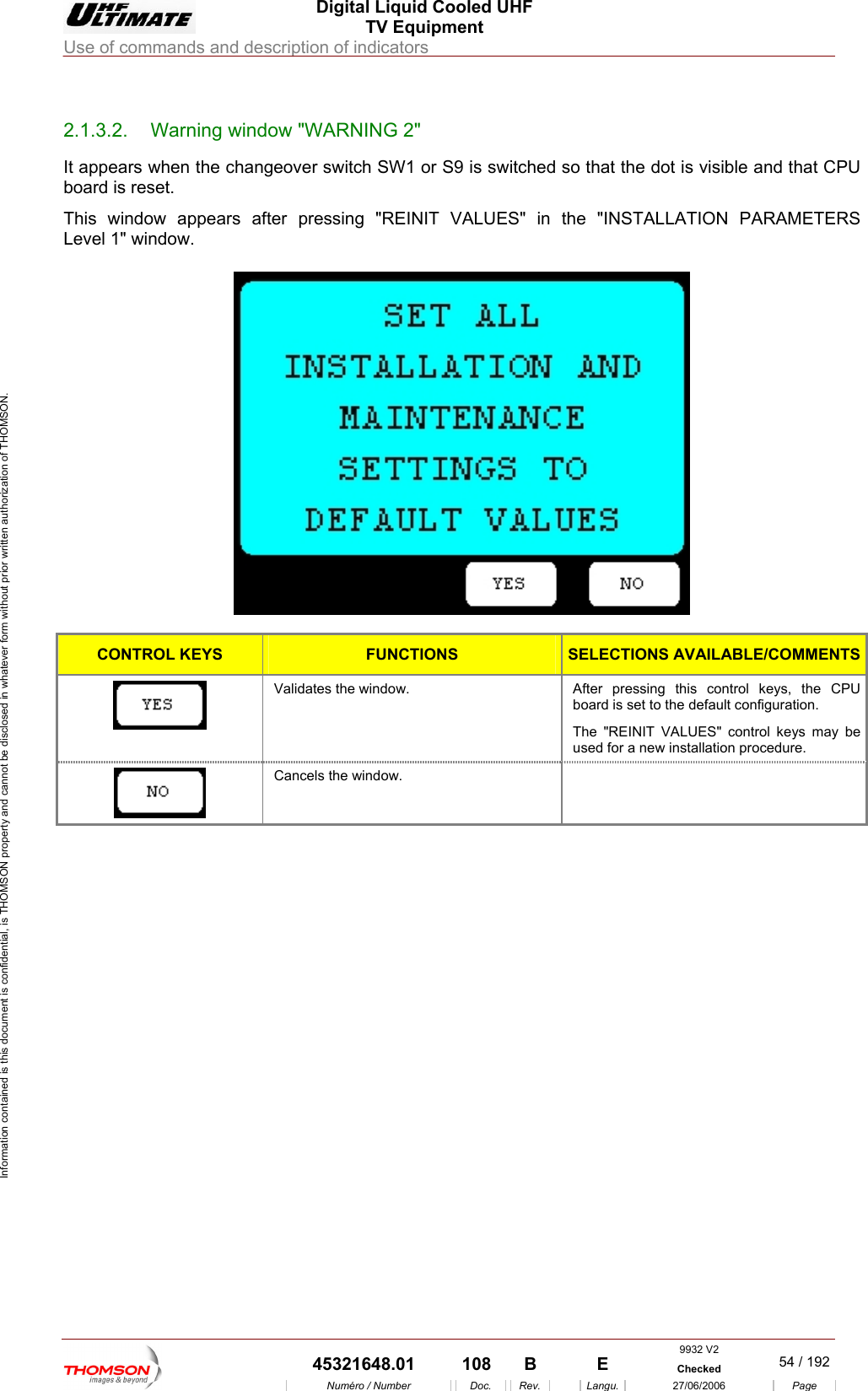
 Digital Liquid Cooled UHF TV Equipment Use of commands and description of indicators  Information contained is this document is confidential, is THOMSON property and cannot be disclosed in whatever form without prior written authorization of THOMSON.                        2.1.3.2.  Warning window "WARNING 2" It appears when the changeover switch SW1 or S9 is switched so that the dot is visible and that CPU board is reset. This window appears after pressing "REINIT VALUES" in the "INSTALLATION PARAMETERS ow.  Level 1" wind  CONTROL KEYS FUNCTIONS SELECTIONS AVAILABLE/COMMENTS Validates the window.  After pressing this control keys, the CPU board is set to the default configuration. The "REINIT VALUES" control keys may be used for a new installation procedure.  Cancels the window.       9932 V2  45321648.01  108  B    E  Checked  54 / 192Numéro / Number Doc. Rev. Langu. 27/06/2006 Page
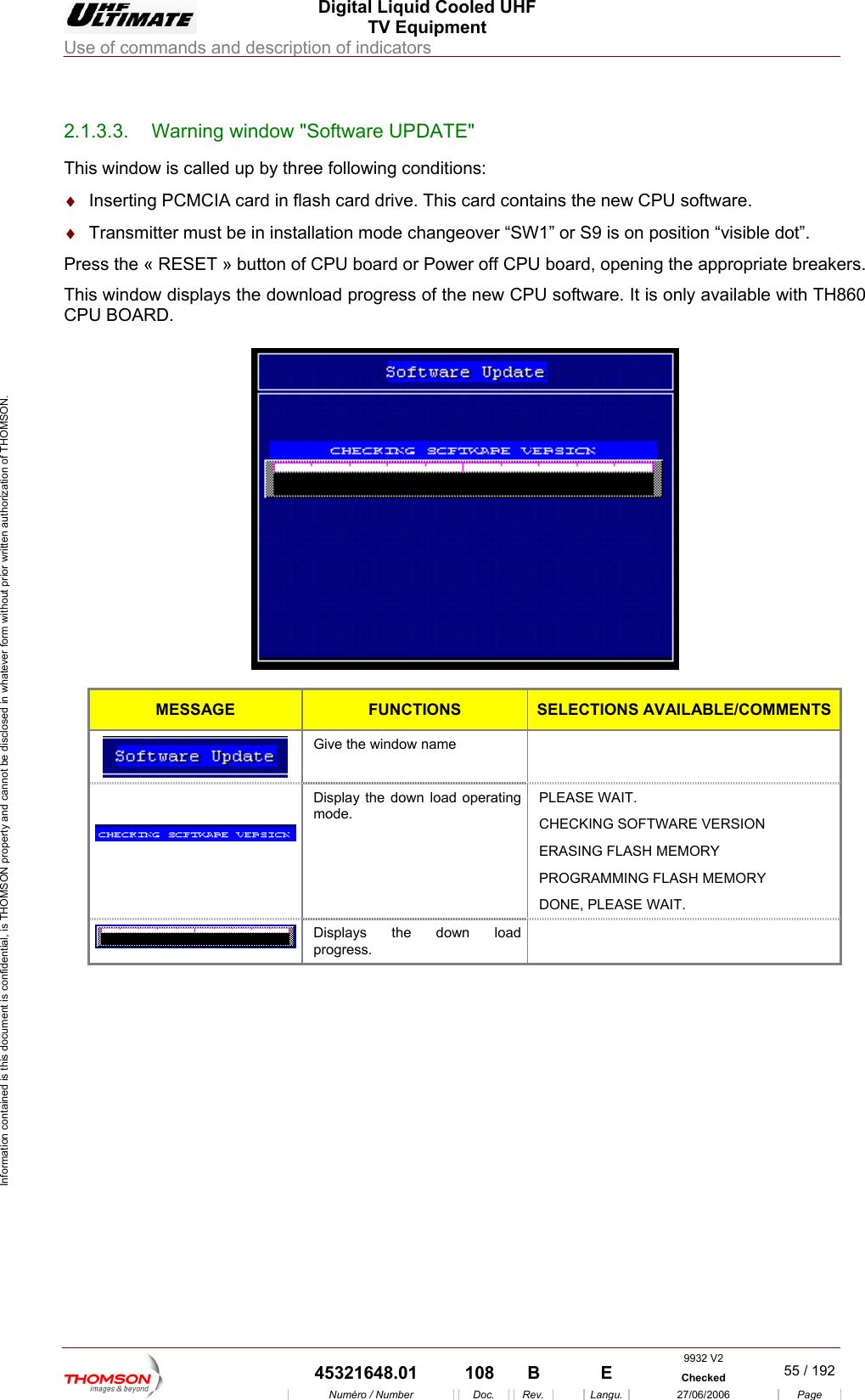
 Digital Liquid Cooled UHF TV Equipment Use of commands and description of indicators  Information contained is this document is confidential, is THOMSON property and cannot be disclosed in whatever form without prior written authorization of THOMSON.                        2.1.3.3 Warning window "Software UPDATE.  "  the new CPU software. ot”. Press the « RESET » button of ning the appropriate breakers. This window displays the download progress of the new CPU software. It is only available with TH860 CPU BOARD.  This window is called up by three following conditions: ♦  Inserting PCMCIA card in flash card drive. This card contains♦  Transmitter must be in installation mode changeover “SW1” or S9 is on position “visible d CPU board or Power off CPU board, ope  MESSAGE  FUNCTIONS SELECTIONS AVAILABLE/COMMENTS Give the window name     Display the down load operating mode. PLEASE WAIT. CHECKING SOFTWARE VERSION ERASING FLASH MEMORY PROGRAMMING FLASH MEMORY DONE, PLEASE WAIT.  Displays the down load progress.      9932 V2  45321648.01  108  B    E  Checked  55 / 192Numéro / Number Doc. Rev. Langu. 27/06/2006 Page
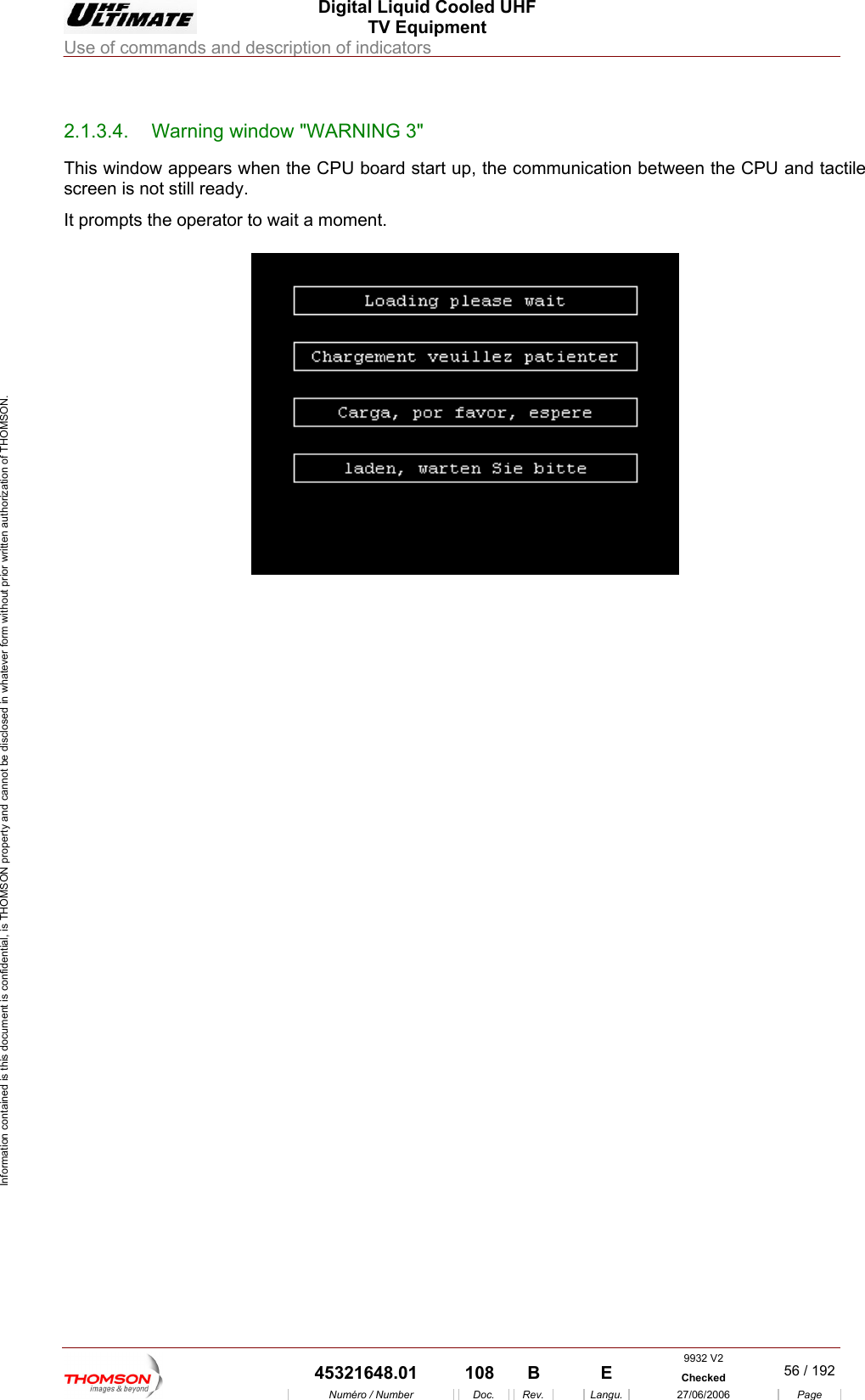
 Digital Liquid Cooled UHF TV Equipment Use of commands and description of indicators  Information contained is this document is confidential, is THOMSON property and cannot be disclosed in whatever form without prior written authorization of THOMSON.                        2.1.3.4.  Warning window "WARNING 3" This window appears whe art up, the communic een the CPU and tactile screen is not still ready. It prompts the operator to wait a moment.  n the CPU board st ation betw     9932 V2  45321648.01  108  B    E  Checked  56 / 192Numéro / Number Doc. Rev. Langu. 27/06/2006 Page
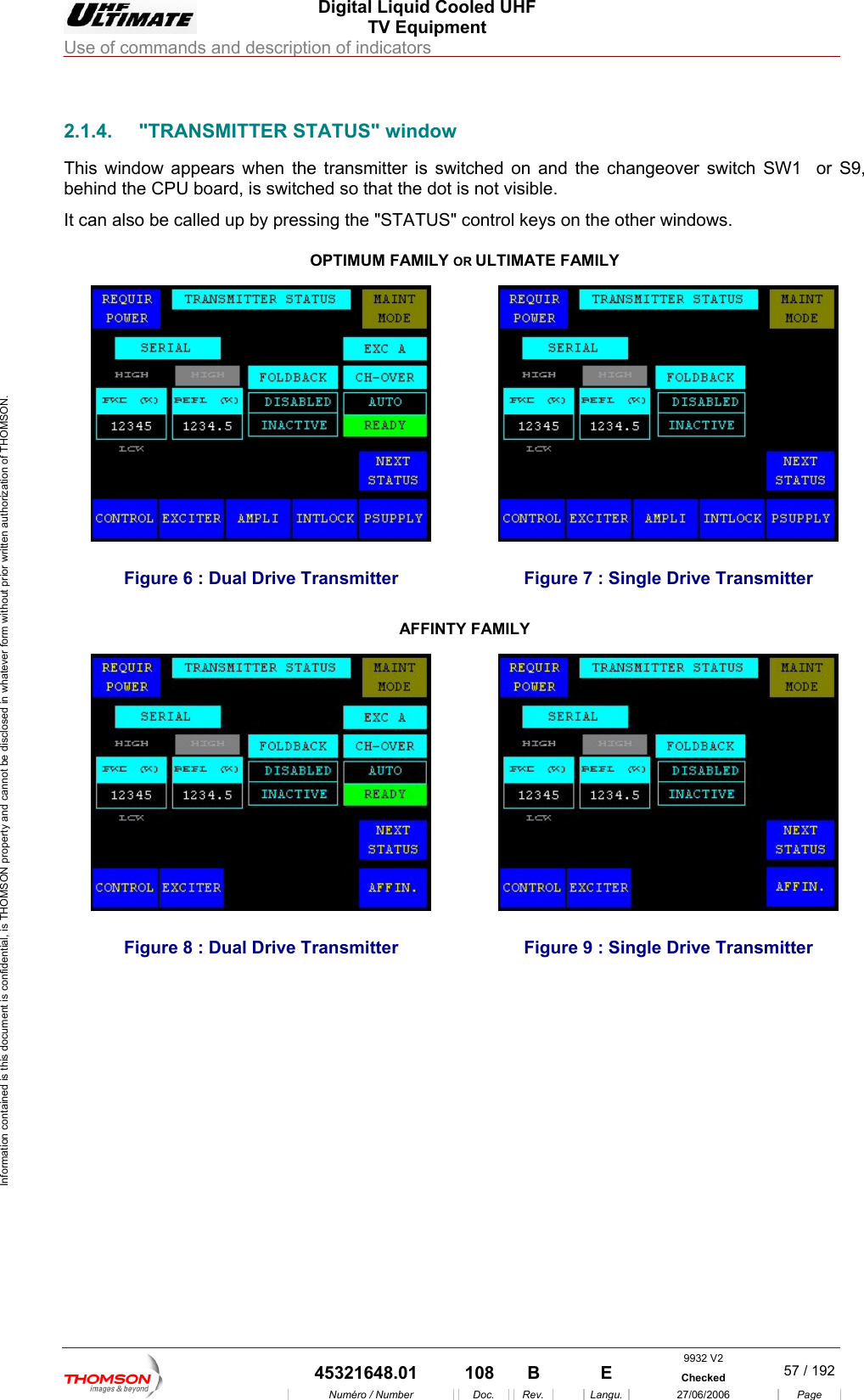
 Digital Liquid Cooled UHF TV Equipment Use of commands and description of indicators  Information contained is this document is confidential, is THOMSON property and cannot be disclosed in whatever form without prior written authorization of THOMSON.                        2.1.4.  "TRANSMITTER STATUS" window This window appears when the transmitter is switched on and behind the CPU  o switched so that the dot is not visible. It can also be called up by preAMILY OR ULTIMATE FAthe changeover switch SW1  or S9, b ard, is ssing the "STATUS" control keys on OPTIMUM Fthe other windows. MILY     7 : Single Drive TransmFigure 6 : Dual Drive Transmitter  Figure itter AFFINTY FAMILY  Figure 8 : Dual Drive Transmitter  Figure 9 : Single Driv e Transmitter 9932 V2  45321648.01  108  B    E  Checked  57 / 192Numéro / Number Doc. Rev. Langu. 27/06/2006 Page
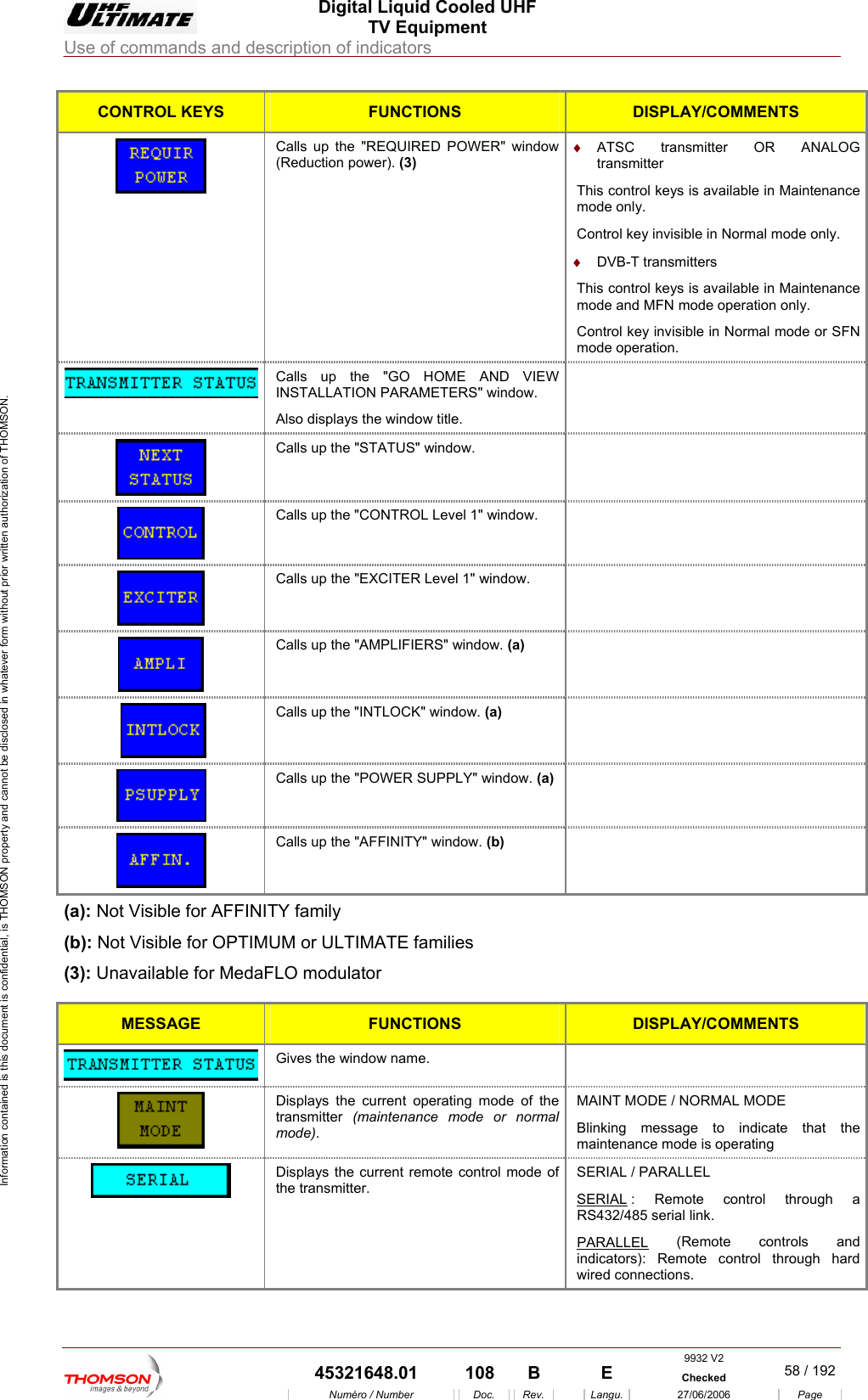
 Digital Liquid Cooled UHF TV Equipment Use of commands and description of indicators  Information contained is this document is confidential, is THOMSON property and cannot be disclosed in whatever form without prior written authorization of THOMSON. CONTROL KEYS FUNCTIONS DISPLAY/COMMENTS  (Reduction power). (3) transmitter Calls up the "REQUIRED POWER" window  ♦  ATSC transmitter OR ANALOG This control keys is available in Maintenance ♦  DVB-T transmitters trol keys is available in Maintenance mode and MFN mode operation only. Control key invisible in Normal mode or SFN mode operation. mode only. Control key invisible in Normal mode only. This con Calls up the "GO HOME AND VIEWINSTALLATION PARAMETERS" window. Also displays the window title.    Calls up the "STATUS" window.    Calls up the "CONTROL Level 1" window.    Calls up the "EXCITER Level 1" window.    Calls up the "AMPLIFIERS" window. (a)     Calls up the "INTLOCK" window. (a)   Calls up the "POWER SUPPLY" window. (a)   Calls up the "AFFINITY" window. (b)  (a): Not Visible for AFFINITY family (b): Not Visible for OPTIMUM or ULTIMATE families (3): Unavailable for MedaFLO modulator  MESSAGE FUNCTIONS DISPLAY/COMMENTS  Gives the window name.    Displays the c  mode of the transmitter  (m  or normal MAINT Mlinking message to indicate that the aintenance mode is operating urrent operatingaintenance modemode). ODE / NORMAL MODE Bm Displays the current remote control mode othe transmitter. f  SERIAL / PARALLEL SERIAL : Remote control through a RS432/485 serial link. PARALLEL (Remote controls and indicators): Remote control through hard wired connections. 9932 V2  45321648.01  108  B    E  Checked  58 / 192Numéro / Number Doc. Rev. Langu. 27/06/2006 Page
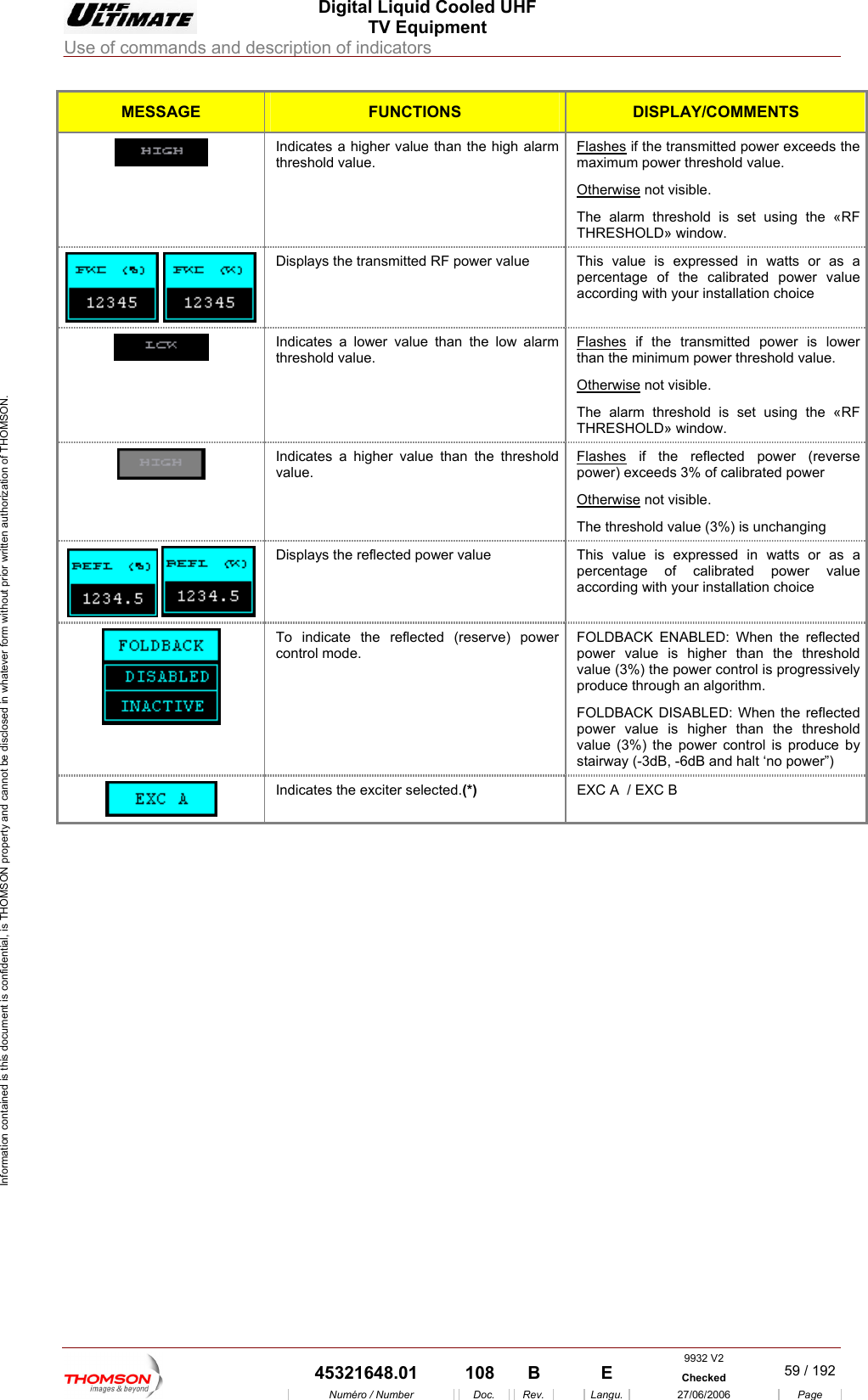
 Digital Liquid Cooled UHF TV Equipment Use of commands and description of indicators  Information contained is this document is confidential, is THOMSON property and cannot be disclosed in whatever form without prior written authorization of THOMSON. MESSAGE FUNCTIONS DISPLAY/COMMENTS Indicates a higher value than the high alarm threshold value. Flashes if the transmitted power exceeds the maximum power threshold value. Otherwise not visible. The alarm threshold is set using the «RF THRESHOLD» window.     Displays the transmitted RF power value  This value is expressed in watts or as a percentage of the calibrated power value according with your installation choice  Indicates a lower value than the low alarm threshold value. Flashes if the transmitted power is lower than the minimum power threshold value. herwiseOt  not visible. he alarm threshold is set using the «RF THRESHOLD» window. T Indicates a higher value than the threshold value.  Flashes if the reflected power (reverse power) exceeds 3% of calibrated power  wise Other  not visible. eshold value (3%) is unchanging  The thrDisplays the reflected power value  Th   is  value is expressed in watts or as a percentage of calibrated power value according with your installation choice To indicate the reflected (reserve) control mode. power  OLDBACK ENABLED: When the reflected ower value is higher than the threshold value (3%) the power control is progressively produce through an algorithm.  OLDBACK DISABLED: When the reflected power value is higher than the threshold value (3%) the power control is produce by stairway (-3dB, -6dB and halt ‘no power”) FpF   EXC A  / EXC B  Indicates the exciter selected.(*) 9932 V2  45321648.01  108  B    E  Checked  59 / 192Numéro / Number Doc. Rev. Langu. 27/06/2006 Page
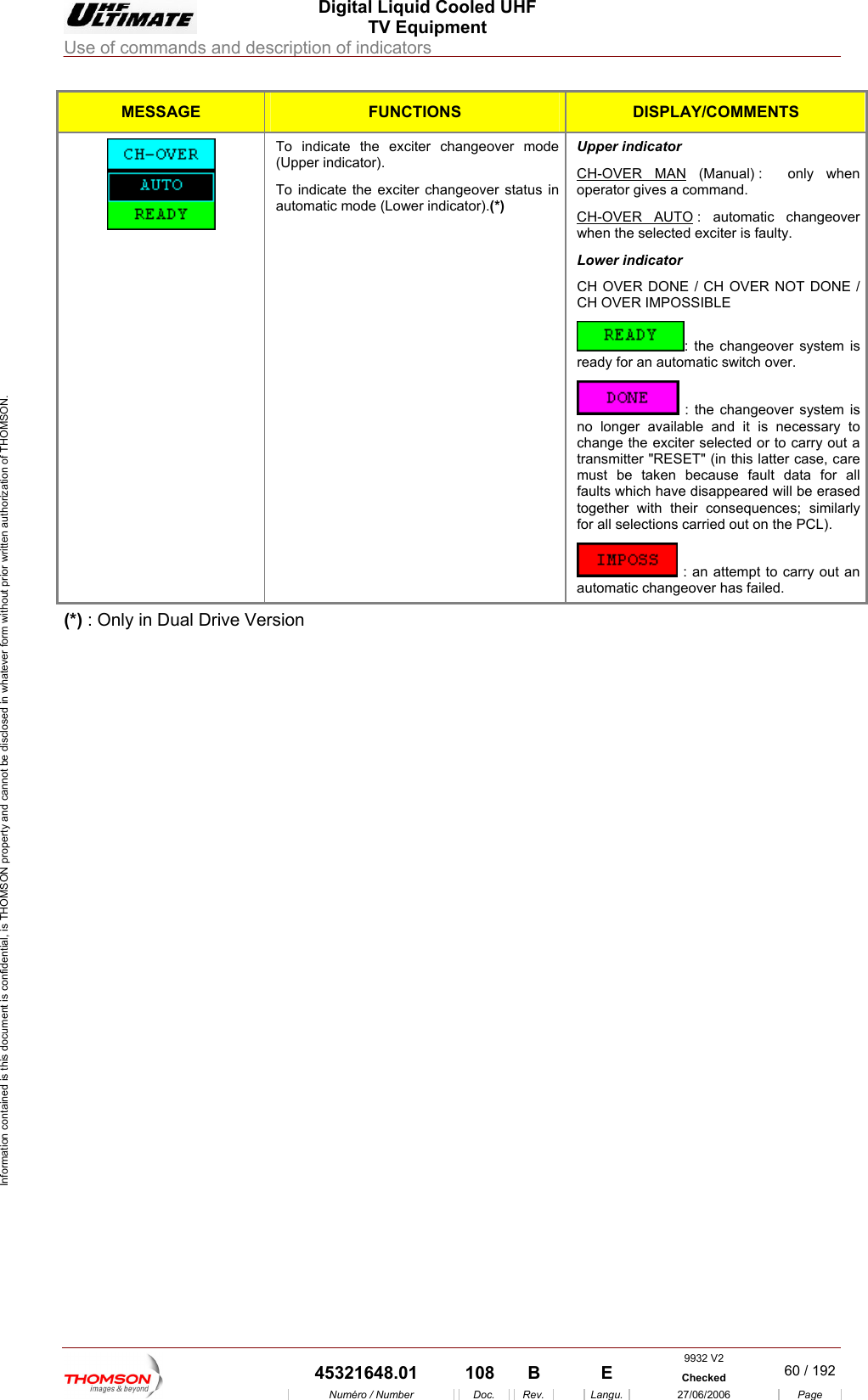
 Digital Liquid Cooled UHF TV Equipment Use of commands and description of indicators  Information contained is this document is confidential, is THOMSON property and cannot be disclosed in whatever form without prior written authorization of THOMSON. MESSAGE FUNCTIONS DISPLAY/COMMENTS To indicate the exciter changeover mode atic mode (Lower indicator).(*) Upper indicator (Upper indicator). To indicate the exciter changeover status in automCH-OVER MAN (Manual) :  only when operator gives a command. CH-OVER AUTO : automatic changeover ulty. Lower indicator CH  ER NOT DONE / CH OVER IMPOSSIBLE     when the selected exciter is faOVER DONE / CH OV: the changeover system is ready for an automatic switch over.  : the changeover system is no longer available and it is necessary to change the exciter selected or to carry out a transmitter "RESET" (in this latter case, care must be taken because fault data for all faults which have disappeared will be erased together with their consequences; similarly for all selections carried out on the PCL).  : an attempt to carry out an automatic changeover has failed. (*) : Only in Dual Drive Version    9932 V2  45321648.01  108  B    E  Checked  60 / 192Numéro / Number Doc. Rev. Langu. 27/06/2006 Page
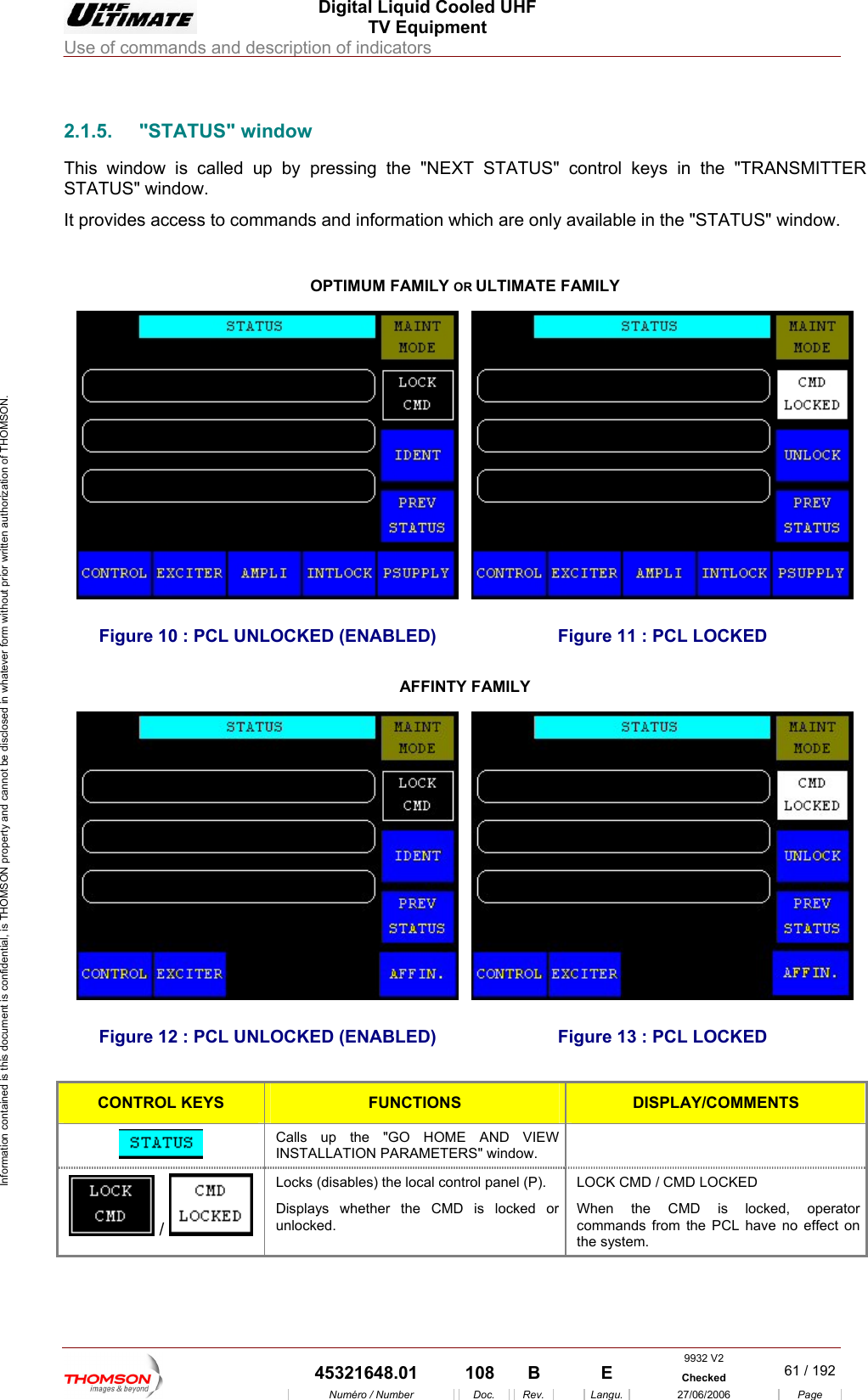
 Digital Liquid Cooled UHF TV Equipment Use of commands and description of indicators  Information contained is this document is confidential, is THOMSON property and cannot be disclosed in whatever form without prior written authorization of THOMSON.                        2.1.5. "STATUS" indow This window s called up s in the "TRANSMITTER STATUS" window. It provides access to comm  "STATUS" window.   w i  by pressing the "NEXT STATUS" control keyands and information which are only available in theOPTIMUM FAMILY OR ULTIMATE FAMILY Figure 10 : PCL UNLOCKED (ENABLED)  Figure 11 : PCL LOCKED AFFINTY FAMILY Figure 12 : PCL UNLOCKED (ENABLED)  Figure 13 : PCL LOCKED  CONTROL KEYS FUNCTIONS DISPLAY/COMMENTS  Calls up the "GO HOME AND VIEW INSTALLATION PARAMETERS" window.   /   Locks (disables) the local control panel (P). Displays whether the CMD is locked or unlocked. LOCK CMD / CMD LOCKED When the CMD is locked, operator commands from the PCL have no effect on the system. 9932 V2  45321648.01  108  B    E  Checked  61 / 192Numéro / Number Doc. Rev. Langu. 27/06/2006 Page
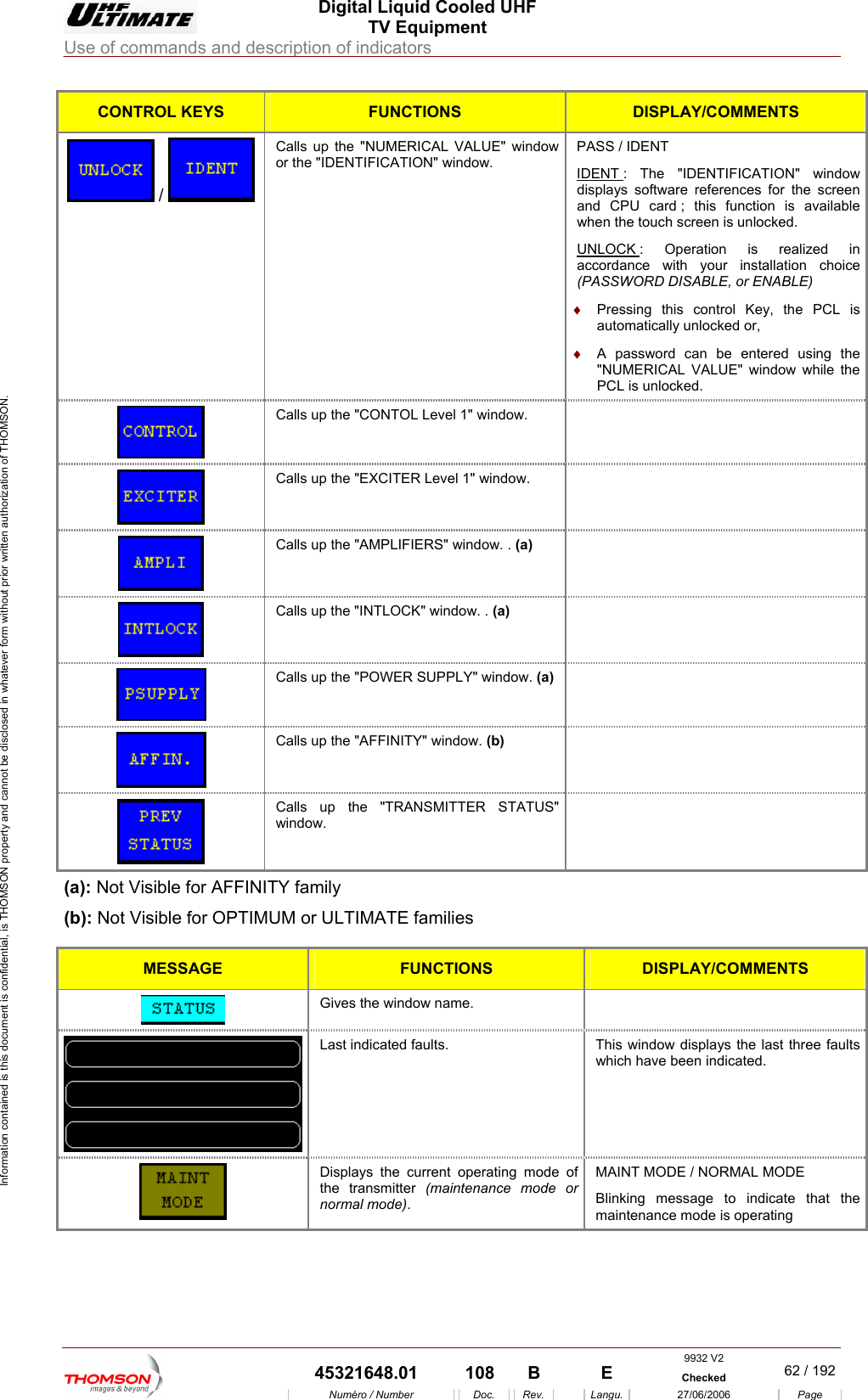
 Digital Liquid Cooled UHF TV Equipment Use of commands and description of indicators  Information contained is this document is confidential, is THOMSON property and cannot be disclosed in whatever form without prior written authorization of THOMSON. CONTROL KEYS FUNCTIONS DISPLAY/COMMENTS  /   or the "IDENTIFICATION" window.  IDENT Calls up the "NUMERICAL VALUE" window  PASS / IDENT : The "IDENTIFICATION" window displays software references for the screen and CPU card ; this function is available when the touch screen is unlocked. UNLOCK : Operation is realized in accordance with your installation choice (PASS LE) ♦  Pressing this control Key, the PCL is automatically unlocked or, ♦  A password can be entered using the "NUMERICAL VALUE" window while the PCL is unlocked. WORD DISABLE, or ENAB Calls up the "CONTOL Level 1" window.    Calls up the "EXCITER Level 1" window.    Calls up the "AMPLIFIERS" window. . (a)   Calls up the "INTLOCK" window. . (a)    Calls up the "POWER SUPPLY" window. (a)   Calls up the "AFFINITY" window. (b)   Calls up the "TRANSMITTER STATUS"   window. (a): Not Visib  for AFFINIT(b): Not Visible for OPTIMU le Y family M or ULTIMATE families MESSA E GFUNCTIONS DISPLAY/COMMENTS  Gives the window name.    Last indicated faults.  This window displays the last three faults which have been indicated.  Displays the  g mode of the transmitter   normal mode). MAINT MOBlinking message to indicate that the maintenance mode is operating current operatin(maintenance mode orDE / NORMAL MODE     9932 V2  45321648.01  108  B    E  Checked  62 / 192Numéro / Number Doc. Rev. Langu. 27/06/2006 Page
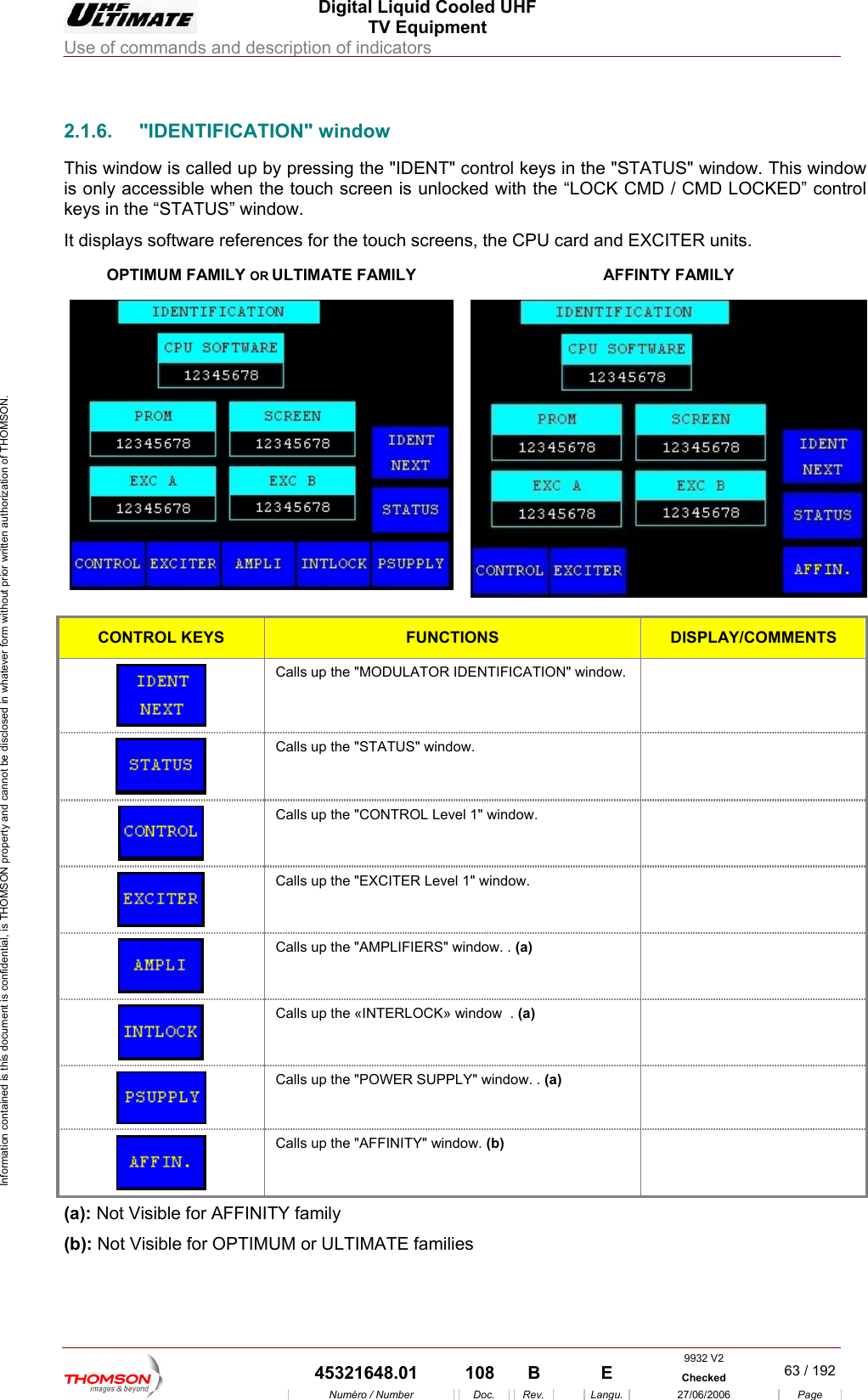
 Digital Liquid Cooled UHF TV Equipment Use of commands and description of indicators  Information contained is this document is confidential, is THOMSON property and cannot be disclosed in whatever form without prior written authorization of THOMSON.                        2.1.6. "IDENTIFICATION" window This window is called up b eys in the "STATUS" window. This window is only accessible when th  / CMD LOCKED” control keys in the “STATUS” windIt displays software references for the touch screens, the CPU card and EXCITER units.  OPTIMUM FAMILY OR y pressing the "IDENT" control ke touch screen is unlocked with the “LOCK CMow. DULTIMATE FAMILY  AFFINTY FAMILY   CONTROL KEYS FUNCTIONS DISPLAY/COMMENTS  Calls up the "MODULATOR IDENTIFICATION" window.    Calls up the "STATUS" window.    Calls up the "CONTROL Level 1" window.    Calls up the "EXCITER Level 1" window.    Calls up the "AMPLIFIERS" window. . (a)   Calls up the «INTERLOCK» window  . (a)   Calls up the "POWER SUPPLY" window. . (a)   Calls up the "AFFINITY" window. (b)  (a): Not Visible for AFFINITY family (b): Not Visible for OPTIMUM or ULTIMATE families  9932 V2  45321648.01  108  B    E  Checked  63 / 192Numéro / Number Doc. Rev. Langu. 27/06/2006 Page
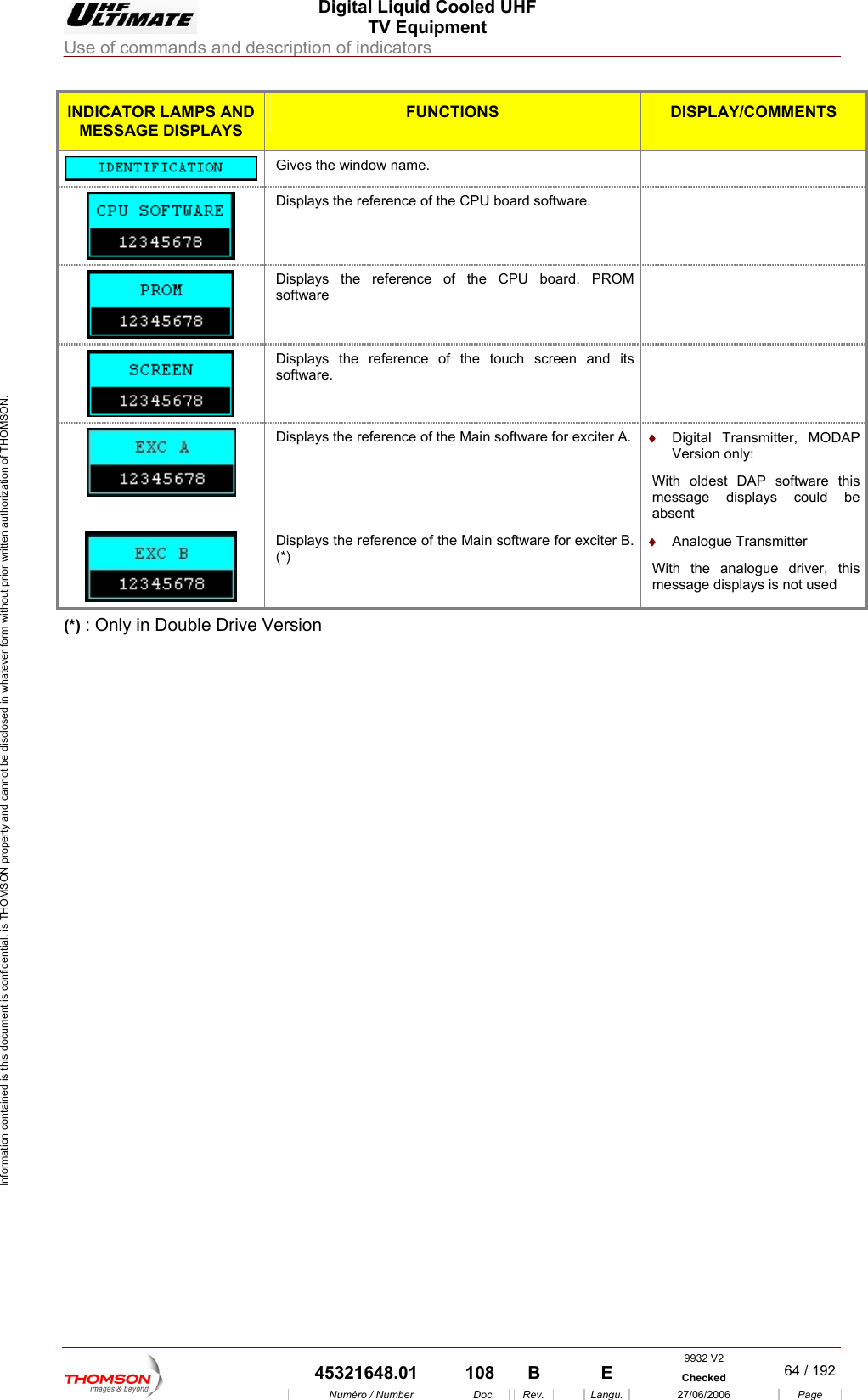
 Digital Liquid Cooled UHF TV Equipment Use of commands and description of indicators  Information contained is this document is confidential, is THOMSON property and cannot be disclosed in whatever form without prior written authorization of THOMSON. INDICATOR LAMPS AND MESS GE DISPLAYS AFUNCTIONS DISPLAY/COMMENTS  Gives the window name.   Displays the reference of the CPU board software.    Displays the reference of the CPU board. PROM software   Displays the reference of the touch screen ansoftware. d its     Displays the reference of the Main software for exciter A.  ♦  Digital Transmitter, MODAP Version only:  With oldest DAP software this message displays could be absent  Displays the reference of the Main software for exciter B. (*) ♦  Analogue Transmitter  With the analogue driver, this message displays is not used (*) : Only in Double Drive Version    9932 V2  45321648.01  108  B    E  Checked  64 / 192Numéro / Number Doc. Rev. Langu. 27/06/2006 Page
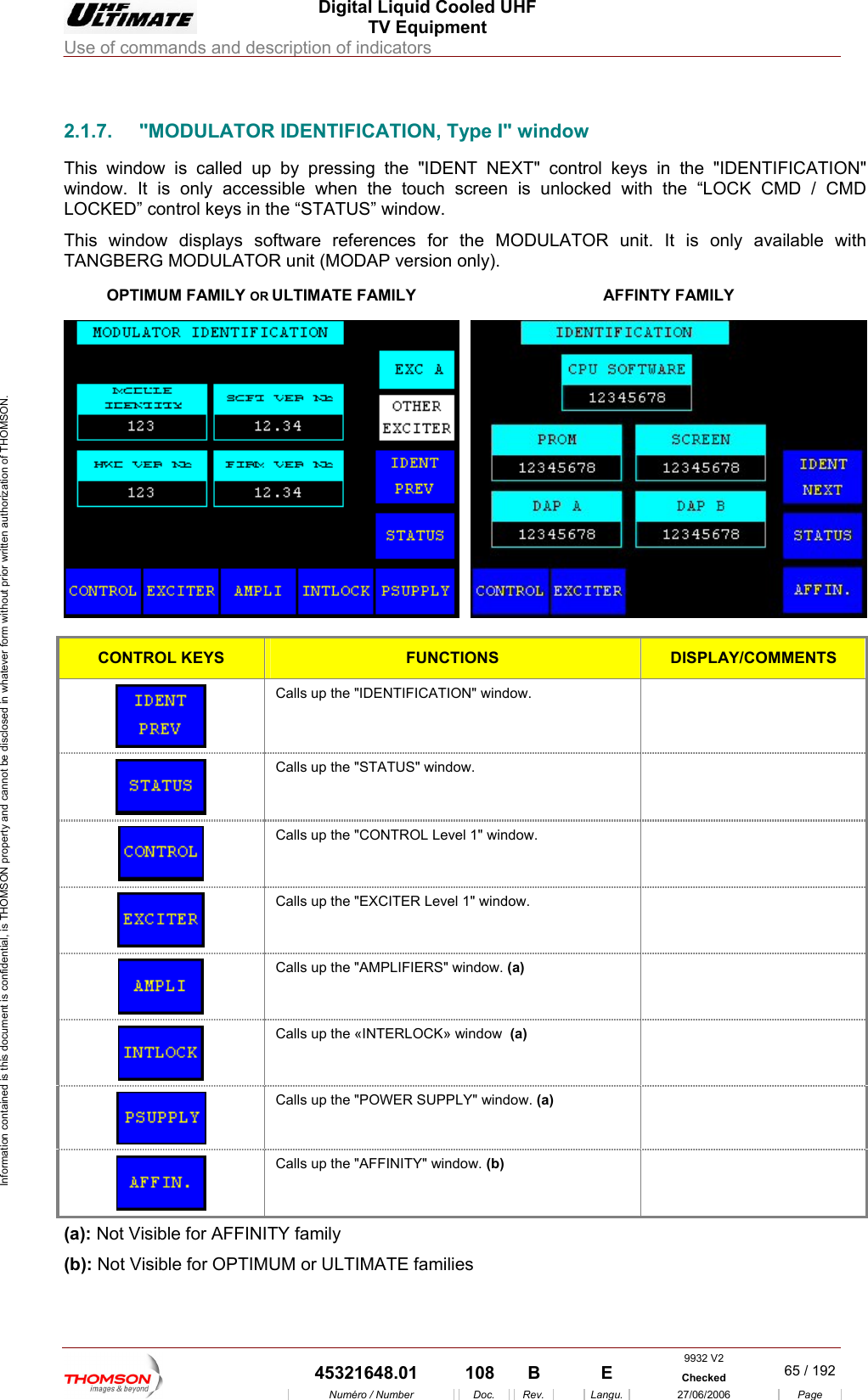
 Digital Liquid Cooled UHF TV Equipment Use of commands and description of indicators  Information contained is this document is confidential, is THOMSON property and cannot be disclosed in whatever form without prior written authorization of THOMSON.                        2 FICATION, Type I" window This window is called up " control keys he "IDENTIFICATION" window. It is only accessible when the touch screen is unlocked with the “LOCK CMD / CMD LOCKED” control keys in the “STATUS” window. This window displays so r the MODULATOR unit. It is only available with TANGBERG MODULATOROPTIMUM FAMILY OR ULTIMATE FAMILY .1.7.  "MODULATOR IDENTI by pressing the "IDENT NEXT  in tftware references fo unit (MODAP version only). AFFINTY FAMILY  CONTROL KEYS FUNCTIONS DISPLAY/COMMENTS  Calls up the "IDENTIFICATION" window.    Calls up the "STATUS" window.    Calls up the "CONTROL Level 1" window.    Calls up the "EXCITER Level 1" window.    Calls up the "AMPLIFIERS" window. (a)   Calls up the «INTERLOCK» window  (a)   Calls up the "POWER SUPPLY" window. (a)   Calls up the "AFFINITY" window. (b)  (a): Not Visible for AFFINITY family (b): Not Visible for OPTIMUM or ULTIMATE families  9932 V2  45321648.01  108  B    E  Checked  65 / 192Numéro / Number Doc. Rev. Langu. 27/06/2006 Page
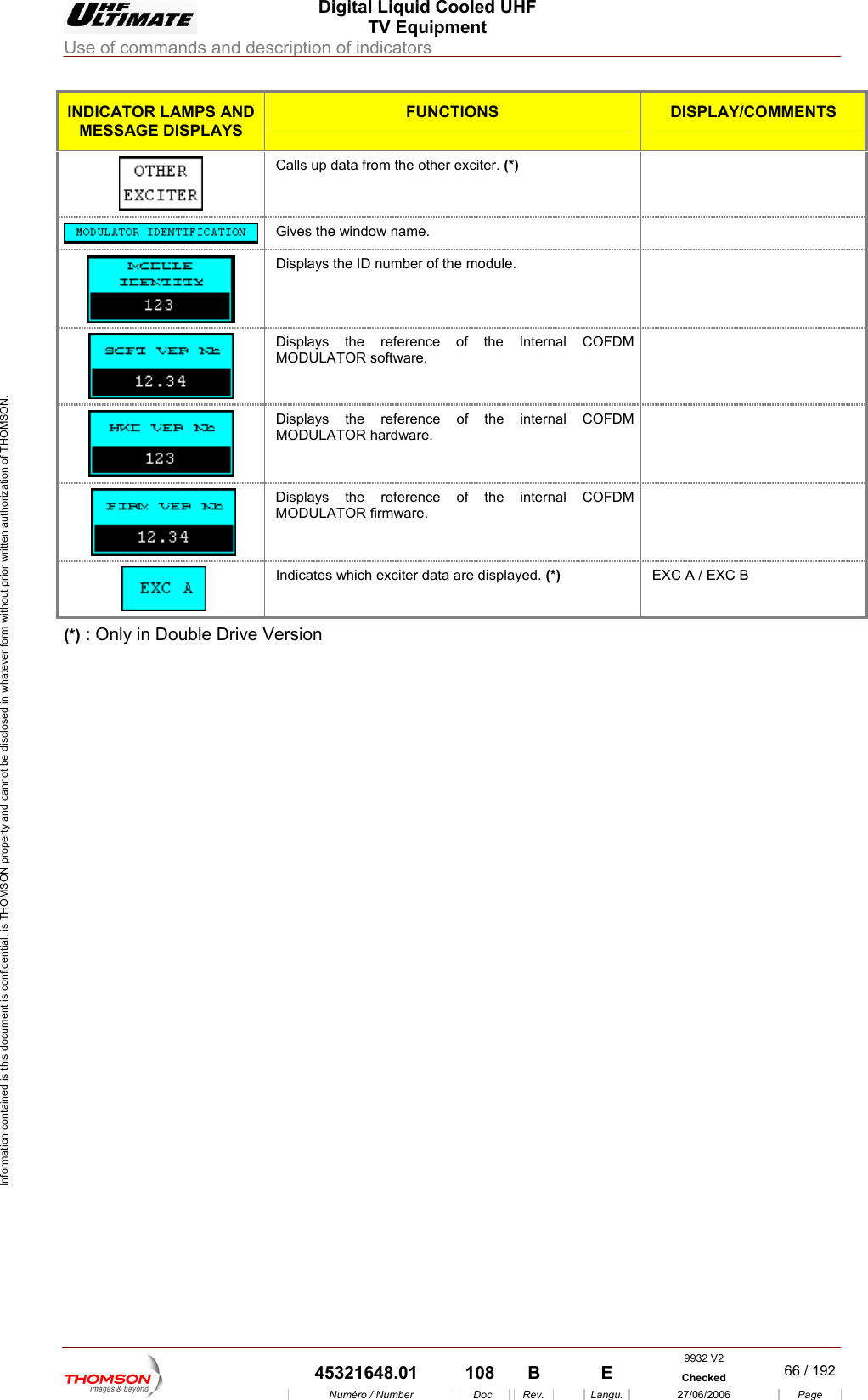
 Digital Liquid Cooled UHF TV Equipment Use of commands and description of indicators  Information contained is this document is confidential, is THOMSON property and cannot be disclosed in whatever form without prior written authorization of THOMSON. INDICATOR LAMPS AND MESS GE DISPLAYS AFUNCTIONS  DISPLAY/COMMENTS Calls up data from the other exciter. (*)    Gives the window name.   Displays the ID number of the module.     Displays the reference of the Internal COFDM  MODULATOR software.   Displays the reference of the internal COFDM MODULATOR hardware.  Displays the reference of the internal COFDM MODULATOR firmware .  Indicates w xciter data are displayed. (*)  EXC A / EXC B  hich e(*) : Only in Double Drive Version    9932 V2  45321648.01  108  B    E  Checked  66 / 192Numéro / Number Doc. Rev. Langu. 27/06/2006 Page
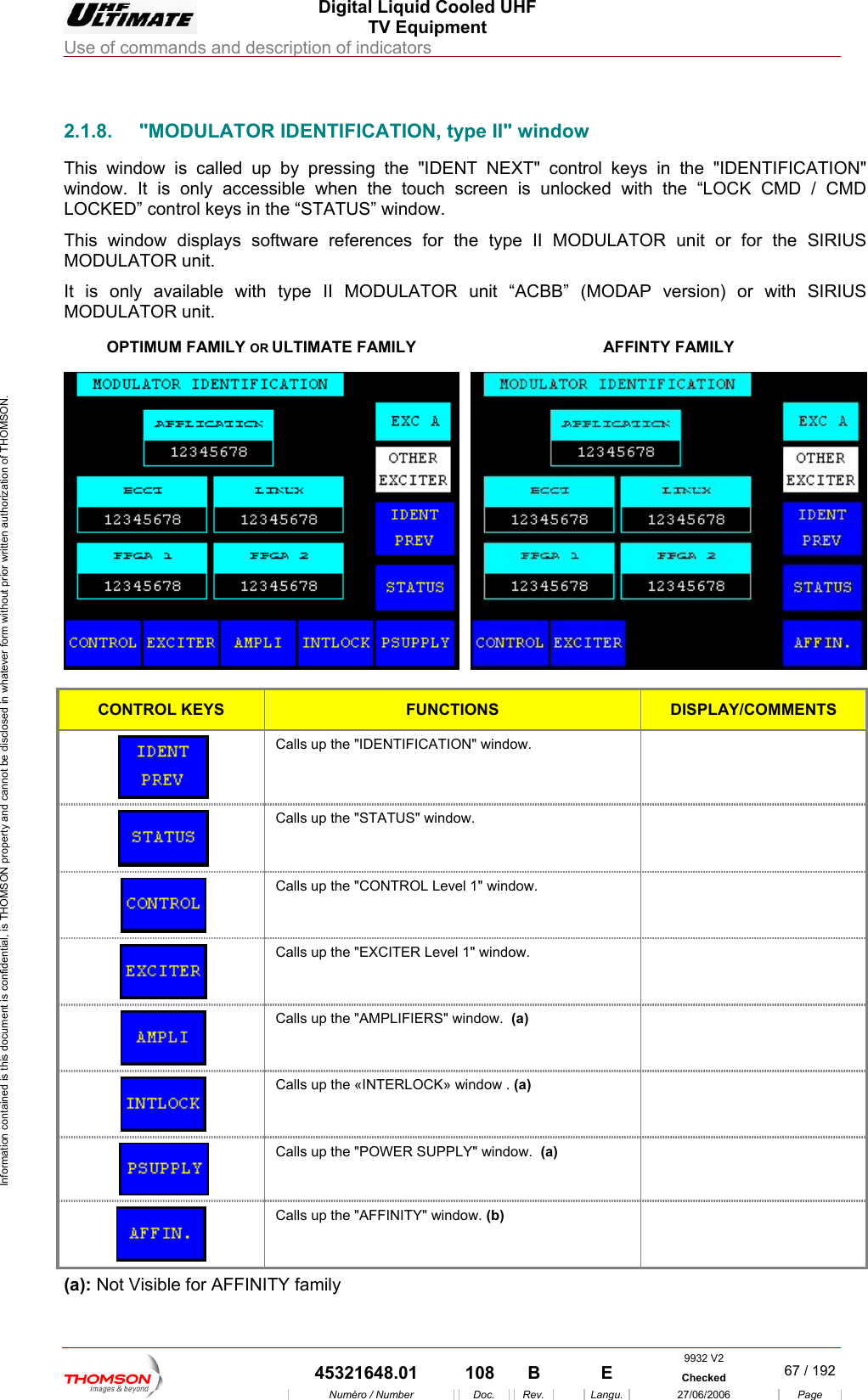
 Digital Liquid Cooled UHF TV Equipment Use of commands and description of indicators  Information contained is this document is confidential, is THOMSON property and cannot be disclosed in whatever form without prior written authorization of THOMSON.                        2.1.8.  "MODULATOR IDENTIFICATION, type II" window This window is called up by pressing the "IDENT NEXT" conwindow. It is only accessible when the touch screen is unloLOCKED” co s in the “STATThis window displays sof references for the type II MODULATOR unit or for the SIRIUS It is only available with   MODULATOR unit. R ULTIMATE FAMILY trol keys in the "IDENTIFICATION" cked with the “LOCK CMD / CMD ntrol key US” window. tware MODULATOR unit.  type II MODULATOR unit “ACBB” (MODAP version) or with SIRIUS OPTIMUM FAMILY OAFFINTY FAMILY  CONTROL KEYS FUNCTIONS DISPLAY/COMMENTS  Calls up the "IDENTIFICATION" window.    Calls up the "STATUS" window.    Calls up the "CONTROL Level 1" window.   Calls up the  "EXCITER Level 1" window.    Calls up the "AMPLIFIERS" window.  (a)   Calls up the «INTERLOCK» window . (a)   Calls up the "POWER SUPPLY" window.  (a)   Calls up the "AFFINITY" window. (b)  (a): Not Visible for AFFINITY family 9932 V2  45321648.01  108  B    E  Checked  67 / 192Numéro / Number Doc. Rev. Langu. 27/06/2006 Page
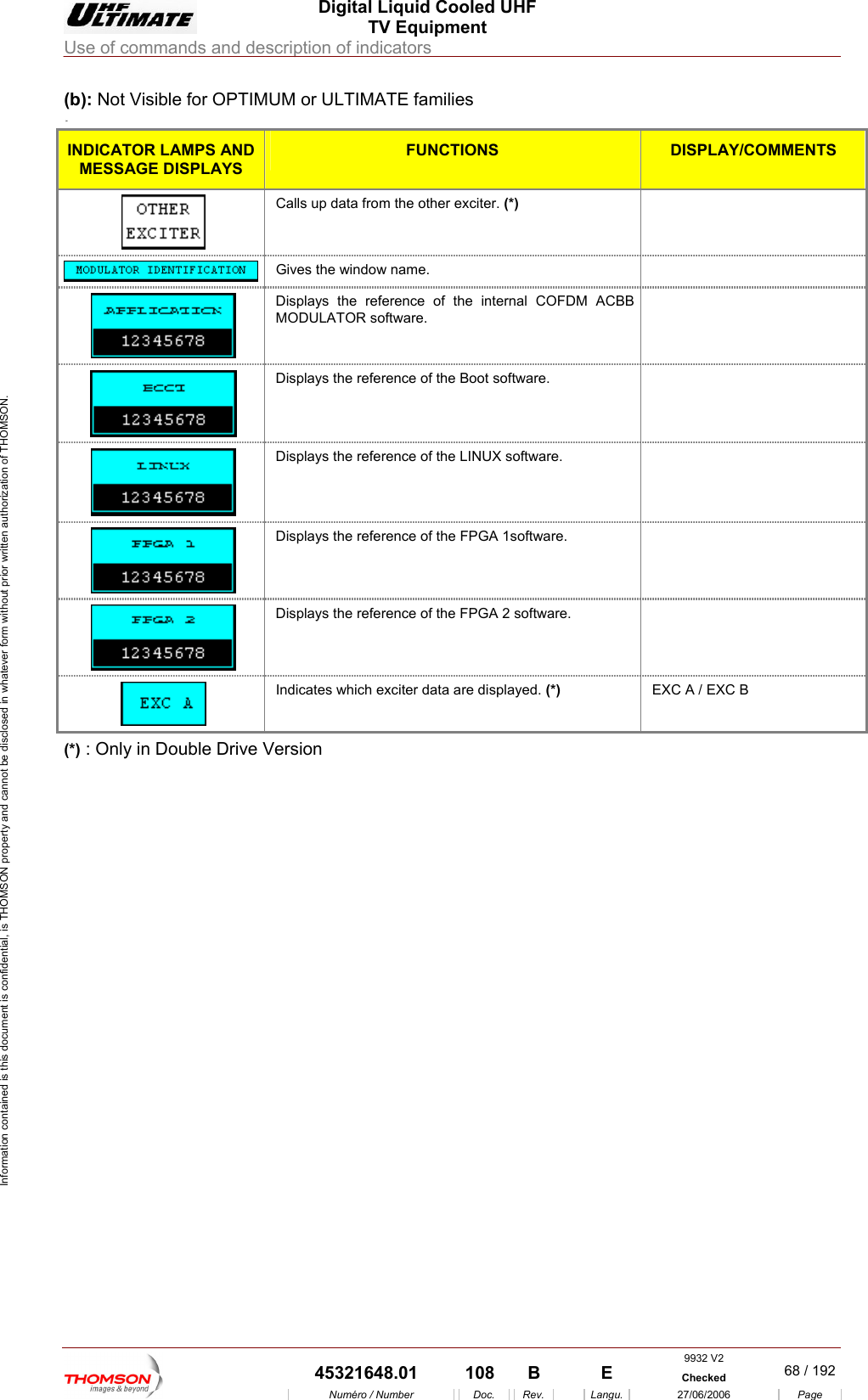
 Digital Liquid Cooled UHF TV Equipment Use of commands and description of indicators  Information contained is this document is confidential, is THOMSON property and cannot be disclosed in whatever form without prior written authorization of THOMSON. (b): Not Visi ULTIM . (a) ble for OPTIMUM or  ATE families INDICATOR L MPS AND AMESSAGE DISPLAYS FUNCTIONS  DISPLAY/COMMENTS  Calls up data from the other exciter. (*)   Gives the window name.   Displays the reference of the internal COFDMODULATOR software. M ACBB    Displays the reference of the Boot software.    Displays the reference of the LINUX software.   Displays the reference of the FPGA 1software.    Displays the reference of the FPGA 2 software.     Indicates which exciter data are displayed. (*)  EXC A / EXC B (*) : Only in Double Drive Version    9932 V2  45321648.01  108  B    E  Checked  68 / 192Numéro / Number Doc. Rev. Langu. 27/06/2006 Page
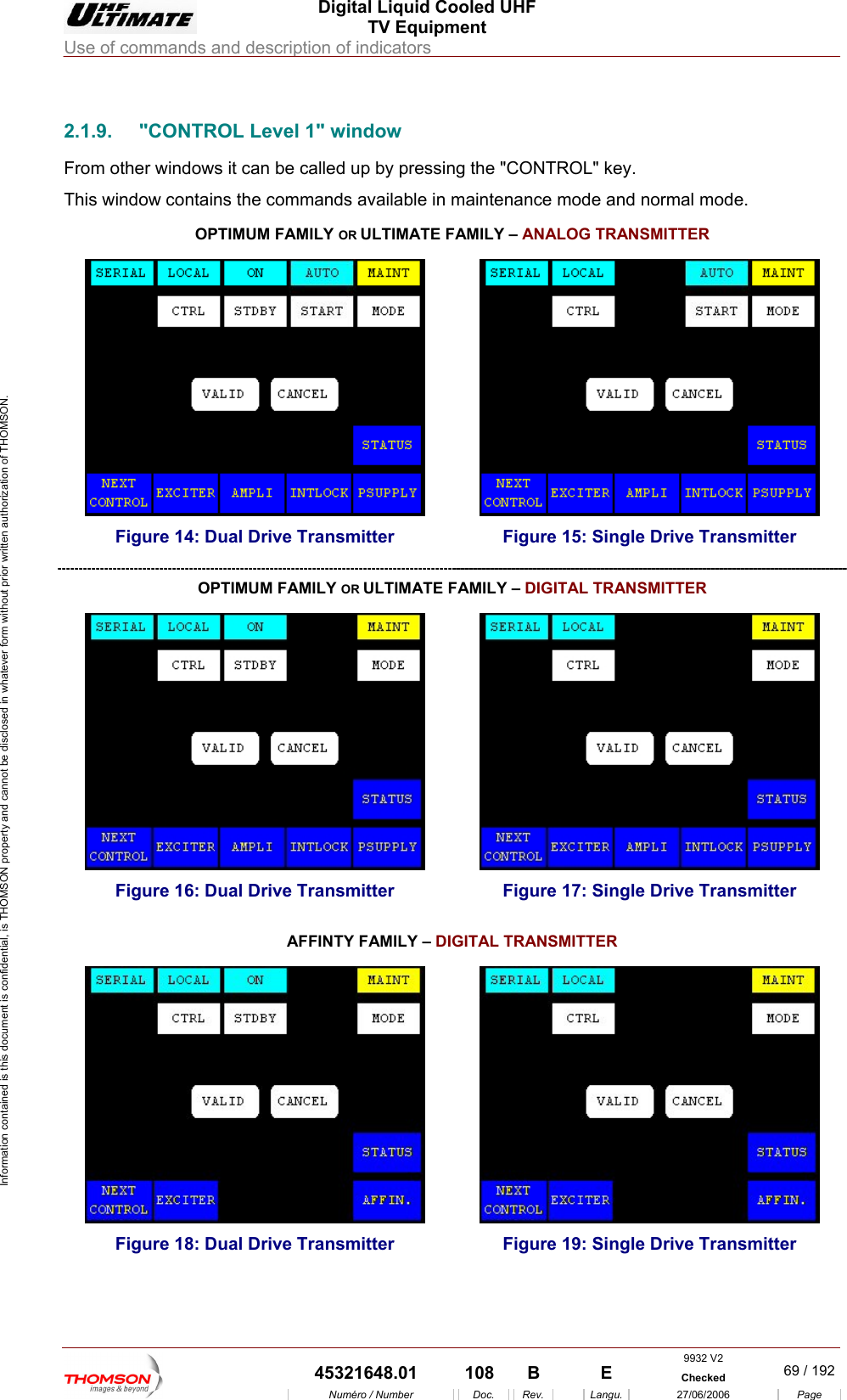
 Digital Liquid Cooled UHF TV Equipment Use of commands and description of indicators  Information contained is this document is confidential, is THOMSON property and cannot be disclosed in whatever form without prior written authorization of THOMSON.                        2.1.9.  "CONTROL Level 1" window From other windows it can be called up by pressing the "CONTROL" key. This window contains the commands available in maintenance mode and normal mode. OR OPTIMUM FAMILY  ULTIMATE FAMILY – ANALOG TRANSMITTER  Figure 14: Dual Drive Transmitter  Figure 15: Single Drive Transmitter OPTIMUM FAMILY OR ULTIMATE FAMILY – DIGITAL TRANSMITTER  Figure 16: Dual Drive Transmitter  Figure 17: Single Drive Transmitter TER AFFINTY FAMILY – DIGITAL TRANSMIT   Figure 18: Dual Drive Transmitter  Figure 19: Single Drive Transmitter  9932 V2  45321648.01  108  B    E  Checked  69 / 192Numéro / Number Doc. Rev. Langu. 27/06/2006 Page
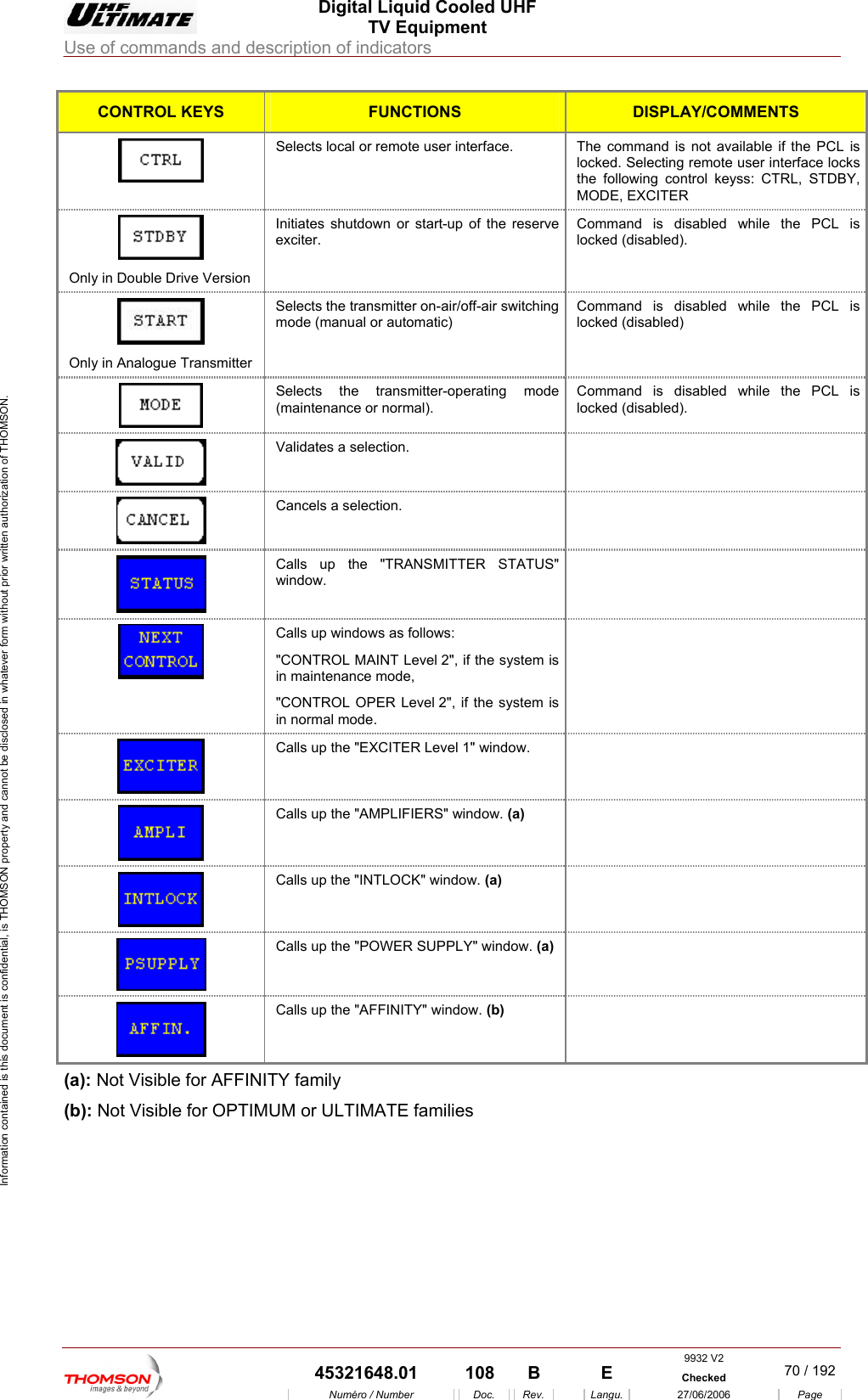
 Digital Liquid Cooled UHF TV Equipment Use of commands and description of indicators  Information contained is this document is confidential, is THOMSON property and cannot be disclosed in whatever form without prior written authorization of THOMSON. CONTROL KEYS FUNCTIONS DISPLAY/COMMENTS Selects local or remote user interface.  T he command is not available if the PCL is locked. Selecting remote user interface locks the following control keyss: CTRL, STDBY, MODE, EXCITER  Only in Double Drive Version hile the PCL is cked (disabled). Initiates shutdown or start-up of the reserve exciter. Command is disabled wlo Only in Analogue Transmitter ing mode (manual or automatic) ommand is disabled while the PCL is locked (disabled) Selects the transmitter on-air/off-air switch CSelects the transmitter-operating (maintenance or normal). mode  ommand is disabled while the PCL is cked (disabled). Clo Validates a  selection.   Cancels a sele ction.   Calls up the   STATUS"   "TRANSMITTERwindow.  Calls up windows as follows: "CONTROL MAINT Level 2", if the system is in maintenance mode, "CONTROL OPER Level 2", if the system is in normal mode.    Calls up the "EXCITER Level 1" window.    Calls up the "AMPLIFIERS" window. (a)   Calls up the "INTLOCK" window. (a)   Calls up the "POWER SUPPLY" window. (a)   Calls up the "AFFINITY" window. (b)  (a): Not Visible for AFFINITY family (b): Not Visible for OPTIMUM or ULTIMATE families  9932 V2  45321648.01  108  B    E  Checked  70 / 192Numéro / Number Doc. Rev. Langu. 27/06/2006 Page
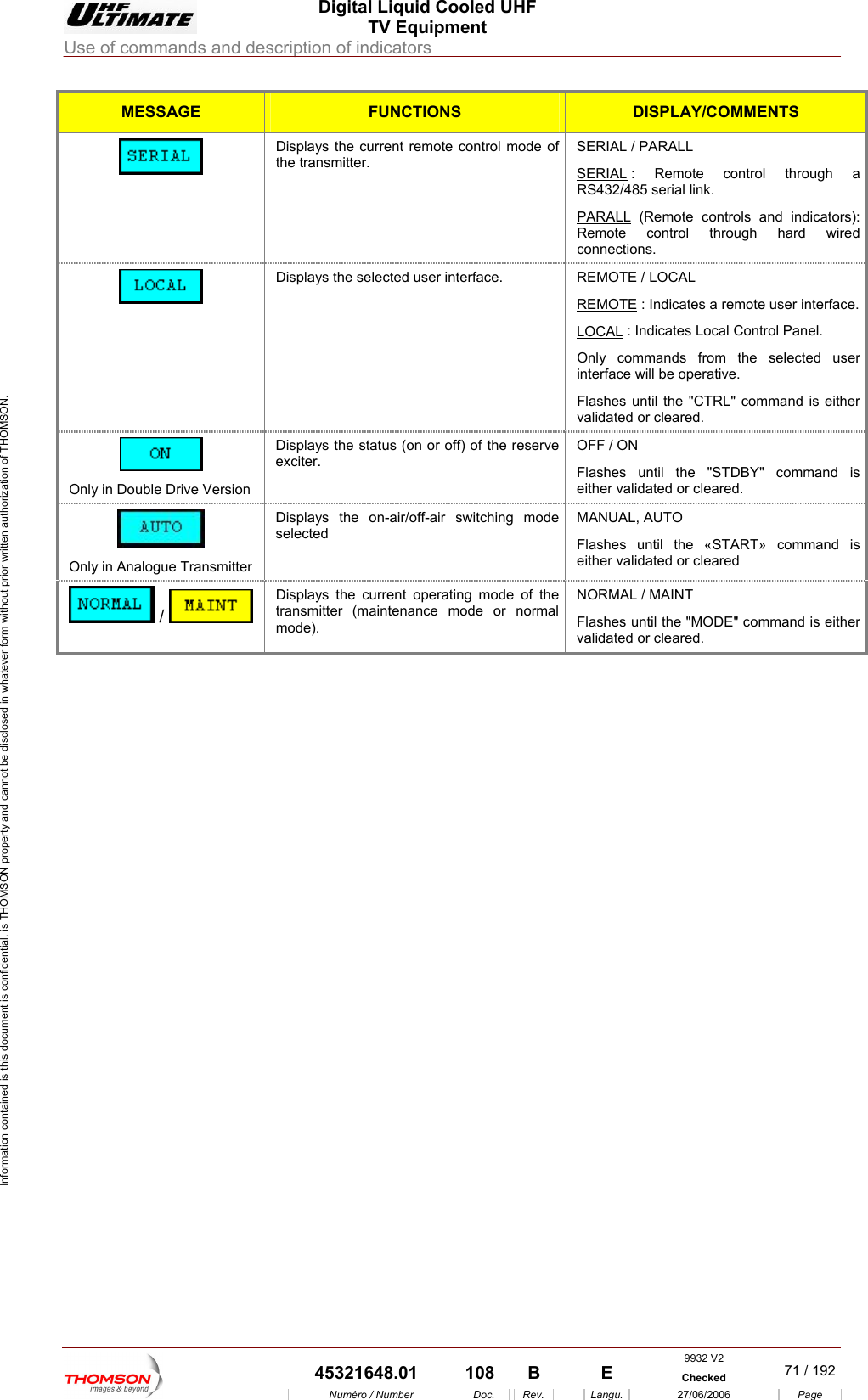
 Digital Liquid Cooled UHF TV Equipment Use of commands and description of indicators  Information contained is this document is confidential, is THOMSON property and cannot be disclosed in whatever form without prior written authorization of THOMSON. MESSAGE FUNCTIONS DISPLAY/COMMENTS  the transmitter.  SERIALDisplays the current remote control mode of  SERIAL / PARALL  : Remote control through a RS432/485 serial link. PARALL (Remote controls and indicatRemote control through hard ors): wired connections. Displays the selected user interface.  REREMOTEMOTE / LOCAL   : Indicates a remote user interface.LOCAL : Indicates Local Control Panel. Only commands from the selected user interface will be operative. Flashes until the "CTRL" command is either validated or cleared.  Only in Double Drive Version Displays the status (on or off) of the reserve exciter. OFF / ON Flashes until the "STDBY" command is either validated or cleared.  Only in Analogue Transmitter Displays the on-air/off-air switching mode selected MANUAL, AUTO Flashes until the «START» command is either validated or cleared Displays the current operating mode of the transmitter (maintenance mode or normal mode). NORMAL / MAINT Flashes  s either validated  /  until the "MODE" command i or cleared.     9932 V2  45321648.01  108  B    E  Checked  71 / 192Numéro / Number Doc. Rev. Langu. 27/06/2006 Page
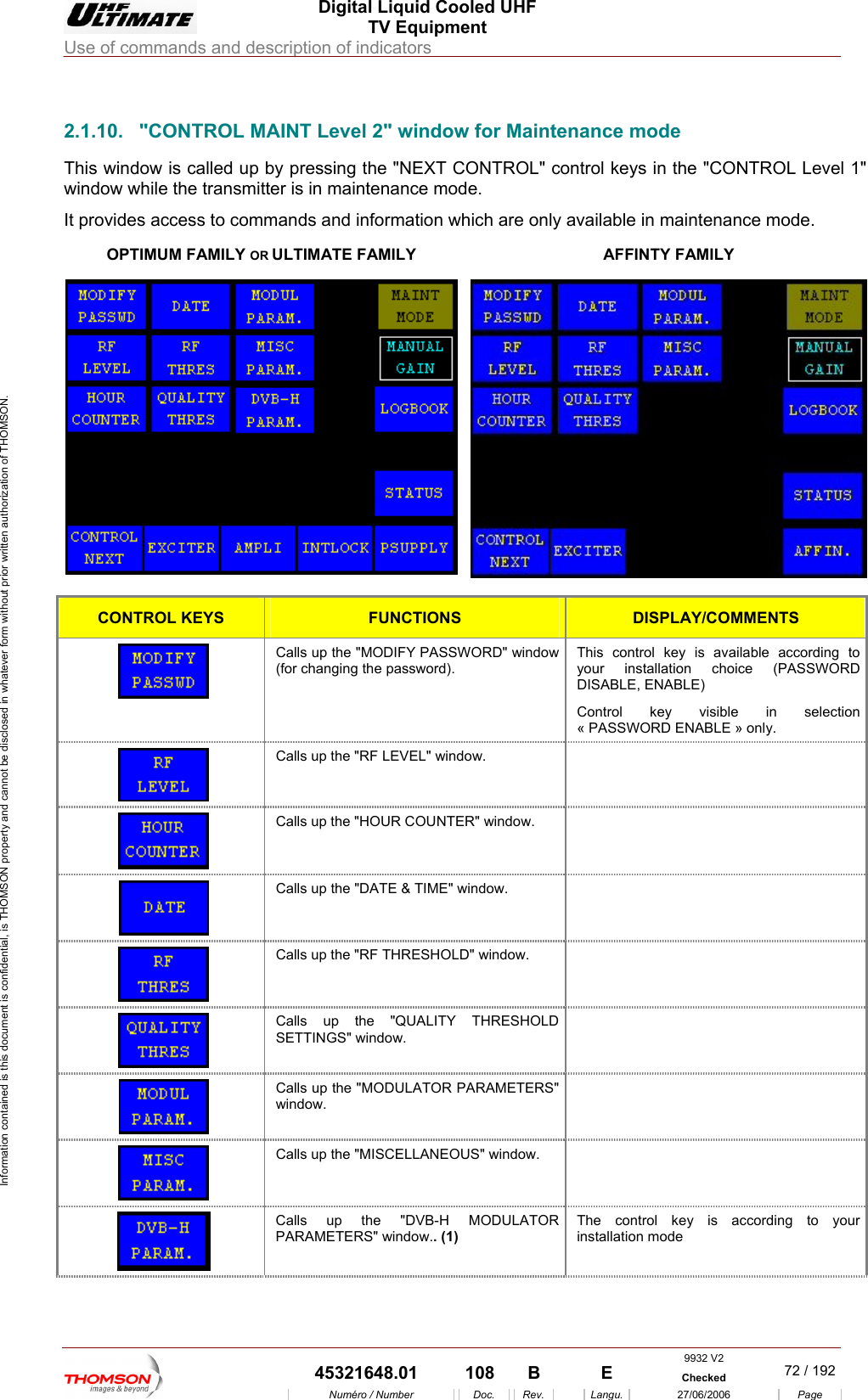
 Digital Liquid Cooled UHF TV Equipment Use of commands and description of indicators  Information contained is this document is confidential, is THOMSON property and cannot be disclosed in whatever form without prior written authorization of THOMSON.                        2.1.10.  "CONTROL MAINT Level 2" window for Maintenance mode This window is called up b " control keys in the "CONTROL Level 1" window while the transmitter is in maiIt provides access to commands and information which are only available in maintenance mode. OPTIMUM FAMILY OR ULTIMATE FAMILY y pressing the "NEXT CONTROLntenance mode. AFFINTY FAMILY  CONTROL KEYS FUNCTIONS DISPLAY/COMMENTS Calls up the "MODIFY PASSWORD" window  ccording to  (PASSWORD ontrol key visible in selection « PASSWORD ENABLE » only. (for changing the password). This control key is available ayour installation choiceDISABLE, ENABLE) C  Calls up the "RF LEVEL" window.    Calls up the "HOUR COUNTER" window.    Calls up the "DATE & TIME" window.    Calls up the "RF THRESHOLD" window.    Calls up the "QUALITY THRESHOLD SETTINGS" window.   Calls up the "MODULATOR PARAMETERS" window.   Calls up the "MISCELLANEOUS" window.    Calls up the "DVB-H MODULATOR PARAMETERS" window.. (1) The control key is according to your installation mode 9932 V2  45321648.01  108  B    E  Checked  72 / 192Numéro / Number Doc. Rev. Langu. 27/06/2006 Page
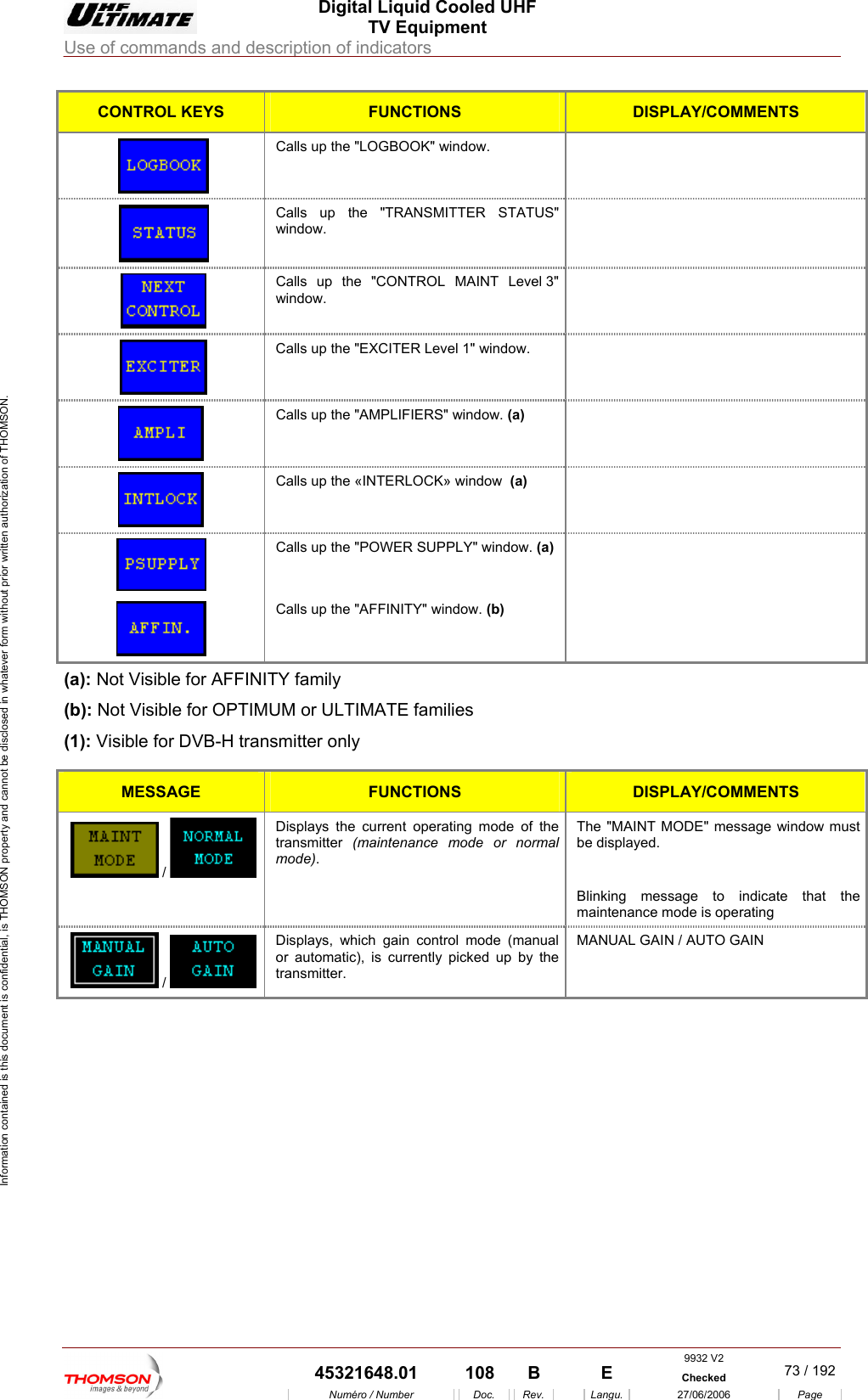
 Digital Liquid Cooled UHF TV Equipment Use of commands and description of indicators  Information contained is this document is confidential, is THOMSON property and cannot be disclosed in whatever form without prior written authorization of THOMSON. CONTROL KEYS FUNCTIONS DISPLAY/COMMENTS Calls up the "LOGBOOK" window.    Calls up the "TRANSMITTER STATUS"  window.  Calls up the "CONTROL MAINT Level 3"    window.  Calls up the "EXCITER Level 1" window.    Calls up the "AMPLIFIERS" window. (a)   Calls up the «INTERLOCK» window  (a)   Calls up the "POWER SUPPLY" window. (a)   Calls up the "AFFINITY" window. (b)  (a):  INITY family (b): Not Visible for OPTIMUM or (1): Visible for DVB-H trans Not Visible for AFFULTIMATE families mitter only MESSAGE FUNCTIONS DISPLAY/COMMENTS  /   Displays the current operating mode of the transmitter  (maintenance mode or normal moThe "MAINT MODE" message window must be displayed. de).   Blinking message to indicate that the maintenance mode is operating Displays, which gain control mode (manual or automatic), is currently picked up by the MANUAL GAIN / AUTO GAIN transmitter.  /       9932 V2  45321648.01  108  B    E  Checked  73 / 192Numéro / Number Doc. Rev. Langu. 27/06/2006 Page
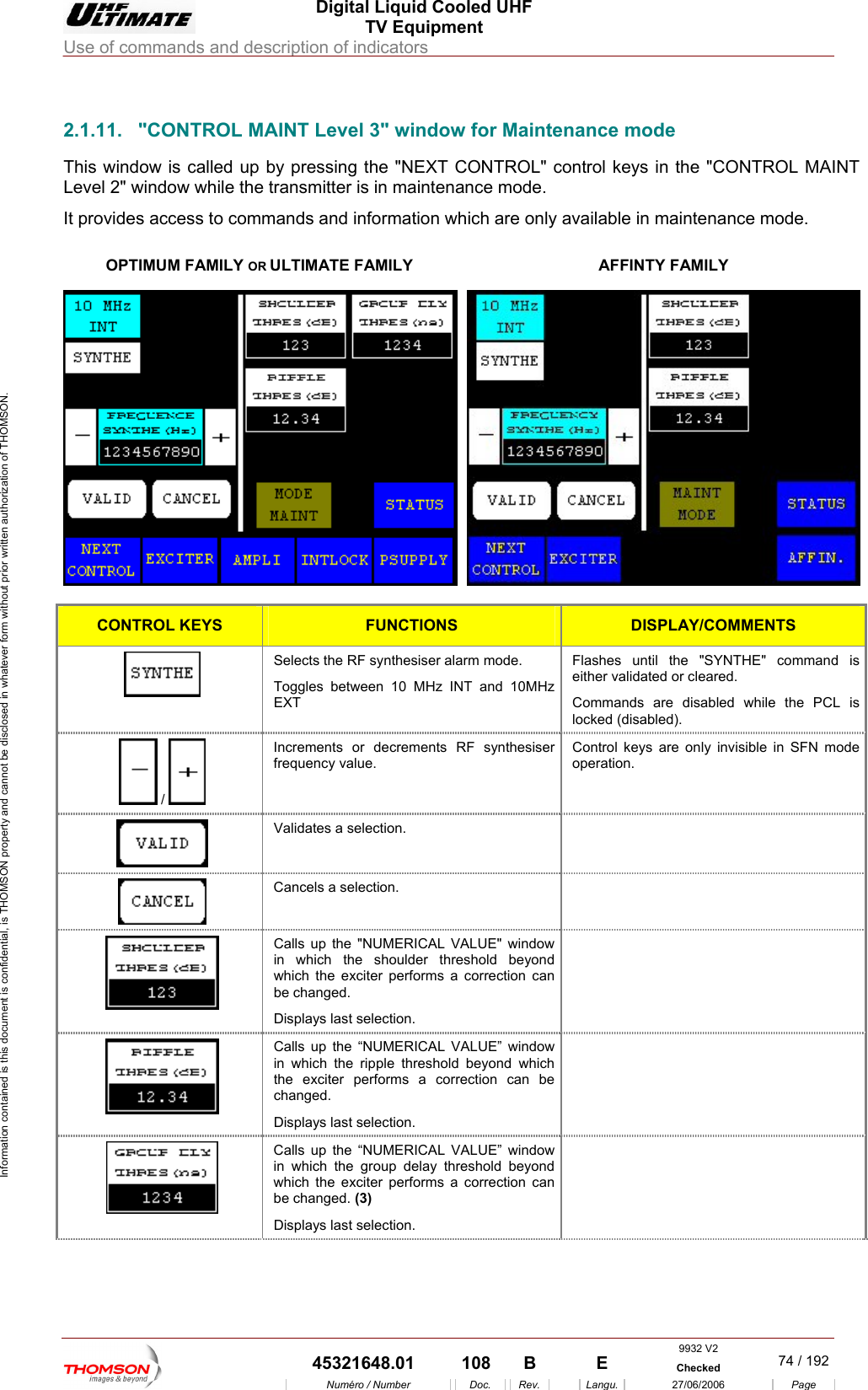
 Digital Liquid Cooled UHF TV Equipment Use of commands and description of indicators  Information contained is this document is confidential, is THOMSON property and cannot be disclosed in whatever form without prior written authorization of THOMSON.                        2.1.11.  "CONTROL MAINT Level 3" window for Maintenance mode This window is called up by pressing the "NEXT CONTROL" control keys in the "CONTROL MAINT Level 2" window while the transmitter is in maintenance mode. It provides ac ss to comm a intenance mode.   OPTIMUM FAMILY OR ULTIMATE FAMILY ce ands and information which are only  vailable in maAFFINTY FAMILY  CONTROL KEYS FUNCTIONS DISPLAY/COMMENTS Selects the RF synthesiser alarm mode.  Toggles between 10 MHz INT and 10MHz EXT command is either validated or cleared. Commands are disabled while the PCL is locked (disabled). Flashes until the "SYNTHE"   /   Increments or decrements RF synthesiser frequency value. Control keys are only invisible in SFN mode operation.  Validates a selection.    Cancels a selection.    Calls up the "NUMERICAL VALUE" window in which the shoulder threshold beyond which the exciter performs a correction can be changed. Displays last selection.   Calls up the “NUMERICAL VALUE” window in which the ripple threshold beyond which the exciter performs a correction can be changed. Displays last selection.   Calls up the “NUMERICAL VALUE” window in which the group delay threshold beyond which the exciter performs a correction can be changed. (3) Displays last selection.  9932 V2  45321648.01  108  B    E  Checked  74 / 192Numéro / Number Doc. Rev. Langu. 27/06/2006 Page
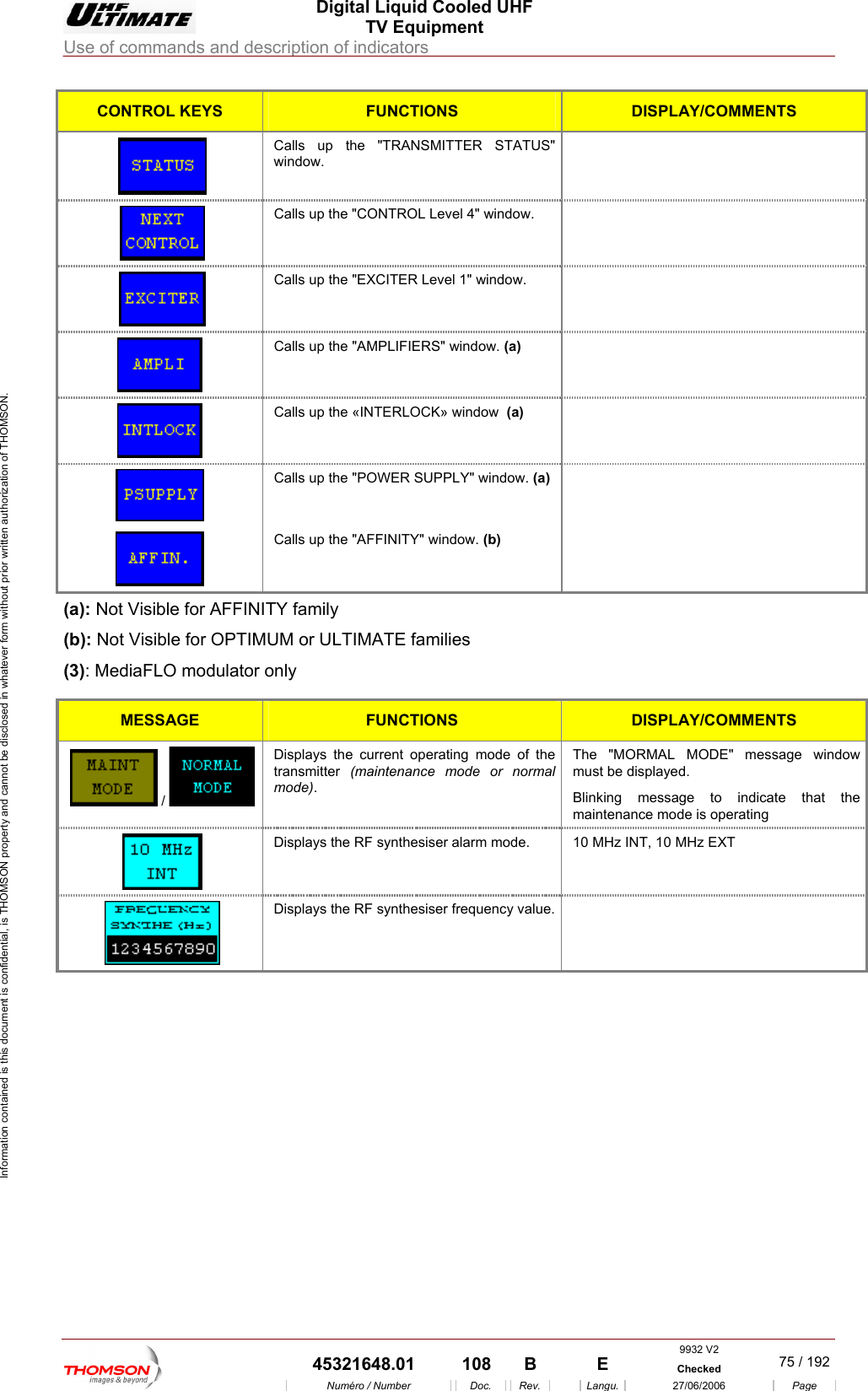
 Digital Liquid Cooled UHF TV Equipment Use of commands and description of indicators  Information contained is this document is confidential, is THOMSON property and cannot be disclosed in whatever form without prior written authorization of THOMSON. CONTROL KEYS FUNCTIONS DISPLAY/COMMENTS  window. Calls up the "TRANSMITTER STATUS"   Calls up the "CONTROL Level 4" window.    Calls up the "EXCITER  Level 1" window.    Calls up the "AMPLIFIERS" window. (a)   Calls up the «INTERLOCK» window  (a)   Calls up the "POWER SUPPLY" window. (a)   Calls up the "AFFINITY" window. (b)  (a): Not Visible for AFFINITY family (b): TIMUM or ULTIM  (3): MediaFLO modulator o  Not Visible for OP ATE familiesnly MESS GEA  FUNCTIONS DISPLAY/COMMENTS  /   al mode). ORMAL MODE" message window ust be displayed. Blinking message to indicate that the maintenance mode is operating Displays the current operating mode of the transmitter  (maintenance mode or normThe "MmDisplays the RF synthesiser alarm mode.   1 0 MHz INT, 10 MHz EXT  Displays the RF synthesiser frequency value.      9932 V2  45321648.01  108  B    E  Checked  75 / 192Numéro / Number Doc. Rev. Langu. 27/06/2006 Page
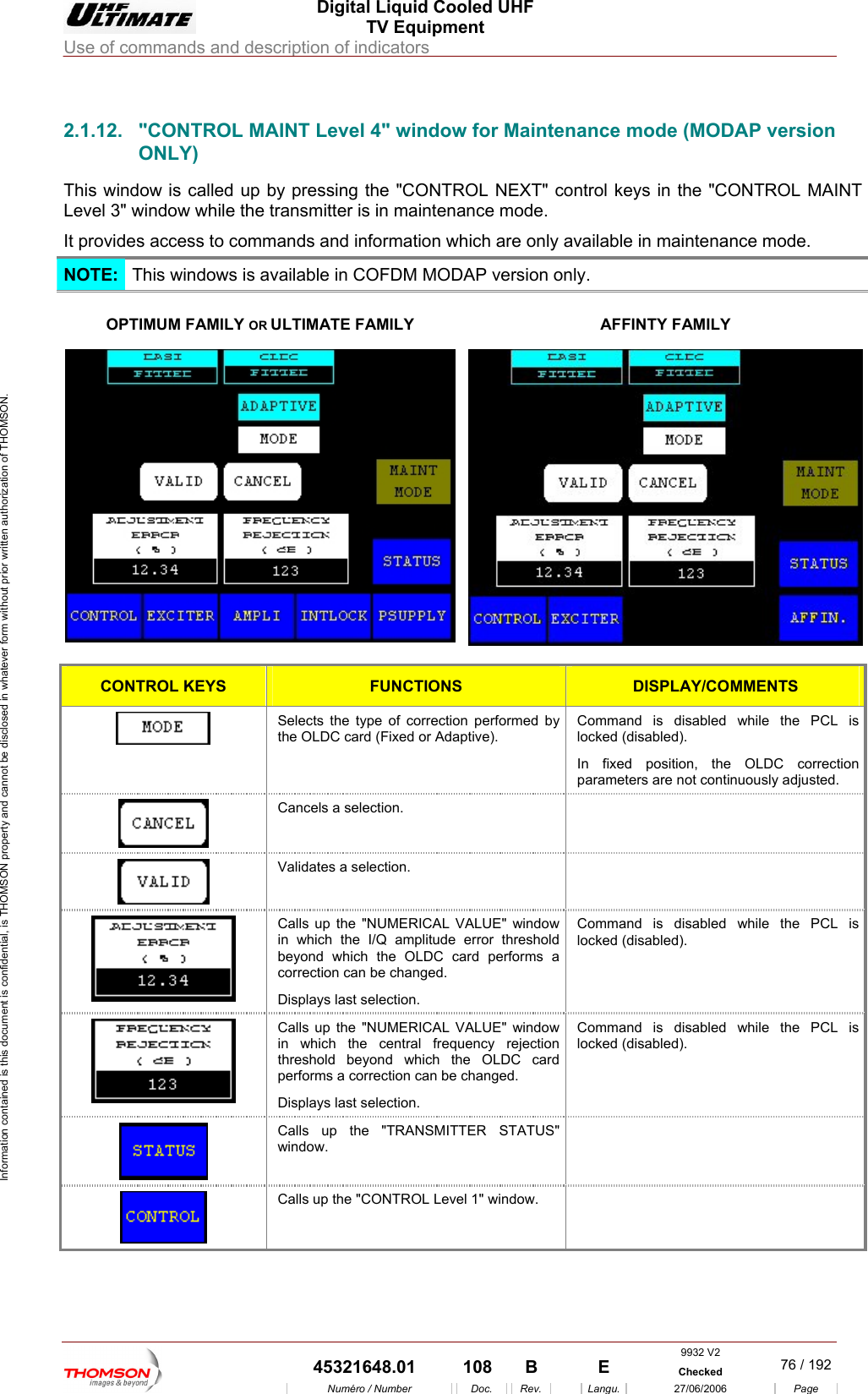
 Digital Liquid Cooled UHF TV Equipment Use of commands and description of indicators  Information contained is this document is confidential, is THOMSON property and cannot be disclosed in whatever form without prior written authorization of THOMSON.                        2.1.12.  "CONTROL MAINT Level 4" window for Maintenance mode (MODAP version ONLY) This window is  ll d up b e "CONTROL NEXT" coLevel 3" window while the transmitter is in maintenance mode. It provides access to comm ode. ca e y pressing th ntrol keys in the "CONTROL MAINT ands and information which are only available in maintenance mNOTE:  This wi o s is a DM MODAP version only. nd w vailable in COF OPTIMUM FAMILY OR ULTIMATE FAMILY  AFFINTY FAMILY  CONTROL KEYS  FUNCTIONS  DISPLAY/COMMENTS  Selects the type of correction performed by the OLDC card (Fixed or Adaptive). Command is disabled while the PCL is locked (disabled). In fixed position, the OLDC correction parameters are not continuously adjusted.  Cancels a selection.    Validates a selection.    Calls up the "NUMERICAL VALUE" window in which the I/Q amplitude error threshold beyond which the OLDC card performs a correction can be changed. Displays last selection. Command is disabled while the PCL is locked (disabled).  Calls up the "NUMERICAL VALUE" window in which the central frequency rejection threshold beyond which the OLDC card performs a correction can be changed. Displays last selection. Command is disabled while the PCL is locked (disabled).  Calls up the "TRANSMITTER STATUS" window.   Calls up the "CONTROL Level 1" window.   9932 V2  45321648.01  108  B    E  Checked  76 / 192Numéro / Number Doc. Rev. Langu. 27/06/2006 Page
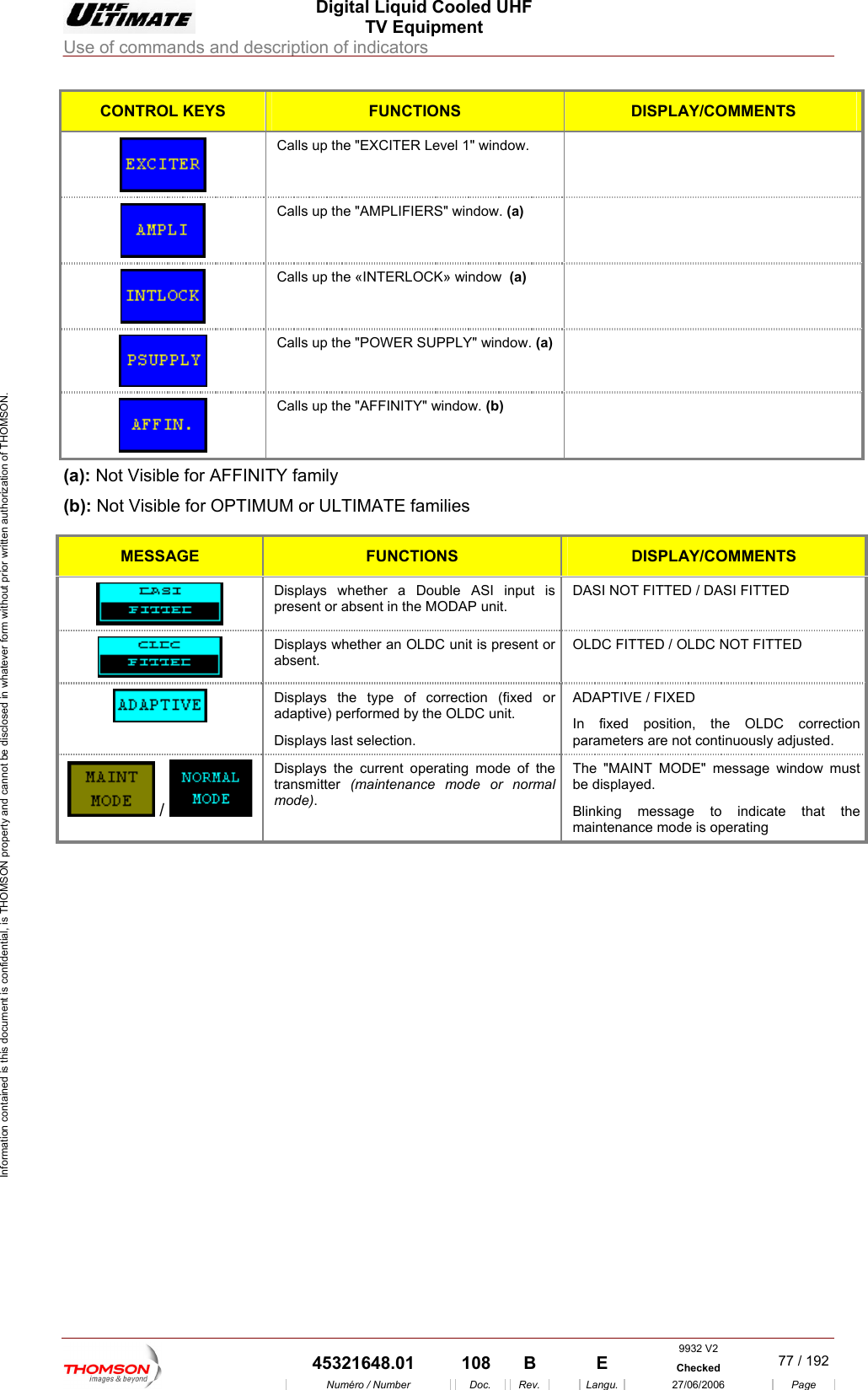
 Digital Liquid Cooled UHF TV Equipment Use of commands and description of indicators  Information contained is this document is confidential, is THOMSON property and cannot be disclosed in whatever form without prior written authorization of THOMSON. CONTROL KEYS  FUNCTIONS  DISPLAY/COMMENTS Calls up the "EXCITER L evel 1" window.   Calls up the "AMPLIFIERS" window. (a)    Calls up the «INTERLOCK» window  (a)   Calls up the "POWER SUPPLY" window. (a)   Calls up the "AFFINITY" window. (b)  (a): Not Visible for AFFINITY family (b): Not Visible for OPTIMUM or ULTIMATE families  MESSAGE FUNCTIONS DISPLAY/COMMENTS  Displays whether a Double ASI input is present or absent in the MODAP unit. DASI NOT FITTED / DASI FITTED  Displays w unit is present or absent. OLDC ED  hether an OLDC   FITTED / OLDC NOT FITTDisplays the type of correction (fixedadaptive) performed b or y the OLDC unit. ADAPTIVE / FIXED In fixed position, the OLDC correction parameters are not continuously adjusted. Displays last selection.  Displays the cu /   rrent operating mode of the transmitter  (maintenance mode or normal mode). The "MAINT MODE" message window must be displayed. Blinking message to indicate that the maintenance mode is operating     9932 V2  45321648.01  108  B    E  Checked  77 / 192Numéro / Number Doc. Rev. Langu. 27/06/2006 Page

Navigation menu