Thousandshores Technology ICBTS30 Portable Wireless Speaker User Manual

Shenzhen Thousandshores Technology Co., Ltd. Portable Wireless Speaker

User Manual

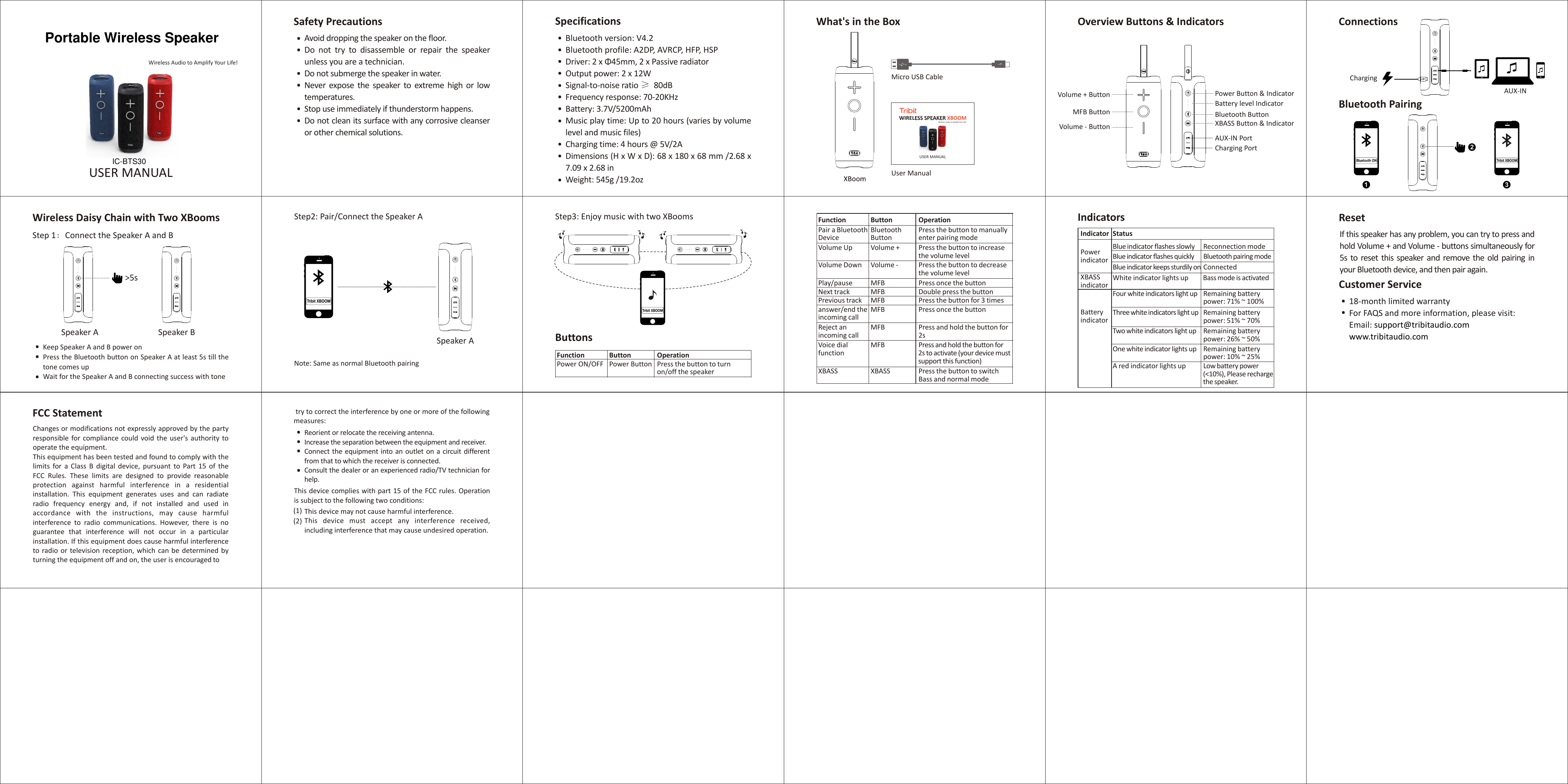
Wireless Audio to Amplify Your Life!USER MANUALSafety PrecautionsAvoid dropping the speaker on the floor.Do  not  try  to  disassemble  or  repair  the  speaker unless you are a technician.Do not submerge the speaker in water.Never  expose  the  speaker  to  extreme  high  or  low temperatures.Stop use immediately if thunderstorm happens.Do not clean its surface with any corrosive cleanser or other chemical solutions.Bluetooth version: V4.2Bluetooth profile: A2DP, AVRCP, HFP, HSPDriver: 2 x Φ45mm, 2 x Passive radiatorOutput power: 2 x 12W Signal-to-noise ratio ≥ 80dBFrequency response: 70-20KHzBattery: 3.7V/5200mAhMusic play time: Up to 20 hours (varies by volume level and music files)Charging time: 4 hours @ 5V/2ADimensions (H x W x D): 68 x 180 x 68 mm /2.68 x 7.09 x 2.68 inWeight: 545g /19.2ozWhat's in the BoxSpecifications Overview Buttons & IndicatorsPower Button & IndicatorVolume + Button MFB ButtonVolume - Button Battery level IndicatorBluetooth ButtonXBASS Button & IndicatorAUX-IN PortCharging PortBluetooth ON1Tribit XBOOM3AUX-INChargingConnectionsBluetooth Pairing2Micro USB CableUser ManualWireless Daisy Chain with Two XBoomsStep 1:Connect the Speaker A and BSpeaker A Speaker B       >5sKeep Speaker A and B power onPress the Bluetooth button on Speaker A at least 5s till the tone comes upWait for the Speaker A and B connecting success with toneStep2: Pair/Connect the Speaker ASpeaker ATribit XBOOMNote: Same as normal Bluetooth pairingStep3: Enjoy music with two XBoomsChanges or modifications not expressly approved by the party responsible for compliance  could  void the  user's  authority  to operate the equipment.This equipment has been tested and found to comply with the limits  for  a  Class  B  digital  device,  pursuant  to  Part  15  of  the FCC  Rules.  These  limits  are  designed  to  provide  reasonable protection  against  harmful  interference  in  a  residential installation.  This  equipment  generates  uses  and  can  radiate radio  frequency  energy  and,  if  not  installed  and  used  in accordance  with  the  instructions,  may  cause  harmful interference  to  radio  communications.  However,  there  is  no guarantee  that  interference  will  not  occur  in  a  particular installation. If this equipment does cause harmful interference to radio or  television reception,  which  can  be determined by turning the equipment off and on, the user is encouraged toFCC StatementReorient or relocate the receiving antenna.Increase the separation between the equipment and receiver.Connect the equipment into an outlet  on a circuit  different from that to which the receiver is connected.Consult the dealer or an experienced radio/TV technician for help.This device complies with part 15 of the FCC rules. Operation is subject to the following two conditions:This device may not cause harmful interference.This  device  must  accept  any  interference  received, including interference that may cause undesired operation.(1) (2) If this speaker has any problem, you can try to press and hold Volume + and Volume - buttons simultaneously for 5s  to reset  this speaker  and remove the  old pairing  in your Bluetooth device, and then pair again.Reset18-month limited warrantyFor FAQS and more information, please visit:Email: support@tribitaudio.comwww.tribitaudio.comCustomer ServiceOperationFunction ButtonPress the button to manually enter pairing modePair a BluetoothDeviceBluetooth ButtonPress the button to increase the volume levelVolume Up Volume +Press the button to decrease the volume levelVolume Down Volume -Press once the button Play/pause MFBDouble press the buttonNext track MFBPress the button for 3 timesPrevious track MFBPress once the buttonanswer/end the incoming callMFBPress and hold the button for 2sReject an incoming callMFBPress and hold the button for 2s to activate (your device must support this function)Voice dial functionMFBPress the button to switch Bass and normal modeXBASS XBASSButtons OperationFunction ButtonPress the button to turn on/off the speakerPower ON/OFF Power Button try to correct the interference by one or more of the following measures:IndicatorsIndicator Status Power indicatorBlue indicator flashes slowly Reconnection modeBlue indicator flashes quickly Bluetooth pairing modeBlue indicator keeps sturdily on ConnectedXBASS indicatorWhite indicator lights up  Bass mode is activatedBattery indicatorFour white indicators light up Remaining battery power: 71% ~ 100%Three white indicators light up Remaining battery power: 51% ~ 70%Two white indicators light up Remaining battery power: 26% ~ 50%One white indicator lights up Remaining battery power: 10% ~ 25%A red indicator lights up Low battery power (<10%), Please recharge the speaker.Tribit XBOOMWIRELESS SPEAKER XBOOMWireless Audio to Amplify Your Life!USER MANUALIC-BTS30  Portable Wireless Speaker

Navigation menu