Tiinlab Acoustic Technology YPJSQ01JY Mi Bluetooth Audio Receiver User Manual

Tiinlab Acoustic Technology (Shenzhen) Co., Ltd. Mi Bluetooth Audio Receiver Users Manual

Users Manual

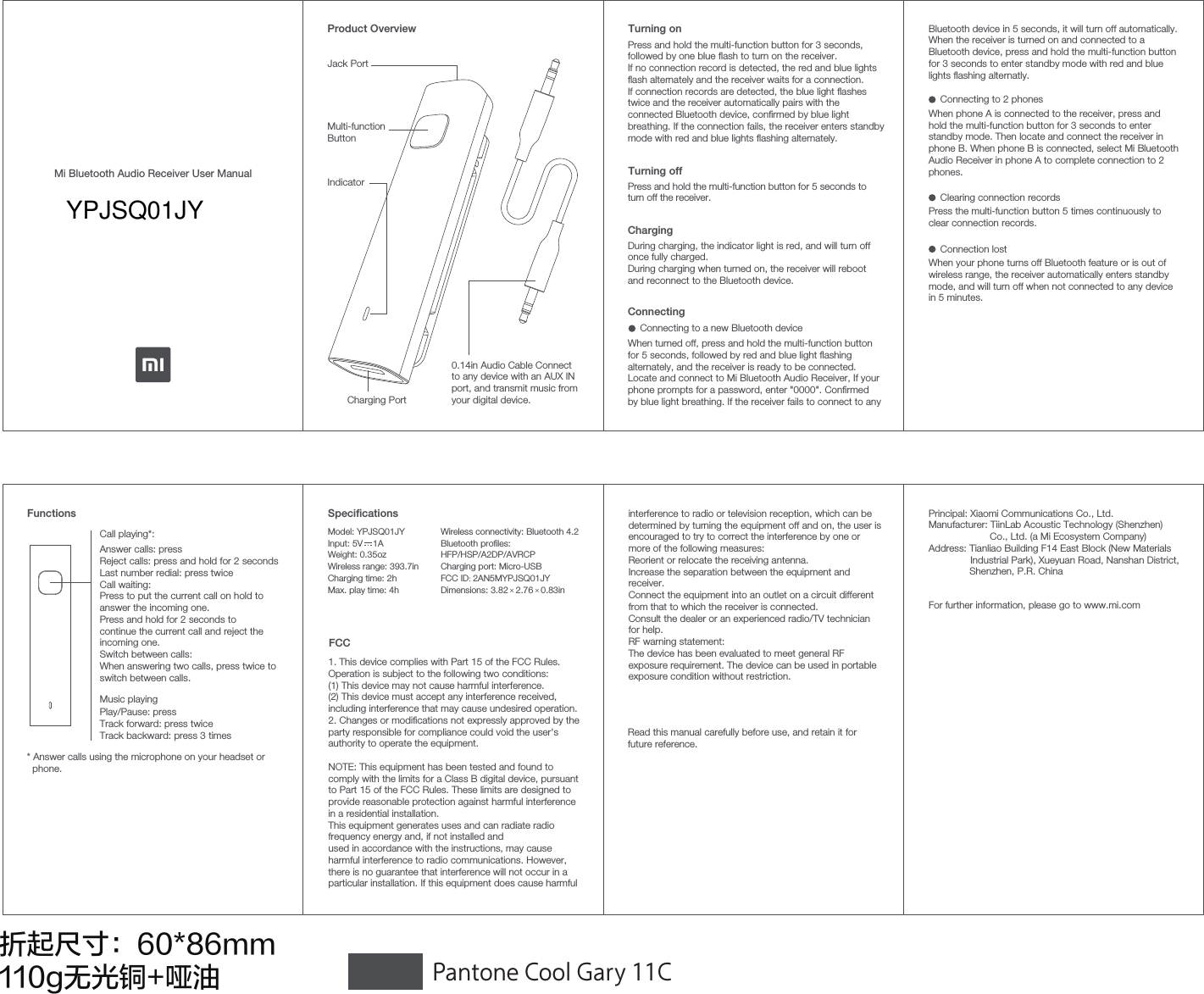
折起尺寸:60*86mm110g无光铜+哑油 Pantone Cool Gary 11CMi Bluetooth Audio Receiver User ManualProduct OverviewMulti-function ButtonJack Port0.14in Audio Cable Connectto any device with an AUX IN port, and transmit music from your digital device.Charging PortIndicatorTurning onTurning offPress and hold the multi-function button for 5 seconds to turn off the receiver.Press and hold the multi-function button for 3 seconds, followed by one blue ash to turn on the receiver.If no connection record is detected, the red and blue lights ash alternately and the receiver waits for a connection.If connection records are detected, the blue light ashes twice and the receiver automatically pairs with the connected Bluetooth device, conrmed by blue light breathing. If the connection fails, the receiver enters standby mode with red and blue lights ashing alternately.During charging, the indicator light is red, and will turn off once fully charged. During charging when turned on, the receiver will reboot and reconnect to the Bluetooth device.ConnectingWhen turned off, press and hold the multi-function button for 5 seconds, followed by red and blue light ashing alternately, and the receiver is ready to be connected. Locate and connect to Mi Bluetooth Audio Receiver, If your phone prompts for a password, enter "0000". Conrmed by blue light breathing. If the receiver fails to connect to any ChargingFunctionsCall playing*:Answer calls: pressReject calls: press and hold for 2 secondsLast number redial: press twiceCall waiting: Press to put the current call on hold to answer the incoming one.Press and hold for 2 seconds to continue the current call and reject the incoming one.Switch between calls: When answering two calls, press twice to switch between calls.* Answer calls using the microphone on your headset or   phone.Music playingPlay/Pause: pressTrack forward: press twiceTrack backward: press 3 times     When phone A is connected to the receiver, press and hold the multi-function button for 3 seconds to enter standby mode. Then locate and connect the receiver in phone B. When phone B is connected, select Mi Bluetooth Audio Receiver in phone A to complete connection to 2 phones.     Press the multi-function button 5 times continuously to clear connection records.Clearing connection records     When your phone turns off Bluetooth feature or is out of wireless range, the receiver automatically enters standby mode, and will turn off when not connected to any device in 5 minutes.Connection lost Specications Principal: Xiaomi Communications Co., Ltd.Manufacturer: TiinLab Acoustic Technology (Shenzhen)                       Co., Ltd. (a Mi Ecosystem Company)Address: Tianliao Building F14 East Block (New Materials               Industrial Park), Xueyuan Road, Nanshan District,               Shenzhen, P.R. ChinaFor further information, please go to www.mi.com Read this manual carefully before use, and retain it for future reference.Bluetooth device in 5 seconds, it will turn off automatically. When the receiver is turned on and connected to a Bluetooth device, press and hold the multi-function button for 3 seconds to enter standby mode with red and blue lights ashing alternatly.     Connecting to a new Bluetooth deviceConnecting to 2 phonesFCC1. This device complies with Part 15 of the FCC Rules. Operation is subject to the following two conditions:(1) This device may not cause harmful interference.(2) This device must accept any interference received, including interference that may cause undesired operation.2. Changes or modications not expressly approved by the party responsible for compliance could void the user's authority to operate the equipment.NOTE: This equipment has been tested and found to comply with the limits for a Class B digital device, pursuant to Part 15 of the FCC Rules. These limits are designed to provide reasonable protection against harmful interference in a residential installation.This equipment generates uses and can radiate radio frequency energy and, if not installed andused in accordance with the instructions, may cause harmful interference to radio communications. However, there is no guarantee that interference will not occur in a particular installation. If this equipment does cause harmful Model: YPJSQ01JYInput: 5V    1AWeight: 0.35ozWireless range: 393.7inCharging time: 2hMax. play time: 4hWireless connectivity: Bluetooth 4.2Bluetooth proles: HFP/HSP/A2DP/AVRCPCharging port: Micro-USBFCC ID: 2AN5MYPJSQ01JYDimensions: 3.82   2.76   0.83in× ×interference to radio or television reception, which can be determined by turning the equipment off and on, the user is encouraged to try to correct the interference by one or more of the following measures:Reorient or relocate the receiving antenna.Increase the separation between the equipment and receiver.Connect the equipment into an outlet on a circuit different from that to which the receiver is connected.Consult the dealer or an experienced radio/TV technician for help.RF warning statement:The device has been evaluated to meet general RF exposure requirement. The device can be used in portable exposure condition without restriction.YPJSQ01JY

Navigation menu