Uni rich Technology BTSPEAKER LANTERN SPEAKER User Manual URBT 1033 Stone Speaker Instr

Uni-rich Technology Limited LANTERN SPEAKER URBT 1033 Stone Speaker Instr

15_URBT-1081 UserMan.pdf

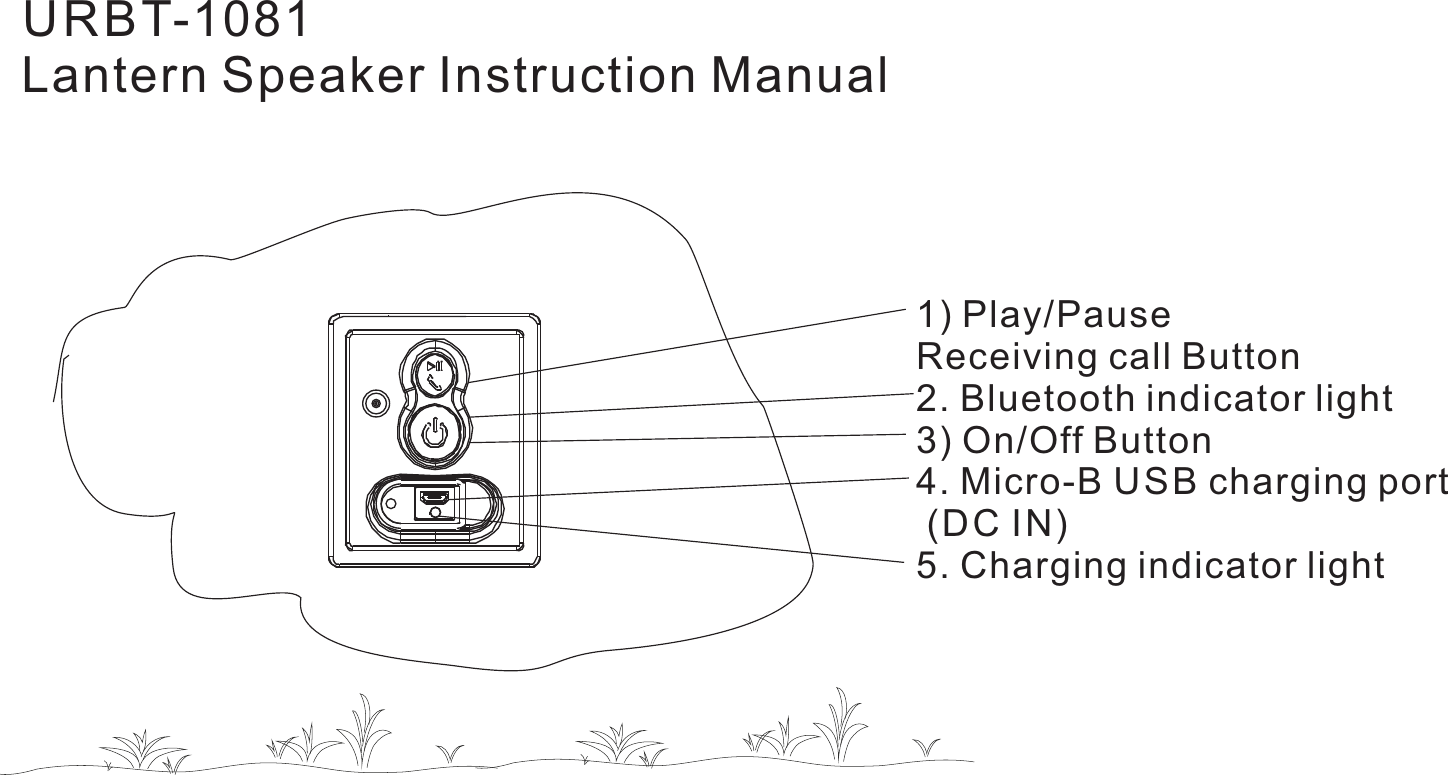
1) Play/PauseReceiving call Button2. Bluetooth indicator light3) On/Off Button4. Micro-B USB charging port(DC IN)5. Charging indicator lightURBT-1081Lantern Speaker Instruction Manual
Thank you for choosing our product. We hope you will enjoy using the appliance.Please read the following chapters carefully so that you can become acquaintedwith the advantage of this product and its use.Overview of the components1. Accept call / End call / Calling last number / Play / Pause2. Bluetooth indicator light3. On / Off Button4. Micro-B charging port ( )USB DC IN5. Charging indicator lightCharging the intergrated batteryThe device is operated via the integrated lithium polymer battery. Charge thebattery as follow :-1. Plug the micro B plug of the charging cable into the charging port ofUSB USBthe device.2. Connect the connector to the port of computer or charging adapterUSB USB(not included).3) While charging, the charging level indicator will remain illuminated .LED RED4) When charging is complete, the charging level indicator will turn solidLEDGREEN.5) Make sure that the socket at the port of computer or charging adapter hasUSBa maximum output of 5V , 500mAh only.DC6) The charging time varies according to battery use.Pairing Bluetooth deviceBluetooth involves a technology for wireless radio connection of devices over ashort distance. Devices with Bluetooth standard are transmitting between 2.402and 2.480 Ghz in band. Iterference can however be caused by s,ISM WLANnetworks, wireless telephones, or microwaves ovens, for example, which operatein the same frequency band.The device offers you the possibility to use a Bluetooth-enabled device. Thefunctional radius is limited to approx. 15 meters depending on the surroundingsand the unit used.If your playing device supports the A2 profile (Advanced Audio DistributionDPProfile) and has a music-player function, then you can also wirelessly transfermusic to the device. The A2 profile involves a multi-vendor Bluetooth profile. ByDPstreaming, stereo audio signals are wirelessly transferred between the playingdevice (source) and the receiving device. To be able to operate the source byremote control, the player needs to support the profile (Audio VideoAVRCPRemote Control Profile)Due to different device manufacturers, models, and software versions, a fullfunctionality cannot be guaranteed.Logging on devices (Pairing)Before you listen to music via the unit, you must pair the devices.1) Ensure, that the Bluetooth function is activated in your player (Mobile or musicplayer). For this, please refer to the operation manual of your player.2. Select the searching mode on your Bluetooth device (refer to your Bluetoothdevice’s owner’s manual for details if necessary.)3. Turn on the power of Garden Speaker by briefly pressing the On/Off button. Theindicator blue light will start to flash rapidly after a short time. The Garden Speakeris now set to the pairing mode.4. Your Bluetooth device should find and display “Garden Speaker” as a selection,select it and, if prompted, use “0000" as a pin for pairing code, depending on thedevice manufacturers, model, and software version.5. Verify that you are connected to the speaker. The Bluetooth on the GardenLEDSpeaker will change to a solid blue and you can hear a signal when pairing iscomplete.Speaker operationThe device is equipped with multi functional buttons. For different functions pressthe respective button briefly or press and hold.On/Off Button1) Turn on the “Garden Speaker” by pressing the On/Off Button. The Bluetoothindicator light will start to blink.2) Hold and press the “On/Off” Button for 3 seconds to turn off the Garden Speakeruntil your hear descending beep tones and blue indicates blink off. The unitsLEDare disconnected.Play/Pause1) Briefly press the Play/Pause button to pause playback2) Press the button again to continue playbackNotes : Depending on the device manufacturers, models, and software versionsyou need to start the music playback in your player.Accepting/Ending call1) Press the Play/Pause button, to accept an incoming call.2) To end the call, press the Play/Pause button again3) During an incoming phone call, the music playback will stop. After ending thephone call, the track will continue to play.Calling the last dialed number1) Press and hold the Play/Pause Button for 3 seconds. The number you calledlast with your mobile phone will be called. To end the conversation, press thePlay/Pause button again.2) Your mobile phone must support this function.Adjust Volume1) To adust the volume, you must use the external audio device.
NOTE: This equipment has been tested and found to comply with the limits for a Class B digital device, pursuant to part 15 of the FCC Rules. These limits are designed to provide reasonable protection against harmful interference in a residential installation. This equipment generates, uses and can radiate radio frequency energy and, if not installed and used in accordance with the instructions, may cause harmful interference to radio communications. However, there is no guarantee that interference will not occur in a particular installation. If this equipment does cause harmful interference to radio or television reception, which can be determined by turning the equipment off and on, the user is encouraged to try to correct the interference by one or more of the following measures: —Reorient or relocate the receiving antenna. —Increase the separation between the equipment and receiver. —Connect the equipment into an outlet on a circuit different from that to which the receiver is connected. —Consult the dealer or an experienced radio/TV technician for help. Thisdevicecomplieswithpart15oftheFCCrules.Operationissubjecttothefollowingtwoconditions:(1)thisdevicemaynotcauseharmfulinterference,and(2)thisdevicemustacceptanyinterferencereceived,includinginterferencethatmaycauseundesiredoperation.Changesormodificationstothisunitnotexpresslyapprovedbythepartyresponsibleforcompliancecouldvoidtheuser'sauthoritytooperatetheequipment.

Navigation menu