Verto Medical Solutions 30004 YURBUDS HYBRID WIRELESS User Manual

Verto Medical Solutions, LLC YURBUDS HYBRID WIRELESS

User Manual

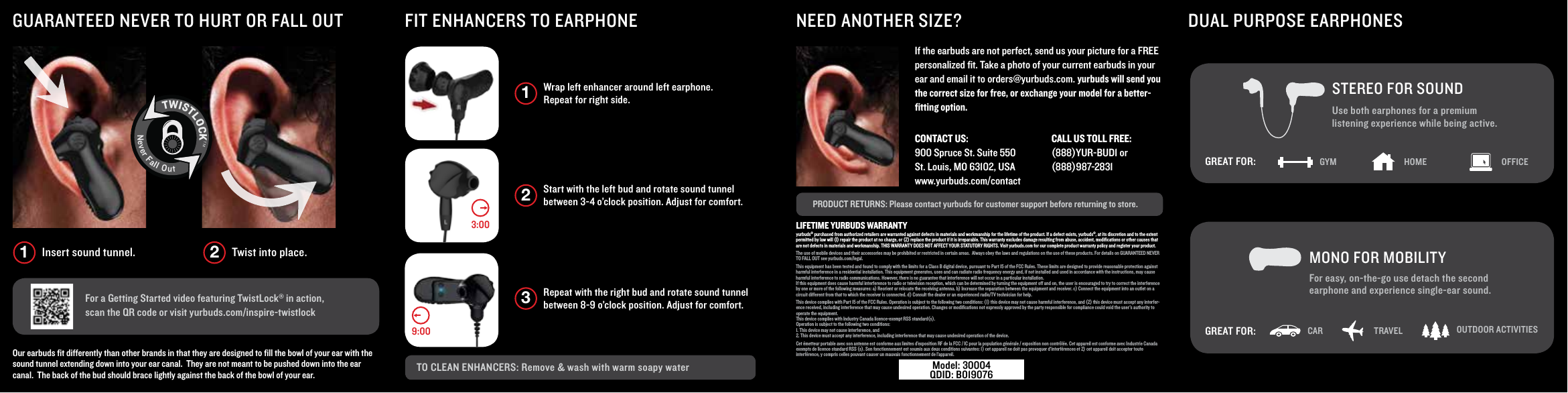
Wrap left enhancer around left earphone. Repeat for right side. 1Start with the left bud and rotate sound tunnel between 3-4 o’clock position. Adjust for comfort. 2Repeat with the right bud and rotate sound tunnel between 8-9 o’clock position. Adjust for comfort. 3TO CLEAN ENHANCERS: Remove & wash with warm soapy waterPRODUCT RETURNS: Please contact yurbuds for customer support before returning to store.NEED ANOTHER SIZE?FIT ENHANCERS TO EARPHONEGUARANTEED NEVER TO HURT OR FALL OUT For a Getting Started video featuring TwistLock® in action, scan the QR code or visit yurbuds.com/inspire-twistlockOur earbuds fit differently than other brands in that they are designed to fill the bowl of your ear with the sound tunnel extending down into your ear canal.  They are not meant to be pushed down into the ear canal.  The back of the bud should brace lightly against the back of the bowl of your ear.If the earbuds are not perfect, send us your picture for a FREE personalized fit. Take a photo of your current earbuds in your ear and email it to orders@yurbuds.com. yurbuds will send you the correct size for free, or exchange your model for a better-fitting option.9:003:00Insert sound tunnel. Twist into place.1 2TWISTLOCKTMNeverFallOutCONTACT US:    900 Spruce St. Suite 550St. Louis, MO 63102, USAwww.yurbuds.com/contact CALL US TOLL FREE:    (888)YUR-BUD1 or (888)987-2831DUAL PURPOSE EARPHONESFor easy, on-the-go use detach the second earphone and experience single-ear sound. MONO FOR MOBILITYSTEREO FOR SOUNDUse both earphones for a premium listening experience while being active. GYM HOME OFFICEGREAT FOR:CAR TRAVEL OUTDOOR ACTIVITIESGREAT FOR:LIFETIME YURBUDS WARRANTYyurbuds® purchased from authorized retailers are warranted against defects in materials and workmanship for the lifetime of the product. If a defect exists, yurbuds®, at its discretion and to the extent permitted by law will (I) repair the product at no charge, or (2) replace the product if it is irreparable. This warranty excludes damage resulting from abuse, accident, modifications or other causes that are not defects in materials and workmanship. THIS WARRANTY DOES NOT AFFECT YOUR STATUTORY RIGHTS. Visit yurbuds.com for our complete product warranty policy and register your product.The use of mobile devices and their accessories may be prohibited or restricted in certain areas.  Always obey the laws and regulations on the use of these products. For details on GUARANTEED NEVER TO FALL OUT see yurbuds.com/legal.This equipment has been tested and found to comply with the limits for a Class B digital device, pursuant to Part 15 of the FCC Rules. These limits are designed to provide reasonable protection against harmful interference in a residential installation. This equipment generates, uses and can radiate radio frequency energy and, if not installed and used in accordance with the instructions, may cause harmful interference to radio communications. However, there is no guarantee that interference will not occur in a particular installation.If this equipment does cause harmful interference to radio or television reception, which can be determined by turning the equipment off and on, the user is encouraged to try to correct the interference by one or more of the following measures: a) Reorient or relocate the receiving antenna. b) Increase the separation between the equipment and receiver. c) Connect the equipment into an outlet on a circuit different from that to which the receiver is connected. d) Consult the dealer or an experienced radio/TV technician for help.This device complies with Part 15 of the FCC Rules. Operation is subject to the following two conditions: (1) this device may not cause harmful interference, and (2) this device must accept any interfer-ence received, including interference that may cause undesired operation. Changes or modifications not expressly approved by the party responsible for compliance could void the user’s authority to operate the equipment.This device complies with Industry Canada licence-exempt RSS standard(s).Operation is subject to the following two conditions: 1. This device may not cause interference, and2. This device must accept any interference, including interference that may cause undesired operation of the device.Cet émetteur portable avec son antenne est conforme aux limites d’exposition RF de la FCC / IC pour la population générale / exposition non contrôlée. Cet appareil est conforme avec Industrie Canada exempts de licence standard RSS (s). Son fonctionnement est soumis aux deux conditions suivantes: 1) cet appareil ne doit pas provoquer d’interférences et 2) cet appareil doit accepter toute interférence, y compris celles pouvant causer un mauvais fonctionnement de l’appareil.Model: 30004 QDID: B019076
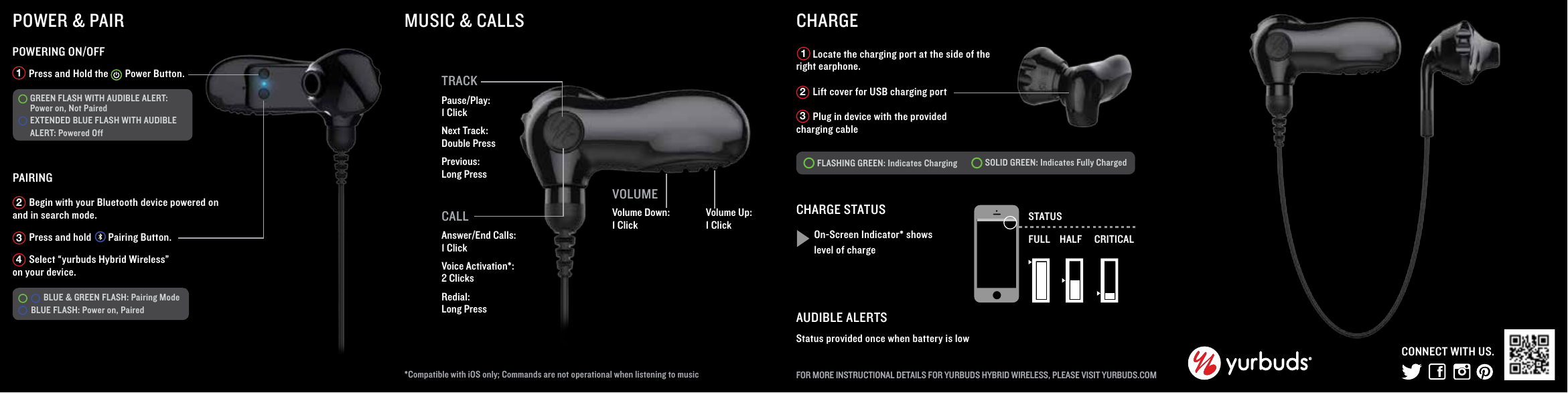
VOLUMEVolume Down: 1 ClickMUSIC & CALLS*Compatible with iOS only; Commands are not operational when listening to music CALLAnswer/End Calls: 1 ClickVoice Activation*: 2 Clicks Redial: Long Press       Press and Hold the       Power Button. PAIRINGPOWERING ON/OFF1POWER & PAIR       Begin with your Bluetooth device powered on and in search mode.         Press and hold       Pairing Button.        Select “yurbuds Hybrid Wireless” on your device. 234Volume Up: 1 ClickCHARGE       Locate the charging port at the side of the right earphone.       Lift cover for USB charging port       Plug in device with the provided charging cableFLASHING GREEN: Indicates Charging SOLID GREEN: Indicates Fully Charged  CHARGE STATUSOn-Screen Indicator* shows level of chargeSTATUSFULL HALF CRITICALAUDIBLE ALERTSStatus provided once when battery is lowFOR MORE INSTRUCTIONAL DETAILS FOR YURBUDS HYBRID WIRELESS, PLEASE VISIT YURBUDS.COM123CONNECT WITH US.      BLUE & GREEN FLASH: Pairing Mode BLUE FLASH: Power on, Paired  GREEN FLASH WITH AUDIBLE ALERT: Power on, Not Paired EXTENDED BLUE FLASH WITH AUDIBLE ALERT: Powered OffTRACKPause/Play:1 ClickNext Track: Double PressPrevious: Long Press

Navigation menu