WFE TECHNOLOGY L00006 Electronic Lock User Manual

WFE TECHNOLOGY CORP Electronic Lock Users Manual

Users Manual

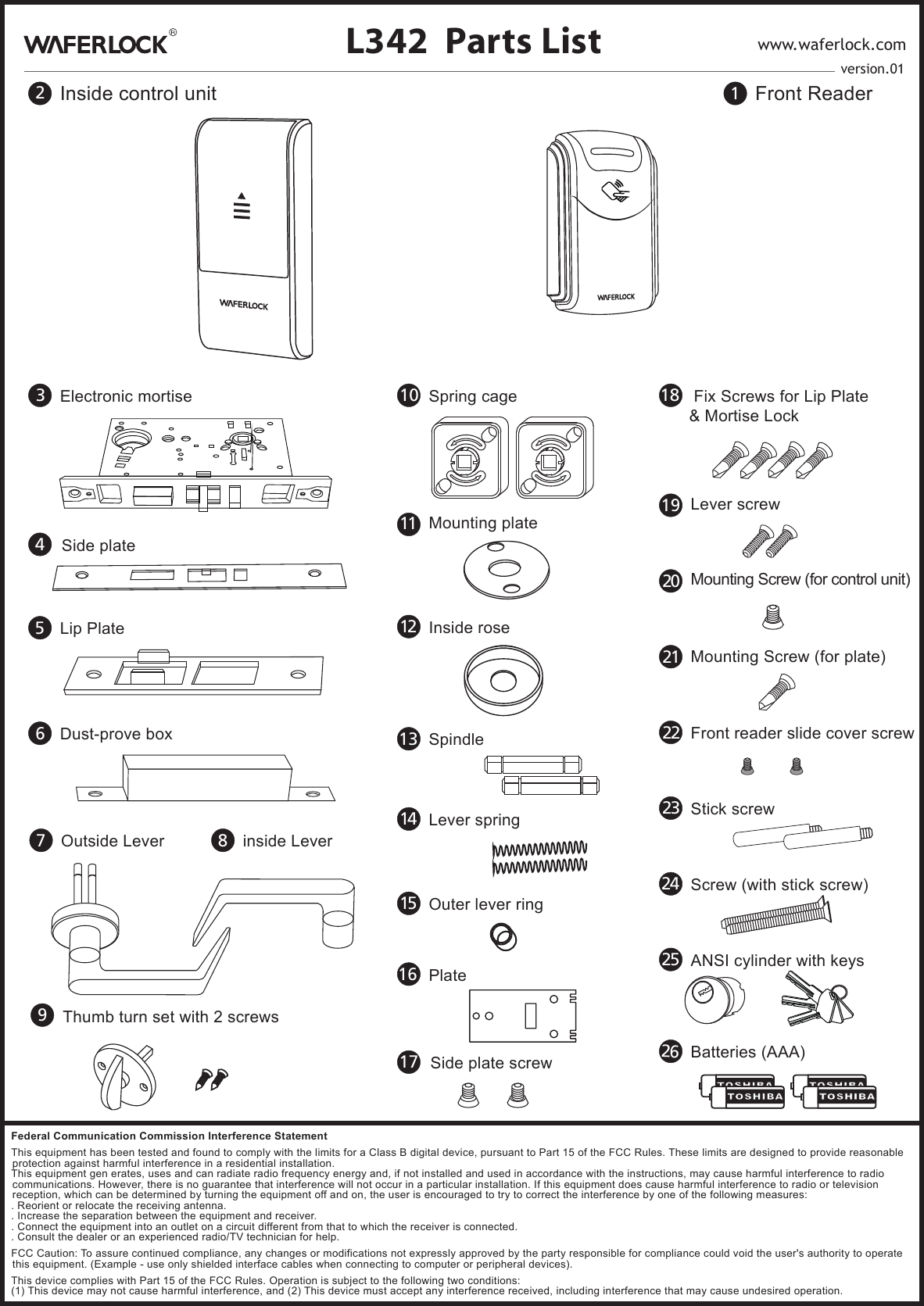
1Front Reader2Inside control unit9Thumb turn set with 2 screwsL342 Parts List www.waferlock.com3Electronic mortise 18  Fix Screws for Lip Plate& Mortise Lock24 Screw (with stick screw)7Outside Lever 8inside Lever5Lip Plate6Dust-prove box25 ANSI cylinder with keys13 Spindle 23 Stick screw16 Plate10 Spring cage26Batteries (AAA)22 Front reader slide cover screw14 Lever spring15 Outer lever ring11 Mounting plate12 Inside roseversion.014Side plate17 Side plate screw20 Mounting Screw (for control unit)21 Mounting Screw (for plate)19 Lever screwFederal Communication Commission Interference StatementThis equipment has been tested and found to comply with the limits for a Class B digital device, pursuant to Part 15 of the FCC Rules. These limits are designed to provide reasonable protection against harmful interference in a residential installation.This equipment gen erates, uses and can radiate radio frequency energy and, if not installed and used in accordance with the instructions, may cause harmful interference to radio communications. However, there is no guarantee that interference will not occur in a particular installation. If this equipment does cause harmful interference to radio or television reception, which can be determined by turning the equipment off and on, the user is encouraged to try to correct the interference by one of the following measures:. Reorient or relocate the receiving antenna.. Increase the separation between the equipment and receiver.. Connect the equipment into an outlet on a circuit different from that to which the receiver is connected.. Consult the dealer or an experienced radio/TV technician for help.FCC Caution: To assure continued compliance, any changes or modifications not expressly approved by the party responsible for compliance could void the user's authority to operate this equipment. (Example - use only shielded interface cables when connecting to computer or peripheral devices).This device complies with Part 15 of the FCC Rules. Operation is subject to the following two conditions:(1) This device may not cause harmful interference, and (2) This device must accept any interference received, including interference that may cause undesired operation.
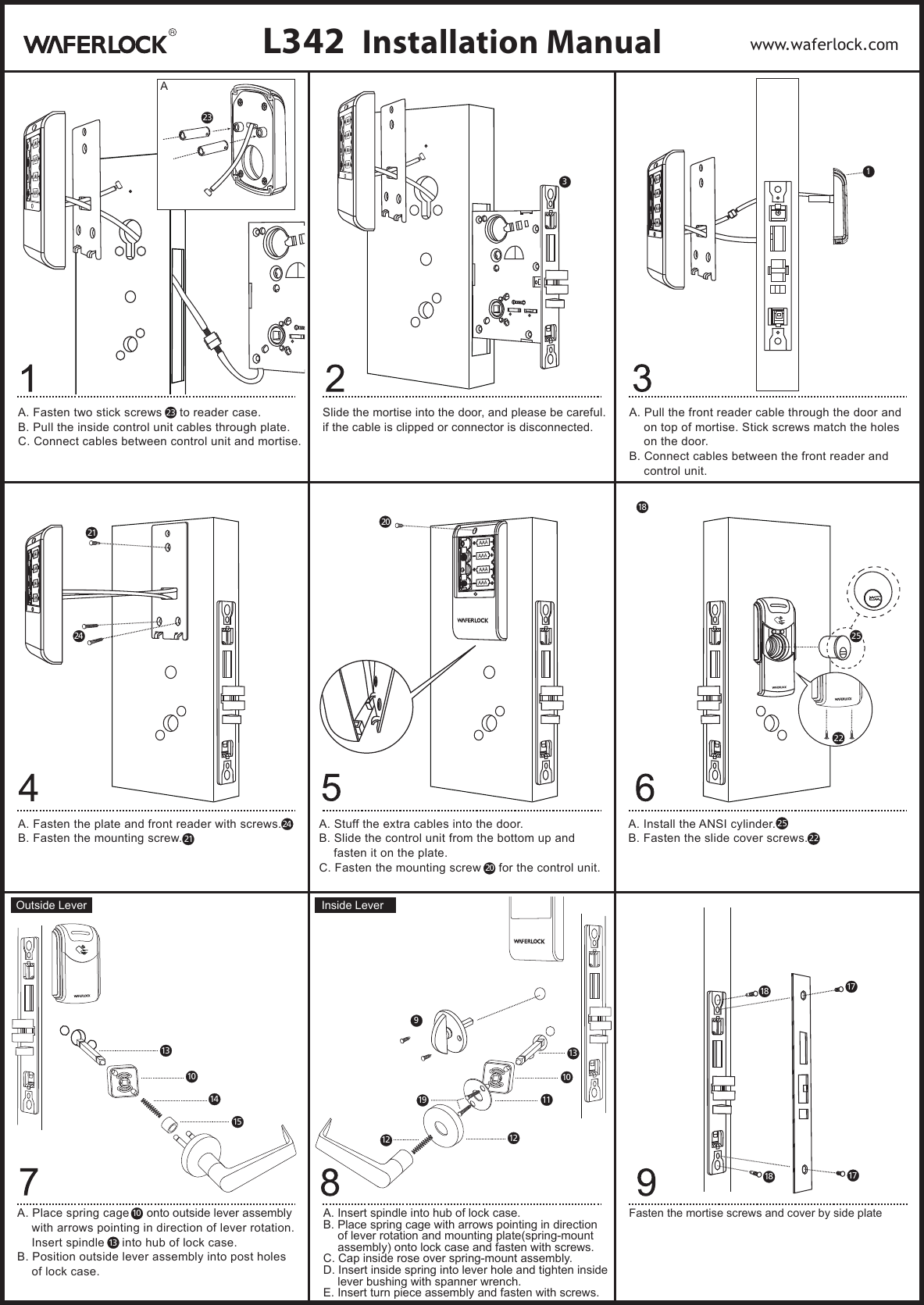
A. Fasten two stick screws     to reader case.B. Pull the inside control unit cables through plate.C. Connect cables between control unit and mortise.Slide the mortise into the door, and please be careful. if the cable is clipped or connector is disconnected.A. Fasten the plate and front reader with screws.B. Fasten the mounting screw.A. Stuff the extra cables into the door.B. Slide the control unit from the bottom up and fasten it on the plate.C. Fasten the mounting screw     for the control unit.A. Install the ANSI cylinder.B. Fasten the slide cover screws.A. Place spring cage     onto outside lever assembly with arrows pointing in direction of lever rotation. Insert spindle     into hub of lock case.B. Position outside lever assembly into post holes of lock case.A. Insert spindle into hub of lock case.B. Place spring cage with arrows pointing in direction  of lever rotation and mounting plate(spring-mount assembly) onto lock case and fasten with screws.C. Cap inside rose over spring-mount assembly.D. Insert inside spring into lever hole and tighten inside lever bushing with spanner wrench.E. Insert turn piece assembly and fasten with screws.Fasten the mortise screws and cover by side plateA. Pull the front reader cable through the door and on top of mortise. Stick screws match the holes on the door.B. Connect cables between the front reader and control unit.21211014131310242418L342 Installation Manual www.waferlock.com1320202525Outside Lever Inside Lever2323A2222131011171818 17199121215

Navigation menu