WIK Far East 9778 Coffee maker User Manual

WIK Far East Ltd. Coffee maker

Users Manual

MAJESTO™USER MANUALwww.dolce-gusto.com
This device complies with Part 15 of the FCC Rules. Operation is subject to the following two conditions:  (1) this device may not cause harmful interference, and  (2) this device must accept any interference received, including interference that may cause undesired operation.FCC Caution:%JCPIGUQTOQFKƂECVKQPUPQVGZRTGUUN[CRRTQXGFD[VJGRCTVTGURQPUKDNGHQTEQORNKCPEGEQWNFXQKFVJGuser’s authority to operate the equipment.FCC Statement:“This equipment has been tested and found to comply with the limits for a Class B digital device, pursuant to part 15 of the FCC Rules. These limits are designed to provide reasonable protection against harmful interference in a residential installation. This equipment generates, uses and can radiate radio frequency energy and, if not installed and used in accordance with the instructions, may cause harmful interference to radio communications. However, there is no guarantee that interference will not occur in a particular installation. If this equipment does cause harmful interference to radio or television reception, which can be determined by turning the equipment off and on, the user is encouraged to try to correct the interference by one or more of the following measures:– Reorient or relocate the receiving antenna.– Increase the separation between the equipment and receiver.– Connect the equipment into an outlet on a circuit different from that to which the receiver is connected.s%QPUWNVVJGFGCNGTQTCPGZRGTKGPEGFTCFKQ68VGEJPKEKCPHQTJGNRq6JKUFGXKEGEQORNKGUYKVJ+PFWUVT[%CPCFCNKEGPEGGZGORV455UVCPFCTFUOperation is subject to the following two conditions:  (1) this device may not cause interference, and  (2) this device must accept any interference, including interference that may cause undesired operation of the device..GRTÅUGPVCRRCTGKNGUVEQPHQTOGCWZ%04Fo+PFWUVTKG%CPCFCCRRNKECDNGUCWZCRRCTGKNUTCFKQGZGORVUFGNKEGPEG.oGZRNQKVCVKQPGUVCWVQTKUÅGCWZFGWZEQPFKVKQPUUWKXCPVGU (1) l’appareil ne doit pas produire de brouillage, et  (2) l’utilisateur de l’appareil doit accepter tout brouillage radioélectrique subi, même si le brouillage est susceptible d’en compromettre le fonctionnement.6JKUGSWKROGPVEQORNKGUYKVJ+PFWUVT[%CPCFCTCFKCVKQPGZRQUWTGNKOKVUUGVHQTVJHQTCPWPEQPVTQNNGFenvironment. %GVÅSWKRGOGPVGUVEQPHQTOG¼NoGZRQUKVKQPCWZTC[QPPGOGPVU+PFWUVT[%CPCFCNKOKVGUÅVCDNKGURQWTWPenvironnement non contrôlé.
SAFETY PRECAUTIONS  4MACHINE OVERVIEW  8 TOUCHSCREEN CONTROL  10FIRST USE   12CONNECT WITH WIFI  14PREPARE YOUR BEVERAGE  16SETTINGS  18RINSING & DESCALING  24TROUBLESHOOTING  26
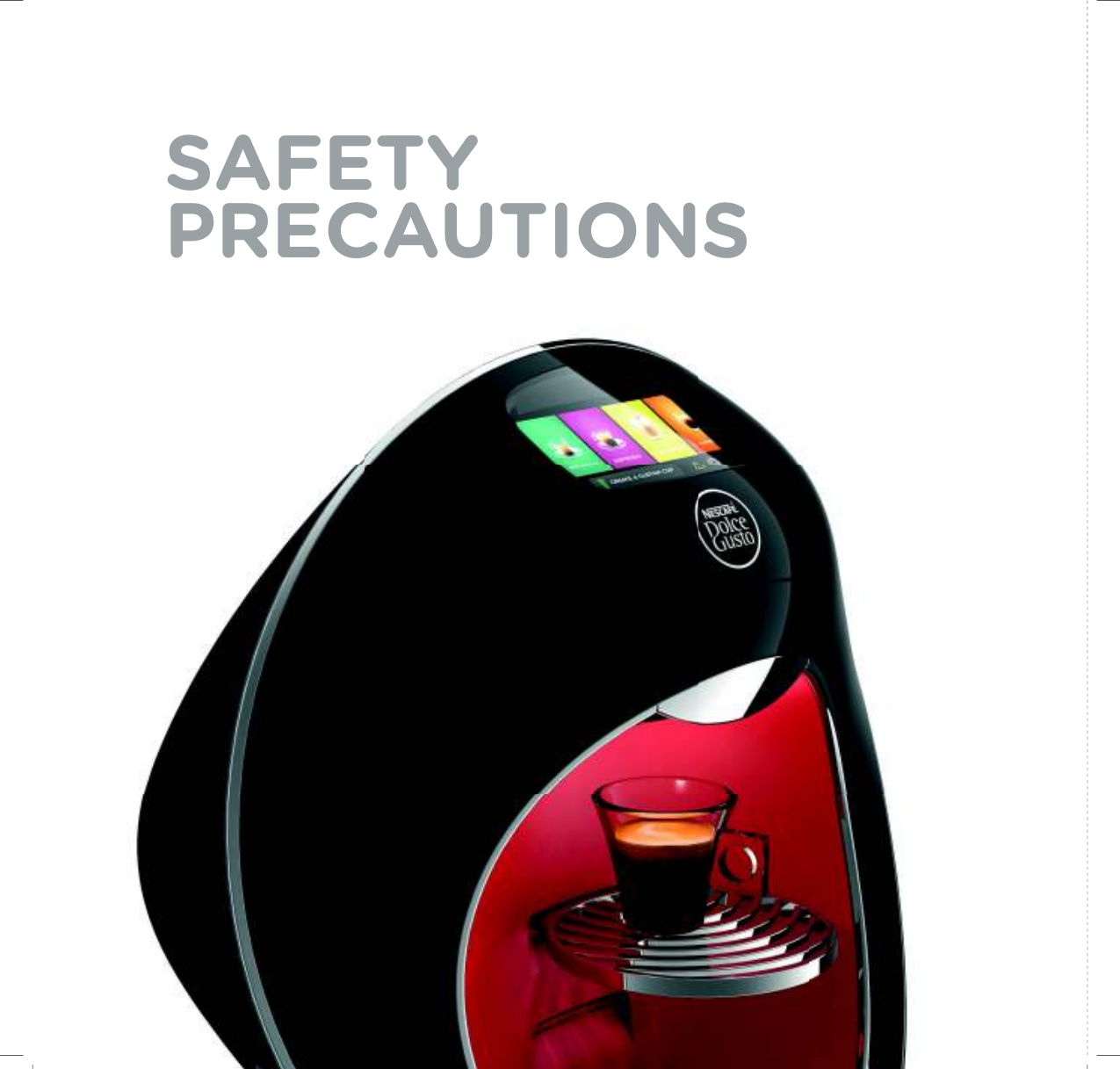
SAFETY  PRECAUTIONS
5Read all safety instructions and follow them carefully. Keep them so that you can refer to them later on. Any type of misuse of the appliance may result in a potential injury.In the case of any inappropriate use or failure to comply with the instructions, the manufacturer accepts no responsibility and the guarantee may not apply.The guarantee does not cover appliances that do not work or do not work properly because they have not been maintained and/or descaled.INTENDED USE• Your appliance is intended for use only at an altitude below 3,400 m.• 6JKURTQFWEVJCUPQVDGGPEGTVKƂGFHQTWUGQPRNCPGUDQCVUtrains and automobiles.• 6JKUCRRNKCPEGKUKPVGPFGFHQTKPFQQTWUGQPN[+VOWUVPQVDGGZ-posed to direct sunlight or rain, nor placed near a source of heat.Hospitality and household use:• This appliance is intended to be used by lay persons in household and similar applications such as: - UVCHHMKVEJGPCTGCUKPUJQRUQHƂEGUCPFQVJGTYQTMKPIenvironments; - farm houses; - clients in hotels, motels and other residential type environments; - bed and breakfast type environments;Commercial use:• /#,'561vKUCOWNVKDGXGTCIGEQHHGGOCMGTQTOCEJKPG• 6JKUCRRNKCPEGKUKPVGPFGFVQDGWUGFD[GZRGTKGPEGFWUGTUin commercial kitchens, restaurants, or other business establishments where food is dispensed.• The appliance is not suitable for placing in an area where a water jet could be used.• The appliance has to be placed in a horizontal position.• The appliance must not be cleaned by a water jet.• The appliance is only to be installed in locations where its use and maintenance is restricted to trained personnel.• The appliance is only to be installed in locations where it can be overseen by trained personnel.• &QPoVWUGVJKUCRRNKCPEGQPVJGƃQQTELECTRICAL POWER SUPPLY• Only connect the appliance to a mains power socket with an earth connection. Mains voltage must be the same as the details on the rating plate. Incorrect connection will negate  the guarantee and may be hazardous.• 6QRTQVGEVCICKPUVƂTGGNGEVTKEUJQEMCPFKPLWT[VQRGTUQPUFQnot immerse the power cord, plugs or the appliance in water or QVJGTNKSWKF#XQKFURKNNCIGQPVJGRNWI0GXGTVQWEJVJGRQYGTEQTFYKVJYGVJCPFU&QPQVQXGTƂNNVJGYCVGTVCPM• In the case of an emergency, remove the plug from the mains power socket immediately.• Unplug from the mains power socket when not in use for a long time.• To disconnect, remove the plug from the mains power socket. Do not unplug by pulling the cord.• Do not let the cord hang over the edge of a table or counter, or touch hot surfaces or sharp edges. Do not allow the cord to dangle (risk of tripping up).• Do not operate any appliance with a damaged cord or plug. If the power cord is damaged, it must be replaced by the OCPWHCEVWTGTKVUUGTXKEGCIGPVQTUKOKNCTN[SWCNKƂGFRGTUQPU in order to avoid a hazard. Do not operate any appliance  that malfunctions or has been damaged in any manner.  Unplug cord immediately. Return the damaged appliance to the nearest authorised service facility designated by the 0'5%#(¥®|&QNEG)WUVQ® hotline.• If the mains power socket does not match the plug on  the appliance, have the plug replaced with a suitable  type by aftersales service centres designated by the 0'5%#(¥®|&QNEG)WUVQ® hotline.CONDITIONS OF USE • #NYC[UWUGVJGCRRNKCPEGQPCƃCVUVCDNGJGCVTGUKUVCPVsurface away from sources of heat or water splashes. This appliance shall not be placed in a cabinet when in use.• Do not use the appliance without the drip tray and drip grid, GZEGRVYJGPCXGT[VCNNOWIKUWUGF&QPQVWUGVJGCRRNKCPEGfor hot water preparation. • 0GXGTVWTPVJGOCEJKPGWRUKFGFQYP• The use of accessory attachments not recommended by the CRRNKCPEGOCPWHCEVWTGTOC[TGUWNVKPƂTGGNGEVTKEUJQEMQTinjury to persons.• Do not place on or near a hot gas or electric burner, or in a heated oven.• &QPQVRWVƂPIGTUWPFGTVJGQWVNGVFWTKPIDGXGTCIGRTGRCTCVKQP• 0GXGTECTT[VJGCRRNKCPEGD[VJGOCEJKPGJGCF• The capsule holder is equipped with a permanent magnet. Avoid placing the capsule holder near appliances and objects VJCVECPDGFCOCIGFD[OCIPGVKUOGIETGFKVECTFU75$drives and other data devices, video tapes, television and computer monitors with picture tubes, mechanical clocks,
6hearing aids and loudspeakers.• +PVJGECUGQHKPVGPUKXGWUGYKVJQWVCNNQYKPIUWHƂEKGPVEQQNKPItime, the appliance will stop functioning temporarily and a OGUUCIGpRWORKUEQQNKPIFQYPqYKNNCRRGCTQPOCEJKPGscreen. This is to protect your appliance from overheating.• Do not turn off the appliance during the descaling process. Rinse the water tank and clean the appliance after descaling to avoid any residual descaling agent.• If away for prolonged periods, on holiday, etc. the appliance must be emptied, cleaned and unplugged. Rinse before re-use. Operate the rinse cycle before re-using your appliance.• 9GTGEQOOGPFWUKPIVJG0'5%#(¥®|&QNEG)WUVQ® capsules FGUKIPGFCPFVGUVGFHQTVJG0'5%#(¥®|&QNEG)WUVQ® machine. They were designed to interact together – the interaction RTQXKFGUVJGKPEWRSWCNKV[VJCV0'5%#(¥®|&QNEG)WUVQ® is known for. Each capsule is designed to prepare a perfect cup, and cannot be reused.• Do not remove hot capsules by hand. Always use capsule holder handle to dispose of used capsules.• Always insert the capsule holder in the machine to prepare a beverage. Do not pull out the capsule holder before the screen p'PLQ[[QWTFTKPMqFKUCRRGCTU6JGCRRNKCPEGYKNNPQVYQTMKHVJGcapsule holder is not inserted.• (QTJGCNVJTGCUQPUCNYC[UƂNNVJGYCVGTVCPMYKVJHTGUJdrinking water.• After using the appliance, always remove the capsule and clean the capsule holder. Empty and clean the drip tray daily and also the capsule bin. Food allergy sufferers must rinse the appliance according to cleaning procedure.• The heating element surface is subject to residual heat after use, and plastic housings may feel warm to the touch a few minutes after use.• 2CVKGPVUYKVJRCEGOCMGTUQTFGƂDTKNNCVQTUFQPQVJQNFVJGECRUWNGJQNFGTFKTGEVN[QXGTVJGRCEGOCMGTQTFGƂDTKNNCVQT• 4CFKCVKQP'ZRQUWTG5VCVGOGPV%CWVKQP6QOCKPVCKPEQORNKCPEGYKVJVJG4CFKQGZRQUWTGIWKFGNKPGURNCEGVJGRTQFWEVCVNGCUVEOKPHTQOPGCTD[RGTUQPUCHILDREN• Keep the appliance and its cord out of the reach of children aged under 8 years. Do not allow children to play with the appliance.• This appliance can be used by children aged from 8 years and above and persons with reduced physical, sensory or mental ECRCDKNKVKGUQTNCEMQHGZRGTKGPEGCPFMPQYNGFIGKHVJG[CTGsupervised or have been given instruction concerning the use of the appliance in a safe way, and if they understand the hazards involved.• This appliance is not intended for use by persons (including children) with reduced physical, sensory or mental capabilities, QTNCEMQHGZRGTKGPEGCPFMPQYNGFIGWPNGUUVJG[JCXGDGGPgiven supervision or instruction concerning use of the appliance by a person responsible for their safety.• Children should be supervised to ensure that they do not play with the appliance.• Cleaning and maintenance should not be performed by children unless they are aged over 8 years and are supervised by an adult.MAINTENANCE• Unplug from the mains power socket before cleaning. Allow to cool before putting on or taking off parts, and before cleaning VJGCRRNKCPEG0GXGTENGCPYGVQTKOOGTUGCRRNKCPEGKPCP[ƃWKF0GXGTENGCPVJGCRRNKCPEGYKVJTWPPKPIYCVGT0GXGTWUGa wet process for cleaning. Clean the appliance only using soft URQPIGUDTWUJGU6JGYCVGTVCPMUJQWNFDGENGCPGFYKVJCclean food-safe brush.• Any operation, cleaning and care other than normal use must be undertaken by after-sales service centres designated by VJG0'5%#(¥®|&QNEG)WUVQ® hotline. Do not dismantle the appliance, and do not put anything into the openings.• 6QTGFWEGVJGTKUMQHƂTGQTGNGEVTKEUJQEMFQPQVTGOQXGVJGEQXGT0QWUGTUGTXKEGCDNGRCTVUKPUKFG4GRCKTUJQWNFDGFQPGby authorised service personnel only!• For additional guidance on how to use the appliance, refer to the user manual at www.dolce-gusto.com or call the 0'5%#(¥®|&QNEG|)WUVQ® hotline.RECYCLING• Packaging is made of recyclable materials. Contact your NQECNEQWPEKNCWVJQTKV[HQTHWTVJGTKPHQTOCVKQPQPTGE[ENKPIprograms. Your appliance contains valuable materials which can be recovered or recycled.EUROPEAN MARKETS ONLY: Think of the environment!Your appliance contains valuable materials which can  be recovered or recycled. Leave it at a local civic waste collection point or at an approved service centre, where it YKNNDGFKURQUGFQHRTQRGTN['WTQRGCP&KTGEVKXGEU on Waste Electrical and Electronic Equipment (WEEE), stipulates that used household appliances must not be disposed of in normal unsorted municipal waste. Old appliances must be collected separately to optimise the sorting and recycling of their parts and to reduce the impact on human health and the environment.
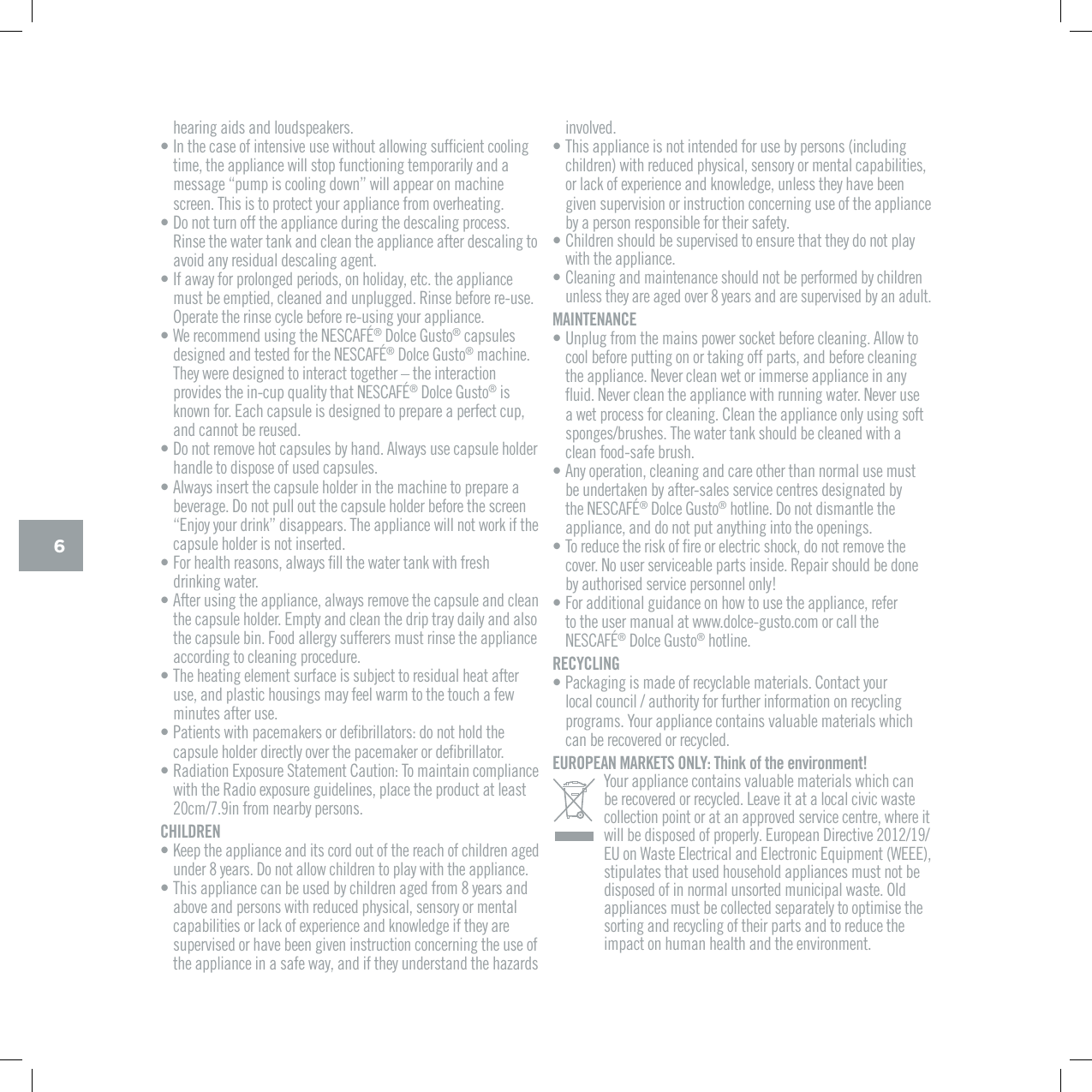
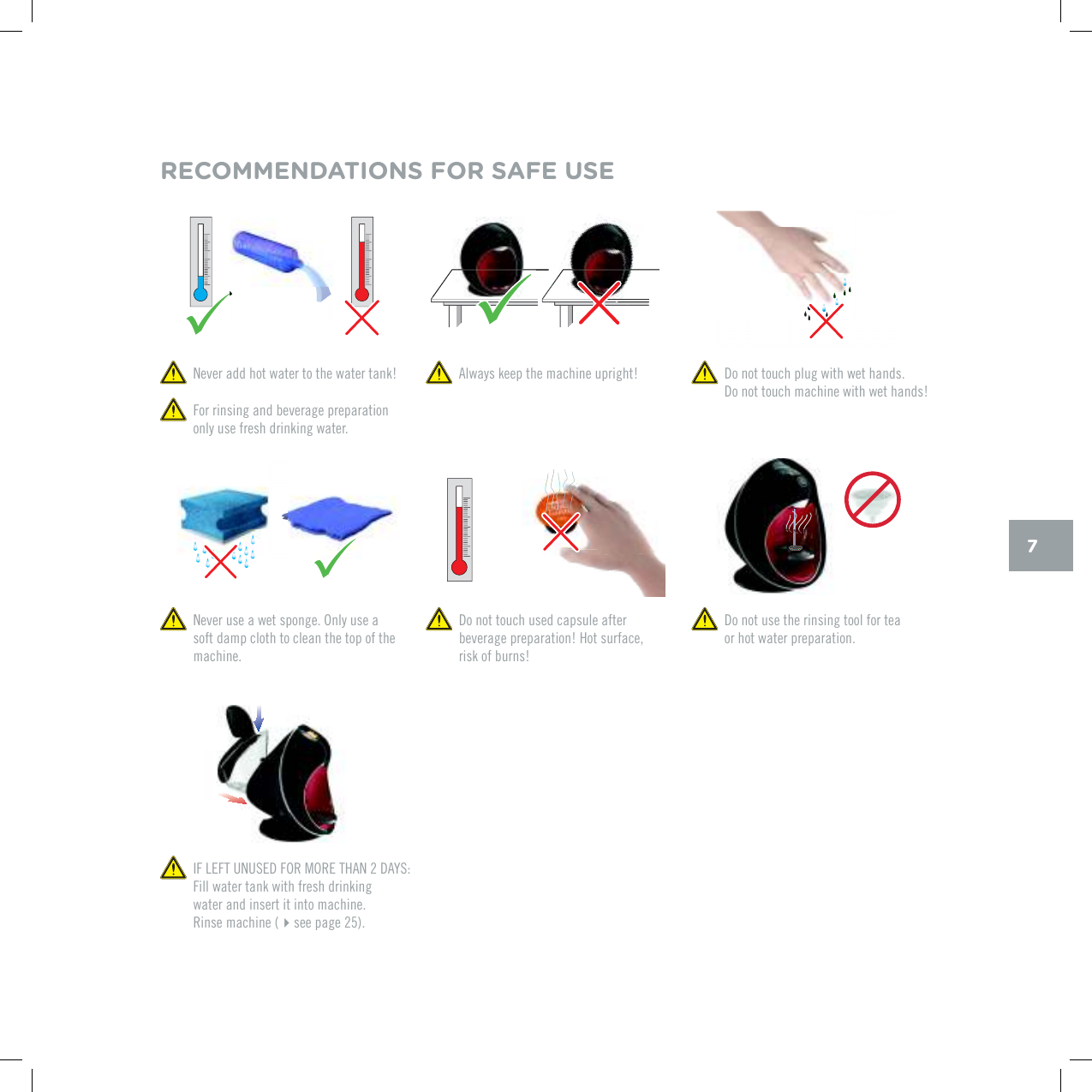
70GXGTCFFJQVYCVGTVQVJGYCVGTVCPM  Always keep the machine upright! For rinsing and beverage preparation only use fresh drinking water. Do not touch plug with wet hands.  Do not touch machine with wet hands! Do not touch used capsule after beverage preparation! Hot surface, risk of burns!0GXGTWUGCYGVURQPIG1PN[WUGCsoft damp cloth to clean the top of the machine. Do not use the rinsing tool for tea  or hot water preparation.RECOMMENDATIONS FOR SAFE USE+(.'(67075'&(14/14'6*#0&#;5Fill water tank with fresh drinking  water and insert it into machine.  Rinse machine (see page 25).
MACHINE OVERVIEW
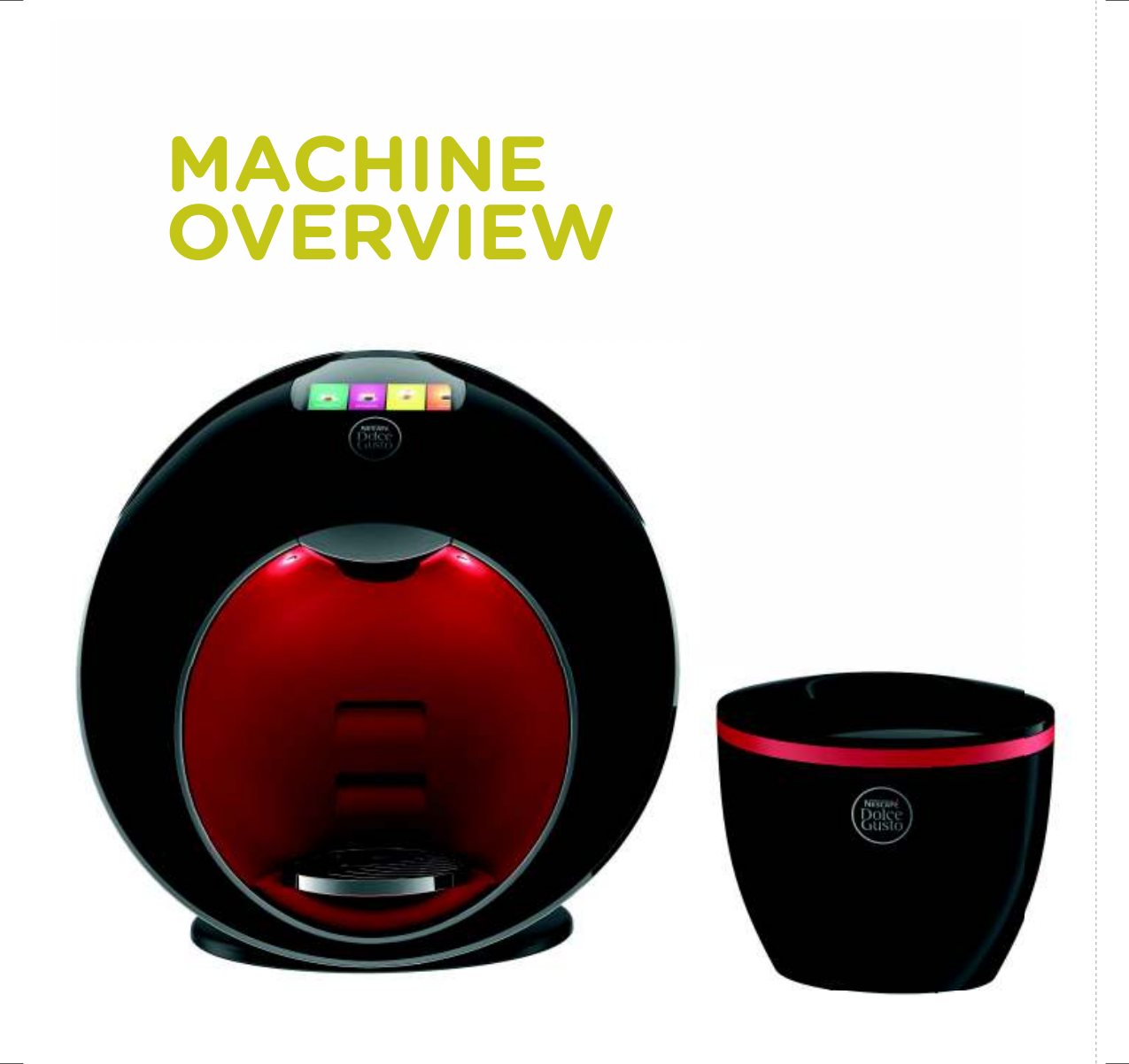
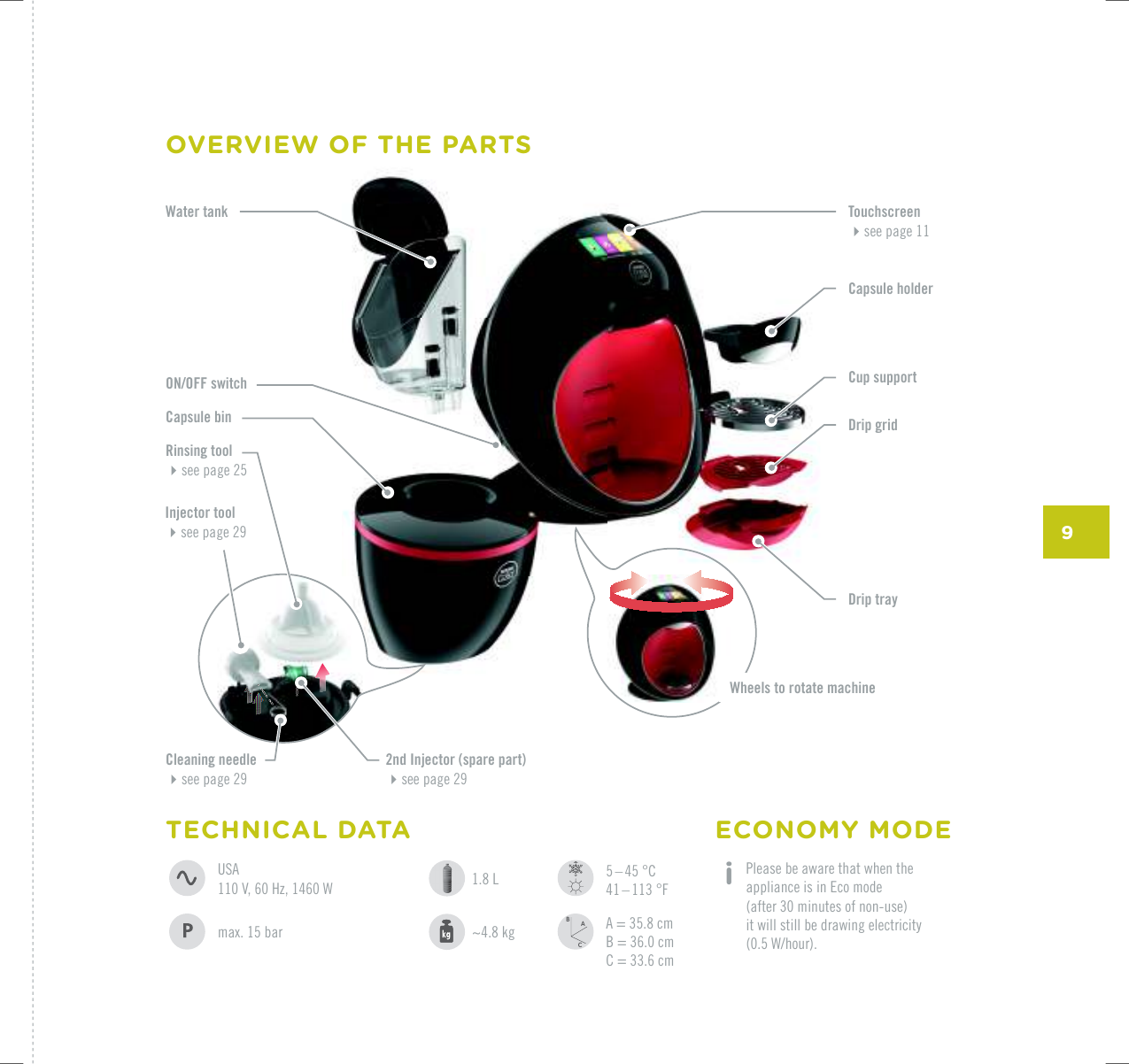
9ACBWater tankCapsule binON/OFF switchRinsing toolsee page 25Injector toolUGGRCIGCapsule holderCup supportDrip gridTouchscreensee page 11Drip trayWheels to rotate machineCleaning needleUGGRCIG2nd Injector (spare part)UGGRCIG5 – 45 °C41 – 113 °FA = 35.8 cmB = 36.0 cmC = 33.6 cmECONOMY MODE i  Please be aware that when the appliance is in Eco mode  (after 30 minutes of non-use)  it will still be drawing electricity  9JQWTOCZDCT1.8 L~4.8 kgTECHNICAL DATA75#8*\9OVERVIEW OF THE PARTS
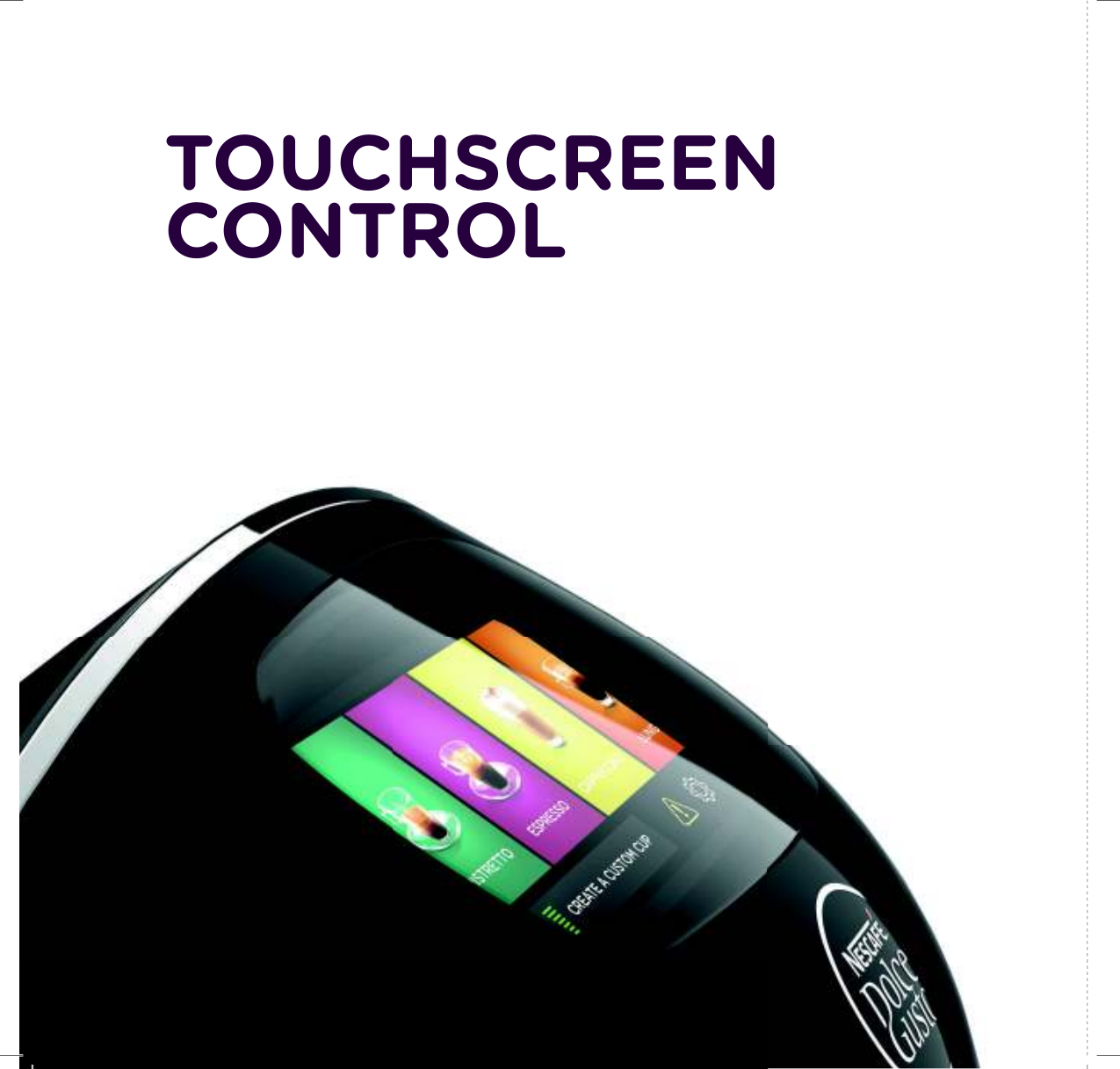
TOUCHSCREEN CONTROL
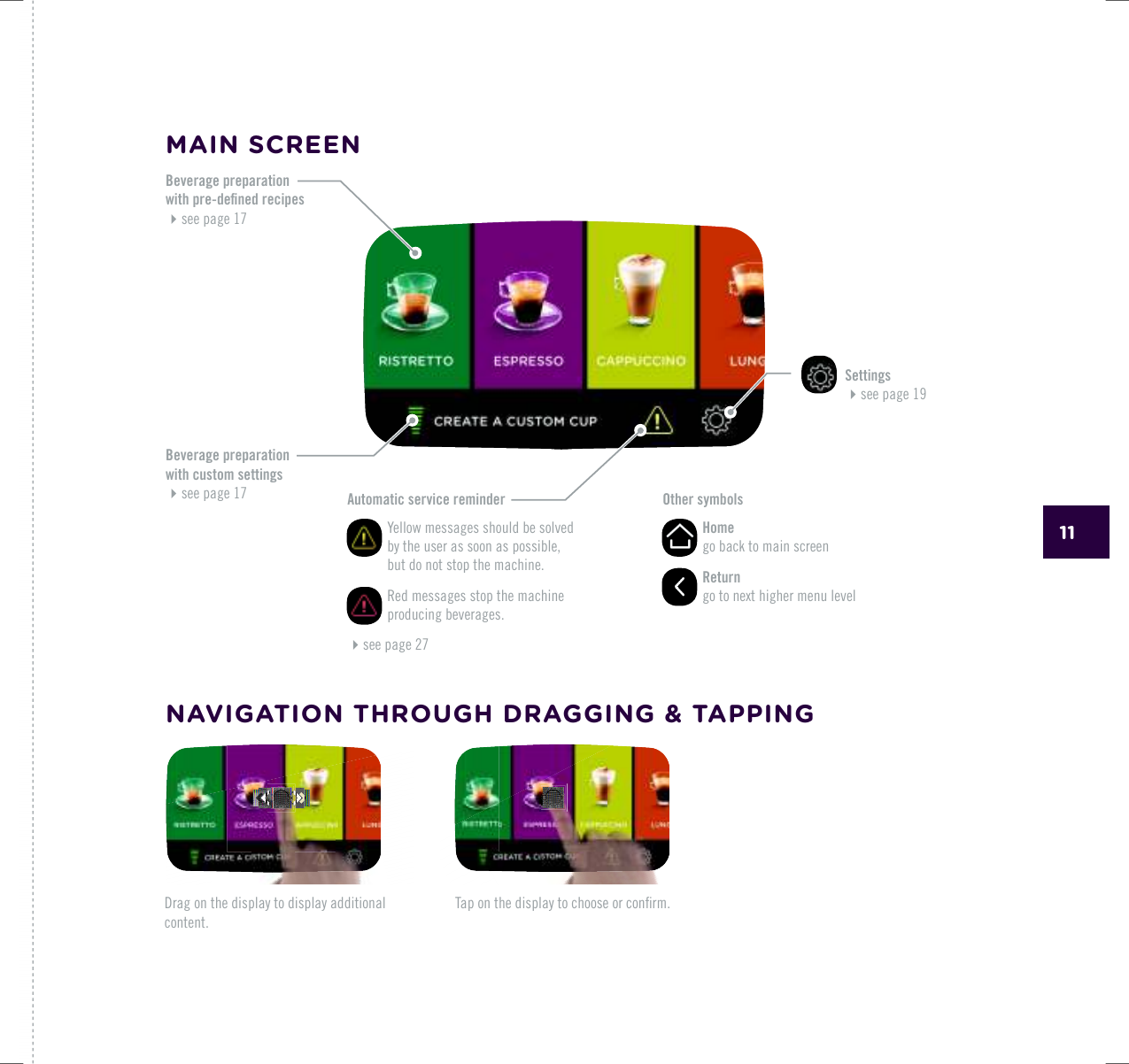
11Drag on the display to display additional content.6CRQPVJGFKURNC[VQEJQQUGQTEQPƂTOOther symbols   Home  go back to main screen   Return  IQVQPGZVJKIJGTOGPWNGXGNSettings UGGRCIGBeverage preparation YKVJRTGFGƂPGFTGEKRGUUGGRCIGBeverage preparation with custom settingsUGGRCIG Automatic service reminder   Yellow messages should be solved by the user as soon as possible,  but do not stop the machine.   Red messages stop the machine producing beverages. UGGRCIGMAIN SCREENNAVIGATION THROUGH DRAGGING & TAPPING
FIRST USE
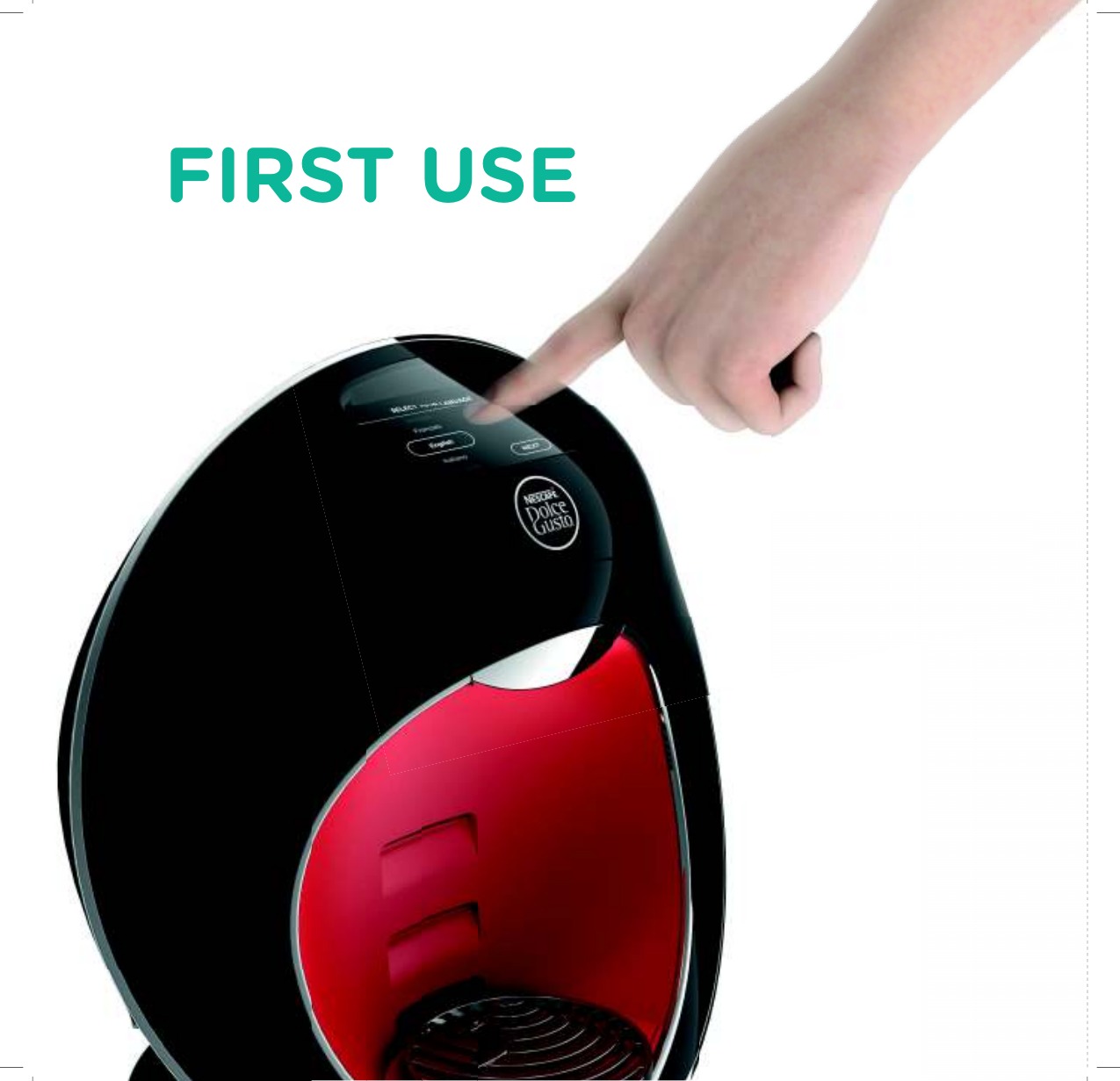
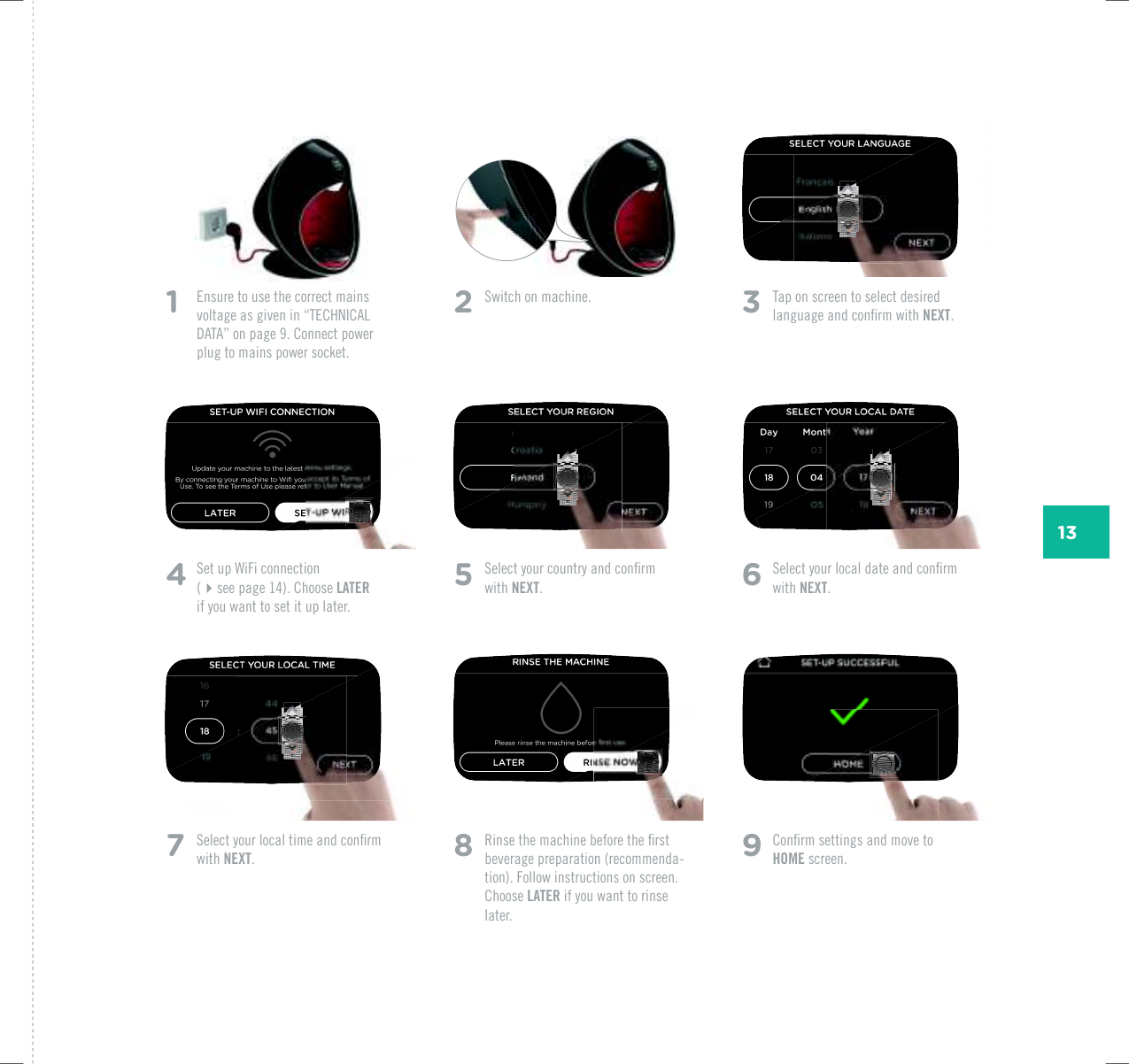
131   Ensure to use the correct mains XQNVCIGCUIKXGPKPp6'%*0+%#.&#6#qQPRCIG%QPPGEVRQYGTplug to mains power socket. 2  5YKVEJQPOCEJKPG 3  Tap on screen to select desired NCPIWCIGCPFEQPƂTOYKVJNEXT.5  5GNGEV[QWTEQWPVT[CPFEQPƂTOwith NEXT.6  5GNGEV[QWTNQECNFCVGCPFEQPƂTOwith NEXT.8  4KPUGVJGOCEJKPGDGHQTGVJGƂTUVbeverage preparation (recommenda-tion). Follow instructions on screen. Choose LATER if you want to rinse later.4  5GVWR9K(KEQPPGEVKQP (see page 14). Choose LATER  if you want to set it up later.7  5GNGEV[QWTNQECNVKOGCPFEQPƂTOwith NEXT.9  %QPƂTOUGVVKPIUCPFOQXGVQHOME screen.
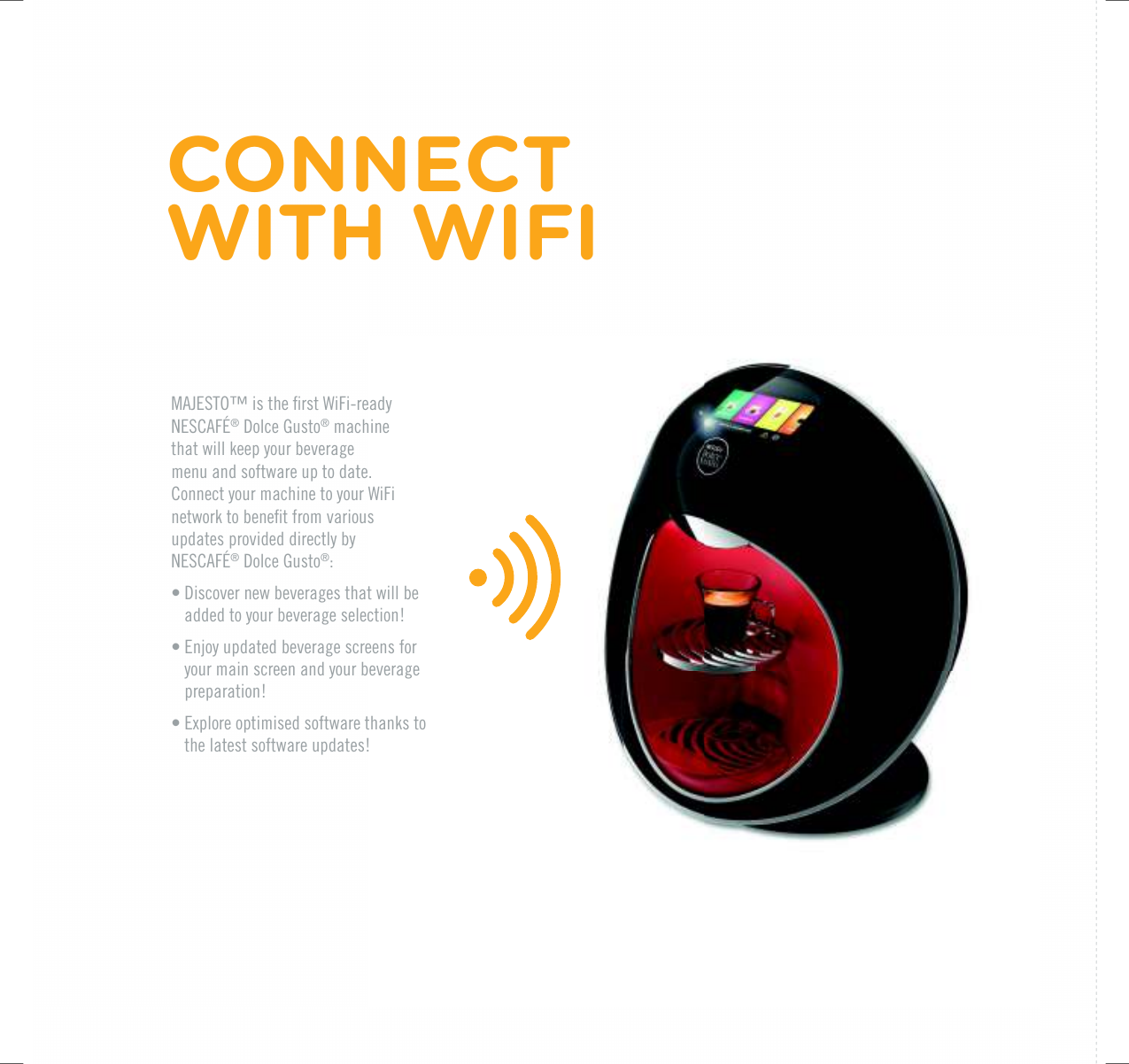
/#,'561vKUVJGƂTUV9K(KTGCF[0'5%#(¥®|&QNEG|)WUVQ® machine  that will keep your beverage  menu and software up to date.Connect your machine to your WiFi PGVYQTMVQDGPGƂVHTQOXCTKQWUupdates provided directly by 0'5%#(¥®|&QNEG|)WUVQ®:• Discover new beverages that will be added to your beverage selection!• Enjoy updated beverage screens for your main screen and your beverage preparation!• 'ZRNQTGQRVKOKUGFUQHVYCTGVJCPMUVQthe latest software updates!CONNECT  WITH WIFI
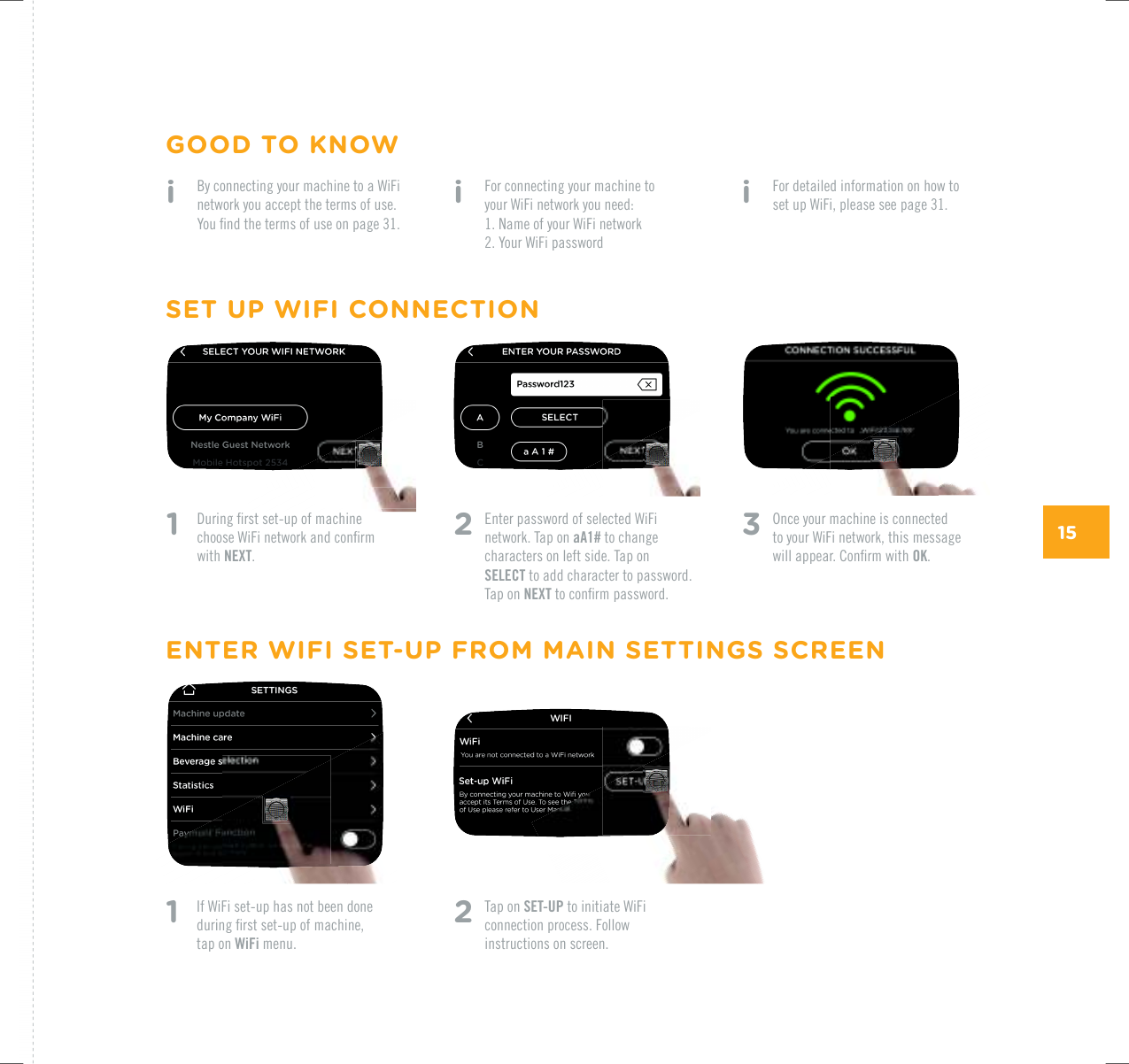
151    &WTKPIƂTUVUGVWRQHOCEJKPGEJQQUG9K(KPGVYQTMCPFEQPƂTOwith NEXT.i   For connecting your machine to  your WiFi network you need: 0COGQH[QWT9K(KPGVYQTM 2. Your WiFi password2   Enter password of selected WiFi network. Tap on aA1# to change characters on left side. Tap on SELECT to add character to password. Tap on NEXTVQEQPƂTORCUUYQTFi   For detailed information on how to set up WiFi, please see page 31.i   By connecting your machine to a WiFi network you accept the terms of use. ;QWƂPFVJGVGTOUQHWUGQPRCIG3   Once your machine is connected to your WiFi network, this message YKNNCRRGCT%QPƂTOYKVJOK.1    If WiFi set-up has not been done FWTKPIƂTUVUGVWRQHOCEJKPG tap on WiFi menu.2   Tap on SET-UP to initiate WiFi connection process. Follow instructions on screen.SET UP WIFI CONNECTIONGOOD TO KNOWENTER WIFI SET-UP FROM MAIN SETTINGS SCREEN
PREPARE YOUR BEVERAGE
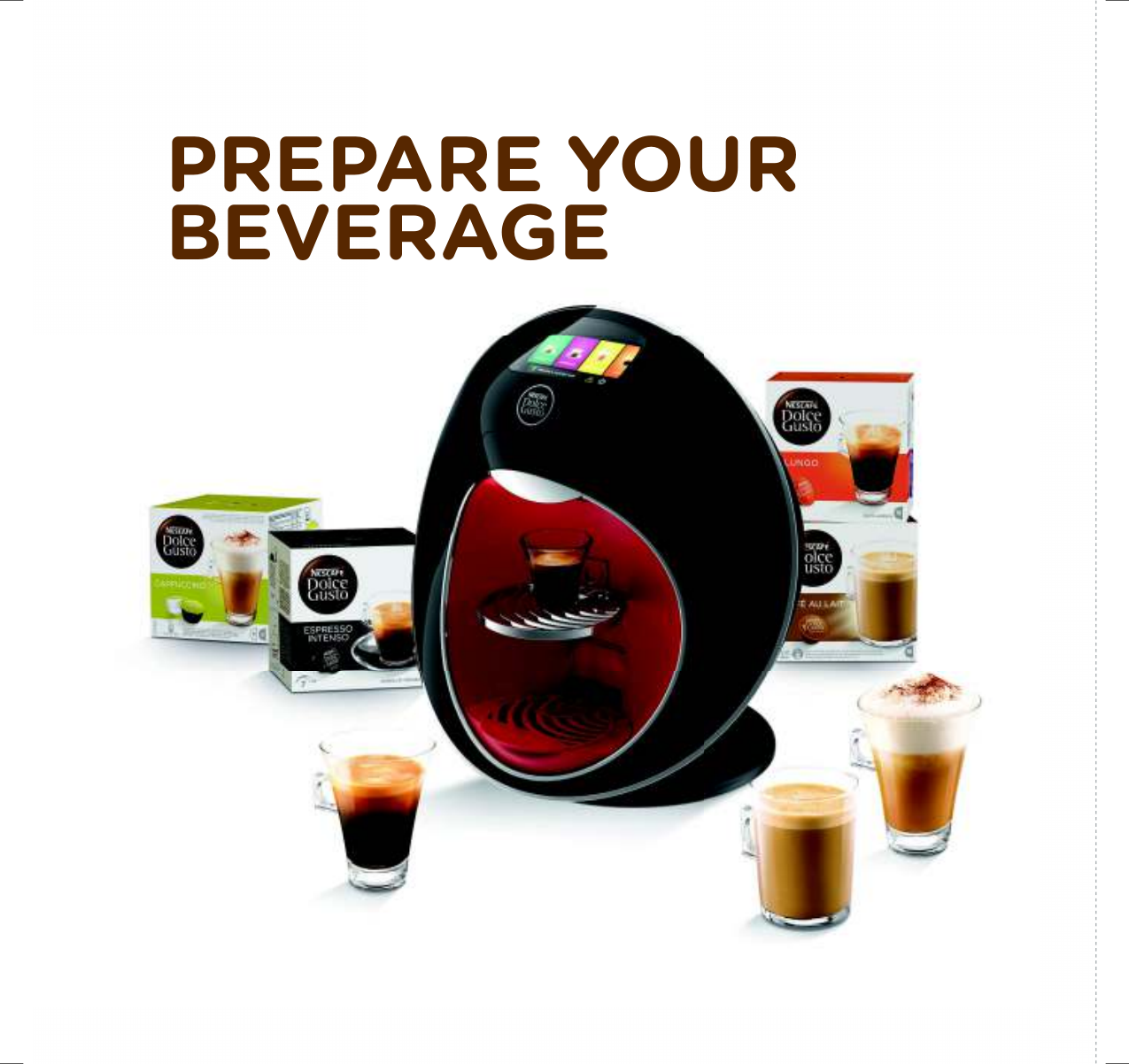
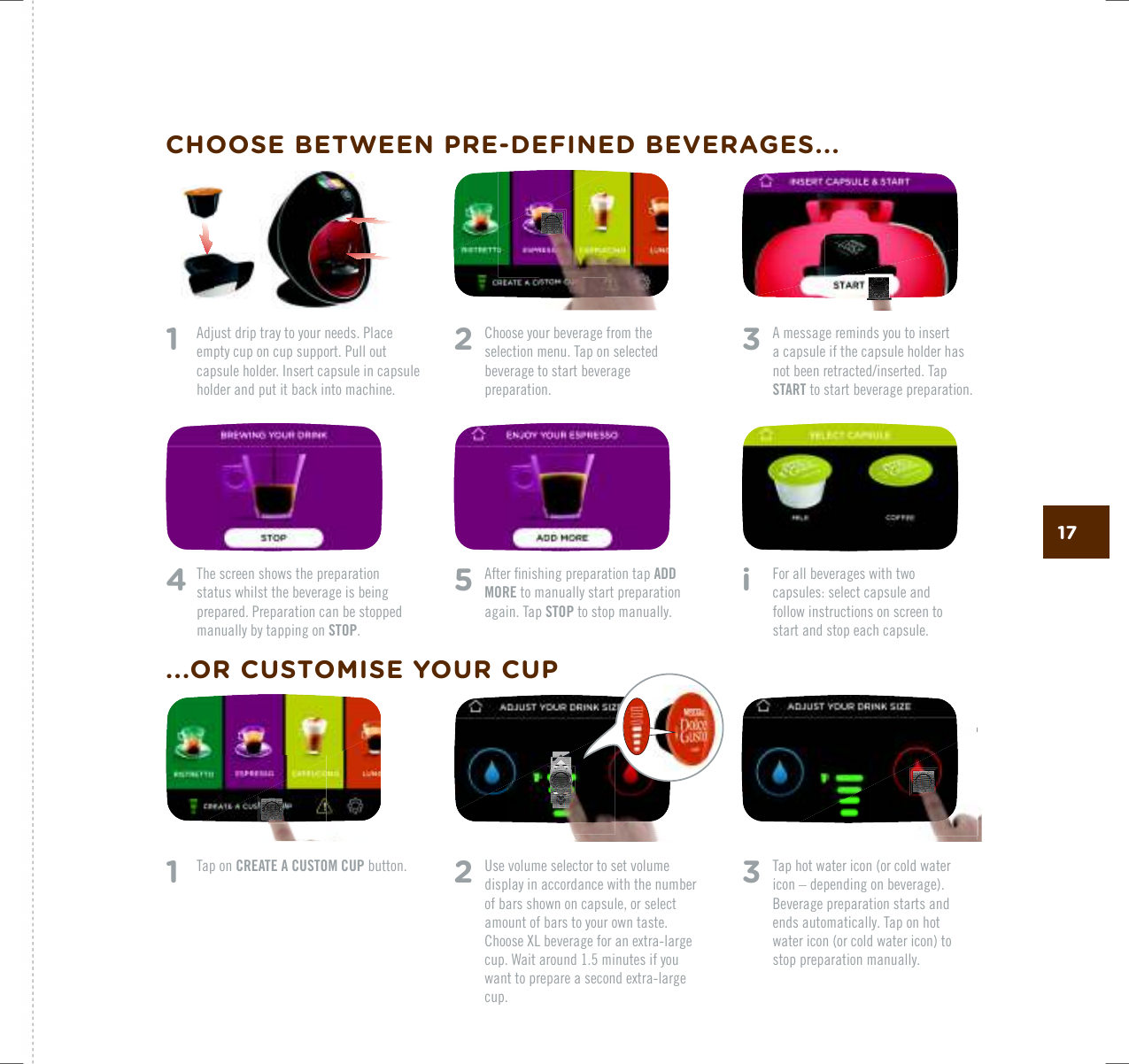
173   A message reminds you to insert  a capsule if the capsule holder has PQVDGGPTGVTCEVGFKPUGTVGF6CRSTART to start beverage preparation.4   The screen shows the preparation status whilst the beverage is being prepared. Preparation can be stopped manually by tapping on STOP. 5   #HVGTƂPKUJKPIRTGRCTCVKQPVCRADD MORE to manually start preparation again. Tap STOP to stop manually.i    For all beverages with two  capsules: select capsule and follow instructions on screen to start and stop each capsule.1    Tap on CREATE A CUSTOM CUP button.2   Choose your beverage from the selection menu. Tap on selected beverage to start beverage preparation.2  Use volume selector to set volume display in accordance with the number of bars shown on capsule, or select amount of bars to your own taste. %JQQUG:.DGXGTCIGHQTCPGZVTCNCTIGcup. Wait around 1.5 minutes if you YCPVVQRTGRCTGCUGEQPFGZVTCNCTIGcup.3   Tap hot water icon (or cold water icon – depending on beverage). Beverage preparation starts and ends automatically. Tap on hot water icon (or cold water icon) to stop preparation manually. 1   Adjust drip tray to your needs. Place empty cup on cup support. Pull out capsule holder. Insert capsule in capsule holder and put it back into machine.CHOOSE BETWEEN PRE-DEFINED BEVERAGES......OR CUSTOMISE YOUR CUP
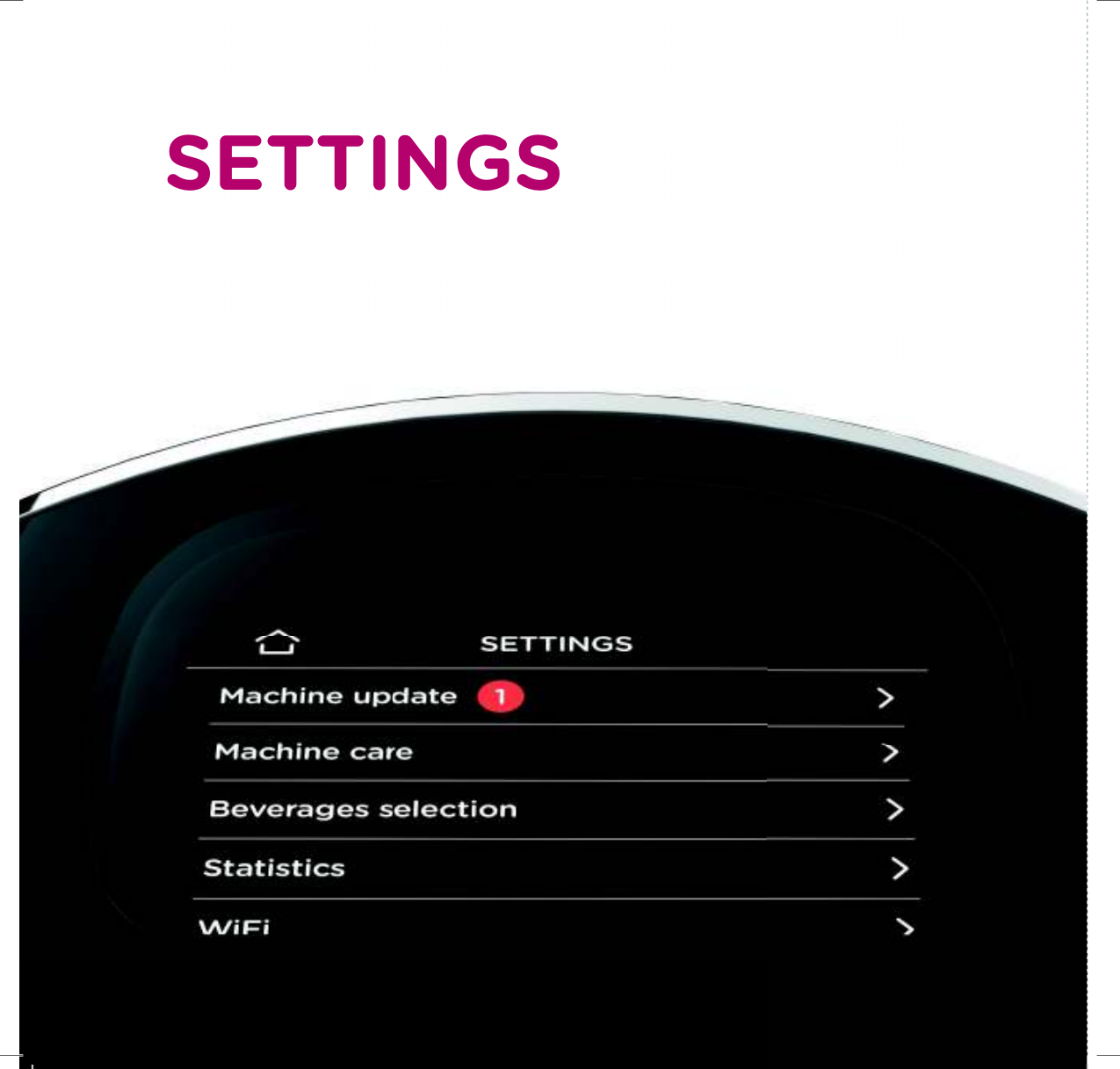
SETTINGS
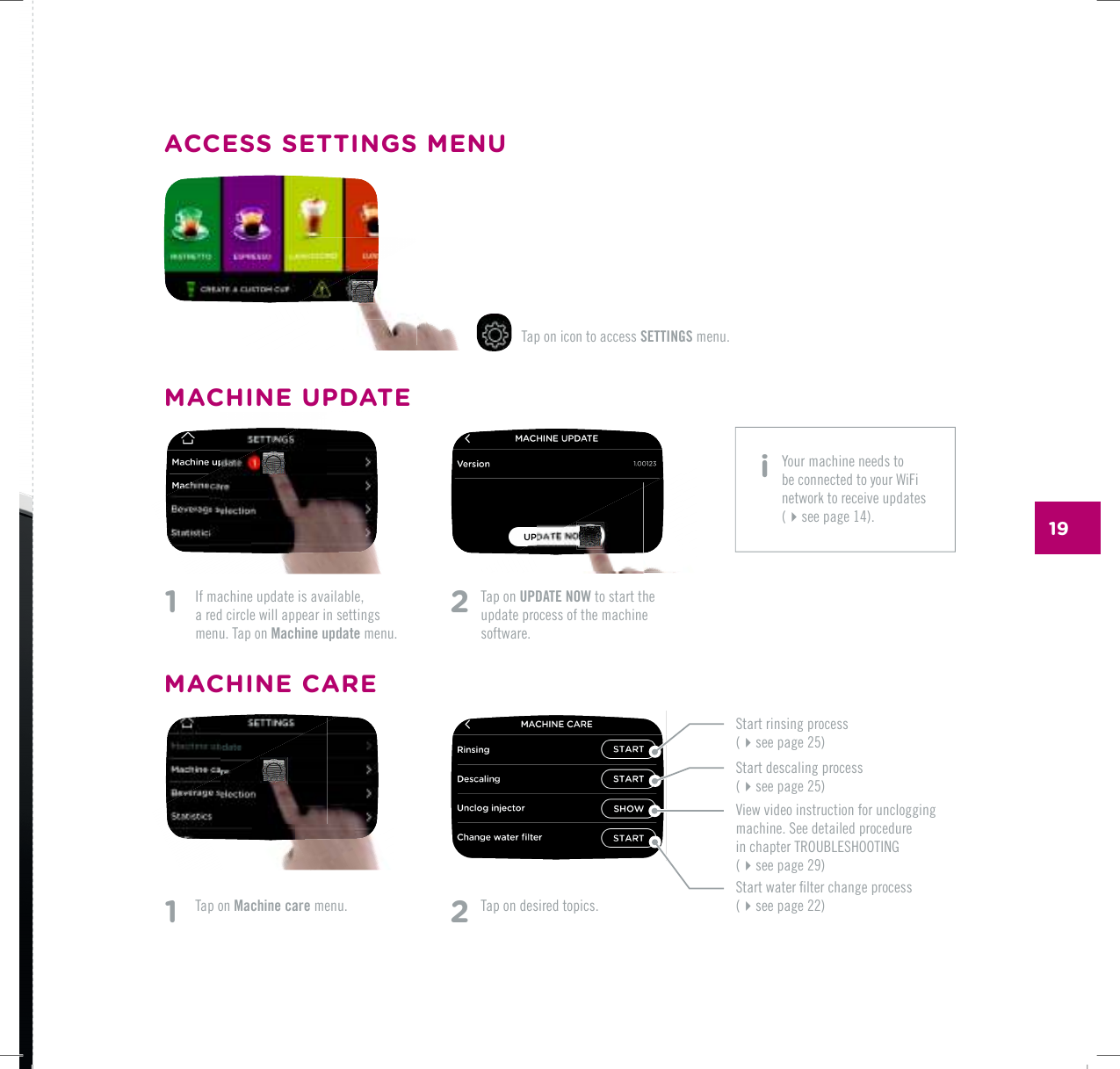
191    If machine update is available,  a red circle will appear in settings menu. Tap on Machine update menu.1   Tap on Machine care menu.2   Tap on UPDATE NOW to start the update process of the machine software. Tap on icon to access SETTINGS menu.2 Tap on desired topics.MACHINE UPDATEACCESS SETTINGS MENU5VCTVTKPUKPIRTQEGUU(see page 25)5VCTVFGUECNKPIRTQEGUU(see page 25)5VCTVYCVGTƂNVGTEJCPIGRTQEGUU (see page 22)8KGYXKFGQKPUVTWEVKQPHQTWPENQIIKPIOCEJKPG5GGFGVCKNGFRTQEGFWTG KPEJCRVGT6417$.'5*116+0) (UGGRCIGMACHINE CARE i  Your machine needs to be connected to your WiFi network to receive updates (see page 14).
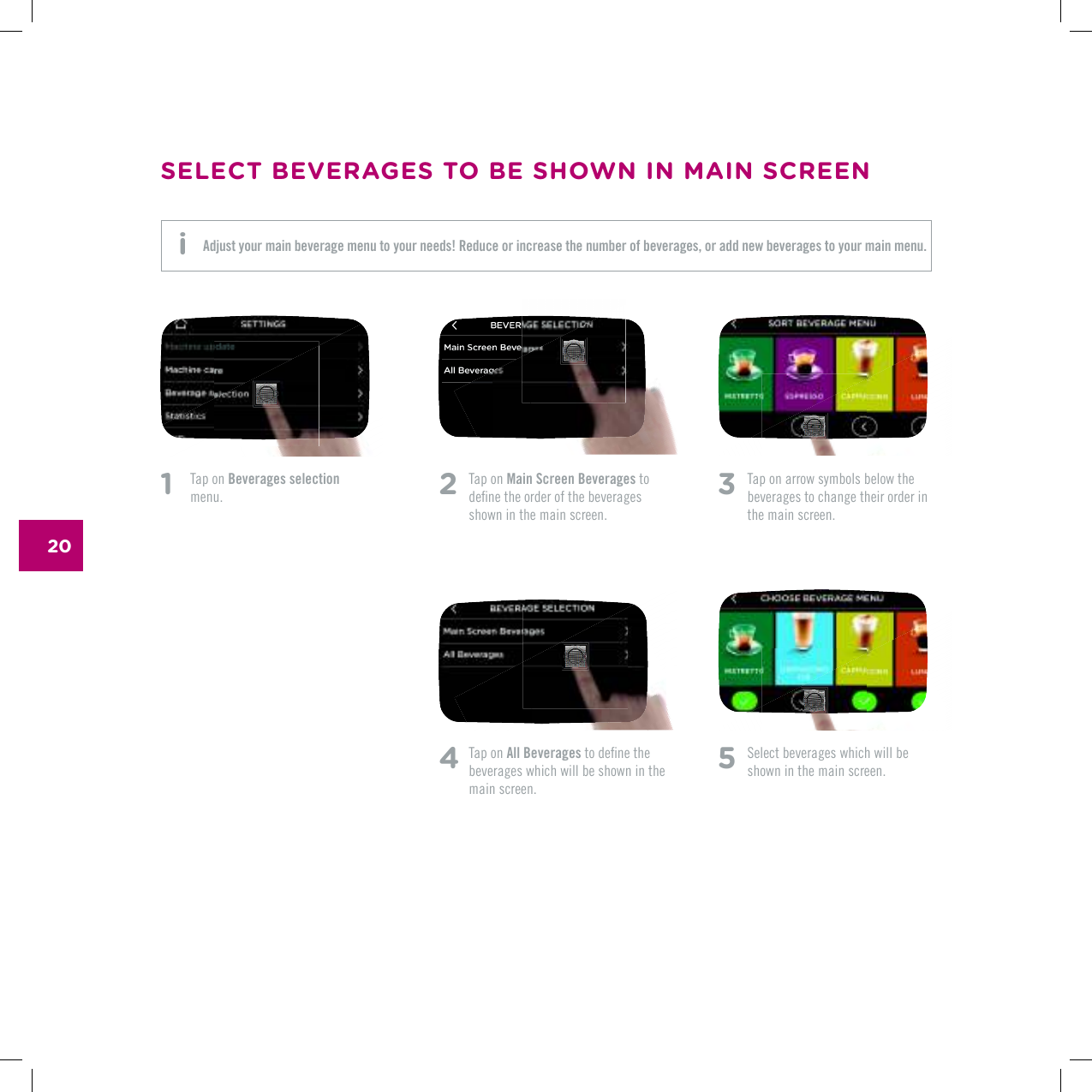
201    Tap on Beverages selection menu. 2   Tap on Main Screen Beverages to FGƂPGVJGQTFGTQHVJGDGXGTCIGUshown in the main screen.4  Tap on All BeveragesVQFGƂPGVJGbeverages which will be shown in the main screen.3   Tap on arrow symbols below the beverages to change their order in the main screen.5 5GNGEVDGXGTCIGUYJKEJYKNNDGshown in the main screen.SELECT BEVERAGES TO BE SHOWN IN MAIN SCREENAdjust your main beverage menu to your needs! Reduce or increase the number of beverages, or add new beverages to your main menu. i
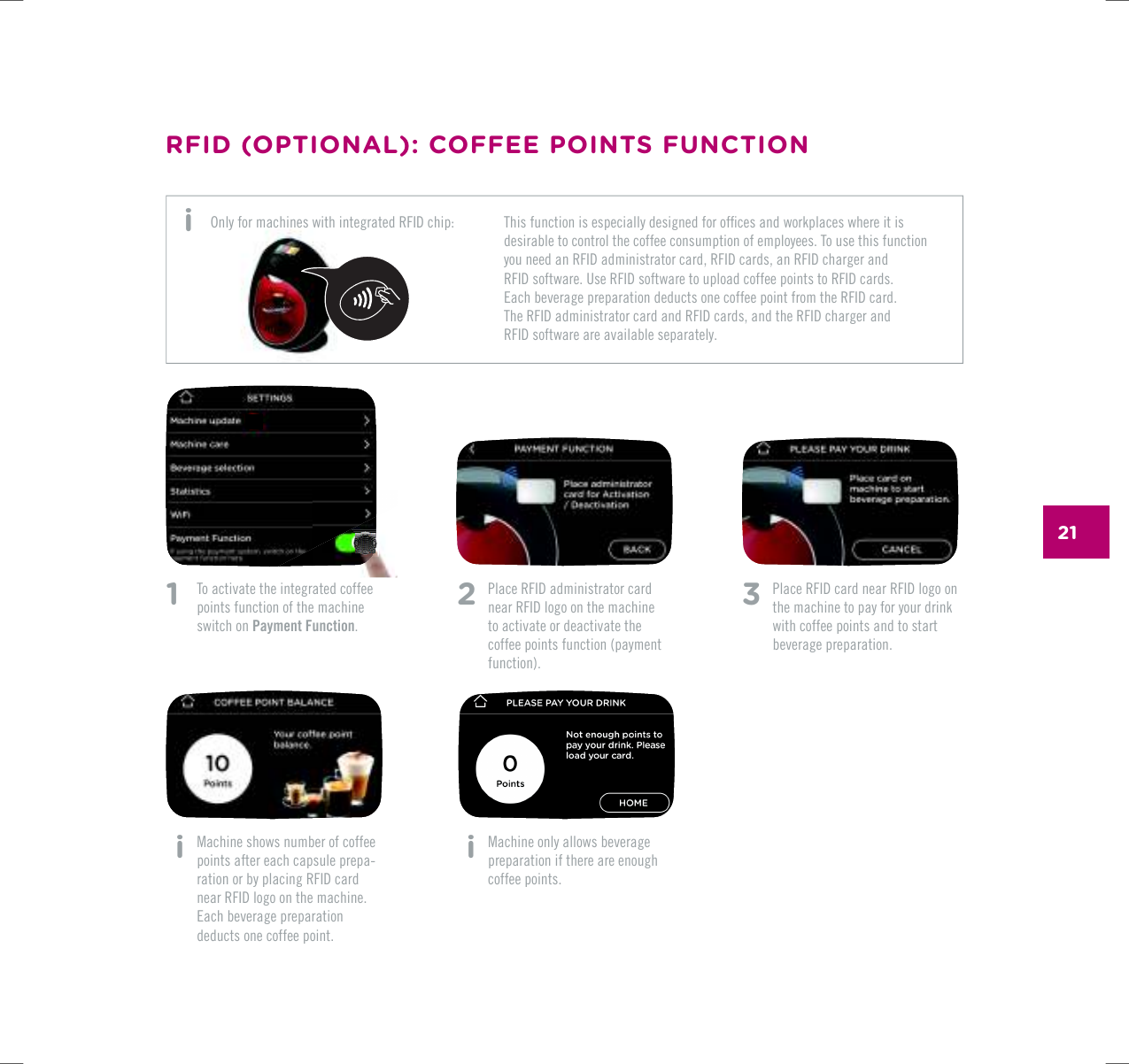
211    To activate the integrated coffee points function of the machine switch on Payment Function. i   Machine shows number of coffee points after each capsule prepa-ration or by placing RFID card  near RFID logo on the machine. Each beverage preparation deducts one coffee point.2  Place RFID administrator card near RFID logo on the machine to activate or deactivate the coffee points function (payment function). i   Machine only allows beverage preparation if there are enough coffee points.3   Place RFID card near RFID logo on the machine to pay for your drink with coffee points and to start beverage preparation.RFID (OPTIONAL): COFFEE POINTS FUNCTION6JKUHWPEVKQPKUGURGEKCNN[FGUKIPGFHQTQHƂEGUCPFYQTMRNCEGUYJGTGKVKUdesirable to control the coffee consumption of employees. To use this function you need an RFID administrator card, RFID cards, an RFID charger and  RFID software. Use RFID software to upload coffee points to RFID cards.  Each beverage preparation deducts one coffee point from the RFID card. The RFID administrator card and RFID cards, and the RFID charger and  RFID software are available separately.Only for machines with integrated RFID chip: i
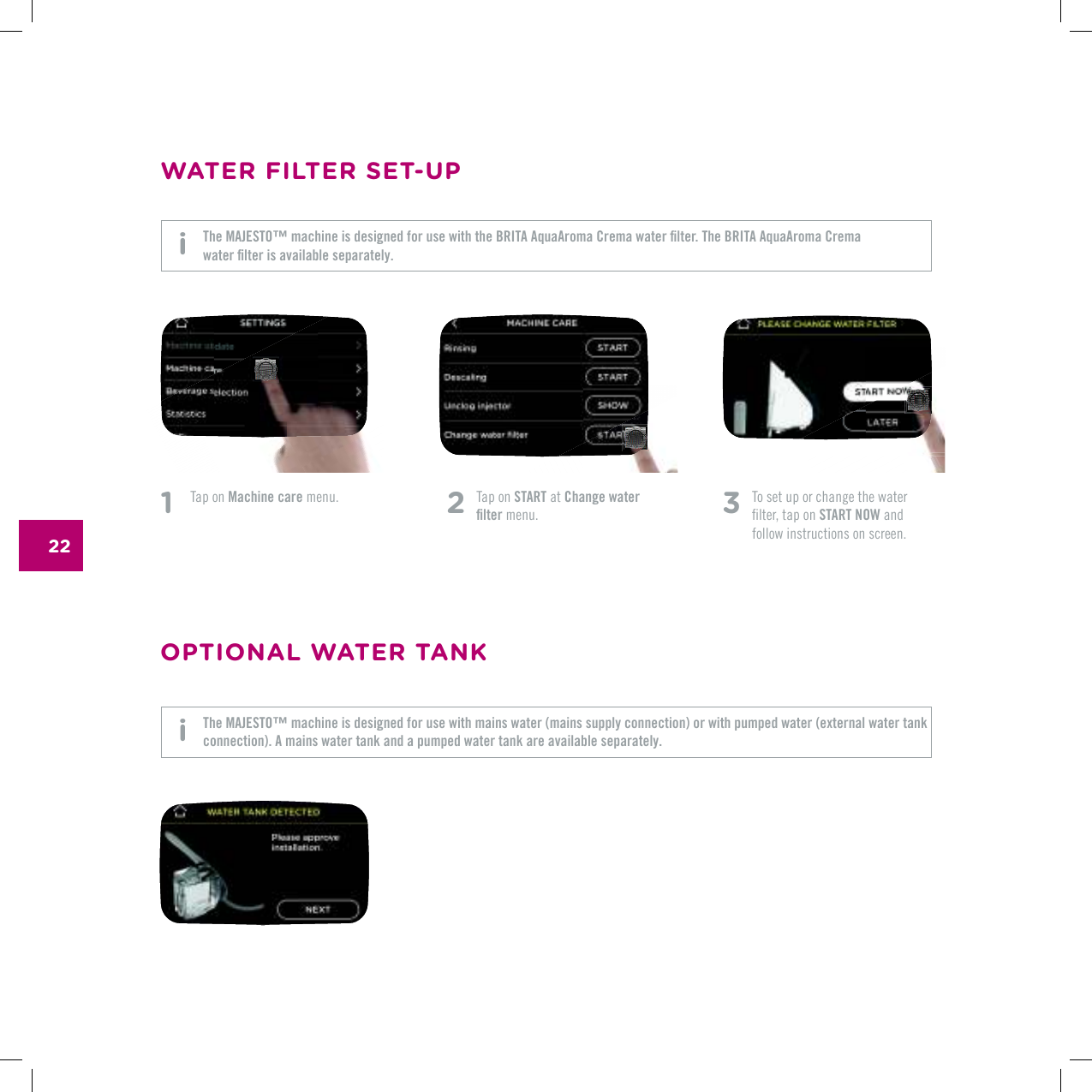
22OPTIONAL WATER TANK3   To set up or change the water  ƂNVGTVCRQPSTART NOW and follow instructions on screen.1   Tap on Machine care menu. 2   Tap on START at Change water ƂNVGT menu.WATER FILTER SET-UP6JG/#,'561vOCEJKPGKUFGUKIPGFHQTWUGYKVJVJG$4+6##SWC#TQOC%TGOCYCVGTƂNVGT6JG$4+6##SWC#TQOC%TGOC YCVGTƂNVGTKUCXCKNCDNGUGRCTCVGN[The MAJESTO™ machine is designed for use with mains water (mains supply connection) or with pumped water (external water tank connection). A mains water tank and a pumped water tank are available separately. i i
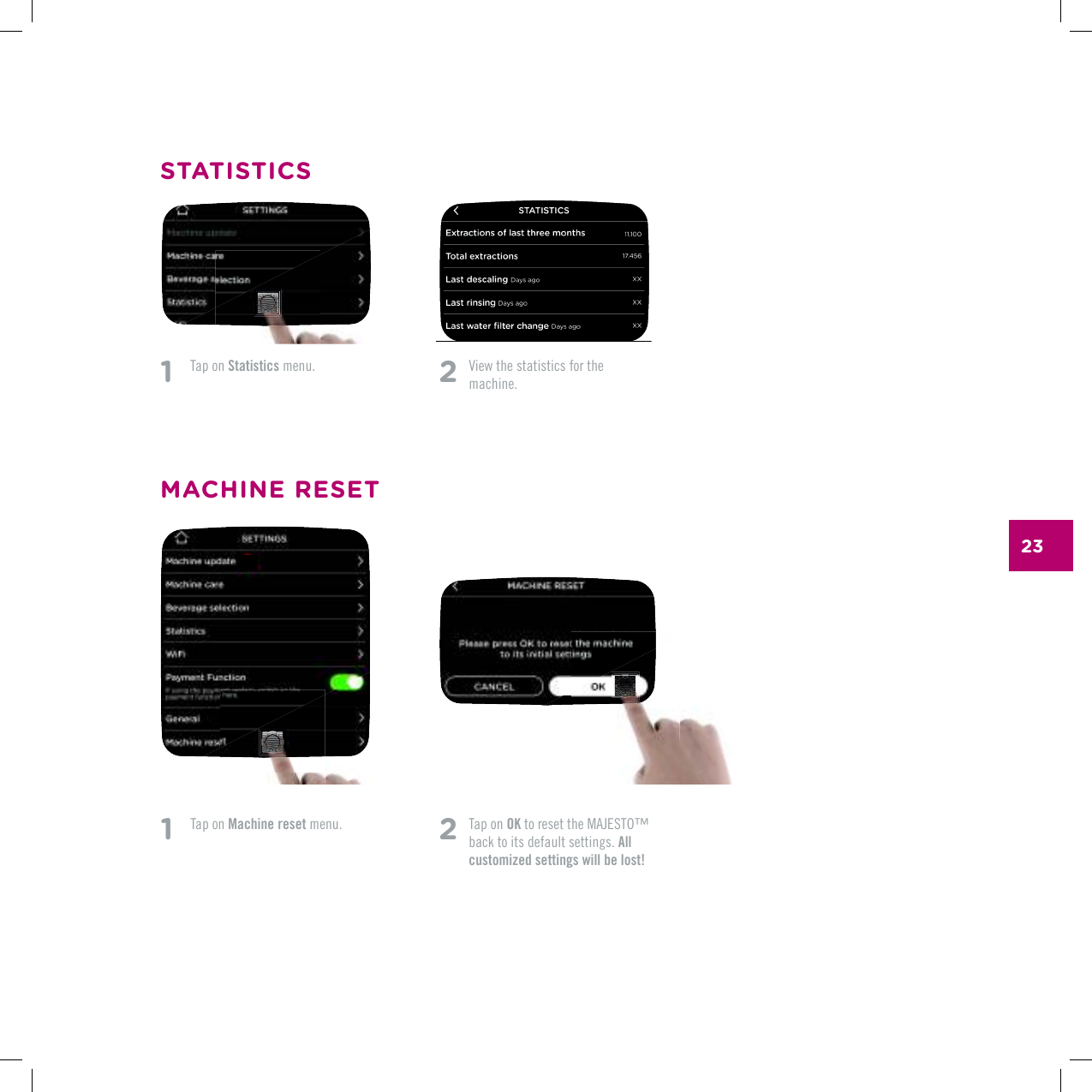
232   Tap on OKVQTGUGVVJG/#,'561vback to its default settings. All customized settings will be lost!1   Tap on Statistics menu. 2   8KGYVJGUVCVKUVKEUHQTVJG machine.STATISTICSMACHINE RESET1   Tap on Machine reset menu.
RINSING & DESCALING
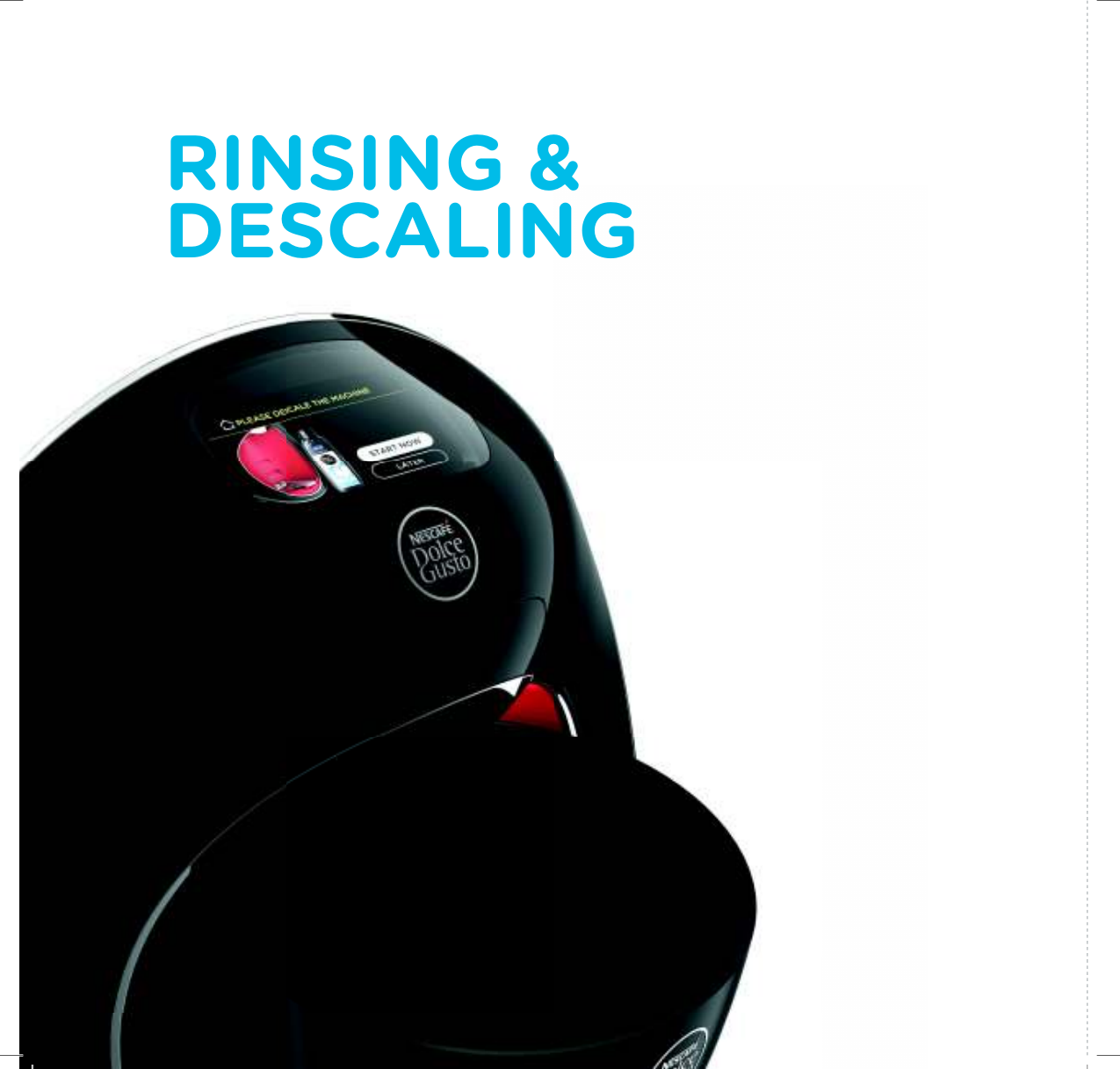
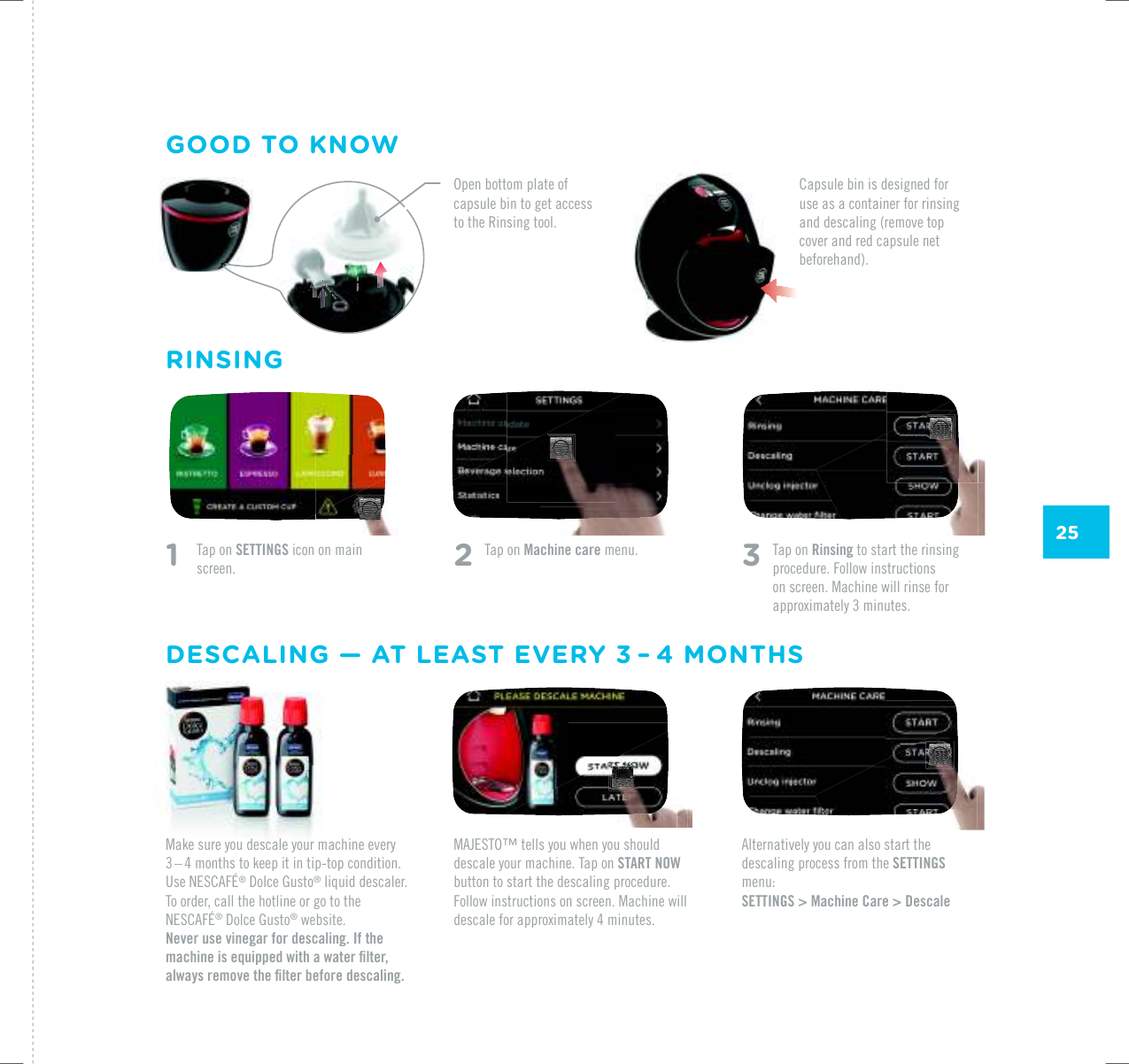
25/#,'561vVGNNU[QWYJGP[QWUJQWNFdescale your machine. Tap on START NOW button to start the descaling procedure. Follow instructions on screen. Machine will FGUECNGHQTCRRTQZKOCVGN[OKPWVGUAlternatively you can also start the descaling process from the SETTINGS menu:SETTINGS > Machine Care > DescaleRINSINGGOOD TO KNOWDESCALING — AT LEAST EVERY 3 – 4 MONTHSMake sure you descale your machine every 3 – 4 months to keep it in tip-top condition. 7UG0'5%#(¥®|&QNEG|)WUVQ® liquid descaler. To order, call the hotline or go to the 0'5%#(¥®|&QNEG|)WUVQ® website.Never use vinegar for descaling. If the OCEJKPGKUGSWKRRGFYKVJCYCVGTƂNVGTCNYC[UTGOQXGVJGƂNVGTDGHQTGFGUECNKPI1    Tap on SETTINGS icon on main screen. 2 Tap on Machine care menu. 3   Tap on Rinsing to start the rinsing procedure. Follow instructions on screen. Machine will rinse for CRRTQZKOCVGN[OKPWVGUOpen bottom plate of capsule bin to get access to the Rinsing tool.Capsule bin is designed for use as a container for rinsing and descaling (remove top cover and red capsule net beforehand).
TROUBLESHOOTING
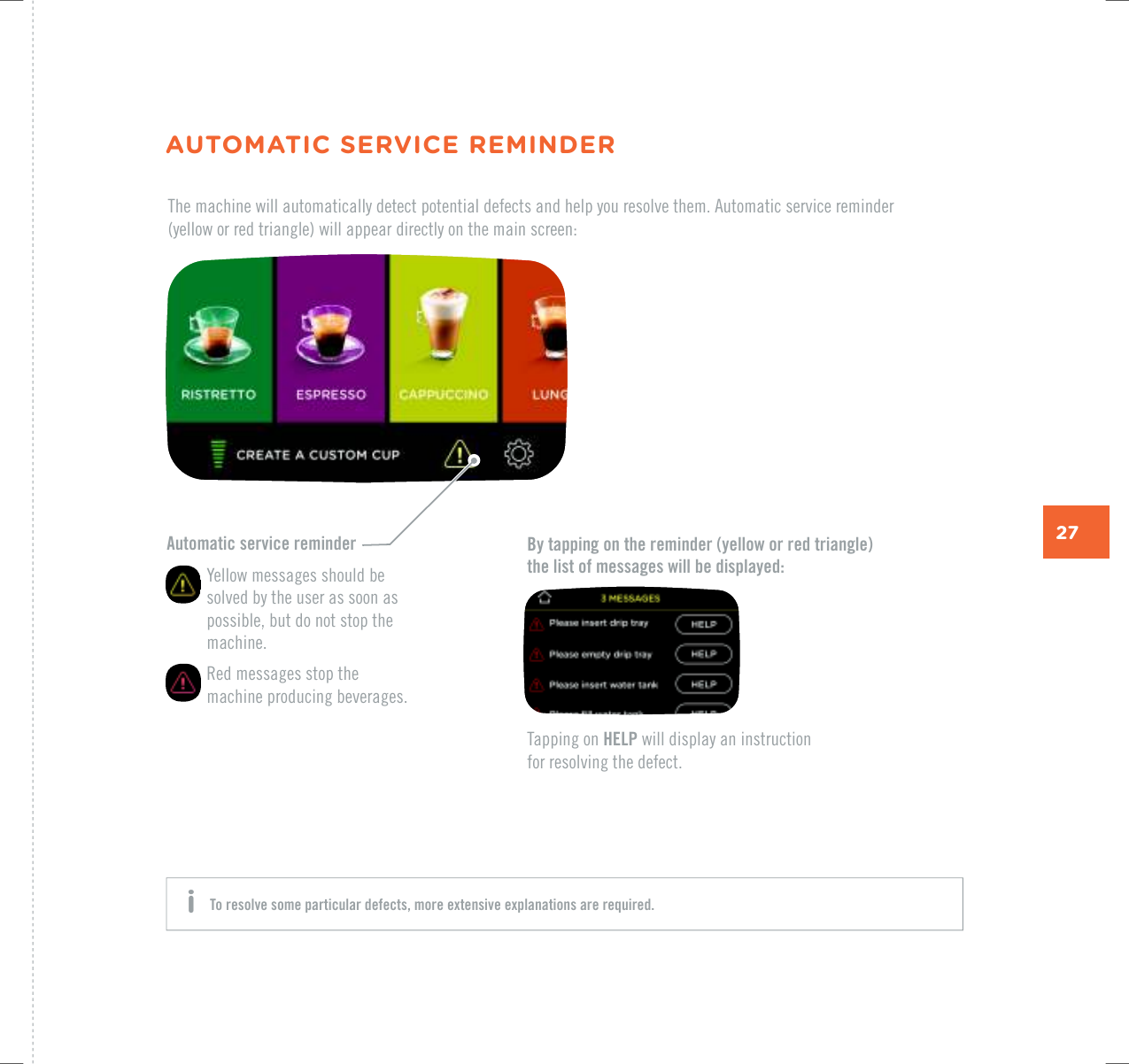
27Automatic service reminder   Yellow messages should be solved by the user as soon as possible, but do not stop the machine.   Red messages stop the machine producing beverages.By tapping on the reminder (yellow or red triangle)  the list of messages will be displayed:The machine will automatically detect potential defects and help you resolve them. Automatic service reminder  (yellow or red triangle) will appear directly on the main screen:Tapping on HELP will display an instruction  for resolving the defect.AUTOMATIC SERVICE REMINDERTo resolve some particular defects, more extensive explanations are required. i
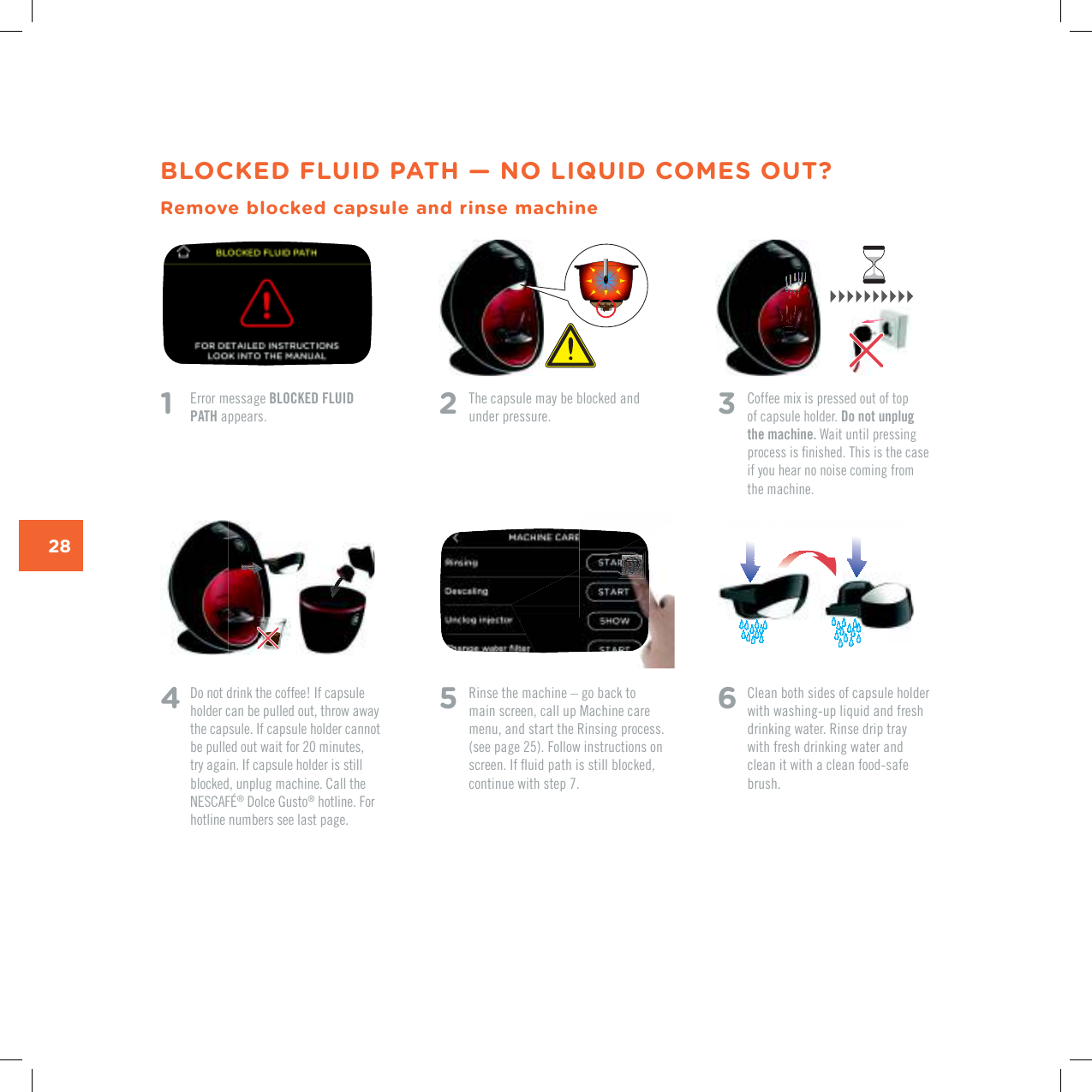
28BLOCKED FLUID PATH — NO LIQUID COMES OUT?Remove blocked capsule and rinse machine1    Error message BLOCKED FLUID PATH appears. 4   Do not drink the coffee! If capsule holder can be pulled out, throw away the capsule. If capsule holder cannot be pulled out wait for 20 minutes, try again. If capsule holder is still blocked, unplug machine. Call the 0'5%#(¥®|&QNEG|)WUVQ® hotline. For hotline numbers see last page.2   The capsule may be blocked and under pressure. 3   %QHHGGOKZKURTGUUGFQWVQHVQRof capsule holder. Do not unplug the machine. Wait until pressing RTQEGUUKUƂPKUJGF6JKUKUVJGECUGif you hear no noise coming from the machine. 5   Rinse the machine – go back to main screen, call up Machine care menu, and start the Rinsing process. (see page 25). Follow instructions on UETGGP+HƃWKFRCVJKUUVKNNDNQEMGFEQPVKPWGYKVJUVGR6  Clean both sides of capsule holder with washing-up liquid and fresh drinking water. Rinse drip tray with fresh drinking water and clean it with a clean food-safe brush.
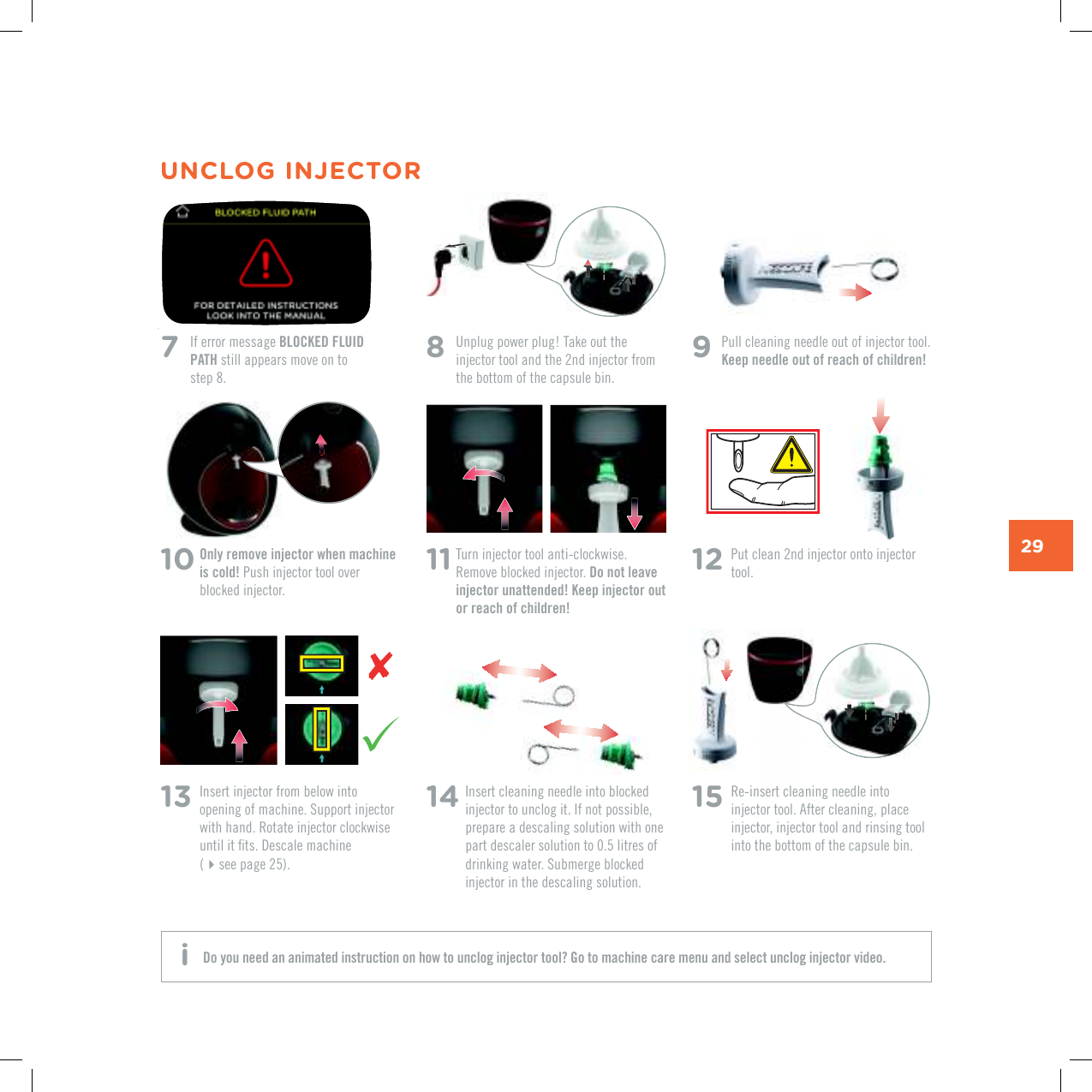
29UNCLOG INJECTOR7   If error message BLOCKED FLUID PATH still appears move on to  step 8.11  Turn injector tool anti-clockwise. Remove blocked injector. Do not leave injector unattended! Keep injector out or reach of children!14  Insert cleaning needle into blocked injector to unclog it. If not possible, prepare a descaling solution with one part descaler solution to 0.5 litres of FTKPMKPIYCVGT5WDOGTIGDNQEMGFinjector in the descaling solution.15  Re-insert cleaning needle into injector tool. After cleaning, place injector, injector tool and rinsing tool into the bottom of the capsule bin.13  Insert injector from below into QRGPKPIQHOCEJKPG5WRRQTVKPLGEVQTwith hand. Rotate injector clockwise WPVKNKVƂVU&GUECNGOCEJKPG (see page 25).12  Put clean 2nd injector onto injector tool.8   Unplug power plug! Take out the injector tool and the 2nd injector from the bottom of the capsule bin.10  Only remove injector when machine is cold! Push injector tool over blocked injector. 9  Pull cleaning needle out of injector tool. Keep needle out of reach of children!Do you need an animated instruction on how to unclog injector tool? Go to machine care menu and select unclog injector video. i
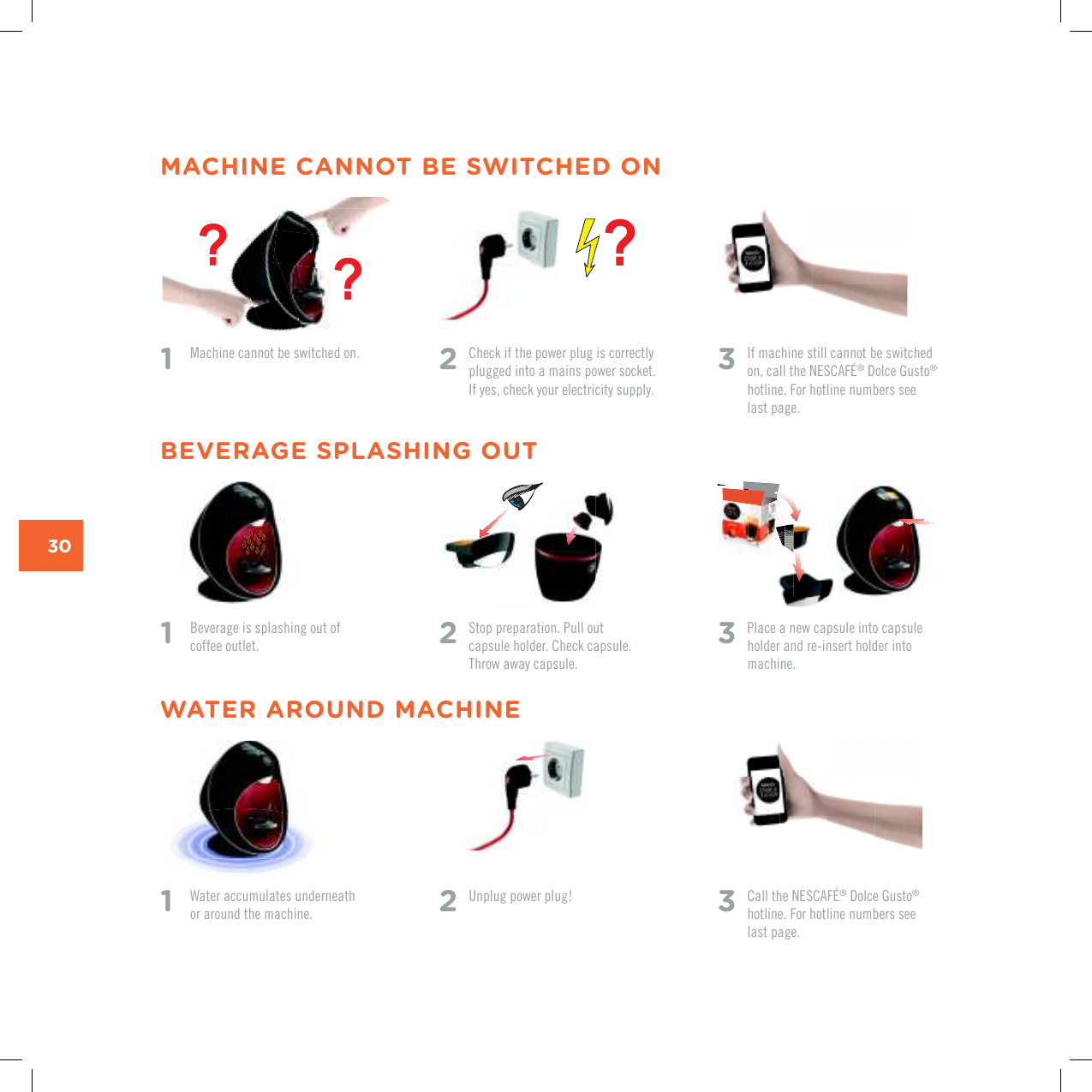
30MACHINE CANNOT BE SWITCHED ON1   Machine cannot be switched on.1  Water accumulates underneath  or around the machine.1    Beverage is splashing out of coffee outlet.2   Check if the power plug is correctly plugged into a mains power socket.  If yes, check your electricity supply. 2 Unplug power plug!2 5VQRRTGRCTCVKQP2WNNQWV capsule holder. Check capsule. Throw away capsule.3   %CNNVJG0'5%#(¥®|&QNEG|)WUVQ® hotline. For hotline numbers see last page.3  If machine still cannot be switched QPECNNVJG0'5%#(¥®|&QNEG|)WUVQ® hotline. For hotline numbers see last page.3   Place a new capsule into capsule holder and re-insert holder into machine.WATER AROUND MACHINEBEVERAGE SPLASHING OUT
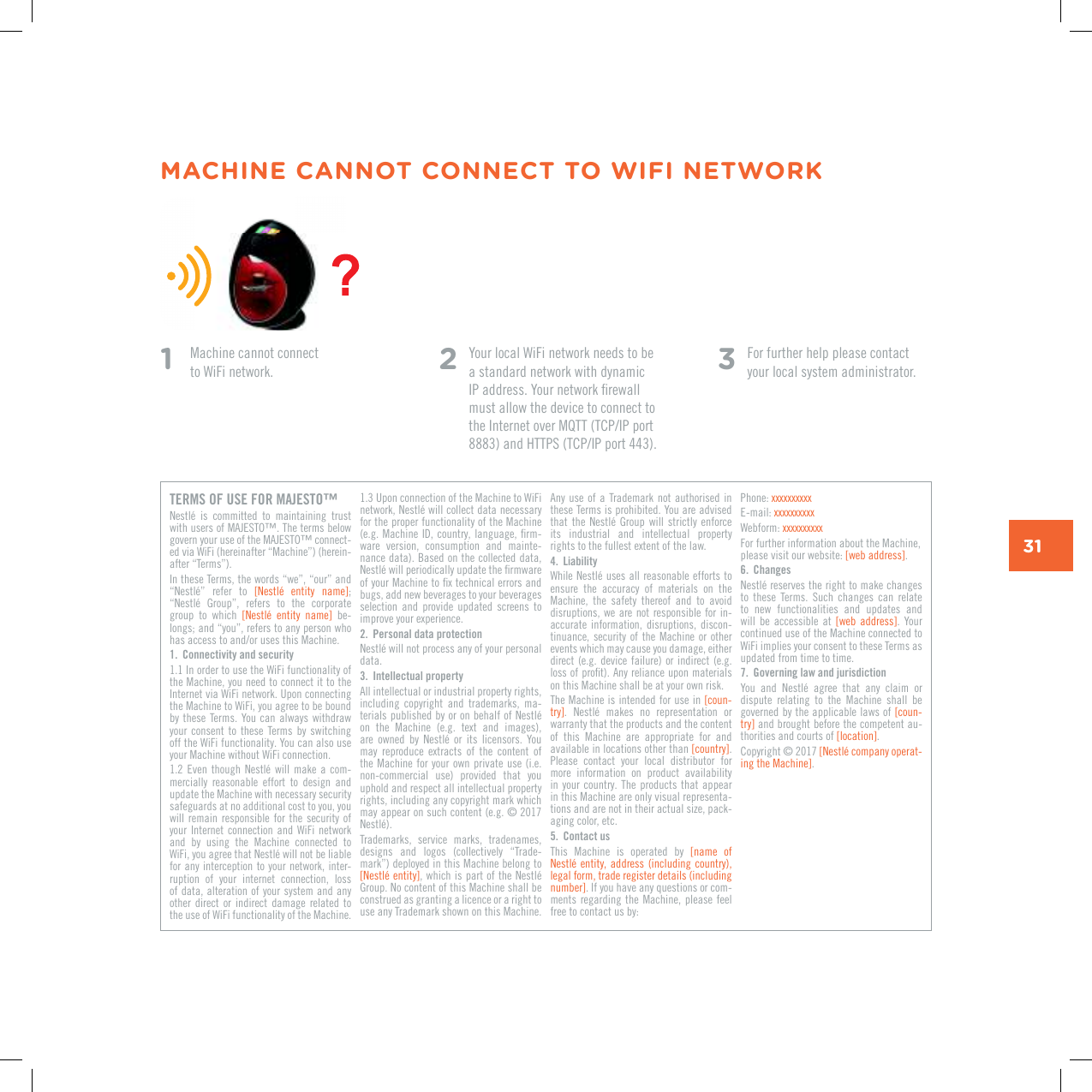
31MACHINE CANNOT CONNECT TO WIFI NETWORK1    Machine cannot connect  to WiFi network. 2  Your local WiFi network needs to be a standard network with dynamic +2CFFTGUU;QWTPGVYQTMƂTGYCNNmust allow the device to connect to VJG+PVGTPGVQXGT/3666%2+2RQTVCPF*66256%2+2RQTV3  For further help please contact your local system administrator.TERMS OF USE FOR MAJESTO™0GUVNÅ KU EQOOKVVGF VQ OCKPVCKPKPI VTWUVYKVJWUGTUQH/#,'561v6JGVGTOUDGNQYIQXGTP[QWTWUGQHVJG/#,'561vEQPPGEV-GFXKC9K(KJGTGKPCHVGTp/CEJKPGqJGTGKP-CHVGTp6GTOUq+PVJGUG6GTOUVJGYQTFUpYGqpQWTqCPFp0GUVNÅq TGHGT VQ =0GUVNÅ GPVKV[ PCOG?; p0GUVNÅ )TQWRq TGHGTU VQ VJG EQTRQTCVGgroup  to  which  =0GUVNÅ GPVKV[ PCOG?  be-NQPIUCPFp[QWqTGHGTUVQCP[RGTUQPYJQJCUCEEGUUVQCPFQTWUGUVJKU/CEJKPG1.  Connectivity and security1.1 In order to use the WiFi functionality of the Machine, you need to connect it to the Internet via WiFi network. Upon connecting the Machine to WiFi, you agree to be bound by these Terms. You  can always withdraw your  consent  to  these  Terms by  switching off the WiFi functionality. You can also use your Machine without WiFi connection. 1.2 'XGPVJQWIJ 0GUVNÅ YKNN OCMG CEQO-mercially  reasonable  effort  to  design  and update the Machine with necessary security safeguards at no additional cost to you, you will  remain  responsible  for  the  security  of your  Internet  connection  and  WiFi  network and  by  using  the  Machine  connected  to 9K(K[QWCITGGVJCV0GUVNÅYKNNPQVDGNKCDNGfor any  interception to  your network,  inter-ruption  of  your  internet  connection,  loss of data,  alteration of your system and any other  direct  or  indirect  damage  related  to the use of WiFi functionality of the Machine. 1.3 Upon connection of the Machine to WiFi PGVYQTM0GUVNÅYKNNEQNNGEVFCVCPGEGUUCT[for the proper functionality of the Machine GI/CEJKPG+&EQWPVT[NCPIWCIGƂTO-ware  version,  consumption  and  mainte-nance data). Based on the collected data, 0GUVNÅYKNNRGTKQFKECNN[WRFCVGVJGƂTOYCTGQH[QWT/CEJKPGVQƂZVGEJPKECNGTTQTUCPFbugs, add new beverages to your beverages selection  and  provide  updated  screens  to KORTQXG[QWTGZRGTKGPEG2.  Personal data protection0GUVNÅYKNNPQVRTQEGUUCP[QH[QWTRGTUQPCNdata.3.  Intellectual propertyAll intellectual or industrial property rights, including  copyright  and  trademarks,  ma-VGTKCNURWDNKUJGFD[QTQPDGJCNHQH0GUVNÅQP VJG /CEJKPG GI VGZV CPF KOCIGUCTG QYPGF D[ 0GUVNÅ QT KVU NKEGPUQTU ;QWOC[ TGRTQFWEG GZVTCEVU QH VJG EQPVGPV QHthe Machine  for your  own private  use (i.e. non-commercial  use)  provided  that  you uphold and respect all intellectual property rights, including any copyright mark which OC[CRRGCTQPUWEJEQPVGPVGI0GUVNÅTrademarks,  service  marks,  tradenames, designs  and  logos  (collectively  “Trade-OCTMqFGRNQ[GFKPVJKU/CEJKPGDGNQPIVQ=0GUVNÅGPVKV[?YJKEJKURCTVQHVJG0GUVNÅ)TQWR0QEQPVGPVQHVJKU/CEJKPGUJCNNDGconstrued as granting a licence or a right to use any Trademark shown on this Machine. Any use of  a  Trademark  not authorised in these Terms is prohibited. You are advised VJCVVJG0GUVNÅ )TQWR YKNN UVTKEVN[ GPHQTEGits  industrial  and  intellectual  property TKIJVUVQVJGHWNNGUVGZVGPVQHVJGNCY4.  Liability 9JKNG0GUVNÅWUGUCNNTGCUQPCDNGGHHQTVUVQensure  the  accuracy  of  materials  on  the Machine,  the  safety  thereof  and  to  avoid disruptions, we  are not  responsible for in-accurate  information,  disruptions,  discon-tinuance,  security of the Machine  or  other events which may cause you damage, either direct (e.g. device  failure)  or indirect (e.g. NQUUQHRTQƂV#P[TGNKCPEGWRQPOCVGTKCNUon this Machine shall be at your own risk.The Machine is intended for use in [coun-VT[? 0GUVNÅ OCMGU PQ TGRTGUGPVCVKQP QTwarranty that the products and the content of  this  Machine  are  appropriate  for  and available in locations other than =EQWPVT[?. Please  contact  your  local  distributor  for more  information  on  product  availability in your country.  The  products  that appear in this Machine are only visual representa-tions and are not in their actual size, pack-aging color, etc.5.  Contact usThis  Machine  is  operated  by  [name  of 0GUVNÅGPVKV[CFFTGUUKPENWFKPIEQWPVT[legal form, trade register details (including PWODGT?. If you have any questions or com-ments regarding the  Machine,  please feel free to contact us by:Phone: ZZZZZZZZZZE-mail: ZZZZZZZZZZWebform: ZZZZZZZZZZFor further information about the Machine, please visit our website: =YGDCFFTGUU?.6.  Changes0GUVNÅTGUGTXGUVJGTKIJVVQOCMGEJCPIGUVQ VJGUG 6GTOU 5WEJ EJCPIGU ECP TGNCVGto  new  functionalities  and  updates  and will  be  accessible  at  =YGD CFFTGUU?.  Your continued use of the Machine connected to WiFi implies your consent to these Terms as updated from time to time.7.  Governing law and jurisdiction;QW CPF 0GUVNÅ CITGG VJCV CP[ ENCKO QTdispute  relating  to  the  Machine  shall  be governed by the applicable laws of [coun-VT[? and brought before the competent au-thorities and courts of =NQECVKQP?. %QR[TKIJV=0GUVNÅEQORCP[QRGTCV-KPIVJG/CEJKPG?.
AE  800348786AL   0842 640 10AR  0800 999 81 00AT  0800 365 23 48AU 1800 466 975BA 0800 202 42BE 0800 93217BG   0 800 1 6666BR  0800 7762233CA  1 888 809 9267CH 0800 86 00 85CL  800 213 006CO 01800-05-15566CN 400 630 4868CR  0800-507-4000CZ  800 135 135 DE 0800 365 23 48DK  35460100EE 6 177 441ES    900 10 21 21FI    0800 0 6161FR 0 800 97 07 80G B   0800 707 6066GR  800 11 68068GT  1-800-299-0019HK   2179 8888HN   800-2220-6666HR   0800 600 604HU   06 40 214 200I D  001803657121IE  00800 6378 5385IL  1-700-50-20-54I T  800365234JO   +962-65902998  JP  0120-879-816KR 080-234-0070KW   +965 22286847  KZ  8-800-080-2880LB  +961-4548595LU   8002 3183LT  8 700 55 200LV  67508056MA  080 100 52 54ME  020 269 902Middle East: +971 4- 8100081MX 01800 365 2348MK   0800 00 200MT  80074114MY   1800 88 3633N I  1-800-4000 NL  0800-3652348NO   800 80 730 NZ   0800 365 234 PA  800-0000P E  80010210PH  898-0061PK  0800-62282PL  0800 174 902PT 800 200 070P Y  0800-112121QA   +974-44587688RO   0 800 8 637 853RU  8-800-700-79-79SA 8008971971SE 020-29 93 00SG 1 800 836 7009S I 080 45 05SK  0800 135 135SR 0800 000 100SV 800-6179TH 1-800-295588 0-2657-8601T R  0800 211 02 18 4 44 31 60TW  0800-000-338 TT  (868) 663-7853UA  0 800 50 30 10US 1-800-745-3391UY  0800-2122VN  1800 6699ZA +27 11 514 6116HOTLINESwww.dolce-gusto.com

Navigation menu