WJ Communications R820 CELLULAR REPEATER User Manual Cover FCC

WJ Communications, Inc. CELLULAR REPEATER Cover FCC

USER MANUAL

WWatkins-Johnson CompanyRepeaterManualWATKINS-JOHNSON COMPANY3333 Hillview AvenuePalo Alto, CA 94304-1223
Watkins-Johnson CompanyPCS RepeaterManual“This drawing, print, or document and subject matter disclosedherein are proprietary items to which Watkins-Johnson Companyretains the exclusive right of dissemination, reproduction,manufacture and sale. This drawing, print or document issubmitted in confidence for consideration by the designatedrecipient or intended using organization alone unless permissionfor further disclosure is expressly granted in writing.”09/99WATKINS-JOHNSON COMPANY3333 Hillview AvenuePalo Alto, CA 94304-1223(800) 951-4401Internet:  http://www.wj.com
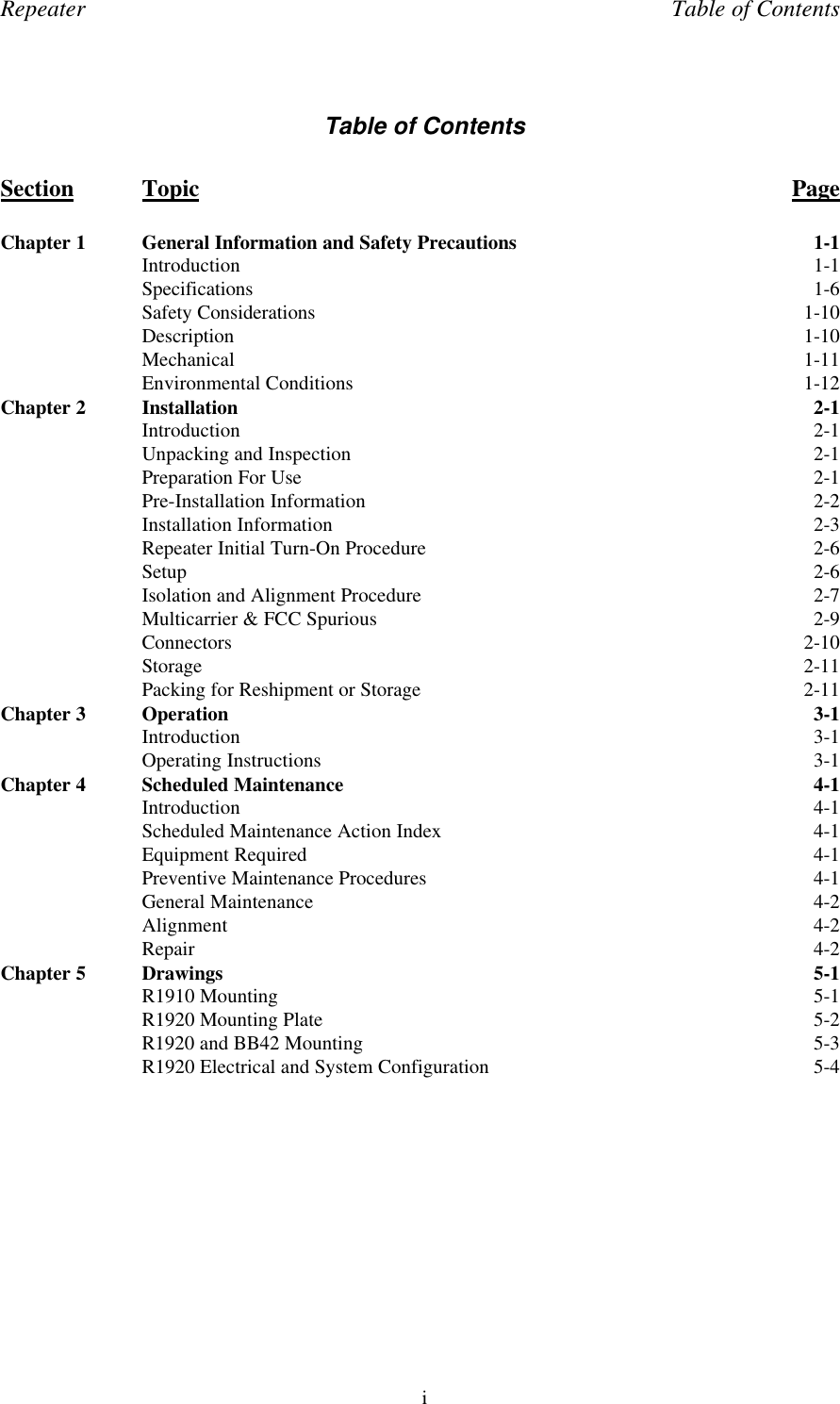
Repeater Table of ContentsiTable of ContentsSection Topic PageChapter 1 General Information and Safety Precautions 1-1Introduction 1-1Specifications 1-6Safety Considerations 1-10Description 1-10Mechanical 1-11Environmental Conditions 1-12Chapter 2 Installation 2-1Introduction 2-1Unpacking and Inspection 2-1Preparation For Use 2-1Pre-Installation Information 2-2Installation Information 2-3Repeater Initial Turn-On Procedure 2-6Setup 2-6Isolation and Alignment Procedure 2-7Multicarrier & FCC Spurious 2-9Connectors 2-10Storage 2-11Packing for Reshipment or Storage 2-11Chapter 3 Operation 3-1Introduction 3-1Operating Instructions 3-1Chapter 4 Scheduled Maintenance 4-1Introduction 4-1Scheduled Maintenance Action Index 4-1Equipment Required 4-1Preventive Maintenance Procedures 4-1General Maintenance 4-2Alignment 4-2Repair 4-2Chapter 5 Drawings 5-1R1910 Mounting 5-1R1920 Mounting Plate 5-2R1920 and BB42 Mounting 5-3R1920 Electrical and System Configuration 5-4
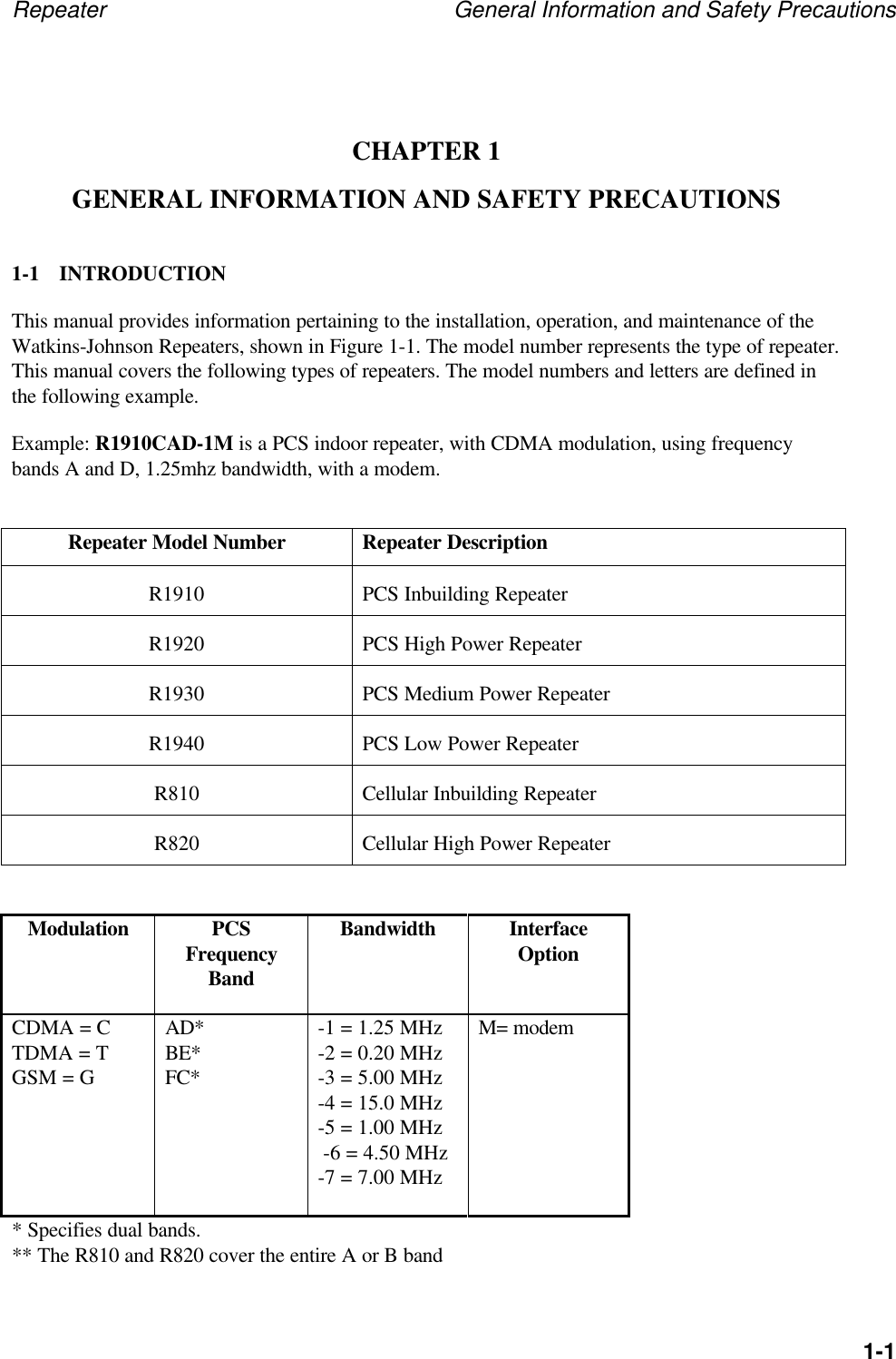
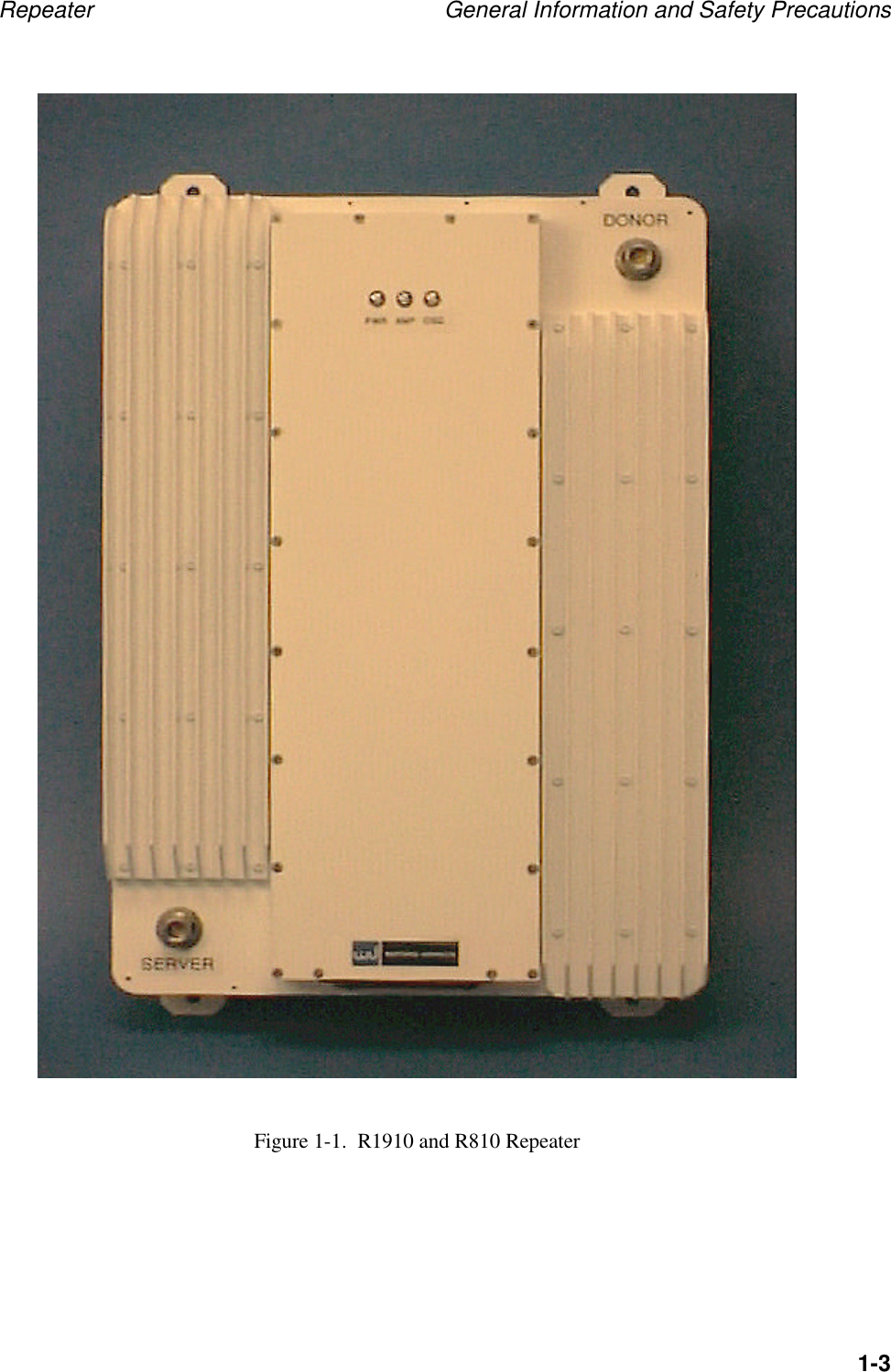
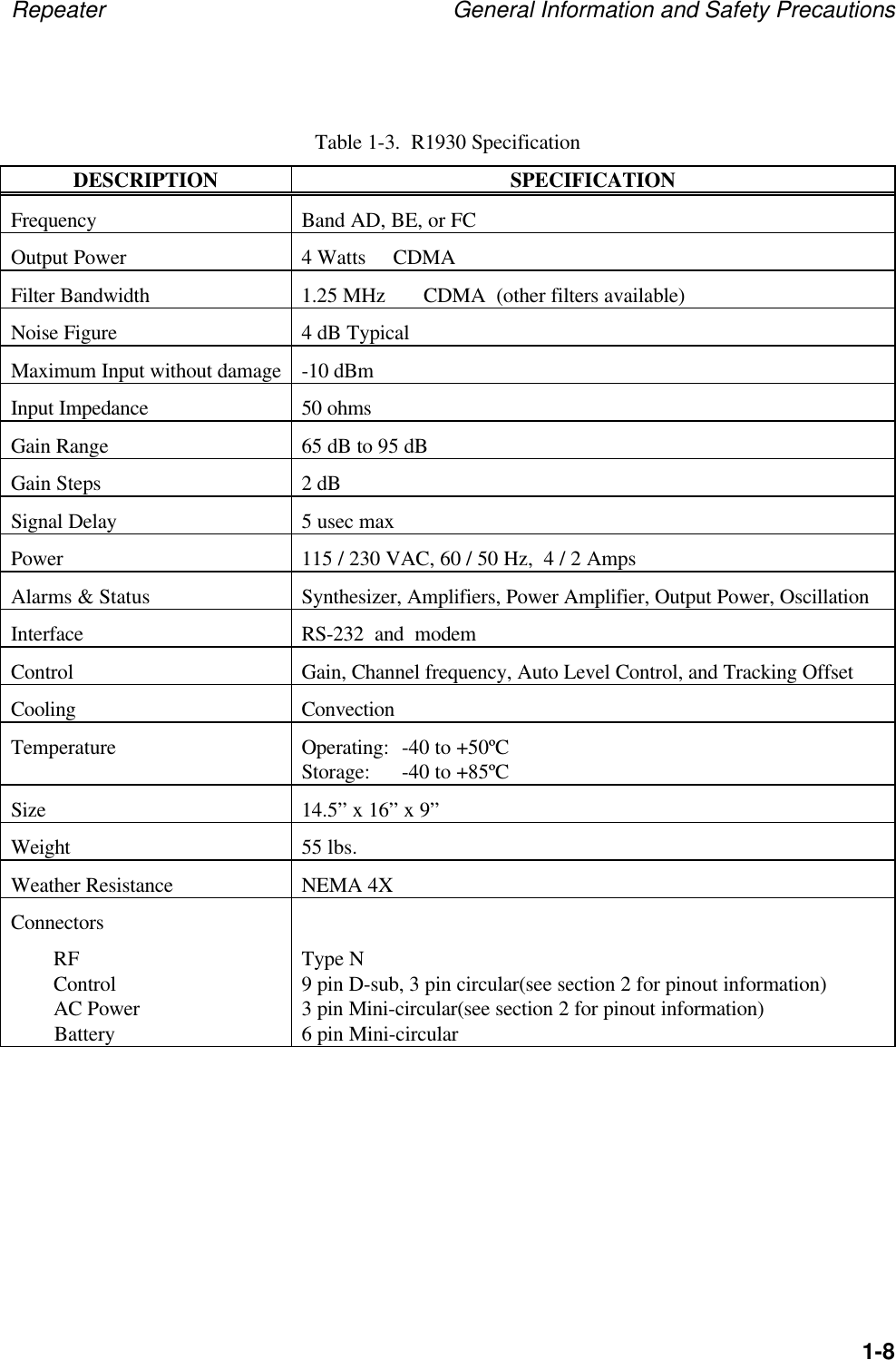
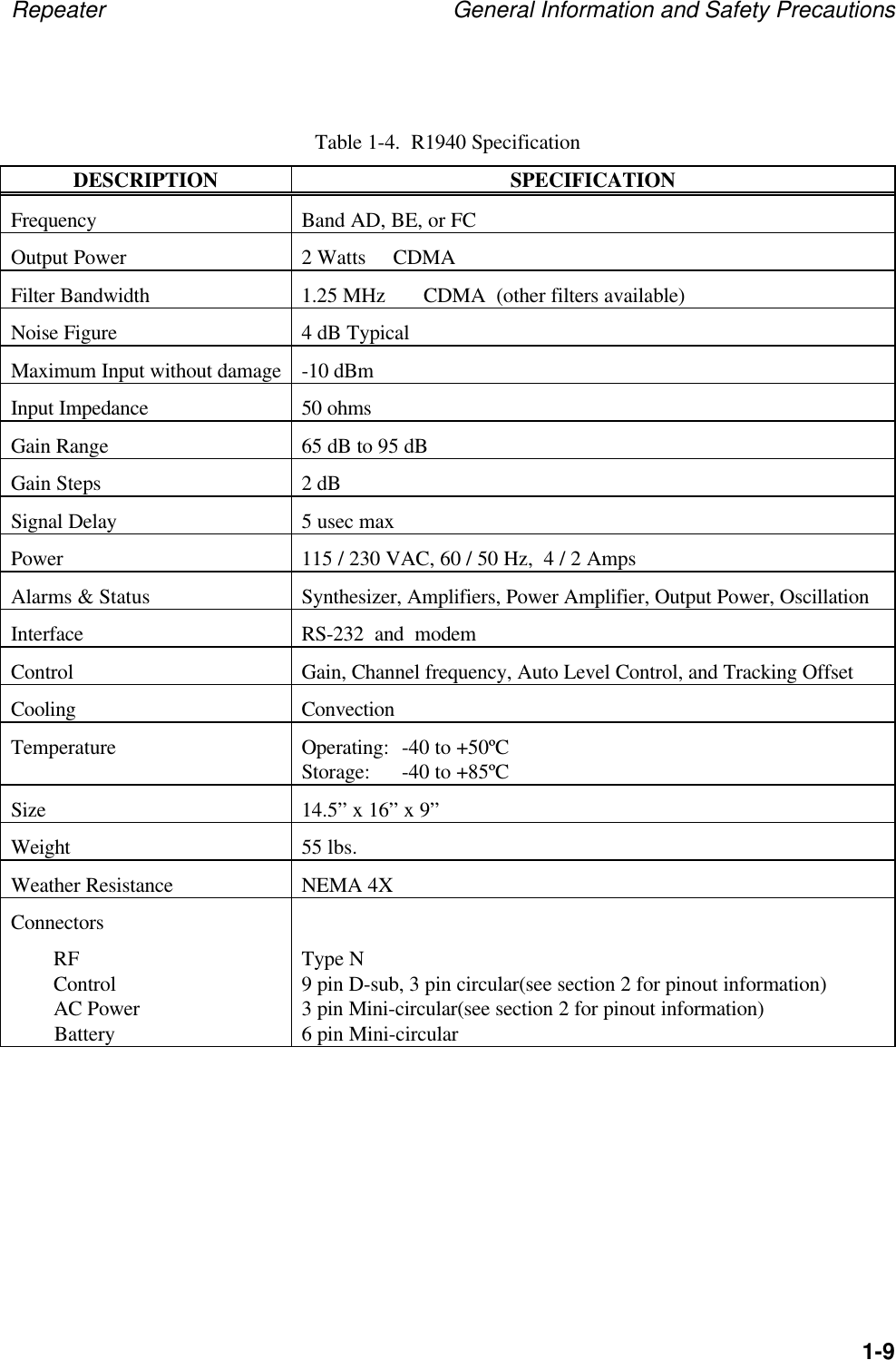
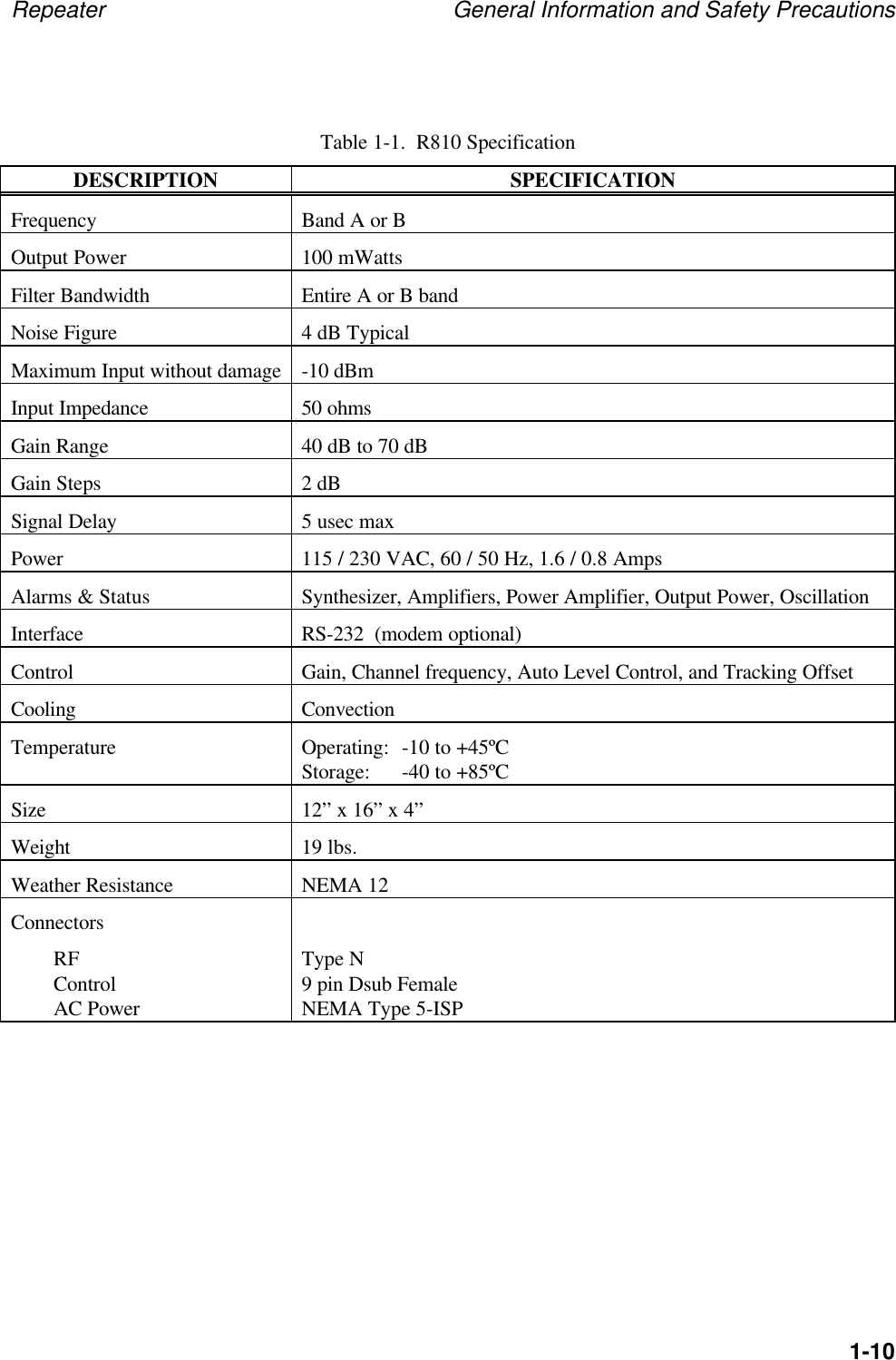
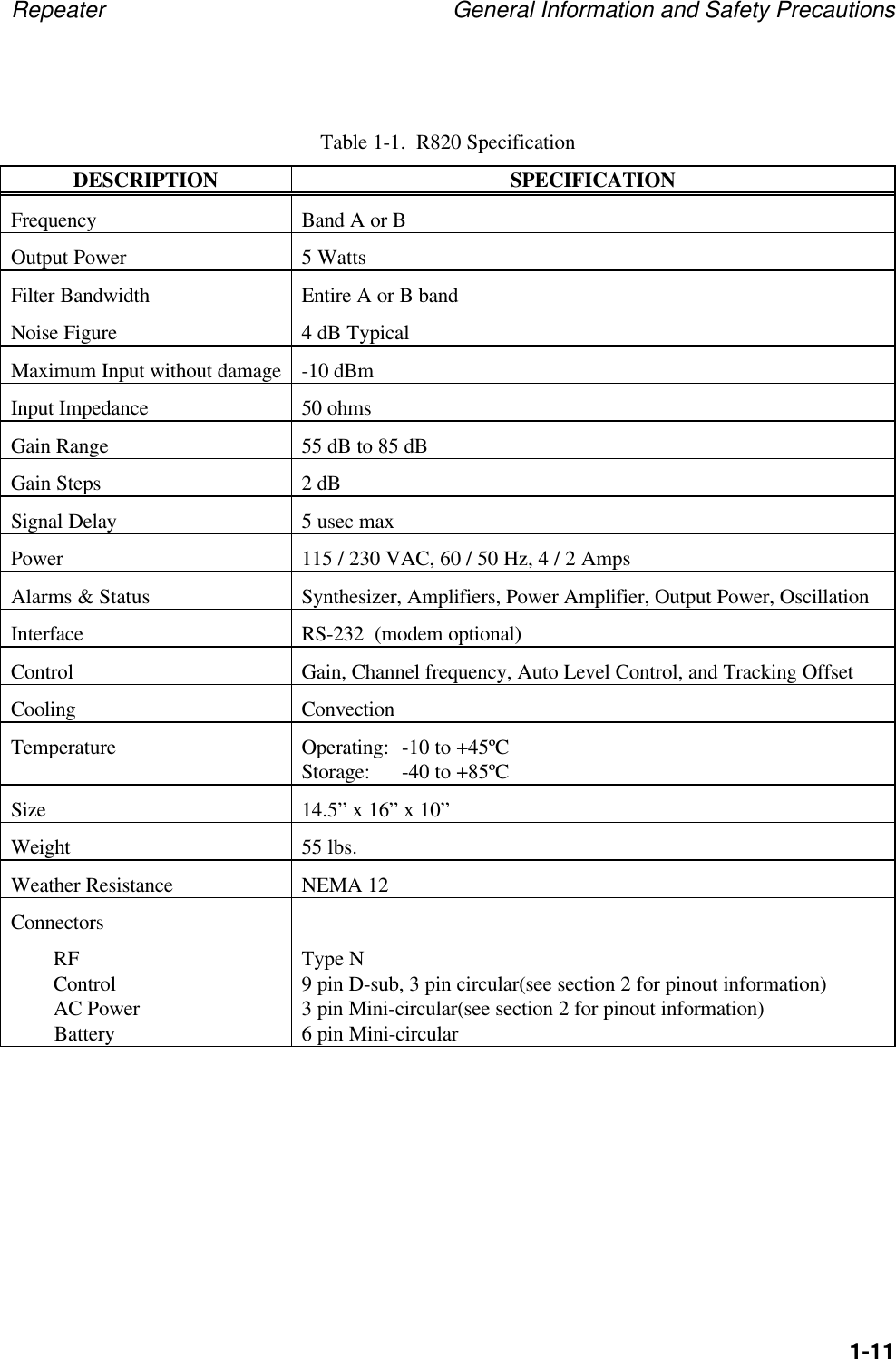
Repeater General Information and Safety Precautions1-1CHAPTER 1GENERAL INFORMATION AND SAFETY PRECAUTIONS1-1 INTRODUCTIONThis manual provides information pertaining to the installation, operation, and maintenance of theWatkins-Johnson Repeaters, shown in Figure 1-1. The model number represents the type of repeater.This manual covers the following types of repeaters. The model numbers and letters are defined inthe following example.Example: R1910CAD-1M is a PCS indoor repeater, with CDMA modulation, using frequencybands A and D, 1.25mhz bandwidth, with a modem.Repeater Model Number Repeater DescriptionR1910 PCS Inbuilding RepeaterR1920 PCS High Power RepeaterR1930 PCS Medium Power RepeaterR1940 PCS Low Power RepeaterR810 Cellular Inbuilding RepeaterR820 Cellular High Power RepeaterModulation PCSFrequencyBandBandwidth InterfaceOptionCDMA = CTDMA = TGSM = GAD*BE*FC*-1 = 1.25 MHz-2 = 0.20 MHz-3 = 5.00 MHz-4 = 15.0 MHz-5 = 1.00 MHz -6 = 4.50 MHz-7 = 7.00 MHzM= modem* Specifies dual bands.** The R810 and R820 cover the entire A or B band
Repeater General Information and Safety Precautions1-2This manual is divided into five chapters, the first four covering a particular topic for the operationand maintenance of the unit. Chapter 5 includes drawings to assist in mounting WJ repeaters. Thetopics are as follows:Chapter Topic1General Information and Safety Precautions2Installation3Operation4Scheduled Maintenance5Drawings
Repeater General Information and Safety Precautions1-3Figure 1-1.  R1910 and R810 Repeater
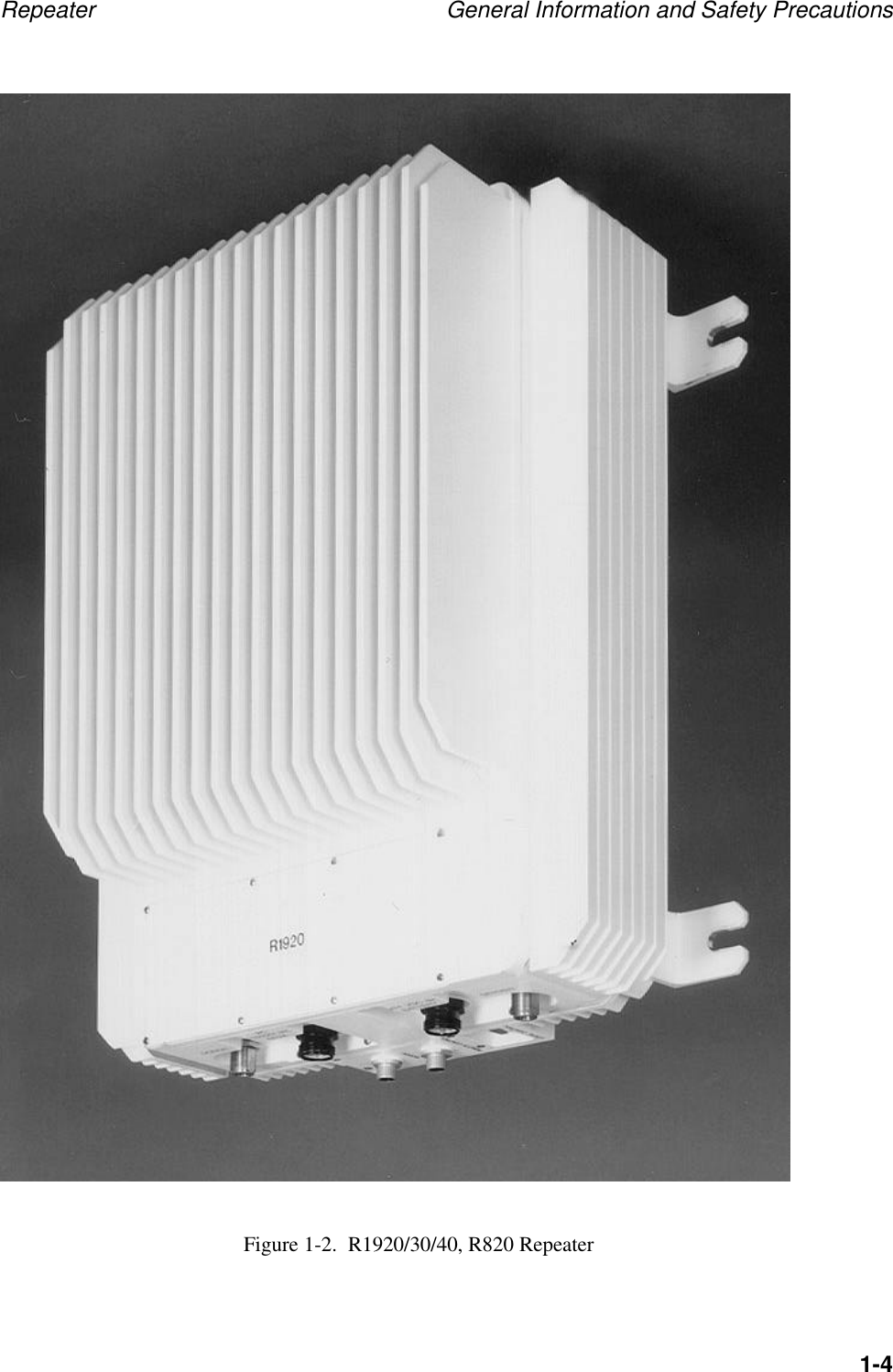
Repeater General Information and Safety Precautions1-4Figure 1-2.  R1920/30/40, R820 Repeater
Repeater General Information and Safety Precautions1-5Chapter 1 provides a general description of the Repeater and summarizes the electrical, mechanical,and environmental characteristics. It also provides a tabular listing of the Repeater performancespecifications. Safety precautions to be observed while operating or servicing the unit are alsoexplained.Chapter 2 provides instructions for the initial inspection and installation of the Repeater. It describesthe purpose and function of all I/O connectors, provides initial start-up instructions, and providesinstallation verification tests.Chapter 3 describes the purpose and function of all remote controls and status indicators andexplains how to operate the unit.Chapter 4 provides a scheduled maintenance action index and describes maintenance procedures thatshould be performed on a regular basis, such as cleaning and inspection.Chapter 5 provides drawings useful when mounting a WJ repeater to a structure.
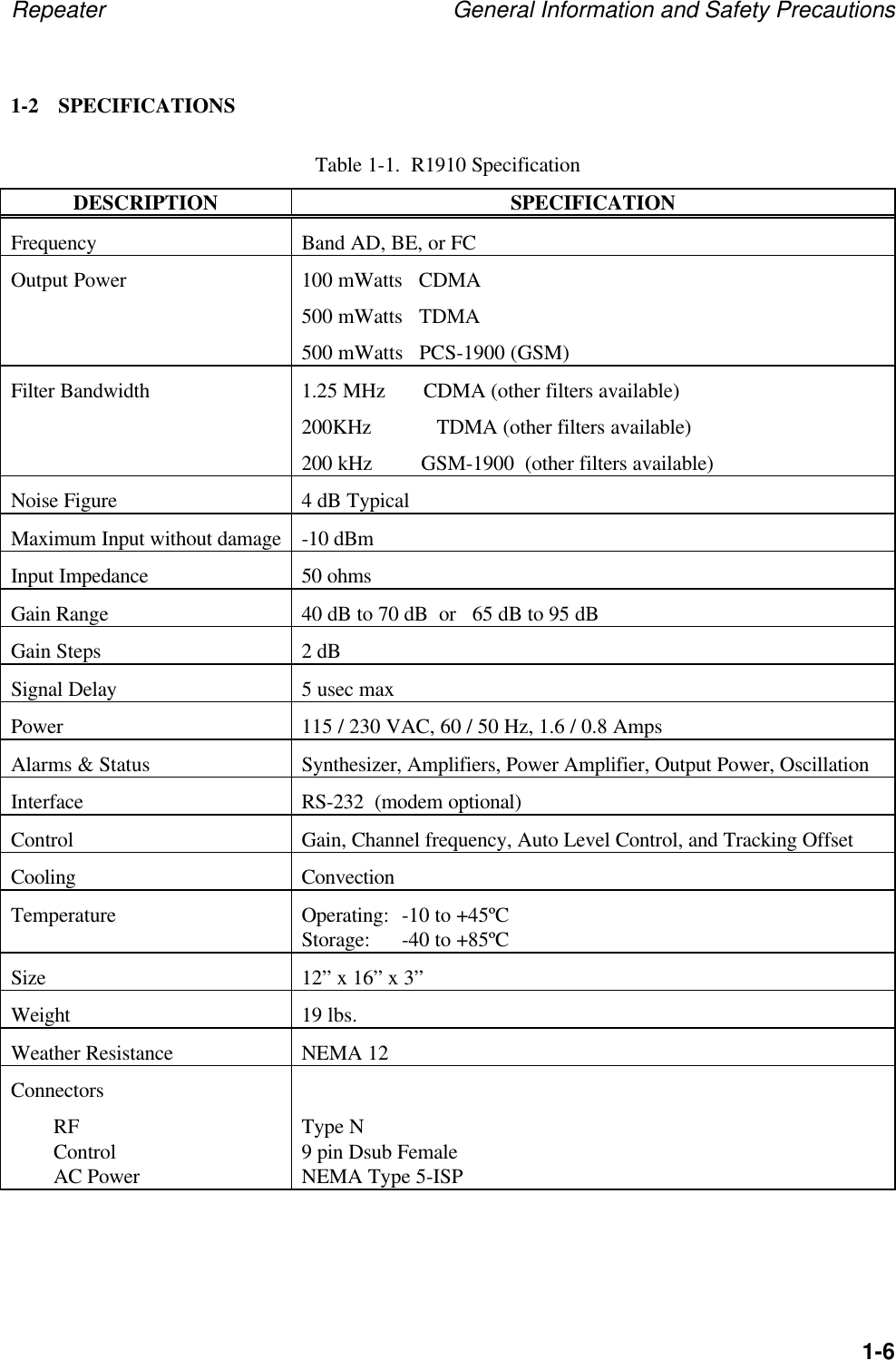
Repeater General Information and Safety Precautions1-61-2 SPECIFICATIONSTable 1-1.  R1910 SpecificationDESCRIPTION SPECIFICATIONFrequency Band AD, BE, or FCOutput Power 100 mWatts   CDMA500 mWatts   TDMA500 mWatts   PCS-1900 (GSM)Filter Bandwidth 1.25 MHz       CDMA (other filters available)200KHz            TDMA (other filters available)200 kHz         GSM-1900  (other filters available)Noise Figure 4 dB TypicalMaximum Input without damage -10 dBmInput Impedance 50 ohmsGain Range 40 dB to 70 dB  or   65 dB to 95 dBGain Steps 2 dBSignal Delay 5 usec maxPower 115 / 230 VAC, 60 / 50 Hz, 1.6 / 0.8 AmpsAlarms & Status Synthesizer, Amplifiers, Power Amplifier, Output Power, OscillationInterface RS-232  (modem optional)Control Gain, Channel frequency, Auto Level Control, and Tracking OffsetCooling ConvectionTemperature Operating: -10 to +45ºCStorage: -40 to +85ºCSize 12” x 16” x 3”Weight 19 lbs.Weather Resistance NEMA 12ConnectorsRFControlAC PowerType N9 pin Dsub FemaleNEMA Type 5-ISP
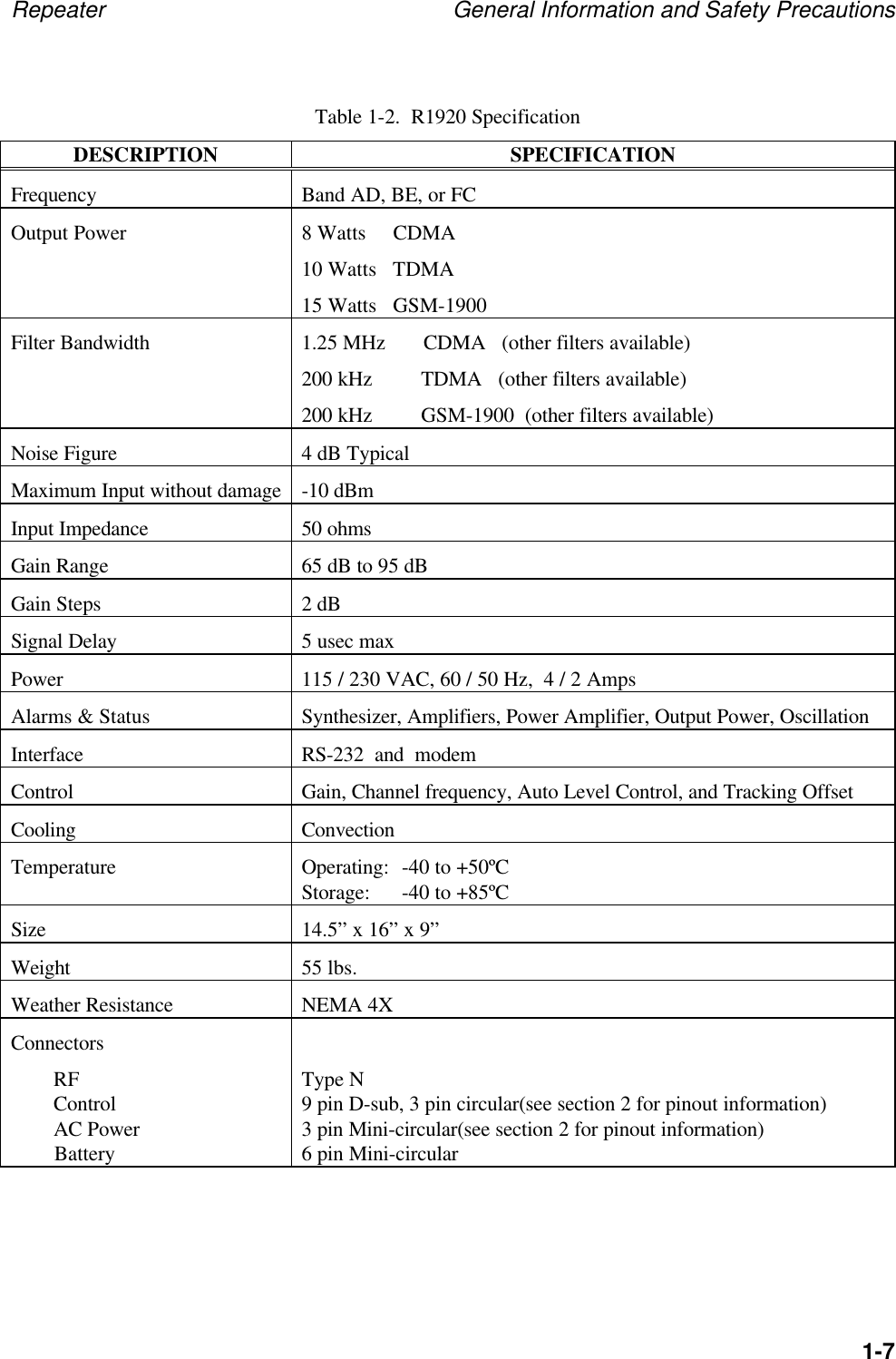
Repeater General Information and Safety Precautions1-7Table 1-2.  R1920 SpecificationDESCRIPTION SPECIFICATIONFrequency Band AD, BE, or FCOutput Power 8 Watts     CDMA10 Watts   TDMA15 Watts   GSM-1900Filter Bandwidth 1.25 MHz       CDMA   (other filters available)200 kHz         TDMA   (other filters available)200 kHz         GSM-1900  (other filters available)Noise Figure 4 dB TypicalMaximum Input without damage -10 dBmInput Impedance 50 ohmsGain Range 65 dB to 95 dBGain Steps 2 dBSignal Delay 5 usec maxPower 115 / 230 VAC, 60 / 50 Hz,  4 / 2 AmpsAlarms & Status Synthesizer, Amplifiers, Power Amplifier, Output Power, OscillationInterface RS-232  and  modemControl Gain, Channel frequency, Auto Level Control, and Tracking OffsetCooling ConvectionTemperature Operating: -40 to +50ºCStorage: -40 to +85ºCSize 14.5” x 16” x 9”Weight 55 lbs.Weather Resistance NEMA 4XConnectorsRFControlAC Power        BatteryType N9 pin D-sub, 3 pin circular(see section 2 for pinout information)3 pin Mini-circular(see section 2 for pinout information)6 pin Mini-circular
Repeater General Information and Safety Precautions1-8Table 1-3.  R1930 SpecificationDESCRIPTION SPECIFICATIONFrequency Band AD, BE, or FCOutput Power 4 Watts     CDMAFilter Bandwidth 1.25 MHz       CDMA  (other filters available)Noise Figure 4 dB TypicalMaximum Input without damage -10 dBmInput Impedance 50 ohmsGain Range 65 dB to 95 dBGain Steps 2 dBSignal Delay 5 usec maxPower 115 / 230 VAC, 60 / 50 Hz,  4 / 2 AmpsAlarms & Status Synthesizer, Amplifiers, Power Amplifier, Output Power, OscillationInterface RS-232  and  modemControl Gain, Channel frequency, Auto Level Control, and Tracking OffsetCooling ConvectionTemperature Operating: -40 to +50ºCStorage: -40 to +85ºCSize 14.5” x 16” x 9”Weight 55 lbs.Weather Resistance NEMA 4XConnectorsRFControlAC Power        BatteryType N9 pin D-sub, 3 pin circular(see section 2 for pinout information)3 pin Mini-circular(see section 2 for pinout information)6 pin Mini-circular
Repeater General Information and Safety Precautions1-9Table 1-4.  R1940 SpecificationDESCRIPTION SPECIFICATIONFrequency Band AD, BE, or FCOutput Power 2 Watts     CDMAFilter Bandwidth 1.25 MHz       CDMA  (other filters available)Noise Figure 4 dB TypicalMaximum Input without damage -10 dBmInput Impedance 50 ohmsGain Range 65 dB to 95 dBGain Steps 2 dBSignal Delay 5 usec maxPower 115 / 230 VAC, 60 / 50 Hz,  4 / 2 AmpsAlarms & Status Synthesizer, Amplifiers, Power Amplifier, Output Power, OscillationInterface RS-232  and  modemControl Gain, Channel frequency, Auto Level Control, and Tracking OffsetCooling ConvectionTemperature Operating: -40 to +50ºCStorage: -40 to +85ºCSize 14.5” x 16” x 9”Weight 55 lbs.Weather Resistance NEMA 4XConnectorsRFControlAC Power        BatteryType N9 pin D-sub, 3 pin circular(see section 2 for pinout information)3 pin Mini-circular(see section 2 for pinout information)6 pin Mini-circular
Repeater General Information and Safety Precautions1-10Table 1-1.  R810 SpecificationDESCRIPTION SPECIFICATIONFrequency Band A or BOutput Power 100 mWattsFilter Bandwidth Entire A or B bandNoise Figure 4 dB TypicalMaximum Input without damage -10 dBmInput Impedance 50 ohmsGain Range 40 dB to 70 dBGain Steps 2 dBSignal Delay 5 usec maxPower 115 / 230 VAC, 60 / 50 Hz, 1.6 / 0.8 AmpsAlarms & Status Synthesizer, Amplifiers, Power Amplifier, Output Power, OscillationInterface RS-232  (modem optional)Control Gain, Channel frequency, Auto Level Control, and Tracking OffsetCooling ConvectionTemperature Operating: -10 to +45ºCStorage: -40 to +85ºCSize 12” x 16” x 4”Weight 19 lbs.Weather Resistance NEMA 12ConnectorsRFControlAC PowerType N9 pin Dsub FemaleNEMA Type 5-ISP
Repeater General Information and Safety Precautions1-11Table 1-1.  R820 SpecificationDESCRIPTION SPECIFICATIONFrequency Band A or BOutput Power 5 WattsFilter Bandwidth Entire A or B bandNoise Figure 4 dB TypicalMaximum Input without damage -10 dBmInput Impedance 50 ohmsGain Range 55 dB to 85 dBGain Steps 2 dBSignal Delay 5 usec maxPower 115 / 230 VAC, 60 / 50 Hz, 4 / 2 AmpsAlarms & Status Synthesizer, Amplifiers, Power Amplifier, Output Power, OscillationInterface RS-232  (modem optional)Control Gain, Channel frequency, Auto Level Control, and Tracking OffsetCooling ConvectionTemperature Operating: -10 to +45ºCStorage: -40 to +85ºCSize 14.5” x 16” x 10”Weight 55 lbs.Weather Resistance NEMA 12ConnectorsRFControlAC Power        BatteryType N9 pin D-sub, 3 pin circular(see section 2 for pinout information)3 pin Mini-circular(see section 2 for pinout information)6 pin Mini-circular
Repeater General Information and Safety Precautions1-12NOTE:This equipment has been tested and found to comply with thelimits for a Class A digital device, pursuant to Part 15 of the FCCRules.  These limits are designed to provide reasonable protectionagainst harmful interference when the equipment is operated in acommercial environment.  This equipment generates, uses, andcan radiate radio frequency energy and, if not installed and usedin accordance with the instruction manual, may cause harmfulinterference to radio communications.  Operation of thisequipment in a residential area is likely to cause harmfulinterference in which case the user will be required to correct theinterference at his own expense.__________CAUTION:Changes or modifications not expressly approved by themanufacturer responsible for compliance could void user’sauthority to operate the equipment.1-3 SAFETY CONSIDERATIONS__________WARNINGTo prevent personal injury, observe all safety precautions andwarnings stated on the instrument and in this manual.Specific warnings, cautions, and instructions are placed wherever applicable throughout this manual.These precautions must be observed during all phases of operation, service, and repair of this unit.Failure to comply with these precautions or with specific warnings elsewhere in this manual violatessafety standard of design, manufacture, and intended use of this instrument.1-4 DESCRIPTIONThe WJ-R19XX Repeaters are used to extend the coverage of a PCS basestation.  For example,inside buildings that do not allow sufficient signal strength from the basestation, there exists a hole inthe coverage for wireless service.  The WJ-R1910 is designed to solve that problem.Likewise, tall buildings in a metropolitan area, or mountains in a more rural area, can reducebasestation signal strength such that pockets of unusable areas develop.  The WJ-R1920/30/40 isdesigned to solve that problem.
Repeater General Information and Safety Precautions1-13The repeater receives the basestation signal via an external antenna see Figure 1-3.  This signal isamplified and filtered by the repeater and ultimately retransmitted via a second antenna.  The entireprocess is duplicated for the reverse path where the handset signal is amplified and filtered andretransmitted to the basestation.  This technique provides PCS coverage inside buildings or inoutside areas that previously did not have sufficient signal strength.Outside Building Inside BuildingLightning ArrestorFigure 1-3.  R1910/R810 Typical Usage1-4.1 Remote ControlRemote control and status reporting of the repeater is provided either through an RS-232 serialinterface or via modem using a standard POTS line.  Either interface permits the control of channelfrequency and gain, and can provide unit alarm status.1-4.2 Prime PowerThe R1910 and R810 is equipped with a power supply with an input of  115 / 230 VAC, 60 / 50 Hz,1.6 / 0.8 Amps.  Power consumption is approximately 65 Watts.The R1920/30/40 and R820 is equipped with a power supply with an input of  115 / 230 VAC, 60 /50 Hz,  4 / 2 Amps with an optional +24VDC/Battery input. Power consumption is approximately250 Watts.1-5 MECHANICALThe R1910 and R810 are a 12 x 16 x 3 wall mount unit. Four mounting feet are provided forinstallation.  The unit is designed to withstand a NEMA 12 type environment.RepeaterRepeaterRepeaterRepeaterServer AntennaDonor AntennaWJ R1910
Repeater General Information and Safety Precautions1-14The R1920/30/40 and R820 a 12 x 16 x 3 tower mount unit. A mounting bracket is provided forinstallation.  The unit is designed to withstand a NEMA 4X type environment.1-6 ENVIRONMENTAL CONDITIONS1-6.1 Non-operating Environmental ConditionsThe Repeater  will survive strains, jars, vibrations, or other conditions incident to normalmaintenance, transportation, and handling.  Temperature ranges can vary between -40°C and+85°C with humidity up to 95% non-condensing.1-6.2 Operating Environmental ConditionsThe R1910 and R810 can be installed and operated in a commercial environment with temperaturesvarying between -10°C and 45°C.The R1920/30/40 and R820 can be installed and operated in an outdoor environment withtemperatures varying between -40°C and 50°C.1-6.3 TransportabilityThe Repeater can be transported by commercial land carriers or pressurized commercial air carrierswithout special handling provisions.
Repeater Installation2-1CHAPTER 2INSTALLATION2-1 INTRODUCTIONThis chapter provides information for the installation, setup and alignment of the R19X0 PCSRepeater. The information consists of procedures for unpacking, inspection, and preparation forreshipment or storage, and description of unit connectors.  It also provides initial start-upinstructions and installation verification tests.2-2 UNPACKING AND INSPECTIONExamine the shipping carton for damage before unpacking the unit. If the shipping carton isdamaged, try to have the carrier's agent present when the equipment is unpacked. If carrier's agent isnot available, retain the shipping cartons and padding material for the carrier's inspection if damageto the equipment is evident after it has been unpacked.Verify that the equipment is complete, as listed on the packing slip. Contact Watkins-JohnsonCompany, Palo Alto, California, or your local Watkins-Johnson representative with details of anyshortage.The unit was thoroughly inspected and factory adjusted for optimum performance prior to shipment.Thus, it is ready for use upon receipt. After unpacking and checking contents against the packingslip, visually inspect all exterior surfaces for dents and scratches. If external damage is visible,contact Watkins-Johnson Company.2-3 PREPARATION FOR USE2-3.1 Power RequirementsThe R1910 is equipped with a power supply that accepts 115  / 230 VAC 1.6 / 0.8 Amps @ 60 /50 Hz single phase. Power consumption of the R1910 is approximately 65 Watts.  The R1920/30/40is equipped with a power supply that accepts 115/230 VAC 4 / 2 Amps @ 50/60 Hz, with optional+24VDC/Battery input. Power consumption is approximately 250 Watts.___________WARNINGRemoving or defeating the ground prong on the power cord maypresent a lethal shock hazard. Do not use an ac two-to-three wireadapter plug with this unit.The R1910 power cord has a 3-conductor grounded plug complying with the National Electric Code(NEMA Type 5-15P) for 110 VAC operation. For the R1920/30/40, or for operation at othervoltages, contact Watkins-Johnson Company or a qualified service technician.
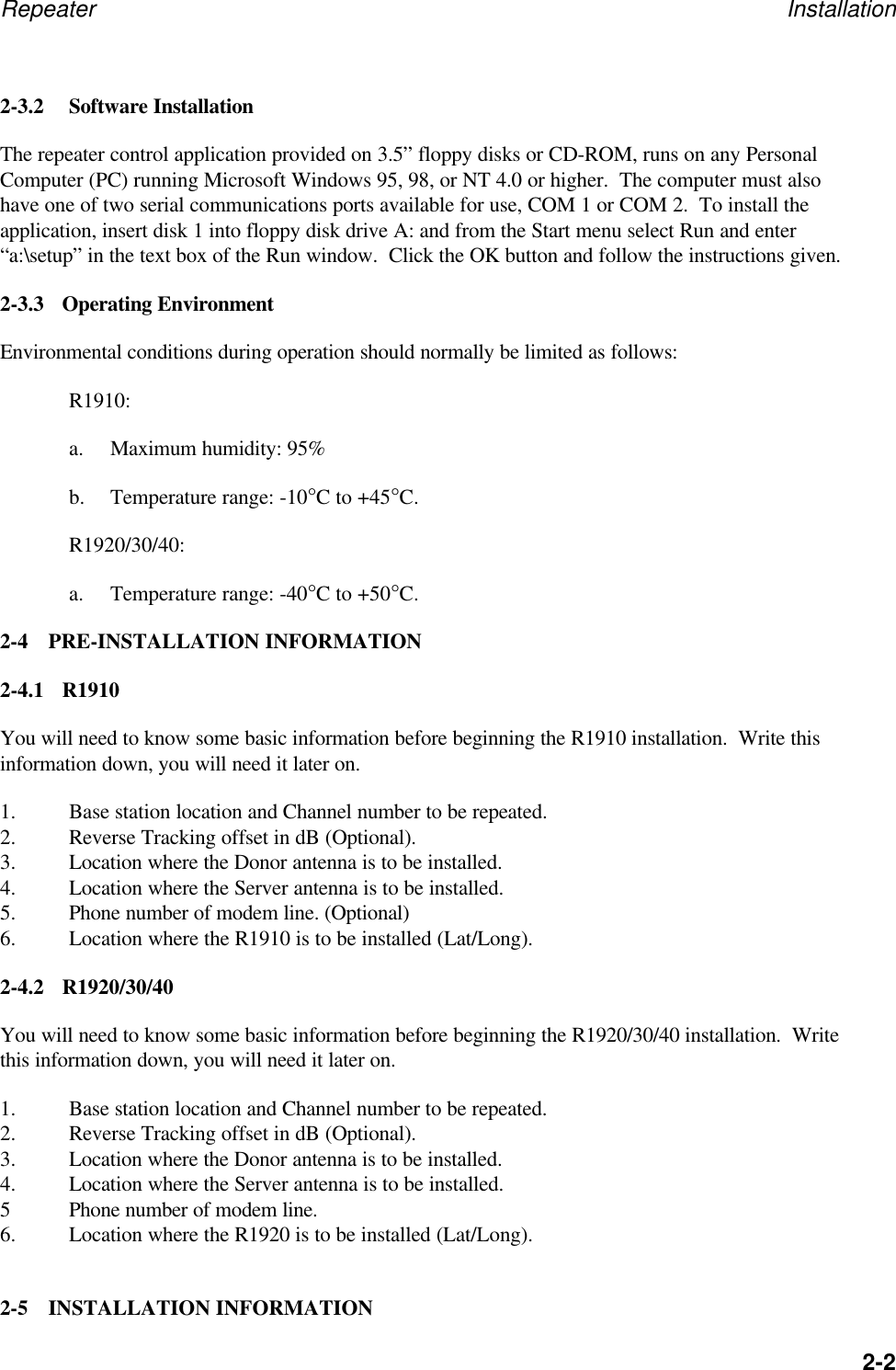
Repeater Installation2-22-3.2 Software InstallationThe repeater control application provided on 3.5” floppy disks or CD-ROM, runs on any PersonalComputer (PC) running Microsoft Windows 95, 98, or NT 4.0 or higher.  The computer must alsohave one of two serial communications ports available for use, COM 1 or COM 2.  To install theapplication, insert disk 1 into floppy disk drive A: and from the Start menu select Run and enter“a:\setup” in the text box of the Run window.  Click the OK button and follow the instructions given.2-3.3 Operating EnvironmentEnvironmental conditions during operation should normally be limited as follows:R1910:a. Maximum humidity: 95%b. Temperature range: -10°C to +45°C.R1920/30/40:a. Temperature range: -40°C to +50°C.2-4 PRE-INSTALLATION INFORMATION2-4.1 R1910You will need to know some basic information before beginning the R1910 installation.  Write thisinformation down, you will need it later on.1. Base station location and Channel number to be repeated.2. Reverse Tracking offset in dB (Optional).3. Location where the Donor antenna is to be installed.4. Location where the Server antenna is to be installed.5. Phone number of modem line. (Optional)6. Location where the R1910 is to be installed (Lat/Long).2-4.2 R1920/30/40You will need to know some basic information before beginning the R1920/30/40 installation.  Writethis information down, you will need it later on.1. Base station location and Channel number to be repeated.2. Reverse Tracking offset in dB (Optional).3. Location where the Donor antenna is to be installed.4. Location where the Server antenna is to be installed.5Phone number of modem line.6. Location where the R1920 is to be installed (Lat/Long).2-5 INSTALLATION INFORMATION
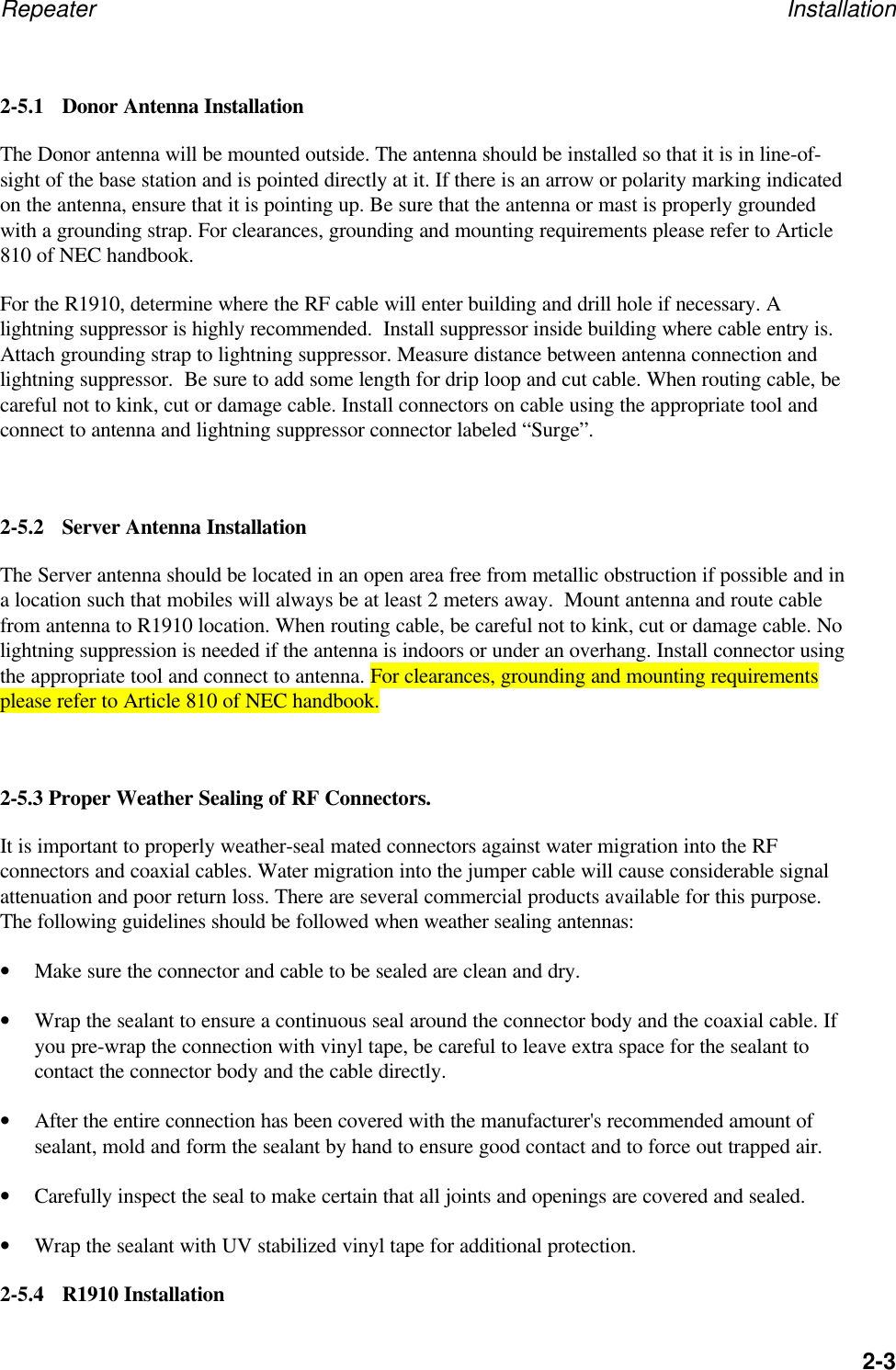
Repeater Installation2-32-5.1 Donor Antenna InstallationThe Donor antenna will be mounted outside. The antenna should be installed so that it is in line-of-sight of the base station and is pointed directly at it. If there is an arrow or polarity marking indicatedon the antenna, ensure that it is pointing up. Be sure that the antenna or mast is properly groundedwith a grounding strap. For clearances, grounding and mounting requirements please refer to Article810 of NEC handbook.For the R1910, determine where the RF cable will enter building and drill hole if necessary. Alightning suppressor is highly recommended.  Install suppressor inside building where cable entry is.Attach grounding strap to lightning suppressor. Measure distance between antenna connection andlightning suppressor.  Be sure to add some length for drip loop and cut cable. When routing cable, becareful not to kink, cut or damage cable. Install connectors on cable using the appropriate tool andconnect to antenna and lightning suppressor connector labeled “Surge”.2-5.2 Server Antenna InstallationThe Server antenna should be located in an open area free from metallic obstruction if possible and ina location such that mobiles will always be at least 2 meters away.  Mount antenna and route cablefrom antenna to R1910 location. When routing cable, be careful not to kink, cut or damage cable. Nolightning suppression is needed if the antenna is indoors or under an overhang. Install connector usingthe appropriate tool and connect to antenna. For clearances, grounding and mounting requirementsplease refer to Article 810 of NEC handbook.2-5.3 Proper Weather Sealing of RF Connectors.It is important to properly weather-seal mated connectors against water migration into the RFconnectors and coaxial cables. Water migration into the jumper cable will cause considerable signalattenuation and poor return loss. There are several commercial products available for this purpose.The following guidelines should be followed when weather sealing antennas:• Make sure the connector and cable to be sealed are clean and dry.• Wrap the sealant to ensure a continuous seal around the connector body and the coaxial cable. Ifyou pre-wrap the connection with vinyl tape, be careful to leave extra space for the sealant tocontact the connector body and the cable directly.• After the entire connection has been covered with the manufacturer's recommended amount ofsealant, mold and form the sealant by hand to ensure good contact and to force out trapped air.• Carefully inspect the seal to make certain that all joints and openings are covered and sealed.• Wrap the sealant with UV stabilized vinyl tape for additional protection.2-5.4 R1910 Installation
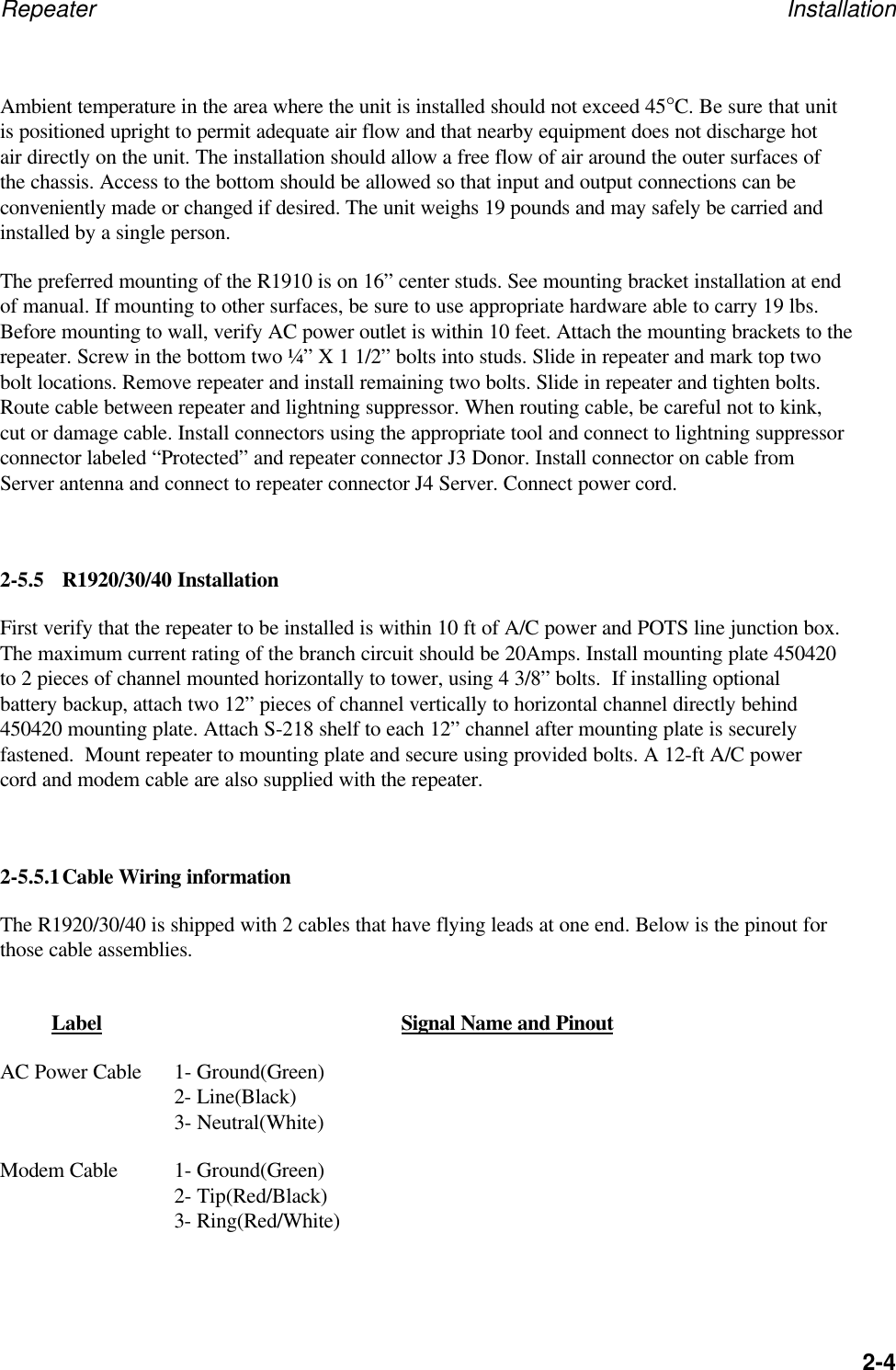
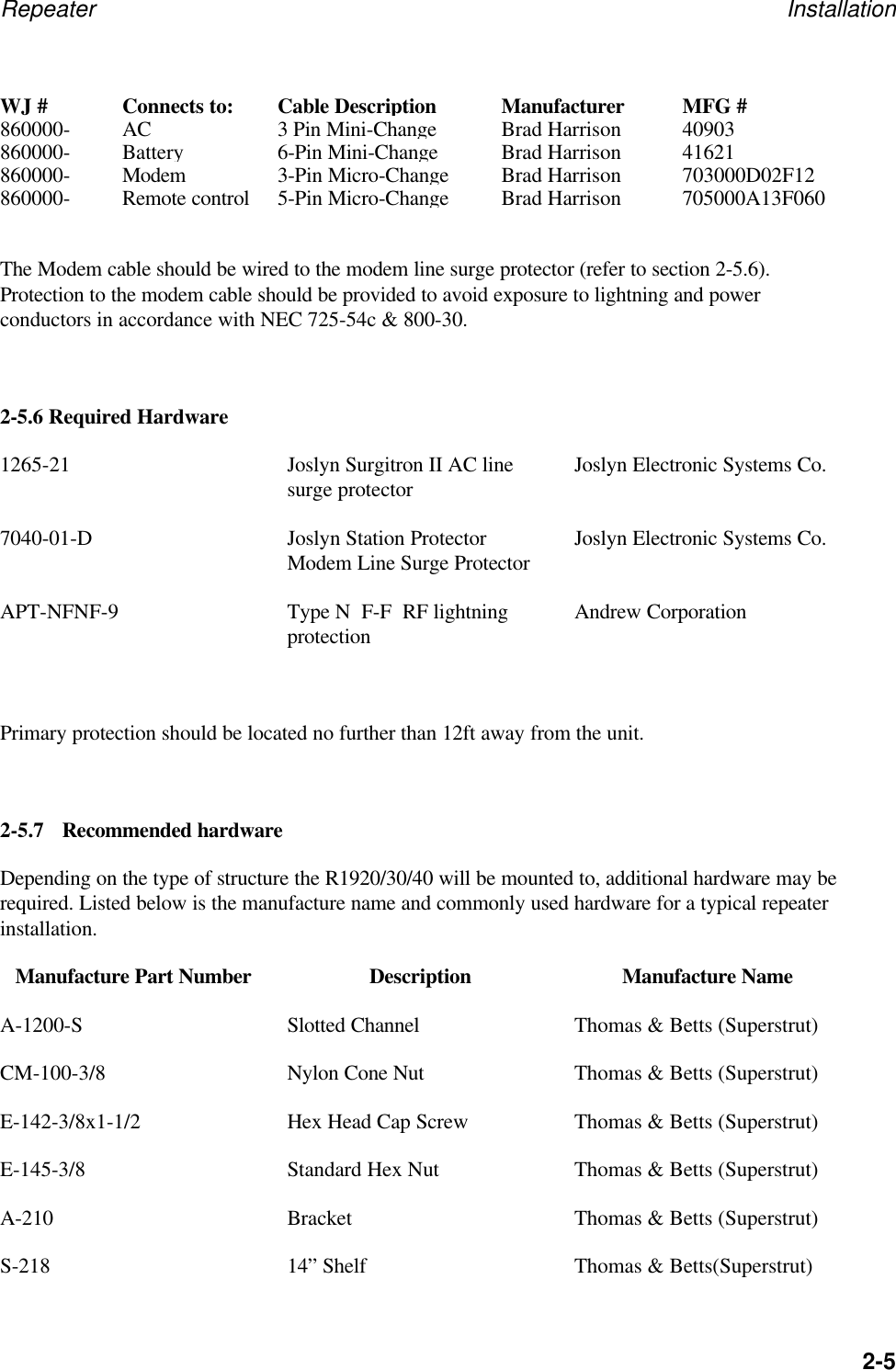
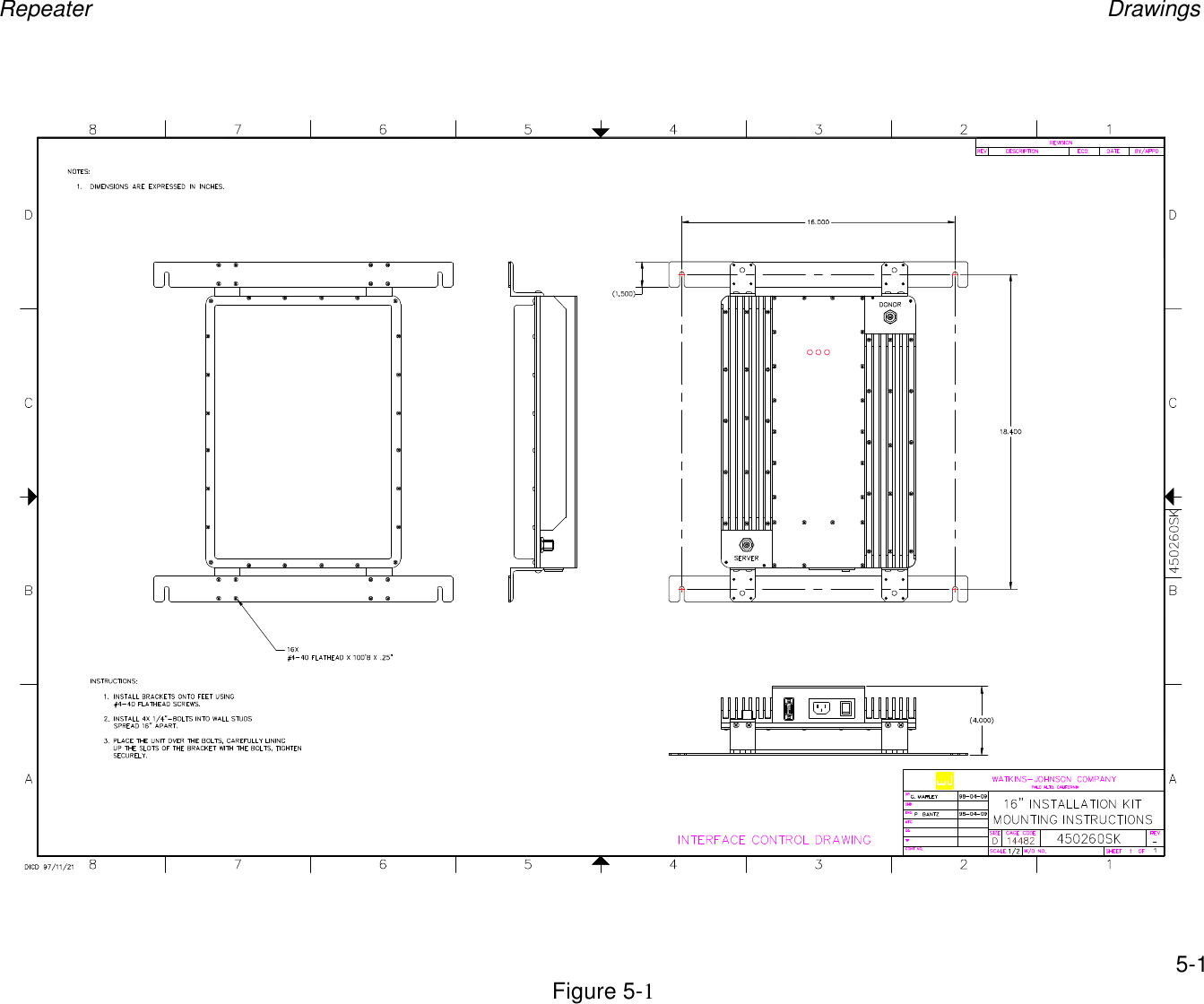
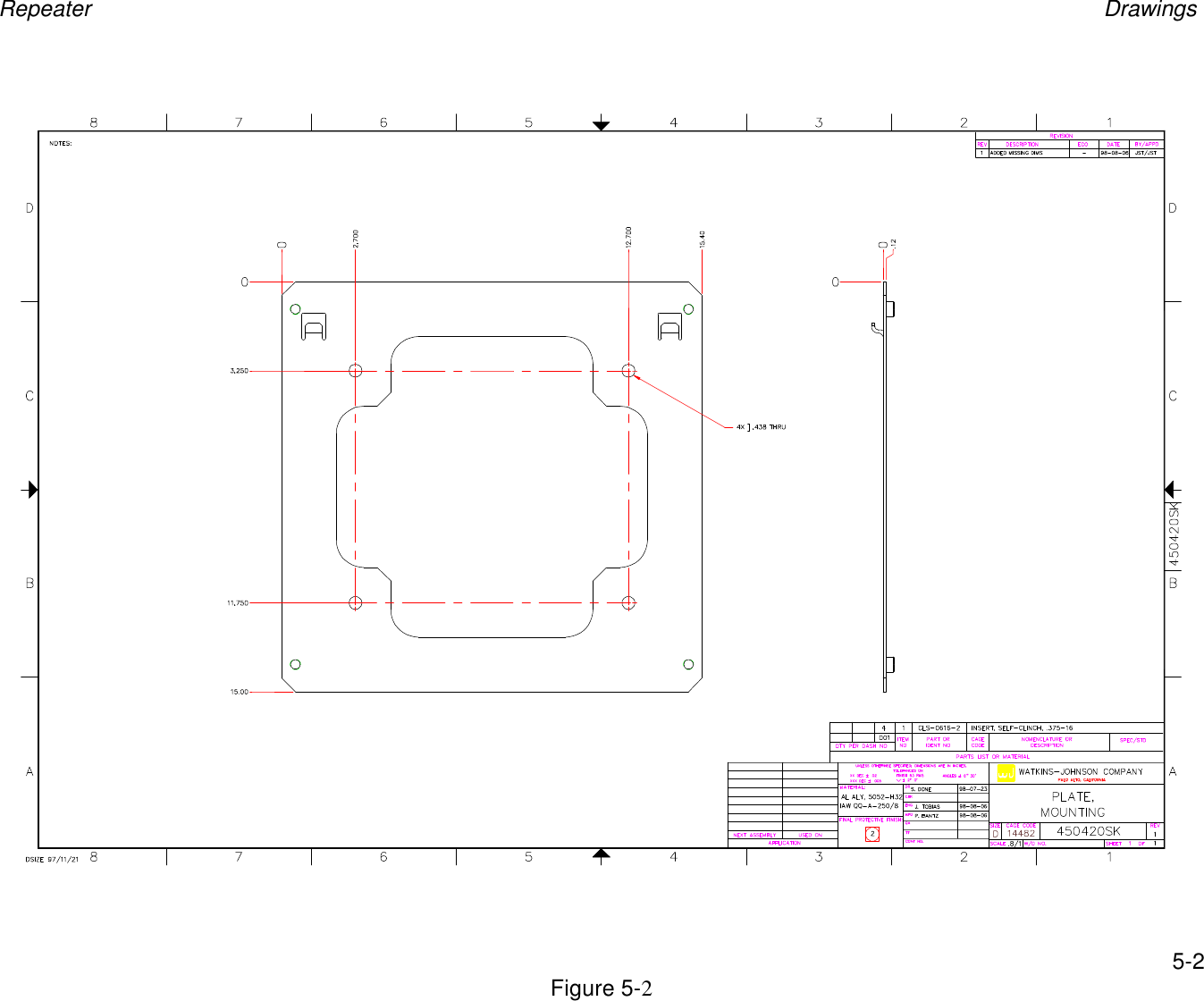
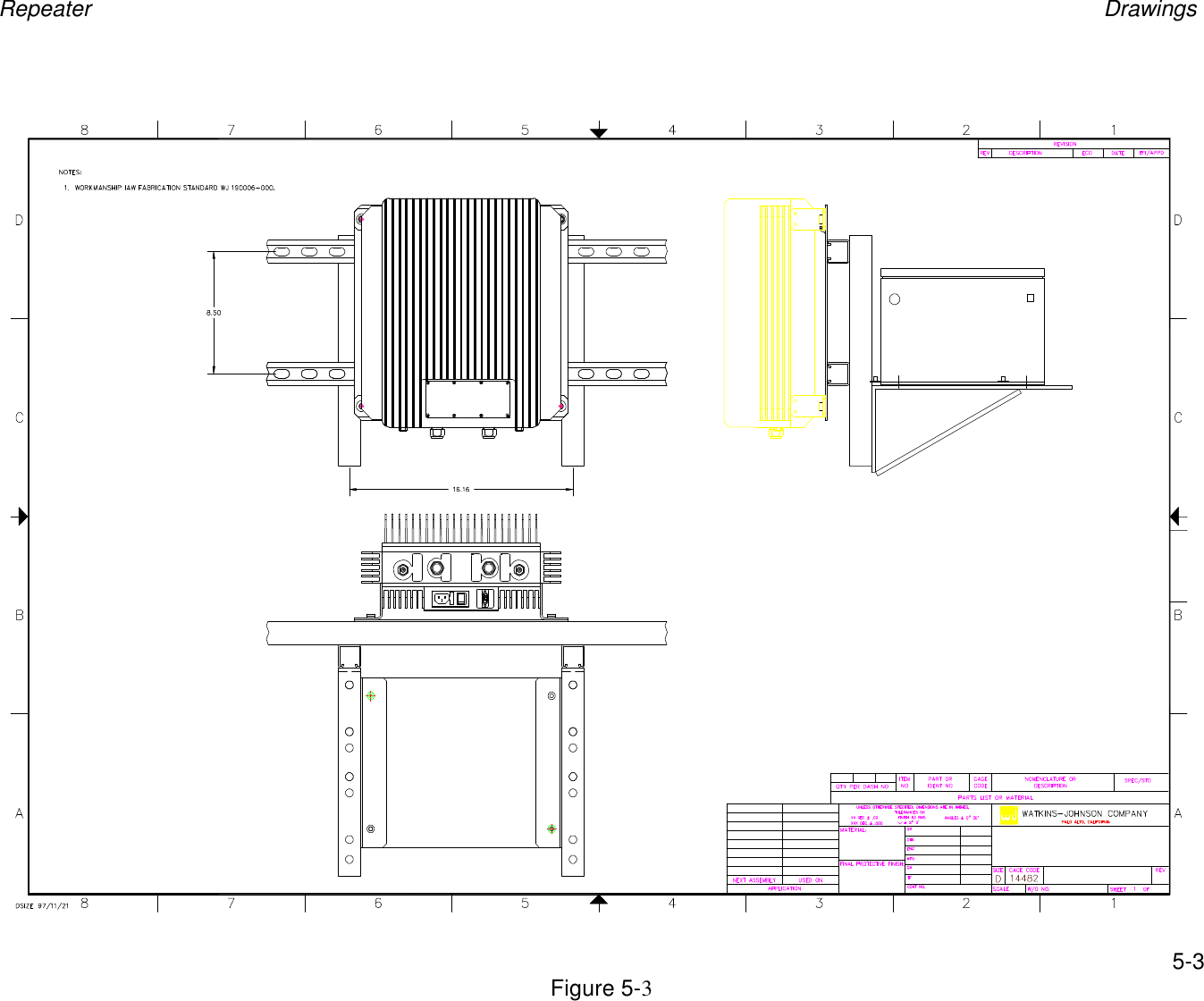
Repeater Installation2-4Ambient temperature in the area where the unit is installed should not exceed 45°C. Be sure that unitis positioned upright to permit adequate air flow and that nearby equipment does not discharge hotair directly on the unit. The installation should allow a free flow of air around the outer surfaces ofthe chassis. Access to the bottom should be allowed so that input and output connections can beconveniently made or changed if desired. The unit weighs 19 pounds and may safely be carried andinstalled by a single person.The preferred mounting of the R1910 is on 16” center studs. See mounting bracket installation at endof manual. If mounting to other surfaces, be sure to use appropriate hardware able to carry 19 lbs.Before mounting to wall, verify AC power outlet is within 10 feet. Attach the mounting brackets to therepeater. Screw in the bottom two ¼” X 1 1/2” bolts into studs. Slide in repeater and mark top twobolt locations. Remove repeater and install remaining two bolts. Slide in repeater and tighten bolts.Route cable between repeater and lightning suppressor. When routing cable, be careful not to kink,cut or damage cable. Install connectors using the appropriate tool and connect to lightning suppressorconnector labeled “Protected” and repeater connector J3 Donor. Install connector on cable fromServer antenna and connect to repeater connector J4 Server. Connect power cord.2-5.5 R1920/30/40 InstallationFirst verify that the repeater to be installed is within 10 ft of A/C power and POTS line junction box.The maximum current rating of the branch circuit should be 20Amps. Install mounting plate 450420to 2 pieces of channel mounted horizontally to tower, using 4 3/8” bolts.  If installing optionalbattery backup, attach two 12” pieces of channel vertically to horizontal channel directly behind450420 mounting plate. Attach S-218 shelf to each 12” channel after mounting plate is securelyfastened.  Mount repeater to mounting plate and secure using provided bolts. A 12-ft A/C powercord and modem cable are also supplied with the repeater.2-5.5.1Cable Wiring informationThe R1920/30/40 is shipped with 2 cables that have flying leads at one end. Below is the pinout forthose cable assemblies.Label Signal Name and PinoutAC Power Cable 1- Ground(Green)2- Line(Black)3- Neutral(White)Modem Cable 1- Ground(Green)2- Tip(Red/Black)3- Ring(Red/White)
Repeater Installation2-5WJ #Connects to:Cable DescriptionManufacturerMFG #860000-AC3 Pin Mini-ChangeBrad Harrison40903860000-Battery6-Pin Mini-ChangeBrad Harrison41621860000-Modem3-Pin Micro-ChangeBrad Harrison703000D02F12860000-Remote control5-Pin Micro-ChangeBrad Harrison705000A13F060The Modem cable should be wired to the modem line surge protector (refer to section 2-5.6).Protection to the modem cable should be provided to avoid exposure to lightning and powerconductors in accordance with NEC 725-54c & 800-30.2-5.6 Required Hardware1265-21 Joslyn Surgitron II AC linesurge protector Joslyn Electronic Systems Co.7040-01-D Joslyn Station ProtectorModem Line Surge Protector Joslyn Electronic Systems Co.APT-NFNF-9 Type N  F-F  RF lightningprotection Andrew CorporationPrimary protection should be located no further than 12ft away from the unit.2-5.7 Recommended hardwareDepending on the type of structure the R1920/30/40 will be mounted to, additional hardware may berequired. Listed below is the manufacture name and commonly used hardware for a typical repeaterinstallation.Manufacture Part Number Description Manufacture NameA-1200-S Slotted Channel Thomas & Betts (Superstrut)CM-100-3/8 Nylon Cone Nut Thomas & Betts (Superstrut)E-142-3/8x1-1/2 Hex Head Cap Screw Thomas & Betts (Superstrut)E-145-3/8 Standard Hex Nut Thomas & Betts (Superstrut)A-210 Bracket Thomas & Betts (Superstrut)S-218 14” Shelf Thomas & Betts(Superstrut)
Repeater Installation2-6H-115-3 U-Bolt Thomas & Betts(Superstrut)99343 Power Splitter Tessco2-6 REPEATER INITIAL TURN-ON PROCEDUREVerify all RF connectors are tightened and cables and antennas are secured.  On the R1910 turn onthe switch J1 located at the bottom of the unit and verify PWR led is illuminated green as well as theAMP and OSC LED’s. For the R1920/30/40 remove the access cover push power switch, it shouldilluminate red.2-7 SETUP2-7.1 SERIAL INTERFACEFor the R1910, connect a 9-pin cable to connector J2 Control.  For the R1920, connect a 9-pin cableto connector labeled Local Control.  Connect the other end of the serial cable to the serial COM porton a PC. Verify software has been installed on PC.  On PC click “WJ Repeater Control” icon.Choose the COM port the cable is attached to.  After the Repeater window opens, all the parametersshould begin appearing.  If not, the wrong COM port may have been selected. The cable used toconnect to the repeater is a temporary connection and should be no longer than 140ft.For background on the entire installation process, please refer to NEC articles 725 and 800.  Thispertains especially to clearances from power and lightning conductors and transient protection.2-7.2 MODEM INTERFACEFor the R1910, connect the 9-pin-to-phone-jack adapter to the J2 Control connector.  Plug the phoneline into the phone jack of the adapter.  For the R1920, connect the supplied 3-pin modem cable toconnector labeled “Modem” and the other end to the POTS line junction box. Connect an analogphone line to the modem of a PC.  Verify software has been installed on the PC. On the PC, click the“WJ Repeater Control” icon on the Desktop or in the Start menu and follow these steps to establish aconnection to the repeater.1. Choose “Modem” from the interface selection window and press “OK”.2. Enter the phone number of the repeater when prompted, and press “OK”.3. When the main window appears, click “File” on the menu bar. Then select “Connect” from themenu.4. When the Dialer window appears press the “Dial” button to call the repeater.When a connection is established the Dialer window will disappear and, after several seconds, therepeater’s parameters will be downloaded.
Repeater Installation2-72-8 ISOLATION AND ALIGNMENT PROCEDURESAfter completing the installation, turn-on procedure, and setup you must align and verify properoperation of the R19XX.Note: Watkins-Johnson repeaters incorporate an over power protection algorithm. This algorithmdetects when the repeater is transmitting at a power level above that allowed by the FCC. Therepeater continuously reduces the gain of the repeater until the output power is reduced to anacceptable power level. An Osc/Max Pwr alarm is generated when this occurs.2.8.1 ISOLATION PROCEDUREPerforming the isolation test will ensure proper system operation. If the Donor and Serverantennas are not sufficiently isolated, the repeater will oscillate and MAY turn off, causingdropped calls and coverage holes.a. Set Uplink and Downlink Gain settings to minimum. Turn off  Downlink ALC andUplink Tracking.b. Set Donor Channel # to unused channel(s) with no signal activity. Note:  This is notpossible with full-band filtersc. Increase Downlink gain setting by 2dB.  RSS should read minimum.d. Increase Uplink gain by 2dB.  RSS should still read minimum.e. Repeat steps C and D until the maximum gain settings are reached. If there is any signalpresent at RSS or the OSC alarm turns red, there is not enough isolation betweenantennas, and you must increase the physical distance between antennas or change theServer antenna direction away from the Donor antenna.f. Typical industry practice is to allow a 14dB margin between the gain setting and theoscillation point, but this is at the user’s discretion.g. As an alternative to steps a through f, set gains to desired levels and click the “OSCTest” button in the Repeater Control software.  The repeater will automatically add14dB to the Uplink and Downlink gain settings, and “Oscillation Test Active” willappear in the lower left-hand corner of the Repeater Control window.h. After the message, “Oscillation Test Active” returns to “Device Online,” verify noAlarms are illuminated red.  If no alarms are red, the test is complete.  If alarms areilluminated red, go to step i.i. Reposition to Donor and/or Server antennas to improve isolation or lower Uplink and/orDownlink gain settings by 2dB, clear alarms, and return to step h.
Repeater Installation2-82.8.2 ANTENNA ALIGNMENT PROCEDUREa. Ensure correct Channel # is displayed and RF is turned ON.  For multicarrierfilters, the Channel # should be tuned to the center of the desired passband.b. Increase the Downlink gain until signal is present on RSSI.c. Adjust Donor Antenna for maximum signal deflection on RSSI.d. Set FWD gain to desired level.e. When ready, click the “OSC Test” button on the windows control software.f. After test complete, verify no Alarms are illuminated red. If yes (no alarms red),skip to step “f”. If no (alarms illuminated red) go to “g”.g. Reposition the Donor or Server antennas to improve isolation, or lower FWD orREV gain settings by 4dB, clear alarms and repeat step “c”.h. If using ALC *, enter ALC Level and enable. Repeat step “c”. If not go to “g”.i. If using the serial interface, remove cable from J2, RS-232 on R1910.  Test iscomplete.2-8.2.1   Effects of obstruction on RF Signal PropagationRadio path clearance between antennas is an essential criterion for any point-to-point communicationsystem, and is one critical element of propagation conditions of a mobile communication system. If afairly large object exists in the radiation path between two antennas, reduced received signal strengthwill occur because the radio link relies increasingly on energy diffracted around the obstructingobject, rather than direct (line-of-sight) radiation.Diffraction allows radio signals to propagate behind obstructions. Although the received signalstrength decreases rapidly as a receiver moves deeply into the obstructed (shadowed) region, thediffraction field still exists and often has sufficient strength to produce a useful signal.2-9   FCC REQUIREMENTS ON SPURIOUSThe FCC requires that all spurious signals emanating from the repeater must be at or below -13dBmoutside your frequency band.  There are several things one must consider when deploying repeaters.  Ifyou are deploying in a single carrier deployment then there are no other calculations you must make toverify that the FCC limits are being met.  Multicarrier deployment is more complicated, but goodsolutions are readily available. The preferred method is to use one repeater per carrier.  This methodprovides the highest composite output power without producing intermodulation products that exceedFCC requirements.  A much lower cost solution involves using a repeater with a bandwidth wide enoughto allow 2 or more signals to pass.  This method provides the lowest cost solution but can limitcomposite output power depending on the frequency of the signals.  The two methods are detailed below.
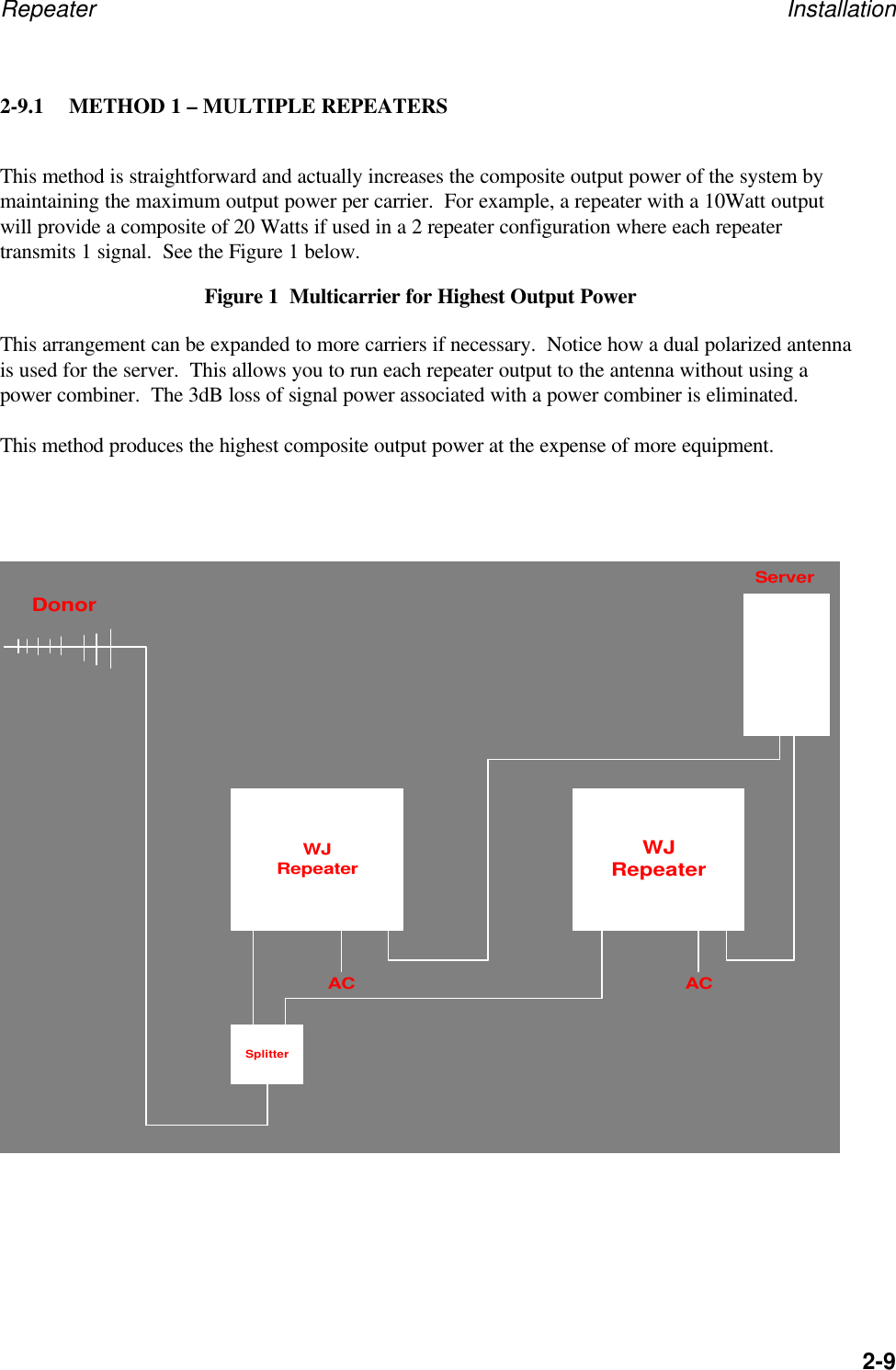
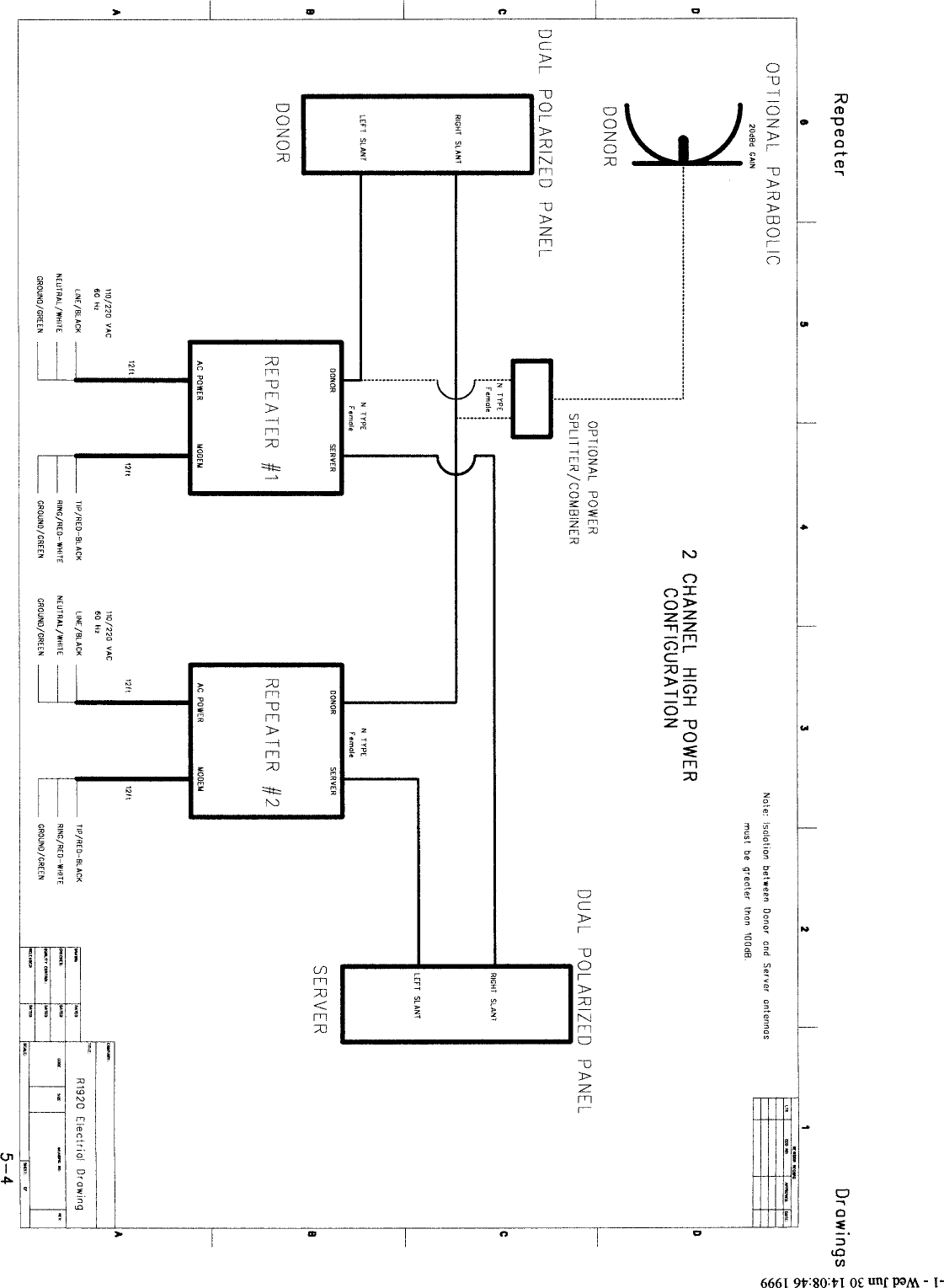
Repeater Installation2-92-9.1 METHOD 1 – MULTIPLE REPEATERSThis method is straightforward and actually increases the composite output power of the system bymaintaining the maximum output power per carrier.  For example, a repeater with a 10Watt outputwill provide a composite of 20 Watts if used in a 2 repeater configuration where each repeatertransmits 1 signal.  See the Figure 1 below.Figure 1  Multicarrier for Highest Output PowerThis arrangement can be expanded to more carriers if necessary.  Notice how a dual polarized antennais used for the server.  This allows you to run each repeater output to the antenna without using apower combiner.  The 3dB loss of signal power associated with a power combiner is eliminated.This method produces the highest composite output power at the expense of more equipment.WJRepeaterWJRepeaterSplitterServerDonorAC AC
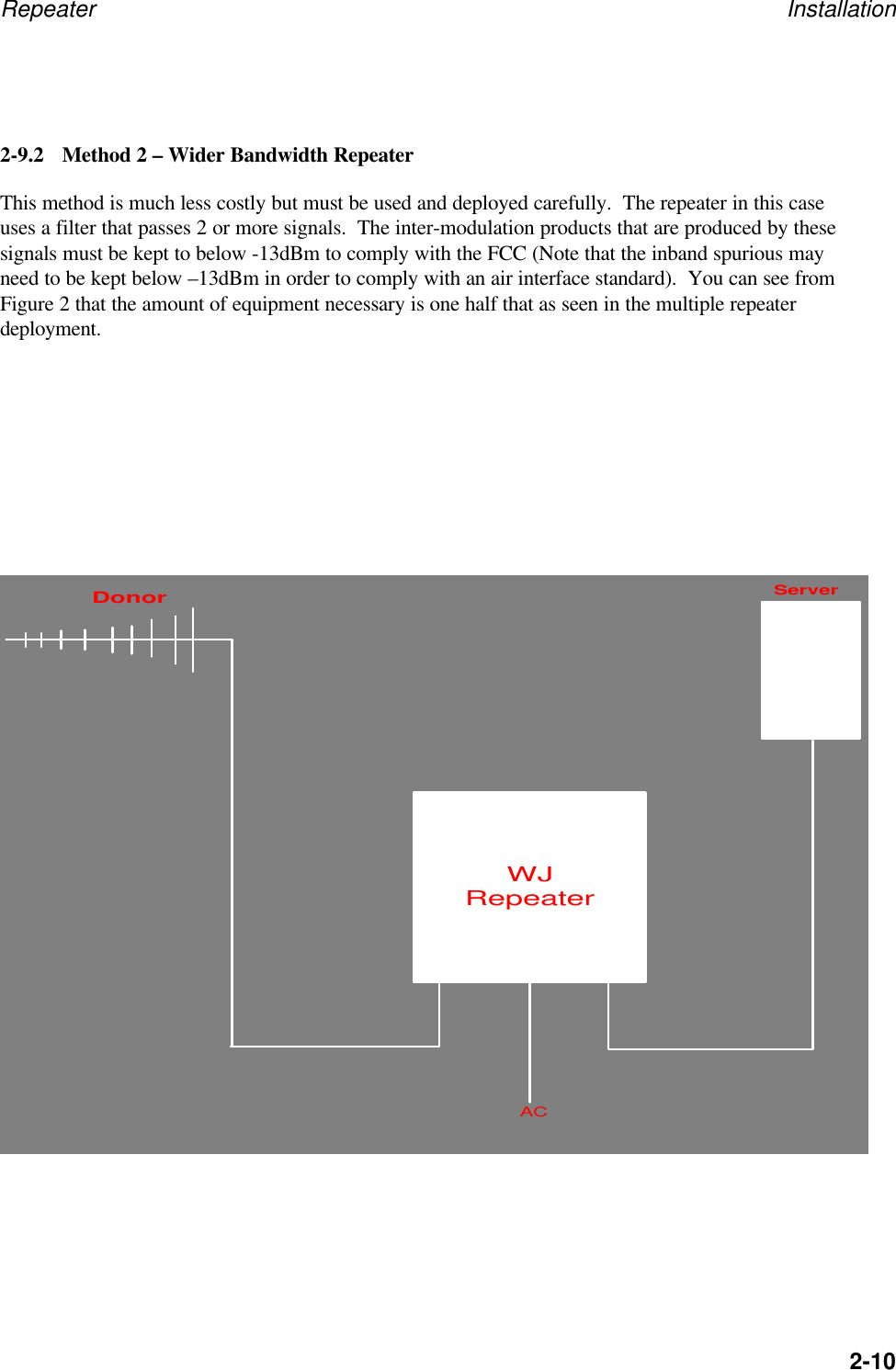
Repeater Installation2-102-9.2 Method 2 – Wider Bandwidth RepeaterThis method is much less costly but must be used and deployed carefully.  The repeater in this caseuses a filter that passes 2 or more signals.  The inter-modulation products that are produced by thesesignals must be kept to below -13dBm to comply with the FCC (Note that the inband spurious mayneed to be kept below –13dBm in order to comply with an air interface standard).  You can see fromFigure 2 that the amount of equipment necessary is one half that as seen in the multiple repeaterdeployment.ServerDonorWJRepeaterAC
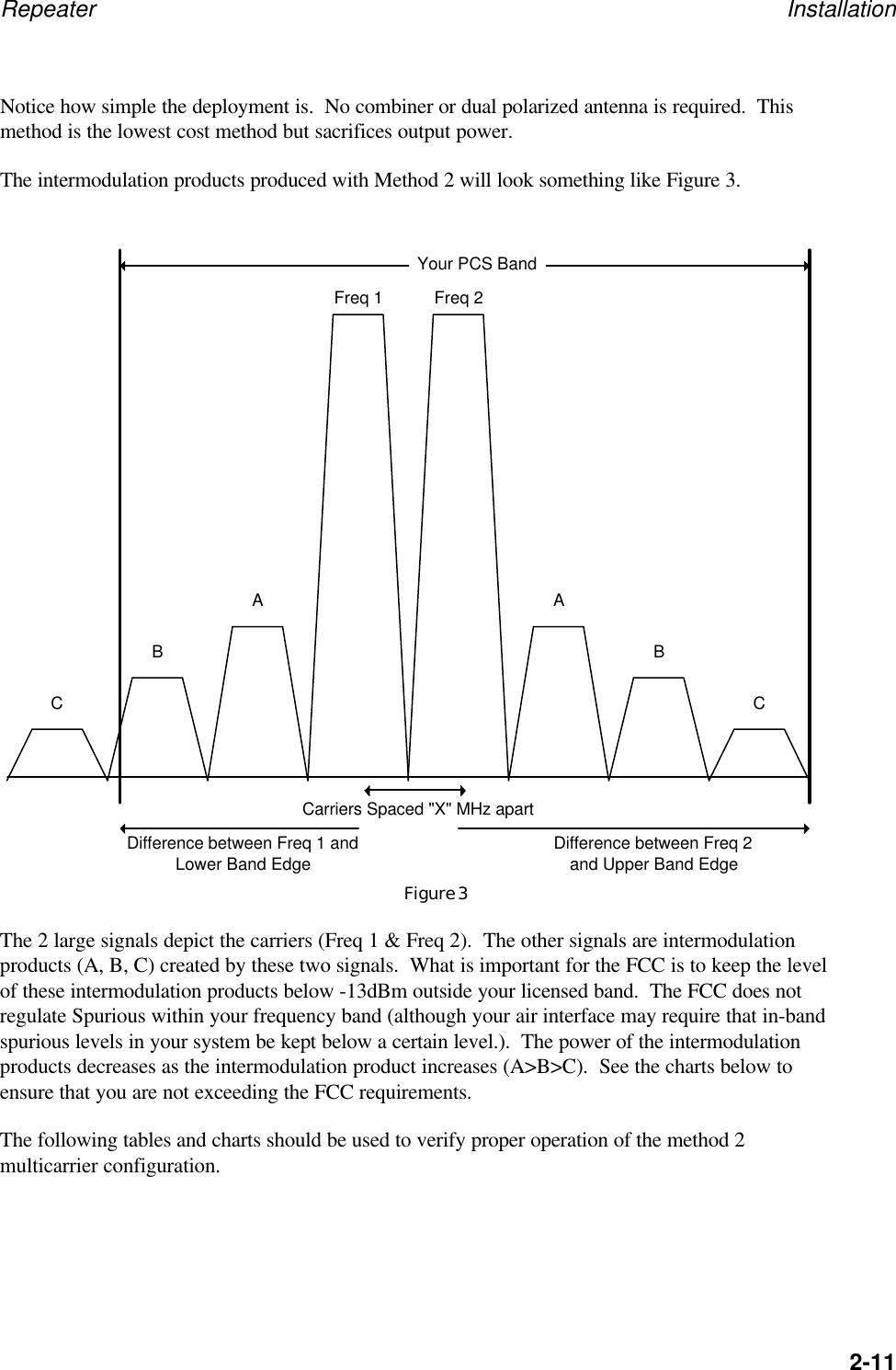
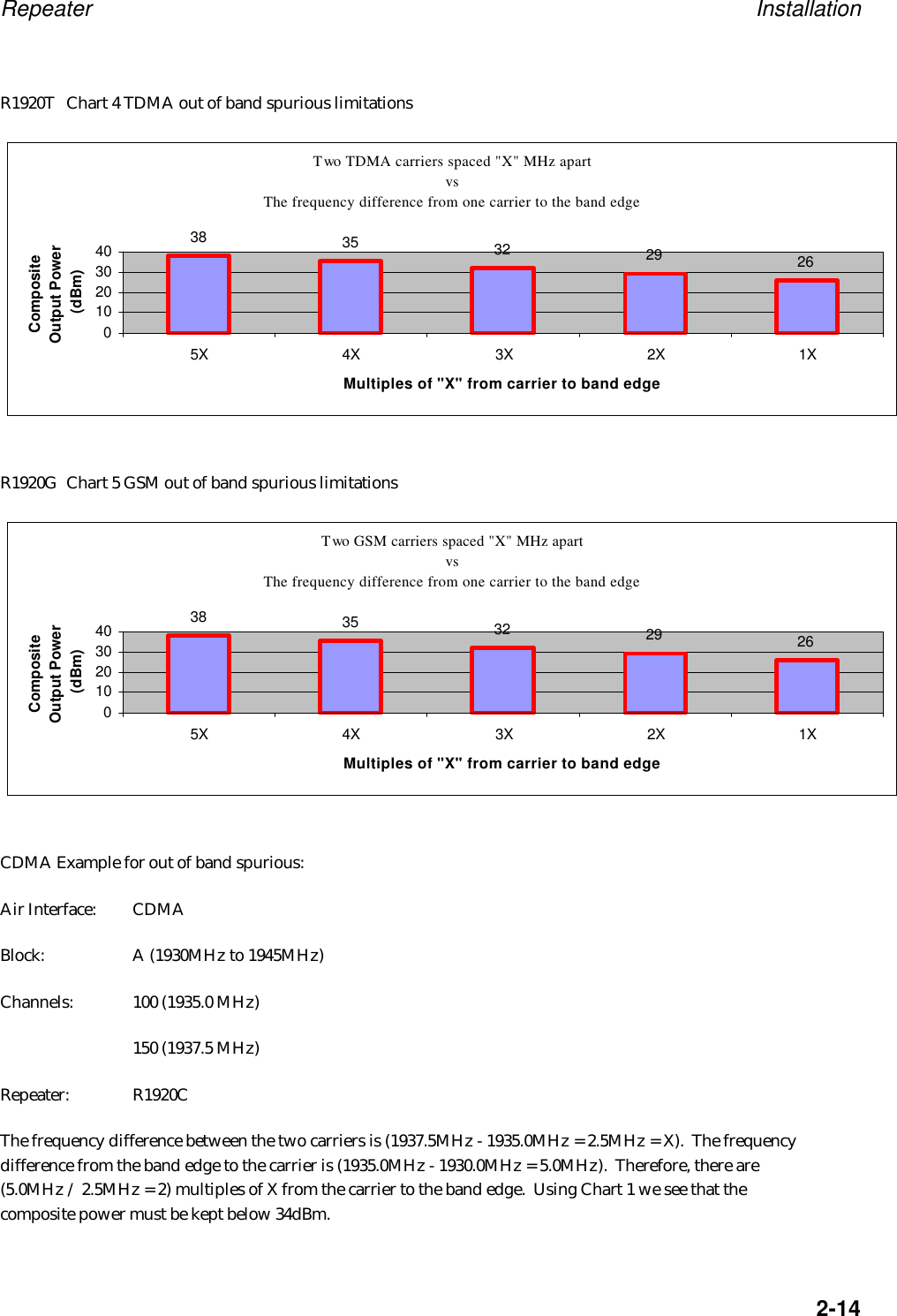
Repeater Installation2-11Notice how simple the deployment is.  No combiner or dual polarized antenna is required.  Thismethod is the lowest cost method but sacrifices output power.The intermodulation products produced with Method 2 will look something like Figure 3.Figure 3The 2 large signals depict the carriers (Freq 1 & Freq 2).  The other signals are intermodulationproducts (A, B, C) created by these two signals.  What is important for the FCC is to keep the levelof these intermodulation products below -13dBm outside your licensed band.  The FCC does notregulate Spurious within your frequency band (although your air interface may require that in-bandspurious levels in your system be kept below a certain level.).  The power of the intermodulationproducts decreases as the intermodulation product increases (A>B>C).  See the charts below toensure that you are not exceeding the FCC requirements.The following tables and charts should be used to verify proper operation of the method 2multicarrier configuration.Carriers Spaced "X" MHz apartDifference between Freq 1 andLower Band Edge Difference between Freq 2and Upper Band EdgeFreq 1 Freq 2ABCABCYour PCS Band
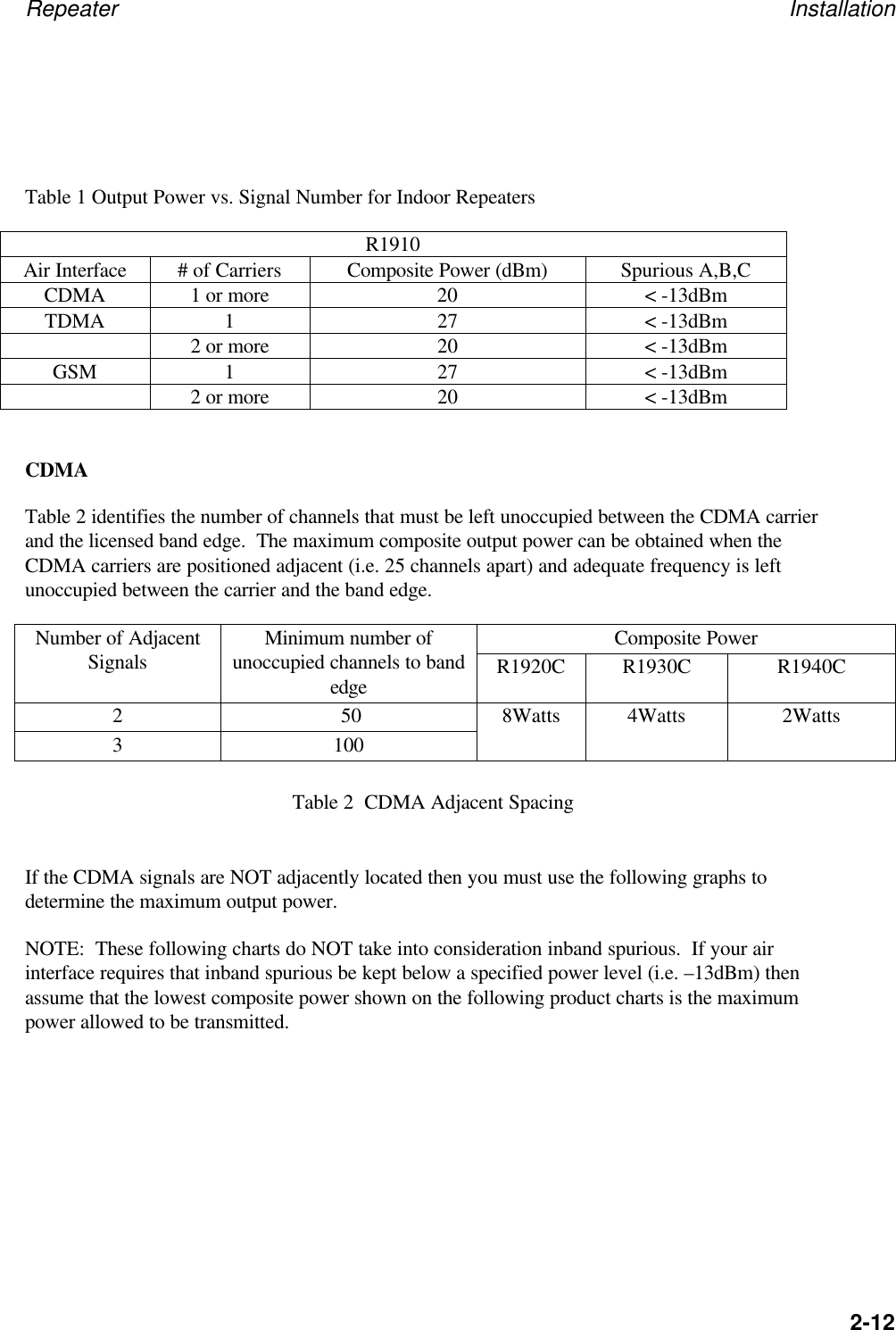
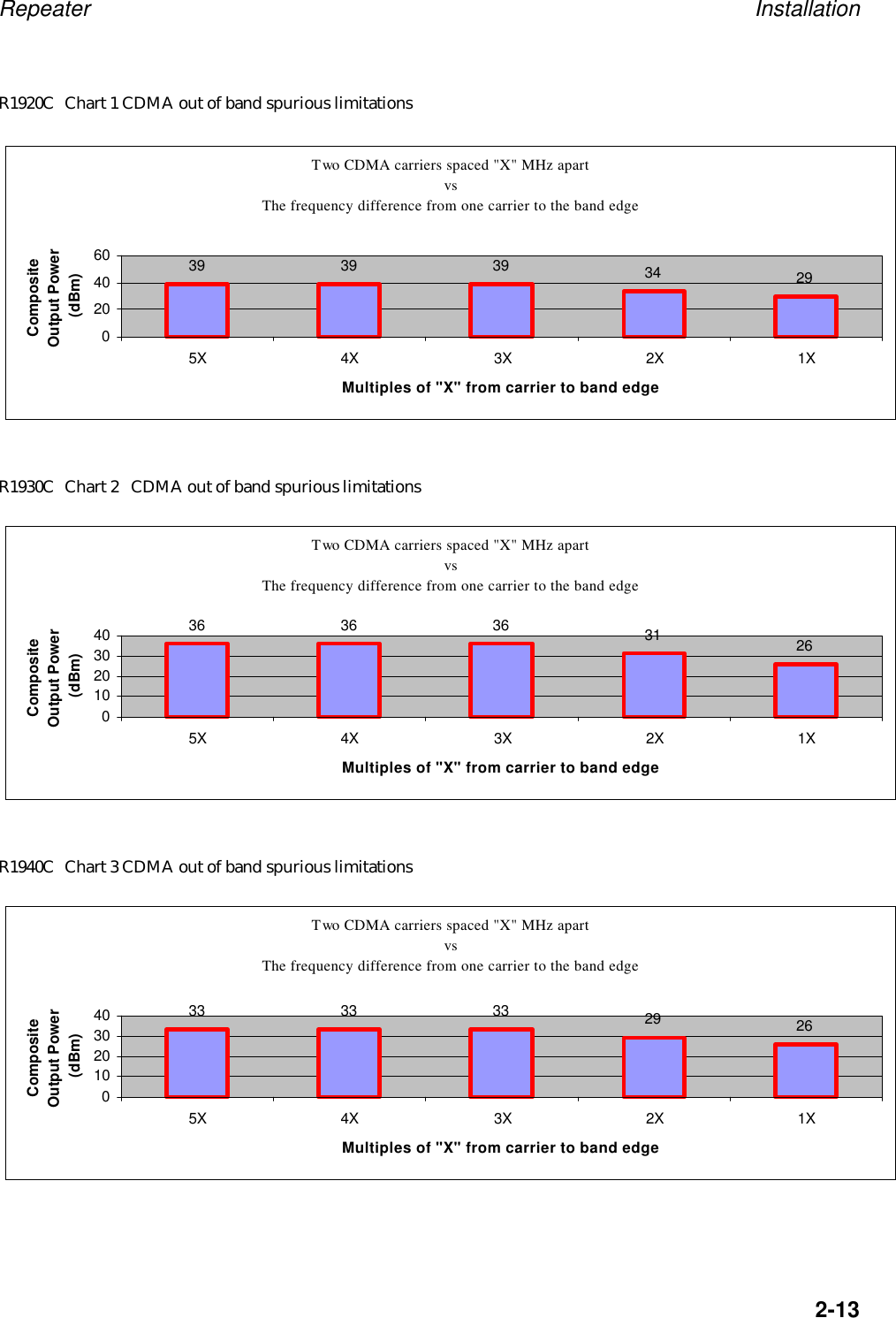
Repeater Installation2-12Table 1 Output Power vs. Signal Number for Indoor RepeatersR1910Air Interface # of Carriers Composite Power (dBm) Spurious A,B,CCDMA 1 or more 20 < -13dBmTDMA 1 27 < -13dBm2 or more 20 < -13dBmGSM 1 27 < -13dBm2 or more 20 < -13dBmCDMATable 2 identifies the number of channels that must be left unoccupied between the CDMA carrierand the licensed band edge.  The maximum composite output power can be obtained when theCDMA carriers are positioned adjacent (i.e. 25 channels apart) and adequate frequency is leftunoccupied between the carrier and the band edge.Composite PowerNumber of AdjacentSignals Minimum number ofunoccupied channels to bandedge R1920C R1930C R1940C2 503 1008Watts 4Watts 2WattsTable 2  CDMA Adjacent SpacingIf the CDMA signals are NOT adjacently located then you must use the following graphs todetermine the maximum output power.NOTE:  These following charts do NOT take into consideration inband spurious.  If your airinterface requires that inband spurious be kept below a specified power level (i.e. –13dBm) thenassume that the lowest composite power shown on the following product charts is the maximumpower allowed to be transmitted.
Repeater Installation2-13R1920C Chart 1 CDMA out of band spurious limitationsR1930C Chart 2 CDMA out of band spurious limitationsR1940C Chart 3 CDMA out of band spurious limitationsTwo CDMA carriers spaced "X" MHz apart vs The frequency difference from one carrier to the band edge39 39 39 34 2902040605X 4X 3X 2X 1XMultiples of "X" from carrier to band edgeComposite Output Power (dBm)Two CDMA carriers spaced "X" MHz apart vs The frequency difference from one carrier to the band edge36 36 36 31 260102030405X 4X 3X 2X 1XMultiples of "X" from carrier to band edgeComposite Output Power (dBm)Two CDMA carriers spaced "X" MHz apart vs The frequency difference from one carrier to the band edge33 33 33 29 260102030405X 4X 3X 2X 1XMultiples of "X" from carrier to band edgeComposite Output Power (dBm)
Repeater Installation2-14R1920T Chart 4 TDMA out of band spurious limitationsR1920G Chart 5 GSM out of band spurious limitationsCDMA Example for out of band spurious:Air Interface: CDMABlock: A (1930MHz to 1945MHz)Channels: 100 (1935.0 MHz)150 (1937.5 MHz)Repeater: R1920CThe frequency difference between the two carriers is (1937.5MHz - 1935.0MHz = 2.5MHz = X).  The frequencydifference from the band edge to the carrier is (1935.0MHz - 1930.0MHz = 5.0MHz).  Therefore, there are(5.0MHz / 2.5MHz = 2) multiples of X from the carrier to the band edge.  Using Chart 1 we see that thecomposite power must be kept below 34dBm.Two TDMA carriers spaced "X" MHz apart vs The frequency difference from one carrier to the band edge38 35 32 29 260102030405X 4X 3X 2X 1XMultiples of "X" from carrier to band edgeComposite Output Power (dBm)Two GSM carriers spaced "X" MHz apart vs The frequency difference from one carrier to the band edge38 35 32 29 260102030405X 4X 3X 2X 1XMultiples of "X" from carrier to band edgeComposite Output Power (dBm)
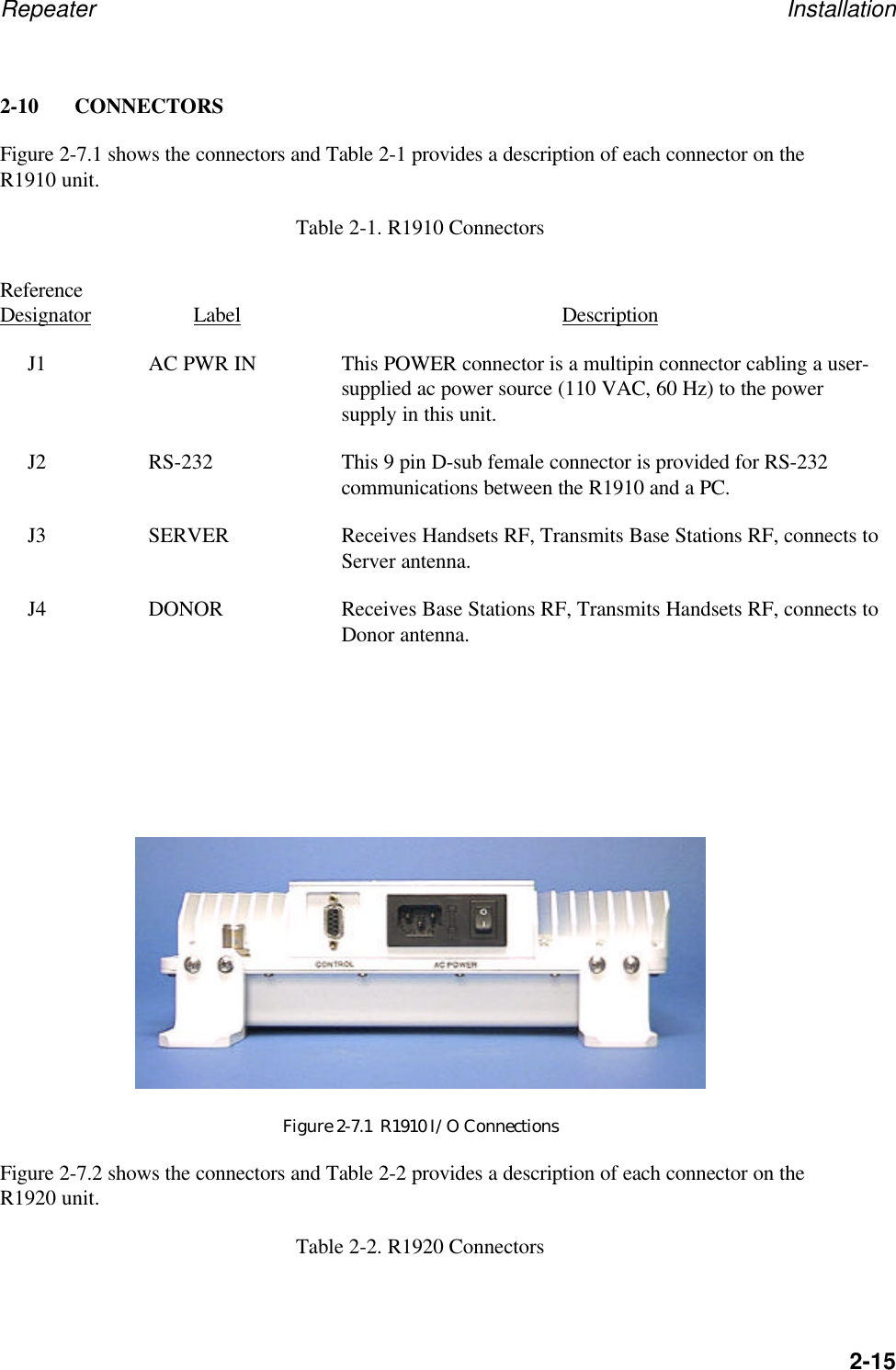
Repeater Installation2-152-10  CONNECTORSFigure 2-7.1 shows the connectors and Table 2-1 provides a description of each connector on theR1910 unit.Table 2-1. R1910 ConnectorsReferenceDesignator Label DescriptionJ1 AC PWR IN This POWER connector is a multipin connector cabling a user-supplied ac power source (110 VAC, 60 Hz) to the powersupply in this unit.J2 RS-232 This 9 pin D-sub female connector is provided for RS-232communications between the R1910 and a PC.J3 SERVER Receives Handsets RF, Transmits Base Stations RF, connects toServer antenna.J4 DONOR Receives Base Stations RF, Transmits Handsets RF, connects toDonor antenna.Figure 2-7.1  R1910 I/O ConnectionsFigure 2-7.2 shows the connectors and Table 2-2 provides a description of each connector on theR1920 unit.Table 2-2. R1920 Connectors
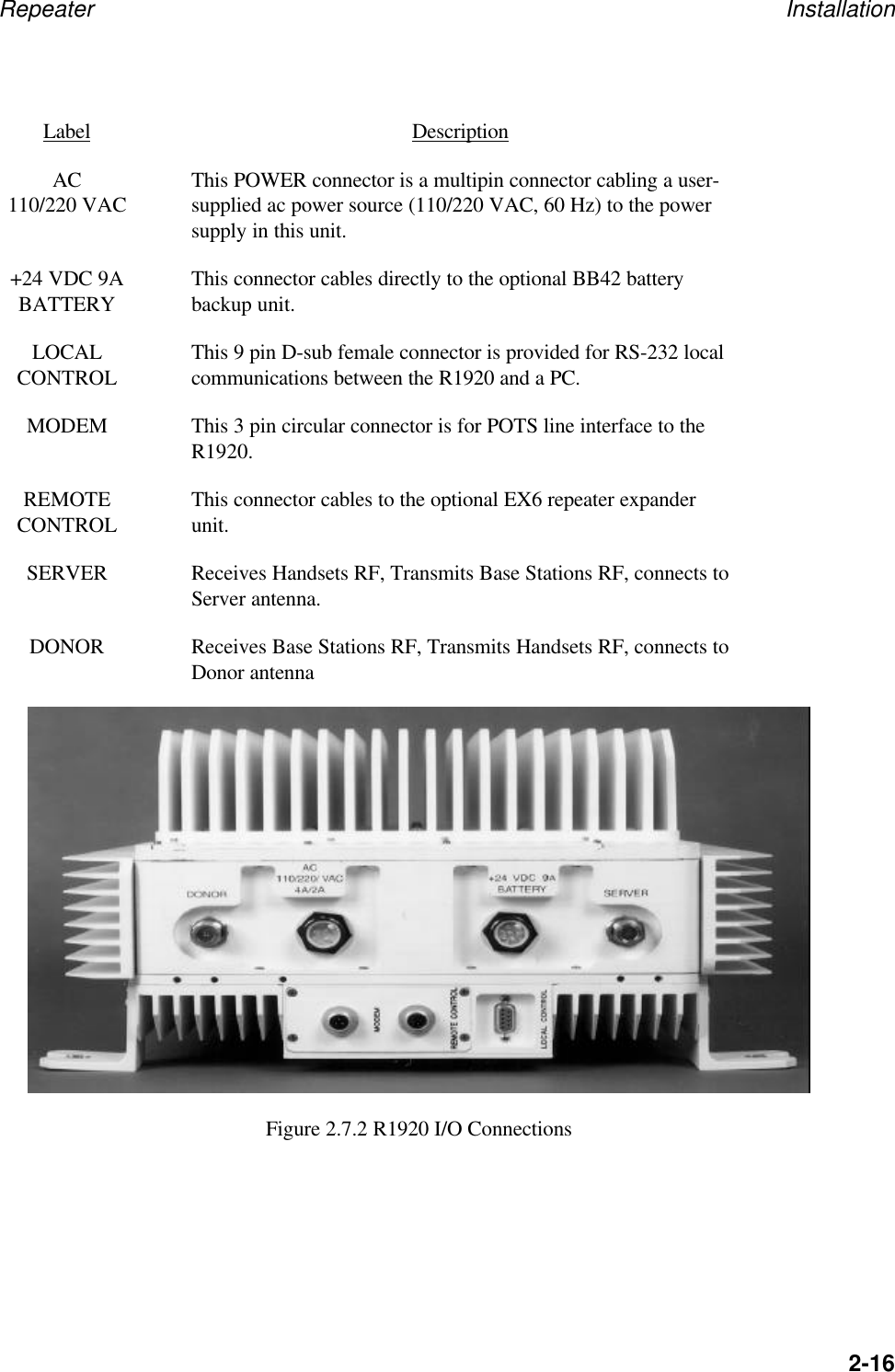
Repeater Installation2-16Label DescriptionAC110/220 VAC This POWER connector is a multipin connector cabling a user-supplied ac power source (110/220 VAC, 60 Hz) to the powersupply in this unit.+24 VDC 9ABATTERY This connector cables directly to the optional BB42 batterybackup unit.LOCALCONTROL This 9 pin D-sub female connector is provided for RS-232 localcommunications between the R1920 and a PC.MODEM This 3 pin circular connector is for POTS line interface to theR1920.REMOTECONTROL This connector cables to the optional EX6 repeater expanderunit.SERVER Receives Handsets RF, Transmits Base Stations RF, connects toServer antenna.DONOR Receives Base Stations RF, Transmits Handsets RF, connects toDonor antennaFigure 2.7.2 R1920 I/O Connections
Repeater Installation2-172-11 STORAGEEnvironmental conditions during storage and shipment should normally be limited as follows:a. Maximum humidity: 95% (no condensation)b. Temperature range: -40°C to +85°C2-12 PACKING FOR RESHIPMENT OR STORAGEIf the R19X0 must be prepared for reshipment or storage, use the original packing and shippingmaterials, if possible. Otherwise, the following general instructions should be used for repackagingwith commercially available materials:a. Wrap unit in heavy paper or plastic.b. Use a strong shipping container. A double-wall carton made of 350-pound test materialis adequate.c. Use a layer of shock-absorbing material 70 to 100 mm (3 to 4 inch) thick around allsides of the instrument to provide firm cushioning and prevent movement insidecontainer. Protect rear panel connectors with cardboard.d. Seal shipping container securely.e. Mark shipping container FRAGILE to ensure careful handling.f. In any correspondence, refer to instrument by model number and full serial number.
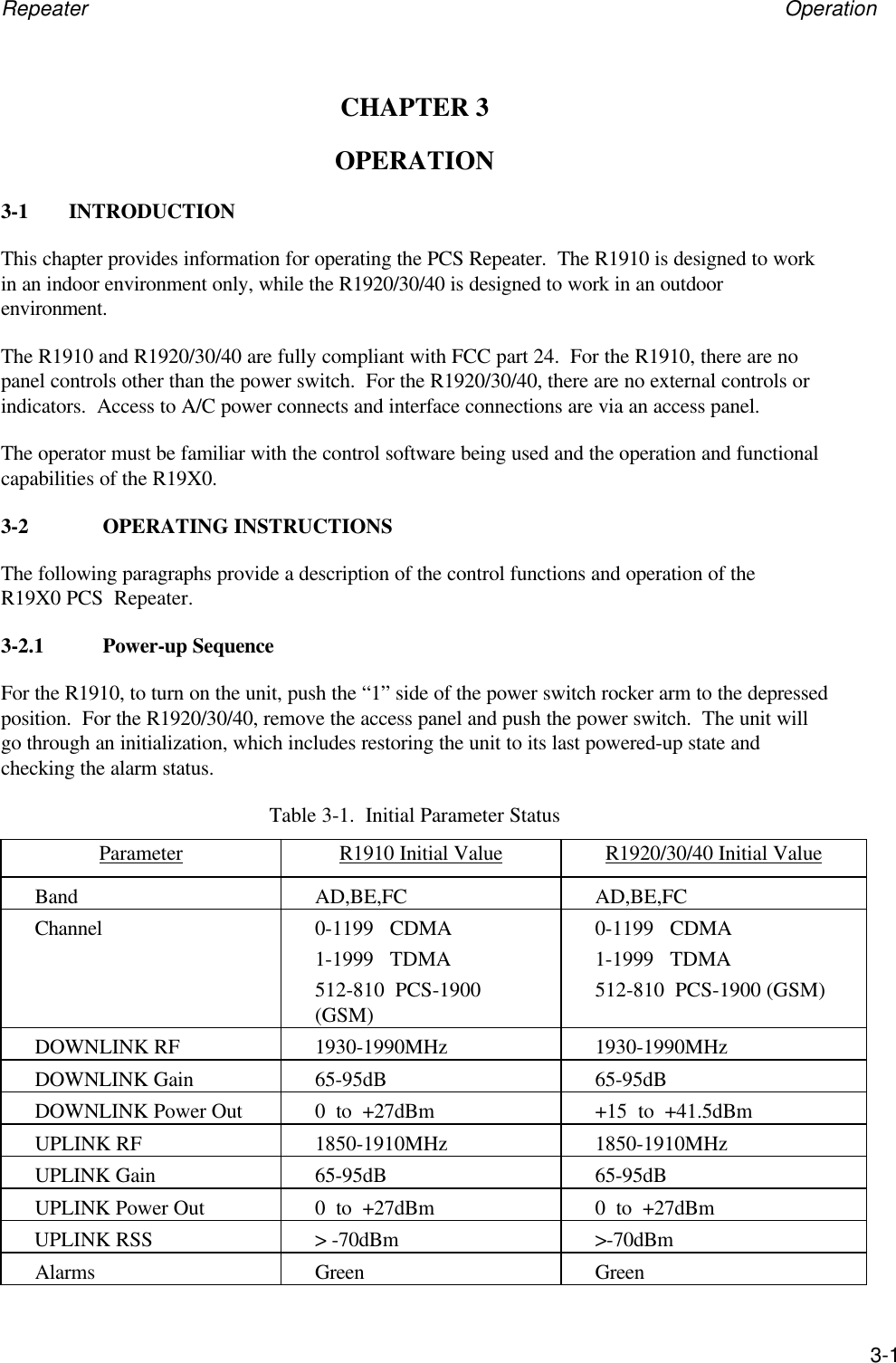
Repeater Operation3-1CHAPTER 3OPERATION3-1 INTRODUCTIONThis chapter provides information for operating the PCS Repeater.  The R1910 is designed to workin an indoor environment only, while the R1920/30/40 is designed to work in an outdoorenvironment.The R1910 and R1920/30/40 are fully compliant with FCC part 24.  For the R1910, there are nopanel controls other than the power switch.  For the R1920/30/40, there are no external controls orindicators.  Access to A/C power connects and interface connections are via an access panel.The operator must be familiar with the control software being used and the operation and functionalcapabilities of the R19X0.3-2 OPERATING INSTRUCTIONSThe following paragraphs provide a description of the control functions and operation of theR19X0 PCS  Repeater.3-2.1 Power-up SequenceFor the R1910, to turn on the unit, push the “1” side of the power switch rocker arm to the depressedposition.  For the R1920/30/40, remove the access panel and push the power switch.  The unit willgo through an initialization, which includes restoring the unit to its last powered-up state andchecking the alarm status.Table 3-1.  Initial Parameter StatusParameter R1910 Initial Value R1920/30/40 Initial ValueBand AD,BE,FC AD,BE,FCChannel 0-1199   CDMA1-1999   TDMA512-810  PCS-1900(GSM)0-1199   CDMA1-1999   TDMA512-810  PCS-1900 (GSM)DOWNLINK RF 1930-1990MHz 1930-1990MHzDOWNLINK Gain 65-95dB 65-95dBDOWNLINK Power Out 0  to  +27dBm +15  to  +41.5dBmUPLINK RF 1850-1910MHz 1850-1910MHzUPLINK Gain 65-95dB 65-95dBUPLINK Power Out 0  to  +27dBm 0  to  +27dBmUPLINK RSS > -70dBm >-70dBmAlarms Green Green
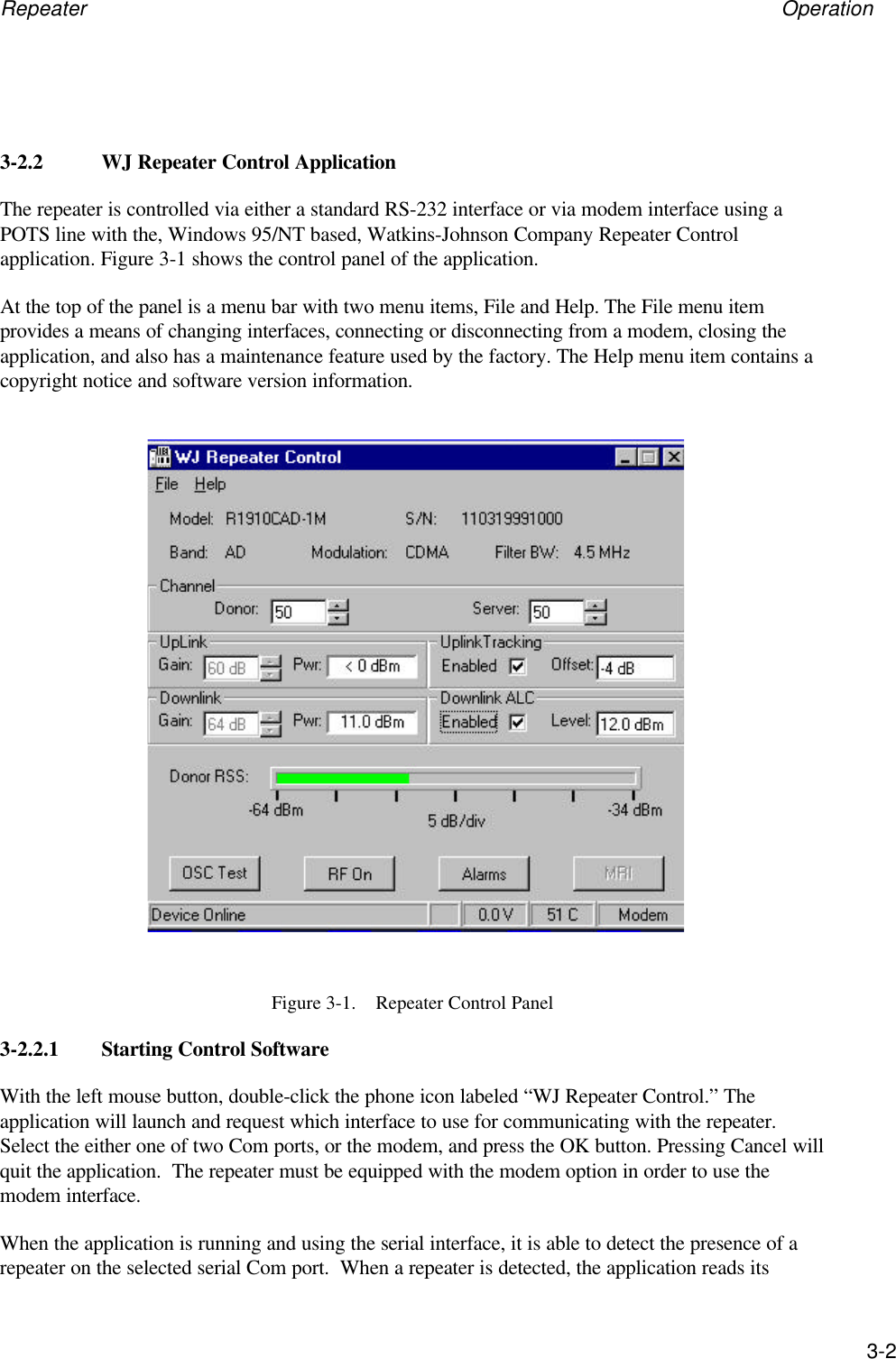
Repeater Operation3-23-2.2 WJ Repeater Control ApplicationThe repeater is controlled via either a standard RS-232 interface or via modem interface using aPOTS line with the, Windows 95/NT based, Watkins-Johnson Company Repeater Controlapplication. Figure 3-1 shows the control panel of the application.At the top of the panel is a menu bar with two menu items, File and Help. The File menu itemprovides a means of changing interfaces, connecting or disconnecting from a modem, closing theapplication, and also has a maintenance feature used by the factory. The Help menu item contains acopyright notice and software version information.Figure 3-1.    Repeater Control Panel3-2.2.1 Starting Control SoftwareWith the left mouse button, double-click the phone icon labeled “WJ Repeater Control.” Theapplication will launch and request which interface to use for communicating with the repeater.Select the either one of two Com ports, or the modem, and press the OK button. Pressing Cancel willquit the application.  The repeater must be equipped with the modem option in order to use themodem interface.When the application is running and using the serial interface, it is able to detect the presence of arepeater on the selected serial Com port.  When a repeater is detected, the application reads its
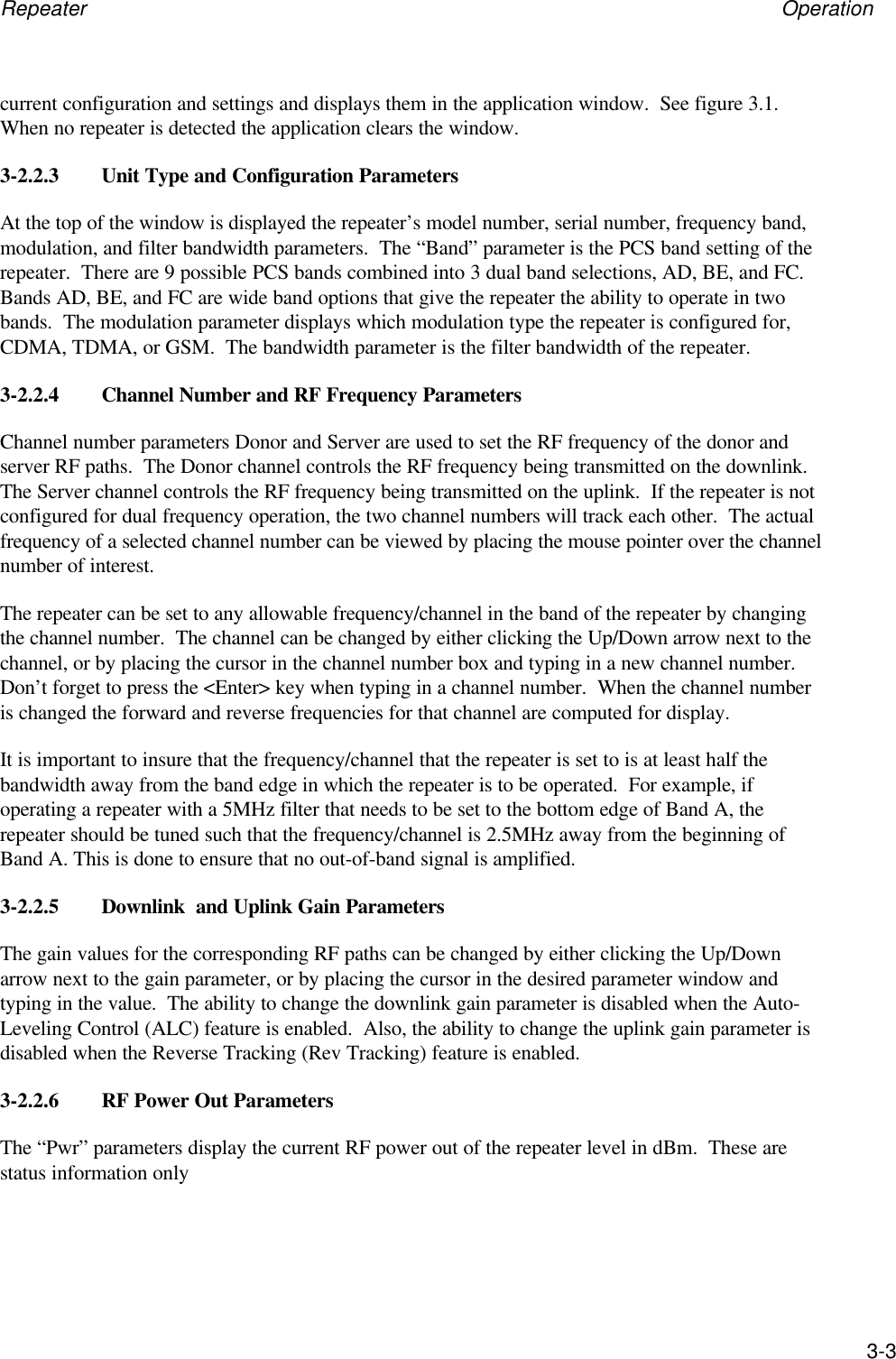
Repeater Operation3-3current configuration and settings and displays them in the application window.  See figure 3.1.When no repeater is detected the application clears the window.3-2.2.3 Unit Type and Configuration ParametersAt the top of the window is displayed the repeater’s model number, serial number, frequency band,modulation, and filter bandwidth parameters.  The “Band” parameter is the PCS band setting of therepeater.  There are 9 possible PCS bands combined into 3 dual band selections, AD, BE, and FC.Bands AD, BE, and FC are wide band options that give the repeater the ability to operate in twobands.  The modulation parameter displays which modulation type the repeater is configured for,CDMA, TDMA, or GSM.  The bandwidth parameter is the filter bandwidth of the repeater.3-2.2.4 Channel Number and RF Frequency ParametersChannel number parameters Donor and Server are used to set the RF frequency of the donor andserver RF paths.  The Donor channel controls the RF frequency being transmitted on the downlink.The Server channel controls the RF frequency being transmitted on the uplink.  If the repeater is notconfigured for dual frequency operation, the two channel numbers will track each other.  The actualfrequency of a selected channel number can be viewed by placing the mouse pointer over the channelnumber of interest.The repeater can be set to any allowable frequency/channel in the band of the repeater by changingthe channel number.  The channel can be changed by either clicking the Up/Down arrow next to thechannel, or by placing the cursor in the channel number box and typing in a new channel number.Don’t forget to press the <Enter> key when typing in a channel number.  When the channel numberis changed the forward and reverse frequencies for that channel are computed for display.It is important to insure that the frequency/channel that the repeater is set to is at least half thebandwidth away from the band edge in which the repeater is to be operated.  For example, ifoperating a repeater with a 5MHz filter that needs to be set to the bottom edge of Band A, therepeater should be tuned such that the frequency/channel is 2.5MHz away from the beginning ofBand A. This is done to ensure that no out-of-band signal is amplified.3-2.2.5 Downlink  and Uplink Gain ParametersThe gain values for the corresponding RF paths can be changed by either clicking the Up/Downarrow next to the gain parameter, or by placing the cursor in the desired parameter window andtyping in the value.  The ability to change the downlink gain parameter is disabled when the Auto-Leveling Control (ALC) feature is enabled.  Also, the ability to change the uplink gain parameter isdisabled when the Reverse Tracking (Rev Tracking) feature is enabled.3-2.2.6 RF Power Out ParametersThe “Pwr” parameters display the current RF power out of the repeater level in dBm.  These arestatus information only
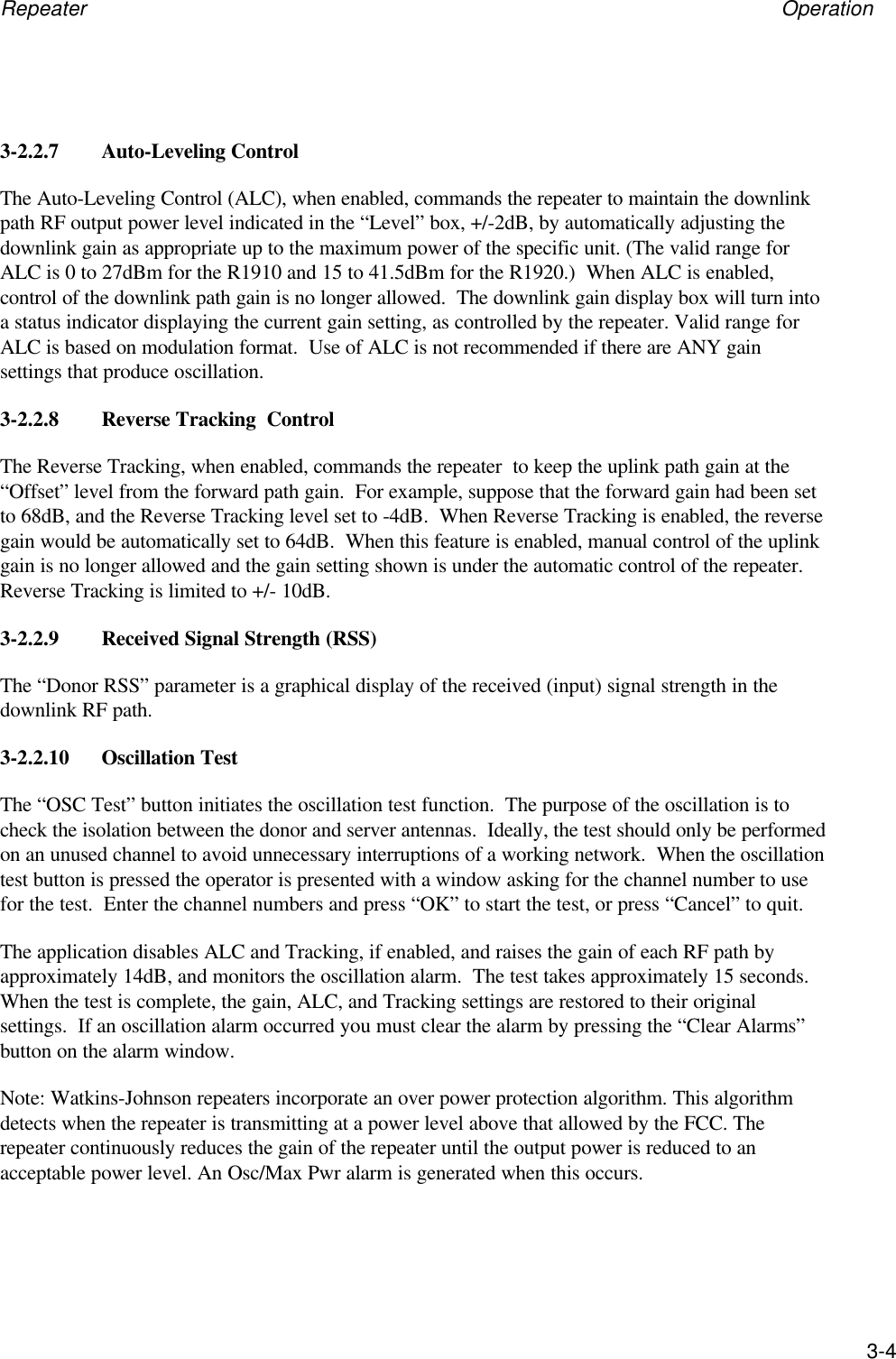
Repeater Operation3-43-2.2.7 Auto-Leveling ControlThe Auto-Leveling Control (ALC), when enabled, commands the repeater to maintain the downlinkpath RF output power level indicated in the “Level” box, +/-2dB, by automatically adjusting thedownlink gain as appropriate up to the maximum power of the specific unit. (The valid range forALC is 0 to 27dBm for the R1910 and 15 to 41.5dBm for the R1920.)  When ALC is enabled,control of the downlink path gain is no longer allowed.  The downlink gain display box will turn intoa status indicator displaying the current gain setting, as controlled by the repeater. Valid range forALC is based on modulation format.  Use of ALC is not recommended if there are ANY gainsettings that produce oscillation.3-2.2.8 Reverse Tracking  ControlThe Reverse Tracking, when enabled, commands the repeater  to keep the uplink path gain at the“Offset” level from the forward path gain.  For example, suppose that the forward gain had been setto 68dB, and the Reverse Tracking level set to -4dB.  When Reverse Tracking is enabled, the reversegain would be automatically set to 64dB.  When this feature is enabled, manual control of the uplinkgain is no longer allowed and the gain setting shown is under the automatic control of the repeater.Reverse Tracking is limited to +/- 10dB.3-2.2.9 Received Signal Strength (RSS)The “Donor RSS” parameter is a graphical display of the received (input) signal strength in thedownlink RF path.3-2.2.10 Oscillation TestThe “OSC Test” button initiates the oscillation test function.  The purpose of the oscillation is tocheck the isolation between the donor and server antennas.  Ideally, the test should only be performedon an unused channel to avoid unnecessary interruptions of a working network.  When the oscillationtest button is pressed the operator is presented with a window asking for the channel number to usefor the test.  Enter the channel numbers and press “OK” to start the test, or press “Cancel” to quit.The application disables ALC and Tracking, if enabled, and raises the gain of each RF path byapproximately 14dB, and monitors the oscillation alarm.  The test takes approximately 15 seconds.When the test is complete, the gain, ALC, and Tracking settings are restored to their originalsettings.  If an oscillation alarm occurred you must clear the alarm by pressing the “Clear Alarms”button on the alarm window.Note: Watkins-Johnson repeaters incorporate an over power protection algorithm. This algorithmdetects when the repeater is transmitting at a power level above that allowed by the FCC. Therepeater continuously reduces the gain of the repeater until the output power is reduced to anacceptable power level. An Osc/Max Pwr alarm is generated when this occurs.
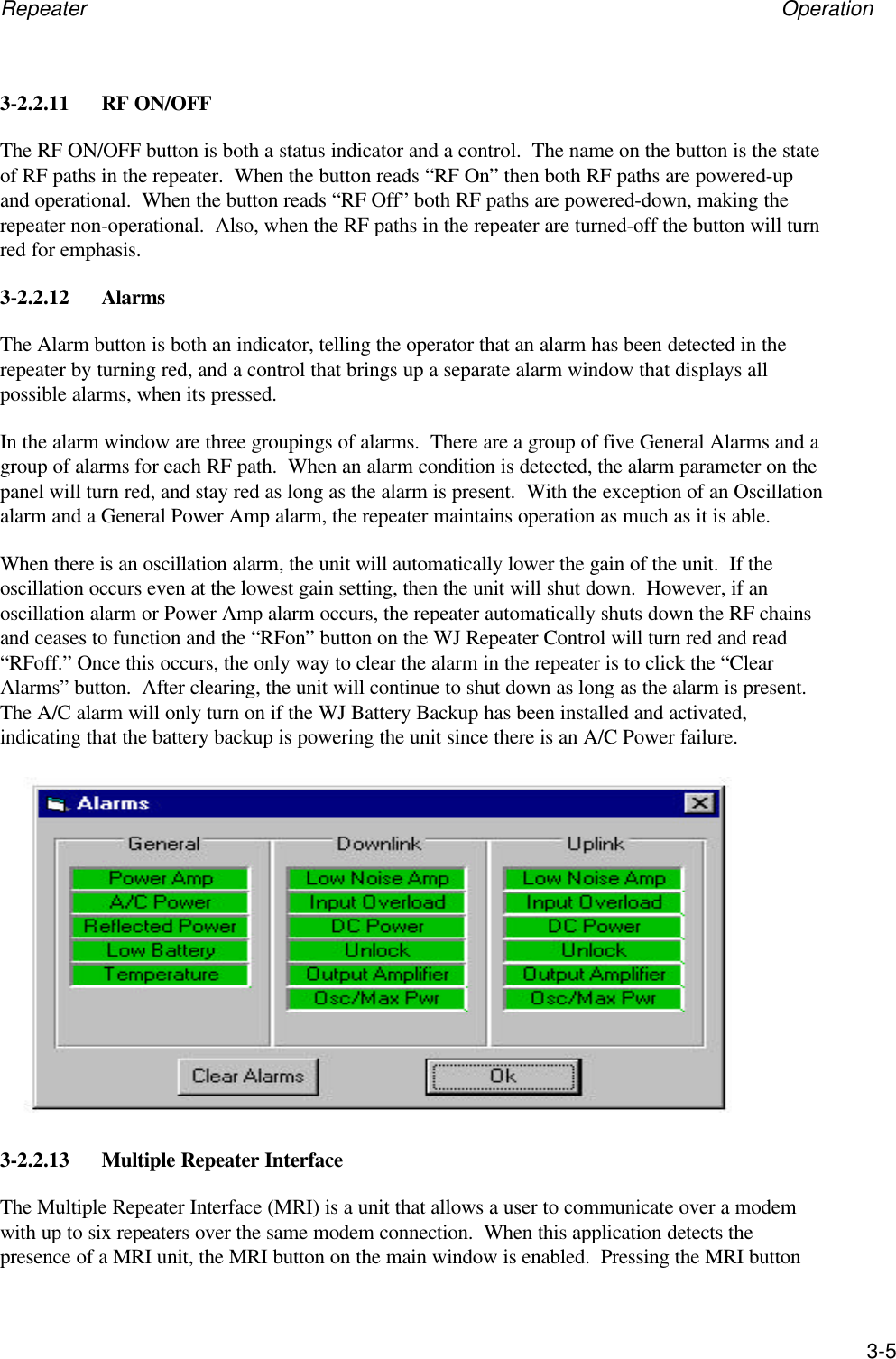
Repeater Operation3-53-2.2.11 RF ON/OFFThe RF ON/OFF button is both a status indicator and a control.  The name on the button is the stateof RF paths in the repeater.  When the button reads “RF On” then both RF paths are powered-upand operational.  When the button reads “RF Off” both RF paths are powered-down, making therepeater non-operational.  Also, when the RF paths in the repeater are turned-off the button will turnred for emphasis.3-2.2.12 AlarmsThe Alarm button is both an indicator, telling the operator that an alarm has been detected in therepeater by turning red, and a control that brings up a separate alarm window that displays allpossible alarms, when its pressed.In the alarm window are three groupings of alarms.  There are a group of five General Alarms and agroup of alarms for each RF path.  When an alarm condition is detected, the alarm parameter on thepanel will turn red, and stay red as long as the alarm is present.  With the exception of an Oscillationalarm and a General Power Amp alarm, the repeater maintains operation as much as it is able.When there is an oscillation alarm, the unit will automatically lower the gain of the unit.  If theoscillation occurs even at the lowest gain setting, then the unit will shut down.  However, if anoscillation alarm or Power Amp alarm occurs, the repeater automatically shuts down the RF chainsand ceases to function and the “RFon” button on the WJ Repeater Control will turn red and read“RFoff.” Once this occurs, the only way to clear the alarm in the repeater is to click the “ClearAlarms” button.  After clearing, the unit will continue to shut down as long as the alarm is present.The A/C alarm will only turn on if the WJ Battery Backup has been installed and activated,indicating that the battery backup is powering the unit since there is an A/C Power failure.3-2.2.13 Multiple Repeater InterfaceThe Multiple Repeater Interface (MRI) is a unit that allows a user to communicate over a modemwith up to six repeaters over the same modem connection.  When this application detects thepresence of a MRI unit, the MRI button on the main window is enabled.  Pressing the MRI button
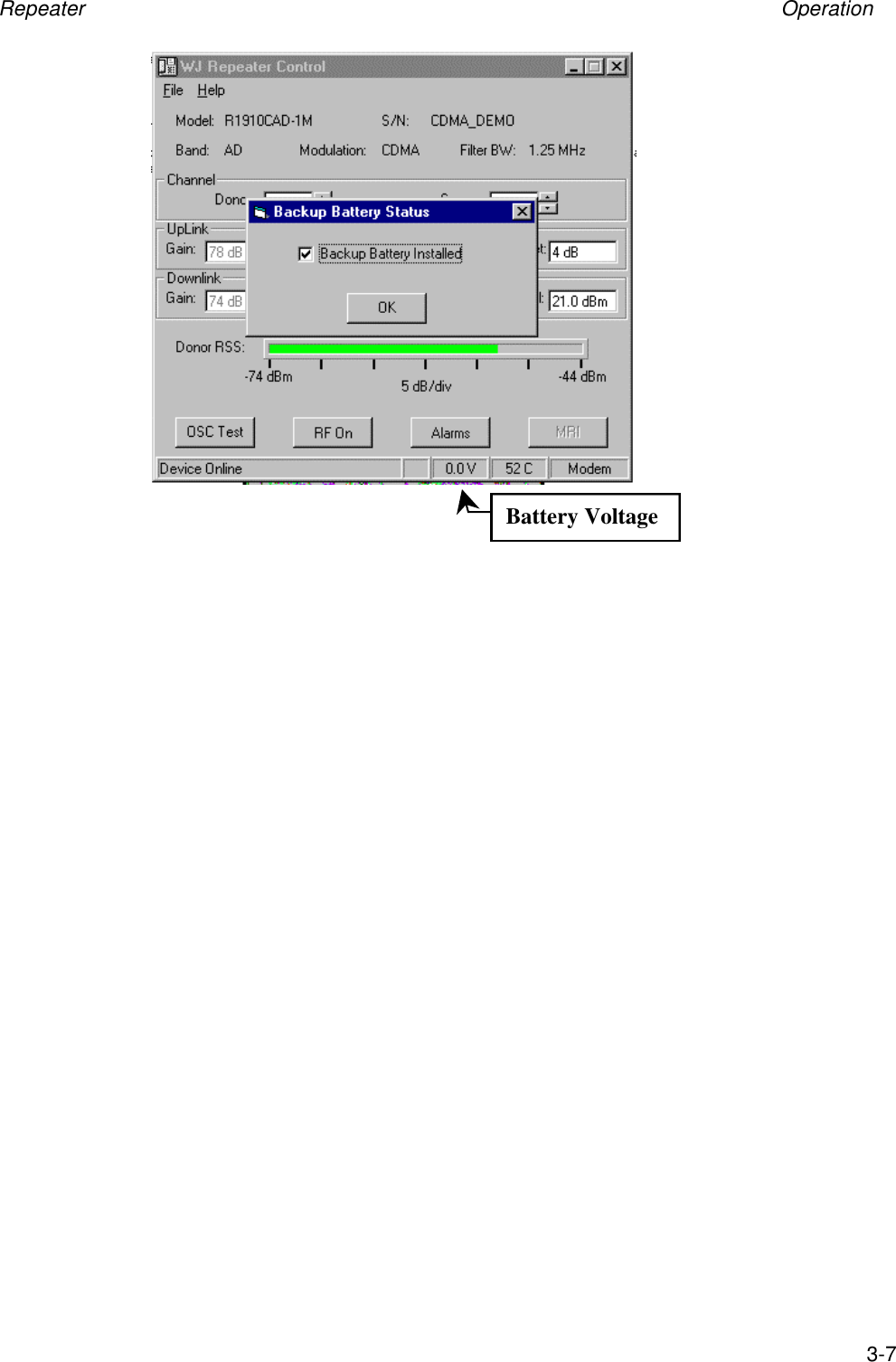
Repeater Operation3-6brings up the MRI Configuration window, which allows repeaters to be added or removed from theMRI unit.3-2.2.14 Status BarAt the bottom of the panel is a status bar that displays four pieces of information.  Beginning in theleft most, and largest box, is basic status information about the operation of the application. .  Thesecond box from the left is only active when communicating to a MRI unit.  When a MRI unit isdetected, this box will display the repeater number of the repeater that the application iscommunicating with.  The third box from the left displays the voltage level of the backup battery ifone is installed.  The next box displays the internal temperature of the repeater in degrees centigrade.The right most box displays the currently selected interface that the application is using tocommunicate with the repeater.When using the serial RS-232 interface, the application is able to detect the presence of a repeater.When one is not detected the panel clears all the data fields, disables all parameter input fields, anddisplays a status message on the status bar of “No Device.” When a repeater is connected to theserial port and turned on, the application will detect its presence and download and display itsconfiguration. It will also change the status bar to indicate a device was found and re-enable allparameter entry fields.3-2.2.15         Battery Back-Up InstallationTo activate the optional Battery Back-Up, click on the battery back-up voltage indicator, and theBattery Back-Up Status widow will appear. By checking the Battery Backup Installed box, the unitwill be able to use the Battery Back-Up as an alternate source of power in the case of a powerfailure.
Repeater Operation3-7Battery Voltage
Repeater Scheduled Maintenance4-1CHAPTER 4SCHEDULED MAINTENANCE4-1 INTRODUCTIONThe WJ PCS  Repeaters are designed to operate for extended periods of time with minimum routinemaintenance.  Inspection and performance tests should be conducted at regular intervals consistentwith the facility's normal scheduling and after troubleshooting. No routine adjustments are required.Troubleshooting and performance tests can be most effectively carried out if the technician firstfamiliarizes himself with the operating instructions and circuit descriptions.4-2 SCHEDULED MAINTENANCE ACTION INDEXThe scheduled maintenance action index is provided in Table 4-1. It lists the maintenance action tobe taken, gives the paragraph reference for detailed instruction, and specifies the maximum timeintervals between equipment cleaning, inspection, and performance checks.__________WARNINGWhenever possible, all preventive maintenance should be performedwith the power cord disconnected from prime power source.4-3 EQUIPMENT REQUIREDNo special tools or test equipment are required for performing routine preventive maintenance.4-4 PREVENTIVE MAINTENANCE PROCEDURESThe R19XX repeaters are designed to operate for extended periods of time with minimummaintenance. Normally, the only preventive maintenance tasks to consider are:a. Cleaning the unit.b. Inspecting the outside of the unit for physically worn, damaged, loose, or overheatedparts.c. Performing a performance check of the unit.If the equipment is used in an environment where a great deal of dust, high temperature, or highhumidity is present, the frequency of the checks should be increased.
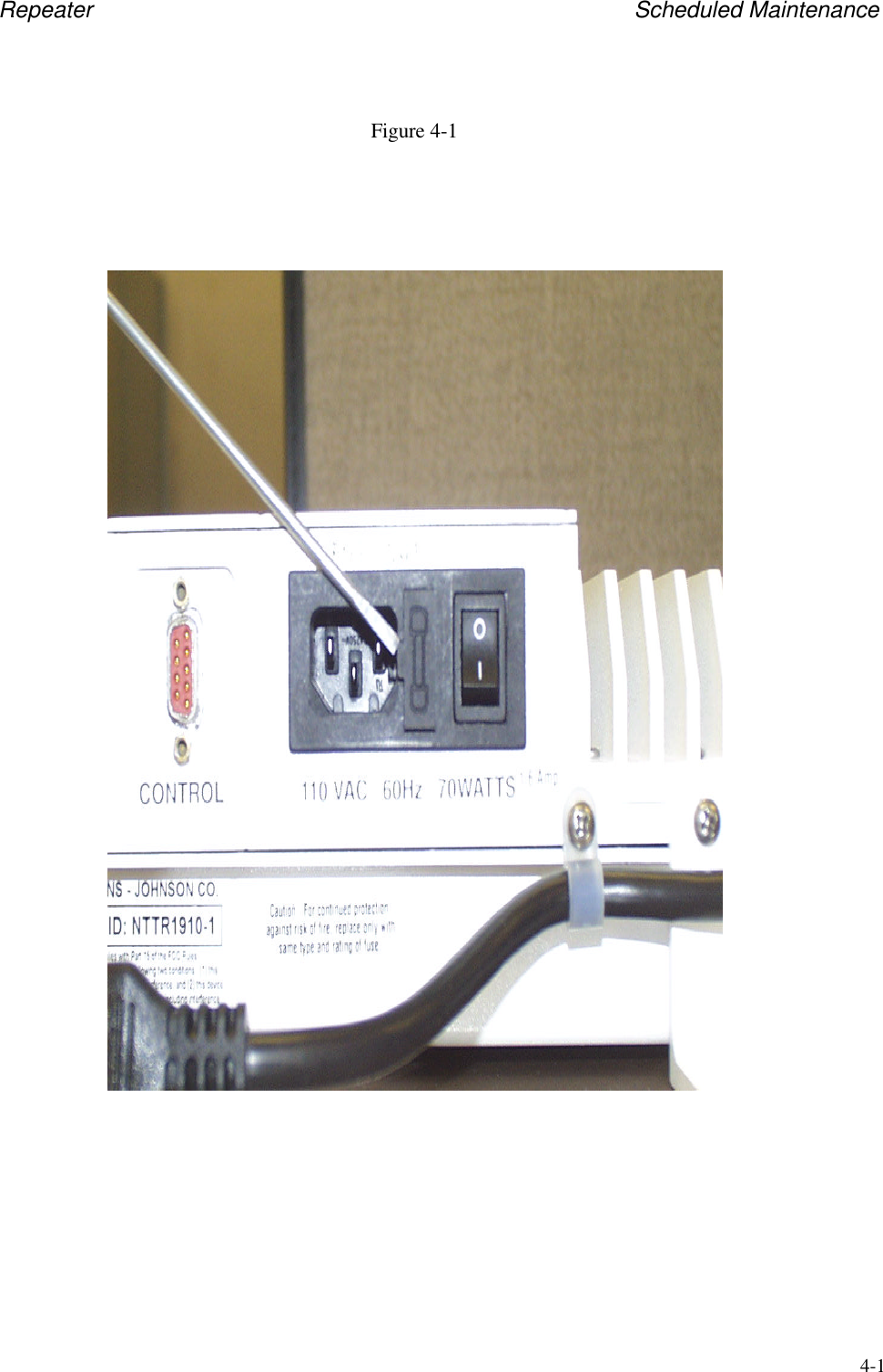
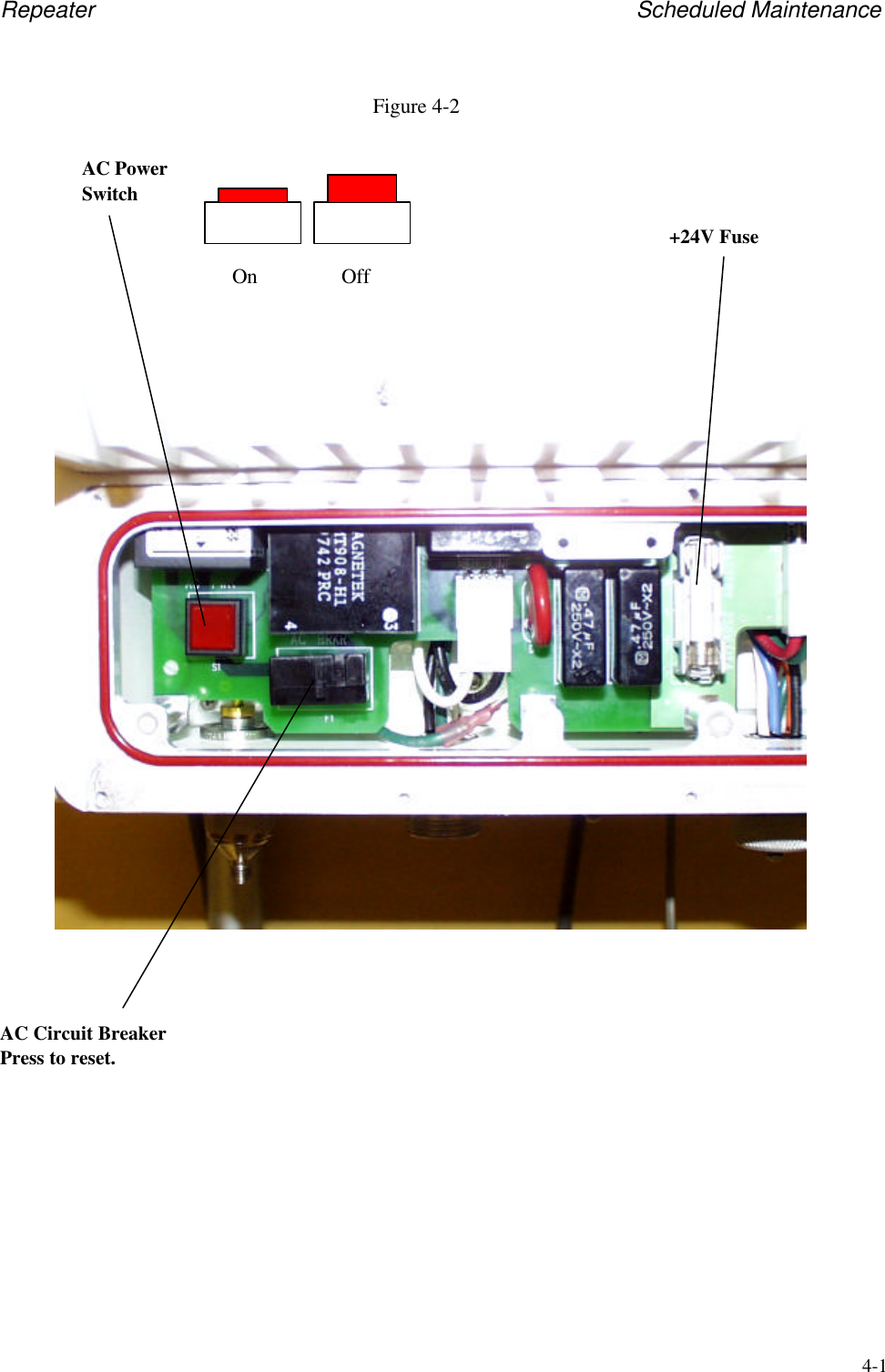
Repeater Scheduled Maintenance4-2Table 4-1.  Scheduled Maintenance Action IndexPM Action ParagraphReference ScheduleCleaning outside of equipment 4-4.1 Every 12 months or when dust is seen on thesurface of the equipment.Inspecting for damage or wear 4-4.2 When the unit is not operating properly.4-4.1 Exterior CleaningRemove loose dirt accumulated on the outside of the unit with a moist paper towel, cloth, or brush.The brush is good for removing dirt on and around the connectors. Dirt and grease which is notremoved can be cleaned off with a paper towel or cloth made moist with a detergent and watersolution. Do not use an abrasive cleaner.4-4.2 Inspection for Damage or WearMany potential or existing troubles can be detected by making a visual inspection of the unit. Forthis reason, a complete visual inspection should be made on a regular basis and whenever the unit isinoperative. Damage due to overheating may be the result of other less apparent troubles in the unit.Mechanical parts such as pin connectors and power switch should be inspected for excessive wear,looseness, misalignment, corrosion, and other signs of deterioration.4-4.3 Fuse ReplacementWJ PCS repeaters are protected by replaceable fuses and circuit breakers.  A blown fuse can resultfrom a variety of conditions, including improper installation, faulty power supply, excessive outputpower levels, AC power line transients, etc.  WJ should be contacted if a repeater fuse needsfrequent service.The R1910 series repeater is equipped with a 250V/3A, 5 x 20 mm Time-Lag Fuse (Buss GMC-3Aor equivalent), located at the power entry module (Fig 4-1). To replace fuse, first push the AC power1/0 switch to the 0 position (OFF), and remove AC power cord from the unit.  Remove fuse holderwith a flatblade screwdriver, replace fuse, and snap back into position.  Reconnect AC power cordand push the AC Power ON/OFF Switch to the 1 (ON) position.  The unit should operate normally.The R1920/30/40 series repeaters are equipped with an AC circuit breaker, located behind the frontaccess panel (Fig 4-2).  Remove the access panel.  The power switch, labeled S1, is a DPDT pushbutton ON/OFF type with a red LED that lights up only when the power supply output voltages arepresent.  Push it once to disengage AC power from the unit.  The circuit breaker, labeled F1, is athermally activated device with a push button reset.  Push the circuit breaker reset button, a distinctclick should be heard.  Now push the AC power switch, a click should be heard and the buttonshould light up red, indicating that the unit is operating normally.  Although not necessary, as anadded measure of safety, the AC power cord can be removed before servicing the breaker.
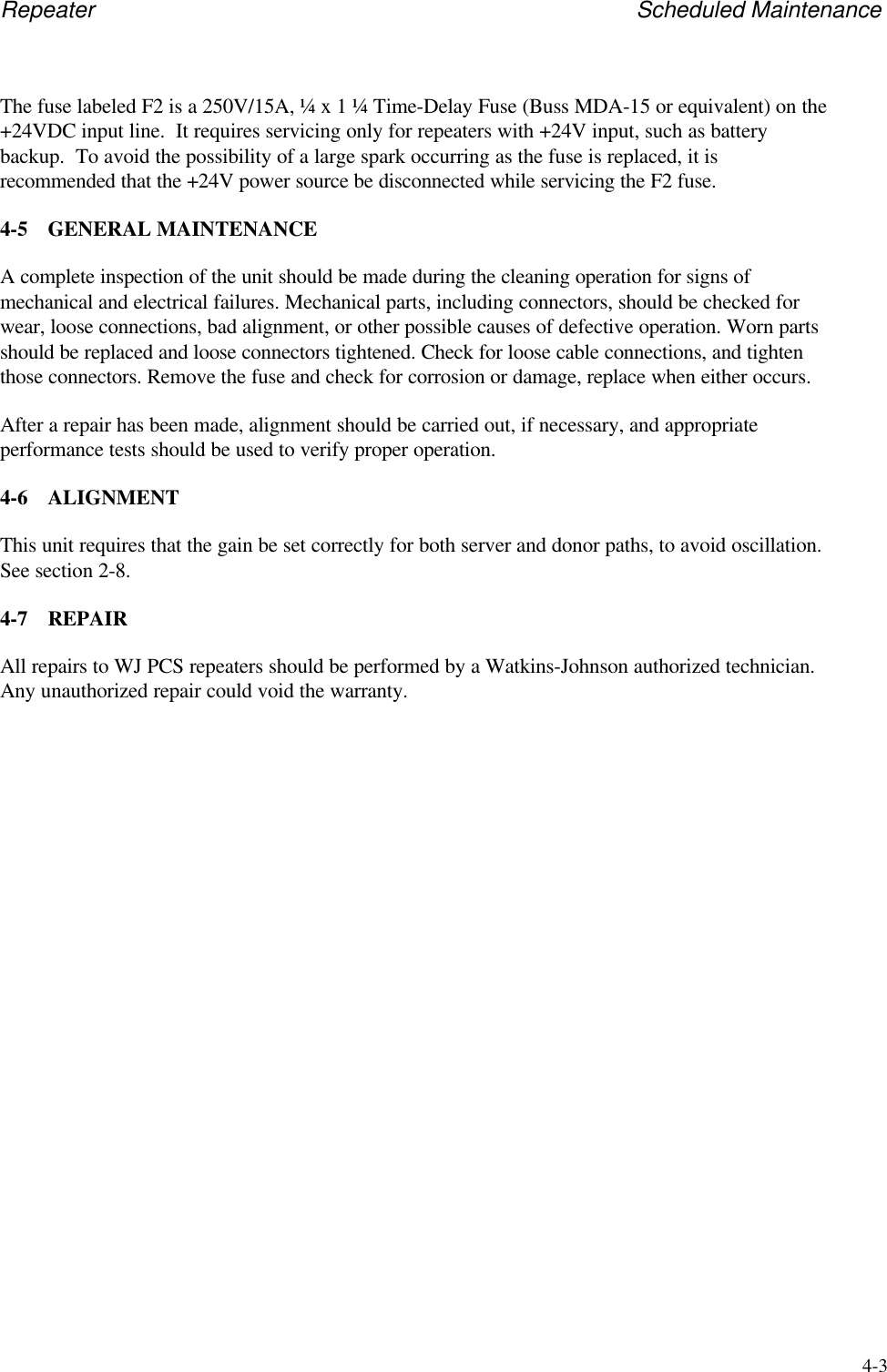
Repeater Scheduled Maintenance4-3The fuse labeled F2 is a 250V/15A, ¼ x 1 ¼ Time-Delay Fuse (Buss MDA-15 or equivalent) on the+24VDC input line.  It requires servicing only for repeaters with +24V input, such as batterybackup.  To avoid the possibility of a large spark occurring as the fuse is replaced, it isrecommended that the +24V power source be disconnected while servicing the F2 fuse.4-5 GENERAL MAINTENANCEA complete inspection of the unit should be made during the cleaning operation for signs ofmechanical and electrical failures. Mechanical parts, including connectors, should be checked forwear, loose connections, bad alignment, or other possible causes of defective operation. Worn partsshould be replaced and loose connectors tightened. Check for loose cable connections, and tightenthose connectors. Remove the fuse and check for corrosion or damage, replace when either occurs.After a repair has been made, alignment should be carried out, if necessary, and appropriateperformance tests should be used to verify proper operation.4-6 ALIGNMENTThis unit requires that the gain be set correctly for both server and donor paths, to avoid oscillation.See section 2-8.4-7 REPAIRAll repairs to WJ PCS repeaters should be performed by a Watkins-Johnson authorized technician.Any unauthorized repair could void the warranty.
Repeater Scheduled Maintenance4-1Figure 4-1
Repeater Scheduled Maintenance4-1Figure 4-2AC Circuit BreakerPress to reset.AC PowerSwitchOffOn+24V Fuse
Repeater Drawings5-1Figure 5-1
Repeater Drawings5-2Figure 5-2
Repeater Drawings5-3Figure 5-3

Navigation menu