Wearable Health Solutions RB 2.4G RF transmitter User Manual Manual V1

Medical Alarm Concepts 2.4G RF transmitter Manual V1

Manual-V1

Cover  Owner’s Manual - iHelp+ 3G Accessory Kit Manufactured By www.iHelpAlarm.com  Page 1  The  iHelp+  3G  Accessories  included  in  this  manual  are  designed  to  work  with  the  iHelp+  3G mobile medical alert device and cannot be used with any other medical alert system.    You  MUST  have  the  iHelp+  3G  mobile  medical  alert  device  in  order  to  use  ANY  of  the accessories included.  For more information on the iHelp+ 3G mobile medical alert or any of the accessories, contact your dealer, or go to www.iHelpalarm.com.  Page 2  Table of Contents - What’s included in the Box - Connecting your Docking Station - Charging your pendant - Using your Remote button - In an Emergency - Wearing your remote button - Attaching the lanyard to your remote button - On the Back of your Docking Station - Terms and Conditions - Safety Precautions and General Warnings  Page 3 What’s included in the Box 1. iHelp+ 3G Docking Station (image) 2. Wall Power Adapter (image) 3. Remote Button (image) 5. Remote Button Wrist Strap (image) 4. Breakaway Neck Lanyard  Page 4 Your Docking Station May Be Used To: 1. Charge your pendant;   2. Utilize your remote button;
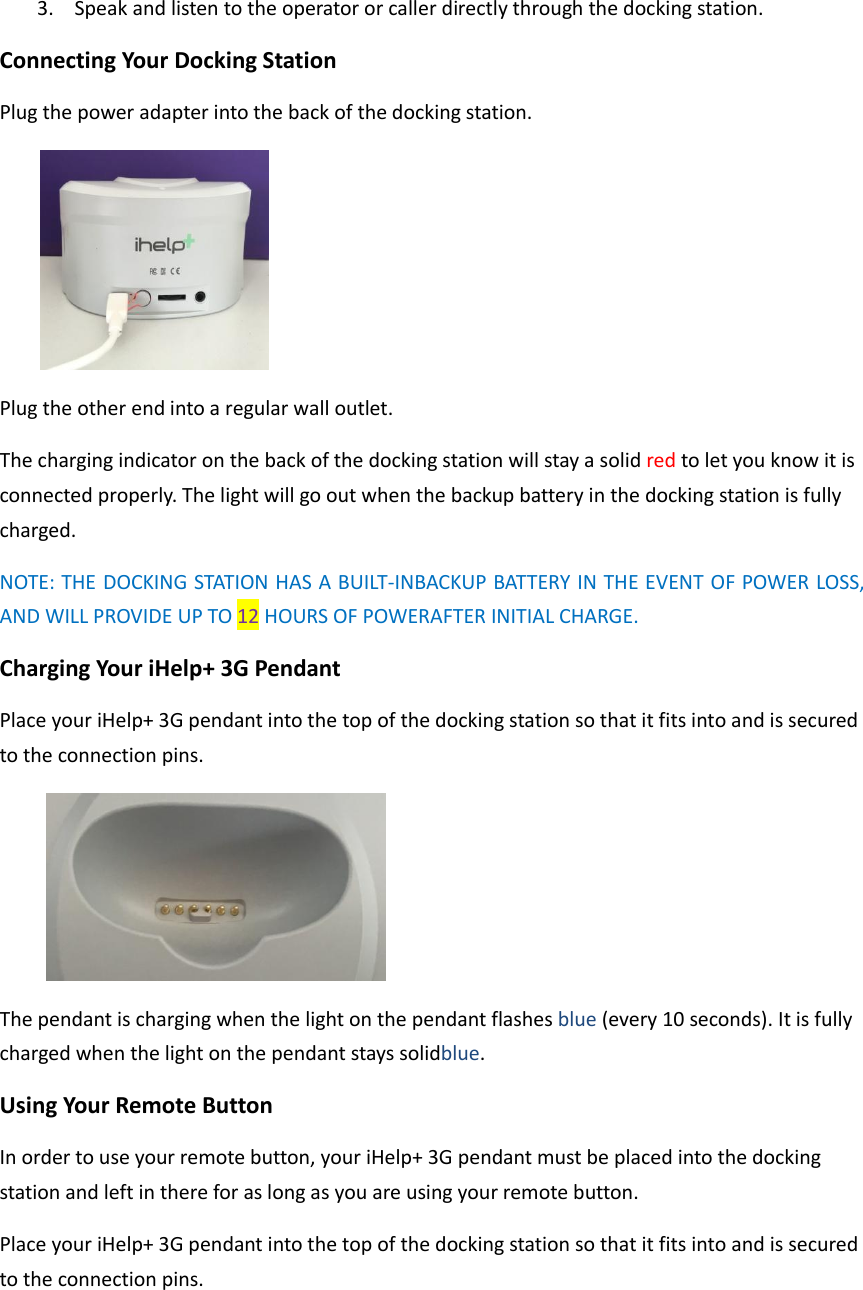
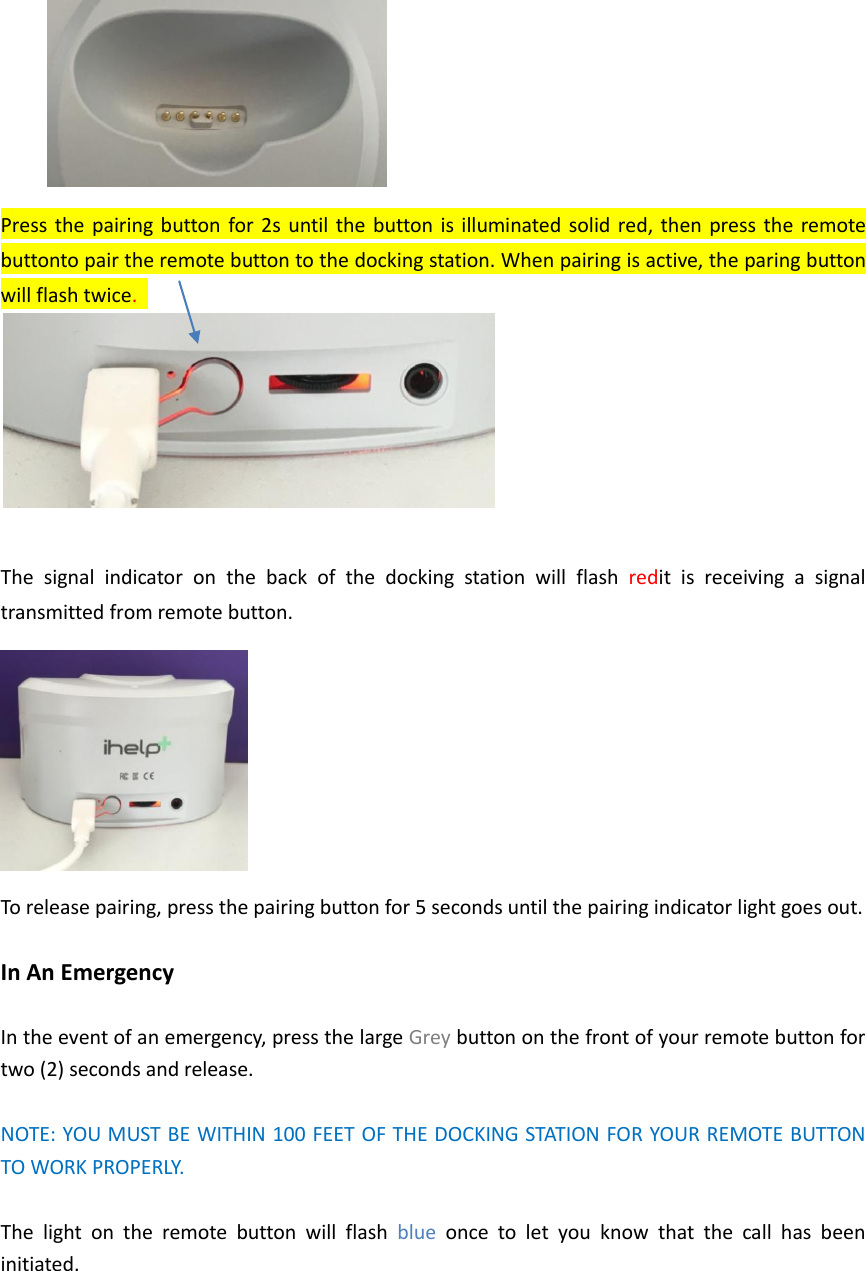
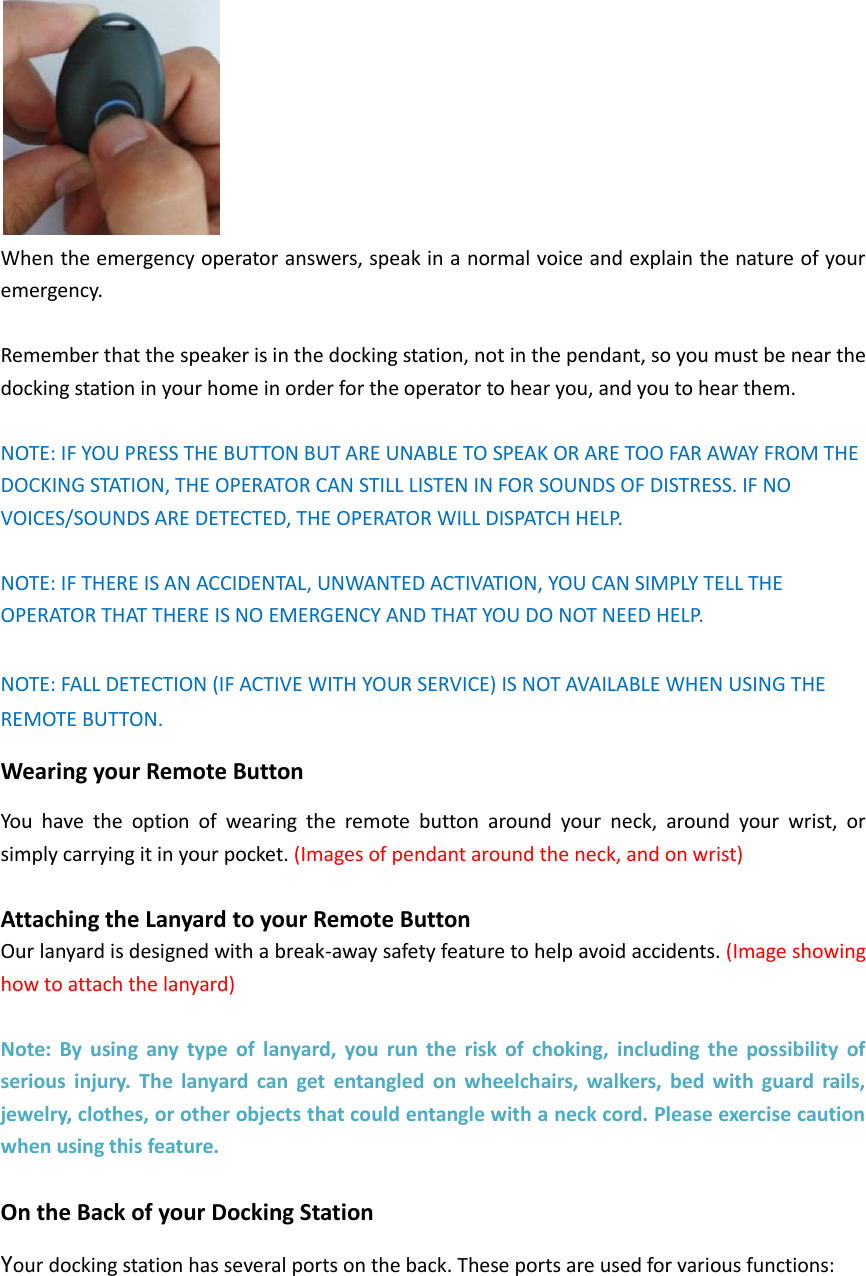
3. Speak and listen to the operator or caller directly through the docking station. Connecting Your Docking Station Plug the power adapter into the back of the docking station.    Plug the other end into a regular wall outlet.   The charging indicator on the back of the docking station will stay a solid red to let you know it is connected properly. The light will go out when the backup battery in the docking station is fully charged. NOTE: THE DOCKING STATION HAS A BUILT-INBACKUP BATTERY IN THE EVENT OF POWER LOSS, AND WILL PROVIDE UP TO 12 HOURS OF POWERAFTER INITIAL CHARGE. Charging Your iHelp+ 3G Pendant Place your iHelp+ 3G pendant into the top of the docking station so that it fits into and is secured to the connection pins.    The pendant is charging when the light on the pendant flashes blue (every 10 seconds). It is fully charged when the light on the pendant stays solidblue. Using Your Remote Button In order to use your remote button, your iHelp+ 3G pendant must be placed into the docking station and left in there for as long as you are using your remote button.   Place your iHelp+ 3G pendant into the top of the docking station so that it fits into and is secured to the connection pins.
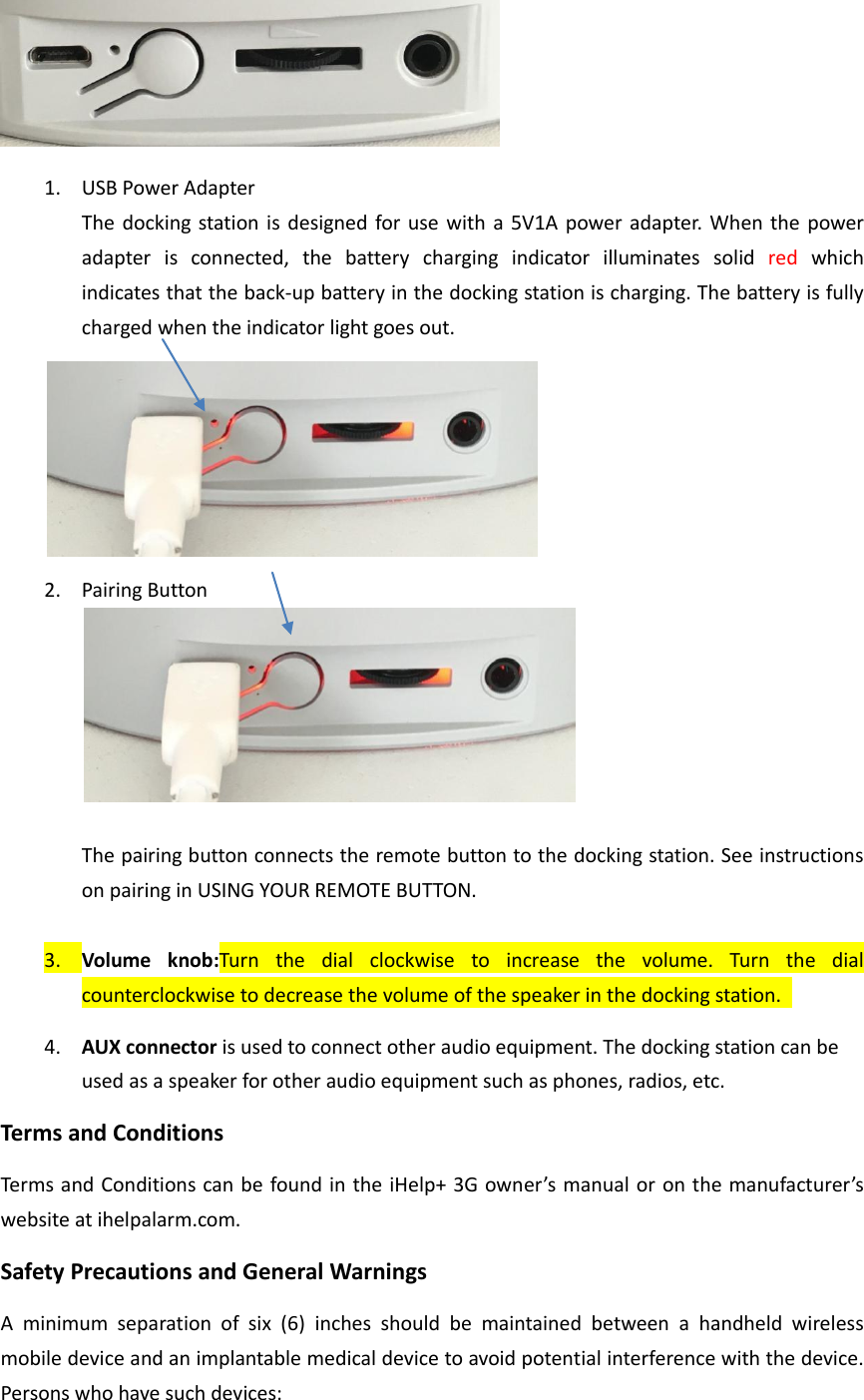
 Press the pairing button  for 2s  until the button  is illuminated solid red, then press the remote buttonto pair the remote button to the docking station. When pairing is active, the paring button will flash twice.     The  signal  indicator  on  the  back  of  the  docking  station  will  flash  redit  is  receiving  a  signal transmitted from remote button.  To release pairing, press the pairing button for 5 seconds until the pairing indicator light goes out.    In An Emergency  In the event of an emergency, press the large Grey button on the front of your remote button for two (2) seconds and release.    NOTE: YOU MUST BE WITHIN 100 FEET OF THE DOCKING STATION FOR YOUR REMOTE BUTTON TO WORK PROPERLY.  The  light  on  the  remote  button  will  flash  blue  once  to  let  you  know  that  the  call  has  been initiated.
 When the emergency operator answers, speak in a normal voice and explain the nature of your emergency.    Remember that the speaker is in the docking station, not in the pendant, so you must be near the docking station in your home in order for the operator to hear you, and you to hear them.    NOTE: IF YOU PRESS THE BUTTON BUT ARE UNABLE TO SPEAK OR ARE TOO FAR AWAY FROM THE DOCKING STATION, THE OPERATOR CAN STILL LISTEN IN FOR SOUNDS OF DISTRESS. IF NO VOICES/SOUNDS ARE DETECTED, THE OPERATOR WILL DISPATCH HELP.  NOTE: IF THERE IS AN ACCIDENTAL, UNWANTED ACTIVATION, YOU CAN SIMPLY TELL THE OPERATOR THAT THERE IS NO EMERGENCY AND THAT YOU DO NOT NEED HELP.  NOTE: FALL DETECTION (IF ACTIVE WITH YOUR SERVICE) IS NOT AVAILABLE WHEN USING THE REMOTE BUTTON.   Wearing your Remote Button You  have  the  option  of  wearing  the  remote  button  around  your  neck,  around  your  wrist,  or simply carrying it in your pocket. (Images of pendant around the neck, and on wrist)  Attaching the Lanyard to your Remote Button Our lanyard is designed with a break-away safety feature to help avoid accidents. (Image showing how to attach the lanyard)  Note:  By  using  any  type  of  lanyard,  you  run  the  risk  of  choking,  including  the  possibility  of serious  injury.  The  lanyard  can  get  entangled  on  wheelchairs,  walkers,  bed  with  guard  rails, jewelry, clothes, or other objects that could entangle with a neck cord. Please exercise caution when using this feature.  On the Back of your Docking Station Your docking station has several ports on the back. These ports are used for various functions:
 1. USB Power Adapter The docking station is designed for use  with a 5V1A power adapter. When the power adapter  is  connected,  the  battery  charging  indicator  illuminates  solid  red  which indicates that the back-up battery in the docking station is charging. The battery is fully charged when the indicator light goes out.    2. Pairing Button   The pairing button connects the remote button to the docking station. See instructions on pairing in USING YOUR REMOTE BUTTON.    3. Volume  knob:Turn  the  dial  clockwise  to  increase  the  volume.  Turn  the  dial counterclockwise to decrease the volume of the speaker in the docking station.   4. AUX connector is used to connect other audio equipment. The docking station can be used as a speaker for other audio equipment such as phones, radios, etc.   Terms and Conditions Terms and Conditions can be found in the iHelp+ 3G owner’s manual or on the manufacturer’s website at ihelpalarm.com.   Safety Precautions and General Warnings A  minimum  separation  of  six  (6)  inches  should  be  maintained  between  a  handheld  wireless mobile device and an implantable medical device to avoid potential interference with the device. Persons who have such devices:
 Should ALWAYS keep the mobile device more than six (6) inches from their implantable medical device when the mobile device is turned ON.    Should not carry the mobile device in a breast pocket.    Should use the ear opposite the implantable medical device to minimize the potential for interference.    Should read and follow the directions from the manufacturer of your implantable medical device.   If you have any questions about using your wireless mobile device with an implantable medical device, consult your health care provider. It is the sole responsibility of the User to charge the docking  station  and  pendant  when  necessary  to  ensure  that  the  batteries  and  other functions/features are working properly. See the Instructions for how to perform these tests.    It is advised to charge the pendant daily until fully charged. The docking station and remote button should NEVER be opened. Attempting to open either one for any reason may cause permanent damage to the equipment or prevent it from functioning properly, and will completely void its warranty. Based  on  its  operating  frequency,  the  docking  station  and  remote button  should  not  interfere with pacemakers or common household appliances.   No other power source may be used for this product other than the one specifically supplied by iHelp Alarm. Use of any other power source will void all warranties, and could also damage your unit and  cause serious safety issues including personal injury,  property damage, and cause the unit to malfunction resulting in the failure to obtain medical attention. The docking station should be unplugged from an electrical outlet before attempting to clean it. A damp,  soft  cloth  can  be  used  to  clean/wipe  down  the  unit  if  it  becomes  dirty.  No  liquids  or cleaners can be used for cleaning or the warranty will be voided. If  damage  does  occur  to  your  equipment,  do  not  attempt  to  repair  it.  Please  return  the equipment, postage paid, to your local dealer for warranty service or replacement as stipulated in the warranty section of this manual. Please  use  a  lanyard  with  a  break-away  cord,  like  the  one  supplied.  By  using  a  lanyard  that doesn’t have a break-away cord, you run the risk of choking, including the possibility of serious injury.  The  lanyard  can  get  entangled  on  wheelchairs,  walkers,  bed  with  guard  rails,  jewelry, clothes, or other objects that could entangle with a neck cord. Any questions or comments should be directed to your local dealer.   NOTE:Changes and modifications not approved by the responsible party could void the user's authority to operate the equipment.   Le  présent  appareil  est  conforme  aux  CNR  d'Industrie  Canada  applicables  aux  appareils  radio exempts de licence. L'exploitation est autorisée aux deux conditions suivantes :
(1) l'appareil ne doit pas produire de brouillage (2)  l'utilisateur  de  l'appareil  doit  accepter  tout  brouillage  radioélectrique  subi,  même  si  le brouillage est susceptible d'en compromettre le fonctionnement.   This  device  complies  with  Industry  Canada’s  licence-exempt  RSSs.  Operation  is  subject  to  the following two conditions: (1) This device may not cause interference; and  (2)  This  device must  accept  any  interference,  including interference that may  cause  undesired operation of the device. This  device  complies  with  Part  15  of  the  FCC  Rules.  Operation  is  subject  to  the following  two conditions: (1) This device may not cause harmful interference.   (2) This device must accept any interference received, including Interference that may cause undesired operation. FCC ID:XWI-RB NOTE: Changes or modifications not expressly approved by the party responsible for compliance could void the user's authority to operate the equipment. NOTE: This equipment has been tested and found to comply with the limits for a Class B digital device, pursuant  to  Part 15  of  the  FCC Rules.  These  limits are designed  to  provide reasonable protection  against  harmful  interference  in  a  residential  installation.  This  equipment  generates uses and can radiate radio frequency energy and, if not installed and used in accordance with the instructions,  may  cause  harmful  interference  to  radio  communications.  However,  there  is  no guarantee that interference will not occur in a particular installation. If this equipment does cause harmful interference to radio or television reception, which can be determined by  turning the equipment off and  on, the user is encouraged  to try to correct the interference by one or more of the following measures: ---Reorient or relocate the receiving antenna. ---Increase the separation between the equipment and receiver. ---Connect the equipment into an outlet on a circuit different from that to which the receiver is connected. ---Consult the dealer or an experienced radio/TV technician for help.  Body-worn Operation
This  device  was  tested  for  typical  body-worn  operations.  To  comply  With  RF  exposure requirements, a minimum separation distance of 2.0cm must be maintained between the user’s body and the handset, including the antenna. Third-party belt-clips, holsters, and similar accessories used by this device should not contain any metallic  components.  Body-worn  accessories  that  do  not  meet  these  requirements  may  not comply with RF exposure requirements and should beavoided.  Specific Absorption Rate (SAR) information: Systems operating under the provisions of this section shall be operated in a manner that ensures that  the  public  is  not  exposed  to  radio  frequency  energy  level  in  excess  limit  for  maximum permissible exposure. In accordance with 47 CFR FCC Part 2 Subpart J, section 2.1091 this device has been  defined as  a  mobile  device whereby  a  distance  of 0.2m normally can be maintained between the user and the device.  END

Navigation menu