Winncom Technologies WAF24-250 User Manual Manual

Winncom Technologies Inc. Manual

Contents

Manual

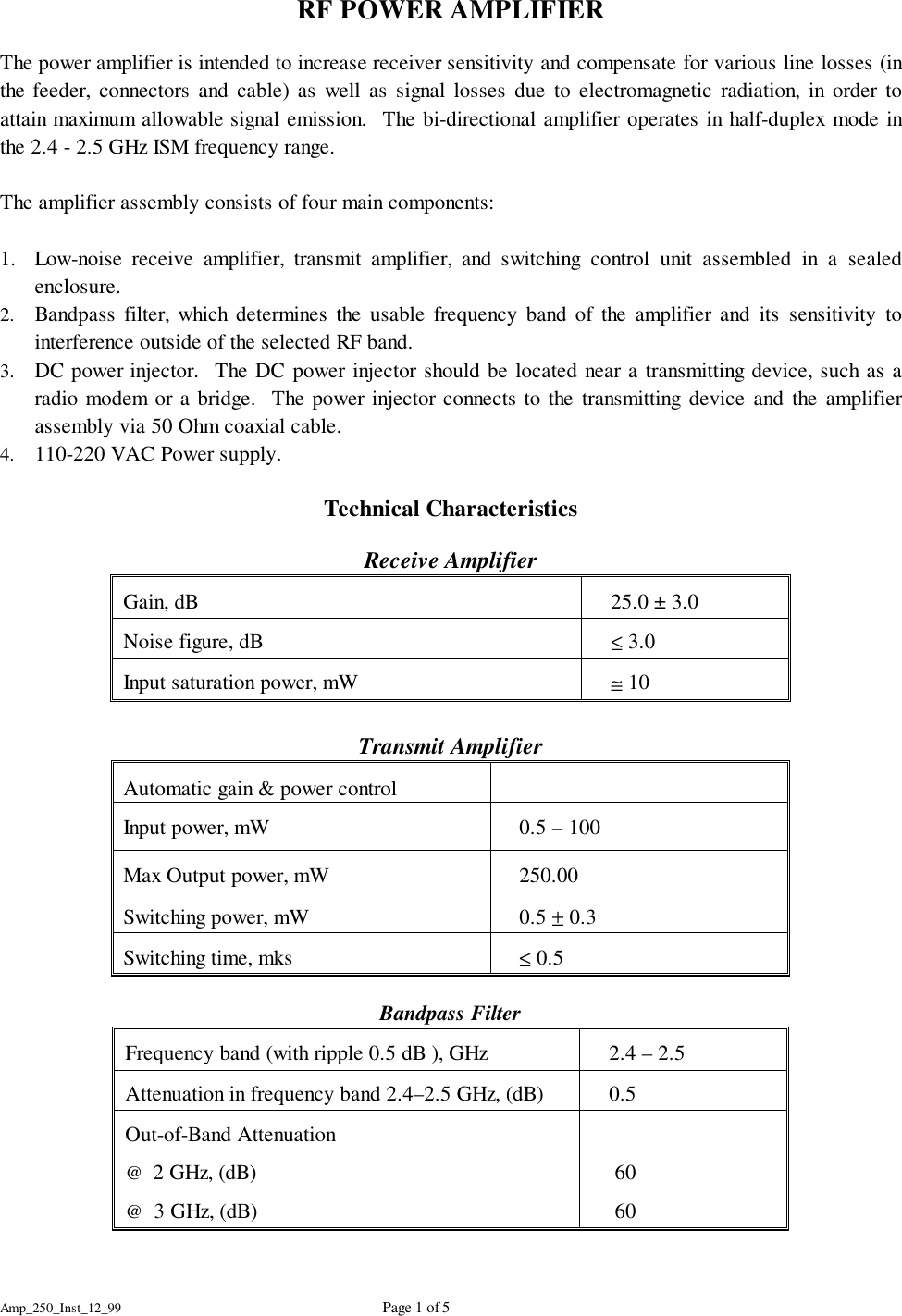
Amp_250_Inst_12_99 Page 1 of 5RF POWER AMPLIFIERThe power amplifier is intended to increase receiver sensitivity and compensate for various line losses (inthe feeder, connectors and cable) as well as signal losses due to electromagnetic radiation, in order toattain maximum allowable signal emission.  The bi-directional amplifier operates in half-duplex mode inthe 2.4 - 2.5 GHz ISM frequency range.The amplifier assembly consists of four main components:1. Low-noise receive amplifier, transmit amplifier, and switching control unit assembled in a sealedenclosure.2. Bandpass filter, which determines the usable frequency band of the amplifier and its sensitivity tointerference outside of the selected RF band.3. DC power injector.  The DC power injector should be located near a transmitting device, such as aradio modem or a bridge.  The power injector connects to the transmitting device and the amplifierassembly via 50 Ohm coaxial cable.4. 110-220 VAC Power supply.Technical CharacteristicsReceive AmplifierGain, dB    25.0 ± 3.0Noise figure, dB    ≤ 3.0Input saturation power, mW    ≅ 10Transmit AmplifierAutomatic gain & power control   Input power, mW    0.5 – 100Max Output power, mW    250.00Switching power, mW    0.5 ± 0.3Switching time, mks    ≤ 0.5Bandpass FilterFrequency band (with ripple 0.5 dB ), GHz    2.4 – 2.5 Attenuation in frequency band 2.4–2.5 GHz, (dB)    0.5Out-of-Band Attenuation@  2 GHz, (dB)@  3 GHz, (dB)    60    60
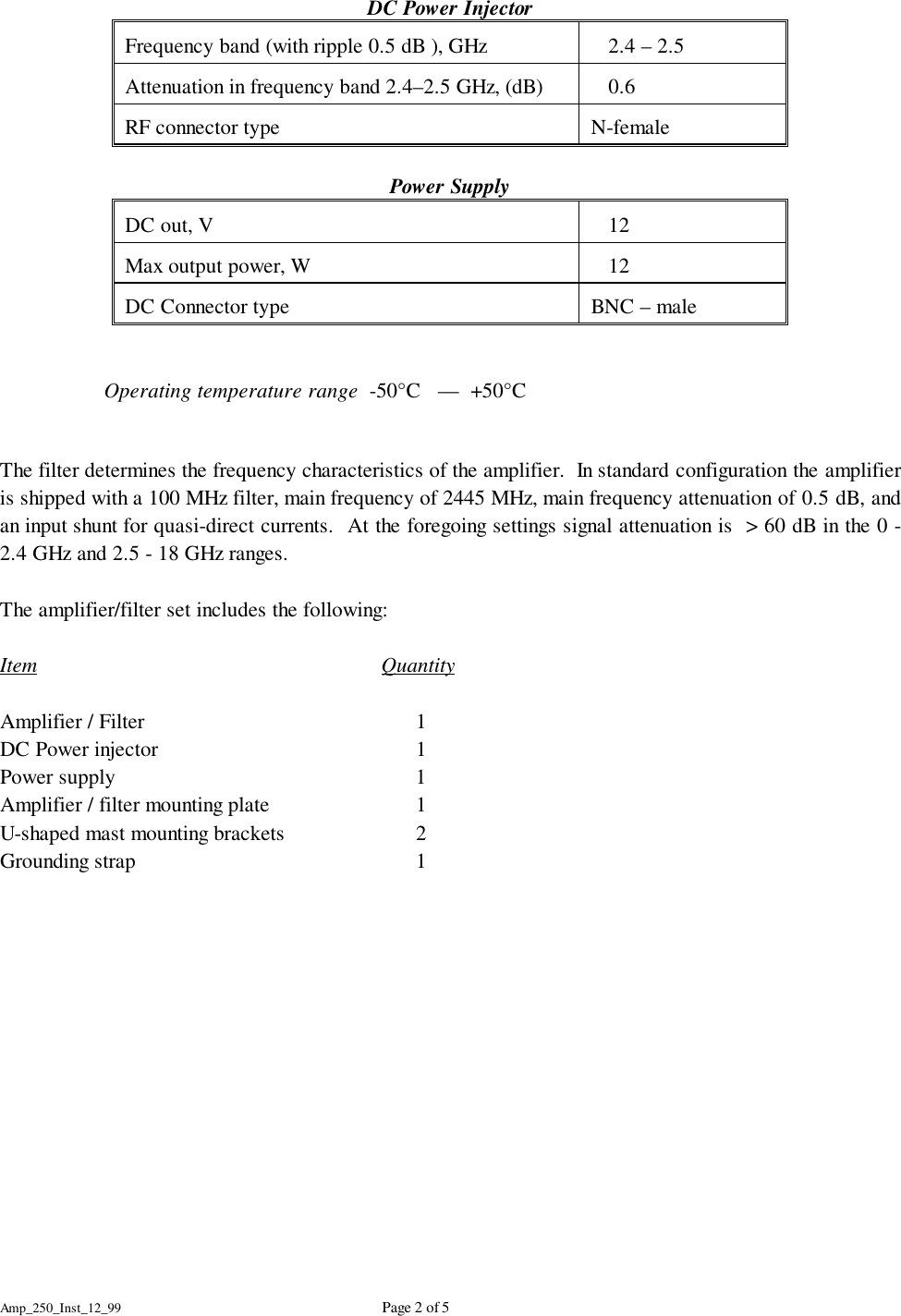
Amp_250_Inst_12_99 Page 2 of 5DC Power InjectorFrequency band (with ripple 0.5 dB ), GHz    2.4 – 2.5 Attenuation in frequency band 2.4–2.5 GHz, (dB)    0.6RF connector type N-femalePower SupplyDC out, V    12 Max output power, W    12DC Connector type BNC – maleOperating temperature range  -50°C   —  +50°CThe filter determines the frequency characteristics of the amplifier.  In standard configuration the amplifieris shipped with a 100 MHz filter, main frequency of 2445 MHz, main frequency attenuation of 0.5 dB, andan input shunt for quasi-direct currents.  At the foregoing settings signal attenuation is  > 60 dB in the 0 -2.4 GHz and 2.5 - 18 GHz ranges.The amplifier/filter set includes the following:Item QuantityAmplifier / Filter 1DC Power injector 1Power supply 1Amplifier / filter mounting plate 1U-shaped mast mounting brackets 2Grounding strap 1
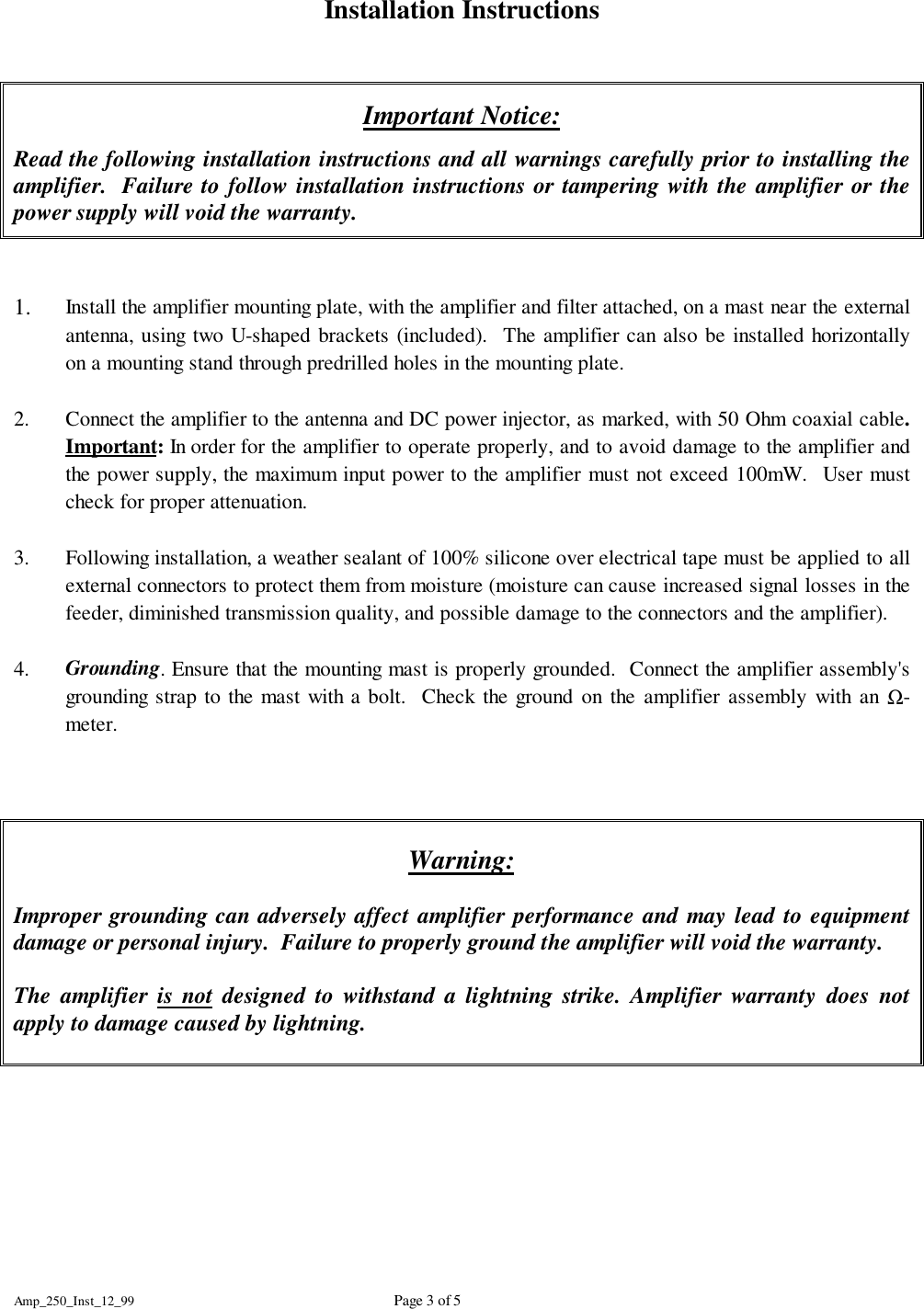
Amp_250_Inst_12_99 Page 3 of 5Installation InstructionsImportant Notice:Read the following installation instructions and all warnings carefully prior to installing theamplifier.  Failure to follow installation instructions or tampering with the amplifier or thepower supply will void the warranty.1. Install the amplifier mounting plate, with the amplifier and filter attached, on a mast near the externalantenna, using two U-shaped brackets (included).  The amplifier can also be installed horizontallyon a mounting stand through predrilled holes in the mounting plate.2. Connect the amplifier to the antenna and DC power injector, as marked, with 50 Ohm coaxial cable.Important: In order for the amplifier to operate properly, and to avoid damage to the amplifier andthe power supply, the maximum input power to the amplifier must not exceed 100mW.  User mustcheck for proper attenuation.3. Following installation, a weather sealant of 100% silicone over electrical tape must be applied to allexternal connectors to protect them from moisture (moisture can cause increased signal losses in thefeeder, diminished transmission quality, and possible damage to the connectors and the amplifier).4. Grounding. Ensure that the mounting mast is properly grounded.  Connect the amplifier assembly'sgrounding strap to the mast with a bolt.  Check the ground on the amplifier assembly with an Ω-meter.Warning:Improper grounding can adversely affect amplifier performance and may lead to equipmentdamage or personal injury.  Failure to properly ground the amplifier will void the warranty.The amplifier is not designed to withstand a lightning strike. Amplifier warranty does notapply to damage caused by lightning.
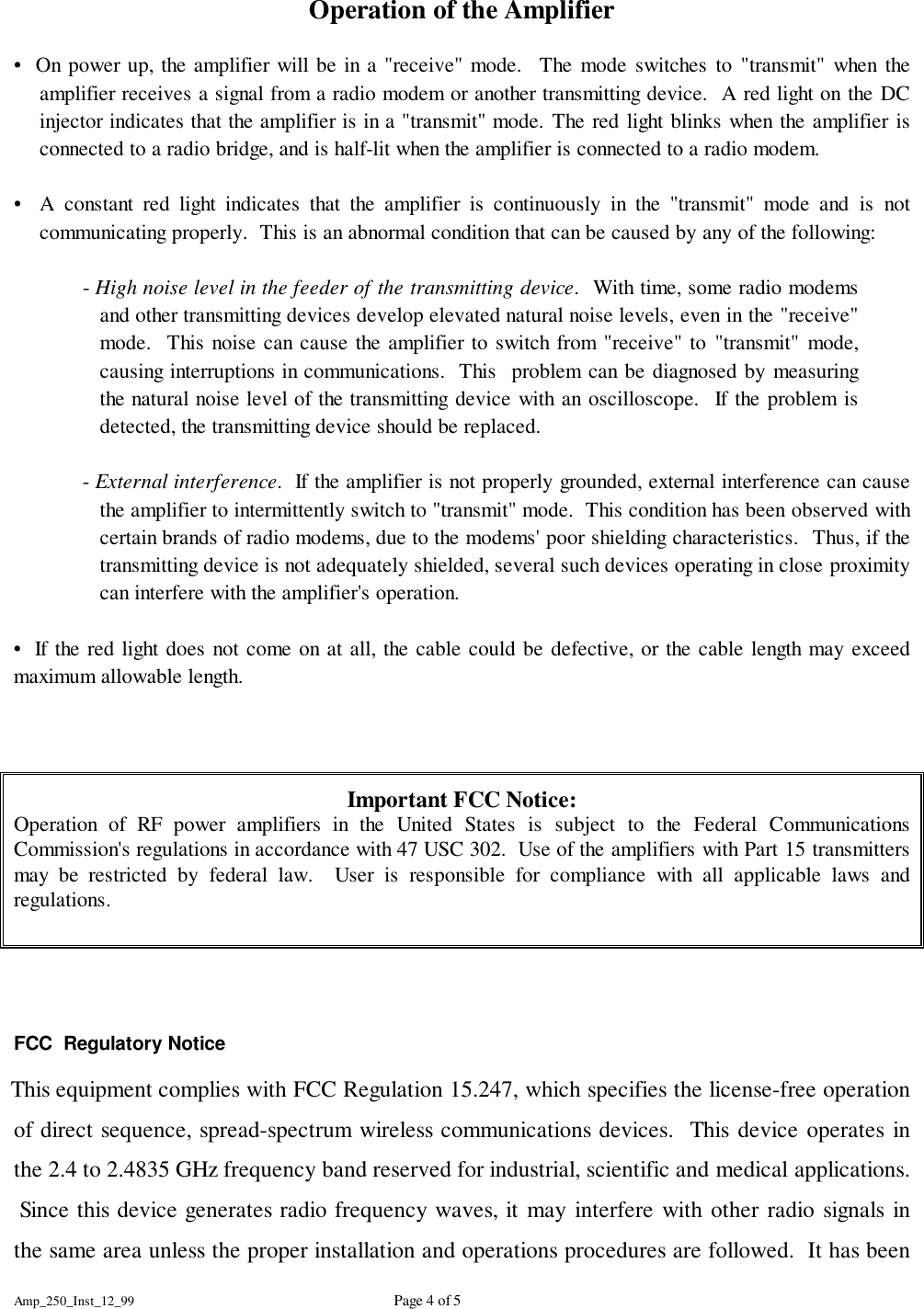
Amp_250_Inst_12_99 Page 4 of 5Operation of the Amplifier•  On power up, the amplifier will be in a "receive" mode.  The mode switches to "transmit" when theamplifier receives a signal from a radio modem or another transmitting device.  A red light on the DCinjector indicates that the amplifier is in a "transmit" mode. The red light blinks when the amplifier isconnected to a radio bridge, and is half-lit when the amplifier is connected to a radio modem.•  A constant red light indicates that the amplifier is continuously in the "transmit" mode and is notcommunicating properly.  This is an abnormal condition that can be caused by any of the following:- High noise level in the feeder of the transmitting device.  With time, some radio modemsand other transmitting devices develop elevated natural noise levels, even in the "receive"mode.  This noise can cause the amplifier to switch from "receive" to "transmit" mode,causing interruptions in communications.  This  problem can be diagnosed by measuringthe natural noise level of the transmitting device with an oscilloscope.  If the problem isdetected, the transmitting device should be replaced.- External interference.  If the amplifier is not properly grounded, external interference can causethe amplifier to intermittently switch to "transmit" mode.  This condition has been observed withcertain brands of radio modems, due to the modems' poor shielding characteristics.  Thus, if thetransmitting device is not adequately shielded, several such devices operating in close proximitycan interfere with the amplifier's operation.•  If the red light does not come on at all, the cable could be defective, or the cable length may exceedmaximum allowable length.Important FCC Notice:Operation of RF power amplifiers in the United States is subject to the Federal CommunicationsCommission's regulations in accordance with 47 USC 302.  Use of the amplifiers with Part 15 transmittersmay be restricted by federal law.  User is responsible for compliance with all applicable laws andregulations.FCC  Regulatory Notice    This equipment complies with FCC Regulation 15.247, which specifies the license-free operationof direct sequence, spread-spectrum wireless communications devices.  This device operates inthe 2.4 to 2.4835 GHz frequency band reserved for industrial, scientific and medical applications. Since this device generates radio frequency waves, it may interfere with other radio signals inthe same area unless the proper installation and operations procedures are followed.  It has been
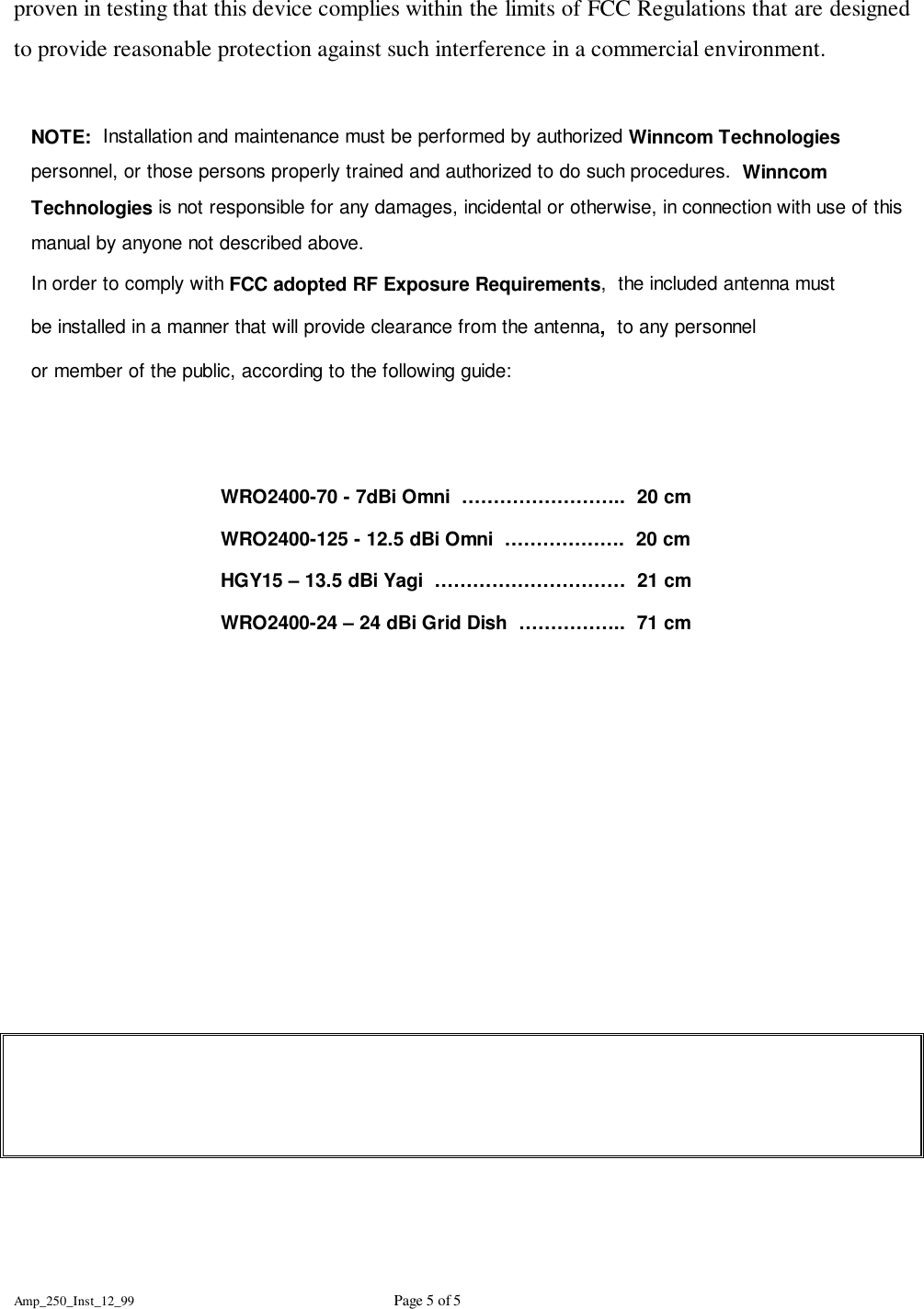
Amp_250_Inst_12_99 Page 5 of 5proven in testing that this device complies within the limits of FCC Regulations that are designedto provide reasonable protection against such interference in a commercial environment.NOTE:  Installation and maintenance must be performed by authorized Winncom Technologiespersonnel, or those persons properly trained and authorized to do such procedures.  WinncomTechnologies is not responsible for any damages, incidental or otherwise, in connection with use of thismanual by anyone not described above.In order to comply with FCC adopted RF Exposure Requirements,  the included antenna mustbe installed in a manner that will provide clearance from the antenna,  to any personnelor member of the public, according to the following guide:WRO2400-70 - 7dBi Omni  ……………………..  20 cmWRO2400-125 - 12.5 dBi Omni  ……………….  20 cmHGY15 – 13.5 dBi Yagi  …………………………  21 cmWRO2400-24 – 24 dBi Grid Dish  ……………..  71 cm

Navigation menu