YAMAHA MOTOR POWERED JW9-85560-00 BASE ASSY User Manual

YAMAHA MOTOR POWERED PRODUCTS CO., LTD. BASE ASSY Users Manual

User manual

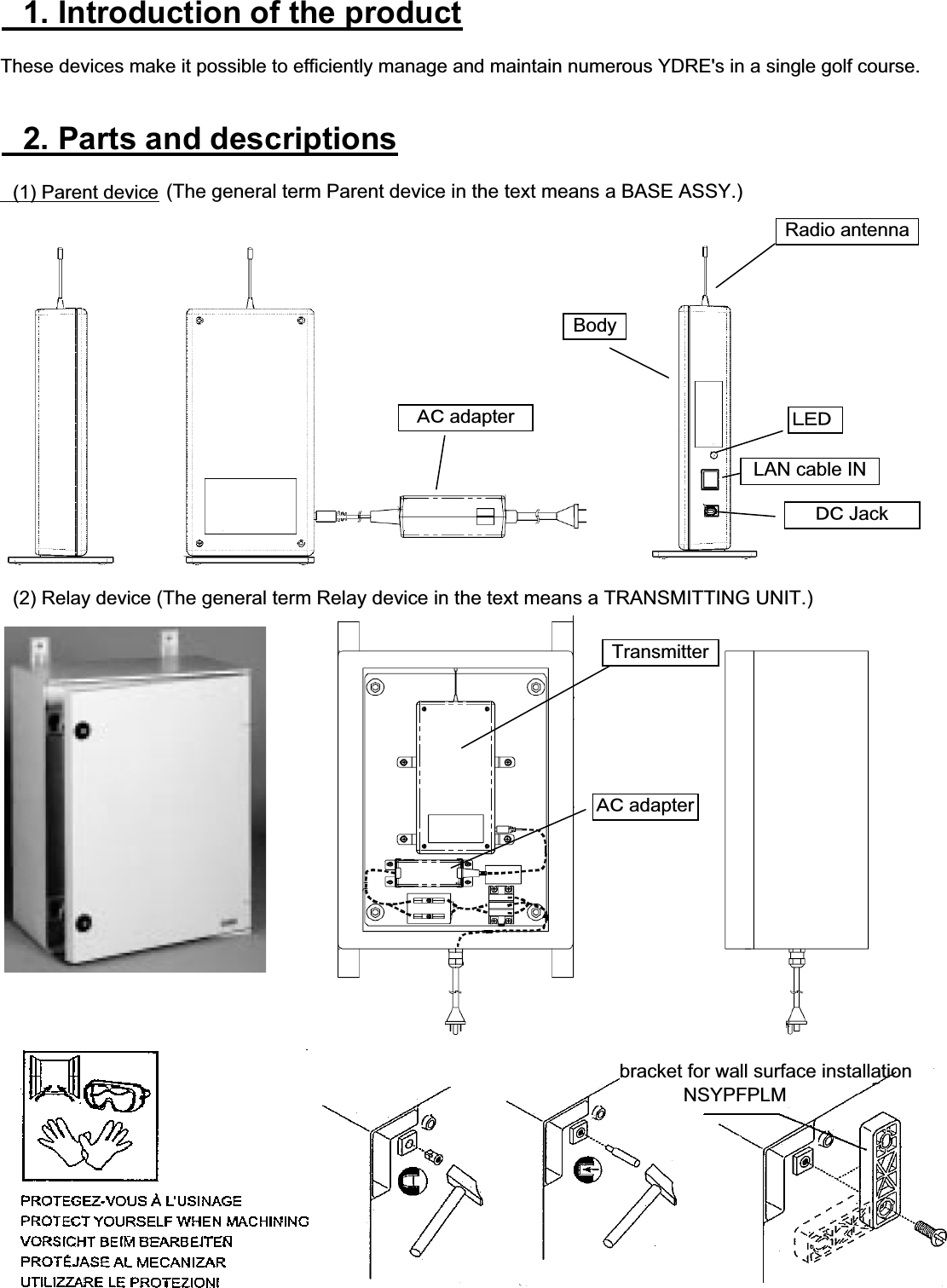
䇭1. Introduction of the productThese devices make it possible to efficiently manage and maintain numerous YDRE's in a single golf course.䇭2. Parts and descriptions䇭(1) Parent device䇭(2) Relay deviceLAN cable IN䌁䌃 adapterRadio antennaBody䌌䌅䌄䌁䌃 adapter䌄䌃 Jackbracket for wall surface installation           NSYPFPLMTransmitter(The general term Parent device in the text means a BASE ASSY.)(The general term Relay device in the text means a TRANSMITTING UNIT.)
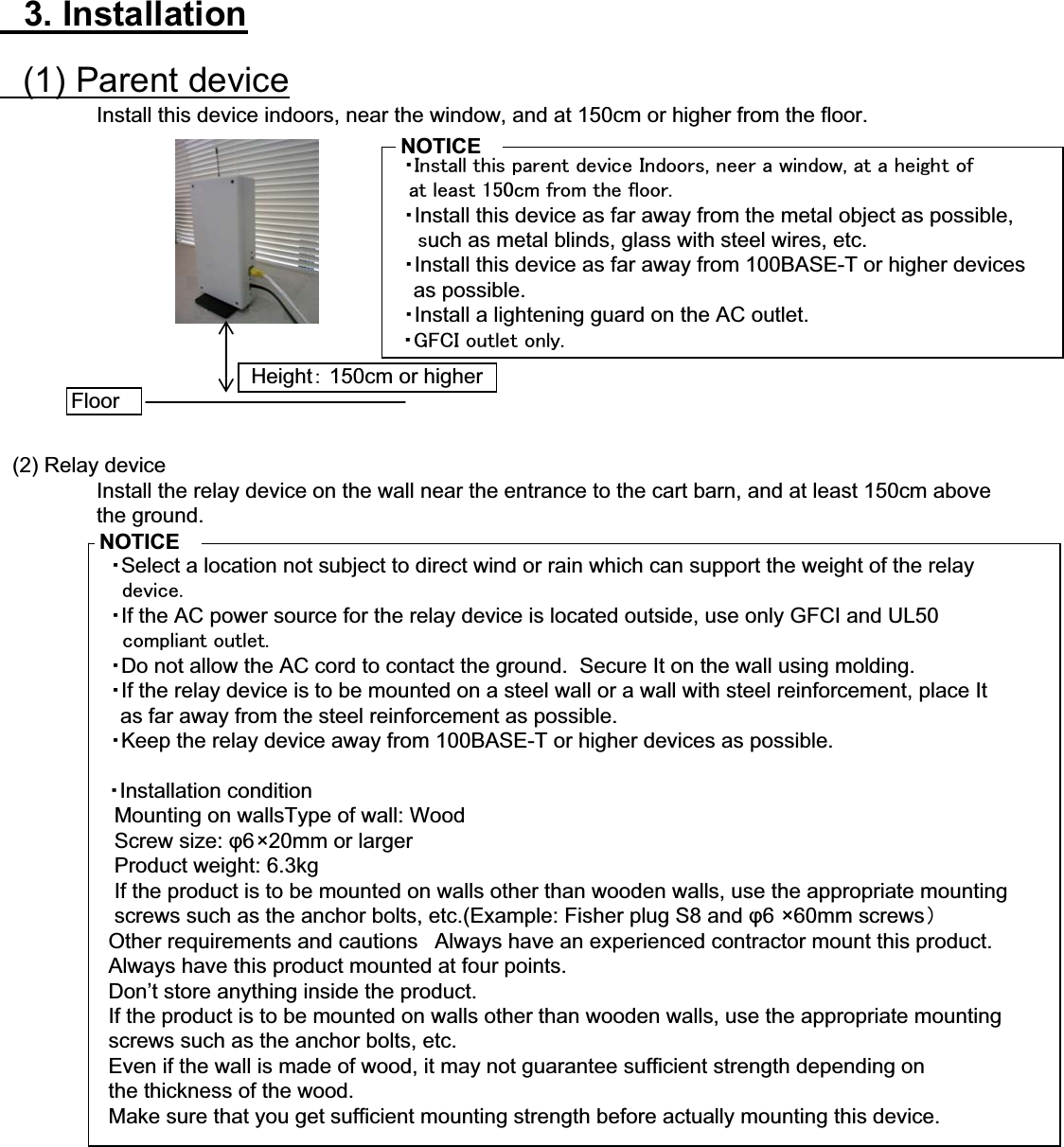
䇭3. Installation䇭(1) Parent deviceInstall this device indoors, near the window, and at 150cm or higher from the floor.䇭䊶㪠㫅㫊㫋㪸㫃㫃㩷㫋㪿㫀㫊㩷㫇㪸㫉㪼㫅㫋㩷㪻㪼㫍㫀㪺㪼㩷㪠㫅㪻㫆㫆㫉㫊㪃㩷㫅㪼㪼㫉㩷㪸㩷㫎㫀㫅㪻㫆㫎㪃㩷㪸㫋㩷㪸㩷㪿㪼㫀㪾㪿㫋㩷㫆㪽㩷㩷㩷㪸㫋㩷㫃㪼㪸㫊㫋㩷㪈㪌㪇㪺㫄㩷㪽㫉㫆㫄㩷㫋㪿㪼㩷㪽㫃㫆㫆㫉㪅䇭䊶Install this device as far away from the metal object as possible,䇭䇭㫊uch as metal blinds, glass with steel wires, etc.䇭䊶Install this device as far away from 100BASE-T or higher devices    as possible.䇭䊶Install a lightening guard on the AC outlet.㩷㩷䊶㪞㪝㪚㪠㩷㫆㫌㫋㫃㪼㫋㩷㫆㫅㫃㫐㪅䇭(2) Relay deviceInstall the relay device on the wall near the entrance to the cart barn, and at least 150cm above the ground.䇭䊶Select a location not subject to direct wind or rain which can support the weight of the relay㩷㩷㩷㩷㪻㪼㫍㫀㪺㪼㪅䇭䊶If the AC power source for the relay device is located outside, use only GFCI and UL50㩷㩷㩷㩷㪺㫆㫄㫇㫃㫀㪸㫅㫋㩷㫆㫌㫋㫃㪼㫋㪅䇭䊶Do not allow the AC cord to contact the ground.  Secure It on the wall using molding.䇭䊶If the relay device is to be mounted on a steel wall or a wall with steel reinforcement, place It    as far away from the steel reinforcement as possible.䇭䊶Keep the relay device away from 100BASE-T or higher devices as possible.䊶Installation condition   Mounting on wallsType of wall: Wood   Screw size: ij6×20mm or larger   Product weight: 6.3kg   If the product is to be mounted on walls other than wooden walls, use the appropriate mounting    screws such as the anchor bolts, etc.(Example: Fisher plug S8 and ij6 ×60mm screws䋩  Other requirements and cautions 䇭Always have an experienced contractor mount this product.  Always have this product mounted at four points.  Don’t store anything inside the product.  If the product is to be mounted on walls other than wooden walls, use the appropriate mounting   screws such as the anchor bolts, etc.  Even if the wall is made of wood, it may not guarantee sufficient strength depending on   the thickness of the wood.  Make sure that you get sufficient mounting strength before actually mounting this device.FloorHeight䋺 150cm or higherNOTICENOTICE
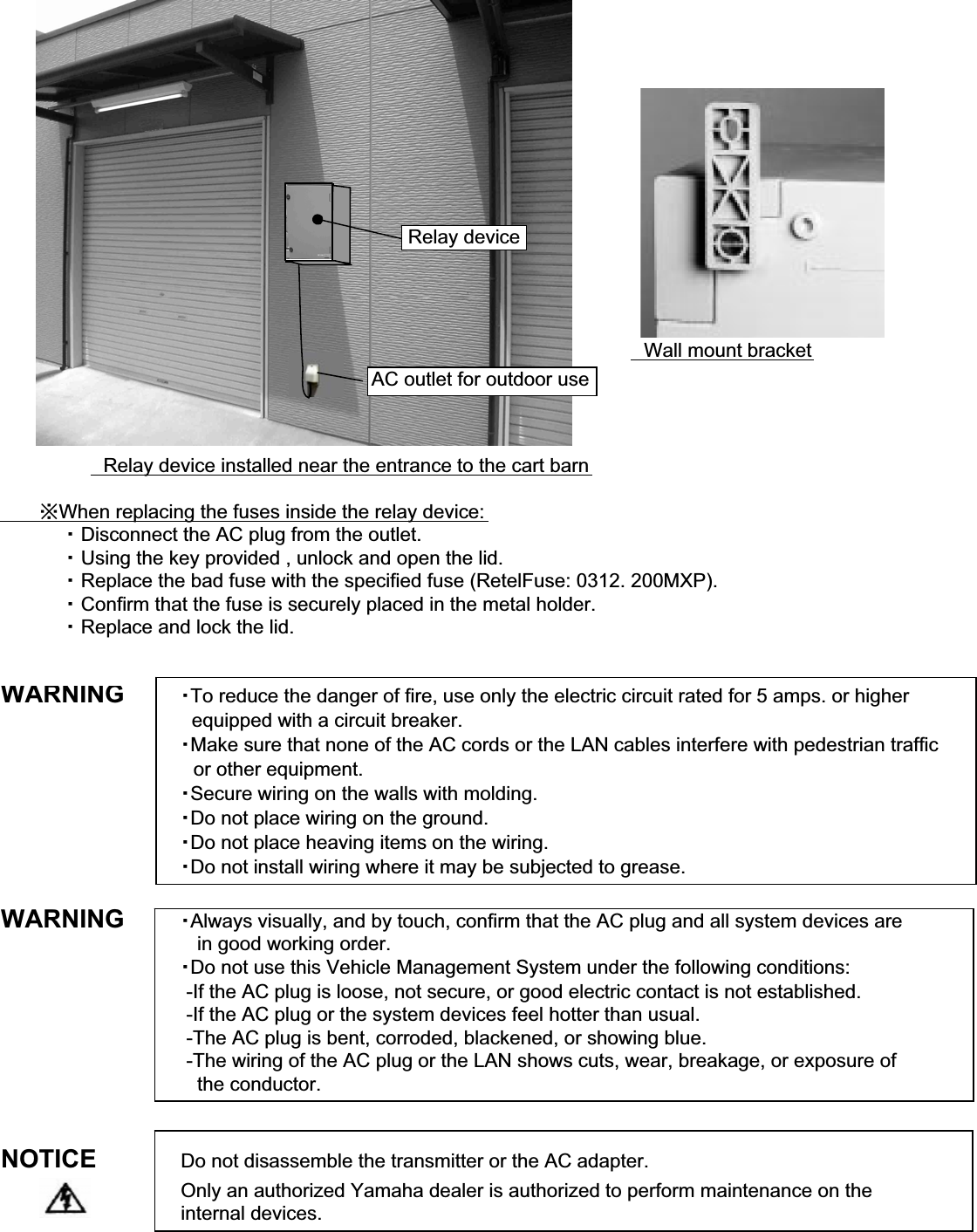
䇭Wall mount bracket䇭Relay device installed near the entrance to the cart barn䇭䇭䇭㶎When replacing the fuses inside the relay device:䇭䇭䇭䇭䇭䊶 Disconnect the AC plug from the outlet.䇭䇭䇭䇭䇭䊶 Using the key provided , unlock and open the lid.䇭䇭䇭䇭䇭䊶 Replace the bad fuse with the specified fuse (RetelFuse: 0312. 200MXP).䇭䇭䇭䇭䇭䊶 Confirm that the fuse is securely placed in the metal holder.䇭䇭䇭䇭䇭䊶 Replace and lock the lid.WARNING䊶To reduce the danger of fire, use only the electric circuit rated for 5 amps. or higher  equipped with a circuit breaker.䊶Make sure that none of the AC cords or the LAN cables interfere with pedestrian traffic䇭or other equipment.䊶Secure wiring on the walls with molding.䊶Do not place wiring on the ground.䊶Do not place heaving items on the wiring.䊶Do not install wiring where it may be subjected to grease.WARNING 䊶Always visually, and by touch, confirm that the AC plug and all system devices are   in good working order.䊶Do not use this Vehicle Management System under the following conditions: -If the AC plug is loose, not secure, or good electric contact is not established. -If the AC plug or the system devices feel hotter than usual. -The AC plug is bent, corroded, blackened, or showing blue. -The wiring of the AC plug or the LAN shows cuts, wear, breakage, or exposure of    the conductor.NOTICE Do not disassemble the transmitter or the AC adapter.Only an authorized Yamaha dealer is authorized to perform maintenance on the internal devices.Relay deviceAC outlet for outdoor use
FCC WARNINGChanges or modifications not expressly approved by the party responsible for compliance couldvoid the user's authority to operate the equipment.Note. This equipment has been tested and found to comply with the limits for a Class A digitaldevice , pursuant to part 15 of the FCC Rules. These limits are designed to provide reasonableprotection against harmful interference when the equipment Is oparated in a commercialenvironment. This equipment generates, uses, and can radiate radio frequency energy and, if notinstalled and used in accordance with the instruction manual, may cause harmful interference toradio communications, Operation of this equipment in a residential area is likely to cause harmfulinterference in which case the user will be required to correct the interference at his own expence.
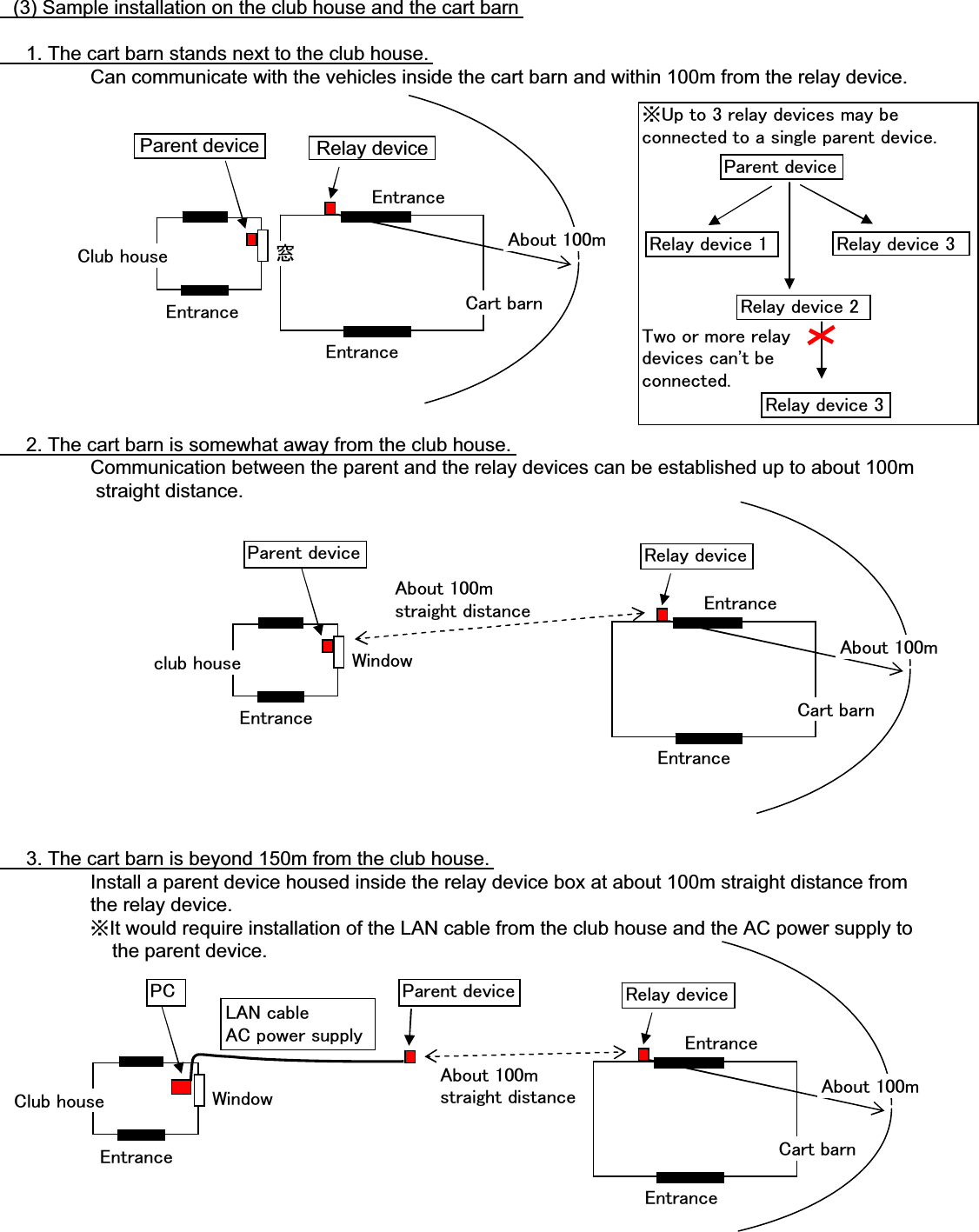
䇭(3) Sample installation on the club house and the cart barn䇭䇭1. The cart barn stands next to the club house.Can communicate with the vehicles inside the cart barn and within 100m from the relay device.䇭䇭2. The cart barn is somewhat away from the club house.Communication between the parent and the relay devices can be established up to about 100m straight distance.䇭䇭3. The cart barn is beyond 150m from the club house.Install a parent device housed inside the relay device box at about 100m straight distance from the relay device.㶎It would require installation of the LAN cable from the club house and the AC power supply to    the parent device.㪚㫃㫌㪹㩷㪿㫆㫌㫊㪼㪚㪸㫉㫋㩷㪹㪸㫉㫅⓹㪜㫅㫋㫉㪸㫅㪺㪼㪜㫅㫋㫉㪸㫅㪺㪼㪜㫅㫋㫉㪸㫅㪺㪼Parent device Relay device㪘㪹㫆㫌㫋㩷㪈㪇㪇㫄㪺㫃㫌㪹㩷㪿㫆㫌㫊㪼㪚㪸㫉㫋㩷㪹㪸㫉㫅㪮㫀㫅㪻㫆㫎㪜㫅㫋㫉㪸㫅㪺㪼㪜㫅㫋㫉㪸㫅㪺㪼㪜㫅㫋㫉㪸㫅㪺㪼㪧㪸㫉㪼㫅㫋㩷㪻㪼㫍㫀㪺㪼 㪩㪼㫃㪸㫐㩷㪻㪼㫍㫀㪺㪼㪘㪹㫆㫌㫋㩷㪈㪇㪇㫄㶎㪬㫇㩷㫋㫆㩷㪊㩷㫉㪼㫃㪸㫐㩷㪻㪼㫍㫀㪺㪼㫊㩷㫄㪸㫐㩷㪹㪼㪺㫆㫅㫅㪼㪺㫋㪼㪻㩷㫋㫆㩷㪸㩷㫊㫀㫅㪾㫃㪼㩷㫇㪸㫉㪼㫅㫋㩷㪻㪼㫍㫀㪺㪼㪅㪫㫎㫆㩷㫆㫉㩷㫄㫆㫉㪼㩷㫉㪼㫃㪸㫐㪻㪼㫍㫀㪺㪼㫊㩷㪺㪸㫅㩾㫋㩷㪹㪼㪺㫆㫅㫅㪼㪺㫋㪼㪻㪅㪧㪸㫉㪼㫅㫋㩷㪻㪼㫍㫀㪺㪼㪩㪼㫃㪸㫐㩷㪻㪼㫍㫀㪺㪼㩷㪈㪩㪼㫃㪸㫐㩷㪻㪼㫍㫀㪺㪼㩷㪉㪩㪼㫃㪸㫐㩷㪻㪼㫍㫀㪺㪼㩷㪊㪩㪼㫃㪸㫐㩷㪻㪼㫍㫀㪺㪼㩷㪊㪚㫃㫌㪹㩷㪿㫆㫌㫊㪼㪚㪸㫉㫋㩷㪹㪸㫉㫅㪮㫀㫅㪻㫆㫎㩷㪜㫅㫋㫉㪸㫅㪺㪼㪜㫅㫋㫉㪸㫅㪺㪼㪜㫅㫋㫉㪸㫅㪺㪼㪧㪚 㪩㪼㫃㪸㫐㩷㪻㪼㫍㫀㪺㪼㪘㪹㫆㫌㫋㩷㪈㪇㪇㫄㪧㪸㫉㪼㫅㫋㩷㪻㪼㫍㫀㪺㪼㪘㪹㫆㫌㫋㩷㪈㪇㪇㫄㫊㫋㫉㪸㫀㪾㪿㫋㩷㪻㫀㫊㫋㪸㫅㪺㪼㪘㪹㫆㫌㫋㩷㪈㪇㪇㫄㫊㫋㫉㪸㫀㪾㪿㫋㩷㪻㫀㫊㫋㪸㫅㪺㪼㪣㪘㪥㩷㪺㪸㪹㫃㪼㪘㪚㩷㫇㫆㫎㪼㫉㩷㫊㫌㫇㫇㫃㫐
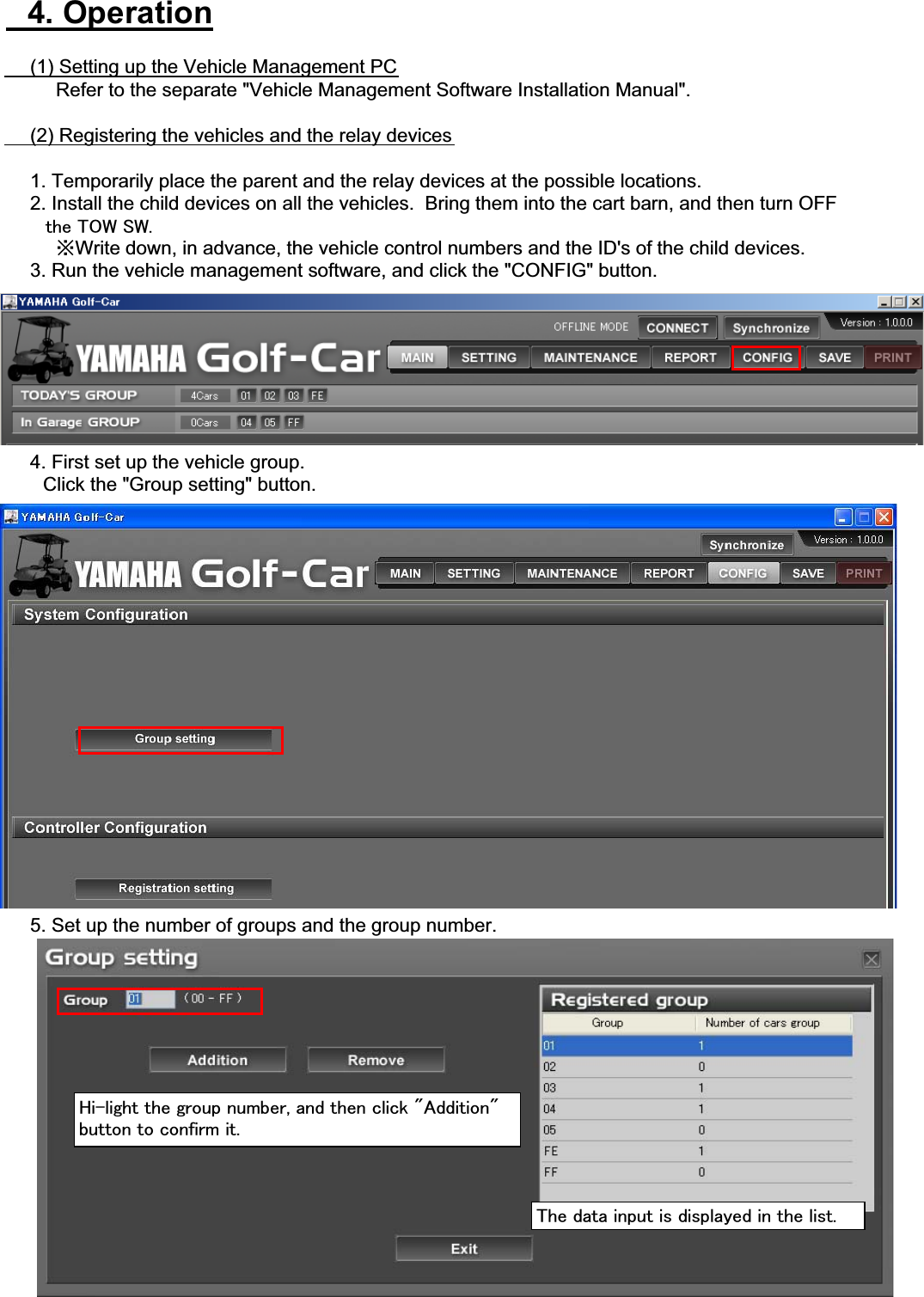
䇭4. Operation䇭䇭(1) Setting up the Vehicle Management PC䇭䇭䇭䇭Refer to the separate "Vehicle Management Software Installation Manual".䇭䇭(2) Registering the vehicles and the relay devices䇭䇭1. Temporarily place the parent and the relay devices at the possible locations.䇭䇭2. Install the child devices on all the vehicles.  Bring them into the cart barn, and then turn OFF㩷㩷㩷㩷㩷㩷㩷㫋㪿㪼㩷㪫㪦㪮㩷㪪㪮㪅䇭䇭䇭䇭㶎Write down, in advance, the vehicle control numbers and the ID's of the child devices.䇭䇭3. Run the vehicle management software, and click the "CONFIG" button.䇭䇭4. First set up the vehicle group.䇭䇭䇭Click the "Group setting" button.䇭䇭5. Set up the number of groups and the group number.㪟㫀㪄㫃㫀㪾㪿㫋㩷㫋㪿㪼㩷㪾㫉㫆㫌㫇㩷㫅㫌㫄㪹㪼㫉㪃㩷㪸㫅㪻㩷㫋㪿㪼㫅㩷㪺㫃㫀㪺㫂㩷㩹㪘㪻㪻㫀㫋㫀㫆㫅㩹㪹㫌㫋㫋㫆㫅㩷㫋㫆㩷㪺㫆㫅㪽㫀㫉㫄㩷㫀㫋㪅㪫㪿㪼㩷㪻㪸㫋㪸㩷㫀㫅㫇㫌㫋㩷㫀㫊㩷㪻㫀㫊㫇㫃㪸㫐㪼㪻㩷㫀㫅㩷㫋㪿㪼㩷㫃㫀㫊㫋㪅
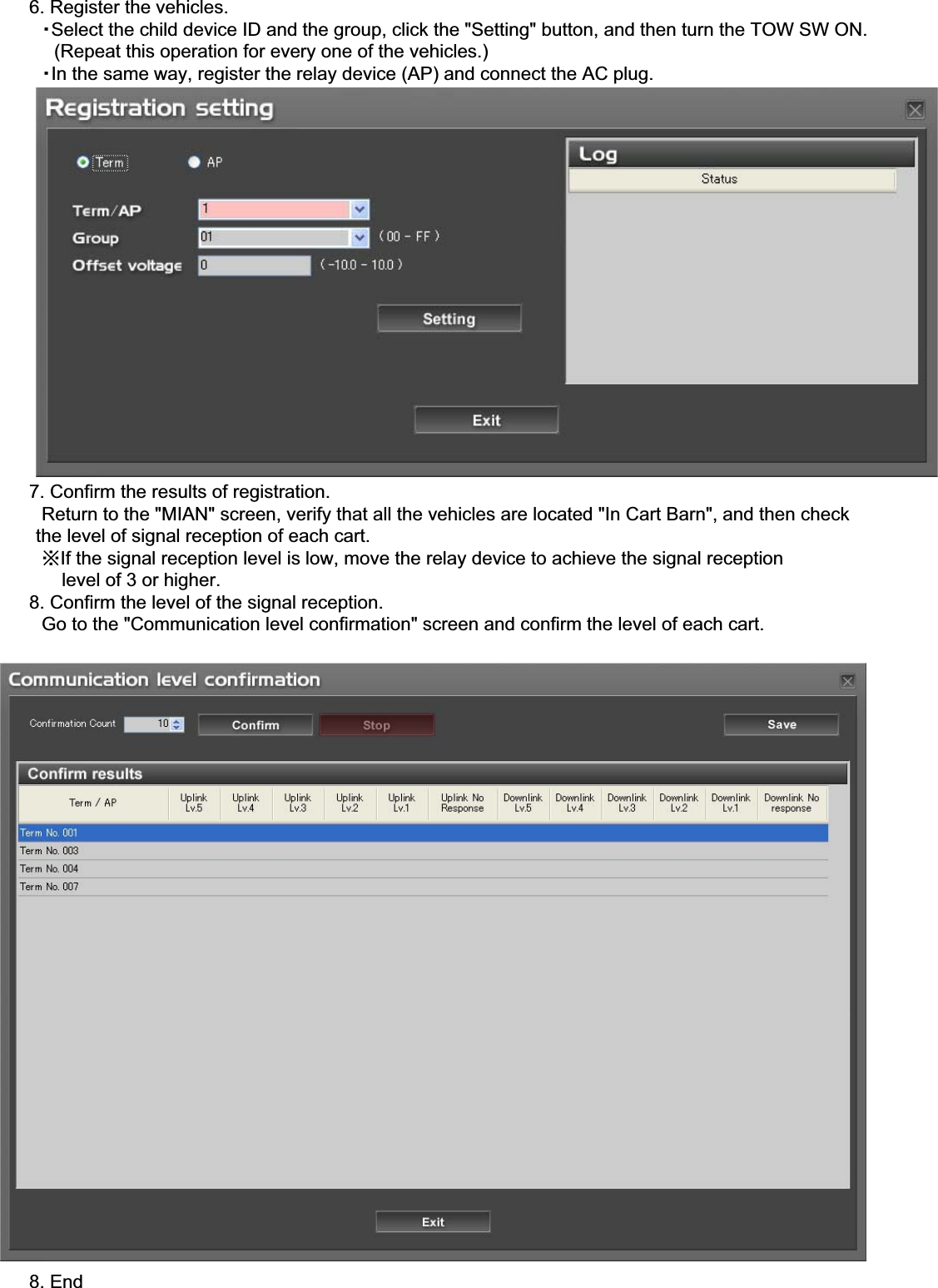
䇭䇭6. Register the vehicles.䇭䇭䇭䊶Select the child device ID and the group, click the "Setting" button, and then turn the TOW SW ON.䇭䇭䇭䇭(Repeat this operation for every one of the vehicles.)䇭䇭䇭䊶In the same way, register the relay device (AP) and connect the AC plug.䇭䇭7. Confirm the results of registration.䇭䇭䇭Return to the "MIAN" screen, verify that all the vehicles are located "In Cart Barn", and then check      the level of signal reception of each cart.䇭䇭䇭㶎If the signal reception level is low, move the relay device to achieve the signal reception           level of 3 or higher.䇭䇭8. Confirm the level of the signal reception.䇭䇭䇭Go to the "Communication level confirmation" screen and confirm the level of each cart.䇭䇭8. End
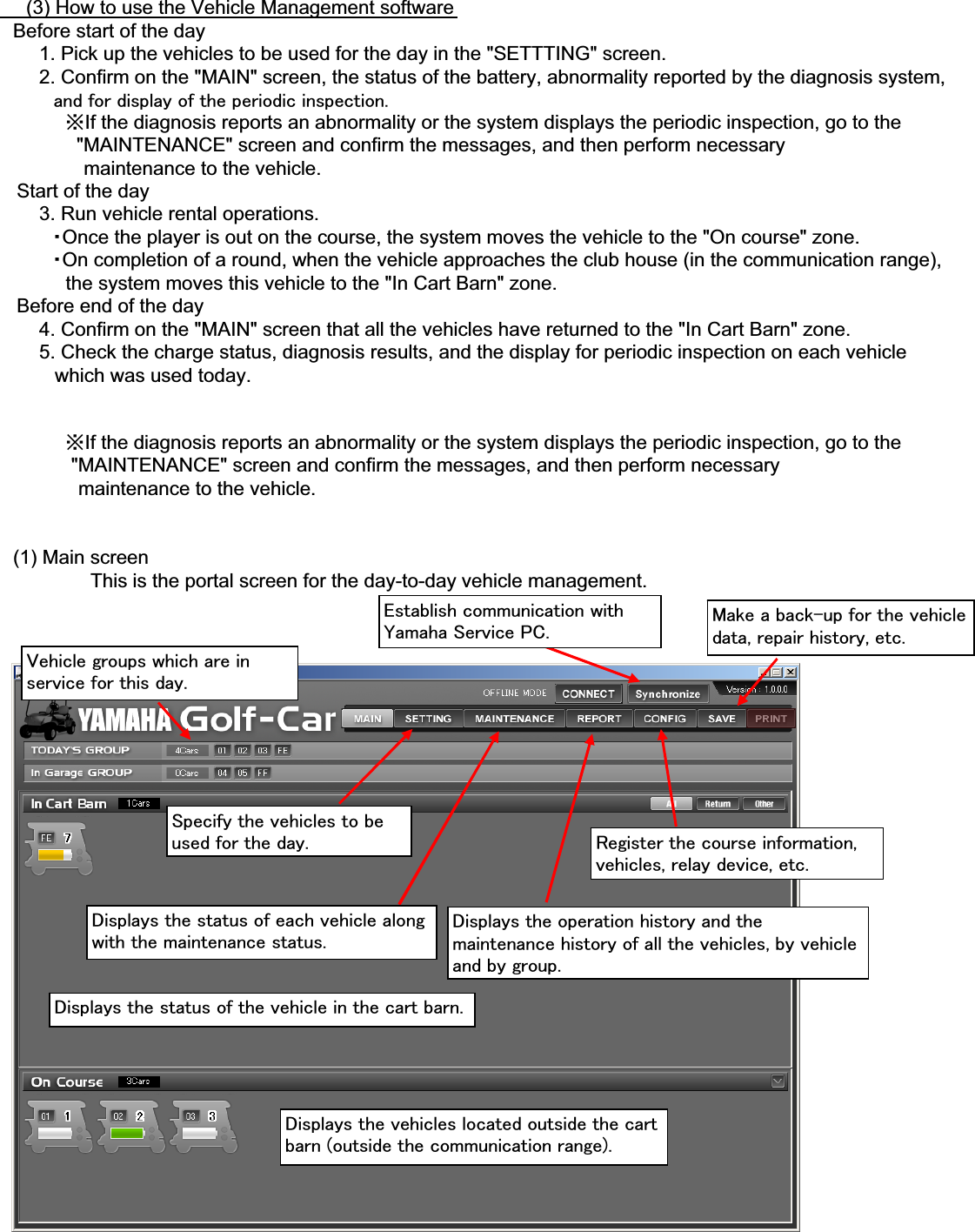
䇭䇭(3) How to use the Vehicle Management software䇭Before start of the day䇭䇭䇭1. Pick up the vehicles to be used for the day in the "SETTTING" screen.䇭䇭䇭2. Confirm on the "MAIN" screen, the status of the battery, abnormality reported by the diagnosis system,㩷㩷㩷㩷㩷㩷㩷㩷㩷㪸㫅㪻㩷㪽㫆㫉㩷㪻㫀㫊㫇㫃㪸㫐㩷㫆㪽㩷㫋㪿㪼㩷㫇㪼㫉㫀㫆㪻㫀㪺㩷㫀㫅㫊㫇㪼㪺㫋㫀㫆㫅㪅䇭䇭䇭䇭䇭㶎If the diagnosis reports an abnormality or the system displays the periodic inspection, go to the              "MAINTENANCE" screen and confirm the messages, and then perform necessary䇭䇭䇭䇭䇭䇭 maintenance to the vehicle.   Start of the day䇭䇭䇭3. Run vehicle rental operations.䇭䇭䇭䇭䊶Once the player is out on the course, the system moves the vehicle to the "On course" zone.䇭䇭䇭䇭䊶On completion of a round, when the vehicle approaches the club house (in the communication range),            the system moves this vehicle to the "In Cart Barn" zone.   Before end of the day䇭䇭䇭4. Confirm on the "MAIN" screen that all the vehicles have returned to the "In Cart Barn" zone.䇭䇭䇭5. Check the charge status, diagnosis results, and the display for periodic inspection on each vehicle          which was used today.䇭䇭䇭䇭䇭㶎If the diagnosis reports an abnormality or the system displays the periodic inspection, go to the             "MAINTENANCE" screen and confirm the messages, and then perform necessary䇭䇭䇭䇭䇭䇭maintenance to the vehicle.䇭(1) Main screenThis is the portal screen for the day-to-day vehicle management.㪜㫊㫋㪸㪹㫃㫀㫊㪿㩷㪺㫆㫄㫄㫌㫅㫀㪺㪸㫋㫀㫆㫅㩷㫎㫀㫋㪿㪰㪸㫄㪸㪿㪸㩷㪪㪼㫉㫍㫀㪺㪼㩷㪧㪚㪅 㪤㪸㫂㪼㩷㪸㩷㪹㪸㪺㫂㪄㫌㫇㩷㪽㫆㫉㩷㫋㪿㪼㩷㫍㪼㪿㫀㪺㫃㪼㪻㪸㫋㪸㪃㩷㫉㪼㫇㪸㫀㫉㩷㪿㫀㫊㫋㫆㫉㫐㪃㩷㪼㫋㪺㪅㪭㪼㪿㫀㪺㫃㪼㩷㪾㫉㫆㫌㫇㫊㩷㫎㪿㫀㪺㪿㩷㪸㫉㪼㩷㫀㫅㫊㪼㫉㫍㫀㪺㪼㩷㪽㫆㫉㩷㫋㪿㫀㫊㩷㪻㪸㫐㪅㪪㫇㪼㪺㫀㪽㫐㩷㫋㪿㪼㩷㫍㪼㪿㫀㪺㫃㪼㫊㩷㫋㫆㩷㪹㪼㫌㫊㪼㪻㩷㪽㫆㫉㩷㫋㪿㪼㩷㪻㪸㫐㪅 㪩㪼㪾㫀㫊㫋㪼㫉㩷㫋㪿㪼㩷㪺㫆㫌㫉㫊㪼㩷㫀㫅㪽㫆㫉㫄㪸㫋㫀㫆㫅㪃㫍㪼㪿㫀㪺㫃㪼㫊㪃㩷㫉㪼㫃㪸㫐㩷㪻㪼㫍㫀㪺㪼㪃㩷㪼㫋㪺㪅㪛㫀㫊㫇㫃㪸㫐㫊㩷㫋㪿㪼㩷㫊㫋㪸㫋㫌㫊㩷㫆㪽㩷㪼㪸㪺㪿㩷㫍㪼㪿㫀㪺㫃㪼㩷㪸㫃㫆㫅㪾㫎㫀㫋㪿㩷㫋㪿㪼㩷㫄㪸㫀㫅㫋㪼㫅㪸㫅㪺㪼㩷㫊㫋㪸㫋㫌㫊㪅㪛㫀㫊㫇㫃㪸㫐㫊㩷㫋㪿㪼㩷㫆㫇㪼㫉㪸㫋㫀㫆㫅㩷㪿㫀㫊㫋㫆㫉㫐㩷㪸㫅㪻㩷㫋㪿㪼㫄㪸㫀㫅㫋㪼㫅㪸㫅㪺㪼㩷㪿㫀㫊㫋㫆㫉㫐㩷㫆㪽㩷㪸㫃㫃㩷㫋㪿㪼㩷㫍㪼㪿㫀㪺㫃㪼㫊㪃㩷㪹㫐㩷㫍㪼㪿㫀㪺㫃㪼㪸㫅㪻㩷㪹㫐㩷㪾㫉㫆㫌㫇㪅㪛㫀㫊㫇㫃㪸㫐㫊㩷㫋㪿㪼㩷㫊㫋㪸㫋㫌㫊㩷㫆㪽㩷㫋㪿㪼㩷㫍㪼㪿㫀㪺㫃㪼㩷㫀㫅㩷㫋㪿㪼㩷㪺㪸㫉㫋㩷㪹㪸㫉㫅㪅㪛㫀㫊㫇㫃㪸㫐㫊㩷㫋㪿㪼㩷㫍㪼㪿㫀㪺㫃㪼㫊㩷㫃㫆㪺㪸㫋㪼㪻㩷㫆㫌㫋㫊㫀㪻㪼㩷㫋㪿㪼㩷㪺㪸㫉㫋㪹㪸㫉㫅㩷㩿㫆㫌㫋㫊㫀㪻㪼㩷㫋㪿㪼㩷㪺㫆㫄㫄㫌㫅㫀㪺㪸㫋㫀㫆㫅㩷㫉㪸㫅㪾㪼㪀㪅
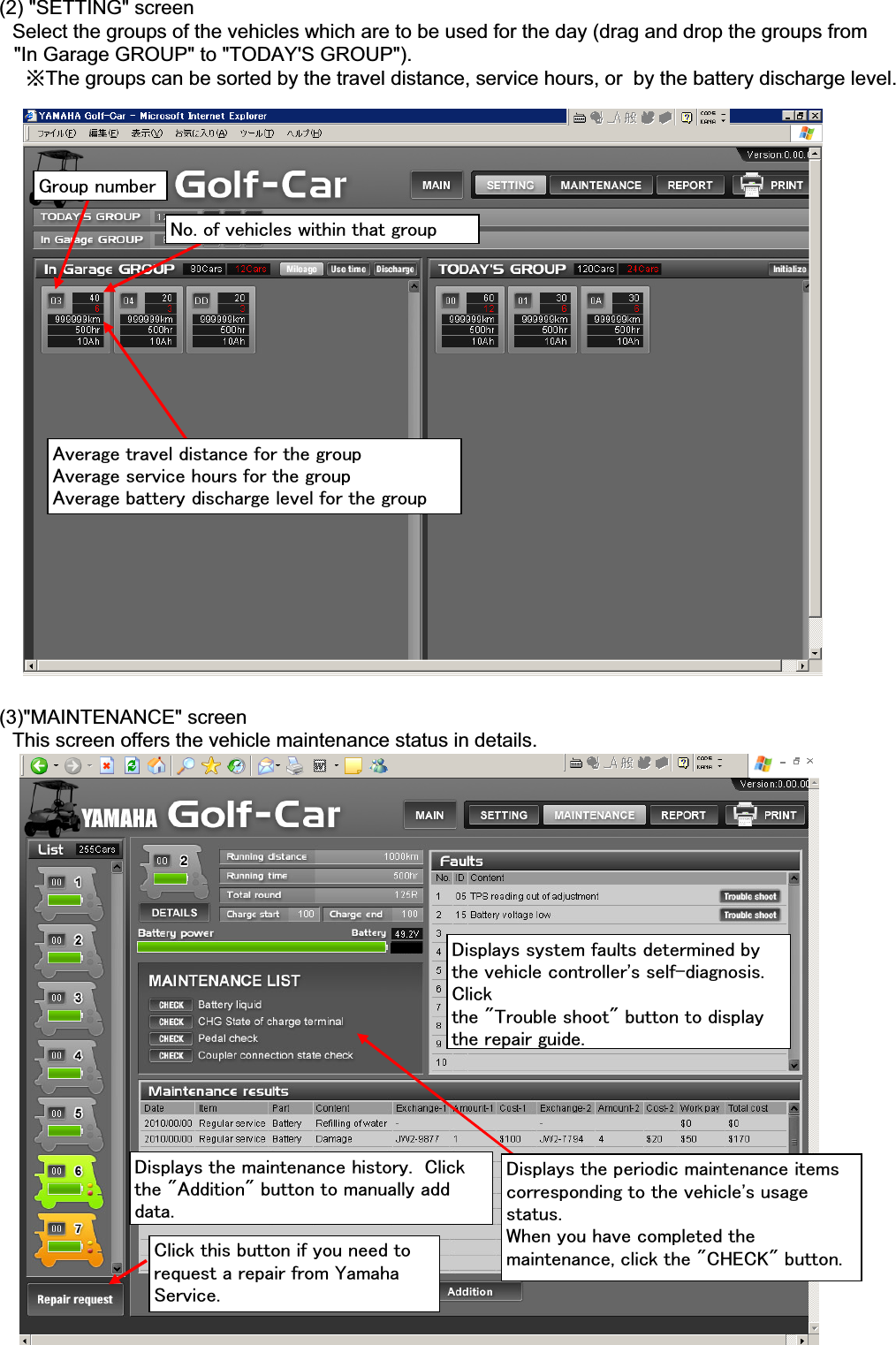
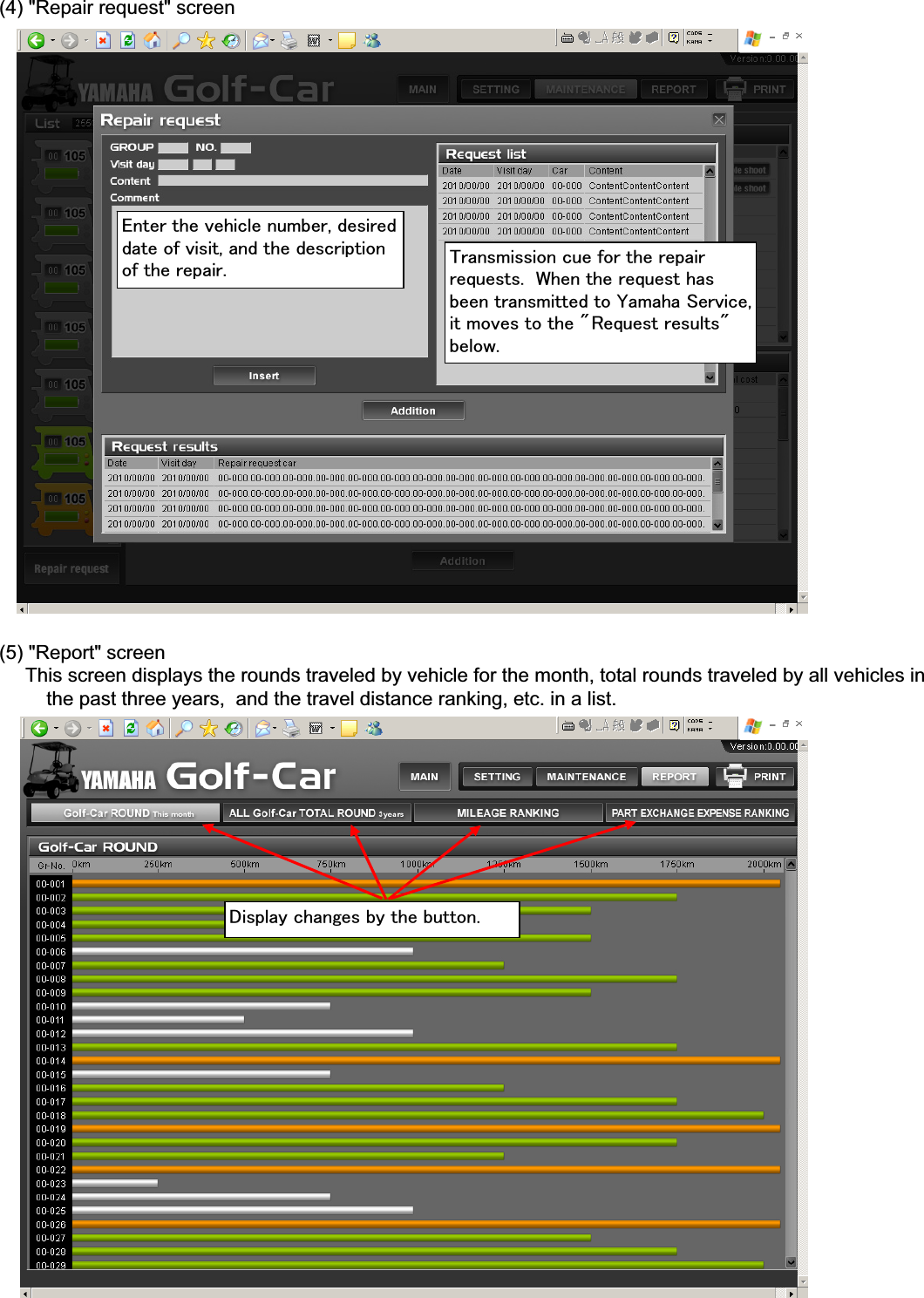
䇭(2) "SETTING" screen䇭䇭Select the groups of the vehicles which are to be used for the day (drag and drop the groups from     "In Garage GROUP" to "TODAY'S GROUP").䇭䇭䇭㶎The groups can be sorted by the travel distance, service hours, or  by the battery discharge level.䇭(3)"MAINTENANCE" screen䇭䇭This screen offers the vehicle maintenance status in details.㪞㫉㫆㫌㫇㩷㫅㫌㫄㪹㪼㫉㪥㫆㪅㩷㫆㪽㩷㫍㪼㪿㫀㪺㫃㪼㫊㩷㫎㫀㫋㪿㫀㫅㩷㫋㪿㪸㫋㩷㪾㫉㫆㫌㫇㪘㫍㪼㫉㪸㪾㪼㩷㫋㫉㪸㫍㪼㫃㩷㪻㫀㫊㫋㪸㫅㪺㪼㩷㪽㫆㫉㩷㫋㪿㪼㩷㪾㫉㫆㫌㫇㪘㫍㪼㫉㪸㪾㪼㩷㫊㪼㫉㫍㫀㪺㪼㩷㪿㫆㫌㫉㫊㩷㪽㫆㫉㩷㫋㪿㪼㩷㪾㫉㫆㫌㫇㪘㫍㪼㫉㪸㪾㪼㩷㪹㪸㫋㫋㪼㫉㫐㩷㪻㫀㫊㪺㪿㪸㫉㪾㪼㩷㫃㪼㫍㪼㫃㩷㪽㫆㫉㩷㫋㪿㪼㩷㪾㫉㫆㫌㫇㪛㫀㫊㫇㫃㪸㫐㫊㩷㫊㫐㫊㫋㪼㫄㩷㪽㪸㫌㫃㫋㫊㩷㪻㪼㫋㪼㫉㫄㫀㫅㪼㪻㩷㪹㫐㫋㪿㪼㩷㫍㪼㪿㫀㪺㫃㪼㩷㪺㫆㫅㫋㫉㫆㫃㫃㪼㫉㩾㫊㩷㫊㪼㫃㪽㪄㪻㫀㪸㪾㫅㫆㫊㫀㫊㪅㪚㫃㫀㪺㫂㫋㪿㪼㩷㩹㪫㫉㫆㫌㪹㫃㪼㩷㫊㪿㫆㫆㫋㩹㩷㪹㫌㫋㫋㫆㫅㩷㫋㫆㩷㪻㫀㫊㫇㫃㪸㫐㫋㪿㪼㩷㫉㪼㫇㪸㫀㫉㩷㪾㫌㫀㪻㪼㪅㪛㫀㫊㫇㫃㪸㫐㫊㩷㫋㪿㪼㩷㫄㪸㫀㫅㫋㪼㫅㪸㫅㪺㪼㩷㪿㫀㫊㫋㫆㫉㫐㪅㩷㩷㪚㫃㫀㪺㫂㫋㪿㪼㩷㩹㪘㪻㪻㫀㫋㫀㫆㫅㩹㩷㪹㫌㫋㫋㫆㫅㩷㫋㫆㩷㫄㪸㫅㫌㪸㫃㫃㫐㩷㪸㪻㪻㪻㪸㫋㪸㪅㪛㫀㫊㫇㫃㪸㫐㫊㩷㫋㪿㪼㩷㫇㪼㫉㫀㫆㪻㫀㪺㩷㫄㪸㫀㫅㫋㪼㫅㪸㫅㪺㪼㩷㫀㫋㪼㫄㫊㪺㫆㫉㫉㪼㫊㫇㫆㫅㪻㫀㫅㪾㩷㫋㫆㩷㫋㪿㪼㩷㫍㪼㪿㫀㪺㫃㪼㩾㫊㩷㫌㫊㪸㪾㪼㫊㫋㪸㫋㫌㫊㪅㪮㪿㪼㫅㩷㫐㫆㫌㩷㪿㪸㫍㪼㩷㪺㫆㫄㫇㫃㪼㫋㪼㪻㩷㫋㪿㪼㫄㪸㫀㫅㫋㪼㫅㪸㫅㪺㪼㪃㩷㪺㫃㫀㪺㫂㩷㫋㪿㪼㩷㩹㪚㪟㪜㪚㪢㩹㩷㪹㫌㫋㫋㫆㫅㪅㪚㫃㫀㪺㫂㩷㫋㪿㫀㫊㩷㪹㫌㫋㫋㫆㫅㩷㫀㪽㩷㫐㫆㫌㩷㫅㪼㪼㪻㩷㫋㫆㫉㪼㫈㫌㪼㫊㫋㩷㪸㩷㫉㪼㫇㪸㫀㫉㩷㪽㫉㫆㫄㩷㪰㪸㫄㪸㪿㪸㪪㪼㫉㫍㫀㪺㪼㪅
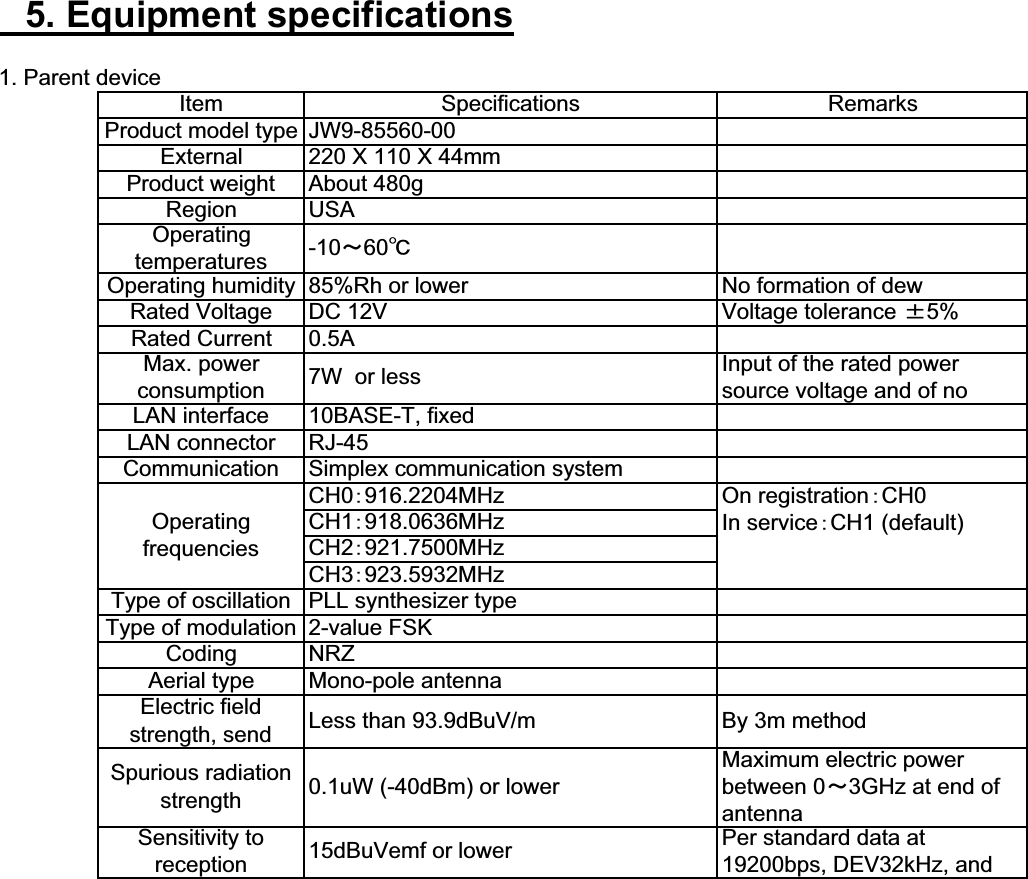
䇭(4) "Repair request" screen䇭(5) "Report" screen䇭䇭䇭This screen displays the rounds traveled by vehicle for the month, total rounds traveled by all vehicles in           the past three years,  and the travel distance ranking, etc. in a list.㪜㫅㫋㪼㫉㩷㫋㪿㪼㩷㫍㪼㪿㫀㪺㫃㪼㩷㫅㫌㫄㪹㪼㫉㪃㩷㪻㪼㫊㫀㫉㪼㪻㪻㪸㫋㪼㩷㫆㪽㩷㫍㫀㫊㫀㫋㪃㩷㪸㫅㪻㩷㫋㪿㪼㩷㪻㪼㫊㪺㫉㫀㫇㫋㫀㫆㫅㫆㪽㩷㫋㪿㪼㩷㫉㪼㫇㪸㫀㫉㪅 㪫㫉㪸㫅㫊㫄㫀㫊㫊㫀㫆㫅㩷㪺㫌㪼㩷㪽㫆㫉㩷㫋㪿㪼㩷㫉㪼㫇㪸㫀㫉㫉㪼㫈㫌㪼㫊㫋㫊㪅㩷㩷㪮㪿㪼㫅㩷㫋㪿㪼㩷㫉㪼㫈㫌㪼㫊㫋㩷㪿㪸㫊㪹㪼㪼㫅㩷㫋㫉㪸㫅㫊㫄㫀㫋㫋㪼㪻㩷㫋㫆㩷㪰㪸㫄㪸㪿㪸㩷㪪㪼㫉㫍㫀㪺㪼㪃㫀㫋㩷㫄㫆㫍㪼㫊㩷㫋㫆㩷㫋㪿㪼㩷㩹㪩㪼㫈㫌㪼㫊㫋㩷㫉㪼㫊㫌㫃㫋㫊㩹㪹㪼㫃㫆㫎㪅㪛㫀㫊㫇㫃㪸㫐㩷㪺㪿㪸㫅㪾㪼㫊㩷㪹㫐㩷㫋㪿㪼㩷㪹㫌㫋㫋㫆㫅㪅
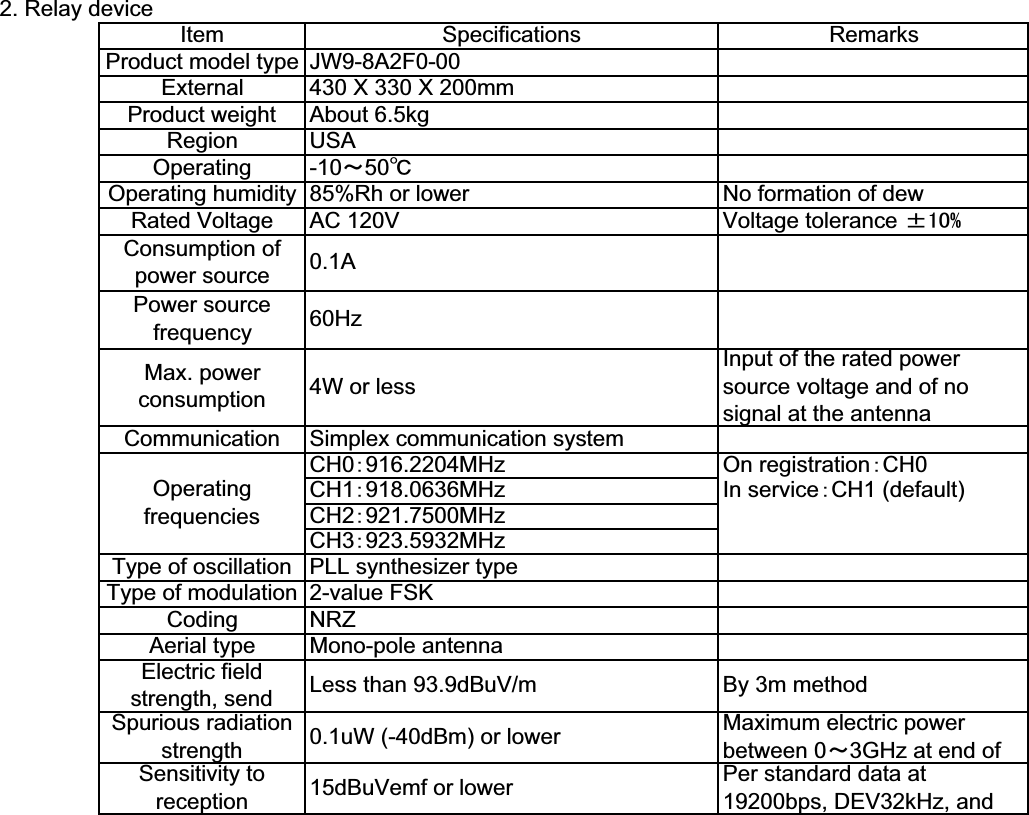
䇭5. Equipment specifications1. Parent deviceIn service䋺CH1 (default)Item Specifications RemarksProduct model type JW9-85560-00External 220 X 110 X 44mmProduct weight About 480gRegion USAOperatingtemperatures -10䌾60㷄Operating humidity 85%Rh or lower No formation of dewRated Voltage DC 12V Voltage tolerance 㫧5%Rated Current 0.5AMax. powerconsumption 7W  or less Input of the rated powersource voltage and of noLAN interface 10BASE-T, fixedLAN connector RJ-45Communication Simplex communication systemOperatingfrequenciesCH0䋺916.2204MHz On registration䋺CH0CH1䋺918.0636MHzCH2䋺921.7500MHzCH3䋺923.5932MHzType of oscillation PLL synthesizer typeType of modulation 2-value FSKCoding NRZAerial type Mono-pole antennaElectric fieldstrength, send Less than 93.9dBuV/m By 3m methodSpurious radiationstrength 0.1uW (-40dBm) or lowerMaximum electric powerbetween 0䌾3GHz at end ofantennaSensitivity toreception 15dBuVemf or lower Per standard data at19200bps, DEV32kHz, and
2. Relay deviceIn service䋺CH1 (default)By 3m methodMaximum electric powerbetween 0䌾3GHz at end ofRemarksInput of the rated powersource voltage and of nosignal at the antennaNo formation of dewVoltage tolerance 㫧㪈㪇㩼PLL synthesizer type2-value FSKNRZMono-pole antennaSpecificationsJW9-8A2F0-00430 X 330 X 200mm4W or lessAbout 6.5kgUSA-10䌾50㷄85%Rh or lowerConsumption ofpower sourcePower sourcefrequencyAC 120VType of modulationMax. powerconsumptionType of oscillation0.1A60HzSimplex communication systemCH0䋺916.2204MHzRegionOperatingOperating humidityRated VoltageItemProduct model typeExternalProduct weightCommunicationOperatingfrequenciesOn registration䋺CH0Electric fieldstrength, send Less than 93.9dBuV/mCodingAerial typeCH1䋺918.0636MHzCH2䋺921.7500MHzCH3䋺923.5932MHzPer standard data at19200bps, DEV32kHz, andSpurious radiationstrength 0.1uW (-40dBm) or lowerSensitivity toreception 15dBuVemf or lower

Navigation menu