ZMI Electronics ZSH00201200YPM UniSmart Handle User Manual

ZMI Electronics, Ltd UniSmart Handle

User Manual

            UniSmartTM Handle User Manual
UNISMARTTM HANDLE USER MANUAL  Page 1                                                                                                                                        ZMI ELECTRONICS LTD. ALL RIGHT RESERVED TABLE OF CONTENTS  1. INTRODUCTION 2 2. THERAPY ADVANTAGES 3 OBJECTIVITY 3 BIOFEEDBACK  5 CONTROL  5 DEFENDABLE DOCUMENTATION  6 CLINICAL BENIFITS  7 3. SAFETY 8 PRECAUTIONS  9 MAINTAINENCE  10 4. PRODUCT COMPOSITION 11 UNISMART HANDLE 11 PRIMARY COMPONENTS  12 CONTROL PANEL  13 LCD DISPLAY  14 BAND GRIP RANGE  15 LABELLING  16 5. INSTALLATION FOR USE 17 INSTALLATION OF ACCESSOIRES 17 INSTALLATION OF BAND  19 6. OPERATION INSTRUCTIONS 20 UNISMART HANDLE 20 HOW TO APPLY THE VARIOUS MODES TO CLINICAL PRACTICE  22 PC TRANSMISSION 27 BLUETOOTH PRINTER  27 7. SPECIFICATIONS 29 8. LIST OF APPROVED EXERCISE BANDS FOR USE WITH UNISMART HANDLE 30 9. TROUBLESHOOTING 31 10. MANUFACTURER & EU REPRESENTATIVE & DISTRIBUTOR 32
UNISMARTTM HANDLE USER MANUAL  Page 2                                                                                                                                        ZMI ELECTRONICS LTD. ALL RIGHT RESERVED 1. INTRODUCTION    The  UniSmart  Handle™  is  designed to promote  high-quality  therapeutic  exercise for  physiotherapy  patients,  members  of  fitness/wellness  centers  and  those exercising  at  home.  Used  with  elastic  exercise  bands  or  tubes  the  UniSmartTM Handle is a practical and simple digital interface for resistive exercise.    When  used  by  therapists  the  UniSmart  Handles  provides  real-time  feedback  by displaying force and repetition data. This enables therapists to see and record the specific data needed  for reliable,  evidence-based exercise  programmes that  help maximize patient strength and function in the shortest period of time possible.    Use the UniSmart Handle to:  o Guide strengthening exercises. o Objectively measure and set precise resistance levels.      o Count and indicate the number of repetitions of a specific exercise. o Encourage quality exercise by setting resistance targets and using immediate audio & visual signals to cue range of motion and resistance targets. o Wirelessly  transmit  performance  data  from  the  UniSmart Handle  to  your Bluetooth® enabled computer.   o Record detailed exercise information to document skilled therapy services.  For additional information and online education, please visit www.unismarthandle.com
UNISMARTTM HANDLE USER MANUAL  Page 3                                                                                                                                        ZMI ELECTRONICS LTD. ALL RIGHT RESERVED 2. THERAPY ADVANTAGES  OBJECTIVITY Therapists  constantly  face  challenges  that  limit  their  ability  to  help  patients achieve  their  therapy  goals.  Limited  treatment  times,  an  insufficient  number  of patient visits and capped payments can all affect successful patient outcomes. It is therefore  vital  that  the  therapist  provides  evidence-based  treatments that  are designed to maximize patient outcome in the shortest period of time.    Resistance  exercises  with  elastic  bands  and  tubes  designed  to  improve  muscle strength  are  one  of  the  most  essential  and  frequently  provided  forms  of physiotherapy  treatment.  Research  demonstrates  that  excellent  muscle strengthening is achieved when specific exercise parameters, including body/limb position  and  range  of  motion,  are  precisely  replicated  each  time  the  exercise  is performed. Most critically, the intensity of the exercise (resistance level) must be sufficiently challenging  to  the  patient, and  as the patient strengthens over time, the resistance increased. In other words, to be effective the exercise must be both consistent and progressive; hence the term Progressive Resistance Exercise, (PRE)  Keeping  track  of  specific  exercise  resistances  is  easy  when  using  cuff  weights, dumbbells, and weight machines because the amount of resistance, or weight, is usually  clearly  labeled.  However,  this  objectivity  currently  does  not  exist  when using resistive elastic bands.    When  having  patients  exercise  with  elastic  bands,  the  UniSmart™  Handle  helps therapists  simply and quickly  determine specific exercise resistance by displaying the actual forces generated during each exercise.    When  attached  to  a  standard  10cm  wide  resistive  elastic  band,  the  UniSmart Handle  displays  the  peak  force  generated  by  the  patient  (or  therapist)  during  a single repetition. This information provides the therapist with detailed information needed  to  determine  the  optimal  resistance  appropriate  for  that  exercise  and patient.
UNISMARTTM HANDLE USER MANUAL  Page 4                                                                                                                                        ZMI ELECTRONICS LTD. ALL RIGHT RESERVED Strength  exercise  research  suggests  that  when  a  patient  momentarily  fatigues  a muscle group between 8 to 12 repetitions of a strength exercise, the resistance is roughly  70%  to  80%  of  one  repetition  maximum  (1RM).  This  intensity  is recommended  in  many  clinical  exercise  guidelines  as  it  represents  a  level  of difficulty  that  is  not  too  stressful  to  patients  yet  sufficient  to  generate  rapid strength  gains.  The  UniSmart™  Handle  helps  therapists  to  determine  an  actual 1RM value used to calculate the specific targeted exercise intensity.    For  example,  if  the  patient’s  1RM  is  5kg  and  the  prescribed  exercise  intensity  is 80% of RM, then the initial resistance load is 4kg.    In addition, research demonstrates that resistance must be progressed for muscles to  strengthen.  So,  progressive  increases  in  resistance  levels  are  necessary  over subsequent exercise sessions. The UniSmart Handle enables these increases to be made systematically and accurately.    Let us look at how this is accomplished.    Seventy to  80%  of a 1  RM is  challenging  enough so  that when exercising  at that intensity  most  people  experience  momentary  muscle  fatigue  between  8  and  12 repetitions. If exercising to momentary fatigue, a patient demonstrates increased strength  when  they  perform  more  repetitions  at  the  same  resistance  level.  If initially a patient fatigues between 8 and 12 repetitions and during a subsequent exercise session performs more than 12 repetitions, the intensity is then less than the target intensity of 70-80% of a  1 RM. Therefore after  12  or more repetitions the resistance should be increased. The challenge is to know when to increase the resistance and by how much.    Research suggests that when progressing resistance for those exercising from 70% to 80% of a 1RM the appropriate amount of an increase is 5%. An increase of 5% usually  results  in  patients  performing  no  fewer  than  8  repetitions  during  the subsequent  exercise  session.  Limiting  the  increase  to  5%  helps  protect  patients from  over-exertion  and  ensures  that  they  continue  to  exercise  at  the  resistance range/dosage of 70% to 80% of 1 RM.  Here’s an  example of how objective data from the UniSmart Handle can  provide the  objectivity  necessary  to  present  high-quality,  evidence  based  strength exercise.
UNISMARTTM HANDLE USER MANUAL  Page 5                                                                                                                                        ZMI ELECTRONICS LTD. ALL RIGHT RESERVED A  patient  performs  elbow  flexion  with  the  UniSmart™  Handle.  During  the initial  exercise  session,  the  therapist  determines  that  the  appropriate resistance  for  the  patient  is  5  kg.  The  patient  fatigues  during  the  11th repetition. Because this is fewer than 12 repetitions the resistance is kept the same  at  5  kg  during  the  next exercise  session.  When  performing  the  same exercise  during  the  second  exercise  session,  the  patient fatigues during  the 14th  repetition.  Since  this  is  more  than  the  12  reps  for  the  third  exercise session; the resistance for the exercise is increased by 5% (. x 1.05) to 5.25 kg. The therapist chooses either a stronger level of band or sets the length of the band within the UniSmart™ Handle so the new resistance is level can be set at  5.25  kg.  This  is  precise  dosing  of  resistance  helps  optimize  both  patient safety and treatment outcomes.  BIOFEEDBACK   People  typically perform  at  a  higher  capacity when  they  receive  useful feedback relevant to their performance. Therapy patients are no different. The UniSmart™ Handle provides patients with specific feedback:  (a) The peak force of each repetition. (b) The number of repetitions performed. (c) Adjustable audio signals & synchronously visual signals to cue the patient when repetition or peak force targets are achieved.  Furthermore, patients are naturally engaged and motivated by technology. While resistive  elastic  bands  are  ‘low-tech’  products  and  may  be  perceived  by  some patients as very simple form of exercise, they are none-the-less a very economical and user-friendly exercise tool. The UniSmart Handle adds not only clinical value but sophistication to band exercise, thereby influencing patient perceptions and enhancing the professionalism of a therapy clinic.    CONTROL Without  close  oversight  and  detailed  monitoring,  patients  performing  strength exercises with resistive elastic bands often use poor technique: this can be in the form of incomplete range of motion, inadequate (or excessive) resistance, and/or improper  body/limb  position  and  substitute  movements.  The  UniSmart  Handle
UNISMARTTM HANDLE USER MANUAL  Page 6                                                                                                                                        ZMI ELECTRONICS LTD. ALL RIGHT RESERVED technology,  along  with  the  band  attachments,  inherently  encourages  the performance  of  good-quality  exercise.  The  UniSmart  Handle  provides  patients with  exercise  targets,  guiding  patients  with  audio  cues  when  resistance  and/or repetition goals are achieved thus promoting high-quality resistance exercise.      DEFENDABLE DOCUMENTATION Health  Services,  governmental  agencies  and  medical  insurance  companies  have steadily  increased  therapy  documentation  requirements.  They  want  to  see objective  data  that  reflects  progress,  or  lack  thereof.  This  includes  an  increased focus  on  Therapeutic  Exercise  therapy  procedures  with  reviewers  closely scrutinizing  if  exercises  are  skilled  in  nature, versus  rote unskilled  activities.  The UniSmart Handle provides essential, detailed resistance data and repetition figures that  can  be  recorded  at  each  therapy  session  to  reflect  the  mindful  and  skilled therapy  services  provided  to  govern  strength  exercise.  The  reports  produced  by the  UniSmart Handle  clearly show  the  patient’s  progress  and  can  be printed out and when required attached to the patient’s record  The  results  of  each  strength  exercise  can  be  downloaded  from  the  UniSmart Handle  directly  to  a  Bluetooth-enabled  device  such  as  a  lap-top  computer  or  a portable  thermal  printer.  The  captured  information  efficiently  and  effectively guides therapists to better tailor  a  patient’s treatment plan  based on  the  logical progression of strength exercises. This level of detail can result in optimal therapy results,  shorter  time  to  maximal  patient  function  and  better  clinical  patient outcomes overall.    For  example:  Compare  these  two  patient  therapy  notes  describing  a  single strength exercise: 1. Elbow flexion performed with green band. 2 sets of 10. Increased resistance from red band last week. 2. Elbow flexion performed with blue band using 3.15kg of resistance. Patient receiving cues to insure full repetition each repetition. Resistance increased from 3 kg last week.
UNISMARTTM HANDLE USER MANUAL  Page 7                                                                                                                                        ZMI ELECTRONICS LTD. ALL RIGHT RESERVED CLINICAL BENEFITS  The UniSmart Handle can be used as part of an exercise programme to:  o Improve muscle strength  o Improve gait o Improve muscle power  o Enhance grip strength o Improve range of motion  o Improve cardiovascular function o Improve posture    o Increase blood circulation o Improve balance and proprioception
UNISMARTTM HANDLE USER MANUAL  Page 8                                                                                                                                        ZMI ELECTRONICS LTD. ALL RIGHT RESERVED 3. SAFETY  o The  UniSmart  Handle  should  only  be  used  with  designated  resistive  bands. NOT ALL BANDS ARE SUITABLE. A list of approved resistive bands is shown in Section 8 of this manual. o Always  follow  the  specific  safety  directions  issued  by  exercise  band manufacturer. o Be  extra  cautious  when  using  exercises  that  involve  stretching  the  resistive band  toward  the  face  and  head  as  sudden  release  of  tension  could  cause injury  to  the face or  eyes.  Protective eyewear should be  worn  if performing this type of exercise. o Avoid any exercise that could cause the patient or band user to lose balance and fall if the band attached to the UniSmart Handle should suddenly snap or slip during the exercise. o Avoid any exercise that could cause the patient’s limbs move rapidly back and hit  an  close  object  or  person  should  the  band  attached  to  the  UniSmart Handle should suddenly snap or slip during the exercise. o For  patients  using  the  UniSmart  Handle  as  part  of  home  therapy,  it  is  very important to instruct the patient on safe and proper use of the UniSmart set to avoid injury.   o Inspect the resistive band before use for small nicks, tears, or punctures that may  cause  the  band  to  break.  If  you  find  any  such  damage  in  the  resistive band,  discard  the  damaged  band  and  replace  with  a  new  band  before performing any exercises. Always examine the surface of  the bands for signs of damage (i.e. cracks or tears) before use. o Ensure  a  proper  length  of  band  to  provide  better  user  control  and  to avoid high pull forces. o Never use bands that have been cut down in width. o Make  sure the resistive band is securely gripped and locked in the UniSmart Handle or its attachment  before use. (i.e. you will  hear a ‘click’ sound when the clip is locked.) o When  using  the  accessories  such  as  the  door  anchor  or  the  extremity  cuff, make  sure  the  accessory  is  fixed  securely  between  the  door  and  the  door frame. Always position the exerciser so that the door opens away from the user.  If  the  door  has  a  lock,  lock  it  to  prevent  unexpected  door  opening  by another person. Tug on the anchor to test for stability before exercise to make
UNISMARTTM HANDLE USER MANUAL  Page 9                                                                                                                                        ZMI ELECTRONICS LTD. ALL RIGHT RESERVED sure the anchor does not slip during exercise. o Always use a fresh piece of band for each and every exercise session.   o To avoid excessively high resistance levels do not use a band that is too short. The minimum band length between the grips should always be greater than 30 cm. o Some brands of exercise bands have a fine wax bloom or powder coating on the  surface  or  the  band  (this  is  to  preserve  the  band)  and  this  coating  can affect the grip. Follow the band manufacturer’s instructions for cleaning any surface contamination from the band. o If the resistance band is slipping from the band clamp, use a light wipe with alcohol (isopropanol) to clean the inside face of the clamp grips. NEVER APPLY ACHOHOL OR  OTHER ORGANIC  SOLVENTS DIRECTLY ON  THE  BANDS, only  to the  clamp  grip  surfaces.  If  the  clamp  mechanism  or  the  clamp  faces  are damaged in anyway contact your local UniSmart Handle agent for repair. o Do not overstretch bands by more than 2 times its resting length. Example: a 30cm band should not be stretched to more than 90cm total length. o Do not use the UniSmart Handle while charging the battery. The system will beep and automatically turn off when the charge signal is detected o Do  not tamper  with  the  casing or  change/remove any of original  parts. This will VOID the warranty.   o Any changes or modifications not expressly approved by the party responsible for compliance could void the user's authority to operate the equipment.  PRECAUTIONS  Always consult a physician or therapist before starting any exercise program.  U.S. Food and Drug Administration warns that Radio Frequency Identification Devices can cause malfunctions in Pacemakers and Cardioverter-Defibrillators. The UniSmart Handle can wirelessly transfer exercise data via Bluetooth transmission at Radio Frequency. Please keep a minimum separation distance of 2.5 cm when using the Bluetooth transmission.  To prevent possible disruption of function, keep UniSmart Handle at least 10 feet from microwave or shortwave diathermy equipment.
UNISMARTTM HANDLE USER MANUAL  Page 10                                                                                                                                        ZMI ELECTRONICS LTD. ALL RIGHT RESERVED  For patients, your physician or therapist should develop an individualized exercise programme to meet your needs and abilities.  UniSmart Handle and resistive elastic bands are not toys; consult a physician  or  therapist  before  allowing  children  to  exercise  with elastic resistance bands.  With any exercise programme, muscle soreness may be experienced over the first few days. If considerable muscle soreness persists for more than 3-4 days, consult your physician or therapist. Do not exercise if experiencing pain. If you experience sharp pain, shortness of breath, dizziness or light-headedness with any of these exercises, stop immediately and contact your healthcare provider.  MAINTAINENCE o Always  inspect  the  band  before use  for small  nicks,  tears,  or  punctures that may cause the band to break. If you find any flaws, discard the product and replace before performing any exercises. For band maintenance, please follow its manufacturer’s instructions.   o Store the  UniSmart  Handle  and  accessories  out  of  direct  sunlight  and  away from extreme temperatures. o After each use, wipe the UniSmart Handle with a clean damp cloth.
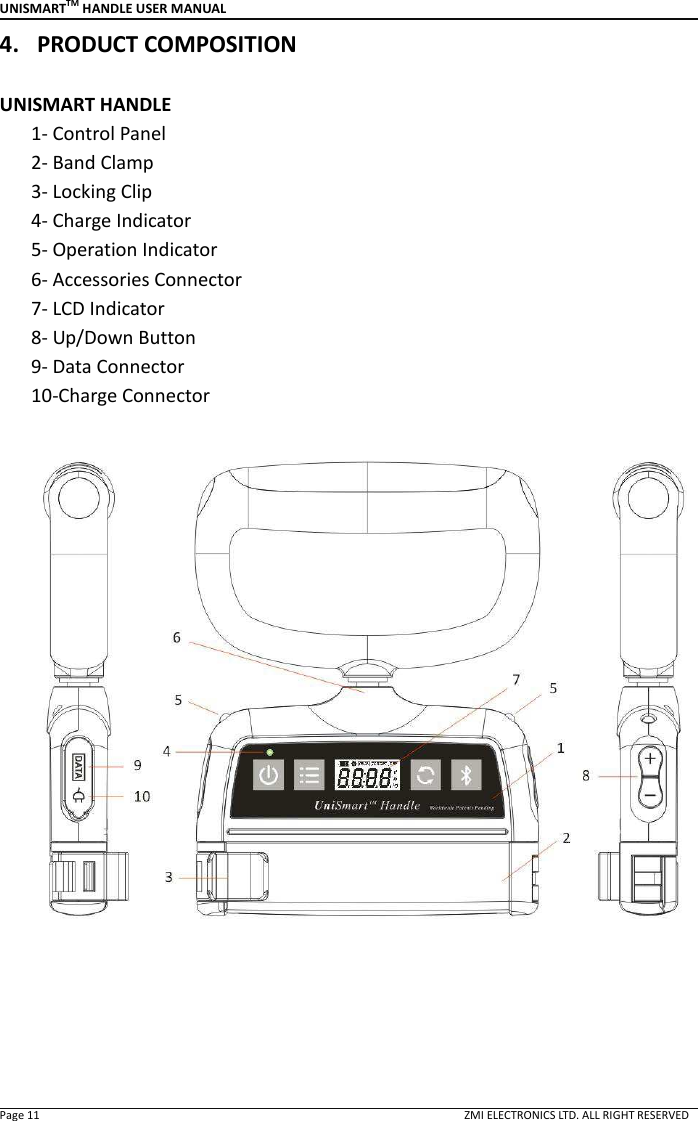
UNISMARTTM HANDLE USER MANUAL  Page 11                                                                                                                                        ZMI ELECTRONICS LTD. ALL RIGHT RESERVED 4. PRODUCT COMPOSITION  UNISMART HANDLE       1- Control Panel       2- Band Clamp       3- Locking Clip       4- Charge Indicator       5- Operation Indicator       6- Accessories Connector       7- LCD Indicator       8- Up/Down Button         9- Data Connector         10-Charge Connector
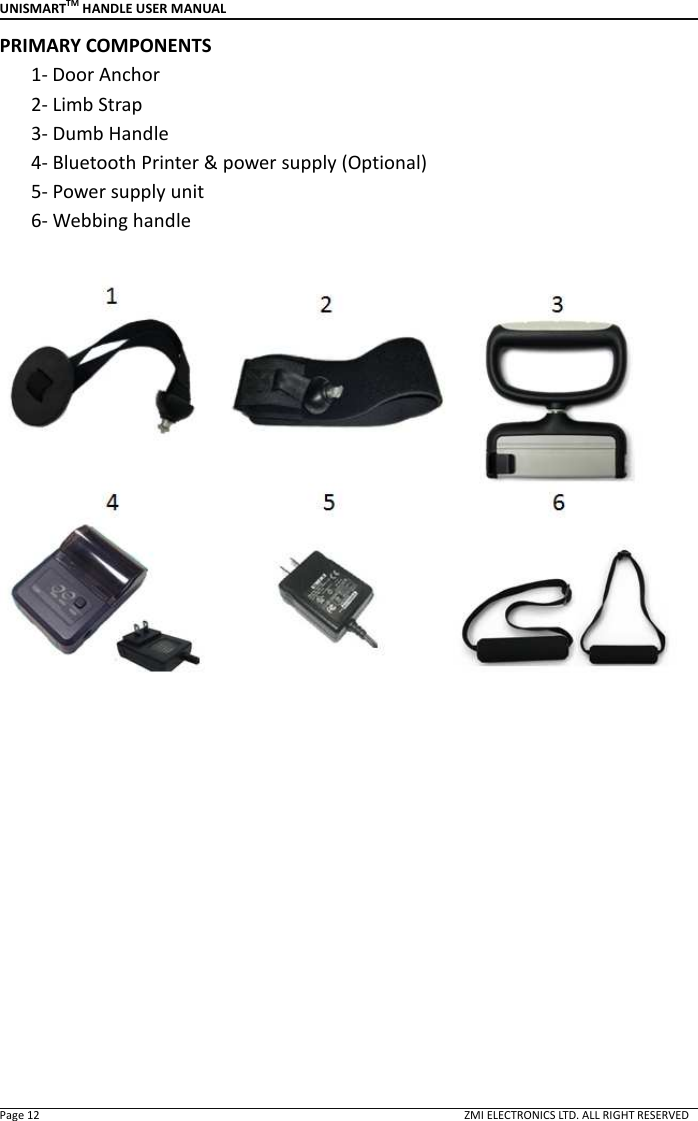
UNISMARTTM HANDLE USER MANUAL  Page 12                                                                                                                                        ZMI ELECTRONICS LTD. ALL RIGHT RESERVED PRIMARY COMPONENTS 1- Door Anchor       2- Limb Strap       3- Dumb Handle       4- Bluetooth Printer & power supply (Optional)       5- Power supply unit       6- Webbing handle
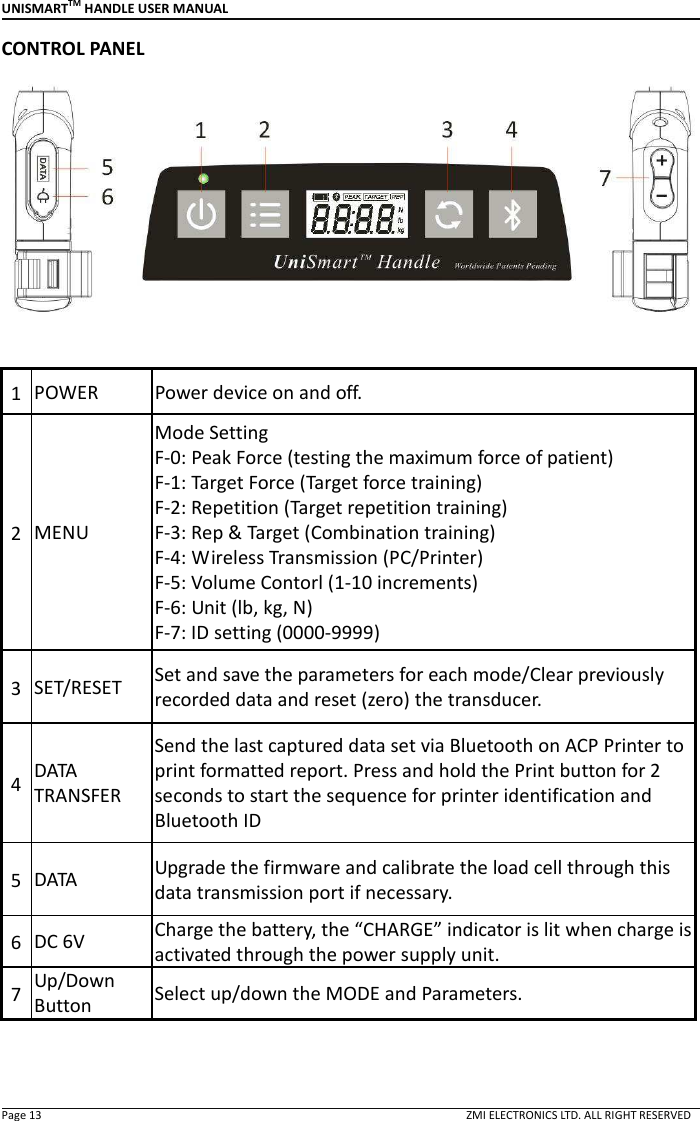
UNISMARTTM HANDLE USER MANUAL  Page 13                                                                                                                                        ZMI ELECTRONICS LTD. ALL RIGHT RESERVED CONTROL PANEL   1 POWER  Power device on and off. 2 MENU Mode Setting F-0: Peak Force (testing the maximum force of patient)   F-1: Target Force (Target force training) F-2: Repetition (Target repetition training) F-3: Rep & Target (Combination training) F-4: Wireless Transmission (PC/Printer) F-5: Volume Contorl (1-10 increments) F-6: Unit (lb, kg, N) F-7: ID setting (0000-9999) 3 SET/RESET  Set and save the parameters for each mode/Clear previously recorded data and reset (zero) the transducer. 4 DATA TRANSFER Send the last captured data set via Bluetooth on ACP Printer to print formatted report. Press and hold the Print button for 2 seconds to start the sequence for printer identification and Bluetooth ID 5 DATA  Upgrade the firmware and calibrate the load cell through this data transmission port if necessary.   6 DC 6V  Charge the battery, the “CHARGE” indicator is lit when charge is activated through the power supply unit. 7 Up/Down Button Select up/down the MODE and Parameters.
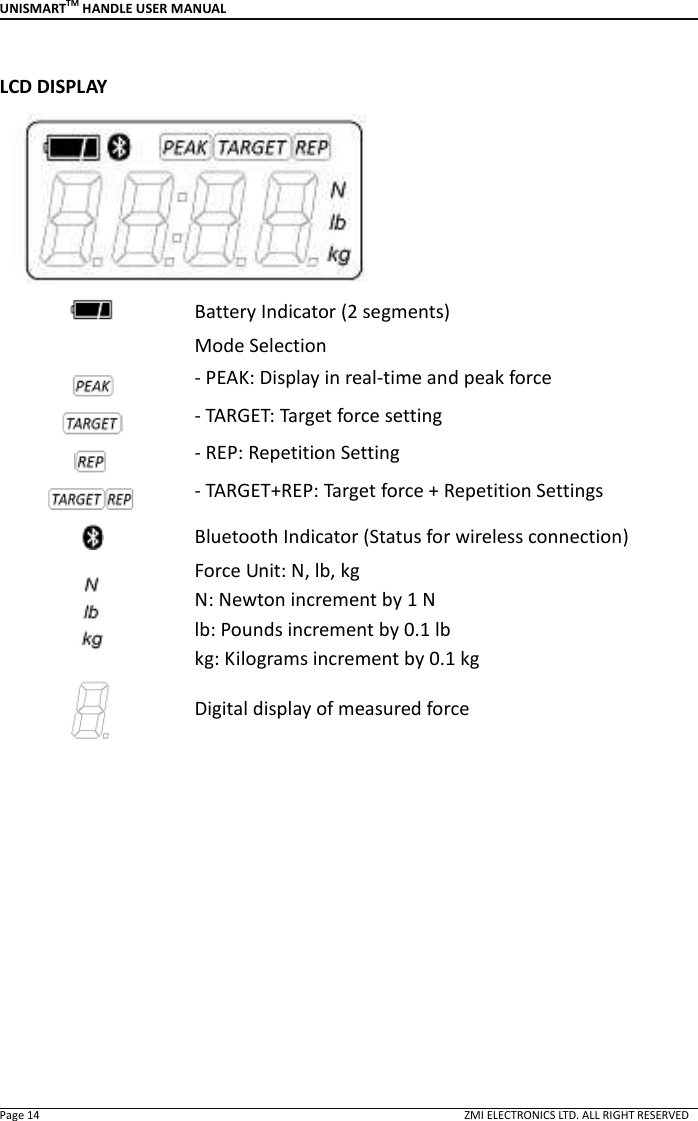
UNISMARTTM HANDLE USER MANUAL  Page 14                                                                                                                                        ZMI ELECTRONICS LTD. ALL RIGHT RESERVED  LCD DISPLAY   Battery Indicator (2 segments)      Mode Selection   - PEAK: Display in real-time and peak force   - TARGET: Target force setting - REP: Repetition Setting - TARGET+REP: Target force + Repetition Settings  Bluetooth Indicator (Status for wireless connection)  Force Unit: N, lb, kg   N: Newton increment by 1 N lb: Pounds increment by 0.1 lb kg: Kilograms increment by 0.1 kg  Digital display of measured force
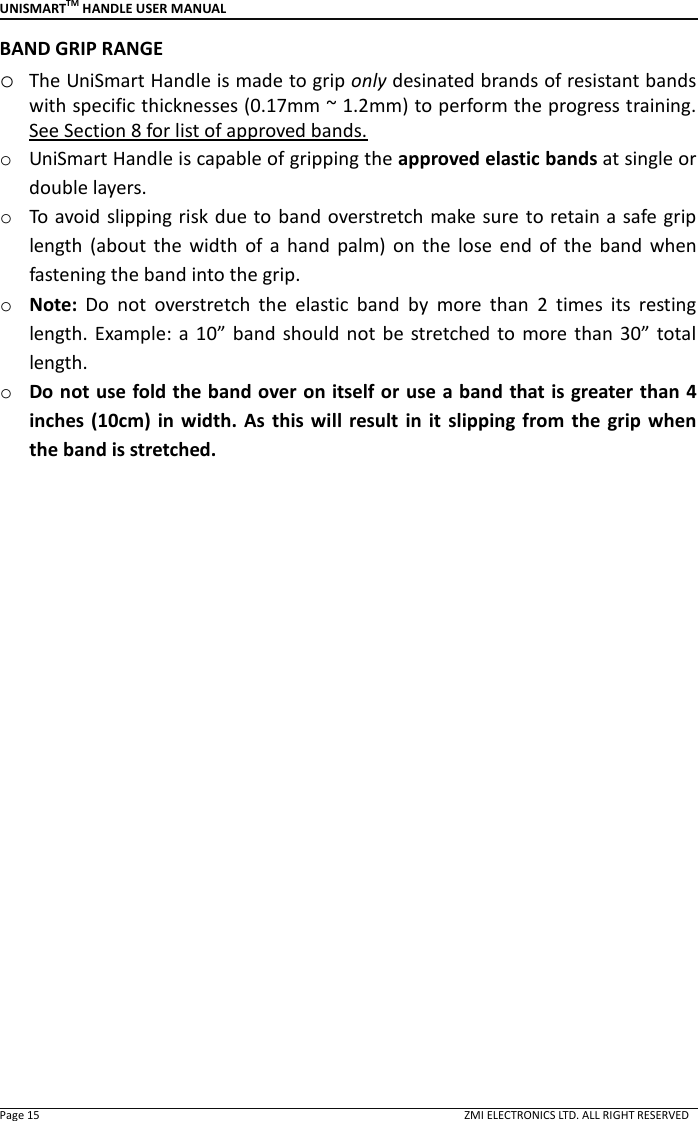
UNISMARTTM HANDLE USER MANUAL  Page 15                                                                                                                                        ZMI ELECTRONICS LTD. ALL RIGHT RESERVED BAND GRIP RANGE o The UniSmart Handle is made to grip only desinated brands of resistant bands with specific thicknesses (0.17mm ~ 1.2mm) to perform the progress training. See Section 8 for list of approved bands. o UniSmart Handle is capable of gripping the approved elastic bands at single or double layers. o To avoid slipping risk due to band overstretch make sure to retain a safe grip length  (about  the  width  of  a  hand  palm)  on  the  lose  end  of  the  band  when fastening the band into the grip. o Note:  Do  not  overstretch  the  elastic  band  by  more  than  2  times  its  resting length. Example:  a 10”  band  should  not  be  stretched  to  more than  30”  total length. o Do not use fold the band over on itself or use a band that is greater than 4 inches (10cm) in  width.  As  this will  result  in  it  slipping from the  grip when the band is stretched.
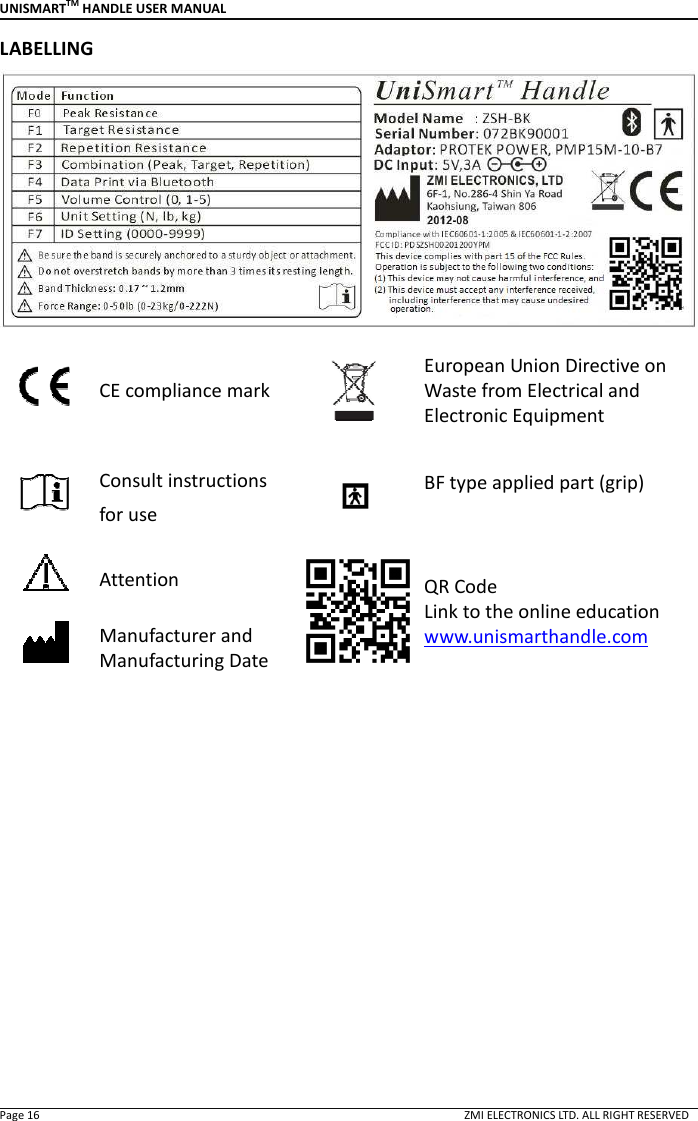
UNISMARTTM HANDLE USER MANUAL  Page 16                                                                                                                                        ZMI ELECTRONICS LTD. ALL RIGHT RESERVED LABELLING   CE compliance mark  European Union Directive on Waste from Electrical and Electronic Equipment  Consult instructions for use   BF type applied part (grip)   Attention  QR Code   Link to the online education   www.unismarthandle.com    Manufacturer and Manufacturing Date
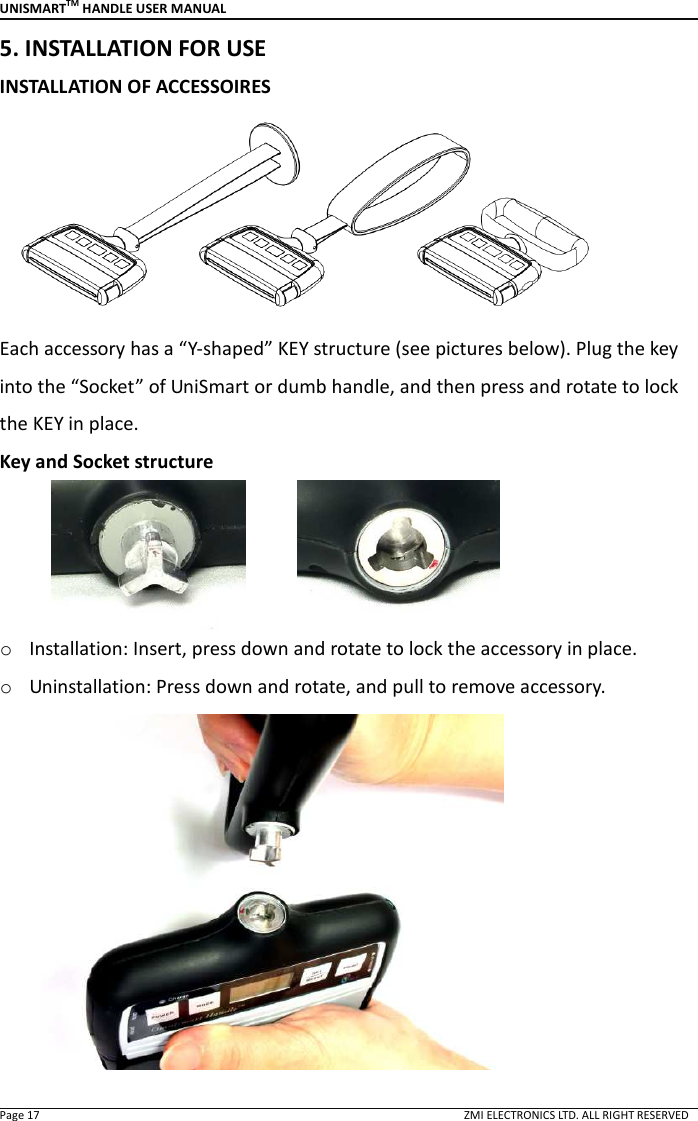
UNISMARTTM HANDLE USER MANUAL  Page 17                                                                                                                                        ZMI ELECTRONICS LTD. ALL RIGHT RESERVED 5. INSTALLATION FOR USE INSTALLATION OF ACCESSOIRES  Each accessory has a “Y-shaped” KEY structure (see pictures below). Plug the key into the “Socket” of UniSmart or dumb handle, and then press and rotate to lock the KEY in place.   Key and Socket structure            o Installation: Insert, press down and rotate to lock the accessory in place.   o Uninstallation: Press down and rotate, and pull to remove accessory.
UNISMARTTM HANDLE USER MANUAL  Page 18                                                                                                                                        ZMI ELECTRONICS LTD. ALL RIGHT RESERVED o Door Anchor           *For  safety,  place  the  door  anchor  between  the  door  and  the  door  frame. Always position the exerciser so that the door opens away from the user. If the door  has a lock, lock it  to prevent unexpected door opening by  another person. Tug on  the anchor  to  test for stability  before exercise  to make sure the anchor does not slip during exercise.  o Upper/Lower Extremity Strap            *For safety, please make sure the Velcro® strap is firmly attached.
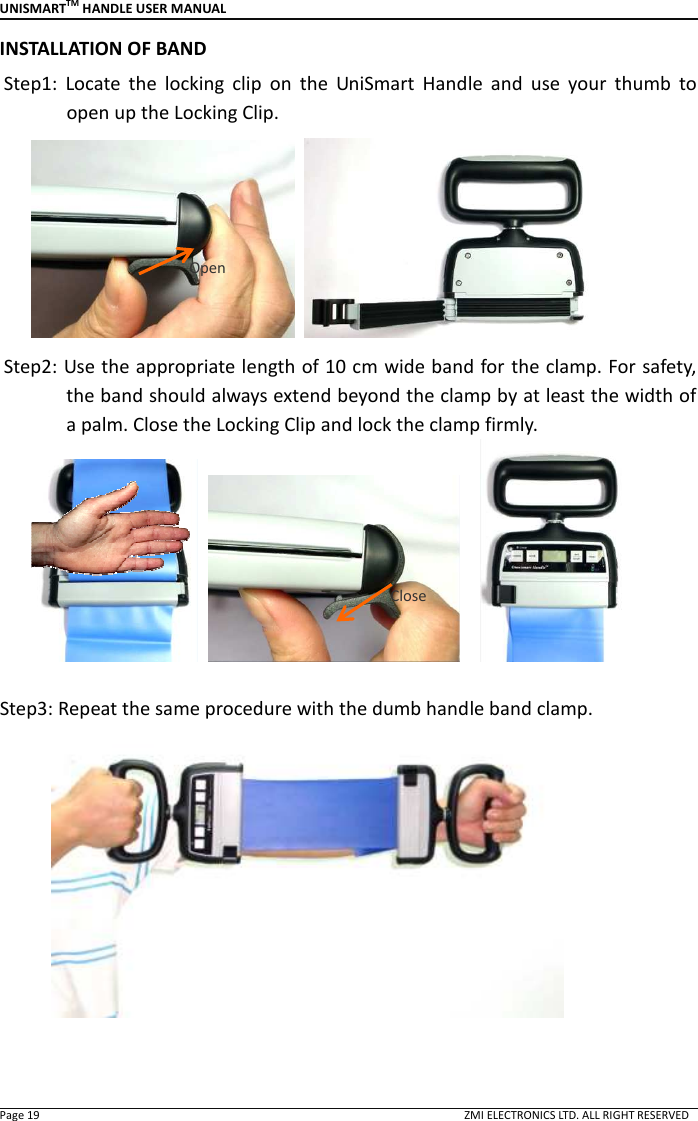
UNISMARTTM HANDLE USER MANUAL  Page 19                                                                                                                                        ZMI ELECTRONICS LTD. ALL RIGHT RESERVED INSTALLATION OF BAND Step1:  Locate  the  locking  clip  on  the  UniSmart  Handle  and  use  your  thumb  to open up the Locking Clip.    Step2: Use the appropriate length of 10 cm wide band for the clamp. For safety, the band should always extend beyond the clamp by at least the width of a palm. Close the Locking Clip and lock the clamp firmly.           Step3: Repeat the same procedure with the dumb handle band clamp.    Open Close
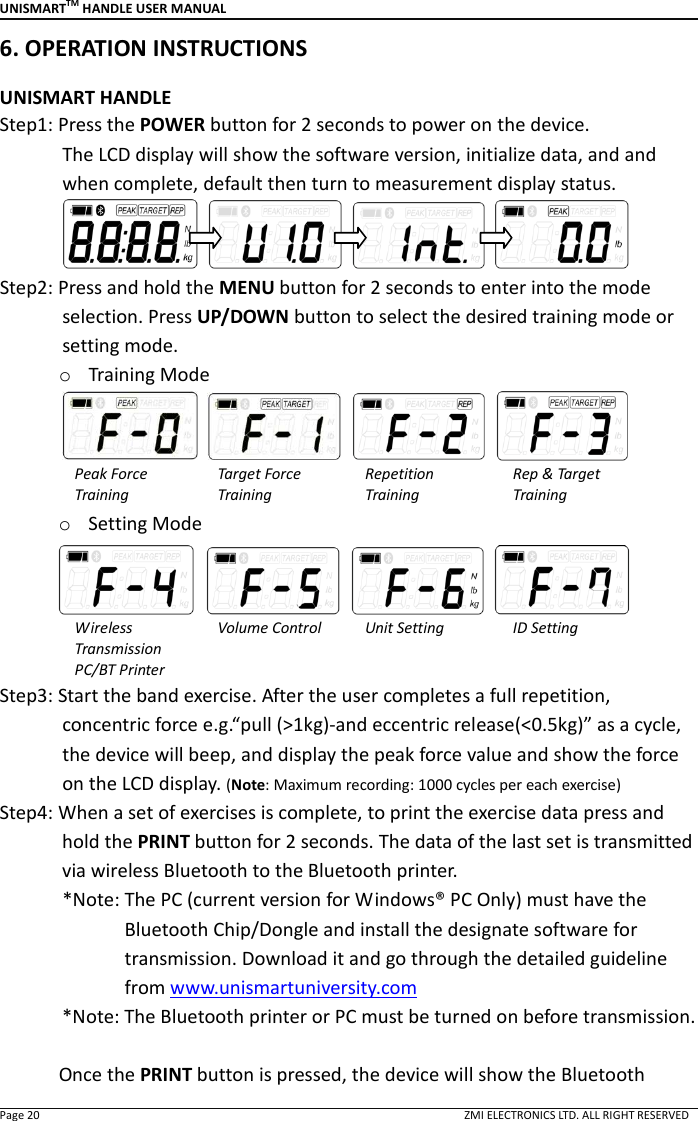
UNISMARTTM HANDLE USER MANUAL  Page 20                                                                                                                                        ZMI ELECTRONICS LTD. ALL RIGHT RESERVED 6. OPERATION INSTRUCTIONS    UNISMART HANDLE Step1: Press the POWER button for 2 seconds to power on the device.               The LCD display will show the software version, initialize data, and and when complete, default then turn to measurement display status.          Step2: Press and hold the MENU button for 2 seconds to enter into the mode selection. Press UP/DOWN button to select the desired training mode or setting mode. o Training Mode     Peak Force   Training Target Force   Training Repetition   Training Rep & Target Training o Setting Mode     Wireless Transmission PC/BT Printer Volume Control  Unit Setting  ID Setting Step3: Start the band exercise. After the user completes a full repetition, concentric force e.g.“pull (>1kg)-and eccentric release(<0.5kg)” as a cycle, the device will beep, and display the peak force value and show the force on the LCD display. (Note: Maximum recording: 1000 cycles per each exercise) Step4: When a set of exercises is complete, to print the exercise data press and hold the PRINT button for 2 seconds. The data of the last set is transmitted via wireless Bluetooth to the Bluetooth printer.               *Note: The PC (current version for Windows® PC Only) must have the Bluetooth Chip/Dongle and install the designate software for transmission. Download it and go through the detailed guideline from www.unismartuniversity.com   *Note: The Bluetooth printer or PC must be turned on before transmission.  Once the PRINT button is pressed, the device will show the Bluetooth
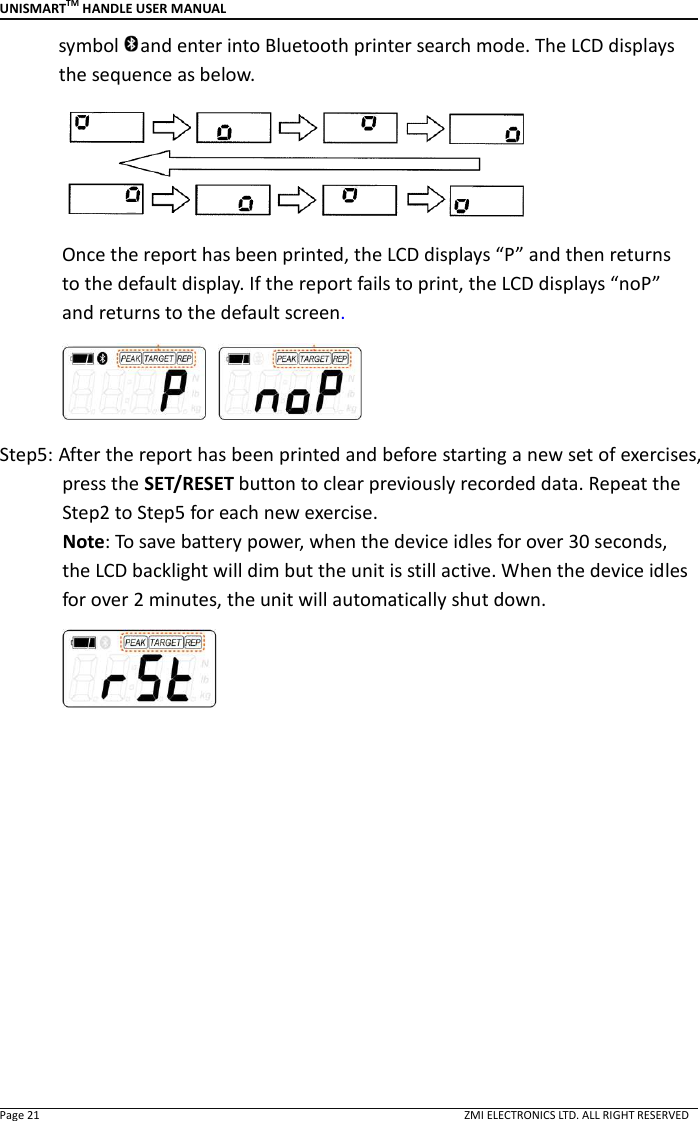
UNISMARTTM HANDLE USER MANUAL  Page 21                                                                                                                                        ZMI ELECTRONICS LTD. ALL RIGHT RESERVED symbol and enter into Bluetooth printer search mode. The LCD displays the sequence as below.  Once the report has been printed, the LCD displays “P” and then returns to the default display. If the report fails to print, the LCD displays “noP” and returns to the default screen.   Step5: After the report has been printed and before starting a new set of exercises, press the SET/RESET button to clear previously recorded data. Repeat the Step2 to Step5 for each new exercise.               Note: To save battery power, when the device idles for over 30 seconds, the LCD backlight will dim but the unit is still active. When the device idles for over 2 minutes, the unit will automatically shut down.
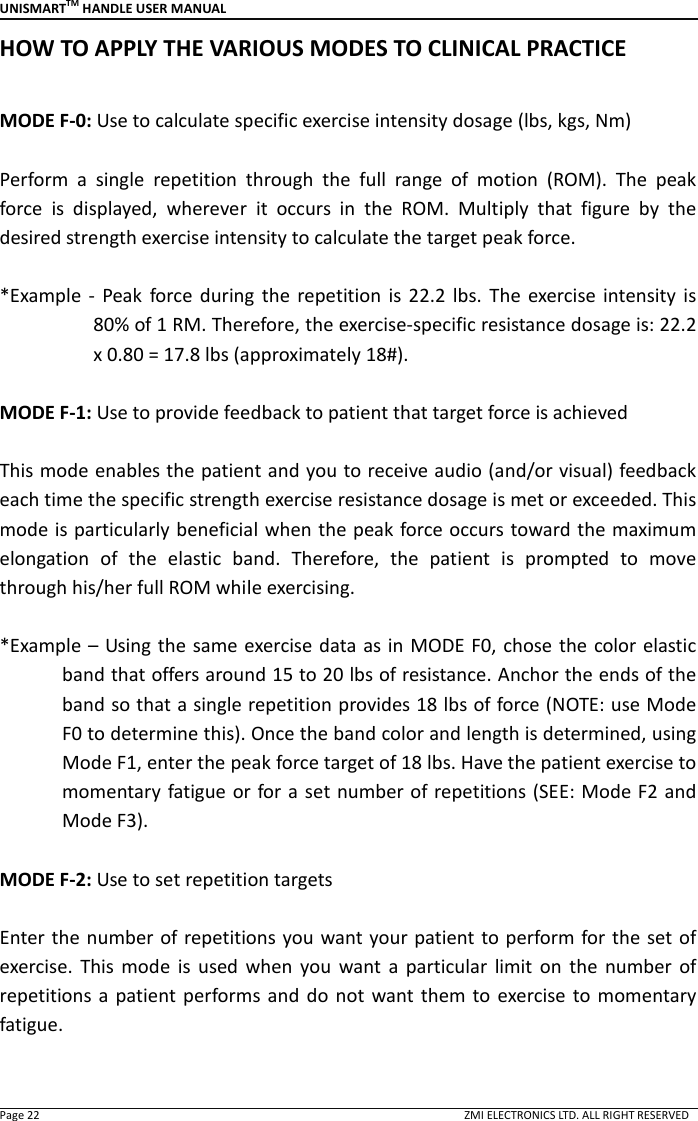
UNISMARTTM HANDLE USER MANUAL  Page 22                                                                                                                                        ZMI ELECTRONICS LTD. ALL RIGHT RESERVED HOW TO APPLY THE VARIOUS MODES TO CLINICAL PRACTICE  MODE F-0: Use to calculate specific exercise intensity dosage (lbs, kgs, Nm)  Perform  a  single  repetition  through  the  full  range  of  motion  (ROM).  The  peak force  is  displayed,  wherever  it  occurs  in  the  ROM.  Multiply  that  figure  by  the desired strength exercise intensity to calculate the target peak force.    *Example -  Peak  force during  the  repetition  is  22.2  lbs.  The  exercise  intensity  is 80% of 1 RM. Therefore, the exercise-specific resistance dosage is: 22.2 x 0.80 = 17.8 lbs (approximately 18#).  MODE F-1: Use to provide feedback to patient that target force is achieved  This mode enables the patient and you to receive audio (and/or visual) feedback each time the specific strength exercise resistance dosage is met or exceeded. This mode is particularly beneficial when the peak force occurs toward the maximum elongation  of  the  elastic  band.  Therefore,  the  patient  is  prompted  to  move through his/her full ROM while exercising.    *Example –  Using the same exercise data as in MODE F0, chose the color elastic band that offers around 15 to 20 lbs of resistance. Anchor the ends of the band so that a single repetition provides 18 lbs of force (NOTE: use Mode F0 to determine this). Once the band color and length is determined, using Mode F1, enter the peak force target of 18 lbs. Have the patient exercise to momentary fatigue or for a set number of repetitions (SEE: Mode F2 and Mode F3).  MODE F-2: Use to set repetition targets  Enter the number of repetitions you want your patient to perform for the set of exercise.  This  mode  is  used  when  you  want  a  particular  limit  on  the  number  of repetitions a  patient performs  and  do  not  want them  to  exercise to  momentary fatigue.
UNISMARTTM HANDLE USER MANUAL  Page 23                                                                                                                                        ZMI ELECTRONICS LTD. ALL RIGHT RESERVED MODE F-3: Use to set both target force and repetition  This mode enables you to set both the target force and the repetition goal for the specific  exercise.  This  mode  is  used  when  you  want  a  particular  limit  on  the number of repetitions,    do not want them to exercise to momentary fatigue, but do want motivate them to achieve a specific peak force target for each repetition.
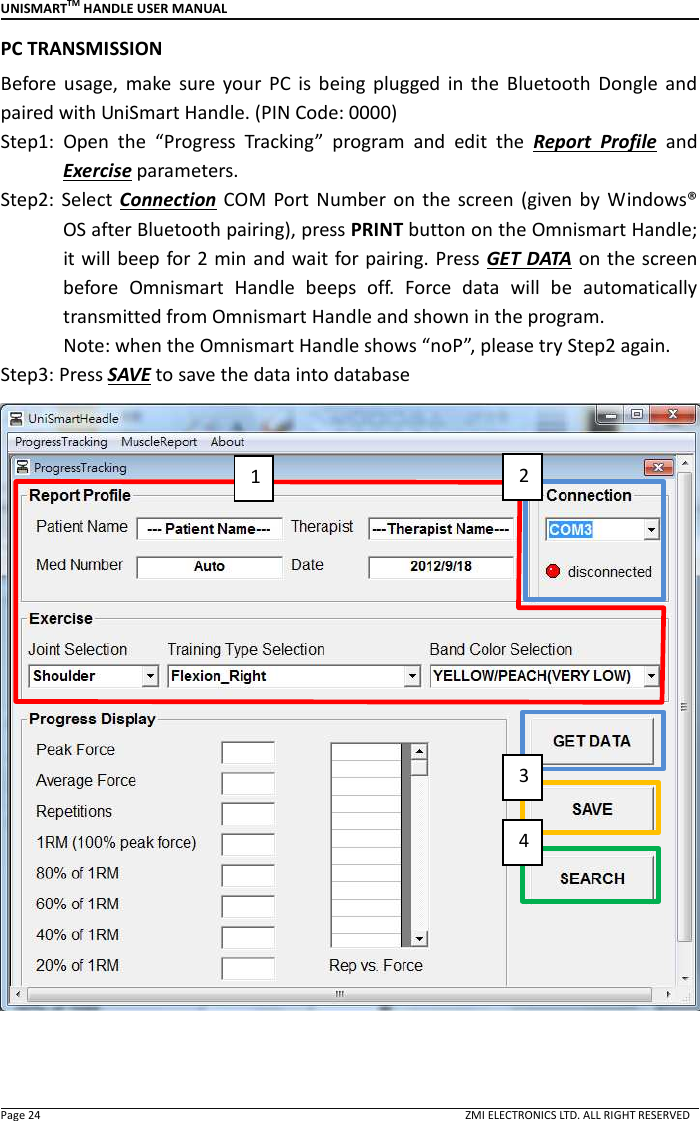
UNISMARTTM HANDLE USER MANUAL  Page 24                                                                                                                                        ZMI ELECTRONICS LTD. ALL RIGHT RESERVED PC TRANSMISSION Before  usage,  make  sure  your  PC  is  being  plugged  in  the  Bluetooth  Dongle  and paired with UniSmart Handle. (PIN Code: 0000) Step1:  Open  the  “Progress  Tracking”  program  and  edit  the  Report  Profile  and Exercise parameters. Step2: Select  Connection  COM  Port  Number  on  the  screen  (given by  Windows® OS after Bluetooth pairing), press PRINT button on the Omnismart Handle; it will beep  for 2 min and wait for pairing. Press GET DATA on the screen before  Omnismart  Handle  beeps  off.  Force  data  will  be  automatically transmitted from Omnismart Handle and shown in the program.             Note: when the Omnismart Handle shows “noP”, please try Step2 again.   Step3: Press SAVE to save the data into database    1 2 3 4
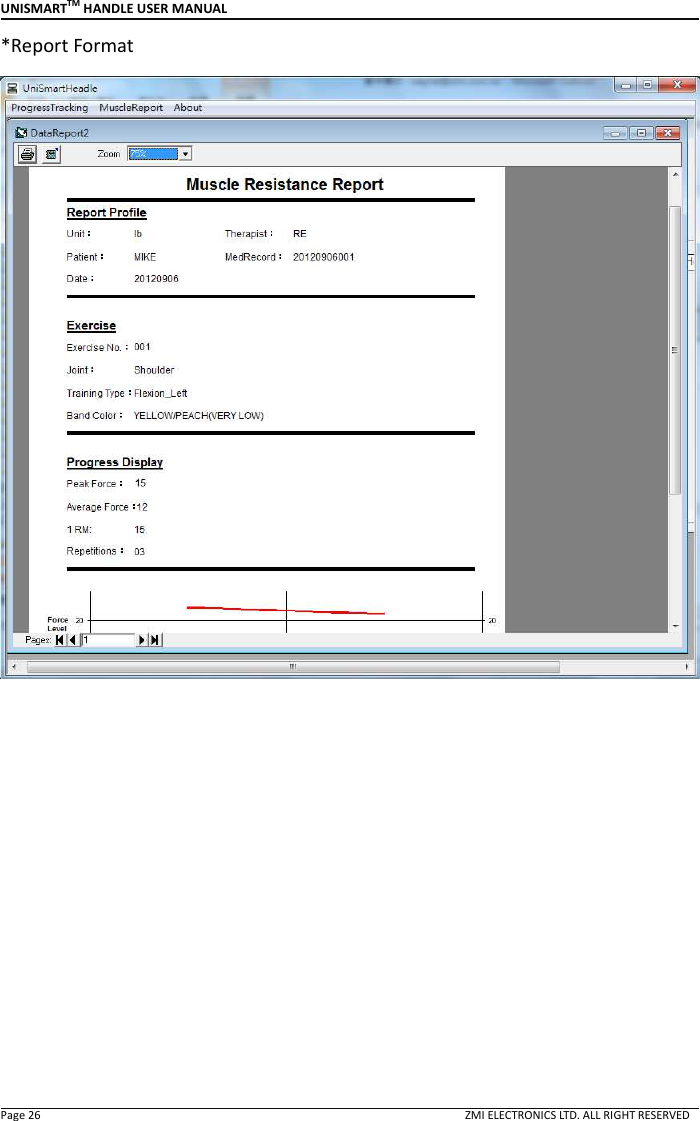
UNISMARTTM HANDLE USER MANUAL  Page 25                                                                                                                                        ZMI ELECTRONICS LTD. ALL RIGHT RESERVED Step4:  Press  SEARCH  to  open  a  search  screen  to  find  and  select  the  data  that needs to be printed.   Step5: Press printer icon    to generate the report. Print it if needed.             Press excel icon    to export the report in excel format.    *Search Window            5
UNISMARTTM HANDLE USER MANUAL  Page 26                                                                                                                                        ZMI ELECTRONICS LTD. ALL RIGHT RESERVED *Report Format
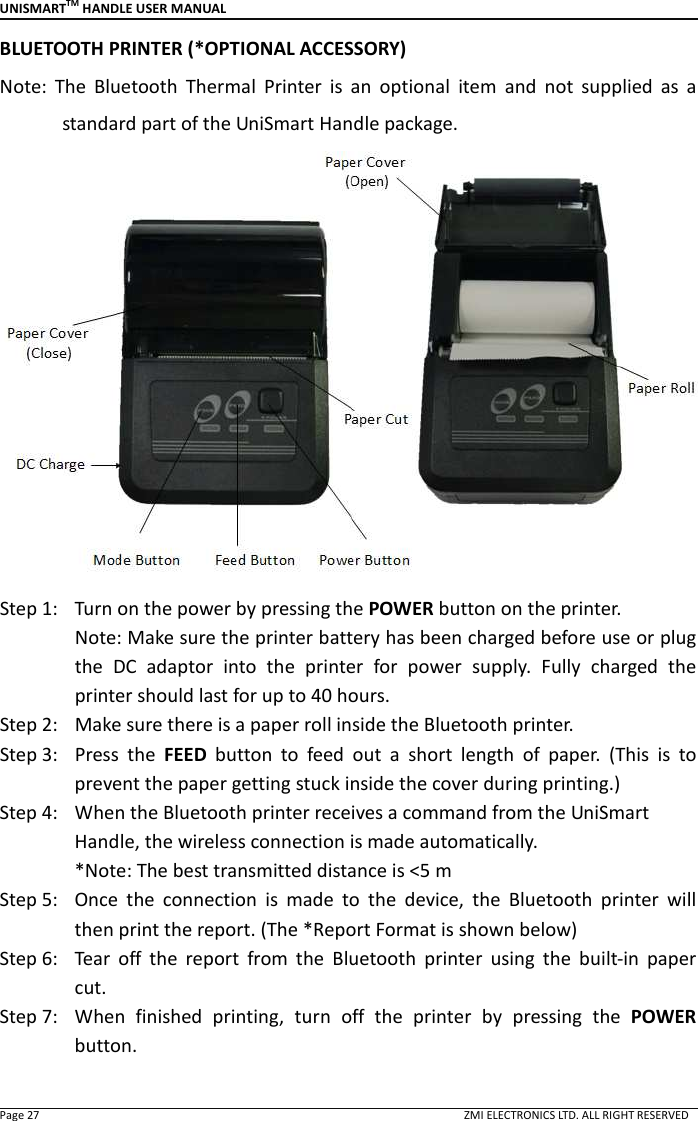
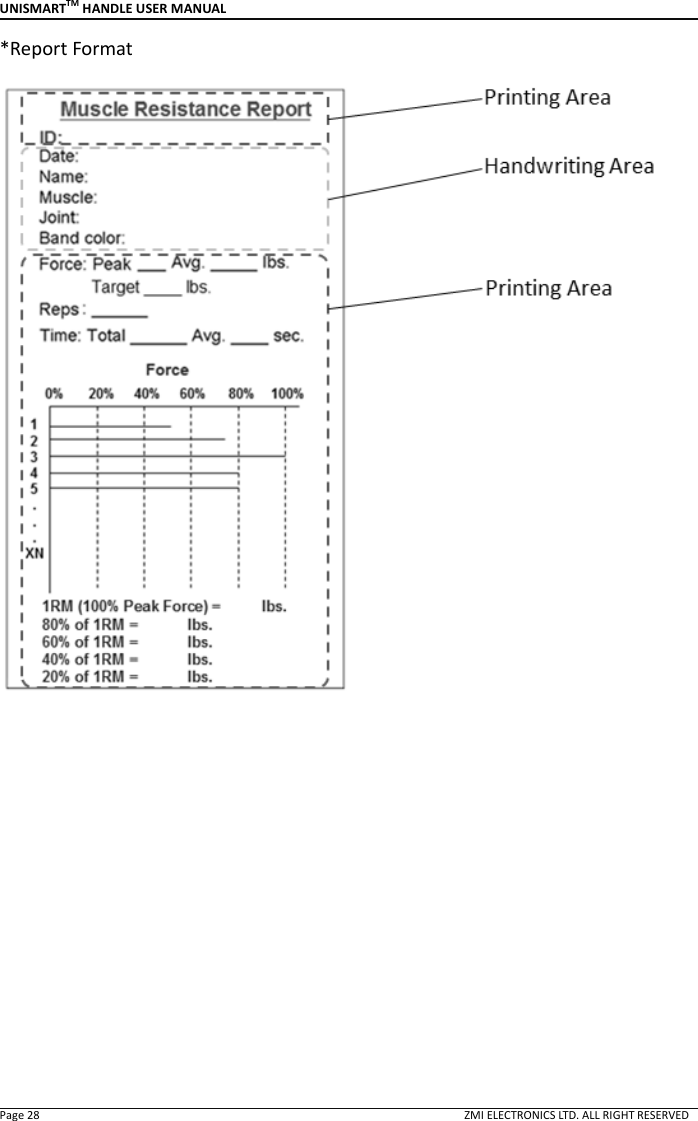
UNISMARTTM HANDLE USER MANUAL  Page 27                                                                                                                                        ZMI ELECTRONICS LTD. ALL RIGHT RESERVED BLUETOOTH PRINTER (*OPTIONAL ACCESSORY) Note:  The  Bluetooth  Thermal  Printer  is  an  optional  item  and  not  supplied  as  a standard part of the UniSmart Handle package.  Step 1:   Turn on the power by pressing the POWER button on the printer. Note: Make sure the printer battery has been charged before use or plug the  DC  adaptor  into  the  printer  for  power  supply.  Fully  charged  the printer should last for up to 40 hours.   Step 2:   Make sure there is a paper roll inside the Bluetooth printer. Step 3:   Press  the  FEED  button  to  feed  out  a  short  length  of  paper.  (This  is  to prevent the paper getting stuck inside the cover during printing.) Step 4:   When the Bluetooth printer receives a command from the UniSmart Handle, the wireless connection is made automatically.                 *Note: The best transmitted distance is <5 m Step 5:   Once  the  connection  is  made  to  the  device,  the  Bluetooth  printer  will then print the report. (The *Report Format is shown below) Step 6:   Tear  off  the  report  from  the  Bluetooth  printer  using  the  built-in  paper cut.   Step 7:   When  finished  printing,  turn  off  the  printer  by  pressing  the  POWER button.
UNISMARTTM HANDLE USER MANUAL  Page 28                                                                                                                                        ZMI ELECTRONICS LTD. ALL RIGHT RESERVED *Report Format
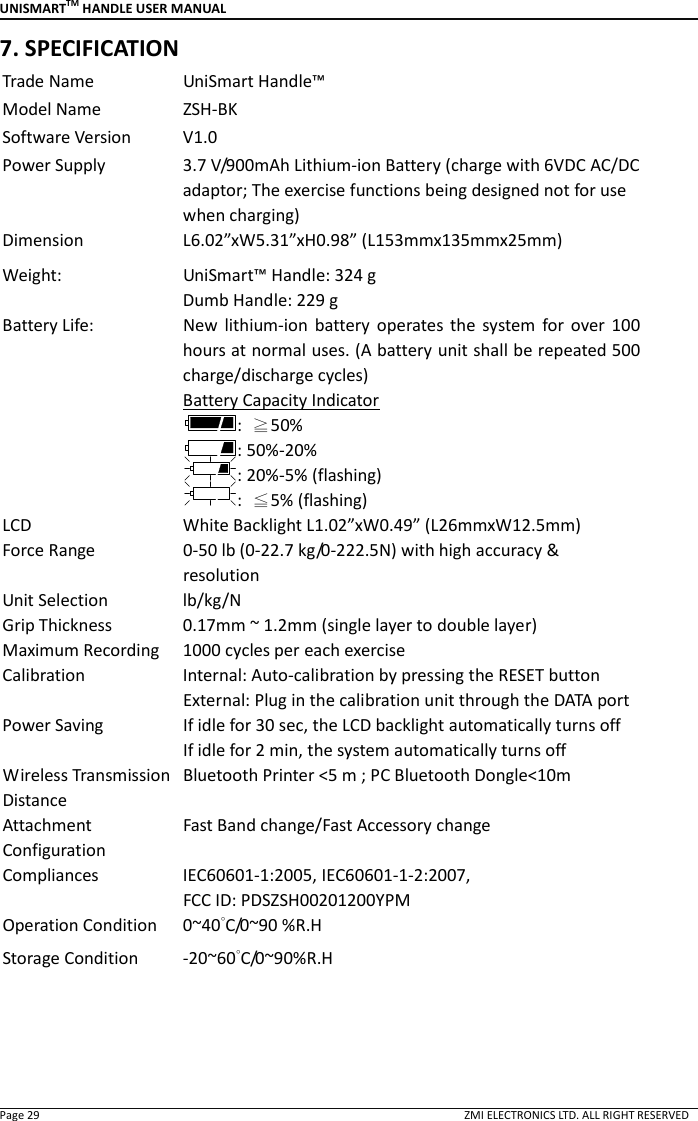
UNISMARTTM HANDLE USER MANUAL  Page 29                                                                                                                                        ZMI ELECTRONICS LTD. ALL RIGHT RESERVED 7. SPECIFICATION Trade Name  UniSmart Handle™ Model Name  ZSH-BK Software Version  V1.0 Power Supply  3.7 V/900mAh Lithium-ion Battery (charge with 6VDC AC/DC adaptor; The exercise functions being designed not for use when charging) Dimension    L6.02”xW5.31”xH0.98” (L153mmx135mmx25mm) Weight:  UniSmart™ Handle: 324 g Dumb Handle: 229 g Battery Life:  New  lithium-ion  battery  operates  the  system  for  over  100 hours at normal uses. (A battery unit shall be repeated 500 charge/discharge cycles) Battery Capacity Indicator :  ≧50%   : 50%-20% : 20%-5% (flashing) :  ≦5% (flashing) LCD  White Backlight L1.02”xW0.49” (L26mmxW12.5mm) Force Range  0-50 lb (0-22.7 kg/0-222.5N) with high accuracy & resolution Unit Selection  lb/kg/N Grip Thickness  0.17mm ~ 1.2mm (single layer to double layer) Maximum Recording  1000 cycles per each exercise Calibration  Internal: Auto-calibration by pressing the RESET button External: Plug in the calibration unit through the DATA port Power Saving  If idle for 30 sec, the LCD backlight automatically turns off If idle for 2 min, the system automatically turns off Wireless Transmission Distance Bluetooth Printer <5 m ; PC Bluetooth Dongle<10m  Attachment Configuration Fast Band change/Fast Accessory change   Compliances  IEC60601-1:2005, IEC60601-1-2:2007,   FCC ID: PDSZSH00201200YPM Operation Condition  0~40°C/0~90 %R.H Storage Condition  -20~60°C/0~90%R.H
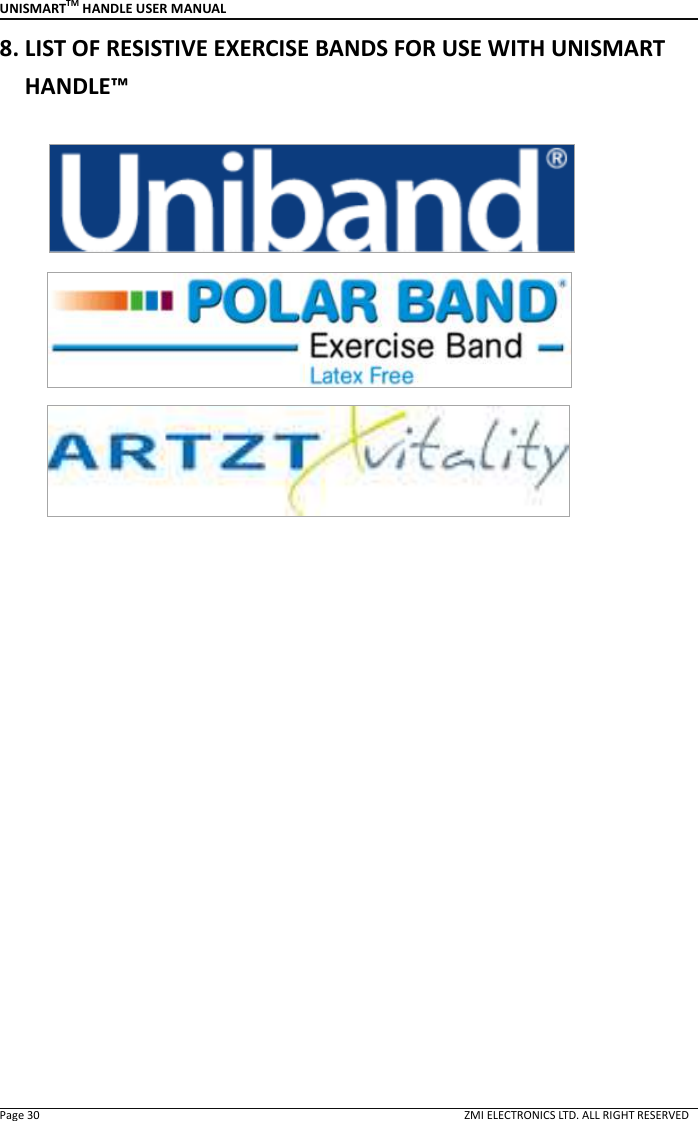
UNISMARTTM HANDLE USER MANUAL  Page 30                                                                                                                                        ZMI ELECTRONICS LTD. ALL RIGHT RESERVED 8. LIST OF RESISTIVE EXERCISE BANDS FOR USE WITH UNISMART HANDLE™
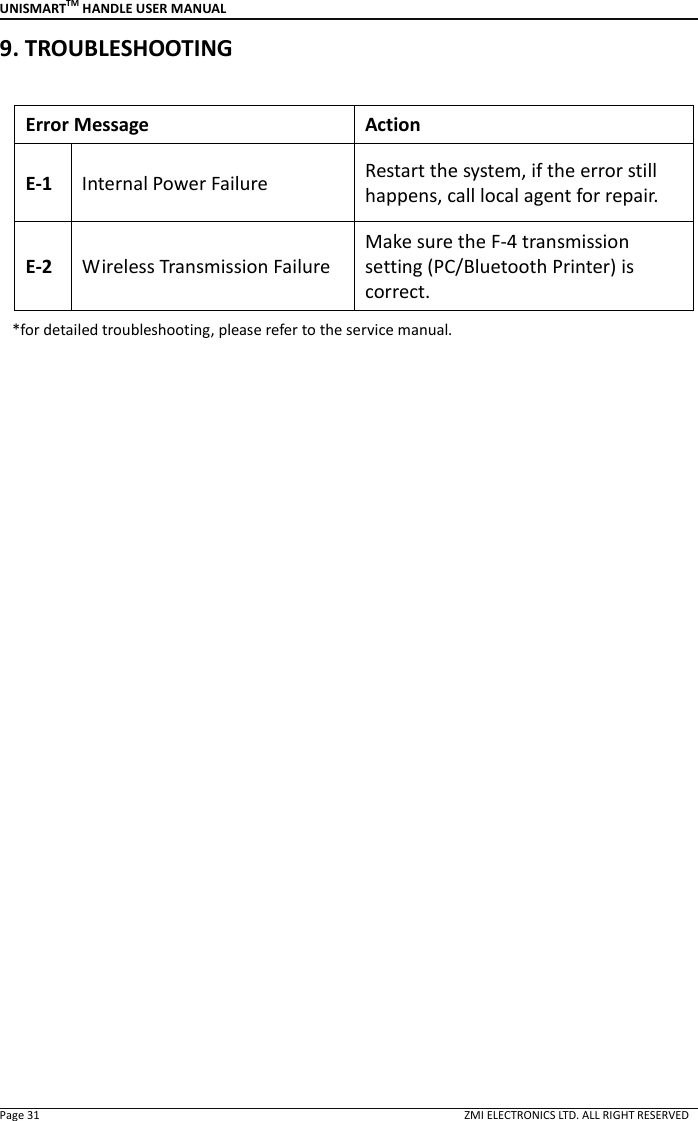
UNISMARTTM HANDLE USER MANUAL  Page 31                                                                                                                                        ZMI ELECTRONICS LTD. ALL RIGHT RESERVED 9. TROUBLESHOOTING    Error Message    Action E-1 Internal Power Failure  Restart the system, if the error still happens, call local agent for repair. E-2 Wireless Transmission Failure Make sure the F-4 transmission setting (PC/Bluetooth Printer) is correct.    *for detailed troubleshooting, please refer to the service manual.
UNISMARTTM HANDLE USER MANUAL  Page 32                                                                                                                                        ZMI ELECTRONICS LTD. ALL RIGHT RESERVED 10. MANUFACTURER & AUTHORIZED REPRESENTATIVE & DISTRIBUTOR  Manufacturer    ZMI Electronics, Ltd. 6F-1, No. 286-4 Shin Ya Road, Kaohsiung, Taiwan 806 Telephone:    +886-7-815-0053 Fax:  +886-7-815-0057 Email:  mail@zmi-electronics.com  ZMI  Electronics,  Ltd.  is  a  participant  in  Good  Manufacturing  Practices  and  is qualified as ISO 13485 supplier.  Authorized Representative in the European Union  Medserve Limited Office No.4, 1st Floor Broad March Long March Industrial Estate Daventry Northamptonshire NN11 4HE, England Telephone:        +44-1327 310310 Fax:                    +44-1327 310311 Email:                info.medserve@btconnect.com  Distributor

Navigation menu