ZONDA HOBBY TECHNOLOGIES ELECTRONIC HK0001 Remote Controller for Toy User Manual GWY004539 GWY 6T V2 Transmitter

ZONDA HOBBY TECHNOLOGIES ELECTRONIC LIMITED Remote Controller for Toy GWY004539 GWY 6T V2 Transmitter

User Manual.pdf

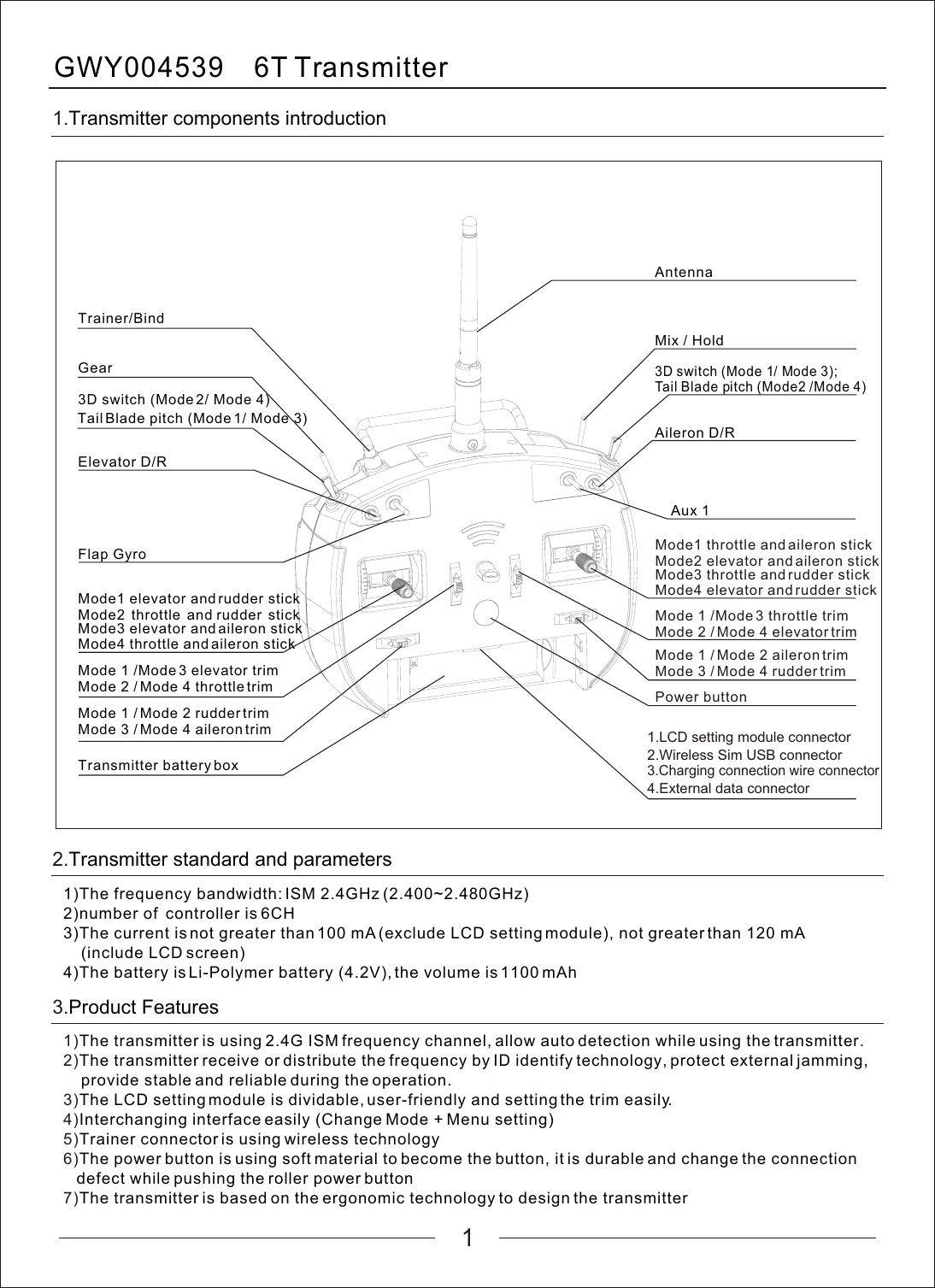
1GWY004539    6T   Transmitter1.Transmitter components introductionAntennaPower button1.LCD setting module connector2.Wireless Sim USB connector3.Charging connection wire connector4.External data connectorTransmitter battery boxMode 3 / Mode 4 aileron trimMode 1 /Mode 3 elevator trimMode 2 / Mode 4 throttle trimMode3 elevator and aileron stickMode4 throttle and aileron stickMix / HoldAileron D/RAux 1Trainer/BindGear3D switch (Mode 2/ Mode 4)Elevator D/RFlap Gyro2.Transmitter standard and parameters1)The frequency bandwidth: ISM 2.4GHz (2.400~2.480GHz)2)number of  controller is 6CH3)The current is not greater than 100 mA (exclude LCD setting module), not greater than 120 mA     (include LCD screen)4)The battery is Li-Polymer battery (4.2V), the volume is 1100 mAhTail Blade pitch (Mode 1/ Mode 3)3D switch (Mode 1/ Mode 3); Tail Blade pitch (Mode2 /Mode 4)Mode1 elevator and rudder stickMode2 throttle and rudder stickMode 1 / Mode 2 rudder trimMode3 throttle and rudder stickMode4 elevator and rudder stickMode1 throttle and aileron stickMode2 elevator and aileron stickMode 1 /Mode 3 throttle trimMode 2 / Mode 4 elevator trimMode 3 / Mode 4 rudder trimMode 1 / Mode 2 aileron trim1)2)3)4)5)6)7)The transmitter is using 2.4G ISM frequency channel, allow auto detection while using the transmitter.The transmitter receive or distribute the frequency by ID identify technology, protect external jamming,     provide stable and reliable during the operation.The LCD setting module is dividable, user-friendly and setting the trim easily.Interchanging interface easily (Change Mode + Menu setting)Trainer connector is using wireless technologyThe power button is using soft material to become the button, it is durable and change the connection    defect while pushing the roller power buttonThe transmitter is based on the ergonomic technology to design the transmitter3.Product Features
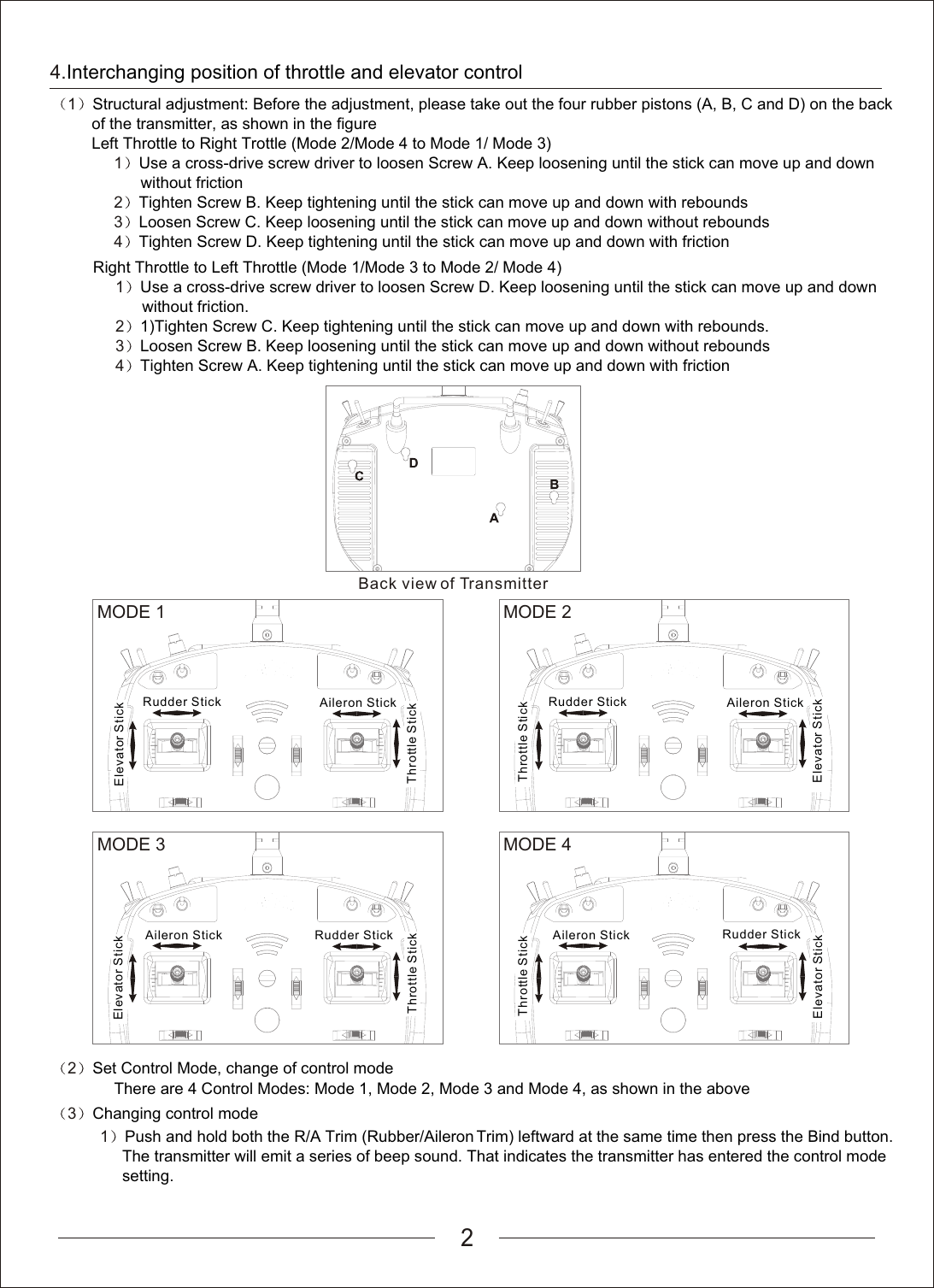
2                                  1              2              3              4             Right Throttle to Left Throttle (Mode 1/Mode 3 to Mode 2/ Mode 4)Use a cross-drive screw driver to loosen Screw D. Keep loosening until the stick can move up and down                     without friction.1)Tighten Screw C. Keep tightening until the stick can move up and down with rebounds.Loosen Screw B. Keep loosening until the stick can move up and down without reboundsTighten Screw A. Keep tightening until the stick can move up and down with frictionBack view of TransmitterMODE 1Rudder StickElevator StickAileron StickThrottle StickMODE 2Rudder StickElevator StickAileron StickThrottle StickMODE 3Rudder StickElevator StickAileron StickThrottle StickMODE 4Rudder StickElevator StickAileron StickThrottle Stick2              Set Control Mode, change of control mode        There are 4 Control Modes: Mode 1, Mode 2, Mode 3 and Mode 4, as shown in the above3              Changing control mode4.Interchanging position of throttle and elevator control1                       1              2              3              4        Structural adjustment: Before the adjustment, please take out the four rubber pistons (A, B, C and D) on the back          of the transmitter, as shown in the figureLeft Throttle to Right Trottle (Mode 2/Mode 4 to Mode 1/ Mode 3)Use a cross-drive screw driver to loosen Screw A. Keep loosening until the stick can move up and down                     without frictionTighten Screw B. Keep tightening until the stick can move up and down with reboundsLoosen Screw C. Keep loosening until the stick can move up and down without reboundsTighten Screw D. Keep tightening until the stick can move up and down with friction    1    Push and hold both the R/A Trim (Rubber/Aileron Trim) leftward at the same time then press the Bind button.          The transmitter will emit a series of beep sound. That indicates the transmitter has entered the control mode          setting.
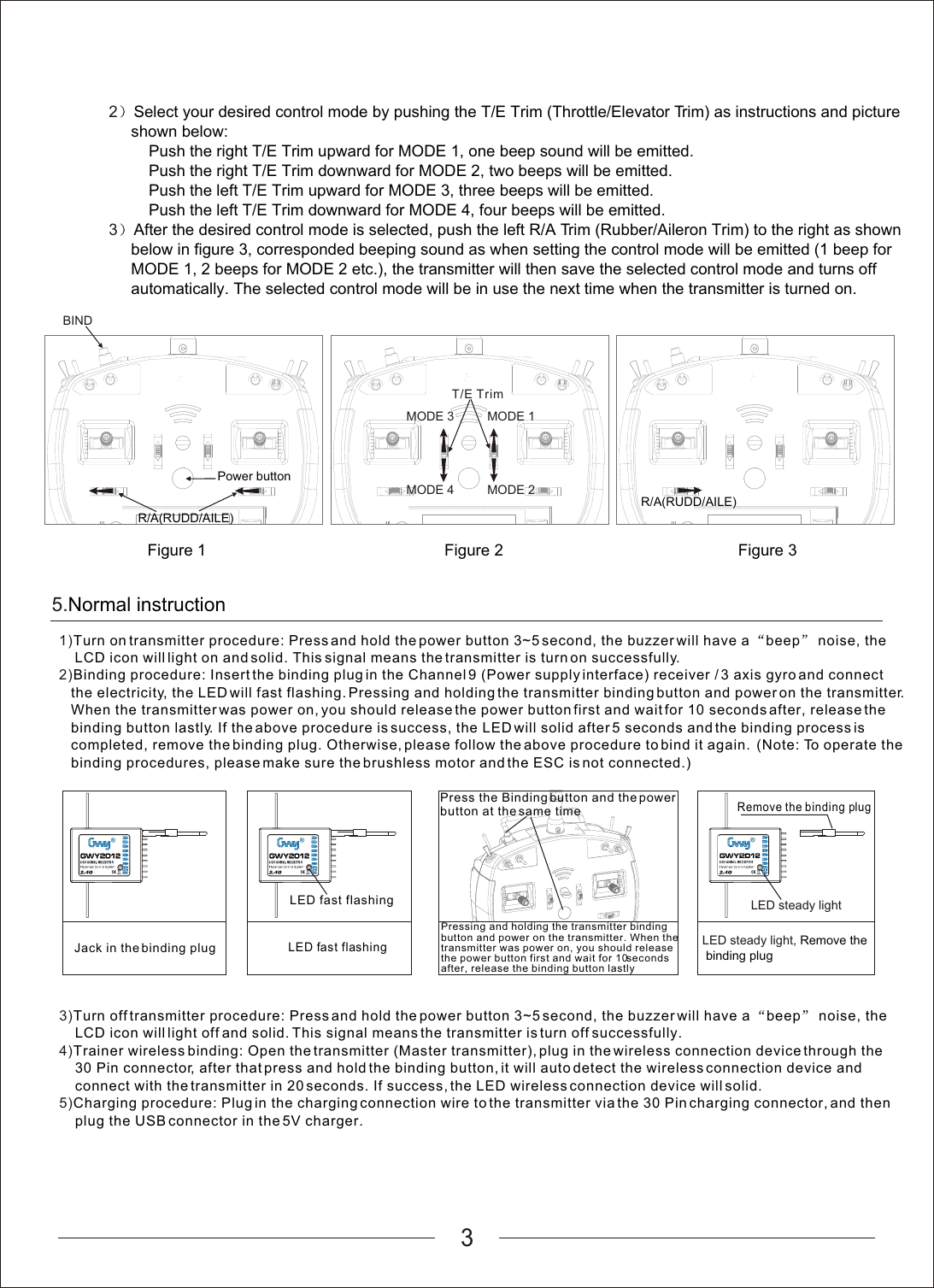
35.Normal instruction1)2)Turn on transmitter procedure: Press and hold the power button 3~5 second, the buzzer will have a  beep  noise, the     LCD icon will light on and solid. This signal means the transmitter is turn on successfully.Binding procedure: Insert the binding plug in the Channel 9 (Power supply interface) receiver / 3 axis gyro and connect    the electricity, the LED will fast flashing. Pressing and holding the transmitter binding button and power on the transmitter.    When the transmitter was power on, you should release the power button first and wait for 10 seconds after, release the    binding button lastly. If the above procedure is success, the LED will solid after 5 seconds and the binding process is    completed, remove the binding plug. Otherwise, please follow the above procedure to bind it again.  (Note: To operate the   binding procedures, please make sure the brushless motor and the ESC is not connected.)LED fast flashingLED fast flashing3)4)5)Turn off transmitter procedure: Press and hold the power button 3~5 second, the buzzer will have a  beep  noise, the     LCD icon will light off and solid. This signal means the transmitter is turn off successfully.Trainer wireless binding: Open the transmitter (Master transmitter), plug in the wireless connection device through the     30 Pin connector, after that press and hold the binding button, it will auto detect the wireless connection device and     connect with the transmitter in 20 seconds. If success, the LED wireless connection device will solid.Charging procedure: Plug in the charging connection wire to the transmitter via the 30 Pin charging connector, and then    plug the USB connector in the 5V charger.Remove the binding plugPressing and holding the transmitter binding button and power on the transmitter. When the transmitter was power on, you should release the power button first and wait for 10 seconds after, release the binding button lastlyJack in the binding plugPress the Binding button and the power button at the same timeLED steady lightLED steady light, Remove the binding plug2         3Select your desired control mode by pushing the T/E Trim (Throttle/Elevator Trim) as instructions and picture      shown below:Push the right T/E Trim upward for MODE 1, one beep sound will be emitted.         Push the right T/E Trim downward for MODE 2, two beeps will be emitted.         Push the left T/E Trim upward for MODE 3, three beeps will be emitted.         Push the left T/E Trim downward for MODE 4, four beeps will be emitted.After the desired control mode is selected, push the left R/A Trim (Rubber/Aileron Trim) to the right as shown      below in figure 3, corresponded beeping sound as when setting the control mode will be emitted (1 beep for      MODE 1, 2 beeps for MODE 2 etc.), the transmitter will then save the selected control mode and turns off      automatically. The selected control mode will be in use the next time when the transmitter is turned on.MODE 3MODE 4MODE 1MODE 2T/E TrimR/A(RUDD/AILE) BINDR/A(RUDD/AILE) Figure 3Power buttonFigure 2Figure 1
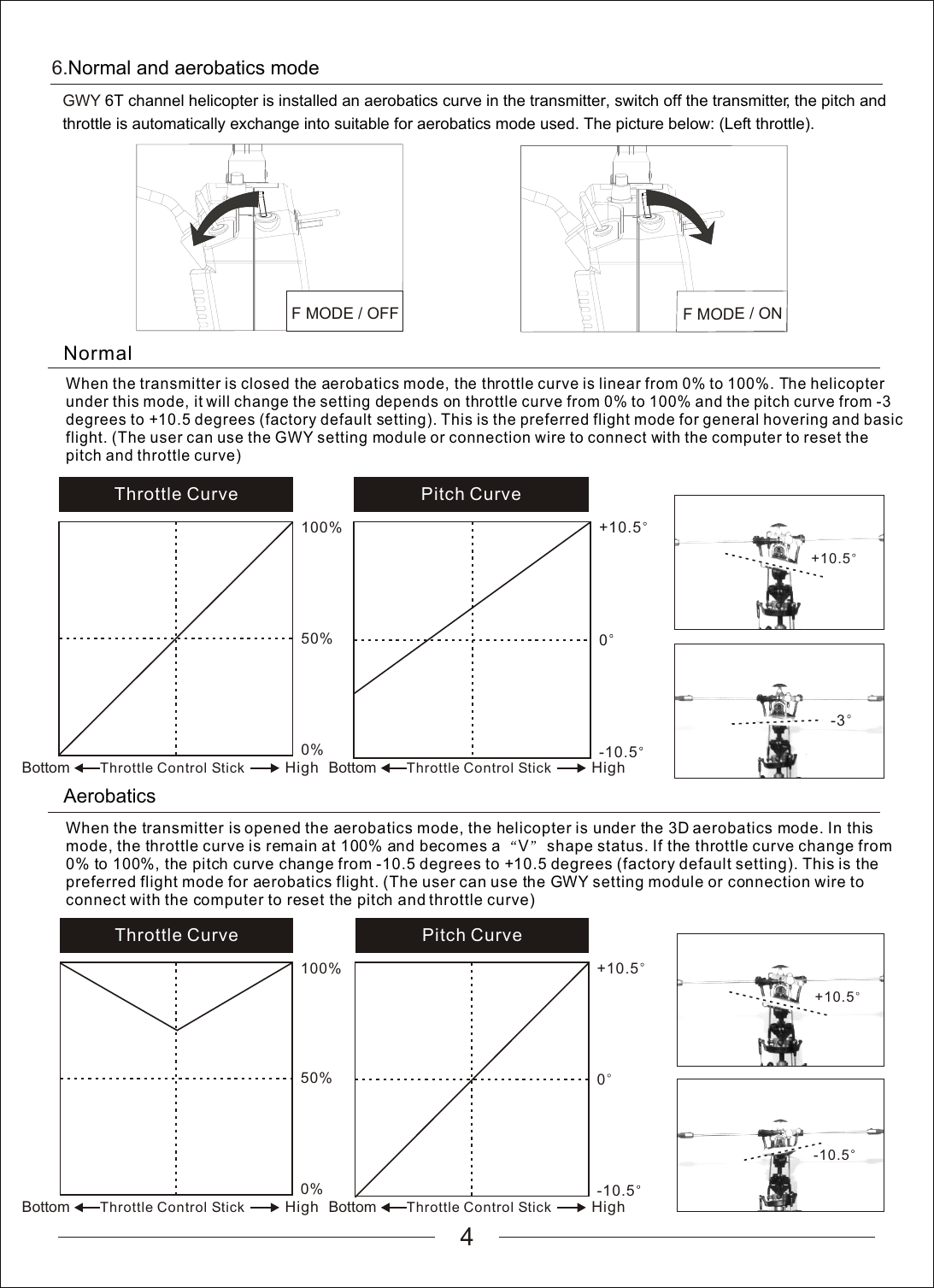
4When the transmitter is opened the aerobatics mode, the helicopter is under the 3D aerobatics mode. In this mode, the throttle curve is remain at 100% and becomes a  V  shape status. If the throttle curve change from 0% to 100%, the pitch curve change from -10.5 degrees to +10.5 degrees (factory default setting). This is the preferred flight mode for aerobatics flight. (The user can use the GWY setting module or connection wire to connect with the computer to reset the pitch and throttle curve)Pitch Curve 0+10.5-10.5-10.5Throttle Curve 50%100%0%Normal When the transmitter is closed the aerobatics mode, the throttle curve is linear from 0% to 100%. The helicopter under this mode, it will change the setting depends on throttle curve from 0% to 100% and the pitch curve from -3 degrees to +10.5 degrees (factory default setting). This is the preferred flight mode for general hovering and basic flight. (The user can use the GWY setting module or connection wire to connect with the computer to reset the pitch and throttle curve)AerobaticsThrottle Curve 50%100%0%Bottom HighThrottle Control StickPitch Curve 0+10.5-10.5+10.5+10.56.Normal and aerobatics modeGWY 6T channel helicopter is installed an aerobatics curve in the transmitter, switch off the transmitter, the pitch and throttle is automatically exchange into suitable for aerobatics mode used. The picture below: (Left throttle). F MODE / OFFF MODE / ON-3Bottom HighThrottle Control StickBottom HighThrottle Control Stick Bottom HighThrottle Control Stick
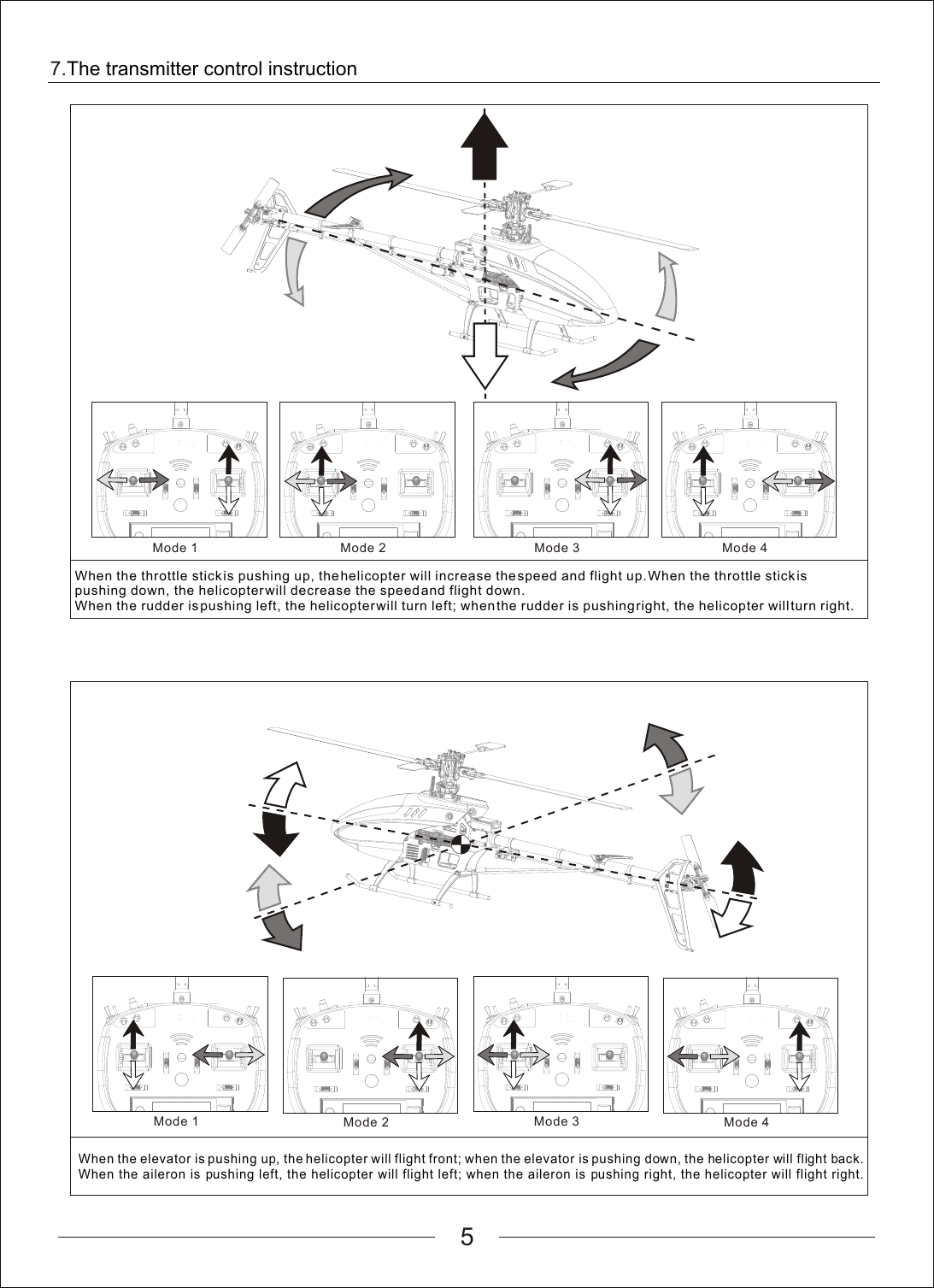
Mode 27.The transmitter control instruction5Mode 1Mode 2Mode 1Mode 4Mode 3Mode 4Mode 3When the throttle stick is pushing up, the helicopter will increase the speed and flight up. When the throttle stick is pushing down, the helicopter will decrease the speed and flight down. When the rudder is pushing left, the helicopter will turn left; when the rudder is pushing right, the helicopter will turn right.When the elevator is pushing up, the helicopter will flight front; when the elevator is pushing down, the helicopter will flight back. When the aileron is pushing left, the helicopter will flight left; when the aileron is pushing right, the helicopter will flight right.
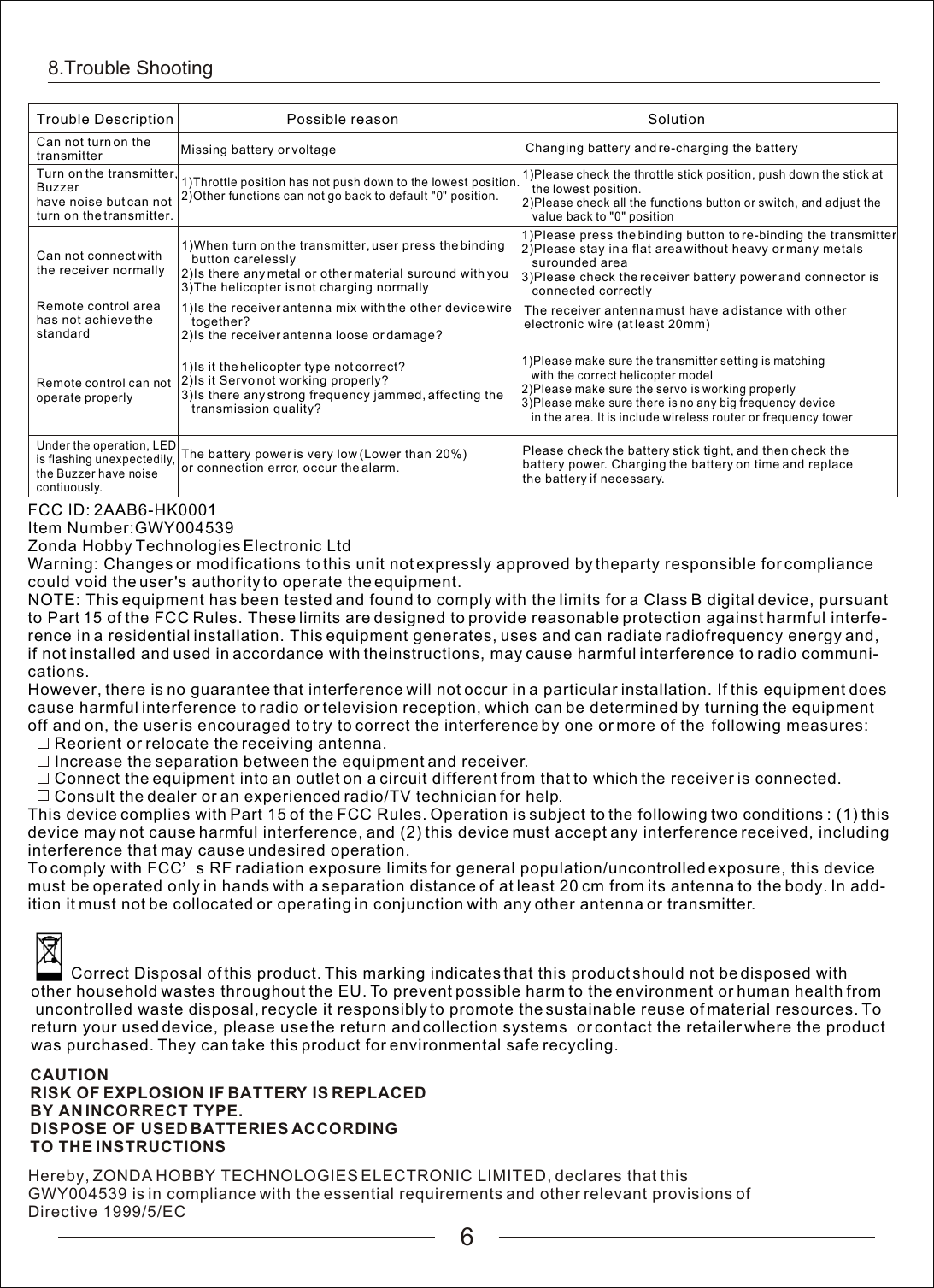
8.Trouble Shooting6Trouble Description Possible reason SolutionCan not turn on the transmitter  Missing battery or voltage Changing battery and re-charging the batteryTurn on the transmitter, Buzzerhave noise but can not turn on the transmitter. 1)Throttle position has not push down to the lowest position.2)Other functions can not go back to default "0" position.1)Please check the throttle stick position, push down the stick at    the lowest position.2)Please check all the functions button or switch, and adjust the    value back to "0" positionCan not connect with the receiver normally1)When turn on the transmitter, user press the binding    button carelessly2)Is there any metal or other material suround with you3)The helicopter is not charging normallyRemote control area has not achieve the standardThe receiver antenna must have a distance with other electronic wire (at least 20mm)1)Is it the helicopter type not correct?2)Is it Servo not working properly?3)Is there any strong frequency jammed, affecting the    transmission quality?1)Please make sure the transmitter setting is matching    with the correct helicopter model2)Please make sure the servo is working properly3)Please make sure there is no any big frequency device    in the area. It is include wireless router or frequency towerUnder the operation, LED is flashing unexpectedily,the Buzzer have noise contiuously. The battery power is very low (Lower than 20%)or connection error, occur the alarm. Please check the battery stick tight, and then check the battery power. Charging the battery on time and replace the battery if necessary. 1)Is the receiver antenna mix with the other device wire    together?2)Is the receiver antenna loose or damage?Remote control can not operate properly1)Please press the binding button to re-binding the transmitter2)Please stay in a flat area without heavy or many metals    surounded area3)Please check the receiver battery power and connector is    connected correctlyFCC ID: 2AAB6-HK0001Item Number:GWY004539Zonda Hobby Technologies Electronic LtdThis device complies with Part 15 of the FCC Rules. Operation is subject to the following two conditions : (1) this device may not cause harmful interference, and (2) this device must accept any interference received, including interference that may cause undesired operation.To comply with FCC s RF radiation exposure limits for general population/uncontrolled exposure, this device must be operated only in hands with a separation distance of at least 20 cm from its antenna to the body. In add-ition it must not be collocated or operating in conjunction with any other antenna or transmitter.Warning: Changes or modifications to this unit not expressly approved by theparty responsible for compliance could void the user s authority to operate the equipment.NOTE: This equipment has been tested and found to comply with the limits for a Class B digital device, pursuant to Part 15 of the FCC Rules. These limits are designed to provide reasonable protection against harmful interfe-rence in a residential installation. This equipment generates, uses and can radiate radiofrequency energy and, if not installed and used in accordance with theinstructions, may cause harmful interference to radio communi-cations.However, there is no guarantee that interference will not occur in a particular installation. If this equipment does cause harmful interference to radio or television reception, which can be determined by turning the equipment off and on, the user is encouraged to try to correct the interference by one or more of the  following measures:      Reorient or relocate the receiving antenna.      Increase the separation between the equipment and receiver.      Connect the equipment into an outlet on a circuit different from that to which the receiver is connected.      Consult the dealer or an experienced radio/TV technician for help.CAUTIONRISK OF EXPLOSION IF BATTERY IS REPLACEDBY AN INCORRECT TYPE.DISPOSE OF USED BATTERIES ACCORDINGTO THE INSTRUCTIONS         Correct Disposal of this product. This marking indicates that this product should not be disposed with other household wastes throughout the EU. To prevent possible harm to the environment or human health from uncontrolled waste disposal, recycle it responsibly to promote the sustainable reuse of material resources. To return your used device, please use the return and collection systems  or contact the retailer where the product was purchased. They can take this product for environmental safe recycling.Hereby, ZONDA HOBBY TECHNOLOGIES ELECTRONIC LIMITED, declares that thisGWY004539 is in compliance with the essential requirements and other relevant provisions ofDirective 1999/5/EC

Navigation menu