Zida Technologies MB-P845GL Motherboard User Manual 845 SERIES MANUAL V2 0 ENGLISH

Zida Technologies Ltd. Motherboard 845 SERIES MANUAL V2 0 ENGLISH

manual 5 of 9

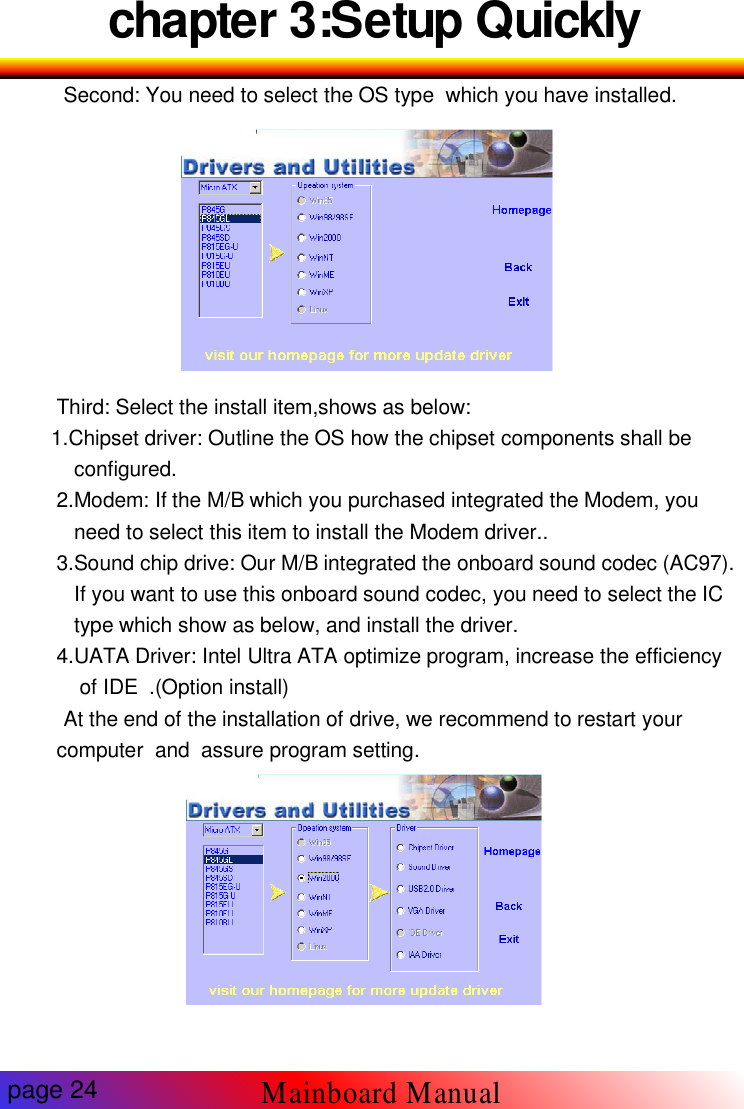
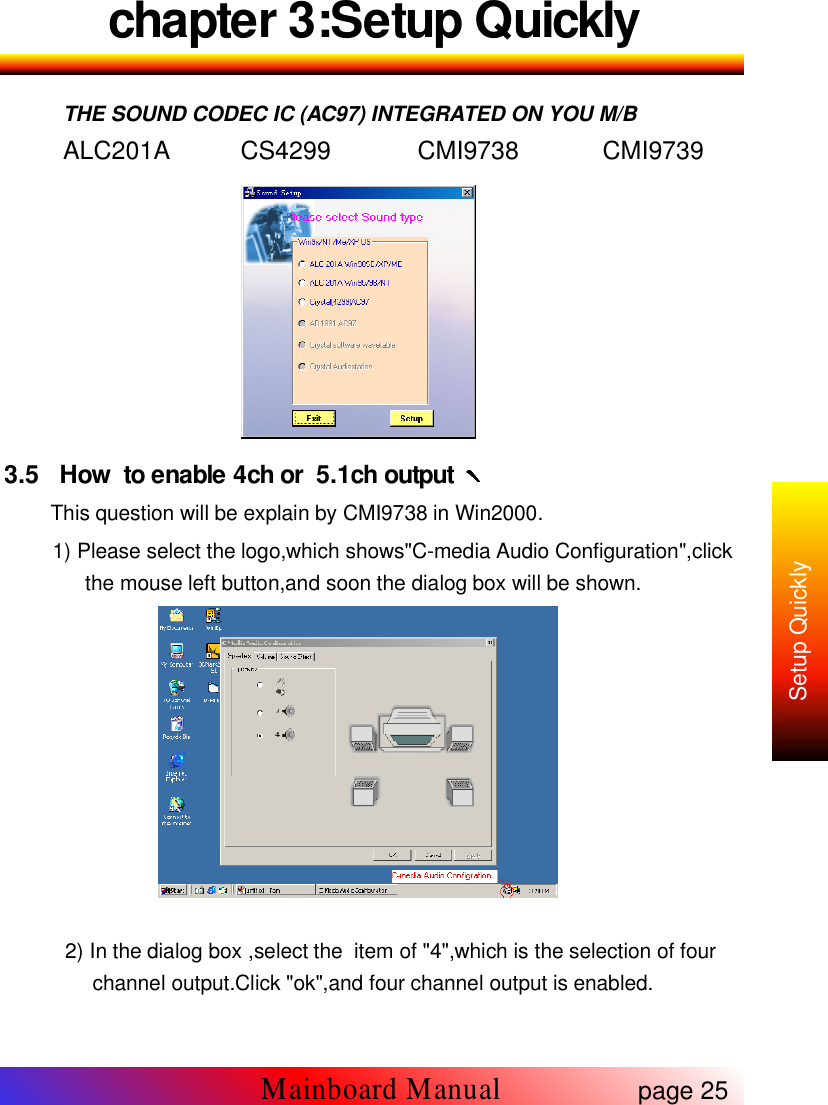
chapter 3:Setup QuicklySecond: You need to select the OS type which you have installed.Third: Select the install item,shows as below:1.Chipset driver: Outline the OS how the chipset components shall beconfigured.2.Modem: If the M/B which you purchased integrated the Modem, youneed to select this item to install the Modem driver..3.Sound chip drive: Our M/B integrated the onboard sound codec (AC97).If you want to use this onboard sound codec, you need to select the ICtype which show as below, and install the driver.4.UATA Driver: Intel Ultra ATA optimize program, increase the efficiencyof IDE .(Option install)At the end of the installation of drive, we recommend to restart yourcomputer and assure program setting.page 24Mainboard Manual
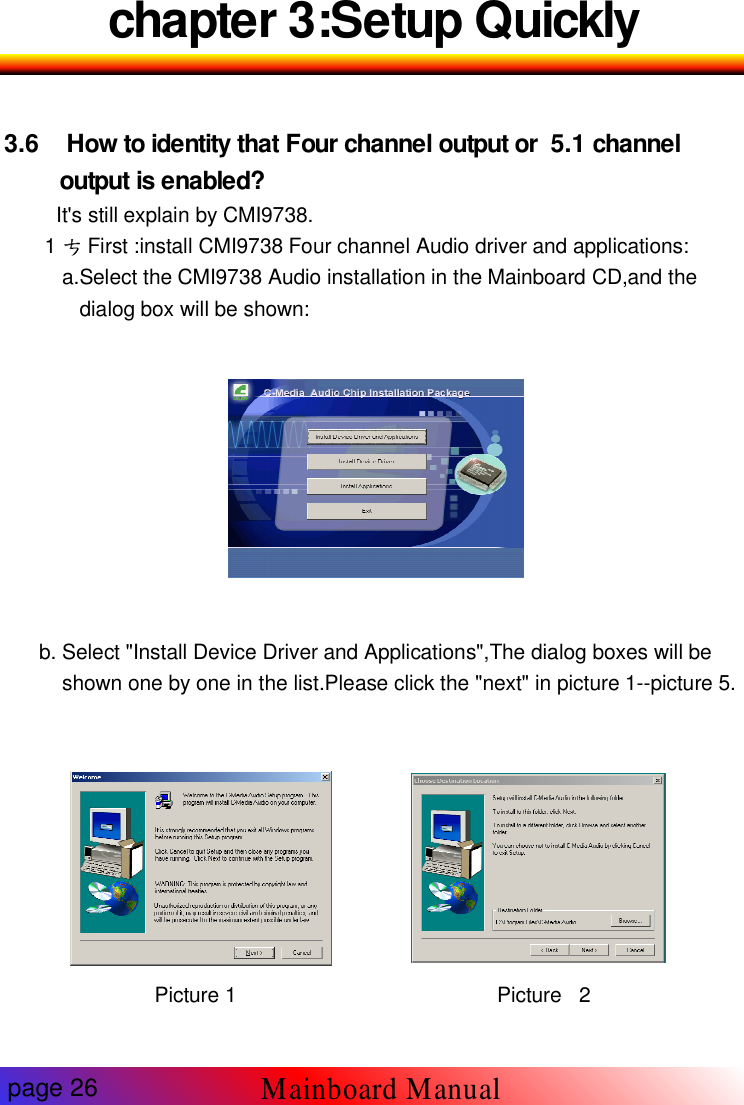
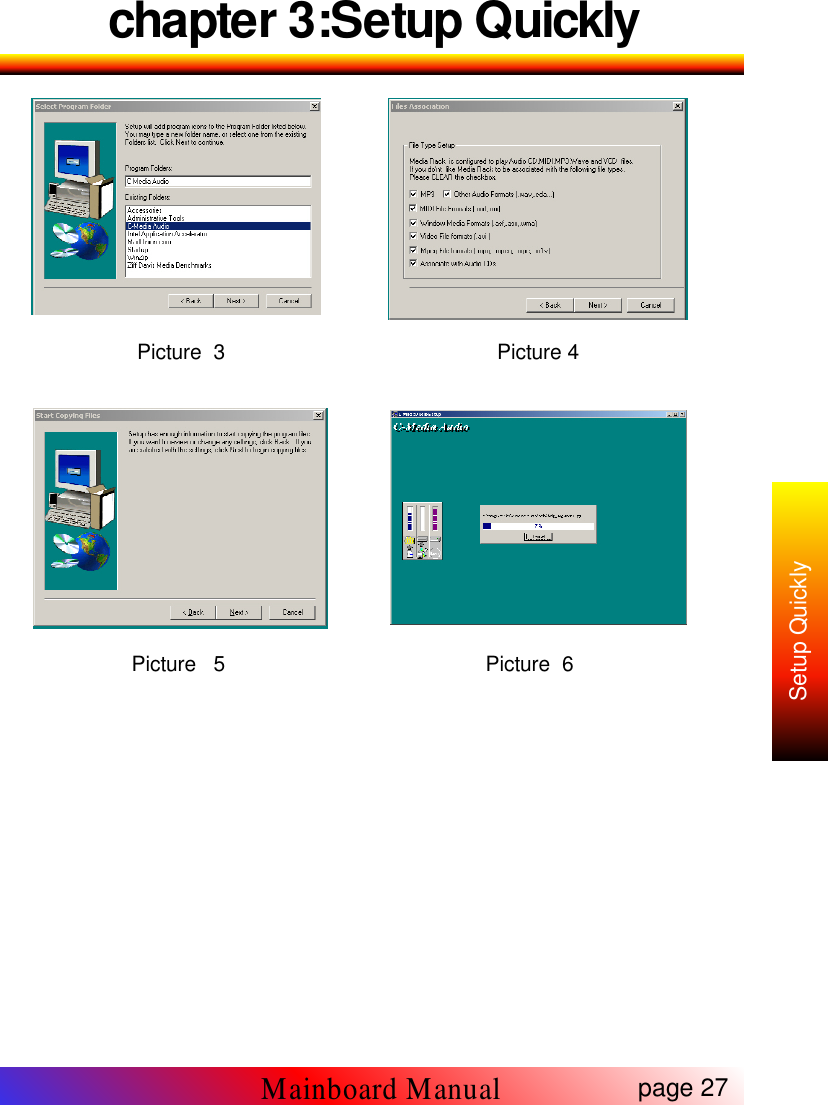
chapter 3:Setup QuicklyTHE SOUND CODEC IC (AC97) INTEGRATED ON YOU M/BALC201A CS4299 CMI9738 CMI97393.5 How to enable 4ch or 5.1ch outputThis question will be explain by CMI9738 in Win2000.1) Please select the logo,which shows"C-media Audio Configuration",clickthe mouse left button,and soon the dialog box will be shown.2) In the dialog box ,select the item of "4",which is the selection of fourchannel output.Click "ok",and four channel output is enabled.page 25Mainboard ManualSetup Quickly
chapter 3:Setup Quickly3.6 How to identity that Four channel output or 5.1 channeloutput is enabled?It's still explain by CMI9738.1 First :install CMI9738 Four channel Audio driver and applications:a.Select the CMI9738 Audio installation in the Mainboard CD,and thedialog box will be shown:b. Select "Install Device Driver and Applications",The dialog boxes will beshown one by one in the list.Please click the "next" in picture 1--picture 5.Picture 1 Picture 2page 26Mainboard Manual
chapter 3:Setup QuicklyPicture 3 Picture 4Picture 5 Picture 6page 27Mainboard ManualSetup Quickly
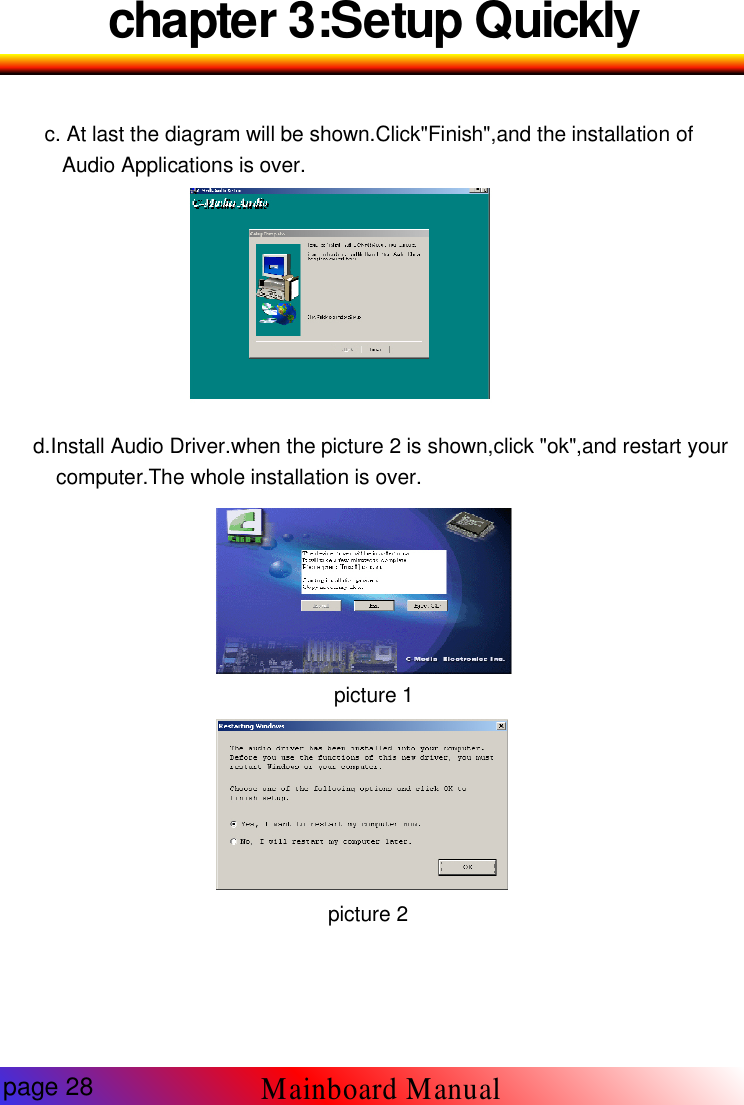
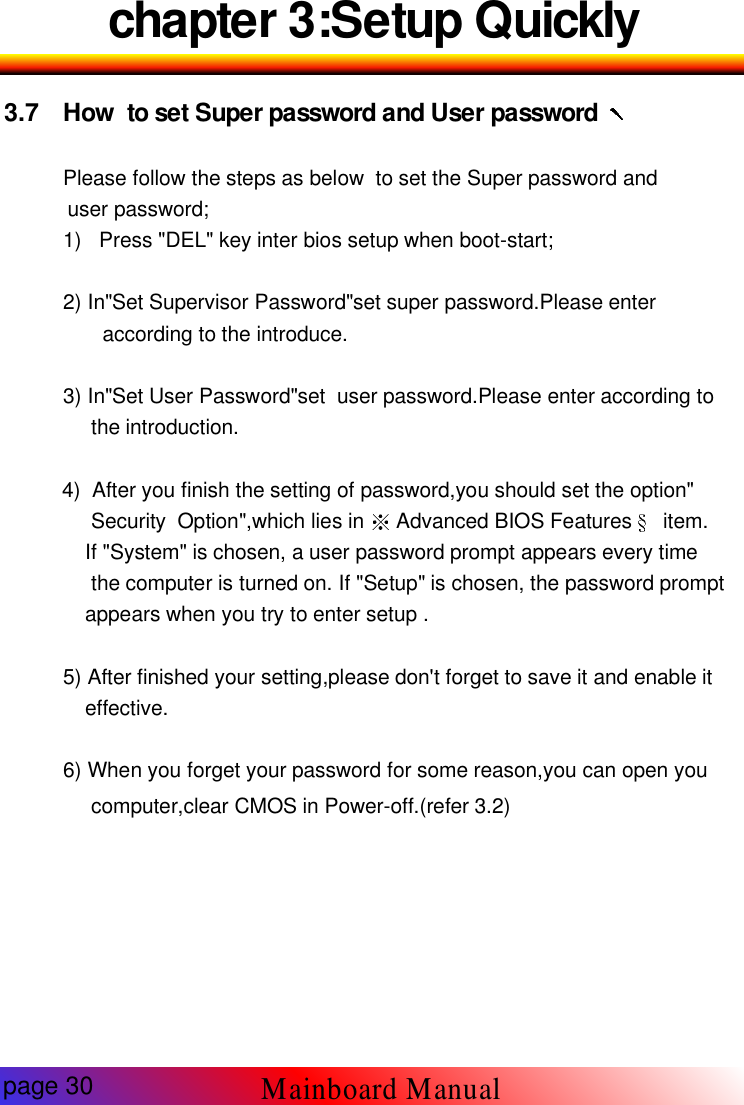
chapter 3:Setup Quicklyc. At last the diagram will be shown.Click"Finish",and the installation ofAudio Applications is over.d.Install Audio Driver.when the picture 2 is shown,click "ok",and restart yourcomputer.The whole installation is over.picture 1picture 2page 28Mainboard Manual
Chapter 3:Setup Quickly2 Open the application of"Muti-channel audio demo"in the menu of "C-media Audio".3 Next diagram.4 Click "Demo1" or "Demo2" and Audio output should happen in theFront speaker and Rear speaker.page 29Mainboard ManualSetup Quickly
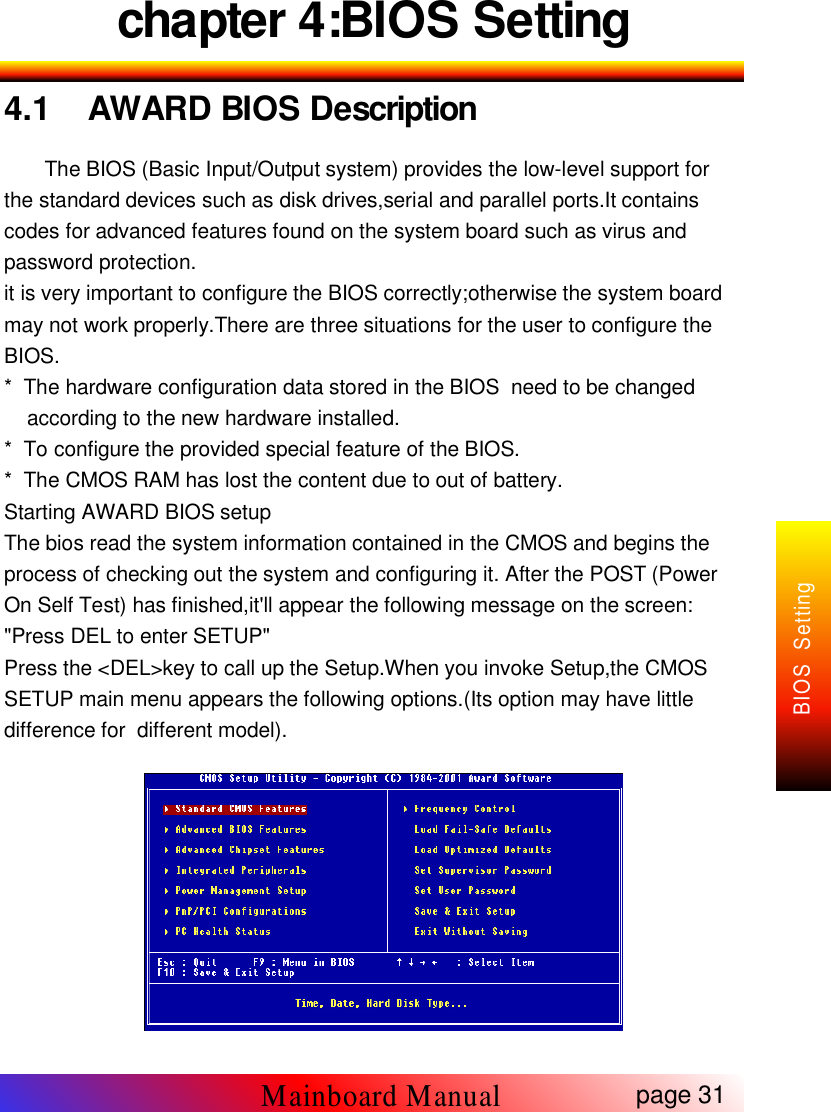
chapter 3:Setup Quickly3.7 How to set Super password and User passwordPlease follow the steps as below to set the Super password anduser password;1) Press "DEL" key inter bios setup when boot-start;2) In"Set Supervisor Password"set super password.Please enteraccording to the introduce.3) In"Set User Password"set user password.Please enter according tothe introduction.4) After you finish the setting of password,you should set the option"Security Option",which lies in Advanced BIOS Features item.If "System" is chosen, a user password prompt appears every timethe computer is turned on. If "Setup" is chosen, the password promptappears when you try to enter setup .5) After finished your setting,please don't forget to save it and enable iteffective.6) When you forget your password for some reason,you can open youcomputer,clear CMOS in Power-off.(refer 3.2)page 30Mainboard Manual
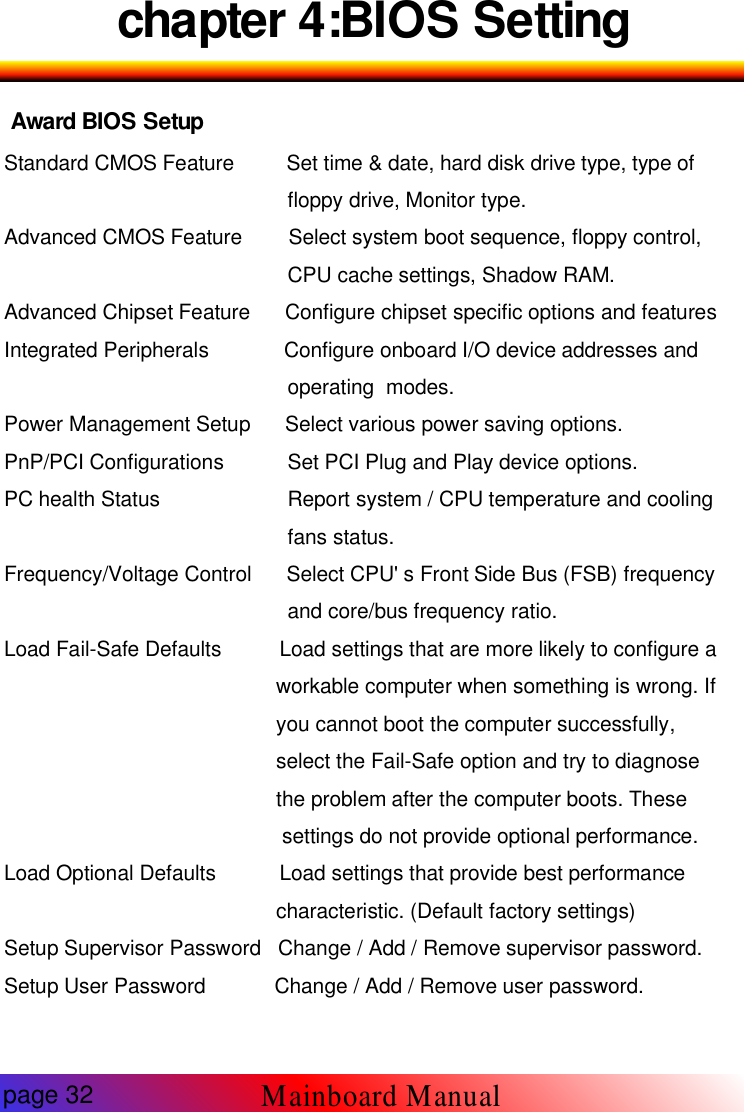
chapter 4:BIOS Setting4.1 AWARD BIOS DescriptionThe BIOS (Basic Input/Output system) provides the low-level support forthe standard devices such as disk drives,serial and parallel ports.It containscodes for advanced features found on the system board such as virus andpassword protection.it is very important to configure the BIOS correctly;otherwise the system boardmay not work properly.There are three situations for the user to configure theBIOS.* The hardware configuration data stored in the BIOS need to be changedaccording to the new hardware installed.* To configure the provided special feature of the BIOS.* The CMOS RAM has lost the content due to out of battery.Starting AWARD BIOS setupThe bios read the system information contained in the CMOS and begins theprocess of checking out the system and configuring it. After the POST (PowerOn Self Test) has finished,it'll appear the following message on the screen:"Press DEL to enter SETUP"Press the <DEL>key to call up the Setup.When you invoke Setup,the CMOSSETUP main menu appears the following options.(Its option may have littledifference for different model).page 31Mainboard ManualBIOS Setting
chapter 4:BIOS SettingAward BIOS SetupStandard CMOS Feature Set time & date, hard disk drive type, type offloppy drive, Monitor type.Advanced CMOS Feature Select system boot sequence, floppy control,CPU cache settings, Shadow RAM.Advanced Chipset Feature Configure chipset specific options and featuresIntegrated Peripherals Configure onboard I/O device addresses andoperating modes.Power Management Setup Select various power saving options.PnP/PCI Configurations Set PCI Plug and Play device options.PC health Status Report system / CPU temperature and coolingfans status.Frequency/Voltage Control Select CPU' s Front Side Bus (FSB) frequencyand core/bus frequency ratio.Load Fail-Safe Defaults Load settings that are more likely to configure aworkable computer when something is wrong. Ifyou cannot boot the computer successfully,select the Fail-Safe option and try to diagnosethe problem after the computer boots. Thesesettings do not provide optional performance.Load Optional Defaults Load settings that provide best performancecharacteristic. (Default factory settings)Setup Supervisor Password Change / Add / Remove supervisor password.Setup User Password Change / Add / Remove user password.page 32Mainboard Manual
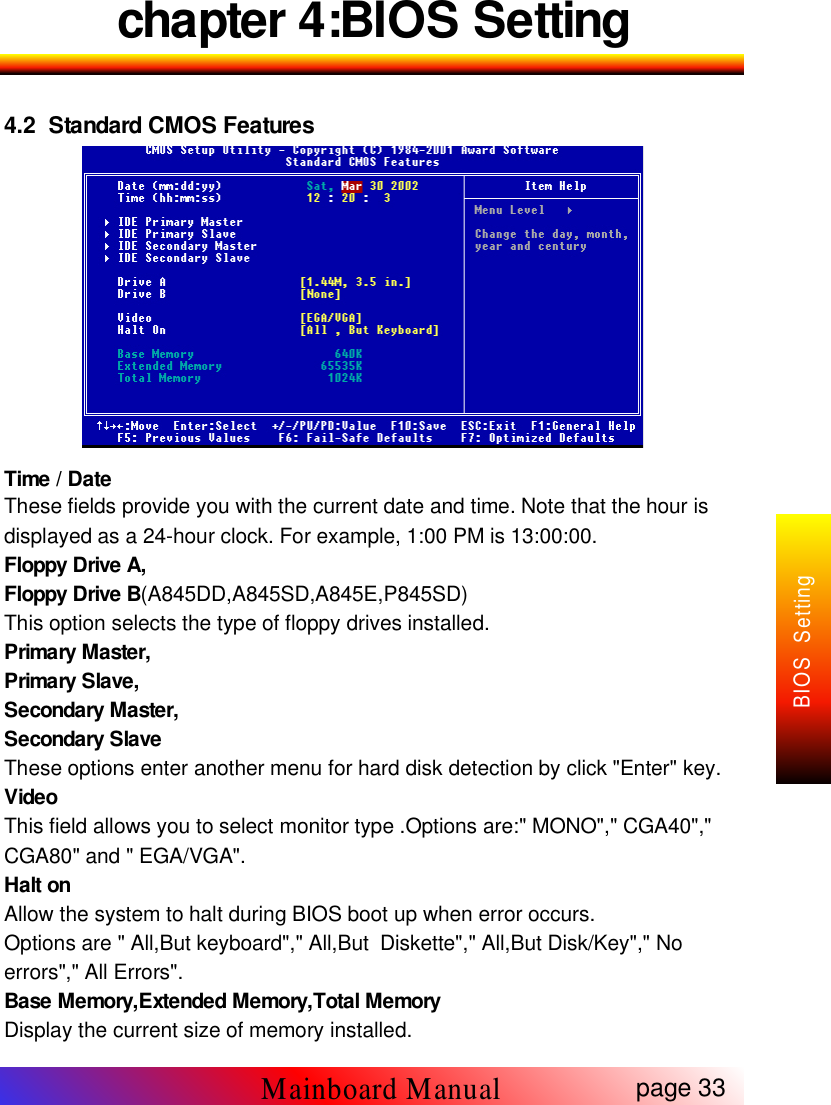
chapter 4:BIOS Setting4.2 Standard CMOS FeaturesTime / DateThese fields provide you with the current date and time. Note that the hour isdisplayed as a 24-hour clock. For example, 1:00 PM is 13:00:00.Floppy Drive A,Floppy Drive B(A845DD,A845SD,A845E,P845SD)This option selects the type of floppy drives installed.Primary Master,Primary Slave,Secondary Master,Secondary SlaveThese options enter another menu for hard disk detection by click "Enter" key.VideoThis field allows you to select monitor type .Options are:" MONO"," CGA40","CGA80" and " EGA/VGA".Halt onAllow the system to halt during BIOS boot up when error occurs.Options are " All,But keyboard"," All,But Diskette"," All,But Disk/Key"," Noerrors"," All Errors".Base Memory,Extended Memory,Total MemoryDisplay the current size of memory installed.page 33Mainboard ManualBIOS Setting
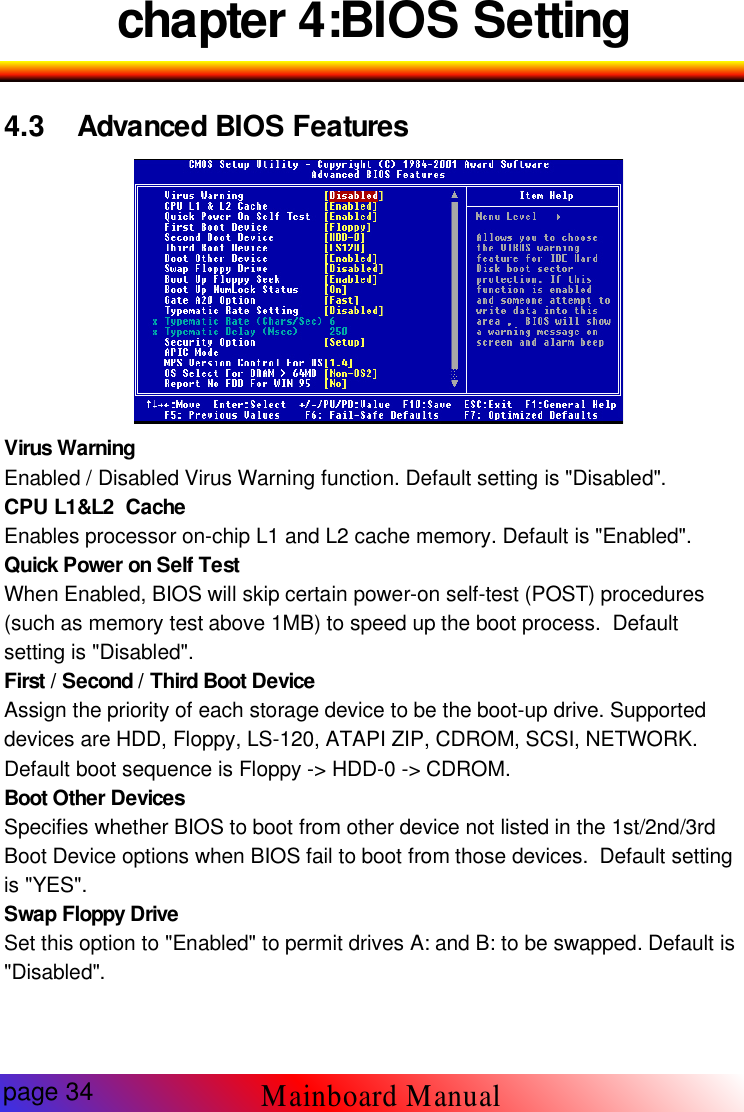
chapter 4:BIOS Setting4.3 Advanced BIOS Features-3 BIOSVirus WarningEnabled / Disabled Virus Warning function. Default setting is "Disabled".CPU L1&L2 CacheEnables processor on-chip L1 and L2 cache memory. Default is "Enabled".Quick Power on Self TestWhen Enabled, BIOS will skip certain power-on self-test (POST) procedures(such as memory test above 1MB) to speed up the boot process. Defaultsetting is "Disabled".First / Second / Third Boot DeviceAssign the priority of each storage device to be the boot-up drive. Supporteddevices are HDD, Floppy, LS-120, ATAPI ZIP, CDROM, SCSI, NETWORK.Default boot sequence is Floppy -> HDD-0 -> CDROM.Boot Other DevicesSpecifies whether BIOS to boot from other device not listed in the 1st/2nd/3rdBoot Device options when BIOS fail to boot from those devices. Default settingis "YES".Swap Floppy DriveSet this option to "Enabled" to permit drives A: and B: to be swapped. Default is"Disabled".page 34Mainboard Manual
chapter 4:BIOS SettingBoot Up Floppy SeekSpecify whether floppy drive A: will perform a Seek operation at system boot.Default setting is "Disabled".Boot Up NumLock StatusSet this option to "OFF" to turn the Num Lock key off when the computer isbooted so you can use the arrow keys on both the numeric keypad and thekeyboard. Default is "ON".Gate A20 OptionSets "Fast", lets chipset control Gate A20; Sets "Normal", lets a pin in thekeyboard controller control Gate A20. Default setting is "Fast".Typematic Rate settingEnabled / Disabled Typematic Rate setting, when enabled,the typematic rateand typematic delay can be selected. Default setting is "Disabled".Security OptionEnables password checking every time the computer is powered on or everytime BIOS Setup is executed. If System is chosen, a user password promptappears every time the computer is turned on. If "Setup" is chosen, thepassword prompt appears if BIOS Setup is executed. Default is "Setup".APIC ModeEnables advance program interrupt controlMPS Version Control For OSOptions are 1.1 and 1.4.Default is "1.4".OS Select For Dram > 64MBSet to "Enabled" if running OS/2 operating system and using more than 64MBsystem memory. Default is "Disabled".Report No FDD For Win95Selects "YES"when the system is running Win95 and no FDD is installed.Default is "NO".Small logo(EPA) ShowEnable/Disable EPA logo to be shown during bootup.page 35Mainboard ManualBIOS Setting
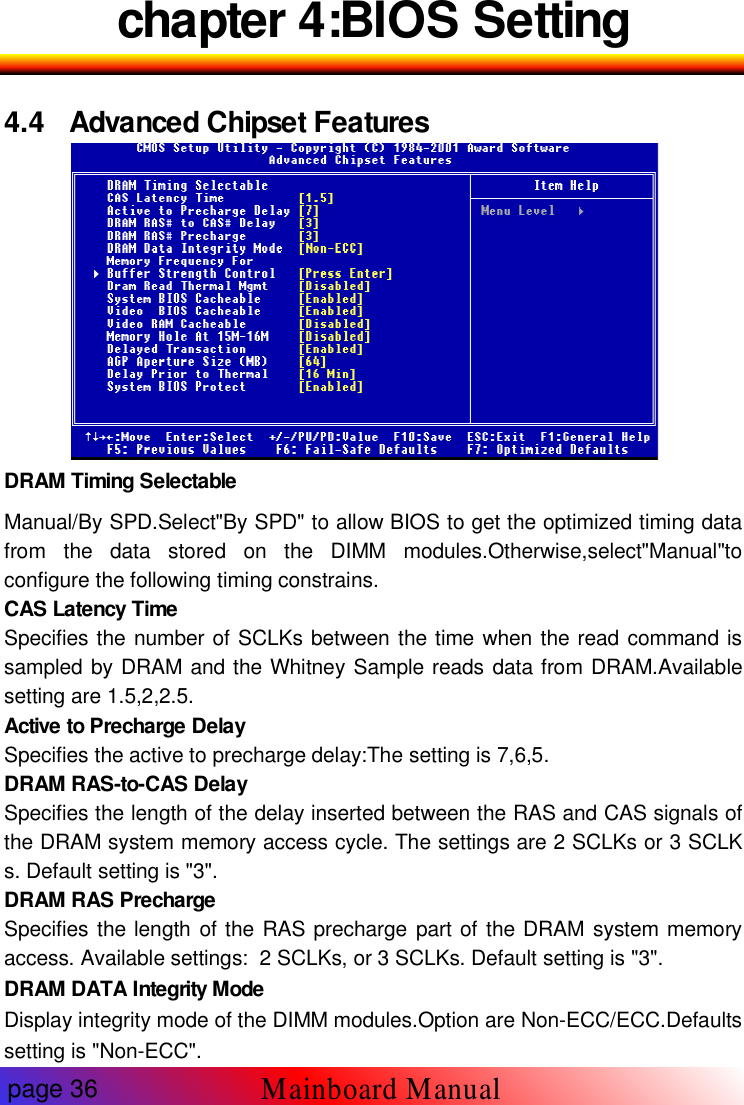
chapter 4:BIOS Setting4.4 Advanced Chipset FeaturesDRAM Timing SelectableManual/By SPD.Select"By SPD" to allow BIOS to get the optimized timing datafrom the data stored on the DIMM modules.Otherwise,select"Manual"toconfigure the following timing constrains.CAS Latency TimeSpecifies the number of SCLKs between the time when the read command issampled by DRAM and the Whitney Sample reads data from DRAM.Availablesetting are 1.5,2,2.5.Active to Precharge DelaySpecifies the active to precharge delay:The setting is 7,6,5.DRAM RAS-to-CAS DelaySpecifies the length of the delay inserted between the RAS and CAS signals ofthe DRAM system memory access cycle. The settings are 2 SCLKs or 3 SCLKs. Default setting is "3".DRAM RAS PrechargeSpecifies the length of the RAS precharge part of the DRAM system memoryaccess. Available settings: 2 SCLKs, or 3 SCLKs. Default setting is "3".DRAM DATA Integrity ModeDisplay integrity mode of the DIMM modules.Option are Non-ECC/ECC.Defaultssetting is "Non-ECC".page 36Mainboard Manual
chapter 4:BIOS SettingMemory Frequency ForSet frequency of DIMM memory.Default is "AUTO".CPU Latency TimerEnables CPU BIST. Default is "Disabled".Buffer Strength ControlThis option allows the experience user to fine tune the DRAM control setting.Leave this setting as default will have more safe & stability performance.DRAM Read Thermal MgmtSelect "Enable" to allow Dram Read Thermal Mgmt to manage DRAM speedaccording to it's temperature.Once the DRAM temperature increase to a specificlevel,Thermal Mgmt will slow down DRAM speed for a certain period of time(canbe specific in "Delay Prior to Thermal")in order to cool down the DRAMtemperature to determine whether to change DRAM speed back to its normaloperation speed or not. Default is"Disabled".System BIOS CacheableEnabled/Disabled System BIOS catch.Default setting is "Disabled".Video Bios cacheableEnabled/Disabled Video BIOS catch.Default setting is "Enabled".Video RAM cacheableEnabled/Disabled S-Video RAM catch.Default setting is "Disabled".Memory Hole At 15M-16MEnabled/Disabled Memory Hole at 15M-16M.Default is "Disabled".Delayed TransactionEnabled/Disabled ICH(I/O Controller Hub) delayed transactions for internalregister,firmware Hub(FWH) and Low Pin Count(LPC)interface access.default is"Disabled".AGP Aperture SizeSet maximam memory aperture for onboard AGP port.Available settings are4MB,8MB,16MB,64MB,128MB and 256MB.Default is "128MB".Delay Prior to ThermalYou must have "Dram Read Thermal Mgmt" option enabled in order for thisoption tobe meaningful.This option sets the time between each DRAM Thermaldetection once the Thermal activities.Options are 4min/8min/16min/32min.Default is "16min".System BIOS ProtectEnabled to protect system BIOS from overwritten.page 37Mainboard ManualBIOS Setting

Navigation menu