Zimi WTX10 Mi LevPower X Qi Wireless Charger User Manual

Zimi Corporation Mi LevPower X Qi Wireless Charger Users Manual

User Manual

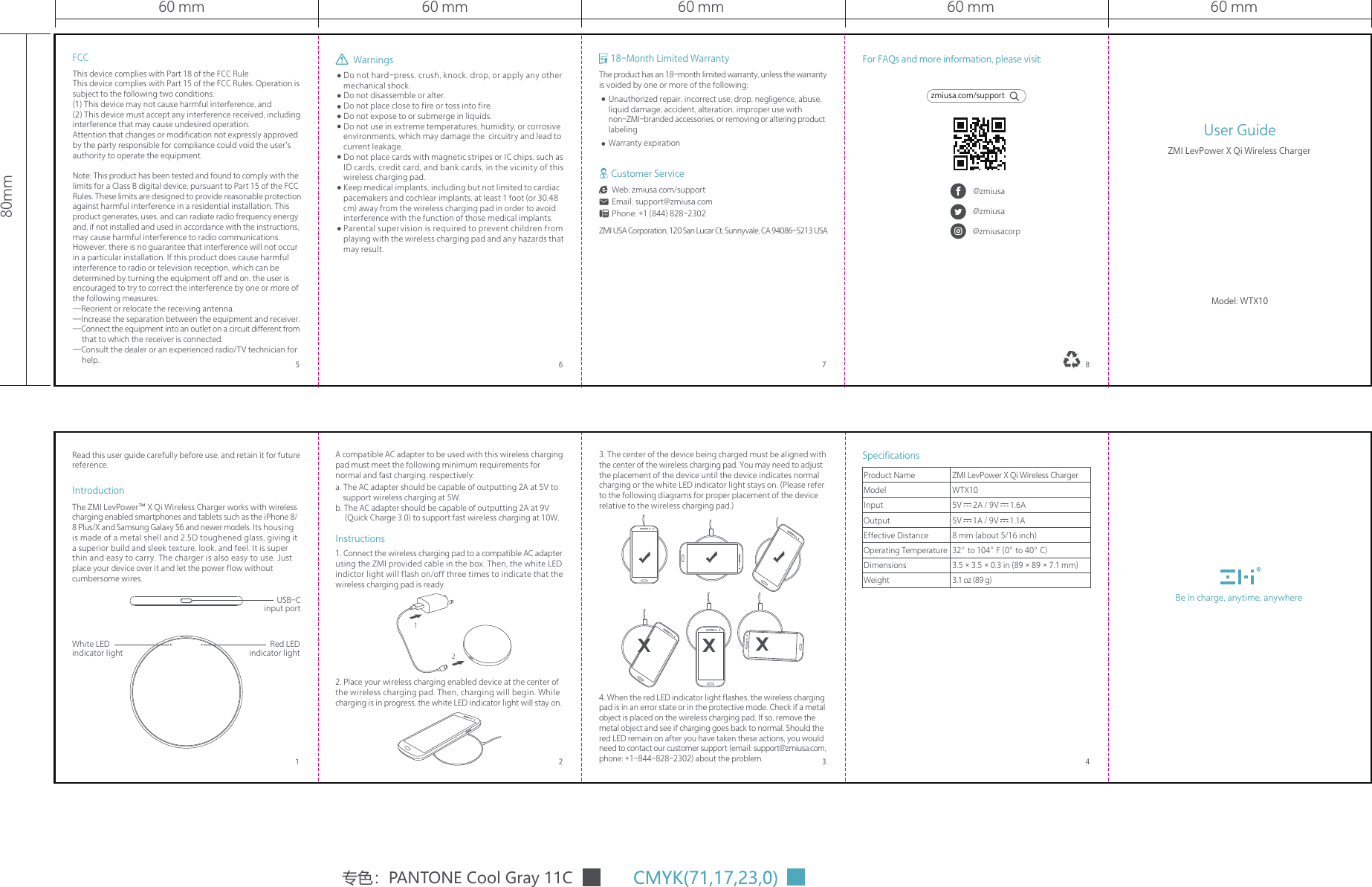
60 mm60 mm80mm60 mm60 mm 60 mmDo not hard-press, crush, knock, drop, or apply any other mechanical shock.Do not disassemble or alter.Do not place close to fire or toss into fire.Do not expose to or submerge in liquids.Do not use in extreme temperatures, humidity, or corrosive environments, which may damage the  circuitry and lead to current leakage.Do not place cards with magnetic stripes or IC chips, such as ID cards, credit card, and bank cards, in the vicinity of this wireless charging pad.Keep medical implants, including but not limited to cardiac pacemakers and cochlear implants, at least 1 foot (or 30.48 cm) away from the wireless charging pad in order to avoid interference with the function of those medical implants.Parental supervision is required to prevent children from playing with the wireless charging pad and any hazards that may result.1. Connect the wireless charging pad to a compatible AC adapter using the ZMI provided cable in the box. Then, the white LED indictor light will flash on/off three times to indicate that the wireless charging pad is ready.2. Place your wireless charging enabled device at the center of the wireless charging pad. Then, charging will begin. While charging is in progress, the white LED indicator light will stay on.A compatible AC adapter to be used with this wireless charging pad must meet the following minimum requirements for normal and fast charging, respectively:a. The AC adapter should be capable of outputting 2A at 5V to      support wireless charging at 5W. b. The AC adapter should be capable of outputting 2A at 9V      (Quick Charge 3.0) to support fast wireless charging at 10W.Instructions3. The center of the device being charged must be aligned with the center of the wireless charging pad. You may need to adjust the placement of the device until the device indicates normal charging or the white LED indicator light stays on. (Please refer to the following diagrams for proper placement of the device relative to the wireless charging pad.)4. When the red LED indicator light flashes, the wireless charging pad is in an error state or in the protective mode. Check if a metal object is placed on the wireless charging pad. If so, remove the metal object and see if charging goes back to normal. Should the red LED remain on after you have taken these actions, you would need to contact our customer support (email: support@zmiusa.com, phone: +1-844-828-2302) about the problem.IntroductionThe ZMI LevPower™ X Qi Wireless Charger works with wireless charging enabled smartphones and tablets such as the iPhone 8/ 8 Plus/X and Samsung Galaxy S6 and newer models. Its housing is made of a metal shell and 2.5D toughened glass, giving it a superior build and sleek texture, look, and feel. It is super thin and easy to carry. The charger is also easy to use. Just place your device over it and let the power flow without cumbersome wires. USB-C input portRed LED indicator lightWhite LED indicator light专色:PANTONE Cool Gray 11CBe in charge, anytime, anywhere7 8653 42118-Month Limited WarrantyThe product has an 18-month limited warranty, unless the warranty is voided by one or more of the following:Unauthorized repair, incorrect use, drop, negligence, abuse, liquid damage, accident, alteration, improper use with non-ZMI-branded accessories, or removing or altering product labelingWarranty expirationZMI USA Corporation, 120 San Lucar Ct, Sunnyvale, CA 94086-5213 USACustomer ServiceWeb: zmiusa.com/supportEmail: support@zmiusa.comPhone: +1 (844) 828-2302For FAQs and more information, please visit:zmiusa.com/support@zmiusa@zmiusa@zmiusacorpWarningsFCCThis device complies with Part 18 of the FCC RuleThis device complies with Part 15 of the FCC Rules. Operation is subject to the following two conditions:(1) This device may not cause harmful interference, and(2) This device must accept any interference received, including interference that may cause undesired operation.Attention that changes or modification not expressly approved by the party responsible for compliance could void the user’s authority to operate the equipment.Note: This product has been tested and found to comply with the limits for a Class B digital device, pursuant to Part 15 of the FCC Rules. These limits are designed to provide reasonable protection against harmful interference in a residential installation. This product generates, uses, and can radiate radio frequency energy and, if not installed and used in accordance with the instructions, may cause harmful interference to radio communications. However, there is no guarantee that interference will not occur in a particular installation. If this product does cause harmful interference to radio or television reception, which can be determined by turning the equipment off and on, the user is encouraged to try to correct the interference by one or more of the following measures:—Reorient or relocate the receiving antenna.—Increase the separation between the equipment and receiver.—Connect the equipment into an outlet on a circuit different from      that to which the receiver is connected.—Consult the dealer or an experienced radio/TV technician for      help.SpecificationsProduct NameModelInputOutputEffective DistanceOperating TemperatureDimensionsWeightZMI LevPower X Qi Wireless ChargerWTX105V=2A / 9V=1.6A5V=1A / 9V=1.1A8 mm (about 5/16 inch)32° to 104° F (0° to 40° C)3.5×3.5×0.3 in (89×89×7.1 mm)3.1 oz (89 g)User GuideModel: WTX10ZMI LevPower X Qi Wireless ChargerRead this user guide carefully before use, and retain it for future reference.12

Navigation menu