ePrep EPREP-01 ePrep Sample Preparation Workstation User Manual Instruction manual
ePrep Pty Ltd ePrep Sample Preparation Workstation Instruction manual
ePrep >
Contents
- 1. Instruction manual
- 2. Quick start instructions
- 3. Tablet installation procedure
Instruction manual

ePrep Instructions

Important Notes
IMPORTANT NOTES
ePrep is a new approach to sample preparation and the various liquid handling processes that are required in Analytical Chemistry
laboratories.
Instructions for operation of the ePrep are available through several mechanisms. The mechanism used for specific instructions
Please see the instructions that are shipped with the ePrep:
Unpackaging Instructions
Quick Start
Ready Reference Guide
Installation Guide (Software installed on the Computer Tablet supplied. Access this Guide from the Home screen – Systems -
Quick Start. Scroll through the installation instruction screens.
Help Topics available throughout the software that are relevant to the part of the Axis software that is being assessed.
This Instruction Manual
All are also available at www.eprep.com.au/instructions, except the HELP information imbedded in the software.
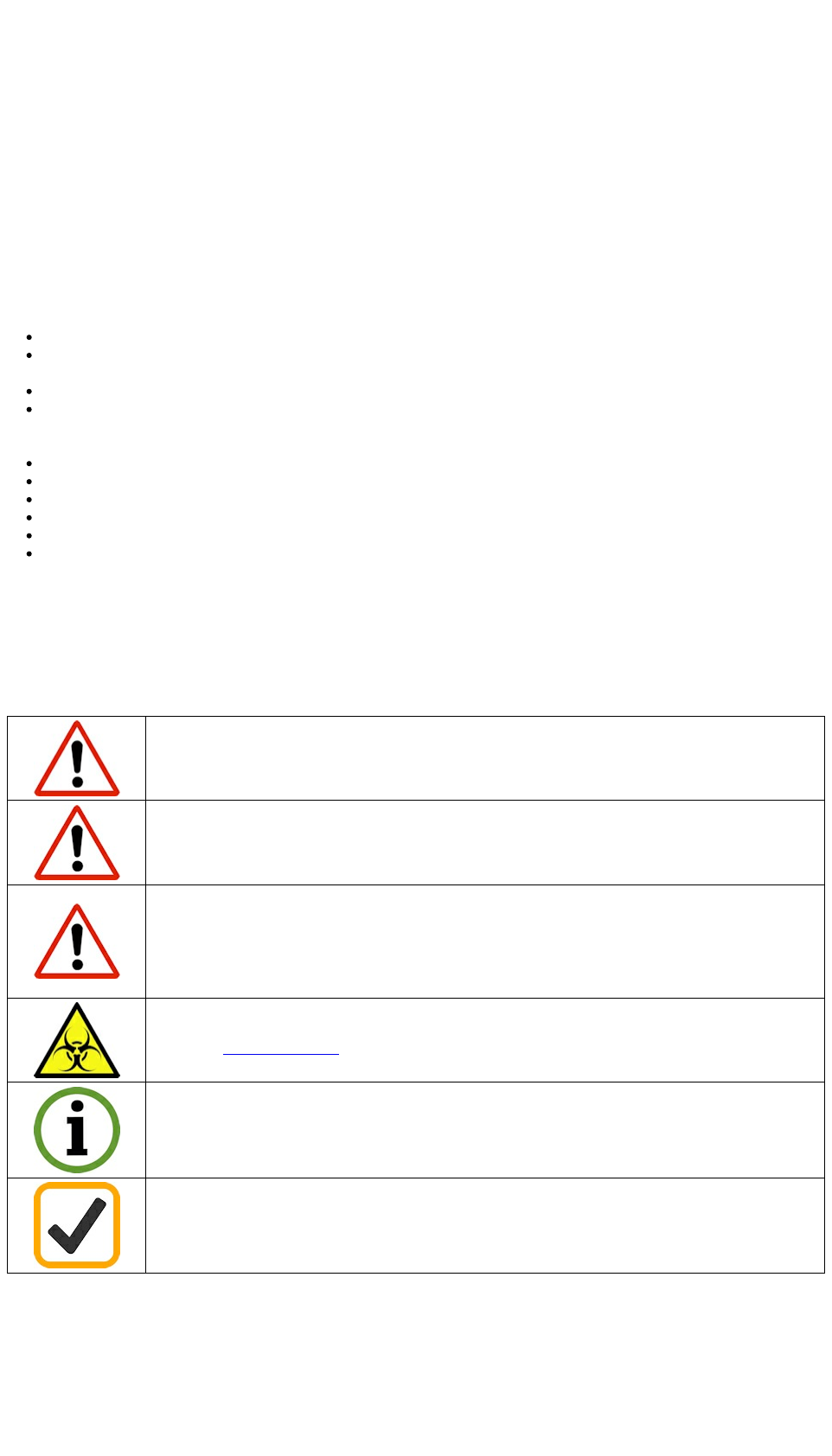
IMPORTANT ICONS USED IN THESE INSTRUCTIONS
Important warning notification for user safety.
Biohazard potential
Information and hints for operation.
Correct hardware and software information
Cabling information
SUPPLIER
Eprep Pty Ltd
14/35 Dunlop Rd
Mulgrave, Victoria, 3170
AUSTRALIA
(e) info@eprep.com.au
(w) www.eprep.com.au
(p) +61-(0)3-9574 3600
FEEDBACK
The ePrep team has designed ePrep to be a flexible platform and along with the help from ePrep family of users we want to continue
to expand capabilities of the system. We welcome your suggestions for changes and addition of new capabilities. We also appreciate
notification of errors in the ePrep software and operation at: suggestions@eprep.com.au
For technical assistance and reporting please use :
Instructions
1

support@eprep.com.au
Call +61 3 9574 3600
Or write Bldg 14, 35 Dunlop Road, Mulgrave, Victoria 3170 Australia
To learn of the latest news, capabilities and free software updates for ePrep, please check regularly at www.eprep.com.au.
ePrep Instructions - Pub No. 99-10008-01 Rev 01 (Feb 2017)
© Copyright 2017, Eprep Pty Ltd
Instructions
2
Boxed ePrep weight = 120kg and ePrep instrument =65kg. Precautions must be taken when lifting and
carrying. Refer to the Unpacking ePrep instructions for handling details.
Do not enter the instrument work space or place any part of your body near moving axes during operation.
If the equipment is used in a manner not specified by the manufacturer, the protection provided by the
equipment may be impaired. Good Laboratory Practice (GLP) should be followed when using the ePrep.
Refer: 21CFR58, 21CFR58, Directive 2004/9/EC and specific product GLP Directives.
Precautions for safe handling of biological specimens are outlined by the Centers for Disease Control and
Prevention, http://www.cdv.gov
ePrep is fitted with an Emergency Stop Button found at the front right side of the instrument. Pressing the
button will cut off all power to the instrument. To reinstate power, rotate the emergency button 90° clockwise.
Only approved accessories and consumables can be used with the instrument. Eprep assumes no liability for
the customer’s failure to comply with these requirements.
1 Safety and Preparation for Use
1.1 Intended Use
The ePrep is designed to bring automation to every laboratory and offers a paradigm shift in sample preparation techniques for most
analytical methods.
ePrep is primarily designed for Analytical Laboratory sample preparation and liquid handling operations. It is a stand-alone robotic
system for processing liquids for analysis and is intended for offline processing.
Summary
Program complex Workflows and be operational in a few minutes
Change rapidly between workflows, making it convenient to use ePrep whether it is a small number of samples being run or a
large number.
One ePrep can be fast enough to prepare samples for multiple analytical instruments
Flexibility on the type of vials and vial racks that are used is possible through the use of Adapter Plates which are specific to the
vials and racks being used. Common sample vials and racks are provided for as well as common analytical instrument
autosampler racks.
Automated syringe exchange system with up to 12 different syringes and tools selectable during a Workflow
Positive displacement syringe based liquid handling (not pipette) leading to accurate control of volume while dispensing.
Precise flowrate control and high pressures permitting micro separation, membrane and filtering operation
Needle based sealed vial operation to guarantee sample integrity and safety
Integrated Workflow use of Accessories for complete sample preparation processes
ePrep is a flexible platform that is designed to accommodate new techniques and accessories to expand it’s capabilities
ePrep is not intended for medical use.
1.2 Safety Precautions
WARNINGS
Instructions
3

Connection cables to external equipment should be less than 3m in total length, preferred length is 1.8m
OTHER SAFE HANDLING INFORMATION
ePrep incorporates many features designed to mitigate the risk of injury to personnel. However, it is sensible and good
laboratory practice to treat the machine with caution and not allow body parts or loose clothing to come into close contact with
the ePrep when it is operating. Besides the risk of injury infringement on the machine is likely to cause the workflow to abort.
Use only approved syringes with the ePrep. These syringes must only be used with the specific needle type supplied with the
syringe. The RFID tag used to identify the syringe should not be changed or interfered with.
When handling syringes and µSPEed cartridges care should be taken to avoid injury from the sharp needle.
ePrep has been produced using paints and other coatings that are highly resistant to chemical attack but nothing is impervious.
Always clean up spills immediately to prevent staining and other damage to the ePrep system and use in a well ventilated area
where aggressive vapors are involved.
Emergency stop: is a safety requirement to immediately stop ePrep operation and movement. Ensure the Emergency Stop
button on the front right side of the instrument is not obstructed by items placed near to it and is easily accessible.
ePrep has a battery back up system in case of interruption to the main power supply. Removing mains power to the instrument
will not stop the operation of ePrep and render the machine safe. The only way to know the machine is completely disabled is
activation of the Emergency Stop button.
Do not use the EPREP in a potentially explosive environment or with potentially explosive chemicals.
Operate the EPREP at temperatures between 15 °C and 40 °C only and at a humidity of max. 80 % at a temperature up to 31
°C.
Care and maintenance:
Do not clean the tablet, or any part of the ePrep instrument using acetone or aggressive solutions.
Other than approved drip trays, do not allow any liquid to enter the device.
1.3 Sample Hazards
When working with laboratory chemicals and biological fluids good safe laboratory practices must be followed. It is expected that
ePrep is operated by personnel who are skilled already in safe laboratory practices.
When using infectious, radioactive, toxic and other solutions which may pose health risks, please observe the safety precautions laid
down for your country.
Precautions for safe handling of biological specimens are outlined by the Centers for Disease Control and Prevention,
http://www.cdv.gov
Instructions
4

1.4 Regulatory Certifications
INSTRUMENT INSTRUCTIONS
Part Number: 01-01000-01
Name: ePrep Sample Preparation Workstation
Model Number: GL950X
Made in Australia
REGULATORY CONFORMANCE
ePrep will be certified to a range of regulatory requirements. Check back to www.eprep.com.au/conformance for the latest approvals.
Conformité Européenne (CE) EMC compliance for Europe
Federal Communication Commision (FCC) EMC compliance for North America
FCC ID: 2AJWG-EPREP-01
Contains FCC ID: T9JRN41-3, IC ID: 6514A-RN413
Industry Canada (IC) EMC compliance
IC ID: 21989-EPREP01
Regulatory Compliance Mark (RCM) EMC compliance for Australia, AS/NZS 4417.1
RF (Radio Frequency) Exposure compliance distance: 5cm (from Foot) / 20cm (from back panel)
RF (Radio Fréquence) Distance de conformité de l'exposition: 5cm (du Pied) / 20cm ( À partir du panneau arrière)
Safety Notifications
ePrep is to be used indoors only.
Not to be disposed of in landfill garbage. Instrument contains sealed lead battery.
This device complies with Industry Canada’s licence-exempt RSSs. Operation is subject to the following two conditions:
(1) This device may not cause interference; and
(2) This device must accept any interference, including interference that may cause undesired operation of the device.
Cet appareil est conforme à la règlementation Canadienne relative aux flux RSS exemptés de licence. L'opération est soumise aux deux conditions suivantes:
(1) Cet appareil ne doit pas provoquer d'interférence; et
(2) Cet appareil doit accepter toute interférence, y compris les interférences susceptibles de provoquer un fonctionnement indésirable de l'appareil.
Instructions
5

1.5 Service and Repair
Contact ePrep via www.eprep.com.au/support or your local ePrep service/distributor for guidance on repairs that can be carried out by
the user and repairs that require trained service personnel to carry out the work.
1.6 Information for the User
Changes or modifications not approved by ePrep could void the user's authority to operate the equipment.
This equipment has been tested and found to comply with the limits for a Class A digital device, pursuant to part 15 of the FCC Rules.
These limits are designed to provide reasonable protection against harmful interference when the equipment is operated in a
commercial environment. This equipment generates, uses, and can radiate radio frequency energy and, if not installed and used in
accordance with the instruction manual, may cause harmful interference to radio communications. Operation of this equipment in a
residential area is likely to cause harmful interference in which case the user will be required to correct the interference at his own
expense.
Instructions
6

2 Introduction to ePrep
2.1 Specifications
INSTRUMENT
Part Number 01-01000-01
Description ePrep Sample Preparation Work Station
Model Number GL950X
DIMENSIONS
Instrument Dimensions (LxWxH) 1370mm x 694mm x743mm
Required Bench Space 1113mm x 603mm
Weight 65kg
MECHANICAL SPECIFICATIONS
Max travel (X,Y,Z) 945, 365, 200mm
Positional accuracy ±0.5mm
Positional repeatability ±0.5mm
Max speed (X,Y,Z) 600, 300, 100mm/sec
Plunger specifications 10.16mm lead, min speed=0.155mm/s, max speed= 170mm/s, Max force = 50N
ENVIRONMENT
Laboratory
Sealed vials, cover not required.
Suggest well ventilated and climate controlled environment.
If using toxic materials take appropriate safety precautions.
Solvent Compitibility Painted surfaces have chemical solvent resistance.
Powercoat Interpon Polyester/Epoxy blend - Medium Ketones and Low Acid
Voltage 24V, 221W, 9.2A DC Power Pack; 100-240 Volt AC input; Requires IEC C13
power cable, nation specific.
Operating range 10 - 35 deg C, 0-80% relative humidity
Storage range 5 - 40 deg C, 0-80% relative humidity
Operating noise Typical 80dB
Altitude ≤2000m
Pollution degree 2
PRODUCT SUPPORT
Maintenance interval 12 months
Spare parts availability 7 years from product obsolescence
DECK AND TOOL SPECIFICATIONS
Tool Rack Capacity 12 Tools
Vial Rack Adapter Plates Interchangeable Adapter Plates available for most sample and autosampler racks
(see available Adapter Plates and Tools)
Vial Rack Adaptor Plate Positions 16 positions @ 55mm x 330mm, plate size matches vial rack size, eg. Sulepco 50
x 1.5mL autosampler vial rack uses 110mm x 330mm adaptor plate
Accessories Adapter Plate Positions 8 positions @ 55mm x 220mm, plate size matches accessory, eg. 10 position
reagent station uses 110mm x 220mm adaptor plate
Instructions
7

COMPATIBLE RACKS, ADATOR PLATES AND TOOLS
Software Compatibility Only predefined Tools, Racks and Rack Adapter Plates available. Software
predefined for simple Workflow creation.
Available Adapter Plates for Sample Racks
(ordered separately)
BelArtSci Large for 90x13mm, 60x16mm, 40x20mm, 24x25mm and 21x30mm
Vials
BelArtSci Small for 42x13mm, 30x16mm, 20x20mm, 12x25mm and 6x30mm
Vials
Supelco 96x6-8mm, 50x11-12mm, 48x15-16mm, 90x17mm, 36x22mm,
50x29mm
96 well microtiter plate
Available Adapter Plates for Autosampler Racks
Agilent 7683GC, 7693GC, 1100LC, 1120LC, 7693HS
Shimadzu AOC20iGC, AOC20sGC, SIL20aLC, Sil30aLC
Thermo 3000, Triplus
Waters 171plus, WISP
Robotic Tool Change ePrep uses syringes and tools with Xchange mechanism for unattended tool
change during a Workflow.
Available syringes with Xchange
Gas Tight Syringes with needles: 100µL, 1mL, 10mL (Supplied)
Gas Tight µSPEed Endurance Syringes: 100µL, 500µL and 1mL (Optional for
SPE)
Available Gripper with Xchange(Optional) Gripper for 2mL to 20mL vials (Optional)
IDENTIFICATION TECHNOLOGY
Tool Identification RFID with magnet check specific for each tool with stored history. Scanned on
setup
Rack Identification RFID specific for each rack type. Scanned on setup
Vial Identification (Optional)
NOTE: Gripper is required for barcode scanning
1&2D Barcode Scanner readable formats include:
1D Symbology's: Code 128, UCC/EAN-128 (GS1-128), AIM 128, EAN-8, EAN-
13, ISSN, ISBN, UPC-E, UPC-A, Interleaved 2 of 5, ITF-6, ITF-14, Matrix 2 of 5,
Industrial 25, Standard 25, Code 39, Codeabar, Code 93, Code 11, Plessey,
MSI-Plessey, RSS-14, RSS-Limited, RSS-Expand
2D Symbology's: PDF417, Data Matrix, QR Code
WASHING OF SYRINGES AND NEEDLES
Wash Station Deck mounted syringe Wash Station. Pump driven with active waste removal.
External solvent and waste reservoirs (not supplied)
Drip Tray Drain System Drain solvent pumped to waste receptacle.
SOFTWARE and CONNECTIVITY
Tablet Controller Microsoft Surface Pro (Supplied)
Operating System Windows 10 Touch Screen, (English Only)
Connectivity Tablet to Instrument USB or Bluetooth
Operational Software EPREP Axis Software (English Only) designed for rapid Workflow development
Software Updates Free Software and Firmware updates available through Axis software via internet
connection
Connection ports
3 x Serial comms (RS232) (to be used with shielded cable)
4 x Digital Output (12V, 500mA max, refer ULN2003AD spec sheet) (to be used
with shielded cable)
4 x Digital Input (typical 5V @ 5mA, refer TLP291-4 spec sheet) (to be used with
shielded cable)
4 x Relay (both NO and NC contacts available per relay, 10A, 250VAC, 30VDC,
refer JW1FSN-DC12V spec sheet)
Note: ALL PORTS ARE FOR CONNECTION TO SELV CIRCUIT ONLY
Instructions
8
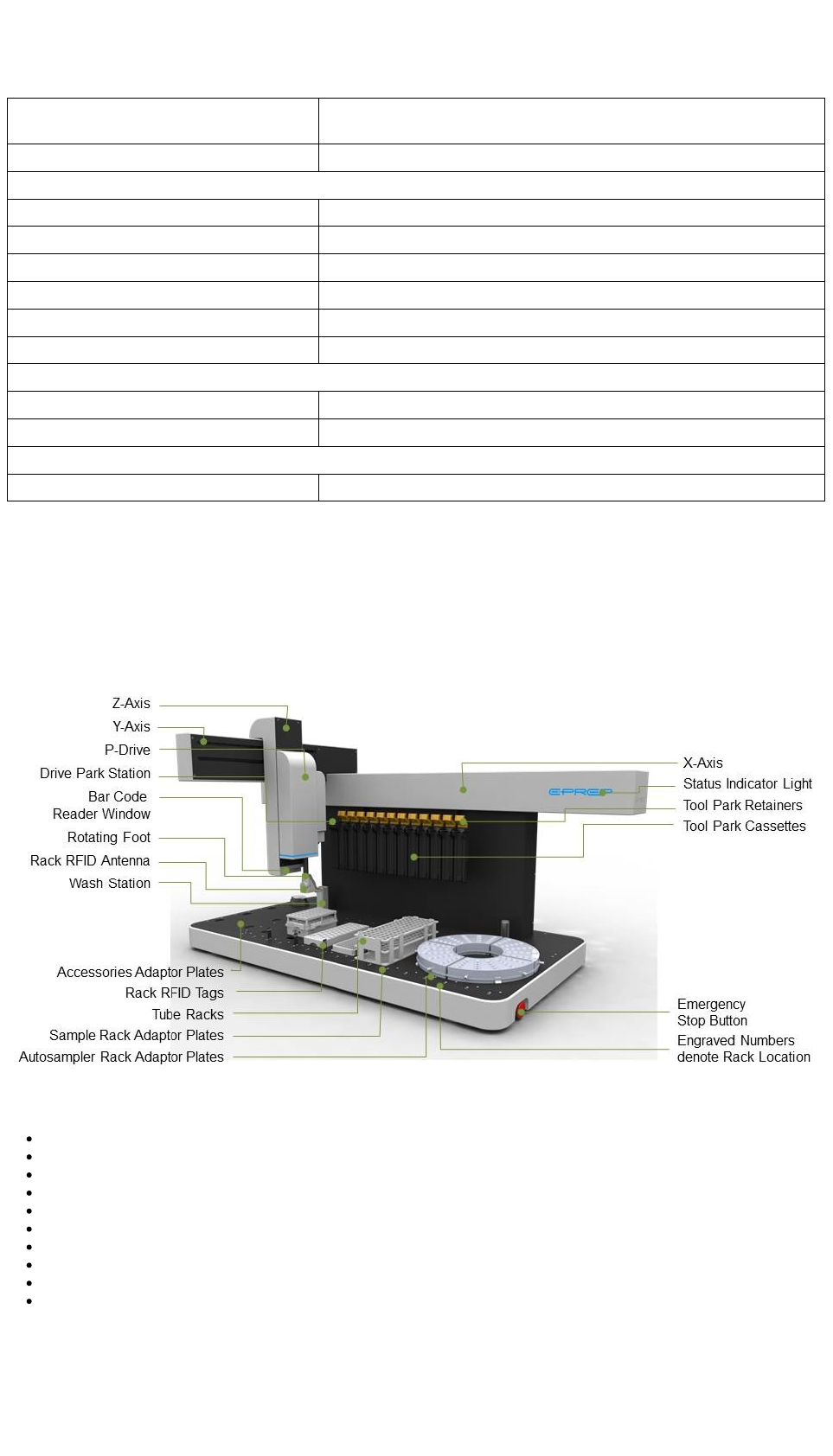
Status indicator Multicolour status indicator LED showing idle, busy, pause, warning and error
states
COMPLIANCE
Workflow Development History: User, Date/Time Creation, Edits, Saves
Data Logged Date/Time, Output ID, Workflow ID, Process
User Access Multilevel rights controlled by user login
Data Input and Output Report formats in TXT and PDF
Compliance CE, FCC, IC, RCM, RoHS, Safety EN 61010, EMC 61326
ACCESSORIES
Available Accessories (Optional) Shaker, Direct Detector Interface, Solvent Manifold, µSPEed Cartridge Rack.
PACKAGING
Recyclable, shock resistant
2.2 Instrument Overview
Designed a to bring automation to every laboratory the ePrep Sample Preparation Workstation offers a paradigm shift in sample
preparation techniques for most analytical methods.
Summary
Programming with complex Workflows operational in just minutes
Rapid change between workflows for the preparation of analytical samples to feed multiple instruments
Adaptor plates allow interchangeably of a variety of common sample and autosampler racks on the instrument deck
Automated syringe exchange system with up to 12 different syringes and tools selectable during a Workflow
Precise syringe based liquid handling (not pipette)
High control of volume and flowrate dispensing
Pressure dispensing permitting micro separation, membrane and filtering operation
Sealed vial operation to guarantee sample integrity and safety
Integrated Workflow use of Accessories for complete sample preparation processes
Rotating Foot enabling unique operational function.
Instructions
9

2.3 Packing List - Base Product
Packing list for Part No.01-01000-01, ePrep Sample Preparation Workstation, GX950X
INSTRUMENT
ePrep Instrument
24volt power pack
Surface Pro Tablet with ePrep Axis software
USB Type B shielded cable (ePrep to Tablet connection)
Underdeck drip tray
Note: Country specific IEC C13 Power Cable for power pack not supplied
INSTALLATION TOOLS
3 x Screws for Rear Deck Plates
1 x Calibration Probe
ADAPTER PLATES
1 x Wash Station deck plate with installed wash station and tubing
1 x Rear/Right deck plate
3 x Accessories Area Adapter Plates
7 x Adapter Plate for BelArt 3x7 Rack - also used for calibration
1 x Adapter Plate & RFID Tag for Supelco 5x10 Rack
RACKS
1 x BelArt 3x7 Rack & RFID Tag for 30mL vials
1 x Supelco 5x10 for 1.5mL vials
VIALS
100 x 1.5mL autosampler vials/caps
10 x 30mL vials/caps for with cap/septa
SYRINGES
1 x 100µL Syringe, 80mm needle
1 x 1mL Syringe, 80mm needle
1 x 10mL Syringe, 80mm needle
SPARES
2 x Septa Piercer
2 x 100µL Needles
2 x 1mL Needles
2 x 10mL Needles
Quick Start Instructions
Wall Chart
Instructions
10
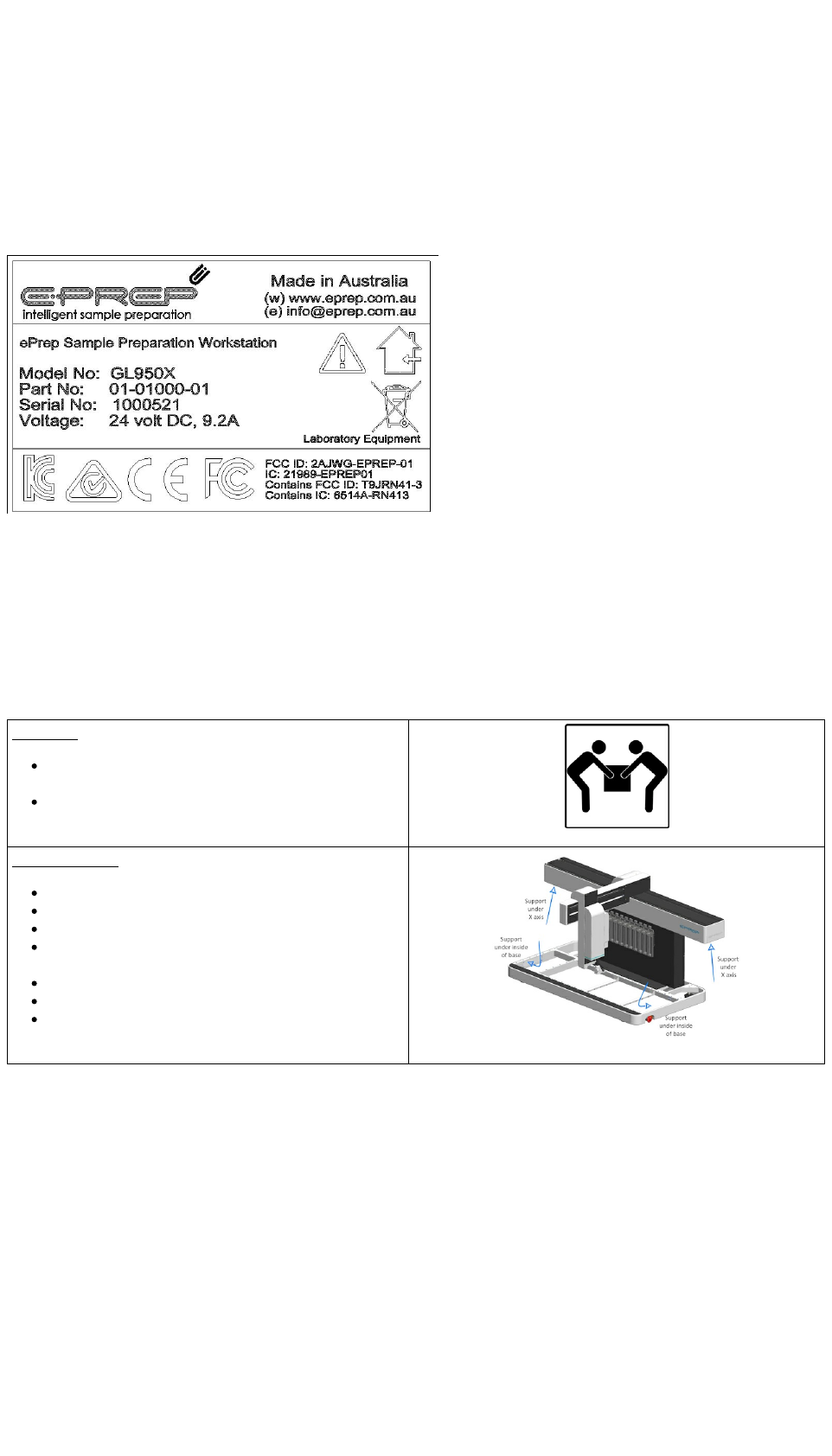
2.4 Instrument Serial Number
Instrument details including Serial Number can be located on the instrument identification panel on the back of the instrument.
Please quote the serial number if logging a service call.
Serial Number is used as the Username for Website Login.
2.5 Handling and Unpacking ePrep
Handling Precautions
Precautions must be taken when lifting and carrying the instrument.
Unpacking
Boxed ePrep weight > 120kg
Use folklift only
ePrep instrument is approximately 75kg.
Minimum 2 person lift
Placing on Bench
EPREP instrument is heavy, approx. 75kg
Minimum 2 person lift to avoid injury
Lift by bending legs, maintain a straight back
Use a pallet trolley or other suitable wheeled device, do
not carry
Trolley instrument to installation location
Ensure bench is suitable to support instrument weight
Lift instrument , 2 person lift, use recommended lift - see
diagram. Lift Points
Box Unpacking Instructions
Initially the Front and Back panels should be removed as shown below.
Comprehensive instructions for unpacking the ePrep will be found inside the box fixed to the shipping container. Alternatively the
comprehensive instructions may be found at : www.eprep.com.au/instructions
The stainless stell drip tray which is to prevent leakage during use and needs to be installed in the base of the ePrep is located in the
lid of the cardboard packaging.
Instructions
11
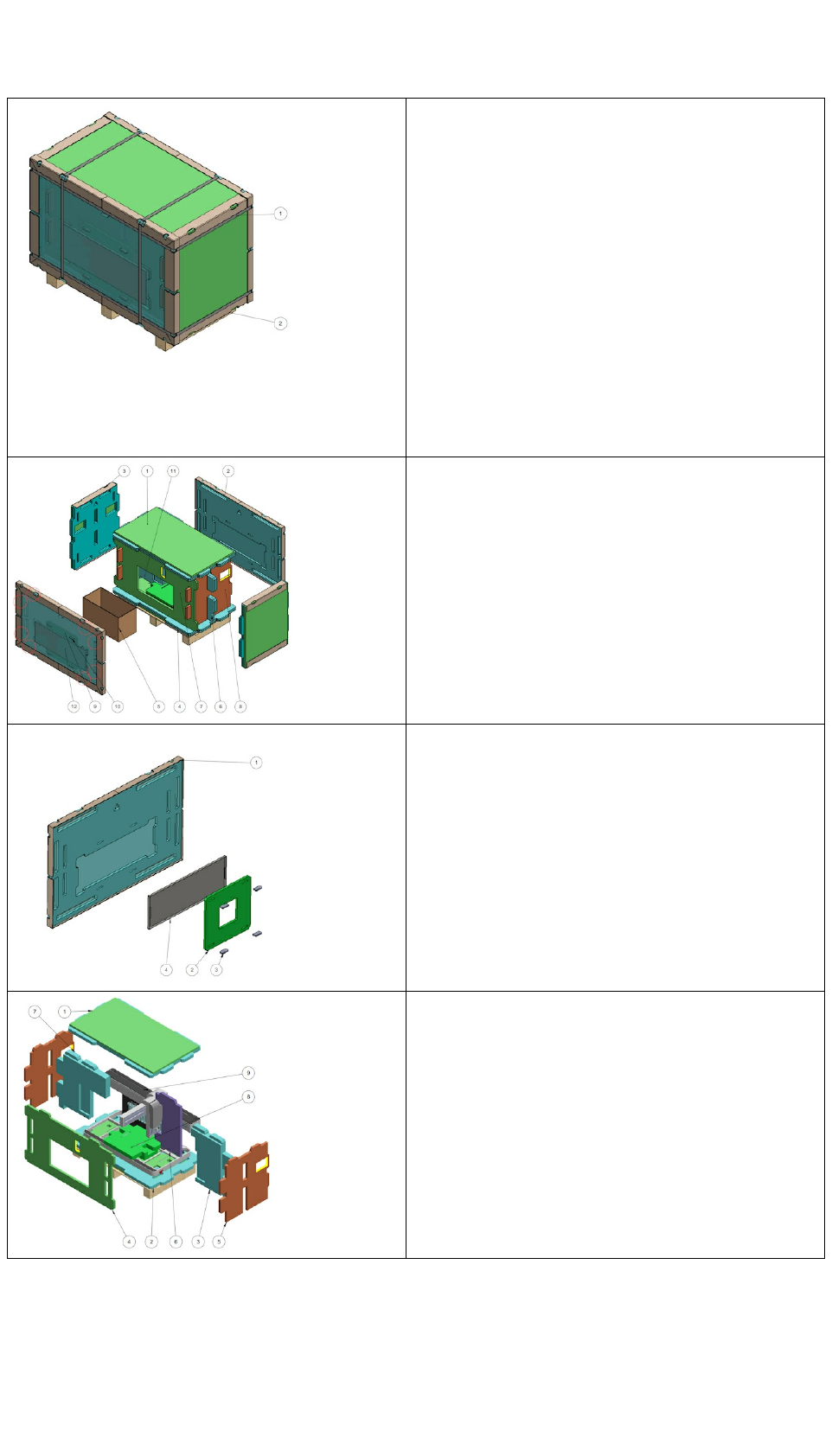
Remove Nylon Strapping
1. Nylon Strapping
2. Base Panel
Remove front and back panels, then side panels followed by the
Accessories Box
Remove Drip Tray from the front panel.
Remove the support pieces in the number order shown.
Instructions
12

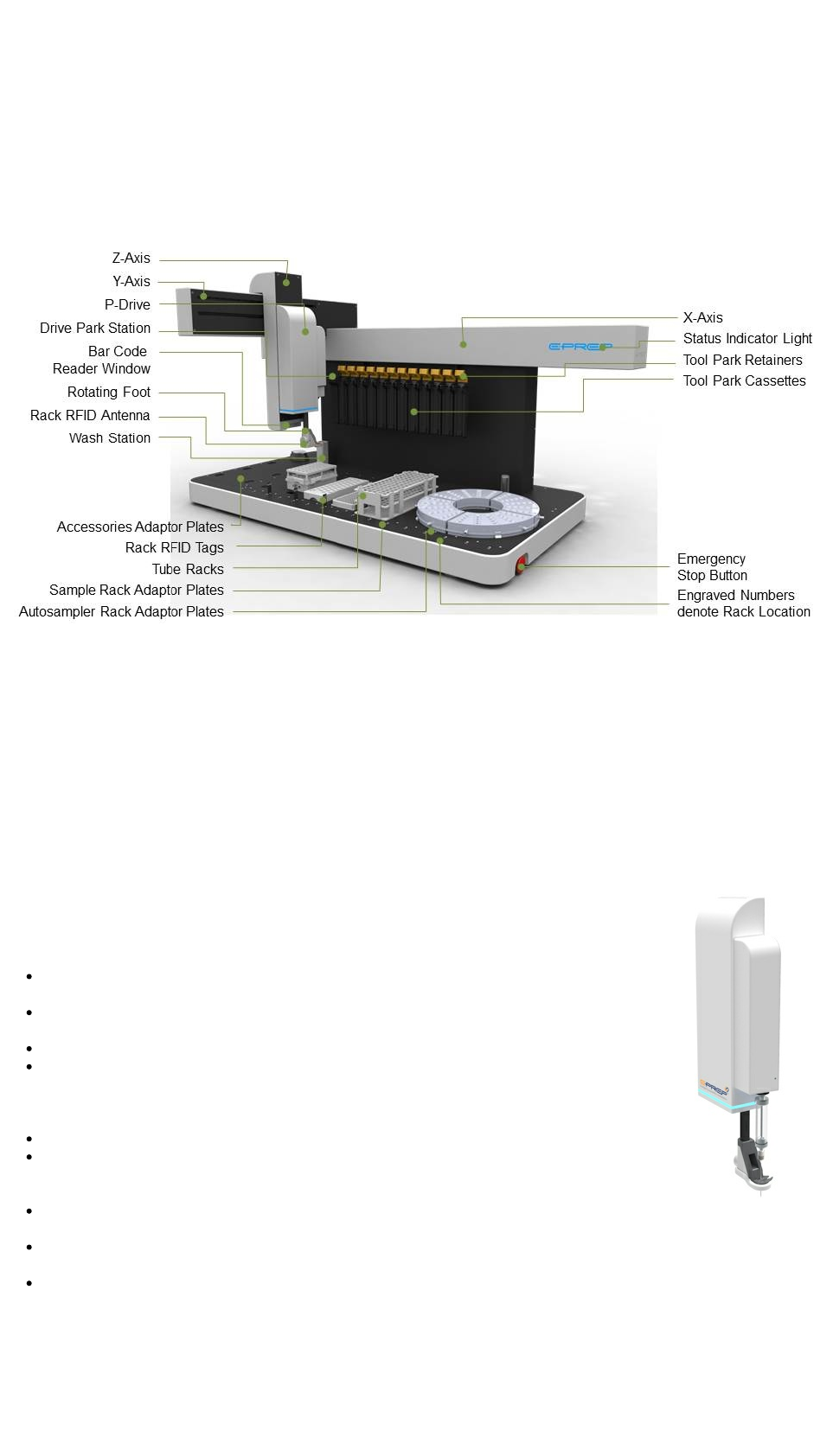
3 Description of ePrep Features
I
3.0 Description of Features
3.1 XYZ Axis
The X, Y and Z axes are stepper motor driven with continuous position monitoring. As an axis moves the actual position is detected
and this actual position is compared with the expected position. At machine start the actual position for each axis has to be
established in the software. A software routine moves each axes a few centimeters in either direction to establish the position.
Occasionally, when an axis is already at its full extension of travel at machine start up the axis carriage will be heard impacting the its
travel limits before reversing direction. Note . this noise maybe alarming but is normal and does not damage the machine.
When power is removed from the machine (flat battery or Emergency Stop activated) the axis may be moved manually.
3.2 P-Drive
The P-Drive is the heart of the ePrep system with an array of actuators, motors and sensors incorporated.
The P-Drive incorporates a separate microprocessor for controlling and monitoring the various functions.
Communication between the P-Drive processor and the main Board in the ePrep is via a series of wires
and connections across the Z-Y- X axes internconnects.
Xchange coupling that automatically connects and disconnects to the syringe barrel and to the
syringe plunger.
Stepper Motor and encoder to precisely drive the syringe plunger and detect high back pressures
and automatically adjust the flowrate.
IR sensor that rapidly scans for the presence of vials.
Septum piercer. The syringe needle is not used to pierce septa because of the risk of bending the
syringe needle. First the piercer punctures the septa and the syringe needle goes through the bore
of the piercer into the vial. On withdrawal from a septa, the piercer first retracts leaving the needle in
the vial and then the needle is withdrawn, wiping the syringe needle on the inside of the septa.
Rotating foot with vertical movement. This rotates to guide the syringe needle into the septa piercer.
The foot through which the piercer and syringe needle pass is movable and separately controllable
in the Z- plane. It is required to push vials as the syringe needle is withdrawn through the septa,
otherwise they would stay attached.
At the back of the P-drive is located an RFID reader to detect and receive data on the syringes and
tools that are on the Tool Rack.
On the opposite of the Foot to the needle piercer and fork is an additional RFID reader to sense and read RFID tags on the Vial
Racks and Vial Rack Adapter Plates.
Barcode Reader (optional). In conjunction with the Vial Gripper that picks up vials and rotates them. Reads 2D and 3D
barcodes.
Instructions
14

3.3 Senor Foot
The sensor foot at the bottom of the P-Drive is a mechanical switch that precisely detects the P-Drive
foot touching an external feature.
The Sensor Foot is used for the following functions :
For safety purposes to detect incorrectly positioned objects or personnel coming into contact.
Activation of the Sensor Foot during operation immediately stops all motion of the machine in the
same way as the Emergency Stop. A continuous RED indication will be given by the annunciator
on the X-axis.
At ePrep installation all axes are moved to a range of locations and the Sensor Foot is touched
against features on the ePrep deck. The data from this precise calibration process is used in the
firmware of the machine to move the move the axes and components of the ePrep to very of the
whole platform at ePrep installation.
Detects the presence and height of vials by touching the vials.
To calibrate the rotation of the foot at the beginning or a workflow. The Sensor Foot rotates against the side of the P-Drive
housing.
3.4 Tablet and ePrep Axis Software
The ePrep is supplied with a Microsoft Surface Pro tablet computer.
Preloaded on this computer is the ePrep Axis software which manages all
elements of the monitoring and control of the ePrep. The intensive data
communication between the Tablet and the ePrep can be done by Bluetooth
connection..
The ePrep has been designed and tested for operation on this computer.
Installing the ePrep Axis software onto an alternative computer or different
version of operating system is not approved.
Axis Software Overview
Conventional laboratory automation is designed to define processes by
programming specific movements at a very low level. The difference with the
ePrep Axis software is programming a workflow is done by selecting standard
tasks that are already fully defined in the software and then adjusting parameters. As a high level program it is much easier and
faster to create a workflow.
For information on operating the ePrep Axis software see the following guides :
Quick Start
Ready Reference Guide
Installation Guide (Software installed on the Computer Tablet supplied. Access this Guide from the Home screen – Systems -
Quick Start. Scroll through the installation instruction screens.
Help Topics available throughout the software that are relevant to the part of the Axis software that is being assessed.
This Instruction Manual
Instructions
15

3.5 Wash Station
Installation of the Wash Station is described in the Quick Start Instructions and the “Installation Guide” that is installed on the
Computer Tablet.
The Wash Station is designed for washing syringe needles to prevent cross contamination and also as a means to empty syringes to
waste.
Parameters for washing are controlled through the Axis Software. These parameters are available to be defined either in a specific
Wash Task in a Workflow or during set up of the Syringe/Tool parameters for a Task such as Aliquoting, Dilution etc.
There are two concentric chambers in the Wash Station. The inner small inside diameter tube (Xmm ID) has water or other solvent
pumped upwards through the tube. With the syringe needle inserted into this tube there is a high velocity of liquid over the outside of
the needle for more effective cleaning.
The Wash station can be used to just clean the outside of the needle or wash the inside of the needle and syringe barrel by pumping
the solvent into the syringe during washing. This option and other functions for washing are selected when setting the syringe
parameters as a Workflow is created in the Axis software.
As solvent is pumped up through the inner tube it overflows into the outer cavity which is then pumped to a waste receptacle. When a
syringe is being purged of any remaining liquid from an operation, the liquid is disposed of directly into the outer cavity of the Wash
Station.
Two peristaltic pumps are used in the Wash Station. One pumps the Wash Fluid from the reservoir to the Wash Station and the other
pumps the waste from the outer chamber to a Waste bottle.
3.6 Tool Station
12 stations for syringes and other tools that can be coupled to the P-drive via the ePrep Xchange coupling system.
Each station is designed to hold the syringe/tool in the correct position for engagement by the Xchange coupling system.
On the far left side of the Tool Rack is a Locking Station that the P-drive returns and connects at the completion of a workflow (after
disconnecting all tools).
The Locking Station is also one of the reference points used to calibrate the ePrep at installation. The correct coupling and decoupling
of syringes and tools is the most dimensionally critical aspect of ePrep operation and that the calibration routine checks and corrects
for critical position parameters.
3.7 Battery Backup System
ePrep is equipped with a 24V DC sealed Lead Acid battery back up system.
The system detects the loss of Mains Power and automatically connects to the Battery Back Up. A fully charged Back Up battery
provides approximately 20 minutes of uninterrupted operation of the ePrep following failure or removal of the Mains Power supply.
If depletion of the Back Up Battery is detected while operating under battery power, the workflow will be terminated, the syringe/tool
being used will be returned to the Tool Rack and the P-Drive will return and lock onto the Park station.
At resumption of Mains Power the ePrep will automatically switch back to Mains Power and if a WorkFlow is in progress will continue
the operation. The Back UP Battery will also be recharged.
CAUTION
Even with the removal of mains power supply and switching the ePrep OFF at Mains Power, the ePrep will not be disabled and is still
capable of moving. There are three ways for an operator to completely disable ePrep from any motion :
Activate the Emergency Stop
Trigger the Sensor Foot
Power switch on the left side rear of the ePrep switched to OFF. Note removing the power cable or switching OFF the Mains
power does not disable ePrep as the Back Up Battery will still be active.
Instructions
16
3.8 Software Updates
In the interests of continual improvement, ePrep will be regularly making available free software upgrades. These upgrades will add
additional capabilities to ePrep as well as rectifying identified bugs in the software.
After ensuring the Computer Tablet has access to the internet click on Home – Service – Software Updates. (should use pictures of
the keys here)
The software will guide you through the updates available and how to download and install them.
Checking for updates can etither be done through the computer tablet.
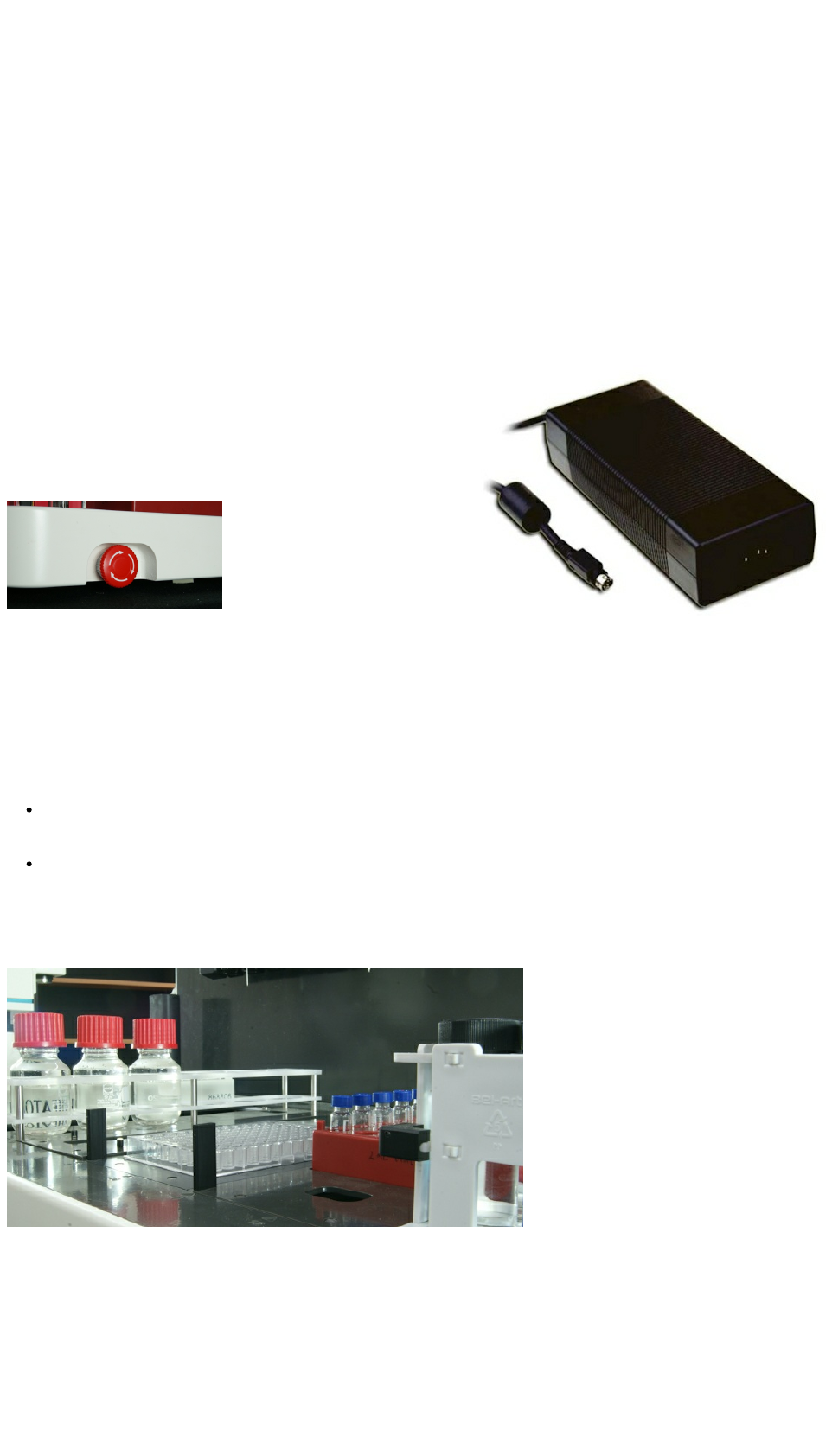
3.9 Power Supply
Note : the ePrep uses a separate 24V DC 221W, 9.2A DC power pack power
supply. Input 100V to 240V AC input.
The Country Specific Mains Power cable is not supplied with the ePrep. Use
a standard Country Specific IEC C13 cable.
Note : Ensure the Emergency Stop button on the front right side corner is
deactivated by turning the button clockwise.
3.10 Syringes and Tools
ePrep syringes and tools are fitted with Radio Frequency Identification (RFID) tags. The code programmed onto each RFID tag is
specific to the syringe and is used to positively identify that the correct syringe has been used in a workflow. The capability also tracks
and records which syringe has been used for specific sample and the history of the syringe.
Only syringes specifically designed for the ePrep may be used on the system with a correctly programmed RFID tag.
For the ePrep to correctly pick up a syringe/tool from the tool rack, the device must be correctly positioned.
The plunger must be fully down with the Tool retainer Clip sprung fully forward and covering the fully depressed syringe/tool
plunger.3shown in the diagram (Fig XX) and pushed all the way back onto the holder. A magnet in the tag holds the syringe
back in the correct position.
The syringe needle cannot be significantly bent and it must be located in within the Vee in the needle holder. There is also a
magnet in the holder to hold the needle in position once it has been located correctly by the operator or the ePrep when it returns
a syringe/tool to the rack
3.12 Adapter Plates, Vial Racks and Vials
WARNING
The ePrep is not quite clairvoyant in knowing the exact location of vials that it must extract and deposit samples. The position of the
vials must be precisely defined in the software. The ePrep software has been designed to make it as simple as possible for the
operator to accurately define the location of vials in the workflow on the deck. It has also been defined to identify errors in placement
of resources on the deck of the ePrep. This is made possible by identifying all racks used on the ePrep with an RFID tag specific to
Instructions
17
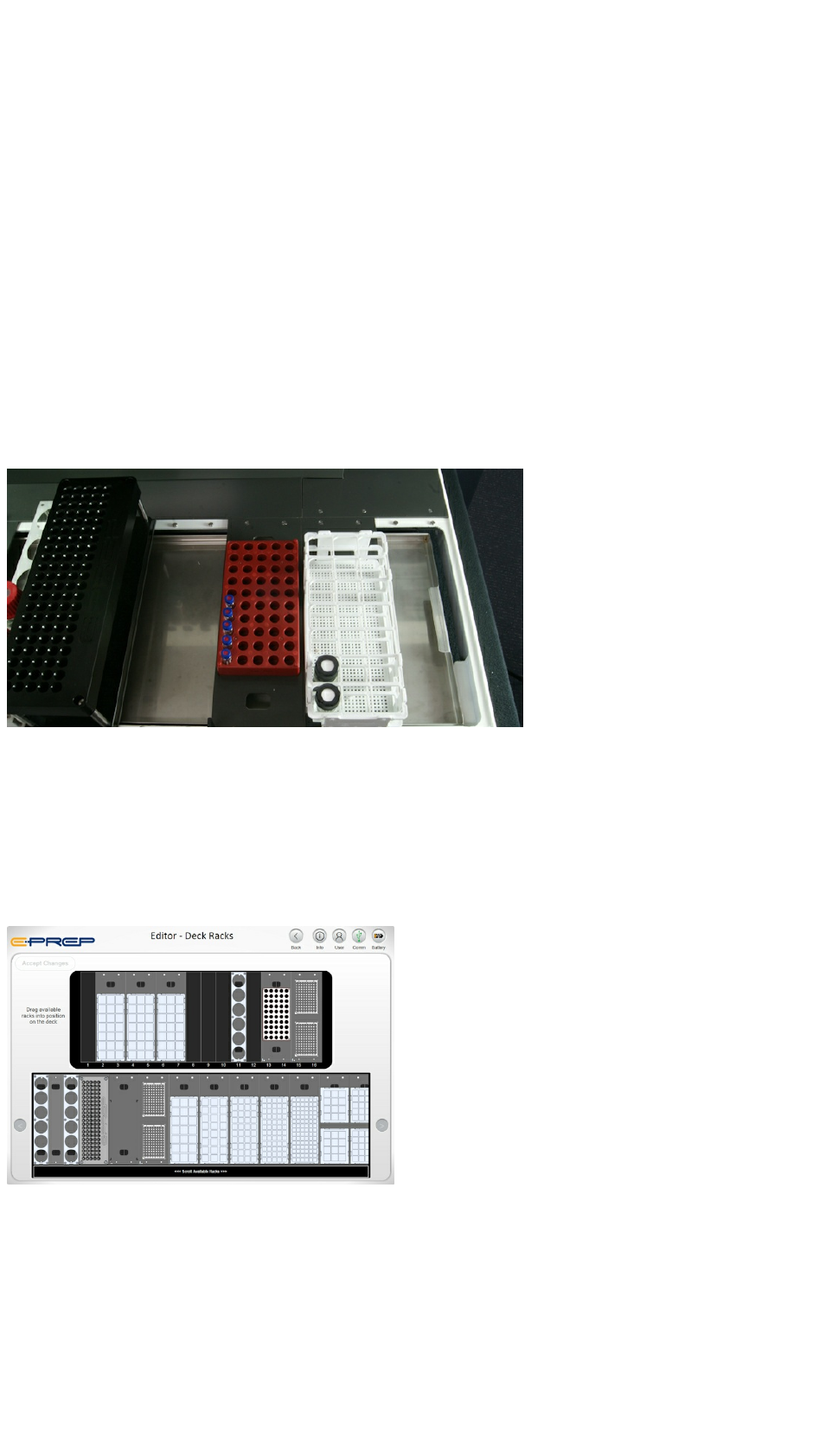
the rack. From the RFID tag on the vial rack or Rack Adapter Plate, the ePrep will identify that a defined rack is present on the deck,
even if it is in an incorrect location as defined by the operator. It will also sense and identify if there are vials present or not present
and will not try and aspirate from or dispense into locations where a vial is not present.
For this level of simplicity and error proofing of ePrep operation it is essential that a few basic guidlelines are followed :
1. A correctly programmed RFID tag must be attached to either the Rack or the Adapter Plate.
2. If the RFID tag is fixed to the Adapter Plate the user needs to ensure that the Vial Rack used matches the defined Adapter
Plate.
3. Do not be tempted to use a vial rack with an adapter plate that appears to be right size. Check before use.
4. Before starting a workflow the ePrep software prompts the operator to check that the graphic on the Computer Tablet screen
matches the racks and tools that are on the ePrep deck. Be in the habit of always doing this.
The consequences of incorrect definition of racks and vial positions are :
1. Incorrect processing of samples and loss of precious samples
2. Damage to the syringe needle and septa piercer
3. Termination of the workflow due to the head crashing into some element on the ePrep deck
The sensor (bumper) in the foot of the P-Drive of the ePrep is used for a multitude of functions in the operation of the ePrep. will
detect collisions.
The task of defining vial positions accurately is made easy for the operator by using vial racks whose coordinates have been mapped
by ePrep and are included in the parameters supplied by ePrep. It just needs to be ensured by the user that the correct vial rack has
been used and it is being used with the correct Vial Rack Adapter plate for that specific vial rack.
If there is a vial and rack combination that is required to be used and it is not currently available in the ePrep software, please contact
ePrep at www.eprep.com.au to determine if a new rack can be defined in the software with a suitable adapter plate.
To make the task easier, either the Vial Rack Adapter plate or the vial rack itself are fitted with a specific RFID tag. The ePrep reads
the RFID tag at the beginning of a process to confirm the correct vials and racks are in the position specified by the user. If the scan
detects that a rack is in an incorrect position or is not present the process will be stopped until the user corrects the error.
As the ePrep processes a series of vials in a particular rack it will sense if there is a vial missing from where it was defined to be. The
software default is to continue onto the next vial in the series and leave the output vial associated with the missing vial and move onto
the next process in the workflow.
Instructions
18

4 Installation
4.1 Quick Start - Commissioning Process
The following guide is a step process for the initial set up of the ePrep. See detailed instructions under Quick Start - Installation and
Commissioning.
STEP #1 - ePrep LOCATION
Place ePrep on a clean flat surface with no obstruction to the axis movement.
The instrument should be located for simple access to the connectors and emergency
stop button.
Adjust ePrep feet to level instrument if required.
STEP #2 - START TABLET SOFTWARE
Power up the Computer Tablet and open the ePrep software via ePrep App icon shown
above. Further installation instructions can be found on the Tablet.
STEP #3 - PREPARE ePrep DECK
See detailed instructions under: Quick Start - Installation and Commissioning
STEP #4 - CABLE and POWERUP
ePrep
See detailed instructions under: Quick Start - Installation and Commissioning
STEP #5 - RUN CALIBRATION
See detailed instructions under: Quick Start - Installation and Commissioning
Instructions
19

STEP #6 - INSTALL TOOLS, RACKS
and VIALS
See detailed instructions under: Quick Start - Installation and Commissioning
4.2 Quick Start - Installation and Commissioning
Detailed installation instructions can be found in the PDF attached. Ensure the instruction sequence is followed. Instructions can also
be found on the Tablet Software.
Installation Procedure - Feb 2017.pdf (1.79MB)
4.3 Workflow Setup
WORKFLOW ELEMENTS
Please fined enlarged images attached
WORKFLOW PARAMETERS
Instructions
20

Please fined enlarged images attached
SAVING A WORKFLOW
Please fined enlarged images attached
Slide2(700).jpg (212KB)
Slide1.JPG (4.37MB)
Slide12.JPG (4.17MB)
4.4 Example Workflows Explained
4.4.1 Sequential vs Batch Processing
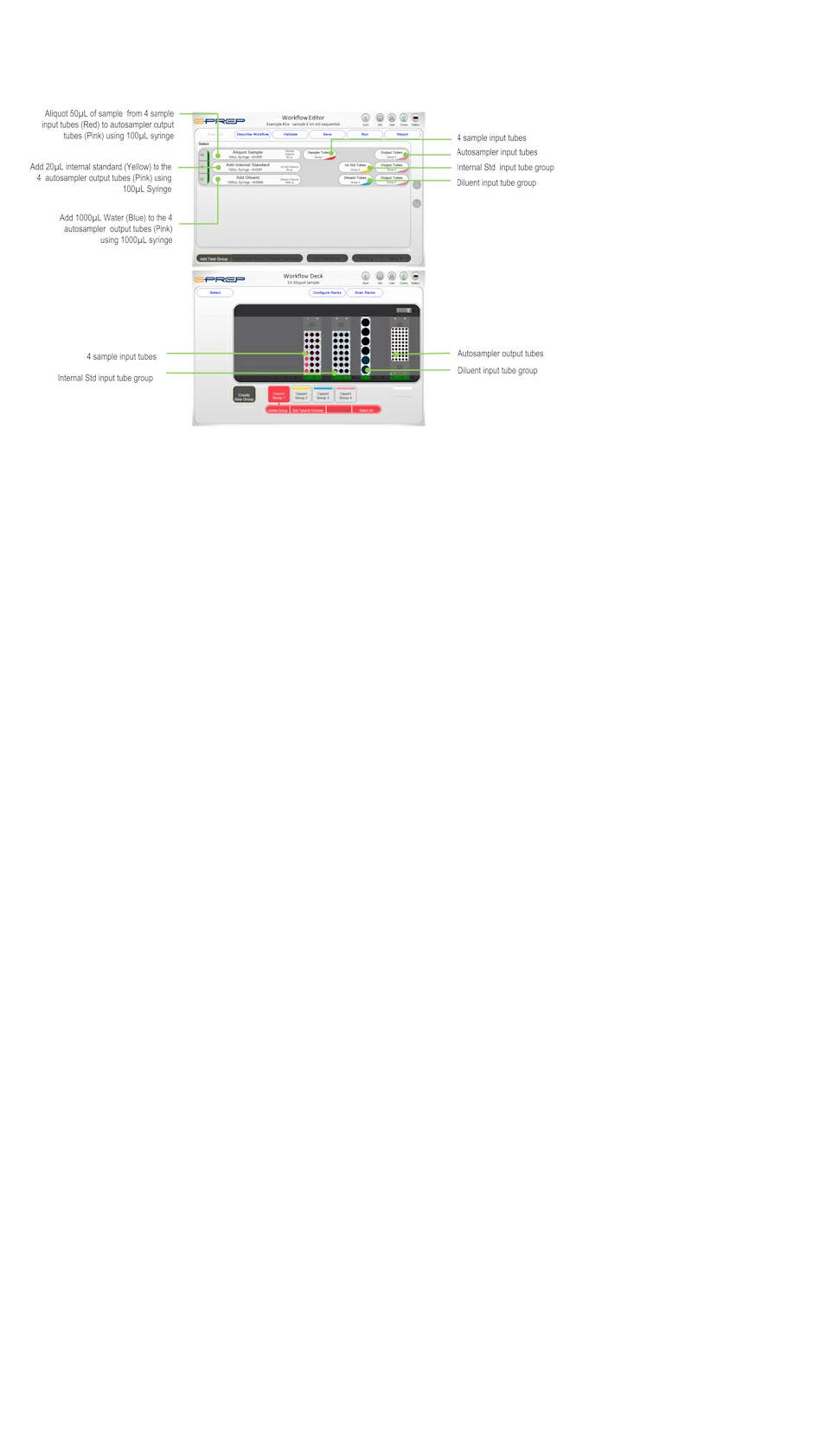
SEQUENTIAL WORKFLOW PROCSSING
A series of task is known as a Task Group. Task Groups can be made up of more than one Task to maximise efficiency.
For simple Workflows, single task processing completes all the processing of one vial before moving to the next vial. This is typically
more time consuming as syringes will be washed between individual tasks to eliminate carry-over. The following EXAMPLE produces
4 output tubes with sample, internal standard and diluent performed sequentially.
Instructions
21

Workflow Setup
BATCH WORKFLOW PROCESSING
A quicker and more efficient Workflow is achieved by carrying out a Task on all defined vials before moving to the next task/task
series. The following EXAMPLE produces 4 output tubes with sample, internal standard and diluent, each added in a batch
processes.
Workflow Setup
Instructions
22
Instructions
23

4.4.2 µSPEed cartridges
Tasks for processing µSPEed cartridges are defined in the ePrep software. Most µSPEed Workflows would also include preparation
steps such as addition of internal standard and diluent. The EXAMPLE below demonstrates activation, condition, load and elution of a
series of 4 samples using µSPEed cartridges.
Workflow Setup
Instructions
24

4.4.3 Calibration Standards
Prep has the ability to create calibration standards by automatically incrementing aliquots of standard concentrate into a series of vials
each made up to a standard volume. The following EXAMPLE produces a series of 6 calibration standards from 10µL to 60µL of
concentrate, internal standard addition and made up to 1500µL.
Workflow Setup
Instructions
25
5 ePrep Operation
5.1 Introduction to Operation
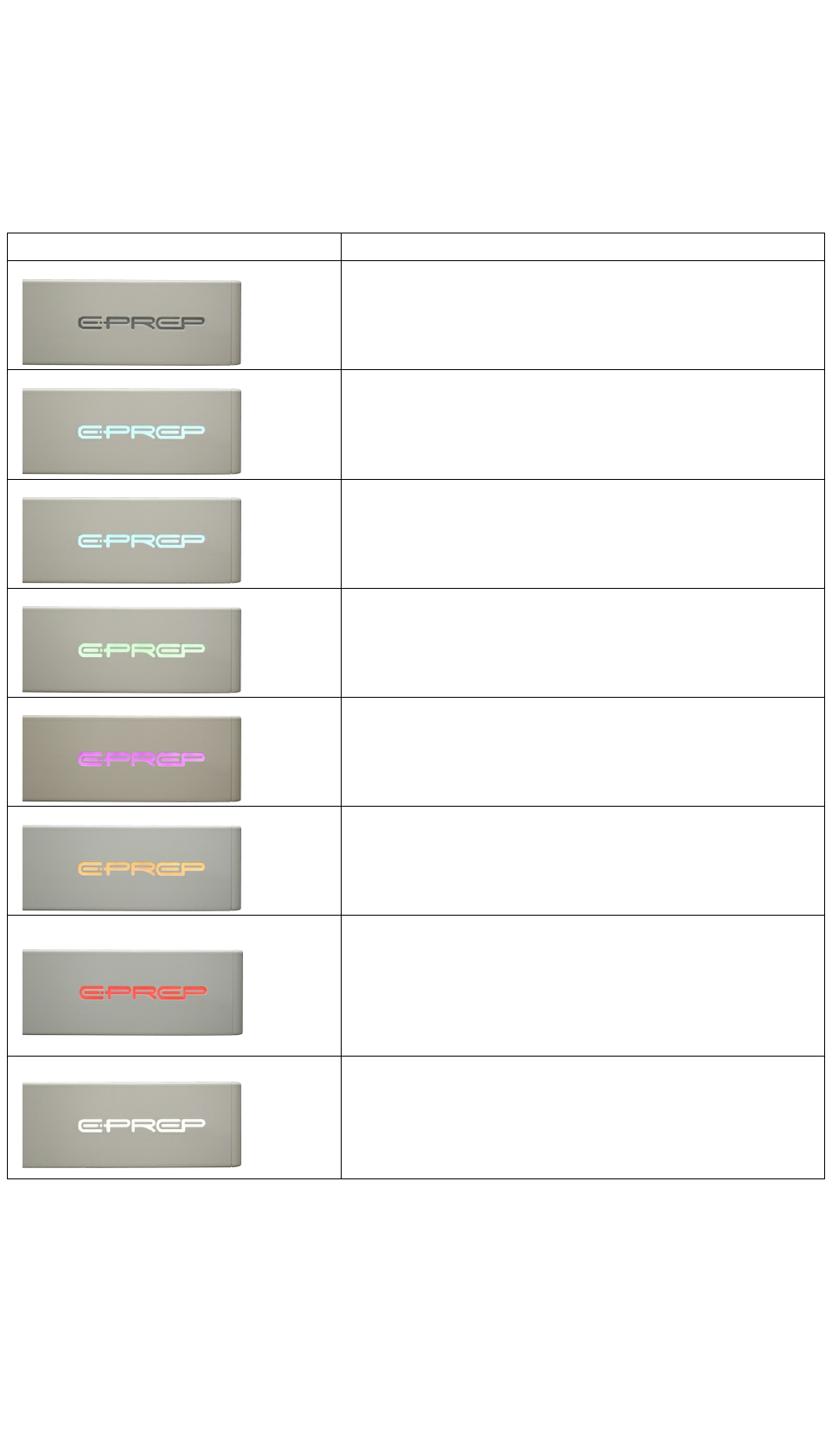
5.1.1 Instrument Light Status
LED Status Indicator Instrument Status
No power to the instrument. Check mains, powerpack and emergancy stop
button
Solid Blue
Eprep ready for use
Flashing Blue
Workflow completed successfully
Green
Workflow running
System will remain green until completion or interruption of workflow
Flashing Purple
Workflow aborted by user.
Check software for options.
Orange
Workflow paused by user
Software provides user ability to continue workflow or abort workflow
Red
Sensor foot or instrument error
Check for obstructions to the rotating foot. Typically items placed on the deck
or different height vial placed in a rack along with vials of a lower height.
Faults with instrument hardware. See trouble shooting information.
White
Mains power disconnected. Eprep running on battery power.
Battery life approximately 20min
5.1.2 Planning a Workflow
Instructions
26

5.1.2.1 Sequential vs Batch Processing
Sequential Tasks
Sequential or serial processing is when Tasks to complete a full workflow on a the first sample are finished before starting the same
Tasks on the second sample. Sequential processing is normally slower that batch processing as it typically requires tool changing
and syringe washing between Task.
However for some applications Sequential processing may be required due to kinetics or post sample processing requiring completion
of one sample before proceeding to the next.
Batch Tasks
Batch processing is where the same Task is preformed on all samples before proceeding onto the next sample. Batch processing is
the fasted way to process a group of samples as it eliminates the tool change and washing steps between samples.
A Workflow may include both Sequential and Batch Tasks.
Sequential and Batch task are identified within a Workflow by grouping Task. A series of grouped Task will be done sequentially.
5.2 Hardware
5.2.1 Syringes
5.2.1.1 Syringe Selection
Syringe Selection
When selecting a syringe for a Workflow Task, the following tables provide volume ranges for 100µL, 1mL and 10mL syringes. The
mimimum dispensed volume has been calculated at 2% of the syringe volume. However, at small dispensed volumes, liquid droplet
formation at the tip of the needle must be considered. It is recommended that the needle tip is dipped into the output vial solution to
minimise droplet for small volume dispensing.
Dispensed Volume Range Selection for ePrep Syringes
Instructions
27
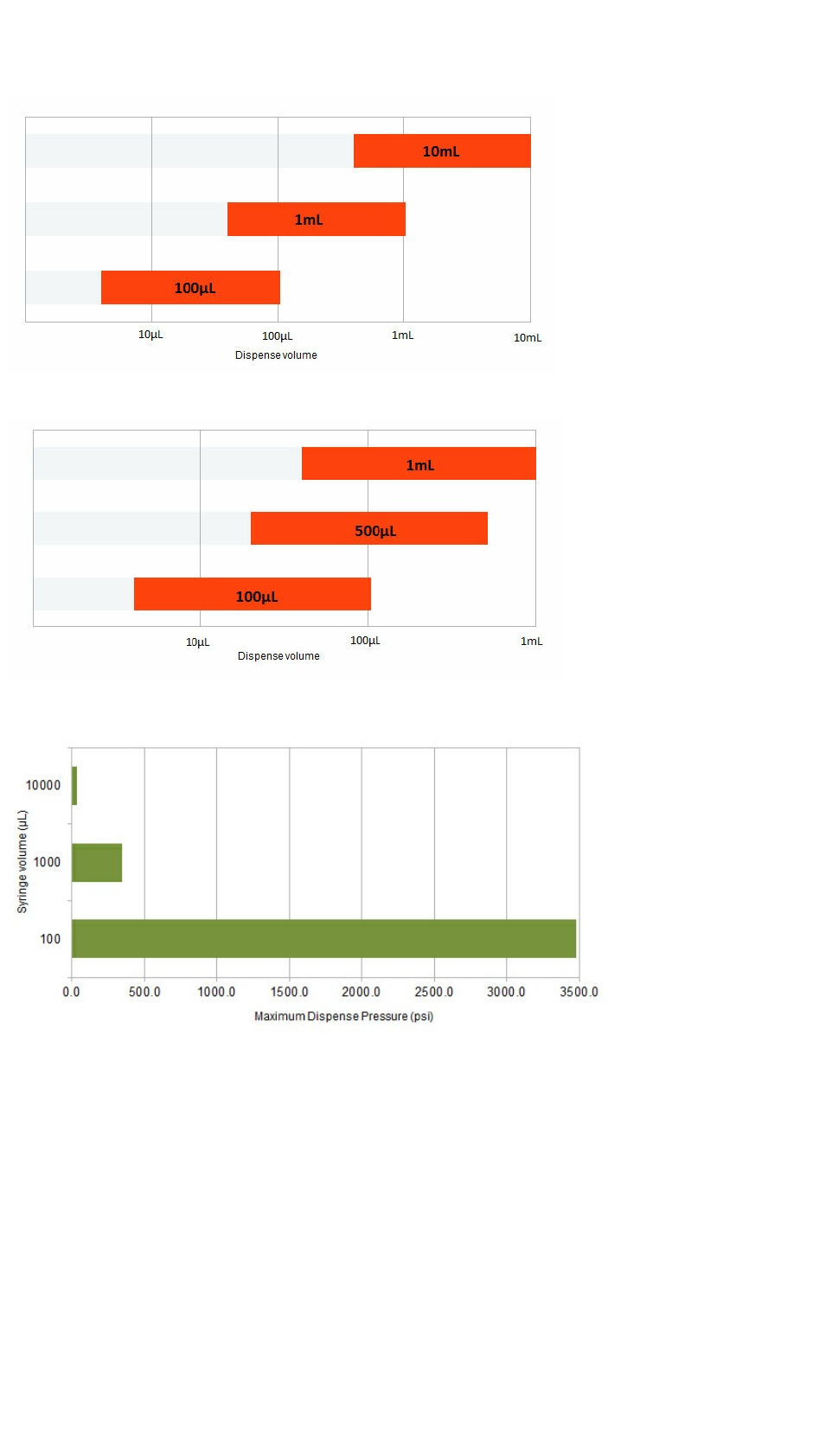
Dispensed Volume Range Selection for ePrep µSPEed Syringes
Maximum Pressure Available using ePrep Plunger Drive
Precision and Accuracy:
A high level of precision and accuracy can be expacted when the correct syringe is used with ePrep. The plunger drive motor has over
1000 steps per syringe volume. The drive is also capable of very accurate plunger position and speed during dispensing.
Carry-over
Sample carryover must be carefully considered in a Workflow. ePrep has set default automated wash setting into Workflow Tasks.
However the wash settings for different compound classes, that vary in viscosity and stickiness for example, may require changes to
these wash settings.
Note: Reserpine is often used to check for carryover in LC-MS systems.
Priming of Syringe
Priming of the syringe can have an effect on both the carryover and precision but over priming can waste reagent and increase the
time to complete a workflow. ePrep has set default automated priming into Workflow Tasks. However for sticky or low viscosity liquids
priming parmater may need to changes to ensure air bubbles don't form in the syringe barrel. .
Instructions
28

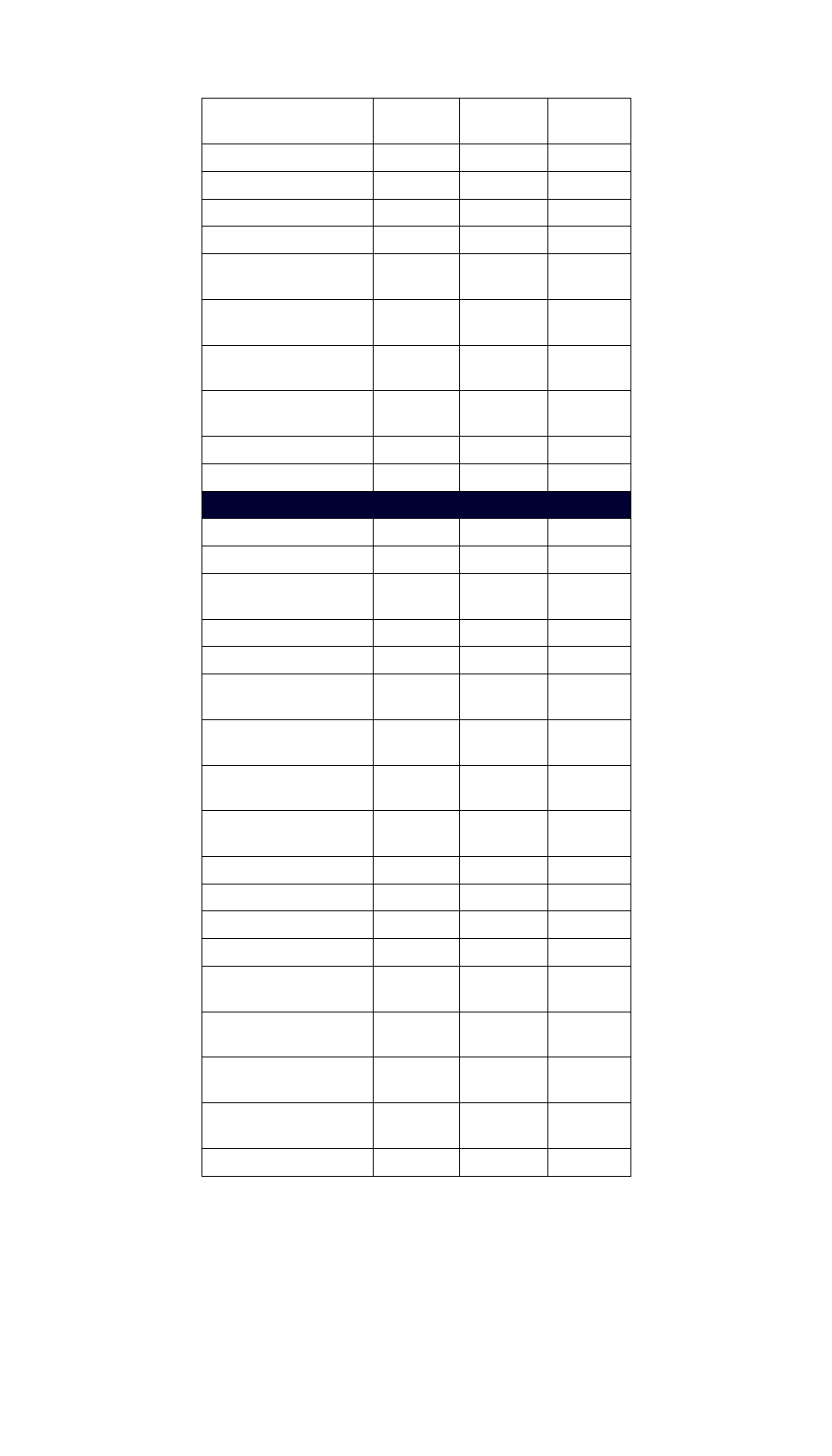
5.2.1.2 Default Syringe Parameters
Tool Parameter Minimum
Value
Maximum
Value
Auto
& Default
100µL Syringe
Aspirate Flowrate (µL/sec)
(µL/sec) 1 50 300
Aspirate Pause (sec) 0 360 1
Dispense Flowrate
(µL/sec) 1 300 100
Dispense Pause (sec) 0 360 1
Wash Volume (µL) 0 100 30
Wash Aspirate Flowrate
(µL/sec) 1 1000 20
Wash Aspirate Pause
(sec) 0 360 1
Wash Dispense Flowrate
(µL/sec) 0 300 300
Wash Dispense Pause
(sec) 0 360 1
Wash Cycles 0 100 6
Wash Air Purge (µL) 0 10 10
Rinse Time (sec) 0 360 3
Prime Volume (µL) 0 10 15
Prime Aspirate Flowrate
(µL/sec) 1 300 10
Prime Aspirate Pause
(sec) 0 360 1
Prime Dispense Flowrate
(µL/sec) 1 300 300
Prime Dispense Pause
(sec) 0 360 1
Prime Cycles 0 100 5
1mL Syringe
Aspirate Flowrate (µL/sec) 1 50 700
Aspirate Pause (sec) 0 360 1
Dispense Flowrate
(µL/sec) 1 700 210
Dispense Pause (sec) 0 360 0
Wash Volume (µL) 0 700 100
Wash Aspirate Flowrate
(µL/sec) 1 1000 50
Wash Aspirate Pause
(sec) 0 360 1
Wash Dispense Flowrate
(µL/sec) 1 700 500
Instructions
29
Wash Dispense Pause
(sec) 0 360 0
Wash Cycles 0 100 8
Wash Air Purge (µL) 0 1000 0
Rinse Time (sec) 0 360 3
Prime Volume (µL) 0 1000 100
Prime Aspirate Flowrate
(µL/sec) 1 700 15
Prime Aspirate Pause
(sec) 0 360 0
Prime Dispense Flowrate
(µL/sec) 1 700 500
Prime Dispense Pause
(sec) 0 360 0
Prime Cycles 0 100 5
10mL Syringe
Aspirate Flowrate (µL/sec) 1 150 1000
Aspirate Pause (sec) 0 360 1
Dispense Flowrate
(µL/sec) 1 1000 500
Dispense Pause (sec) 0 360 1
Wash Volume (µL) 0 5000 800
Wash Aspirate Flowrate
(µL/sec) 1 1000 150
Wash Aspirate Pause
(sec) 0 360 2
Wash Dispense Flowrate
(µL/sec) 1 1000 500
Wash Dispense Pause
(sec) 0 360 0
Wash Cycles 0 100 3
Wash Air Purge (µL) 0 5000 500
Rinse Time (sec) 0 360 5
Prime Volume (µL) 0 5000 1000
Prime Aspirate Flowrate
(µL/sec) 1 1000 70
Prime Aspirate Pause
(sec) 0 360 1
Prime Dispense Flowrate
(µL/sec) 1 1000 500
Prime Dispense Pause
(sec) 0 360 0
Prime Cycles 0 100 3
5.3 Software
Instructions
30

5.3.1 Overview
ePrep Axis Software is designed to quickly create, save and run laboratory sample preparation workflows.
Workflow Elements
A Workflow consists of four elements; 1) The Task Function 2) Syringe or Tool to perform the fuction 3) Input Vial/Tubes and 4)
Output Vial/Tube. Selction of these parameters is shown below.
Task
ePrep have preprogrammed Task functions to simplify programming of the instrument. Tasks have been designed to mimic common
laboratory processes. Tasks are given names related to the laboratory process they replace.
Eprep have defined defult parameters for each task which should be suitable for most applications. However the user can modifiy
these parameters if required.
User cannot create a Task
Tools
ePrep Tools include syringes, grippers and specific function tools.
Tools are predefined in the ePrep software and therefore only Registered or Predefined Tools can be used with ePrep.
ePrep uses RFID to identify and record a tool useage of a Tool..
User cannot create a Tool class.
Adaptor Plates, Racks and Vials
Adaptor Plates and Racks classes are predefined in the ePrep software. Only Registered Adaptor Plate/Racks can be used with
ePrep.
Inpu/Output vial positions within a rack can be defined in the sofwtare.
User cannot create an Adaptor Plate/Rack class.
Instructions
31
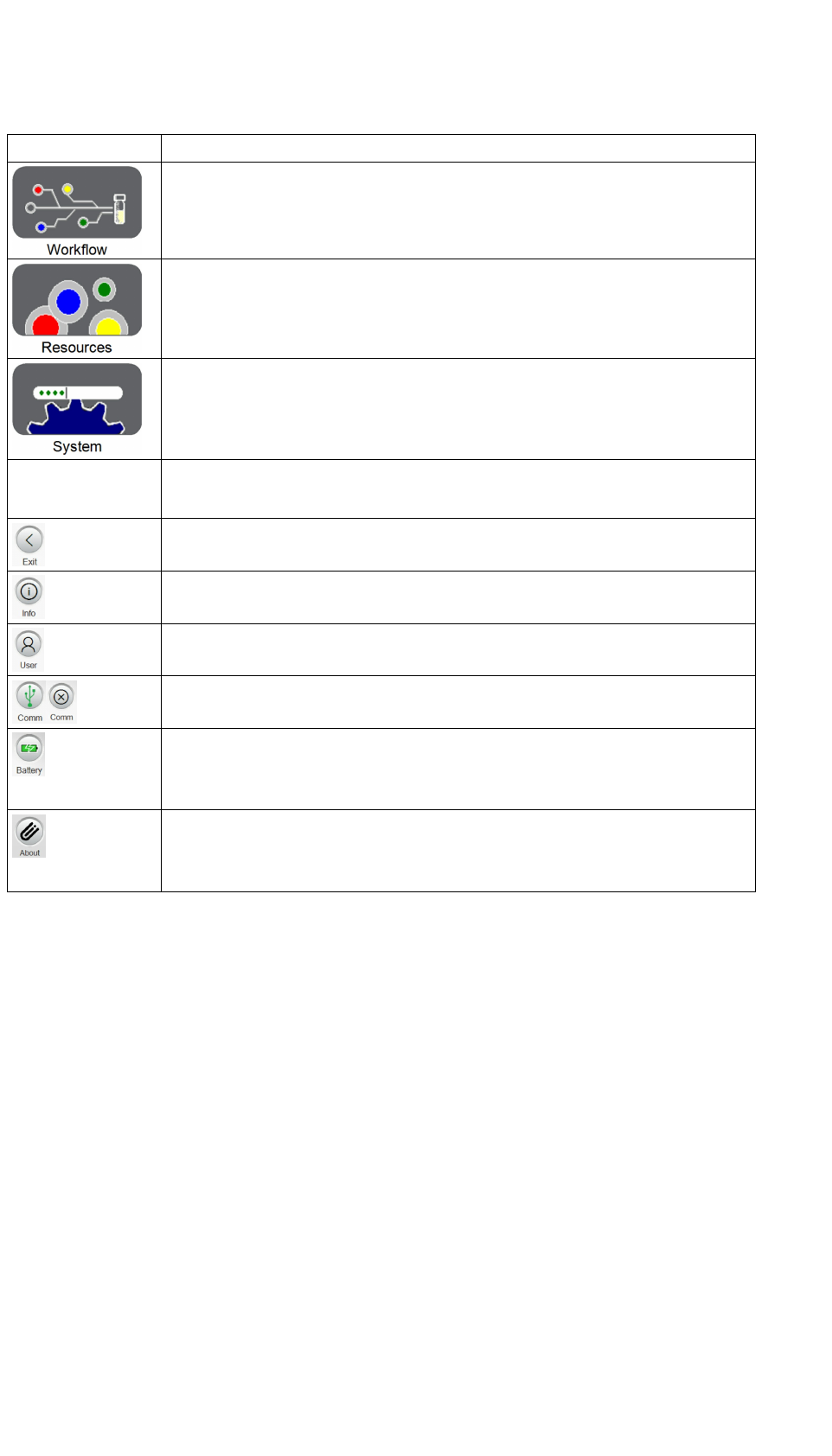
5.3.1.1 Main Menu and Icons
Main Menu Options
Options to create a new Workflow, Edit a saved Workflow and Run a saved Workflow.
Options to Register Racks, Tools and Accessories in the software database. This area is
particularly useful when adding previously unregistered assets to the ePrep/
Enables ePrep scanning and user definition of Tools, Racks and Accessory assets for Workflow
integration.
Options for instrument calibration, software operational settings, user administration and
operation/workflow reports
Icons
Exit software or Return to previous menu depending on the screen context .
Contextual help information available throughout the software.
Enables user login and options to change user details such as password.
Indicates Tablet USB connection to ePrep. When connected USB is established icon will display
USB icon. When communication is not established icon will display a cross.
Battery charge level indicator. Will display power icon when tablet is connected to mains.
It is recommended that during running of an ePrep Workflow that the tablet is connected to the
mains
Information about installed Software and Firmware versions. This information is important for
communication Faults and Software Bug.
System also uses this information for automatic software/firmware updates.
5.3.2 Workflow
Instructions
32

5.3.2.1 Tasks
ePrep has been preprogrammed with a series of Tasks designed to mimic typical laboratory sample preparation processes. The
following table provides a summary of available Tasks their function and use in a sample preparation Workflow.
Task Function and Use
µSPEed Wash Washes series of µSPEed cartridges using a single wash
vial (vial group). Wash task is used for Activation, Condition
and Washing of cartrdiges.
µSPEed Load Loads a series of µSPEed cartridges using a series of input
vials. Task includes load needle wash and also enables
collection of loading sample
µSPEed Elute Elutes a series of µSPEed cartridges using a single eluant
input vial (vial group) to a series of ouput vials.
Aliquote Sample
Adds Sample from a series of input vials to a series of
output vials.
Aliquote Sample
Supernatant
Adds Supernatant Sample at a nominated depth from a
series of input vials to a series of output vials.
Add Internal Standard Adds Internal Standard from a single input vial (or vial
group) to a series of output vials.
Add Surrogate Adds Surrogate Standard from a single input vial (or vial
group) to a series of output vials.
Add Diluent Adds dilute solution from a single input vial (or vial group)
to a series of output vials. Allows syringe mixing
Add Reagent Adds a reagent from a single input vial (or vial group) to a
series of output vials.
Add Reagent and React Adds a reagent from a single input vial (or vial group) to a
series of output vials and provides a counter for timing
reaction time after reagent is added.
Serial Dispense Adds sample/standard from a single input vial (or vial
group) with a set starting volume to the first output vial,
incrementing the volume for subsequent output vials.
Makeup to Volume Used in conjuction with "Serial Dispense", it adds diluent
from a single vial (or vial group) to make up to a set volume
in the Serial Dispense output vials.
Syringe Mix Enables syringe mixing of series of vials.
Instructions
33

5.3.2.1.1 µSPEed Wash
Task Summary
Washes series of µSPEed cartridges from an input tube(s) to waste. Wash task can be used for Activation, Condition and Washing of
cartridges.
Processing
Typical Use
Used for activation, conditioning and washing µSPEed cartridges though the Workflow
Tool Settings and Options
Setting Options Default Selections Description
Volume Increments (µL) Volume inciments (µL) Type increment volume
Tool Wash Settings
Tool Wash Method Auto
Auto
Syringe wash is to remove carryover. Auto is a predefined syringe wash procedure for
a Task. Parameters typically include wash on solution change, before and after
syringe park in tool cassette.
Always
Will wash the syringe after each Workflow step. It also washes before and after
syringe pickup from tool cassette. Typically used for Task that include syringe mixing,
needle dipping and kinetically sensitive operations.
After Pickup
Wash of the syringe is limited to after pickup only. Typically used for Tasks where
cross contamination is not an issue such as dispensing of the same reagent. Will also
improve Workflow times.
Never Tyically used for repeated Workflows where a syringe is used to aliquote the same
and there is no chance of cross contanimation pre, during and post run.
Wash Type Wash
Wash Washing of barrel and needle to eliminate carry over from previous aliquote.
Rinse Needle Rinses the outside of the needle only. Typically used when adding reagent or standard
and the needle is dipped during dispense. Will eliminate carryover.
Tool Wash Volume (µL) See Default Table Syringe volume used for washing cycles. It is better to do a large number of small
volume washes. Related to dilution factors.
Tool Wash Aspiration Flowrate (µL/sec) See Default Table Flowrate for syringe be set so liquid does not cavitate during aspiration. Aspiration
speed can be reduced for viscous samples
Tool Wash Dispense Flowrate (µL/sec) See Default Table Dispense flowrate can be varied to compensate for liquid viscosity, chromatography,
kinetics requirements or sample velocity from the needle. Plunger drive has a finite
velocity and force so flowrate range and accuracy is dependent on syringe volume.
Tool Wash Cycles See Default Table Number of wash cycles.
Prime Settings
Prime Type Auto
Auto
Syringe prime is designed to remove airbubbles and ensure syringe is completely
filled with the selected solution prior to aspiration. Auto is a predefined prime
procedure for a Task and Syringe. It typically includes a prime step if the syringe has
before all task aspirations if the syringe has not been prviously primed with the
selected solution.
Always Enables priming before every Task volume aspiration
Never Removes priming process from the Task.
Prime Method To Tube
To Tube Priming dispense to selected tube/vial
To Waste Priming dispense to waste wash station
Prime Volume (µL) Syringe volume set for priming. It is better to do a large number of small volume
washes. Related to dilution factors.
Prime Aspiration Flowrate (µL/sec) Prime aspiration flowrate should be slow enough to ensure cavitation does not occur
Prime Aspirate Pause (sec) Dispense pause can be used to enable relaxation of plunger and/or trapped air in the
solution. A longer pause is required for larger syringe volumes and high viscosity
liquids.
Prime Dispense Flowrate (µL/sec) Prime dispense flowrate should be as fast as possible to assist air bubble removal
Prime Dispense Pause (sec) Dispense pause can be used to enable relaxation of plunger and/or trapped air in the
solution prior to the needle being withdrawn from the tube. A longer pause is required
for larger syringe volumes
Tool Wash Cycles Number of times plunger is cycled for the wash process
Instructions
34
5.3.2.1.2 µSPEed Load
Task Summary
Loads µSPEed cartridges with sample from a series of input tubes. It includes load, needle wash and also enables collection of loading
sample
Processing
Typical Use
Specific function for loading µSPEed cartridges which includes flushing of needle and the ability to collect unretained analytes.
Tool Settings and Options
Setting Options Default Selections Description
Volume Increments (µL) Volume inciments (µL) Type increment volume
5.3.2.1.3 µSPEed Elute
Task Summary
Elutes a series of µSPEed cartridges from an eluant input tube(s) to a series of ouput tubes.
Processing
Typical Use
µSPEed cartridges elution process includes the ability to nominate output vials
Tool Settings and Options
Setting Options Default Selections Description
Volume Increments (µL) Volume inciments (µL) Type increment volume
Settings
Rense needles between dispenses (sec) zero Timed needle rinse between dispenses. Typically used if needle is dipped in solution
on output vial dispense.
Volume to over aspirate (%) zero Over aspiration function to counter system backlash. Draws the plunger past the
selected volume by slected %, then dispenses the over aspiration amount back into
input vial before dispensing the selected volume into the output vial.
Aspirate Needle Position Bottom of the vial Position of the needle during aspiration measured as mm below the septum cap. Used
if vial contains sedimant or requires access to supernatent layer.
Dispense Needle Position Below the septa Position of the needle during dispensing measured as mm below the septum cap.
Used if needle is to be dipped in output solution during dispensing for reduction of
needle droplet effect.
Pre Aspirate Air Gap (µL) zero Aspiration of an air gap over the liquid. Often used to dipense all liquid from the
syringe and needle to minimise carryover or avoid prolonged contact with corrosive
solvents.
Aspirate Flowrate (µL/sec) See Default Table Aspiration flowrate can be varied to compensate for liquid viscosity or process
requirements. Plunger drive has a finite velocity and force capability so flowrate range
and accuracy is dependent on syringe volume.
Aspirate Pause (sec) See Default Table Timed pause after plunger aspiration before dispensing. Pause should be increased
with high aspirating plunger speeds or high viscosity liquids are used so liquid head
can catch up with the plunger for full volume fill.
Dispense Flowrate (µL/sec) See Default Table Dispense flowrate can be varied to compensate for liquid viscosity, chromatography,
kinetics requirements or sample velocity from the needle. Plunger drive has a finite
velocity and force so flowrate range and accuracy is dependent on syringe volume.
Dispense Pause (sec) See Default Table Dispense pause can be used to enable relaxation of plunger and/or trapped air in the
solution prior to the needle being withdrawn from the tube. This results in greater
accuracy and reproducibilty. A loner pause is required for larger syringe volumes
Instructions
35

Tool Wash Settings
Tool Wash Method Auto
Auto
Syringe wash is to remove carryover. Auto is a predefined syringe wash procedure for
a Task. Parameters typically include wash on solution change, before and after
syringe park in tool cassette.
Always
Will wash the syringe after each Workflow step. It also washes before and after
syringe pickup from tool cassette. Typically used for Task that include syringe mixing,
needle dipping and kinetically sensitive operations.
After Pickup
Wash of the syringe is limited to after pickup only. Typically used for Tasks where
cross contamination is not an issue such as dispensing of the same reagent. Will also
improve Workflow times.
Never Tyically used for repeated Workflows where a syringe is used to aliquote the same
and there is no chance of cross contanimation pre, during and post run.
Wash Type Wash
Wash Washing of barrel and needle to eliminate carry over from previous aliquote.
Rinse Needle Rinses the outside of the needle only. Typically used when adding reagent or standard
and the needle is dipped during dispense. Will eliminate carryover.
Tool Wash Volume (µL) See Default Table Syringe volume used for washing cycles. It is better to do a large number of small
volume washes. Related to dilution factors.
Tool Wash Aspiration Flowrate (µL/sec) See Default Table Flowrate for syringe be set so liquid does not cavitate during aspiration. Aspiration
speed can be reduced for viscous samples
Tool Wash Dispense Flowrate (µL/sec) See Default Table Dispense flowrate can be varied to compensate for liquid viscosity, chromatography,
kinetics requirements or sample velocity from the needle. Plunger drive has a finite
velocity and force so flowrate range and accuracy is dependent on syringe volume.
Tool Wash Cycles See Default Table Number of wash cycles.
Prime Settings
Prime Type Auto
Auto
Syringe prime is designed to remove airbubbles and ensure syringe is completely
filled with the selected solution prior to aspiration. Auto is a predefined prime
procedure for a Task and Syringe. It typically includes a prime step if the syringe has
before all task aspirations if the syringe has not been prviously primed with the
selected solution.
Always Enables priming before every Task volume aspiration
Never Removes priming process from the Task.
Prime Method To Tube
To Tube Priming dispense to selected tube/vial
To Waste Priming dispense to waste wash station
Prime Volume (µL) Syringe volume set for priming. It is better to do a large number of small volume
washes. Related to dilution factors.
Prime Aspiration Flowrate (µL/sec) Prime aspiration flowrate should be slow enough to ensure cavitation does not occur
Prime Aspirate Pause (sec) Dispense pause can be used to enable relaxation of plunger and/or trapped air in the
solution. A longer pause is required for larger syringe volumes and high viscosity
liquids.
Prime Dispense Flowrate (µL/sec) Prime dispense flowrate should be as fast as possible to assist air bubble removal
Prime Dispense Pause (sec) Dispense pause can be used to enable relaxation of plunger and/or trapped air in the
solution prior to the needle being withdrawn from the tube. A longer pause is required
for larger syringe volumes
Tool Wash Cycles Number of times plunger is cycled for the wash process
5.3.2.1.4 Aliquot Sample
Task Summary
Adds Sample from a series of input tubes to a series of output tubes.
Processing
Function is specifically designed to aliquot a sample from a single input tube/vial to a single output tube/vial.
Typical Use
Adding sample from an input vial to output.
Tool Settings and Options
Setting Options Default Selections Description
Volume Increments (µL) Volume inciments (µL) Type increment volume
Instructions
36

Dispense Settings
Rense needles between dispenses (sec) zero Timed needle rinse between dispenses. Typically used if needle is dipped in solution
on output vial dispense.
Volume to over aspirate (%) zero Over aspiration function to counter system backlash. Draws the plunger past the
selected volume by slected %, then dispenses the over aspiration amount back into
input vial before dispensing the selected volume into the output vial.
Aspirate Needle Position Bottom of the vial Position of the needle during aspiration measured as mm below the septum cap. Used
if vial contains sedimant or requires access to supernatent layer.
Dispense Needle Position Below the septa Position of the needle during dispensing measured as mm below the septum cap.
Used if needle is to be dipped in output solution during dispensing for reduction of
needle droplet effect.
Pre Aspirate Air Gap (µL) zero Aspiration of an air gap over the liquid. Often used to dipense all liquid from the
syringe and needle to minimise carryover or avoid prolonged contact with corrosive
solvents.
Aspirate Flowrate (µL/sec) See Default Table Aspiration flowrate can be varied to compensate for liquid viscosity or process
requirements. Plunger drive has a finite velocity and force capability so flowrate range
and accuracy is dependent on syringe volume.
Aspirate Pause (sec) See Default Table Timed pause after plunger aspiration before dispensing. Pause should be increased
with high aspirating plunger speeds or high viscosity liquids are used so liquid head
can catch up with the plunger for full volume fill.
Dispense Flowrate (µL/sec) See Default Table Dispense flowrate can be varied to compensate for liquid viscosity, chromatography,
kinetics requirements or sample velocity from the needle. Plunger drive has a finite
velocity and force so flowrate range and accuracy is dependent on syringe volume.
Dispense Pause (sec) See Default Table Dispense pause can be used to enable relaxation of plunger and/or trapped air in the
solution prior to the needle being withdrawn from the tube. This results in greater
accuracy and reproducibilty. A loner pause is required for larger syringe volumes
Tool Wash Settings
Tool Wash Method Auto
Auto
Syringe wash is to remove carryover. Auto is a predefined syringe wash procedure for
a Task. Parameters typically include wash on solution change, before and after
syringe park in tool cassette.
Always
Will wash the syringe after each Workflow step. It also washes before and after
syringe pickup from tool cassette. Typically used for Task that include syringe mixing,
needle dipping and kinetically sensitive operations.
After Pickup
Wash of the syringe is limited to after pickup only. Typically used for Tasks where
cross contamination is not an issue such as dispensing of the same reagent. Will also
improve Workflow times.
Never Tyically used for repeated Workflows where a syringe is used to aliquote the same
and there is no chance of cross contanimation pre, during and post run.
Wash Type Wash
Wash Washing of barrel and needle to eliminate carry over from previous aliquote.
Rinse Needle Rinses the outside of the needle only. Typically used when adding reagent or standard
and the needle is dipped during dispense. Will eliminate carryover.
Tool Wash Volume (µL) See Default Table Syringe volume used for washing cycles. It is better to do a large number of small
volume washes. Related to dilution factors.
Tool Wash Aspiration Flowrate (µL/sec) See Default Table Flowrate for syringe be set so liquid does not cavitate during aspiration. Aspiration
speed can be reduced for viscous samples
Tool Wash Dispense Flowrate (µL/sec) See Default Table Dispense flowrate can be varied to compensate for liquid viscosity, chromatography,
kinetics requirements or sample velocity from the needle. Plunger drive has a finite
velocity and force so flowrate range and accuracy is dependent on syringe volume.
Tool Wash Cycles See Default Table Number of wash cycles.
Prime Settings
Prime Type Auto
Auto
Syringe prime is designed to remove airbubbles and ensure syringe is completely
filled with the selected solution prior to aspiration. Auto is a predefined prime
procedure for a Task and Syringe. It typically includes a prime step if the syringe has
before all task aspirations if the syringe has not been prviously primed with the
selected solution.
Always Enables priming before every Task volume aspiration
Never Removes priming process from the Task.
Prime Method To Tube
To Tube Priming dispense to selected tube/vial
To Waste Priming dispense to waste wash station
Prime Volume (µL) Syringe volume set for priming. It is better to do a large number of small volume
washes. Related to dilution factors.
Prime Aspiration Flowrate (µL/sec) Prime aspiration flowrate should be slow enough to ensure cavitation does not occur
Prime Aspirate Pause (sec) Dispense pause can be used to enable relaxation of plunger and/or trapped air in the
solution. A longer pause is required for larger syringe volumes and high viscosity
liquids.
Prime Dispense Flowrate (µL/sec) Prime dispense flowrate should be as fast as possible to assist air bubble removal
Instructions
37
Prime Dispense Pause (sec) Dispense pause can be used to enable relaxation of plunger and/or trapped air in the
solution prior to the needle being withdrawn from the tube. A longer pause is required
for larger syringe volumes
Tool Wash Cycles Number of times plunger is cycled for the wash process
Syringe Mix Settings
Syringe Mix Enables mixing of the sample using the current syringe once the task volume hads
been dispensed
Syringe Mix Volume (µL) Syringe volume set for mxing cycles. It is better to do a large number of large volume
washes.
Syringe Mix Needle Position Below the septa Position of the needle during dispensing measured as mm below the septum cap.
Used if needle is to be dipped in output solution during dispensing for reduction of
needle droplet effect.
Syringe Mix Aspirate Flowrate (µL/sec) Flowrate for syringe be set so liquid does not cavitate during aspiration. Aspiration
speed can be reduced for viscous samples.
Syringe Mix Aspirate Pause (sec) Dispense pause can be used to enable relaxation of plunger and/or trapped air in the
solution prior to the needle being withdrawn from the tube. A longer pause is required
for larger syringe volumes
Syringe Mix Dispense Flowrate (µL/sec) Dispense flowrate can be varied to compensate for liquid viscosity, chromatography,
kinetics requirements or sample velocity from the needle. Plunger drive has a finite
velocity and force so flowrate range and accuracy is dependent on syringe volume.
Syringe Mix Cycles Number of times plunger is cycled for the mixing process
5.3.2.1.5 Aliquot Supernatant
Task Summary
Adds Supernatant Sample at a nominated depth from a series of input tubes to a series of output tubes.
Processing
Typical Use
Enables needle depth to be selected for an input vial/tube to remove the supernatant to an output vial.
Tool Settings and Options
Setting Options Default Selections Description
Starting Dispense Volume (µL) Sarting Volume (µL) Type start volume
Volume Increments (µL) Volume inciments (µL) Type increment volume
Dispense Settings
Rense needles between dispenses (sec) zero Timed needle rinse between dispenses. Typically used if needle is dipped in solution
on output vial dispense.
Volume to over aspirate (%) zero Over aspiration function to counter system backlash. Draws the plunger past the
selected volume by slected %, then dispenses the over aspiration amount back into
input vial before dispensing the selected volume into the output vial.
Aspirate Needle Position Bottom of the vial Position of the needle during aspiration measured as mm below the septum cap. Used
if vial contains sedimant or requires access to supernatent layer.
Dispense Needle Position Below the septa Position of the needle during dispensing measured as mm below the septum cap.
Used if needle is to be dipped in output solution during dispensing for reduction of
needle droplet effect.
Pre Aspirate Air Gap (µL) zero Aspiration of an air gap over the liquid. Often used to dipense all liquid from the
syringe and needle to minimise carryover or avoid prolonged contact with corrosive
solvents.
Aspirate Flowrate (µL/sec) See Default Table Aspiration flowrate can be varied to compensate for liquid viscosity or process
requirements. Plunger drive has a finite velocity and force capability so flowrate range
and accuracy is dependent on syringe volume.
Aspirate Pause (sec) See Default Table Timed pause after plunger aspiration before dispensing. Pause should be increased
with high aspirating plunger speeds or high viscosity liquids are used so liquid head
can catch up with the plunger for full volume fill.
Dispense Flowrate (µL/sec) See Default Table Dispense flowrate can be varied to compensate for liquid viscosity, chromatography,
kinetics requirements or sample velocity from the needle. Plunger drive has a finite
velocity and force so flowrate range and accuracy is dependent on syringe volume.
Instructions
38
Dispense Pause (sec) See Default Table Dispense pause can be used to enable relaxation of plunger and/or trapped air in the
solution prior to the needle being withdrawn from the tube. This results in greater
accuracy and reproducibilty. A loner pause is required for larger syringe volumes
Tool Wash Settings
Tool Wash Method Auto
Auto
Syringe wash is to remove carryover. Auto is a predefined syringe wash procedure for
a Task. Parameters typically include wash on solution change, before and after
syringe park in tool cassette.
Always
Will wash the syringe after each Workflow step. It also washes before and after
syringe pickup from tool cassette. Typically used for Task that include syringe mixing,
needle dipping and kinetically sensitive operations.
After Pickup
Wash of the syringe is limited to after pickup only. Typically used for Tasks where
cross contamination is not an issue such as dispensing of the same reagent. Will also
improve Workflow times.
Never Tyically used for repeated Workflows where a syringe is used to aliquote the same
and there is no chance of cross contanimation pre, during and post run.
Wash Type Wash
Wash Washing of barrel and needle to eliminate carry over from previous aliquote.
Rinse Needle Rinses the outside of the needle only. Typically used when adding reagent or standard
and the needle is dipped during dispense. Will eliminate carryover.
Tool Wash Volume (µL) See Default Table Syringe volume used for washing cycles. It is better to do a large number of small
volume washes. Related to dilution factors.
Tool Wash Aspiration Flowrate (µL/sec) See Default Table Flowrate for syringe be set so liquid does not cavitate during aspiration. Aspiration
speed can be reduced for viscous samples
Tool Wash Dispense Flowrate (µL/sec) See Default Table Dispense flowrate can be varied to compensate for liquid viscosity, chromatography,
kinetics requirements or sample velocity from the needle. Plunger drive has a finite
velocity and force so flowrate range and accuracy is dependent on syringe volume.
Tool Wash Cycles See Default Table Number of wash cycles.
Prime Settings
Prime Type Auto
Auto
Syringe prime is designed to remove airbubbles and ensure syringe is completely
filled with the selected solution prior to aspiration. Auto is a predefined prime
procedure for a Task and Syringe. It typically includes a prime step if the syringe has
before all task aspirations if the syringe has not been prviously primed with the
selected solution.
Always Enables priming before every Task volume aspiration
Never Removes priming process from the Task.
Prime Method To Tube
To Tube Priming dispense to selected tube/vial
To Waste Priming dispense to waste wash station
Prime Volume (µL) Syringe volume set for priming. It is better to do a large number of small volume
washes. Related to dilution factors.
Prime Aspiration Flowrate (µL/sec) Prime aspiration flowrate should be slow enough to ensure cavitation does not occur
Prime Aspirate Pause (sec) Dispense pause can be used to enable relaxation of plunger and/or trapped air in the
solution. A longer pause is required for larger syringe volumes and high viscosity
liquids.
Prime Dispense Flowrate (µL/sec) Prime dispense flowrate should be as fast as possible to assist air bubble removal
Prime Dispense Pause (sec) Dispense pause can be used to enable relaxation of plunger and/or trapped air in the
solution prior to the needle being withdrawn from the tube. A longer pause is required
for larger syringe volumes
Tool Wash Cycles Number of times plunger is cycled for the wash process
Syringe Mix Settings
Syringe Mix Enables mixing of the sample using the current syringe once the task volume hads
been dispensed
Syringe Mix Volume (µL) Syringe volume set for mxing cycles. It is better to do a large number of large volume
washes.
Syringe Mix Needle Position Below the septa Position of the needle during dispensing measured as mm below the septum cap.
Used if needle is to be dipped in output solution during dispensing for reduction of
needle droplet effect.
Syringe Mix Aspirate Flowrate (µL/sec) Flowrate for syringe be set so liquid does not cavitate during aspiration. Aspiration
speed can be reduced for viscous samples.
Syringe Mix Aspirate Pause (sec) Dispense pause can be used to enable relaxation of plunger and/or trapped air in the
solution prior to the needle being withdrawn from the tube. A longer pause is required
for larger syringe volumes
Syringe Mix Dispense Flowrate (µL/sec) Dispense flowrate can be varied to compensate for liquid viscosity, chromatography,
kinetics requirements or sample velocity from the needle. Plunger drive has a finite
velocity and force so flowrate range and accuracy is dependent on syringe volume.
Syringe Mix Cycles Number of times plunger is cycled for the mixing process
5.3.2.1.6 Add Internal Standard
Instructions
39

Task Summary
Adds Internal Standard from an input tube(s) to a series of output tubes.
Processing
Typical Use
Adding Internal Standard(s) in a Workflow
Tool Settings and Options
Setting Options Default Selections Description
Volume Increments (µL) Volume inciments (µL) Type increment volume
Dispense Settings
Rense needles between dispenses (sec) zero Timed needle rinse between dispenses. Typically used if needle is dipped in solution
on output vial dispense.
Volume to over aspirate (%) zero Over aspiration function to counter system backlash. Draws the plunger past the
selected volume by slected %, then dispenses the over aspiration amount back into
input vial before dispensing the selected volume into the output vial.
Aspirate Needle Position Bottom of the vial Position of the needle during aspiration measured as mm below the septum cap. Used
if vial contains sedimant or requires access to supernatent layer.
Dispense Needle Position Below the septa Position of the needle during dispensing measured as mm below the septum cap.
Used if needle is to be dipped in output solution during dispensing for reduction of
needle droplet effect.
Pre Aspirate Air Gap (µL) zero Aspiration of an air gap over the liquid. Often used to dipense all liquid from the
syringe and needle to minimise carryover or avoid prolonged contact with corrosive
solvents.
Aspirate Flowrate (µL/sec) See Default Table Aspiration flowrate can be varied to compensate for liquid viscosity or process
requirements. Plunger drive has a finite velocity and force capability so flowrate range
and accuracy is dependent on syringe volume.
Aspirate Pause (sec) See Default Table Timed pause after plunger aspiration before dispensing. Pause should be increased
with high aspirating plunger speeds or high viscosity liquids are used so liquid head
can catch up with the plunger for full volume fill.
Dispense Flowrate (µL/sec) See Default Table Dispense flowrate can be varied to compensate for liquid viscosity, chromatography,
kinetics requirements or sample velocity from the needle. Plunger drive has a finite
velocity and force so flowrate range and accuracy is dependent on syringe volume.
Dispense Pause (sec) See Default Table Dispense pause can be used to enable relaxation of plunger and/or trapped air in the
solution prior to the needle being withdrawn from the tube. This results in greater
accuracy and reproducibilty. A loner pause is required for larger syringe volumes
Tool Wash Settings
Tool Wash Method Auto
Auto
Syringe wash is to remove carryover. Auto is a predefined syringe wash procedure for
a Task. Parameters typically include wash on solution change, before and after
syringe park in tool cassette.
Always
Will wash the syringe after each Workflow step. It also washes before and after
syringe pickup from tool cassette. Typically used for Task that include syringe mixing,
needle dipping and kinetically sensitive operations.
After Pickup
Wash of the syringe is limited to after pickup only. Typically used for Tasks where
cross contamination is not an issue such as dispensing of the same reagent. Will also
improve Workflow times.
Never Tyically used for repeated Workflows where a syringe is used to aliquote the same
and there is no chance of cross contanimation pre, during and post run.
Wash Type Wash
Wash Washing of barrel and needle to eliminate carry over from previous aliquote.
Rinse Needle Rinses the outside of the needle only. Typically used when adding reagent or standard
and the needle is dipped during dispense. Will eliminate carryover.
Tool Wash Volume (µL) See Default Table Syringe volume used for washing cycles. It is better to do a large number of small
volume washes. Related to dilution factors.
Tool Wash Aspiration Flowrate (µL/sec) See Default Table Flowrate for syringe be set so liquid does not cavitate during aspiration. Aspiration
speed can be reduced for viscous samples
Tool Wash Dispense Flowrate (µL/sec) See Default Table Dispense flowrate can be varied to compensate for liquid viscosity, chromatography,
kinetics requirements or sample velocity from the needle. Plunger drive has a finite
velocity and force so flowrate range and accuracy is dependent on syringe volume.
Tool Wash Cycles See Default Table Number of wash cycles.
Instructions
40
Prime Settings
Prime Type Auto
Auto
Syringe prime is designed to remove airbubbles and ensure syringe is completely
filled with the selected solution prior to aspiration. Auto is a predefined prime
procedure for a Task and Syringe. It typically includes a prime step if the syringe has
before all task aspirations if the syringe has not been prviously primed with the
selected solution.
Always Enables priming before every Task volume aspiration
Never Removes priming process from the Task.
Prime Method To Tube
To Tube Priming dispense to selected tube/vial
To Waste Priming dispense to waste wash station
Prime Volume (µL) Syringe volume set for priming. It is better to do a large number of small volume
washes. Related to dilution factors.
Prime Aspiration Flowrate (µL/sec) Prime aspiration flowrate should be slow enough to ensure cavitation does not occur
Prime Aspirate Pause (sec) Dispense pause can be used to enable relaxation of plunger and/or trapped air in the
solution. A longer pause is required for larger syringe volumes and high viscosity
liquids.
Prime Dispense Flowrate (µL/sec) Prime dispense flowrate should be as fast as possible to assist air bubble removal
Prime Dispense Pause (sec) Dispense pause can be used to enable relaxation of plunger and/or trapped air in the
solution prior to the needle being withdrawn from the tube. A longer pause is required
for larger syringe volumes
Tool Wash Cycles Number of times plunger is cycled for the wash process
Syringe Mix Settings
Syringe Mix Enables mixing of the sample using the current syringe once the task volume hads
been dispensed
Syringe Mix Volume (µL) Syringe volume set for mxing cycles. It is better to do a large number of large volume
washes.
Syringe Mix Needle Position Below the septa Position of the needle during dispensing measured as mm below the septum cap.
Used if needle is to be dipped in output solution during dispensing for reduction of
needle droplet effect.
Syringe Mix Aspirate Flowrate (µL/sec) Flowrate for syringe be set so liquid does not cavitate during aspiration. Aspiration
speed can be reduced for viscous samples.
Syringe Mix Aspirate Pause (sec) Dispense pause can be used to enable relaxation of plunger and/or trapped air in the
solution prior to the needle being withdrawn from the tube. A longer pause is required
for larger syringe volumes
Syringe Mix Dispense Flowrate (µL/sec) Dispense flowrate can be varied to compensate for liquid viscosity, chromatography,
kinetics requirements or sample velocity from the needle. Plunger drive has a finite
velocity and force so flowrate range and accuracy is dependent on syringe volume.
Syringe Mix Cycles Number of times plunger is cycled for the mixing process
5.3.2.1.7 Add Surrogate
Task Summary
Adds Surrogate Standard from an input tube(s) to a series of output tubes.
Processing
Typical Use
Adding Surrogate Standard(s) in a Workflow
Tool Settings and Options
Setting Options Default Selections Description
Volume Increments (µL) Volume inciments (µL) Type increment volume
Rense needles between dispenses (sec) zero Timed needle rinse between dispenses. Typically used if needle is dipped in solution
on output vial dispense.
Volume to over aspirate (%) zero Over aspiration function to counter system backlash. Draws the plunger past the
selected volume by slected %, then dispenses the over aspiration amount back into
input vial before dispensing the selected volume into the output vial.
Aspirate Needle Position Bottom of the vial Position of the needle during aspiration measured as mm below the septum cap. Used
if vial contains sedimant or requires access to supernatent layer.
Instructions
41

Dispense Settings
Dispense Needle Position Below the septa Position of the needle during dispensing measured as mm below the septum cap.
Used if needle is to be dipped in output solution during dispensing for reduction of
needle droplet effect.
Pre Aspirate Air Gap (µL) zero Aspiration of an air gap over the liquid. Often used to dipense all liquid from the
syringe and needle to minimise carryover or avoid prolonged contact with corrosive
solvents.
Aspirate Flowrate (µL/sec) See Default Table Aspiration flowrate can be varied to compensate for liquid viscosity or process
requirements. Plunger drive has a finite velocity and force capability so flowrate range
and accuracy is dependent on syringe volume.
Aspirate Pause (sec) See Default Table Timed pause after plunger aspiration before dispensing. Pause should be increased
with high aspirating plunger speeds or high viscosity liquids are used so liquid head
can catch up with the plunger for full volume fill.
Dispense Flowrate (µL/sec) See Default Table Dispense flowrate can be varied to compensate for liquid viscosity, chromatography,
kinetics requirements or sample velocity from the needle. Plunger drive has a finite
velocity and force so flowrate range and accuracy is dependent on syringe volume.
Dispense Pause (sec) See Default Table Dispense pause can be used to enable relaxation of plunger and/or trapped air in the
solution prior to the needle being withdrawn from the tube. This results in greater
accuracy and reproducibilty. A loner pause is required for larger syringe volumes
Tool Wash Settings
Tool Wash Method Auto
Auto
Syringe wash is to remove carryover. Auto is a predefined syringe wash procedure for
a Task. Parameters typically include wash on solution change, before and after
syringe park in tool cassette.
Always
Will wash the syringe after each Workflow step. It also washes before and after
syringe pickup from tool cassette. Typically used for Task that include syringe mixing,
needle dipping and kinetically sensitive operations.
After Pickup
Wash of the syringe is limited to after pickup only. Typically used for Tasks where
cross contamination is not an issue such as dispensing of the same reagent. Will also
improve Workflow times.
Never Tyically used for repeated Workflows where a syringe is used to aliquote the same
and there is no chance of cross contanimation pre, during and post run.
Wash Type Wash
Wash Washing of barrel and needle to eliminate carry over from previous aliquote.
Rinse Needle Rinses the outside of the needle only. Typically used when adding reagent or standard
and the needle is dipped during dispense. Will eliminate carryover.
Tool Wash Volume (µL) See Default Table Syringe volume used for washing cycles. It is better to do a large number of small
volume washes. Related to dilution factors.
Tool Wash Aspiration Flowrate (µL/sec) See Default Table Flowrate for syringe be set so liquid does not cavitate during aspiration. Aspiration
speed can be reduced for viscous samples
Tool Wash Dispense Flowrate (µL/sec) See Default Table Dispense flowrate can be varied to compensate for liquid viscosity, chromatography,
kinetics requirements or sample velocity from the needle. Plunger drive has a finite
velocity and force so flowrate range and accuracy is dependent on syringe volume.
Tool Wash Cycles See Default Table Number of wash cycles.
Prime Settings
Prime Type Auto
Auto
Syringe prime is designed to remove airbubbles and ensure syringe is completely
filled with the selected solution prior to aspiration. Auto is a predefined prime
procedure for a Task and Syringe. It typically includes a prime step if the syringe has
before all task aspirations if the syringe has not been prviously primed with the
selected solution.
Always Enables priming before every Task volume aspiration
Never Removes priming process from the Task.
Prime Method To Tube
To Tube Priming dispense to selected tube/vial
To Waste Priming dispense to waste wash station
Prime Volume (µL) Syringe volume set for priming. It is better to do a large number of small volume
washes. Related to dilution factors.
Prime Aspiration Flowrate (µL/sec) Prime aspiration flowrate should be slow enough to ensure cavitation does not occur
Prime Aspirate Pause (sec) Dispense pause can be used to enable relaxation of plunger and/or trapped air in the
solution. A longer pause is required for larger syringe volumes and high viscosity
liquids.
Prime Dispense Flowrate (µL/sec) Prime dispense flowrate should be as fast as possible to assist air bubble removal
Prime Dispense Pause (sec) Dispense pause can be used to enable relaxation of plunger and/or trapped air in the
solution prior to the needle being withdrawn from the tube. A longer pause is required
for larger syringe volumes
Tool Wash Cycles Number of times plunger is cycled for the wash process
Syringe Mix Enables mixing of the sample using the current syringe once the task volume hads
been dispensed
Syringe Mix Volume (µL) Syringe volume set for mxing cycles. It is better to do a large number of large volume
washes.
Instructions
42

Syringe Mix Settings
Syringe Mix Needle Position Below the septa Position of the needle during dispensing measured as mm below the septum cap.
Used if needle is to be dipped in output solution during dispensing for reduction of
needle droplet effect.
Syringe Mix Aspirate Flowrate (µL/sec) Flowrate for syringe be set so liquid does not cavitate during aspiration. Aspiration
speed can be reduced for viscous samples.
Syringe Mix Aspirate Pause (sec) Dispense pause can be used to enable relaxation of plunger and/or trapped air in the
solution prior to the needle being withdrawn from the tube. A longer pause is required
for larger syringe volumes
Syringe Mix Dispense Flowrate (µL/sec) Dispense flowrate can be varied to compensate for liquid viscosity, chromatography,
kinetics requirements or sample velocity from the needle. Plunger drive has a finite
velocity and force so flowrate range and accuracy is dependent on syringe volume.
Syringe Mix Cycles Number of times plunger is cycled for the mixing process
5.3.2.1.8 Add Diluent
Task Summary
Adds dilute solution from an input tube(s) to a series of output tubes. Also has a syringe mixing step.
Processing
Typical Use
Dilution of output vial(s) using a single solvent
Tool Settings and Options
Setting Options Default Selections Description
Volume Increments (µL) Volume inciments (µL) Type increment volume
Dispense Settings
Rense needles between dispenses (sec) zero Timed needle rinse between dispenses. Typically used if needle is dipped in solution
on output vial dispense.
Volume to over aspirate (%) zero Over aspiration function to counter system backlash. Draws the plunger past the
selected volume by slected %, then dispenses the over aspiration amount back into
input vial before dispensing the selected volume into the output vial.
Aspirate Needle Position Bottom of the vial Position of the needle during aspiration measured as mm below the septum cap. Used
if vial contains sedimant or requires access to supernatent layer.
Dispense Needle Position Below the septa Position of the needle during dispensing measured as mm below the septum cap.
Used if needle is to be dipped in output solution during dispensing for reduction of
needle droplet effect.
Pre Aspirate Air Gap (µL) zero Aspiration of an air gap over the liquid. Often used to dipense all liquid from the
syringe and needle to minimise carryover or avoid prolonged contact with corrosive
solvents.
Aspirate Flowrate (µL/sec) See Default Table Aspiration flowrate can be varied to compensate for liquid viscosity or process
requirements. Plunger drive has a finite velocity and force capability so flowrate range
and accuracy is dependent on syringe volume.
Aspirate Pause (sec) See Default Table Timed pause after plunger aspiration before dispensing. Pause should be increased
with high aspirating plunger speeds or high viscosity liquids are used so liquid head
can catch up with the plunger for full volume fill.
Dispense Flowrate (µL/sec) See Default Table Dispense flowrate can be varied to compensate for liquid viscosity, chromatography,
kinetics requirements or sample velocity from the needle. Plunger drive has a finite
velocity and force so flowrate range and accuracy is dependent on syringe volume.
Dispense Pause (sec) See Default Table Dispense pause can be used to enable relaxation of plunger and/or trapped air in the
solution prior to the needle being withdrawn from the tube. This results in greater
accuracy and reproducibilty. A loner pause is required for larger syringe volumes
Tool Wash Method Auto
Auto
Syringe wash is to remove carryover. Auto is a predefined syringe wash procedure for
a Task. Parameters typically include wash on solution change, before and after
syringe park in tool cassette.
Always
Will wash the syringe after each Workflow step. It also washes before and after
syringe pickup from tool cassette. Typically used for Task that include syringe mixing,
needle dipping and kinetically sensitive operations.
After Pickup
Wash of the syringe is limited to after pickup only. Typically used for Tasks where
cross contamination is not an issue such as dispensing of the same reagent. Will also
improve Workflow times.
Instructions
43

Tool Wash Settings
Never Tyically used for repeated Workflows where a syringe is used to aliquote the same
and there is no chance of cross contanimation pre, during and post run.
Wash Type Wash
Wash Washing of barrel and needle to eliminate carry over from previous aliquote.
Rinse Needle Rinses the outside of the needle only. Typically used when adding reagent or standard
and the needle is dipped during dispense. Will eliminate carryover.
Tool Wash Volume (µL) See Default Table Syringe volume used for washing cycles. It is better to do a large number of small
volume washes. Related to dilution factors.
Tool Wash Aspiration Flowrate (µL/sec) See Default Table Flowrate for syringe be set so liquid does not cavitate during aspiration. Aspiration
speed can be reduced for viscous samples
Tool Wash Dispense Flowrate (µL/sec) See Default Table Dispense flowrate can be varied to compensate for liquid viscosity, chromatography,
kinetics requirements or sample velocity from the needle. Plunger drive has a finite
velocity and force so flowrate range and accuracy is dependent on syringe volume.
Tool Wash Cycles See Default Table Number of wash cycles.
Prime Settings
Prime Type Auto
Auto
Syringe prime is designed to remove airbubbles and ensure syringe is completely
filled with the selected solution prior to aspiration. Auto is a predefined prime
procedure for a Task and Syringe. It typically includes a prime step if the syringe has
before all task aspirations if the syringe has not been prviously primed with the
selected solution.
Always Enables priming before every Task volume aspiration
Never Removes priming process from the Task.
Prime Method To Tube
To Tube Priming dispense to selected tube/vial
To Waste Priming dispense to waste wash station
Prime Volume (µL) Syringe volume set for priming. It is better to do a large number of small volume
washes. Related to dilution factors.
Prime Aspiration Flowrate (µL/sec) Prime aspiration flowrate should be slow enough to ensure cavitation does not occur
Prime Aspirate Pause (sec) Dispense pause can be used to enable relaxation of plunger and/or trapped air in the
solution. A longer pause is required for larger syringe volumes and high viscosity
liquids.
Prime Dispense Flowrate (µL/sec) Prime dispense flowrate should be as fast as possible to assist air bubble removal
Prime Dispense Pause (sec) Dispense pause can be used to enable relaxation of plunger and/or trapped air in the
solution prior to the needle being withdrawn from the tube. A longer pause is required
for larger syringe volumes
Tool Wash Cycles Number of times plunger is cycled for the wash process
Syringe Mix Settings
Syringe Mix Enables mixing of the sample using the current syringe once the task volume hads
been dispensed
Syringe Mix Volume (µL) Syringe volume set for mxing cycles. It is better to do a large number of large volume
washes.
Syringe Mix Needle Position Below the septa Position of the needle during dispensing measured as mm below the septum cap.
Used if needle is to be dipped in output solution during dispensing for reduction of
needle droplet effect.
Syringe Mix Aspirate Flowrate (µL/sec) Flowrate for syringe be set so liquid does not cavitate during aspiration. Aspiration
speed can be reduced for viscous samples.
Syringe Mix Aspirate Pause (sec) Dispense pause can be used to enable relaxation of plunger and/or trapped air in the
solution prior to the needle being withdrawn from the tube. A longer pause is required
for larger syringe volumes
Syringe Mix Dispense Flowrate (µL/sec) Dispense flowrate can be varied to compensate for liquid viscosity, chromatography,
kinetics requirements or sample velocity from the needle. Plunger drive has a finite
velocity and force so flowrate range and accuracy is dependent on syringe volume.
Syringe Mix Cycles Number of times plunger is cycled for the mixing process
5.3.2.1.9 Add Reagent
Task Summary
Adds a reagent from an input tube(s) to a series of output tubes.
Processing
Typical Use
Adding a single Reagent to output vial(s)
Instructions
44

Tool Settings and Options
Setting Options Default Selections Description
Volume Increments (µL) Volume inciments (µL) Type increment volume
Dispense Settings
Rense needles between dispenses (sec) zero Timed needle rinse between dispenses. Typically used if needle is dipped in solution
on output vial dispense.
Volume to over aspirate (%) zero Over aspiration function to counter system backlash. Draws the plunger past the
selected volume by slected %, then dispenses the over aspiration amount back into
input vial before dispensing the selected volume into the output vial.
Aspirate Needle Position Bottom of the vial Position of the needle during aspiration measured as mm below the septum cap. Used
if vial contains sedimant or requires access to supernatent layer.
Dispense Needle Position Below the septa Position of the needle during dispensing measured as mm below the septum cap.
Used if needle is to be dipped in output solution during dispensing for reduction of
needle droplet effect.
Pre Aspirate Air Gap (µL) zero Aspiration of an air gap over the liquid. Often used to dipense all liquid from the
syringe and needle to minimise carryover or avoid prolonged contact with corrosive
solvents.
Aspirate Flowrate (µL/sec) See Default Table Aspiration flowrate can be varied to compensate for liquid viscosity or process
requirements. Plunger drive has a finite velocity and force capability so flowrate range
and accuracy is dependent on syringe volume.
Aspirate Pause (sec) See Default Table Timed pause after plunger aspiration before dispensing. Pause should be increased
with high aspirating plunger speeds or high viscosity liquids are used so liquid head
can catch up with the plunger for full volume fill.
Dispense Flowrate (µL/sec) See Default Table Dispense flowrate can be varied to compensate for liquid viscosity, chromatography,
kinetics requirements or sample velocity from the needle. Plunger drive has a finite
velocity and force so flowrate range and accuracy is dependent on syringe volume.
Dispense Pause (sec) See Default Table Dispense pause can be used to enable relaxation of plunger and/or trapped air in the
solution prior to the needle being withdrawn from the tube. This results in greater
accuracy and reproducibilty. A loner pause is required for larger syringe volumes
Tool Wash Settings
Tool Wash Method Auto
Auto
Syringe wash is to remove carryover. Auto is a predefined syringe wash procedure for
a Task. Parameters typically include wash on solution change, before and after
syringe park in tool cassette.
Always
Will wash the syringe after each Workflow step. It also washes before and after
syringe pickup from tool cassette. Typically used for Task that include syringe mixing,
needle dipping and kinetically sensitive operations.
After Pickup
Wash of the syringe is limited to after pickup only. Typically used for Tasks where
cross contamination is not an issue such as dispensing of the same reagent. Will also
improve Workflow times.
Never Tyically used for repeated Workflows where a syringe is used to aliquote the same
and there is no chance of cross contanimation pre, during and post run.
Wash Type Wash
Wash Washing of barrel and needle to eliminate carry over from previous aliquote.
Rinse Needle Rinses the outside of the needle only. Typically used when adding reagent or standard
and the needle is dipped during dispense. Will eliminate carryover.
Tool Wash Volume (µL) See Default Table Syringe volume used for washing cycles. It is better to do a large number of small
volume washes. Related to dilution factors.
Tool Wash Aspiration Flowrate (µL/sec) See Default Table Flowrate for syringe be set so liquid does not cavitate during aspiration. Aspiration
speed can be reduced for viscous samples
Tool Wash Dispense Flowrate (µL/sec) See Default Table Dispense flowrate can be varied to compensate for liquid viscosity, chromatography,
kinetics requirements or sample velocity from the needle. Plunger drive has a finite
velocity and force so flowrate range and accuracy is dependent on syringe volume.
Tool Wash Cycles See Default Table Number of wash cycles.
Prime Settings
Prime Type Auto
Auto
Syringe prime is designed to remove airbubbles and ensure syringe is completely
filled with the selected solution prior to aspiration. Auto is a predefined prime
procedure for a Task and Syringe. It typically includes a prime step if the syringe has
before all task aspirations if the syringe has not been prviously primed with the
selected solution.
Always Enables priming before every Task volume aspiration
Never Removes priming process from the Task.
Prime Method To Tube
To Tube Priming dispense to selected tube/vial
To Waste Priming dispense to waste wash station
Prime Volume (µL) Syringe volume set for priming. It is better to do a large number of small volume
washes. Related to dilution factors.
Prime Aspiration Flowrate (µL/sec) Prime aspiration flowrate should be slow enough to ensure cavitation does not occur
Instructions
45

Prime Aspirate Pause (sec) Dispense pause can be used to enable relaxation of plunger and/or trapped air in the
solution. A longer pause is required for larger syringe volumes and high viscosity
liquids.
Prime Dispense Flowrate (µL/sec) Prime dispense flowrate should be as fast as possible to assist air bubble removal
Prime Dispense Pause (sec) Dispense pause can be used to enable relaxation of plunger and/or trapped air in the
solution prior to the needle being withdrawn from the tube. A longer pause is required
for larger syringe volumes
Tool Wash Cycles Number of times plunger is cycled for the wash process
Syringe Mix Settings
Syringe Mix Enables mixing of the sample using the current syringe once the task volume hads
been dispensed
Syringe Mix Volume (µL) Syringe volume set for mxing cycles. It is better to do a large number of large volume
washes.
Syringe Mix Needle Position Below the septa Position of the needle during dispensing measured as mm below the septum cap.
Used if needle is to be dipped in output solution during dispensing for reduction of
needle droplet effect.
Syringe Mix Aspirate Flowrate (µL/sec) Flowrate for syringe be set so liquid does not cavitate during aspiration. Aspiration
speed can be reduced for viscous samples.
Syringe Mix Aspirate Pause (sec) Dispense pause can be used to enable relaxation of plunger and/or trapped air in the
solution prior to the needle being withdrawn from the tube. A longer pause is required
for larger syringe volumes
Syringe Mix Dispense Flowrate (µL/sec) Dispense flowrate can be varied to compensate for liquid viscosity, chromatography,
kinetics requirements or sample velocity from the needle. Plunger drive has a finite
velocity and force so flowrate range and accuracy is dependent on syringe volume.
Syringe Mix Cycles Number of times plunger is cycled for the mixing process
5.3.2.1.10 Add Reagent & React
Task Summary
Adds a reagent from an input tube(s) to a series of output tubes and provides a counter for timing reaction time after reagent is added.
The next task in the Workflow is not performed until the minimum reactionn time expires.
Processing
Typical Use
Used for kinetically sensitive reactions on aliquoting of a single reagent.
Tool Settings and Options
Setting Options Default Selections Description
Volume Increments (µL) Volume inciments (µL) Type increment volume
Dispense Settings
Rense needles between dispenses (sec) zero Timed needle rinse between dispenses. Typically used if needle is dipped in solution
on output vial dispense.
Volume to over aspirate (%) zero Over aspiration function to counter system backlash. Draws the plunger past the
selected volume by slected %, then dispenses the over aspiration amount back into
input vial before dispensing the selected volume into the output vial.
Aspirate Needle Position Bottom of the vial Position of the needle during aspiration measured as mm below the septum cap. Used
if vial contains sedimant or requires access to supernatent layer.
Dispense Needle Position Below the septa Position of the needle during dispensing measured as mm below the septum cap.
Used if needle is to be dipped in output solution during dispensing for reduction of
needle droplet effect.
Pre Aspirate Air Gap (µL) zero Aspiration of an air gap over the liquid. Often used to dipense all liquid from the
syringe and needle to minimise carryover or avoid prolonged contact with corrosive
solvents.
Aspirate Flowrate (µL/sec) See Default Table Aspiration flowrate can be varied to compensate for liquid viscosity or process
requirements. Plunger drive has a finite velocity and force capability so flowrate range
and accuracy is dependent on syringe volume.
Aspirate Pause (sec) See Default Table Timed pause after plunger aspiration before dispensing. Pause should be increased
with high aspirating plunger speeds or high viscosity liquids are used so liquid head
can catch up with the plunger for full volume fill.
Instructions
46
Dispense Flowrate (µL/sec) See Default Table Dispense flowrate can be varied to compensate for liquid viscosity, chromatography,
kinetics requirements or sample velocity from the needle. Plunger drive has a finite
velocity and force so flowrate range and accuracy is dependent on syringe volume.
Dispense Pause (sec) See Default Table Dispense pause can be used to enable relaxation of plunger and/or trapped air in the
solution prior to the needle being withdrawn from the tube. This results in greater
accuracy and reproducibilty. A loner pause is required for larger syringe volumes
Tool Wash Settings
Tool Wash Method Auto
Auto
Syringe wash is to remove carryover. Auto is a predefined syringe wash procedure for
a Task. Parameters typically include wash on solution change, before and after
syringe park in tool cassette.
Always
Will wash the syringe after each Workflow step. It also washes before and after
syringe pickup from tool cassette. Typically used for Task that include syringe mixing,
needle dipping and kinetically sensitive operations.
After Pickup
Wash of the syringe is limited to after pickup only. Typically used for Tasks where
cross contamination is not an issue such as dispensing of the same reagent. Will also
improve Workflow times.
Never Tyically used for repeated Workflows where a syringe is used to aliquote the same
and there is no chance of cross contanimation pre, during and post run.
Wash Type Wash
Wash Washing of barrel and needle to eliminate carry over from previous aliquote.
Rinse Needle Rinses the outside of the needle only. Typically used when adding reagent or standard
and the needle is dipped during dispense. Will eliminate carryover.
Tool Wash Volume (µL) See Default Table Syringe volume used for washing cycles. It is better to do a large number of small
volume washes. Related to dilution factors.
Tool Wash Aspiration Flowrate (µL/sec) See Default Table Flowrate for syringe be set so liquid does not cavitate during aspiration. Aspiration
speed can be reduced for viscous samples
Tool Wash Dispense Flowrate (µL/sec) See Default Table Dispense flowrate can be varied to compensate for liquid viscosity, chromatography,
kinetics requirements or sample velocity from the needle. Plunger drive has a finite
velocity and force so flowrate range and accuracy is dependent on syringe volume.
Tool Wash Cycles See Default Table Number of wash cycles.
Prime Settings
Prime Type Auto
Auto
Syringe prime is designed to remove airbubbles and ensure syringe is completely
filled with the selected solution prior to aspiration. Auto is a predefined prime
procedure for a Task and Syringe. It typically includes a prime step if the syringe has
before all task aspirations if the syringe has not been prviously primed with the
selected solution.
Always Enables priming before every Task volume aspiration
Never Removes priming process from the Task.
Prime Method To Tube
To Tube Priming dispense to selected tube/vial
To Waste Priming dispense to waste wash station
Prime Volume (µL) Syringe volume set for priming. It is better to do a large number of small volume
washes. Related to dilution factors.
Prime Aspiration Flowrate (µL/sec) Prime aspiration flowrate should be slow enough to ensure cavitation does not occur
Prime Aspirate Pause (sec) Dispense pause can be used to enable relaxation of plunger and/or trapped air in the
solution. A longer pause is required for larger syringe volumes and high viscosity
liquids.
Prime Dispense Flowrate (µL/sec) Prime dispense flowrate should be as fast as possible to assist air bubble removal
Prime Dispense Pause (sec) Dispense pause can be used to enable relaxation of plunger and/or trapped air in the
solution prior to the needle being withdrawn from the tube. A longer pause is required
for larger syringe volumes
Tool Wash Cycles Number of times plunger is cycled for the wash process
Syringe Mix Settings
Syringe Mix Enables mixing of the sample using the current syringe once the task volume hads
been dispensed
Syringe Mix Volume (µL) Syringe volume set for mxing cycles. It is better to do a large number of large volume
washes.
Syringe Mix Needle Position Below the septa Position of the needle during dispensing measured as mm below the septum cap.
Used if needle is to be dipped in output solution during dispensing for reduction of
needle droplet effect.
Syringe Mix Aspirate Flowrate (µL/sec) Flowrate for syringe be set so liquid does not cavitate during aspiration. Aspiration
speed can be reduced for viscous samples.
Syringe Mix Aspirate Pause (sec) Dispense pause can be used to enable relaxation of plunger and/or trapped air in the
solution prior to the needle being withdrawn from the tube. A longer pause is required
for larger syringe volumes
Syringe Mix Dispense Flowrate (µL/sec) Dispense flowrate can be varied to compensate for liquid viscosity, chromatography,
kinetics requirements or sample velocity from the needle. Plunger drive has a finite
velocity and force so flowrate range and accuracy is dependent on syringe volume.
Syringe Mix Cycles Number of times plunger is cycled for the mixing process
Instructions
47
5.2.2.1.11 Serial Dispense
Task Summary
Washes series of µSPEed cartridges from an input tube(s) to waste. Wash task can be used for Activation, Condition and Washing of
cartridges.
Processing
Typical Use
Used for activation, conditioning and washing µSPEed cartridges though the Workflow
Tool Settings and Options
Setting Options Default Selections Description
Starting Dispense Volume (µL) Sarting Volume (µL) Type start volume
Volume Increments (µL) Volume inciments (µL) Type increment volume
Serial Dispense Settings
Rense needles between dispenses (sec) zero Timed needle rinse between dispenses. Typically used if needle is dipped in solution
on output vial dispense.
Volume to over aspirate (%) zero Over aspiration function to counter system backlash. Draws the plunger past the
selected volume by slected %, then dispenses the over aspiration amount back into
input vial before dispensing the selected volume into the output vial.
Aspirate Needle Position Bottom of the vial Position of the needle during aspiration measured as mm below the septum cap. Used
if vial contains sedimant or requires access to supernatent layer.
Dispense Needle Position Below the septa Position of the needle during dispensing measured as mm below the septum cap.
Used if needle is to be dipped in output solution during dispensing for reduction of
needle droplet effect.
Pre Aspirate Air Gap (µL) zero Aspiration of an air gap over the liquid. Often used to dipense all liquid from the
syringe and needle to minimise carryover or avoid prolonged contact with corrosive
solvents.
Aspirate Flowrate (µL/sec) See Default Table Aspiration flowrate can be varied to compensate for liquid viscosity or process
requirements. Plunger drive has a finite velocity and force capability so flowrate range
and accuracy is dependent on syringe volume.
Aspirate Pause (sec) See Default Table Timed pause after plunger aspiration before dispensing. Pause should be increased
with high aspirating plunger speeds or high viscosity liquids are used so liquid head
can catch up with the plunger for full volume fill.
Dispense Flowrate (µL/sec) See Default Table Dispense flowrate can be varied to compensate for liquid viscosity, chromatography,
kinetics requirements or sample velocity from the needle. Plunger drive has a finite
velocity and force so flowrate range and accuracy is dependent on syringe volume.
Dispense Pause (sec) See Default Table Dispense pause can be used to enable relaxation of plunger and/or trapped air in the
solution prior to the needle being withdrawn from the tube. This results in greater
accuracy and reproducibilty. A loner pause is required for larger syringe volumes
Tool Wash Settings
Tool Wash Method Auto
Auto
Syringe wash is to remove carryover. Auto is a predefined syringe wash procedure for
a Task. Parameters typically include wash on solution change, before and after
syringe park in tool cassette.
Always
Will wash the syringe after each Workflow step. It also washes before and after
syringe pickup from tool cassette. Typically used for Task that include syringe mixing,
needle dipping and kinetically sensitive operations.
After Pickup
Wash of the syringe is limited to after pickup only. Typically used for Tasks where
cross contamination is not an issue such as dispensing of the same reagent. Will also
improve Workflow times.
Never Tyically used for repeated Workflows where a syringe is used to aliquote the same
and there is no chance of cross contanimation pre, during and post run.
Wash Type Wash
Wash Washing of barrel and needle to eliminate carry over from previous aliquote.
Rinse Needle Rinses the outside of the needle only. Typically used when adding reagent or standard
and the needle is dipped during dispense. Will eliminate carryover.
Tool Wash Volume (µL) See Default Table Syringe volume used for washing cycles. It is better to do a large number of small
volume washes. Related to dilution factors.
Tool Wash Aspiration Flowrate (µL/sec) See Default Table Flowrate for syringe be set so liquid does not cavitate during aspiration. Aspiration
speed can be reduced for viscous samples
Instructions
48
Tool Wash Dispense Flowrate (µL/sec) See Default Table Dispense flowrate can be varied to compensate for liquid viscosity, chromatography,
kinetics requirements or sample velocity from the needle. Plunger drive has a finite
velocity and force so flowrate range and accuracy is dependent on syringe volume.
Tool Wash Cycles See Default Table Number of wash cycles.
Prime Settings
Prime Type Auto
Auto
Syringe prime is designed to remove airbubbles and ensure syringe is completely
filled with the selected solution prior to aspiration. Auto is a predefined prime
procedure for a Task and Syringe. It typically includes a prime step if the syringe has
before all task aspirations if the syringe has not been prviously primed with the
selected solution.
Always Enables priming before every Task volume aspiration
Never Removes priming process from the Task.
Prime Method To Tube
To Tube Priming dispense to selected tube/vial
To Waste Priming dispense to waste wash station
Prime Volume (µL) Syringe volume set for priming. It is better to do a large number of small volume
washes. Related to dilution factors.
Prime Aspiration Flowrate (µL/sec) Prime aspiration flowrate should be slow enough to ensure cavitation does not occur
Prime Aspirate Pause (sec) Dispense pause can be used to enable relaxation of plunger and/or trapped air in the
solution. A longer pause is required for larger syringe volumes and high viscosity
liquids.
Prime Dispense Flowrate (µL/sec) Prime dispense flowrate should be as fast as possible to assist air bubble removal
Prime Dispense Pause (sec) Dispense pause can be used to enable relaxation of plunger and/or trapped air in the
solution prior to the needle being withdrawn from the tube. A longer pause is required
for larger syringe volumes
Tool Wash Cycles Number of times plunger is cycled for the wash process
Syringe Mix Settings
Syringe Mix Enables mixing of the sample using the current syringe once the task volume hads
been dispensed
Syringe Mix Volume (µL) Syringe volume set for mxing cycles. It is better to do a large number of large volume
washes.
Syringe Mix Needle Position Below the septa Position of the needle during dispensing measured as mm below the septum cap.
Used if needle is to be dipped in output solution during dispensing for reduction of
needle droplet effect.
Syringe Mix Aspirate Flowrate (µL/sec) Flowrate for syringe be set so liquid does not cavitate during aspiration. Aspiration
speed can be reduced for viscous samples.
Syringe Mix Aspirate Pause (sec) Dispense pause can be used to enable relaxation of plunger and/or trapped air in the
solution prior to the needle being withdrawn from the tube. A longer pause is required
for larger syringe volumes
Syringe Mix Dispense Flowrate (µL/sec) Dispense flowrate can be varied to compensate for liquid viscosity, chromatography,
kinetics requirements or sample velocity from the needle. Plunger drive has a finite
velocity and force so flowrate range and accuracy is dependent on syringe volume.
Syringe Mix Cycles Number of times plunger is cycled for the mixing process
5.3.2.1.12 Makeup to Volume
Task Summary
Used in conjuction with "Serial Dispense", it adds diluent from a tube(s) to make up to a set volume in the Serial Dispense output
tubes. Must be used after the Serial Dispense step.
Processing
Typical Use
The Make Up To Volume task is used to add a calculated volume to each selected tube to make up its volume to the set value.
The 'Make up to Volume' task will be used to make up the volume in each tube to 1000uL.
Tool Settings and Options
Setting Options Default Selections Description
Makup Volume (µL) Volume inciments (µL) Type increment volume
Instructions
49
Dispense Settings
Rense needles between dispenses (sec) zero Timed needle rinse between dispenses. Typically used if needle is dipped in solution
on output vial dispense.
Volume to over aspirate (%) zero Over aspiration function to counter system backlash. Draws the plunger past the
selected volume by slected %, then dispenses the over aspiration amount back into
input vial before dispensing the selected volume into the output vial.
Aspirate Needle Position Bottom of the vial Position of the needle during aspiration measured as mm below the septum cap. Used
if vial contains sedimant or requires access to supernatent layer.
Dispense Needle Position Below the septa Position of the needle during dispensing measured as mm below the septum cap.
Used if needle is to be dipped in output solution during dispensing for reduction of
needle droplet effect.
Pre Aspirate Air Gap (µL) zero Aspiration of an air gap over the liquid. Often used to dipense all liquid from the
syringe and needle to minimise carryover or avoid prolonged contact with corrosive
solvents.
Aspirate Flowrate (µL/sec) See Default Table Aspiration flowrate can be varied to compensate for liquid viscosity or process
requirements. Plunger drive has a finite velocity and force capability so flowrate range
and accuracy is dependent on syringe volume.
Aspirate Pause (sec) See Default Table Timed pause after plunger aspiration before dispensing. Pause should be increased
with high aspirating plunger speeds or high viscosity liquids are used so liquid head
can catch up with the plunger for full volume fill.
Dispense Flowrate (µL/sec) See Default Table Dispense flowrate can be varied to compensate for liquid viscosity, chromatography,
kinetics requirements or sample velocity from the needle. Plunger drive has a finite
velocity and force so flowrate range and accuracy is dependent on syringe volume.
Dispense Pause (sec) See Default Table Dispense pause can be used to enable relaxation of plunger and/or trapped air in the
solution prior to the needle being withdrawn from the tube. This results in greater
accuracy and reproducibilty. A loner pause is required for larger syringe volumes
Tool Wash Settings
Tool Wash Method Auto
Auto
Syringe wash is to remove carryover. Auto is a predefined syringe wash procedure for
a Task. Parameters typically include wash on solution change, before and after
syringe park in tool cassette.
Always
Will wash the syringe after each Workflow step. It also washes before and after
syringe pickup from tool cassette. Typically used for Task that include syringe mixing,
needle dipping and kinetically sensitive operations.
After Pickup
Wash of the syringe is limited to after pickup only. Typically used for Tasks where
cross contamination is not an issue such as dispensing of the same reagent. Will also
improve Workflow times.
Never Tyically used for repeated Workflows where a syringe is used to aliquote the same
and there is no chance of cross contanimation pre, during and post run.
Wash Type Wash
Wash Washing of barrel and needle to eliminate carry over from previous aliquote.
Rinse Needle Rinses the outside of the needle only. Typically used when adding reagent or standard
and the needle is dipped during dispense. Will eliminate carryover.
Tool Wash Volume (µL) See Default Table Syringe volume used for washing cycles. It is better to do a large number of small
volume washes. Related to dilution factors.
Tool Wash Aspiration Flowrate (µL/sec) See Default Table Flowrate for syringe be set so liquid does not cavitate during aspiration. Aspiration
speed can be reduced for viscous samples
Tool Wash Dispense Flowrate (µL/sec) See Default Table Dispense flowrate can be varied to compensate for liquid viscosity, chromatography,
kinetics requirements or sample velocity from the needle. Plunger drive has a finite
velocity and force so flowrate range and accuracy is dependent on syringe volume.
Tool Wash Cycles See Default Table Number of wash cycles.
Prime Settings
Prime Type Auto
Auto
Syringe prime is designed to remove airbubbles and ensure syringe is completely
filled with the selected solution prior to aspiration. Auto is a predefined prime
procedure for a Task and Syringe. It typically includes a prime step if the syringe has
before all task aspirations if the syringe has not been prviously primed with the
selected solution.
Always Enables priming before every Task volume aspiration
Never Removes priming process from the Task.
Prime Method To Tube
To Tube Priming dispense to selected tube/vial
To Waste Priming dispense to waste wash station
Prime Volume (µL) Syringe volume set for priming. It is better to do a large number of small volume
washes. Related to dilution factors.
Prime Aspiration Flowrate (µL/sec) Prime aspiration flowrate should be slow enough to ensure cavitation does not occur
Prime Aspirate Pause (sec) Dispense pause can be used to enable relaxation of plunger and/or trapped air in the
solution. A longer pause is required for larger syringe volumes and high viscosity
liquids.
Prime Dispense Flowrate (µL/sec) Prime dispense flowrate should be as fast as possible to assist air bubble removal
Instructions
50
Prime Dispense Pause (sec) Dispense pause can be used to enable relaxation of plunger and/or trapped air in the
solution prior to the needle being withdrawn from the tube. A longer pause is required
for larger syringe volumes
Tool Wash Cycles Number of times plunger is cycled for the wash process
Syringe Mix Settings
Syringe Mix Enables mixing of the sample using the current syringe once the task volume hads
been dispensed
Syringe Mix Volume (µL) Syringe volume set for mxing cycles. It is better to do a large number of large volume
washes.
Syringe Mix Needle Position Below the septa Position of the needle during dispensing measured as mm below the septum cap.
Used if needle is to be dipped in output solution during dispensing for reduction of
needle droplet effect.
Syringe Mix Aspirate Flowrate (µL/sec) Flowrate for syringe be set so liquid does not cavitate during aspiration. Aspiration
speed can be reduced for viscous samples.
Syringe Mix Aspirate Pause (sec) Dispense pause can be used to enable relaxation of plunger and/or trapped air in the
solution prior to the needle being withdrawn from the tube. A longer pause is required
for larger syringe volumes
Syringe Mix Dispense Flowrate (µL/sec) Dispense flowrate can be varied to compensate for liquid viscosity, chromatography,
kinetics requirements or sample velocity from the needle. Plunger drive has a finite
velocity and force so flowrate range and accuracy is dependent on syringe volume.
Syringe Mix Cycles Number of times plunger is cycled for the mixing process
5.3.2.1.13 Syringe Mix
Task Summary
Enables syringe mixing of series of tubes.
Processing
Typical Use
Syringe mixing of a vial contents
Tool Settings and Options
Setting Options Default Selections Description
Mix Volume (µL) Volume (µL) Mix volume
Dispense Settings
Rense needles between dispenses (sec) zero Timed needle rinse between dispenses. Typically used if needle is dipped in solution
on output vial dispense.
Volume to over aspirate (%) zero Over aspiration function to counter system backlash. Draws the plunger past the
selected volume by slected %, then dispenses the over aspiration amount back into
input vial before dispensing the selected volume into the output vial.
Aspirate Needle Position Bottom of the vial Position of the needle during aspiration measured as mm below the septum cap. Used
if vial contains sedimant or requires access to supernatent layer.
Dispense Needle Position Below the septa Position of the needle during dispensing measured as mm below the septum cap.
Used if needle is to be dipped in output solution during dispensing for reduction of
needle droplet effect.
Pre Aspirate Air Gap (µL) zero Aspiration of an air gap over the liquid. Often used to dipense all liquid from the
syringe and needle to minimise carryover or avoid prolonged contact with corrosive
solvents.
Aspirate Flowrate (µL/sec) See Default Table Aspiration flowrate can be varied to compensate for liquid viscosity or process
requirements. Plunger drive has a finite velocity and force capability so flowrate range
and accuracy is dependent on syringe volume.
Aspirate Pause (sec) See Default Table Timed pause after plunger aspiration before dispensing. Pause should be increased
with high aspirating plunger speeds or high viscosity liquids are used so liquid head
can catch up with the plunger for full volume fill.
Dispense Flowrate (µL/sec) See Default Table Dispense flowrate can be varied to compensate for liquid viscosity, chromatography,
kinetics requirements or sample velocity from the needle. Plunger drive has a finite
velocity and force so flowrate range and accuracy is dependent on syringe volume.
Dispense Pause (sec) See Default Table Dispense pause can be used to enable relaxation of plunger and/or trapped air in the
solution prior to the needle being withdrawn from the tube. This results in greater
accuracy and reproducibilty. A loner pause is required for larger syringe volumes
Instructions
51

Tool Wash Settings
Tool Wash Method Auto
Auto
Syringe wash is to remove carryover. Auto is a predefined syringe wash procedure for
a Task. Parameters typically include wash on solution change, before and after
syringe park in tool cassette.
Always
Will wash the syringe after each Workflow step. It also washes before and after
syringe pickup from tool cassette. Typically used for Task that include syringe mixing,
needle dipping and kinetically sensitive operations.
After Pickup
Wash of the syringe is limited to after pickup only. Typically used for Tasks where
cross contamination is not an issue such as dispensing of the same reagent. Will also
improve Workflow times.
Never Tyically used for repeated Workflows where a syringe is used to aliquote the same
and there is no chance of cross contanimation pre, during and post run.
Wash Type Wash
Wash Washing of barrel and needle to eliminate carry over from previous aliquote.
Rinse Needle Rinses the outside of the needle only. Typically used when adding reagent or standard
and the needle is dipped during dispense. Will eliminate carryover.
Tool Wash Volume (µL) See Default Table Syringe volume used for washing cycles. It is better to do a large number of small
volume washes. Related to dilution factors.
Tool Wash Aspiration Flowrate (µL/sec) See Default Table Flowrate for syringe be set so liquid does not cavitate during aspiration. Aspiration
speed can be reduced for viscous samples
Tool Wash Dispense Flowrate (µL/sec) See Default Table Dispense flowrate can be varied to compensate for liquid viscosity, chromatography,
kinetics requirements or sample velocity from the needle. Plunger drive has a finite
velocity and force so flowrate range and accuracy is dependent on syringe volume.
Tool Wash Cycles See Default Table Number of wash cycles.
Prime Settings
Prime Type Auto
Auto
Syringe prime is designed to remove airbubbles and ensure syringe is completely
filled with the selected solution prior to aspiration. Auto is a predefined prime
procedure for a Task and Syringe. It typically includes a prime step if the syringe has
before all task aspirations if the syringe has not been prviously primed with the
selected solution.
Always Enables priming before every Task volume aspiration
Never Removes priming process from the Task.
Prime Method To Tube
To Tube Priming dispense to selected tube/vial
To Waste Priming dispense to waste wash station
Prime Volume (µL) Syringe volume set for priming. It is better to do a large number of small volume
washes. Related to dilution factors.
Prime Aspiration Flowrate (µL/sec) Prime aspiration flowrate should be slow enough to ensure cavitation does not occur
Prime Aspirate Pause (sec) Dispense pause can be used to enable relaxation of plunger and/or trapped air in the
solution. A longer pause is required for larger syringe volumes and high viscosity
liquids.
Prime Dispense Flowrate (µL/sec) Prime dispense flowrate should be as fast as possible to assist air bubble removal
Prime Dispense Pause (sec) Dispense pause can be used to enable relaxation of plunger and/or trapped air in the
solution prior to the needle being withdrawn from the tube. A longer pause is required
for larger syringe volumes
Tool Wash Cycles Number of times plunger is cycled for the wash process
Syringe Mix Settings
Syringe Mix Enables mixing of the sample using the current syringe once the task volume hads
been dispensed
Syringe Mix Volume (µL) Syringe volume set for mxing cycles. It is better to do a large number of large volume
washes.
Syringe Mix Needle Position Below the septa Position of the needle during dispensing measured as mm below the septum cap.
Used if needle is to be dipped in output solution during dispensing for reduction of
needle droplet effect.
Syringe Mix Aspirate Flowrate (µL/sec) Flowrate for syringe be set so liquid does not cavitate during aspiration. Aspiration
speed can be reduced for viscous samples.
Syringe Mix Aspirate Pause (sec) Dispense pause can be used to enable relaxation of plunger and/or trapped air in the
solution prior to the needle being withdrawn from the tube. A longer pause is required
for larger syringe volumes
Syringe Mix Dispense Flowrate (µL/sec) Dispense flowrate can be varied to compensate for liquid viscosity, chromatography,
kinetics requirements or sample velocity from the needle. Plunger drive has a finite
velocity and force so flowrate range and accuracy is dependent on syringe volume.
Syringe Mix Cycles Number of times plunger is cycled for the mixing process
5.3.3 Resources
TBA
Instructions
52

5.3.4 System
TBA
Instructions
53

6 Accessories and Options
A range of devices are available for the ePrep to expand the system’s capabilities. Some items are supplied standard with the ePrep
and others are optional. Check at www.eprep.com.au for the latest information on accessories that are available for the ePrep.
The following is simply provide an overview of each accessory with more detailed instructional information supplied with the
Accessory.
6.1 Bar Code Reader
The Bar Code Reader option for the ePrep comprises a 2D barcode engine capable of reading 1D and 2D barcodes. The barcode
labels can be attached to a range of vial sizes. The reader is mounted in the lower section of the P-Drive and is easily retrofitted to the
ePrep by laboratory staff or service personnel.
The Bar Code Reader can be used for identification and recording of vials used in a workflow and records the following information:
Date, Analysis Number, Work Order, Sample Number, Sample Name, Origin, Batch Number and Expiry Date.
The Bar Code reader option is supplied with a Vial Gripper which is treated in the ePrep control system in the same way as a syringe.
The Gripper has an RFID tag attached and is loaded onto the Tool Rack on the ePrep in the same way as a syringe.
When the “Read Bar Code” option is selected as a task in the Axis software a range of vials to be read can be selected and the Tool is
selected as the “Gripper”.
The Gripper is identified and connected via the Xchange coupling. It is then used to pick up each vial in the selected range and
rotates it through XXX degrees to read the barcode.
The 2D barcode engine supports all main stream 1D barcodes as well as PDF417, QRCode (QR1, QR2,Micro QR), Data Matrix and
GS-1 Databar™(RSS) (RSS-Limited, RSS-14, RSS-14 Stacked and RSSExpand).
6.2 Vortex Shaker
An Orbital Shaker is available for vial mixing. It can be simply added to a Workflow in any position on the smellto bas the . Functions
of the Shaker include:
Selectable 0.5, 1 or 2 mm orbital motion
Low stirring speed to ultra-vigorous mixing and vortexing speeds for
viscous liquids; 60 to 3570 RPM
Ultra-precise home positioning every time
Buzz mode for re-suspending stubborn sediment
The Shaker is supplied with specially designed racks for 2mL, 5mL and 10mL vials
Vials are moved to or from the Vortex Shaker using the optional Vial Gripper tool.
Instructions
54
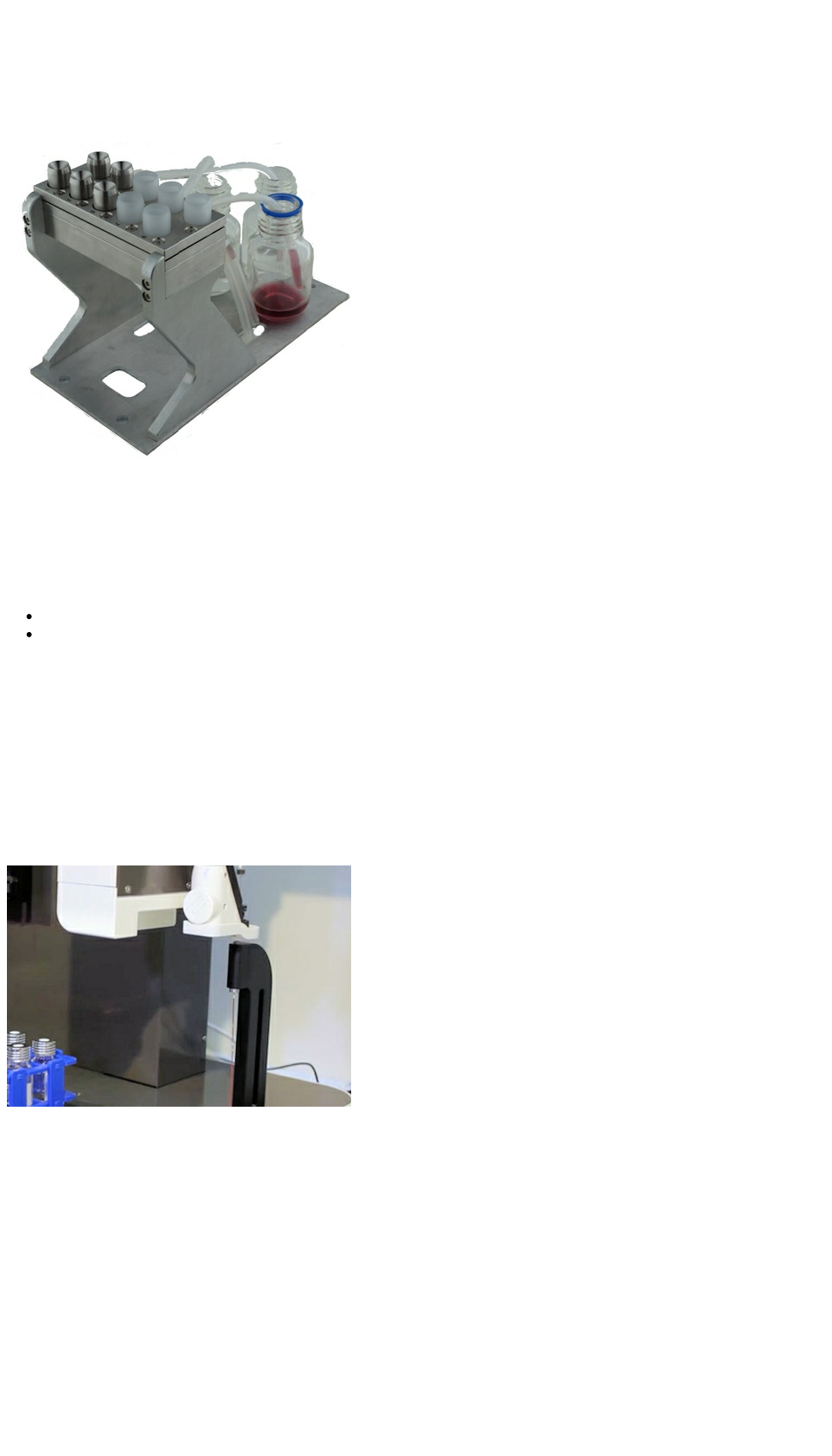
6.3 Reagent Manifold
When larger reagent or solvent volumes are required for a workflow the Reagent Manifold may be used to deliver solvents and
reagents from bulk bottles stationed alongside the ePrep. Up to 10 ports are available to supply multiple off deck solvent reservoirs
The manifold is fitted with one-way valve system that allows a syringe to be filled and then its dispensed flow channeled to a waste
collection bottle without moving the syringe.
This capability provides :
more efficient conditioning of SPE cartridges
more efficient rinsing of syringes between sample processing steps.
The unit is mounted in the Accessories area, located on the left side of the ePrep deck.
The manifold is fitted with six standard needle ports and four µSPEed syringe ports. Spares are available.
6.4 Syringe-Detector Interface
The eDirect™ allows interfacing of the ePrep robot and sample preparation process directly to an external detector such as a Mass
Spectrometer, UV/Vis, fluorescence, IR or any chromatography detector or chromatography interface.
The ePrep syringe system provides a precise flow to the detector at a high pressure if required with sample transferred directly from
the needle through a small bore fused silica lined transfer tube to the detector with minimal band broadening.
The eDirect accepts a standard ePrep syringe that has a standard 23 gauge needle that seals directly to a soft internal seal in the
eDirect.
The three obvious ways to utilize the eDirect interface are :
Inject an ePrep prepared sample from a vial on the ePrep deck into a detector or even an LC system. This effectively is using the
ePrep as a conventional autosampler.
Elute an ePrep prepared sample from a µSPEed SPE column directly into a detector. Effectively this gives a chromatographic
separation from the µSPEed cartridge into various types of detectors including a mass spectrometer.
The ePrep can drive an isocratic separation of the ePrep 50mm X 2.1mm column directly into a detector via eDirect. This combines
the sample preparation and LC column chromatography separation into one automated step.
Instructions
55
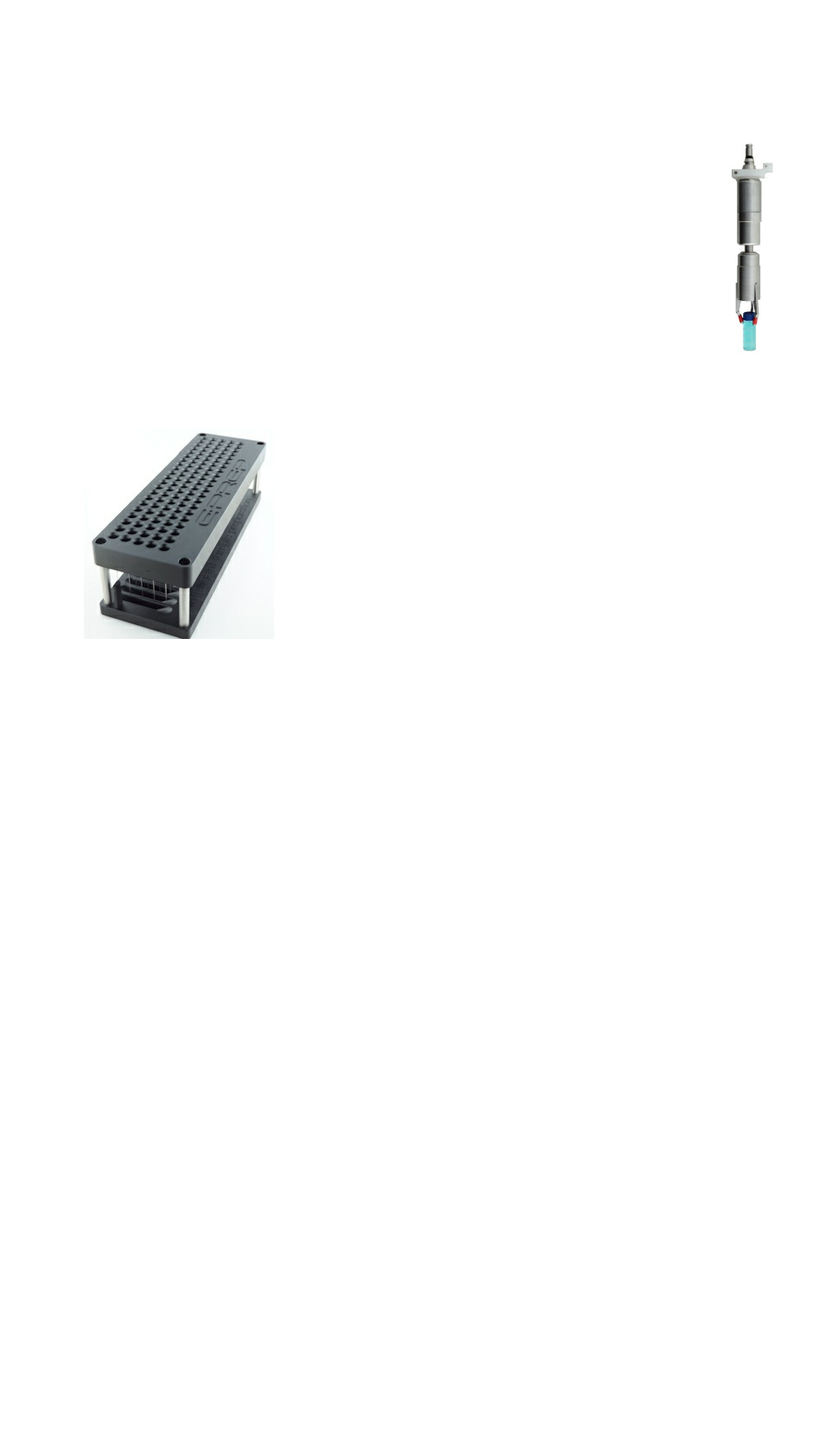
6.5 Gripper
The Gripper is supplied with the Vial Bar Code Reader option but is also available as a stand-alone unit to be
used for methods requiring vials to be moved from one position to another.
The common situations where there is required is for moving a vial to a Vortex Shaker or heater block.
6.6 uSPEed Cartridge Rack
The µSPEed Cartridge Rack enables reliable operation of µSPEed cartridges on the EPREP deck. The rack self-aligns ensuring
correct engagement of the ePrep syringe with a µSPEed cartridge held in the rack.
Each rack contains 96 cartridge positions and is supplied with ePrep ADAPTER Plate and RFID identification tag.
Instructions
56

Image Decription
Unscrew the Calibration Probe/ Screw Hex Tool from its position beside the Wash
Station
Using the Screw Hex end of tool to undo the screw at the base of the ePrep Foor
Remove the Bumper from the foot
Using a spanner loosen the Retaining Nut holding the old Piercer
Remove the old piercer from the Foot
Refit the new Piercer taking care not to cross thread the Retaining Nut during
tightening
Use a spanner to loosely tight the Retaining Nut
7 Maintenance and Troubleshooting
7.1 Preventative Maintenance
TBA
7.2 Moving ePrep
TBA
7.3 Specific Maintenance
7.3.1 Charging the piercer
Instructions
57
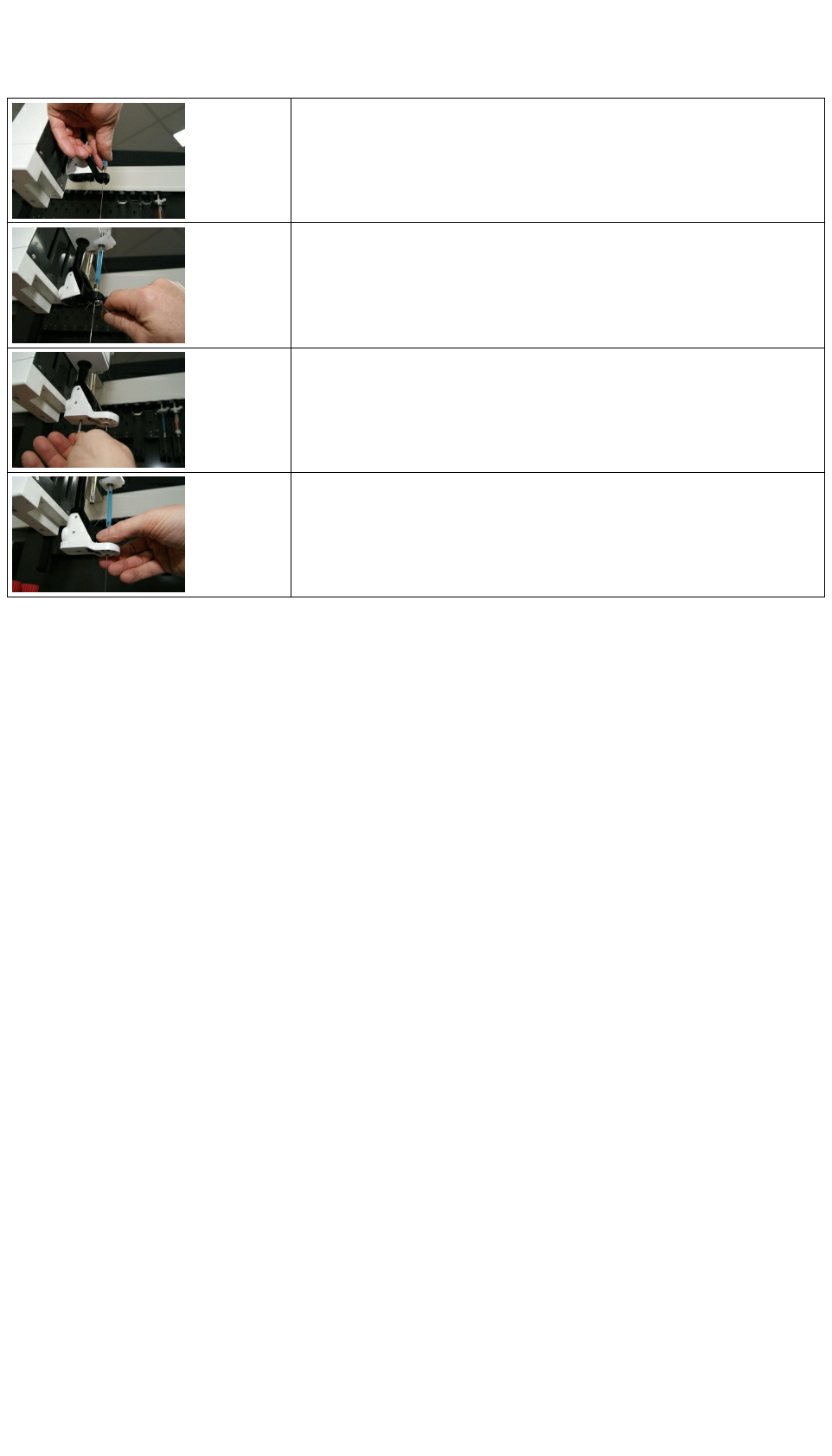
Remove a Syringe from the Tool Holder and insert the needle through the top of the
Foot and through the Piercer.
Ensure the needle can smoothly pass though the piecer. Tighten the Retaining Nut.
Do not overtighten.
Replace the Bumper
Recheck passing the Syringe Needle through the Foot and Piecer.
Instructions
58
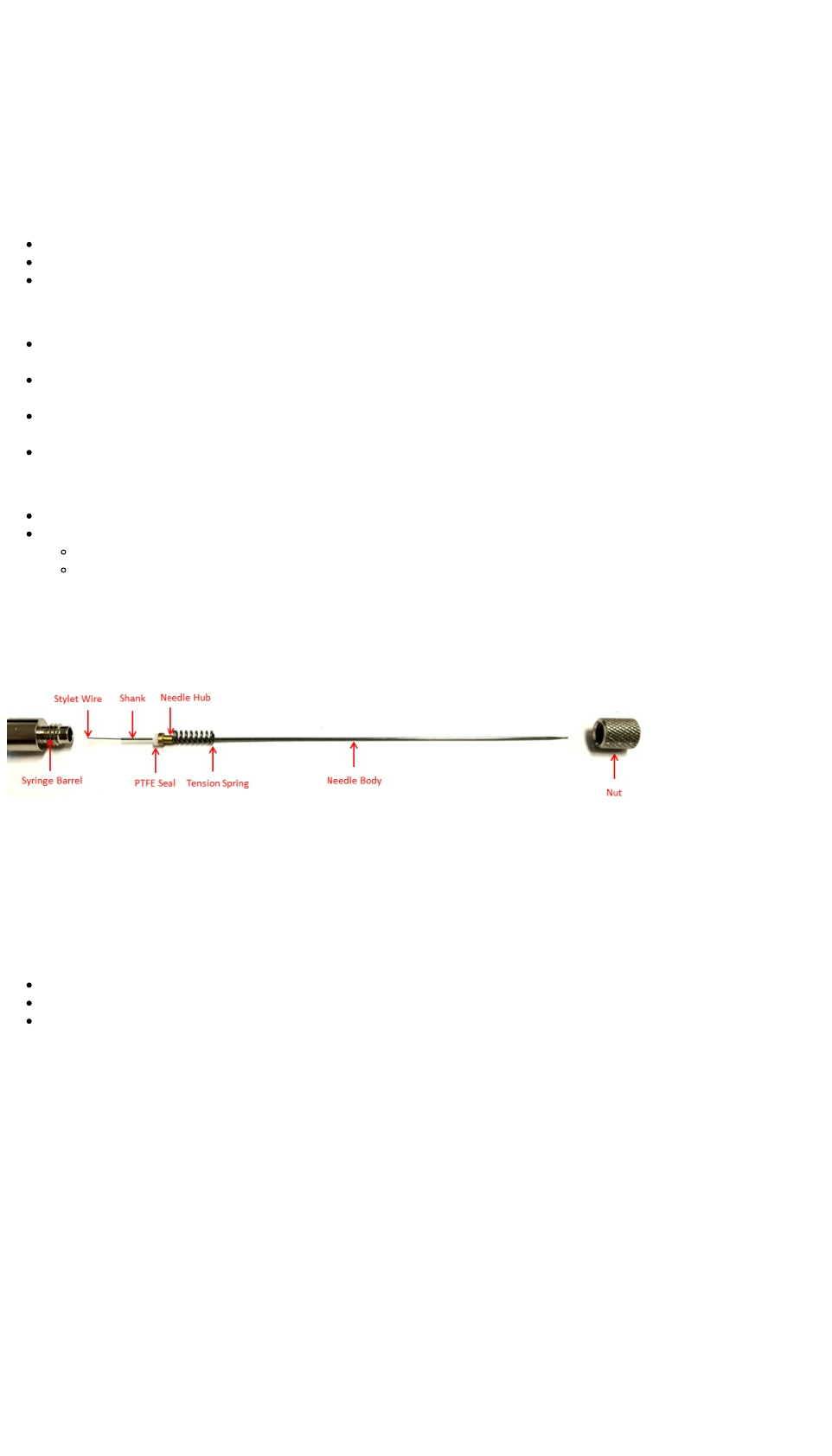
7.3.2 Syringe Needle Replacement
Syringe Specifications
Removable Needle: 5-120 °C
Accuracy and Reproducibility: ±1 % of displaced volume.
Syringe Use
Always inspect the syringe before use.
Avoid unnecessary movement of the plunger when the syringe is dry.
Never force the plunger
Syringe Cleaning
Syringe cleaning agents will usually depend on the contaminating material. Methanol, methylene chloride, acetonitrile and
acetone are commonly used solvents for cleaning.
After the syringe has been cleaned, rinse the syringe with acetone, remove plunger and air dry. CH3 COCH3 Rinse with acetone
Air dry to store.
Do not immerse the entire syringe in solventasthismay damage the adhesive used to bond parts of the syringe. • Clean externally
by wiping with a tissue.
Avoid cycling the plunger when the syringe is dry
Needle Care
Check the needle for burrs prior to use. Use a fine emery board or carborundum to remove burrs.
To unblock needles,
Remove the needle from the syringe and gently push the stylet wire through the needle.
Blockages can be removed by removing the plunger and fill the syringe with solvent using another syringe. Re-insert the
plunger and gently push solvent through needle. Never force the plunger. Too much pressure may crack the syringe barrel.
Remove plunger and fill syringe with solvent using another syringe Insert plunger and GENTLY push solvent through
needle.
Needle Replacement
To replace needles unscrew front cover nut and spring, remove needle. Carefully insert replacement needle into the front of the
syringe, slide spring and cover nut over the needle and screw nut onto the front screw of the syringe barrel.
Syringe Storage
To protect against breakage store the syringe in its original packaging or on a syringe rack. Always thoroughly clean the syringe before
storage.
Shipping
DO NOT return any syringe to EPREP unless requested to do so by an authorized EPREP representative.
DO NOT return any syringe that has been used with radioactive, infectious or hazardous materials.
Any syringe being returned must be clearly marked with a Return Authorization Number, which is available from your EPREP
representative.
Instructions
59
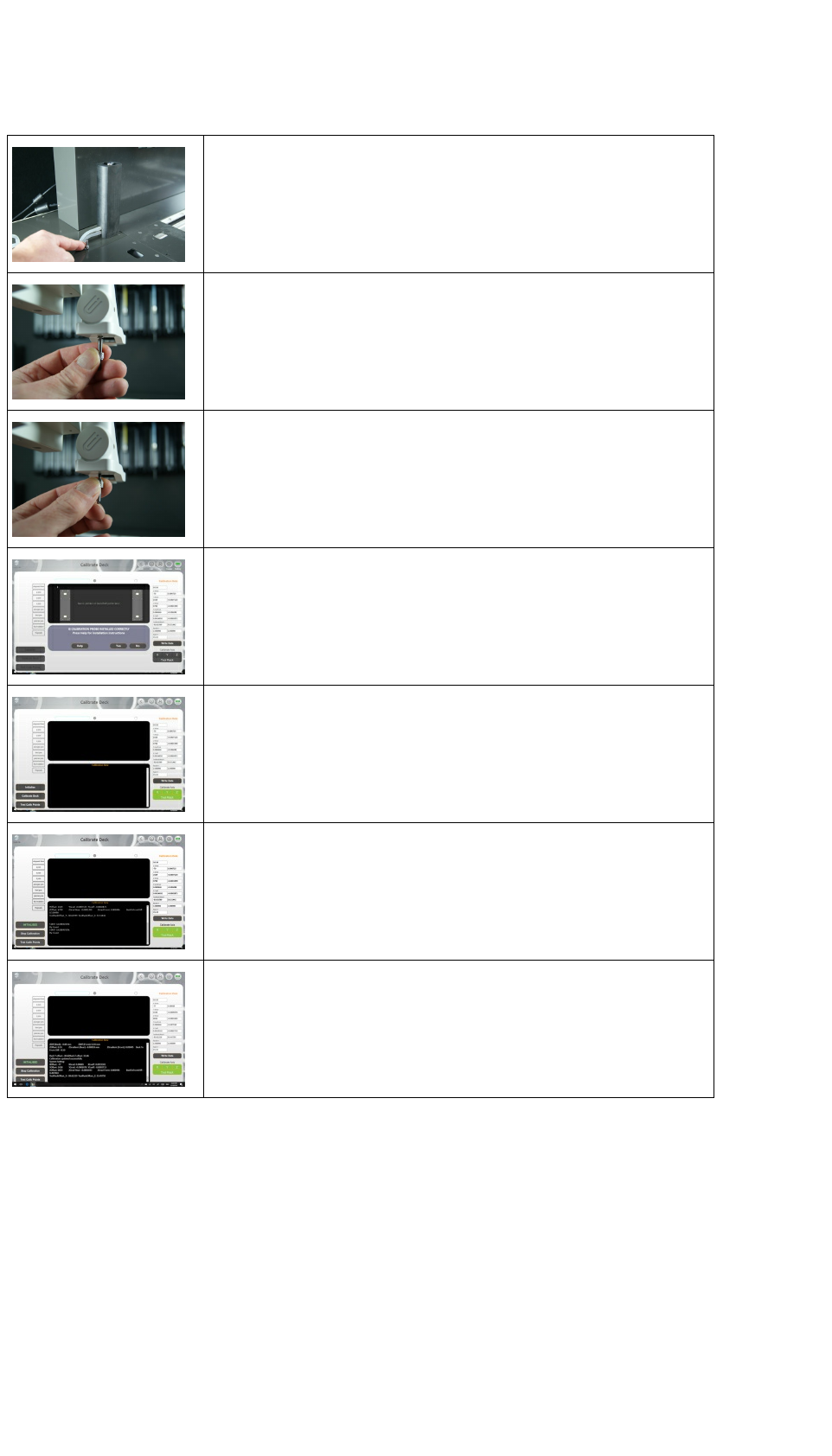
7.3.3 Instrument Recalibration
Unscrew the Calibration Probe/ Screw Hex Tool from its position beside the
Wash Station
Using the Screw Hex end of tool to undo the screw at the base of the ePrep
Once the screw has been removed , turn the Calibration Probe/ Screw Hex Tool
over and firmly screw it into the threaded hole the screw was removed from
ensure that the foot bumper remains in position
Check the Calibration Probe and Vial Adaptor Plates are installed correctly.
Open the Calibrate Deck option on the ePrep Software through
System>Service>Calibrate Deck
Click on Initalise. ePrep will perform initialisation process
Click on Calibrate Deck. ePrep will move the Calibration Probe on the P-Drive to
allocated positions on the deck and tool rack to record instrument calibration data.
When complete calibration dialogue will display "Calibration updated
successfully". Calibration data is automatically written to the instrument EPROM
to be used during operation.
7.3.4 Updating Software and Firmware
In the interests of continual improvement, ePrep will be regularly making available free software upgrades. These upgrades will add
additional capabilities to ePrep as well as rectifying identified bugs in the software.
After ensuring the Computer Tablet has access to the internet click on Home – Service – Software Updates. (should use pictures of
the keys here)
The software will guide you through the updates available and how to download and install them.
Checking for updates can etither be done through the computer tablet.
7.4 Troubleshooting and FAQs
Instructions
60

Fault/Issue Issue Explaination and Action
USB Comms won't connect or
reconnect
Issue typically occurs when Instrument Comms doesn't disconnect properly during power failure or
unexpected disconnection of the Control Tablet.
Steps to correct:
1) Press the software Comms Button. Comms button will display USB symbol if successful
connection is made.
2) Disconnect the USB cable and reconnect the cable to the Tablet. Comms button will display USB
symbol if successful connection is made.
3) Cycle the instrument power to reset Comms .Comms button will display USB symbol if successful
connection is made.
Tube Groups Disappear on
Saving
Tube Groups must be assigned to a task before saving. Tube group not assigned to a task will be
deleted on saving.
Undetected Tubes or Tube
Groups
ePrep uses both ultrasonic and touch detection for determining tube/vial placement. To ensure the
correct detection of vials use only the caps and septa supplied with the vials. Ensure all vials, caps
and septa in a single rack are the same height and vial/cap type. If the ePrep fails to detect a
particular vial, ensure the rack dimensions are correct for the vial size being used and the vials are
closely located in the centre of the rack position.
Validation Over volume Error -
Input Vial
The volume entered for an input volume is the total volume liquid place in the vial NOT the vial
volume. Eprep automatically accounts for the useable volume (ie. allowing for needle depth etc) to
determine if sufficient input liquid is available for a Workflow.
ePrep calculates the expected volume required from all nominated input vials required to complete
the Workflow. If the User selected volumes of the input vials is less than calculated required
volume, a validation error will be signaled.
To overcome this error; 1) increase the volume of liquid in the input vial 2) select more than one vial
for the Group (if allowed for the task) or 3) add additional task steps with alternate vials.
Validation Over volume Error -
Output Vial
If the total volume to be dispensed in to single Output Tube exceeds the defined system volume of
that tube (eg. Microtiter Plate), a validation error will be signaled.
Steps to correct:
1) Ensure a volume is not set for the Output Tube. If a volume is set, ePrep will assume that the set
volume already exists will add this to any dispensed volume in its calculation.
2) Reduce the total dispensed volume so it does not exceed the defined volume
Syringe trapped Air Bubbles
Trapped Air Bubbles can be caused by:
1) Empty Wash station reservoir
2) High viscosity liquids
3) Incorrect aspiration and dispensing speeds
4) Partially blocked needle (see also Blocked Needles)
5) Needle seal damaged
6) Leaking syringe plunger
7) Inrease the pause time at end of the aspirate cycle.
Blocked Needle
Blocked needles are typically caused by pieces if septa cored during vial piercing. ePrep syringes
use needles optimised for minimal septa piercing force, minimum septa coring and minimum
restriction of sample on aspiration. However hard brittle septa can result in coring causing the
syringe needle to block.
Steps to correct:
1) Use conventional soft septa on vials
2) Ensure the needle tip is not damaged. Burrs on the needle caused by the needle hitting a hard
object can cause septum coring.
Unexpected reduced recovery
of some compounds
If septa material is damaged or cored and particles of anlytes are displaced into a sample vial, this
septa material can extract analytes from the solution, causing low recoveries. Ensure syringe
needles, septa piercer are in good condition and the correct grade of a soft septa is used.
Droplets remain on the syringe
needle during dispense.
Droplets can formed at the needle tip when dispensing small volumes at low flowrates. These
droplets can lead to reproducibility errors and sometimes the appearance of liquid above the
septum and on the ePrep piercer.
Steps to correct:
1) When possible, dispense small volumes into liquid already in the Output Vial ie. Add the diluent
to the vial first.
2) Dispense liquids as fast as possible
3) Pause after dispense to allow the droplet time to dislodge.
Sensor hit error on adjoining
rack
Some rack combinations may foul the ePrep forked foot if place adjacent to each other. Ensure high
racks are never be placed immediately left of a low rack/vials.
Instructions
61

Software Lockup
If the ePrep software locks up (ie. All keystrokes are no responsive) the following procedure should
be used to close ePrep software:
1) Swipe the Tablet from the bottom right upwards
2) Select Task Manager form the Task Bar menu
3) Click on ePrep software from the Task List
4) Click End Task
5) Restart the ePrep Software
Observation of Sample
Carryover
Carry over is typically caused by insufficient wash and/or priming of the syringe before the next
sample.
Steps to correct:
1) Increase the syringe wash after each sample. It is better to use additional small volume wash
cycles than a single large volume wash cycle to minimise carryover.
2) Increase the number of prime cycles before sample aspiration.
3) Prime to waste to ensure carryover sample is not recycled into next sample vial.
My vial rack is not listed
Rack definitions must be predefined in ePrep's software for them to be suitable for use with the
ePrep. The ePrep software uses the rack and Mat definition to determine X and Y coordinates of
vials when setting up and running a Workflow. Contact Eprep if your rack definition is not listed.
Needle length will not reach
the bottom of the vial
ePrep syringes use an 80mm long needle and µSPEed cartridges use 50mm long needles. The
ePrep senses the height of the septa cap and for aspiration from a vial will automatically insert the
needle as far as possible without colliding with the septa cap or bottom of the vial. Effective vial
penetration for an 80mm needle is 56mm below the septa cap and 25mm for µSPEed cartridges.
When the volume of the vial has been correctly defined, the ePrep software will automatically
determine the volume available to be aspirated given the needle penetration into the vial. When
selecting volumes to be aspirated from particular vials, be aware of the volume that cannot be
reached below the maximum penetration of the needle into a vial.
Workflow did not aliquot all
samples correctly
If a Workflow does not visually or chromatographically aliquot all samples correctly, the following
possible causes should be checked:
1) Check for needle blockage
2) Check set input vial volumes are correct and allowance for needle depth penetration has been
considered.
3) Ensure sufficient mixing of sample after aliquots
ePrep stopped with
syringe/tool still engaged.
If the ePrep has stopped or been stopped for any reason with the syringe still connected:
1) Turn ePrep power off and rotate the foot away from the syringe needle
2) Turn the ePrep power on
2) Open the ePrep software and enter a Workflow Run.
3) With the syringe held tightly in one hand, press the Release Tool button at the bottom right of the
run screen with the other hand to eject the tool.
4) Replace the syringe on the tool rack
Sample Mixing Use syringe mixing or vortex mixing once sample aliquots are complete to ensure output vial is
homogeneous before sampling,
Duplicate and Triplicate
samples
Sample task is a one input vial to one output vial. To achieve duplicate and triplicate samples,
duplicate the task series in a second task group.
Syringe Washing
Syringe washing is an often-overlooked parameter, and when optimised, can significantly lower
carryover. You will need to experiment with your syringe washing and sample priming routines,
however 3–5 sample primes (sometimes called pumps), and three washes from the flowing Wash
Station before and after injection give reasonably good results. If the sample is particularly viscous,
you may need to use a viscosity delay, to allow time for the viscous sample to rise up into the
syringe and avoid variable volumes being injected.
Instructions
62

8 Replacement Parts
8.1 ePrep Replacement Parts
Part No. Description Service Level
X-axis Complete Changeover High
Y-Axis Complete Changeover High
Z-Axis Complete Changeover High
P-Drive Complete
Changeover High
Wash Station Unit High
Wash Station Tubing High
Instructions
63

8.2 Replacement Syringes and Needles
Needle Syringes
Part No. Code Description
01-09006 10µL EPREP Syringe 10 µL|80mm|26g|Cone| Removable Needle EPREP Teflon Tip Syringe
01-09014 100µL EPREP Syringe 100 µL|80mm|26g|Cone| Removable Needle EPREP Teflon Tip Syringe
01-09020 1mL EPREP Syringe 1 mL|80mm|26g|Cone| Removable Needle EPREP Teflon Tip Syringe
01-09026 10mL EPREP Syringe 10 mL|80mm|26g|Cone| Removable Needle EPREP Teflon Tip Syringe
Replacement Needles
01-09803 Replacement Needle for 10-25µL Syringe, 80mm/Cone (PKT 2)
01-09807 Replacement Needle for 25µL- 500µL Syringe, 80mm/Cone (PKT 2)
01-09811 Replacement Needle for 1mL Syringe, 80mm/Cone (PKT 2)
01-09815 Replacment Needle for 5-25mL Syringe, 80mm/Cone (PKT 2)
Replacment Piercer
µSPEed Syringes
Part No Code Description
01-09080 100µL µSPEed EPREP Syringe 100uL| µSPEed| EPREP Endurance™ Syringe
01-09083 500µL µSPEed EPREP Syringe 500µL | µSPEed| EPREP Endurance™ Syringe
01-09087 2.5mL µSPEed EPREP Syringe 2.5mL | µSPEed| EPREP Endurance™ Syringe
Instructions
64
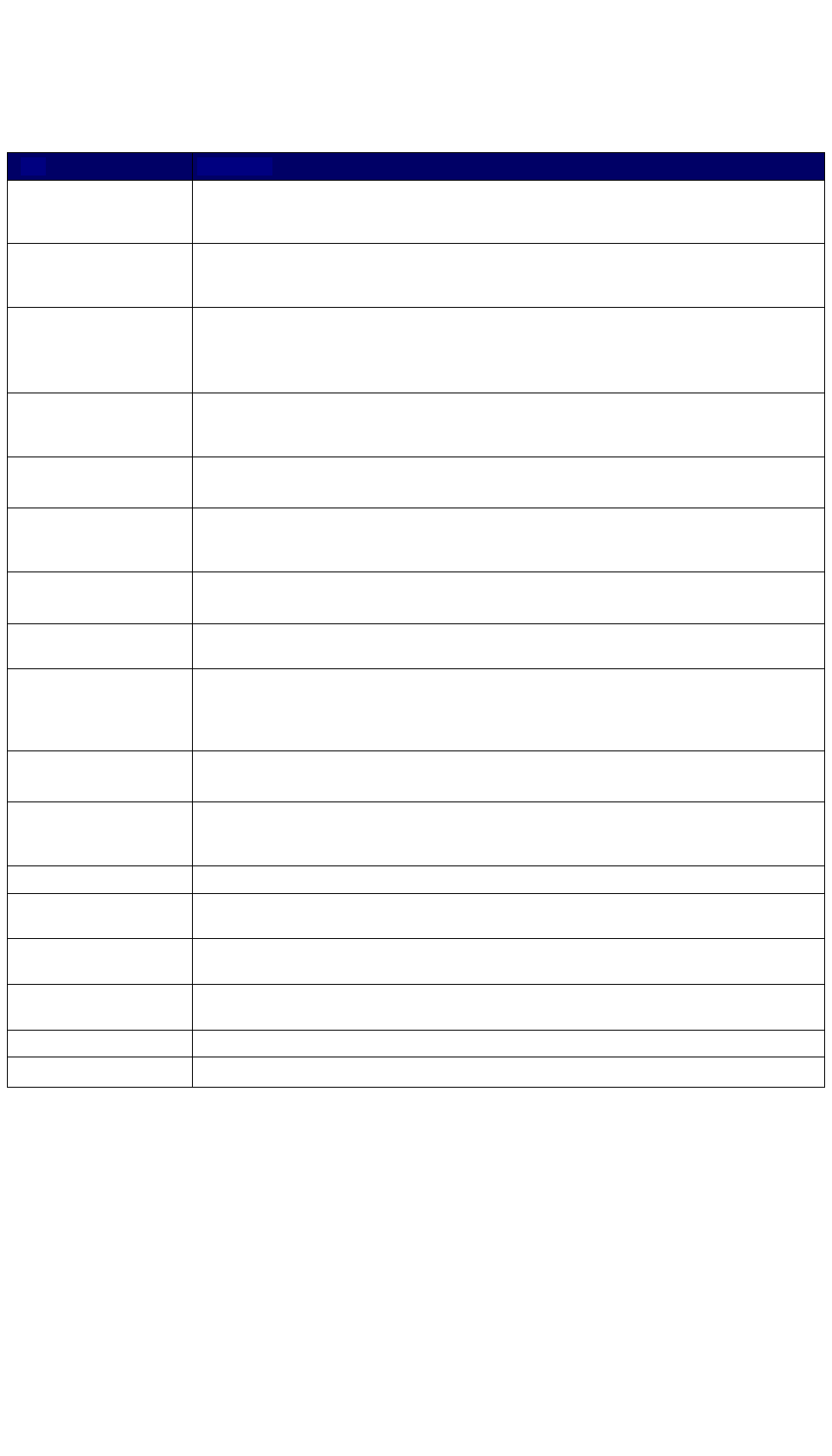
9 Glossary of Terms
Term Description
µSPEed Cartridges
µSPEed cartridges offer a unique opportunity to revolutionise micro SPE and micro fractionation.
Using a one-way check valve, the sample is aspirated through the cartridge and dispensed on to the
top of a sorbent bed.
Accessories
A range of devices are available for the ePrep to expand the system’s capabilities. Some items are
supplied standard with the ePrep and others are optional. Check at www.eprep.com.au for the latest
information on accessories that are available for the ePrep.
Adaptor Plate (Mat)
The task of defining vial positions accurately is made easy for the operator by using vial racks whose
coordinates have been mapped by ePrep and are included in the parameters supplied by ePrep. It
just needs to be ensured by the user that the correct vial rack has been used and it is being used with
the correct Vial Rack Adapter plate for that specific vial rack.
Batch (Task Group)
Batch processing is where the same Task is preformed on all samples before proceeding onto the
next sample. Batch processing is the fasted way to process a group of samples as it eliminates the tool
change and washing steps between samples.
Gripper The Gripper is supplied with the Vial Bar Code Reader option but is also available as a stand-alone
unit to be used for methods requiring vials to be moved from one position to another.
P-Drive
The P-Drive is the heart of the ePrep system with an array of actuators, motors and sensors
incorporated. The P-Drive incorporates a separate microprocessor for controlling and monitoring the
various functions.
Rack RFID Tag ePrep uses RFID Tag identification to check validity and location of tube/vial racks on the deck. RFID
Tags are placed on the rack or a Adapter Plate post depending on the rack configuration.
Senor Foot The sensor foot at the bottom of the P-Drive is a mechanical switch that precisely detects the P-Drive
foot touching an external feature.
Sequential
Sequential or serial processing is when Tasks to complete a full workflow on a the first sample are
finished before starting the same Tasks on the second sample. Sequential processing is normally
slower that batch processing as it typically requires tool changing and syringe washing between
Task.
Task A set of predefined actions that make up a sample prepartion workflow. A Task typically contains a
tool, tool parameters, rack and accessory definitions and allocation of input and output vial/tubes
Tool Station
12 stations for syringes and other tools that can be coupled to the P-drive via the ePrep Xchange
coupling system. Each station is designed to hold the syringe/tool in the correct position for
engagement by the Xchange coupling system.
Tools ePrep syringes and tools are fitted with Radio Frequency Identification (RFID) ta
Validation (Workflow) Workflow validation examines different characteristics of a workflow to locate issues that might
prevent the workflow from Running
Vial/Tube A tube/vial is a glass or plastic vessel for storage and manipulation of liquids. The range of vials that
can be used with ePrep is only restricted to fitting in a defined rack
Wash Station The Wash Station is designed for washing syringe needles to prevent cross contamination and also as
a means to empty syringes to waste.
Workflow Process ways in which a sample is treated prior to its analysis
XCHANGE®ePrep’s patented system for automated syringe and tool exchange.
Instructions
65