iMpak Health KMB121 Handheld, Bluetooth 4.0 Enabled, Medication Compliance Device User Manual KR005 Kraken

iMpak Health Handheld, Bluetooth 4.0 Enabled, Medication Compliance Device KR005 Kraken

Users Manual

1 | Page  iMPakhealth LLc                            For support please email support@impakhealth.com  or visit impakhealth.com                          version 1.0  August 2013                                                                                                          KRAKEN MEDICATION MANAGEMENT SYSTEM    U s   e   r       M   a   n   u   a   l             iMPAK 1350 Campus Parkway • Suite 200 Neptune, NJ  07753 Phone 732.751.3475 • Fax 732.481.8525
2 | Page  iMPakhealth LLc                            For support please email support@impakhealth.com  or visit impakhealth.com                          version 1.0  August 2013   TABLE OF CONTENT                                 1. PRODUCT DESCRIPTION ..............................................................................................................3                                2. INDICATIONS FOR USE .................................................................................................................3                                3. INTENDED USER ...............................................................................................................................3                                4. GENERAL SAFETY PRECAUTIONS ..............................................................................................3                                5. STORAGE AND HANDLING ...........................................................................................................3                                6. WARNINGS ............................................................................................................................................3                                7. MAINTENANCE ..................................................................................................................................4                              8. PREPARE THE KRAKEN FOR USE ….........................................................................................4                                 9. REPLACE THE BATTERY IN YOUR DAYPAK DEVICE ...................................................................4                             10. UNDERSTANDING YOUR KRAKEN APPLICATION................................................................5                               11. TROUBLESHOOTING……………………………………...............................................................9    12. iMPAK HEALTH CONTACT INFORMATION ......................................................................................10
3 | Page  iMPakhealth LLc                            For support please email support@impakhealth.com  or visit impakhealth.com                          version 1.0  August 2013   1.   PRODUCT DESCRIPTION TheKRAKENMedicationManagementSystemisamedicationadherencedeviceaimedatincreasingthecomplianceoftheindividualuser.Thesystemconsistsof:a. WeeklySortingStationb. Seven(7)dailymedication“wells”c. DayPakdeviced. Mobileapplication 2.  INDICTION FOR USE TheKrakenSystemistobeusedtotracktheusageofdailymedicationtoincreasetheuserscomplianceandenabletheusertotrackandreportmedicationcompliancetosharewiththeirphysiciansandfamilymembers. 3. INTENDED USER    Thisdeviseisintendedtobeusedbyanindividualtakingmultiplemedicationsatvarioustimesonaregularbasis. 4. GENERAL SAFETY PRECAUTIONS  Usersshouldalwaysfollowanycurrentmedicaltreatmentand/orinstructionsfromtheirmedicalprovider. Thedeviceshouldnotbeusedinconjunctionwithwater,orinawetenvironment. Donotsterilizethisunitwithanautoclaveorglasssterilizer. Disperseanystaticelectricityfromyourbodybeforeusingtheunit. Donotexposetheunittostrongshocksorvibrations. Donotdisassemble,repair,ormodifytheunit. Donotinsertbatterywithpolarityreversed. Donotusebatteriesofatypeotherthanthatspecifiedforusewiththedevice. Donotuseforanypurposeotherthantrackingandreportingmedicationcompliance. Keepawayfrompetsandchildren.5. STORAGE AND HANDLING Donotstoretheunitin: Locationsexposedtodirectsunlight. Locationssubjecttohightemperaturesandhighhumidity. Wetordamplocationswherewatermaygetontheunit. Dustylocations. Nearfiresoropenflames. Locationsexposedtostrongvibration. Locationsexposedtostrongelectromagneticfields.6. WARNINGS  Thisdeviceisnotdesignedorintendedfordiagnosisorastreatment. Patientsshouldalwaysconsulttheirphysicianiftheynoticechangesintheirhealth. Thisdeviceshouldneverbeusedasabasisforstartingormodifyingmedicaltreatment. Donotattemptself‐diagnosisorself‐treatmentbasedontherecordedresults.
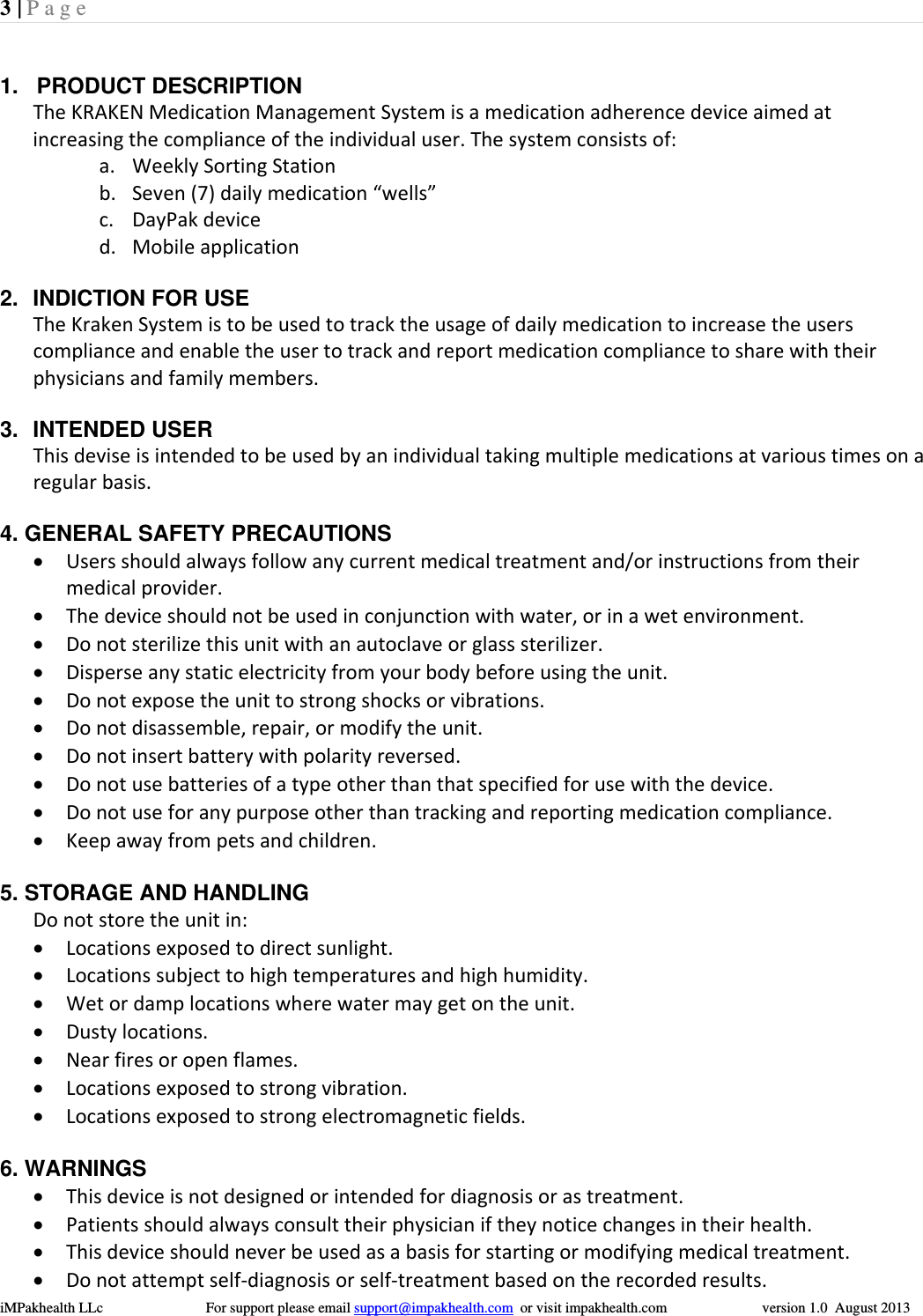
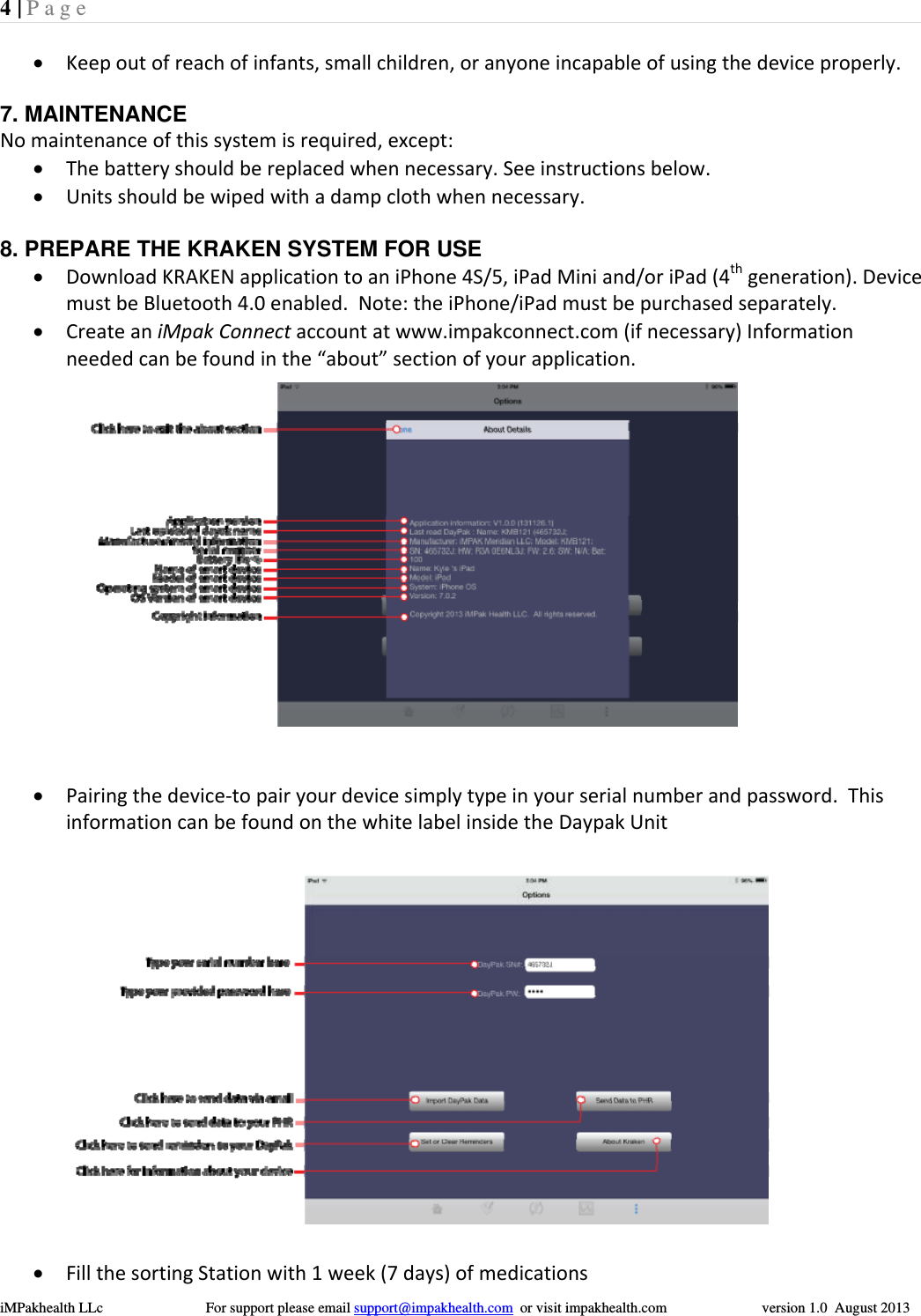
4 | Page  iMPakhealth LLc                            For support please email support@impakhealth.com  or visit impakhealth.com                          version 1.0  August 2013   Keepoutofreachofinfants,smallchildren,oranyoneincapableofusingthedeviceproperly. 7. MAINTENANCE Nomaintenanceofthissystemisrequired,except: Thebatteryshouldbereplacedwhennecessary.Seeinstructionsbelow. Unitsshouldbewipedwithadampclothwhennecessary.8. PREPARE THE KRAKEN SYSTEM FOR USE  DownloadKRAKENapplicationtoaniPhone4S/5,iPadMiniand/oriPad(4thgeneration).DevicemustbeBluetooth4.0enabled.Note:theiPhone/iPadmustbepurchasedseparately. CreateaniMpakConnectaccountatwww.impakconnect.com(ifnecessary)Informationneededcanbefoundinthe“about”sectionofyourapplication. Pairingthedevice‐topairyourdevicesimplytypeinyourserialnumberandpassword.ThisinformationcanbefoundonthewhitelabelinsidetheDaypakUnit FillthesortingStationwith1week(7days)ofmedications
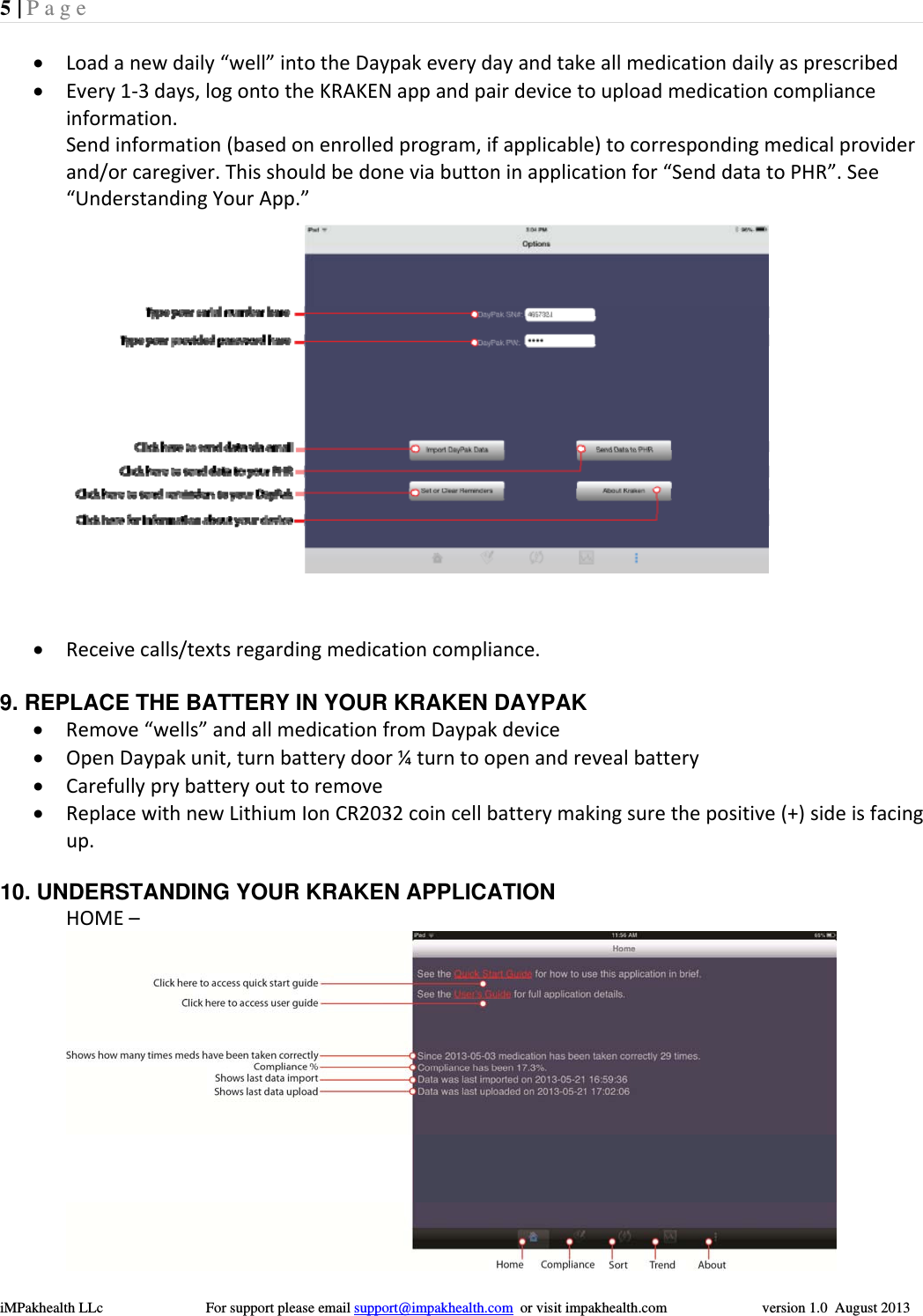
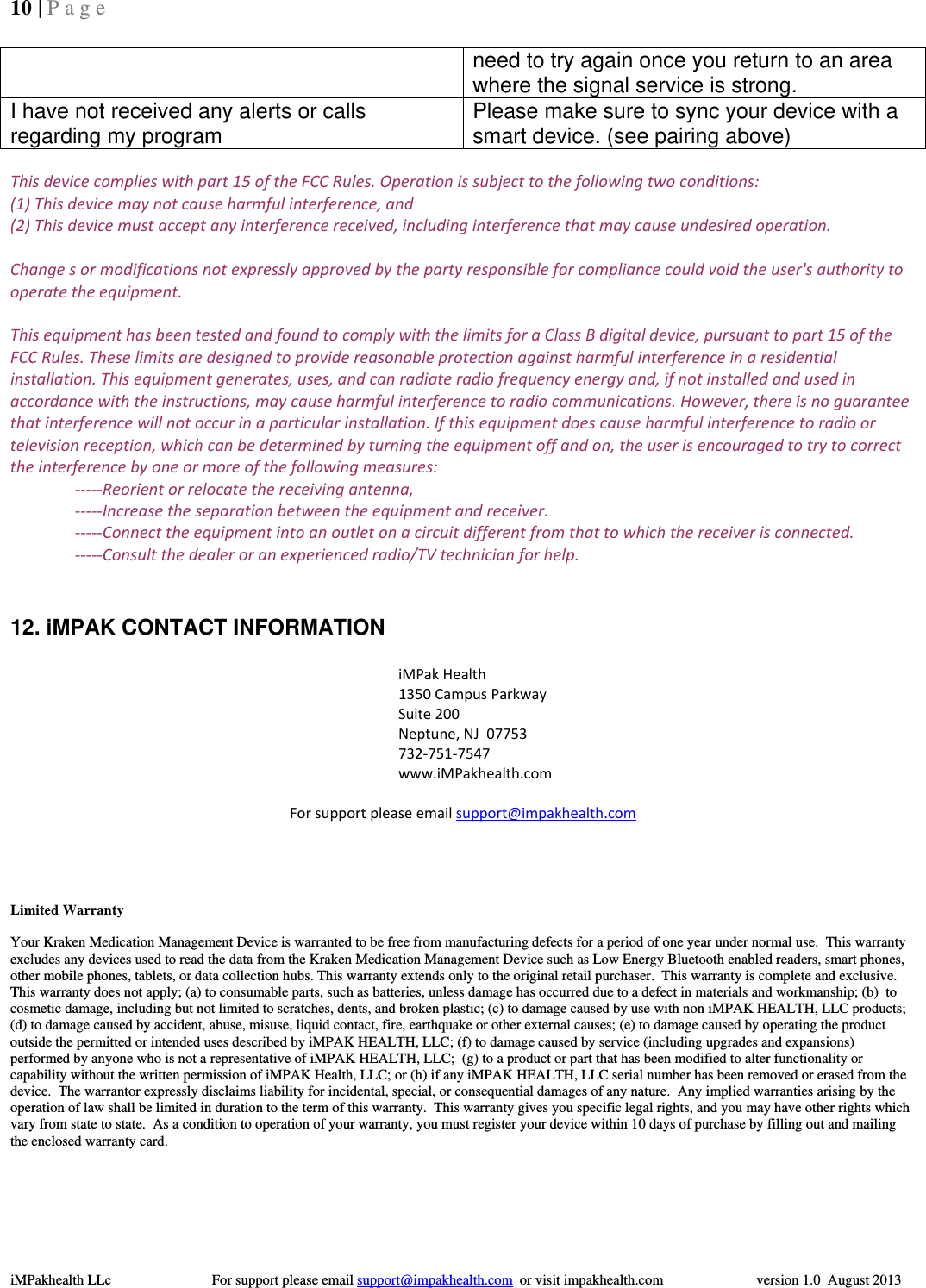
5 | Page  iMPakhealth LLc                            For support please email support@impakhealth.com  or visit impakhealth.com                          version 1.0  August 2013   Loadanewdaily“well”intotheDaypakeverydayandtakeallmedicationdailyasprescribed Every1‐3days,logontotheKRAKENappandpairdevicetouploadmedicationcomplianceinformation.Sendinformation(basedonenrolledprogram,ifapplicable)tocorrespondingmedicalproviderand/orcaregiver.Thisshouldbedoneviabuttoninapplicationfor“SenddatatoPHR”.See“UnderstandingYourApp.” Receivecalls/textsregardingmedicationcompliance.9. REPLACE THE BATTERY IN YOUR KRAKEN DAYPAK  Remove“wells”andallmedicationfromDaypakdevice OpenDaypakunit,turnbatterydoor¼turntoopenandrevealbattery Carefullyprybatteryouttoremove ReplacewithnewLithiumIonCR2032coincellbatterymakingsurethepositive(+)sideisfacingup.   10. UNDERSTANDING YOUR KRAKEN APPLICATION  HOME– 
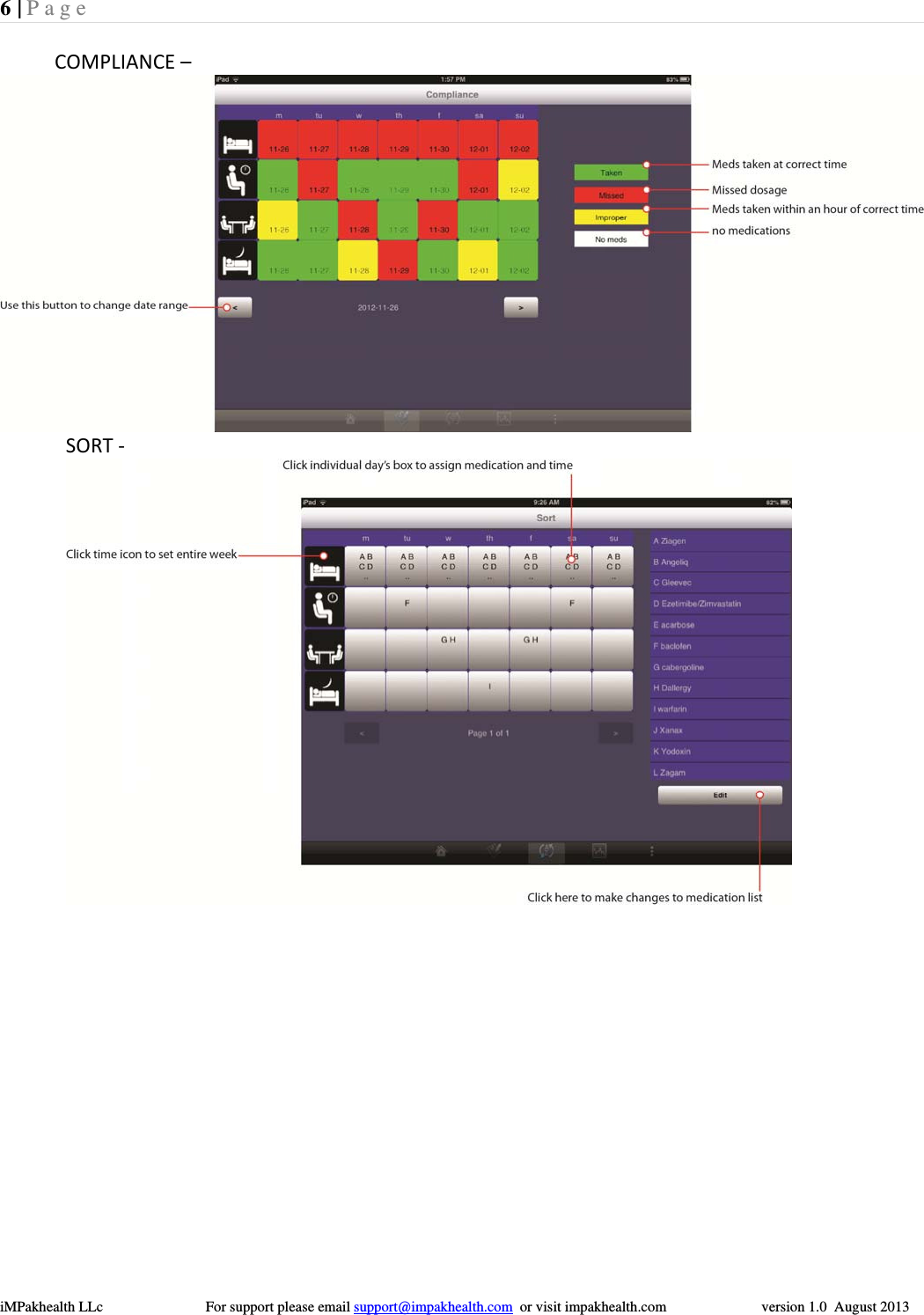
6 | Page  iMPakhealth LLc                            For support please email support@impakhealth.com  or visit impakhealth.com                          version 1.0  August 2013  COMPLIANCE–SORT‐
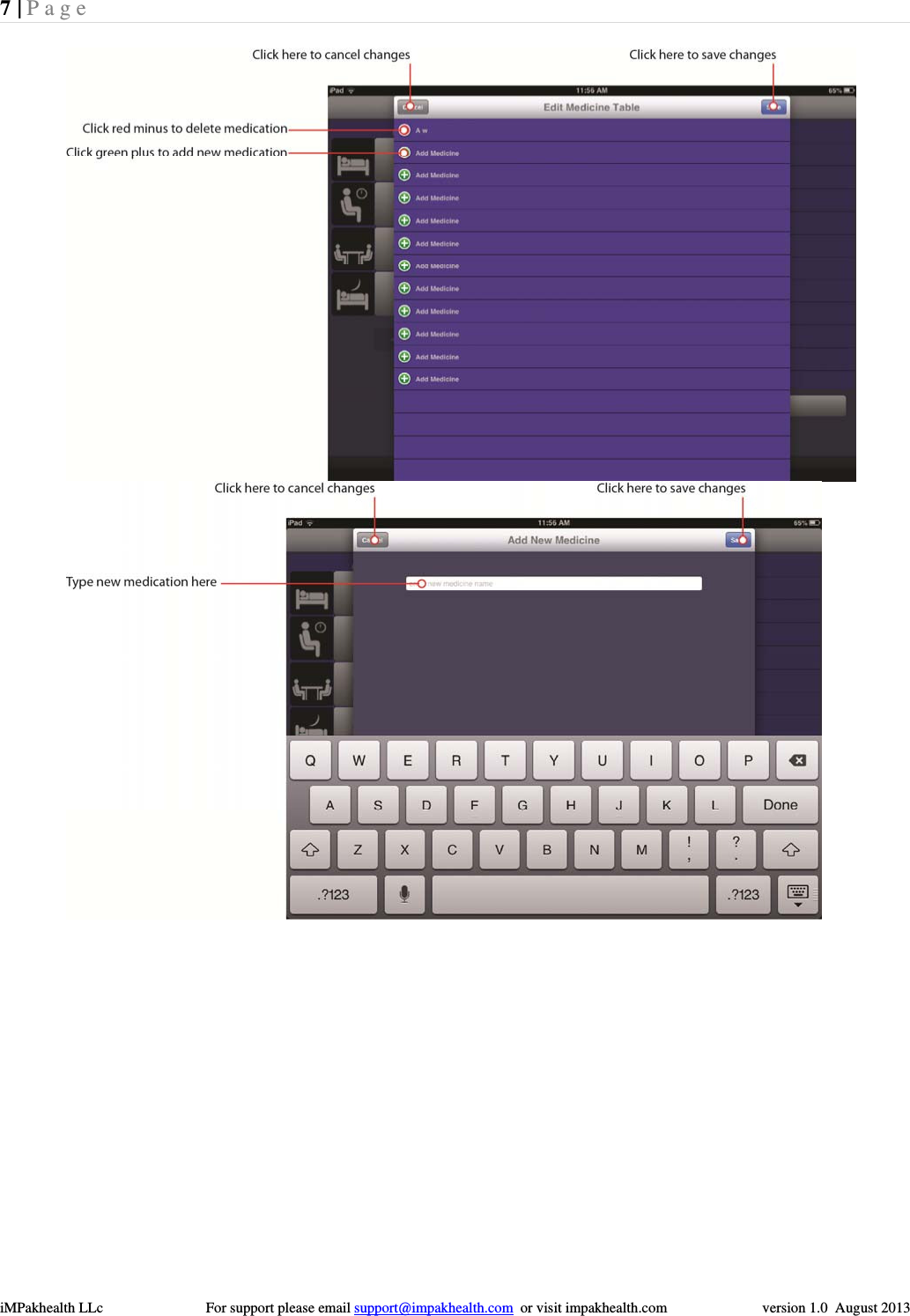
7 | Page  iMPakhealth LLc                            For support please email support@impakhealth.com  or visit impakhealth.com                          version 1.0  August 2013  
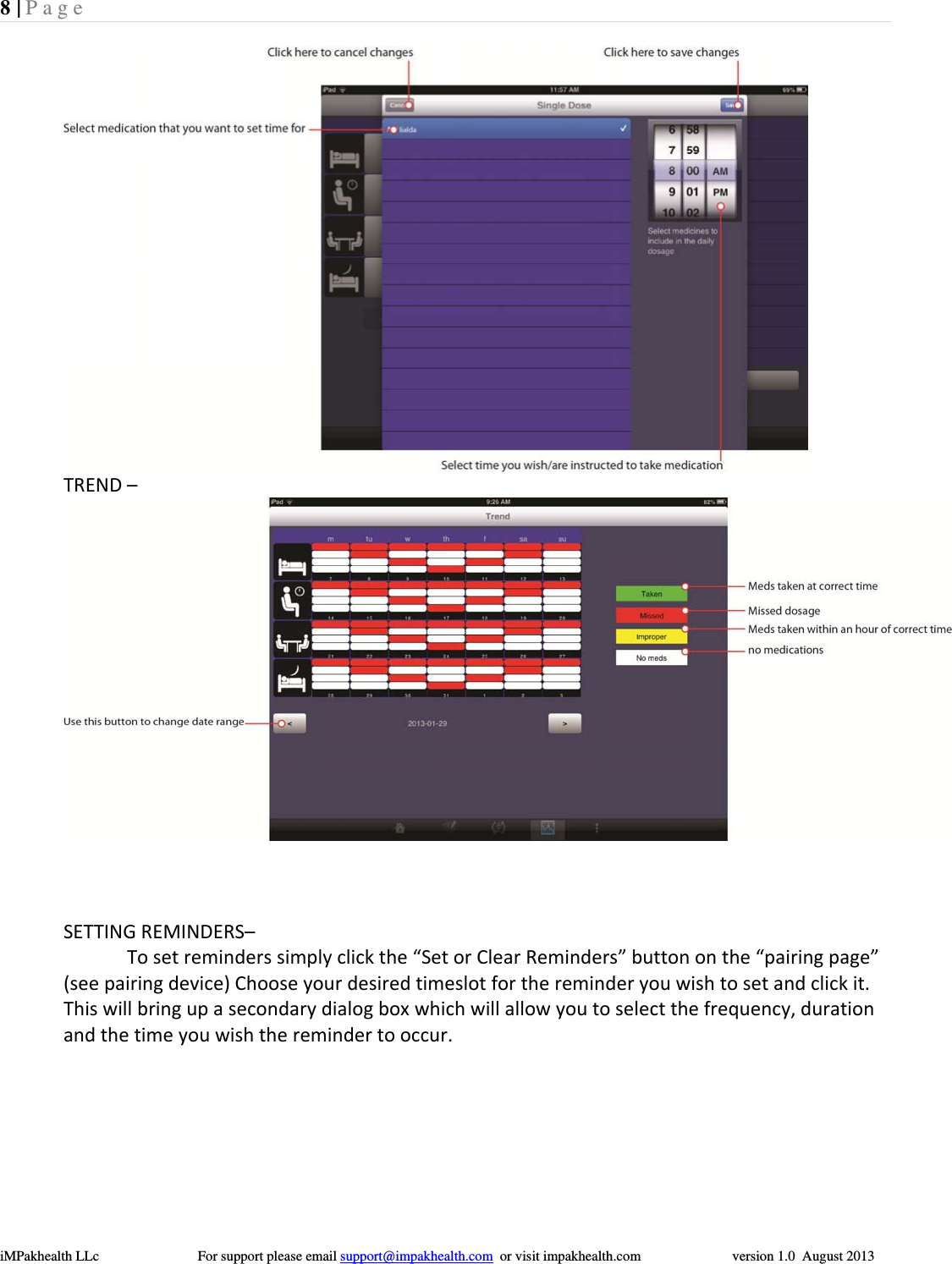
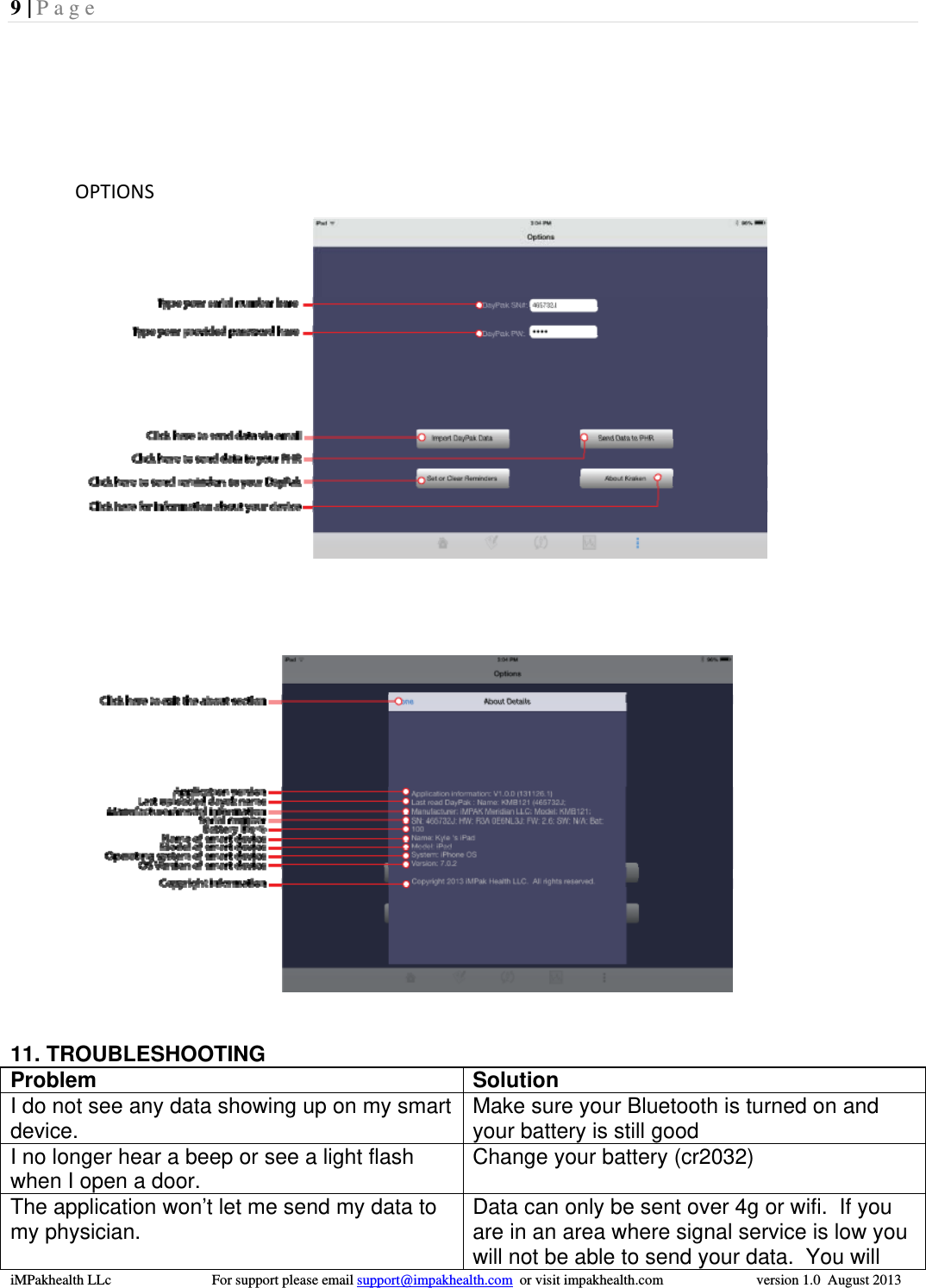
8 | Page  iMPakhealth LLc                            For support please email support@impakhealth.com  or visit impakhealth.com                          version 1.0  August 2013  TREND–SETTINGREMINDERS–Tosetreminderssimplyclickthe“SetorClearReminders”buttononthe“pairingpage”(seepairingdevice)Chooseyourdesiredtimeslotforthereminderyouwishtosetandclickit.Thiswillbringupasecondarydialogboxwhichwillallowyoutoselectthefrequency,durationandthetimeyouwishtheremindertooccur.
9 | Page  iMPakhealth LLc                            For support please email support@impakhealth.com  or visit impakhealth.com                          version 1.0  August 2013  OPTIONS   11. TROUBLESHOOTING Problem Solution I do not see any data showing up on my smart device.  Make sure your Bluetooth is turned on and your battery is still good I no longer hear a beep or see a light flash when I open a door.  Change your battery (cr2032) The application won’t let me send my data to my physician.  Data can only be sent over 4g or wifi.  If you are in an area where signal service is low you will not be able to send your data.  You will
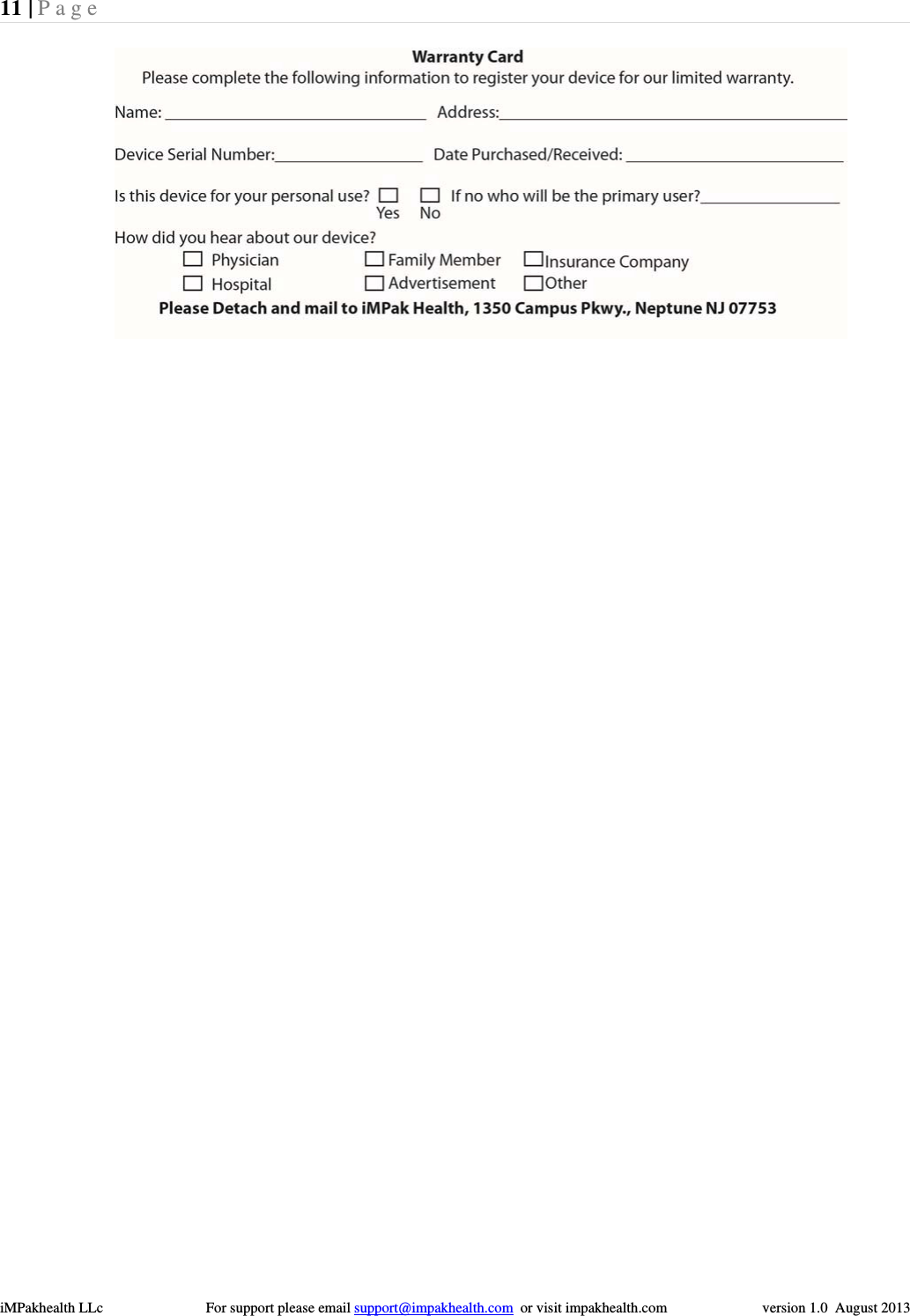
10 | Page  iMPakhealth LLc                            For support please email support@impakhealth.com  or visit impakhealth.com                          version 1.0  August 2013  need to try again once you return to an area where the signal service is strong.  I have not received any alerts or calls regarding my program  Please make sure to sync your device with a smart device. (see pairing above)  Thisdevicecomplieswithpart15oftheFCCRules.Operationissubjecttothefollowingtwoconditions:(1)Thisdevicemaynotcauseharmfulinterference,and(2)Thisdevicemustacceptanyinterferencereceived,includinginterferencethatmaycauseundesiredoperation.Changesormodificationsnotexpresslyapprovedbythepartyresponsibleforcompliancecouldvoidtheuser'sauthoritytooperatetheequipment.ThisequipmenthasbeentestedandfoundtocomplywiththelimitsforaClassBdigitaldevice,pursuanttopart15oftheFCCRules.Theselimitsaredesignedtoprovidereasonableprotectionagainstharmfulinterferenceinaresidentialinstallation.Thisequipmentgenerates,uses,andcanradiateradiofrequencyenergyand,ifnotinstalledandusedinaccordancewiththeinstructions,maycauseharmfulinterferencetoradiocommunications.However,thereisnoguaranteethatinterferencewillnotoccurinaparticularinstallation.Ifthisequipmentdoescauseharmfulinterferencetoradioortelevisionreception,whichcanbedeterminedbyturningtheequipmentoffandon,theuserisencouragedtotrytocorrecttheinterferencebyoneormoreofthefollowingmeasures:‐‐‐‐‐Reorientorrelocatethereceivingantenna,‐‐‐‐‐Increasetheseparationbetweentheequipmentandreceiver.‐‐‐‐‐Connecttheequipmentintoanoutletonacircuitdifferentfromthattowhichthereceiverisconnected.‐‐‐‐‐Consultthedealeroranexperiencedradio/TVtechnicianforhelp.  12. iMPAK CONTACT INFORMATION            iMPakHealth1350CampusParkwaySuite200Neptune,NJ07753732‐751‐7547www.iMPakhealth.comForsupportpleaseemailsupport@impakhealth.comLimited Warranty  Your Kraken Medication Management Device is warranted to be free from manufacturing defects for a period of one year under normal use.  This warranty excludes any devices used to read the data from the Kraken Medication Management Device such as Low Energy Bluetooth enabled readers, smart phones, other mobile phones, tablets, or data collection hubs. This warranty extends only to the original retail purchaser.  This warranty is complete and exclusive.  This warranty does not apply; (a) to consumable parts, such as batteries, unless damage has occurred due to a defect in materials and workmanship; (b)  to cosmetic damage, including but not limited to scratches, dents, and broken plastic; (c) to damage caused by use with non iMPAK HEALTH, LLC products; (d) to damage caused by accident, abuse, misuse, liquid contact, fire, earthquake or other external causes; (e) to damage caused by operating the product outside the permitted or intended uses described by iMPAK HEALTH, LLC; (f) to damage caused by service (including upgrades and expansions) performed by anyone who is not a representative of iMPAK HEALTH, LLC;  (g) to a product or part that has been modified to alter functionality or capability without the written permission of iMPAK Health, LLC; or (h) if any iMPAK HEALTH, LLC serial number has been removed or erased from the device.  The warrantor expressly disclaims liability for incidental, special, or consequential damages of any nature.  Any implied warranties arising by the operation of law shall be limited in duration to the term of this warranty.  This warranty gives you specific legal rights, and you may have other rights which vary from state to state.  As a condition to operation of your warranty, you must register your device within 10 days of purchase by filling out and mailing the enclosed warranty card.
11 | Page  iMPakhealth LLc                            For support please email support@impakhealth.com  or visit impakhealth.com                          version 1.0  August 2013  

Navigation menu