nTAG Interactive 400-00200 Access Point Radio User Manual

nTAG Interactive LLC Access Point Radio

User manual

  Page 1   Operational Manual for the nTAG Access Point Model AP1000  Copyright nTAG Interactive Operational Manual for the nTAG Access Point Model AP1000                                       nTAG Interactive  311 Summer Street Boston, Massachusetts 02210
  Page 2   Operational Manual for the nTAG Access Point Model AP1000  Copyright nTAG Interactive Table of Contents 1. NOTICES.......................................................................................................3 2. LIST OF COMPONENTS ..............................................................................3 3. CONTROLS AND CONNECTORS ...............................................................3 4. BEFORE YOU BEGIN...................................................................................7 5. OPERATION .................................................................................................8 6. DISASSEMBLY.............................................................................................9 7. CHANNELS SETTINGS ON RADIO MODULE.............................................9 8. TROUBLESHOOTING ..................................................................................9  List of Figures   Figure 1 Back End Processor (BEP) Front View....................................................................................... 4 Figure 2 Back End Processor (BEP) Rear View ........................................................................................ 4 Figure 3 Radio Module Front View ............................................................................................................ 5 Figure 4 Radio Module Rear View.............................................................................................................. 6 Figure 5 Mounting Pole and Tripod ........................................................................................................... 7 Figure 6 Sample coverage diagram for Access Points............................................................................... 8
  Page 3   Operational Manual for the nTAG Access Point Model AP1000  Copyright nTAG Interactive  1. Notices This device complies with part 15 of the FCC rules.  Operation is subject to the following two conditions: (1) This device may not cause harmful interference, and (2) this device must accept any interference received, including interference that may cause undesired operation.   This Class [A] digital apparatus complies with Canadian ICES-003.  Cet appareil numérique de la classe [A] est conforme à la norme NMB-003 du Canada.  This device has been designed to operate only with a LinxTechnologys antenna, part number ANT-2.4-CW-RCT, with a maximum gain of 2.90 dBi. Other antennas having a gain greater than 2.90 dBi are strictly prohibited for use with this device. The required antenna impedance is 50 ohms.  There are no end user serviceable parts inside the nTAG Access Point. Please return to nTAG Interactive for any servicing or repair.   FCC Caution: To assure continued compliance, any changes or modifications not expressly approved by the party responsible for compliance could void authority to operate this equipment.  2. List of Components  The nTAG Access Point Model AP1000 consists of the following components: • One Back End Processor (BEP) • Two Radio Modules o Data Channel Radio Module marked blue o Census Channel Radio Module marked green • One Mounting pole with tripod • One Power Cable for BEP • One Ethernet Cable to connect BEP to Event Server  3. Controls and connectors The following section shows the key controls and connectors for the components comprising the Access Point.
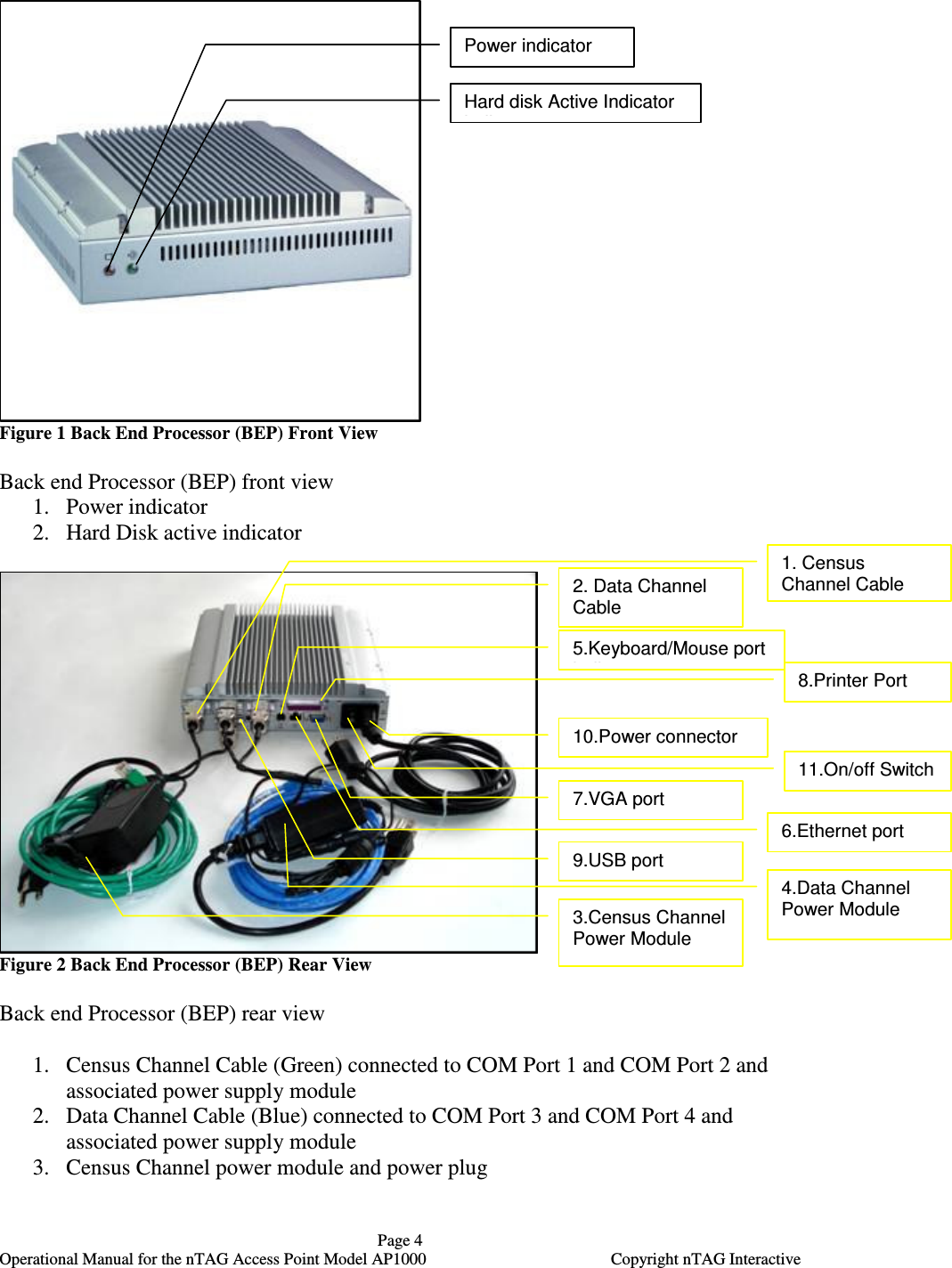
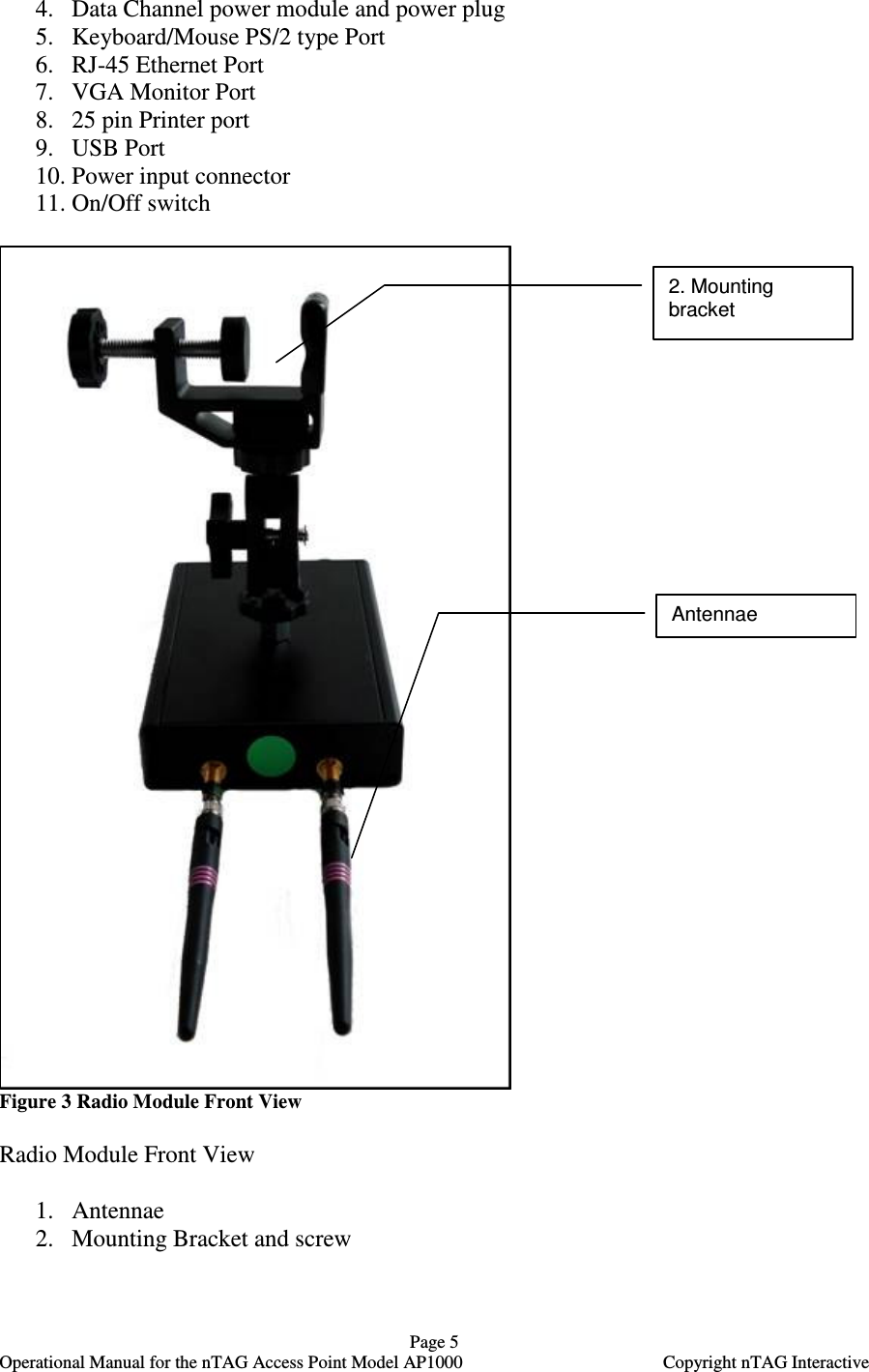
  Page 4   Operational Manual for the nTAG Access Point Model AP1000  Copyright nTAG Interactive  Figure 1 Back End Processor (BEP) Front View  Back end Processor (BEP) front view 1. Power indicator 2. Hard Disk active indicator   Figure 2 Back End Processor (BEP) Rear View  Back end Processor (BEP) rear view  1. Census Channel Cable (Green) connected to COM Port 1 and COM Port 2 and associated power supply module 2. Data Channel Cable (Blue) connected to COM Port 3 and COM Port 4 and associated power supply module 3. Census Channel power module and power plug Power indicator  Hard disk Active Indicator indicator 1. Census Channel Cable 2. Data Channel Cable  5.Keyboard/Mouse port indicator 8.Printer Port 10.Power connector  11.On/off Switch  7.VGA port 6.Ethernet port  3.Census Channel Power Module 4.Data Channel Power Module  9.USB port
  Page 5   Operational Manual for the nTAG Access Point Model AP1000  Copyright nTAG Interactive 4. Data Channel power module and power plug 5. Keyboard/Mouse PS/2 type Port 6. RJ-45 Ethernet Port 7. VGA Monitor Port 8. 25 pin Printer port 9. USB Port  10. Power input connector 11. On/Off switch   Figure 3 Radio Module Front View  Radio Module Front View  1. Antennae 2. Mounting Bracket and screw  2. Mounting bracket  Antennae
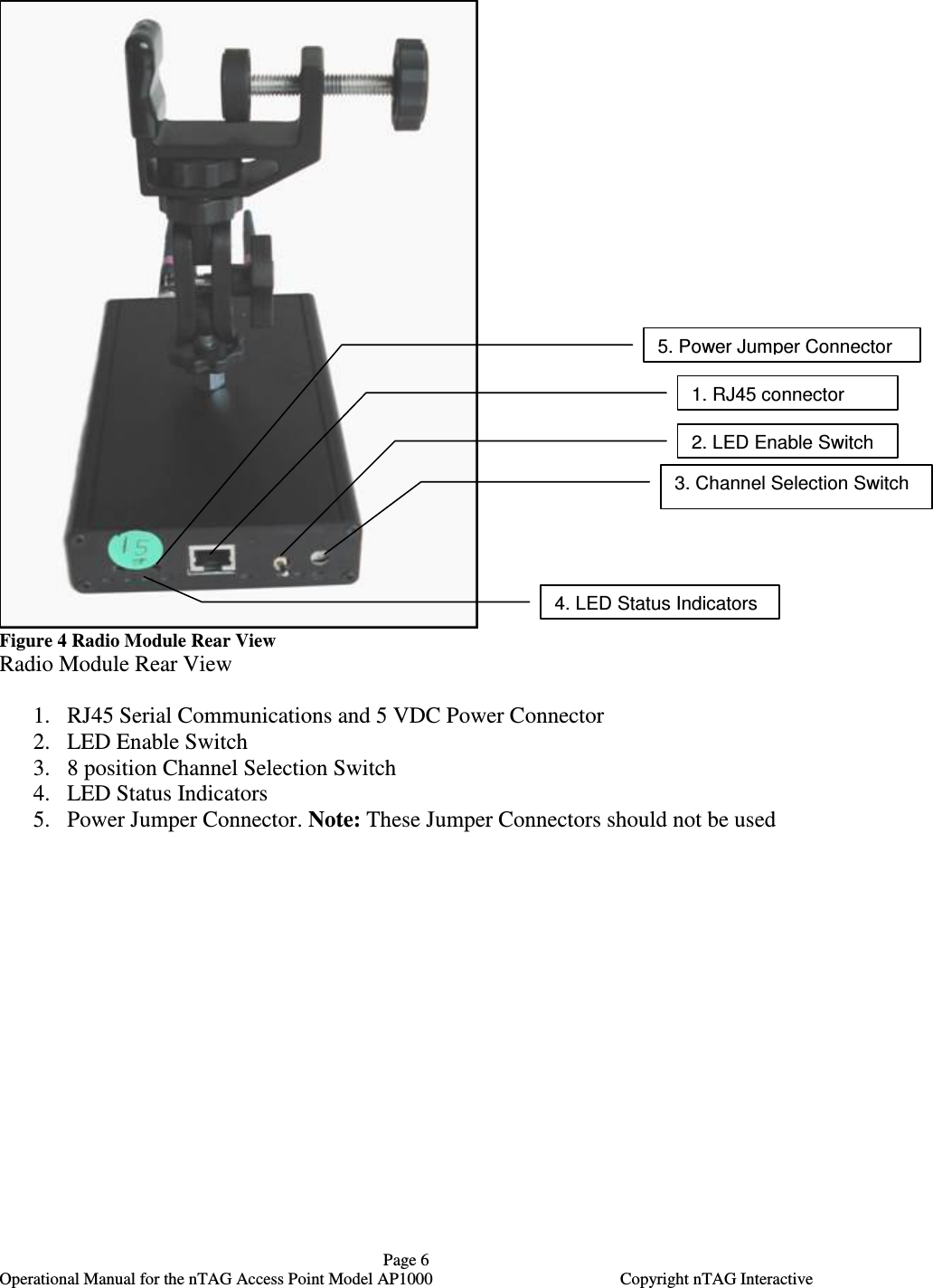
  Page 6   Operational Manual for the nTAG Access Point Model AP1000  Copyright nTAG Interactive  Figure 4 Radio Module Rear View Radio Module Rear View  1. RJ45 Serial Communications and 5 VDC Power Connector  2. LED Enable Switch  3. 8 position Channel Selection Switch  4. LED Status Indicators 5. Power Jumper Connector. Note: These Jumper Connectors should not be used  2. LED Enable Switch 3. Channel Selection Switch 1. RJ45 connector 5. Power Jumper Connector 4. LED Status Indicators
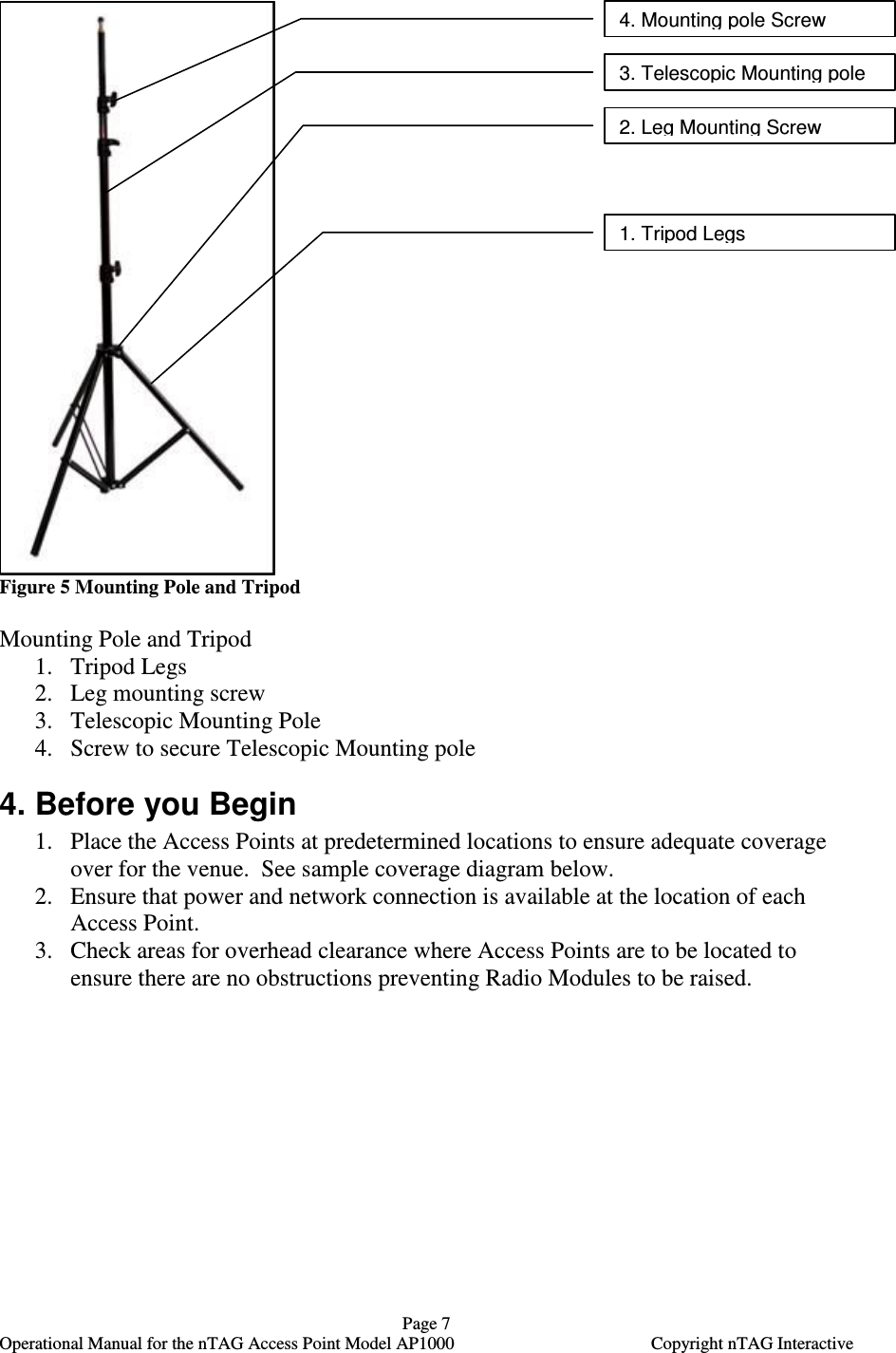
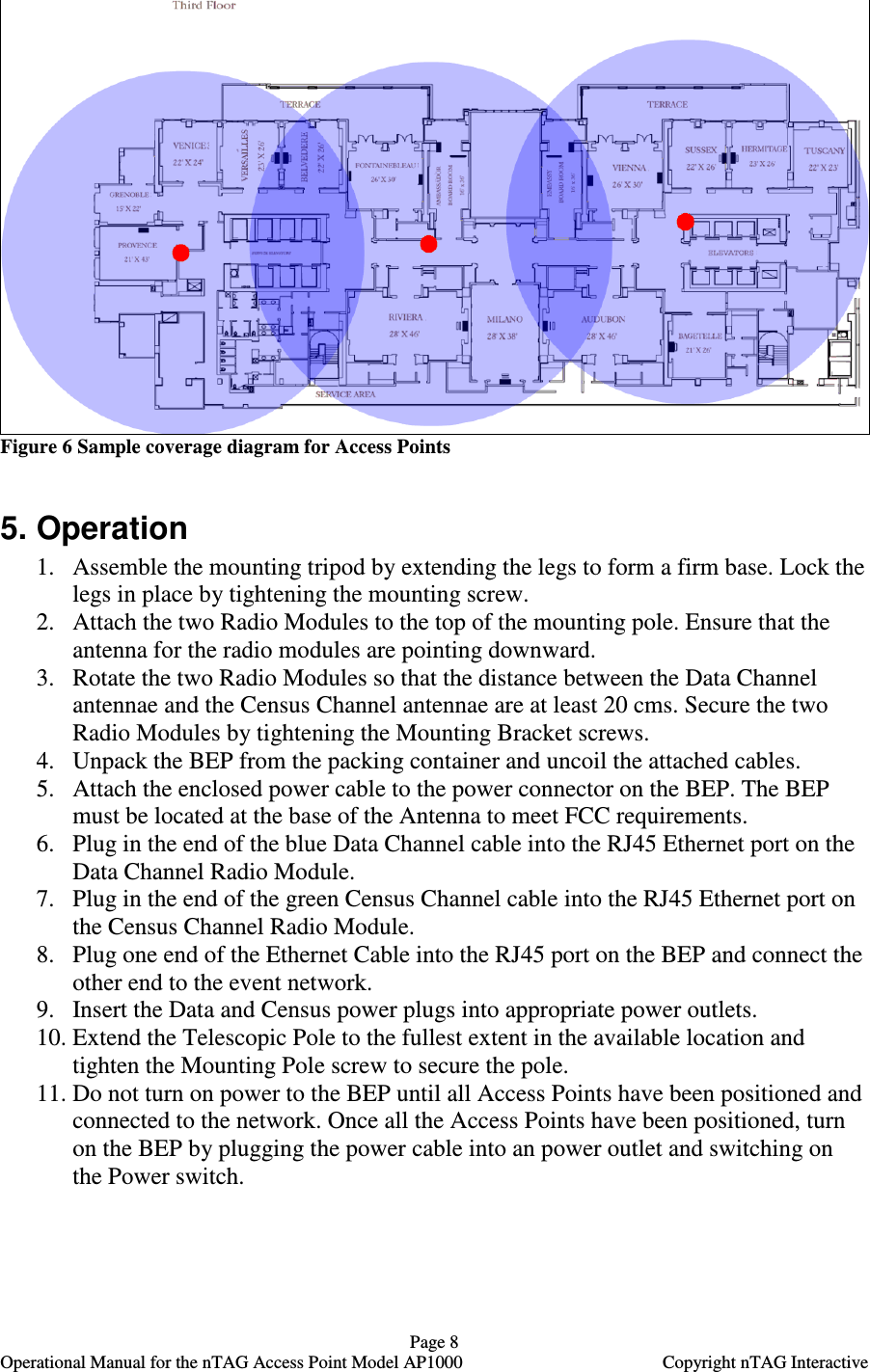
  Page 7   Operational Manual for the nTAG Access Point Model AP1000  Copyright nTAG Interactive    Figure 5 Mounting Pole and Tripod  Mounting Pole and Tripod 1. Tripod Legs 2. Leg mounting screw 3. Telescopic Mounting Pole  4. Screw to secure Telescopic Mounting pole 4. Before you Begin 1. Place the Access Points at predetermined locations to ensure adequate coverage over for the venue.  See sample coverage diagram below.  2. Ensure that power and network connection is available at the location of each Access Point. 3. Check areas for overhead clearance where Access Points are to be located to ensure there are no obstructions preventing Radio Modules to be raised.  4. Mounting pole Screw  3. Telescopic Mounting pole 2. Leg Mounting Screw 1. Tripod Legs
  Page 8   Operational Manual for the nTAG Access Point Model AP1000  Copyright nTAG Interactive  Figure 6 Sample coverage diagram for Access Points  5. Operation 1. Assemble the mounting tripod by extending the legs to form a firm base. Lock the legs in place by tightening the mounting screw. 2. Attach the two Radio Modules to the top of the mounting pole. Ensure that the antenna for the radio modules are pointing downward.  3. Rotate the two Radio Modules so that the distance between the Data Channel antennae and the Census Channel antennae are at least 20 cms. Secure the two Radio Modules by tightening the Mounting Bracket screws. 4. Unpack the BEP from the packing container and uncoil the attached cables. 5. Attach the enclosed power cable to the power connector on the BEP. The BEP must be located at the base of the Antenna to meet FCC requirements. 6. Plug in the end of the blue Data Channel cable into the RJ45 Ethernet port on the Data Channel Radio Module. 7. Plug in the end of the green Census Channel cable into the RJ45 Ethernet port on the Census Channel Radio Module. 8. Plug one end of the Ethernet Cable into the RJ45 port on the BEP and connect the other end to the event network. 9. Insert the Data and Census power plugs into appropriate power outlets.  10. Extend the Telescopic Pole to the fullest extent in the available location and tighten the Mounting Pole screw to secure the pole. 11. Do not turn on power to the BEP until all Access Points have been positioned and connected to the network. Once all the Access Points have been positioned, turn on the BEP by plugging the power cable into an power outlet and switching on the Power switch.
  Page 9   Operational Manual for the nTAG Access Point Model AP1000  Copyright nTAG Interactive 6. Disassembly 1. Ensure that all the attendees have handed in their tags to registration and no further wireless communication is required. 2. Ensure that the event Server has been shut down.  3. Switch off power to the BEP from the BEP Power switch and unplug the power cable from power outlet. 4. Unplug the Data and Census power modules from the power outlets. 5. Unplug the Ethernet cable from the RJ45 port on the BEP and the other end from the event network. 6. Loosen the Mounting Pole screw and retract the Telescopic pole.  7. Unplug the Data Channel and Census Channel cables from the RJ45 ports on the Data and Census Radio Modules. 8. Dismount the Radio modules from the Mounting pole by unscrewing the Mounting Bracket screws and place in packing container. 9. Disconnect the power cable from the BEP. 10. Coil the Data and Census Channel cables and place in packing container together with the BEP. 11. Loosen the Leg mounting screws and collapse the tripod legs.  7. Channels Settings on Radio Module The channel utilized by the Radio Module can be changed by using a screwdriver to rotate the setting screw. The Data and Census Radio Modules are set to different channels. By default the Census Radio Module is set to channel 0 and the Data Radio Module is set to channel 2. Data and Census Radio Modules used in the same event should be at least two channels apart. Do not change the settings for the Radio Modules unless directed by nTAG Interactive. 8. Troubleshooting If the BEP looses contact with either Radio Module, disconnect the Ethernet cable to the Radio Module and reinsert firmly.

Navigation menu